
Tag Archives for " websites "

Examples of Sites with Great Content & What You Can Learn From Them
Sites with great content are the types of things you know when you see them. You don’t even know why you love them. You just do. Creating it can be a different story. It’s easy to get lost in the trappings of a great site and lose focus on what makes it great.

No matter what your brand is about and what you’re trying to sell or convert, you can create a site with great content. You just need to break down what makes those sites great in the first place and use the same approach for whatever your topic is.
How Important Is Good Content?
You know when you’re drawn to specific websites. You spend more time there. You always read their newest blogs and click through on their social posts or in their newsletters. You look forward to consuming the content, and you spend lots of time on the website absorbing it all.
Content refers to everything you create on your website for the visitors’ consumption, including written pieces, videos, images, and more. Content covers everything from blog posts to product descriptions to case studies.
Basically, if it’s on your site, it’s content.
Because people engage more with sites with great content, they spend more time on the website, which improves your SEO. Further, people who love your content are more likely to share with others and convert customers.
What Makes Good Content?
Search engines have gotten smart, and people have grown accustomed to truly well-created, resource-rich content. As a result, you can no longer get away with following specific sneaky techniques to game the SEO system or trick people into visiting your website.
Good content answers the questions people search for on search engines and provides educational, entertaining, insightful, and empowering information.
Best practices for more in-depth written content include pieces running about 2,000 to 3,000 words and easily skimmed.
Good content is consistent, as well. People remain more engaged with your brand if you are regularly putting out high-quality content for them to consume.
Examples of Sites With Great Content
We’ve put together a list of websites whose content stands out for a particular reason. Let’s explore what makes sites’ content great and why.
1. Tell Engaging Stories: charity: water
We, humans, love stories. You can leverage this proclivity by telling stories in your content.
The best stories appeal to people’s emotions. It’s easy to assume your brand doesn’t have stories to tell—but you do. Think about what your brand brings to the table. What do you do? Who do you help?
Check out charity: water for an example. They provide water resources to people who need them, but their writing focuses on reaching those who can get water at the turn of a faucet handle. By telling stories of those who don’t have that luxury, they can reach the best help audiences.
Stories can change the narrative.
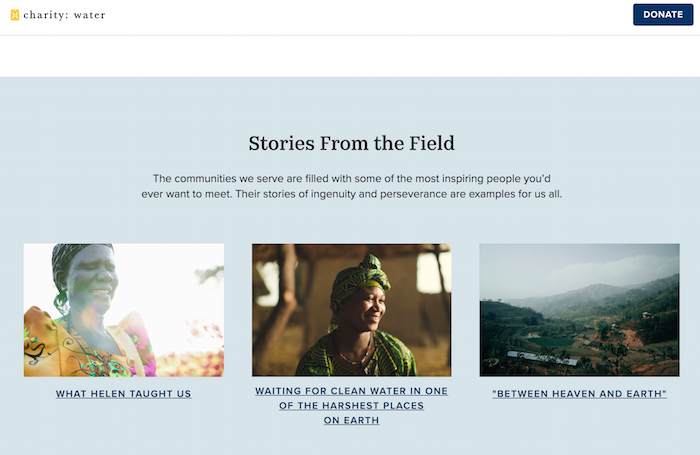
Case studies are excellent for telling stories. Think about your most loyal and happy customers or clients. What did you do for them? Tell the story. You can keep specifics and identifiers out of the story. Even a vague story is better than no story.
You can also tell your own story. Help people understand what you do and why. charity: water does this on the About Us page.

2. Stay Current and Break Industry News: thredUP
Sites with great content update regularly, and Google notices. Websites that update more often are seen as current and relevant, and therefore usually rank higher than websites that grow stale.
As a result, posting current, even breaking, the news is a great way to do this. But not every brand can be a news site that’s rolling out the latest headlines constantly. So how can you stay current without going into a newsroom? Check out thredUP.

thredUP is a secondhand clothing brand, but their blog is a treasure trove of information about sustainability, clothing trends, and more. They see a bigger picture in their content. In fact, they have set themselves up as an expert to turn to for news.
Any brand can do this. What are your customers interested in? Set up Google alerts and create blogs and posts that react to the latest news in your field. Get ahead of the game and write articles exploring and expounding on trends to set your brand up as the expert.
3. Use Subject Matter Experts (Industry Insiders): Etsy
As you build content, don’t be afraid to pull in other voices. Subject matter experts can help you appeal to a broader audience and dive deeper into topics your audience cares about. They can also lend credibility to your brand, which matters for your SEO.
Google uses the EAT acronym to describe and rank quality standards in human analysis. EAT stands for expertise, authoritativeness, and trustworthiness. Bringing in subject matter experts can bring those qualities to your content.
For example, check out Etsy’s blog. They pull in industry leaders and changemakers all the time.

You can also interview experts. And you aren’t restricted to written work—you can host these on YouTube, Instagram, or Facebook. You could even start a podcast.
4. Make Sure Your Copy Sounds Human: Bissell
Human copy is personal and conversational, not necessarily casual, but approachable. It brings emotion without being salesy or pushy. It’s clear and straightforward.
For a more human touch, check out the Bissell blog and website. They take what could be a dry, boring topic and make it approachable and personal.

If you have trouble with this style of writing, give yourself a break. Be authentic and write as naturally as you talk. You can use a voice-to-text app to help you translate genuine conversation into writing.
5. Offer Interactive Content: QVC
One of the best ways to remain human and build engagement with your audience is to use your website to interact with people.
Interactive content can start with allowing your audience to offer you feedback and respond to your content. This can be in the form of comment boxes after your blogs or social media posts.
You can also add audio and video elements to your post to engage your viewers.
QVC leverages this type of content to keep its audience invested and coming back for more.
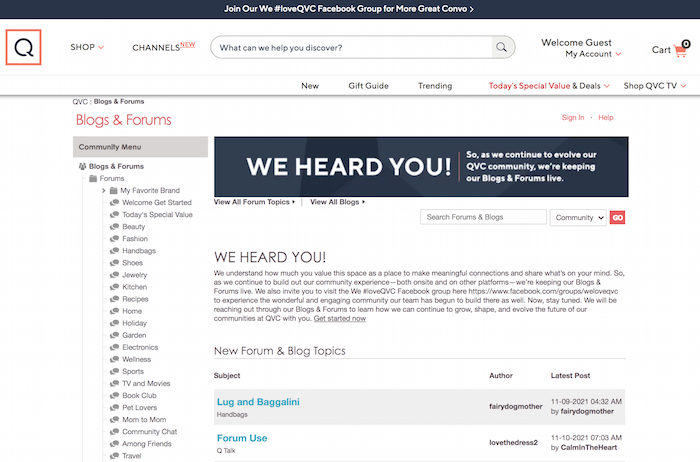
During live shows and events, they invite their viewers to interact on forums and social media groups. As a result, they become more than customers. They feel part of the QVC community.
6. Incorporate Different Media Types: BarkBox
Sites with excellent content pull in lots of different types of media. This might include a video on a blog post, a slide deck, a downloadable, lots of images, photos, videos, audio, and more.
Using different elements can bring your stories to life while helping you get your message out in many ways people can absorb it.
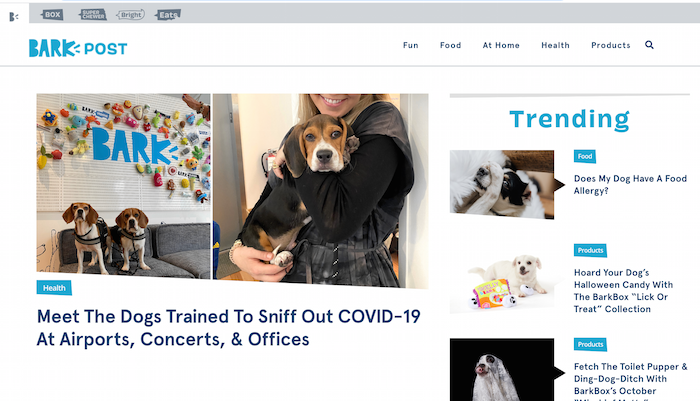
If you need some inspiration, check out BarkBox’s blog.
7. Answer Users’ Most FAQs: NeilPatel.com
Strive to answer frequently asked questions your customers have. Sites with effective answers to frequent questions can get picked up for featured snippets in search results on Google.
You can do this by asking and answering questions in your content. Make sure those are prominent and easy to scroll. Style is up to you: You can incorporate questions into headers and subheaders or use lists or bullet points.
Not to toot our own horn, but we think we’re pretty good at this! Check out our method below:
Frequently Asked Questions About Good Content
What is an example of great content marketing?
Great content marketing makes visitors want to return and consume more. Sites with the strongest content provide current information, interactive elements, and answers to questions.
How is website content strategy different from social media content strategy?
Website content strategy focuses on what will be posted on the site itself. In contrast, social media content strategy focuses on how and what information will be posted to social media sites. The way things are presented on your site and social media will likely be quite different.
What are the different types of content?
Many different types of content can be used on your website, including audio, visual, interactive, and written content. Using a variety of content can enliven your message and entice a growing audience.
Is short or long content better?
In general, longer written content ranks better for SEO. However, even long-form content should be broken down into digestible paragraphs with headings and bullet points, answering frequently asked questions along the way. Video and audio content varies based on subject and audience.
Conclusion for Sites with Great Content
The internet is full of sites with great content. You probably know of plenty of examples that draw you back for more.
As you put together your digital marketing strategy for your brand or e-commerce shop, think about the elements that make those websites great.
What’s your favorite type of online content?
Source: neilpatel.com

Why A Simple PHP Framework Works for Websites
As a developer, chances are you’re always looking for ways to improve your website’s functionality or create a more dynamic experience for your audience.
Typically, you might rely on languages like HTML and JavaScript. However, there’s another cool processing language that could improve your site structure called PHP.
With PHP, you can reduce development time and streamline your coding, while improving the user experience. Does this mean you need to build out a whole app from scratch, though?
Nope. The best (and most efficient) way to use PHP is through a simple PHP framework. Here’s how these templates work and a look at some frameworks you might choose from.

What Is a Simple PHP Framework?
First, PHP, or “Hypertext Preprocessor,” is a programming language you can use to improve websites. Web developers use it to build PHP applications and services to make websites more interactive, for example, by adding web polls.
To build PHP apps, developers use PHP frameworks. These templates typically include prebuilt components which allow developers to speed up the process.
What’s a “simple” PHP framework, then? Well, the clue’s in the name: it’s a simple, streamlined version of a typical PHP framework. You might use it to build, for example, interactive web apps, and so on.
Here’s an example of what some basic PHP code might look like:

Essentially, simple PHP frameworks help you build solid programs without composing huge amounts of code. They allow you to get fully-functioning apps up and running quickly, which is precisely what we’re aiming for when trying to start and grow a business.
Want to find the source code for this framework? It’s hosted over on GitHub. However, it might be easier and faster to use a simple PHP framework that is already packaged and ready to go. We’ll cover a few of those a bit further down.
Reasons to Use a Simple PHP Framework for Websites
If you’re not sold on PHP frameworks yet, or if you’re still unclear on why they’re useful, here are just some of the reasons why you should give a simple PHP framework a try.
1. Simplified Coding
As a programming language, PHP can be tricky. If you want to introduce new concepts or, for example, improve a website’s functionality, you need to write long and complex lines of code.

This is where the template comes in. With a simple PHP framework, you can quickly generate the code you need, which helps you build impressive PHP apps with little coding experience.
2. Quicker Development
Here’s what else is great about simplified coding: it’s a time-saver!
Rather than spending time writing repetitive code or building out apps from scratch, you can let the framework generate the code for you. As a result, you can focus your time on business and app marketing, rather than coding.
3. Increased Security
At its core, PHP is fairly secure. However, as with any programming language, it’s easy to accidentally write in vulnerable code, especially if you rely on outdated tutorials or guidelines.

Frameworks provided by reliable platforms are constantly tested for vulnerabilities and updated where necessary, so your apps will be as secure as possible.
4. Easier Maintenance
It’s much easier to maintain your application if you have a clear template to follow, which is where the PHP frameworks really help.

Not only do PHP frameworks include documentation to help run your apps smoothly, but developers are constantly building community libraries to help other programmers manage their code more efficiently, which allows for easier maintenance.
5. Improved Teamwork
If you’re programming alone, it’s simple to keep track of the code as it develops. However, it’s challenging (not to mention time-consuming) for new team members to come in and learn your whole code from start to finish.
A PHP framework boosts collaboration. With a template, your team can quickly skim the template and understand how it applies to your particular application.
Simple PHP Frameworks to Try
OK, so that’s what a simple PHP framework is and why you might use one.
How do you pick a framework for your needs, though? To help you get started, here’s a selection of simple PHP frameworks, each with slightly different benefits.
1. CodeIgniter
If you’re a newbie looking to make your website more dynamic or build some functional apps, check out CodeIgniter. From creating simple news items to complex web services, CodeIgniter can help you out:
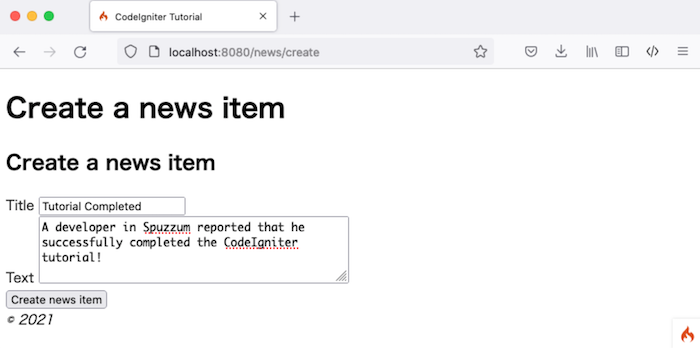
Lightweight and nimble, CodeIgniter is a simple PHP framework aimed at developers who want to create scalable apps without a fuss. There’s very little configuration involved and it comes with clear documentation, so you can be up and running in no time.
Compared with similar frameworks, like Laravel, it’s easy to learn and simple to navigate, but it’s no less impressive. Give it a try if you want to build on a comprehensive framework without taking up too much space on your device.
2. Laravel
Do you want to build a scalable, sophisticated app with advanced features? Then consider Laravel.
Laravel is all about providing a great experience for those looking to innovate and develop apps quickly. It’s based on a neat, elegant structure, and you can quickly generate skeletal templates to build into complex apps without compromising on quality or security.
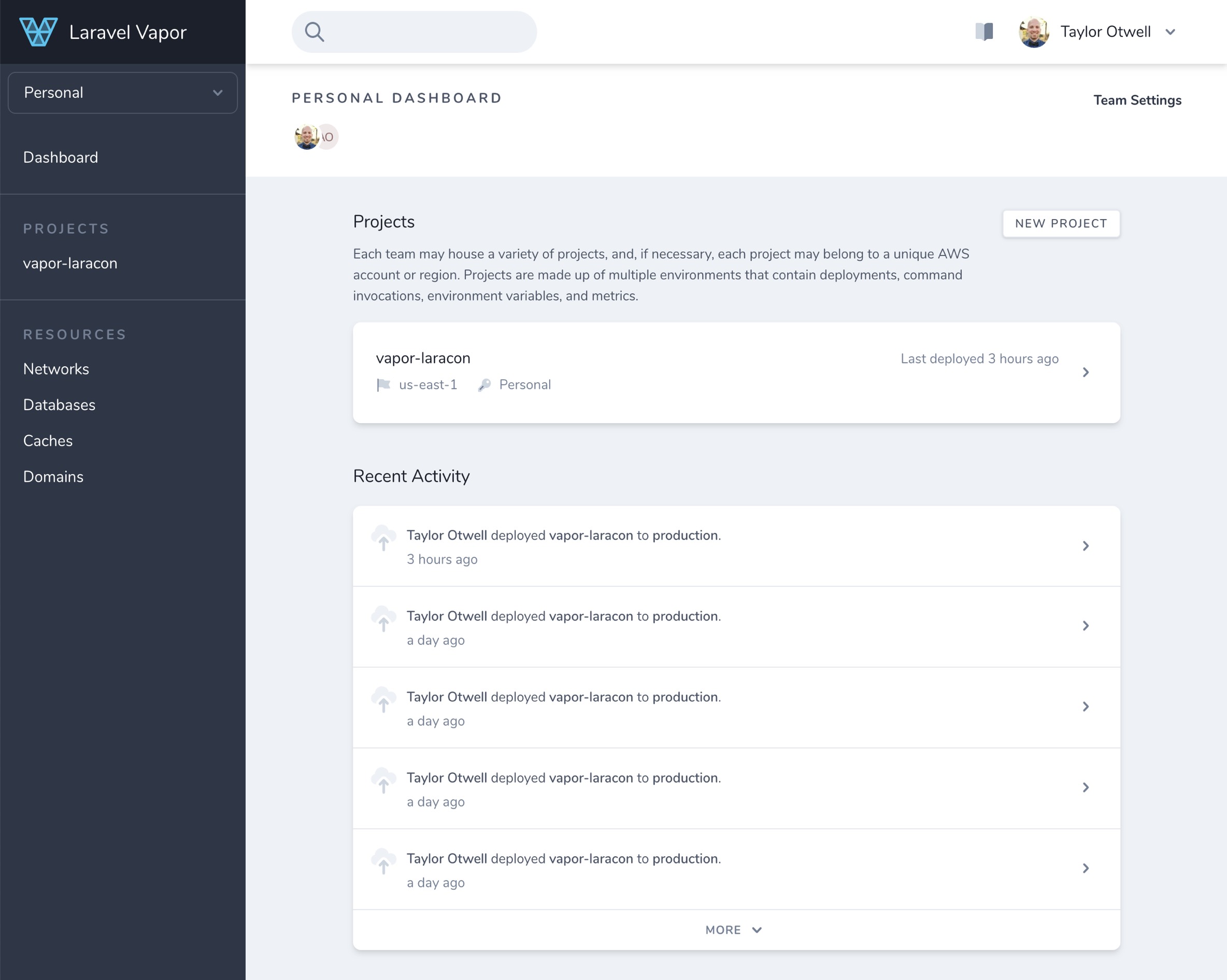
What’s great about Laravel is how scalable and flexible it is. The entire framework is designed to “grow” with your business, so you can rapidly scale your apps as your audience grows.
Whether you run Mac, Windows, or Linux, it’s simple to launch Laravel and get building. That said, it’s not the easiest PHP framework to learn, so new developers might prefer other templates.
3. Phalcon
Do you need a framework to help you build a high-performing website? Phalcon might be an option for you.
Phalcon is all about low-level architecture. The framework prioritizes performance and speed over complex configurations, so it’s one of the fastest PHP frameworks out there and offers a sleek, streamlined coding experience:
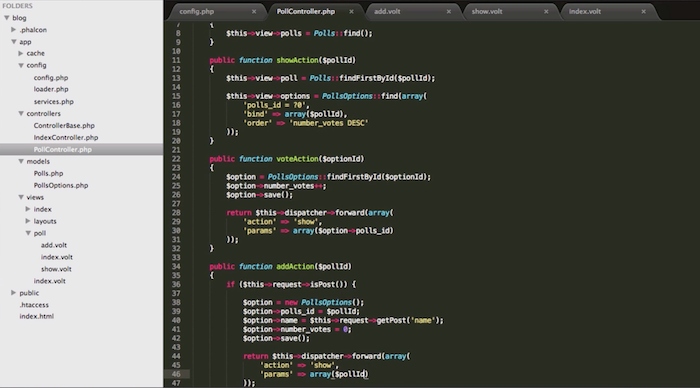
Why is it so fast? It’s all about memory usage. Phalcon is “memory-resident,” meaning you can load it once, and it runs continuously in the background. It’s ready and waiting whenever you need it, so you can work quickly and efficiently.
What’s more, it’s flexible enough for either small app developers or enterprise-level designers. You’ll also find a great range of documents, screencasts, and tutorials for more help when you need it.
The takeaway? Phalcon is an option if you need a fast framework with a little freedom to configure your own directories.
4. Yii
Are you new to coding and seeking a simple PHP framework to learn the ropes? Then check out Yii.
Yii, which translates to “simple and evolutionary” in Chinese, aims to streamline web app development. What does this mean? Well, the base code is fairly simplistic. However, this is why Yii stands out.
It’s essentially a universal template, meaning you can use it to build a whole host of different PHP web apps. All you do is add components from the library to your core template, and you can build high-performing apps with relatively little code:

Is it a popular framework? Sure! Developers use the Yii framework for developing a huge range of tools, ranging from simple apps to scalable web services. There’s an active user community, too, so there’s always support on hand when you need it.
Bottom line? Yii is speedy, easy to install, and just as secure as the other frameworks. It’s probably the most accessible framework on this list, so give it a try if you’re unfamiliar with making PHP apps or you want to build tools fast.
5. Slim
Looking for a lean, compact framework to create basic functional apps in minutes? Slim could be the answer.
Created in 2010, Slim targets developers to build smaller or more simple web services. For example, you might use Slim to build REST APIs for the web, or web apps that rely on a simple HTTP request and response model.
It’s easy to get up and running, too.
First, install Composer. Then, install Slim by executing the right framework command. Finally, make sure you’re running the right implementation to launch Slim on your device (check out the website for help with this.)
Once you’re all set, run the “Hello World” tutorial to see just how easy it is to compose through this simple PHP framework:
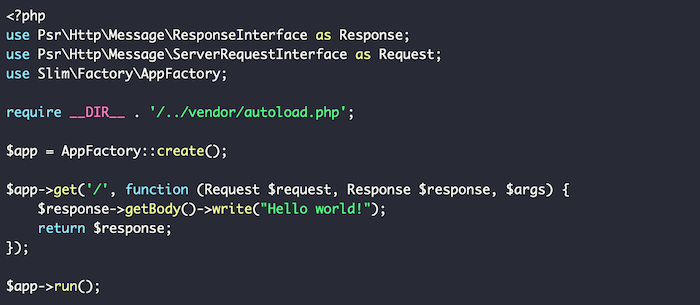
As with the other PHP frameworks, you’ll find an active user community and plenty of online documentation to help you jump in. However, what truly sets Slim apart is its sleek, simplistic template designed to create small but mighty web tools in no time.
For app developers seeking a secure PHP framework for no-frills prototyping, look no further than Slim. Don’t let the simplistic functionality fool you, though: advanced developers can add more code to make Slim web apps more dynamic.
6. Symfony
If you have some experience with PHP, or you’re building an enterprise-level app, consider Symfony. It’s simple to operate, easy to install, and gives you the freedom you need to build more complex configurations.
What’s so great about Symfony is its large library of reusable components, which means there’s no need to spend time writing repetitive code for different apps. You can just select the base code you need from the library and get going!
What’s more, you can easily link Symfony PHP frameworks with larger enterprise-level platforms like Drupal, so you can seamlessly integrate your apps into a wider content management strategy.
If you need a little help figuring out Symfony, don’t worry. There’s a whole library of text and video tutorials to walk you through everything from installation to app creation.
In short, while Symfony’s not the most accessible framework on the list, it’s exactly what more experienced developers need to build large-scale apps and web solutions. Check it out if you’re ready to take app development to the next level.
Frequently Asked Questions About PHP Frameworks
What is the purpose of using a PHP framework?
A PHP framework simplifies the process for building websites and web applications. It’s useful for anyone trying to design PHP-based apps and services to grow their business.
Is PHP popular in 2021?
Absolutely! The PHP language is advancing all the time, which means it’s sophisticated enough to handle the demands of modern web services. You’re definitely not wasting your time by learning simple PHP frameworks in 2021.
What is the best framework for PHP?
There’s no one “best” framework. The right framework for you depends on your particular business needs, and how comfortable you are with code. If you’re new to PHP, you won’t go wrong by selecting one of the frameworks we talked about earlier.
Why should I use a PHP framework?
A framework is a huge time-saver. With even a simple PHP framework, you can simplify the coding process, speed up app development times, and make your website easier to maintain in the long run. If you’re looking for an efficient app and web design approach, even for beginners, you should check out PHP frameworks.
Simple PHP Frameworks Conclusion
If you’re a web developer looking to improve efficiency without compromising code quality, you might want to try PHP frameworks.
Simple PHP frameworks are uniquely designed to help you build the apps and services you need quickly and securely, so you can focus on designing useful tools rather than wasting time on repetitive coding.
Are you still unsure where to start with PHP frameworks? Check out my consulting services to see how I can help.
Have you tried using a PHP framework yet? How easy did you find it to work with?
Source: neilpatel.com

How to Accept Bitcoin and Other Crypto Payments On Your Website
Should you accept Bitcoin and other crypto payments on your website?
With cryptocurrencies becoming more and more mainstream, this is a question lots of us are asking. Whether you choose to accept Bitcoin payments on your site is ultimately up to you, but if you choose to do so, it’s important you get the right setup.

Should You Accept Bitcoin on Your Site?
This is probably the biggest question you’ve first got to decide on. Once you’ve decided to accept crypto, the payment processing is fairly easy to set up, but first, you’ve got to decide if cryptocurrency is right for your business.
As big as crypto has become (Bitcoin has a market valuation of over $1 trillion), it’s still something that divides opinion. For every devout crypto fan, there’s an influential person talking it down. For all the positive talk you hear about it, the next minute you hear Jamie Dimon, chairman and CEO of JPMorgan, saying “I personally think Bitcoin is worthless.”
It’s confusing, and when you don’t fully understand the intricacies of how crypto works (which few of us do—and if your customers don’t use it, why bother?), choosing to accept crypto payments on your website can be a worrying decision.
Of course, everyone’s got their agenda, and when you’re making your decision, you should remember that. Do your own research and find out if accepting Bitcoin on your website is in your best interests.
The Benefits of Accepting Bitcoin on Your Site
Let’s draw this back to a subject I love: marketing. I’m always saying that marketing is about reaching the right people with the right message at the right time. When you do this, sales are likely to start flowing.

If lots of your customers are engaging with crypto, then why not make it a part of your message?
Accepting Bitcoin on your website plays into your brand identity, then in some people’s eyes, it’s going to show you’re an innovative, cutting-edge company that’s not afraid to embrace new technology.
Here’s where you need to think about your audience. The people who currently seem to embrace crypto are overwhelmingly males between 25 and 44-years-old.
If your key target demographics are over 60, then accepting Bitcoin might not be at the top of your agenda. However, if your target audience is passionate about crypto and it fits your brand identity, then you might be onto something. Especially if you are selling a high-ticket item.
Look at the big companies that are currently accepting Bitcoin: Microsoft, NameCheap, WholeFoods. You can see how crypto lends itself to their audiences, namely, young, alternative, and techy.
If you do decide to accept Bitcoin on your site, then financially it can be rewarding too. Crypto tends to have very low transaction fees compared with traditional payment methods. Most bitcoin transactions cost between zero and one percent, whereas the average credit card transaction fee is between 1.5 and 3.5 percent.
The Drawbacks of Accepting Bitcoin on Your Site
One of the obvious things that makes people question the value of accepting crypto on their sites is volatility. You don’t quite know what Bitcoin and other cryptocurrencies are going to do from one day to the next and this can be a worry for website owners.
In some cases, Bitcoin has been known to lose 25 percent of its value in less than a month, which on the face of it, isn’t what you need as a business owner.
The thing is, just because you accept Bitcoin payment doesn’t mean you have to hold Bitcoin. If you don’t want to be exposed to the volatility of cryptocurrencies, then you can immediately exchange Bitcoin into your chosen currency.
The next Bitcoin drawback is something you may not expect: curiosity.
Whether they love it or hate it; people love to talk about crypto. If you accept Bitcoin on your website, then you’re something of a pioneer, and this will stir lots of curiosity.

You may well find your customer service team isn’t inundated with questions about your products, but instead, fielding questions about cryptocurrencies. This is far from ideal, and it’s something you need to be prepared for if you do decide to accept crypto.
What You Need to Accept Bitcoin and Cryptocurrency on Your Website
Crypto is designed for the modern world, so it’s no surprise that it doesn’t take too much set up to start accepting Bitcoin on your website.
There are a few basics everyone will need and then you need to decide on the best way for your website to accept crypto payments.
The Basics
To hold crypto, you need a “wallet.” This is very similar to the “wallet” app you probably have on your iPhone, but it’s specific to crypto.
Your crypto wallet allows you to buy, sell, and hold many different types of cryptocurrency, for instance, Bitcoin, Ethereum, and Tether. You get a unique private key that helps to keep your currency safe and accessible, and it links with other apps to help make transactions seamless.
When someone buys something in crypto on your website, the money will eventually filter into your wallet and from there, you’re free to exchange it into the currency of your choice.
Good Communication
As with anything in this world, the key to introducing a new payment method is good communication.
If you’re going to take the step and accept Bitcoin on your website, then you’ve got to explain the value proposition to your audience. Make sure they’re aware of new changes and showcase how it benefits them.
This is an excellent opportunity to showcase your brand, so make sure you take it. If you communicate well, then you’ll find more people take up the option of paying in crypto, and it will also foster greater brand loyalty.
Platforms and Integrations
How you integrate your crypto payments will depend largely on the platform your site is hosted on. For the major platforms like Shopify, WooCommerce (WordPress), and Magenta, there will be different plugins you can use for a quick setup.
If you can’t find the plugin you want, then most Bitcoin payment tools offer alternatives such as payment buttons, custom integration, and invoices.
Different websites will require different solutions, but for the majority, the plugins do an excellent job. If you’re struggling to integrate these tools with your website, then don’t worry, though.
Crypto was created to enable financial transactions between two parties without the need for a middleman, so you can always invite customers to contact you directly for Bitcoin payment options.
What to Look for in a Crypto Payment Processor
When you accept Bitcoin payment on your website, you want maximum value for your customer and your business. With many different crypto payment processors to choose from, it’s important to evaluate your options and make sure you’re getting the best deal.
Here are some considerations when choosing your payment processor.
Transaction Fees
How much do you get charged for each transaction? Bitcoin transaction fees are generally very low compared to traditional payment fees, but you want to make sure you’re getting the right deal.
Payout Frequency
Is it important for your business that your money comes in quickly? If so, you will want to consider payout frequency. While some crypto payment processors payout daily, others can take three to five days before processing your payment. ACH payments are recommended for companies requiring faster business funds.
Supported Countries
Cryptocurrency is a delicate political issue. As we’ve seen with China’s crypto ban, not every country is open to the use of cryptocurrency.
With different rules throughout the world, it’s important to ensure you choose a payment processor that supports the countries you do business in.
Customer Support
Whenever we’re talking about tech, it’s always important to think about customer support. If you have problems with setup or the service goes down, then you want to be able to speak to someone immediately.
Make sure you’ve got the support you need.
Security
The security of your business and its customers is essential. Make sure the payment processor you choose takes security seriously, and stay up to date with your site maintenance. Make sure you’re installing new updates and making regular encrypted backups to your wallet.
5 Ways to Accept Bitcoin and Cryptocurrency on Your Website
There are many different Bitcoin payment processors, and other manual ways to accept Bitcoin on your website.
While I recommend you dig deeper into these companies and find the method that best suits your business, these are some of the easiest ways to start taking crypto payments on your site.
1. BitPay
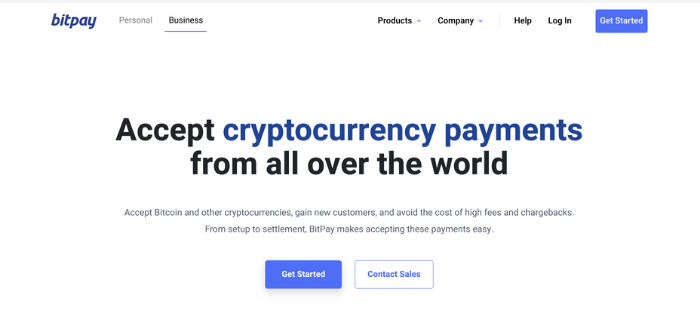
BitPay is one of the best options for websites that are looking to accept crypto payments.
It offers different ways for your customers to pay, with payment buttons, hosted checkouts, and embeddable invoices, as well as a host of plugins and integrations. All of these are easy to set up, meaning you can start accepting Bitcoin payments without lots of hassle.
BitPay also helps protect you from volatility through its Zero Price Volatility feature and daily bank deposits. For a 1 percent transaction fee, this is a pretty attractive offer.
2. Coinbase Commerce
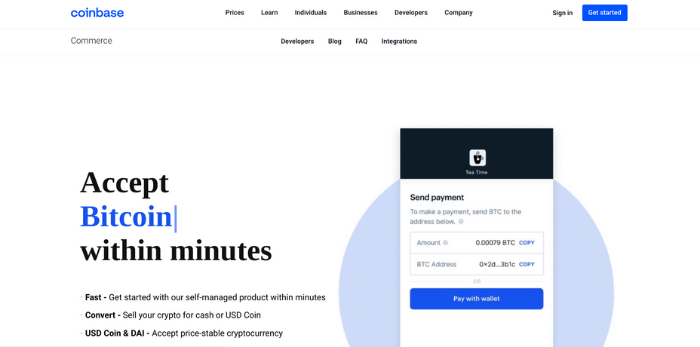
Coinbase makes it quick and easy for websites to start accepting Bitcoin payments. With a great app and excellent compatibility with most e-commerce platforms, you can start accepting crypto in an instant.
With quick exchange from crypto to your currency of choice, it’s a high-security option to protect you against currency fluctuations, and with flexible pricing options, it offers something for all businesses.
3. NOWPayments
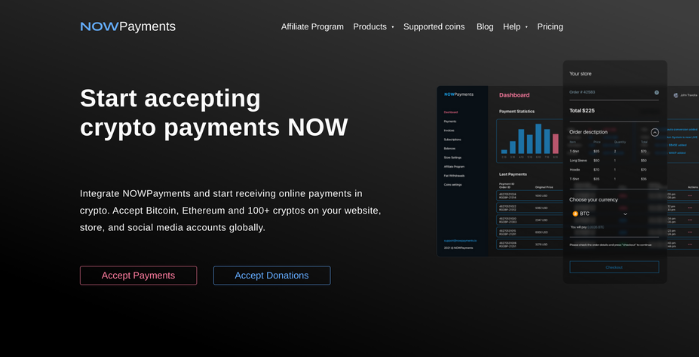
NowPayments is a low-fee, easy-to-implement processing option that’s extremely popular.
It allows you to accept over 100 cryptocurrencies and seamlessly exchange them into the currency of your choice. NowPayments has good compatibility with the major e-commerce platforms, offers some great plugins, and has an excellent point of sale solution.
With a maximum fee of 1 percent, it offers great value for money.
4. PayPal

PayPal is one of the biggest online payment providers in the world and it’s recently stepped into the crypto sphere.
If you’re one of the 29 million merchants that accept PayPal transactions, then customers with US crypto holdings will automatically be able to purchase in their preferred cryptocurrency. At the point of sale, the crypto will be converted to your fiat currency (e.g., US Dollar) and you will be paid as normal.
While this doesn’t quite embrace crypto in the same way as the other options, it is an easy way to accept Bitcoin payments on your website.
5. Accept Bitcoin and Cryptocurrency Manually
Bitcoin and other cryptocurrencies were designed to make it easier for individuals to make payments to each other without the involvement of a third party. This makes it easy to simply speak with your buyer and organize your own payment.
This will happen in the customer’s wallet, where they simply facilitate a payment.
All they need is your “address” which is an alphanumerical string (you can also generate a QR code) that you’ll find in your wallet.
Once your customer has your “address,” then they can quickly send payment and complete the transaction.
Frequently Asked Questions About Accepting Bitcoin and Cryptocurrency on Your Website
Can I accept Bitcoin at my business?
If it’s legal to do so in your country, then your business can easily accept Bitcoin. All you need is a cryptocurrency wallet, and you can start accepting cryptocurrency right away.
How do I accept someone’s Bitcoin?
To receive Bitcoin from someone, all you need to do is give them your “address.” This alphanumerical code will allow someone to send Bitcoin straight to your wallet.
What are the advantages of accepting Bitcoin on my website?
Some advantages of accepting Bitcoin on your website are low transaction rates, more options for your customers, and brand loyalty.
What are the disadvantages of accepting Bitcoin on my website?
The disadvantages of accepting Bitcoin on your website are price volatility and the fact that it can be a distraction for your customers.
Conclusion: Accepting Bitcoin Payments on Your Website
Bitcoin and other cryptocurrencies are gradually becoming more mainstream and your website can capitalize on it—should the market allow.
While the world debates the merits of cryptocurrency, you can accept crypto payments on your website without exposing yourself to unnecessary risk.
With the right plugins, it’s easy to accept crypto payments and immediately convert them to your preferred currency. This means you don’t have to worry so much about volatility while still giving your customers a valuable service.
One of the great things about accepting Bitcoin on your site is that it can add to your brand image. If your target audience is interested in Bitcoin and other cryptocurrencies, then you should be too. Accepting Bitcoin on your website is an excellent way to do this.
Are you planning on accepting Bitcoin or another cryptocurrency?
Source: neilpatel.com

20 Awesome Examples of Accessible Websites

Earlier this year, we introduced you to a solution called accessiBe* that makes websites accessible with just a snippet of code.
We are proud users of accessiBe at Convince & Convert.
The interface allows every visitor to a website with accessiBe installed to adjust website design, UI, and accessibility to their specific needs.
I’m a big an of the solution. To give you an idea of what websites with accessiBe look like and how they help users with disabilities, I put together this list of examples of websites that are made accessible with accessiBe.
*To provide complete transparency: we are accessiBe customers, and accessiBe is a client of Convince & Convert as well.
Here are 20 awesome examples of accessible websites.
Section 1: Hospitality & Travel
1. Hilton
Seizure Safe Profile
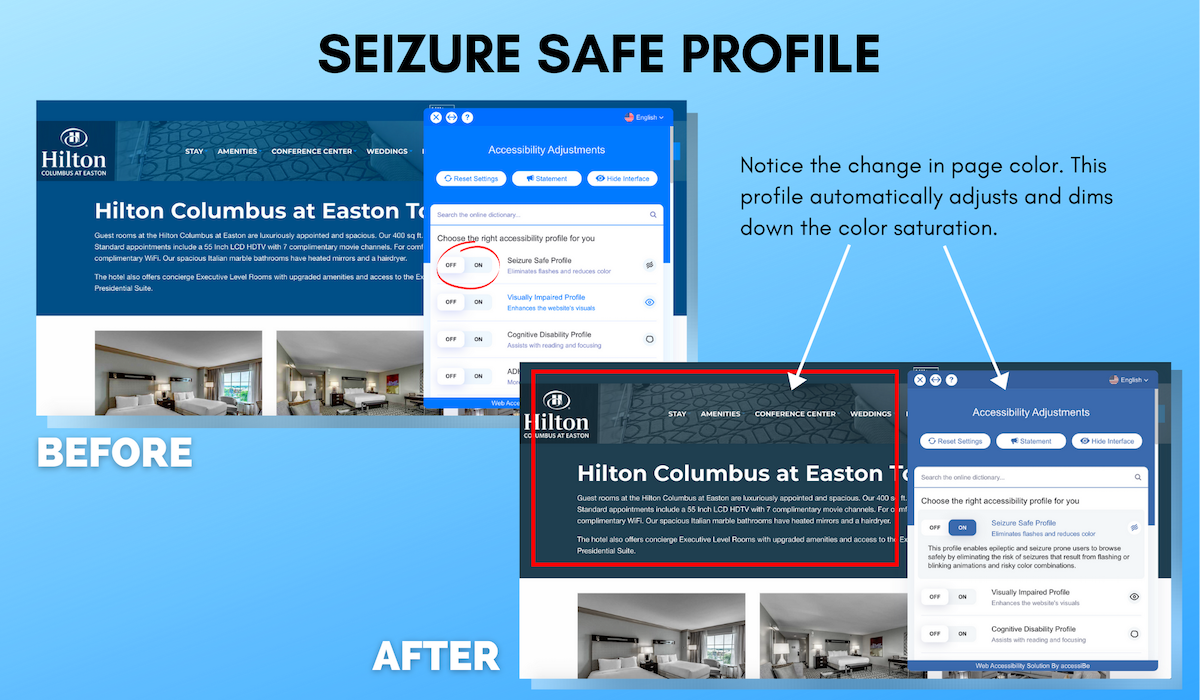
The Hilton Columbus at Easton is a favored hotel among business and leisure travelers, locals, and groups alike.
To accommodate all of their online visitors, the use of accessiBe within their website allows visitors to choose the right accessibility profile for their own preferences.
With the Seizure Safe Profile feature, flashes are eliminated and screen color is reduced.
The profile enables epileptic and seizure users to swiftly browse through the website by reducing the risk of seizures that are caused by flashing or blinking animations and risky color combinations.
2. Condor Hotel
Visually Impaired Profile
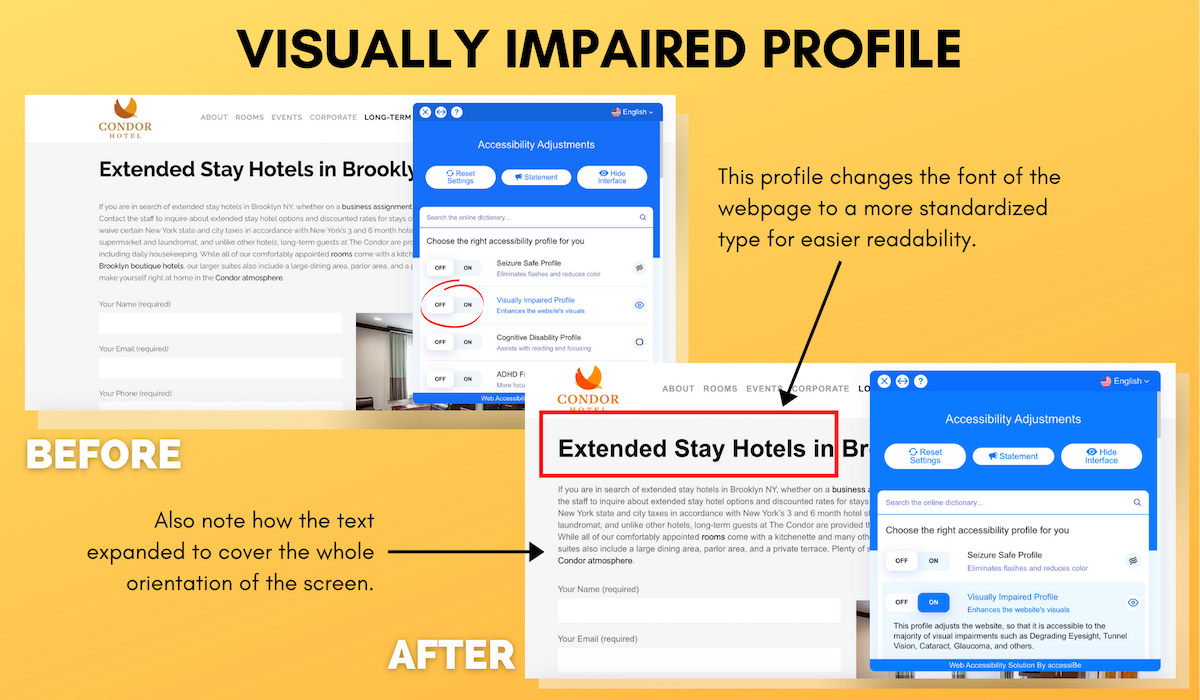
In addition to more features that accessiBe provides, the Visually Impaired Profile function enhances visuals on the client websites to adapt to the majority of visual impairments, including tunnel vision, cataracts, and glaucoma.
Here, when Condor’s guests browse through their website to find a boutique stay in Brooklyn, they can easily do so as the program quickly adjusts the orientations.
3. SnackNation
Cognitive Disability Profile
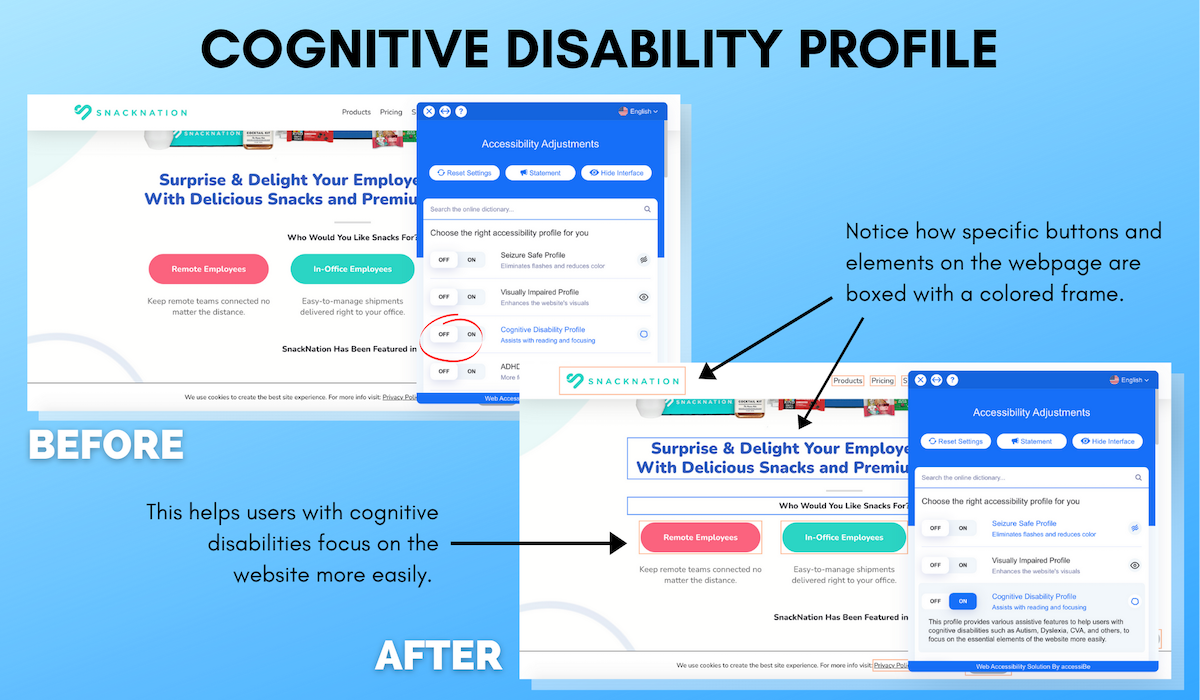
SnackNation is a snack delivery service for those who want to send snack boxes to their teams, friends, and even your own home.
For some visitors, especially those with cognitive disabilities, such as Autism, Dyslexia, and CVA, browsing through all the snack options without accessiBe enabled could pose a challenge.
However, the Cognitive Disability Profile assists viewers with reading and focusing.
This profile provides assistive features that focus on the essential elements of the website, such as boxing out the heading and menu bar options.
4. Lonely Planet
ADHD Friendly Profile
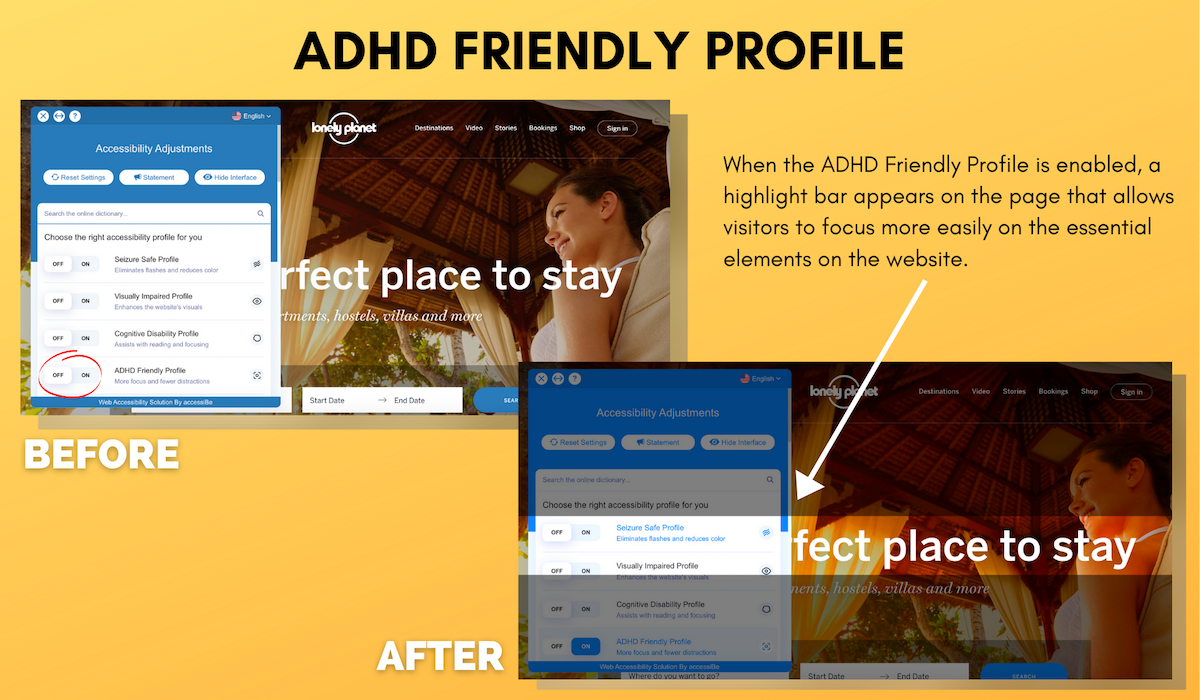
The ADHD Friendly Profile helps visitors focus on specific sections of the website while eliminating distractions.
This profile was specially designed to help people with ADHD and Neurodevelopmental disorders browse, read, and focus on the website easily, and is an excellent way to keep users focused on achieving conversion goals.
5. DELSEY
Readable Font for Visually Impaired
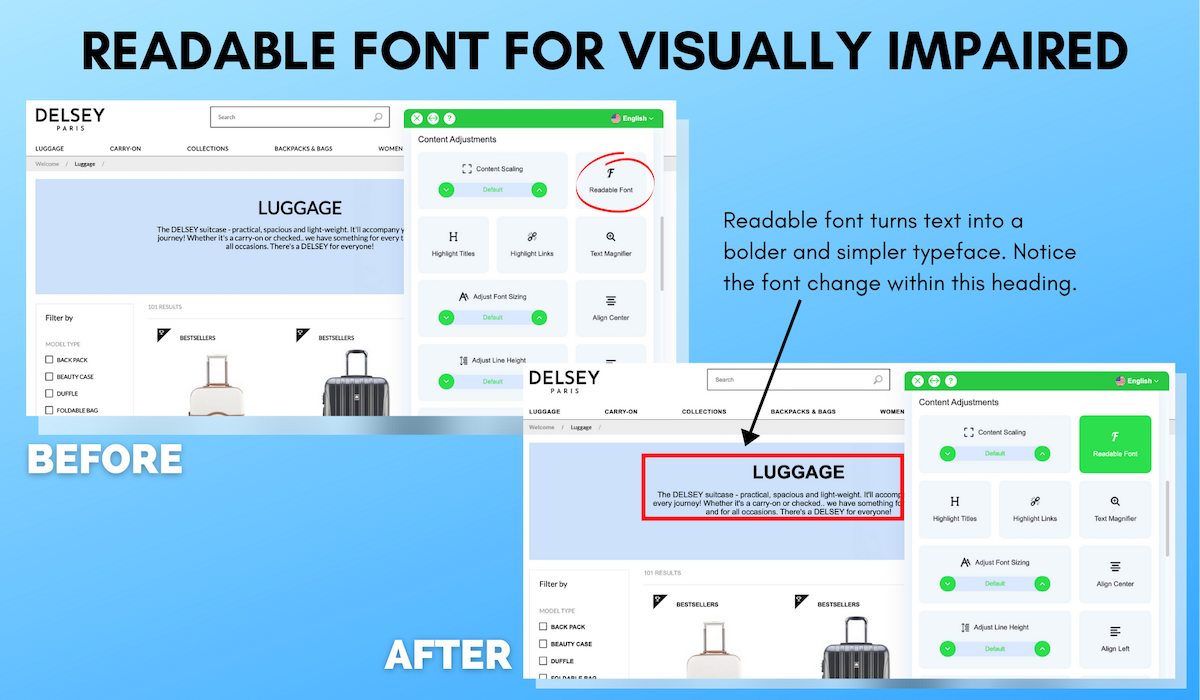
As we all know, good typography helps a potential customer feel more secure about your product listing, business, and even advertisements online.
AccessiBe’s content adjustments allow individuals to use the “Readable Font” feature.
The website quickly adjusts to a simple typeface while keeping the same layout and design elements of the brand.
Section 2: Automotive & Financial and Legal Services
6. DealerON
Highlight Titles for Visually Impaired
7. Yokohama
Highlight Links for Visually Impaired

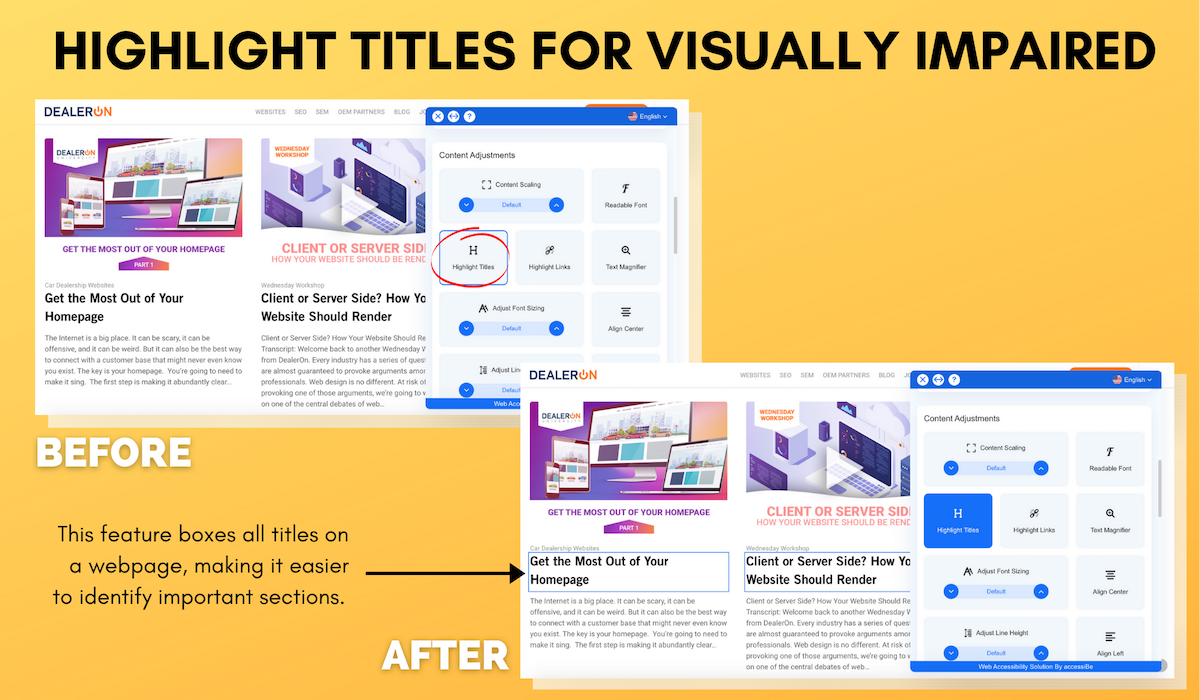
If you need help focusing on certain aspects of a website but don’t necessarily need additional functions that accessiBe’s ‘Profile’ adjustments provide, you can use some of the simpler adjustment options such as Highlight Titles and Highlight Links.
As shown on DealerON and Yokohama’s home pages, this feature boxes the main titles and links on the websites so that visitors can quickly determine where they are and where they should go.
8. StepStone
Text Magnifier for Visually Impaired

Sometimes text can appear small and difficult to read.
Being able to magnify or zoom into text makes it easier and more comfortable to read.
Especially for those who have vision impairments, accessiBe’s Text Magnifier adjustment enables users to move their cursor over the content and automatically enlarge the text.
9. Miami State Attorney
Align Center for Visually Impaired
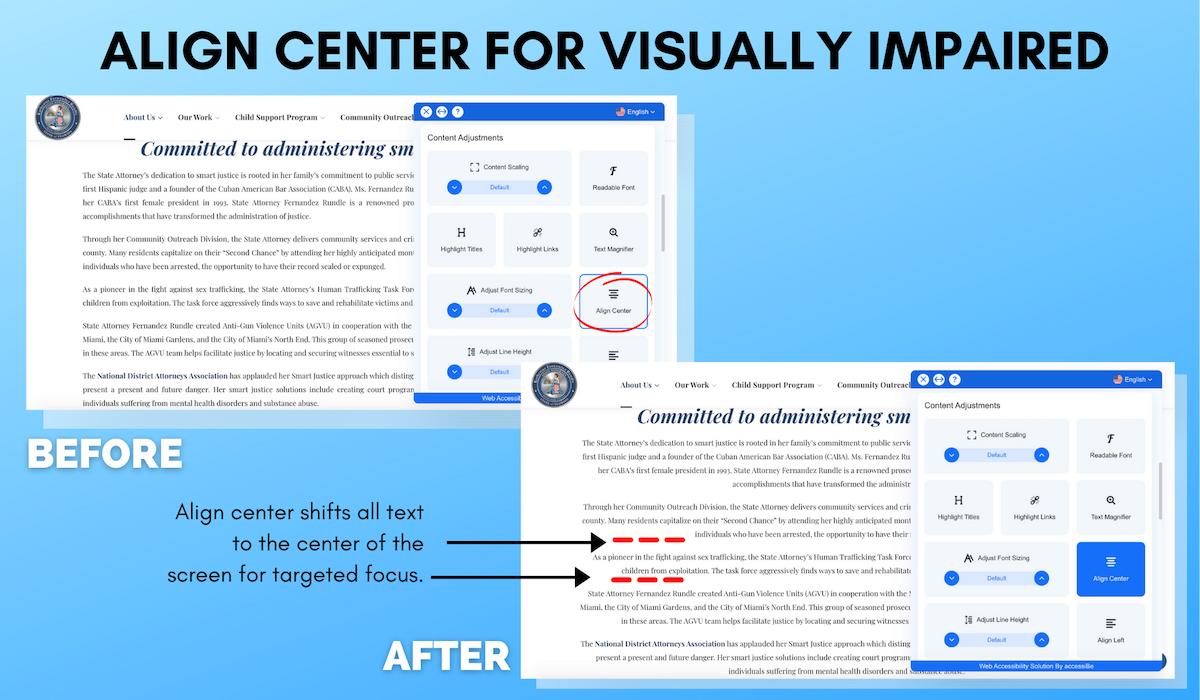
As shown on the Miami State Attorney’s website, accessiBe’s center alignment tool seamlessly centers all text.
This function works perfectly for sections of websites where there’s a large portion of text on the screen.
Center-aligned text is easier to read for the visually impaired.
In addition, visitors also have the option to left and right align text as well.
10. The Florida Bar
Dark Contrast for Visually Impaired
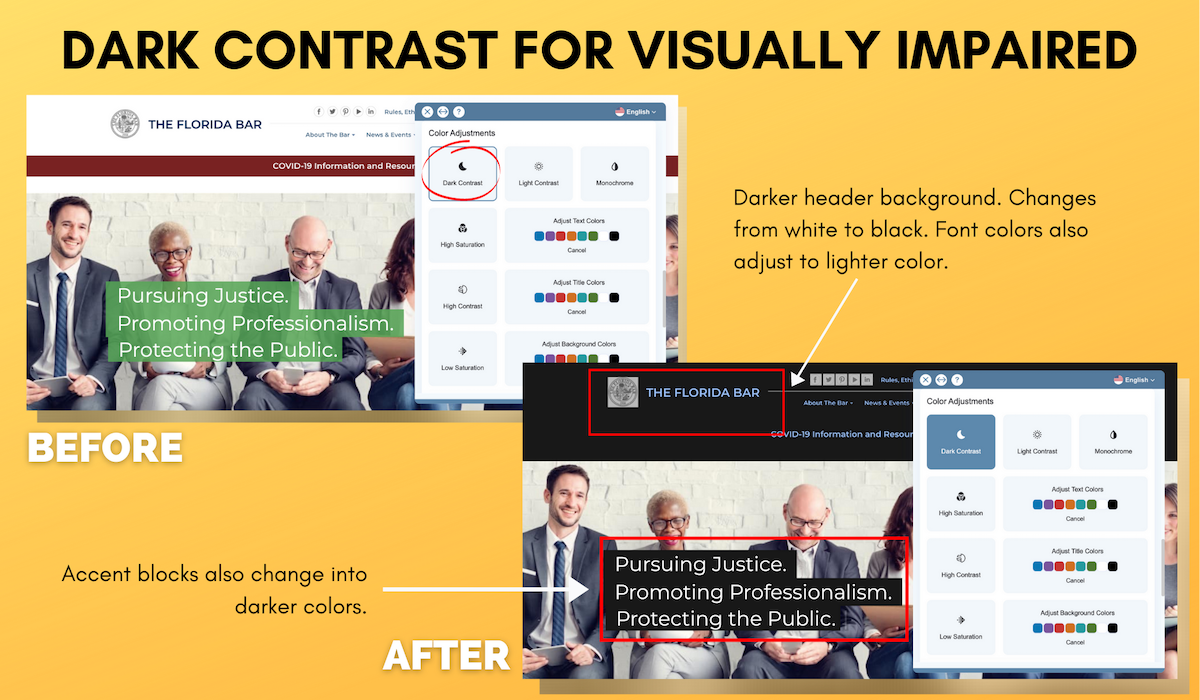
Many programs and apps on our mobile devices now have a “dark mode.”
Thanks to accessiBe, many brands can now have a similar feature on their websites.
Visitors can adjust colors based on their needs and reduce eye strain with the dark contrast feature.
This also accommodates those who have light sensitivity and cannot surf websites with bright backgrounds.
Section 3: Healthcare & Technology
11. Louisiana Department of Health
Monochrome for Visually Impaired
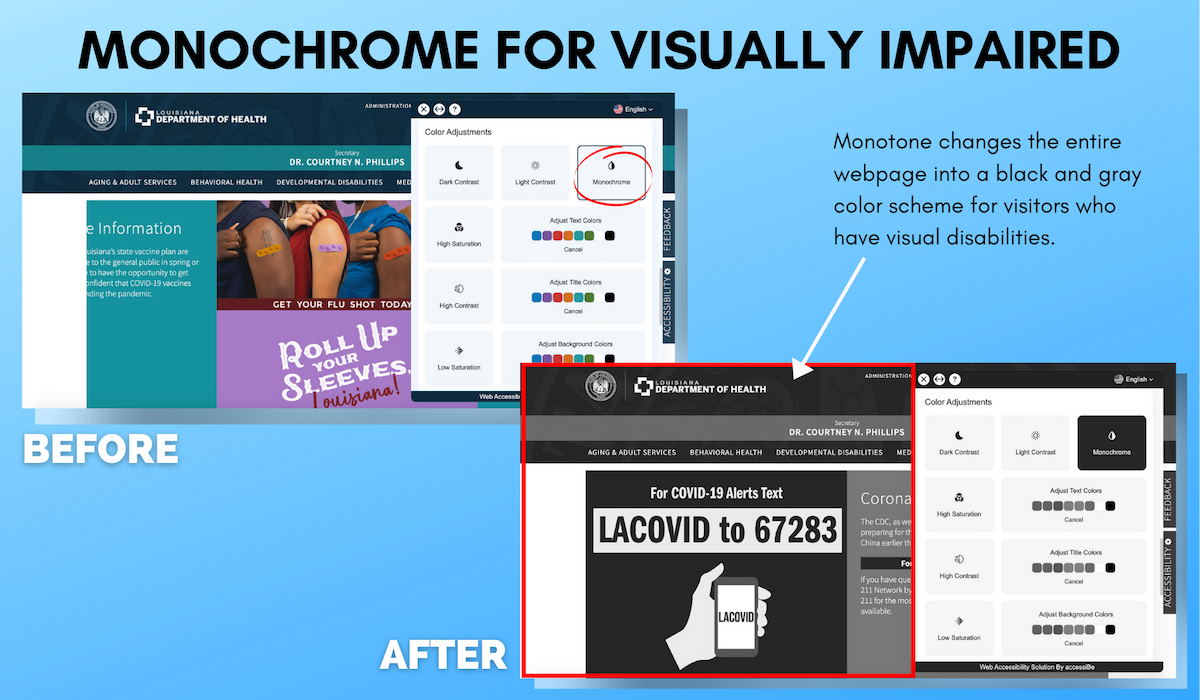
Similar to the dark contrast feature, accessiBe’s monochrome function works great to reduce bright colors on websites.
n addition, it’s a great solution for those who are experiencing color vision impairments.
As shown on the Louisiana Department of Health’s home page, the monochrome function turns the pages into clear shades of gray without hindering the content.
12. Dexcel
Monochrome for Visually Impaired
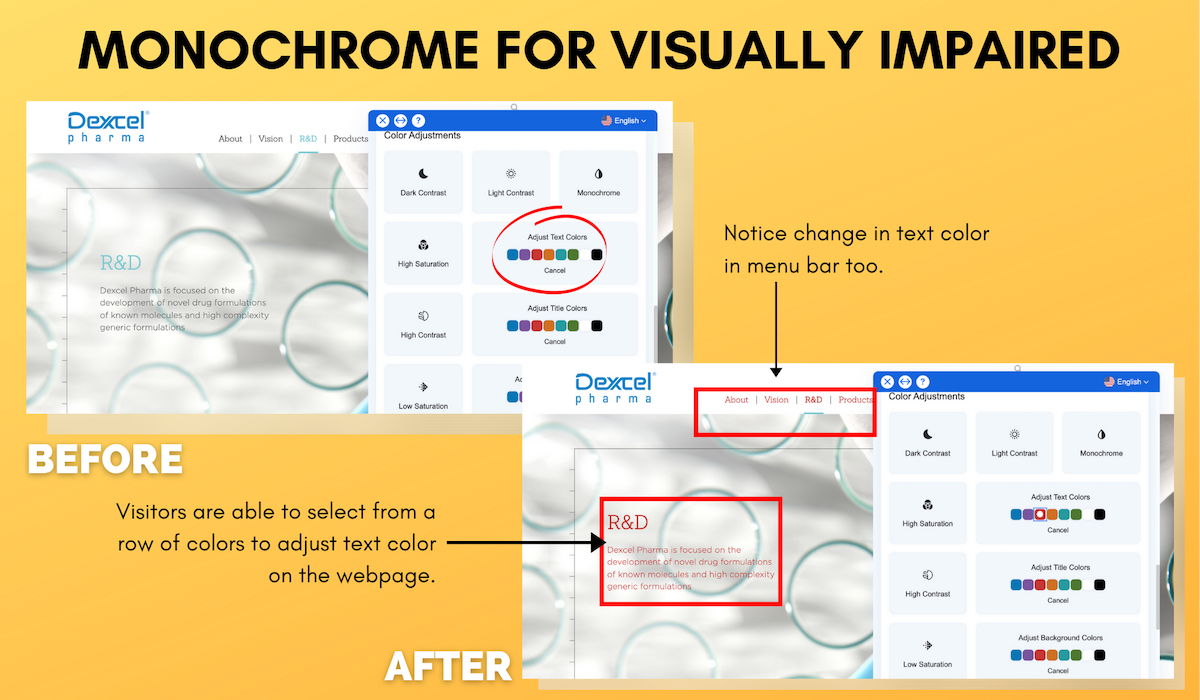
In this example on the Dexcel website, accessiBe provides color adjustment to specific content areas on a website.
Whether it is text or a title, viewers who experience various degrees of color blindness may not be able to see your buttons or links because of the color.
This feature allows them to easily adjust the colors according to their vision needs.
13. Pacific Life
Read Mode for Visual, Motor & Cognitive Disabilities
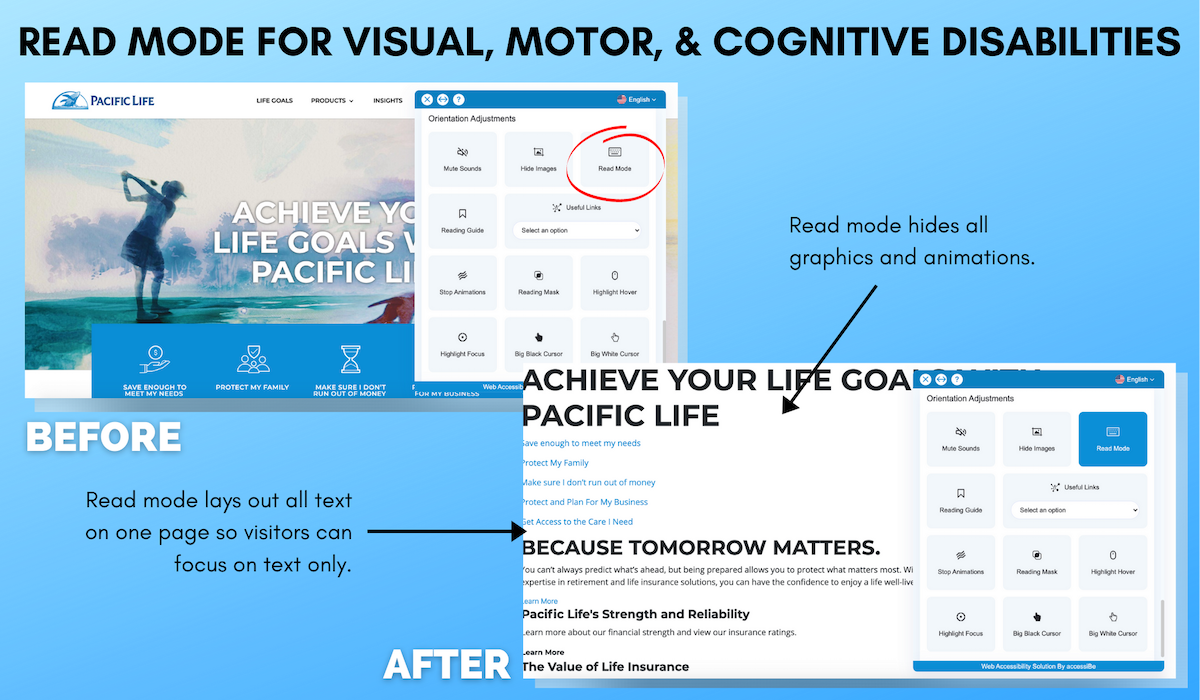
In this example, you can see how a viewer can adjust their screen orientation as well.
This section is specifically designed to help people with visual impairments, cognitive disabilities, and motor impairments.
The read mode removes all graphics and moving images and keeps all text on the screen for viewers to focus solely on the information.
As a plus, this feature is also printer-friendly as it saves you some ink if you decide to utilize it for your physical needs.
14. Belkin
Highlight Hover Example

One of the main concepts behind AccessiBe’s orientation features is that it helps reduce distractions and noise by providing guiding elements.
On the Belkin website, you can see how the highlight hover function allows viewers to use their cursor to click on specific parts of the site.
This focuses directly on the content as the program highlights your desired section.
15. Mobileye
Hide Images for Visual, Motor & Cognitive Disabilities

Many websites contain moving images or animations that may be difficult for some visitors.
With accessiBe, visitors are given the option to hide images in order to reduce distractions.
With all the blank space left on the screen, the overall layout and dimensions of the website stay true to itself, so brands won’t need to worry about their content being reconstructed in an unusual way.
Section 4: Apparel & Retail
16. Allsaints
Useful Links for Visual, Motor, and Cognitive Disabilities

For visitors that find navigating through a website challenging, the useful link accessibility feature allows visitors to quickly access a drop-down menu with all the links on a website.
17. DC Shoes
Font and Letter Adjustments for Visual, Motor, and Cognitive Disabilities
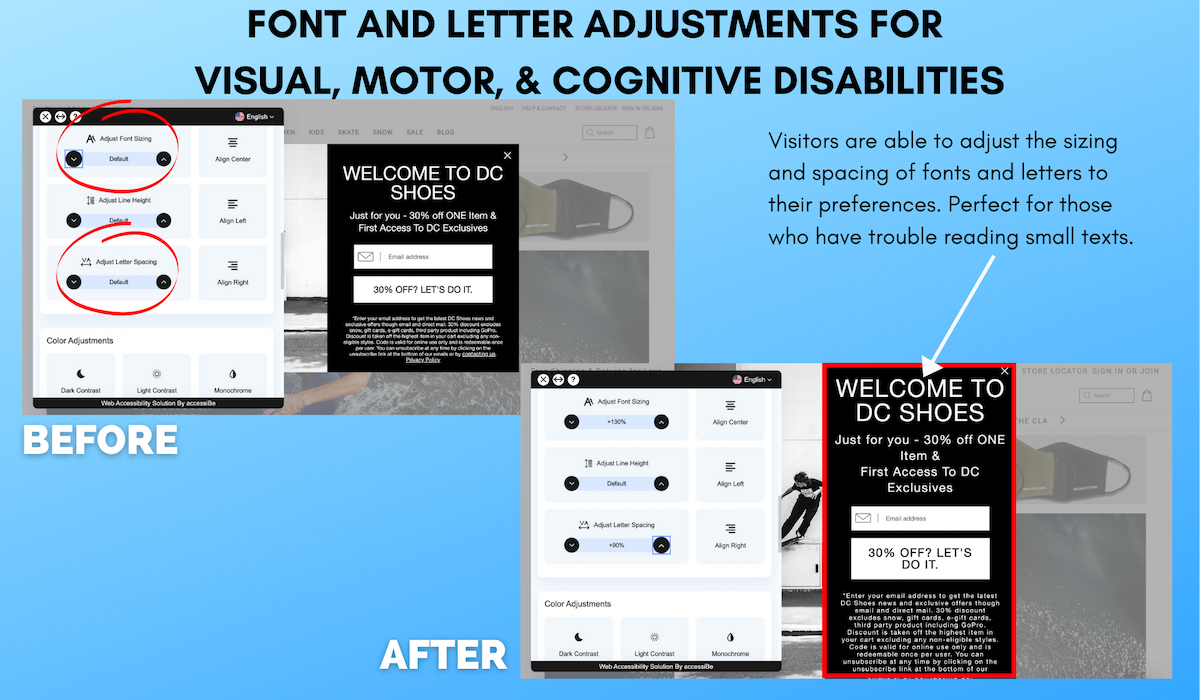
Although accesiBe’s profile features are pre-built, viewers can choose to adjust other elements to their needs.
For example, on DC’s home page, you can see how easy it is to adjust font sizing or letter spacing when necessary.
This customization allows people to find the perfect screen view for their particular disability and preferences.
18. Glasses USA
High Contrast for Visually Impaired
19. Kappa
Low Saturation for Visually Impaired

Individuals with vision impairments need to have the option to adjust the screen displays brightness in order to enhance readability and design.
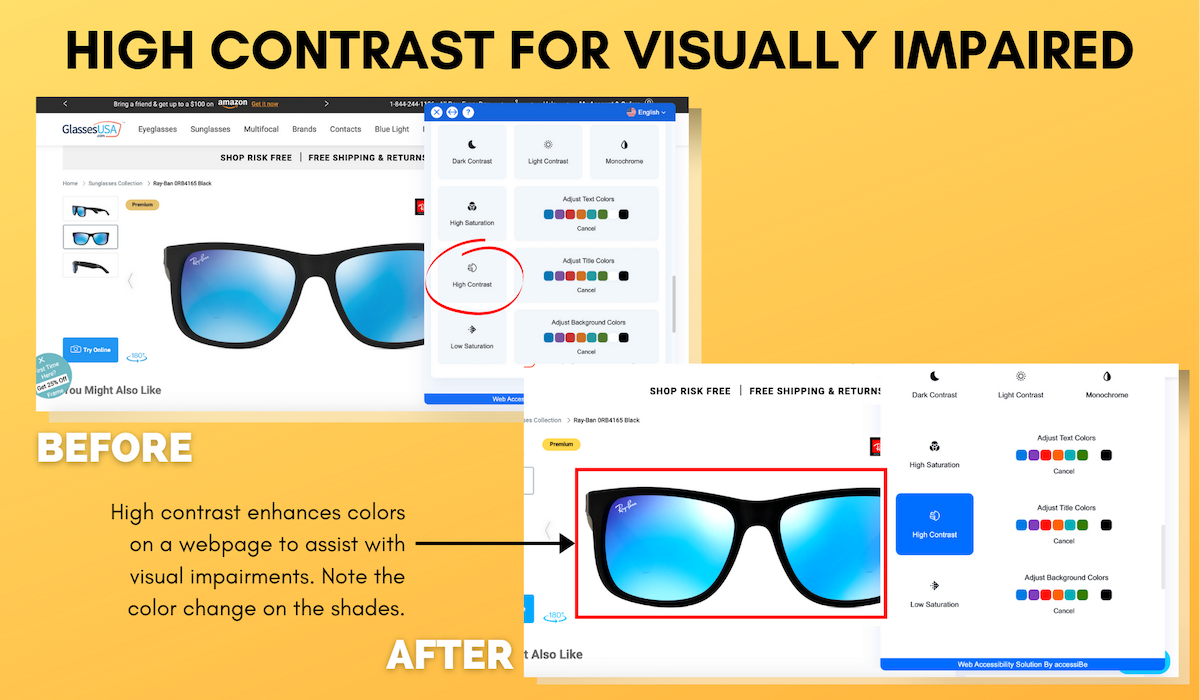
The high contrast function works as a filter to make images and text easier to read and for color to be more prominent.
Those with limited or low vision can see content better with the use of high contrast, compared to a normal color scheme.
Low saturation works in a similar way to accommodate those who are sensitive to bright and bold visuals.
The homepage on GlassesUSA showcases the high contrast feature, where the colors on the shades are enhanced, and on the Kappa homepage, low saturation dims down visuals, as seen on the model’s shirt.
20. Taylor Guitars
Keyboard Navigation for Motor Impaired

When using the blind users’ function, the Taylor Guitar’s website becomes compatible with screen readers that are installed on the user’s computer or smartphone.
With the keyboard navigation function, it enables motor-impaired individuals to operate the website using their keyboards with shortcuts such as “M” for menus and “H” for headings.
Conclusion
Website accessibility is more important than ever.
In order to provide equal opportunities and experiences for people with disabilities, it is critical to make your website accessible for all.
That way, your relationships with your consumers grow far beyond a computer screen.
The post 20 Awesome Examples of Accessible Websites appeared first on Content Marketing Consulting and Social Media Strategy.
Source: convinceandconvert.com

Best Shared Hosting Companies
Web hosting comes in all different shapes and sizes. As a whole, these plans can be segmented into four main categories—shared, VPS, cloud, and dedicated. Since shared hosting is the first tier of hosting options, it’s always the most cost-effective way to host your website.
Disclosure: This content is reader-supported, which means if you click on some of our links that we may earn a commission.
Web hosting comes in all different shapes and sizes. As a whole, these plans can be segmented into four main categories—shared, VPS, cloud, and dedicated.
Shared hosting is essentially the entry-level web hosting category.
It’s ideal for new websites and smaller websites that don’t have a ton of traffic just yet. Since shared hosting is the first tier of hosting options, it’s always the most cost-effective way to host your website.
For those of you starting a new website from scratch, shared hosting will be the best option 99% of the time. These are the top hosting companies for shared plans:
The Top 6 Options For Shared Hosting Companies
How to Choose the Best Shared Hosting Company For You
As you’re shopping around and evaluating different shared hosting companies, there are certain factors that you need to keep an eye out for. Make sure you take the following elements into consideration:
Speed
With shared web hosting, your site will be sharing server resources with other websites on the same server (that’s where the name “shared” comes from).
This ultimately impacts the performance of your website, including the site speed. Your site won’t be as fast as it would if you were on a VPS (virtual private server) or dedicated hosting plan. But that’s fine; most new websites don’t need top-of-the-line performance.
With that said, some web hosting providers are faster than others. If your loading times are too slow, it will cause visitors to bounce and ultimately create a negative experience for people on your website.
Uptime
Uptime is another crucial factor to consider when discussing site performance. If people can’t access your site, it’s going to be detrimental to your success.
Generally speaking, some downtime is bound to happen. Certain providers will guarantee uptime rates, like 99.9%, but those typically come with all different types of contingencies. For example, planned outages wouldn’t qualify for the guarantee.
Read some reviews from current customers to see if they are experiencing outages and downtime.
Traffic
Make sure you choose a plan within the shared hosting category that can accommodate the traffic you’re expecting.
For example, some plans won’t be able to accommodate more than 10,000 monthly visits. You might need to choose a tier that supports 25,000 or 50,000 monthly visitors. Once you get beyond these numbers (and it will probably take a while), then it might be time to consider moving away from shared hosting to a VPS or cloud hosting plan.
But for not, there are plenty of shared hosting providers out there offering plans to accommodate the traffic for new websites.
Security
At a minimum, your web hosting provider should be giving you a free SSL certificate.
But beyond that, some providers will go the extra mile to help protect your website from things like malware, brute force attacks, and more. So keep an eye out for packages and promotions that will protect your website from malicious attacks.
Some hosts will include these extras in your plan, while others will charge you extra to add-on a security package.
Limitations
The vast majority of shared hosting plans will have some restrictions for your bandwidth and storage.
Your bandwidth essentially restricts the amount of data that gets transferred from your site at any given moment. The more traffic you have, the more bandwidth you’ll need to accommodate that traffic.
This is especially true for websites with lots of videos, images, or dynamic content (all of these require additional bandwidth).
Although many hosts will advertise unmetered or unlimited bandwidth, that’s really never actually the case. So double-check your contract before making a commitment.
Storage can also be referred to as disk space. This is the amount of space your website can occupy on the shared server. Images, videos, files, databases, scripts, code, and more all eat into your disk space limits.
Similar to bandwidth, be wary of hosts promoting unlimited disk space—that doesn’t actually exist.
Support
If you’re new to the world of web hosting, you’re going to have some questions. It might not be today or next week, but eventually, you’ll need assistance.
Make sure you choose a web hosting provider that will be there to help you out. This is crucial in times when your site goes down, or you need a time-sensitive reply. If your site crashes on Friday afternoon, waiting until Monday at 9:00 AM EST isn’t really a viable option.
The best web hosting providers offer 24/7/365 support.
The Different Types of Shared Hosting Companies
Earlier I mentioned the different types of web hosting (shared, VPS, cloud, and dedicated). But there is further segmentation within the shared hosting category itself. Before we dive into the company reviews, I want to quickly explain the differences between the following shared hosting types:
Linux Hosting
Generally speaking, Linux servers are the default option for shared hosting. Unless you’re super technical and need to run specific applications at the server level, you shouldn’t have to think twice about this— Linux servers will be just fine.
Windows Hosting
Some hosting providers let you choose your OS. So if you don’t want a Linux server, you might have the option to select a Windows server instead. This is really only necessary if you’re running custom server-side applications written in .NET or SQL servers—both of these need a windows hosting plan. But the vast majority of you don’t need to worry about this.
WordPress Hosting
As the name implies, WordPress hosting is designed specifically for WordPress websites. These plans will include features like one-click WordPress installations, automatic WordPress updates, security optimized for WordPress, and more.
If you’re running a WordPress site, it’s definitely a good idea to consider WordPress hosting. But with that said, you can still host your WordPress site without a WordPress-specific plan.
Managed Web Hosting
Managed hosting will be a bit more expensive than traditional shared plans. That’s because managed providers allow you to stay hands-off.
If you don’t want to worry about security, backups, updates, and other technical aspects of hosting your website, a managed hosting provider can handle all of these things for you. You’ll pay a little extra, but you really won’t have to do anything beyond running the site itself. Everything behind the scenes will be managed for you.
Domain Registrars
Lots of domain registrars also double as web-hosting providers. Avoid these.
There are certain instances when you can bundle web hosting and domain registration, but I’d only recommend that from a hosting provider. You should never get web hosting from a domain registrar—period.
Website Builders
Similar to domain registrars, lots of website builders also offer web hosting plans. Again, stay away from these. Even if you’re using a site builder to create your website, you should still get your hosting plan from a traditional hosting company.
Examples of Shared Hosting Companies
#1 – Bluehost — The Best Shared Hosting For WordPress
More than two million sites worldwide are powered by Bluehost. This is one of the most popular and reputable shared hosting solutions on the market today.
I also like Bluehost because they’ve been on WordPress’ list of recommended web hosts for 15+ years.
In addition to the WordPress hosting plans, there are plenty of other great reasons to choose Bluehost. Here’s why they rank so high on my list:
Free SSL certificate included with your shared plan
- The free domain name for the first year
- One-click WordPress installation
- 24/7 customer support
- 30-day money-back guarantee
- $200 in marketing credits
Bluehost makes it easy for your site to scale as well. As the site grows and you need more resources, upgrading your plan accordingly is a breeze. They also advanced extras like Cloudflare CDN, domain privacy & protection, spam protection, SiteLock, CodeGuard, and multi-server management.
Plans start as low as $3.95 per month.
#2 – A2 Hosting Review — The Best Hosting Company For Speed
A2 Hosting is another well-known name in the web hosting world. If you want fast loading times and outstanding performance on a shared plan, this will be a top choice to consider.
Certain plans come with turbo boost servers that are up to 20x faster than traditional shared plans. Here’s a closer look at those plans:
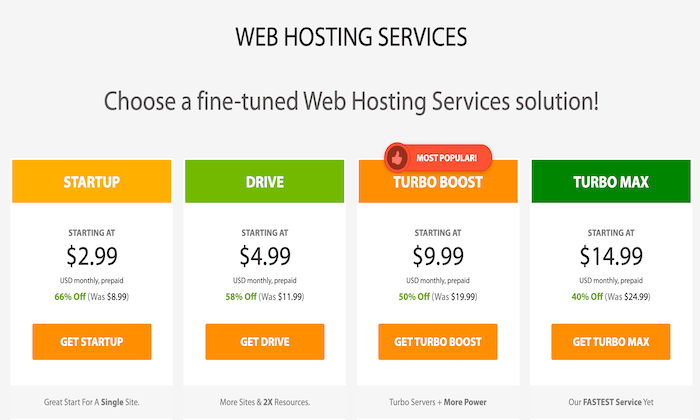
Sites of all sizes can rely on A2 Hosting for optimized performance. Other top features, benefits, and highlights of the shared plans included:
- Free and simple site migrations
- Free automated backups
- 99.9% uptime guarantee
- Speed and performance optimized for WordPress
- Free SSL certificate
- Guru support available 24/7/365
A2 Hosting is a great option for new websites, as well as existing websites looking to switch hosting providers. They offer WordPress hosting as well.
You can sign up for A2 Hosting risk-free. All plans are backed by a 30-day money-back guarantee.
#3 – TMDHosting — The Best Fully Managed Plans
If you’re looking for a hands-off hosting solution, I highly recommend TMDHosting.
While this might not be the most recognizable name in the industry, these managed shared hosting plans are second to none.
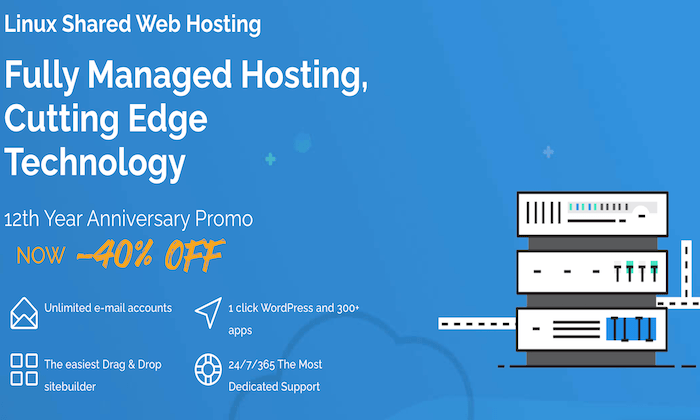
For new websites and existing websites alike, TMDHosting has solutions to accommodate your needs. Let’s take a closer look at the noteworthy highlights from this hosting company:
- 24/7/365 premium support
- Global data centersMilitary-grade security
- Optimized for open-source platforms (WordPress, OpenCart, Drupal, PrestaShop, etc.)
- Free application installation with 1,300+ apps
- Free components installation
- Free template installation
- Up to 16x faster page loading speeds
- Live malware protection
- Free domain
- Linux and Windows servers available
- Free daily backups
- 99.999% uptime guarantee
As you can see, managed plans from TMDHosting definitely come packed with features and benefits. If you’re migrating over from another host, TMDHosting will transfer your site files and databases for free. They’ll also compensate you for unused months on your other contract.
Shared hosting starts at just $2.95 per month. All plans are backed by a 60-day money-back guarantee.
#4 – Hostinger Review — Best Cheap Shared Hosting Plans
If you’re on a tight budget and don’t want to spend a fortune on web hosting, you should definitely check out Hostinger.
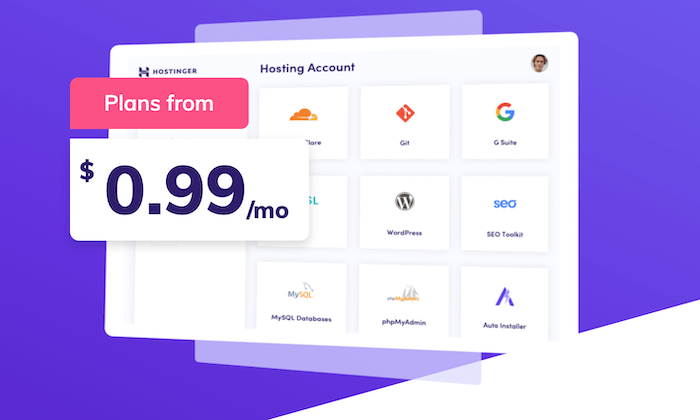
With shared plans starting at just $0.99 per month, this is roughly 25% of the price compared to entry-level plans from other providers.
Even at such a low introductory rate, you really aren’t sacrificing too much quality with a shared plan from Hostinger. Aside from the rock-bottom pricing, there are still plenty of reasons why Hostinger ranks so high on my list:
- 24/7/365 live chat support
- Automatic one-click WordPress installations
- Strong uptimes rates and loading speeds
- Easy to set up whether you’re creating a new site or migrating an existing site
- Free SSL certificate
- Simple, intuitive, and user-friendly control panel
- Flexible and built to scale
It’s worth noting that you’ll need to lock-in a 48-month contract to get the lowest possible rate. Since you have to pay for this contract upfront and in-full, it’s actually going to cost you more than just $1 today.
Hostinger offers a 30-day money-back guarantee, so you can sign up risk-free.
#5 – DreamHost Review — The Best Shared Hosting Features
DreamHost is one of the most reliable and reputable hosting solutions on the market today. They offer a wide range of hosting solutions, including feature-rich shared plans.
Plans start as low as $2.59 per month.
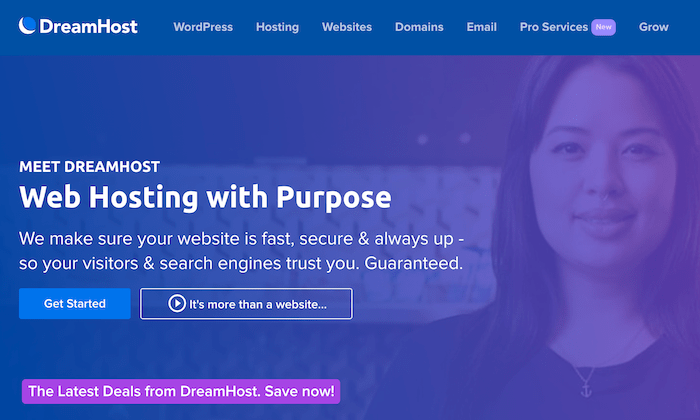
Why should you consider DreamHost? Let’s take a closer look to see what these shared plans have to offer.
- 24/7 support
- WordPress hosting
- Free domain name
- Fast SSD storage and email hosting
- Anti-spam protection and free WHOIS privacy
- 100% uptime guarantee
- One-click WordPress installs
- Unlimited traffic
- Automated WordPress migrations
- Automated backups
Some of the advanced features include canned CGI scripts, Crontab Access, Full Unix Shell, unlimited SFTP users, unlimited MySQL databases, and more. So if you’re a developer or a technical user, these will definitely come in handy.
It’s no surprise that 1.5+ million websites rely on DreamHost for web hosting. All plans are backed by an industry-leading 97-day guarantee.
#6 – GreenGeeks Review — Best Eco-Friendly Hosting Company
GreenGeeks is a bit unique compared to some of the other providers on our list. It’s definitely not the most popular or most recognized name in the hosting world.
But as the name implies, this provider offers eco-friendly hosting, which is extremely important in today’s day and age.
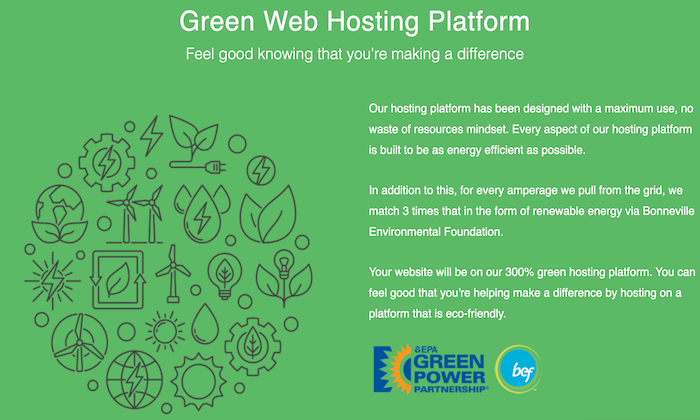
If you want to limit your carbon footprint and help protect the environment, GreenGeeks will be the best option for you to consider. Aside from this unique differentiator, here are some other reasons why 45,000+ websites rely on GreenGeeks:
- Free nightly backups
- Free SSL certificate
- Free domain for the first year
- Free CDN
- Unlimited email accounts
- LSCache included with plans
- Free site transfers24/7 tech support (chat, ticket, or phone)Developer-friendly tools and features
- Real-time security scanning and proactive server monitoring
- Built for speed and scalability
When you sign up for a GreenGeeks shared hosting plan, you can sleep well at night knowing that your site is stable and you’re making a difference in the world. Plans start at $2.95 per month, and they’re backed by a 30-day money-back guarantee.
Summary
Every website needs a hosting plan to be live on the Internet.
If you’re starting a new site from scratch or currently running a small website, shared hosting will be the best option for you. But which hosting company is the best?
Use the recommended providers and buying guide explained above to find the best-shared plan for your website.
The post, Best Shared Hosting Companies appeared first on Neil Patel.
Source: feedproxy.google.com