
Tag Archives for " youtube "

What Is the YouTube Measurement Program (YTMP)?
The YouTube Measurement Program takes care of this for you by personally vetting all the companies and offering a YTMP certification. By partnering with these companies, you’re setting yourself up for success.
Every now and then Google and YouTube provide us with a little insight into what they’re thinking.
This small glimmer of hope shows us that we, too, can have success on the platform with the right steps.
The YouTube Measurement Program is one of these little glimmers.
YTMP provides a clear list of all the approved partners that YouTube recommends we use in conjunction with the video platform.
Software for metrics, data management, influencer marketing, security, and video insights are all present on the list.
In this article, we’ll cover what YTMP is and see if it’s worth a deeper look.
What Is the YouTube Measurement Program (YTMP)?

As marketers, we spend a lot of money on measurement tools, software, advertising, and analysis; but how can you be sure the tools you use provide the most up-to-date and accurate data?
Unfortunately, you can’t.
When you spend time and money creating content, investing in ads, and uploading videos to YouTube, you want to be sure the analytics and metrics you receive are an actual reflection of how well you perform.
That’s why YouTube created the YouTube Measurement Program (YTMP).
It provides trusted and approved independent companies recommended by YouTube.
Now, when you’re choosing a new tool or software, you can choose from a variety of companies recommended by YouTube.
Why Is YTMP Important?
It’s important because all the companies have been personally vetted by YouTube, which means they meet their requirements regarding service and standards.
It also means these companies provide the most accurate and up-to-date information on your performance on YouTube.
Tools use different methods to store, gather, and interpret data.
We can’t trust everyone with our information, especially when it pertains to our business.
If you’re trying to find success on YouTube, you want a trusted company with a track record of proven success.
The YouTube Measurement Program takes care of this for you by personally vetting all the companies and offering a YTMP certification.
By partnering with these companies, you’re setting yourself up for success.
What About Other Service Providers?
As we look at the approved companies, you’ll see it is a shortlist, and there are dozens, if not hundreds, of other businesses offering similar services.
- Are all of these companies providing a sub-par service?
- Is their data inaccurate?
- Do they all have a poor reputation?
Let’s take two popular tools like VidIQ and TubeBuddy, for example.
Both help you choose keywords, tags, write descriptions, and come up with ideas for content.
They help you to gauge competition and see what’s trending on YouTube.
But, they’re not part of the YouTube Measurement Program.
Why is that?
It doesn’t necessarily mean there’s something wrong with these tools or that they’re going to steal your information.
It just means they were not able to meet the program’s strict requirements.
Perhaps they never even tried to work up an agreement with YouTube; we don’t know.
The bottom line is, it’s best to always go with what the platform itself recommends.
If YouTube tells you that you should use a certain set of services, they are your best shot at success.
YTMP Partners
Let’s look at some of the YouTube Measurement Program partners to see what sets them apart.
Channel Factory
This global technology and data platform help improve video performance while increasing contextual suitability and delivering highly targeted content to the right audience.
Their flagship product, ViewIQ, analyzes every channel to ensure that you’re only running your ads on videos that are relevant to your goals.
How many times have you been on YouTube and had an ad pop up that has absolutely nothing to do with the content you’re watching?
If an ad for Budweiser is displaying on a video intended for kids under 12, you’ve got a problem.
Channel Factory specializes in brand suitability and amplification.
By ensuring your ads display to only the most relevant viewers, you can amplify your brand and generate a higher ROI.
Integral Ad Science (IAS)

IAS is the global leader in digital ad verification.
They help advertisers and content creators receive the insight and technology necessary to protect themselves from fraud.
The end goal is to help create a profitable campaign by targeting the right audience, zeroing in on every impression, and ensuring your ads are displayed where they should.
This sounds a lot like what Channel Factory does, but they have one primary difference.
IAS focuses on “Quality Impressions.” They’ve even trademarked the phrase.
This metric determines what an impression really means.
Essentially, they verify the impressions YouTube says you get are eyeballs from real people who are prepared to buy something, in the right environment, and correct geographical location.
Interesting…
Getting thousands of impressions on an ad doesn’t matter if your ad wasn’t displayed to the right audience.
Integral Ad Science helps ensure the impressions you get actually make a difference with your brand.
CreatorIQ

CreatorIQ helps find influencers for endorsement and brand deals.
If you want to leverage influencer marketing, CreatorIQ will help you find the right.
They have five primary product offerings, Creator Core, Creator Connect, Creator Pay, Creator Boost, and Creator Hubs. I’ll break some of them down.
Creator Core is a tremendous database of all the most popular influencers on YouTube.
It even uses Google AI image recognition to connect you with the right person and prevent fraud.
Once you connect with an influencer and your content hits the masses, you’ll also receive reporting and analytics showing how many posts you made, impressions, engagement, and total reach.
Creator Connect allows you to build a network of content creators so you can spread your reach in a safe and encrypted environment.
Creator Pay is a way for you to make and accept payments in a systematized and scalable way.
CreatorIQ is an all-in-one solution for influencer marketing.
If you’re looking for an easy way to find influencers safely, without having to DM hundreds of creators, CreatorIQ seems like a great choice.
How Do You Know If a Company Is Part of the YTMP?
There are two ways to find this out.
YouTube Measurement Program Page
The first way is to check the YouTube measurement program page.
Here you’ll find a list of all the companies within each niche and a brief explanation of what they do and what sets them apart.
You can also find out if a tool is part of the program by looking at their website.
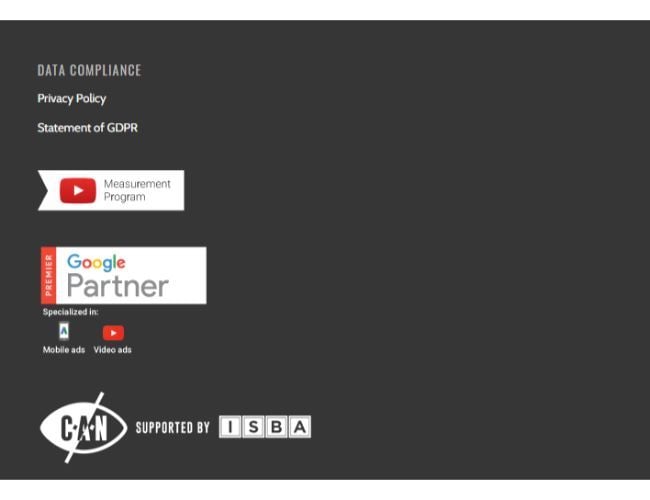
The image above is from the footer on ChannelFactory.com.
Every company that is verified by the YouTube Measurement Program will receive this seal of approval.
You can use this to help determine if you plan to work with this company or not.
YTMP Certifications
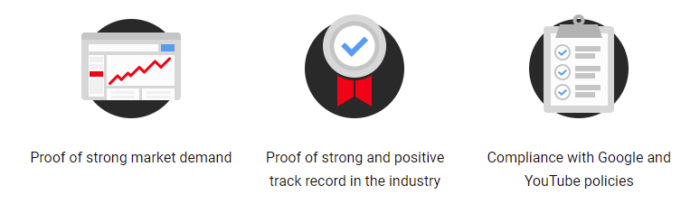
When it comes down to specific requirements, there are three. To become YTMP verified, members must show the following:
- proof of strong demand in the market
- proof of a strong and successful industry track record
- continued compliance with Google and YouTube policies
All the companies you see on YouTube’s list meet these requirements.
That makes finding the right platform much easier.
What Are the Vetting Standards for the YouTube Measurement Program?
I mentioned the three certifications YouTube presents to their partners, but how do they get those certifications? There is a strict vetting process to weed out less ideal tools.
Here are the standards all YTMP partners must follow.
Strong market demand:
YouTube expects its partners to have a certain level of demand in the industry.
They want the companies they recommend to be popular and well-received by their niche.
This is usually a tell-tale sign that they’re providing top-notch service.
Successful track record:
YouTube wants the best partners with long-term track records of success.
Many companies on the list have been in business for 10+ years, so the chances are they’re doing something right.
Policy compliance:
We all know that Google is serious about its policies and they expect creators and advertisers to follow the rules.
The same goes for service providers.
YouTube will only recommend companies with a proven track record for following the guidelines.
Accurate and up-to-date information:
The goal of YTMP is to help provide creators and advertisers with only the most accurate data.
To become part of the program, service providers need to prove that their data aligns with YouTube.
If they can do that, it’s a gold star for them.
Actionable and insightful metrics:

YouTube wants to ensure that the data these service providers offer is actionable, insightful, and has the potential to actually make a difference.
Security and safety:
Security and safety are critically important and that’s why YouTube requires all members to comply with proper data handling, encryption, and other security measures.
You can trust that if you choose a YTMP partner that they’re properly handling your private information.
What Does the YTMP Mean for Content Creators?
This leaves us with one final thought, how can YTMP make a difference in your business?
YouTube, Google, Facebook, Instagram, and all these platforms are constantly trying to figure out new ways to get advertisers to choose them.
How can this new measurement program help your company? Here are a few ways.
1. Ensures Data Accuracy
Probably the biggest plus is data accuracy.
We use so many tools and frankly, they all tell us different things.
If you’re in SEO, you probably use SEMrush and Ahrefs; but have you ever compared them?
The data is completely different, so who do we trust?
The goal of the YTMP is to provide the most accurate data across the board so you get a direct representation of how your money is being spent.
2. Easy Competition Analysis
YouTube lays it all out and shows you each company that they partner with.
This makes it much easier to choose a service because you can compare them easily without having to randomly crawl the SERPs looking to solve your problems.
It’s a lot like walking down the cereal aisle in the grocery store.
You have a much better chance of enjoying your cereal when you’re choosing between the five best in the world versus 100 random kinds of cereal.
3. Match With The Right Company
Companies are changing the way they provide services and attempting to provide more of an in-store experience.
When you go with a vetted partner you’re ensuring that you get a company that aligns with your goals and objectives.
4. Trust, Safety, and Security
Last but certainly not least, security and safety are everything.
We have tons of data, and if the wrong person gets access to it, it could cause huge problems.
Knowing how companies handle your information is so important, and the YTMP ensures you’re only trusting your valuable data with companies that know how to handle it properly.
Conclusion
Do you think the YouTube Measurement Partner Program could make a difference with your content creation?
You are much more likely to find a solid tool that serves your needs.
If you need additional help these tools don’t provide, we can help.
Remember that in the game of marketing, YouTube and Google sometimes give us a little glimpse into how they work and what we can do to succeed.

That is exactly what YTMP does. They’re telling you that these companies might give you a little advantage.
Do you use any of the companies on the YouTube Measurement Program approved list?
If so, let us know which one in the comments and what your experience is/was?
The post What Is the YouTube Measurement Program (YTMP)? appeared first on Neil Patel.
Source: feedproxy.google.com

How to Optimize Your Videos Through YouTube Analytics Data
What if I told you there was a way to reach an audience larger than the one Netflix has through YouTube analytics?
It’s possible!
YouTube videos reach more than 2 billion users a month—about one-third of the entire internet’s traffic.
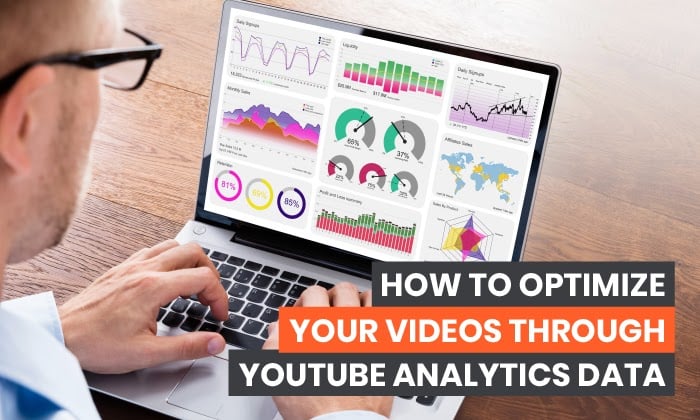
However, if you want to use YouTube videos to drive traffic and revenue, you need to deep into the data.
How do you know whether your video has impacted your business?
Through the effective use of YouTube analytics!
In the next few sections, I’ll explain what YouTube analytics is all about, how to access it, what metrics you need to track, and how to leverage this information for better ROI.
What Is YouTube Analytics?
YouTube analytics is the native analytics platform on the site, providing access to vital metrics about video performance including watch time, viewer demographics, traffic sources, impressions, and more.
What is the point of all this information?
This data is here to help you understand what type of content your audience is interested in so you can improve your YouTube strategy.
If you hate wading through data, you’ll be happy to know YouTube analytics is pretty straightforward.
Instead of overwhelming yourself with a ton of information, you can choose to focus on the data that matters most to your brand.
Why Is YouTube Analytics Important?
Simply put, knowing about your YouTube videos’ performance levels is vital to understanding how effective your efforts have been. When you know that, you can create more of the content your viewers love.
Why does YouTube Analytics matter so much?
For starters, YouTube is the second most popular website online. Period.
Further underlining YouTube’s popularity is that teens spend much more time watching YouTube than live TV—or even Netflix or Hulu.
This fact is of particular importance if your products appeal to this demographic.
But YouTube isn’t just for teens—people of all ages and demographics watch more than a billion hours of YouTube videos every day.
How to Access YouTube Analytics
Ready to dig into the data? Here’s how to access YouTube analytics.
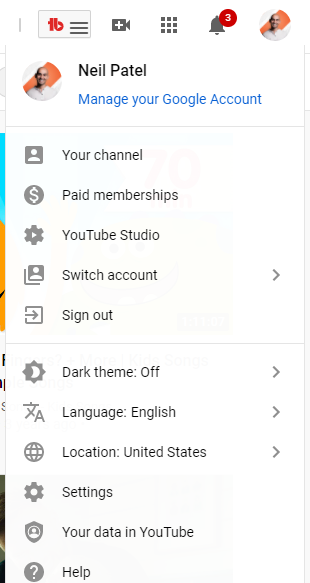
From the YouTube homepage, navigate to the top right corner, where you see your account’s avatar.
Click on the image, and you’ll see a drop-down list of account options.
Select “YouTube Studio.”
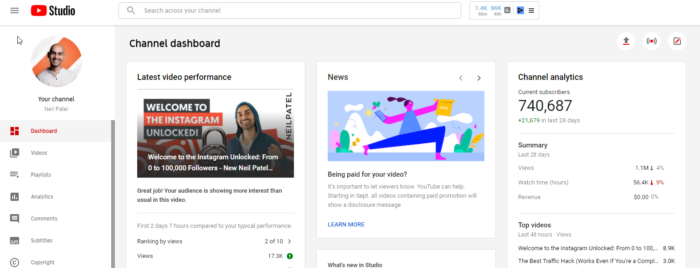
On the next page, you’ll see the Studio dashboard.
There’s a sidebar on the left, which allows you to access different parts of your account.
Click “Analytics,” which takes you to an overview of your YouTube channel’s performance.
The overview page provides details like views, watch time, subscribers, estimated revenue, and real-time reporting.
You’ll also see four primary analytics tabs:
- Reach
- Engagement
- Audience
- Revenue
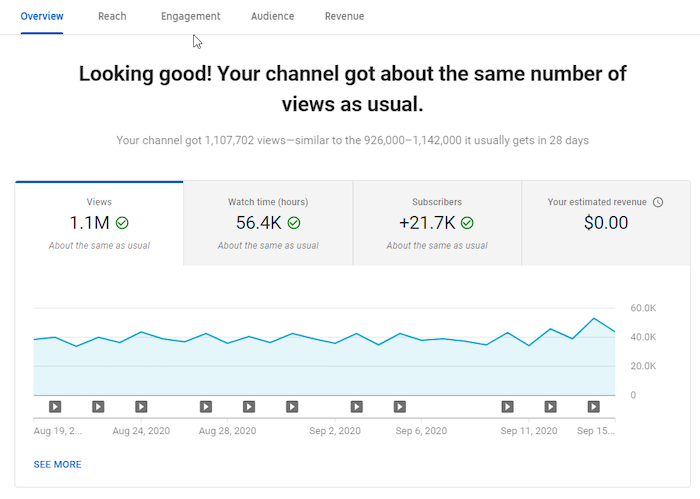
The statistics you see here are for the last 28 days. That’s YouTube’s default setting.
However, you can view metrics for a different period by clicking on the drop-down on your screen’s top right corner.
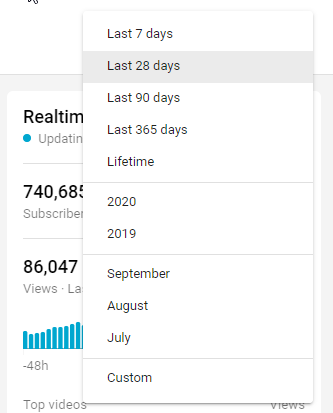
What if you want to see how well your videos have performed within 60 minutes or 48 hours of hitting the publish button?
The real-time report provides these details.
YouTube has information in place to help you understand the metrics, even if you’re a beginner.
All you have to do is hover over your chosen metric or click the “i” in a circle appearing near the metric’s name.
Here’s an example:
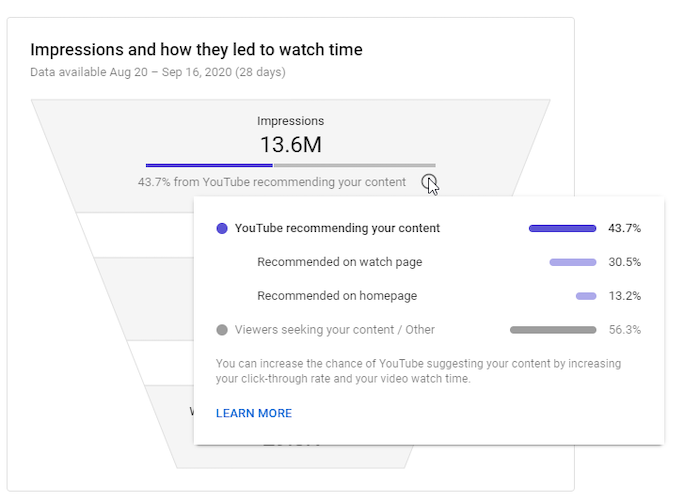
If you want to understand the metrics further, the “Learn More” link at the bottom of the box comes in handy.
In addition to overall channel metrics, you can also view individual videos’ metrics.
To access video metrics, click on any video from the overview page.
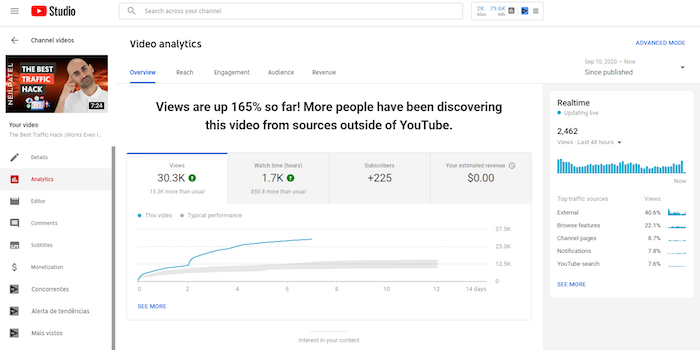
Click on “See More” to dive deeper into the analytics of a specific video.
Alternatively, you could click “Advanced Mode” at the top right corner.
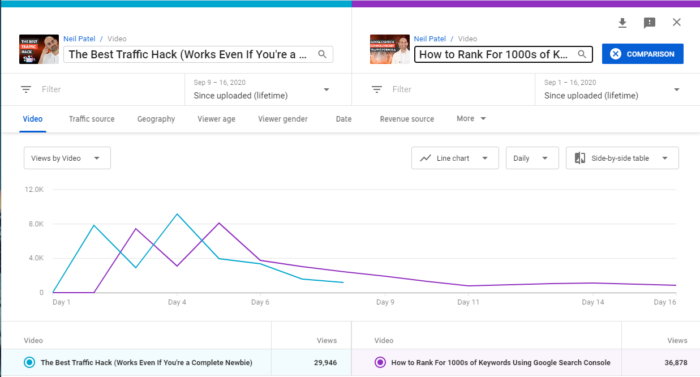
Want to see how two videos performed against each other?
The comparison feature allows you to compare two videos, one video against itself over different periods, or a video with a group of other videos.
If the video is part of a series, you can discover how it compares to the others.
Additionally, you can discover if there is a difference in seasonal video performance.
To access this feature, click “Compare to” at the top right corner of the page.
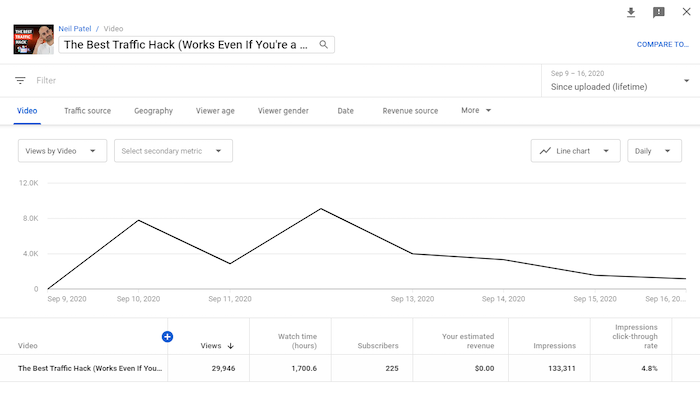
Here, you can select the periods, video, or group to compare.
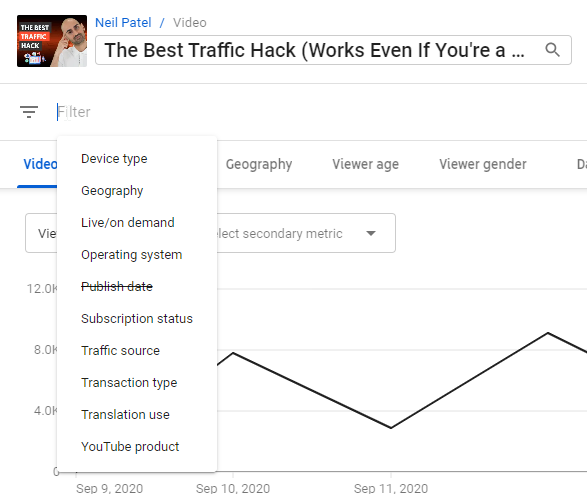
Another useful option is to add filters to your metrics.
You can find the filter option beneath the video’s title in the upper left, underneath the image from your video.
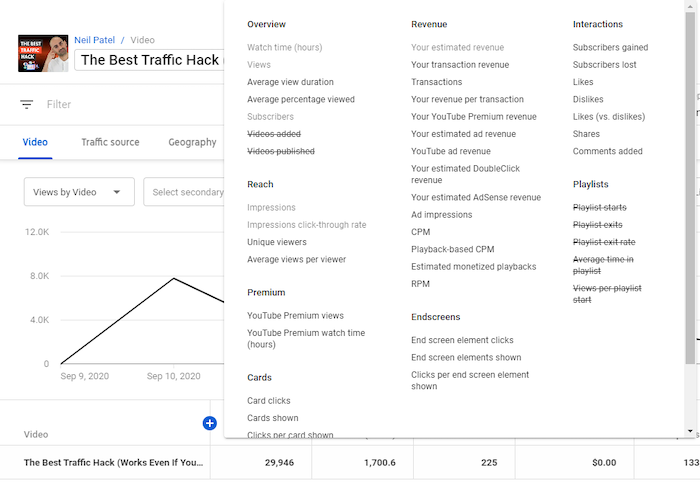
Clicking the “+” icon at the top of the table of metrics brings up a big list of metrics you can check out.
Want to save or share your data? You can easily export it for further analysis.
To do this, navigate to the top right corner of the page you want to export and click the download icon—a downward-facing arrow with a line beneath it.
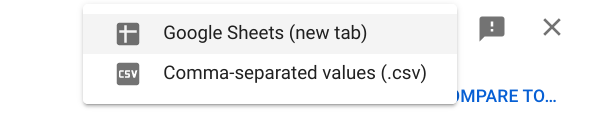
This will bring up two options—Google Sheets and .csv—so you can choose the format you prefer.
Vital Metrics to Track on YouTube Analytics
It’s easy to get lost in the sea of data on various marketing platforms. There’s so much information, and it’s understandable if you get overwhelmed by all the filters, options, and tools.
And the same applies to YouTube analytics.
Don’t worry, though: YouTube analytics is comparatively easy to use.
Keep in mind you only need to view metrics answering a specific question you have.
These questions might include:
- How do viewers engage with our videos?
- When do they exit the videos?
- Which videos convert the most viewers to subscribers?
- Do our YouTube audience demographics match our buyer personas?
With these and more questions in mind, it should become easier to view the metrics you need.
Below, I’ll share seven essential metrics in YouTube Analytics and insights you may derive from them.
1. Demographics
When creating a video, you need to know who you’re targeting—and who’s watching.
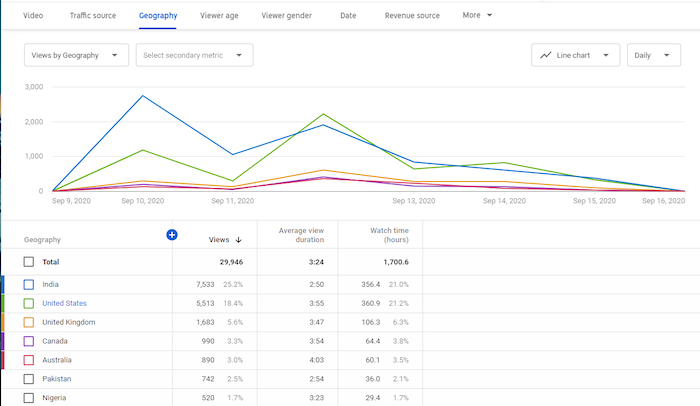
YouTube’s demographics data reveals details like the top countries and cities your viewers are watching from, viewers’ ages and genders, the times and days they most often watch videos, and more.
Location
If you have many viewers from a particular country or city, and your brand allows for this, you could tailor content to those locations.
If you’re advertising a local product, but your videos aren’t generally being viewed locally, it may be time to investigate your keywords.
Age and Gender
Knowing who your audience is can help you create relevant and appropriate content. After all, you wouldn’t want to produce R-rated content if your viewers are typically 13-17!
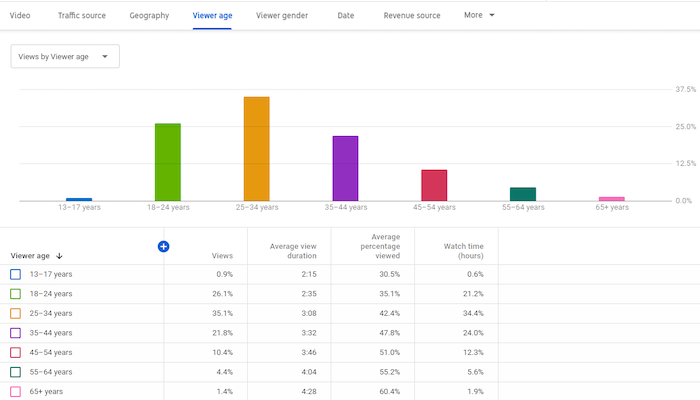
Furthermore, the times and days viewers are on YouTube provide insights into when you should publish new videos.
If you run YouTube ads, having demographics information can also improve your ability to target content accordingly.
Finally, you can compare your demographics data to your buyer persona.
Do they match?
If so, great! If not, will you change your buyer persona or your content?
2. Traffic Source Types
Traffic source types indicate where viewers find your videos, such as YouTube search, Suggested videos, Channel pages, direct visits, views from external sources, and others.
In addition, you’ll see how viewers from each source behave.
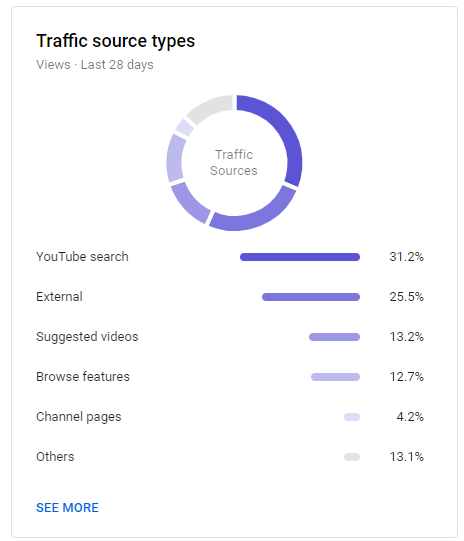
These metrics provide information about the sources responsible for your video views.
For example, you might find your blog drives a ton of traffic to YouTube, which means you may want to embed more videos in blog posts.
For more details about how people found you, you can click on each source.
For instance, clicking on “YouTube search” will show you what keywords led users to your videos.
You can also see which sources contributed little to your views and try to figure out how to boost those areas.
For example, a low number of views from YouTube search might mean you need to improve your YouTube SEO.
Or, a small number of views from Suggested videos might indicate you need to engage your audience better.
Higher engagement means YouTube may see your videos as valuable and suggest them to people viewing similar content.
There are even more insights to uncover once you dig into the data.
3. Watch Time
Getting a lot of YouTube views is good, but getting a high watch time is even better. “Watch time” is how long users spend watching your videos.
YouTube’s algorithm uses this metric to help it understand your content’s quality. This means a long watch time improves your chances of showing up as suggested videos and on search pages.
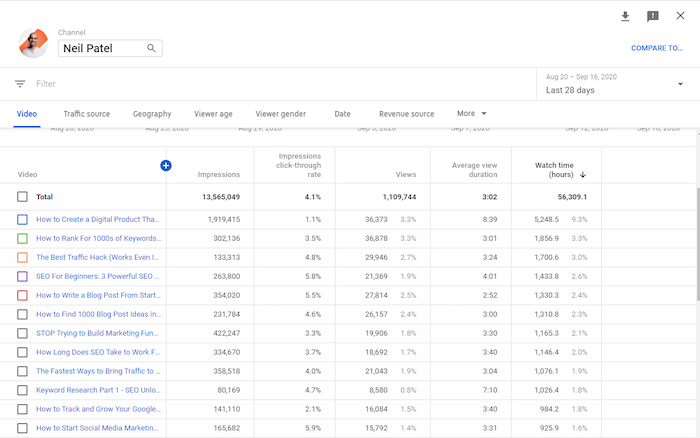
You can analyze each video’s watch time and compare it to the video’s length.
What types of videos have high watch times? What types have low watch times? Why do you think that is?
Considering the differences between videos with high and low watch times can help you create better content in the future.
You should also examine videos with a high watch time at a particular time of year. This could be a seasonal video—and if it did well, consider creating a similar video next year.
4. Subscribers
When a viewer clicks the “Subscribe” button, they’re confirming their interest in your content. They’re then more likely to see when you post new videos—and watch them.
YouTube Analytics displays the number of subscribers you’ve gained and lost during a given period.
You’ll also see which videos contributed to your subscribers count.
Which videos are responsible for a high number of subscribers gained? Which ones are responsible for subscribers lost?
Analyzing these changes can help you improve the content you create. For example, if longer videos tend to drive more subscribers, then you should focus on longer videos
You can also view subscription sources, which tell you where subscribers found your content.
There’s another way to understand what drives subscribers—comparing them with non-subscribers.
For example, you can compare these two audiences on metrics such as watch time, including the time spent viewing and what percentage of the video they watched.
Thirty seconds means something very different on a 45-second video than it does on a 45-minute video!
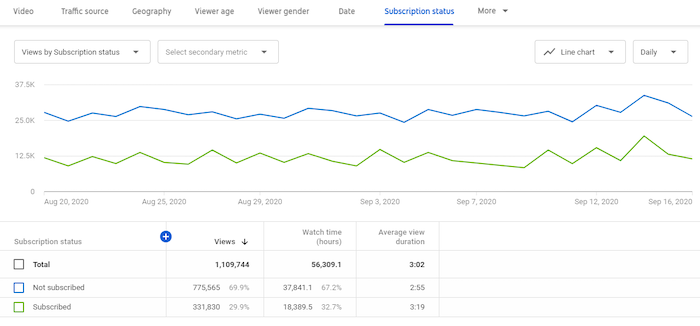
In the image above, there’s an anomaly. You see, non-subscribers are outnumbering subscribers significantly. This data indicates a need for further investigation—perhaps check their traffic sources.
5. Top Videos By End Screen
If you’ve ever watched YouTube, you know many videos end with images of other videos to watch. Those images are there to entice users to keep watching.
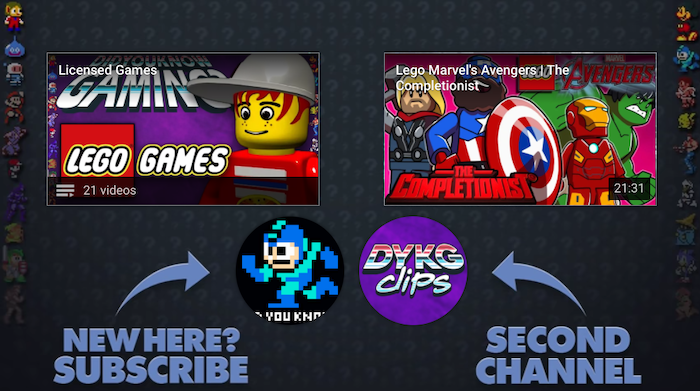
The metric related to this tells you which end screens accounted for the most clicks.
By clicking on “See More” in the engagement tab, you’ll see details such as end screen elements shown, end screen element clicks, and clicks per end screen element.
As a result, you can identify videos that keep viewers watching.
Why is a specific end screen more effective than another? Once you figure this out, apply the insights to other videos.
6. Top Cards
Card elements are interactive and allow you to promote other YouTube videos or links to your website. You can see an example in the image below—the “Suggested” bar is a card element.
Card element metrics show you details such as card clicks, cards shown, clicks per card, and more.
From these numbers, you’ll discover which cards were most effective at converting viewers.
Ask these questions:
- What makes these cards effective?
- Are cards more effective on some videos than others?
- At what time are cards most effective in a video?
- What makes some card teasers effective?
By diving deeper into these metrics, you can find answers to these critical questions.
7. Revenue
YouTube ads are essential to revenue. However, to run YouTube ads, you need at least 1,000 subscribers and 4,000 hours of watch time.
Focus on making great content using your metrics as a guide to get to these numbers.
You can see an example of an ad overlaying a YouTube video below.

If you’re running ads as part of the YouTube Partners Program already—or when you get to that point—the revenue section of analytics is crucial.
Here, you’ll find details such as your revenue sources, top-earning videos, ad types, monthly estimated revenue, YouTube Premium revenue, and more.
- What are the top-earning videos?
- How are they different from the low earners?
You may get answers to these questions and more by diving deeply into revenue analytics.
All that said, you don’t have to monetize your channel through ads—I don’t do this myself. Instead, I use YouTube for branding, education, and to drive traffic to other resources.
Other YouTube Analytics Tools
YouTube analytics provides a ton of metrics about your channel performance, but it’s not the only source of data available.
That’s why you should use other analytics tools to gain more insight into your YouTube campaigns.
Using these tools, you can obtain analytics for other channels in your industry, enhance YouTube SEO, and get recommendations to improve.
Here are three other tools to better understand your YouTube video performance.
Vidooly
Using your YouTube analytics information, Vidooly provides suggestions about how to improve your videos.
They also grant access to video tag analysis—meaning the words in your video’s metadata—so you can discover high-performing tags.
To help you rank higher in YouTube keyword searches, Vidooly also has a keyword tool that may boost your videos’ SEO.
If you run influencer marketing campaigns, Vidooly can help you figure out which influencers may help grow your channel.
ChannelMeter
ChannelMeter provides access to extremely detailed audience insights.
Beyond that, you can monitor how videos from influencers perform. This is handy if you run YouTube influencer marketing campaigns—or if you want to emulate some of their ideas.
ChannelMeter also allows you to check on your benchmarks and follow trends among similar videos so you can adapt accordingly.
Unmetric
One of Unmetric’s most significant features is the benchmarking tools. These tools allow you to compare your strategy against your competitors.
For example, you can look at your competitor’s click-through rate, engagement rate, and video completions. This tool can help you develop campaign goals and identify new trends.
Furthermore, you can see how you fare against your competitors and obtain insights that may boost your campaigns. They even provide ideas for content creation.
Conclusion
YouTube Analytics is essential to running any successful YouTube campaign.
You can learn about your audience, what you’re doing well, and where you can improve—without being bogged down by unnecessary data, thanks to YouTube Analytics’ helpful filters.
What aspects of your videos do you think YouTube analytics can improve?
The post How to Optimize Your Videos Through YouTube Analytics Data appeared first on Neil Patel.
Source: feedproxy.google.com

SEO Isn’t the Only Way to Drive Traffic. Here Are 6 Alternative Strategies.
As marketers, we invest a lot of our time and energy into SEO.
Considering that Google receives over 66,000 searches every second, we’d be stupid not to.
But when it comes down to it, Google and other search engines are just one of the many ways you can drive traffic to your website.
In fact, depending on your target audience and competition, Google may not even be your best traffic source.
Take Upworthy, for example.
This site, which has a reputation for sharing feel-good viral videos, gets almost 43% of their traffic from social and less than 19% from search.
Groups of consumers all use the web differently.
Some like to get their content from friends or influencers on social.
A few depend on their trusted newsletters to tell them what content they need to read.
Others use an alternative search engine like YouTube or even Facebook.
6 Alternative Strategies to Drive Traffic
To prove that you don’t need Google to drive traffic to your website, here are six alternatives that can help boost your visits.
1. Create a YouTube channel
YouTube has 1.5 billion active users each month, making it the world’s second-largest social platform.
With 1.5 billion active users each month, YouTube is the world’s second-largest social platform.
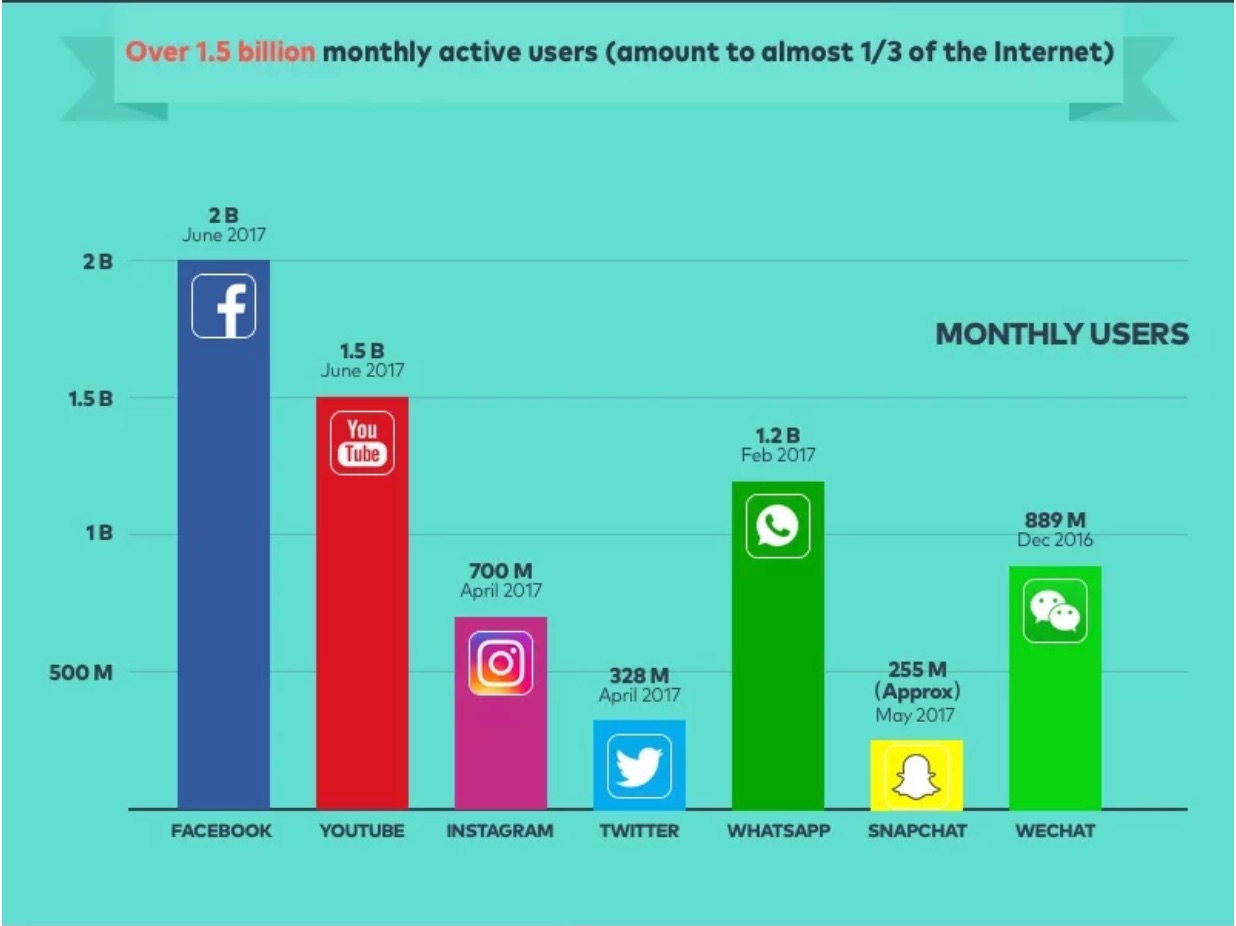
Over 30 million users log on to watch a total of 5 billion videos each and every day.
These numbers are massive.
However, these numbers still don’t rival Google, which processes about 3.5 billion searches per day.
So, how can you drive even a fraction of the traffic with YouTube that you could with Google?
Well, the beauty of YouTube is that it allows you to share videos.
While Google does display YouTube videos as part of its results lists (Google does, after all, own YouTube), the results aren’t quite the same.
In order to appeal and reach these video-lovers, you need to create YouTube content.
Because YouTube reaches more people from the ages of 18-49 than any cable network, this is particularly true if you’re marketing to younger generations.
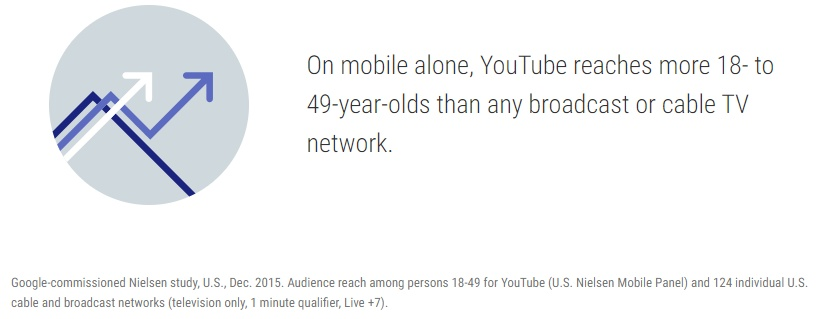
Gen Z’s love affair with YouTube runs especially deep.
In fact, 50% of Gen Z-ers told AdWeek they wouldn’t be able to live without the sharing site.
They also shared why.
For Gen Z-ers, YouTube is more than just a video-sharing site. Look at all of the things that they go to YouTube for:
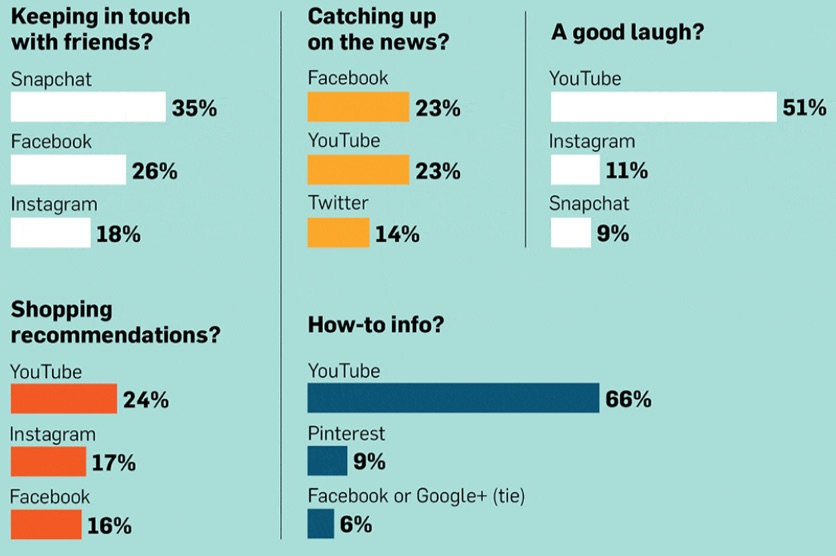
If Gen Z’s love for videos continues as they grow older and start making new purchasing decisions, this may be a major game-changer for marketing in years to come.
Uploading videos to YouTube allows you to appear in front of customers who use the site like a traditional search engine.
Then, with appropriately-placed links, you can drive those users back to your website.
Let’s take a look at how GoPro’s YouTube channel does this.
As one of the most popular YouTube channels around, GoPro uses their high-quality videos to show what their product is capable of doing.
However, simply uploading videos doesn’t drive sales.
That’s why they also make it easy for customers to get from their YouTube channel to a product page.
Here, we have a video shot users shot with the GoPro HERO6:

Right within the first couple lines of the description, viewers have a link that will bring them straight to the product page for the GoPro HERO6.
Interested customers can check out what the new camera is capable of, then easily make their way over to the GoPro website to get additional details or make a purchase.
And this isn’t the only way GoPro pushes traffic to their website.
You can also find a link to their website and their social media profiles within their cover image.

This gives YouTube users who land on the company’s channel an opportunity to get to their website quickly.
You can also add links to your website within your actual video content.
YouTube even offers features that allow users to create interactive video ads.
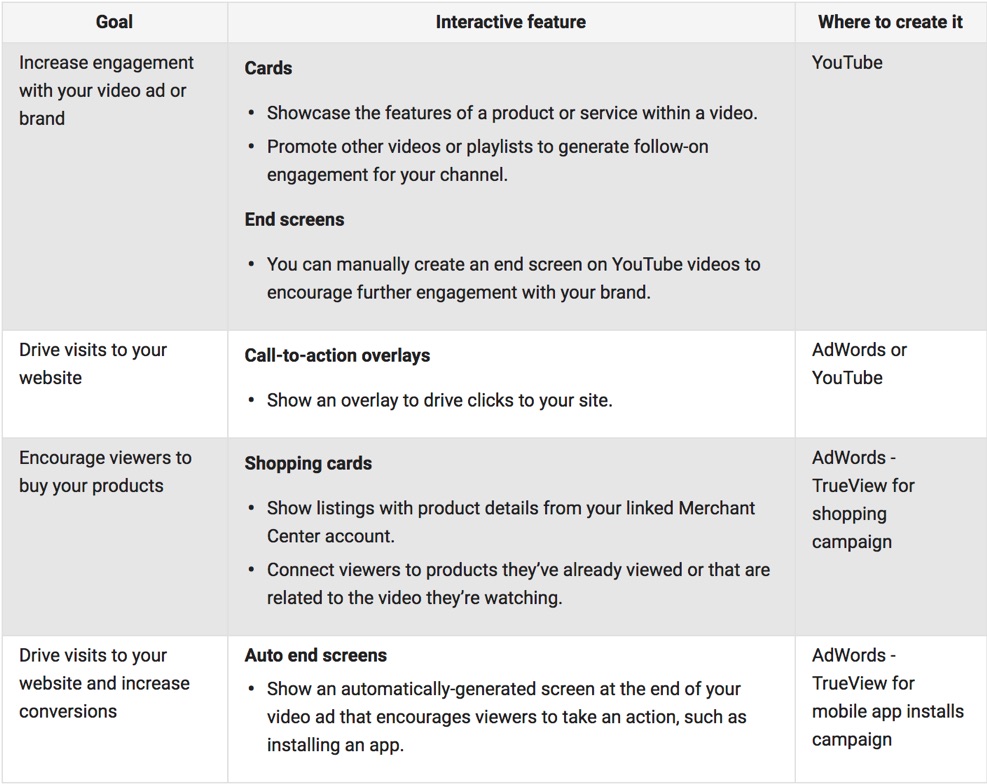
These features display either over the video itself or at the end of a video, prompting viewers to make the next move.
You’ll see from this chart that both call-to-action overlays and auto end screens help drive traffic to your website.
Here’s an example of a call-to-action overlay from a HubSpot video.
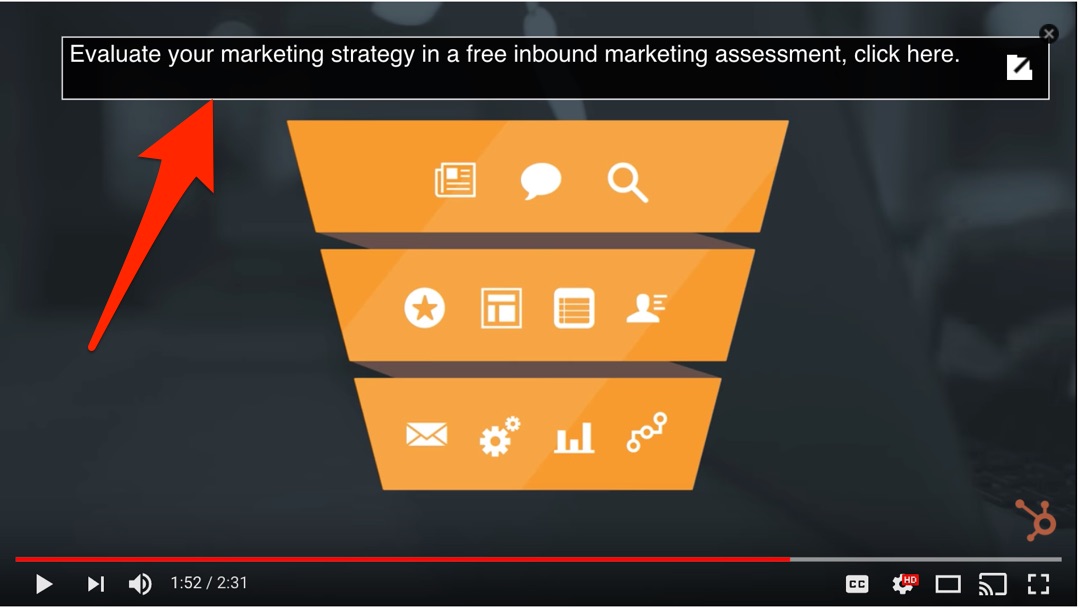
YouTube features the link right within the middle of the video. HubSpot timed it perfectly so that it appears when the viewer has a thorough enough understanding of inbound marketing to start feeling enticed.
Now, let’s compare this to an auto end screen.
Here’s an example from The Tonight Show Starring Jimmy Fallon.
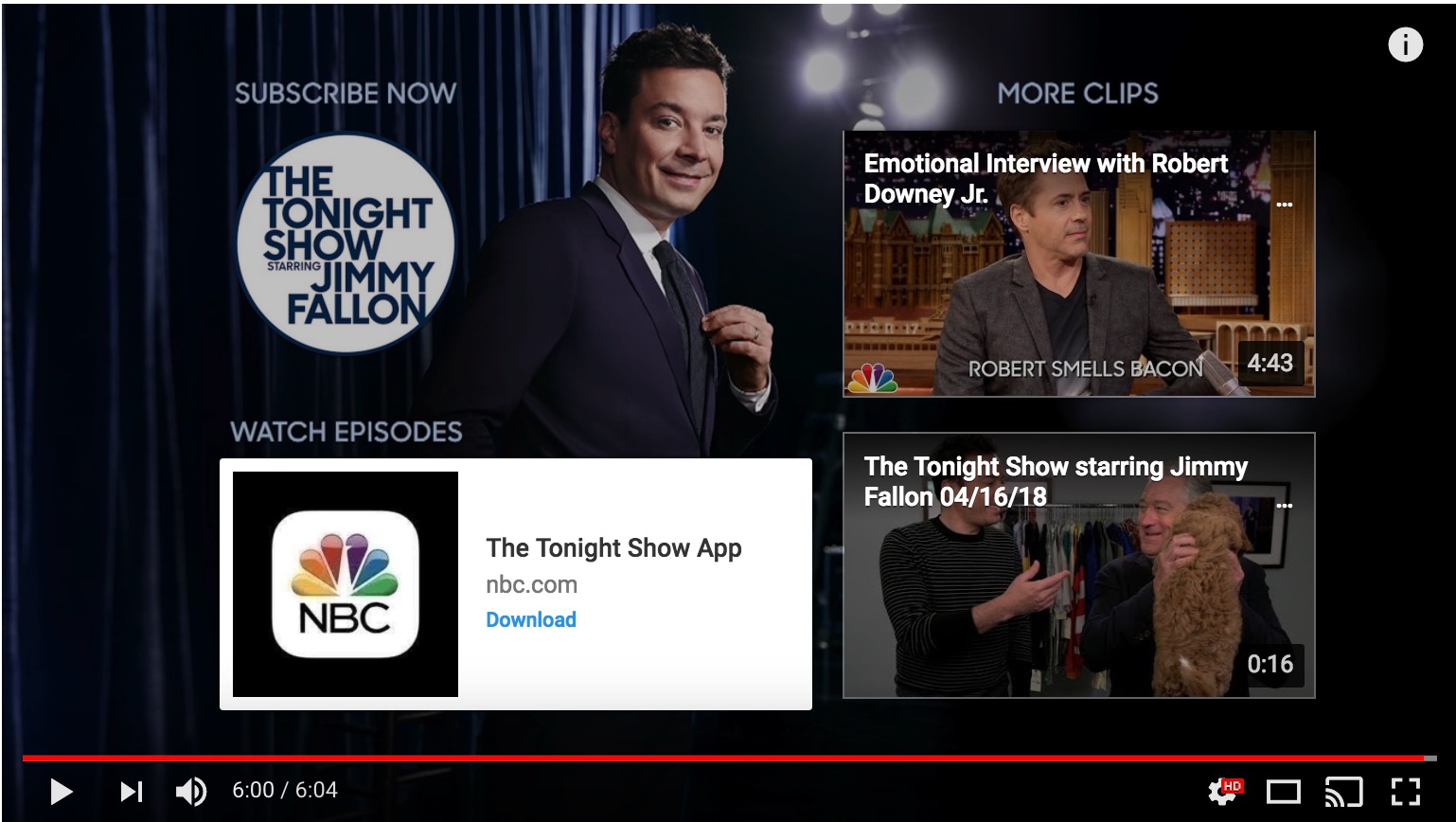
This presents the viewer with a number of different options when they’ve completed a video. It includes an offer to head to the NBC website to download the show’s app.
When using either of these interactive features, be sure to provide a clear and direct value to your watcher.
Also, keep in mind that you don’t want to plaster over your video with links to dozens of content pieces.
Instead, focus on just one or two that truly support the contents of your video.
2. Start conversations on social
If you do it correctly, social can rival Google as a traffic source.
According to Sprout Social, 48% of Millennials and 48% of Gen X-ers followed a brand on social media in Q1 of 2017.
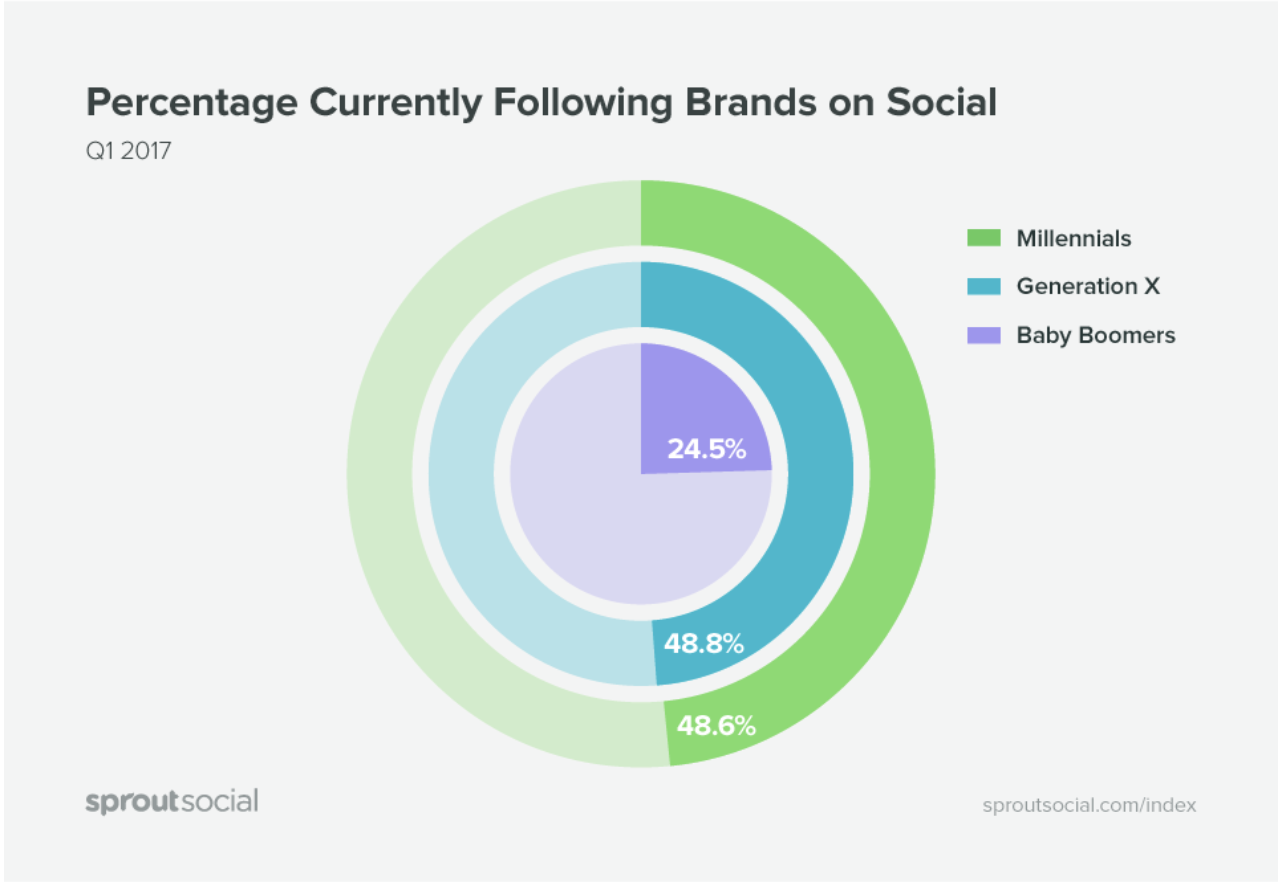
This means you have less noise to cut through to get to your target audience.
Additionally, social provides you with an opportunity to engage and entertain – something you’ll struggle to do on a search engine.
When social users scroll through their timelines and news feeds, they’re looking for just about anything that will pique their interest.
If you’re capable of providing something high-quality and interesting, they’ll click through to your site to check out more.
However, it’s important to recognize how social is changing for brands.
In 2017, social accounted for 25.6% of all site visits.
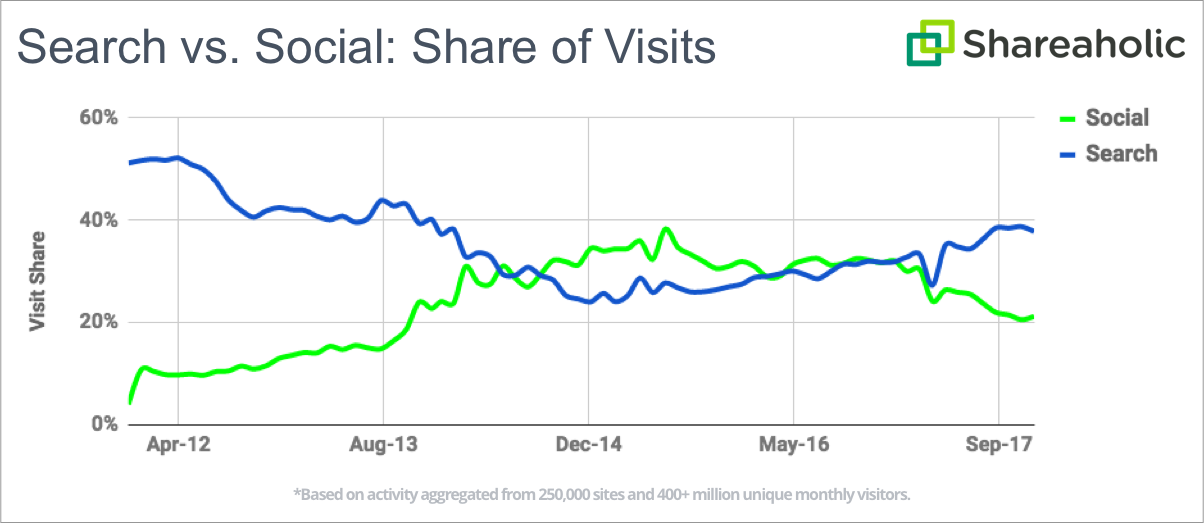
But this number is actually down from past years.
From the same study, we can see that from about the end of 2013 to the beginning of 2017, social was outperforming search for driving traffic.
Unfortunately, the changes to the Facebook algorithm led to serious declines in organic reach on the platform.
Compared to the first half of 2017, Facebook saw about a 9% drop in social media referrals in the second half of the year.
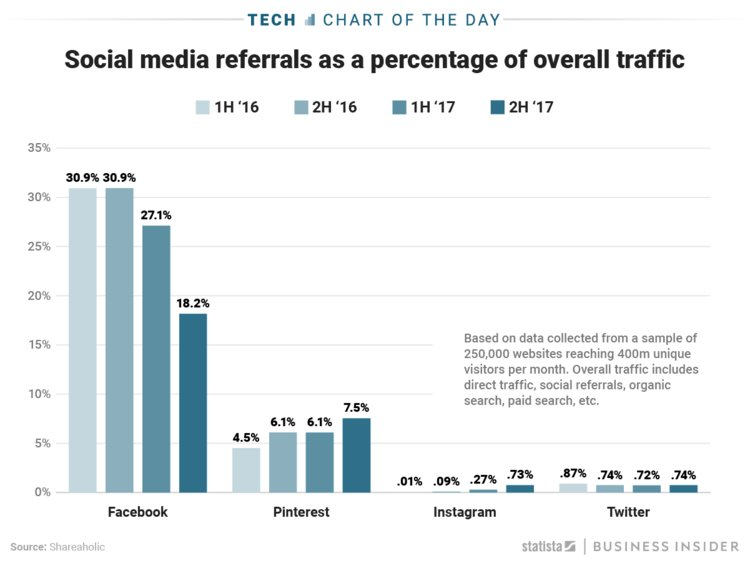
However, one social site’s loss is another’s gain.
While Facebook saw a large dip at the end of 2017, both Pinterest and Instagram saw some pretty significant jumps.
Regardless of the social networks, you choose to target, you want to provide meaningful and valuable information.
Remember that users log onto social to engage with their friends – not to have someone sell them something.
You want to find ways to engage your user while they’re still on the platform.
Buzzfeed Tasty does an excellent job at this.

Within their Facebook post, they include it all.
They created a video to grab attention.
They have friendly messages that establish the viewer as their friend.
And they include not one but two links that can either push the user to buy or to check out the recipe from the video.
And they do all of that without making it feel overwhelming!
This tactic has gained the Tasty Facebook page serious attention – almost 95 million followers!
To replicate this for your own audience, know your audience and create social content that blends seamlessly into their timelines.
Another way to get a conversation started is to use Twitter threads.
Twitter threads allow you to share insights, tips, and thoughts that connect by replying to yourself – and they have the power to bring you viral attention.
Check out what happened to travel blogger Hey Ciara.
On January 1st, she started this thread.

With this one thread alone, Ciara gained over 13,000 new Twitter followers, 6,000 new Instagram followers, and a 10x increase in her blog traffic.
Threads like these provide a distinct value to followers in a relatable way.
After sharing her secrets, Ciara drops a link to a blog post on her website containing more information.

Though the engagement with the link is significantly less than the first post, it was still able to drive traffic.
She already established authority with her followers in the thread. They trust her and know that she has information worth sharing. That gives them a reason to click on the link.
Creating a Twitter thread typically takes minimal effort. However, you want to be prepared to keep the momentum going.
Know the direction you’re going to take before you begin and be ready to share images, videos, or links that support your claims.
3. Partner with influencers
There are a lot of scams on the web, making shoppers wary about who they choose to purchase from.
If they’ve never heard of a business, they’re not going to pull out their credit cards after seeing just one ad.
Before they’re ready to shop, they need to trust you.
Unfortunately, it takes time to build trust organically.
However, you can speed up that process by working with influencers.
Almost nine out of ten individuals say that they trust online recommendations as much as personal recommendations.
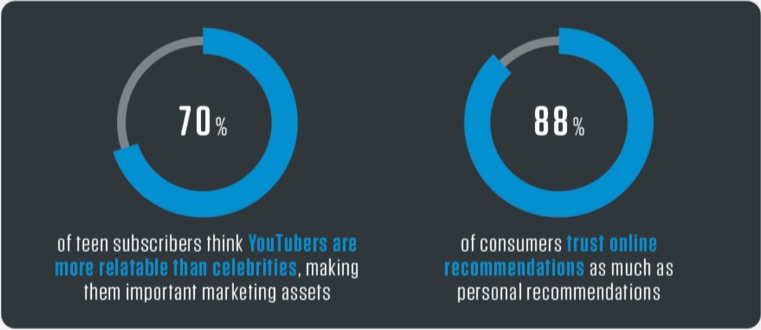
Influencer marketing gives your content a “stamp of approval” from someone your audience already values. This dramatically cuts down on the trust-building process.
There are two main ways that you can get in touch with influencers.
First, you can use the more traditional pathway of having influencers share sponsored posts.
Here’s an example of a sponsored post from Emma Blackery.
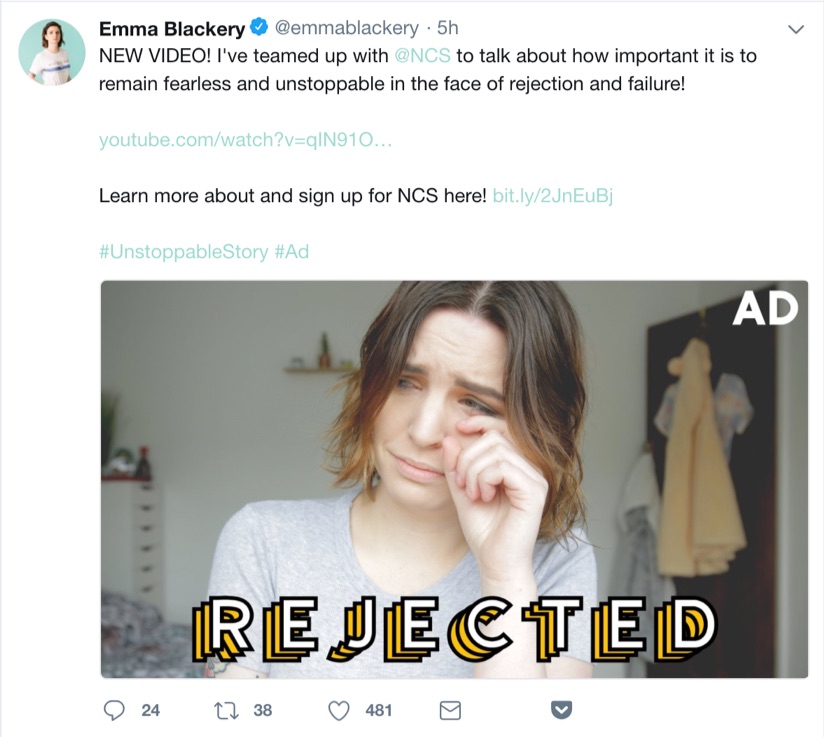
The National Citizen Service (NCS) sponsored the ad. In the UK, they offer kids from 15-17 years old a camp-like, professional development opportunity.
By sharing this post, Emma is bringing awareness to NCS while also vouching for its validity.
She also includes a link to the company’s homepage, encouraging her followers to check out the organization more.
Within just five hours, Emma’s post gained over 480 likes, 38 retweets, and 24 comments.
Compared to the handful of likes NCS’s own posts get, this kind of attention is huge.
Paying for advertisements can give you more control as a brand.
If you’re a small business or you have a limited marketing budget, it might not be right for you.
But even if you don’t have money to invest in influencer marketing, you can appeal to influencers for free by featuring them in your own content.
Posts like this one from Comm100 are a great way to connect with several influencers at once.
This not only gives you free promotion, but it can also help you create long-term relationships with influencers and experts you might want to partner with in the future.
If you choose to use this kind of content, have realistic expectations.
It isn’t likely that each influencer you mention will share the post, especially if they already have a large following.
However, reaching out to each expert to let them know that you’ve featured them might help you get a few new shares and a boost in web traffic.
One way of reaching out is to present a quote.
In this Twitter post from Jitesh Patil, he pulled a quote from Robbie Richards and then tagged him in the tweet.
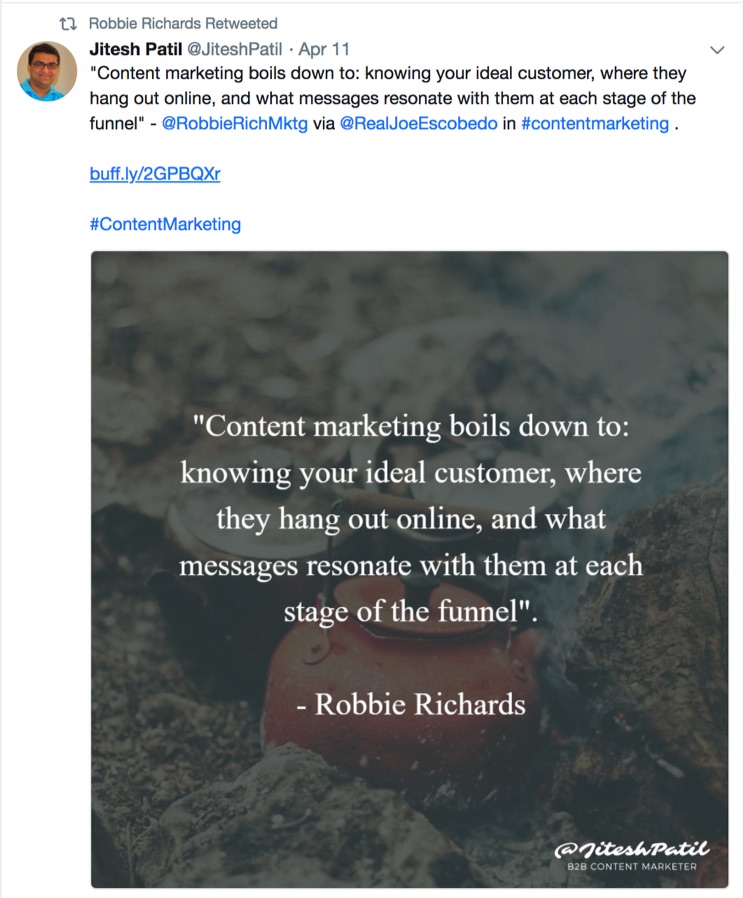
This gained Robbie’s attention, so he retweeted it to his own audience.
This kind of outreach makes it easy for the influencer to share your content. With just one click of a button, they’ve done their job.
You can also reach out via direct message. This is one of Gary Vaynerchuk’s favorite ways to network.
According to Gary, “the key is to connect first, provide value, and THEN given the right opportunity presents itself, ASK.”
This kind of relationship can help you establish long-term relationships with influencers.
4. Take advantage of your email subscribers
The conversation about whether or not an email is dying has been happening for years.
Many markers are quick to support social or mobile apps over email marketing.
However, in Adobe’s 2017 Consumer Email Survey Report, they found that email was the preferred form of contact for 61% of survey participants.
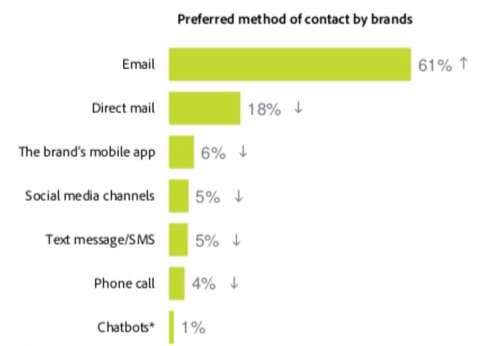
In fact, email was the only contact method that actually improved between 2016 and 2017.
But user preference isn’t the only thing that email marketing has over other contact methods.
The average click-through rate is also much higher.
For email, the average click-through rate is 3.42%.
While this might seem low, the average click-through rate for Facebook Ads is only 0.90%.
This means that you’re much more likely to get web traffic from your email subscribers than your social profiles.
And that starts with personalization.
Here’s an example of personalization from LinkedIn.
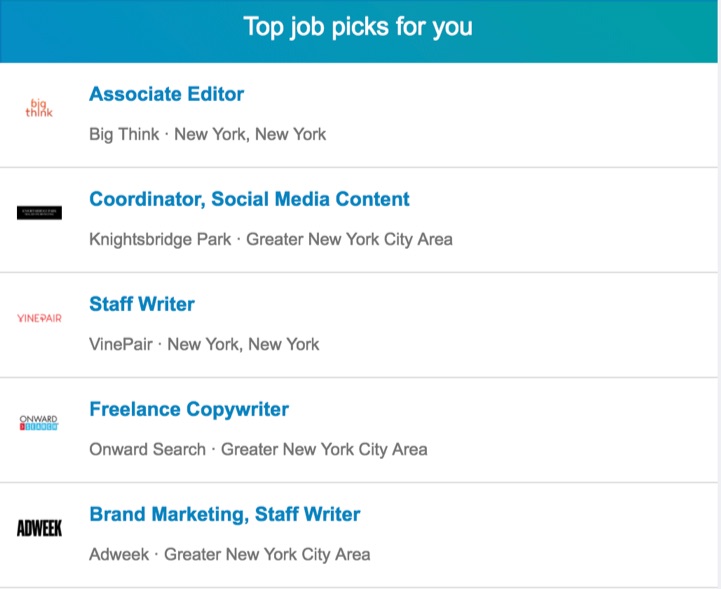
LinkedIn takes a user’s location, job title, and qualifications and provides unique job recommendations for them.
This goes far beyond simply changing the name at the top of a message. For best results, you need to personalize the email’s body, too.
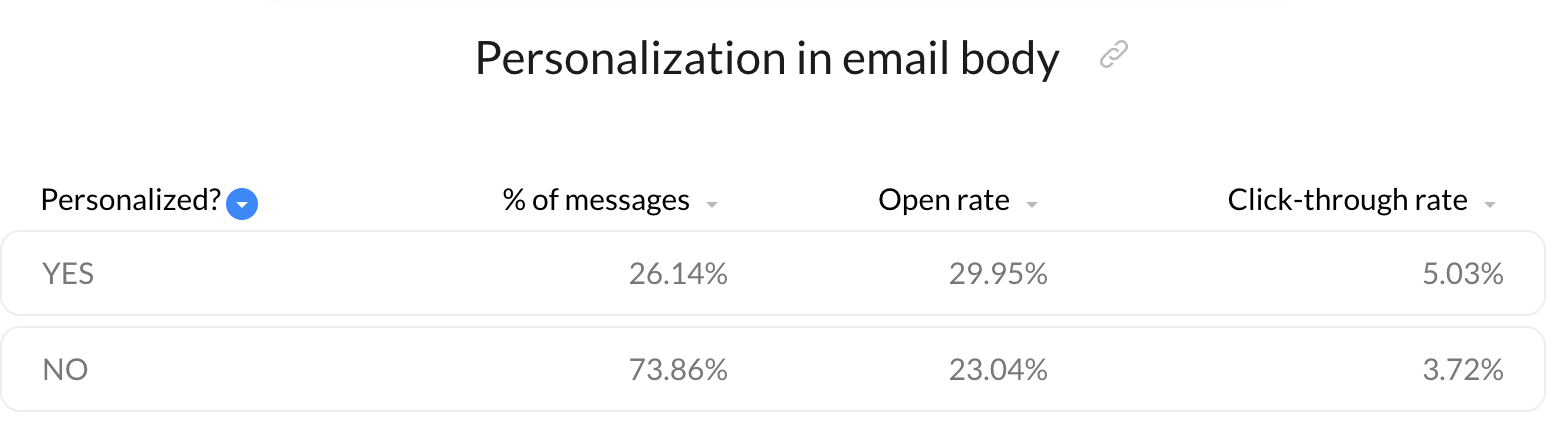
According to research, personalizing email bodies has a dramatic effect on open rates and click-through rates.
Open rates are almost 7% higher with a personalized email body, and click-through rates jump by over 1.3%.
You can also personalize the sender name for even stronger click-through-rate results.
Take this example from HubSpot.
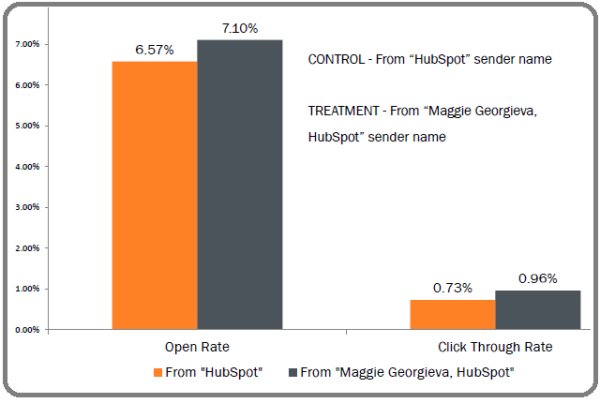
When they sent a message from “Maggie Georgieva, HubSpot,” there was a 0.50% higher open rate and 0.25% higher click-through rate than when they sent the email from just “HubSpot.”
For HubSpot, this meant that a personalized sender generated 292 more clicks.
To improve click-through rates even further, you also want to optimize your emails for mobile.
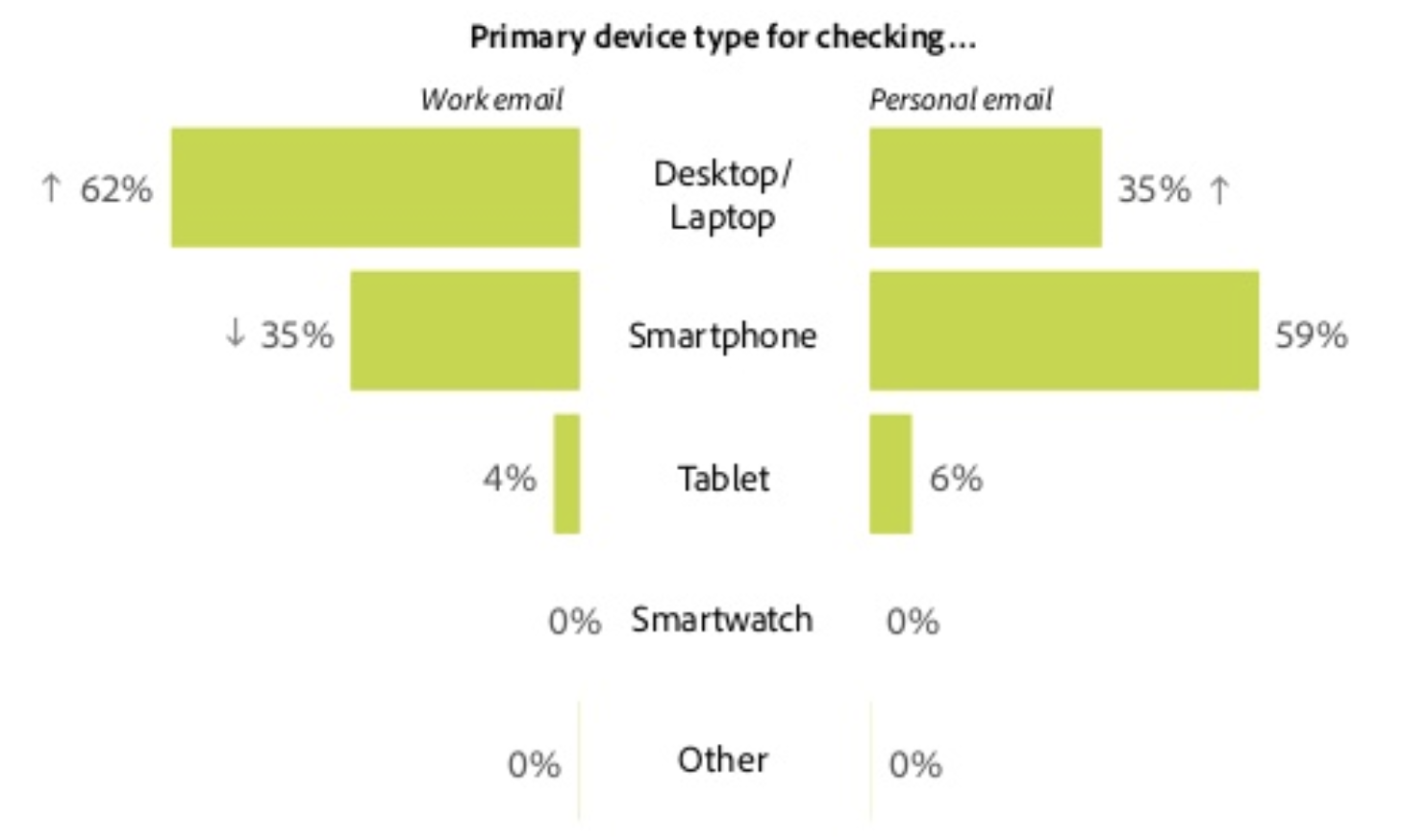
In the study from Adobe that we looked at above, we see that users are much more likely to check their personal email on a smartphone than a desktop or laptop.
Make it easy for your email subscribers to get back to your website regardless of the screen they’re viewing your message on.
Use CTA buttons rather than in-text links and keep your messages short and to the point.
Provide enough information to pique your reader’s interest, but your end goal should always be to push subscribers back to your site.
5. Provide assistance on forums and question sites
People have a lot of questions.
And they don’t exclusively turn to Google to get their answers.
Users turn to forums and question sites.
Participating in conversations on sites like Reddit for Quora can help you attract individuals looking for answers beyond what Google can provide.
With over 330 million users, Reddit is the fourth most-visited website in the US.
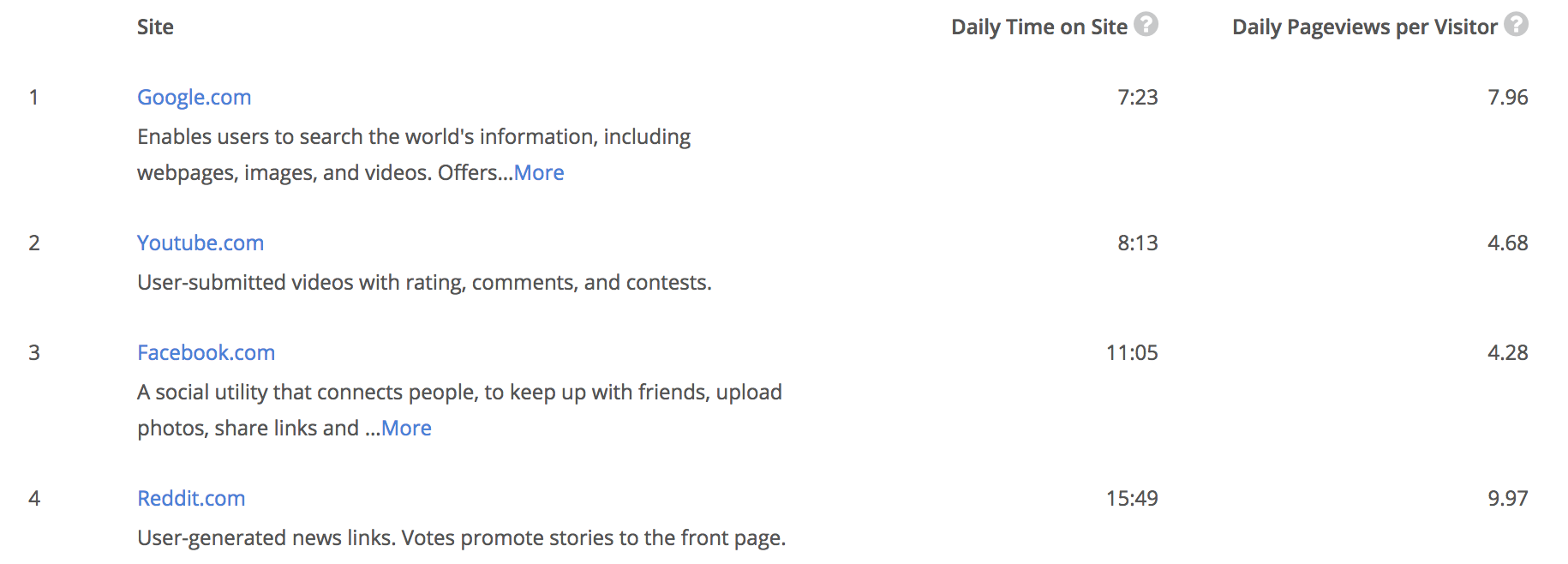
Although Google, YouTube, and Facebook outrank the site in terms of popularity, Reddit beats them all based on the average amount of time that users spend on the site.
Reddit can be a great place to promote your site. However, you need to be strategic with how you go about it.
Most subreddits have strict rules about what you can and can’t say in their comments.
Each subreddit has a moderator. If you post the wrong material, they’ll delete your post and potentially even ban your account.
Users turn to forums like Reddit for help – not to have someone sell to them.
But that doesn’t mean that you can’t use Reddit to drive traffic to your site.
One of the best ways to do it successfully is through an “ask me anything” session, or an AMA.
Here’s an example of a successful AMA from Student Loan Hero.
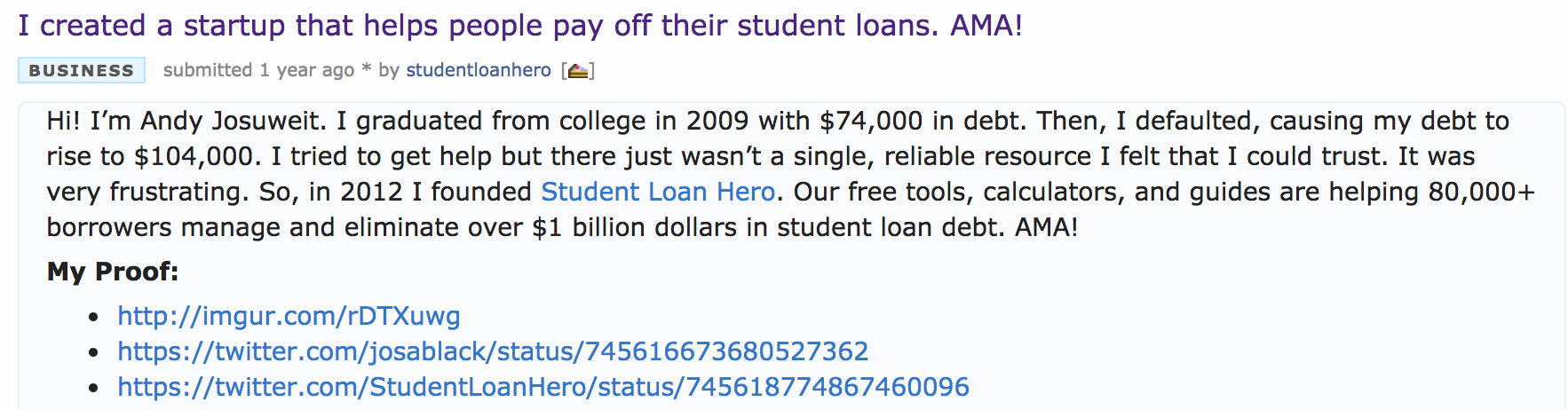
While the post is promoting the business, it’s more focused on providing Reddit users with valuable information about paying off debt.
By answering questions, Student Loan Hero is able to improve trust with Reddit users and get them interested in the brand.
They also find ways to link to their content and tools as they answer questions.
Here is an example.
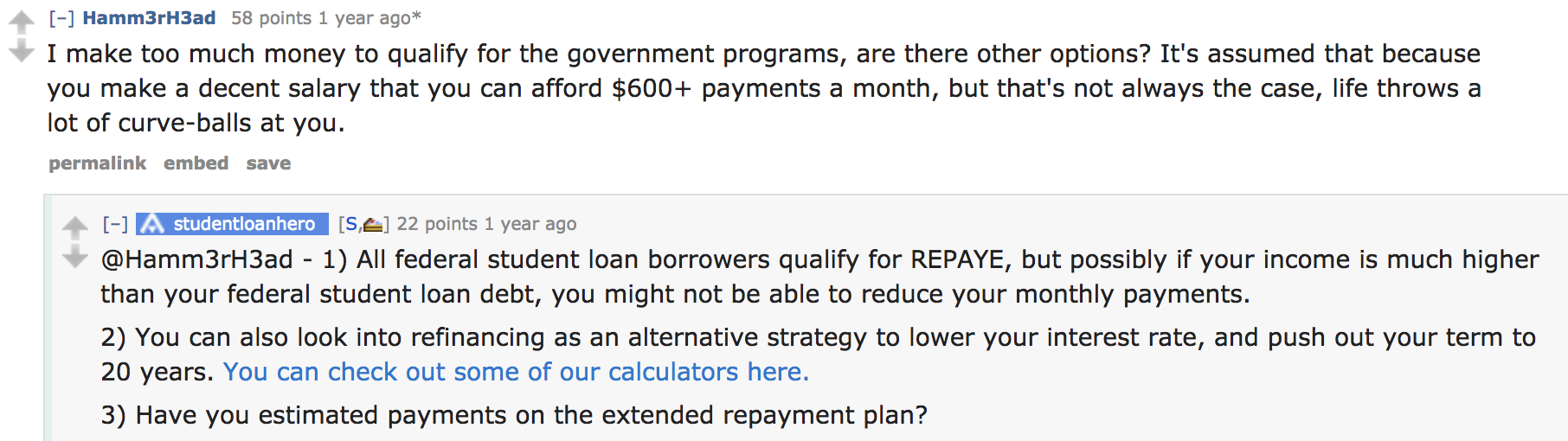
Student Loan Hero isn’t using this platform as a way to spit out ads.
Instead, they’re framing their content to fit the unique needs of each individual asking questions.
If you’re trying to be spammy on Reddit, users will be quick to call you out.
However, you can still see a lot of success from the platform by making your value clear.
Jeff Callahan, the creator of one of the most successful Reddit posts, says that success on the platform begins with a “non-clickbaity” title.
He begins his post by sharing who he is and how he relates to the other users. Then, he communicates exactly what he has to say and why he’s credible enough to say it.

He then follows these same ideas throughout his post, always relating back to the user before providing tips or insights he can back up with personal experience.
If you use it wisely, Reddit can be a great place to bring visitors to your website.
You can also use Quora, which has 200 million unique monthly visitors, to answer questions from potential audience members.
Here’s an example of how I responded to a Quora question.
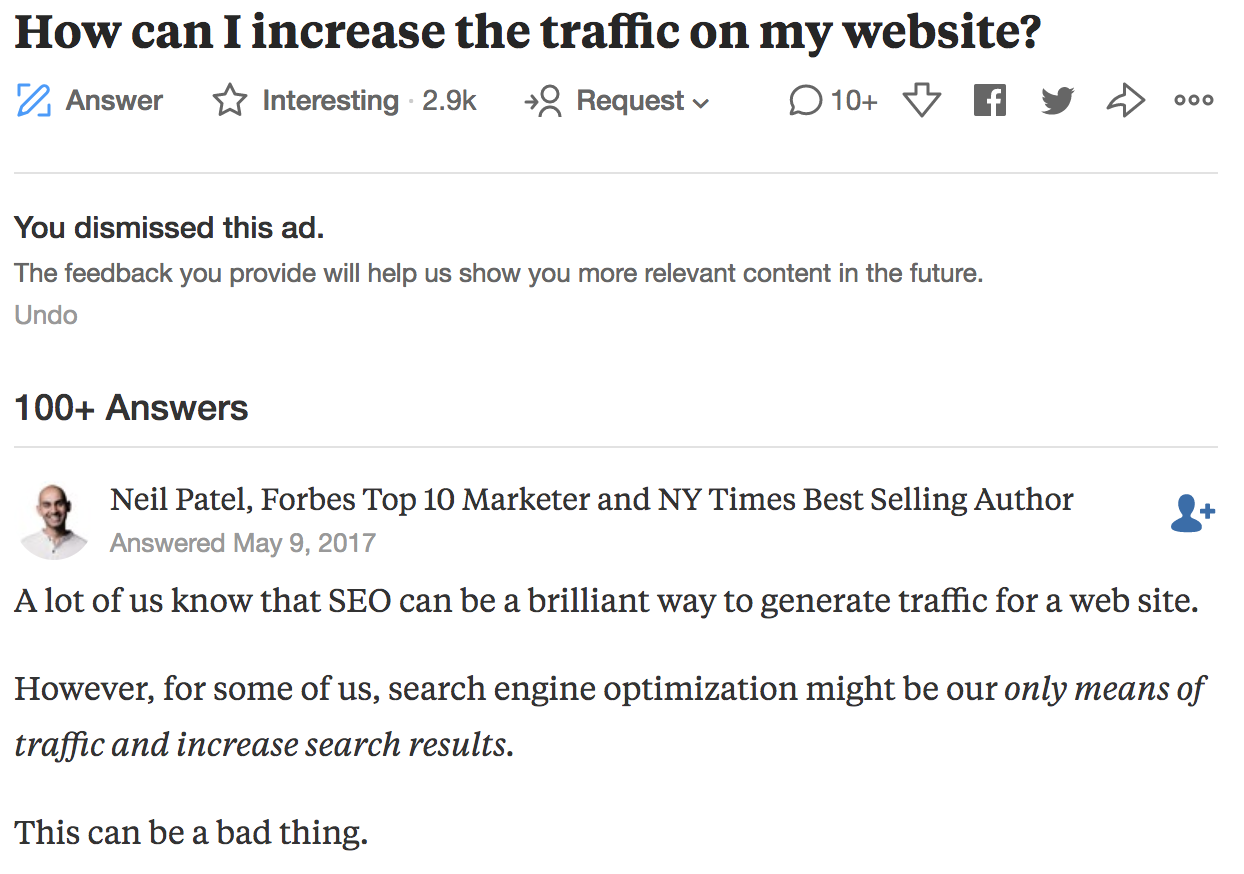
Like Reddit, Quora allows you to engage with individuals who are asking questions. Answering questions helps you prove your value to them before they head to your website.
This can encourage more traffic to your page.
Kevin Lee, the founder of Product Manager HQ, attributes his business’s start and growth to Quora.
According to his post about how Quora changed his life, Kevin explains that Quora brought thousands of new subscribers to his blog.
He says that people in public have even recognized him from his Quora answers.
If you’re in a niche industry, there are other forums you may want to take advantage of.
For example, marketers may want to become active on Inbound.org while lawyers should check out Avvo.
6. Take advantage of guest posting
Guest posting can be a powerful way to bring new traffic to your website.
About 57% of business bloggers use guest posting as part of their content strategy.
Some major brands even used guest blogging to get their platforms off the ground.
For example, Buffer used guest blogging to grow their site to 100,000 users in their first nine months.
When looking for guest posting opportunities, you want to find sites that are within your niche but aren’t direct competitors.
Hosting a post on another website puts your content in front of a new audience, driving new leads back to your page.
Check out this example of a guest post on Entrepreneur.

As you can see, Dan Dowling, the guest author in this example, has links to his Facebook page, Twitter account, and website homepage.
Guest posting on other websites isn’t the only way to use the strategy to drive traffic.
You can also feature guest posts on your own site.
This not only gives you a bit of a break in your content schedule, but it also encourages guest posters to share links to your page.
Here’s an example from ProBlogger.
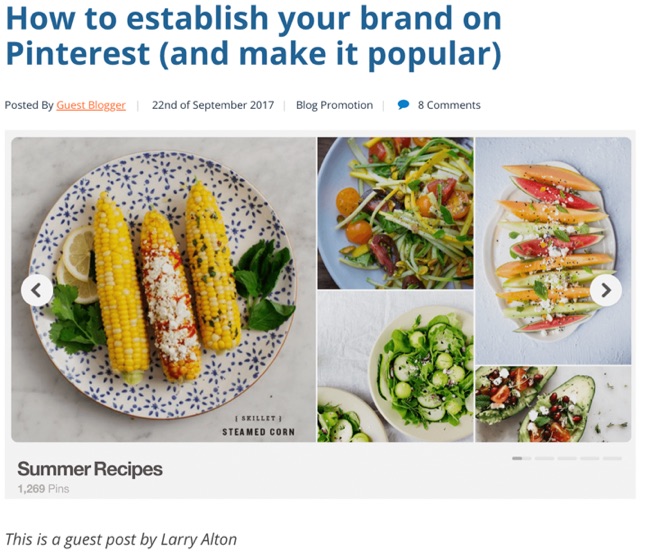
ProBlogger benefits from this post because the author, Larry Alton, will want to advertise that they’re featuring him on their site.
Each time Larry promotes the piece, ProBlogger gets a new wave of traffic.
But blogging isn’t your only option.
You can also appear on podcasts or webinars to share your opinion and expertise.
Here’s an example from SEMrush’s Search Marketing Scoop with David Bain.

In this episode, both Barry Schwartz, News Editor at Search Engine Land, and Richard Fergie, a consultant at E-Analytica, jump on the podcast to talk about paid and organic search.
These types of partnerships typically take more time, but they can provide serious returns in the end.
You want to think of what podcasts or webinars your audience may be engaging with that aren’t your direct competitors.
Conclusion
You don’t need Google to drive traffic to your website.
Sure, it helps.
But it shouldn’t be your only traffic source.
In fact, for the most success, you should have multiple pathways bringing new traffic to you.
Use these six traffic-generating sources as a starting point for diversifying how you bring in new visitors.
Pay close attention to your customers and target audience.
If they’re not responding to a particular pathway, don’t waste your time.
When you provide what they’re looking for in an avenue they’re already engaging with, traffic will flock to your page.
What are some of the best traffic sources for your website outside of SEO?
About the Author: Neil Patel is the cofounder of Neil Patel Digital.
Source: feedproxy.google.com