
Tag Archives for " YouTube strategy "

How to Create a Content Calendar for Your YouTube Strategy
In the world of social media marketing—planning needs to become your best friend if you want to find the success you’re looking for.
We’re not talking about just getting tons of followers… we’re talking about those YouTube videos that make SALES.

And the only way to make those sales is to publish the videos that drive viewers to your landing pages.
That’s where your content calendar comes in.
If you don’t have a content calendar, you’re going to find yourself confused and unsure of what’s on your plate really quickly.
This strategy might work for a little bit but after a while, you’re going to realize that scalable strategies are where  it’s at.
Having a content calendar is going to give you a roadmap of what’s on your plate this month and when you should be promoting what offer.
It’s going to be one of the biggest reasons you’re getting more than followers, you’re making SALES!
And isn’t that why we’re making YouTube videos in the first place?
So let’s dive into how you can create a content calendar for your YouTube strategy that makes your life as a business owner, agency, or marketer sooo much easier.
5 Steps to Create YouTube Content Calendar
Here are the 5 steps to create your YouTube content calendar.

#1: Choose your upload schedule
How often are you going to upload videos?
There are a lot of different schedules you can choose for your YouTube strategy, and there isn’t necessarily one right answer.
It just depends on your industry and your team.
For example, a YouTube vlogger can’t expect to get much pay-off from uploading one video a month.
For their industry, viewers want to have constant contact with their favorite vloggers and they’ll want to see them as much as possible.
Uploading 3 videos per week is a good start for a vlogger.

On the other hand, if you’re an agency owner posting about marketing strategies—you can post one GREAT video per week.
Or, if you’re feeling like an overachiever, you can post 3 times a week.
That brings us to the second part of choosing your schedule: your team.
If you are a one-person show, make sure your YouTube schedule is realistic.
For example, if you need to do all of the work within your agency and shoot, edit, and upload 3x YouTube videos a week—that might lead to biting off more than you can chew.
If you have a 10-person team and you know that between two of your team members they could handle a posting schedule like this, then green light your way to a 3x per week posting schedule.
Decide what schedule works best for your industry and your team and then decide what days your videos are going to live.
It could be every Tuesday, or every Monday, Wednesday, and Friday.
Whatever works best for your audience and your schedule.

#2: Choose the topics you’ll make your videos about
Bet you weren’t surprised to see this task on your content calendar to-do list.
That’s right, the second thing you need to create a content calendar is…content.

Sit down and figure out what content works best for your audience right now.
You’re going to want to come up with as many content topics as you need to create videos per month (and maybe a few extras in case one topic doesn’t end up working out).
For example, if you’re posting 1 video per week each month you need 4-6 content ideas.
You can either come up with all of these ideas in one brainstorming session each month or come up with 12+ ideas at once so you have 3 months of content ready to film.
But WHERE do you find content topics that your audience will be interested in watching?

- Quora: Search for questions related to your industry and create videos that answer those questions
- AnswerThePublic: Search for your industry and look for questions you can answer in your videos
- Ask your customers: Send out surveys on what content your customers want from you and look through customer feedback for questions that come up often
- Facebook groups: Read through Facebook group posts related to your industry to see what your customer avatar is struggling with
- YouTube: Search YouTube to see what content is doing really well in your niche and figure out how you can make what they have even better
With your upload schedule and content topics in hand, it’s time to whip out your upcoming product launches, promotions, and offers to make sure your content is in line with what you’re selling at the time.
#3: Put your product launches, promotions, and new offers in your calendar


If you’re wondering where your YouTube video topic ideas went—we’ll come back to them in the next step.
First, we want to make sure your upcoming product launches, promotions, and new offers are in your calendar so we know when you’re going to need your content to support certain products or services you offer.
This is the time to put everything in your calendar on the DAY that it is going to launch.
You want to have the day your new product is launching, the day you’re going to announce a new promotion, and the day you’re going to talk about a new offer.
It’s important that you have each of these dates because we’re going to work your YouTube videos around these promotions so that your content feeds into everything you’re running at that time.
#4: Put your YouTube video content ideas into your calendar

Alright, now for the part that you probably thought was coming first in this article—putting your YouTube content in your calendar.
Now that you have all of your launches, promotions, and offers in your calendar it’s easy to tell what content topic should go live each week.
For example, if we’re running a promotion on our Social Media Mastery Course in the middle of the month, we want to post a social media marketing-related YouTube video that week so we get more traffic to that offer.
See what we’re doing here?
Your YouTube strategy isn’t just there for views and followers, you want to be using YouTube as an asset to getting more sales in your business.
By pairing your YouTube content calendar with your promotions calendar you’re creating a cohesive calendar that fits together like peanut butter and jelly. 
#5: Choose the dates you’ll promote your YouTube videos

Last but not least, your content calendar needs to have the dates that you’ll be promoting your YouTube content as well.
For example, if your schedule is to post YouTube videos on Tuesdays, then you’ll want to be promoting that video on Monday and Tuesday each week.
On Monday you’ll talk about how it’s going to be live tomorrow and ask your audience to turn their post notifications on so they know when your video is live on YouTubeOn Tuesday, you’ll be reminding your audience that your video just went live and giving them the link to check it out
You want these dates in your calendar so you can SEE what you’re promoting and on what day.
This means that when it’s time to promote a video, you’re not stumbling to get your promotional assets together—you’re good to go and can sail smoothly through the day.
The reason content calendars exist is to make our lives as content creators easier.
Use a YouTube content calendar to fit your YouTube strategy into your entire marketing strategy and to make sure you stay on track with your uploading schedule.
The post How to Create a Content Calendar for Your YouTube Strategy appeared first on DigitalMarketer.
Source: digitalmarketer.com

The 5 Most Important Metrics to Track Your YouTube Growth
YouTube is the second most used search engine in the world, second to Google.
That means that there’s a pretty big (okay—HUGE) chance that your customers are watching YouTube.
They’re using the video platform to find entertainment and education.
Depending on your business, your YouTube strategy probably involves a little bit of both.
For example, we love teaching about email campaigns to boost conversions… while one of our managers wears a flamingo shirt.
But, what’s a YouTube channel without a strategy?
A very bold idea.
While we love bold ideas, we love strategy just as much.
What do all great strategies have? METRICS!
Metrics tell us when we’re doing well and when we’re doing badly.
They’re our lighthouse when we’re at sea trying to find the mystical land of Traffic and Conversions.
5 Metrics to Track Your Growth on YouTube
If you’re looking to grow your YouTube channel, here are the 5 most important metrics to track your growth.
NOTE: The first 4 metrics can be tracked in your YouTube analytics. The last metric can be tracked with a link tracker.
#1: Watch Time
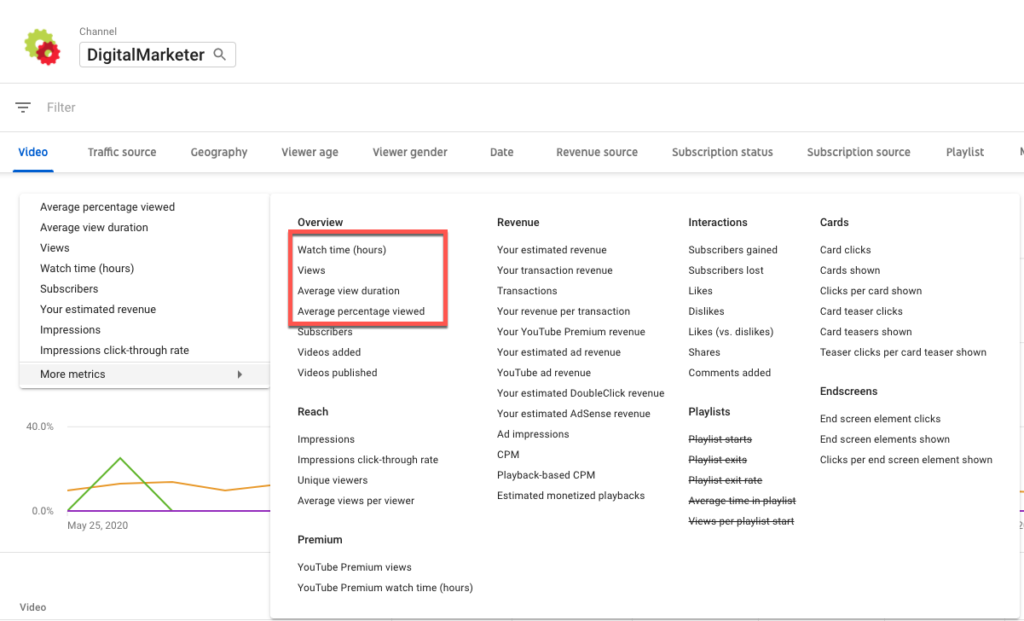
Watch time is the amount of a video somebody watches.
On YouTube, they’ll average your watch time for each video and tell you in your analytics.
Don’t be scared if you find that your watch time isn’t 100% for every video.
This is kind of like getting a 100% conversion rate—you’re going to have to be so perfectly niched that you create the holy grail of marketing success.
That can happen… but don’t short yourself if it doesn’t.
Watch time is an extremely important metric for your YouTube growth because it’s telling you how well your content is answering your viewer’s problems.
If viewers don’t feel like they’re getting what they were promised in your title and thumbnail, they’re going to click off of your video.
On the reverse, if they feel like you’re educating them and keeping their attention—you’re going to have great watch time metrics.
For example, if we noticed that our watch time was lower than 40% for a video, we’d start to really evaluate that video’s template and see what needs to be done to improve that watch time.
Maybe our introduction was too long or the amount of time spent talking about the topic of the video wasn’t concise enough, and viewers decided to go elsewhere.
We’re always going to aim for an above 40% watch time on each video we publish and use the videos that perform well to show us what general template to follow with future videos.
#2: Impressions Click-Through Rate
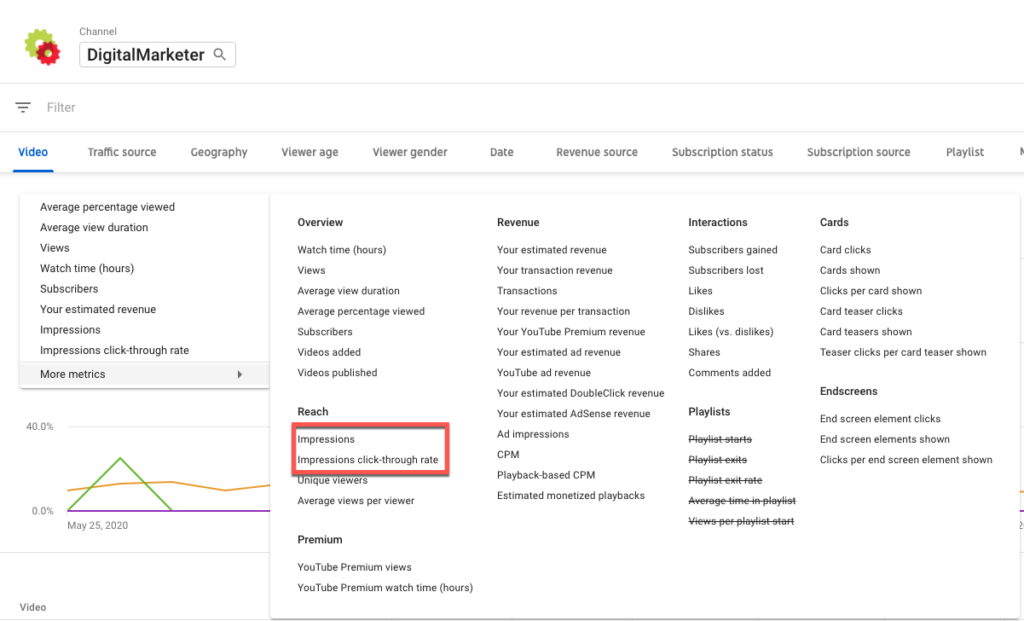
Impressions click-through rate tells you how often a video is being clicked.
You can equate it to the click-through rate (CTR) of a Facebook ad.
For every set amount of people who saw your video in their feed, how many clicked to watch it?
When your videos get a high CTR, you did something really well.
That could be that your title nailed your customer avatar’s pain point and your thumbnail was eye-catching and had the right information on it.
As most YouTube stars would tell you—it’s all in the thumbnail.
Changing your thumbnail can have drastic effects on your CTR.
If you’re constantly seeing a less than 5% CTR on YouTube, start to change the creative of your thumbnails to see if you can improve them.
For your videos performing well, take note of their thumbnails and titles and how you can replicate that in the future.
Remember, your metrics are here to show you the way… let them guide you.
#3: Most Popular Videos
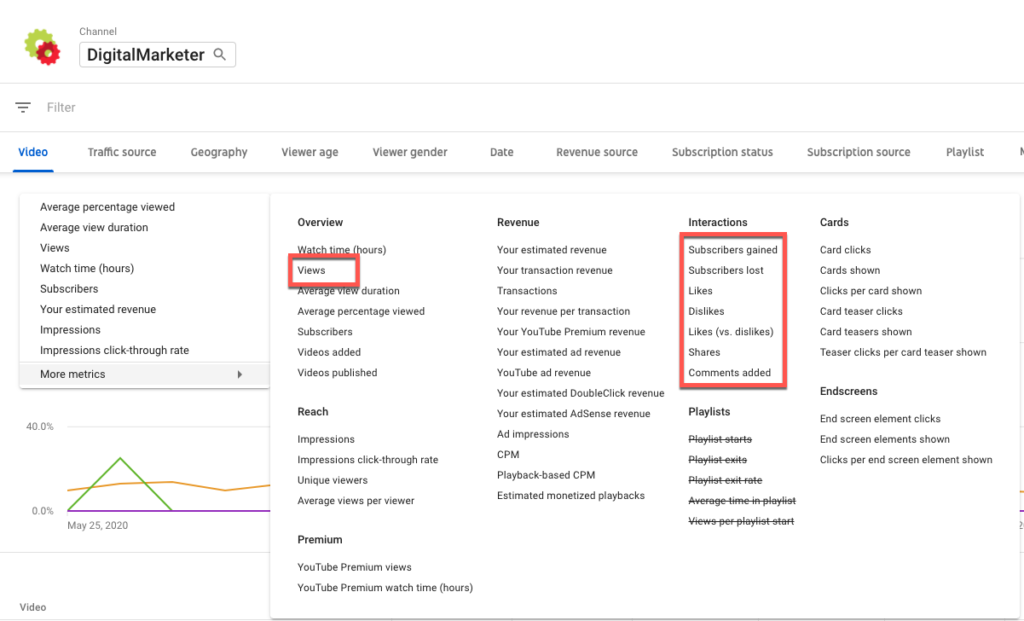
You’ll find your most popular videos by going to your YouTube page and clicking on the filter option, and choosing “Most Popular.”
This will show you your most popular videos in descending order, so you can see what videos are carrying the weight for the rest of the team.
This metric is going to help grow your YouTube channel by being a direct line of communication between yourself and your customer avatar.
What content that you created are they LOVING… and how can you create more of it?
Another bonus about this metric is that you can also see what your competition’s most popular videos are.
This will give you more content ideas as well as validate what content your viewers want to see.
If they have a similar audience to yours, you know that your audience also probably wants to see that content.
#4: Audience Information
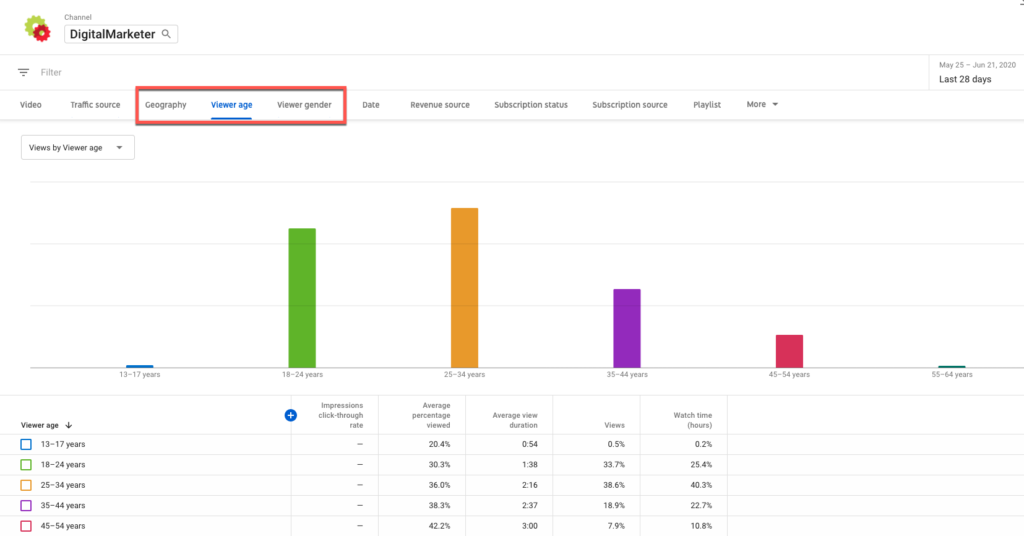
Audience information is essential knowledge for anybody trying to grow a social media following or business.
Knowing your audience is key to creating the content they want—and to making sure you’re creating content for the right people.
There are 2 metrics to look at here, the first is your internal traffic sources.
This tells you how many viewers came to your video by having it suggested to them, by finding it through YouTube search, by choosing it on your channel, etc.
The second is to look at your external traffic sources.
How many viewers came from a Google search, Facebook, a website, or a link in an email they received?
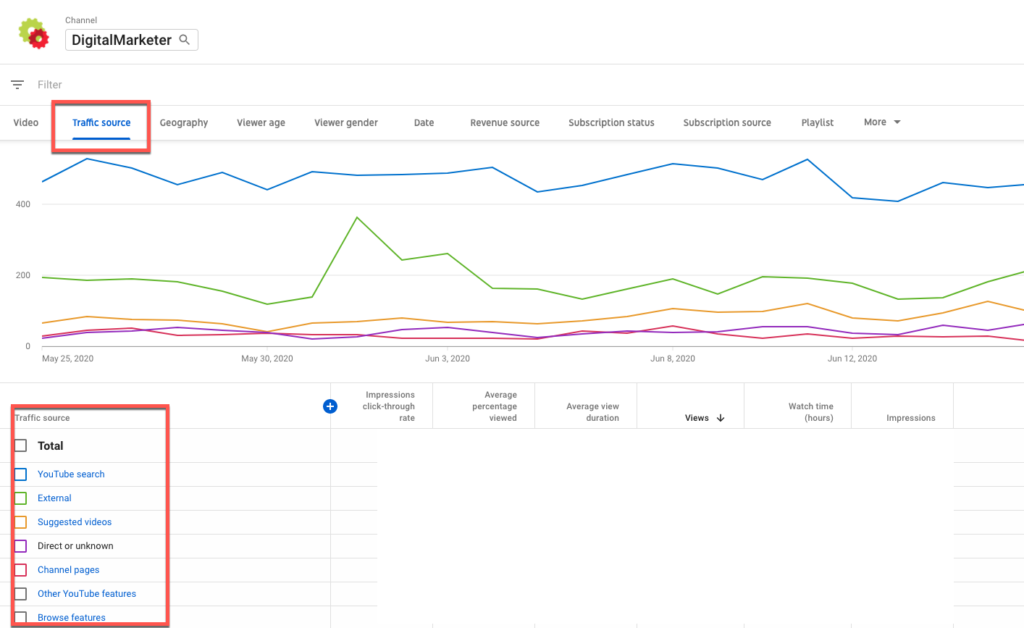
Knowing these metrics tells you where your audience is coming from, and what you’re doing right or wrong.
For example, if you’re seeing that a lot of your views are coming from YouTube search—you’re doing a great job at creating videos that your customer avatar is specifically looking for.
If you’re sending an email blast to 100,000 people every week with your recent YouTube video and you’re not seeing any sources coming from email—your email subscribers aren’t taking the bait in your email to watch your videos.
If it’s important that they watch them, it’s time to create a new strategy.
#5: Actions Per Video
Actions per video are the number of viewers who clicked the link that you asked or told them about in the video.
This is the only YouTube metric that can’t be tracked with YouTube analytics—but it is so important to make sure you’re paying attention to it.
Having one million views on a YouTube video is great, but if nobody clicked through to your lead magnet, then how successful was that video?
For example, you may have a video that is one of your least popular videos, but it has a 15% CTR for your call to action.
While the video title or thumbnail isn’t meeting the needs of an average viewer, your call to action is.
This tells you that how you framed your call to action or the offer you created for that video is really good.
You should try and do that again.
To track this, you’d use a link tracker to see how many viewers clicked the link you placed on the video or in your description (or both!).
Then, you’re going to see how many people viewed the video. Divide the number of viewers who clicked by the total number of viewers and multiply by 100 to get your link’s CTR for the video.
Your YouTube metrics are going to be your lighthouse, guiding you towards building your following and growing the awareness, subscribers, and customers of your business.
Use these metrics to grow your YouTube channel and sail smoothly into the port of the mystical land of Traffic and Conversions.
We’ll see you there.
The post The 5 Most Important Metrics to Track Your YouTube Growth appeared first on DigitalMarketer.
Source: digitalmarketer.com