
Tag Archives for " Wix "

WordPress Vs. Wix
WordPress outshines Wix in terms of flexibility for allowing users of all skill levels to create a more sophisticated website and customize it to their liking. Wix, on the other hand, forgoes some flexibility so beginners and non-coders without advanced needs can launch their websites in no time.
Disclosure: This content is reader-supported, which means if you click on some of our links that we may earn a commission.
With WordPress and Wix serving different users, the final decision ultimately depends on your experience level and purpose in launching a website.
WordPress or Wix: Which is Better?
WordPress is a content management system best for those who value flexibility and versatility.
It doesn’t come with great functionality right out of the box, but you can customize it through thousands of themes and plugins.
Get your website idea off the ground using WordPress’s powerful, flexible platform.
Wix is best for beginners who want to whip up a basic website that does not need advanced features.
It’s an entry-level tool with an intuitive drag-and-drop editor so you can churn out a website in minutes without much technical know-how. Create your own website today and let Wix do the heavy lifting.
A Review of The Best Website Builders
Website builders provide the tools you need to spin up basic or highly-versatile websites without touching any code.
But it can be challenging to decide which website builder fits your needs if you’re clueless about what to look for.
With years of experience under my belt, I’ve learned the key differentiators you should look for when shopping for a website builder.
Using this in-depth review of the top four website builders, you’ll be able to zero in on the best platform that will set up your website for future success. Both WordPress and Wix made it into the top four.
WordPress Wins
Full data ownership: With WordPress being open-source software, nobody is holding you by the neck.
Hence, transferring from one host to another isn’t complicated. You own all your files and can take them to any hosting provider that supports WordPress.
Site transfers are facilitated by the built-in WordPress Import and Export tools, features you won’t find in Wix.
In addition, Wix sites are hosted exclusively on Wix’s servers.
Therefore, transferring your website files to a self-hosted WordPress requires a complex, cumbersome process.
Limitless design options:
WordPress is generous to a fault when giving users the power to design their websites.
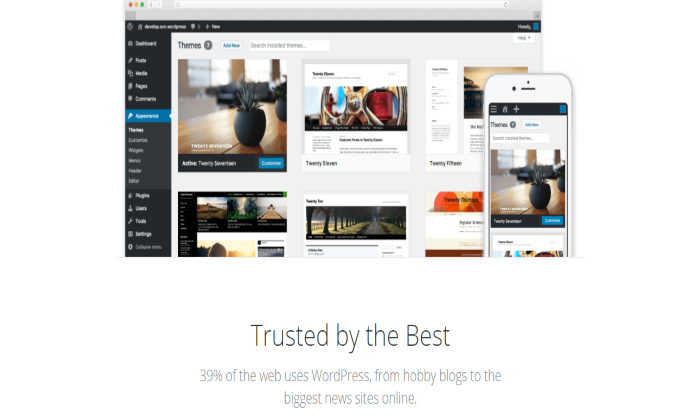
Free themes are available for starters, but if you’re looking for more functionality, you can choose from over 5,000 premium third-party themes that cost anywhere between $25 and $299.
You can also hire a developer to create a custom theme with unconventional features to make your website stand out.
The best part is you can easily switch from one theme to another, unlike Wix that doesn’t allow it once your site goes live.
No WordPress-sponsored ads: WordPress is free, but you need to purchase a domain name and a hosting plan for it to work.
But once your website is up and running, you’re free to monetize it any way you want.
Meanwhile, Wix websites are free, and most basic plans are riddled with ads you don’t control.
Wix only removes these ads once you upgrade to higher premium plans.
Unmatched customizability:
An open-source software, WordPress offers great flexibility right out of the box.
If you’re a programmer or somebody who knows how to code, you can tweak WordPress’s underlying codes to create a website exactly as you envision it.
Beginners can also customize their WordPress sites as they please.
From switching templates after the website goes live to improving site security and adding forms to blog posts, WordPress allows you to modify your site in ways that are impossible with Wix.
And even if you love Wix for its drag-and-drop builder, WordPress also offers something better with third-party page builder plugins like Elementor or Divi.
Massive selection of plugins:
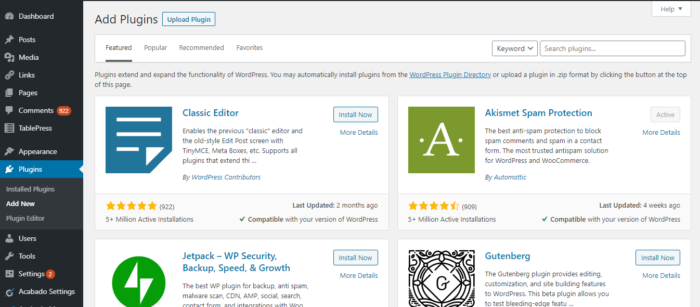
WordPress beats Wix for having the most number of plugins to enhance your website’s functionality.
Whether you want to add a table, collect your visitors’ emails, or create a landing page, there’s always a plugin that will match your needs.
There are over 55,000 free and premium plugins to choose from, so it’s easy to beef up your website without manipulating any codes.
Robust blogging platform:
Even if it has evolved into a full-blown content management system, WordPress doesn’t forget its roots and continues to be the platform of choice for all things blog-related.
It offers the same blogging features as Wix but takes it up a notch with advanced features you’ll only find in WordPress.
These include a native commenting section so you can manage your readers’ comments without the need for additional plugins.
You also have complete control over posts and pages’ visibility as you can set them to public, private, or password-protected.
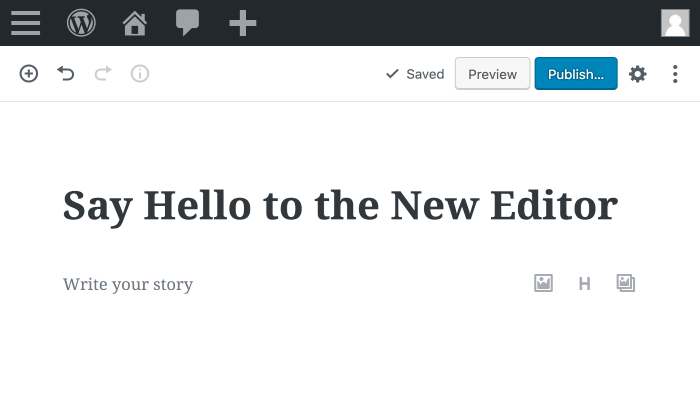
The new Gutenberg editor has its flaws, but the ease of adding, dragging, and dropping different elements without the need for scrolling up or down is second to none.
Better search visibility:
WordPress gives you more control, so your website is more likely to rank on search engine results.
Slow website? You can improve your site’s performance by applying speed-boosting strategies.
WordPress users can also install Yoast, the world’s most popular SEO plugin.
This tool helps over five million websites improve how their articles appear on search results, insert internal links, and redirect old pages to new ones, all of which help boost their rankings in the long run.
Ahrefs, a leading all-around SEO tool, once analyzed 6.4 million websites, and the results show that WordPress sites have higher domain authority, backlinks, and traffic than their Wix counterparts.
Scalable ecommerce functionality:
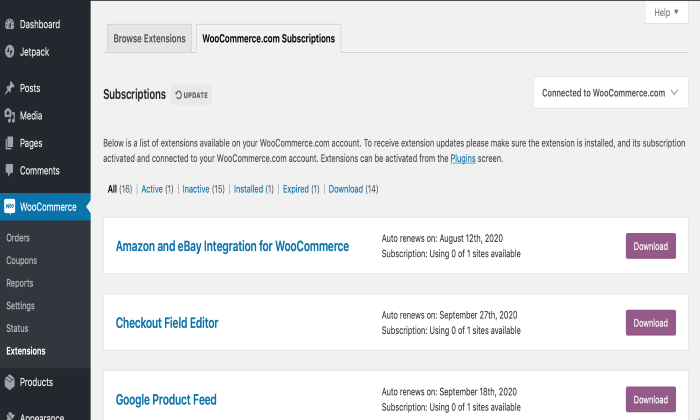
WordPress lacks built-in ecommerce features, but you can easily integrate it with a powerful ecommerce solution like WooCommerce.
Used by over 40% of ecommerce sites, this plugin can help you display products, fulfill orders, receive payments in multiple currencies, and automatically calculate tax by region.
To further boost its functionality, you can also install additional WooCommerce plugins.
For example, you can connect your store to a print-on-demand service that will process the orders on your behalf.
There’s also the free HubSpot for ecommerce plugin that lets you track your visitors and lead them into your sales funnel.
WordPress Losses
No phone support available: WordPress relies on its global community of volunteers.
Hence, there’s no customer service hotline that you can turn to if you encounter technical hiccups.
However, over 39% of websites in the world are powered by WordPress, so whatever issue you’re dealing with, chances are you’ll find a troubleshooting guide in support forums, Slack channels, or YouTube.
But having to go looking for solutions is annoying.
The cost of creating and maintaining a website varies:
WordPress is free to download. However, it can’t stand on its own, so you need to pay for a domain name and a hosting plan before you can start a website.
A custom domain name starts at $10 per year, while a hosting plan can start as cheap as $2.95 a month.
If your website gets a lot of traffic, you need to pay more for a hosting plan to avoid downtimes with each traffic spike.
Additional expenses include premium themes and plugins to enhance the functionality of your site. In total, you might spend anywhere between $200 to a few thousand every year.
Steep learning curve: WordPress is not the most intuitive, and it takes time to understand it. It doesn’t come with an official walkthrough, so you have to learn everything on your own.
WordPress’s Gutenberg editor, for instance, is not as intuitive as Wix’s drag-and-drop editor.
It lacks the what-you-see-is-what-you-get (WYSWYG) framework, so you need to preview the page you’re working on to see what it will look like once published.
DIY security and maintenance:
Website upkeep is not hands-off for WordPress users.
The WordPress software itself rolls out updates every once in a while, and it’s your responsibility to ensure you’re using the latest version.
You also need to manually update themes and plugins to fix bugs and prevent them from affecting site performance.
As for backups and security, you can handle them yourself with the help of plugins.
In exchange for fixed monthly fees, you can outsource all these to a WordPress maintenance service or choose a managed WordPress host to handle everything for you.
Wix Wins
No upfront cost: Anybody can register and create a Wix website for free.
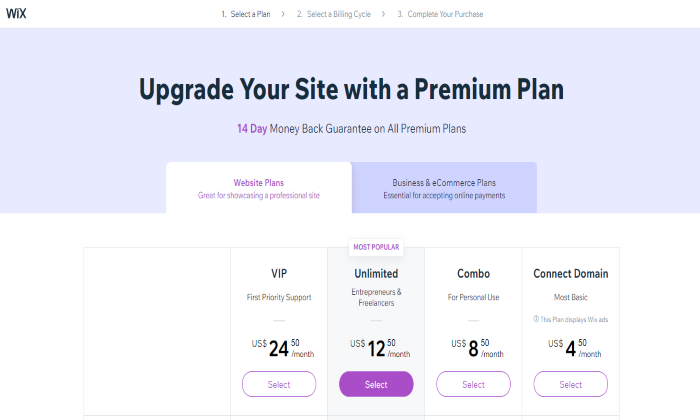
If you want more functionality and to remove the Wix ads, you can upgrade to one of the Wix website plans or the business and ecommerce plans.
Unlike WordPress, which is 100% free but comes with extra expenses, Wix’s pricing is much more straightforward.
You don’t have to estimate anything as the pricing page has all the details.
The Unlimited and VIP plans, for example, cost $12.50 and $24.50 per month (billed annually), respectively.
Both include a custom domain, unlimited bandwidth, free SSL certificate, and built-in analytics.
If you want more features like chatbots or event booking, you can also add Wix apps that are either free or premium with prices ranging from $3 to $20.
Effortless registration:
Although the software itself is free, creating a website with WordPress requires the additional steps of domain registration and signing up to a hosting provider.
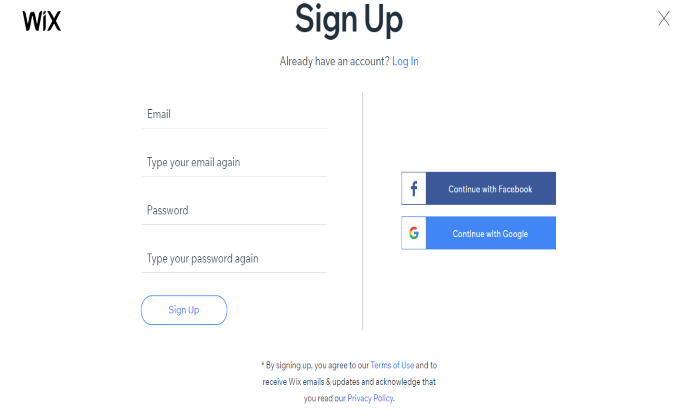
With Wix, registration is as easy as signing up using your Facebook or Google account.
Then, you can start building your website right away, either through the editor or with the help of an AI tool.
Intuitive drag-and-drop editor:
Wix sacrifices flexibility so users can build websites fast with little to no learning curve.
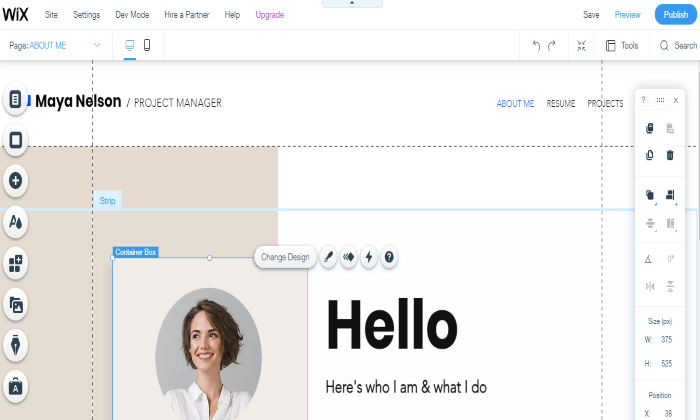
Beginners can easily customize their website templates with Wix’s drag-and-drop interface that lets you move things around and add as many features as you please.
Unlike WordPress’s Gutenberg editor, Wix’s operates on a what-you-see-is-what-you-get (WYSWYG) paradigm, so everything you see is exactly what will appear once the site goes live.
If you’re short on time, you can also let Wix’s Artificial Design Intelligence (ADI) tool automatically create a website based on your answers to a series of questions.
A wide selection of free templates:
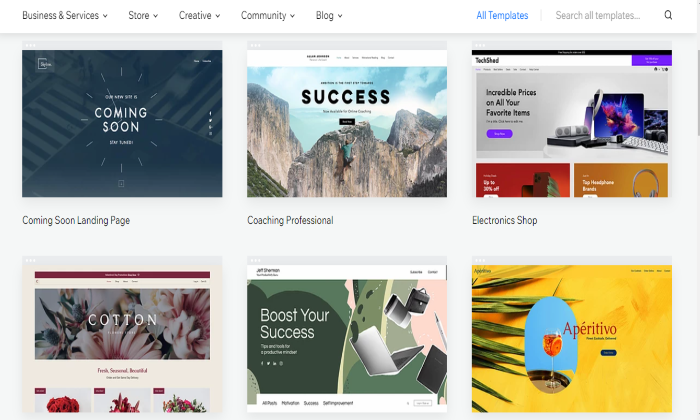
Wix offers the freest pre-made templates among all website builders.
With over 500 templates to choose from, it’s easy to pick one that best aligns with your brand, whether you’re a non-profit organization, a photographer, a small business, or a school.
Each template is packed with built-in elements that you can drag and drop wherever you want.
The editor also gives you the freedom to change the background image into a video, select a different color palette, change the font, and tweak other elements that matter to you.
Handpicked in-house and third-party apps:
Wix’s over 250 apps are the counterpart of WordPress’s plugins that enhance a website’s functionality.
WordPress plugins may outnumber Wix’s, but you have to sift through piles of clunky ones before finding what you need.
With Wix, however, quality matters more than quantity.
Everything in the Wix App Market has already passed Wix’s guidelines, so you won’t have to perform a vetting process.
In addition to that, all apps integrate well with Wix, so there’s no need to worry about incompatibility issues.
Multiple customer support channels:
Unlike WordPress that mainly relies on its support forums, Wix employs a more personal approach to customer service.
Users can request a call-back through the Wix website so a company representative can talk to them directly.
This way, they won’t have to waste time fixing the issue themselves and let a real person handle it.
If phone support is unavailable, Wix users can also reach out via email or search Wix’s online help center to find relevant articles and video tutorials.
Easy WordPress-to-Wix migration:
If you jumped on the bandwagon but soon found out that WordPress lacks the simplicity you’re looking for, Wix offers an easy way out.
All you need to do is enter the WordPress blog URL in Wix’s blog import tool, and with one click, your WordPress blog will be converted into a Wix blog.
With this import tool, you can choose only the blogs you want to move to Wix without building anything from scratch.
Hands-off security and maintenance:
The benefit of having your website hosted in a closed ecosystem like Wix is its technical team handles all maintenance and security.
This means you won’t have to lift a finger to create backups, update apps, or fix security glitches.
All updates are implemented and deployed by the in-house technical team, so you won’t even notice there’s an update taking place.
In contrast, WordPress doesn’t handle any of these right out of the box, so you’re basically on your own.
Wix Losses
Pricing page lacks transparency: At first glance, Wix’s pricing page seems to show how much you’d pay for each premium plan every month.
However, the prices are actually what each plan would cost if you avail of the annual subscription.
If the Unlimited plan’s monthly cost is $12.50 per month, you’ll actually pay $150 upfront.
If you opt for monthly payments, the cost is significantly higher.
It wouldn’t have been an issue had Wix placed a toggle button through which users can compare the prices if billed monthly or annually.
To be fair, there’s a disclaimer at the bottom saying that the prices displayed are for yearly subscriptions, but the text is so small you won’t notice it right away.
Limited flexibility:
Wix may be easier to use than WordPress, but that comes at the price of flexibility.
For instance, the free templates have good enough designs for inexperienced builders but are limiting for more advanced website creators.
Not to mention that you won’t be able to switch to a different template once the website goes live.
Wix is also not open-source, so programmers and other tech-savvy users won’t be able to tinker with its underlying codes.
Lastly, the over 250 apps inside its App Market can enhance the site functionality, but they pale in comparison to the thousands of WordPress plugins.
The underwhelming blog features:
Wix wasn’t created with bloggers in mind, so if written content is your website’s main attraction, choose WordPress instead.
Although Wix offers basic blog features like categories, tagging, cover image, and post scheduling, it lacks other vital elements like native commenting.
For readers’ comments, Wix only offers Facebook comments, which are much more vulnerable to a slew of spammers.
Also, the Wix plain blog editor doesn’t have the drag-and-drop functionality of WordPress’ Gutenberg, so the formatting options are limited.
Ad-free site not available in all plans:
A free Wix website comes with Wix ads and a Wix subdomain.
You won’t pay for anything, but it’s not good for branding.
If you already have a custom domain, you can connect it to Wix for $4.50 a month (billed annually).
However, the Wix ads remain at this level. You can only get rid of the Wix-sponsored ads if you upgrade to more expensive plans.
Difficult to get out of:
Wix websites are hosted in their infrastructure, so once you create a website with them, it’s stuck in their hosting for life.
It also lacks the Import and Export function of WordPress, so moving your website files from Wix to WordPress is tricky.
To give you an idea, your posts will be imported in the form of RSS files, while your images will need to be transferred manually. For most users, this complex procedure is enough to discourage them from making the switch.
Inferior built-in SEO functionality: Wix is not a terrible choice if you only get direct or social media traffic on your site.
But when it comes to search engine visibility, Wix lags behind WordPress.
Wix is not up to snuff from a technical SEO standpoint as it relies on Javascript to display its URLs, making them more difficult to crawl.
The Javascript also leads to code bloating, resulting in slower pages.
Wix also doesn’t have the basic features to set up a website to SEO success like hreflang and AMP support.
Users have limited control over redirects and are restricted from editing the site’s robots.txt and sitemap. Creating shorter URLs is also impossible, so you’ll be stuck with https://www.neilpatel.com/post/keyword instead of the more concise and user-friendly https://www.neilpatel.com/keyword.
Comparing The Top Website Builders
Whether you’re a tech-savvy geek or a technophobe who wants to take a stab at creating websites, there’s a website builder that meets your needs. Here are my top four recommendations:
- Wix — Best for general use
- Weebly — Best for beginners
- Shopify — Best for e-commerce
- WordPress — Best for content management
In terms of Wix and WordPress, if you’re a novice who needs a leg up in creating your first website, Wix can get you online fast.
The ease of its drag-and-drop editor is second to none, while its wide range of free templates can give you a professional-looking website without breaking the bank.
For high-traffic websites that generate income from content, WordPress remains the best content management system.
The post, WordPress Vs. Wix appeared first on Neil Patel.
Source: feedproxy.google.com

Shopify Vs. Wix
Is the clothing niche more profitable than accessories? Which theme would be better: Wookiee or Porto? Is Shopify better than Wix, or is it the other way around? Decisions, decisions!

Disclosure: This content is reader-supported, which means if you click on some of our links that we may earn a commission.
As an ecommerce seller, you’ll find yourself making a lot of choices. But out of the plethora of answers you need to figure out, choosing the best ecommerce platform remains the most crucial. More so, when your options have overlapping features.
Although Shopify and Wix have overlapping features, Shopify edges forward in the race if you’re specifically looking for ecommerce functionality. Still, it’s a close call between the two that boils down to your intent.
Small businesses or brand-conscious entrepreneurs will love Wix with its easy-to-use, cheap features, and greater design flexibility.
But if you’re looking for a serious ecommerce solution to scale and sell worldwide and have the bigger budget and technical knowledge to flatten the learning curve, stick with Shopify.
Shopify or Wix: Which Is Better?
Shopify is a solid option for ecommerce applications with its fully responsive templates, AMP support on product pages, and dropshipping features. It also supports multi-currency selling functionality and offers useful integrations with other essential apps. Overall, it’s a more professional choice for anyone who wants to build an online store. If this is exactly what you’re looking for, make sure you sign up for a free trial ASAP.
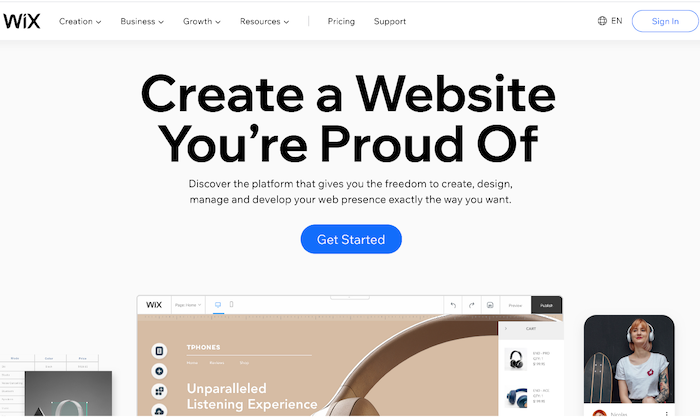
Wix has a drag-and-drop interface and a wide range of bundled templates, making it a great choice for those who want to build a general-purpose website. It also comes loaded with page layout tools, data capture, and email marketing features. Plus, it’s cheaper, and you don’t have to worry about paying transaction fees. Ready to check out Wix? Give it a try with a free trial.
A Review of the Best Ecommerce Platforms
People want to dabble with good ecommerce platforms considering their rising popularity. But what’s the best one out there?
We reviewed dozens of ecommerce platforms and narrowed them down to the seven best options that tick off all the right things on an ecommerce seller’s checklist. Wix and Shopify both made the list.
Head over to our best ecommerce platforms guide for an in-depth look at where every product stands, along with what criteria do we think they are best for.
Shopify Wins
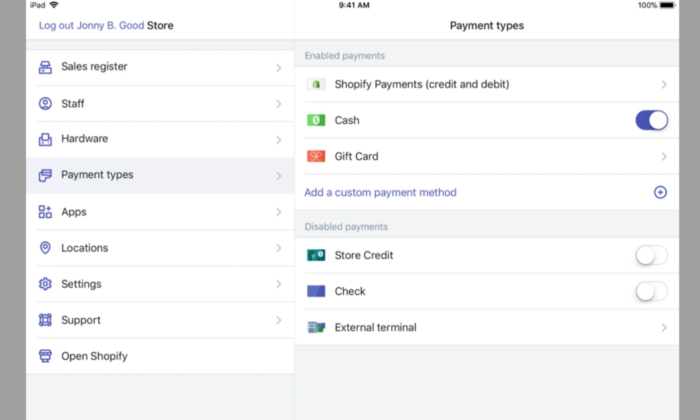
Several Useful Ecommerce Features: As it’s specially designed to be for ecommerce, Shopify sites come with many useful ecommerce features to cover every little aspect of the sales process. It has multiple payment gateways, inventory management tools, third-party platform integrations, and shopping carts. The platform is also scalable, allowing you to grow with your expanding business needs.
Fluid Themes and Greater Flexibility:
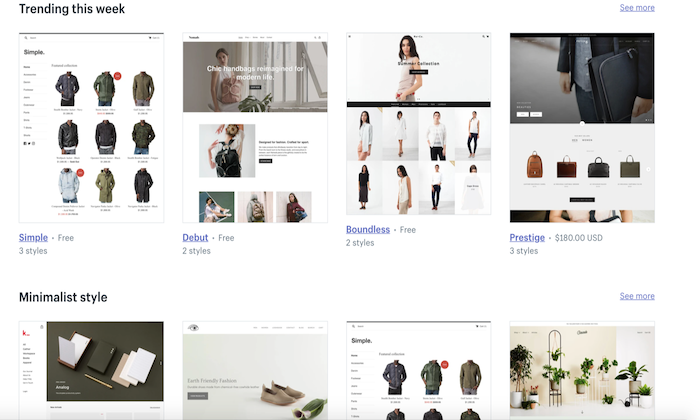
Shopify offers 60+ professionally-designed and customized themes, giving you the liberty to add individual product pages based on your needs.
Moreover, this customization and flexibility extend to changing page elements too. You can move, add, remove, or resize page elements to make your shop more on-brand.
Tweaking themes is also possible—provided you know HTML and CSS. If you’re tired of how your site looks, you simply have to choose a new theme, and you’ll have a brand new store within minutes!
Custom Domain Name:
Every Shopify user gets a custom domain name that allows them to brand their respective stores and online business more efficiently and effectively.
You can handle your domain on the same site location as your domain store, which, in turn, allows you to make changes to either with ease while simultaneously managing your domain.

Excellent Built-In Analytics:
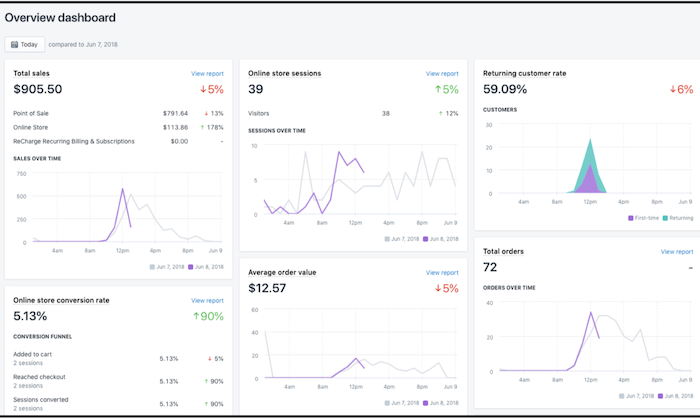
Shopify goes the extra mile by offering you plenty of built-in analytics features like Google Analytics, customer behavior, stock levels, and conversion tracking to know exactly how your store is doing and which aspects need a bit of tweaking for better results.
You can also view online store sessions, total sales, top-selling products, returning customer rate, average order value, and behavior reports (phew!) on the platform to make better decisions.
Shopify App Market:
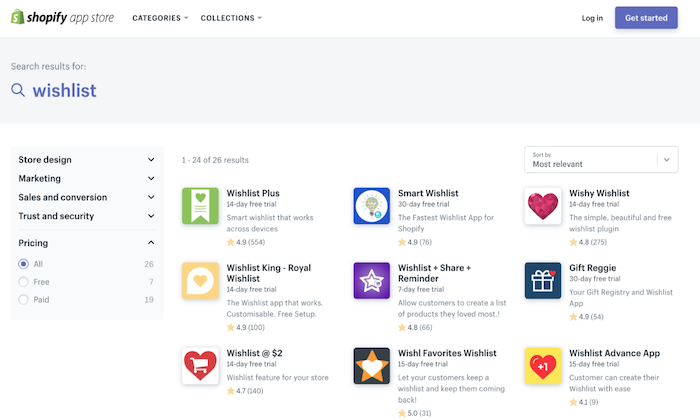
Nearly every ecommerce plugin and feature are developed for Shopify first due to its vast popularity. Whether it’s free or premium add-ons for marketing to content management, you get all kinds of unique features with this platform.
Case in point:
An augmented reality feature that allows you to use your smartphone to navigate the product and see every little detail. What’s more, even other marketplaces like AliExpress and Oberlo offer compatible apps to make your store management easier.
Faster Checkout Options:
Shopify has prioritized customer preference when designing login and checkout options. You can make the registering of users before heading to checkout mandatory, optional, or prohibited.
Plus, registration is also incredibly easy as users only have to fill out basic information. As a seller, you can add users manually or import the list via CSV and sort them through a tag system.
More Payment Options:
Shopify gives you several options to sell items anywhere in the world thanks to its Amazon FBA or a 3PL order fulfillment support, along with multiple-currency support through a complex, non-supported HTML, CSS, JavaScript, and Liquid hack.
This may not be ideal, but it’s definitely there. You also get direct access to 100+ different payment gateways, including PayPal, Stripe, and Shopify’s fully integrated payment system.
No Cap on Products and Inventory:
Most web servers or external platforms restrict the number of products you can add to your store—but not Shopify. You can add unlimited products to your Shopify store.
Even the lowest subscription package does not put any restriction on the number of products you can add to your inventory.
Shopify Losses
Learning Curve:
Shopify developers claim the platform is the best for creating and managing online stores, but they don’t claim to be the easiest, and rightfully so.
Although Shopify uses templates that eliminate the need to edit HTML code and CSS styling, its websites are harder to edit than Wix.
It’s because the focus is on the products and how you present the page. If you want to make additional changes, you’ll have to learn to edit the backend code.
Limited Free Themes:
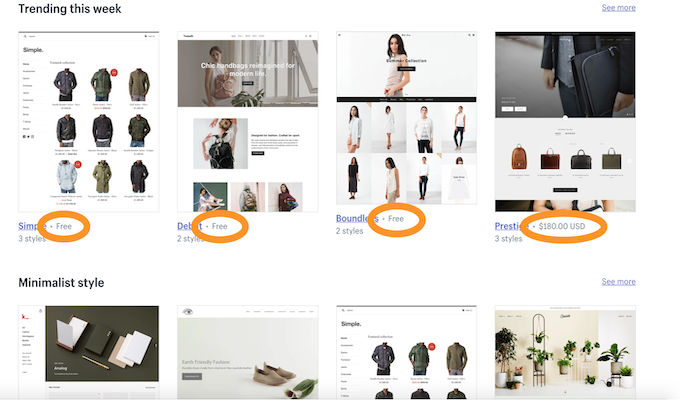
While we love how modern and responsive Shopify themes are, it’s the limited number can restrict your options. You have to pay a one-time fee for most themes, ranging between $140 to $180, as only ten themes are free.
Expensive:
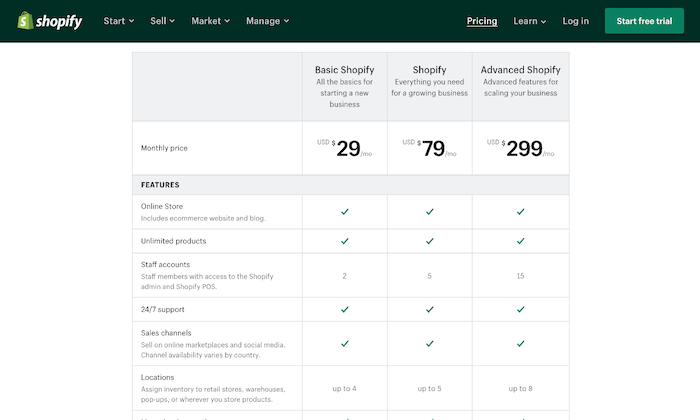
Shopify gives you a wide range of subscription plans starting at $29 per month. However, not only is it more expensive, but you also don’t get a free plan (only a 14-day free trial).
The basic plan includes only the barest of features, so if you want access to advanced features like fraud analysis and reports, you have to pay a higher price.
Further, unless you use Shopify Payments—something that isn’t available everywhere—you have to pay a transaction fee on top of the payment processor fee.
Lacks Email Hosting Facility:
You don’t get an email hosting feature despite web hosting being included in all Shopify plans. So, you can’t host a domain-based email address like [email protected].
What you can do, however, is set up email forwarding. This will forward all emails sent to [email protected] automatically to your regular email account.
You’ll have to set up other third-party email hosting connections to use the email forwarding function.
Wix Wins
Massive Template Collection:
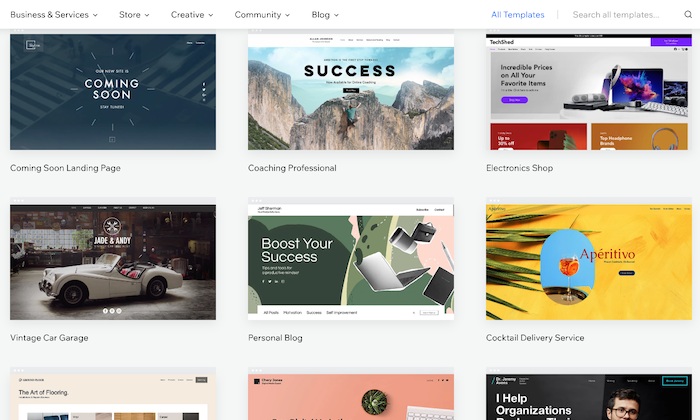
The basic Wix editor lets you pick from 500+ beautiful templates for your site and populate it with any content of your choice.
There are several built-in dynamic templates—from homepages to blogs to landing pages—suitable for novices and experts.
People on a tight budget will be happy to know the platform offers 60 completely free, modern, and stylish ecommerce templates.
Intuitive Drag-and-Drop Interface:
The drag-and-drop interface is the heart of Wix, making it incredibly user-friendly. Because of this, not only people with all levels of skills can use the platform, but it also gives you enough options to convert your side into a real powerhouse by extending its functionality.
You can use the mobile editor to review and edit your site to optimize it for mobile devices.
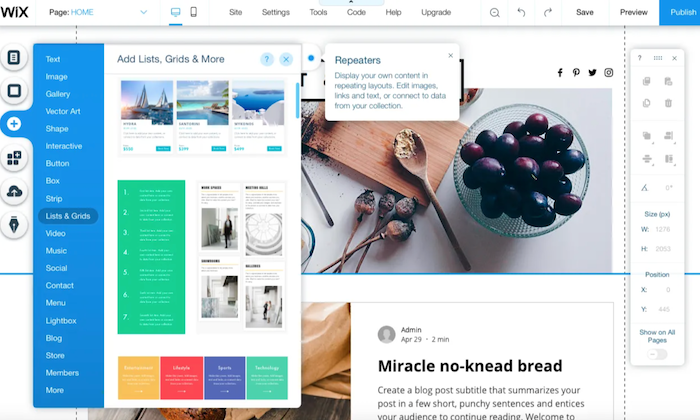
Free Plan:
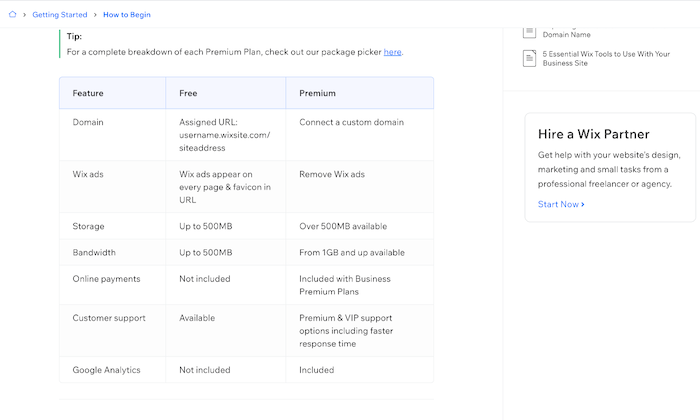
Wix is definitely the cheaper platform, with prices starting at $23 per month. There’s also an entirely free plan and a free domain name facility (for the first year) that further boosts its appeal.
Plus, you don’t have to worry about paying any extra fees with the platform.
Built-In Video Function:
Wix seriously lets your products shine, which is one of its biggest USPs. It has a built-in product video function that helps improve customer experience by allowing them to see the product live.
You’ll also appreciate the product zoom feature and the fact you can build a distinctive checkout page to make the checking out process as hassle-free as possible.
Efficient SEO Guidance:
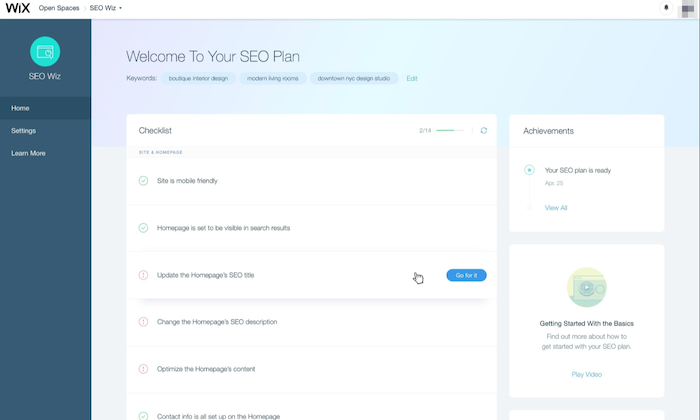
Wix helps you optimize your ecommerce site for SEO by highlighting areas that require your attention. It then does the hard work by letting you fill in keyboard tags and other metadata.
You can also modify the URL of each page, so it best fits what Google needs to know.
Tons of Extra Features:
Aside from the core functions, Wix is built with an entire ecosystem of useful tools and products to make website building easier.
It offers your free HTTPS to ensure visitor interactions with your website remain secure, templates to create quotations for customers, and integrated payment options like PayPal and Stripe.
There’s also a logo maker to make branding even easier!

Online Store Integration:
You can include an online store with your website at no additional cost with Wix. As the interface is easy to use, the integration process is very straightforward, and you don’t even require an external shopping solution.
Wix Losses
Harder to Redesign:
The intuitive drag-and-drop interface of Wix makes designing your site simple, but it’s the redesigning where you have to pay the price.
You don’t have the flexibility to make any major changes by just selecting a new theme. Instead, the redesigning process is extremely manual.
If you want to make any drastic changes to your online store, you practically have to rebuild your entire website.
Besides that, you don’t have access to HTML and CSS, which makes the overall process more time-consuming and tough.
Limited Integration With Third-Party Apps:
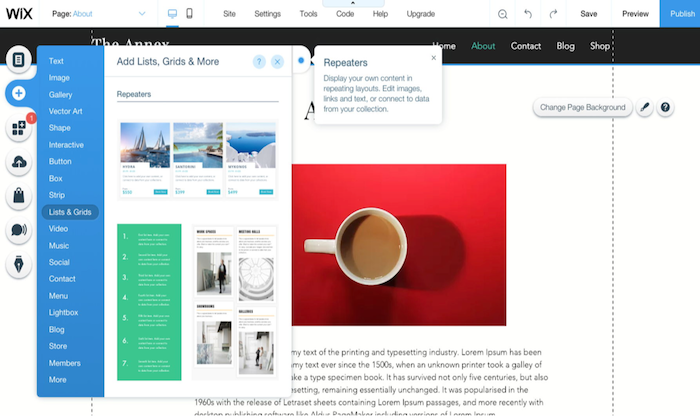
When we talk about app integrations, it isn’t even a fair fight as Wix has far fewer ecommerce developers creating apps for its platform.
For instance, you won’t find a Google Shopping Feed or Facebook Product Feed. This means you can’t run Google shopping ads or run dynamic product ads on Facebook from the platform.
Native integration with email marketing applications is also absent, making it troubling for owners who rely on email marketing for revenue.
The only way you can integrate a Wix store to an email marketing add-on is to use either Zapier or write the code yourself.
Forced Wix Branding:
They say there’s no such thing as a free lunch, and Wix very well proves it. If you decide to choose and stay on Wix’s free plan, be prepared to carry Wix branding—right at the top of your site.
It isn’t too obnoxious, but it isn’t exactly discreet. What makes it more annoying is it appears before your website header!

Non-Transferrable Site:
While some may justify Wix not wanting users to export websites created with their technology, it’s a con for those who want to migrate.
And the fact that scalability isn’t Wix’s biggest forte, makes this an even bigger problem. If you want to recreate and transfer your website away from Wix, you have to pay some serious amount of cash.
In short, if you sign up for Wix, they might just have you for life.
Comparing the Top Ecommerce Platforms
While Shopify and Wix are excellent ecommerce platforms, there are several other alternatives with their own advantages. Make sure you check our top picks for the best ecommerce platforms to find the right option based on your specific needs.
- Wix – Best for flexibility and customization
- Squarespace – Best ecommerce platform for creatives
- BigCommerce – Best for medium to large stores
- Shopify – Best all-in-one ecommerce platform
- WooCommerce – Best for WordPress websites
- OpenCart – Best for selling digital products
- Ecwid – Best for integrating with your current platform
Summary
Shopify is the more obvious choice since we’re concerned with ecommerce functionalities in particular. But that doesn’t mean Wix has lost its charm.
Shopify is the best solution for sizable online stores that need all the bells and whistles of scaling and selling everywhere around the globe, while Wix is more appropriate for general-use cases and for owners who rely on content creation to acquire more traffic. It also offers more creative freedom as opposed to Shopify.
In the end, the choice is yours—just make sure you make the right one.
The post, Shopify Vs. Wix appeared first on Neil Patel.
Source: neilpatel.com