
Tag Archives for " website marketing "

How to Increase Your Website Traffic Without SEO
SEO can be a brilliant strategy to increase your website traffic but it isn’t always enough.
Imagine you rely on SEO for all your traffic. What happens when the Google algorithm changes? You risk losing potential customers!
Disclosure: This content is reader-supported, which means if you click on some of our links that we may earn a commission.
That’s why diversifying your methods of increasing web traffic can offer better results.
If you have multiple traffic sources, changing algorithms won’t completely halt your business.
You will have a toolkit full of optimization strategies to keep your business running.
Diversifying your web traffic can also be helpful in cases where there’s little scope for search engine optimization (for example, podcasts).
In this post, we’re going to look at effective strategies to grow your website traffic without SEO so you’re never left stranded by algorithm changes again.
We’ll also look at practical tips you can start using right now, so you can get back in the game if your traffic has been low for a while.

Why Should You Try to Grow Traffic Without SEO?
You can generate substantial traffic from SEO alone, but not all traffic is equal. High-quality traffic (that includes users more likely to convert) offers better ROI, so you need to prioritize it.
Plus, if you aren’t an SEO expert, you may want to focus on other strategies to grow your website traffic efficiently.
This doesn’t mean you completely ignore SEO. All websites, irrespective of their niche, must follow the best SEO practices to avoid being penalized by Google and to ensure the site gets indexed.
Top Strategies to Increase Website Traffic Without SEO
The strategies we’ll discuss below can be a helpful addition to a pre-existing SEO plan.
1. Content Marketing
If you have been reading about digital marketing for a while, you must have heard the term “content marketing.”
In simple words, it’s a way to organically advertise your brand through high-quality content.
Content marketing strategies often include blog posts, podcast episodes, infographics,
YouTube videos, downloadable PDFs, etc.
For instance, Toggl, a time tracking software company frequently uploads informative blog posts and research data about productivity, work-life, and career.
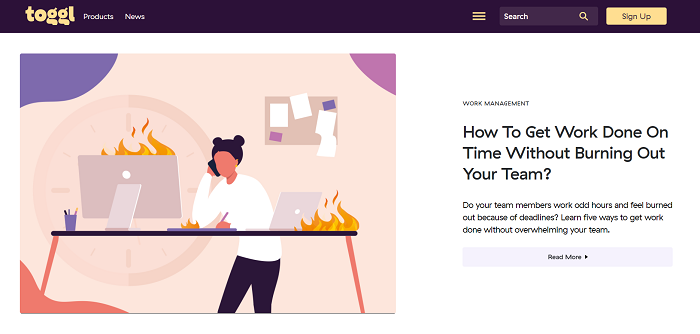
This attracts users interested in time management, productivity, and wellbeing in the workplace.
When they read Toggl’s blog, they eventually discover Toggl’s time tracking app, among its other productivity tools.
Some of these users convert, helping Toggl increase their website traffic and ROI.
Content marketing isn’t limited to blog posts.
If you connect better through audio, you can try launching a podcast or host a webinar.
Nowadays, most social media apps let you post a variety of content formats including photos, audio clips, long-form text, and videos.
You can experiment with one or more of these formats to see what works best for your audience.
2. Paid Ads
Content marketing is beneficial but it can take a lot of money, especially if you’re paying established writers to create original, well-researched posts for you.
Most of these projects also take weeks or months to show results, which isn’t a practical timeline for many businesses.
If you want quicker results with a budget you can control, why not try paid ads?
Seven in ten Americans use social media today.
That’s more than two-thirds of the population.
Think about the possibilities!
Paid ads can instantly generate hundreds, if not thousands, of clicks to your website.
Plus, with new advertising and social media platforms appearing and innovating regularly, getting your ads in front of the right people is becoming easier than ever.
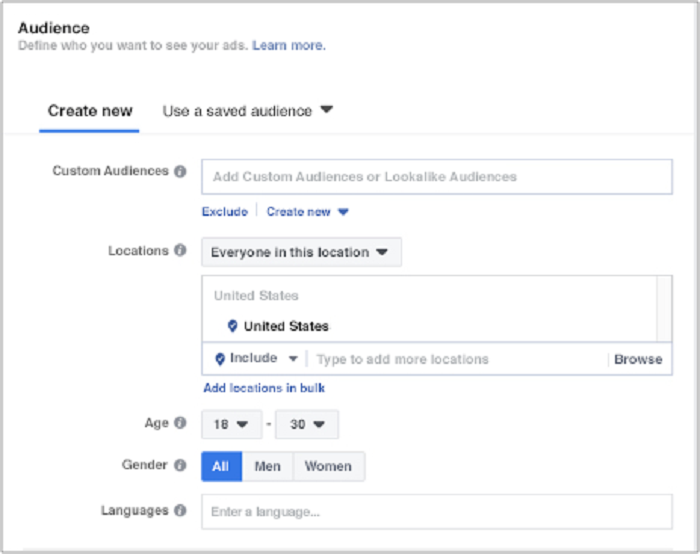
For example, Facebook offers detailed customer personas and multiple targeting options so you can put your business in front of your target customers without wasting a lot of money on mass advertising.
However, you don’t have to stick to the largest platforms for effective advertising.
In fact, advertising on lesser-known platforms whose audience aligns with your products can be more effective in the long run.
For example, if your ideal customer includes teens who enjoy memes and weird stories, you’d have much better results by advertising on Reddit, rather than Facebook or YouTube.
Another option is dating apps.
If your brand is focused on relationships or if you’re targeting young singles, advertising on dating apps like Tinder can help you find your target customers faster.

If you’re worried paid ads will take a lot of money, remember, you don’t need to spend $1,000 on your first day.
Test the waters with $5-$10 a day and see what happens.
Do that for a week, just to learn how different media platforms work.
3. Social Media Strategies
One of the best ways to increase your website traffic is to meet your customers where they like to hang out.
Like we discussed earlier, almost everyone is using social media today.
Ramping up your social media marketing efforts can help you reach new users, develop brand awareness and increase website traffic.
How to gain website traffic through social media?
When it comes to social media, you can’t just barge into “conversations” and ask people to buy something from you or to visit your website.
Think about how you’d present your brand in real life when you meet an individual for the first time.
Would you immediately talk sales in their face?
How about providing details about your product/service without introducing yourself first?
Remember, users, visit their preferred social media platforms for entertainment, not for being sold to.
To make sure your efforts are well-received, you need to provide value first and develop positive relationships with your potential “followers.”
You can do this by sharing informative posts like How-Tos, or posting fun photos of your employees, like this post from Casper.

I wrote a detailed guide to increasing social media followers and boosting engagement.
Here’s a summary of the top options to help you grow your website traffic.
- Join relevant Facebook groups
- Share helpful articles/videos in these groups
- Post updates about your company’s latest products host contests and giveaways
- Leave thoughtful comments on user-generated content
4. Link Building Strategies
When marketing teams talk about SEO, link building frequently comes to mind.
When reputable websites link to your content, the algorithm favors your website and increases its rank on the search page.
Sounds helpful, but that’s not all.
Did you know link building can help you increase web traffic without relying on SEO?
Link building for brand awareness is a process where you focus your strategies on expanding your reach, putting your content in front of new users, and generating conversations around your brand.
This is more than just a casual backlink in a blog post.
Link building for brand awareness takes more planning and resources, but the investment is worth the high-quality leads you’ll get.
Here are some tips for developing effective link building strategies to increase website traffic:
- Engage with your audience: Create interesting, shareable posts and encourage your followers to respond and share your content.
- Work with PRs: Recruit efficient PRs to help generate brand awareness and distribute your story to your desired audience.
- Guest blog intentionally: Choose unique publications that align with your readers’ key interests and post guest blogs on their page.
5. Interact With Other Blogs
Guest blogging is an effective traffic-driving strategy aimed at leveraging somebody else’s audience to widen your brand’s reach.

Think about it: Somebody in your niche has a large, engaged following.
Imagine if you could put your content in front of them.
How much traffic could you drive to your website!
Why would someone publish your work?
Probably because you’re good at what you do.
Everyone is looking for high-quality content.
If you can provide a well-researched, helpful post for free, people are often open to publishing it on their website.
After all, it’s benefiting their audience at zero cost.
Why would you give precious content away for free?
It’ll help you gain access to hundreds, if not thousands of new users, many of whom could become long-term customers.
It’s a win-win situation, but you have to be careful how you approach it.
Start by searching for blogs and media publications that publish content relevant to your business.
For example, if you run a recruiting company, publish content on business blogs read by people interested in the latest recruiting practices.
If you want to find blogs in your industry that are accepting guest posts, use the following search queries to see more specific results:
- name of your niche + “write for us”
- name of your niche + “submit guest post”
- name of your niche + “sites that accept guest posts”
- write guest article + ‘name of your niche” + blog
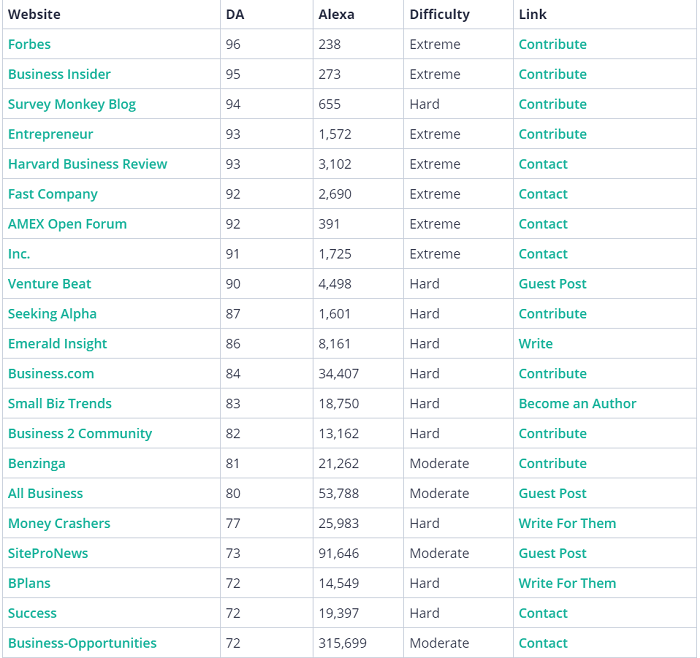
Solvid provides a comprehensive list of places accepting guest blogs:
In addition, research online biographies of specific companies and bloggers.
More often than not, their web profiles contain a handy list of sites where they’ve been invited to guest post.
That’s a plethora of most fitting guest blog opportunities presented to you on a silver platter.
Then, send a request.
Most websites will have publication guidelines you can follow.
Follow these instructions carefully to increase your chances of publication.
There’s also the option of using blog comments as a way to generate traffic to your site.
In the past, I have managed to generate $25,000 as a result of 249 comments.

How exactly do you go about using comments to generate traffic?
When leaving a comment, make sure you are adding something worthwhile to the discussion.
There is no use in leaving comments like “Awesome post!” or “Nice website!”
If someone posts a question, make sure you take the time to answer thoughtfully.
This showcases your expertise in the given niche and will encourage someone reading to click on your name and be taken through to your site.
If you read an article on a subject you don’t know very well, it would be imprudent to voice your own thoughts as fact.
In this situation, you should simply ask questions.
Then the website owner would be able to elaborate more on complex topics or complicated sections.
If you’re knowledgeable about a subject, feel free to contribute (e.g., suggest something, recommend a solution, answer a question).
If you’re a novice, it’s best to ask questions.
Powerful questions can bring you website traffic by encouraging blog readers to check you out.
Avoid embedding links in your comments.
It comes off as a wretched attempt to plant your flag on someone’s lawn.
It’s okay to use your website’s link in the URL field when entering your name and email address, but your comment needs to add to the conversation or challenge an idea without lazy attempts at driving traffic to your blog.
Refrain from using the name of your business as your “commenting name.”
Use your actual full name instead.
Using a random or fake name is a missed opportunity to build strong branding because your brand actually starts with your name.
In fact, failing to use your full name will reduce your chances of the website owner approving your comment.
6. Email Marketing
If you read a few posts on digital marketing, email marketing would be mentioned in most of them.
That’s because it’s still one of the most efficient ways to increase website traffic.
One study suggests email generates $36 for every $1 spent, offering a shocking 3,600 percent ROI.
What more could you ask for?

Email marketing lets you reach potential customers directly.
It’s an ideal platform for building long-term relationships for improved customer loyalty.
You can post questions, ask for feedback, introduce soft sales, and persuade customers for the “big buy.”
Here are some tips for effective email marketing to increase website traffic:
- Be real: Share stories, post-behind-the-scenes content, and solicit original user-generated content.
- Offer value: Just like content marketing needs a high value to convert readers, emails and newsletters must provide value before they make an ask.
- Include all your links: Make it easy to read and share your post. Include links to your social media profiles, latest blog posts, and sales page in every email you send.
7. Provide Excellent Customer Service and Ask Customers to Review Your Brand
Ramping up your social media marketing efforts to increase website traffic is useless if you offer poor customer service.

According to a survey, 42 percent of customers said they bought more after pleasant customer service experiences.
Think about it: Users make complaints on social media, you offer a prompt and polite response.
What happens?
The person starts respecting your brand.
Even when users complain privately via email, it’s important to offer the best possible service so they come back for more.
How can you offer great customer service?
- reply promptly
- offer as many suggestions for customer problems as possible apologize when you make a mistake and offer coupons/refunds
If you consistently provide great customer service, you can request users to review your brand.
Platforms like Trustpilot and Yelp can be great for building positive reviews.
Many users consult these websites before making a purchase decision, so having a solid profile can help improve your reputation.
Increase Website Traffic Without SEO Frequently Asked Questions
FAQ: 1
Is it possible to increase website traffic without SEO?
Yes. You can use a combination of social media marketing strategies and content marketing techniques to increase website traffic without SEO.
FAQ: 2
Are there ways to increase website traffic for free?
Guest blogging, posting on social media, and requesting user-generated content are some of the most effective ways to increase website traffic for free.
FAQ: 3
Can I increase website traffic through marketing without an agency?
You can use techniques like guest blogging and content marketing to engage audiences without relying on any agency.
FAQ: 4
What’s the best strategy to increase website traffic quickly?
Working on improving your social media strategies can help you connect with new users, develop brand awareness and drive organic traffic relatively fast.
Increase Website Traffic Without SEO Conclusion
You shouldn’t only rely on search engines to increase website traffic.
Algorithm changes and SEO techniques become outdated quickly.
The strategies we discussed today can help you create a comprehensive digital marketing plan to increase website traffic effectively.

Whether you use one of these tactics in isolation, or you use all of them together, they can transform the way you attract customers.
Which traffic-driving strategy will you try today?
Source: neilpatel.com

Why SEO Does Not Work for You & Your Website
So, you’re wondering why SEO does not work for you and your website, right?
Haven’t you heard?! SEO is dead!
Dead from all the bad jokes about it.
Of course, SEO isn’t actually dead, but there are a few reasons why SEO might not be working for you and your site.

We’ve gathered 14 top-of-mind reasons why your SEO might not be working for your website.
Let’s go through them and see if something rings a bell.
- You don’t stick to the basics
- You don’t really understand what SEO is
- SEO just doesn’t fit your business/idea
- Your expectations are too high
- You’re not patient enough
- Your budget is too small
- You’re not focusing on mobile
- You don’t analyze and you underestimate your competition
- You’ve skipped keyword research
- You’re not prioritizing the right things
- You’re ignoring structure, click depth & internal linking
- You’re ignoring backlinks
- You don’t understand your audience
- You’ve externalized to the wrong SEO agency
- You’re not monitoring your results
1. You don’t stick to the basics
When people say SEO has some relation with magic, what they actually mean is that it’s very complex.
It would take several very long articles for me to fully explain how it works.
Yes, it implies user experience, link profile, content strategy, referral traffic or marketing campaigns. And all these SEO efforts might seem very complex.
However, SEO is more simple that you might think, in some ways.
In a nutshell, it’s the multitude of criteria that makes a website the best result for a particular keyword, in the sense that it satisfies the user’s intent.
What you must understand is that Google isn’t trying to rank websites based on some checklist.
Sure, it follows a list of criteria, but it also looks at historical data in the SERP and since Rank Brain has got involved, machine learning really made things a lot more complicated.
It’s hard for us humans to keep pace with how Google decides what actually makes a web page ‘the best one’.
At this point… I’m not sure even the makers themselves have any idea how things work anymore.
So, instead, focusing on the latest trends and techniques, try to focus more on the basics.
Do them well and do them consistently.
Sure, SEO and digital marketing experts like Neil Patel and Brian Dean always try new techniques and tweaks, but one thing’s for sure: They haven’t stopped posting!
Being consistent is difficult, but it’s also the key to success!
2. You don’t really understand what SEO is
So, we know Google is trying to rank the best page.
- But what does that actually mean?
- Does it mean the page with the most targeted keywords?
- The page with the best links?
- The page with the best content?
- Who wins the Google top organic results?
It’s the page that best satisfies the user’s intent. And in some cases, the website alone can’t do it!
Let’s say you want to rank high in the search engines for a very competitive eCommerce keyword. Well… if your offer isn’t good enough, you probably won’t.
If you want to rank for “shoes” but you only have 3 products in your store, you won’t be getting far.
If you want to rank for “cheap” but your prices aren’t cheap, again, you probably won’t have much success with it even if you optimize your website in this direction.
Moreover, many people don’t understand that high rankings within search results also reflect the quality of a business, at least to some extent.
For example, bad reviews on Google My Business can affect your local SEO rankings and your business listing and people don’t leave bad reviews because your SEO campaign sucks.
Sure, you can invest in search marketing and pump links into a website and get it to the top, but if the business itself doesn’t have the necessary infrastructure to properly satisfy clients (quality, shipping, support), the results won’t last for long!
I’ve seen sites pumping bad links and rushing to the top, only to fall ungracefully a short time after because they did not meet their user’s expectations.
3. SEO just doesn’t fit your business/idea
Another thing you should consider is that your business type should match SEO.
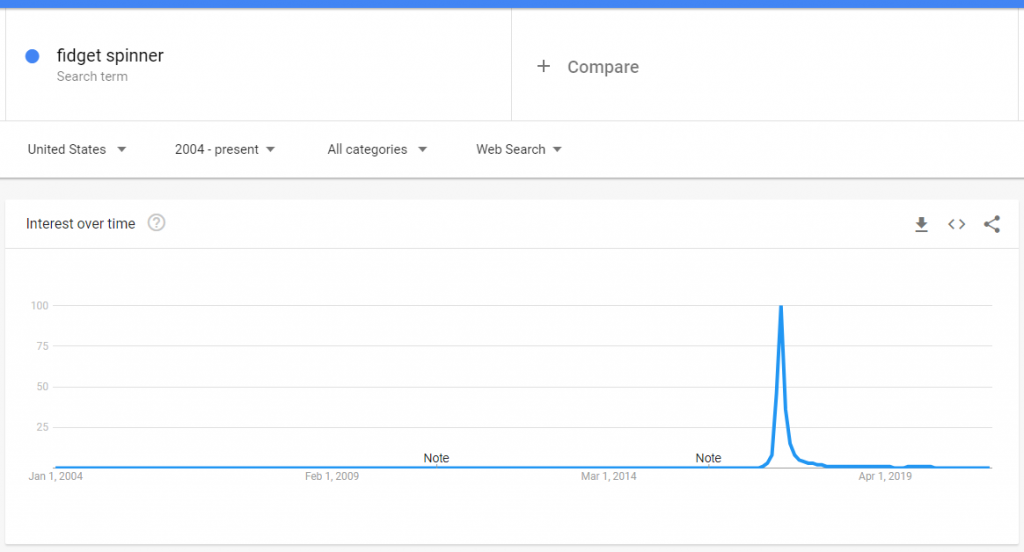
Usually, if you want to promote a short-term trending product, such as the fidget spinner, investing big and long term on SEO might not be the right choice!
Furthermore, if you need a quick turnover and you’re just getting started… SEO might not be the right channel for you, and you should look for PPC advertising or social media remarketing instead.
However, it’s not always a matter of SEO vs PPC. Usually, they go well together.
4. Your expectations are too high
The higher the expectations, the bigger the disappointment.
To be satisfied with your results, you’ll need to have realistic goals.
With SEO, you can’t really expect top rankings and huge website traffic in a month or two, if your domain has just been registered.
You can’t expect to outrank the online presence of a strong competitor with thousands of links, with a tight budget and no scaling even if you apply some good SEO tactics.
In some cases, the entire competition might be way out of your league.
That’s when you have to dig in deeper, to find those keyword opportunities that are easier to rank for.
You should still start with SEO as soon as possible, but start small.
Look for keywords with lower competition and build your way up before saying that SEO does not work for you.
5. You’re not patient enough
Sometimes you just need to be more patient.
Most SEOs will tell you upfront that it can take from 6 to 12 months to see the top positions.

Some will claim that they can get you to the #1 spot in the first month. It’s probably false and you should stay away from them.
You should always see progress in the first month.
If it’s a new website, that might be as little as the first pages getting indexed.
So, if you’re not yet in the position you’ve wished for but have increased in rankings compared to the previous month, just give it a little more time. You’re on the right path.
If you want to find out more about why it takes so long to rank in Google and other search engines and what you can do to speed things up, check out this article.
6. Your budget is too small
Actually… you CAN have high expectations. But for the right budget.
If your budget is too small, you might not be able to do everything you want and you might end up saying that SEO does not work for you.
SEO includes things like: good server, fixing technical SEO issues, keyword research, content marketing, social media, investing in links and many others.
If you want to scale it up quickly and efficiently, the truth is that you will need a substantial investment.

Clients often ask me: “Why is it that SEO takes so long?”
Sure, part of the answer is: “Because of Google.”
However, I’m always confident I can speed things up by scaling.
But why does scaling speed up the process, you may ask?
Well… it’s pretty straightforward:
- More content = more keywords covered faster
- More links = faster higher authority
- More monitoring = better / faster tweaking
- More programmers = faster site, more useful features, better UX, etc.
But all those above = more money.
- Are you developing the content for 5 categories per month? — Pump that to 10.
- Are you consolidating the site’s structure with 2 monthly blog posts? — Up it to blog posts.
- Are you securing 1-2 links per month? — Make that 5 and so on.
Many people get into SEO because they can use time instead of money to drive traffic to their websites and businesses.
However, time can’t scale things up. Only money can. If you want to rank faster, you’ll need to outsource some work.
7. You’re not focusing on Mobile
I know, I know, you’ve been hearing that Mobile SEO is very important and that most traffic is now coming from mobile devices.
The real thing here is that most professionals work from a desktop computer.
So, the first contact with any issue, be it web development or SEO-related, is on the desktop, most of the time.
Often times I find myself fixing a quick issue on the desktop and completely forgetting to check how it looks on mobile devices.
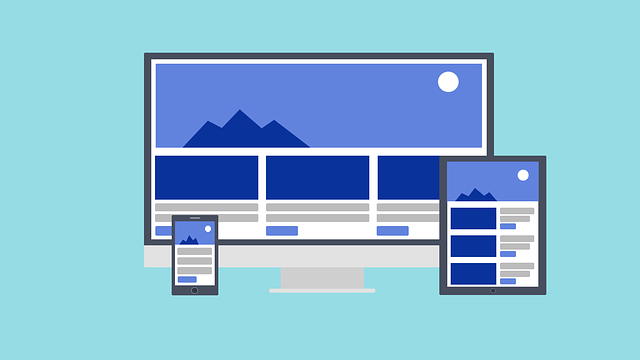
And although I browse websites on mobile (as a user), when a client asks me something or signals an issue, I immediately check it on my computer (the phone is busy at my ear anyway).
In SEO, you always have to keep in mind that Google uses mobile-first indexing.
If you’re mostly working from a desktop computer, like me, remember to always right-click in Chrome and hit inspect.
You can select multiple device types to stop any issues.
But sometimes, phones act differently than the desktop Chrome browser does (even when set on mobile view), so it’s always best to check on a physical phone itself.
And don’t forget to check on both Android and iOS.
Test if links work, test if scrolling works, test the entire checkout process, test, test, test.
Ask your friends to test, ask your mom to test ask your cat to test. If the cat can use it, you’re good to go.

In addition to that, consider that CSS hidden content also follows the mobile-first mentality.
Feel comfortable to combine desktop columns into sliders, or compress long paragraphs of text into dropdowns.
For example, on an eCommerce website, you might have a small description before your products, on the category page.
If on mobile devices the text pushes the products too far down, the users won’t be able to quickly see them when they load the page.
You can shorten the mobile description by using a ‘read more link which triggers a dropdown with the rest of the content.
8. You don’t analyze and you underestimate your competition
“If you know the enemy and know yourself, you need not fear the result of a hundred battles. If you know yourself but not the enemy, for every victory gained you will also suffer a defeat. If you know neither the enemy nor yourself, you will succumb in every battle.” – Sun Tzu
Deep, isn’t it?
Google Analytics and Search Console are very good friends, but they only show you data for your own website.
Sometimes, it’s not enough to only do research about yourself. You have to analyze your competition! Not doing this, might end up saying that SEO does not work for your website.
That’s why having an SEO Tools Set like CognitiveSEO is a good idea. You can analyze and monitor your competitors to see how they perform and find gaps.
So, if you want to improve your SEO campaigns, make sure you always perform an SEO Competitor Analysis.
9. You’ve skipped keyword research
New clients often come to me because they are not satisfied with the results they got from their previous SEO partners.
Many times, after a quick analysis, I can spot that the title tags and meta descriptions have not been optimized at all!
That lets me know that keyword research hasn’t been performed.
I’ve seen many ‘SEO pack’ offers around, which are mostly PBNs or different link-building tactics. 5 links per month… 10 links per month… and so on.
It baffles me and I don’t agree with it, but I guess it’s about money…
They’re easy to sell and can often offer quick results. But those results might only last a very short time and I can bet on who the contract you’ve signed covers (spoiler alert, it’s not you).
However, while those links might be helpful in certain situations, they probably won’t get you anywhere without the right keyword in the right places.
Make sure you do your keyword research!
10. You’re not prioritizing the right things
It might not be that you’re doing SEO wrong. It might just be that you’re doing the wrong type of SEO or at the wrong time.
Why put so much effort into getting that 100% PageSpeed score if your loading times are already between 1-3 seconds?
Why write more blog content when you haven’t finished optimizing your category pages?
- If you have a small website and no SEO has been performed, start with keyword research and title tags optimization.
- If you have a website with a lot of images, start by compressing your images.
- If you have a huge website with a lot of filters, make sure you prioritize crawlability and indexability by optimizing your faceted navigation.
Sometimes, it might be designed (if your website is too outdated for your audience). Other times, it might be UX.
It’s different from website to website.
That’s why an SEO audit is crucial for your website’s success, especially if your website is huge.
But not just any SEO audit will do. You need an SEO Audit that actually looks in-depth at all your issues and then prioritizes them properly.
11. You’re ignoring structure, click depth & internal linking
A website’s structure defines how easily users and search engines will navigate and understand your content.
Make sure you structure your website accordingly.
You should always keep important pages maximum 3 clicks away from your homepage.
If you’re using pagination, make sure all your pages are linked to from the first archive/category page.
Moreover, if you’re not doubling down already on internal links, you should.
Use your blog to always link to important pages, such as product category pages, using relevant and keyword-rich anchor texts.
There’s no penalty for using too many internal links. Well… just don’t make everything an internal link and you’ll be fine.
12. You’re ignoring backlinks
I’ve been fortunate enough to be able to help most of my clients rank high with very few links if any links at all.
But once in a while, there are projects that even the best SEOs can’t handle without actively pursuing backlinks.
I like to think of myself as being able to do everything without links, but I also what to be as efficient as possible.
Getting backlinks is not bad. They’re just used improperly.
In some cases, your website simply needs more authority. And the fastest way to build it is by having quality backlinks.
If the number of links your competitors have far outweighed yours, you’ll have a hard time outranking them.

Sometimes, it might just mean it takes longer to see results, considering you’re doing everything else right.
Other times, it’s just plain impossible.
Links can help you kickstart that initial progress to help you gain your client’s trust and secure a long-term deal.
The best thing you can do is to build relationships, through content marketing and shareable content, such as case studies or interviews with industry-leading experts.
Don’t just stop at link building.
Try to be involved and build a small community.
That’s what Google likes.
Sometimes, however… you can just buy the links.
Of course, you don’t want to buy and spammy links that might get your website penalized.
But it’s wise to understand that links are ads and ads are paid for. The internet works based on ads, so own it.
You can always follow your paid links (just like Google tells you to do).
Nofollow links can also improve rankings and I’ve seen this with my own eyes on my own clients.
13. You don’t understand your audience
The audience is much more important for SEO than you think. It can make or break your SEO strategies.
You might be saying: neh, SEO is not working for me when the actual problem is the way you tackle your audience.
You might have the best interest and the greatest information in your content marketing strategy. But if you don’t deliver it in the right format or tone of voice, you won’t be getting the best results.
Maybe your audience prefers video content. Then stop spending so much time writing articles. Just use your video scripts as repurposed content on your blog instead.

Make sure you understand your audience well and make decisions based on that.
14. You’ve externalized to the wrong SEO agency
I hate talking about this, but finding a good SEO company or digital marketing agency isn’t an easy task.
Even more… in the pandemic era of 2020-2021, people have rebranded as experts in digital marketing fields. Much to say… they’re not really experts.
So, be very picky when choosing who you work with. Here are some more things to look after when hiring an SEO company.
On the other hand, if you are an SEO company, here’s how to convince your clients to buy your SEO services.
15. You’re not monitoring your results
Correctly monitoring results is a very difficult task. Sometimes, is not that SEO does not work but monitoring results properly do not work.
That’s because monitoring isn’t just about traffic and conversion rate optimization.
It’s about discovering new opportunities to do things better.
But even so, whether it’s a drop in traffic or a drop in conversions, the sooner you see it, the sooner you’ll be able to fix it.

There are many tricks, such as using Google Search Console to identify secondary keywords for articles that are already ranking pretty well.
Go to the Performance Section, select a page that’s already ranking well and then go back to the Queries section. Activate Positions and CTR and look for those phrases that have a good click-through rate.
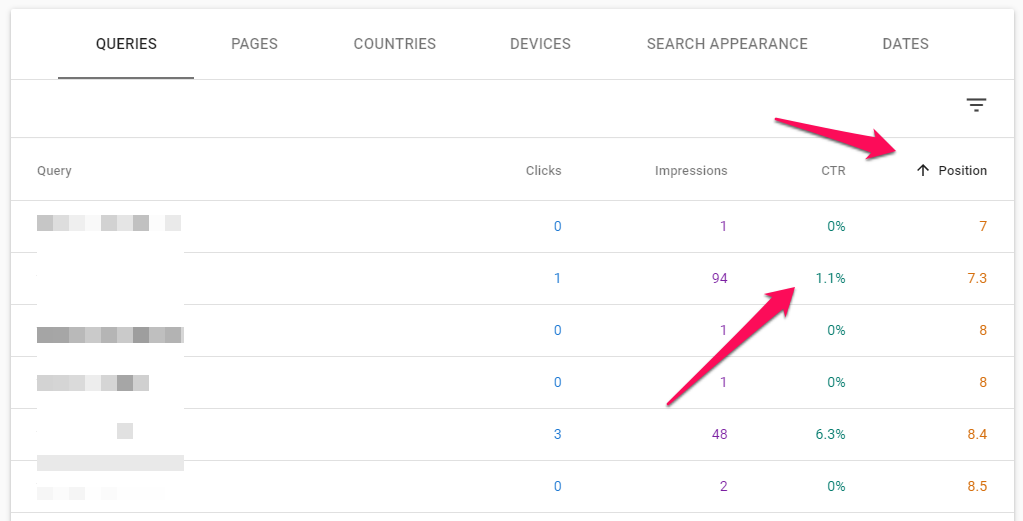
You can then start adding that keyword to your content to rank better for it in the search engines.
If you want even better results, try out the CognitiveSEO Content Optimization Tool.
Or, you can use a Secondary Dimension (Behaviour > Landing Page) on the Organic Traffic Channel in Google Analytics to figure out which pages converted the best.
Then you can mix those with the Google Search Console query data to know (with approximation) which set of keywords bring the most conversions.
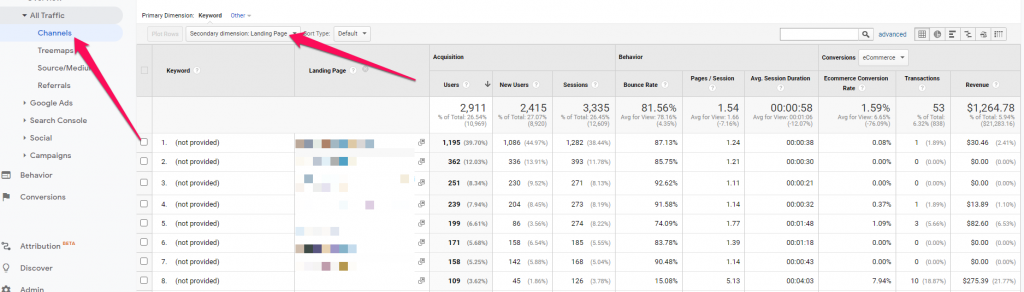
Tools such as Google Analytics have a lot of filters that can help you figure out what exactly happened on your website so make sure you use them for better SEO results.
I hope this list of 15 reasons why your SEO doesn’t work helps you figure out what you’ve been doing wrong or at least gives you a new perspective on your SEO campaigns.
Complex SEO strategies and tactics are awesome, but you always have to make sure you stick to the basics first.
Do you think there are other reasons why someone’s SEO strategy might not work? Share them with us in the comments section below.
The post Why SEO Does Not Work for You & Your Website appeared first on SEO Blog | cognitiveSEO Blog on SEO Tactics & Strategies.
Source: cognitiveseo.com

What Does It Take to Start a New Digital Project?
Have you been planning to start a new digital project for ages but never got around to taking the leap?
We’ve all been there!
I have a long list of domains I once purchased planning a new project that I never ended up using.
So don’t feel bad. It is never too late!

Here’s what it takes to start a new digital project:
1. Start with the Name
This step requires some serious consideration.
Remember your brand name is something you are going to be stuck with for years.
Rebranding is a nightmare, so make sure you do this right the first time.
Things to consider:
Easy to Write
How easy is it going to be to misspell it?
Running this generator may give you some ideas. You may also share your name with friends and get their input on how easy it may be to type your future brand name into the browser’s address bar.

Check Negative Association
Are there going to be any negative associations that would impact your branding?
I usually check Urban Dictionary for parts of my brand name to see if there’s anything I need to know about that concept.

Unique Brand
Are there strong brands with the same or similar names?
Search Google and see if there’s someone already known by that name.
They don’t have to be in the same niche to make your reputation management a nightmare or cause ongoing brand confusion.
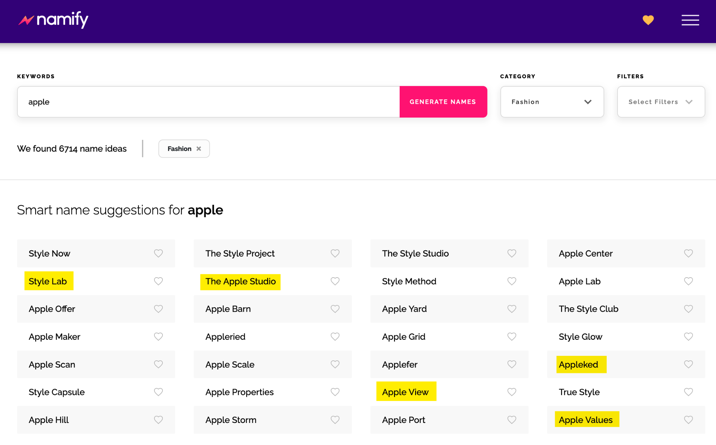
I like using this brand name generator to find a cool name for my new projects.
What makes this tool unique is the way they come up with brand names: Instead of using overused tactics (like putting a prefix or a suffix to your target keyword), this one uses AI to generate meaningful and unique suggestions based on your chosen category.
For example, here are some suggestions in the Fashion category:
And here are suggest brand names in the Technology category:
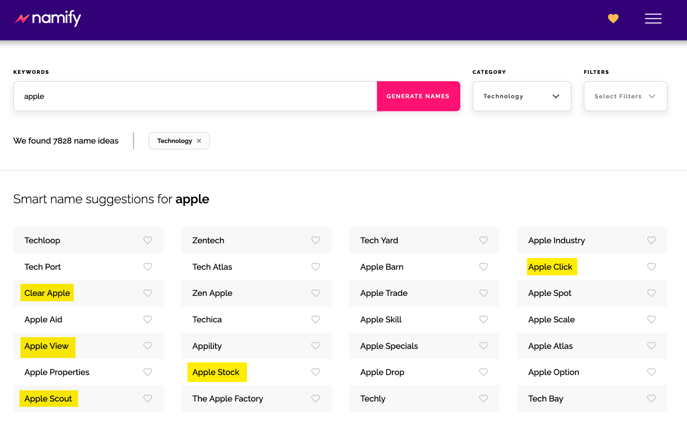
The tool will also check the domain and social media availability for your chosen name and even suggest a possible logo for your future brand which also matches your niche:
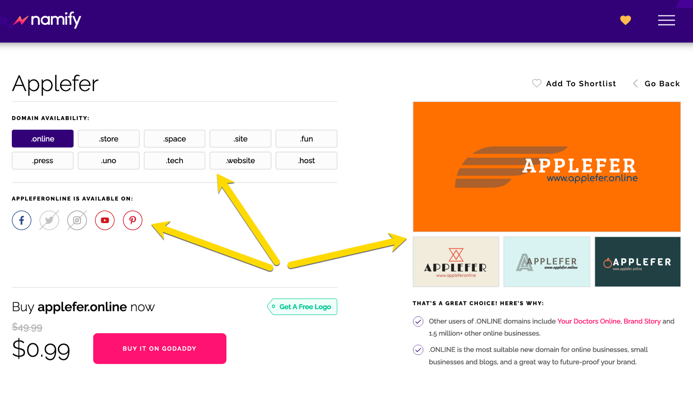
Surely, with so many helpful ideas, selecting your future brand name and identity is much easier.
Plus, it’s free and requires no registration.
2. Set up a Website
This may seem a challenging step if you lack tech skills (like most of us do) but the reality is that it has become much easier!
In fact, setting up a WordPress site on the most popular hosting providers is just a matter of several clicks and following the clear steps.
From there, all you need is to select a theme.
Unlike your brand name, a theme is easy to change, so no need to stress yourself with this step too much.
I usually just start with a decent free theme and start filling it up with content to be found by search engines.
3. Develop Your Content Plan
You can develop content in various sections of your website: frequently asked questions, a blog, a news section, product or service descriptions, testimonials or reviews, your “about page”—these all deserve your attention!
Try not to sound too corporate.
Nobody likes talking with a company, so add some personality.
Be yourself.
And skip the gobbledygook!
Firstly, start with your audience
A useful way to do this is to describe your perfect customer.
- What do they read?
- What are they interested in?
- What are they worried about?
- What do they dream about achieving?
- What are their objections to buying from you?
Thinking about your perfect customer will make your content interesting, engaging, and persuasive.
Next, decide what content your perfect customer is interested in
- Which questions can you answer?
- How can you create testimonials?
- How can you show the benefits of your products and overcome objections?
- What language does she speak?
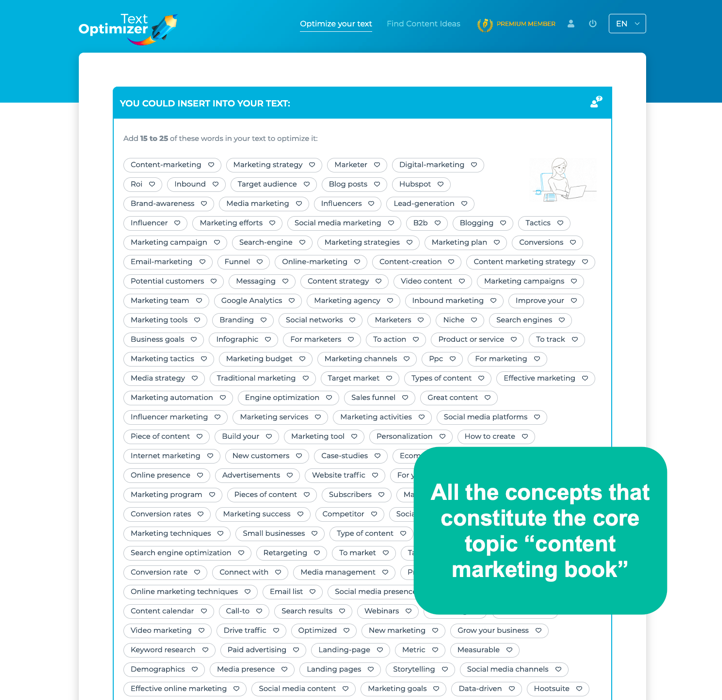
Text Optimizer will give you lots of ideas on what to cover in your content and where to branch out to in the future:
Your content shouldn’t all be about your services/products
Show that you’re an expert in your industry.
Comment on industry news.
Interview experts.
And don’t forget that your content can be text, audio, visuals, or video. Above all, be useful.
Help your perfect customer with solutions to her problems.
An editorial calendar will help you create content on a regular basis.
It’s absolutely fine to create something just once a week or even every other week.
The quality of your content is more important than quantity.
And don’t forget that you need to spend time promoting your content, too
Do you know on which social media channels your audience is most active?
Just start with two or three channels.
Don’t try to be everywhere.
Build up a following in a natural way.
If something doesn’t work, move to another channel or change the way you engage.
Ask different questions or share different stories. But always be authentic.
This is what content marketing is about.
You need to provide quality content that is useful for your audience, that engages your audience and that builds trust and authority for your company.
4. Define Your Conversion Funnels
Don’t launch your project until you set up your conversion funnels!
Otherwise, all the traffic you’ll generate from your launch activities will be lost forever.
First define your main conversion, for example:
- Buy your book
- Set up for your demo
- Schedule a phone consultation
- The email you to request about your services
- Enroll with your course, etc.

Then identify and set up all the different paths towards that goal:
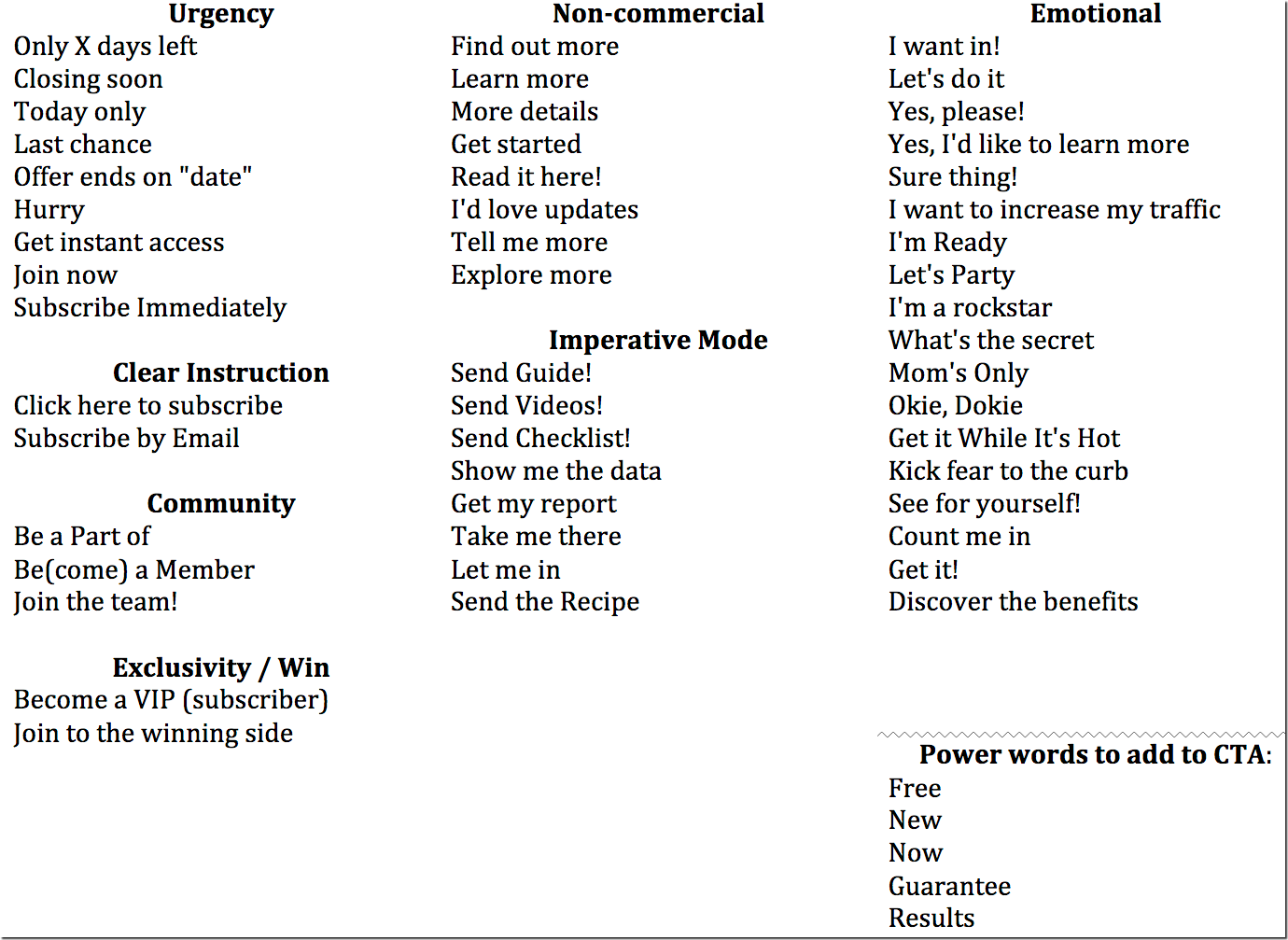
- Add your CTAs: “Contact now”, “Buy now”, etc. I did a huge list (which you can download) on how you can word your calls to action to trigger an action.
- Add lead generation forms: Those who may be interested in hearing more from you will share their contact details. Using conversational forms is a smart idea as they feel more human and encourage more action.
- Include the “Recommend” button to encourage your site visitors to recommend your product or service to a friend
- Create and install Facebook pixel to be able to reach out to your site visitors through Facebook ads and generate some more conversions from people who already know your brand but failed to take an action
- Include social proof to show how your customers are enjoying your product
There are many more conversion optimization tactics that also generate more traffic to play with.
Conclusion
Starting a new project is scary and overwhelming but it will also make you feel inspired all over again.
I am a strong believer that the riskiest thing in life is not to take risks.
The person who is afraid of falling never learns to walk!
So wait no more: Launch that project of yours now!

The post What Does It Take to Start a New Digital Project? appeared first on DigitalMarketer.
Source: digitalmarketer.com

8 Technical SEO Mistakes You’re Probably Making and How to Fix Them
Technical SEO.
If you’re like most marketers I know, that phrase can give you the heebie-jeebies.
It just sounds so…
Well…
Technical.
And chances are you’re not a developer or a master programmer. So you shouldn’t have to worry about technical SEO… right?
Wrong. Totally wrong.
As you’re about to learn, technical SEO is crucial if you want to rank for your most important keywords. Without good technical SEO, you could end up with the visibility of a short kid standing in the back row of a team picture.
Without proper technical SEO, you’ll never rank for your target keywords.
But don’t worry. There’s good news: once you start digging in, technical SEO is not nearly as hard or complicated as it sounds.
In most cases, it’s a fairly straightforward task that you can get the hang of relatively quickly, and you won’t even have to go back to DeVry for a second degree to do it.
And here’s even more good news:
In this post I’m going to help you fast-track your results by sharing the 8 most common technical SEO mistakes most marketers are making, and how to fix them.
Now you may be wondering, what is technical SEO anyway? And why is it so important?
I’m glad you asked.
What is Technical SEO Anyway? And Why is it So Important?
In general, there are 3 main kinds of SEO: technical SEO, on-page SEO, and off-page SEO.
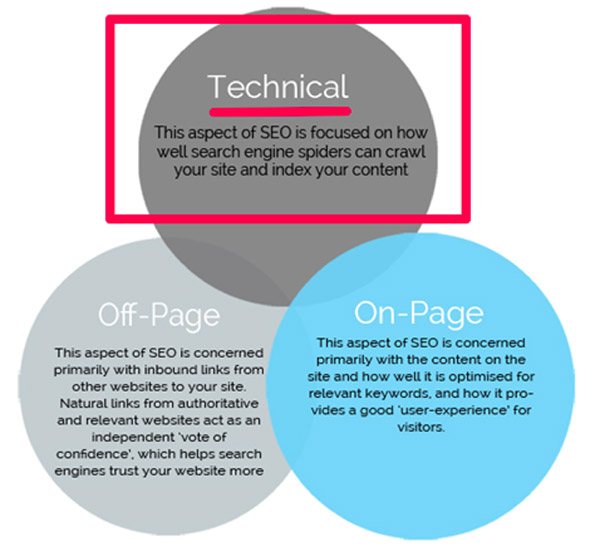
Here are some quick and dirty definitions:
- On-Page SEO: In a nutshell, this is your content. To rank for competitive terms, you need to create engaging content that includes the right keywords.
- Off-Page SEO: This is your inbound links. To rank for competitive terms, you need inbound links from authoritative and relevant websites.
- Technical SEO: This is making sure that Google and other search engines are able to crawl and index your content.
Most people tend to focus on off-page and on-page SEO.
And those are really important!
(RELATED: 5 On-Page SEO Elements (+1 Bonus Tactic) to Optimize in WordPress)
But here’s the thing:
Without proper technical SEO, you’ll never rank for your target keywords—no matter how good your content is or how many great links you have.
Let’s explain this with a quick analogy.
Pretend, for example, that you’ve just produced your own feature film (go you!) and you’re releasing your new movie in theaters.
And now, you want to get as many people to come to see your movie as possible.
In this scenario…
- Your on-page SEO is the movie itself. (The content needs to be good.)
- Your off-page SEO is all your reviews. (You need other people to confirm how good your movie is.)
- And your technical SEO is like having a movie projector that actually works.
See what I mean?
It doesn’t matter how good the movie is or how good your reviews are.
If you have a technical problem—like a broken movie projector—then nobody’s going to see that movie.
It just won’t be possible.
Technical SEO is the same way.
And technical SEO mistakes are a lot more common than you might realize.
In fact, we had one just recently here at DigitalMarketer!
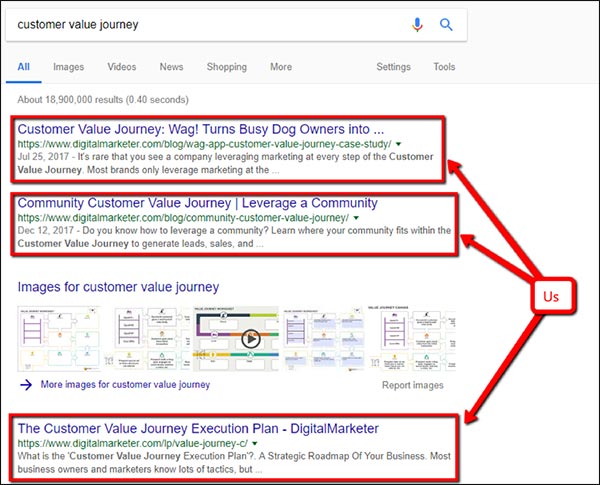
During my very first week here, Marcus (our Director of Monetization) came to my desk and said that he’d really like to rank for the term “customer value journey.”
I started doing some digging and was perplexed.
We had 3 really great pages that should have been ranking for this keyword.
And on top of that, we’re an authoritative site for digital marketing-related terms.
So why weren’t we ranking for “customer value journey”?
It turns out we had a technical SEO mistake: there was a folder in the URL structure that had been indexed, nofollowed across the entire site.
As a result, none of our customer value journey pages could be seen in the search results!
So I removed those tags, and in the very next week we were ranking for “customer value journey”… not once, not twice, but 3 times:
To go back to our analogy, we had a great movie… with great reviews…
But the projector was broken.
Fortunately, the solution is pretty simple.
Fix the technical problem, and you can start ranking really fast if your on-page and off-page factors are in place.
8 Most Common Technical SEO Mistakes that People Make, and How to Fix Them.
So now I’m going to give an overview of the 8 most common technical SEO mistakes that people make, and how to fix them. Starting with…
Mistake #1: Confusing Your Meta Descriptions + Title Tags with Your Open Graph Description + Title
Your title tag is a little bit of text that can appear in the search results and in the tab of your website. And your meta description is what appears as the description of your page in the search results.
It’s probably easiest to just show you what I mean:
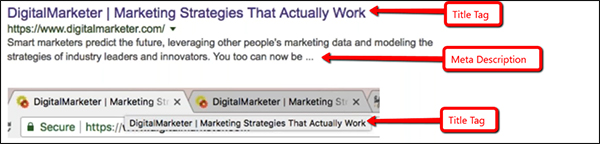
People usually think of meta descriptions and title tags as on-page SEO elements.
But as you’ll see, they can also be considered technical tags on the back end of your website.
For example, here’s the title tag on our homepage:

Pretty simple.
But 1 mistake that a lot of people make is confusing their meta title/description with their Open Graph title/description.
Here’s the Open Graph title (the highlighted part):
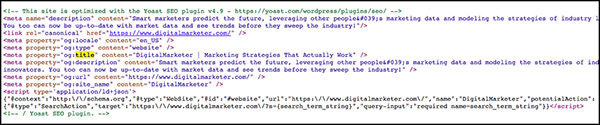
And here I’ll highlight both the meta description and the Open Graph description.
As you can see, they look very similar so it’s very easy to confuse them:
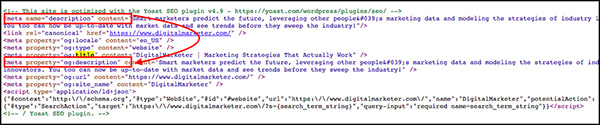
This is an easy mistake to make, but fortunately, it’s also really easy to fix.
Just make sure you have both a meta description/title tag and an Open Graph description/title tag.
Here’s how you can tell which is which:
- Title tag begins with: <title>
- Open Graph title begins with: <mega property=“og:title”…
- Meta description begins with: <meta name=“description”…
- Open Graph description begins with: <meta property=“og:description”…
Mistake #2: Not Using Open Graph to Optimize Your Social Links
We just talked a little bit about Open Graph in technical SEO mistake #1. So, what is Open Graph, anyway?
Basically, Open Graph is sort of like a title tag and meta description for social networks.
It’s what tells sites like Facebook what your page is about, and how to display your page anytime it’s shared on that network.
It can include a title, description, image, and more.
Here’s an example:
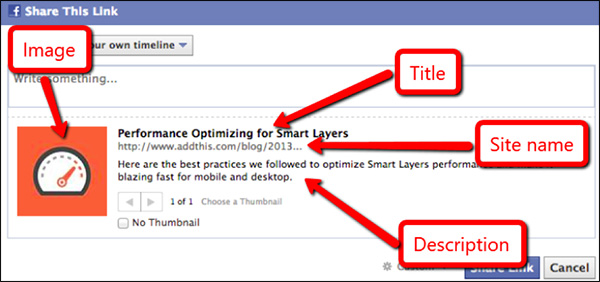
Looks nicer than just a plain old link, doesn’t it?
Here’s what Open Graph tags look like on the back end:

And here are some of the different Open Graph tags you can specify:
- og:title – This is the title of your object as it should appear.
- og:type – This is the type of your object, like “video.movie.” Some types may require
- additional properties.
- og:description – This is the description of what your page is about.
- og:image – This is the URL of an image that should represent your object.
- og:url – This is the canonical URL for the page.
So make sure to specify these tags for any page that gets social traffic.
Your links will look more appealing with a nice image and a well-written title and description, which will help improve your click-through rate—and therefore your reach—on social media.
(NOTE: Before you get started fine-tuning to rank for your keywords, you need to know who your ideal customer is, where they are, and what they want to see. Download our FREE and proven Customer Avatar Worksheet and get clear on who you’re selling to.)

Mistake #3: A URL Structure That Creates Duplicate Content
Now let’s talk about your URLs.
You may already know that this is another factor that can influence your SEO.
Having your primary keyword in the URL, for example, can help improve your rankings.
It’s also considered a best practice to keep your URLs relatively short so that people can see what they’re about to get when they click on your link.
Here’s an example of one of our URLs that does both, which helps it to rank for the term “Facebook Messenger marketing”:
https://www.digitalmarketer.com/blog/leverage-facebook-messenger-marketing/
But inherent in your URL structure is a potential technical SEO mistake that you want to be on the lookout for:
Having your primary keyword in the URL can help improve your rankings.
Accidentally creating duplicate content.
This happens a lot more often than most people realize.
One common way it can happen, for example, is when you upgrade your hosting from http to the more secure https.
When you do that, you have to make sure that the non-secure (http) pages are all properly redirected to the secure (https) pages.
Otherwise, you could potentially be creating a ton of duplicate content without even realizing it.
Here’s a quick and easy way to figure out if you’re making this mistake right now:
- Go to your search bar and navigate to your website. Say it’s https://www.mycoolsite.com.
- Now try deleting the “s” from your website so that the address is now http://www.mycoolsite.com, and hit enter.
If your site automatically redirects you back to the https version of the page, then you’re good.
But if the non-secure (http) version of the page loads, then that’s a problem.
Because that means as far as search engines are concerned, there are 2 versions of your page—the http version and the https version.
If that’s the case, then you’ll need to let your developers know so they can set up 301 redirects.
That way Google and other search engines are seeing only 1 version of every page on your site.
The same principle applies to any potential URL differences, including:
- www vs non-www (https://www.mycoolsite.com and https://mycoolsite.com)
- Trailing slash vs no trailing slash (https://www.mycoolsite.com and https://www.mycoolsite.com/)
Remember, every page on your site should have only 1 URL.
Otherwise, you’ll be creating duplicate content.
Now, duplicate content isn’t the end of the world.
It’s not a penalty in Google.
But it’s not ideal, because when you have multiple pages with the exact same content, then Google (not you) decides which link to display in the search results.
And you never want to let Google decide.
You always want to keep control over this stuff for yourself.
If you don’t, Google could potentially do something like rank a page with UTM parameters, which means that instead of ranking this URL in the organic results:
https://www.digitalmarketer.com/resources/blog-marketing-strategies/
It could rank this page instead:
And you definitely don’t want that!
For one thing, it’s long and hard to read.
Second of all, you’ll have 2 URLs in your analytics, which can cause issues in your data.
You’ll have to combine these together.
That’s a lot of potential complications that can arise based on your URLs.
Fortunately, the solutions are pretty simple—phew! You just need to do these 2 things:
1) Always specify a canonical URL (this tells Google which URL to rank)
On the back end, make sure that your canonical tags exactly match the URLs that you want ranking in search engines (including https, www, trailing slash, everything).
Here’s what a canonical tag looks like on the back end:

2) Use 301 redirects whenever necessary to redirect to your desired URL
If you find that multiple versions of a page are loading, just redirect all the duplicates to your canonical URL.
You can learn how to do that here if you are new to redirects.
And if you want to figure out whether a page is being properly redirected or not, check out the Redirect Path Chrome extension.
It will show you the redirection path of every URL so you can double-check this stuff.
Mistake #4: Improperly Specifying Language Parameters
If your website is translated into different languages, you’ll want to use the hreflang tag to specify a URL for each translated version of each page.
Here’s what that would look like if our homepage were translated into Chinese, French, German, Japanese, Portuguese, and Spanish:
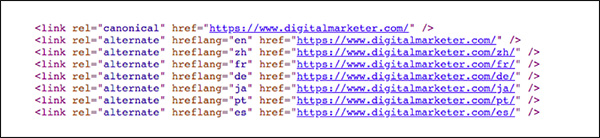
This tells Google that these URLs are translated versions of the same page.
So if someone is searching for your page in Spain, Google will automatically show the Spanish version of the page.
If the searcher is in Japan, it will show the Japanese version.
And so on.
Basically, language parameters allow you to show the right page, in the right language, to the right people.
(Warning: you should ONLY do this if your page is actually translated into each of the languages you specify.)
Mistake #5: Using Header Tags for Formatting (And Not SEO)
Header tags tell a search engine what to focus on when they’re crawling a page on your website.
So, when you’re coding your page, you want to make sure to include your target keywords in those header tags so that Google will know what your page is about and rank it accordingly (if you can’t find a way to weave it in, you might want to rethink your keyword choice)
But here’s the problem that comes up a lot:
Header tags are often used for formatting and design, rather than for SEO. (This is especially true on WordPress sites.)
Sometimes if you want some text to look bigger, it’s easier to give it an <h2> and move on than it is to style it accordingly with CSS. But that’s not the best practice. Ideally, you’ll reserve those header tags for phrases that contain your target keywords.
Now I’ll be the first to admit that it’s not always easy to follow this advice…
Here’s an example of a place on our homepage where we’re using a <h2> tag to style a bit of text that really shouldn’t be in a header tag:

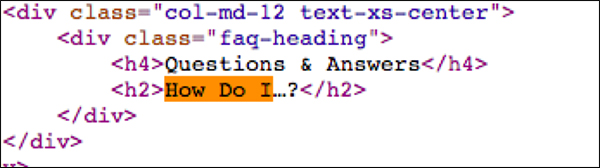
By putting the text “How Do I…?” in a <h2> tag, we’re essentially telling Google that “How Do I…?” is an important keyword to look for when crawling this page—which, of course, it isn’t.
Now, this isn’t a huge issue.
It’s not going to destroy your organic rankings if you have header tags with irrelevant keywords inside them.
But again, it’s not the best practice.
So try to reserve those header tags for keyword-rich phrases (especially if you’re trying to rank for a really competitive keyword).
Mistake #6: Using Keyword Tags
This one is going to be really short and sweet:
You know that keyword tag that tells Google which keywords you’re targeting for each page?
Don’t use it. Seriously.
If you have a bit of code like this on your site:

Then just delete it and move on.
Here’s why.
This bit of code was originally used to remind SEOs which keywords they were trying to rank for.
And it was considered a ranking factor in Google.
Don’t use it. Seriously.
But these days, it’s definitely NOT a ranking factor.
It doesn’t help your rankings at all.
And it’s also NOT a good way to keep track of the keywords you’re targeting on each page.
(For that, you should be using an SEO tool or even just a spreadsheet.
You can learn more about SEO organization here.)
So the keyword tag has zero benefits.
The only thing it does is inform your competitors of which keywords you’re targeting!
And you don’t want to give your competitors that kind of advantage. So do yourself a favor and don’t use the keyword tag.
Mistake #7: Using Pagination Incorrectly
Pagination is when you use multiple pages of content.
You’ve almost certainly seen paginated content with a navigation bar that looks something like this:

You may want to use pagination on your blog, for example, or on an ecommerce store with lots of products.
Now the technical SEO implications of pagination can get tricky because you can potentially create duplicate content between the separate paginated and the view-all versions of your content.
There are 3 potential ways to handle pagination for SEO:
Option #1: Use a canonical tag to point to a view-all version of a page.
With this solution, you’re creating a single page that will display all your results.
So the user won’t have to click “Next” or “Previous” to find what they’re looking for (a specific blog post, product link, etc.).
Instead, all those results will be on 1 long page.
To do it, you’ll need to manually point all your separate pages to the view-all version… like this:
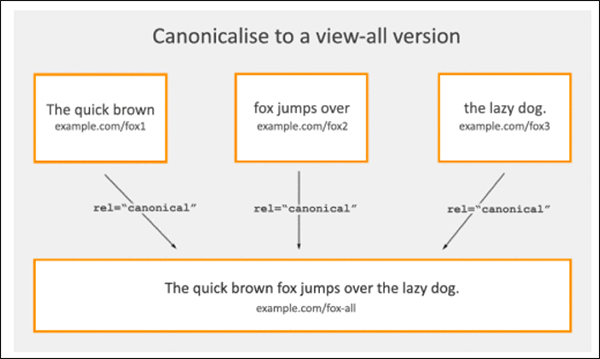
The benefit of this approach is that it’s fairly simple and straightforward to create, and it solves the issue of duplicate content by putting all your results on one big page.
The problem is that because that page will have so many results, it can lead to slow load times and potentially a poor user experience (it may be hard for the user to find what they’re looking for).
Option #2: Paginate using HTML markup.
The other option (and the one we use here at DigitalMarketer) is to break up your results into separate pages so that each page contains a more manageable number of results.
This way, the user can click “Previous” or “Next” to navigate among the results.
Like this:
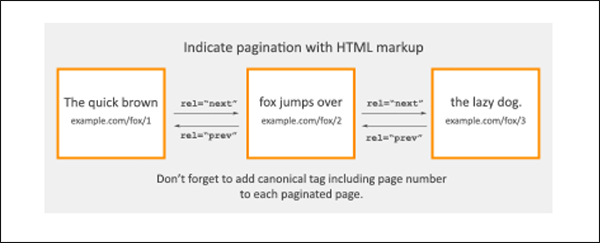
You can implement this solution using the rel=“prev” and rel=“next” tags so that on each page the user can navigate forward or backward in the series.
If you decide to go this route, just make sure there isn’t a rel=“prev” on the first page or a rel=“next” on the last page of results.
Otherwise, you could potentially be creating duplicate pages.
Option #3: Don’t do anything and let Google try to figure it out.
This is the option I like to call…

If you don’t feel strongly about how your content is paginated in the search results, then you could do nothing and let Google decide how to show your results.
Google understands that this sort of thing happens, so if you don’t specify a pagination system then Google will try to group your pages even if there’s no pagination markup.
At the end of the day, it’s probably not the most optimized option out there because it means you have no control over how Google presents your pages.
But it’s still an option if your time is limited and you have more important things to focus on.
Mistake #8: Accidentally Applying Noindex, Nofollow to a Page You Actually Want to Rank
A noindex, nofollow tag on the back end of your site tells crawlers like Google not to crawl a page and not to index it.
So, if you have a page that you don’t want showing up in the search results—like an order confirmation page, for example—use these tags to make sure people don’t stumble onto that page through organic search.
Just be careful when using this tag, because if you accidentally apply it to a page that you DO want to show up in the results… well, you’ll be mistaken in thinking that your page is discoverable through organic search, and you may be wondering why your page isn’t ranking.
To quickly see if your pages are indexable or not, download the SeeRobots Chrome extension.
It’s a quick and easy way to make sure that your important content is being crawled and indexed by search engines.
Mistake #9 (BONUS): Using Redirect Chains
Guess what, guys?
I have a BONUS tip for you!
Technical SEO mistake #9 has to do with redirect chains.
Every website is going to have redirects, and that’s fine.
It’s to be expected, actually.
A redirect works like this:
So anyone who hits Page A will be automatically redirected to Page B.
Again—that’s totally fine.
With a permanent 301 redirect like this, the SEO authority from Page A will be transferred to Page B.
But what you want to avoid is redirect chains in which you have one page redirecting to another, which is redirecting to another, and so on.
That would look like this:
In this case, anyone who hits Page A will be automatically redirected to Page B… and then again to Page C.
This is bad because multiple redirects can cause you to lose some of Page A’s authority in the course of all those redirects.
You’ll essentially be losing SEO authority for no good reason.
Luckily, there’s a simple solution! Just do this instead:
Page B > 301 Redirect > Page C
Here instead of creating 1 redirect chain, you just create a separate redirect for each page.
This way, both Page A and Page B are each redirecting their authority to the new page—and as a result, you will be maximizing your search engine results.
This is another situation in which the Redirect Path Chrome extension really comes in handy.
Technical SEO Doesn’t Have to Be Scary
And that’s it—you just learned how to spot, and fix, the 9 most common technical SEO mistakes.
That wasn’t so bad, was it?
Give yourself a pat on the back.
I know this material can be a lot to take in but trust me—it’s well worth your time to make sure your site is ranking as high as possible in Google.
My recommendation, if you’re learning about all these SEO mistakes for the first time, is to take them one by one.
First, start with mistake #1, and make sure your website has the right title tags and meta descriptions.
Then when you’re done with that, move on to mistake #2 and specify your Open Graph settings.
And so on down the list.
Before you know it, your site will be technically optimized for the best possible search results, helping you to maximize your SEO traffic for your highest-value, most relevant keywords.
(NOTE: Before you get started fine-tuning to rank for your keywords, you need to know who your ideal customer is, where they are, and what they want to see. Download our FREE and proven Customer Avatar Worksheet and get clear on who you’re selling to.)
The post 8 Technical SEO Mistakes You’re Probably Making and How to Fix Them appeared first on DigitalMarketer.
Source: digitalmarketer.com