
Tag Archives for " virtual "

How to Run a Virtual Job Fair to Attract Top Marketing Talent
Virtual job fairs have been growing in popularity in recent years.
Chances are, that’s only going to continue.
Virtual job fairs can be the perfect way to initiate that first interaction between candidate and employer.
How do you make sure yours is successful?
Here is what you need to know.

Disclosure: This content is reader-supported, which means if you click on some of our links that we may earn a commission.
What Is a Virtual Job Fair?
A virtual job fair is an online event that allows job seekers to network with potential employers.
The entire event takes place online, allowing attendees to get to know employers better, network with other job seekers, and attend workshops and guest speeches, all from the comfort of their own homes.

With so many virtual job fair platforms to choose from, it’s possible to recreate the traditional job fair with an online twist.
Combine traditional features like colorful booths, meeting rooms, info packets, and guest speakers with the online elements of virtual tours, and analytics and it’s easy to see why many businesses are having success with this method of hiring.
Experts believe as much as 80 percent of recruiting will remain virtual for the foreseeable future, and the early stages of the recruitment process are ideal for the online medium.
This has seen major companies around the world embrace virtual jobs fairs, including Deloitte, BNP Paribas, SumUp, and many more.
What Are the Benefits of a Virtual Job Fair?
The vast majority of job searches start online, so it’s not surprising that the next step is moving online as well.

It’s not just attendees who benefit from job fairs though, both the organizers and exhibitors stand to gain as well.
Virtual job fairs are:
- safe
- cost-effective
- not limited by physical space
- provide access to a wider talent pool
- make it easier to access the data
The most obvious benefit and one of the main reasons people turned to virtual job fairs in the first place is the added convenience.
By hosting the event remotely, it’s possible for people to network without sharing physical space.
The remote location has other big benefits too.
For example, you don’t have to pay for event space (which can be expensive).
By eliminating this cost from your budget, you can focus on finding the right software and maximizing value.
A virtual job fair can also pull in talent from further around the world.
With a traditional job fair, there’s only so far people are willing to travel to attend, but when they’re meeting employers from the comfort of their own home, this isn’t a factor.
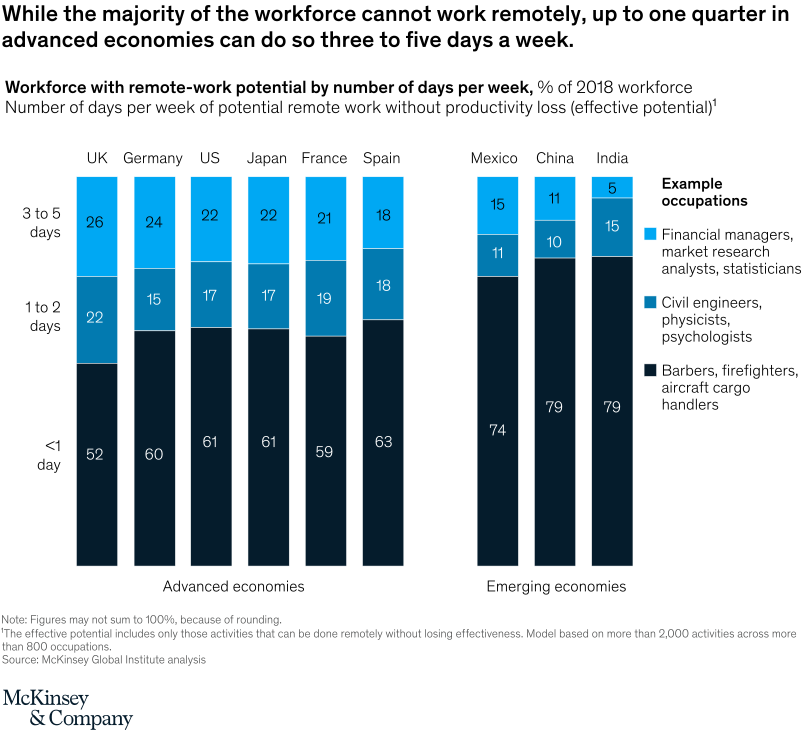
With remote work becoming more and more efficient, this is ideal for businesses looking to attract top candidates from all over the world.
Finally, the virtual format provides access to far more data.
By accessing attendees’ resumes before they sign up, employers can personalize their offerings and streamline the hiring process.
Data analytics can also help track event success more easily.
7 Tips to Hosting a Successful Virtual Job Fair
Hosting a virtual job fair can save you a lot of hassle associated with a traditional job fair.
However, there’s still a lot of hard work to be done to ensure your event is a success.
Here are a few tips for ensuring your event is successful and valuable to everyone involved.

1. Choose the Right Virtual Job Fair Platform
The platform you choose for your virtual job fair is essential.
When you’ve got hundreds of people coming together online, you don’t want glitches, and the right software will ensure this.
When choosing your platform, one of the most important things to consider is features.
Think about the type of virtual job fair you want to run, and then decide on the features you need to make it successful.
There are some great options to choose from, and three of the most popular are Brazen, CareerEco, and Paradox.
Brazen
Brazen offers powerful virtual job fair software, tailored to businesses, colleges and universities, governments, and jobs boards.

With a range of features, Brazen is one of the most popular options for virtual job fairs.
Popular features include:
- highly customizable, allowing your brand to take center stage
- live video broadcast booths will enable you to host webinars within your event
- engage attendees through text-based and video-based chat as needed
- everything you need in one place
To get a better idea of how you can use Brazen and the costs of this software, enquire about pricing online.
CareerEco
CareerEco sells itself as a partner in your virtual job fair.

Not only does it provide you with the platform, but it also offers support every step of the way.
With over ten years of experience in virtual events, CareerEco is a trusted name in the industry.
It is regularly used by Amazon, AmeriCorps, FEMA, Wells Fargo, Arizona State University, and many other large organizations.
Popular features include:
- flexible platform allows you to tailor your event to your needs
- affordable, straight-up pricing that enables you to keep your costs down
- advanced technology tool kit
- great customer support to help make sure your event is a success
As CareerEco says, virtual events are here to stay.
If you’re planning a virtual job fair, it’s a great place to get a quote from.
Paradox
Paradox uses AI to make your virtual job fair easy to manage.
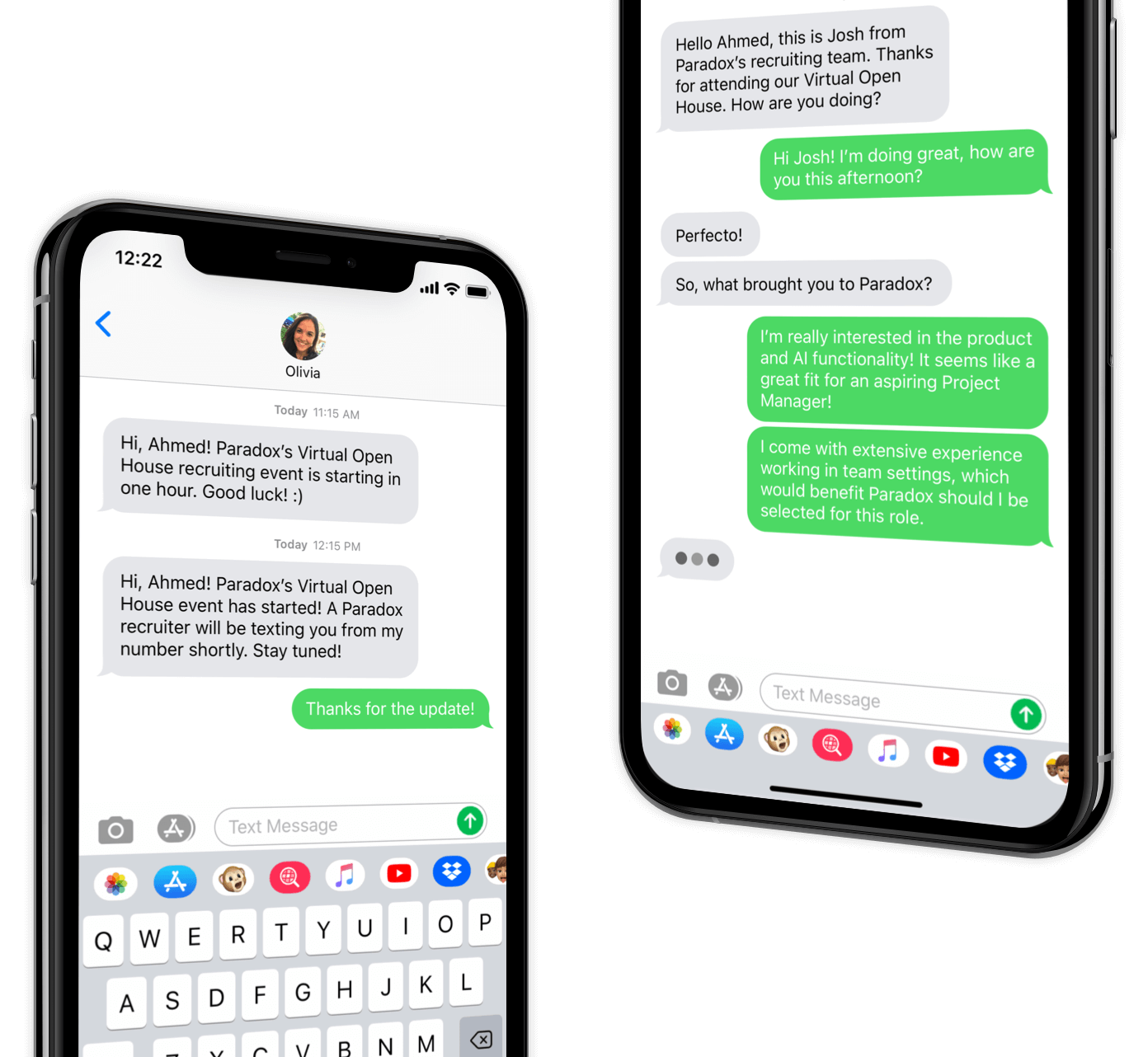
With its virtual assistant, Olivia, looking after event registrations and communication, you can sit back and relax as your event comes together.
Top features include:
- streamlined process to help put your event together quickly
- no user limits mean you can put a strong team together to work on your event
- streamlined registration to maximize attendance
With Paradox, you get a mobile-first recruitment experience that uses AI to put the candidate first.
2. Outline Resources Needed
A virtual job fair needs more than just some fancy software to be a success.
Candidates are there to get a deeper understanding of the businesses they’re interacting with, and this requires a personal touch.
Put a team together that shows off the best aspects of your business.
This way, you can create engaging presentations and give people a complete picture of what it’s like to be a part of your organization.

Start by making sure you have the right technology (cameras, microphones, etc).
Don’t underestimate this part.
No matter how good your software is, a poor camera and microphone will make your fair look unprofessional.
Make sure everyone on your team is equipped with everything they need, and focus on coordination.
Bringing together different team members virtually isn’t easy, and it takes good planning.
3. Develop a Marketing Plan
Every event needs attendees, and the only way to attract attendees is to market your event.
It’s no use hiding a link on some corner of your website and hoping people sign up.
You’ve got to be proactive and focus on your marketing plan.
Email Marketing

The key to marketing an event is engagement, and one of the best ways to do this is through email.
Even if someone has signed up for your event, make sure you continue to engage with them and build excitement.
Particularly for something like a virtual job fair, where you’re generally not charging, it’s easy for people to sign up and forget to attend.
You want to maximize attendance, and one of the ways to do this is through an engaging email marketing campaign.
Social Media

Marketing is about reaching people where they’re hanging out, and for a huge number of us (almost 4.5 billion), that is on social media.
If you have a large following on social media, then you have a perfect platform to market your event.
If not, then don’t worry; paid social media advertising is a great way to reach a larger target audience.
The key is to use careful targeting to avoid overspending on ads.
Have a clear idea of what your target audience looks like, and use targeting features to make sure you’re maximizing your budget.
Follow my guides on how to advertise on LinkedIn, Facebook, and Instagram, and you will reach your audience.
You can also reach out to my agency to do this for you.
Reach Out to Partners

Use your connections.
If you’re running a big virtual job fair, then you may want to share the load with another company and run it together.
The more companies you get on board, the wider your reach will be.
Sometimes working together can be beneficial, and if it gets more talented people engaging with your business, then it’s a good idea.
This is particularly helpful for local businesses, where you all stand to gain.
4. Set Up Virtual Booths

Virtual booths are the online equivalent of the booths you see at a traditional job fair.
They allow attendees to speak to different companies, or different departments within the same company, and get to know them on a deeper level.
Virtual booths are a great way to guide candidates through the virtual job fair.
It allows them to explore their interests and engage with different people within a business.
For example, if you’re doing a virtual job with a collection of other companies, then each company would have a booth.
Companies might also split up departments and have one booth each for accounting, sales, and marketing.
Like a regular booth, you can design your virtual booth to reflect your branding and stand out from the crowd.
Offering small incentives, like a software trial or an ebook, can encourage users to engage with booths.
5. Add Additional Events and Spaces

One of the nice things about a traditional job far is that you’ve got so much going on.
In addition to booths, there may be guest speakers, workshops, and entertainment options.
Just because you’ve moved your job fair online doesn’t mean you can’t still offer these same features.
Create additional events and virtual breakout rooms to add different layers to your virtual job fair.
Focus on maximizing the value you offer attendees.
The more engagement you get, the better your recruitment efforts will go, so these additional events and spaces can be critical.
Additional spaces also offer an opportunity to get more personal.
Rather than engaging everyone as a group, they allow you to run personal meetings with the most promising candidates.
6. Send Educational Info Before the Event

As I mentioned earlier, your marketing doesn’t stop when someone signs up for your virtual job fair.
Continue to build excitement by offering value in the run-up to the event.
This is also an opportunity to make sure everything runs smoothly.
The more prepared attendees are, the more comfortable they will be, and the more you’ll be able to see the qualities they could bring to your company.
Simple educational content like tips on updating resumes won’t just make your job easier as a recruiter.
Still, it can also keep the conversation open and give people the confidence to attend.
Don’t forget to send automated reminders!
People lead busy lives, and it’s easy to forget what they’ve signed up for.
7. Follow Up With Attendees
If your virtual job fair has gone well, then you should have made a strong connection with the attendees.
It’s important to capitalize on this and keep building the relationship.
When you come across an ideal candidate, you’re naturally going to continue the conversation.
However, even the people you don’t hire can offer helpful insights.
Consider making a survey to find out what attendees thought of your virtual job fair.
This information will help you perfect your next event.
Virtual Job Fair Frequently Asked Questions
Q:1
What are the benefits of a virtual career fair?
A virtual job fair allows you to pull in talent from around the world, avoid paying for expensive event space, and invite a larger number of attendees.
Q:2
What do you do at a virtual job fair?
A virtual job fair is similar to a traditional one.
You meet potential employers, learn about their businesses, listen to guest speakers, attend workshops and network with other job seekers.
Q:3
What platforms can I use for a virtual job fair?
Three of the most popular virtual job fair platforms are Brazen, CareerEco, and Paradox.
Q:4
Do the virtual career fairs worth it?
Employers put a lot of resources into organizing virtual job fairs, so it’s clear they take them seriously.
For job seekers, this means virtual job fairs can lead to important connections that can often result in a job offer.
Virtual Job Fair Conclusion
So much of our lives happen online, so it’s no surprise that virtual job fairs are growing in popularity.
With the right software, hosts can offer many of the same benefits of a traditional job fair, but with the added flexibility and convenience of the online world.
Don’t think setting up a virtual job fair will be a walk in the park, though.
To be successful, organizations spend time planning and find ways to offer value to attendees.
Don’t forget to build a strong event promotional strategy.

You might offer amazing content and endless opportunities for job seekers, but all that work will be wasted if no one attends.
Find the right platform, figure out what resources you need, and make sure to learn from your mistakes by getting feedback from your attendees.
Has your organization hosted a virtual job fair? What challenges did you face?
Source: feedproxy.google.com

Best VPS Hosting Plans
Upgrading to a virtual private server (VPS for short) will drastically improve your site performance if you’re currently on a shared hosting plan.
Disclosure: This content is reader-supported, which means if you click on some of our links that we may earn a commission.
In a world filled with different web hosting options, VPS hosting has become a popular choice for websites in various categories.
Upgrading to a virtual private server (VPS for short) will drastically improve your site performance if you’re currently on a shared hosting plan.
For those of you who are starting a new site from scratch and expecting tons of traffic from the beginning, getting a VPS hosting plan out of the gate is a viable option as well.
There are literally hundreds of thousands of web hosting providers on the market today.
That’s why finding the right web hosting plan for your site can be such a tough decision.
Fortunately, you’ve come to the right place—this guide will provide you with everything you need to know about VPS hosting.
The Top 5 Options For VPS Web Hosting
- HostGator — The Best For Reliable VPS Hosting
- InMotion — Best VPS Plans For Ecommerce Sites
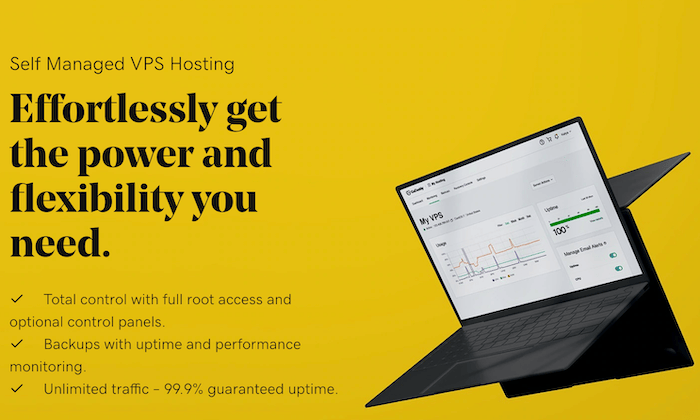
- GoDaddy — Best Self-Managed VPS Hosting
- Media Temple — Best Managed VPS Hosting Plans
- InterServer — The Best Cheap VPS Hosting Plans
How to Choose the Best VPS Hosting Plan For You

As previously stated, the list of web hosting providers is seemingly a mile long.
But in terms of actual contenders, there are a couple dozen at most. When it comes to VPS hosting, specifically, the list is even shorter.
But as you’re shopping around and evaluating different VPS hosting providers, these are the factors that you’ve got to take into consideration:
Site Performance Metrics
Site performance needs to be the top priority for everyone seeking a VPS plan.
The term “performance” can be pretty subjective, but there are two metrics that matter the most:
UptimeSpeed
Most people searching for a VPS are upgrading from a shared hosting plan that they’ve outgrown.
Uptime and speed are the first two things to be affected when you’re sharing server resources with other sites.
You want to make sure that your VPS plan can accommodate your traffic needs.
If performance is affected at scale, then you need to look elsewhere.
Lots of web hosting providers will give you a guaranteed uptime rate.
However, those offers typically come with some contingencies (like planned outages).
Some sites can’t afford any downtime or slow loading times.
If you fall into that category, make sure you get a premium VPS plan.
For those of you who would rather save some money, just know that your site performance might be affected.
Dedicated Resources
Technically speaking, you’re still sharing server resources with other websites on a VPS hosting plan.
However, the number of sites on the same main server is much lower compared to shared hosting.
Plus, each virtual server will have its own dedicated resources.
As you’re evaluating plans, consider the following:
- RAM
- Storage
- Bandwidth
- CPUs
These resources will have a direct impact on your site speed and uptime (mentioned previously).
If you’re maxing out your resources, you can’t expect your site to run at peak performance.
Optional Root Access
Not everyone needs root access.
This feature only really matters if you’re a developer or need the ability to make custom changes to your virtual server at an advanced level.
If that’s the case, then you should be looking for a self-managed VPS plan.
Most people will be better off with a fully managed plan (no need for root access here).
It’s also worth noting that you can find fully managed VPS plans with optional root access, but that feature won’t really be utilized by the average user.
Operating System
On the technical side, there are two main options for VPS hosting—Windows VPS and Linux VPS.
A Windows-based platform will provide you with access levels and performance that’s similar to a dedicated server.
If you’re on a self-managed plan, you would be able to install common windows databases and applications like Microsoft SQL, ASP, SharePoint, and ASP.NET.
With a Linux VPS, your virtual servers will support web features like PHP, MySQL, and POP3.
Since Linux is an open-source OS, these hosting plans are usually more cost-effective.
You could eventually convert your Linux server into a Windows server, but doing the opposite would be much more complex.
Customer Service
Customer support piggybacks on our last point, especially true if you’re on a fully managed plan.
You want to make sure that your web hosting provider has your back.
- What happens if something goes wrong?
- Who do you contact if you have a problem or question?
- How do you resolve a time-sensitive issue?
If your site crashes at 10:00 PM on Friday night, waiting to contact a customer support representative at 9:00 AM Monday morning isn’t going to cut it.
Look for a VPS provider with 24/7/365 support via phone and live chat.
Features like free migrations from another provider or hosting type to your new VPS plan would also fall into the support category.
Some hosting providers are undoubtedly better than others when it comes to customer service.
Budget
The price for VPS web hosting varies significantly from provider to provider and plan to plan.
We’ve seen VPS hosting plans starting as low as $6 per month.
Other plans start at $250+ per month.
Most of you will likely fall somewhere between these two extremes.
In many cases, you can expect to get what you pay for.
If you’re signing up for the cheapest VPS hosting plan that you can find, don’t expect to have extremely high uptime rates and fast page loading speeds.
For those of you who want as many dedicated resources as possible, just know that they come at higher price points.
So you’ll have to weigh your performance and resource needs against your budget.
The Different Types of VPS Web Hosting

There are essentially two different types of VPS hosting—managed and unmanaged plans.
I’ll explain the differences between these choices below, and I’ll also provide you with more information on alternative options for web hosting (to make sure a VPS plan is right for you).
Managed VPS
If you’re not very technically inclined and don’t have a dedicated IT team, a managed VPS plan is definitely the best option for you.
In short, you won’t have to really handle anything on your own.
You’ll be able to just focus on running your website while the hosting provider takes care of the server behind the scenes.
Here are a handful of examples of what most VPS hosting providers will do for you on a fully managed plan:
- Set up the server from the start
- Install your control panel, applications, and OS
- Handle all application updates and OS updates
- Server monitoring and maintenance
- Automated backups
- Security patches
Some providers will offer a little more or maybe even a little less, but this is generally what you should expect if you choose this type of VPS plan.
Unmanaged VPS
An unmanaged, or self-managed VPS, is just the opposite of a managed plan.
You’ll be completely on your own when it comes to installing your software, control panel, security, maintenance, updates, and everything else listed above.
If you experience a hardware failure or an outage, don’t expect a ton of support from your hosting provider either.
This type of VPS plan is really intended for those of you who need complete customization at the server level.
Self-managed plans are usually cheaper as well since the hosting provider doesn’t have to do nearly as much.
Other Types of Web Hosting
VPS hosting isn’t for everyone.
So if you’re new to the world of web hosting, I want to quickly take a moment to explain your other options.
Shared Hosting —
Shared web hosting is the best option for new websites that aren’t expecting a ton of traffic.
You’ll be sharing resources with other sites on the same server.
These plans are cheap, but performance can be an issue.
If another site on your shared server has a traffic spike and uses up the shared resources, it can impact the uptime and loading speeds on your site.
Cloud Hosting —
Cloud hosting is pretty similar to VPS hosting.
Think of this as a hybrid version of a virtual private server.
Cloud plans come with several remote servers, each one with different responsibilities.
If something goes wrong with one of those servers, the others will pick up the slack and keep your site running smoothly.
Cloud hosting is generally cheaper than VPS hosting, and it’s easier to scale resources on-demand.
However, customization is limited to cloud plans.
Dedicated Hosting —
Dedicated hosting is the top of the line in the world of web hosting.
It’s designed for large sites with tons of traffic.
As the name implies, you’ll have one server completely dedicated to your website.
This also gives you ultimate control in terms of customizations at the server level.
Dedicated hosting comes at a higher price point, but the performance is second to none.
Top VPS Hosting Plans on the Market Today
With all of this in mind, let’s dive into the top VPS hosting plans on the market today:
#1 – HostGator Review — The Best For Reliable VPS Hosting
HostGator has been around for roughly two decades. The hosting provider powers 2+ million websites worldwide.
As one of the most trusted names in the web hosting industry, you really can’t go wrong with a HostGator VPS plan.
Here’s a look at the different plans and price points:
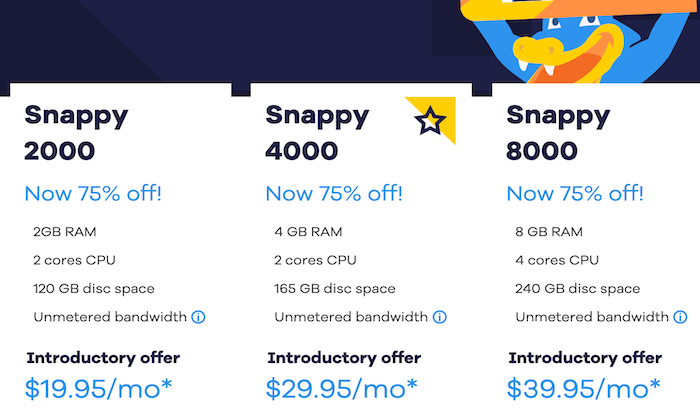
The VPS hosting plans from HostGator come with full root access and dedicated resources.
You’ll also benefit from features like:
- Complete customization and total control of the virtual server
- Free off-site backups of your server data every week
- Script installers, site templates, and development tools
- Unlimited domains, databases, email addresses, and FTP accounts
- Ability to scale CPUs, RAM, and disk space
- Exceptional customer support, 24/7/365
In addition to traditional web hosting, HostGator’s virtual private servers are commonly used for ecommerce sites, testing environments, gaming, and heavy application use.
All plans are backed by a 45-day money-back guarantee.
#2 – InMotion Review — Best VPS Plans For Ecommerce Sites
InMotion has a wide range of VPS hosting plans for you to choose from.
They offer managed VPS hosting and self-managed cloud VPS hosting, both powered by Linux SSD servers.
Managed plans start at $29.99 per month, and the entry-level self-managed VPS starts at $5 per month.
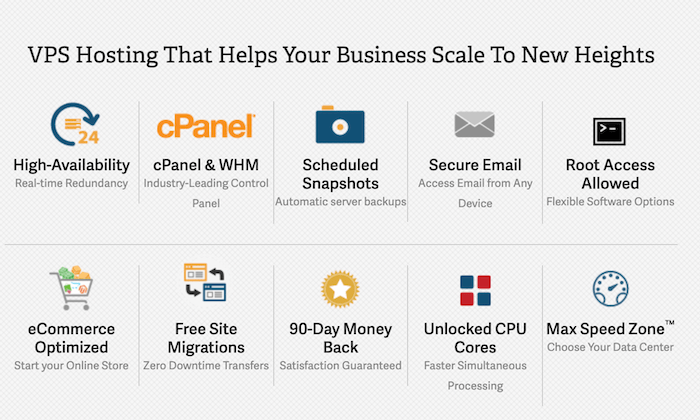
Most of you will benefit from the managed plans, as these virtual servers are optimized for ecommerce out of the box.
These plans are configured for speed and reliability with ecommerce platforms like WooCommerce, Magento, Prestashop, and more.
Other advantages of using InMotion for VPS hosting include:
- Free private SSLs and scheduled snapshots
- Update databases, email, and domain settings with cPanel
- Security updates and server management (with a managed plan)
- DDoS protection and secure SSH keys (with a self-managed plan)
- Fast and automatic software installs, like NGINX
Overall, InMotion’s virtual private servers are fast and reliable.
Even the managed plans come with full root access.
InMotion’s 90-day money-back guarantee is arguably the best in the hosting industry.
#3 – GoDaddy Review — Best Self-Managed VPS Hosting
GoDaddy is a name that’s usually synonymous with domain registration and controversial marketing strategies.
But if you’re in the market for a self-managed VPS plan, this will be a top option for you to consider.
Standard RAM VPS plans from GoDaddy start as low as $4.99 per month.
The high RAM plans start at $9.99.
The self-managed plans are perfect for developers and system admins.
Features and benefits of using GoDaddy’s virtual private servers include:
- Full root access with SSH keys
- Command-line for complete power and flexibility
- Scalable performance options and a wide range of custom server configurations
- Unlimited hosting accounts with easy administration
- Easy monitoring and alert notificationsDDoS protection and free SSL certificate
- Ability to choose your data centre (North America, Asia-Pacific, EMEA)
- Backups and recovery console
These plans are great for testing environments, database servers, resource-heavy apps, email servers, and admins running multiple websites.
GoDaddy does have fully-managed VPS plans starting at $99.99, but the self-managed option is definitely the standout from this provider.
#4 – Media Temple Review — Best Managed VPS Hosting Plans
For businesses, ecommerce websites, agencies, and resellers, Media Temple is my top recommendation for managed VPS hosting.
The pros at Media Temple will handle all of the technical aspects of managing your server.
So you can spend more time focusing on your website and business.

In addition to the best customer support team in the world of web hosting, your managed VPS plan comes with benefits like:
- Ability to choose your control panel (cPanel or Plesk) and version
- MySQL, PHP, Python, and Perl come pre-installed
- Customize your virtual server with any Linux-based app, software, or OS component
- Easily resell your hosting to clients with built-in reseller tools99.99% uptime guaranteed
- Scale your server resources on-demand with just a few clicks
Media Temple’s servers are fast and reliable.
These managed VPS hosting plans start as low as $55 per month.
#5 – InterServer Review — The Best Cheap VPS Hosting Plans
InterServer definitely isn’t the most well-recognized name in web hosting.
But for those of you who want a cost-effective VPS plan, InterServer is worth taking a closer look at.
This hosting provider offers managed and unmanaged VPS hosting, starting at just $6 per month.
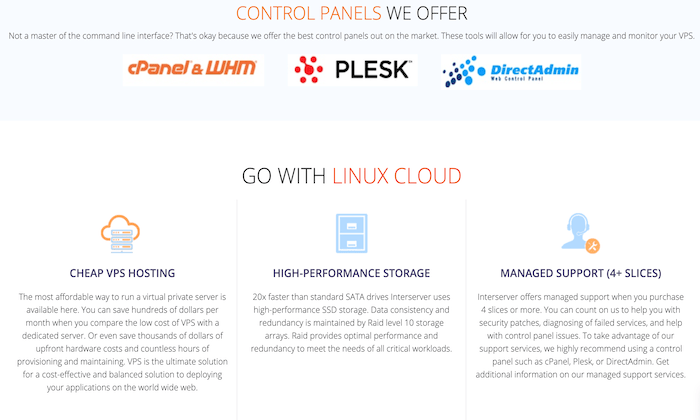
Let’s takes a closer look at some of the features, benefits, and highlights of using InterServer for VPS hosting:
- 450+ cloud apps supported by one-click installs
- No limits on accessing or updating data
- Full root access with total control of your OS and control pane
- lAutomatically redirect server issues to another node
- 99.9% uptime guarantee
- No fees for incoming or outgoing site transfers
- Remote backup service to keep data safe and secure
Unlike other hosting providers on the market today, InterServer doesn’t offer a free trial or any money-back guarantees.
However, they do offer month-to-month pricing, so you can cancel at any time.
The performance of these servers won’t be as high as some of the other plans on our list.
But when you’re paying rock bottom rates, top of the line performance probably isn’t your first priority.
Summary
VPS (virtual private server) hosting is an excellent option for sites that have outgrown a shared hosting plan.
Which VPS is the best?
Naming just one as the top pick is a tough call.
But you’ll be happy with any of the options on this list.
Just make sure you follow the methodology described earlier in this guide for choosing the best VPS plan.
For self-managed and managed plans alike, there’s something for everyone on my list.
The post Best VPS Hosting Plans appeared first on Neil Patel.
Source: feedproxy.google.com