
Tag Archives for " unnatural links "

We Analyzed 100,000 Unnatural Links and This Is What We’ve Learned
Everybody talks about unnatural links and their impact on the SEO world. While some things are well known, when it comes to search engine optimization and spammy links, there is still a lot of obscurity on the subject.

To shed some light on this matter, we’ve run an in-depth analysis based on more than 100k inbound links.
Some of the findings are really surprising, while others bring a clear confirmation to some really popular assumptions.
The unnatural links have eaten the SERPs alive all these years and the “good” links keep fighting their way back.
Lots of websites suffered and ended in dreadful situations regarding penalties because of SEO spammers who called themselves “SEO experts” and promised to offer high rankings in Google by building awful links or business owners who followed old tactics.
Either way, the damage remains.

The current research contains lots of insights on the unnatural link matter, aggregating information on metrics such as unnatural and suspect link percentage, link issues, commercial and brand anchor text percentage, webpage type, and link positioning, dofollow, and nofollow links, average domain influence, search visibility, etc.
We recommend you to read everything thoroughly; yet, if you think that you don’t have time to read everything now, you can jump to the main takeaways.
1. Almost a Quarter of the Analyzed Websites Have Over 50% Unnatural Links
After analyzing the data we saw that most of the websites (39.9% of all websites) have up to 10% unnatural links.
Is not bad, but it’s a small percentage if we were to think about it.
Up to 30% of unnatural links represent more than half of the links (a total of 63.3%).
An even worse situation is if we look at the percentage of websites (20.7%) that have over 50% unnatural links.
For a better understanding of the charts, you need to know that we divided the websites based on the percentage of their unnatural links into 4 categories:
- comprising up to 10% unnatural links of all links;
- comprising between 10-30% unnatural links of all links;
- comprising 30-50% unnatural links of all links;
- comprising over 50% unnatural links of all links.
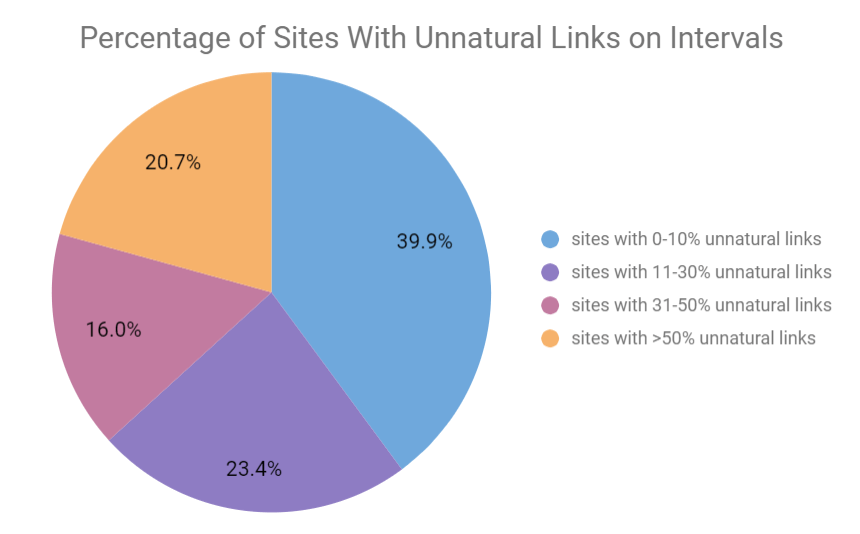
If we compare this chart with the next one, where we’ve summed up unnatural and suspect links together, we can see the differences between the pie charts.
The number of websites that have over 50% unnatural and suspect links is almost a quarter or the total amount of websites – 24.8%.
And the number of websites with up to 10% unnatural and suspect links is smaller than the first chart – 31.4%.
But overall the situation looks worse.
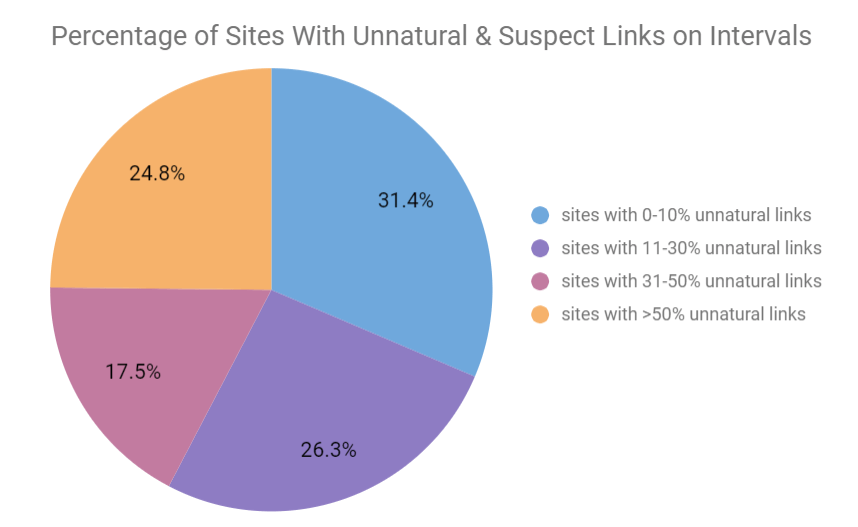
The cognitiveSEO tool triggers a penalized flag when a website has more than 30% of its backlink profile containing unnatural links.
And when we look at our situation, we see that there is a significant amount of links with over 30% of unnatural links.
By now you might be thinking of how we classified or what we considered to be an unnatural link.
For the links classification, we used the cognitiveSEO classification metrics.
cognitiveSEO’s Unnatural Link Detection classifies links based on their unnaturalness as follows:
Unnatural link:
links considered unnatural by Google.
The tool uses over 50 rules to classify unnatural links.
Suspect links:
links that could be unnatural but need a manual double-check investigation.
Context can change a lot in terms of the naturalness of a link and this is why some links cannot be algorithmically classified but need manual curation.
OK links:
Links that seem to have no issue.
Below you can see a print screen taken from the Unnatural Link Detection tool.

2. 35% of All Unnatural Links Have Low Influence
Our research is based on the analysis of almost 8,000 websites that have thousands of unnatural links.
We looked at the influence carried by those links and analyzed the main unnatural issues.
For each website, we had a list of issues.
We calculated the frequency of the issues and you can see in the chart below the top link issues for websites with unnatural links.
A low influence link is one of the most widespread link issues.
A low influence link is a low-quality link, which can have low influence because of lots of reasons, in addition to web-directory links, suspect anchor text, or suspect pattern links.
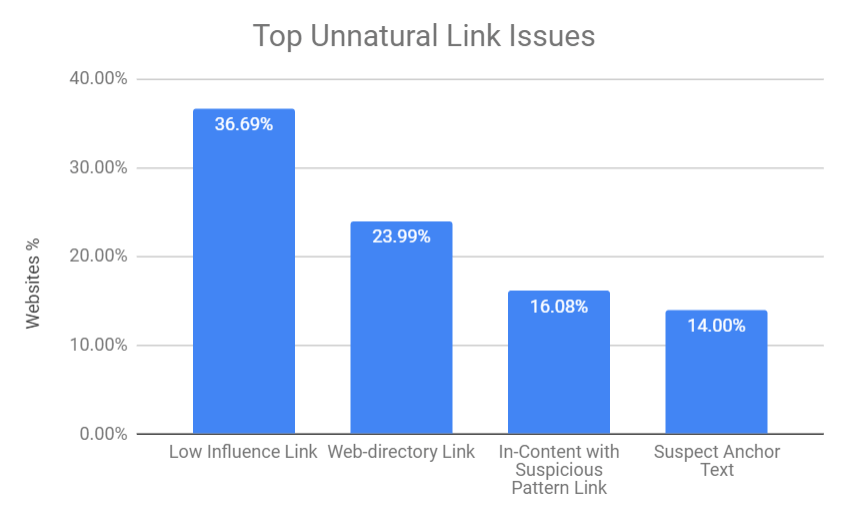
There is no secret that low influence links or links coming from web directories are most of the time spammy links; yet, what is surprising here is that these issues are still encountered today, as they were 10 years ago.
And, for a quick reminder, here are the link schemes which violate Google’s Webmaster Guidelines:
- buying and selling links or any other links generated through monetary payments;
- excessive link exchanges;
- guest blogging with keyword rich and over-optimized anchor text links;
- automatic link building using automated software;
- blogrolls, footer links, and any other widely distributed links on a website;
- web directories;
- advertorials or paid articles with links;
- hidden or low-quality links embedded in widgets;
any sort of links that still intends to manipulate PageRank; - forum comments with optimized links.
3. More Commercial Anchor Texts Correlate with Higher Unnatural Links
According to the graphic below, we can see that most of the commercial anchor texts are found within websites that have a high percentage (over 50%) of unnatural links.
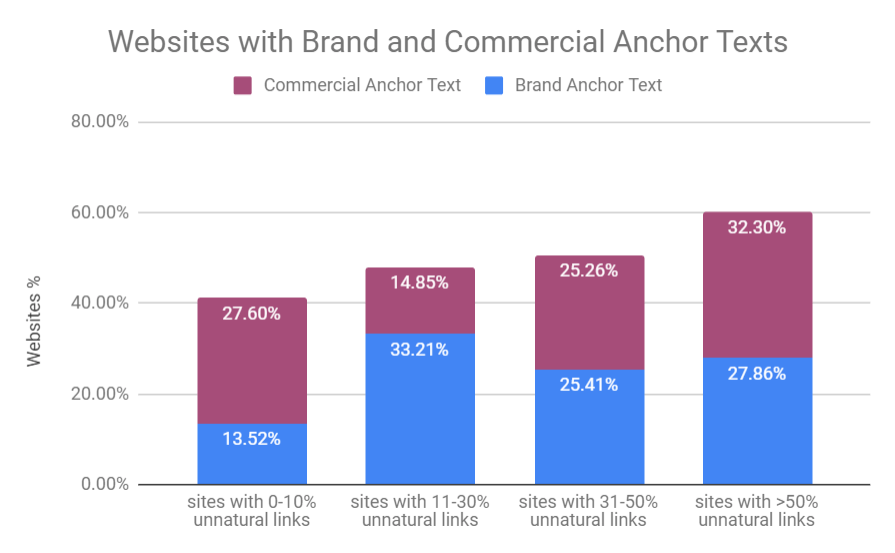
For you to make an idea of how we tackle anchor texts, let us explain a bit how we defined brand and commercial keywords.
The brand anchor text contains the name of the business or domain name.
Commercial keywords (or money keywords) are all of those keywords relevant for transactional searches, keywords that match queries to real buyers.
In our case, for instance, cognitiveSEO would be a brand keyword while the best SEO tool would be a commercial keyword.
One thing is clear:
The commercial anchor texts have a higher distribution for websites with unnatural links.
So it was a surprise to see so many brand anchor texts for the unnatural links.
We analyzed the brand anchor texts for the unnatural links to see why there are so many.
And we realized that is actually a connection with the top link issues discussed above.
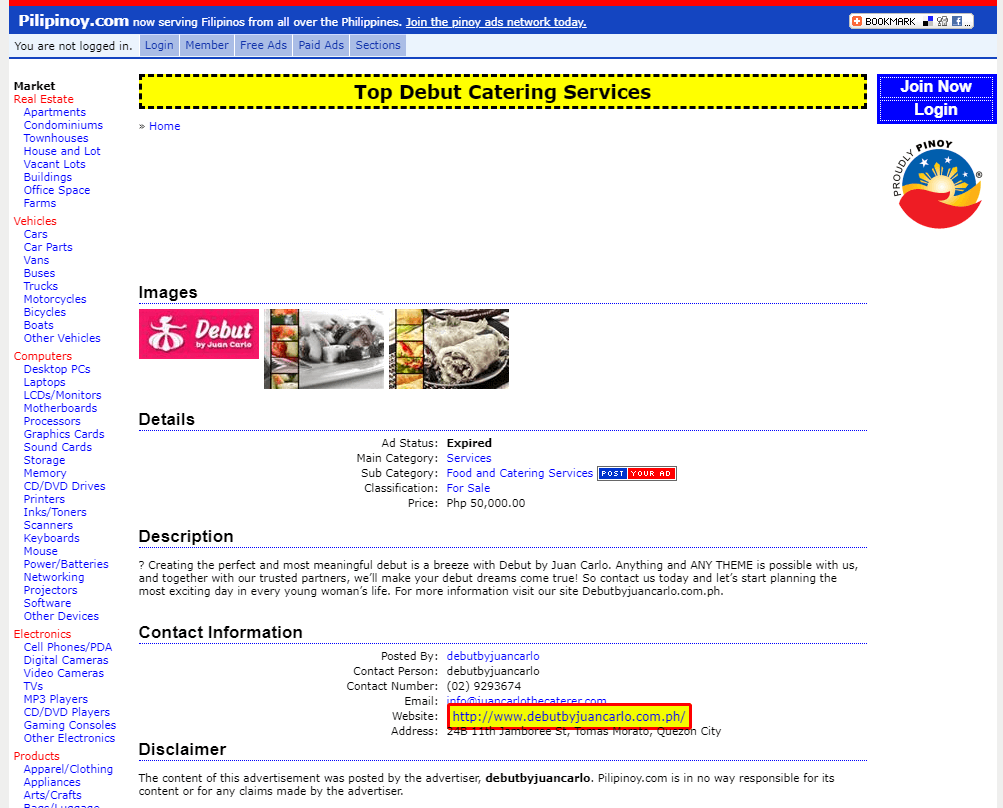
Most of the unnatural links with a brand anchor text are coming from web directories.
Below you can see an example of such kind.
You can see that the link is on the website and the domain name, but the website looks really spammy and we all know that Google doesn’t like web directories or any listing websites.
For determining the link building strategy we analyzed the Webpage Type, Link Positioning, Webpage Category. Webpage Type is a metric that profiles backlinks by their structural type.
This means you can see exactly the type of page it’s linking to, whether it’s a Blog, a Forum, an Ecommerce site, or maybe a News site.
The Link Positioning metric classifies each analyzed link by its type (Blogroll, Blog Post, in Content Link, etc) and the Webpage Category identifies the contextual relevance between the site and its inBound Links.
The top 5 webpage categories for websites that have unnatural links are:
- Generic
- Business
- Home
- Tech
- Health
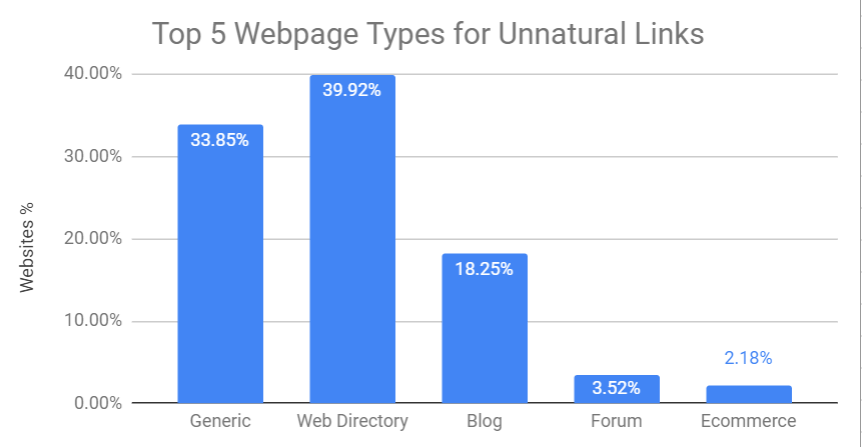
4. Almost Half of the Unnatural Links Are Coming From Web Directories
According to our study, it looks that web directories are the main source for spammy backlinks, followed by generic websites, blogs, forums, and ecommerce.
Web directories were a big hit in the glorious old days of black hat SEO.
They have been with us since the beginning of black hat SEO.
If you look at the print screen below, you can see how web directory searches changed over the years.
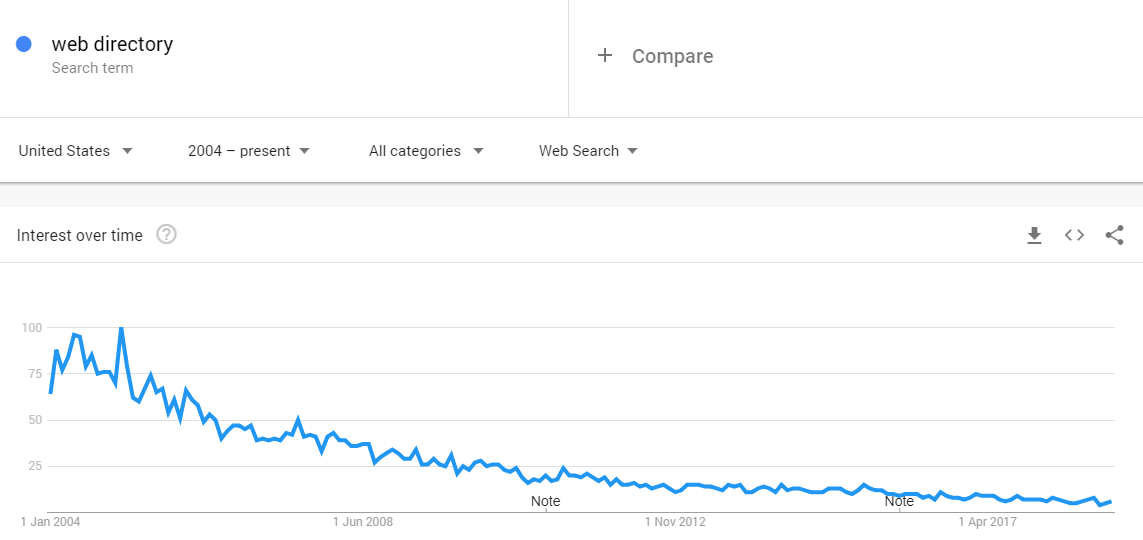
It started big, then it went down and the popularity dropped, but some people are still using them.
Web Directories don’t have a good image anymore in the SEO world.
Matt Cutts said that the Google team looks at the value of the directory and how much work is put into it.
If it’s not substantially a lot of work and, primarily, it looks to be more-less a link scheme, then paid directories are held to the same standards as paid links.
5. 40% of All Unnatural Links are Placed in Short Paragraph of Texts
Since our main source of links is web directories, it turns out that the top two link positionings are related to that.
During our study, we saw that most of the unnatural links are placed in short paragraphs or text and in groups of links.
40% of the websites had unnatural links in short paragraphs of text and 39% of websites in groups of links.
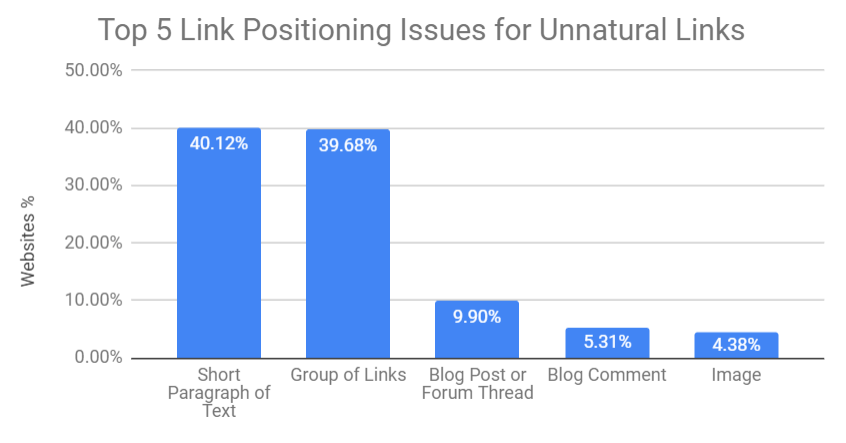
The study shows that links placed in short paragraphs of text and in groups of links are the top link positioning schemes used by spammers.
6. Websites with Highly Unnatural Backlink Profiles Have over 70% Nofollow Links
Besides the information we discussed above, regarding the link strategy, we were also interested in finding out the link equity or link juice transferred and the type of value assigned to the rel attribute – dofollow and nofollow.
We know that “dofollow” is not an attribute in itself but we are going to use it here to make a distinction between links.
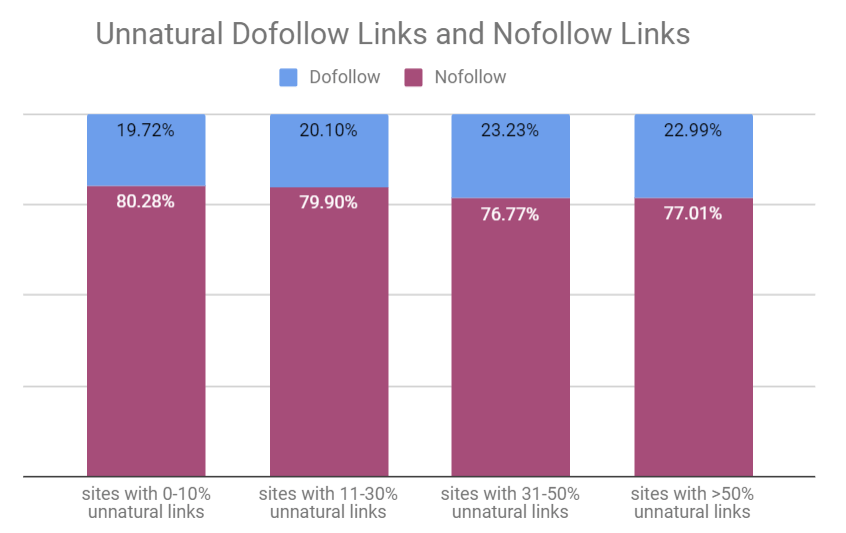
As you can see in the chart, all the websites with unnatural links have a high number of nofollow links. And out of the total links, less than a quarter are dofollow.
We’ve been fed with the belief that dofollow links might be mostly for unnatural links, but it seems that that’s not necessarily the case.
We admit that the data discovered reflects only findings on a set of links, but still, the results we’ve discovered here are quite interesting.
Since most of the unnatural links are nofollow, as you can see in the chart above, we started to believe that the question “Should I disavow nofollow links?” has new directions.
The nofollow links saga continues, after long and heated debates among online marketers and SEOs.
Judging by our findings here, we can say that disavowing nofollow links is not a matter of choice anymore.
You should think about removing or disavowing links that look spammy and have a high risk for your backlink profile even if they are nofollow.
They can impact the whole quality of your backlink profile.
If they are nofollow, that doesn’t mean they are risk-free.
Since dofollow links were known for being unnatural in a high percentage, it became a standard as far as natural links go.
But if we look at the results of our study, more and more major publishers start to switch to nofollow.
This can definitely influence other spammer practitioners to do this as well.
And Google’s John Mueller said to disavow bad links, no matter if they are dofollow or nofollow.
Disavowing or cleaning up bad links to your site may help Google’s algorithm trust other links to your site.
The nofollow drama started to be more complicated since lots of publishers abuse the practice, so that good nofollow links and spammy nofollow links got mixed.
We had an entire talk about the impact of nofollow links on SEO where you can find if they are still worth having.
7. Lower Domain Influence Score Shows Higher Unnaturalness
In our study, we checked the Domain Influence for the unnatural links to see the average value.
It turns out that the higher the unnatural backlink profile is, the lower the Domain Influence goes.
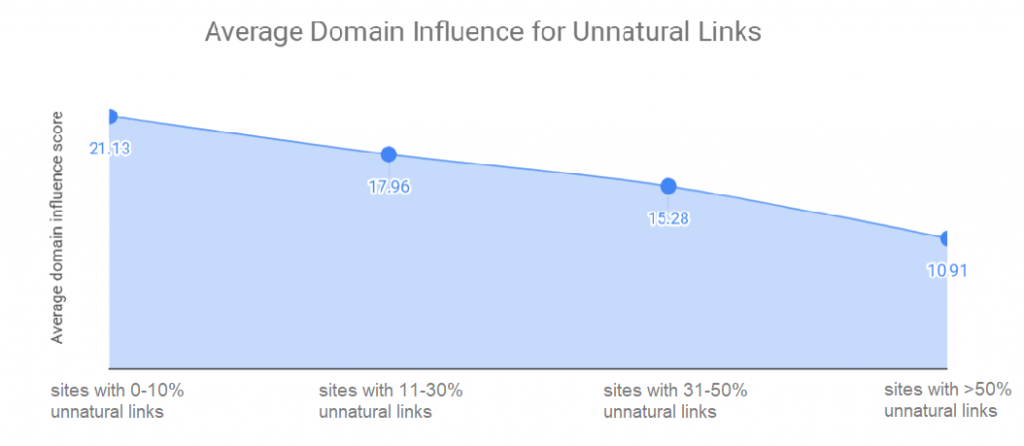
The Domain Influence is a similar metric that includes the domain authority, a crowd-sourced metric measured from 0 to 100.
8. A High Unnatural Backlink Profile Usually Leads to a Decrease in Search Visibility
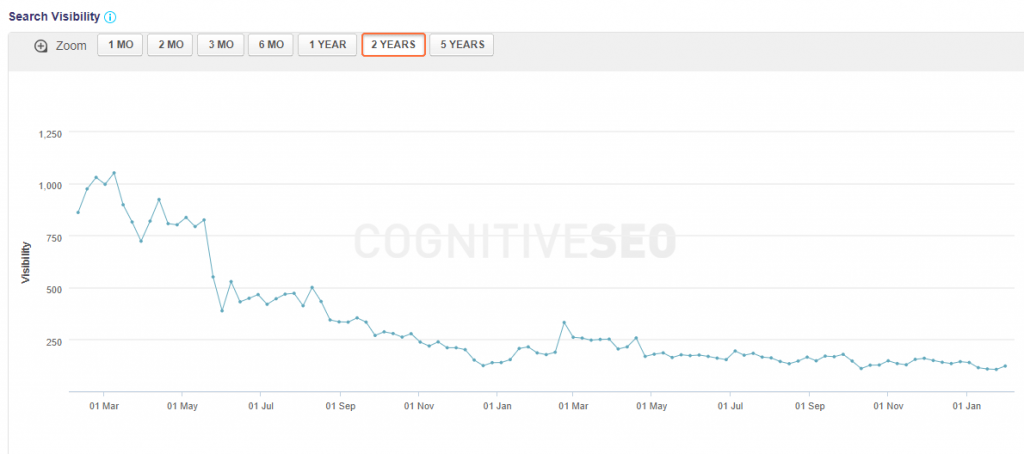
A direct correlation between the unnatural link and the search visibility wasn’t done in the present study, yet, judging by other researches we made it seems that the highest the unnatural backlinks profile, the highest the chance to get fluctuations on the search engines, and no visibility on the long run.
We’ve written several researches on this matter, and in almost all cases, a high number of unnatural links caused a major drop in search visibility.
To make sure that your rankings will be safe, we deeply recommend you to:
- Regularly monitor your backlink profile
- Disavow your unnatural links
- Monitor new links that could trigger penalties
- Know your anchor text ratio
And if you’re looking for a tool that can do all that and even more, the cognitiveSEO toolset is always here for you.
9. How We Did the Research
We extracted and worked on more than 100k links coming from almost 8,000 randomly chosen and anonymized websites from different categories, mainly from health, ecommerce, finance, travel, business technology, entertainment, adult.
Here are some data we looked for:
- the percentage of unnatural links, suspect links, and OK links;
- most uncommon unnatural link issues;
- the percentage of brand and commercial anchor text;
- webpage type, link positioning, and web category for unnatural links only;
- nofollow and dofollow links for the whole backlinks profile;
- nofollow and dofollow links for the unnatural links only;
- high and good Domain Influence for the whole backlink profile and for the unnatural links only;
- the average Domain Influence for the whole backlinks profile and for the unnatural links only.
And for each metric analyzed and discussed in the present article we classified the unnatural backlink profile into 4 categories:
- with 0-10% unnatural links out of the total links;
- 11-30 % unnatural links out of the total links;
- 31-50% unnatural links out of the total links;
- over 50% unnatural links out of the total links.
Top 10 Takeaways
We had some pretty interesting SEO facts discovered in our study. We debunked some SEO myths and got new leads and strategies to put in place for future investigations.
Below you can see our top 10 takeaways.
- Almost all websites have some unnatural links, with a third of all of them have over 50% spammy links.
- Obviously or not, most of the unnatural links have no influence, and a third of all analyzed websites have low or no influence links.
- Web directories are on the top list of unnatural tactics and (probably) black hat SEO strategies.
- Most of the unnatural links are placed mostly on short paragraphs of texts and groups of lists.
- Commercial anchor texts are not necessarily the trigger to unnaturalness.
- Most of the unnatural links had the rel=”nofollow” tag, contrary to popular beliefs that nofollow links are “safe”.
- Mostly dofollow links seem to be natural, non-spammy & relevant links.
- We might need to change our approach regarding disavowing nofollow links.
- Unnatural links highly affect websites’ Google visibility.
- Unnatural links are correlated with a lower Domain Influence score.
The post We Analyzed 100,000 Unnatural Links and This Is What We’ve Learned appeared first on SEO Blog | cognitiveSEO Blog on SEO Tactics & Strategies.
Source: cognitiveseo.com

When You Should and Shouldn’t Use the Google Disavow Tool
The Google Disavow Tool can be useful but it can also be very dangerous. If not used properly, it can mess up with your website’s rankings on Google.
In order to make sure you use the Google Disavow Tool right, you must first know when you are actually allowed to use it. This advanced Google feature should only be used in specific scenarios.
If you’re interested in finding out when you should use the Google Disavow Tool, keep reading because you’ll get all your answers in this article.
- What Exactly Is the Google Disavow Tool?
- When to Use The Disavow Tool
- When there’s a dramatic drop in traffic & rankings
- When your site has been spammed with Negative SEO backlinks
- When you know your SEO Agency built spammy links to your website
- When you have a manual action applied on your site
- Other cases
- When NOT to Use the Disavow Tool
- When there’s no drastic drop in rankings
- When you’re not sure if it is a penalty
- When there’s a small drop in rankings
- For testing purposes
- How to Easily Disavow Links
- Is the Disavow Tool Actually Helpful? (READ THIS)
A lot of webmasters see this tool as the ultimate salvation for their problems when they get an algorithmic or manual penalty.
Even though generally the objective of the Disavow Links tool was to be used as a resort to resolve link problems, it is not as simple as it seems.
What Exactly Is the Google Disavow Tool?
Long story short, the Google Disavow Tool is a feature in the Google Search Console (former Google Webmaster Tools) in which you can submit a list of backlinks that you want Google to disconsider.
It was launched in late 2012 and was a pretty big deal back in the day.
The Google Disavow tool became a very popular topic in the aftermath of the Penguin 2.0 update.
The changes made to the algorithm “dissolved” a lot of abused black hat SEO techniques and affected a lot of webmasters that found themselves on the wrong side of the street all of a sudden.
The effects were harsh and visible and the website owners were desperate to recover their dropped rankings.
It became clear that this tool was developed in order to help webmasters solve their issues regarding penalties.
The process seems simple. You have to create a file in order to show which links you want Google to disregard.
However, later on, people found out that the tool is actually much more than that.
Through this very tool, Google collects information about spammy links across the web as users submit them.
This way, it can improve its database of types of backlinks to better identify spammy and shady ones in the future.
For this very reason, the Black Hat SEO community doesn’t like the Disavow Tool.
Many advised people not to use it because it will help Google get stronger and catch their tactics quicker.
But fearful webmasters rushed in to submit their spammy link profiles, in hope that they will be spared or forgiven.
Today, as of the new version of GSC, there’s no actual way of accessing the Disavow Tool from the Search Console.
Although Google sends you to the new version, the tool can’t be found there either.
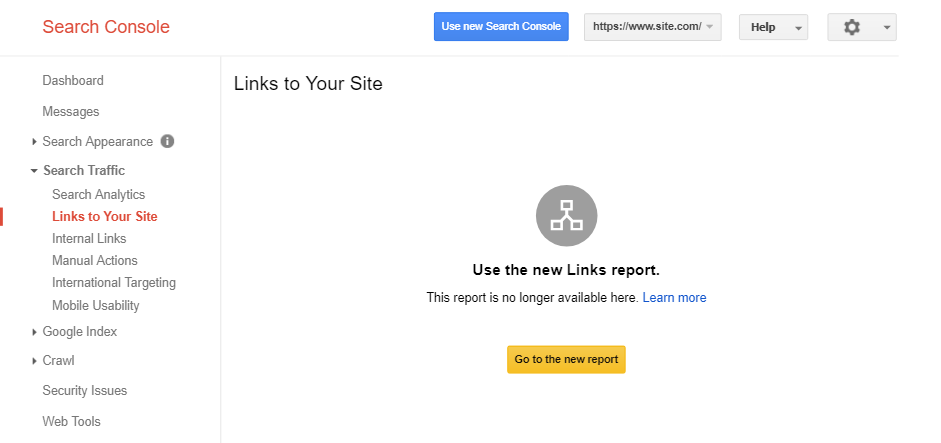
The Google Disavow Tool can be however directly accessed from the web by searching for it, or by accessing the Disavow Links Main Page.
In order to use the tool, you need to have a verified property in GSC.
This means you can disavow backlinks only for websites that you own.
The process is pretty simple once you have the proper list.
Getting that Google Disavow links list right, however, is another story. I’ll explain it soon.
When to Use the Disavow Tool
The short answer is that there are only a few isolated cases in which you should use the Google Disavow Tool.
If you’re not sure you should use it, then the answer is probably don’t.
When deciding to use it, you should take into consideration a couple of things:
- First of all, you need to make a quick link audit and see which are the links that are harming your site the most.
- You need to carefully determine the bad and the good and see which links could influence your site’s ranking drop.
- If you’re not careful, you might end up losing some valid links that would otherwise pour some of that precious “link juice”.
Then, you have to take into account the fact that, before appealing to the disavow tool, you could try to remove the bad links manually by contacting the owners of the websites that point to you.
Before panicking and running straight for the disavow solution, you should carefully try to clean up your mess the old fashion way.
It may sound like a laborious task but you can make use of third-party tools that can help you speed up with the unnatural link detection and outreach.
You may want to use this tool if you stumble upon the following problems:
1. When there’s a dramatic drop in traffic & rankings
Obviously, a dramatic drop in traffic and rankings indicates an issue with your website.
However, you should not rush in to disavow your links.
First, make sure that that is the issue and try to exclude everything else before you decide on doing it.
The whole concept of disavowing unnatural links must be taken very seriously as it may also harm your ranking.
This process should not be done in a haste.
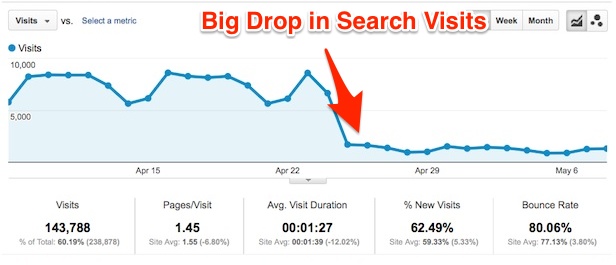
You should take your time weeding out the bad and you should submit a list to be disavowed only if you’re 100% sure of the links that you send.
You should also remember to try to manually remove the harmful links, not only to show Google your good intentions but also because you don’t know how long the disavow process could take.
2. When your site has been spammed with Negative SEO backlinks
If your website has been subject to a large-scale Negative SEO attack, then you can consider disavowing those bad links.
But how do you know when your site was attacked? And how do you know which links are good and which links are bad?
Well, you can always use the CognitiveSEO Tool to monitor your backlinks and see if your link profile suffers major changes in a short amount of time.
You can also use the tool to determine which links are natural and which links fit the patterns of spammy links by using our Unnatural Link Detection feature.
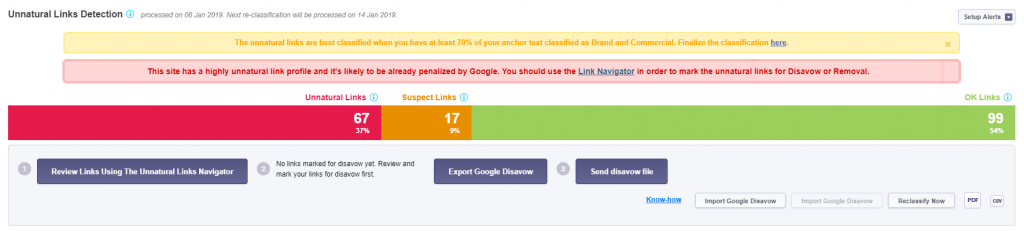
I’ll tell you more about how to exactly identify the bad links in a bit, so keep reading.
First, let’s take a look at some other scenarios where you should consider using the Disavow Tool.
3.When you know your SEO Agency built spammy links to your website
Many times, webmasters hire companies to do SEO work for them.
If you don’t choose your SEO agency right, you risk ending up with an SEO that will use BlackHat link-building tactics to try and boost your site.
This might end up in a manual action penalty for your website, which is usually pretty hard to recover from.
If you find out that your SEO agency has been building unnatural links to your website instead of using techniques accepted by Google’s Guidelines, then you should consider using the Disavow Tool.
However, keep in mind that you should never disavow links massively if your website has not yet been penalized!
4. When you have a manual action applied on your site
Manual actions aren’t something you will often see.
They are rare, isolated cases.
However, they do exist and, if your website is one of them, you can consider using the disavow tool.
There are multiple types of manual actions, so make sure you start disavowing links only if you see the “Unnatural Links” warning.
Other types of actions are related to Thin Content or User Generated Spam.
These problems are fixed in other ways, without using the Disavow Tool.
To see if any manual actions have been applied to your website, go to the Google Search Console and find the Manual Actions section in the left menu.
Hopefully, you’ll see something like this:
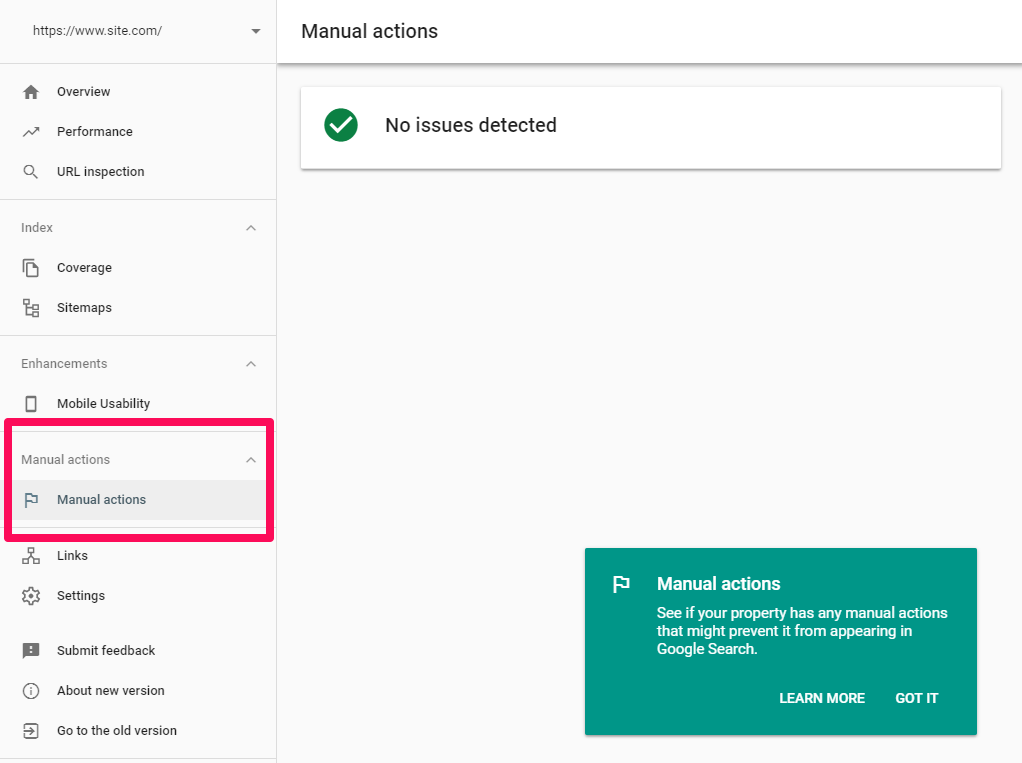
If you see any warnings here, make sure you fix them and then submit your site for reconsideration (also done in the GSC under Manual Actions).
5. Other cases
Now, of course, there are some other certain situations when you might want to Disavow some links that you’re sure to provide no value, for example when the linking sites have viruses or malicious software.
However, if these links take 1% or less of your total links, then you probably shouldn’t bother (except if that 1% means thousands of links, which looks more like an attack).
John Mueller said that it’s also possible to disavow links in order to prevent future penalties and achieve ‘peace of mind’.
That’s a sneaky way of threatening webmasters that they will get penalized if they don’t submit their links.
However, Gary Illyes later said that he would not bother to disavow some spammy links.
I have a site that gets 100,000 visits every two weeks.
I haven’t looked at the links to it for two years, even though I’ve been told that it has some porn site links.
I’m fine with that. I don’t use the disavow file. Don’t overuse it. It is a big gun.
Overusing it can destroy your rankings in a matter of hours.
Don’t be afraid of sites that you don’t know.
There’s no way you can know them all. If they have content, and they are not spammy, why would you disavow them?
Sites like this are very unlikely to hurt you, and they may help you.
I personally trust the Google filters.

Gary Illyes
Chief of Sunshine and Happiness at Google / @methode
Our recommendation is to ignore these links unless there’s a visible penalty on your websites, such as a manual action in GSC or a massive drop in traffic/rankings which can’t be attributed to anything else (HTTPS migration, redesign, or some other major modifications to the site).
If you think your site is suffering from some bad links and you really want to remove the links you suspect, start slow, by disavowing only 5-10 links at a time.
Wait for a couple of weeks to spot any effects and then expand by updating the disavow file with some new spammy links.
Track your rankings carefully to spot any differences and if you see massive negative impacts, remove the disavow files and stop messing with the tool immediately.
When NOT to Use the Disavow Tool
Usually, the answer is to never use the disavow tool except for the cases mentioned above.
Some people think that it’s a good idea to use the Disavow Tool from time to time to make sure they clean their link profile, but they end up messing things up very badly!
To get a better understanding, here are some specific scenarios when you should not disavow the links:
1. When there’s no drastic drop in rankings
The reasons for which you may experience a drastic Google ranking drop may vary from website to website and in general, there is a serious guideline violation.
But if you don’t experience that, you shouldn’t be panicking.
You may just be outranked by a competitor.
As a consequence, there is no need to rush and get the disavow tool from your link survival kit.
You should try to analyze and track your competitor and see what is their SEO and content strategy. Also, you should maybe step up and improve your own approaches.
2. When you’re not sure if it is a penalty
When you receive a manual penalty the situation is pretty clear.
Especially if you make use of Google Webmaster Tools (which we strongly recommend).
You will receive a message in which they warn you about the actions taken against you.
While this is easy and straightforward, an algorithmic penalty is not that obvious.
You’ll have to make a personal assessment to see if it’s a penalty or it’s just the fact that the links are low quality.
And if it is indeed an algorithmic penalty, what is harming your site’s ranking?
3. When there’s a small drop in rankings
It may just be a quick road bump in the road. You may always experience a flux in ranking that is unpredictable.
As a golden rule, if you don’t have an explicit message from Google that you’ve been penalized or if you know you have an unnatural link profile, you shouldn’t jump to conclusions.
Your ranking could just recover on its own after a day or two.
Moreover, a small drop in search engine ranking may just be influenced by the fact that you have many low-quality links pointing to your site.
The solution here isn’t to remove those links, but to focus on building higher-quality ones.
Usually, an algorithmic penalty will take place after an algorithm update.
Sure, sometimes you might get penalized much later after the update, but usually, if that’s the case, chances are that it’s rather a manual penalty than an algorithmic one.
If you’re not sure whether there’s been an update on Google’s algorithm, you can check the CognitiveSEO Signals Tool.
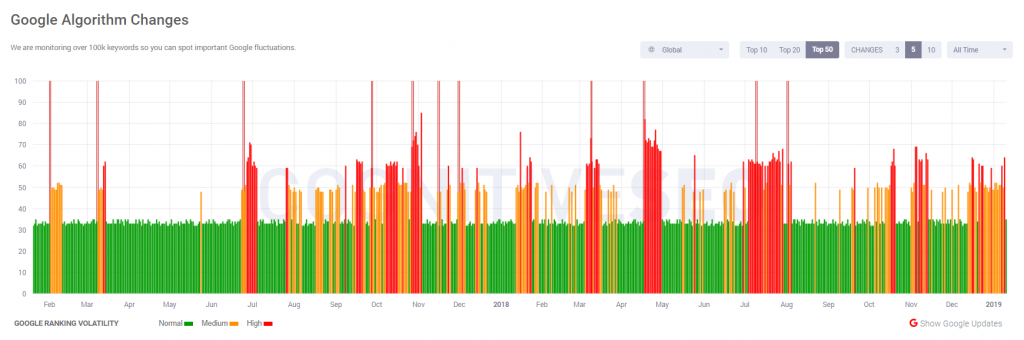
You also have to check what the algorithm was about.
Google doesn’t say much, but sometimes it says things like “this update will affect websites that are not optimized for mobile”.
If you can correlate what Google says with your website, then you have an issue.
3. For testing purposes
The final advice on when not to use the Google disavow tool would be to not just use it so you can see how it works. Cyrus Shepard made such an experiment and here are his “sad” findings.
DON’T DO THIS AT HOME!!! – Just don’t toy around with this tool, you may get fried!
The saying “if it ain’t broke, don’t fix it” is very much true in this case.
This is one of those tools that you just don’t want to learn at your own cost.
It’s too powerful and the damage it may do if misused may be irreversible.
The Disavow Tool is an advanced feature and should not be used unless one actually knows what they’re doing.
It’s risky and shouldn’t be played with.
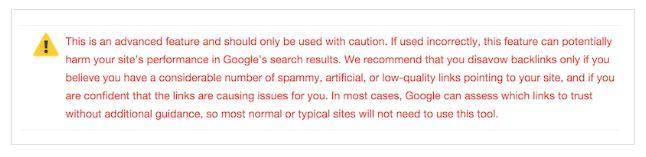
Unless it’s one of the scenarios mentioned above, which are pretty critical if you ask me, it should be avoided.
Don’t disavow links or domains with low performance.
Low DA links are part of a natural link profile. In the end, disavowing them might do more harm than good.
Maybe a new, small website with low domain performance writes about your website and links to it.
Should you disavow these types of links? Definitely not.
Someday, that low-domain performance website might become really popular and have a great deal of domain authority.
Not only this, but the link might already be contributing to your site’s well-being.
How To Easily Disavow Links
As stated above, you usually have to disavow links in severe cases of webspam and negative SEO attacks or manual actions.
In case your site was massively spammed or already penalized and you have no way of removing those links, then you can use the Disavow Tool without any limitations to try and fix things.
Remember that you’re doing this at your own risk.
Don’t rush Disavowing links if you’re not penalized yet.
The truth is that disavowing links is a very difficult and time-consuming process.
In the end, it sounds as simple as uploading a text file on the web, but generating that text file correctly can be a bummer.
You’ll have to differentiate the bad links from the good ones and Google doesn’t actually help you do that.
It will just tell you that your site has been penalized for spammy links.
Luckily, there is an easy way of dealing with unnatural links.
By using the CognitiveSEO Unnatural Link Detection Tool.
The tool makes it very easy to identify those links using an algorithm.
The links that fit spammy links patterns will be marked as unnatural.
It is not, however, 100% automated.
Before the tool can actually determine which links are good and which links are bad, you’ll have to sort out your anchor texts.
This is usually done quickly in the tool via the anchor text classifier.
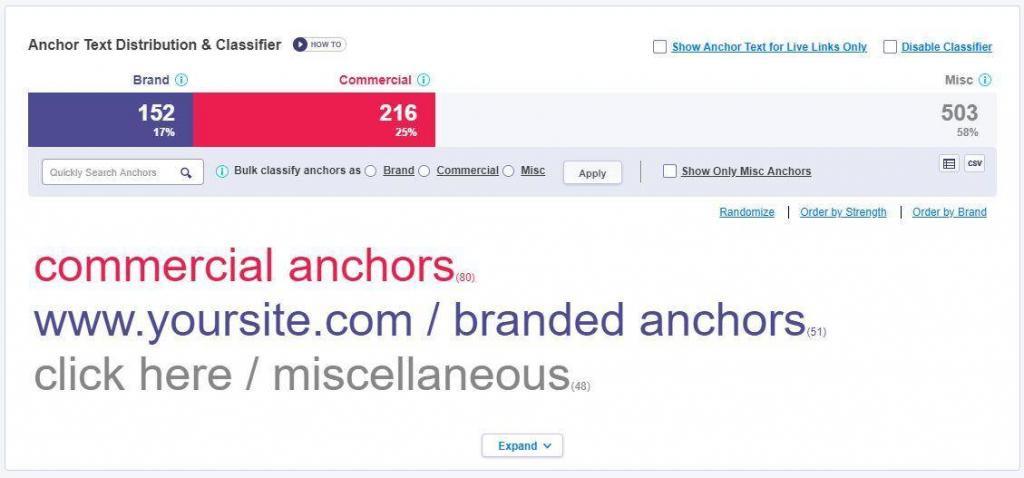
The graphic above has been modified for privacy purposes. It is just an example.
The tool will automatically identify most branded keywords.
However, the ones only containing keywords your site wants to target will be Misc by default.
You can use the search filter on the left and bulk classify.
The more diverse your anchor text distribution, the better for SEO, but the longer it will take to classify.
After that, you will get to see the unnatural links:
Once you have your list of unnatural links, you can mark them for disavow.
You can also choose to reclassify the links as natural (OK) if you want.
We highly advise you to take a look over your unnatural links (if you don’t have thousands).
Mark any links that aren’t obviously spammy as Suspect and decide later if they really need to be disavowed.
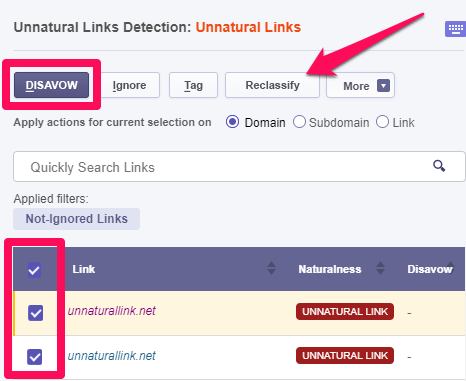
After that, from the Unnatural Link Detection menu, you can Export Google Disavow which will result in the Browser downloading a text file containing all the links/domains in the proper format for uploading it to the Disavow Tool.
It’s best if you try the tool yourself.
You can sign up for a free trial and also get a live demo in which one of the cognitiveSEO team members will showcase the tool for you.
Remember, if there’s no penalty yet, those links might be the ones keeping your website near the top.
Disavowing links can also result in a drop in rankings, so be very careful how you play with it!
It’s always a better idea to try to completely remove any spammy links to your website from the web.
It’s time-consuming, but it’s the more efficient way and it’s also what Google recommends.
If you want a step-by-step approach, you can take a look at this more in-depth guide on using the disavow tool.
Is the Disavow Tool Actually Helpful?
There’s a lot of controversy around the Google Disavow Tool.
- Is it actually useful?
- Will it prevent a penalty?
- Does it actually work?
The truth is that for each of the successful penalty recovery stories documented by us, there are indefinitely more out there that have not seen any success, even when using the Disavow Tool as recommended by Google.
In 2016, Google introduced Penguin 4.0 which supposedly made Google capable of ignoring spammy links altogether, as they were posted. In other words, the Disavow Tool worked and the spammy links database has improved the algorithm by making it able to run in real-time.

But in this case, is disavowing the links needed anymore?
This question has been asked many times around different events, on social media, and throughout Webmaster Hangouts.
Some answers came up to help us draw some conclusions:
Gary Illyes said on social media that:
For penguins specifically, there’s less need, yes, but if you see the crap, you can help us help you by using it.
Gary Illyes
Chief of Sunshine and Happiness at Google / @methode
Also, John Mueller said this about keeping or removing the disavowed files:
If you’ve cleaned up the links & they’ve been reprocessed, you can remove those URLs from the disavow file.
—
John
The question wasn’t really about cleaning the links, but about the necessity of keeping the disavow file post-Penguin 4.0.
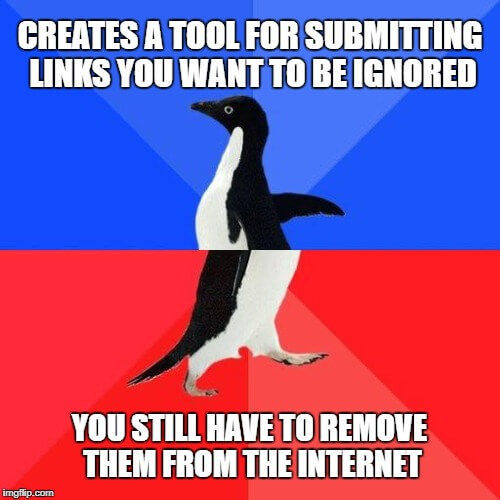
However, John’s answer instead reminds us that the spammy links should still be removed from the internet, which is something Google mentioned when they first launched the Google Disavow Tool.
Eric Kuan from Google said that “Google may not process them (disavowed links) if they don’t see you making a serious manual attempt at removing those links.”
If you’ve spammed the website yourself, that makes sense.
However, if you’re the victim of a negative SEO attack, it’s kind of unfair, don’t you think?
The truth is, there’s no guarantee that using the disavow tool and submitting your site for reconsideration will remove a penalty.
The best way to not get penalized is to not do anything that will get you penalized.
However, it’s worth a shot in critical situations.
In the end, you have to consider that the Disavow Tool:
Takes time:
If you want to do things the right way, you’ll have to spend a lot of time researching your link profile and making sure that you’re not disavowing any useful links (remember, the CognitiveSEO Tool can help you speed up this process)
Can mess things up:
Remember, the Disavow Tool is an advanced feature and should only be used in specific cases.
You shouldn’t waste your time with it if you’re not 100% sure it’s the right way to go.
Has actual guarantee it will work: Even if you know what you’re doing, there’s no guarantee it will help.
Who knows, it might actually make things worse.
Conclusion
The main point that you should remember is that this tool shouldn’t be used if you’re not 100 percent sure how it works.
Disavowing links is a powerful and irreversible process that may resolve your ranking drops or may throw your site into search engine oblivion.
Even though the Google Disavow Tool proves to be an invaluable asset to use in times of need, it can very well be misunderstood and easily used for the wrong purpose.
If you couldn’t prevail at removing unnatural links through traditional methods, you should obviously try disavowing them.
But the tool should be used only in specific situations, such as a Manual Penalty.
If you’re unsure how to use it and what it’s capable of doing, you should avoid it.
However, if you think you’ve tried everything else, it’s worth a shot.
By adding smaller amounts of links at a time to the disavow file, you can avoid messing things up very badly, although this process is more time-consuming.
- What are your experiences with the Disavow Tool?
- Have you successfully recovered from a penalty?
- Did it not do anything at all?
- Have you used it to try to prevent any future penalties?
Let us know in the comments!
The post When You Should and Shouldn’t Use the Google Disavow Tool appeared first on SEO Blog | cognitiveSEO Blog on SEO Tactics & Strategies.
Source: cognitiveseo.com