
Tag Archives for " tracking "

Best Employee Scheduling Software
It’s no fun being shorthanded or overstaffed.
For a small business, a single absence can turn a morning upside down.
For large businesses with multiple locations, staying organized is even harder.
Employee scheduling software makes it so much easier for managers to staff appropriately.

Disclosure: This content is reader-supported, which means if you click on some of our links that we may earn a commission.
They can create a schedule in minutes, update it on the fly, and switch people around as need be.
Plus, your team will appreciate a schedule that’s always up-to-date and accessible from any device.
Cut down on miscommunications with everyone looking at the same schedule no matter where they are.
Which employee scheduling software is the best?
You’ll find in-depth reviews of each of my top picks below, followed by a short guide to help you find the best tool for your workplace.
#1 – Homebase Review — The Best Employee Scheduling Software For Small Businesses
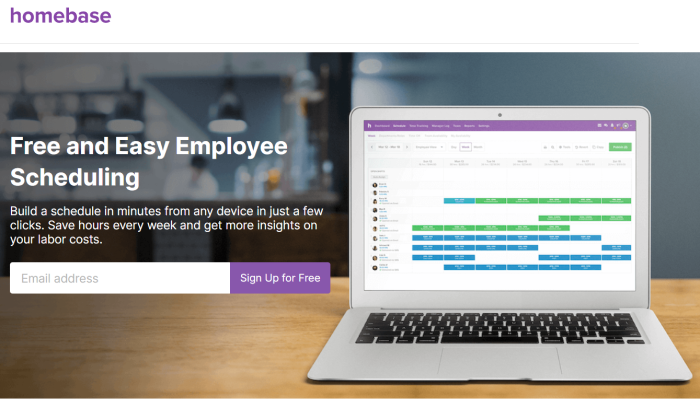
Homebase is an employee scheduling tool designed with small businesses in mind.
It’s versatile enough to accommodate scheduling needs across a wide range of industries, including retail, health and beauty, service businesses, and restaurants.
More than 100,000 businesses rely on Homebase, and not all of them pay for it.
I’m serious. Homebase has a freemium business model.
If you need advanced features, you can look at one of the paid plans.
But if all you need just need a scheduling system,
Homebase more than has you covered.
You get a beautiful interface that employees and managers can access 24/7.
The calendar updates in real-time, so everyone is on the same page.
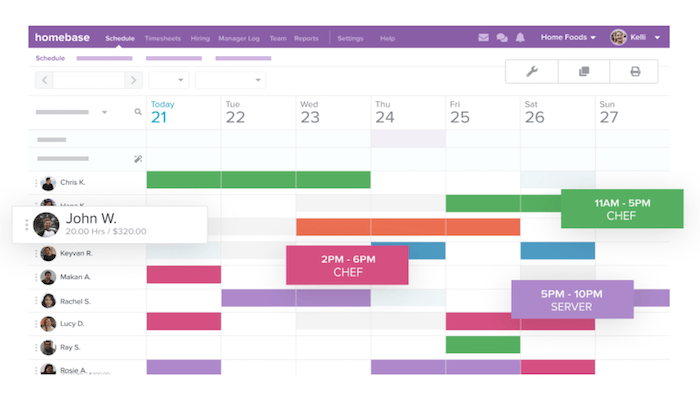
With Homebase, you’ll benefit from top features and functionality like:
- Simple scheduling templates that can be edited on the fly
- Easy schedule sharing with your entire team
- Ability to forecast your labor costs
- Employees can access real-time schedule updates from the mobile app
- Track employee availability, time-off requests, and approvals
- Automatically remind your staff about upcoming shifts
- Manage shift trading from anywhere
- Calculate overtime and get alerts about scheduling conflicts
In addition to these robust scheduling features, Homebase is an all-in-one solution for time clocks, hiring, onboarding, team communication, HR, and compliance.
You can also improve your labor forecasts by integrating your sales data from POS systems like Square, Clover, Shopify, Upserve, Revel, Lightspeed, and more.
Popular payroll software, like Paychex and Gusto, is also integrated with Homebase.
For hourly workers, having a schedule tied into payroll is going to save a ton of time.
The free version of Homebase works for an unlimited number of employees.
You don’t get every feature, but you do get scheduling, time tracking, team messaging, and the payroll & POS integrations.
To get the most out of the software, you can upgrade to a paid plan, starting at $14 per month per location. Learn more and sign up now.
#2 – Sage HR Review — The Best All-in-One HR Solution
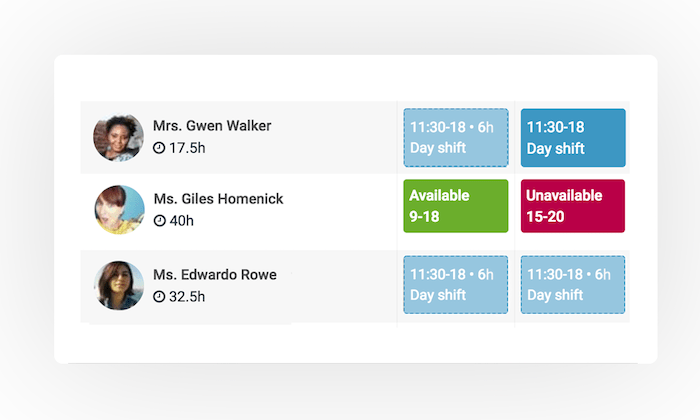
Sage HR (formerly CakeHR) is a complete HR software.
Within this all-in-one HR solution, you’ll find robust tools for shift scheduling.
Overall, Sage HR is a great choice for any business that wants to automate its human resources tasks, in addition to improving its scheduling process.
Other noteworthy standouts of the employee scheduling features include:
- Interactive shift planning with an easy-to-use interface
- Compatible for single sites and multiple locations
- Easy to split up schedules into groups and departments with multiple shift managers
- Employee-self service tools with the ability to add preferred times and unavailable times
- Drag-and-drop shift management
- Daily, weekly, and monthly reportsComplete data exports
Aside from the scheduling tools, you’ll also benefit from features related to leaving management, timesheets, recruitment, performance management, employee records, and other HR essentials.
Sage HR starts at $8.50 per month for core HR and shift scheduling.
Additional modules cost extra.
The software is easy to set up, and you can try it free for 14 days.
#3 – Deputy Review — The Best For Time and Attendance Management
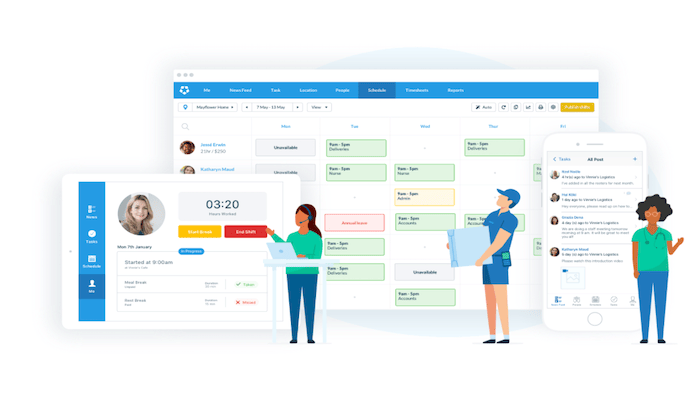
Deputy is one of the most popular employee scheduling tools on the market today.
It’s trusted by 200,000+ brands across the globe, including big names like Nike, Amazon, HubSpot, and Peloton.
I like Deputy because it’s feature-rich, but also has simple and straightforward pricing.
You can bundle employee scheduling with time tracking software for just $4 per user per month.
Alternatively, each of these functions can be purchased separately for $2.50 per user.
Here’s a quick look at some of the other top features and benefits that you’ll get from this software:
- Easy to fill open shifts based on staff availability, qualifications, and costInstantly share schedules with your team Real-time labor costing data
- Auto-scheduling capabilities using AIBreak planning and rest compliance
- Manage schedules from anywhere with the iOS and Android apps
- Request, approve and track PTOAutomate wage calculations
- Collect timesheets and export them to payroll with a single click
- View who’s currently on shift, taking or a break, or late in real-time
Any business that wants a simple way to manage employee scheduling and time tracking from a single solution will definitely benefit from Deputy.
Try it free for 31 days; no credit card required.
#4 – ShiftNote Review — The The Simplest Employee Scheduling Software
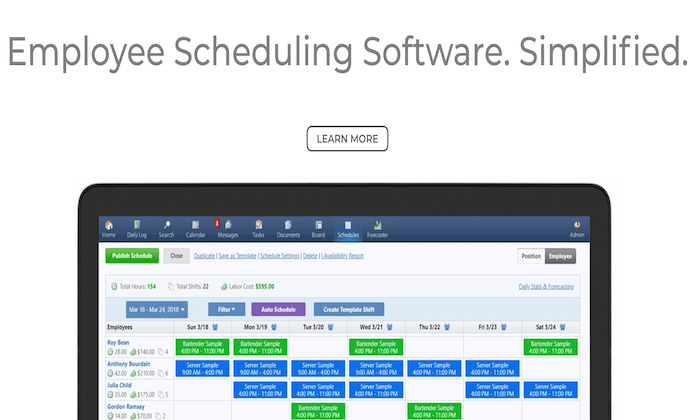
ShiftNote is one of the most straightforward employee scheduling tools on the market today.
It’s trusted by 75,000+ users across a wide range of different industries.
I like ShiftNote because they have industry-specific solutions for categories like restaurants, hotels, retail, manufacturing, healthcare, education, and breweries.
Here are some of the top reasons why ShiftNote ranks so high on my list:
- The free mobile app, free team messaging, and free customer support
- Employees can update their availability and swap shifts
- Scheduling templates so managers don’t have to build from scratch
- Free setups and one-on-one training
- Multi-location dashboard
- Time off request management
- Sales and labor forecasting tools
- Daily log reports
Overall, ShiftNote drastically improves the speed of your scheduling process while optimizing the efficiency of your schedules.
It’s a reliable way for your management team and staff to communicate from anywhere as well.
It’s worth noting that ShiftNote lacks some of the HR and time-tracking features offered by other tools on the market today.
But if you’re just looking for a straightforward scheduling solution, this should definitely be a top consideration.
You can try ShiftNote for free with a 30-day trial.
#5 – Shiftboard Review — The Best For Labor Cost Management
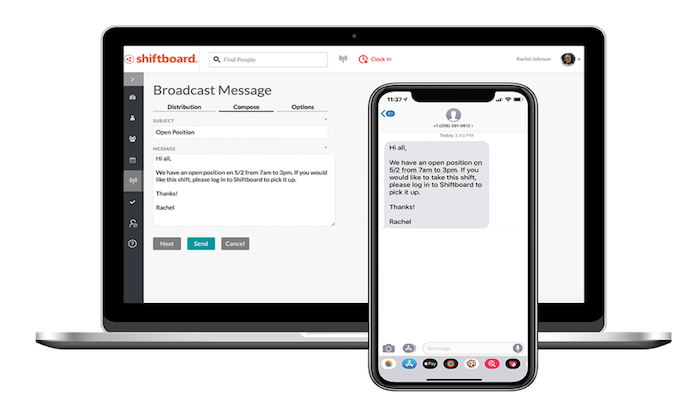
Shiftboard is another excellent workforce management solution designed for scheduling hourly employees.
It’s a feature-rich software with lots of different options to solve common business challenges associated with scheduling.
This includes things like labor cost management, employee retention, fatigue management, compliance, and more.
Shiftboard actually has two different scheduling tools—SchedulePro and ScheduleFlex.
The Pro version is designed for high compliance industries like corrections, oil and gas, and petrochemical.
The Flex version is built for organizations with changing scheduling needs, like healthcare, staffing, call centers, warehouse and distribution, public safety, and manufacturing.
Other noteworthy highlights of the Shiftboard software include:
- Real-time communication about schedule updates and newly available shifts
- Auto-fill shifts with call outs and no-shows
- Employees can confirm last-minute shift requests directly from the mobile app
- Employees can pick up extra shifts and trade shifts (with approval)
- Tailored fit schedules based on departments and locations
- Smart team groupings based on staff qualifications, certifications, and moreAccurate labor forecasting based on demand
- Avoid over/understaffingScheduling automation tools
60,000+ teams rely on Shiftboard for employee scheduling.
They even have additional features for applicant tracking and time clocks with geofencing.
Request a free demo today to get started.
#6 – HotSchedules by Fourth — Best Labor Management System For Restaurants and Hospitality
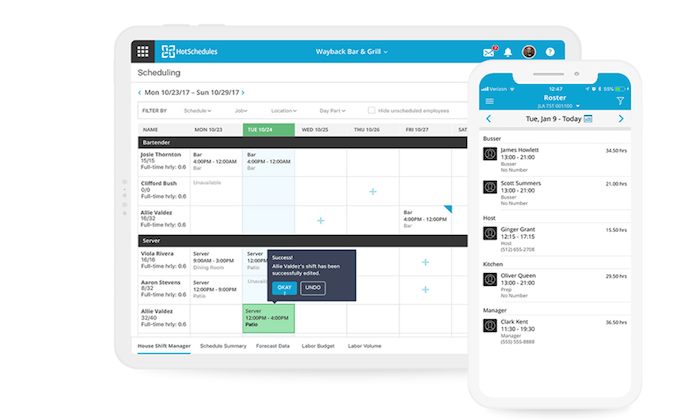
HotSchedules (now part of Fourth) is a complete workforce management solution built specifically for businesses in the restaurant and hospitality industries.
In addition to employee scheduling, HotSchedules has tools for applicant tracking, onboarding, time and attendance management, manager logbooks, and more.
They even have solutions for inventory management, HR, and payroll.
In terms of the employee scheduling features, here’s a closer look at the top benefits provided by HotSchedules:
- Simple drag-and-drop scheduling tool
- Ready-made scheduling templates
- Reduce scheduling errors, understaffing, and overages
- Limit unplanned overtime
- PTO management and employee availability
- Approve or deny shift requests from any device
- Quick access to your daily roster reports
- Compliance tools for meals, breaks, fair work weeks, and more
Depending on your needs, HotSchedules can be as simple or complex as you want it to be.
You can take advantage of just the employee scheduling tools, or build a robust and custom solution with lots of features and add-ons for your business.
Whichever option you choose, HotSchedules is definitely my top pick for restaurants and hospitality businesses.
Request your free demo to get started.
What I Looked at to Find the Best Employee Scheduling Software
Two restaurants in the same city might have completely different employee scheduling needs based on how they operate.
In other words, there’s no one-size-fits-all solution that’s going to work for every business or even business within the same industry.
Keep your daily operations at the front of your mind, and continually assess how each employee scheduling tool maps on to your actual needs.
Here are the key criteria you should use to evaluate the solutions available.
Number of Employees and Locations
A small coffee shop with six employees at a single location won’t have the same needs as a restaurant chain with 500 workers across a dozen sites.
Some software is built to scale, while others are intended for smaller businesses and single sites.
Think about the future of your business as you’re evaluating options as well. While you might only have 50 employees today, how many will you have in six months? 12 months? If you’re scaling rapidly, make sure the software you choose can accommodate your growth.
Time Tracking Functionality
Scheduling and time tracking go hand-in-hand for some businesses. Employees need to clock in, clock out, and record their time.
For other companies, time-tracking is less important. Employees are either present for their shift, or not. A simple attendance feature will be all you need.
If time tracking is a key part of how your employees show their work and get paid, I highly recommend getting employee scheduling software with that functionality built-in.
First of all, you don’t have to get a separate time tracking software that may have trouble integrating with your schedule.
This simplifies everything.
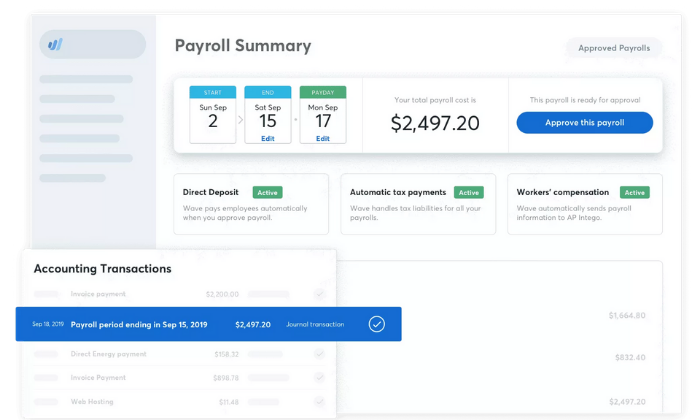
It’s even better if your employee scheduling software ties directly into your payroll service, as this will eliminate the process of entering times manually.
With time tracking, scheduling, and payroll all working together, there are going to be fewer mistakes that annoy employees and frustrate managers.
Flexible Access
The best employee scheduling software is usually offered as a web-based solution.
You want to make it easy for your staff to access their schedules from anywhere.
This isn’t possible with desktop software.
I also recommend looking for an employee scheduling solution that comes standard with a free mobile app.
Then your staff can essentially carry a schedule with real-time updates on them 24/7.
These apps are great for things like team communication features and push notifications with schedule changes or shift reminders.
Mobile and browser-based access to the schedule is a must if you have employees working remotely or in the field.
And even if everyone is in a single office or restaurant, chances are employees will appreciate the ability to check the schedule or send a message no matter where they are.
Industry-Specific Solutions
There are plenty of general-purpose employee scheduling tools on the market today.
But if you fall into certain categories, look for an industry-specific tool.
Restaurants and hospitality industries are two that come to mind.
Lots of software is geared towards these types of businesses because the scheduling needs are more involved in these cases.
If you have the opportunity to use software that’s designed specifically for your particular industry, I tend to lean in that direction as you’re making a final decision.
Additional Features and Extras
As I said before, lots of employee scheduling software does much more than just allow managers to post weekly schedules.
The best tools will also have shift swapping, employee self-service tools, HR features, labor cost management, leave management, attendance tracking, team messaging, overtime control, time clocks, etc.
Some extras are definitely more important to consider than others, depending on your business type and needs.
So keep a close on these various options as you’re shopping around.
Summary
What’s the best employee scheduling software?
The answer really depends on what you’re looking for.
But regardless of your needs, you can find the right option for your business based on my recommendations in this guide:
Best Employee Scheduling Software
- Homebase – Best employee scheduling software for small businesses
- Sage HR (formerly CakeHR) – Best all-in-one HR solution
- Deputy – Best for time and attendance management
- ShiftNote – The simplest employee scheduling software
- Shiftboard – Best for labor cost management
- HotSchedules by Fourth – Best labor management system for restaurants and hospitality
Just refer back to the methodology I described earlier to simplify the buying process. This will make it much easier to narrow down your options.
Source: feedproxy.google.com

Best Time Tracking Software
Why is time tracking still a source of stress for employees, supervisors, and management? There are only two reasons, really. They’re not using time tracking software.
Or, they’re using a solution that doesn’t fit with their business.
There is no third reason.
I can say that with total confidence because there are so many good time trackers to utilize.
Disclosure: This content is reader-supported, which means if you click on some of our links that we may earn a commission.
Because no one should suffer any longer, I’m going to share the top five-time tracking software options on the market today.
The Top 5 Options for Time Tracking Software
- Clockify – Best Reporting Features
- Time Doctor – Best for Employee Monitoring
- Toggl Track – Best for Holding Everyone Accountable
- TSheets – Best for GPS Monitoring
- Tick – Best for SMB Time Management
How to Choose the Best Time Tracking Software for You
If you have searched for time tracking software before, there’s one thing you’ll notice right away.
All of the popular products deliver way more than simple time tracking.
Trying to keep track of all these additional features would be difficult, but they break down into four highly-recognizable areas:
- Scheduling
- Reporting
- Accounting
- Monitoring
Does your time tracker need to be connected to some or all of these areas?
Finding the best time tracking software is about knowing how you want it to sync with your business. Let’s dive into the core features in each area.
Scheduling
When employees clock in, time tracking software automatically logs their hours. In most cases, users fill out a timecard that says what project or client they are working for.
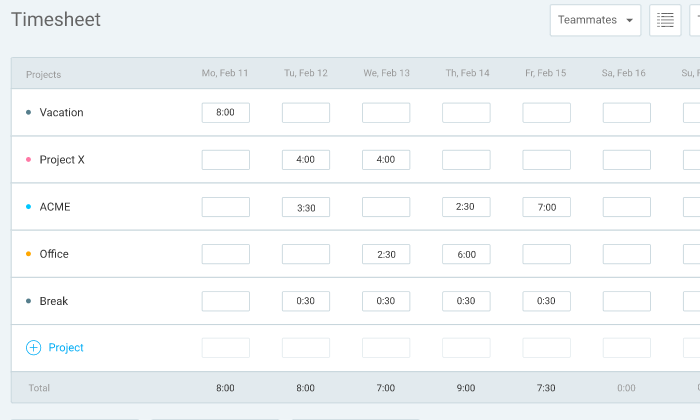
All of that information gets tracked in a timesheet.
In this example, the timesheet from Clockify shows how all the time entries are automatically mapped out over the week.
Some time tracking software comes with built-in scheduling tools that allow you to assign shifts and alert users when there’s a change in plans.
Time tracking software that’s light on native scheduling features usually has tight integration with the best project management solutions.
Look for the product that has what you need out of the box or connects with the tools you already use to manage your schedule.
Reporting
Time tracking software will let you monitor productivity and forecast budget problems well in advance.
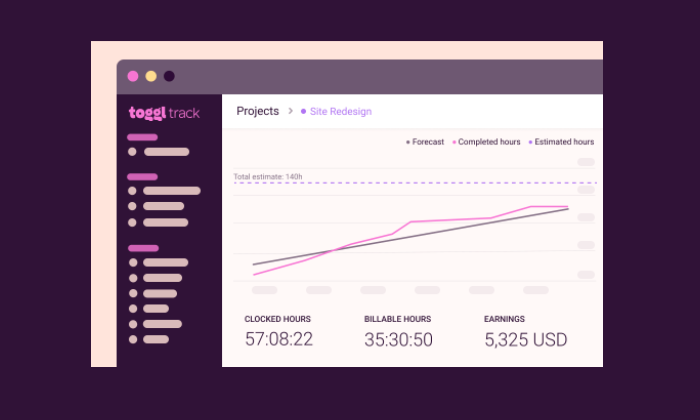
The products I like pull all your data into clear visualizations.
In this example from Toggl Track, it’s easy to see how work is progressing and the impact that has on revenue:
Good tracking platforms also let you drill down into each client, employee, and project’s specifics.
The more advanced tools will let users and administrators add more detail, but all of the products on this list come with tools to help you stay on budget.
Accounting
A lot of companies use time tracking software to streamline payroll and invoicing. By integrating with services like Quickbooks and PayPal, these tools can handle the job in a few clicks.
You can forget about long spreadsheets and good ol’ human error. Whenever you generate an invoice or make a payment, there’s a clear record of the work that was done.
Monitoring
Some time tracking software comes with monitoring features that let you check up on employee productivity.
These include location-based monitoring—such as GPS tracking—which ensures that employees are supposed to be.
Time tracking software can also be downloaded to a specific tablet or desktop that serves as a time clock kiosk.
Like a punch card system of old, the kiosk lets employees enter a PIN or takes a picture to prove they clocked in on time.
There are also digital monitoring aspects to time tracking software, which can record the websites and applications a user visits while they are clocked in.
Some products also take screenshots at random intervals to ensure that people are staying on task.
One quick, important word about monitoring and tracking software.
Before you deploy your new solution, have an open conversation with employees about what’s happening and why. Find alignment in the fact that tracking and monitoring will protect employees as much as the company.
The Different Types of Time Tracking Software
Time tracking software really breaks into two separate categories. One important thing to note is that both types of software have integrations for payroll and billing.
Time Clock Software
If you are looking for a basic time tracking functionality, time clock software is a good place to start.
These are great products for companies that need to track remote workers, as they can clock in the right from their phone.
For consultants, freelancers, or small business owners who really need to keep track of billable hours, time clock software can be a solid, cost-effective solution.
Project Management Software
Once scheduling and reporting features are added to time tracking software, it becomes a powerful tool for project management.
Premium subscriptions for products like Clockify are going to come with everything you need to plan, budget, and execute a project. Others, like Tick, work best when integrated with tools like Basecamp, Trello, and Asana.
Working time tracking software into your project management workflow can be a huge time-saver, and it gives decision-makers excellent insight into productivity.
#1- Clockify — Best Reporting Features
Clockify is a wonderfully simple solution for time tracking and project management. The free version is generous, and its paid plans are very reasonable.
I really like Clockify because it is easy for users to get a bird’s eye view of their time entries for the day, week, or month.
Once they clock in—they can do it anywhere—they see a complete list of their time entries.
From there, they can easily check if anything is missing or incorrect. Without opening a new window, they can edit times and additional information or tags to projects. They can also use the timesheet to confirm that everything is correct each week quickly.
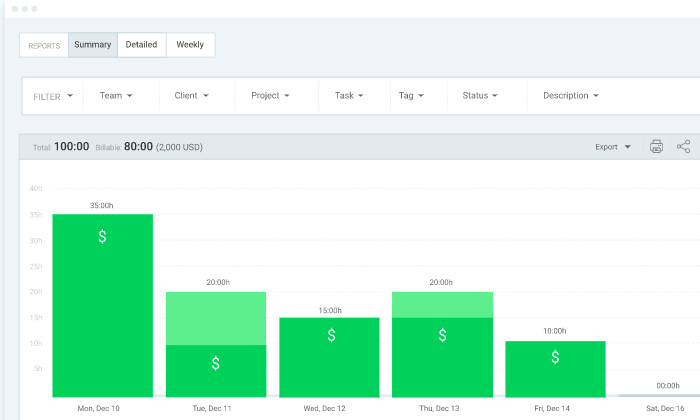
The reporting features in Clockify are quite good, bolstered by users’ ability to put so much information into their timesheets.
Administrators can get a real-time view of project budgets and see exactly what each person is working on.
There are many different reporting filters available to slice the data. However, you like. Get a quick read of how things are progressing for every individual, team, and client.
Clockify is loaded with features to help users stay on track like:
Idle detectionTime auditRequired fieldsAlertsBulk editOffline mode
The free version of Clockify allows unlimited tracking, users, projects, and reports. It has all the great viewing and editing capability that make Clockify easy to use.
The paid plans, which are still a bargain, come with features that give administrators more control over who can see what and advanced alerting and reporting features.
Here’s a breakdown of the Clockify pricing:
- Plus: $9.99/month
- Premium: $29.99/month
- Enterprise: $9.99/month per user
Integrations with Salesforce, G Suite, Freshbooks, and more than 50 other web apps make it easy to use Clockify for scheduling and payroll.
Shortlist Clockify if you need a budget-friendly time tracking solution with beneficial reporting features.
It’s not at the ERP software level, for sure, but compared to other time tracking software, Clockify is fairly robust and really easy to navigate.
#2 – Time Doctor — Best for Employee Monitoring
Time Doctor has rich monitoring features. It’s a full-service time tracker that you can use for payroll and project management, but where it really steps away from the competition is the employee monitoring.
Once employees download Time Doctor, they create tasks and begin tracking time. Supervisors can see what tasks people are working on and get insight into mouse and keyboard activity.
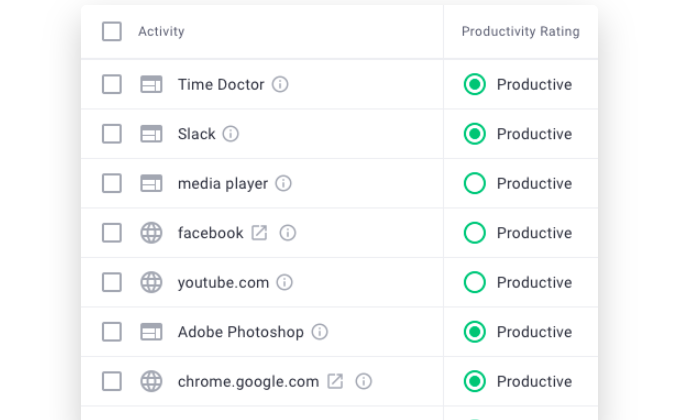
They may also enable screenshots taken at random intervals to confirm people stay on task.
Website and app monitoring is another beneficial facet of Time Doctor for both users and supervisors. You can quickly generate reports that show exactly how much time each person is spending on a website or application.
For supervisors, reports surface unproductive behaviors. With Time Doctor, you can set automatic alerts when users spend too much time on problematic websites and apps or block them altogether.
Moreover, users can better understand their work habits and where they are losing time.
There’s a lot more than just monitoring features included with Time Doctor, as it can handle:
Timesheets & payroll project management & budgetingOffline time-tracking productivity analysis daily, weekly, monthly reports
Pricing for Time Doctor breaks down as follows:
- Basic: starting at $7/month per user
- Standard: starting at $10/month per user
- Premium: starting at $20/month per user
There is no free version of Time Doctor, but you can sign up for a 14-day free trial.
#3 – Toggl Track — Best for Holding Everyone Accountable
Toggl Track has a surprisingly feature-rich free-forever version. For a freelancer or a consultant, this free time clock software can be used to track and invoice all their billable hours.
It’s an excellent app for personal accountability. There’s an idle detector, automated reminders, and Pomodoro timer to maintain focus, which may change the way you work forever.
For teams, the paid plans are a little more on the expensive side, but that is because it can collect and report so much information.
I especially like Timeline, Toggl Track’s background tracking feature, which records time entries for any app or website you use for more than 10 seconds. It’s an easy way to see how you’re really spending your time, and you can configure alerts to suggest tracking for specific actions, such as every time you join a certain call.
Automated alerts let you know when projects are nearing their estimated completion or are in danger of running over budget.
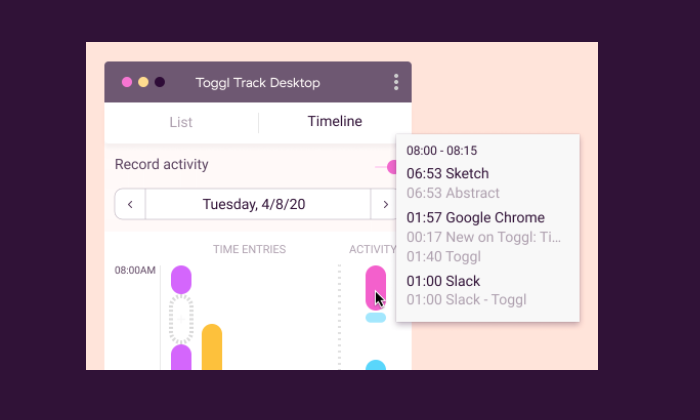
You can also automate email reminders for users who aren’t tracking their hours.
Toggl also has a handy time auditing capability that helps you detect incorrect or unassigned time entries.
Some of the other features that help users save time include:
- Time tracking across all devices
- Chrome and Firefox browser extensions
- Team access levelsProject templates
- Google Calendar integration
Like time audits and being able to set required fields, some nice features are only available with paid subscriptions of Toggl Track.
There are three tiers to choose from:
- Starter: $9/month per user
- Premium: $18/month per user
- Enterprise: Contact Toggl sales for a custom pricing plan
The appeal of Toggl is that it really helps people hold themselves accountable. Between automation and robust monitoring, everyone is reminded of how they are spending their time.
#4 – TSheets– Best for GPS Time Tracking
TSheets is a great choice for employee payroll, especially if you have many people working in the field. It’s a favorite for property developers, construction companies, and other field service-oriented businesses.
It’s wonderful for shift work and salaries, but the GPS tracking features are where TSheets shines.
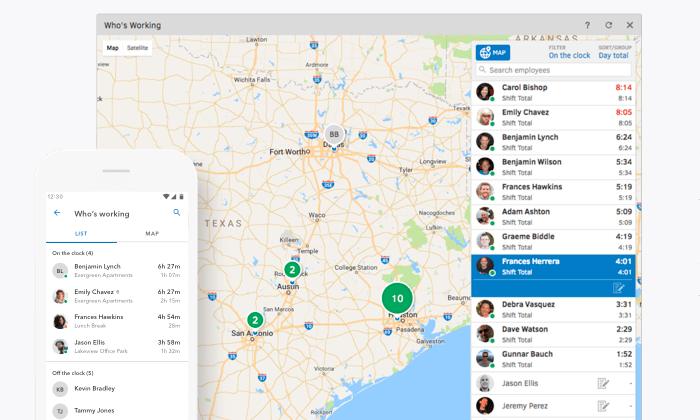
Employees clock in from the mobile app, and managers can see exactly where they are in the Who’s Working window.
You can use geofencing to set specific areas for employee clock-in, and they can upload pictures and a digital signature to confirm that everything’s done.
The real-time GPS data is also a boon for company coordination.
Quickly figure out who’s closest to the job-site for optimal deployments. Any changes to the schedule will trigger alerts to let everyone involved know about the new plan.
Some of the other convenient features include:
- Drag-and-drop scheduling tool
- Time clock kiosk
- Facial-recognition time clockOvertime tracking
- Reporting and forecasting
- Alert by text, email, or push notifications
TSheets has dozens of integrations on its App Marketplace, but I want to note that Intuit makes Quickbooks the same company. So, if you are using Quickbooks, know that TSheets is going to plug right in.
Pricing for TSheets is very reasonable:
- Premium: $8/month per user, plus $20 base fee
- Elite: $10/month per user, plus $40 base fee
- Premium doesn’t have geofencing, digital signatures, and advanced reporting features, but it has literally everything else.
In terms of a project management app, TSheets doesn’t let you get too granular, but you’ll be a master of the entire platform within a week. There’s not a lot of education needed for workers to use it, which makes getting buy-in a lot easier.
#5 – Tick — Best for SMB Time Management
Tick is project-based time tracking software. It integrates nicely with tools like Trello, Asana, and Basecamp, helping managers keep projects on time and budget.
In Tick, you create projects made up of tasks. Then, employees select the appropriate project and task, entering time from their desktop, mobile device, or even their Apple Watch.
You can set budgets for individual tasks within Tick, so managers have a better idea of where time is being lost within the larger project.
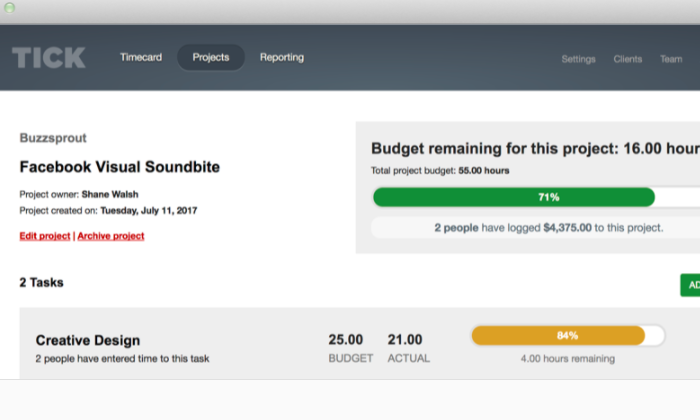
You can also create recurring projects, which can close at the end of the month and auto-duplicate for the next one. This is great for individuals and companies that use retainers or provide routine services for their clients.
The reporting capabilities in Tick are helpful for budget analysis and forecasting. Searching through data is really easy, by the client, employee, project, or billable versus non-billable.
A lot of users like Tick’s auto-fill search because they don’t have to browse for what they need.
Quite simply, Tick simplifies time management. With very little work on the user-side, those in control of the budget can make decisions based on accurate, real-time information.
Other key features of Tick include:
- Set running timers
- Assign people to projects
- Chrome extensionInvoicing and payroll integrations
- Easy-edit time entryBulk move time entry
A word about these last two features: It used to be that Tick’s editing time entries were a real pain. They’ve since updated it so you can edit time directly in reports and move all entries from one task or project to another.
Tick pricing is based on the number of projects you can create:
- 1 Project: Free
- 10 Projects: $19/month
- 30 Projects: $49/month
- 60 Projects: $79/month
- Unlimited Projects: $149/month
With every tier, you get unlimited users, clients, and tasks. It’s super affordable for any business.
I mean, if Tick saves you 2 hours, it’s already paid for several months of service.
I recommend this product to teams using Trello, Asana, and especially Basecamp, which has really tight integration. It also integrates with Zapier and more than 750 other web apps.
There’s a 30-day free trial of Tick. If you think it could work for your business, you owe it to yourself to give it a try.
Summary
I don’t like just to hit expectations; I always want to over-deliver.
But my work has to be on time and budget. It’s impossible to sustain a consistent level of service without a clear sense of how my time is spent.
The same holds for both blue-collar moving companies and white-shoe law firms. Time is money.
Take control with time tracking software.
Individuals and small businesses should check out Clockify, Tick, and Toggl to see how far they can get with a free forever product.
Looking at those three options and thinking about larger teams and paid plans, Clockify is going to offer the best in-house reporting features. This can be really helpful for teams that are trying to track revenue and expenses across many projects.
For time management, SMBs are going to find that Tick has everything they need within an intuitive interface. It delivers a similar experience as Toggl at a lower cost. Choose Toggl if you want employee monitoring features, which you won’t get with Tick.
If you really need robust employee monitoring features, Time Doctor is the product for you. You get a lot more insight into how users spend their time than you will with other time tracking software.
In the field, TSheets outperforms the competition. The GPS tracking features work beautifully, and the mobile app keeps remote workers up to speed.
The post-Best Time Tracking Software appeared first on Neil Patel.
Source: feedproxy.google.com

Best Applicant Tracking Software
An applicant tracking software, also known as ATS software, can help businesses reach a wider pool of qualified applicants as well as manage data from various sources – all at a single platform.
Disclosure: This content is reader-supported, which means if you click on some of our links that we may earn a commission.
Here’s a business cliche for you: Employees are the greatest asset for every company.
Precisely why recruitment is so challenging for HRs or recruiters. The process is quite elaborate and comprises several steps ranging from job posting to managing and streamlining applications.
Let’s talk statistics:
A corporate job post receives 250 resumes on average. And even after that, 45% of employers say that they can’t find candidates with the skills they need.
With the high influx of CVs, it’s crucial for HR specialists to raise their efficiency levels, which brings us to our next stat – recruiters only take six seconds to evaluate the candidate’s resume.
Now, six seconds isn’t necessarily enough for recruiters to make the right decision every time, especially because every business has unique needs when it comes to recruitment.
At the same time, technology is changing how we did things manually, which is why we now have a tool dedicated to automating the process of recruitment and hiring.
An applicant tracking software, also known as ATS software, can help businesses reach a wider pool of qualified applicants as well as manage data from various sources – all at a single platform.
This software is used by departments and hiring managers to carry out internal hiring. Even third parties, such as recruitment and staffing agencies, use an ATS.
According to research:
- 86% of recruiting professionals agree that using ATS software has accelerated their hiring process
- 78% of recruiting professionals found that using ATS software has given them access to higher qualified candidates
So adding top-level talent doesn’t have to be time-consuming and troubling anymore.
In this guide, we’ll review the best applicant tracking software on the market that can help a company employ the most suitable candidate for the job with minimal effort.
The Top 5 Options For Applicant Tracking Software
- BambooHR – Anchor Link to Subhead Below
- Bullhorn – Anchor Link to Subhead Below
- SAP SuccessFactors– Anchor Link to Subhead Below
- Workable – Anchor Link to Subhead Below
- JazzHR – Anchor Link to Subhead Below
How to Choose the Best Applicant Tracking Software for Your Needs
Every business has unique recruiting and applicant tracking requirements, depending on specific factors like size, niche, and so on.
It also means that no ATS software offers an a-one-size-fits-all solution.
There are a few pointers that can help you determine the best applicant tracking software for your needs, though. Read on as we discuss them in greater detail below.
ATS Software Type
Every ATS software has been conceived to cater to a specific set of needs.
You see, while some software is designed to handle higher volume recruiting, which is typically carried out by enterprises, some are created to help small businesses specifically.
Similarly, you’ll also find software focused on satisfying the needs of staffing and recruitment agencies.
We’ll do a more in-depth assessment of the different types of applicant tracking software later on in this article. (Anchor link to H2 below)
Hiring Frequency and Volume
A business that hires around 20 employees every year won’t have the same requirements as an enterprise that is hiring 20 employees every month.
You need to figure out software that meets your hiring frequency and volume.
Generally, ATS software has a maximum limit or restriction on how many active openings you can have at a time.
Moreover, most of the brands offer additional features and tools to help businesses efficiently manage large-scale recruiting, which are understandably far more tricky to manage.
So how do you find software that is suitable for your company?
Ask yourself the following questions:
- How frequently does your company hire new employees?
- What is the average number of employees that you hire at once? Is the volume high or low?
These two questions will help you weed out software that doesn’t fit your needs instantly.
Feature List
Most ATS software offers add-on features to enhance the efficiency of your recruiting strategy.
This can include candidate sourcing, applicant tracking, employee onboarding, recruiting analytics, and workforce planning.
Your aim should be to pick software that fulfills your recruiting needs in terms of efficiency and scalability.
For instance, small businesses can opt for cloud-based ATS software that is more affordable and doesn’t require an on-site tech support team.
Contrarily, large-sized enterprises don’t need to go cloud-based since they have a higher budget and can afford an in-house support team to cater to their higher hiring frequency.
Budget
Every business has a budget for various processes. Whether its marketing or recruitment, teams have to operate within the constraints.
Try to find an applicant tracking software that fits within your budget while simultaneously helping you improve the efficiency within your organization.
The good news here is you have several options.
You‘ll find software that costs less than $0.50 per employee – provided you opt for an add-on to HR software – and also plans that have a monthly charge of $249.
What are the Different Types of Applicant Tracking Software?
Here, we’ll compare the different types of ATS.
Small Business vs. Midsize Business vs. Enterprise Business
Small business buyers are anywhere between 1-50 employees. Generally, this category doesn’t have a department dedicated to human resources and recruiting initiatives.
On the other hand, mid-size business buyers and enterprise business buyers have employees anywhere between the 51–500 and greater than 500 range, respectively.
While the former is headed towards rapid growth, the latter is more developed.
Besides that, mid-size businesses often seek to hire an internal recruiter, whereas enterprise business buyers already have a hiring team and a dedicated IT department.
The hiring frequency and volume for each of these businesses are obviously different.
Staffing agencies, for example, would do well with software plans that offer them sourcing, tracking, and hiring. For corporates, however, hiring may have to be customized further.
It’ll be better for larger companies to opt for plans that allow them to customize their career pages and employee referral portals, followed by pre-screening assessments, e-signature verification, and background screening, and lastly, HRMS integration.
In-house Recruiting vs. Recruiting Agency
Some applicant tracking system software is created for in-house recruiting that allows them to enjoy higher personalization and automation.
Other software focuses on servicing recruiting agencies and firms with scalability for high-volume and white labeling for getting clients.
Although you’ll also find ATS software that offers capabilities for both groups, it’s better to find one that’s right for your company.
All-In-On Option vs. Specialty Tools Availability
Different businesses will require different add-ons depending on their hiring process.
While most ATS software does come with additional specialty tools like SEO, payroll, HR, and CRM, some don’t.
SEO tools are useful for all businesses since they make job advertisements more successful.
Not only will companies be able to build up wider reach, but they’ll also attract new candidates to their ‘Careers’ page.
Similarly, CRM capabilities are an essential component for inbound recruiting that allows companies to carry out long-term candidate tracking and build their talent pool.
Core Applicant Tracking vs. Full Recruiting Cycle Support
You’ll find two types of ATS products: one that focuses exclusively on tracking candidate’s application materials, and two, that provide support for other aspects of the recruitment life cycle.
You can also differentiate between the software based on feature lists. Interviews, document signing and management, note-taking, scheduling, and integration are some common differentiation points.
After carrying out extensive research and taking demos, we can confidently recommend the following five applicant tracking software to transform the way your company recruits and hires employees.
Examples of Applicant Tracking Software
Keep reading as we discuss the features, benefits, and pricing of each software below:
#1: BambooHR – The Best Overall Applicant Tracking Software
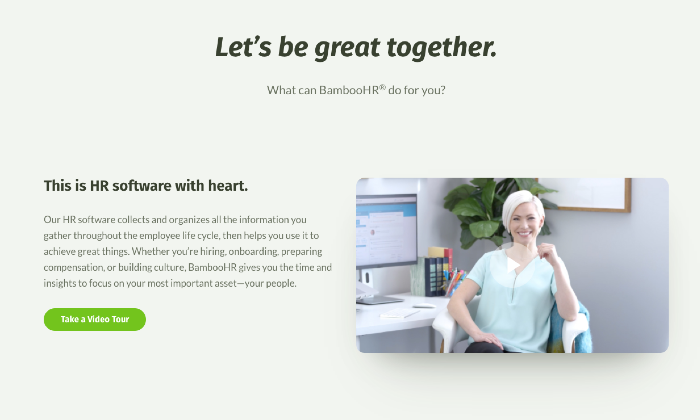
BambooHR can provide the ultimate solution to your human resources department for handling the company’s recruiting and onboarding needs.
While it may not be the cheapest option, you do get features that make the investment more than worth it.
The ATS system of BambooHR provides ideal solutions for small and mid-size businesses.
It has a well-organized and visually appealing set of tools for handling application information throughout every stage of the hiring process.
BambooHR allows you to post job positions on the go too. You’ll have access to top-level talent from the leading job boards and sites, such as LinkedIn, Facebook, Indeed, and Twitter – all at your fingertips.
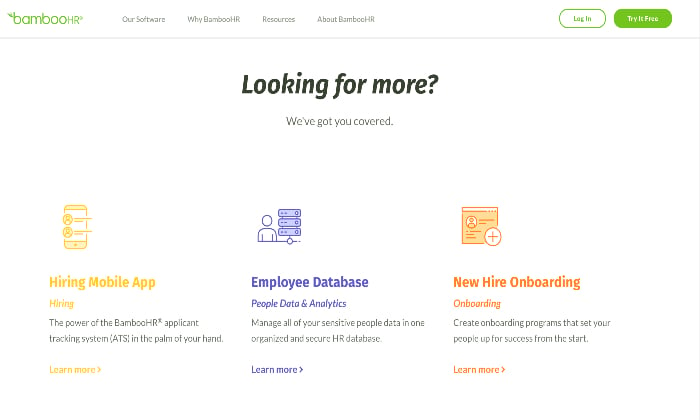
The software has a hiring mobile app that is available for both Android and iOS.
Sending offer letters directly within the platform as well as collaborating with your team for recruiting, sending automated alerts, and so on is also possible.
Additionally, since BambooHR is a complete human resource management software, you‘ll be able to manage your new employees for their full duration with your company.
Prominent Features
- User-friendly
- Streamlined processes that are easy to learn, along with easy pre-boarding and onboarding facilities
- Customizable email templates
- Automated emailing system
- Message scheduling to multiple candidates
- Job boards and social media integration
Pricing
BambooHR offers two packages: Essentials and Advantage.
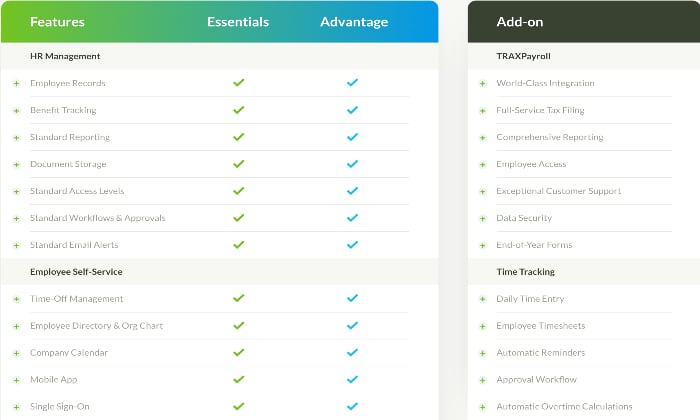
While both the packages are feature-rich, the ATS isn’t available with the Essentials plan.
So if you want applicant tracking, you have to get the Advantage plan.
Keep in mind that this software may not be the best solution for your company if you only want ATS.
Unfortunately, BambooHR doesn’t feature pricing on its website. In case you want a free quote, you‘ll have to contact them.
Pros
- Impressive design
- Easy to set up
- Open API that allows simple integrations with HR tech vendors
- Provides an all-in-one solution for HR departments
Cons
- Pricey
- ATS software isn’t available with the entry-level plan
#2: Bullhorn – The Best Applicant Tracking Software for Large Enterprises
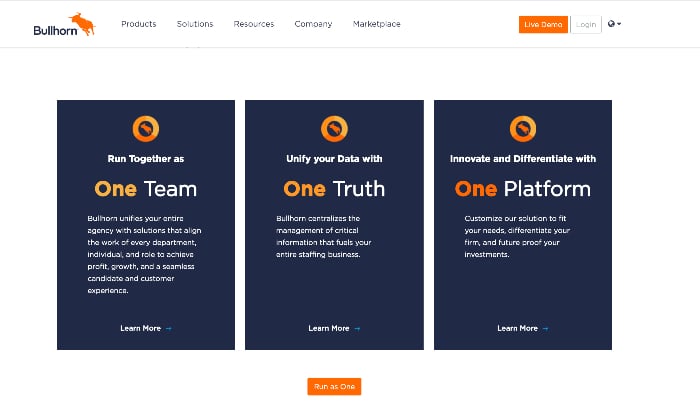
Bullhorn is a powerful, easy-to-use applicant tracking system that helps you streamline all recruitments from a single interface that can either be a desktop, mobile device, or any internet browser.
In fact, it’s a tailor-made solution for staffing businesses and traders.
The software allows you to keep track of candidates throughout the recruitment process, along with initiating team member collaboration.
You can use Bullhorn to fill jobs and automate the onboarding process. It offers 100+ pre-integrated solutions for customizing the software to accommodate specific needs.
Even calculating bills for time tracking and invoicing are also possible.
All in all, you can manage clients as well as candidates with Bullhorn.
That being said, we would recommend this software for staffing and recruiting agencies only.
Generally speaking, there are better options on the market for internal reporting, making Bullhorn a bit too much for in-house hiring managers and HR departments.
Plus, the premium price may be too expensive for smaller businesses that have limited budgets.
Prominent Features
- Automatic candidate tracking on the application system
- Allows you to add new candidate resumes from job boards
- Mobile recruiting software for viewing and managing candidate records
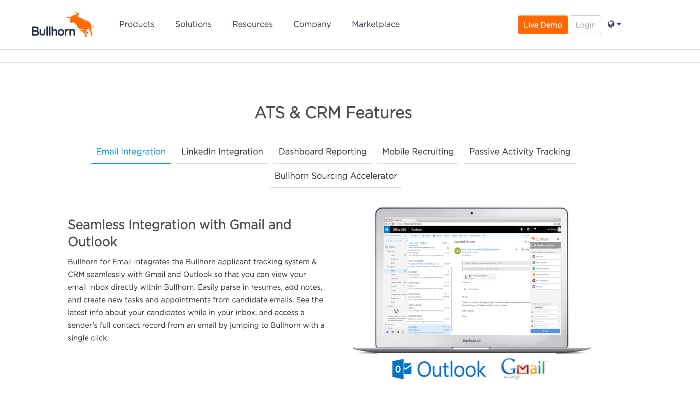
- LinkedIn and email integration
- Dashboard reporting
- Facilitates addition of notes to records
- Real-time updating of records
- Reporting and management options to check the recruiting team’s progress
Pricing
Bullhorn offers three plans: Team, Corporate, and Enterprise.
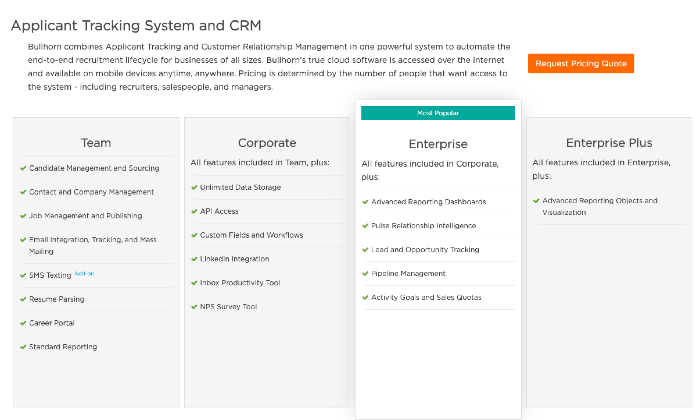
The rates for Bullhorn plans aren’t available on the website. You’ll have to request a pricing quote to get more details.
Pros
- Excellent user interface
- Gmail and Outlook integration
- Intuitive features like bowling alley layout for easy and efficient data input
- Unlimited customizations
Cons
- Very expensive
- Lacks iOS or Android mobile applications
#3: SAP SuccessFactors – The Best Cloud-Based Applicant Tracking Software
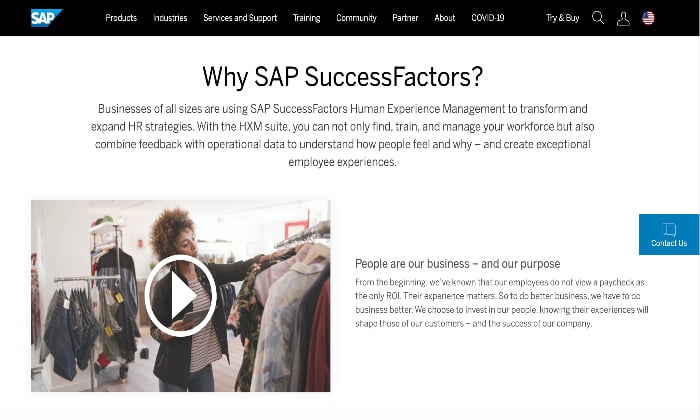
SAP SuccessFactors aims to provide all-inclusive ATS software to give companies wider access to top-level talent with minimal effort. In fact, in terms of reliability, this software might be one of the best options available to you.
SuccessFactors has a plethora of support and features, such as comprehensive applicant management, onboarding portal, global talent sourcing, and candidate relationship management. You can also avail of performance metrics, employee engagement, and payroll management.
In other words, it’s a holistic, cloud-based HR management system that facilitates all processes of the recruiting cycle.
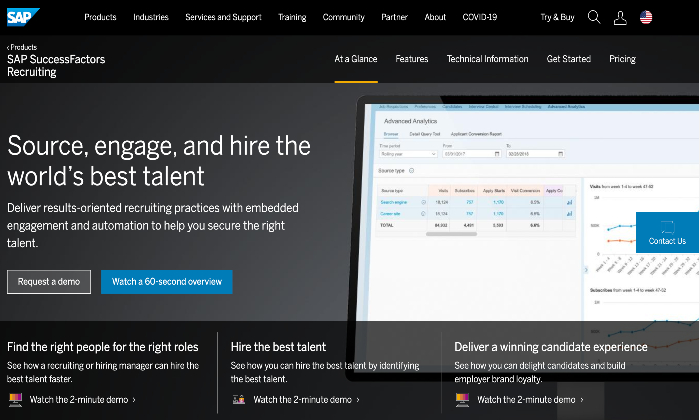
We particularly like how deeply insightful the software can be for talent acquisition thanks to its analytical reporting and progress tracking features.
Prominent Features
- Centrally managed global job distribution and access
- Effective and efficient candidates relationship management
- E-signature solutions
- Online offer letter and other documentation
- Key insights into 4000 job boards, social media platforms, and campuses spanning across 80 countries
- Responsive career site creation facility
Pricing
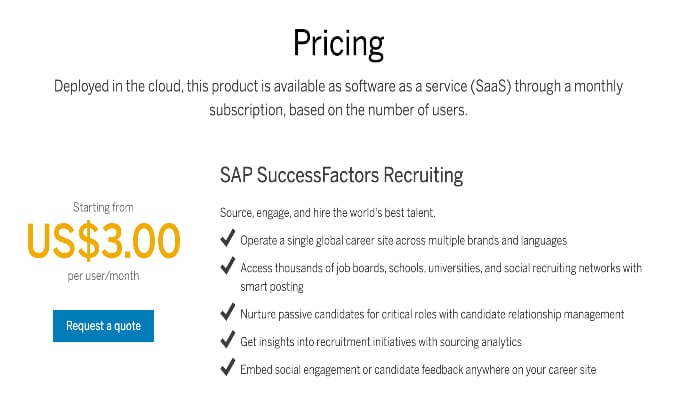
SAP SuccessFactors is available as SaaS through a monthly subscription based on the number of users. It‘s priced at $3 per user per month, but you can also avail of the HCM suite that costs $84.53 per user annually.
Pros
- Comes with a great feature list for small to medium-sized businesses
- Intuitive setup wizard
- Provides descriptive video tutorials
- Superb performance tracking features
- A great option for fast-growing companies
Cons
- Steeper price tag than its competitors
- Doesn’t include add-ons offered by rivals
#4: Workable – The Best Applicant Tracking Software for Small and Midsize Businesses
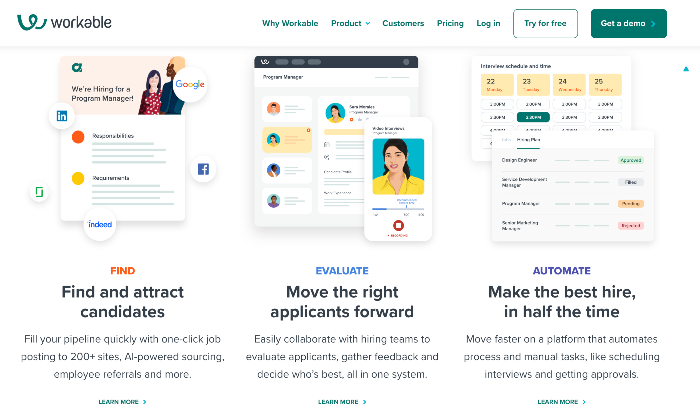
Offering the best value for small and medium-sized businesses, Workable is an easy-to-use recruiting software solution.
It’s a holistic tool that can be accessed on mobile devices as well as desktops.
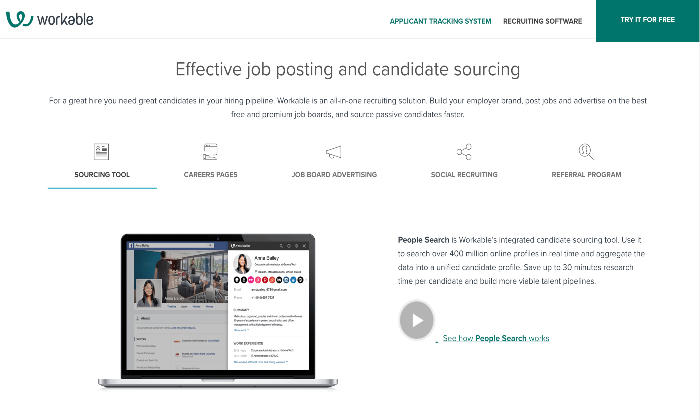
You get a wide array of applicant tracking (AT) solutions, along with access to a large pool of premium job boards.
Besides this, you can also customize the dashboard to boost the efficiency of your hiring process further.
Workable aims to help businesses of all sizes find, evaluate, and automate recruitment and hiring.
Companies can fill in their pipeline with one-click job postings on nearly 200 sites through AI-powered search.
Moreover, team collaboration for applicant evaluation, gathering feedback, and automating manual tasks like scheduling interviews and getting approvals is also possible.
Workable also has various add-ons that can make your account more functional – provided you‘re ready to pay for them.
Basically, your company can stay on top of the entire recruiting process right from posting ads to onboarding employees.
It’s also a good option for scalability since you can upgrade to an annual plan to get access to advanced features like one-click candidate sourcing and applicant tracking tools too.
Prominent Features
- Data protection with access rights for hiring team
- Confidentiality control
- Organized reporting lines, with role assignment, job creation, and job posting
- Productivity and activity report generation
- One-click postings on multiple job boards
- Interview scheduling with email-calendar synchronization
- Offer letters and single sign-on (SSO)
Pricing
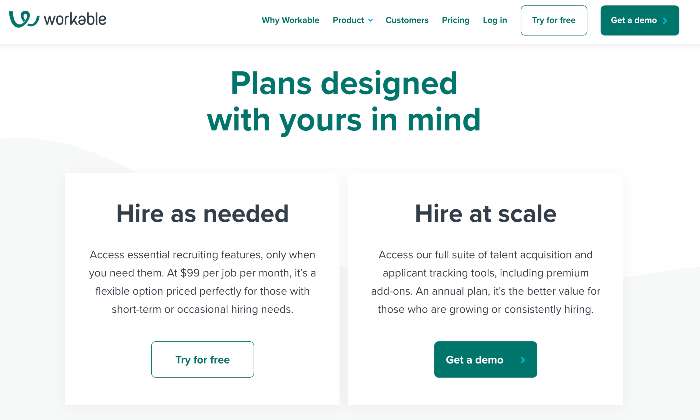
Workable has two pricing plans: Hire As Needed and Hire At Scale. While the Hire As Needed plan costs $99 per job, per month, the Hire At Scale plan doesn’t have clear pricing.
You can also take advantage of free demos and a 15-day free trial program to test the software before committing.
Pros
- Easy-to-understand UI
- Robust integrationOffe
- rs great email and interview templates
- Well-organized
Cons
- Not very customizable
- Search across tabs needs to be improved
- Inefficient support functionality
#5: JazzHR – The Best Applicant Tracking Software for Internal Hiring and Staffing Agencies
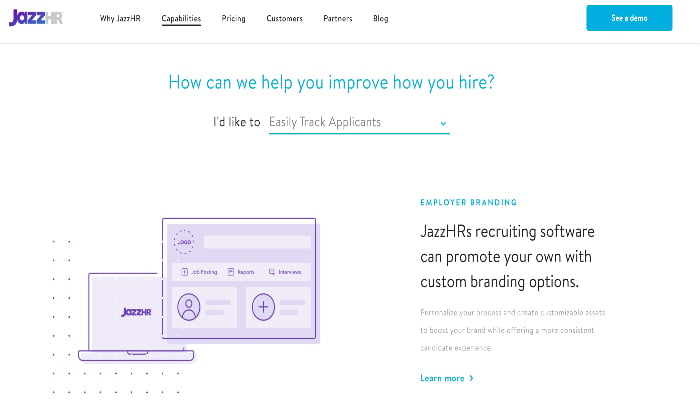
JazzHR can assure you seamless job requisition, interview scheduling, and other aspects of the hiring process.
You can use this software for organizing and tracking all of your job openings, candidates, resumes, customers, and contacts.
This intuitive ATS tool can automate every manual process connected with hiring, allowing recruiters and HR managers to curate recruitment processes and source qualified candidates efficiently and quickly.
No wonder it’s trusted by over 5000 organizations across the world!
JazzHR is an excellent option for staffing agencies and internal hiring.
It has an unlimited user feature that allows businesses to bill on a per-user basis, which simultaneously eliminates any additional charges.
The software is also highly customizable.
You can tailor-make a process to suit your team’s needs and preferences when it comes to recruitment and hiring.
Prominent Features
- Efficient candidate sourcing, along with employer branding facility
- Job posting and syndication
- Collaborative hiring
- Job-specific recruitment teams
- Compliance management and reporting
- Interview scheduling and other assessments
- Job offers and e-signature solutions
Pricing
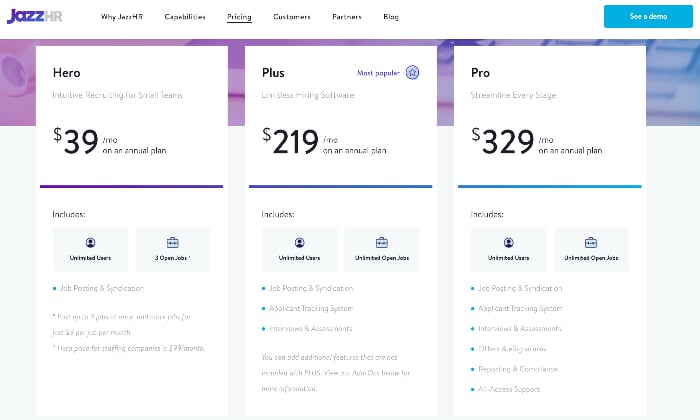
JazzHR has three plans on offer: Hero, Plus, and Pro.
At $39 per month, the Hero plan caps the maximum open jobs at three.
While this might be suitable for small teams, it still doesn’t offer an applicant tracking system.
For ATS and other benefits like interviews and assessments, all-access support, and so on, we would recommend the Plus and Pro plans, which cost $219 and $329 per month, respectively,
You can also request a free demo and get a free trial for 21 days.
Pros
- User-friendly and flexible
- Job posting integration and job syndication
- Auto-reject functions for unqualified candidates
- Allows you to keep track of interview notes
Cons
- Reporting feature needs to be improved
- Lacks mobile app support
Wrapping Up
Finding the right talent is crucial – more so because employees serve as the foundation of an organization.
We hope you were able to find an ATS software that suits your companies recruitment and hiring needs from this guide.
Irrespective of your choice, an application applicant tracking software will help you select the best candidates from a talent pool of thousands of people in a surprisingly efficient manner. So, why wait? Get your ATS now.
The post, Best Applicant Tracking Software appeared first on Neil Patel.
Source: feedproxy.google.com