
As a developer, chances are you’re always looking for ways to improve your website’s functionality or create a more dynamic experience for your audience.
Typically, you might rely on languages like HTML and JavaScript. However, there’s another cool processing language that could improve your site structure called PHP.
With PHP, you can reduce development time and streamline your coding, while improving the user experience. Does this mean you need to build out a whole app from scratch, though?
Nope. The best (and most efficient) way to use PHP is through a simple PHP framework. Here’s how these templates work and a look at some frameworks you might choose from.

What Is a Simple PHP Framework?
First, PHP, or “Hypertext Preprocessor,” is a programming language you can use to improve websites. Web developers use it to build PHP applications and services to make websites more interactive, for example, by adding web polls.
To build PHP apps, developers use PHP frameworks. These templates typically include prebuilt components which allow developers to speed up the process.
What’s a “simple” PHP framework, then? Well, the clue’s in the name: it’s a simple, streamlined version of a typical PHP framework. You might use it to build, for example, interactive web apps, and so on.
Here’s an example of what some basic PHP code might look like:

Essentially, simple PHP frameworks help you build solid programs without composing huge amounts of code. They allow you to get fully-functioning apps up and running quickly, which is precisely what we’re aiming for when trying to start and grow a business.
Want to find the source code for this framework? It’s hosted over on GitHub. However, it might be easier and faster to use a simple PHP framework that is already packaged and ready to go. We’ll cover a few of those a bit further down.
Reasons to Use a Simple PHP Framework for Websites
If you’re not sold on PHP frameworks yet, or if you’re still unclear on why they’re useful, here are just some of the reasons why you should give a simple PHP framework a try.
1. Simplified Coding
As a programming language, PHP can be tricky. If you want to introduce new concepts or, for example, improve a website’s functionality, you need to write long and complex lines of code.

This is where the template comes in. With a simple PHP framework, you can quickly generate the code you need, which helps you build impressive PHP apps with little coding experience.
2. Quicker Development
Here’s what else is great about simplified coding: it’s a time-saver!
Rather than spending time writing repetitive code or building out apps from scratch, you can let the framework generate the code for you. As a result, you can focus your time on business and app marketing, rather than coding.
3. Increased Security
At its core, PHP is fairly secure. However, as with any programming language, it’s easy to accidentally write in vulnerable code, especially if you rely on outdated tutorials or guidelines.

Frameworks provided by reliable platforms are constantly tested for vulnerabilities and updated where necessary, so your apps will be as secure as possible.
4. Easier Maintenance
It’s much easier to maintain your application if you have a clear template to follow, which is where the PHP frameworks really help.

Not only do PHP frameworks include documentation to help run your apps smoothly, but developers are constantly building community libraries to help other programmers manage their code more efficiently, which allows for easier maintenance.
5. Improved Teamwork
If you’re programming alone, it’s simple to keep track of the code as it develops. However, it’s challenging (not to mention time-consuming) for new team members to come in and learn your whole code from start to finish.
A PHP framework boosts collaboration. With a template, your team can quickly skim the template and understand how it applies to your particular application.
Simple PHP Frameworks to Try
OK, so that’s what a simple PHP framework is and why you might use one.
How do you pick a framework for your needs, though? To help you get started, here’s a selection of simple PHP frameworks, each with slightly different benefits.
1. CodeIgniter
If you’re a newbie looking to make your website more dynamic or build some functional apps, check out CodeIgniter. From creating simple news items to complex web services, CodeIgniter can help you out:

Lightweight and nimble, CodeIgniter is a simple PHP framework aimed at developers who want to create scalable apps without a fuss. There’s very little configuration involved and it comes with clear documentation, so you can be up and running in no time.
Compared with similar frameworks, like Laravel, it’s easy to learn and simple to navigate, but it’s no less impressive. Give it a try if you want to build on a comprehensive framework without taking up too much space on your device.
2. Laravel
Do you want to build a scalable, sophisticated app with advanced features? Then consider Laravel.
Laravel is all about providing a great experience for those looking to innovate and develop apps quickly. It’s based on a neat, elegant structure, and you can quickly generate skeletal templates to build into complex apps without compromising on quality or security.
What’s great about Laravel is how scalable and flexible it is. The entire framework is designed to “grow” with your business, so you can rapidly scale your apps as your audience grows.
Whether you run Mac, Windows, or Linux, it’s simple to launch Laravel and get building. That said, it’s not the easiest PHP framework to learn, so new developers might prefer other templates.
3. Phalcon
Do you need a framework to help you build a high-performing website? Phalcon might be an option for you.
Phalcon is all about low-level architecture. The framework prioritizes performance and speed over complex configurations, so it’s one of the fastest PHP frameworks out there and offers a sleek, streamlined coding experience:

Why is it so fast? It’s all about memory usage. Phalcon is “memory-resident,” meaning you can load it once, and it runs continuously in the background. It’s ready and waiting whenever you need it, so you can work quickly and efficiently.
What’s more, it’s flexible enough for either small app developers or enterprise-level designers. You’ll also find a great range of documents, screencasts, and tutorials for more help when you need it.
The takeaway? Phalcon is an option if you need a fast framework with a little freedom to configure your own directories.
4. Yii
Are you new to coding and seeking a simple PHP framework to learn the ropes? Then check out Yii.
Yii, which translates to “simple and evolutionary” in Chinese, aims to streamline web app development. What does this mean? Well, the base code is fairly simplistic. However, this is why Yii stands out.
It’s essentially a universal template, meaning you can use it to build a whole host of different PHP web apps. All you do is add components from the library to your core template, and you can build high-performing apps with relatively little code:

Is it a popular framework? Sure! Developers use the Yii framework for developing a huge range of tools, ranging from simple apps to scalable web services. There’s an active user community, too, so there’s always support on hand when you need it.
Bottom line? Yii is speedy, easy to install, and just as secure as the other frameworks. It’s probably the most accessible framework on this list, so give it a try if you’re unfamiliar with making PHP apps or you want to build tools fast.
5. Slim
Looking for a lean, compact framework to create basic functional apps in minutes? Slim could be the answer.
Created in 2010, Slim targets developers to build smaller or more simple web services. For example, you might use Slim to build REST APIs for the web, or web apps that rely on a simple HTTP request and response model.
It’s easy to get up and running, too.
First, install Composer. Then, install Slim by executing the right framework command. Finally, make sure you’re running the right implementation to launch Slim on your device (check out the website for help with this.)
Once you’re all set, run the “Hello World” tutorial to see just how easy it is to compose through this simple PHP framework:
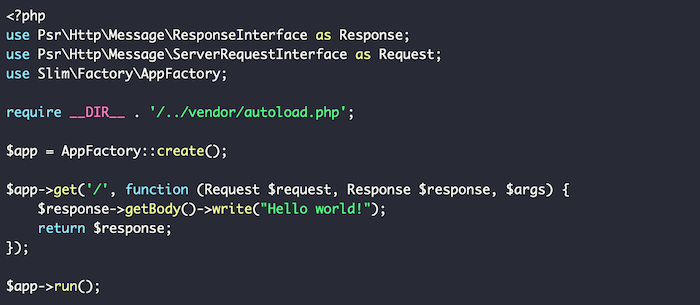
As with the other PHP frameworks, you’ll find an active user community and plenty of online documentation to help you jump in. However, what truly sets Slim apart is its sleek, simplistic template designed to create small but mighty web tools in no time.
For app developers seeking a secure PHP framework for no-frills prototyping, look no further than Slim. Don’t let the simplistic functionality fool you, though: advanced developers can add more code to make Slim web apps more dynamic.
6. Symfony
If you have some experience with PHP, or you’re building an enterprise-level app, consider Symfony. It’s simple to operate, easy to install, and gives you the freedom you need to build more complex configurations.
What’s so great about Symfony is its large library of reusable components, which means there’s no need to spend time writing repetitive code for different apps. You can just select the base code you need from the library and get going!
What’s more, you can easily link Symfony PHP frameworks with larger enterprise-level platforms like Drupal, so you can seamlessly integrate your apps into a wider content management strategy.
If you need a little help figuring out Symfony, don’t worry. There’s a whole library of text and video tutorials to walk you through everything from installation to app creation.
In short, while Symfony’s not the most accessible framework on the list, it’s exactly what more experienced developers need to build large-scale apps and web solutions. Check it out if you’re ready to take app development to the next level.
Frequently Asked Questions About PHP Frameworks
What is the purpose of using a PHP framework?
A PHP framework simplifies the process for building websites and web applications. It’s useful for anyone trying to design PHP-based apps and services to grow their business.
Is PHP popular in 2021?
Absolutely! The PHP language is advancing all the time, which means it’s sophisticated enough to handle the demands of modern web services. You’re definitely not wasting your time by learning simple PHP frameworks in 2021.
What is the best framework for PHP?
There’s no one “best” framework. The right framework for you depends on your particular business needs, and how comfortable you are with code. If you’re new to PHP, you won’t go wrong by selecting one of the frameworks we talked about earlier.
Why should I use a PHP framework?
A framework is a huge time-saver. With even a simple PHP framework, you can simplify the coding process, speed up app development times, and make your website easier to maintain in the long run. If you’re looking for an efficient app and web design approach, even for beginners, you should check out PHP frameworks.
Simple PHP Frameworks Conclusion
If you’re a web developer looking to improve efficiency without compromising code quality, you might want to try PHP frameworks.
Simple PHP frameworks are uniquely designed to help you build the apps and services you need quickly and securely, so you can focus on designing useful tools rather than wasting time on repetitive coding.
Are you still unsure where to start with PHP frameworks? Check out my consulting services to see how I can help.
Have you tried using a PHP framework yet? How easy did you find it to work with?


Source: neilpatel.com

Should you accept Bitcoin and other crypto payments on your website?
With cryptocurrencies becoming more and more mainstream, this is a question lots of us are asking. Whether you choose to accept Bitcoin payments on your site is ultimately up to you, but if you choose to do so, it’s important you get the right setup.

Should You Accept Bitcoin on Your Site?
This is probably the biggest question you’ve first got to decide on. Once you’ve decided to accept crypto, the payment processing is fairly easy to set up, but first, you’ve got to decide if cryptocurrency is right for your business.
As big as crypto has become (Bitcoin has a market valuation of over $1 trillion), it’s still something that divides opinion. For every devout crypto fan, there’s an influential person talking it down. For all the positive talk you hear about it, the next minute you hear Jamie Dimon, chairman and CEO of JPMorgan, saying “I personally think Bitcoin is worthless.”
It’s confusing, and when you don’t fully understand the intricacies of how crypto works (which few of us do—and if your customers don’t use it, why bother?), choosing to accept crypto payments on your website can be a worrying decision.
Of course, everyone’s got their agenda, and when you’re making your decision, you should remember that. Do your own research and find out if accepting Bitcoin on your website is in your best interests.
The Benefits of Accepting Bitcoin on Your Site
Let’s draw this back to a subject I love: marketing. I’m always saying that marketing is about reaching the right people with the right message at the right time. When you do this, sales are likely to start flowing.

If lots of your customers are engaging with crypto, then why not make it a part of your message?
Accepting Bitcoin on your website plays into your brand identity, then in some people’s eyes, it’s going to show you’re an innovative, cutting-edge company that’s not afraid to embrace new technology.
Here’s where you need to think about your audience. The people who currently seem to embrace crypto are overwhelmingly males between 25 and 44-years-old.
If your key target demographics are over 60, then accepting Bitcoin might not be at the top of your agenda. However, if your target audience is passionate about crypto and it fits your brand identity, then you might be onto something. Especially if you are selling a high-ticket item.
Look at the big companies that are currently accepting Bitcoin: Microsoft, NameCheap, WholeFoods. You can see how crypto lends itself to their audiences, namely, young, alternative, and techy.
If you do decide to accept Bitcoin on your site, then financially it can be rewarding too. Crypto tends to have very low transaction fees compared with traditional payment methods. Most bitcoin transactions cost between zero and one percent, whereas the average credit card transaction fee is between 1.5 and 3.5 percent.
The Drawbacks of Accepting Bitcoin on Your Site
One of the obvious things that makes people question the value of accepting crypto on their sites is volatility. You don’t quite know what Bitcoin and other cryptocurrencies are going to do from one day to the next and this can be a worry for website owners.
In some cases, Bitcoin has been known to lose 25 percent of its value in less than a month, which on the face of it, isn’t what you need as a business owner.
The thing is, just because you accept Bitcoin payment doesn’t mean you have to hold Bitcoin. If you don’t want to be exposed to the volatility of cryptocurrencies, then you can immediately exchange Bitcoin into your chosen currency.
The next Bitcoin drawback is something you may not expect: curiosity.
Whether they love it or hate it; people love to talk about crypto. If you accept Bitcoin on your website, then you’re something of a pioneer, and this will stir lots of curiosity.

You may well find your customer service team isn’t inundated with questions about your products, but instead, fielding questions about cryptocurrencies. This is far from ideal, and it’s something you need to be prepared for if you do decide to accept crypto.
What You Need to Accept Bitcoin and Cryptocurrency on Your Website
Crypto is designed for the modern world, so it’s no surprise that it doesn’t take too much set up to start accepting Bitcoin on your website.
There are a few basics everyone will need and then you need to decide on the best way for your website to accept crypto payments.
The Basics
To hold crypto, you need a “wallet.” This is very similar to the “wallet” app you probably have on your iPhone, but it’s specific to crypto.
Your crypto wallet allows you to buy, sell, and hold many different types of cryptocurrency, for instance, Bitcoin, Ethereum, and Tether. You get a unique private key that helps to keep your currency safe and accessible, and it links with other apps to help make transactions seamless.
When someone buys something in crypto on your website, the money will eventually filter into your wallet and from there, you’re free to exchange it into the currency of your choice.
Good Communication
As with anything in this world, the key to introducing a new payment method is good communication.
If you’re going to take the step and accept Bitcoin on your website, then you’ve got to explain the value proposition to your audience. Make sure they’re aware of new changes and showcase how it benefits them.
This is an excellent opportunity to showcase your brand, so make sure you take it. If you communicate well, then you’ll find more people take up the option of paying in crypto, and it will also foster greater brand loyalty.
Platforms and Integrations
How you integrate your crypto payments will depend largely on the platform your site is hosted on. For the major platforms like Shopify, WooCommerce (WordPress), and Magenta, there will be different plugins you can use for a quick setup.
If you can’t find the plugin you want, then most Bitcoin payment tools offer alternatives such as payment buttons, custom integration, and invoices.
Different websites will require different solutions, but for the majority, the plugins do an excellent job. If you’re struggling to integrate these tools with your website, then don’t worry, though.
Crypto was created to enable financial transactions between two parties without the need for a middleman, so you can always invite customers to contact you directly for Bitcoin payment options.
What to Look for in a Crypto Payment Processor
When you accept Bitcoin payment on your website, you want maximum value for your customer and your business. With many different crypto payment processors to choose from, it’s important to evaluate your options and make sure you’re getting the best deal.
Here are some considerations when choosing your payment processor.
Transaction Fees
How much do you get charged for each transaction? Bitcoin transaction fees are generally very low compared to traditional payment fees, but you want to make sure you’re getting the right deal.
Payout Frequency
Is it important for your business that your money comes in quickly? If so, you will want to consider payout frequency. While some crypto payment processors payout daily, others can take three to five days before processing your payment. ACH payments are recommended for companies requiring faster business funds.
Supported Countries
Cryptocurrency is a delicate political issue. As we’ve seen with China’s crypto ban, not every country is open to the use of cryptocurrency.
With different rules throughout the world, it’s important to ensure you choose a payment processor that supports the countries you do business in.
Customer Support
Whenever we’re talking about tech, it’s always important to think about customer support. If you have problems with setup or the service goes down, then you want to be able to speak to someone immediately.
Make sure you’ve got the support you need.
Security
The security of your business and its customers is essential. Make sure the payment processor you choose takes security seriously, and stay up to date with your site maintenance. Make sure you’re installing new updates and making regular encrypted backups to your wallet.
5 Ways to Accept Bitcoin and Cryptocurrency on Your Website
There are many different Bitcoin payment processors, and other manual ways to accept Bitcoin on your website.
While I recommend you dig deeper into these companies and find the method that best suits your business, these are some of the easiest ways to start taking crypto payments on your site.
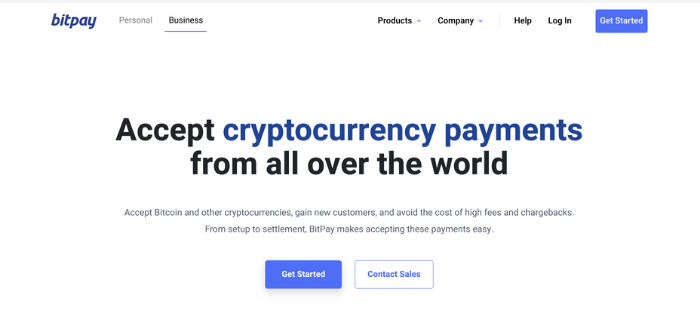
BitPay is one of the best options for websites that are looking to accept crypto payments.
It offers different ways for your customers to pay, with payment buttons, hosted checkouts, and embeddable invoices, as well as a host of plugins and integrations. All of these are easy to set up, meaning you can start accepting Bitcoin payments without lots of hassle.
BitPay also helps protect you from volatility through its Zero Price Volatility feature and daily bank deposits. For a 1 percent transaction fee, this is a pretty attractive offer.
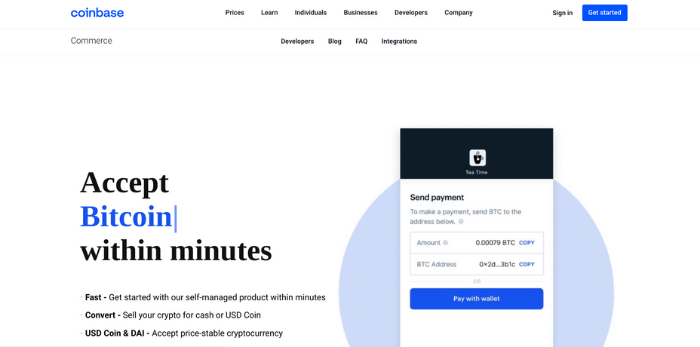
Coinbase makes it quick and easy for websites to start accepting Bitcoin payments. With a great app and excellent compatibility with most e-commerce platforms, you can start accepting crypto in an instant.
With quick exchange from crypto to your currency of choice, it’s a high-security option to protect you against currency fluctuations, and with flexible pricing options, it offers something for all businesses.
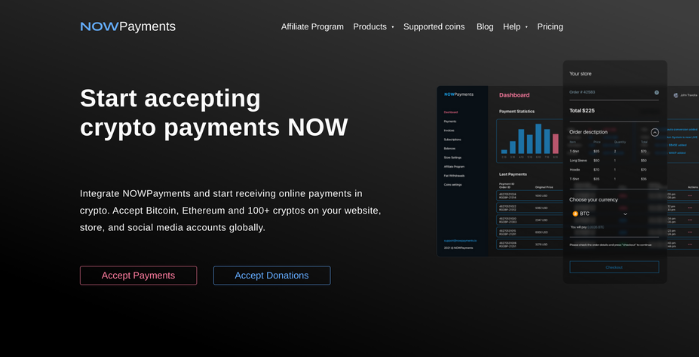
NowPayments is a low-fee, easy-to-implement processing option that’s extremely popular.
It allows you to accept over 100 cryptocurrencies and seamlessly exchange them into the currency of your choice. NowPayments has good compatibility with the major e-commerce platforms, offers some great plugins, and has an excellent point of sale solution.
With a maximum fee of 1 percent, it offers great value for money.

PayPal is one of the biggest online payment providers in the world and it’s recently stepped into the crypto sphere.
If you’re one of the 29 million merchants that accept PayPal transactions, then customers with US crypto holdings will automatically be able to purchase in their preferred cryptocurrency. At the point of sale, the crypto will be converted to your fiat currency (e.g., US Dollar) and you will be paid as normal.
While this doesn’t quite embrace crypto in the same way as the other options, it is an easy way to accept Bitcoin payments on your website.
5. Accept Bitcoin and Cryptocurrency Manually
Bitcoin and other cryptocurrencies were designed to make it easier for individuals to make payments to each other without the involvement of a third party. This makes it easy to simply speak with your buyer and organize your own payment.
This will happen in the customer’s wallet, where they simply facilitate a payment.
All they need is your “address” which is an alphanumerical string (you can also generate a QR code) that you’ll find in your wallet.
Once your customer has your “address,” then they can quickly send payment and complete the transaction.
Frequently Asked Questions About Accepting Bitcoin and Cryptocurrency on Your Website
Can I accept Bitcoin at my business?
If it’s legal to do so in your country, then your business can easily accept Bitcoin. All you need is a cryptocurrency wallet, and you can start accepting cryptocurrency right away.
How do I accept someone’s Bitcoin?
To receive Bitcoin from someone, all you need to do is give them your “address.” This alphanumerical code will allow someone to send Bitcoin straight to your wallet.
What are the advantages of accepting Bitcoin on my website?
Some advantages of accepting Bitcoin on your website are low transaction rates, more options for your customers, and brand loyalty.
What are the disadvantages of accepting Bitcoin on my website?
The disadvantages of accepting Bitcoin on your website are price volatility and the fact that it can be a distraction for your customers.
Conclusion: Accepting Bitcoin Payments on Your Website
Bitcoin and other cryptocurrencies are gradually becoming more mainstream and your website can capitalize on it—should the market allow.
While the world debates the merits of cryptocurrency, you can accept crypto payments on your website without exposing yourself to unnecessary risk.
With the right plugins, it’s easy to accept crypto payments and immediately convert them to your preferred currency. This means you don’t have to worry so much about volatility while still giving your customers a valuable service.
One of the great things about accepting Bitcoin on your site is that it can add to your brand image. If your target audience is interested in Bitcoin and other cryptocurrencies, then you should be too. Accepting Bitcoin on your website is an excellent way to do this.
Are you planning on accepting Bitcoin or another cryptocurrency?
Source: neilpatel.com

Data privacy and consumer identity have been topics of conversation in the ad tech industry for a long time now. With the widespread use of the internet and the desire for companies to be more transparent with their motives, consumers are getting smarter about how their data is gathered online.

This new insight has sparked countless debates over what resources are and aren’t acceptable for companies to use and has led to big-name platforms, such as Apple and Google redefining their privacy policies.
Advertisers are able to reach consumers in new and meaningful ways with so many online channels at their disposal. However, the promise of value-based advertising has fallen short, with several voices calling for changes to the way consumer identity data is handled.
Trends such as consumer action, privacy regulations, the abolishment of third-party cookies, and the rise of the walled garden have all contributed to the rapidly changing landscape of the ad tech industry, and have made it important for companies to innovate their data and identity strategies.
There are currently four trends driving the future of consumer identity that marketing professionals should keep top of mind as they continue improving the brand/consumer relationship:
The Consumer is More Than a Participant
With so many data-driven insights comes the tendency for brands to shift away from human-based marketing and instead of seeing consumers as cookies, cohorts and user IDs.
By taking data gathered from consumers to best target them based on their personal wants and needs, companies hope to connect with their audience in more relevant ways.
While the average consumer values personalized marketing, they’re getting much smarter in their ability to recognize what’s truly valuable and what’s simply noise.
As consumer behavior changes, brands must shift towards a conversation-based approach instead of seeing consumer engagement as an end goal to be reached.
With the introduction of AI-based technologies comes the eagerness to automate consumer processes. Brands should be careful in taking this approach. Simply automating all processes can take away the dynamic and responsive aspects of marketing that consumers have come to value.
Instead, companies looking to evolve with consumer wants should be integrating AI with pre-existing ideas of human creativity and intelligence to bring to life answers to the questions consumers search for.

Implementing a creative ad tech system helps to streamline and automate across the creative process, allowing brands to marry large-scale personalization with consumer wants and needs.
Due to the boom of social media, consumers can connect with brands at various touchpoints across the customer journey.
Instead of a blanket advertising approach, brands must take into account the fact that the vast majority of consumers are likely to make a purchase from a brand that puts effort into personalized marketing.
Utilizing a creative personalization solution has the power to create 1:1 personalized experiences at the level the market has grown to demand.
Navigating Consumer Identity Privacy
The momentum around consumer privacy regulations has grown in recent years. Privacy regulations such as CCPA and GDPR require the consent of users and a designated opt-out policy and give consumers the right to demand their data be corrected if inaccurate.
Ultimately, these laws require brands to be transparent about how they collect, use and share customer information, bringing even more attention to how consumer data is being handled.
Brands need to take a proactive approach toward data privacy in order to avoid serious consequences.
Identity solutions, such as LiveRamp’s RampID and Unified ID 2.0 (an open-source ID framework using consumers’ anonymized email addresses gathered from a user logging into a website or app), offer brands a way to personalize communications with their audiences across all media channels while still adhering to privacy regulations via acquired consent.
Identity and consumer privacy will continue to be major themes across the industry for years to come. Combining data-driven identifiers with creative automation platforms allows companies to set themselves up for long-term success.
They must ensure that they’re still meeting consumers at the right places with the right messaging with privacy in mind.
Cookie and Device ID Deprecation
Consumers have been standing up to demand more fairness and transparency for their privacy online. Browsers and device manufacturers have also been on the same page.

With Google’s decision to moving away from third-party cookies (now delayed until 2023) and Apple integrating key privacy changes into their iOS 14.5, players in the direct-to-consumer market are creating big disruptions in the data-driven advertising space.
The industry is quickly pivoting from a world of ubiquitous consumer data to one where it’s significantly more controlled, managed and safeguarded.
These changes leave brands little choice but to turn away from traditional advertising methods and find new ways to harness consumer data, such as first-party cookies through privacy-compliant technologies.
Companies should keep in mind that traditional use cases for third-party cookies won’t simply disappear, but will instead evolve.
By maxing out the value of first-party data to effectively personalize experiences for consumers, brands will be in a better position to ride out these changes and evolve with the industry.
These changes may seem daunting to an industry that has depended on third-party cookies and device ID methods for decades, but a shift towards first-party data offers an opportunity for companies to take a step back and really dig into their personalization strategies to best optimize their consumer relationships.
Walled Garden vs. Open Web

The walled garden ecosystem is growing rapidly as big players such as Amazon and Facebook erect walls to protect their data and assets.
These walled gardens are incredibly disruptive to the future of data-driven advertising, as they block the gathering of data from any outside advertisers.
There has been conversation around publishers and ad tech companies banding around a new unified ID, however, it’s too soon to tell whether these efforts will be fruitful.
According to a 2020 Harris Poll, online users spend 66% of their time on the open web, and 34% behind walled gardens.
However, the open web-only accounts for 40% of total ad spend, whereas 60% of brands are putting their money behind walled gardens in the hopes of reaching more consumers.
For publishers and marketers to survive this large-scale shift of content to closed ecosystems, companies need to improve their first-party data and bolster their direct relationships with consumers instead of relying on platforms such as Google and Facebook to connect them.
Between You and Me
Advertisers who have consistently viewed cookies as the end-all-be-all for personalization tactics are going to have to get smart about their next move.

Respecting consumers’ desire for privacy, shifting to a first-party data strategy and recognizing customers as more than just a one-size-fits-all audience are all great steps towards creating a trusted, lasting brand.
There’s plenty of opportunity for outside-the-box solutions if only companies are willing to take the leap.
The post-Four Trends Driving the Future of Consumer Identity appeared first on Content Marketing Consulting and Social Media Strategy.
Source: convinceandconvert.com

Do you want to skip the read and get right to my top picks? The best cloud storage service for most people is pCloud or IceDrive. The rise in the popularity of cloud storage is not hard to explain. It’s safe, affordable, and undoubtedly easy to use.

Disclosure: This content is reader-supported, which means if you click on some of our links that we may earn a commission.
Companies of all sizes use it for backups, document archiving, team collaboration, and file sharing. Getting new storage space without having to build and manage additional infrastructure is a huge time saver.
But choosing the best cloud storage services isn’t always easy, especially since there are so many options on the market. I’ve narrowed it down and reviewed my top nine recommendations.
After the reviews, you’ll find a short guide that shows you how I broke down my choices, and how you can find the best cloud storage services for your specific needs.
Best Cloud Storage Services
#1 – pCloud Review — The Best Cloud Storage Service with Lifetime Access
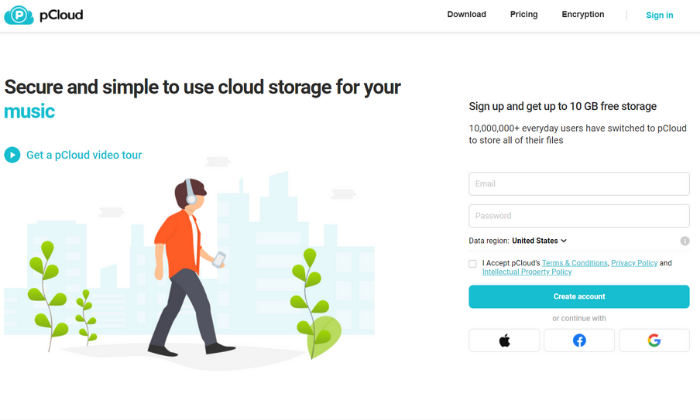
Cloud storage services through pCloud start at $4.99 per month for 500 GB, which is a good deal.
Of course, if you pay for lifetime access to pCloud storage, you get a far better deal.
Yes, it’s more money upfront, but way less expensive in the long run.
If you are buying storage that you know you are going to need for 3 years or more, getting a lifetime plan with pCloud is one of your most cost-effective options.
It’s not just the price though. pCloud’s lifetime plans come with a wide range of features, including:
- Shareable links and file requests
- Brandable and customizable share links
- TLS and SSL channel protection
- Five copies on different servers
- Automatic syncing
- Offline access capabilities
- Built-in video and audio player
- File versioning up to 30 days in the past
pCloud also offers an add-on service for extra security and client-side encryption.
You have the option to pay annually or for a lifetime subscription.
There are two-lifetime storage plans to choose from, including:
- Premium — 500 GB for $480 (only $175 for a limited time)
- Premium Plus — 2 TB for $980 (only $350 for a limited time)
If you prefer paying annually, you can do that as well.
You can try pCloud for free for up to 10 GB of storage space.
So, sign up for a free account or buy lifetime access to get started!
#2 – Icedrive Review — The Best Desktop and Portable Cloud Storage Software
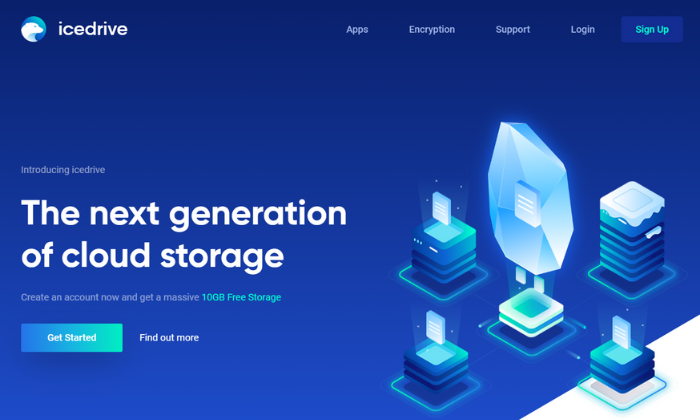
If you’re looking for cloud storage that feels more like a hard drive with cloud servers’ portability and flexibility, Icedrive is a smart choice.
It utilizes drive mounting software so you can access your files as if they’re stored directly on your computer.
You can also get up to 10 GB of storage space for free, making this one of the most robust free plans on this list.
Icedrive offers several different storage apps for various devices, including web-based, mobile, and desktop. So, you can easily access your files from anywhere.
The mobile app is available for iOS and Android devices with a clean and intuitive interface.
With it, you can view documents in various formats, watch videos and listen to audio files with the built-in media player, and create a full device backup in just a few taps.
Plus, the various apps come packed full of powerful features, including:
- Client-side Twofish encryption
- Password protection
- Share timeout capabilities
- Collaboration tools
Icedrive offers monthly, annual, and lifetime plans.
Monthly Pro plans start at $4.99 per month for up to 1 TB of data, which is incredibly affordable. Alternatively, you can pay $49.99 per year or $149 for lifetime access.
If you just need a small amount of cloud storage, Lite Plans start at $19.99 for the year or $59 for lifetime access. This comes with 150 GB.
Obviously, the lifetime plans get you the best price in the long run.
But Icedrive is worth checking out if you want a fast and secure cloud storage solution.
Choose your storage requirements to get started!
#3 – iDrive Review — The Best Device Backups with Unlimited Users
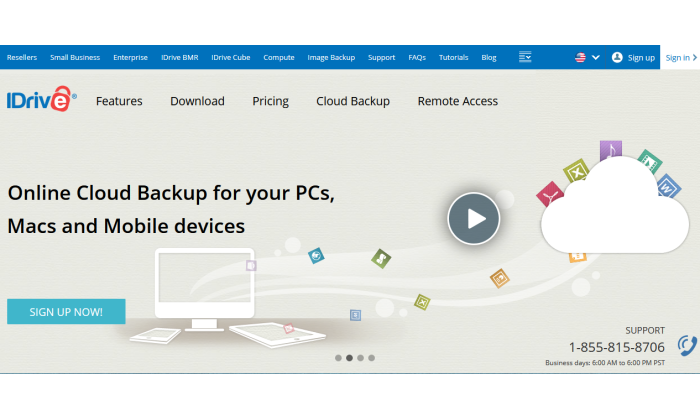
If you need cloud storage or cloud backups for a large number of people, it’s more affordable to choose a plan with unlimited users.
With Drive, you can have as many users as you want with flexible plans depending on the amount of space you need.
iDrive’s personal plan is also affordable if you only need cloud storage for yourself.
However, the business plans are where the service really shines.
Those business plans come with a ton of powerful features, including things like:
- Unlimited PC, Mac, iPhone, Android, and tablet backups
- Continuous and automatic data backups
- External hard drive backups
- Remote management via a browser-based application
- User and group management
- Single sign-on24/7 priority support
- Server backups
- Business compliance
So, it’s an excellent option for businesses of all sizes needing backups and affordable cloud storage space.
Pricing starts at $99.50 per year for 250 GB, with storage limits up to 12.5 TB if you need more.
Alternatively, you can opt for monthly plans starting at $49.95 per month for 1.25 TB.
You can try iDrive free for up to 5 GB to see if it’s right for you.
From there, you can upgrade once you run out of space or need access to more features.
Sign up for a free account and choose your plan to get started today!
#4 – Zoolz Review — The Best High-volume Cloud Storage Services
If you need a secure place to store large amounts of backup data (100 TB range), Zoolz is an excellent choice.
- They offer long-term storage plans in increments of one, three, and five years.
- The longer your term and the more space you have, the more you can save.
- Plus, Zoolz’ enterprise-grade mass backup storage plans come with a ton of security, management, and reporting features, including:
- Automatic purging by days and versions
- Smart duplication algorithm even for encrypted files
- On-the-fly decryption for easy access
- Military-grade AES encryption
- Easy deployment via Active Directory Deployment
- Advanced device management
- Bandwidth and storage monitoring
- Automatic system alerts
- Continuous change monitoring
- Server backups
If you don’t need mass storage, Zoolz offers standard cloud backup plans for businesses of all sizes starting at $15 per month (or $99 per year) for up to 1 TB of storage space.
Speak with a cloud specialist to learn more and get started today!
#5 – Degoo Cloud Review — The Best for Storing Photos

If you’re interested in a better way to store your photos, Degoo Cloud is a photo storage service that lets you rediscover memories using AI and a built-in personal image feed.
Plus, Degoo has over 23 million users worldwide.
So, you’re in good company.
On top of that, you get top-notch security.
When you upload an image, you can encrypt it with a password.
From there, the data gets broken down into pieces and scattered throughout several data centers in different countries.
The company even claims it’s 100% NSA proof.
So, you can rest easy knowing your photos are safe and secure.
It’s also an excellent way to free up space on your phone.
And you can choose when you want to upload your files to preserve your phone’s battery life.
Alternatively, you can set things up to auto-upload into your Degoo account.
Furthermore, Degoo works on virtually any device with iOS, Android, and web-based applications available.
You have three different plans to choose from, including:
- Free — 100 GB of storage, three devices, and Degoo ads
- Pro — 500 GB of storage, ten devices, and no ads for $2.99 per month
- Ultimate — 10 TB of storage and unlimited devices for $9.99 per month
Create a free account to get started with Degoo today!
#6 – SpiderOak One Review — The Best Storage and Backups for Security
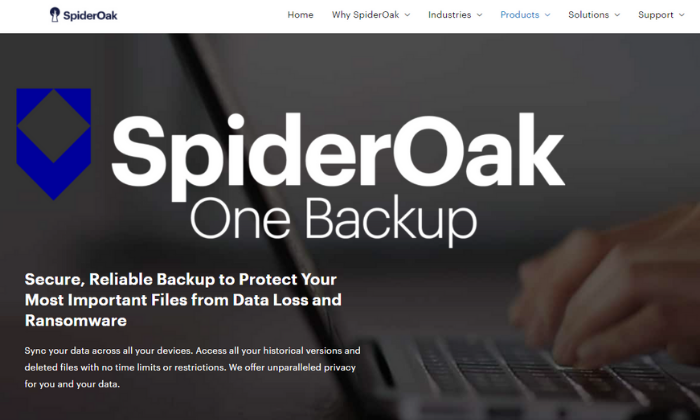
If you want or need advanced levels of security, SpiderOak is an excellent choice.
It offers everything you need to protect your data and stay compliant with local, state, and federal regulations (like HIPPA).
Rather than a true cloud storage provider, SpiderOak provides data backups.
However, you can share and access those files.
So, it works similarly, but you can only store backups vs. uploading whatever you want.
On top of that, SpiderOak practices No Knowledge, meaning the company has no knowledge of your passwords, the data you’re storing, or any of the metadata associated with the files you upload.
No one but you knows what you store on the cloud.
And the system is built with privacy and security in mind with end-to-end encryption.
This means your files are encrypted before they ever leave your computer, and they stay encrypted the entire time they’re stored.
Furthermore, you also get:
- Point-in-time recovery to restore data to any point in time
- File sharing (No Knowledge doesn’t apply to shared files)
- Mobile apps for file viewing
- Separate encryption keys for each file
- File versioningAccess to deleted files
Pricing starts at $6/month for up to 150 GB and goes all the way up to 5 TB for $29/month.
Sign up for a 21-day free trial to see if SpiderOak One is right for you and your business today!
#7 – OneDrive Review — The Best for Windows Users
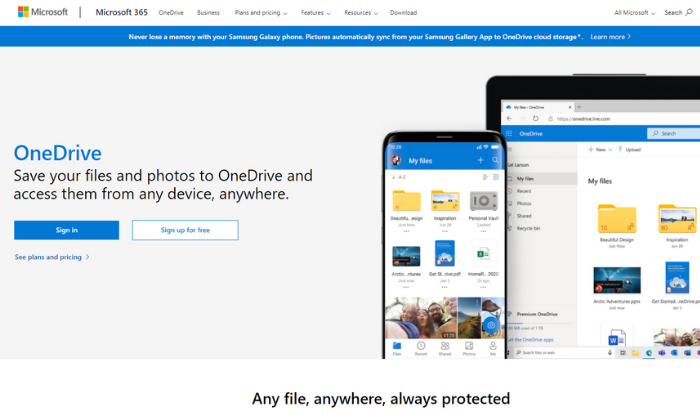
If you use Windows and none of the other options feel like a good fit, OneDrive is an affordable and easy-to-use option.
There are family, individual, and business plans available to suit individuals and businesses of all shapes and sizes.
Plus, you can access, edit, and manage your files from any device regardless of where you are in the world.
Some plans also include access to Microsoft Office apps, like Word and Excel.
So, it’s a great deal if you don’t already have those tools.
Each business plan includes 1 TB of storage space, among various other features, including:
- Secure file sharing
- Access expiration dates
- Accessing files on the cloud without having to download
- Offline access
- Mentions, comments, and tasks
- File folder and access controls
- Password protection
- Multi-page scanning
Furthermore, you can get unlimited cloud storage space with the Business 2 plan.
It also includes advanced security features so you can rest easy knowing your files are secure.
OneDrive’s business plans include:
- Business 1 — $5/month paid annually for 1 TB of space
- Business 2 — $10/month paid annually for unlimited space and advanced security
- 365 Business Basic — $6/month for 1 TB plus essential Office apps
- 365 Standard — $15/month for 1 TB plus all Office apps and collaboration tools
Alternatively, you can get 5 GB for free or pay $1.99/month for 100 GB of personal storage space.
Choose your plan to get started with OneDrive today!
#8 – iCloud Review — The Best for Apple Users
iCloud definitely isn’t the strongest competitor on this list.
But it’s a good choice if you already use Apple devices and want an easy way to store and access your files from one device to another.
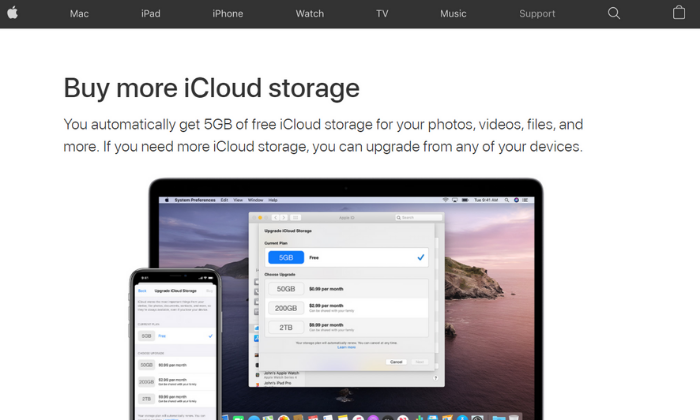
Plus, you automatically get 5 GB of storage for free.
If you’re a light user, this may be enough for you.
However, if you have a lot of photos or videos, you probably need more space.
Furthermore, it’s incredibly easy to set up and upgrade to a higher plan.
You can upgrade from any of your devices using your iTunes account.
And there are various storage plans to choose from, including 50 GB, 200 GB, and 2 TB.
You can also share this storage space with up to six people in your household.
This space can also be used for device backups, including your Apple watch, home screen, and app organization, purchase history, photos, videos, and device settings.
This means you don’t have to start from scratch if you get a new device.
You can simply use the backups stored in iCloud.
In the US, paid plans start at $0.99/month and extend up to $9.99 per month.
These prices vary in other countries and regions, so be sure to check out iCloud’s storage plan pricing for your country before upgrading.
#9 – Google Drive Review — The Best for Google Users
If your organization uses G Suite (now called Workspace), Google Drive is included in your subscription.
It’s packed full of powerful features and is incredibly affordable for businesses of all sizes.
Workspace paid plans, include business email accounts, cloud storage space, video conferencing capabilities, internal messaging, and various web-based tools for document creation, PowerPoint presentations, and more.
So, you get everything you need to connect, collaborate, and share documents with your entire team.
But if you’re not already using or planning on using Workspace for business email, you’re better off choosing Workspace Essentials (doesn’t include email services and starts at $8/month) or a different option on this list.
Google Drive comes with various features, including:
- Desktop, web-based, and mobile applications
- Centralized user and data management
- Data loss prevention services
- AI-driven predictions for important content
- Shared drives for easy team access
- Cloud-based streaming
- Advanced sharing and accessibility settings
Pricing for Google Workspace starts at $6/month per user with up to 30 GB of storage space per user.
You can also upgrade to a higher plan for more space and additional features.
Alternatively, there’s an enterprise plan with unlimited storage, advanced security features, and custom pricing.
Choose your plan to get started with Google Drive today!
What I Looked at to Find the Best Cloud Storage Services
Every option on this list has its own set of perks, features, and benefits.
They’re all great in one aspect or another, but there isn’t a one-size-fits-all service that I can recommend across the board.
You want to find a cloud storage service that offers resources and capabilities that align with your needs.
Here are the criteria I’m looking at when I make an evaluation.
Use this short guide to break down the market and find a solution that will help your organization over the long term.
Storage Limits
Every cloud storage service offers various plans with differing storage limits and different price points, depending on how much space you need.
You don’t necessarily need to know how much space you need before you decide.
Thankfully, it’s easy to upgrade and add more storage space with most providers on the list.
Some charge a small monthly fee to add more space and others may require you to upgrade to a different plan.
With that said, I always recommend starting on the lowest plan until you meet those storage limits.
From there, you can upgrade as you need to.
However, it is essential to choose a provider that can scale with you.
For example, if you know you’re going to need hundreds of terabytes of space, you need a mass storage provider since you will quickly outgrow a standard cloud storage service.
Security
Legal requirements for your industry and your personal preferences may require advanced security features and capabilities.
And when it comes to cloud storage, not all providers are equally secure.
Some practice No Knowledge, meaning they do not know your password, account details, encryption keys, or the files you store on their servers.
Furthermore, end-to-end encryption is common but not utilized by every provider.
And some may change their security processes while your files are moving, while they’re stored, or when you share them with other people.
So, you need to be aware of the types and levels of security you need.
This is especially important if you need advanced security for legal compliance, like HIPAA privacy laws in the healthcare industry.
Number of Users
This consideration isn’t as crucial if you’re looking for personal cloud storage.
However, if you need cloud storage for your company, you typically need to pay monthly per user.
So, it’s important to understand how many users you have and how much space each account needs to have.
Some providers, like iDrive, offer plans with unlimited users and an all-encompassing storage limit.
So, you only need to upgrade when you reach the maximum storage capacity, rather than paying separately for new accounts.
However, others don’t offer this, and you’re required to pay for the number of users you have.
Operating System
iCloud is specifically for Apple devices.
So, it doesn’t make sense if you don’t use the Mac operating system or have an iPhone.
On the other hand, OneDrive is specifically for Windows users.
Some providers offer solutions that work regardless of your OS.
So, this isn’t a crucial consideration unless you plan to use a cloud storage service specifically for your operating system.
You may even need more than one of these services.
I use iCloud to back up my phone and for personal use, but I use pCloud and Google Drive to run my business.
Your Use Cases
Do you need device backups?
Maybe you need easy file-sharing or access to files from multiple devices.
Perhaps you want to archive sensitive information.
Different types of cloud storage services are better suited to handle each type of task.
Those that are good for archiving let you store a ton of data for next to nothing, but they don’t come with the collaborative tools that help teams work together in real-time.
Make sure you have a clear idea of how you want your new cloud storage service to be used across your organization.
Understanding these use cases will make it easier to decide which type of service will work best for your teams.
Conclusion
pCloud, iDrive, and Icedrive are my top recommendations for most users.
Each service offers flexible plans at affordable prices to suit individuals and businesses.
However, your storage and security needs also play a role in which option you should choose.
It may be that one of these services offers better integration with the tools you are already using.
To review, here’s my full list of best cloud storage services:
- pCloud – Best cloud storage with lifetime access
- Icedrive – Best desktop and portable cloud storage software
- iDrive – Best device backups with unlimited users
- Zoolz – Best high-volume data storage services (100TB+)
- Degoo Cloud – Best for photo storage and sharing
- SpiderOak One – Best storage and backups for security
- OneDrive – Best for Windows/PC users
- iCloud – Best for Apple/iOS users
- Google Drive – Best for Google users
Some people won’t want another monthly service expense, so they can purchase lifetime storage from pCloud and never have to worry again.
Or they may want to set up storage that’s easily accessible for their whole company with iDrive.
What do you need out of your cloud storage service?
Be sure to use the considerations I talked about above in order to figure out which one is going to work best.
Follow the links and explore your options in greater detail. You may even find promotional pricing that gets you an even better deal on cloud storage.
What’s your favorite cloud storage service?


Source: feedproxy.google.com

Are you hoping to identify MarTech trends that can help your campaigns be more effective and run more smoothly?
As our marketing capabilities evolve, so do the tools we use to measure our successes and how we achieve that success.
In this blog, we unpack the six biggest MarTech trends looming over the marketing industry and how you can use them to your advantage.

Disclosure: This content is reader-supported, which means if you click on some of our links that we may earn a commission.
What Is MarTech?
Marketing technology, or MarTech, as it is more commonly known, refers to software and platforms that help individuals or organizations achieve marketing goals.
This term is very inclusive, covering everything from email templates to data analytics.
While every individual, agency, or company has unique MarTech needs, the constantly-growing field is making great leaps to fill any open niche.
Over the past twenty years, the field has seen truly exponential growth.
Today, being a marketer doesn’t necessarily mean you have to be incredibly tech-savvy, but it does mean that you need to understand the benefits of tools that can improve your strategy and help you reach your goals.
Your competitors are likely using MarTech to help their campaigns succeed.
If you’re not looking toward how you can automate, optimize, and ideate your campaigns through MarTech, it’s time to start.
Examples of MarTech
As we mentioned above, MarTech is a very wide umbrella.
However, some forms of MarTech are more common than others.
These include:
Email Marketing

With more than 50 percent of survey respondents copping to checking their email in excess of ten times a day, it’s no wonder that email marketing is an easy way to try to reach your target audience.
While the operative word in that sentence was try, marketing automation tools can get you that much closer to your goals.
To reach them, you need tools and platforms that not only disseminate your emails but provide in-depth analytics that gives you a real-time view of reader practices and interactions.
As email marketing continues to grow and evolve, the demand for personalization in this medium will also continue to grow.
Marketers should use automation and AI to deploy targeted emails engineered to attract a particular audience segment.
To achieve successful personalization, use data to assess customer habits and preferences for each audience segment and then craft corresponding templates.
Then your MarTech tool can do the rest.
Content Management
While managing your website content used to be a time-consuming, exhaustive process that took hours of coding, new marketing technology has automated cumbersome processes, allowing marketers to dedicate time to other important pursuits.
Content management systems (CMS) have evolved over the years, now equipped with the capabilities to develop the following kinds of websites (along with many others):
- social networking
- blogging platform
- static website
- news
- online store
Predicted to achieve a compound annual growth rate (CAGR) of 16.7 percent, as CMS capabilities grow, so will collaboration and planning tools that unite workflows to allow complete management of content from creative to back-end development.
Data Analytics
Today, marketers can harness the power of data analytics to gain an understanding of customer preferences and behaviors—including how they shop, where they spend their time, and how they discover new offerings—as well as market trends.
MarTech tools that allow marketers to dive deep into these data sets are invaluable, as they provide never-before-seen maps of how consumers operate online.
By tracking online behaviors, marketers gain a deeper understanding of their customers.
As MarTech data tools become even more intuitive, marketers will have even more visibility of customer journeys, following them from initial interest to final purchase.
These insights will be captured through cookies and CTR, among other trackers.
As the tools become more refined, so will understanding of consumer behavior, allowing marketers to readjust their strategies.
6 MarTech Trends
To help you decide which MarTech offerings you want to add to your stack, we broke down the six biggest trends that are likely to impact both the MarTech world and the marketing world well beyond this year.
1. Increased Spending on Analytics
If you’re tempted to bypass adding an intuitive analytics tool to your MarTech stack, don’t.
These tools can help you gain a better understanding of nearly every aspect of your marketing campaigns, from buyer behaviors to conversion rates.
In fact, researchers expect marketing analytics budgets to grow by 61 percent over the next three years.

That’s huge.
You don’t want to miss out on getting in early on a tool that can quite literally change the way you see your business.
Some of the many benefits of marketing analytics tools include:
- viewing real-time, comprehensive outcomes of marketing efforts across channels
- improving lead generation through actionable insights
- gaining insights into customer behavior and preferences
- using predictive analytics to enable your business to be proactive rather than reactive
2. Higher Emphasis on Personalization
We nodded a bit toward the importance and growing prevalence of personalization in marketing campaigns.
In short, this strategy means delivering individualized content to audience members.
This personalized route builds a connection with consumers, treating them as individuals rather than a mass market.
Some common (and growing) opportunities for personalization include:
- targeted emails
- custom video messages
- product recommendations
- social media
In the coming years, this prevalence will only grow, and marketers who don’t use tools to aid them in personalization will fall behind.
In fact, 99 percent of marketers claim personalization helps advance customer relationships, and 44 percent of consumers say they would be willing to switch to a brand that better personalized its marketing material.
If you’re not taking advantage of learning more about your would-be customers through tools and data, you’re missing out—not only on reaching customers more strategically but also on building relationships.
3. Transition Away From Third-Party Cookies
If you’re an advertiser or marketer who has relied heavily on third-party cookies, you may be in for a bit of a shock.
In 2020, Google announced its plan to phase out third-party cookies within two years.
With Google Chrome composing almost 65 percent of the web browsing market according to StatCounter’s data below, this move will have a dramatic impact on how marketers gather data.
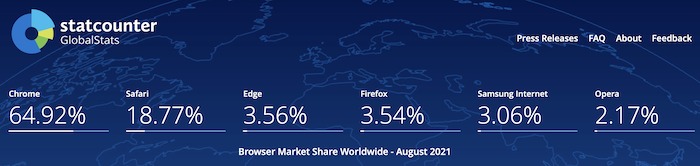
If in the past, you relied on information from cookies to gain an understanding of consumer behavior and identity, you’re going to need to recalibrate your strategy.
Recently, Adobe found two in five brands are not prepared to transition away from cookies, indicating businesses do not have a strategy for gathering consumer data post-cookie.
After the transition is final, marketers will no longer be able to capture individual consumer data.
To prepare for this future, digital marketers must align with the trend of personalization to reach and understand their intended consumers.
4. Higher Need for Data Privacy and Security
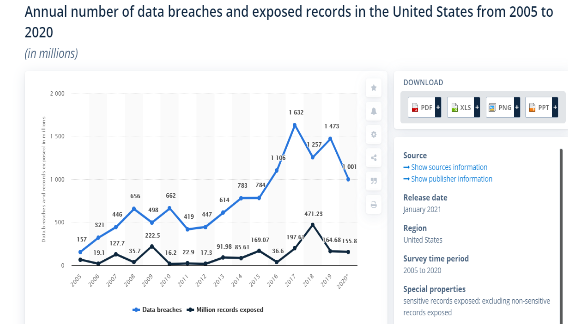
If you’ve been keeping an eye on the news, you know that data breaches are on the rise.
The United States alone has seen data breaches grow from 660 annually to over a thousand within the past decade, according to Statista.
If you think this number doesn’t apply to you, think again.
Your website and consumer data are among your business’ most valuable assets.
You need to protect them from malicious attacks at all costs.
5. Increased Importance of Campaign Automation Tools

Marketing automation can make every aspect of your marketing campaign easy.
By using these tools, you reduce time spent, error, and unnecessary cost.
We’re not the only ones who think this way: The marketing automation market is primed to grow 8.55 percent annually, with 51 percent of companies already taking advantage of these tools.
- Time-saving: With tools that automate time-consuming processes like project management, all members of your team will rejoice in the sheer amount of time they can reclaim after implementing these tools.
- More effective spend: By pinpointing processes that devour valuable time and treating them with automation software, you can use your budget much more effectively, saving both time and money.
- Scalability: MarTech automation tools scale with you.
If you’ve got a big vision for your organization, these tools fit your business needs for today and tomorrow.
- Concrete measures of success: We’ve talked about the importance of data and metrics a lot in this article.
All MarTech automation tools come with data insights that allow you to track everything from productivity to campaign spend.
As you assess your organization’s needs, look at how marketing automation tools simplify your processes and streamline campaign creation.
The benefits of marketing analytics tools include:
6. Growing Importance of Direct Mail
Thought direct mail was dead?
Think again: Forty-two percent of direct mail recipients engage with your send either through reading or scanning.
Further, 73 percent of Americans prefer direct mail marketing, as it allows them to read the piece at their leisure rather than forcing immediate consumption.
This year and beyond, you should reassess your organization’s direct mail strategy to see if there are new (or overlooked) avenues for you to contact your prospects directly through their physical mailbox, according to Who’s Mailing What:
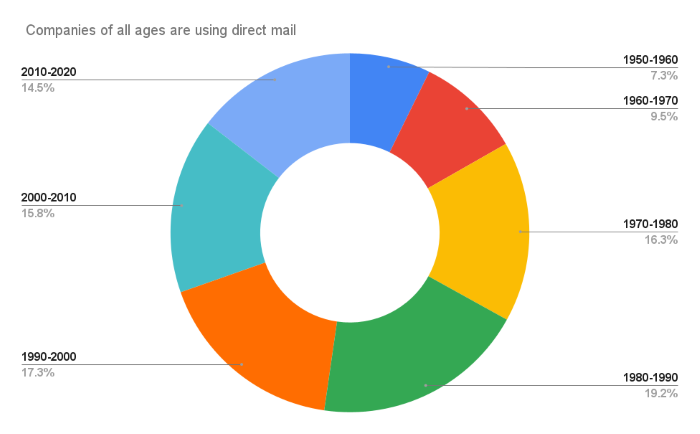
Outside of the above statistics, benefits of direct mail include:
- opportunities for personalization
- builds familiarity and trust
- easy to track
- complements your digital campaign
- cost-effective
MarTech Frequently Asked Questions
FAQ: 1
What Is MarTech?
Marketing technology, or MarTech, as it is more commonly known, refers to software and platforms that help individuals or organizations achieve marketing goals.
This term is very inclusive, covering everything from email templates to data analytics.
FAQ: 2
Is MarTech a Good Investment for My Business?
Yes. With MarTech making up 30 percent of North American marketers’ business budget, you would be well-advised to take advantage of marketing automation tools and platforms that can help you take your campaigns to the next level.
FAQ: 3
What MarTech Trends Will Dominate the Market?
While there is a slew of MarTech trends that reshape the market year after year, we can confidently report that these six trends will be game-changers in the MarTech world:
- increased spending on analytics
- higher emphasis on personalization
- the transition away from third-party cookies
- increased need for data privacy and security
- the increased importance of campaign automation tools
- the growing importance of direct mail
FAQ: 4
Is Direct Mail Still a Good Marketing Strategy?
In a word, yes. Direct mail is still an extremely effective marketing strategy.
While there’s a lot of conversation around digital marketing, this classic mode of reaching potential customers is as effective as ever.
Want proof? Forty-two percent of direct mail recipients actually read what you’re sending them.
Compare that to your average email clickthrough rate (CTR), and you’ll understand the true, measurable value of direct mail.
MarTech 2021 Trends: Conclusion
As marketing needs and customer predilections continue to change, so will the tools we use to meet them.
However, the six marketing trends outlined in this post are here to stay.
To help your organization grow with these MarTech trends, be sure to invest in software that can help you achieve all of your marketing goals.
Tools are meant to be used—be sure you’re taking advantage of them to outmaneuver your competitors.
What’s your prediction for the biggest marketing trend in 2021 and beyond?


Source: feedproxy.google.com

The best WordPress plugins make your site faster, increase traffic, and tighten website security for your visitors.
But you don’t want to overdo it.
Installing too many WordPress plugins can actually slow down your site.
Using certain plugins together can cause conflicts that you definitely want to avoid.

Disclosure: This content is reader-supported, which means if you click on some of our links that we may earn a commission.
I’ve got a good number of plugins on my blog, which gets millions of visitors each year.
You can fill out forms, sign up for membership content, and more–everything runs smooth.
It’s all about picking the right plugins that work together for your needs.
7 Best WordPress Plugins
I’ve put together a list of the seven best WordPress plugins you can install right now to improve your site.
After the reviews, I’ll show you how to evaluate your options and avoid issues.
#1 – WP Rocket Review – The Best for Speed Optimization
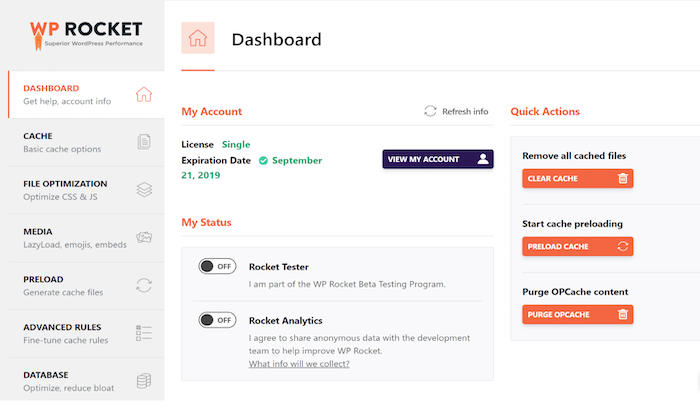
A WordPress site can put a lot of strain on your server, which increases the possibility of crashing your web server.
To avoid such unfortunate situations and ensure all your site loads super fast, you need a caching plugin like WP Rocket.
WP Rocket is a simple and effective plugin designed to boost your website speed and performance.
It doesn’t wait for someone to request a page to save it to cache.
Instead, it automatically builds your website cache, resulting in an immediate performance boost.
The plugin turns on recommended WordPress caching settings, such as page cache, gzip compression, and cache pre-loading automatically.
You can also activate other features like CDN support, lazy loading images, DNS prefetching, and minification to improve your page loading time and reduce bounce rate.
Starting at $49 for an annual license per site, WP Rocket is less than $5 a month.
There are solid WordPress cache plugins available, but WP Rocket is still my number one pick in the category.
It’s easier to use than some of the less expensive ones, which is probably why it is so popular.
There is no free trial, but WP Rocket does have a 14-day refund policy.
So you can try it risk-free to see how it impacts your site’s performance. Learn more.
#2 – Yoast SEO Review – The Best for Increasing Organic Website Traffic
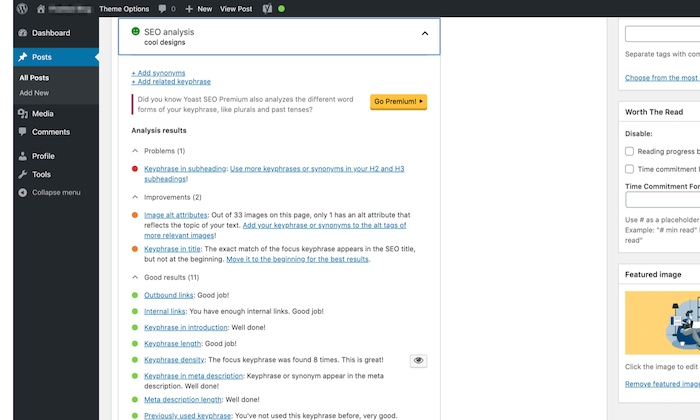
Users serious about search optimization trust Yoast SEO to reach their goals.
All you need to do is select a keyword, and the tool will then optimize your page around it.
Not only does it help you improve SEO, but it also analyzes your content readability.
It gives you real-time page analysis to optimize your content, images, meta descriptions, titles, and keywords.
No wonder it might be the most popular SEO tool in the WordPress plugin repository.
Further, Yoast checks the length of your sentences and paragraphs, whether you’re using enough transition words or subheadings, how often you use passive voice, and so on.
It tells Google whether or not to index a page or a set of pages too.
Although there’s a free version available, you can upgrade to the premium version for $89 per year that comes with extra functions, allowing you to optimize your content up to five keywords, among other benefits.
#3 – Akismet Review – The Best for Spam Protection
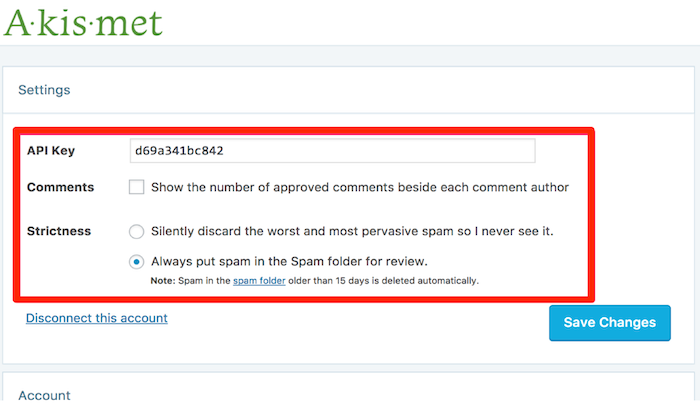
Nobody appreciates the opinions of bots.
Unfortunately, spam comments are an unavoidable price of website success.
With Akismet, though, you’ll be able to eliminate spam comments–no matter how genuine they look–effectively and effortlessly.
After all, it’s the official anti-spam plugin developed by Automattic, the parent company of WordPress.
There’s a possibility of the plugin missing out on a few spam comments or not identifying false positives.
You only need to tell it about them, and the plugin learns and gets better over time.
The plugin also checks your contact form submissions against its global spam database to weed out unnecessary and fake information.
Although free to download, you will need an Akismet.com API key to use the plug-in.
These keys are free for personal blogs, but businesses and commercial sites will have to opt for paid subscriptions.
#4 – Wordfence Security Review – The Best to Handle Security Concerns
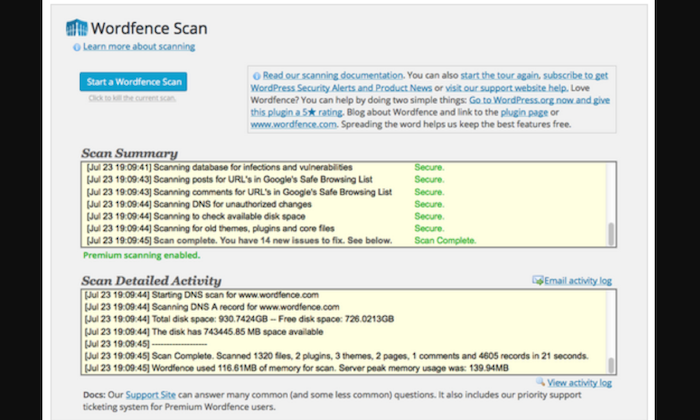
Wordfence Security is a WordPress firewall and security scanner plugin.
It offers your site full protection from malicious hackers, malware, spam, and other online threats.
It searches for malware and compares code, theme, and plugin files with the records in the WordPress.org repository, allowing it to verify its integrity and report any changes to you.
The plugin comes fitted with a web application firewall (WAF) called Threat Defense Feed that helps Wordfence identify and block malicious traffic.
Plus, it prevents brute force attacks by ensuring you set stronger passwords and limiting login attempts.
Wordfence firewall and security scanner will give you security risk alerts before your website is hacked, keeping it safe and secure.
It also comes with login security features that enable you to activate reCAPTCHA and two-factor authentication on your website.
A free version of Wordfence is available.
But you can also buy the premium plan at $99 per year to get extra security features like the real-time IP blacklist and country blocking option, along with support from professional support engineers.
#5 – UpdraftPlus Review – The Best for Site Backup
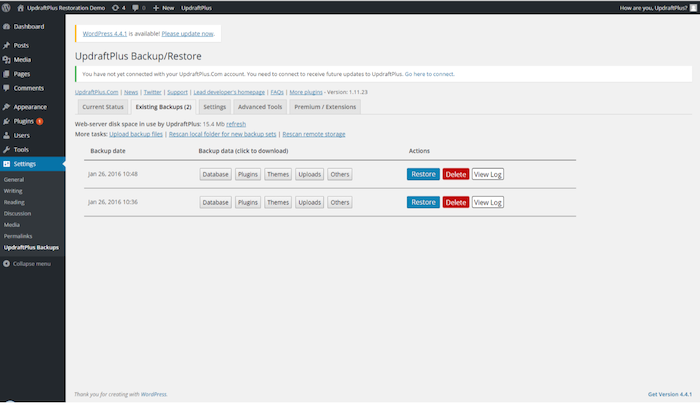
Many people fail to consider the importance of having a backup plugin.
Don’t make that mistake.
Thousands of sites get hacked daily.
WordPress sites are a really common target for hackers because it is so popular and a lot of non-technical folks use it.
Simply hoping you won’t be next on the list is just wishful thinking.
You have to be prepared, which is where backup plugins come in handy.
There are plenty of WordPress backup plugins online, but only a few are as powerful and user-friendly as UpdraftPlus.
It allows you to set up automatic backups and store your files on a remote location like Google Drive, FTP, email, and Dropbox.
Restoring your website from a backup is also super easy and can be done straight from the dashboard.
Other features include advanced reporting, database encryption, additional storage destinations like OneDrive, Azure, SFTP, and backup scheduling.
You have the option to either use the base version of UpdraftPlus or purchase its premium version that costs between $195-$399 a year, depending on the plan you choose.
#6 – MonsterInsights Review – The Best for Data Tracking
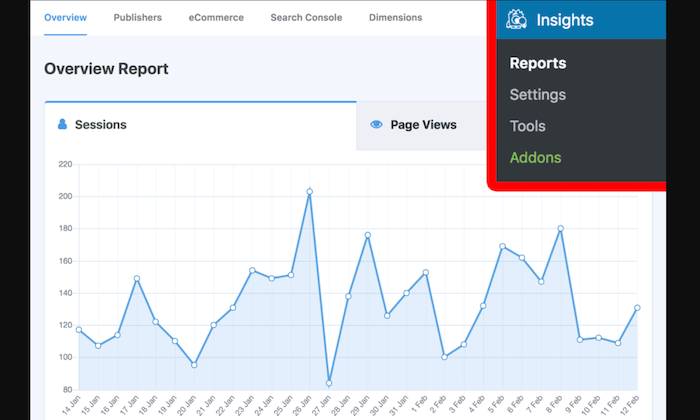
Data tracking is crucial for scaling and improving your website.
Without facts, all you’ll have are assumptions. MonsterInsights allows you to add, customize, and manage your Google Analytics-related web tracking services–all within your WordPress dashboard.
Google Analytics helps you improve your website, content, and better user experience by giving you key insights about how every webpage performs and which online campaigns bring in the most traffic and conversions.
Some of you may have heard of Google Analytics for WordPress.
It was the former name for MonsterInsights.
The name might’ve changed, but the purpose remains the same.
You can use it to view active sessions, conversion and bounce rate statistics, and keep track of outbound and internal links and downloads.
Other details like your total revenue, top products, and top referral sources will also be included.
With all the information readily available, you can work on creating a data-driven strategy to grow your business.
MonsterInsights has a free version that allows you to install Google Analytics, track data, see metrics on the dashboard, and run reports.
There is also a premium version that is more of an investment but includes post and page tracking, custom tracking and reports, AdSense tracking, and more.
The premium version starts at $99.50 per year with the Plus plan.
#7 – WPForms Review – The Best for Designing Contact Forms
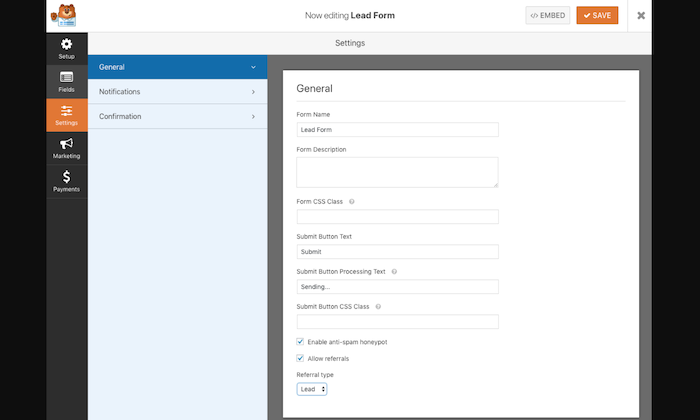
You can use WPForms to create appealing and highly-effective contact forms rather quickly, thanks to its drag-and-drop builder.
It comes with several cool features like smart conditional logic to ensure your visitors have an excellent customer experience, which, in turn, increases the chances of them submitting their contact information.
Moreover, WPForms can integrate with all popular marketing and payment platforms.
The free plan lets you create a secure contact form with ease.
But if you want access to more templates and advanced features to boost your lead generation efforts, the paid version would be more appropriate. The paid version starts at $39.50 per year for one site.
What I Looked at to Find the Best WordPress Plugin
I’ve compiled a list of a few factors you should consider to narrow down your search to determine the right fit for your website.
Every plugin’s page on the WordPress Plugin Repository contains detailed information about the plugin, its purpose, how to use it, and more.
Refer to this information to decide whether a specific plugin is a good fit for you.
Search the plugin directory and pick a few options you think will suit your needs best.
When it comes to making the final selection, use my tips below:
Free vs. Premium
We all like free things, but that doesn’t necessarily mean they’re better.
WordPress plugins are no exception.
Free plugins can be great if you don’t want to spend money right away, and most of them are enough to get the basic job done.
However, if you’re looking for more features or higher customization, most plugins will need to be upgraded to the premium version to unlock more features.
Contrarily, premium plugins are designed to ensure compatibility with new WordPress versions and provide better security.
On top of this, you get a more comprehensive selection of features to customize and enhance your site.
If monetary commitment is something you’re worried about, you’ll be pleased to know that most premium plugins are quite affordable.
So you won’t be breaking the bank anytime soon.
In the end, it’s your call. Just make sure you make the right choice for the functionality of your site.
Overall Plugin Ratings
The overall rating of a WordPress plugin can tell you a lot.
Previous users can rate a plugin up to five stars based on their experience.
Skip options that don’t have an average of at least (or almost) four stars.

Plugins with a one-star, two-star, or three-star rating are mostly glitchy and create a lot of problems.
Whereas higher-rated plugins are well maintained, work well, and offer adequate support.
Otherwise, why would any user give them good ratings and reviews?
Go Through As Many User Reviews You Can
There’s no better way to determine the quality of a plugin than directly from users. This way, you know precisely whether a plugin is successful.
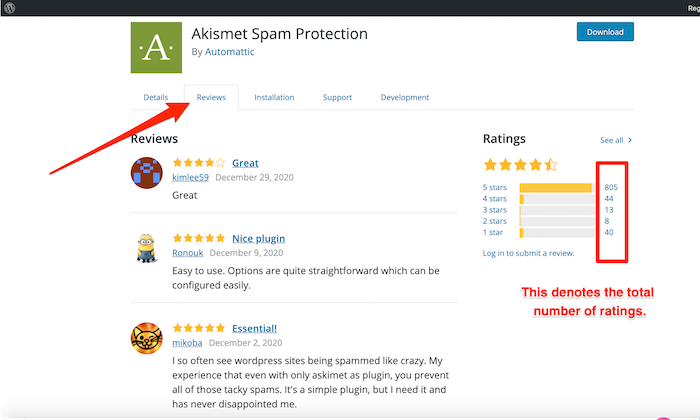
I would also recommend looking at the total number of ratings.
For instance, if a plugin has only been rated by five or seven people, it means it’s relatively new.
If they give a decent review, the average rating will automatically be higher.
It’s always better to download plugins with more users and reviewers.
So, not only should you read the user reviews, but also check the total number of reviews.
See How Active the Support Section Is
Every plugin on the WordPress plugin repository has a support forum.
Go through the support tab to check out the level of activity within these forums.
Regular activity is necessary as it indicates the developer is responsive and wants to deliver an excellent experience to its users by solving user-reported issues.
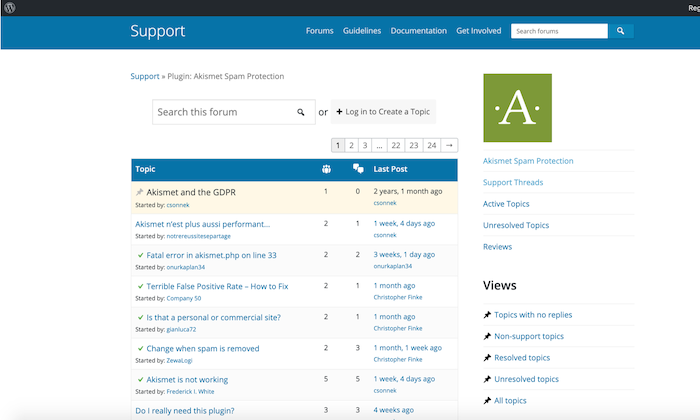
If you’re evaluating a premium plugin, their official website should be your go-to instead of the support tab.
Find out how easy it is to get support and whether it has the features you need.
Send a test email to see how fast the developers respond to check out their efficiency.
If a plugin has several unresolved threads or you don’t get an answer to your test email, it probably means the plugin is abandoned or that developers are not responding to user issues.
It could still work, yes. But you won’t get adequate support if you face problems.
Find Out the Frequency of Updates
The best plugins are updated regularly. If not, or if it has been a long time since their last update, they may not be well-maintained.
Of course, there can be some exceptions, but regular updates are still an important consideration.
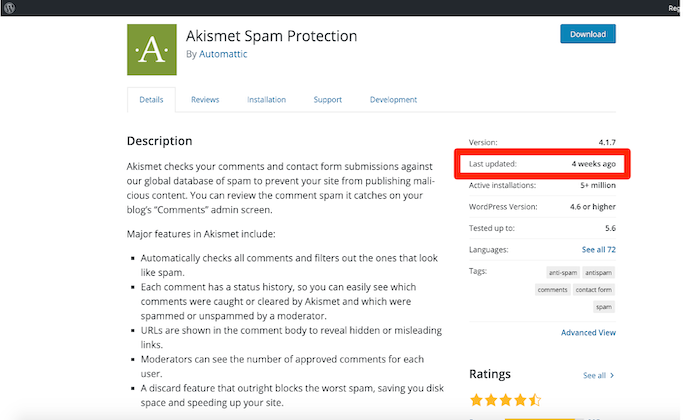
Ideally, plugin updates should be in line with WordPress’ core updates.
This ensures optimal compatibility and a good level of active implication from the plugin developer.
You can check exactly when a plugin was last updated by visiting the WordPress plugin repository.
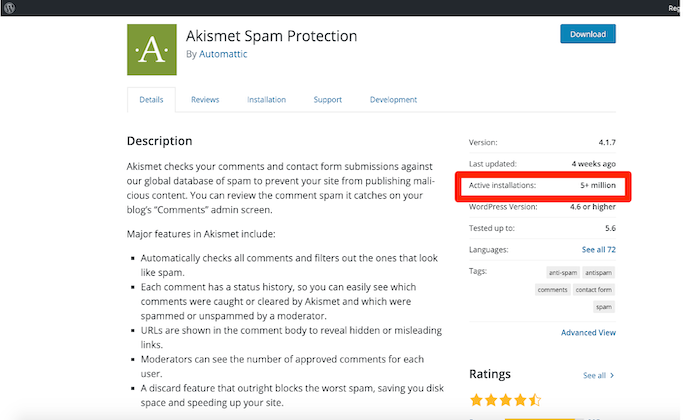
Also, check out the Active Installations section.
This will give you an idea of the plugin’s popularity and whether it’s still relevant to the ever-changing market trends.
Conclusion
WordPress plugins can do it all, from designing and maintaining a website to optimizing it for search engines to enhance user experience.
Get started today with my top recommendations.
These are trusted products that can help you take your site to the next level.
Here’s the full list to recap:
- WP Rocket – The best for speed optimization
- Yoast SEO – The best for increasing organic website traffic
- Akismet – The best for spam protection
- Wordfence Security – The best to handle security concerns
- UpdraftPlus – The best for site backup
- MonsterInsights – The best for data tracking
- WPForms – The best for designing contact forms
Use Yoast to keep your SEO on point, and block spam and bots with Akismet.
Next, make sure your WordPress security remains uncompromised with Wordfence.
WP Rocket keeps loading times short, while UpdraftPlus can come to your rescue when you face compatibility issues or want to migrate your site.
Got a favorite plugin that I didn’t mention?
Comment below to let me know!


Source: feedproxy.google.com

For marketers, technology alone is not the solution to achieving marketing goals, but when you understand your goals and implement the right marketing technology to meet your goals, it is the perfect combination to generate the results you need to succeed.

Effective marketing technologies should extend the capabilities of the team and the strategy behind them.
B2B marketers are faced with the lofty challenge of determining which tools will align best with their needs while integrating seamlessly into an existing mar-tech stack to ensure optimal performance.
But how are B2B marketers up-leveling their marketing technology to meet business goals?
Ascend2, in partnership with RollWorks, surveyed 145 B2B marketing professionals, and here are a few research insights and key takeaways from the research study, Marketing Technology Implementation from the B2B Perspective.
Insight #1: Think Efficiency
B2B marketing professionals know that their tech stack is only as good as the data that flows through it. High-quality data empowers B2B marketers to make informed decisions that will drive a positive impact on their bottom line.
That’s why 41% of those surveyed set out to improve data quality when implementing marketing technology.
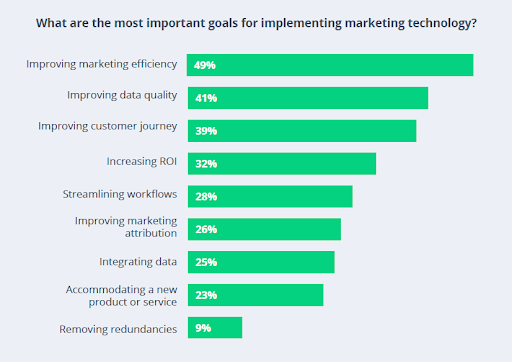
The most important goals for implementing marketing technology, according to B2B marketers
Key Takeaway: If your mar-tech goal is efficiency, consider an account-based approach. Account-based marketing (ABM) means taking a fit-first approach to B2B marketing, ensuring you’re only targeting the accounts with the highest likelihood to buy.
Research shows that 94% of marketers find ABM successful at achieving their primary objectives. The more targeting you become in identifying your best audience, the more you can improve efficiency in your overall programs.
Insight #2: Think Strategically
Carrying out a strategy for implementing marketing technology as well as determining what technologies align best with the needs of their business are both top challenges reported by 43% of marketers for B2B businesses.
Over one-third (37%) of B2Bs surveyed also feel constrained by budgets allotted for technology.
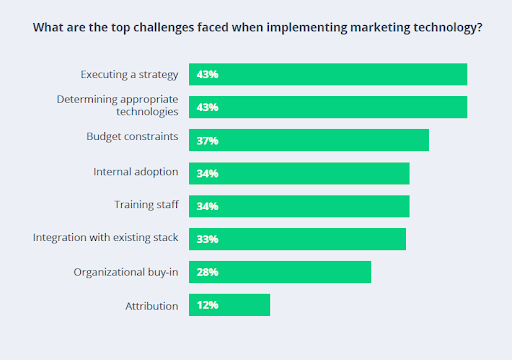
The biggest challenges when implementing marketing technology
Key Takeaway: If your biggest challenge is in execution, find tools that are easy to adopt and that integrate well with other technologies in your stack. Choosing the right tools is tough, but making sure your mar-tech vendors have great onboarding and customer success experiences will ensure you can execute your full strategy.
Successful companies identify a specific marketing challenge, develop a strategy, integrate various technologies to meet the challenge, and measure results to validate success.
Insight #3: Top Considerations: Think Ease of Use
When evaluating new marketing technologies, what is most important for B2B marketers to consider? An easy-to-implement and utilize tool enables marketing teams to execute efforts more efficiently.
Nearly half (47%) of B2Bs surveyed agree that ease-of-use is a top priority when it comes to new marketing technologies.
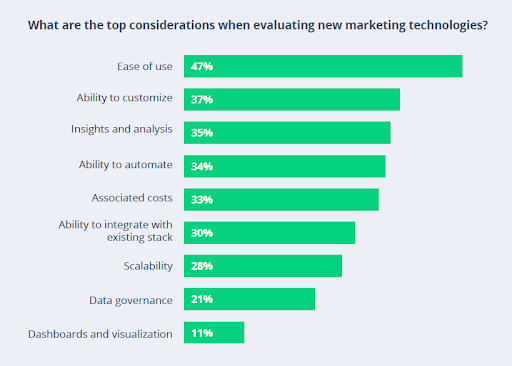
These are the top considerations when evaluating new mar-tech for B2B marketing
Key Takeaway: Above all, B2B marketing technology needs to be user-friendly and customizable. You’ll want to look for tools that allow you to build and measure your programs the way that makes the most sense for your business.
If you want to target specific accounts, the good news is that technology to support your strategy is not exclusively for enterprise companies with large budgets—now, small and mid-size companies have access to account-based tools that are fast, affordable, and customizable.
Insight #4: Think Growth
From the B2B perspective, budgets for implementing new marketing technology are trending up in the year ahead.
59% of marketers working for B2B companies expect a moderate increase in budgets dedicated to implementing new mar-tech new year, while one-in-five B2B marketers expect a significant increase.
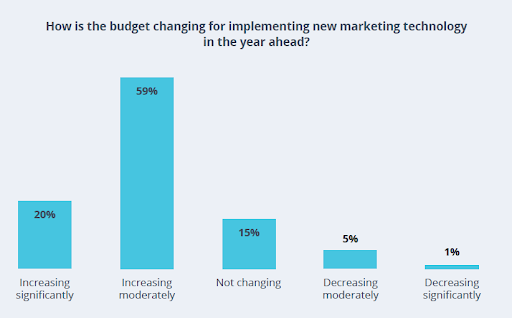
This is how budgets are changing for mar-tech implementation in 2021
Key Takeaway: While 2020 was a rollercoaster of a year, mar-tech is coming out strong. To meet the demands of the coming year, expect to see B2B marketers rethink and expand their tech stacks to get in front of their audience in new, creative ways.
And the data shows that budgets are increasing to support continued investment.
Insight #5: Think Real-Time
For B2B marketers, having real-time data allows for the prioritization of campaigns and efforts that are most likely to drive meaningful results.
43% of B2B marketers report that real-time marketing will have the most impact on their overall marketing strategy in the year ahead.
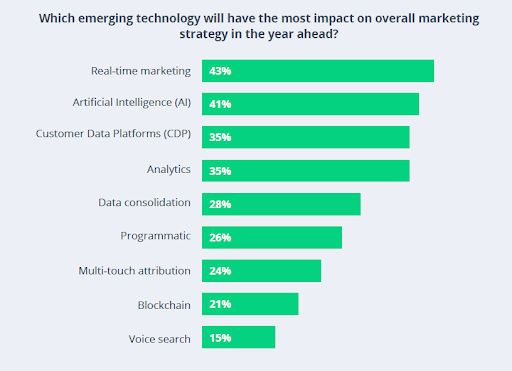
Emerging marketing technology for 2021
Key Takeaway: Real-time marketing and AI leading the pack, revealing B2B marketers are hyper-aware that reaching the right audience, at the right time, with the right message requires smart technology.
Both are key in ABM technology, with the power to help marketers in areas like identifying companies that are the best fit for their solutions, knowing when sales should reach out, and saving budget when serving them with the right message—all key components to a winning B2B marketing strategy in 2021.
Final Thoughts
What marketing technology tools are you planning to implement in the year ahead? How will you ensure the optimal performance of the tools you implement? What marketing strategy are you most excited to test?
You can download the entire Marketing Technology Implementation from the B2B Perspective Report for more data, tips, and strategies to plan, implement, and optimize your marketing technology implementation plan this year.
The post 5 Tips for Selecting Marketing Technology, Based on Research appeared first on Content Marketing Consulting and Social Media Strategy.
Source: convinceandconvert.com

Blogging is quite popular these days. Everywhere you turn nowadays it seems like someone is running a blog. It takes planning and hard work to create a successful blog. Do some research and use what you’ve learned here to create the technology blog you’ve always wanted.

Updating Technology Blog
Update your blog frequently. A big mistake that many bloggers make is they do not keep it updated and use it on an infrequent basis. Readers’ interest may be piqued at first, but they will become annoyed if they have to wait for new posts all the time. Get in the habit of updating your blog at least once per week and sending updates via email.
You should make every effort to add new content to your blog regularly. If you make a concerted effort to produce new content regularly, your audience will not only return but will recommend your blogs to others. Try to post at least daily, if possible. If new content appears infrequently, visitors won’t be motivated to come back to your blog. At a minimum, you should make at least one post per day.

TIP! Blog about things people care about. Everyday chores such as vacuuming and cleaning do not usually make good topics for blog posts.
Focus on Quality Content
Never copy anything you write in your blog. Nobody takes plagiarism lightly, and employing this tactic will unquestionably be very counterproductive to your efforts at establishing yourself as a reputable writer. You do not have to be a professional writer to find success with a blog. The main thing that you need is to be passionate about what you are writing.
When you set up your blog, it may be wise to buy a domain name instead of utilizing a free site. It isn’t that expensive to do and will give your blog a more professional appearance. This will allow users to find you more easily, and it will also help when it comes to search engine optimization.
You do have a life separate from your blog. It’s very easy to burnout if you jump in headfirst and spend the bulk of your time writing a blog. You need to take a bit of time away from it to stay sane. Fit normal things like taking walks or visiting friends into your day. Having some time outside of running a blog will prevent burnout and allow you to return from your break ready to write great content.
TIP! Ask other expert bloggers in your niche to trade guest posts with you. This will raise the value of your blog and provide your readers with quality content.

Your blog should be unique, so it stands out in the crowd. Having interesting content will increase site traffic. Using rare information is also good. Write about unique experiences or hobbies. You can give complex details about constructing a widget. The idea is to provide readers with a reason to look for posts on your site.
Writing Guest Blog
Ask already established bloggers if they would like to write guest posts on your blog. This will increase the amount of quality content on your blog. It also means more traffic for your blog once people find out about your guest writers. Use several bloggers to do this and create more rich content.
You should consider inviting guests to make posts on your blog. This helps you develop relationships with other blog owners and can come in helpful. It’s amazing what having a tight circle of bloggers will do for your site! You might need a favor in the future, and the blogger with whom you’ve been exchanging guest posts might be happy to help you.
TIP! Before starting a blog, find a topic to write about that is meaningful to you. Your content will be more interesting to your readers if it is about something that you care about.

Make lists an integral part of your blog. Lists become very useful when you’re posting specific requirements, such as ingredients to gather or tools needed for a job. Lists help to make important information front and center, so your readers can quickly find it.
Mailing List
Aim to start a mailing list for your personal blog as quickly as you can. The sooner you get started on it, the easier it will be to expand as your blog grows. You can use a list such as this to earn more money down the road. Not starting a mailing list right away can be costly.
Be Professional
TIP! Sticking with a simple routine may not be the best idea for maintaining your blog. Treat it like a business and always try to improve.

Make sure that you are totally committed to the topic that you’ve chosen to blog about. You are going to seem more sincere and more interesting when you write about topics you are actually passionate about. This will translate well to your readers, increasing their commitment to return.
Blogging is an informal medium, so write accordingly. A blog should be fun and social. Be certain that you remember that. It is important to establish an enjoyable, friendly connection to readers so that they are more inclined to return.
When thinking of keywords for your blog, it is important to choose keywords that are less competitive and more unique. Unique keywords allow you to rise high in the search engine results, leading to more visitors. To increase the number of reader’s views, be unique.
Be Passionate
TIP! One of the best reasons to start a blog is so that you can enjoy the experience! If you’re bored by what you’re writing, your readers will be bored too. On the flip side, if you’re passionate, your readers will be hooked.

Whenever and wherever possible, you should try to make bullet lists and italic text segments that include the keywords that go with your niche. This is a great way to boost accessibility for both search engines and viewers. This is a simple yet powerful tip.
As previously noted, the popularity of blog posting is increasing exponentially. Blogs are created for many reasons, but they all want to get their message to their target audience. Use the information you have obtained in this article to accomplish your goals and make your blog a success.

Today’s leading minds talk AI with host Byron Reese
About this Episode
Episode 79 of Voices in AI features host Byron Reese and Naveen Rao discussing intelligence, the mind, consciousness, AI, and what the day-to-day looks like at Intel.
Byron and Naveen also delve into the implications of an AI future.

Visit www.VoicesinAI.com to listen to this one-hour podcast or read the full transcript.
Transcript Excerpt
Q-Byron Reese:
This is Voices in AI brought to you by GigaOm, and I’m Byron Reese.
Today I’m excited that our guest is Naveen Rao.
He is the Corporate VP and General Manager of the Artificial Intelligence Products Group at Intel.
He holds a Bachelor of Science in Electrical Engineering from Duke and a Ph.D. in Neuroscience from Brown University.
Welcome to the show, Naveen.
A-Naveen Rao:
Thank you. Glad to be here.
Q-1:
You’re going to give me a great answer to my standard opening question, which is: What is intelligence?
A-1:
That is a great question. It really doesn’t have an agreed-upon answer.
My version of this is about potential and capability.
What I see as an intelligent system is a system that is capable of decomposing structure within data.
By my definition, I would call a newborn human baby intelligent, because the potential is there, but the system is not yet trained with real experience.
I think that’s different than other definitions, where we talk about the phenomenology of intelligence, where you can categorize things, and all of this.
I think that’s where the outcropping of having actually learned the inherent structure of the world is.

Q-2:
So, in what sense by that definition is artificial intelligence actually artificial?
Is it artificial because we built it, or is it artificial because it’s not real intelligence?
It’s like artificial turf; it just looks like intelligence.
A-2:
No. I think it’s artificial because we built it. That’s all.
There’s nothing artificial about it.
The term intelligence doesn’t have to be on biological mush, it can be implemented on any kind of substrate.
In fact, there’s even research on how slime mold, actually…

Q-3:
Right. It can work mazes…
A-3:
… can solve computational problems, Yeah.
Q-4:
How does it do that, by the way? That’s really a pretty staggering thing.
A-4:
There’s a concept that we call gradients. Gradients are just how information gets more crystalized.
If I feel like I’m going to learn something by going in one direction, that direction is the gradient.
It’s sort of a pointer in the way I should go.
That can exist in the chemical world as well, and things like slime mold actually use chemical gradients that translate into information processing and actually learn the dynamics of a system.
Our neurons do that. Deep neural networks do that in a computer system.
They’re all based on something similar at one level.

Q-5:
So, let’s talk about the nematode worm for a minute.
A-5:
Okay.
Q-6:
You’ve got this worm, the most successful creature on the planet.
Seventy percent of all animals are nematode worms.
He’s got 302 neurons and exhibits certain kinds of complex behavior.
There have been a bunch of people in the OpenWorm Project, who spent 20 years trying to model those 302 neurons in a computer, just to get it to duplicate what the nematode does.
Even among them, they say: “We’re not even sure if this is possible.”
So, why are we having such a hard time with such a simple thing as a nematode worm?

A-6:
Well, I think this is a bit of a fallacy of reductive thinking here, that, “Hey, if I can understand the 302 neurons, then I can understand the 86 billion neurons in the human brain.”
I think that fallacy falls apart because there are different emergent properties that happen when we go from one size system to another.
It’s like running a company of 50 people is not the same as running a company of 50,000. It’s very different.
Q-7:
But, to jump in there… my question wasn’t, “Why doesn’t the nematode worm tell us something about human intelligence?”
My question was simply, “Why don’t we understand how a nematode worm works?”
A-7:
Right. I was going to get to that. I think there are a few reasons for that.
One is, the interaction of any complex system – hundreds of elements – is extremely complicated.
There’s a concept in physics called the three-body problem, where if I have two pool balls on a pool table, I can actually 100 percent predict where the balls will end up if I know the initial state and I know how much energy I’m injecting when I hit one of the balls in one direction with a certain force.
If you make that three, I cannot do that in a closed-form system.
I have to simulate steps along the way.
That is called a three-body problem, and it’s computationally intractable to compute that.
So, you can imagine when it gets to 302, it gets even more difficult.
And what we see in big systems like in mammalian brains, where we have billions of neurons, and 300 neurons, is that you actually have pockets of closely interacting pieces in a big brain that interact at a higher level.
That’s what I was getting at when I talked about these emergent properties.
So, you still have that 302-body problem, if you will, in a big brain as you do in a small brain.
That complexity hasn’t gone away, even though it seemingly is a much simpler system.
The interaction between 302 different things, even when you know precisely how each one of them is connected, is just a very complex matter.
If you try to model all the interactions and you’re off by just a little bit on any one of those things, the entire system may not work.
That’s why we don’t understand it, because you can’t characterize every piece of this, like every synapse… you can’t mathematically characterize it.
And if you don’t get it perfect, you won’t get a system that functions properly.

Q-8:
So, do you say that suggesting by extension that the Human Brain Project in Europe, which really is… You’re laughing and nodding.
What’s your take on that?
A-8:
I am not a fan of the Human Brain Project for this exact reason.
The complexity of the system is just incredibly high, and if you’re off by one tiny parameter, by a tiny little amount, it’s sort of like the butterfly effect.
It can have huge consequences on the operation of the system, and you really haven’t learned anything.
All you’ve learned how to do is model some micro dynamics of a system.
You haven’t really gotten any true understanding of how the system really works.

Q-9:
You know, I had a guest on the show, Nova Spivack, who said that a single neuron may turn out to be as complicated as a supercomputer, and it may even operate down at the Planck level.
It’s an incredibly complex thing.
A-9:
Yeah.
Q-10:
Is that possible?
A-10:
It is a physical system – a physical device.
One could argue the same thing about a single transistor as well.
We engineer these things to act within certain bounds… and I believe the brain actually takes advantage of that as well.
So, a neuron… to completely, accurately describe everything a neuron is doing, you’re absolutely right.
It could take a supercomputer to do so, but we don’t necessarily need to abstract a supercomputer’s worth of value from each neuron.
I think that’s a fallacy.
There are lots of nonlinear effects and all this kind of crazy stuff that are happening that really aren’t useful to the overall function of the brain.
Just like an individual neuron can do very complicated things, when we put a whole bunch of [transistors] together to build a processor, we’re exploiting one piece of the way that transistor behaves to make that processor work.
We’re not exploiting everything in the realm of possibility that the transistor can do.

Q-11:
We’re going to get to artificial intelligence in a minute.
It’s always great to have a neuroscientist on the show.
So, we have these brains, and you said they exhibit emergent properties.
Emergence is of course the phenomenon where the whole of something takes on characteristics that none of the components have. And it’s often thought of in two variants.
One is weak emergence, where once you see the emergent behavior, with enough study you can kind of reverse engineer… “Ah, I see why that happened.”
And one is a much more controversial idea of strong emergence that may not be discernible.
The emergent property may not be derivable from the component.
Do you think human intelligence is a weak emergent property, or do you believe in strong emergence?
AQ-11:
I do in some ways believe in strong emergence.
Let me give you the subtlety of that.
I don’t necessarily think it can be analytically solved because the system is so complex.
What I do believe is that you can characterize the system within certain bounds.
It’s much like how a human may solve a problem like playing chess.
We don’t actually pre-compute every possibility.
We don’t do that sort of a brute force kind of thing.
But we do come up with heuristics that are accurate most of the time.
And I think the same thing is true with the bounds of a very complex system like the brain.
We can come up with bounds of these emergent properties that are accurate 95 percent of the time, but we won’t be accurate 100 percent of the time.
It’s not going to be as beautiful as some of the physics we have that can describe the world.
In fact, even physics might fall into this category as well.
So, I guess the short answer to your question is: I do believe in strong emergence that will never actually 100 percent describe…

Q-12:
But, do you think fundamentally intelligence could, given an infinitely large computer, be understood in a reductionist format?
Or is there some break-in cause and effect along the way, where it would be literally impossible?
Are you saying it’s practically impossible or literally impossible?
AQ-12:
…To understand the whole system top to bottom, from the emerging…?
Q-13:
Well, to start with, this is a neuron.
AQ-13:
Yeah.
Q-14:
And it does this, and you put 86 billion together and voilà, you have Naveen Rao.
AQ-14:
I think it’s literally impossible.
Q-15:
Okay, I’ll go with that. That’s interesting. Why is it literally impossible?
AQ-15:
Because the complexity is just too high, and the amount of energy and effort required to get to that level of understanding is many orders of magnitude more complicated than what you’re trying to understand.
Q-16:
So now, let’s talk about the mind for a minute.
We talked about the brain, which is physics. To use a definition that most people I think wouldn’t have trouble with, I’m going to call the mind all the capabilities of the brain that seem a little beyond what three pounds of goo should be able to do… like creativity and a sense of humor.
Your liver presumably doesn’t have a sense of humor, but your brain does.
So where do you think the mind comes from?
Or are you going to just say it’s an emergent property?
AQ-16:
I do kind of say it’s an emergent property, but it’s not just an emergent property.
It’s an emergent property that is actually the coordination of the physics of our brain – the way the brain itself works – and the environment.
I don’t believe that a mind exists without the world.
You know, a newborn baby, I called intelligent because it has the potential to decompose the world and find meaningful structure within it in which it can act.
But if it doesn’t actually do that, it doesn’t have a mind. You can see that… if you had kids yourself.
I actually had a newborn while I was studying neuroscience, and it was actually quite interesting to see.
I don’t think a newborn baby is really quite sentient yet.
That sort of emerges over time as the system interacts with the real world.
So, I think the mind is an emergent property of the brain plus environments interacting.
Listen to this one-hour episode or read the full transcript at www.VoicesinAI.com
Byron explores issues around artificial intelligence and conscious computers in his new book The Fourth Age: Smart Robots, Conscious Computers, and the Future of Humanity.
Source: gigaom.com

Just three weeks into 2019, Veeam announced a $500M funding round.
The company is privately held, profitable, and with a pretty solid revenue stream coming from hundreds of thousands of happy customers.
But, still, they raised $500M!
I didn’t see it coming, but if you look at what is happening in the market, it’s not a surprising move.
Market valuation of companies like Rubrik and Cohesity is off the chart and it is pretty clear that while they are spending boatloads of money to fuel their growth, they are also developing platforms that are well beyond traditional data protection.

Backup Is Boring
Backup is one of the most tedious, yet critical, tasks to be performed in the IT space.
You need to protect your data and save a copy of it in a secure place in case of a system failure, human error, or worse, like in the case of natural disasters and cyberattacks.
But as critical as it is, the differentiations between backup solutions are getting thinner and thinner.
Vendors like Cohesity got it right from the very beginning of their existence.
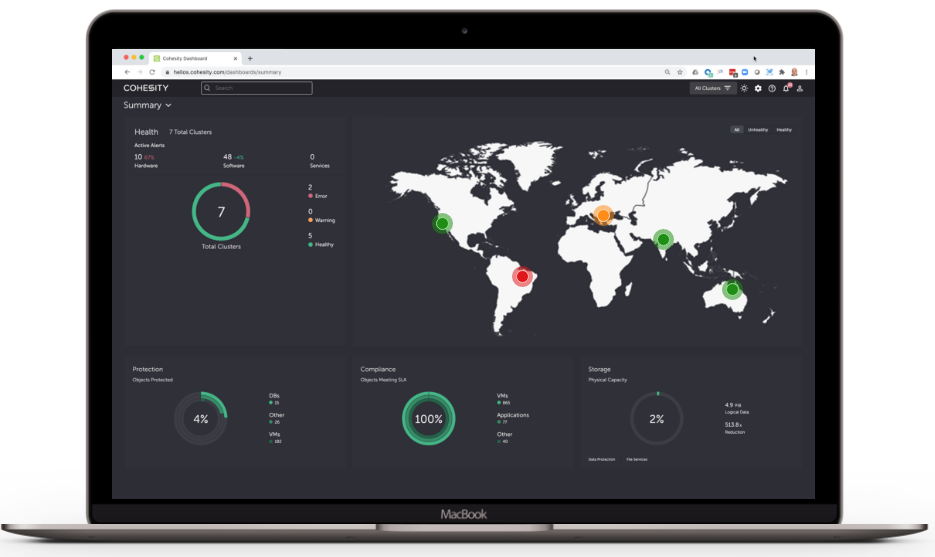
It is quite difficult, if not impossible, to consolidate all your primary storage systems in a single large repository, but if you concentrate backups on a single platform then you have all of your data in a single logical place.
In the past, backup was all about throughput and capacity with very low CPU, and media devices were designed for few sequential data streams (tapes and deduplication appliances are perfect examples).
Why are companies like Rubrik and Cohesity so different then?
Well, from my point of view they designed an architecture that enables them to do much more with backups than what was possible in the past.
Next-gen Backup Architectures
Adding a scale-out file system to this picture was the real game-changer.
Every time you expand the backup infrastructure to store more data, the new nodes also contribute to increasing CPU power and memory capacity.
With all these resources at your disposal, and the data that can be collected through backups and other means, you’ve just built a big data lake … and with all that CPU power available, you are just one step away from transforming it into a very effective big data analytics cluster!
From Data Protection to Analytics and Management
Starting from this background it isn’t difficult to explain the shift that is happening in the market and why everybody is talking more about the broader concept of data management rather than data protection.
Some may argue that it’s wrong to associate data protection with data management and in this particular case the term data management is misleading and inappropriately applied.
But, there is much to be said about it and it could very well become the topic for another post.
Also, I suggest you take a look at the report I recently wrote about unstructured data management to get a better understanding of my point of view.
Data Management for Everybody
Now that we have the tool (a big data platform), the next step is to build something useful on top of it, and this is the area where everybody is investing heavily.
Even though Cohesity is leading the pack and has started showing the potential of this type of architecture years ago with its analytics workbench, the race is open and everybody is working on out-of-the-box solutions.
In my opinion, these out-of-the-box solutions, which will be nothing more than customizable big data jobs with a nice and easy-to-use UI on top, will make data management within everyone’s reach in your organization.
This means that data governance, security, and many business roles will benefit from it.
A Quick Solution Roundup
As mentioned earlier, Cohesity is in a leading position at the moment and they have all the features needed to realize this kind of vision, but we are just at the beginning and other vendors are working hard on similar solutions.
Rubrik, which has a similar architecture, has chosen a different path. They’ve recently acquired Datos IO and started offering NoSQL DB data management.
Even though NoSQL is growing steadily in enterprises, this is a niche use case at the moment and I expect that sooner or later Rubrik will add features to manage data they collect from other sources.

Not long ago I spoke highly about Commvault, and Activate is another great example of their change in strategy.
This is a tool that can be a great companion of their backup solution but can also live alone, enabling the end-user to analyze, get insights and take action on data.
They’ve already demonstrated several use cases in fields like compliance, security, e-discovery, and so on.

Getting back to Veeam … I really loved their DataLabs and what it can theoretically do for data management.
Still not at its full potential, this is an orchestrator tool that allows to take backups, create a temporary sandbox, and run applications against them.
It is not fully automated yet, and you have to bring your own application.
If Veeam can make DataLabs ready to use with out-of-the-box applications it will become a very powerful tool for a broad range of use cases, including e-discovery, ransomware protection, index & search, and so on.
These are only a few examples of course, and the list is getting longer by the day.
Closing the Circle
Data management is now key in several areas.
We’ve already lost the battle against data growth and consolidation, and at this point finding a way to manage data properly is the only way to go.
With ever-larger storage infrastructures under management, and sysadmins that now have to manage petabytes instead of hundreds of terabytes, there is a natural shift towards automation for basic operations and the focus is more on what is really stored in the systems.

Furthermore, with the increasing amount of data, expanding multi-cloud infrastructures, new demanding regulations like GDPR, and ever-evolving business needs, the goal is to maintain control over data no matter where it is stored.
And this is why data management is at the center of every discussion now.
Originally posted on Juku.it
Source: gigaom.com
