
Tag Archives for " Task management "

Best Task Management Software
What if it was easy to define clear objectives, assign responsibilities, and measure progress for every task?
It can be, provided you are using the best task management software.
Both individuals and teams can benefit from these products.
They will help you prioritize your tasks and systematically approach your goals.
Finish on time, on budget, every time.

Disclosure: This content is reader-supported, which means if you click on some of our links that we may earn a commission.
I’ve picked out the seven best task management software tools on the market today.
All these products are excellent, but you need to find something that fits with your workflow.
Best Task Management Software
Below you’ll find in-depth reviews of my top picks, followed by a brief buyer’s guide to help you assess your options.
#1 – Wrike Review – The Best Task Management Software for Reporting
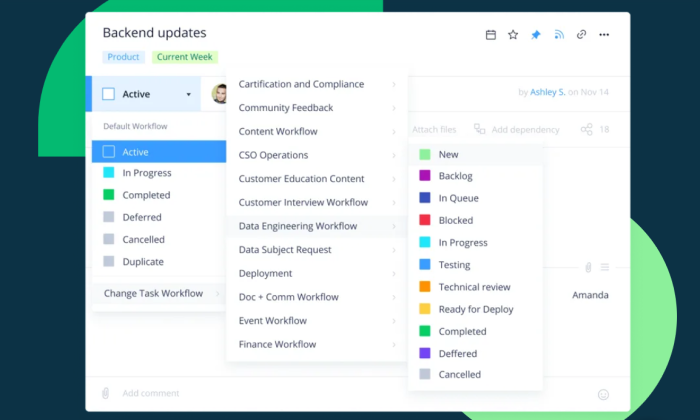
Strictly speaking, Wrike is a project management tool, and you can see this with its robust and powerful features.
You can see who is assigned which task, the duration for the task, dependencies, and the task’s progress from one simple dashboard.
You can view and manage projects using lists, tables, kanban boards, and Gantt charts.
By default, Wrike sorts tasks by status (active or complete), but you can customize the headers for additional workflow categories.
Wrike has direct integrations with tons of popular business apps, so you won’t have any trouble pulling information from your CRM, email, or other software.
In other words, your reports will be rich because you can integrate data from across your organization.
Despite its numerous features, Wrike is straightforward to use.
You can choose from templates for project scheduling, agile teamwork, marketing campaign management, product launch, professional services management, complex project with phases, and much more.
Another handy feature is the document editor.
This one allows you to edit documents directly on the cloud without first having to download them.
The purpose-built templates also make this software very easy to use.
Additional features include:
- Advanced integrations
- File sharing
- Collaborators
- Calendars
- Graphical analytics
- Time tracking
- Salesforce integration
- User audit report
- Automation engine
The Business plan or higher comes highly recommended for its reporting capabilities. You can share reports in real-time, have access to report templates, and schedule report notifications.
Wrike also has add-on features you can integrate into your account by paying an additional fee. Wrike Analyze, for example, is basically a business intelligence tool.
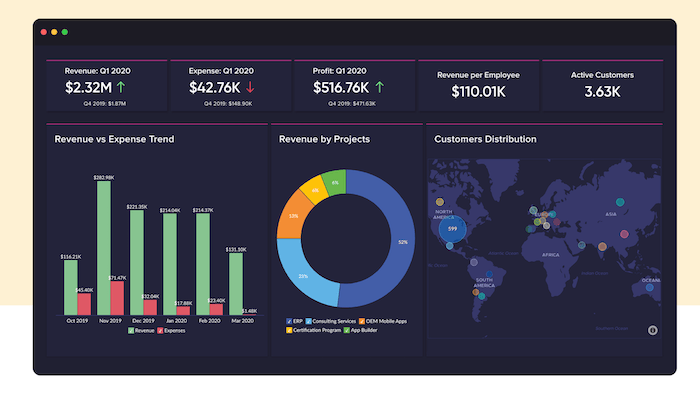
You don’t need to export, run, or manage reports anywhere else except your account. You can create highly customized, highly visual reports. Choose from 15 different visuals, including heatmaps, pie charts, and column charts. You can also create a dashboard just for reporting.
Wrike has a free plan and three paid tiers:
- Professional: $9.80 per user per month
- Business: $24.80 per user per month
- Enterprise: Contact Wrike for pricing
Wrike is straightforward to use for such a feature-rich task management tool. Learn more.
#2 – ClickUp Review – The Best Free Task Management Software
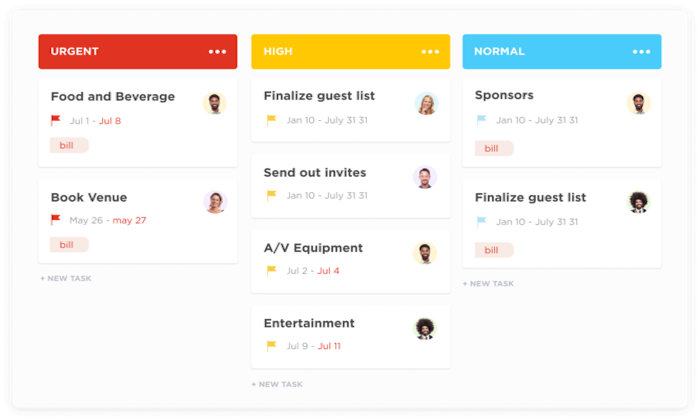
ClickUp is an excellent option if you have a small team and cannot yet justify the cost of task management software. Some companies that use this tool include Uber, Nike, Google, and Airbnb.
ClickUp has a free version with an incredible suite of features and capabilities.
The free version also supports unlimited tasks and unlimited members.
You get many advanced features, including automation, mind maps, goals, portfolio, sprints, Gantt charts, real-time collaborations, workload view, and more than 50 native integrations.
The software’s layout is user-friendly and allows you to break down tasks into subtasks for easier management.
One subtle but handy feature is the assignable comments feature.
You can convert comments into independent tasks with the click of a button.
The mentions feature is also quite useful for getting team members’ attention.
ClickUp is also highly customizable, and you have free reign to customize status toolbars, tasks, categories, sections, and comments.
The features and functionality of the free plan are almost as good as some paid task management software.
ClickUp has a free version as well as three paid plans, including:
- Unlimited: $5 per member per month
- Business: $9 per member per month
- Enterprise: Contact the ClickUp sales team for pricing.
You may need to go for a paid plan if you find that the free version is too restrictive or need more space.
However, this is highly unlikely for a small team with a relatively simple workflow.
#3 – Trello Review – The Best for Individuals and Simple Workflow
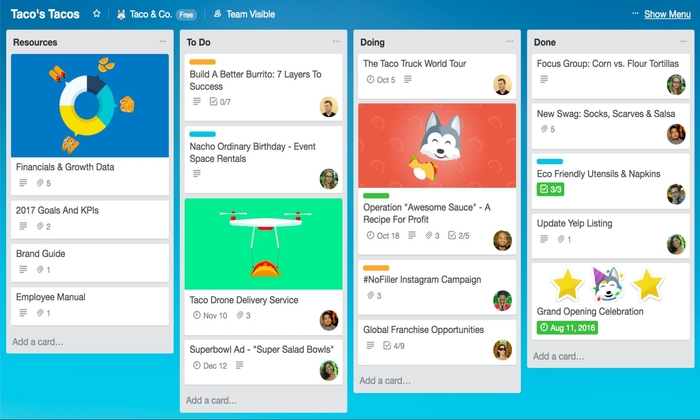
Trello is a task management tool in the best sense.
You can equally think of this software as a Kanban board app.
The software includes boards, lists, and cards, allowing you to create as many projects and columns as you need to track progress.
You can assign tasks to team members, attach files to each task, create checklists, and add comments, tag members, and link files.
Trello is highly customizable, allowing you to annotate cards with labels so you can quickly identify them.
The drag-and-drop feature is very handy.
Team members simply slide their cards from one column to the next (e.g., from To Do to In Progress) as they hit the various milestones.
The board view keeps everything clearly organized and labeled.
The Power-Up feature is worth noting.
You can add integrations and features to your boards, including custom fields, social media, document management, time-tracking, and calendar view.
The free version offers only one power-up, but you get more with the paid plans.
Trello offers Business Class plans, which start at $10 per user per month, and Enterprise plans.
You’ll have to contact Trello to get a custom price for Enterprise.
Trello is a perfect tool for project managers who want a quick and straightforward overview of the workflow.
The free version is equally suitable for an individual managing a startup or even a household.
The software has over 19 million users worldwide, including Adobe, Fender, Pixer, and Google.
Get a free demo of Trello today.
#4 – WorkFlow Max Review – The Best for Business Management
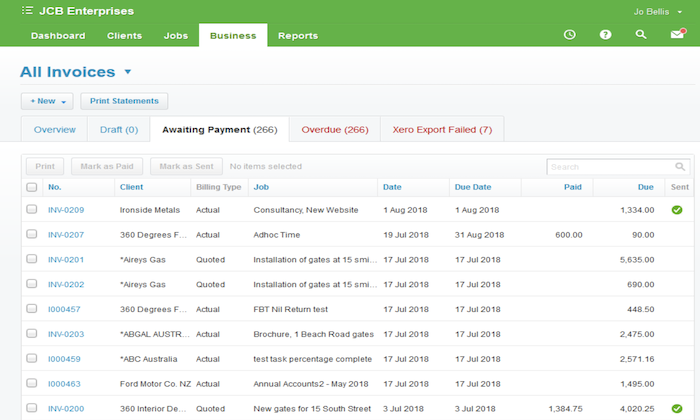
WorkFlow Max does everything you would need task management software to do and more.
You can assign tasks complete with a to-do checklist, estimate task times, and set due dates.
You can track the progress of the entire project and individual tasks making up the project.
You can also view jobs based on the assignee, important date, progress, or deadline.
You can also view the completed percentage of each task in real-time.
There is an automated feature for assigning recurring jobs complete with start and end dates, templates, descriptions, and categories.
The advanced time tracking feature allows you to record time in eight different ways.
Additionally, you can include details of how time is spent, which is useful for creating detailed reports.
Time tracking with the software also helps you compare the actual time it takes to complete tasks compared to the estimated time.
WorkFlow Max also helps with billing and payments.
You can send out invoices, manage un-invoiced jobs, and track job costs.
The job costing feature is particularly useful and tracks the estimated cost down to individual tasks.
It also tracks quoted costs and the actual costs.
WorkFlow Max all but guarantees you will be sending out accurate quotes.
Additional WorkFlow Max features include:
- Document management
- Lead manager
- Client manager
- Purchase orders
- Custom fields
- Xero integration
- Reporting
- Notifications
WorkFlow Max is owned by Xero and easily integrates with the latter’s software and systems, including Xero Accounting Software.
This tool also integrates with more than 25 other products, including Dropbox, Box, Adobe Time Tracking, Actual, Google Drive, and Flexitime.
You can get WorkFlowMax starting at $45 per month for three users.
There is also a full-feature app available for iOS and Android.
#5 – Jira Software Review – The Best for Large Agile Teams
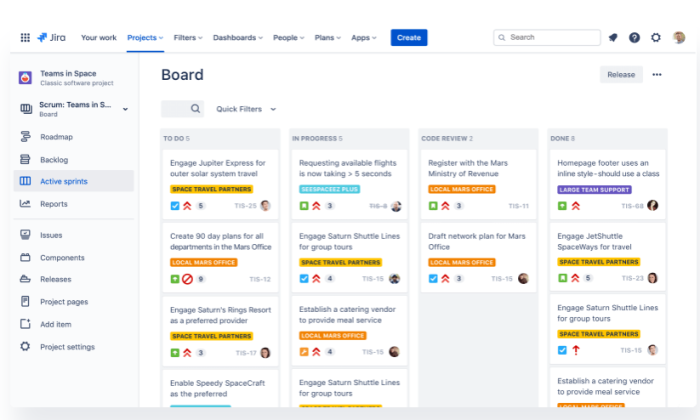
Jira Software is designed explicitly with developers in mind.
It’s one of a suite of Jira tools from Atlassian designed to help agile teams get things done.
Think of Jira Software as a way to track everything that happens across iterations.
You can focus on constant improvement, identify roadblocks as quick as possible, and hit your objectives with as little drama as possible.
You’ll get cards pre-configured for Kanban and Scrum and more than a dozen common agile reporting tools.
These aren’t like knock-your-socks-off beautiful reports, especially with the free version, but they’re handy.
Share a burndown chart at sprint planning, look at velocity week to week.
It won’t take you any extra time.
If you have never worked within an agile framework, the lingo will be a little unfamiliar, but it is not hard to pick up. For those familiar, it should be no surprise you get features like:
- Backlogs
- Roadmaps
- Dependency management
- Capacity planning
- Automation rules
- Integrations with other agile tools
Jira Software is designed to scale. It works with other Jira tools, so you can run many aspects of your business through the single platform. Jira has three plans:
- Standard: starting at $7/month per user
- Premium: $14/month per user
- Enterprise: Contact Jira for pricing
Register to begin using Jira Software for free today.
#6 – Microsoft To-Do Review – The Best for Personal Tasks
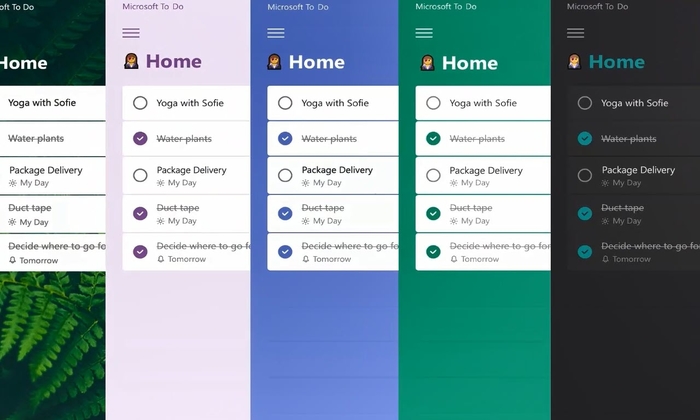
If you wish you had an easier time organizing your personal life, Microsoft To-Do just might be the answer.
You can do a lot, including creating tasks, setting reminders, prioritizing tasks, adding due dates, attaching notes or files to tasks, and grouping related tasks together.
This is a mobile and web app, so you can access your planner anywhere and anytime.
You can also share your to-do lists with others, including colleagues, family, and friends.
Microsoft To-Do also integrates with Outlook Tasks, so you can also manage your professional tasks along with your day-to-day personal tasks.
This app is also very intuitive and suggests personalized tasks that you might want to add to your list.
This is a straightforward yet effective task management app, and it is free!
This is more like a daily planner and is an excellent alternative to Trello if you don’t need the latter’s more complicated features.
#7- Accelo Review – The Best for Automation
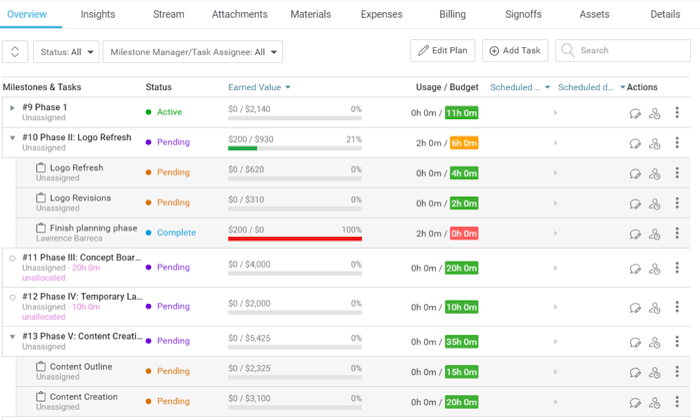
If you find that you are spending a lot of time on recurring tasks, you could automate them to make task management smoother.
Accelo does exceedingly well in this regard.
The software provides several automated features.
You can configure essential milestones and set up the system such that users are prompted to enter information or update fields.
You can also automate client communications.
Accelo automatically tracks emails, giving you crucial client information in one place.
Other features you can automate include routing emails, billing, and timesheets.
You can also automate triggers such as closing a ticket, sending emails, or converting emails to tickets.
Setting up recurring tasks is also very easy with this software.
You can configure these tasks on a calendar and have the system automatically assign them to team members on the predetermined date.
Accelo is easy to use for task management.
You can reassign and reorder tasks as you go along, then send notifications to team members when you rearrange tasks.
The simple dashboard lets you sort tasks by workload, status, or due date.
Additionally, you can highlight tickets that require immediate or special attention, such as overdue or unassigned tickets.
Accelo is highly customizable and serves a range of industries, including digital and creative, business consulting, information technology, engineering, marketing, property and architecture, and more.
The industry-specific templates, which you can also personalize, allows Accelo to adjust your task and project management requirements seamlessly.
Additional features include:
- Team inbox
- Project collaboration
- Client database
- Client records
- Usage tracking
- Quotes
- Invoicing
- Reporting dashboard
Accelo has five different offerings, including Projects, Sales, Retainers, and Service.
These cost $39 per month.
You can also go for the All-in-One ServOps for $79.
This option gives you all the features of the other four options combined.
What I Looked at to Find the Best Task Management Software
It helps if you have a good idea of the features to look for in task management software.
What makes good task management software may vary slightly depending on your specific needs and industry.
Once you have an overview of what to look out for, you can then pick out the features that seem to fit your bill and use this as the basis for choosing specific software.
When thinking of purchasing a task management software, don’t be afraid to take advantage of multiple free trials to find the one that best suits your needs.
And be aware that some software on this list includes free options.
Some of the most crucial features, and the ones I used when compiling this review include:
Task Creation

This is the most basic function of a task management tool.
You should be able to create tasks and assign them accordingly.
Look for custom fields.
This feature helps you to define the task so that the assignee understands it easily.
It also helps if the tool allows you to add links, photos, videos, documents, and comments to tasks.
Additionally, you should be able to quickly sort the job by your preferred criteria, such as by task, due date, department, or resource.
Notifications as deadlines draw close is a bonus.
Communication Tools

Communication is indispensable in a team working towards a common goal.
Good task management software should have built-in communication tools.
This could be a discussion board, instant messaging, or both.
Discussion boards are handy for large teams.
Everyone can see what other team members are talking about.
Some task management tools will even let you create task cards out of these discussions.
This feature can come in handy during a productive brainstorming session.
Visualization
Once the project is underway, it helps if team members can have simple visuals of the process as it unfolds.
Kanban boards do this very well, offering a simple view of individual tasks and their progress.
The drag-and-drop feature of kanban boards also makes them easy to work with.
Gnatt charts are also very popular for task management.
These charts are familiar and offer plenty of information at a glance, including assignee, start and end dates, dependencies, and completion percentage.
Reporting

Creating reports can be tedious, but it is an essential part of task management.
Software with a reporting tool makes the process much more comfortable.
You can insert and collect data regarding budget, expenses, performance, resource allocation, and more.
Some software has templates, automated reporting based on pre-defined criteria, and customized reporting.
Look for reporting features that will provide you with the highest value information for your needs.
Notifications

You cannot expect team members to be on the dashboard at all times.
You will be reassigning tasks, adding comments, or making other changes to jobs.
Notifications help keep everyone in the loop in real-time of any changes.
Some task management software will also notify users of upcoming deadlines or other urgent actions that need to be taken.
Summary
It doesn’t matter if you prefer proactive methodology like a waterfall or reactive methods like Scrum or Agile.
A task management tool will help you manage the workflow cycle and increase efficiency and productivity.
You just need to find the right fit for your team.
Start with my top recommendations:
- Wrike – Best for reporting
- ClickUp – Best free task management software
- Trello – Best for individuals and small teams
- WorkFlow Max – Best for business management
- Jira Software – Best for large agile teams
- Microsoft To-Do – Best for personal use
- Accelo – Best for automation
It pays if you first take some time to define your task management needs.
Follow the links to see which one best suits the day-to-day problems and challenges you face.
Be honest about your requirements and look to the future before making your final decision.
Robust (and more expensive) project management software may be more capable of handling complex tasks and is easily scalable than a simple kanban board tool like Trello.
Source: feedproxy.google.com

Managing Your Time In This Modern World
When you start to wonder where the time has gone, it’s not that it moves more quickly only for you. Although we all have the same number of hours in a day, some of us are better able to manage it than others.

This is why the following article was put together. Here are some time management tips to help you.
Prepare for Your Day in Advance
Work at least a day ahead if you can. Do this by charting your course for each day during the preceding evening. Getting together a list of what you need to be done, the next day can be a great end to a day of work. When you see your tasks in front of you, you can easily start work.
Time Management
Wisely allocate time. Think about the amount of time you have for each task and try to complete it as quickly as possible. This can help you to manage your time much more efficiently. Then when you have some free time, you can truly enjoy it.
Leave a little wiggle room in your daily schedule so that you will be able to handle emergencies. If you don’t, you could end up derailing your day due to surprise phone calls or email tasks. Plan for any interruptions.

If time management really isn’t your “thing,” pay attention to just one task at a time. It can be a challenge to do well if you have too many irons in the fire. Doing too much at once will confuse and exhaust you. Work steadily at one task at a time until completion, then proceed to the next one.
If you’re having trouble grasping time management, consider what you are actually doing with your time. Spend it wisely. Check out voicemails and emails when you have made time for them. Checking them when they come in takes away from the time already allocated for other things.
Write Your Day’s Schedule

Set up a plan each day when you wake. Get something to write with and put down what things you want to do and the amount of time you will need to do each task. A written schedule can help you make good use of your time.
Staying focused and on the task will help streamline your life. Avoid getting distracted by interruptions. People may try to give you more to do before you are finished. Never allow this to happen. Complete your current task before beginning another task.
It is almost impossible to always get everything on your list done. Some days it is impossible. Chances are that you waste more time than you realize. Always keep realistic goals.
Put priority levels to the tasks that you need to complete today. Once you finish something, move on to the next item on your list. Bring along your list so you remember it all.
Keep Journal
To figure out how to better manage your time, keep a diary. Over the course of a few days, outline each task that you have completed. Also, note how long it took you to finish each one. Check out your diary after several days to see what you need to change.
Your to-do list should be brought wherever you go. Thus, you will have a constant reminder of your priorities. It might be hard to complete some tasks, especially if they are very stressful. Don’t let that get in the way of not gettings are done. Having the list to remind you will keep you on track.
Find out how to properly prioritize, and do what’s most important first. Your quality will decrease if you spread yourself too thin. This will lead you to not finish anything. Addressing a single task by the level of priority will produce the best outcomes.
Pomodoro Method
Try out the Pomodoro method. The basic idea of the Pomodoro method is that you should work around 25 minutes, then pause for five. This way, you aren’t working hard than necessary. You will increase the quality of your work without feeling stressed out.
Make sure that you specify the tasks you must accomplish. Try to find time for the things you enjoy in life. Look for those activities you could cut from your schedule, and focus on those things you have a strong interest in doing. If you schedule a time for the things you really want to do, you will be much happier.
By following the tips presented here, you will soon enjoy success, thanks to time management. Making some simple adjustments to the way you utilize your time can make a world of difference. Give this article’s suggestions a try; you’ll be surprised at what a difference they can make.

Learn How To Manage Your Time Better
More people should study time management techniques.
You might have noticed that with a detailed game plan, you get more things accomplished.
Time management is a skill most people should have.
The tips below help you to get started.

Put on a timer.
If focusing for a set amount of time is difficult, setting a timer can help.
For instance, if you have an hour to work on a task, set the timer to let you know when 15 minutes have passed.
Then take a brief break, reset the timer and continue this routine until the hour has elapsed.

Plan out your work one day in advance.
Plan out your agenda ahead of time.
An excellent way to end your workday is to devise your to-do list for the next day.
This ensures you can get up and get moving.

Keep the deadlines that you set in mind at all times.
When you know a deadline is soon, your other tasks suffer, and then you’re behind on all of them.
If you learn to complete tasks on time, you will be able to get more things done throughout the day.

Begin your morning by assessing your schedule and to-do list.
You will reach your goals faster if you know ahead of time what you have to accomplish for the day.
Don’t overbook yourself for the day.

Focus on the small parts of tasks when trying to manage your time.
It’s hard to do everything efficiently when multi-tasking.
Your work quality will suffer when you are overwhelmed.
Focus on one thing at a time to get the job done right.

Analyze just what you have been doing wrong if you struggle with time management.
Think about your reasons for procrastinating and leaving tasks incomplete.
If you want to manage your time more effectively, it’s crucial to identify what you’re already getting out of the workflow you use now.

Planning a day ahead will help your stress.
You can either create a detailed schedule or a basic to-do list.
When you do this, you can calm your mind; not only that, but you can more effectively handle pressure during the day.

Say no.
When you say yes to everything, you’ll end up overwhelmed.
If you’re overextended, review your schedule.
Can you get someone else to do this task?
Turn to your loved ones for help.
When you wake each morning, spend a bit of time planning out your day ahead.
Make a list and allot your time accordingly.
A daily schedule is a great way of effectively managing your time.
Make a list of the important tasks to accomplish.
Begin work on each task in order, starting with the tasks that appear first on your prioritized list and working on each task in order.
To ensure that you get all of your tasks completed, carry your to-do list with you.

Enroll in a time management class at a local school or college.
These can provide useful information on how to better deal with time.
Many companies offer classes in time management to their employees,
with the hope that it will improve their efficiency.
If your company does not offer such classes, check the local high schools or community colleges.
Keep a diary to manage your time better.
Keep a diary for three or four days with tasks and the time it took to complete them.
When you figure out your schedule, you can streamline it.
Figure out the amount of work any given task needs.
Do not waste all your time doing a task that is unimportant.
For any particular task, spend just enough time and energy to accomplish your immediate goals.
Once you have achieved them, set your sights on the next thing on your list.
This will ensure you have more time for hard work.
If you have never kept a tidy schedule, learning time management tasks can be tricky.
However, the faster you start, the faster you will see how time management leads to a successful life.
Use what you learned and have more time on your hands.

Time Management Advice That Can Really Help
Time is valuable. You should use your time wisely to make the most of life. Time for fun, friends and family, and rest is also determined by how well you manage your time. You will find that the following suggestions will help you make the most of your time.

Use a digital timer.
If you can’t focus on something for whatever reason, get a timer and then set it up for the time you’re thinking you’re able to work.
For instance, if your goal is to be able to do an hour’s work straight, set your timer for 15 minutes to start out with.
Take a break and then increase the time on the timer.
Repeat this until you work up to your desired length of time.

Keep the deadlines that you set in mind at all times.
When a deadline suddenly looms, other priorities may suffer so that you fall behind on everything on your schedule.
If you had kept your deadlines in sight, then it would not have been necessary to drop some projects for a rush job elsewhere.
Do your best to use your time wisely.
Think about how much time each task you have will take and give yourself a completion time.
It will help you spend your time smartly and enjoy life more.
If you find yourself with some unexpected free minutes or hours in your day, take some time for yourself, or use the time to catch up with some other necessary tasks.

Focus on Small
If you’re finding that it’s hard to work with time management, you should instead focus on smaller tasks.
Many people can’t do things accurately when multitasking.
Juggling tasks and working quickly often just leaves you stressed out and the work quality ends up sub-par.
Breathe evenly, relax, and stay focused until one task is done before moving on to your next task.
Efficient Use of Time
If you struggle with effective time management, take time to analyze what’s awry with the current workflow.
You may be doing things in an inefficient manner.
Ask others how you can improve.
This is the first step in improving your use of time.

Plan Time Management
If it’s tough for you to manage your time, plan the day the night before.
Use a to-do to help you plan your future days.
When doing this, your mind is more relaxed and you can easily deal with time pressure the following day.
Prioritize the tasks in your day.
A lot of times, the unimportant tasks take over a lot of the day.
Doing things in order of priority will ensure that you spend your time well and get key things done when they should be.
Consider keeping a list of every task you hope to get done, and then organize them by the level of importance.
Plan Your Schedule in Advance
Upon rising each day, spend a few minutes planning your schedule.
Write down your schedule on paper.
Your time will be spent more wisely with a schedule.
Shut the Door
Close the door to your office so you aren’t disturbed while you work.
When you have your door open, people tend to assume that interruptions aren’t a big deal.
Simply shutting the door provides you with a bit of privacy.
People will know you’re trying to focus on work, allowing you to complete things more efficiently.
Examine your schedule.
Does it contain activities that aren’t necessary or just clutter?
Could you possibly do some delegating to others?
One great time management skill you can learn is how to delegate to others.
Once you allow something to be delegated to someone else, don’t think about it and leave someone else to finish the task.
To improve your life, it is important to remain on task.
Keep Distractions Away
Keep distractions from taking over your time during important tasks.
Others will try to slip in tasks for you to do before you have finished what you are working on.
This should be stopped unless it’s an emergency.
Complete one task before doing the next one.
Make sure that you create a list of things to accomplish.
Work from the top down to ensure that everything gets accomplished.
Consider having your list with you at all times to maximize efficiency.
Take a class in time management.
The instructor can give time-tested advice for managing your time.
Some companies provide these management classes to their employees in order to help them succeed.
If there are no time management classes through your employer, you may be able to take one at a university or community college.

Write in a diary to jot down your tasks.
Keep the diary for three or for days with tasks and time it took to complete them.
Look at your times and activities to see if there is any way to improve on them.
For effective time management, figure out how much time is required to complete each job.
Do not waste time performing nonessential tasks.
Just devote enough attention to the task to get it done and move on.
You use your time more wisely when you expend the most effort on jobs that are critical.
Time is a critical commodity in today’s world.
When you use your time wisely, you can focus on important things.
Use the tips above to better manage time and enjoy your life.