
Tag Archives for " stories "

The Marketer’s Guide to LinkedIn Stories
LinkedIn Stories are here, and the first thing you might be thinking is, “How can I use them to grow my business”?
We all see how powerful stories are for brands on platforms like Instagram. Over 500 million people use Stories each day, but how can you use this social strategy to boost your professional reputation on LinkedIn?
In this guide, I’ll show you how to use LinkedIn Stories and share strategies you can start implementing today.
What Are LinkedIn Stories?
If you’ve ever made a story on Instagram, Facebook, or Snapchat, LinkedIn Stories operate in pretty much the same way. You create a short video of up to 20 seconds, and once you upload it, the video is available for people to see for 24 hours, and then it goes away.
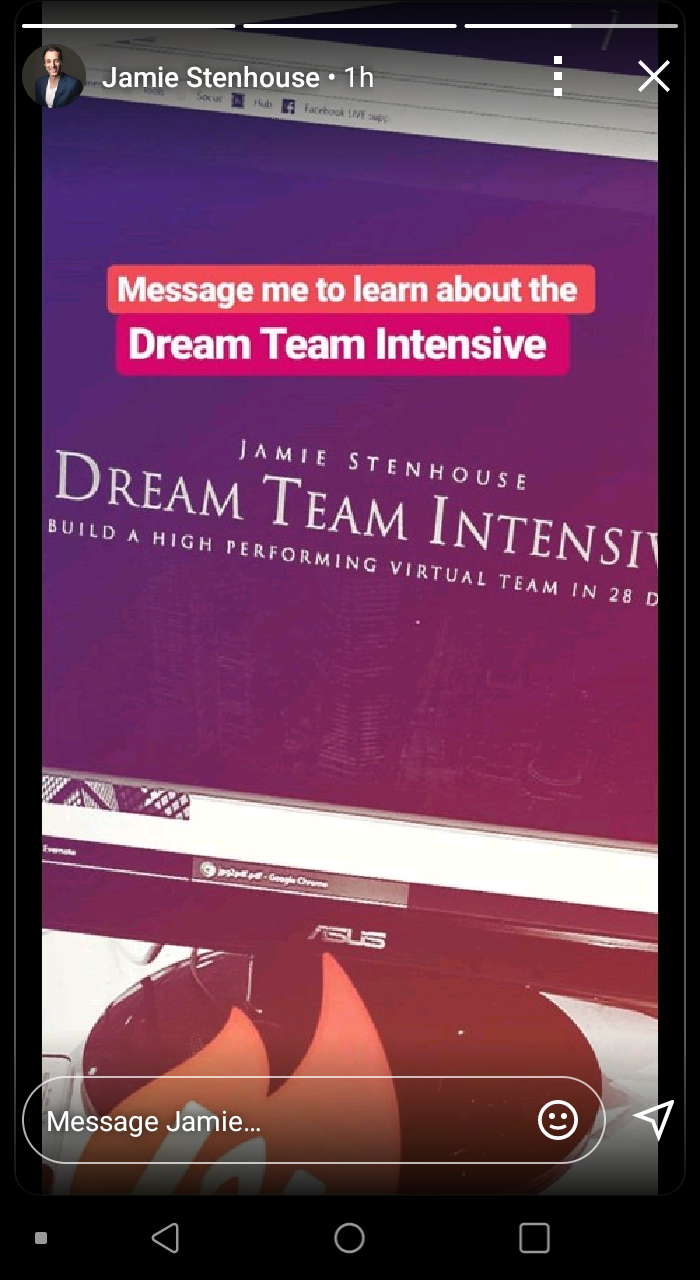
Users can post as many stories as they like, making it easy to quickly jump in, record a quick update with what you’re doing, and then allow your connections to check it out.
So, why stories? Why do I think LinkedIn is starting to roll out something so casual on a platform geared towards networking and digital resumes?
Because we’re living in the “age of sharing,” and the more you share, the bigger your brand becomes. Stories are a great way to share all of those imperfect moments in your professional life, and I think that’s what the Senior Director of Product Management, Pete Davies, is going for.
The format will help kickstart conversations and nurture the relationships that are core to everything that happens on LinkedIn.
Why Should Your Business Create LinkedIn Stories?
Now let’s talk about some of the reasons why you should consider implementing a LinkedIn Stories strategy in your business. If you’ve been using Instagram or Facebook Stories for a while, you’ll likely be able to come up with a plan pretty quickly; if not, here are some reasons to take notice.
Pull Back the Curtain
One of the best ways to generate attention for your business is to show people what’s happening behind the scenes.
Show your network there’s a personality behind the business. This helps create a more personal experience. When people see you’re more than a “brand,” you’ll build the trust that’s so necessary when trying to get someone to do business with you.
Taking this even further, you can use this strategy to give your connections some insight into your process.
For example, if you run a print on demand shirt store, use LinkedIn stories to show people how you make your shirts and why they should choose you over someone else.
There’s a great opportunity here for you to separate yourself from the competition without having to hard-sell anyone.
Document the Hustle
In years past, we were so focused on making everything perfect. We needed to buy the best equipment and do everything to ensure no one ever saw us make a mistake.
Those days are long gone.
We’re living in a world of constant connection, and we can’t be afraid to document what we’re going through as it’s happening. For those of you who are already doing this, that is excellent news. If you’re not, now is the time to get started.
Don’t be afraid to show your connections that you’re a real person with faults. If something is going wrong, do a story and explain to your colleagues what happened and how they can prevent the same thing from happening to them.
Doing this shows authenticity, and people don’t hire a brand; they hire people.
On the flip side, share your triumphs and successes as well. If you just closed on a huge contract with a big client, create a story explaining how it went and what you think you did well.
You don’t have to give away sensitive information, just let your network know what you’re winning, and it might motivate them to reach out and connect with you.
Increase Engagement With LinkedIn Stories
Stories on LinkedIn provide the most significant opportunity for engagement. On Instagram, as much as 25% of users swipe up on branded stories. Now we’re taking this same thought process but moving it to a platform entirely dedicated to business networking.
There’s a lot of power here.
Keep in mind that, even though your stories might not result in a direct sale, you’re generating awareness around you and your brand.
LinkedIn allows you to engage with the people you need to directly talk to for access to new opportunities.
For example, let’s say the Director of Marketing at a company posts a story about their SEO strategy, and you are interested in working with them. Here’s your chance to directly reply to that story with some tips and ideas you’ve used in your own business.
Keep in mind that you may get a generic response to something like this, but you’re increasing the person’s chances of checking out your profile to see what you do. If you’re active on LinkedIn and your profile is well optimized, you just might find a message in your inbox.
How to Create LinkedIn Stories?
Creating LinkedIn Stories is simple. It works the same as every other platform.
You’ll go into your LinkedIn app and click the “post” button at the bottom. Once you do that, you’ll see a new button titled “share a story.”
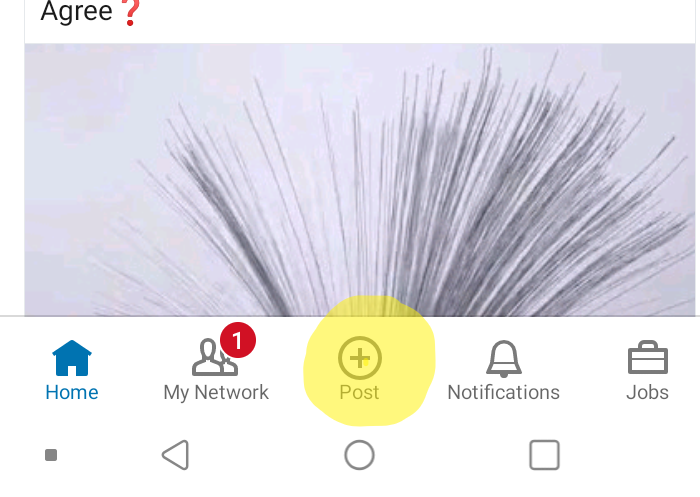
When you click it, you’ll be able to record a video or take a picture and customize it to your liking.
The story uploads, and once it’s done, you’ll find it at the top of your LinkedIn home with all the stories from your connections. This is a fantastic way to put your name at the top of everyone’s page.
Keep in mind that LinkedIn Stories are only available on the mobile app. You can’t create or view them from your desktop.
What Makes a Successful LinkedIn Story?
If you’re sitting there right now, wondering, “What steps do I need to take to create the best story?” Selling with LinkedIn Stories is easy, and I’ll guide you through it.
Looking at Instagram as an example, 50% of businesses worldwide create an average of one story per month. So, you can see where the low hanging fruit lies here. You have an excellent opportunity to generate a lot of free attention for your business — with the right strategy.
Here are the most important metrics to consider when determining the success of your LinkedIn story.
Grab Their Attention
The first thing you’ll notice about LinkedIn Stories is they don’t offer a preview at the top of the screen like Facebook and Instagram. This makes getting the initial click a bit more difficult.
You can’t create a clickbait thumbnail to get people to click on your story. So, your LinkedIn profile picture needs to get the attention of your audience.
Keep in mind that LinkedIn is a professional network, so use a professional headshot on your profile. This is not the place for a picture of your cat or your car; you need to dress and look the part.
Think about your target audience and dress to get their attention. An agency owner pitching agriculture businesses might not look the same as one pitching boutique coffee shops, right?
Start Strong
The average person only watches 40 to 60% of your story, so you must grab their attention right away. If you start with a boring message, chances are they’ll swipe away and assume your Stories aren’t worth watching.
Consider starting your story with the most exciting part of the video. While you only have 15to 20 seconds, take those first five seconds to speak directly to the camera and call out your audience.
If you’re trying to reach agency owners making $100,000+, call them out right away. Address a pain point or issue they might have within the first five seconds, and you’ll increase the chances of keeping them around for the next 15.
Keep Their Attention
At around the 10-second mark is where you will start losing people. They’ll swipe to your next story or move on to a different profile. You need to hold their attention by keeping it as interesting as possible.
Consider using props, bring in other people, and utilize statistics that draw in your audience and speak to them directly. Every business should have a customer avatar. If you don’t, now is the time to start!
Figure out exactly who your ideal customer is and bring them to life with personality traits, demographic information, pain points, and desires.
You should know exactly who they are, what they want to hear, and what you need to say to make them stick around.
Close It Out
While Stories are meant to be informal, it doesn’t mean you can’t have an objective in mind. You should always be looking for ways to convert the people watching your Stories.
These are great opportunities to get free attention, so make the most of it.
Keep in mind that a lot of people have likely swiped away by the time you get to your last five seconds. That means these people are highly interested in what you’re saying and may want to learn more.
For example, you could turn a blog post you recently posted into a Story. Take the three most important points from the post and highlight them in a story. In the end, tell the viewers where they can find the blog post and prompt them to check it out.
There are a million different options, but you want to have some type of call to action at the end of your story.
You don’t have to ask someone to buy something directly, but you should always tell them what to do next.
Tips on Converting LinkedIn Story Viewers to Clients
If you’re on LinkedIn, I can bet you’re there to get clients. Why else would you use the platform? Networking and building connections are great, but the end goal of those efforts is to add more clients to the database.
Here are a few quick tips to help you get the most out of your LinkedIn story viewers.
Stay on Brand
On Facebook, users move 41% faster on mobile than desktop. While we don’t have data from LinkedIn yet, we can expect the numbers to be similar. You need to be quick in establishing your brand and representing it the right way.
When someone taps your story, they should get hit immediately with something that makes your brand stand out so they’ll remember it.
Even if you’re just quickly recording a story about going for a run before hitting the office, talk about how it impacts your performance at your business.
Provide Value
The best way to convert traffic is by giving something away. You don’t have to overcomplicate this. Provide free information, offer a short how-to, or show them how to solve a critical problem.
Revisit your customer avatar here and think of something that might be on their to-do list. What’s something that your ideal customer hates doing? Chances are it might be the very thing you do and offer to take care of it for them if that’s the case.
Always Have a Plan
Just because LinkedIn Stories are casual doesn’t mean you need to improvise all the time. Never fill the story with something that doesn’t have an objective.
Doing this one time will hurt your brand, and people might just swipe by you because they think you have nothing to offer.
Every time you put something out to your audience, you should have a plan in mind to provide value. Give yourself enough time to plan ahead and even consider developing a content calendar for your LinkedIn stories.
Conclusion
LinkedIn Stories are an exciting addition to the networking platform. Based on what the Senior Director of Product Management said, they’re trying to make LinkedIn appear less intimidating and more informal.
Have you ever had the opportunity to stand out and become an early adopter? Maybe you have, maybe you haven’t. Either way, LinkedIn stories offer a unique chance to jump ahead of the competition and get your content in front of your target audience first.
Why wait? Create your first LinkedIn Story right now and get ahead of the pack!
Have you tried LinkedIn Stories yet?
The post The Marketer’s Guide to LinkedIn Stories appeared first on Neil Patel.
Source: neilpatel.com

254: Blogging Breakthroughs – Your Invitation to Be on the ProBlogger Podcast
Do you have a blog? Why not? It’s time to get started. Imagine the breakthroughs you could experience. And if you do already have a blog, have you had a breakthrough? You have? Then tell us about it. We’re seeking submissions of stories to appear on the ProBlogger podcast for the theme, My Blog Breakthrough.
Our goal with this series is to feature bloggers from around the world telling stories about breakthroughs in their blogging.
We want to inspire ProBlogger listeners and give them practical ideas to try with their own blogs.

Your breakthrough can be about anything, big or small. For example:
- How an influencer helped you grow your blog
- A new income stream
- How you made your first dollars blogging
- How a post went viral
- An opportunity that arose from blogging
- A mindset shift that led to growth in your blog
- A tool you started using that led to new results
- Refocusing your blog on a new, narrower, or broader niche
- How you overcame fear or some other obstacle in your blogging
We want to feature a variety of bloggers’ stories, including bloggers of different experience levels, countries, and niches.
If you’d like to participate, submit your story and complete the form at problogger.com/breakthrough.
You can be brief and only include:
- Your name
- Your blog URL
- Your blog topic
- What blogging was like before the breakthrough
- What the breakthrough was
- What blogging was like after the breakthrough
- A tip you’d give listeners that might help them with this breakthrough
- Anything else you think we need to know that relates to your breakthrough story
If your story is selected, you will be asked to record your breakthrough story as an audio file.
Ready to share your story and help others?

Further Listening
- 10 Things I Wish I’d Known About Blogging
- My Million Dollar Blog Post (and How Procrastination Almost Stopped Me from Writing It)
- Why You Should Create a Product to Sell on Your Blog (and Tips on How to Do It)
- I Guarantee This Will Improve Your Blog

Courses
Join our Facebook group
Hi there and welcome to episode 254 of the ProBlogger Podcast. My name’s Darren Rowse and I’m the blogger behind problogger.com, a blog, podcast, events, job board, ebooks, and a couple of courses now that help you to start a great blog and to build a profit around that blog as well.
In today’s episode, episode 254 which you can find the show notes for it at problogger.com/podcast/254, I want to invite you to be a part of an upcoming show on this podcast.
We want to do a series of shows actually called My Blog Breakthrough. We are seeking submissions from you, listeners of the podcast, and readers of the blog, to appear on the podcast by submitting a short audio clip where you talk about a blogging breakthrough that you have had.
Click ► to expand…
Full Transcript
My hope is that this series is going to both inspire our listeners by hearing some different voices from bloggers around the world, sharing their stories, but also giving a few practical ideas of things that other listeners could apply as well.
If that interests you, listen on, and I’ll talk to you a little bit more about what we’re looking for and how you can participate in today’s challenge.
Again, the show notes today where you find links to how to submit your story, the show notes are at problogger.com/podcast/254.
Start A Blog Course
As part of our Start A Blog course which we launched at the start of this year. We did a similar series to what we are planning with this new one–where we invited listeners to submit stories of them starting a blog and it was amazing.
People really enjoyed that series. We featured, I think it was probably almost 10 different stories over a week or so of bloggers.
It was really great to hear the different accents and the different stories of bloggers in different nations starting their blog and what the start of their blog led to.
This really stimulated us with this idea today of doing a series of your blogging breakthroughs.
We know, for a fact, because we hear about these little breakthroughs all the time in our Facebook group, and via emails from listeners and readers as well, that you are constantly, as a listenership, having breakthroughs in your blogging.
Intuition to Share
Every time we get one of the stories, we think, “Ahh, wish we could share this with a wider audience.” That’s what this series is about.
I hope as I said at the start, is that we want to inspire ProBlogger listeners with your stories—your big stories and your little ones as well because we all have different types of breakthroughs in our blogging.
We also really would like this to be a practical thing as well. What we’re going to ask you to do is to submit your story but also share a tip that will help others make a similar breakthrough as well.
Now, you’re probably wondering, “What could I do as a breakthrough?” Well, really it could be anything at all that has helped to grow your blog.
About Traffic

Now, probably some of you are already thinking about how you’ve grown your traffic. We’re certainly open to hearing breakthroughs about traffic but we don’t want everyone to talk about the same thing.
In fact, if everyone submits traffic, we’ll only probably be able to feature a few of them. There are so many other breakthroughs that maybe you could talk about.
Income Story

Maybe it could be the story of trying a new income stream or even the story of how you made your first dollar blogging–that first income stream for you.
- Or maybe some are stories about how an influencer has helped, or how you got featured in the media, or how a post that you wrote went viral for the first time, and how you’ve replicated that.
- Or an opportunity that arose from blogging. Maybe a book deal came through, maybe an opportunity to be featured on someone else’s podcast–a big blogger’s podcast.
- Or maybe it was a mindset shift that led to growth in your blog in some way.
- Or a new tool that you started to use that led to new results.
- Or a new strategy, or a new social network that you tried.
- Or maybe it was you’ve refocused your blog, relaunched it.
A new niche, or a narrower niche, or a broader niche. Or maybe it’s the way you overcame fear or some other obstacle in your blogging.
Really, the breakthrough can be anything that you would like. Even if it’s something small because what I’ve learned over the years is that sometimes it is the small things that lead to bigger ongoing results.
I would love to hear some of those types of stories as well. But if you’ve got a big one as well, you’re more than welcome to share that too.
Featuring a Story

Now, we do want to feature a variety of bloggers.
We want to feature bloggers male and female. We want to feature stories from bloggers who sort of are at the beginning of their journey and more experienced bloggers.
We want to feature some stories of bloggers that you may have heard of before and some new bloggers, bloggers from different countries, and bloggers focusing on different niches.
If you’re thinking, “Oh, I’m not big enough. I’m not well-known enough.” We would love to hear your stories.
Sometimes those unknown bloggers that the rest of us don’t know about, they’re sometimes the best stories of all.
We’re looking for breakthroughs of different kinds.
Again, we cannot feature too many on the same kind of wavelength.
That’s why we’ve kind of chosen the way that we have for you to submit your stories as well because we don’t want you to start recording your story straight away.
We’d like you to submit in a form your idea for the story, just to save you the work of recording something. We want to select and then we’ll commission the ones that we want.
That way, we’d know we’re going to get a variety of stories, and we’re not going to waste too much of your time as well.
Record a Story

If you’d like to participate, we are going to ask you to record a story, it’ll have to be within 10 minutes, and we would like it to be of a reasonable quality so that we can use it on the podcast.
You need to be able to record a story. You need to be willing to have your voice on the ProBlogger podcast and heard by quite a few bloggers. There’s an opportunity for you here to share your link.
Hopefully, it will help you to grow your blog and connect with other bloggers as well but we would love it if you head over to a form that we’ve set up.
Breakthrough
We’ve set up the form at problogger.com/breakthrough. We’ll link to it in today’s show notes as well.
You will see there that I’ve written a little bit of information about what we’re looking for and there is a form there that asks you a few questions.
It asks you, what is your blog name, what’s your blog URL, what’s the topic of your blog.
Then it asks you some questions that again, help us to understand what you are going to talk about in your recording.
Breakthrough Transformation

We want to know what was blogging like before your breakthrough, what was the breakthrough, and what was blogging like after the breakthrough.
That’s really important for us because we want to see that this breakthrough actually led to some kind of transformation in your blogging or growth in your blogging in some way.
You don’t have to write a lot in there. We just want to know the theme of your topic and any relevant information for you there.
We don’t want a transcription of what you’re going to say, just the idea, really. We want to know what tip you will give our listeners that might help them with a similar kind of breakthrough.
Then there’s also an opportunity for you to tell us anything else that you think we need to know about your story.
Now, keep in mind we’re looking for storytelling here that is going to inspire our readers. Again, it doesn’t need to be a massive story in many ways.
Something Small
It could be something small. In fact, sometimes those small things can inspire people the most because they think they can do it too. We’re looking for stories but also looking for something practical here as well.
That’s something that I always try with the ProBlogger podcast to do. I want to inspire you but more than that, I want to give you something that you can go and do as well.
Please don’t feel the need to write too much. I’m looking forward to seeing what you submit.
Now, if I was doing this, as I thought about this, I really have done this with almost every podcast I’ve written out, I usually try and bring something into the podcast that is a story for myself.
If I was doing this, a few things that I would—I’d give you some ideas, it might help to get the wheels turning in your mind—I might do a mindset shift that I made in the early days in my blogging where I decided to stop treating my blog as a hobby and it’s something that might, one day, become a full-time thing.
I made this mindset shift with Vanessa to treat my blog as a business today. I talk about that story in episode 100 of this podcast.
Mindshift

That might be an example that you might want to listen to that could give you some ideas about a mindset shift that changed for you.
Or back in episode 167, I talked about how I overcame eight years of procrastination to write a blog post that I’ve been putting off, that I’ve been too scared to write.
Hell, that blog post, when I did write it, actually ended up helping me earn an income–a 5-figure income a month in some months. That was 167.
Episode 67 was when I created my first ebook by repurposing a lot of the content I’d already published before.
That was a breakthrough because it, one, it grew us an income stream but it helped open up a new type of income stream for me.
That was the first of many ebooks that came or when I created the 31 Days to Build a Better Blog blog post series.
The breakthrough there was really understanding that my readers didn’t want just information, that they wanted a challenge, they wanted something to do as well, and that in turn, let to the new course that we’ve just launched as well which you can listen to information about in our last podcast.
These are the types of things that I’m looking for. They could be mindset shifts, new tools, new strategies, and new understandings, new learning even. Again, head over to problogger.com/breakthrough.
I will love to read your story and then we will be in touch with those that submit that. We want to actually record something as well.
I look forward to presenting those stories in our future episodes of this podcast. It might take us a few weeks to go through this process and get them up and running as well.
Season

The other thing that I just wanted to let you know is that there will be a few weeks’ breaks on this podcast. It’s the middle of the year.
We’ve had a fairly intense year so far and we think, as a team, we just need a little bit of break from producing the podcast for a few weeks.
I know a lot of you are on summer holidays in America or in other parts of the world. Here in Australia, we’ve in the middle of winter and it’s freezing.
We’re just going to have a little bit of hibernation of the podcast for a few weeks while we get this new series up and running.
If you’re missing the ProBlogger podcast, there are 253 other episodes that you can dig around into. I mentioned a few of those today in the show.
I do encourage you to dig around in the archives. Have a listen to something that you may have missed in the past.
Thanks for listening. I look forward to chatting with you in a few weeks’ time in the upcoming episodes of the ProBlogger podcast. Thanks for listening.
Think of Start a Blog Course
If you’re still listening and you are still thinking about your breakthroughs and wondering what breakthrough you could share, I know some of the biggest breakthroughs you really need is to start a blog.
It’s amazing how many listeners of the ProBlogger podcast are in the same position as you. People who haven’t yet started a blog. If you are one of those, I do encourage you to check out our completely free Start A Blog course.
It is designed to walk you through the process of starting a blog.
It is a seven-step course. It’s very comprehensive but it will walk you through even the question of, “Is a blog right for you?” It will help you to define what your blog is about.
It will help you work out what to call your blog, how to get a domain name set up, how to get hosting set up, how to get your WordPress theme set up, and a bit of a checklist there for getting your email and social media account set up as well.
It is completely free. It can be found over at problogger.com/startablog. It will take you through there where you can signup and register for that free course.
If you know someone who hasn’t started a blog, give them the gift of this course by letting them know about it as well. Again, it’s problogger.com/startablog.
How did you go with today’s episode?
Enjoy this podcast?
Sign up for our ProBloggerPLUS newsletter to get notified of all new tutorials and podcasts.


 Related Stories218: How to Set Smart Blogging Goals for the New Year214: 4 Realities of Blogging All Bloggers Need to Talk About205: 5 Obstacles Bloggers Face (And How to Get Over Them)
Source: feeds.feedblitz.com

Why Businesses Can’t Ignore Google AMP Stories
The Accelerated Mobile Pages (AMP) project was launched by Google in February of 2016 with the goal of putting mobile performance above everything else on the web. And Google definitely met their goal. AMP powers more than two billion mobile pages and 900,000 different domains. Pages with AMP now load twice as fast as pages without added AMP elements.
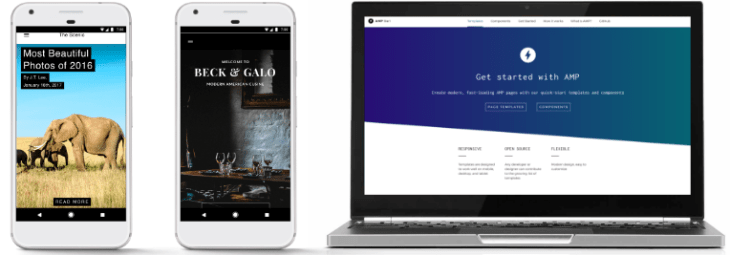
If you think you can ignore AMP, you’re wrong. AMP has some pretty awesome features and benefits that can take your content creation efforts to the next level.
If you don’t take the time to understand or use AMP stories, you’re missing out.
Here’s why businesses can’t afford to ignore them.
But first, let’s analyze that, what AMP stories truly are.
What are AMP Stories?
Google’s AMP stories features allow publishers to create content that is very similar to Instagram stories, designed with mobile websites in mind.
But the content created with AMP doesn’t get added to an app. Instead, it’s placed right on search results pages.
AMP is an open-source project that was created in response to the fact that mobile users now spend more time on apps than on websites.
77% of their time, to be exact, according to Statista data.
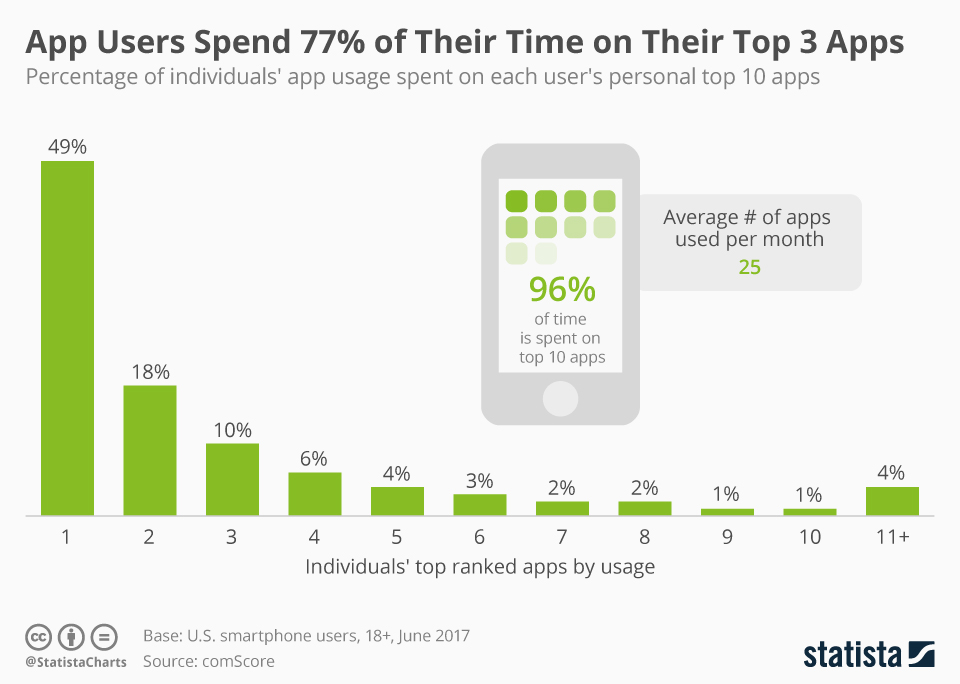
With AMP, content loads extremely fast, which helps keep mobile users on those pages and off of their apps.
Instead of regular search engine results, users receive a swipeable story that’s easy to navigate. The UX is somewhat similar to the popular dating app, Tinder.
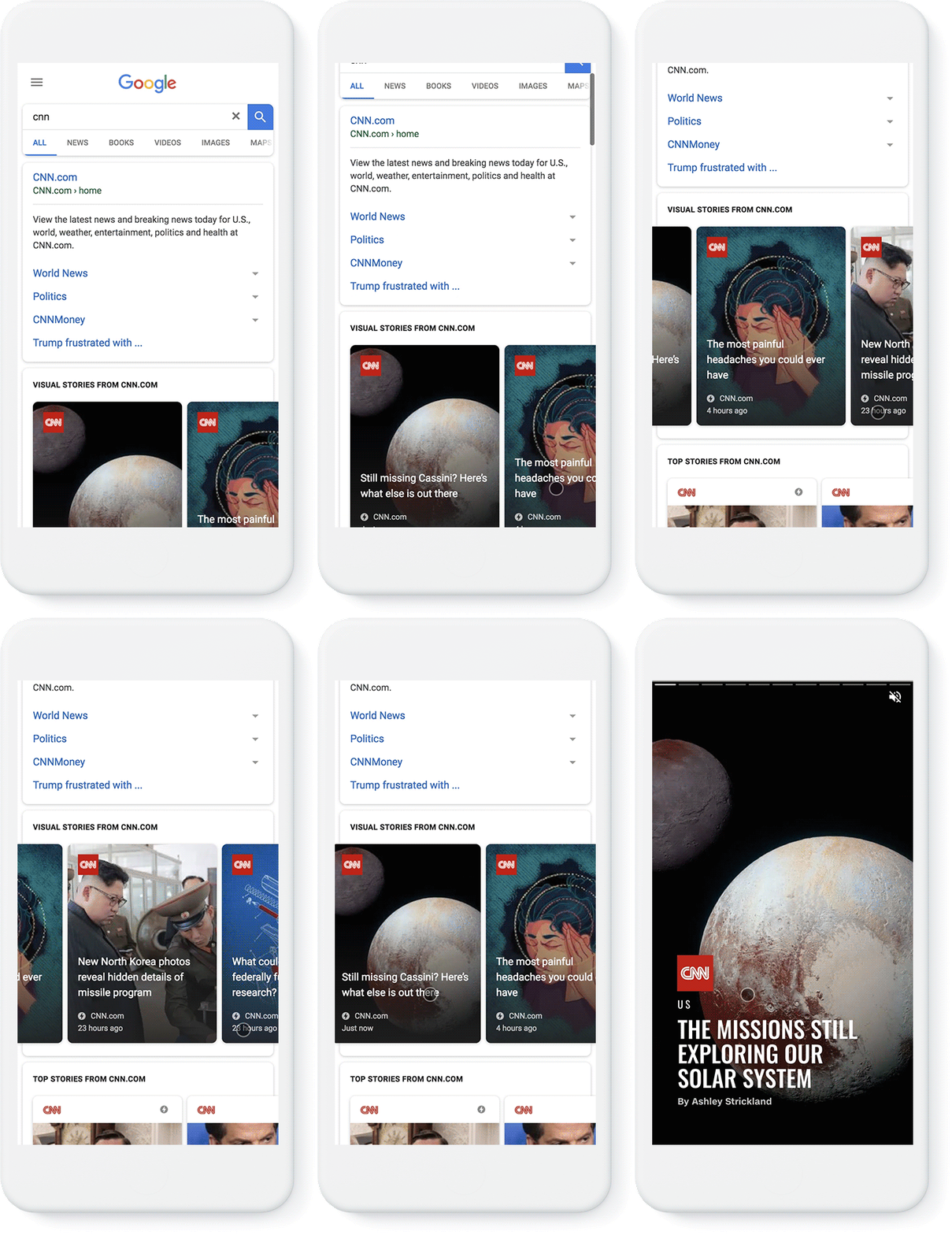
AMP partners include CNN, Mic, Wired, The Washington Post, Mashable, and People.
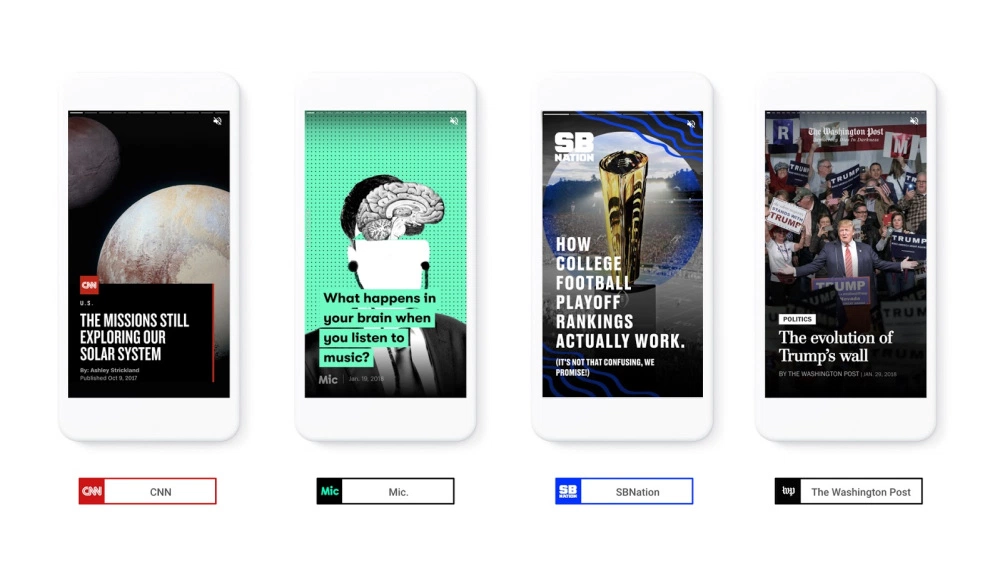
Beyond loading at lightning-fast speeds, AMP Stories can also be shared in the same way news articles are shared.
Here’s a breakdown of how they work.
How Accelerated Mobile Pages Work
Today, JavaScript can be used on almost any web page to modify any portion of it.
But it also slows the loading and rendering of pages. And since page speed is so important (we’ll talk more about that later), that’s something you want to avoid.
AMP only allows for asynchronous JavaScript to run on pages, meaning that the JavaScript code won’t block any other code present on your site.
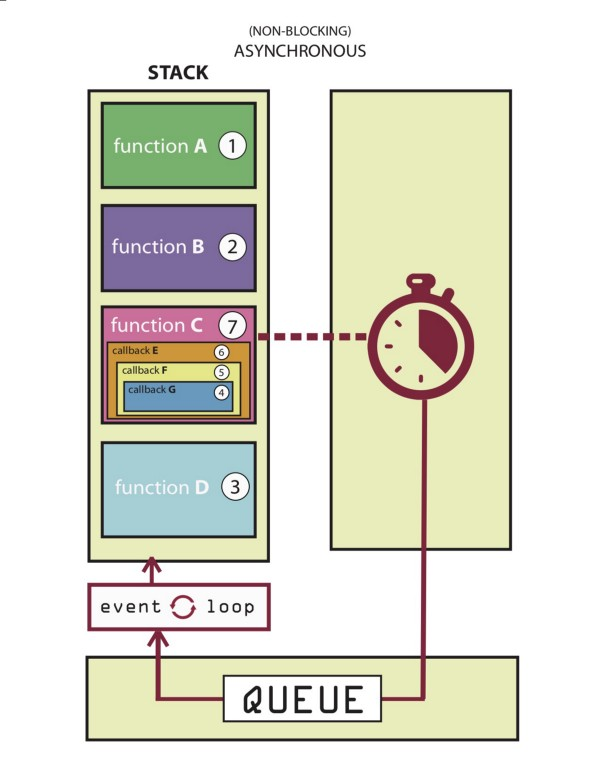
JavaScript written by the webmaster is forbidden on AMP stories, and interactive pages must only contain custom AMP elements.
Custom elements can consist of JavaScript at their core, but they must be specifically designed to make sure that they don’t cause any restrictions on the overall performance of a page.
Third-party JavaScript is also allowed with AMP, but it cannot block page rendering.
AMP also does not allow for any kind of extension mechanisms to block page rendering, but it can be used for Instagram embeds, tweets, or lightboxes.
Because of this, users can swipe through mobile-optimized content on AMP pages without all of the unnecessary distractions.
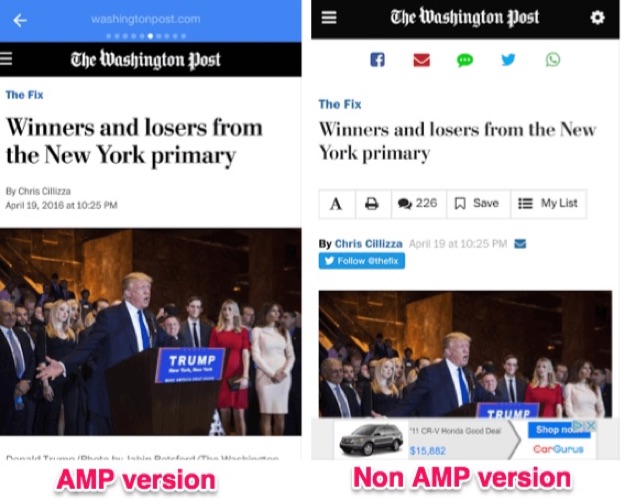
As you can already tell, there are a lot of reasons why AMP stories are growing fast.
Why Should You Use AMP Stories?
Some of your competition is probably consistently using AMP.
If you aren’t, you might as well be accepting defeat.
On the other hand, if you start using AMP protocols before your competitors, you’ll differentiate yourself as a frontrunner in your industry.
Why? Because AMP features can help you tell stories, and storytelling is powerful.
Storytelling is Powerful
Everyone loves a good story.
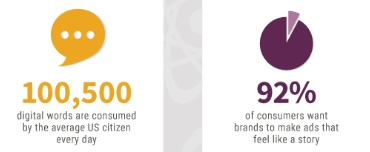
At least 100,500 digital words are consumed by the average U.S. citizen in one day, while 92% of consumers want to view and read ads that feel like stories.
There is some evidence out there that suggests that people view AMP stories much longer than they view traditional alternatives.
This could be because faster loading times make it easier to view more content for a longer period of time.
AMP lets you tell stories in a powerful, fast, unique way. And when you tell a good story well, you’ll be able to reach your audience effectively.
Speak to your readers’ needs, give each piece an interesting arc, and don’t forget to add in all of the hard data needed to prove your point.
Page speed plays a huge role in AMPs success, too.
Page Speed is Important
Site speed is important. Pages that take a long time to load can kill your conversions. If your site takes a while to load, you’ll rack up less and less conversions.
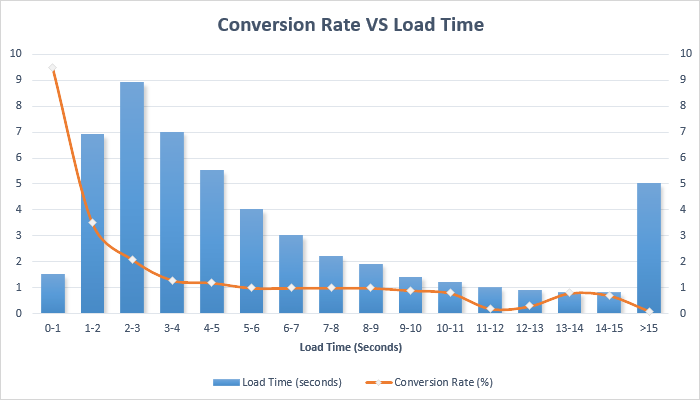
Luckily, AMP pages load about twice as fast as regular mobile pages.
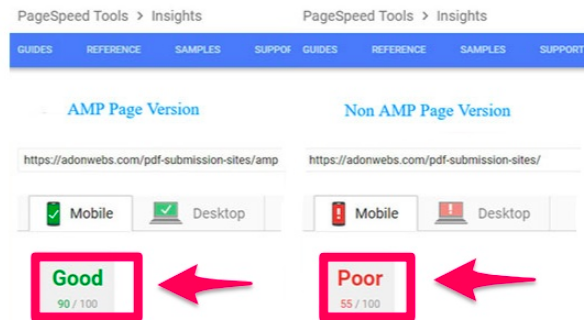
With such quick loading times, customers will be able to get to your content faster than ever before.
This is great news, since the probability of a bounce increases by 32% if a mobile page takes as long as three seconds to load.
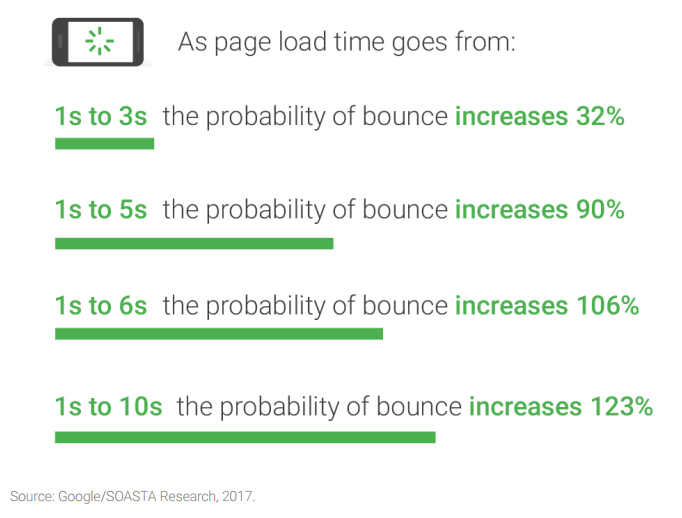
If it takes five seconds, the probability of a bounce increases by 90%.
Because of the quick loading times provided by AMP, users will be more likely to go ahead and buy from you.
When they know they can interact with your brand without any friction or wait time, they’ll be willing to trust you with their money.
To make the case for AMP even stronger, Google tends to give faster loading mobile pages special treatment and better rankings.
Take advantage of the creative design features offered by AMP to keep viewers engaged and intrigued.
Take Advantage of Creative Design
In case you didn’t already know, design is important. And AMP pages let you add in creative elements that take your content to the next level.
Don’t be afraid to add forms, buttons, videos, images, shopping options, or links to your AMP stories.
Your site will look much more sleek and functional, giving you tons of opportunities to attract, engage, and hold your viewers’ attention.
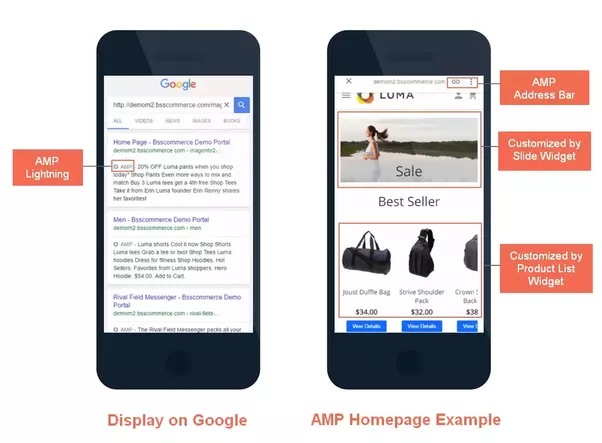
AMP can give your site the SEO boost it needs.
AMP Helps SEO
AMPs give your site a huge visibility boost.
As of right now, a page with AMP protocols won’t increase your site’s page authority or domain authority.
That being said, it does give the page a chance to be featured in the AMP carousel that appears above traditional Google search results.
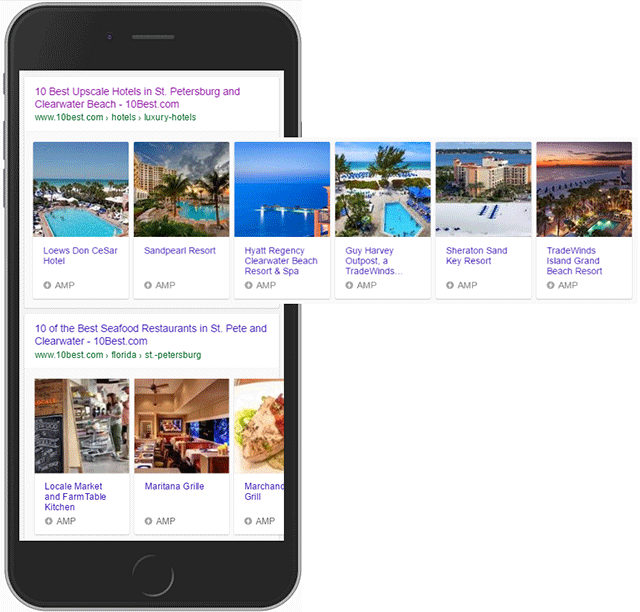
This means that if your site shows up in the carousel, it will appear before the number one placement.
It doesn’t get any better than placing before the number one spot, does it?
This can give you the big boost in organic search results that you need, bringing more traffic to your site than ever before.
Next, let’s break down all of the moving parts that make AMPs so great.
Introducing the AMP Story Features
Traditional AMP content relies solely on text, but the new and improved format includes videos, animation, and images to give users a full experience.
For publishers, you can:
- Embed your stories across apps and websites
- Access stories via both desktop and mobile
- Tell stories without needing to have a ton of technical knowledge
The best part? AMPs are free for everyone to try.
Let’s examine all of the parts involved in completing an AMP story.
Parts of an AMP story
Before you can create your first AMP story, you have to master all of its components.
Every story is structured with individual pages. Each page consists of individual layers that are made up of a combination of HTML code and AMP elements.
Here’s how the components will look when added to your code:
Story = amp-story
Page = amp-story-page
Layers = amp-story-grid-layer
When added to a page, the code might look something like this:
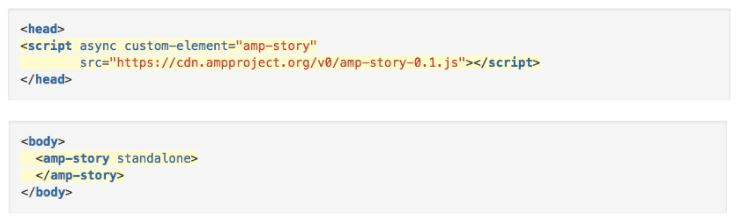
The story component contains your entire AMP story, while the page component contains each specific page that exists within your story.
The layers component contains all of the elements that are present on a page.
Here are some examples of a few AMP stories.
Examples of Google AMP Stories
It’s no secret that Google will link to AMP versions of web pages over traditional ones any time that they’re available because Google prefers them.
Because of this, every AMP partner has used the feature of the service to suit their strengths.
The most commonly known AMP adapters were news organizations since they could use AMPs to get information out quickly and effectively to searchers.
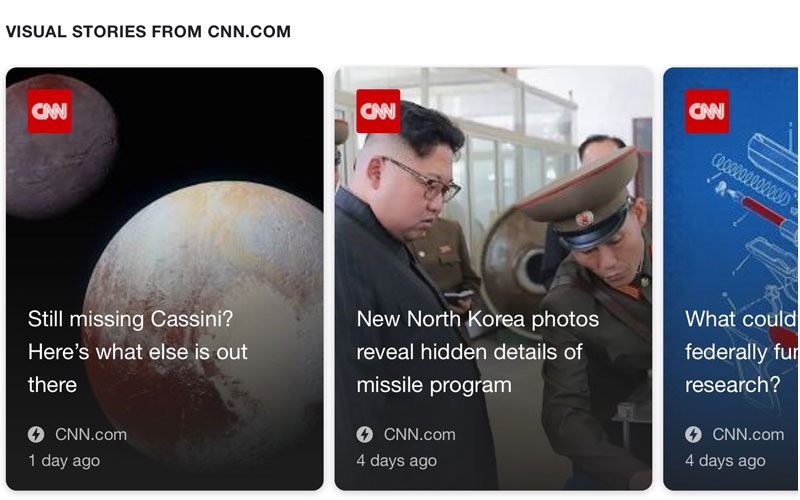
Here are examples of how CNN has utilized AMP stories to share and amplify breaking news:
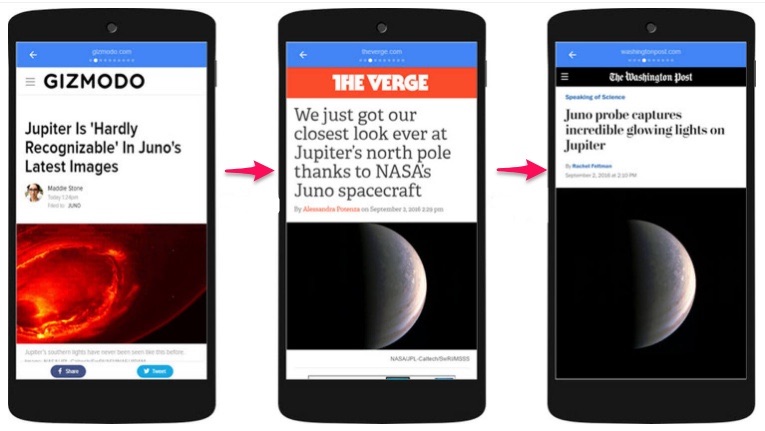
Some publishers have even written AMP stories over the exact same kinds of content (with the same cover photo):
But AMPs aren’t just for news sites. You can turn your long-form content into an AMP if you want to. And you should.
What are people saying about AMP, overall?
What People Are Saying About It
AMP Product Manager Rudy Galfi recently told AdWeek that AMP stories “should make for a really engaging ad format.”
But what does everyone else seem to think about publishing content with AMP?
Econsultancy writer Stuart Shaw says that while AMP pages require some maintenance, the payoff and exposure that they provide is well worth it.
In an April 2018 post, he wrote:
“Sure, all you’ve done is improve things for your mobile users – and only on the few scant pages that you’ve implemented AMP on…But optimization isn’t about making things perfect in an instant It’s a gradual process that must adapt to the ever-changing ‘techscape’ that is search.”
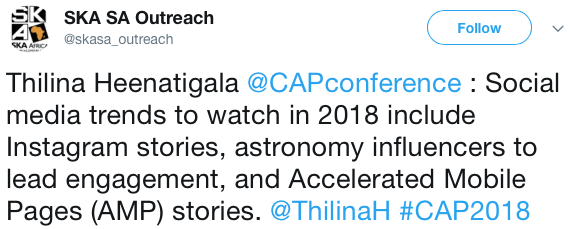
In general, reactions to AMP on sites like Twitter are fairly positive. Some people are calling AMP one of the most important trends of 2018.
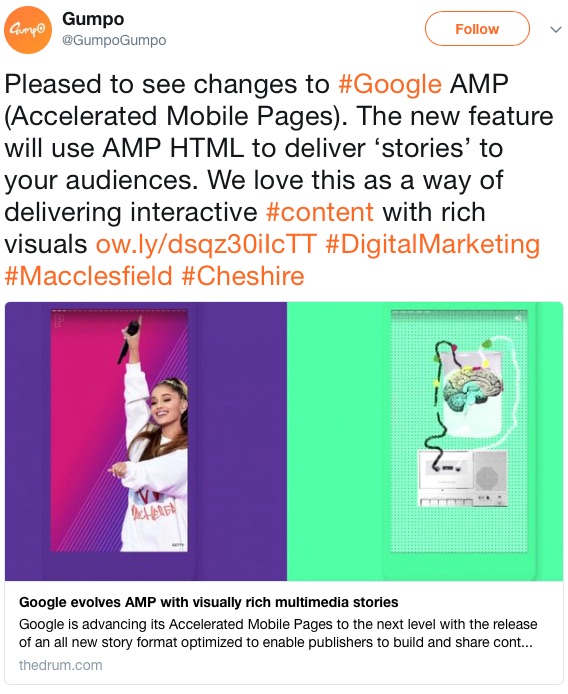
Others really love the recent changes and updates to AMP, like Gumpo, who says “We love this as a way of delivering interactive content with rich visuals.”
In September of 2017, SEO company Optimising had this to say about AMPs on Facebook:
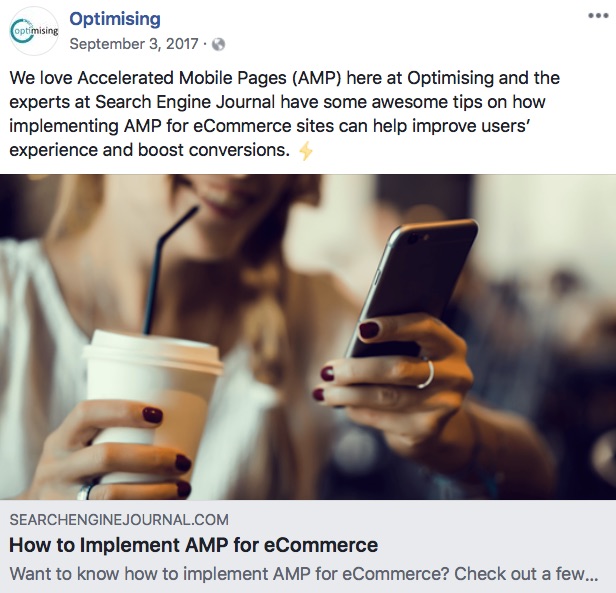
“We love Accelerated Mobile Pages (AMP) here at Optimising.”
The experts at Search Engine Journal have some awesome tips on how implementing AMP for eCommerce sites can help improve users’ experience and boost conversions.”
Overall, it looks like AMP is here to stay.
Here’s how you can get started creating your own AMP stories.
How to Get Started With Google AMP Stories
Now that you know what AMP stories are, how they work, why you should use them, and what people are saying about them, you can get down to business creating your own.
To get started, download the code.
1. Download the code
In order for Google to pick up on the AMP version of your articles, you have to modify the code of the article page.
The original article must have the following tag, which is an AMP canonical tag:
<link rel=”amphtml” href=”http://www.example.com/blog-post/amp/”>
If you want all of the AMP code you need all from one page, click over to the amp-wp GitHub page and select the “Download ZIP” button.
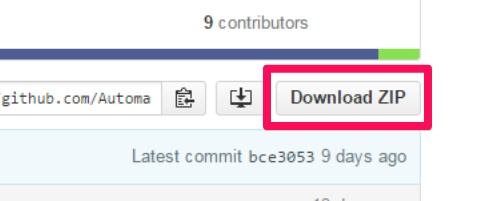
Then, install this code on your WordPress site just like any WordPress plugin.
Alternatively, you can also download the following code from AMP directly and save it to a file with a .html extension.
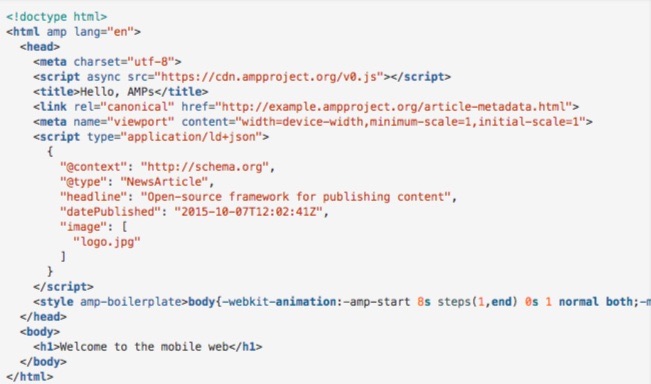
Once your code is downloaded and added, you can run the sample page.
2. Run the sample page
In order to test out your sample page, you’ll need to access your files from a server.
There are a few ways you can create a temporary local webserver to help you test it:
- “Web Server for Chrome” Google Chrome app
- Apache
- A local HTTP Python server
- Nginx
- AMP recommends that you use HTTPS, here, for added security.
After you set up a local web server, you can access your sample article by heading to this URL:
http://localhost:8000/article.html.
If everything looks good, go ahead and create the cover page.
3. Create the cover page
Your cover page is represented with the tag.
You can have more than one component within a story, which contains each of the individual screens for that story.
But the first page that you specify will act as the cover page.
To create a cover page, assign a unique ID for your cover to the first page:
<amp-story standalone>
<amp-story-page id=”cover”>
</amp-story-page>
</amp-story>
That code acts as a shell for your cover page. But you need to specify at least one layer to make it valid.

Layers in AMP work similarly to layers in graphics: they consist of different elements stacked on top of one another.
In the example above, layer one contains the image that serves as the cover photo, while layer two contains the title and byline of the story.
To create layer one, add the <amp-story-grid-layer> element to <amp-story-page>.
If you want the image to fill the screen, add the template=”fill” attribute to the amp-story-grid-layer tag.
Inside the layer, add the <amp-image> element for a cover.jpg file and make sure it’s responsive by adding the tag layout=”responsive”.
Here’s what the code for the first layer should look like when it’s all said and done:
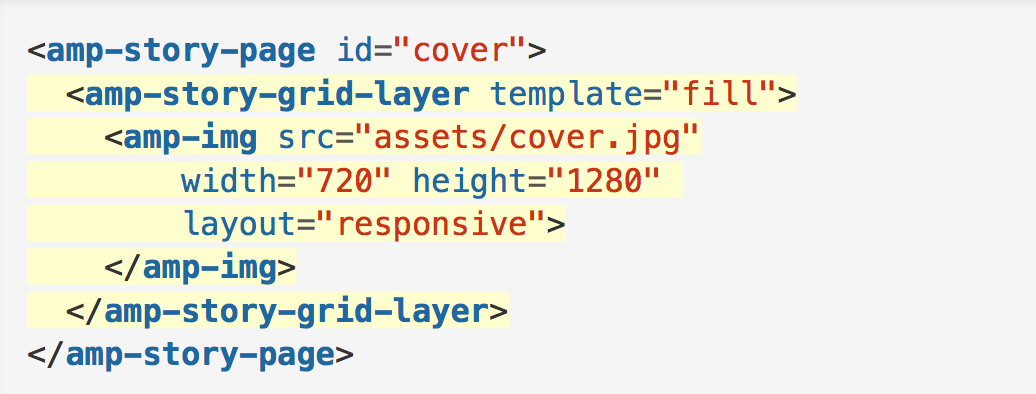
Check how the page displays before moving on.
To add a second layer, use the “vertical template” instead of the “fill template” found here.
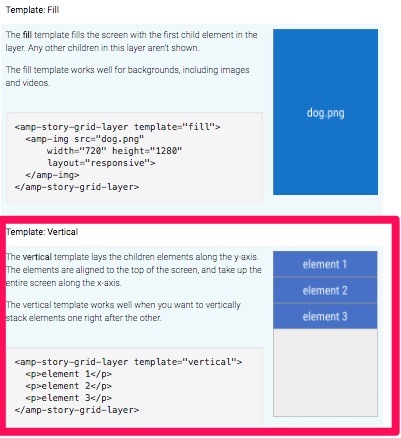
Once your cover page is complete, you can add more pages.
4. Add more pages
Adding more pages is similar to adding your sample page and cover page.
The code you use will depend on the template you choose.
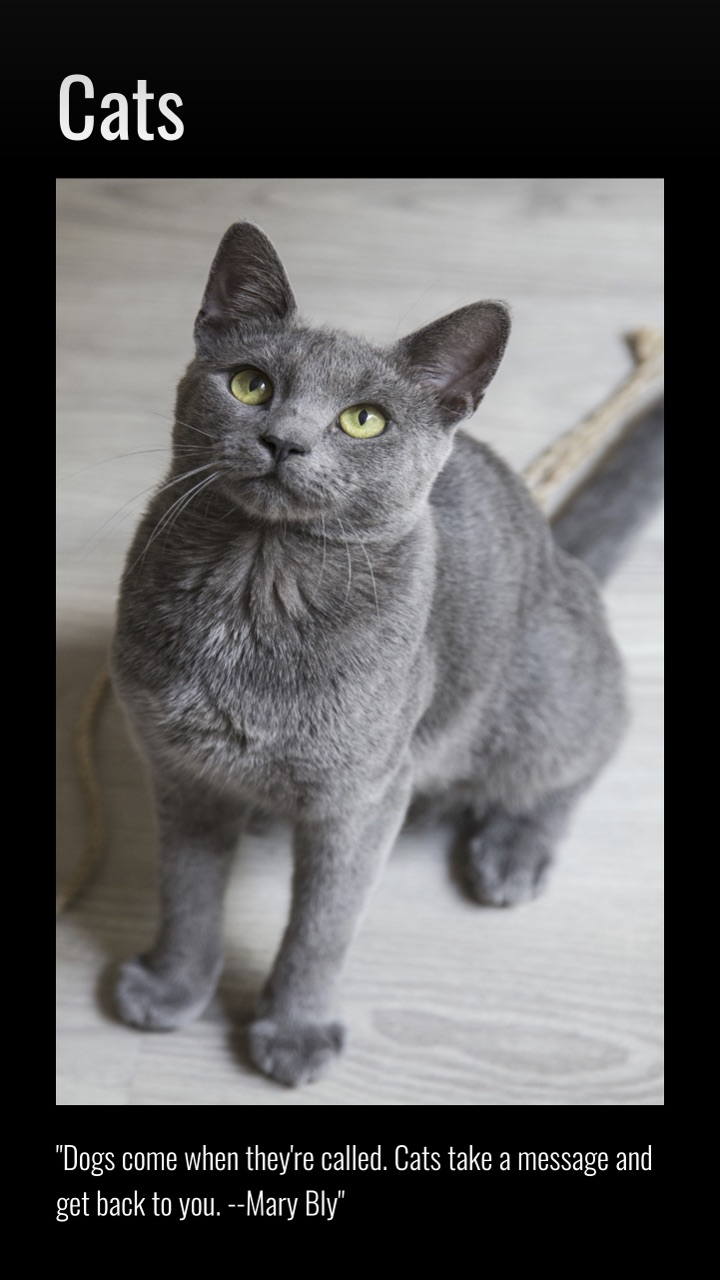
To add text to a layer with the vertical template, add something similar to the following elements:
An <h1> element containing the title
A responsive amp-img
A <q> element that contains all of your text
Your new page should come out looking something like this:
You can also add animating elements to enhance your story.
5. Add animating elements
If you want to take your story to the next level, you can make your title drop into a page, fade in, twirl in, and so on.
The AMP framework currently includes the following preset animating elements:

If you want to add an animation to an element, add animate-in=”animationpresetcodehere”.
For example, to use the pulse animation, your code might look like this:
<amp-story-page id=”page3″>
<amp-story-grid-layer template=”vertical”>
<p animate-in=”pulse”>Pulse this text into the page </p>
</amp-story-page>
Once you’ve added animating elements, you’re ready to create the bookend.
6. Create the bookend
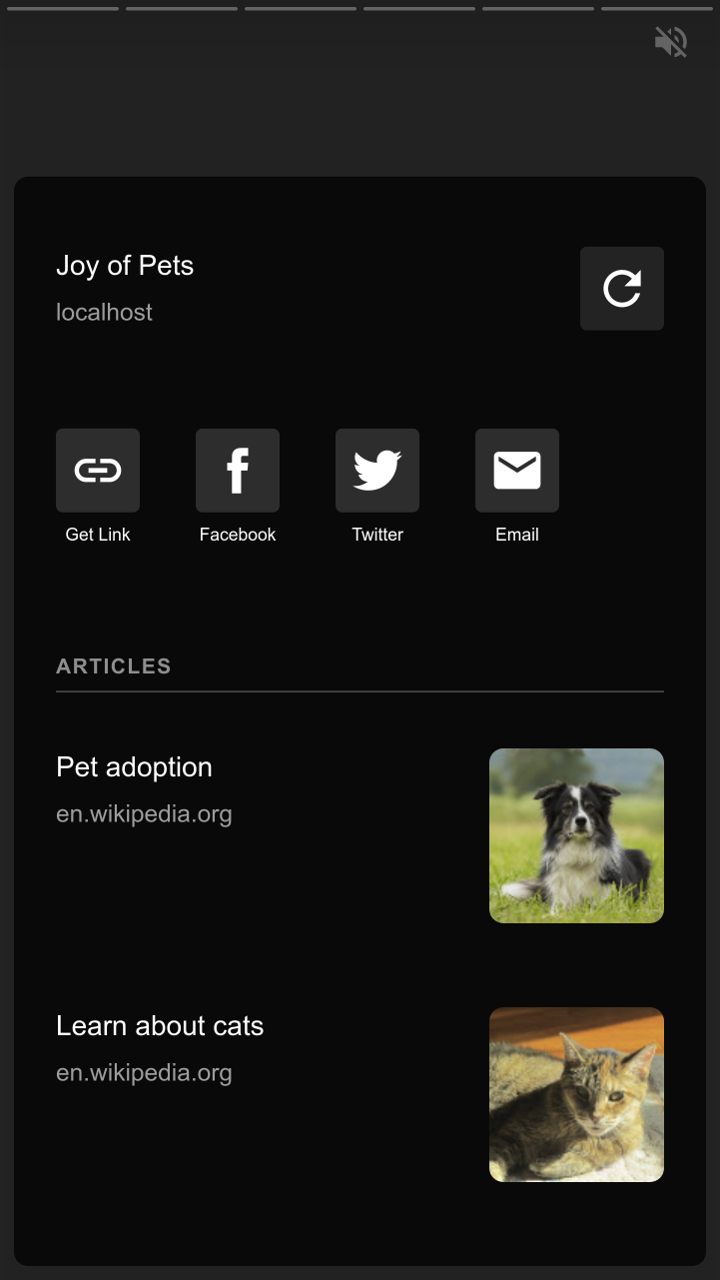
The “bookend” is the last screen that wraps up your story.
You can use it to add related links or social sharing links, too.
In your amp-story elements, add the bookend-config-src attribute. Then, point it toward the bookend.json file.
<amp-story standalone
bookend-config-src=”bookend.json”>
</amp-story>
Your bookend should look something like this when you’re finished:
Finally, you’re ready to validate your AMP HTML.
7. Validate your AMP HTML
There are a number of ways to validate your AMP pages.
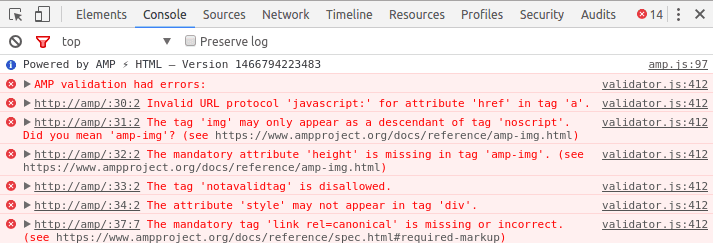
For example, you can use the Chrome DevTools console:
Open your page in a browser
Add “#development=1” to your URL
Open the Chrome DevTools console and check for any validation errors
You can also use the AMP Validator browser extension.
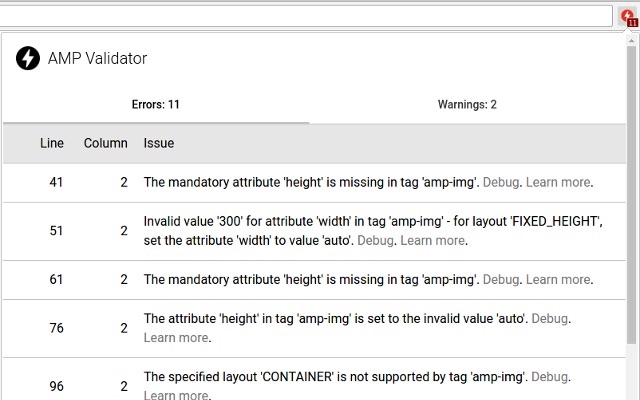
Both tools will show you any issues with your AMP code and describe ways to repair them.
Here are three quick tips to keep in mind when creating AMP stories.
3 Quick Tips
To make a great AMP story, you’ll need to add videos, text, pictures, or all of the above.
Here are some quick and easy ways to save yourself some time in the process.
For videos
It’s not uncommon to add a click-to-play overlay on videos across the web. You can use it to add a custom play icon that matches your page’s style along with the title of your video.

AMP stories don’t come with this feature automatically added.
However, you can easily add it with a tag like:
<div id=”myOverlay”
class=”click-to-play-overlay”>
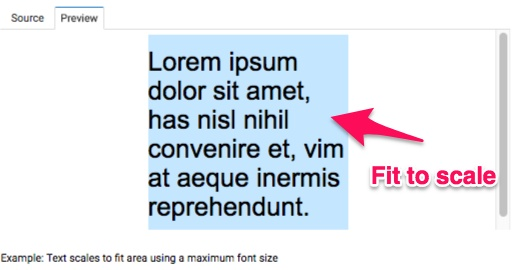
For text, you may want to manage the size or fit to make the certain text fit within a specified area.
For text
The amp-fit-text component lets you manage the size or fit of text within a specified area, which is perfect if you don’t want to play around with font sizes all day.
The component finds the best font size to fit content in the available space automatically, so you don’t have to.
Some HTML image tags can become problematic when it comes to AMP.
For pictures
Most HTML tags can be added directly in AMP HTML.
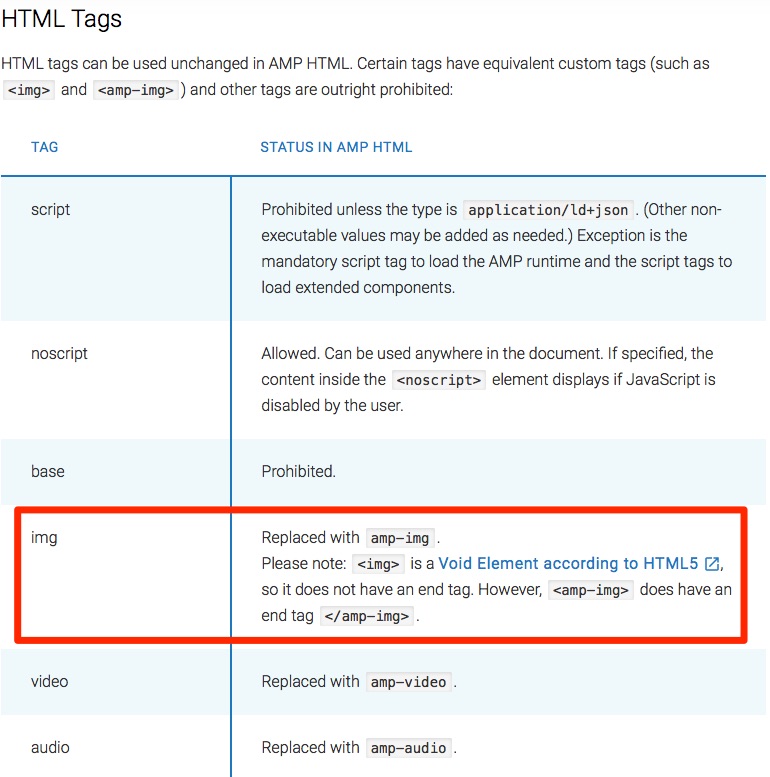
That being said, some tags (like the <img> tag) are sometimes replaced with enhanced AMP HTML tags. A few problematic HTML tags are banned completely.
Instead of the <img> tag, be sure to use <amp-img>, which has an end tag.
You can view the full list of AMP tag conversions here.
Conclusion
AMP was created by Google to put mobile first in search engine results pages and across the web.
AMP stories are similar to Instagram Stories, and tons of well-known companies are dominating the Internet with them. If you think you can ignore them, you’re wrong.
Billions of mobile pages are powered by AMPs. Those pages load twice as fast as before because JavaScript code isn’t allowed to slow them down.
There are plenty of reasons to use AMP stories. They can help improve your storytelling efforts, boost page speeds, improve your site’s creative design, and help SEO efforts.
There are three parts to an AMP story: the story, the page(s), and the layer(s).
Huge media sites like CNN are using AMPs to share breaking news, while other sites are using them to share their long-form or video content.
And the reactions to AMP are positive overall. Most people are calling it the next big thing of 2018. Publishers love it.
To get started creating AMP stories, download the code, run a sample page, create your cover page, add more pages and animating elements, create the bookend, and validate your HTML.
If any issues are uncovered when you validate your AMP code, fix them immediately.
To save some time, there are a few quick tips and tricks you can use when adding videos, text, and pictures to your stories.
Add a custom click-to-play overlay for videos, use the amp-fit-text component to automatically size your text, and never try to use <img> tags. Instead, use <amp-img>.
Now, go forward and put mobile users first on your site, too.
Which piece of content are you going to turn into an AMP story first?
About the Author: Neil Patel is the cofounder of Neil Patel Digital.
Source: feedproxy.google.com