
Tag Archives for " startups "

6 Steps to Launch Your First LinkedIn Ads Campaign
If you have a job, you should be on LinkedIn.
If you own a business, you should also be on LinkedIn.
But especially if you provide any sort of B2B product or service, you have to be on LinkedIn.
You can go ahead and set up your new profile now before we get to the rest of the post, I’ll wait.
Those of you who are still dragging your feet, let me convince you.

With over 560 million users, including professionals in every industry you can think of, it’s the biggest source of potential new business leads available in the world.
And with LinkedIn ads, you have the ability to reach your ideal prospects through powerful targeting that allows you to customize your campaigns based on specific industries, locations, job titles, and more.
The only problem is, a lot of people seem to be confused by LinkedIn ads.
This is a different animal than Facebook, so the ad platform might seem a little unfamiliar if you’ve never used it before.
But don’t worry, y’all. I got you.
6 Steps to Launch Your First
In this post I’m going to walk you through the 6 most important steps to successfully launch your first LinkedIn ad—so you can start targeting and attracting your ideal prospects on a bigger scale than ever before.
Launch a LinkedIn Ads Campaign Step 1: Make Your Profiles Shine
So you’re going to advertise on LinkedIn? Great!
But don’t start working on your ad copy just yet.
Step #1 of launching a successful LinkedIn ad campaign is to optimize your profiles.
We have a few things to take care of first to make sure your new campaign is set up for success.
You know that account you just set up (or maybe you’ve had it a while and it just needs some love)?
You are going to have to put some work into it.
This is really important, y’all.
Remember that people do business with people.
And this is especially true on LinkedIn, where it’s super easy for anyone to check out your profile and see what you’re all about.
That’s why step #1 of launching a successful LinkedIn ad campaign is to optimize your profiles and portray yourself as the kind of person that your prospects will want to do business with.
And there are 3 pieces to doing this right:
1) Optimize Your Personal LinkedIn Profile
I recently wrote a post that goes into this topic in-depth, so rather than rehash everything again, just click here to learn how to create an all-star LinkedIn profile.

2) Create Your Company Profile
Once your personal profile is set up for success, the next thing steps are to create a great-looking company page.
If you don’t have a company page yet, you can easily create one in just 2 clicks:
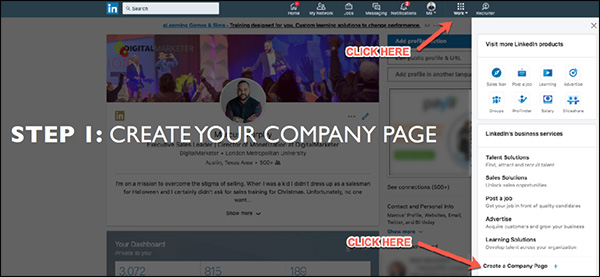
Then specify your company name and LinkedIn URL:
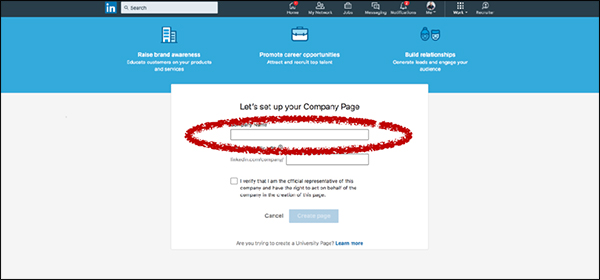
Now your company page is created on LinkedIn! Of course, you still have to complete your profile by filling out all the information, adding copy, uploading media, and so on.
The 3 things that you’ll want to add right away are your cover image, your logo, and your “About Us” summary. Here’s where you can find them:
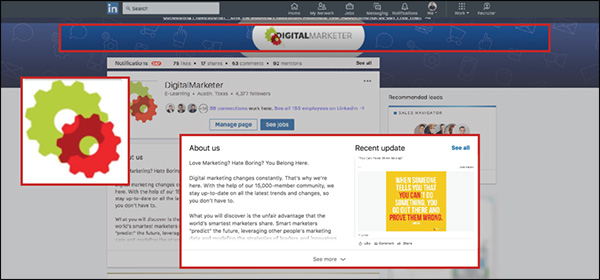
Make sure your header and profile picture are branded (a lot of companies just use their logo for the profile picture). This way when people land on your company page they’ll know right away who you are and that they’re in the right place.
In your “About Us” summary, make sure you’re speaking to your audience.
Let them know right away that what you offer is directly relevant to them, and that you offer an effective way to solve their problem.
Another thing to keep in mind here is search optimization.
LinkedIn is really good at SEO, so if you fill out your company page well, it has the potential to show up in relevant Google results.
Here are a few things to keep in mind when optimizing your company page for search:
- Google previews 156 characters.
So make sure the first 2 sentences or so of your “About Us” section do a really good job of communicating who you are, what you do, and how you can help people.
- Lead with a story.
I’m a big fan of using narrative-style copy that tells a story.
Paint a picture with your words that tell people what you do and how you can help them in a clear and compelling way.
- Members can search by keywords.
Remember that LinkedIn has its own internal search function, too—so definitely remember to include any relevant keywords that you want to show up for.
- Communicate expertise and industry focus.
Don’t try to be all things to all people.
Generalists don’t typically win on LinkedIn. Instead, tell people what industry you focus on and what you’re GREAT at.
3) Get Your Team On Board
The last step here is to get your team on board.
Because after all, everyone at your company makes up your brand.
And any potential leads or business partners who interact with you on LinkedIn are going to be able to see your employees if they want to:
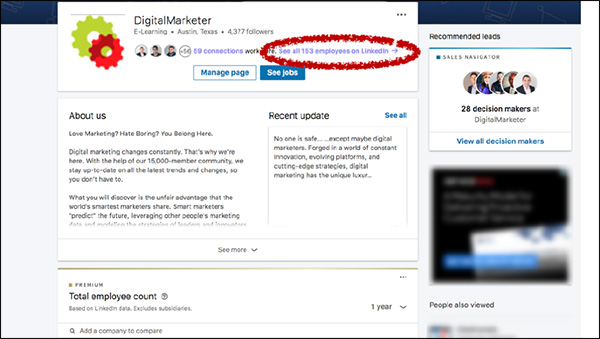
So get your team on board.
Have everyone connect with your company page, and ask them to go through the same profile optimization tips that you completed for your own personal profile.
Launch a LinkedIn Ads Campaign Step 2: Promote Great Content
OK, so now you’ve got an all-star personal profile as well as an awesome company page that stands out and speaks to your ideal prospect.
Is it time to start creating ads yet?
Nope.
I know you’re antsy, but trust me y’all—there’s a method to my madness here.
And there’s a really important reason why we’re going through all these steps before we create your actual campaign.
It takes a little more time up-front, but I promise you it will be worth it in the end.
So with that in mind, the next thing you’ll need to do is to promote great content on LinkedIn.
(RELATED: 3 Simple Steps to Creating A “Pillar Blog Post” That Generates Organic Traffic for Years to Come)
LinkedIn is hugely underrated as a content platform.
And now that they’ve launched native video, giving a massive engagement boost to your video content, it’s going to be even better.
LinkedIn is hugely underrated as a content platform.
There are about 9 billion content impressions every week on LinkedIn, which is an enormous number.
And what’s even crazier is that those 9 billion impressions are being driven by just 3 million people.
This means there’s a lot less competition here than other platforms like Facebook.
That’s why, as long as you post good content and follow a few best practices, you stand a really good chance of generating great engagement with your content on LinkedIn.
Here are my top 5 tips to help you do that:
1) Share Daily
I recommend sharing content daily.
Yes, you heard right—every single workday you should post some kind of content on LinkedIn.
That could include a huge variety of content.
Company news and updates, blog posts, industry articles, and more.
If you’re a thought leader, or if you want to be, this is a great place to promote your thought leadership.
Share articles from your industry and weigh in on what the author has to say.
(Even if you’re not the one actually writing these articles, simply the fact that you’re reading and sharing them will start to position you as a leader in your industry.)
It’s also a great idea to prompt your followers to weigh in.
Ask for thoughts, opinions, and questions.
This is a great way to keep your finger on the pulse of your audience so you can quickly respond to their changing needs and problems.
2) Optimize Your Copy
For any piece of content, the words you use are important.
The difference between good copy and bad copy often means the difference between an article people want to click on… and one they scroll past without a second glance.
But this doesn’t mean you have to agonize over every single word in your article.
Instead, you can just focus on the few places in your content where the copy is most important.
Here are a few tips for improving your content:
Keep your intro concise.
Don’t spend too long introducing your topic.
Just write a quick intro and get to the meat of your content ASAP.
Write a snappy headline.
What is a snappy headline?
Simple: it’s one that STANDS OUT IN THE NEWSFEED.
That’s your #1 goal, so keep it in mind when you write your headlines.
Ask thoughtful questions.
Many of us are so busy telling people about ourselves—what WE do, why WE are so great—that we forget to ask questions about what THEY want.
Doing this can be really powerful, and is a great way to put the focus of your content back where it belongs—on the customer.
Write a clear call to action with a link.
At the end of your content, what should people do next?
Don’t force people to hunt around for a “Contact” page if they want to do business with you. Instead, take the next step super clear by writing a compelling call to action with a link for people to click.
3) Make It Visually Appealing
After the copy, the next thing you’ll want to work on is your content’s visual appearance.
This can make a HUGE difference in your performance.
Just take a look at these pieces of content—see how these bright images really stand out?
They get much more engagement than they would without any images or video:
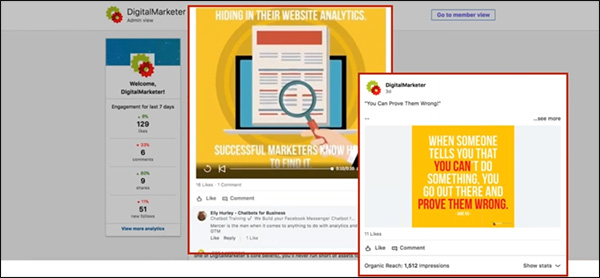
So the take-home message here is pretty simple. Use media—images, and videos—to help your content stand out in the newsfeed and grab people’s attention.
4) Be Helpful, Not Salesy
Ultimately, your goal is to generate sales. I get that.
But don’t get ahead of yourself.
When posting content, now is not the time to get salesy.
Instead, you should be using content to help generate engagement, build goodwill and trust, and position yourself as an authority in your industry.
With that in mind, you should post content that is NOT overly promotional.
Instead, make sure that your content has a benefit to your audience—it helps them solve a problem, or answer a question.
5) Use Tags
If you want to give your organic content a boost, tag companies and/or people who would find that content useful.
This will help generate some quick likes and comments right out of the gate—which will signal to the LinkedIn algorithm that this is an engaging piece of content that it should share with a wider audience.
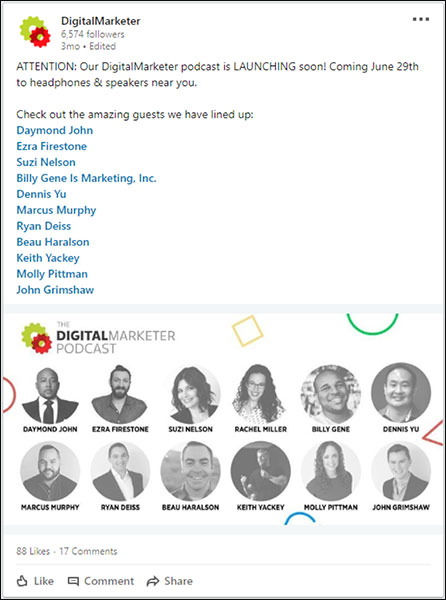
We used this strategy when we announced the new DigitalMarketer Podcast by tagging some of our upcoming guests.
The post performed really well as a result:
Launch a LinkedIn Ads Campaign Step 3: Analyze the Data
Now that you’ve been posting content on a regular basis, it’s time to analyze the data around that content to see how well it’s been performing.
In your business page Engagement highlights, you can see how well each piece of content performed in terms of impressions, clicks, video views, followers acquired, and more.
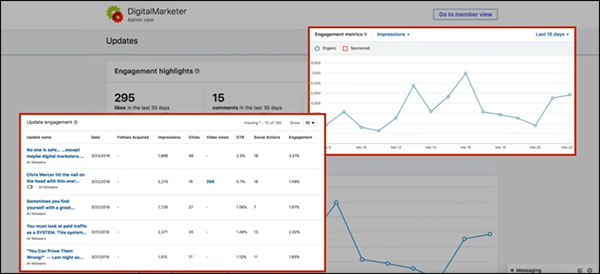
So take some time to dig into these reports.
Your goal at this step is to find out 2 main things:
First, WHO is engaging with your content?
Are you reaching the right kind of people?
If not, go back and tweak your headlines to see if you can appeal to a more appropriate audience.
If you are reaching the right people, the next thing you want to find out is:
WHAT kind of content are they engaging with the most?
Are there certain topics that appeal to your audience?
Certain formats (blogs, podcasts, videos)?
This is a really important step because you can learn so much about your audience, like what issues are important to them and what kind of content they’re most likely to engage with on LinkedIn.
And armed with that knowledge, the moment you have all been waiting for: it’s time to finally create your first LinkedIn ads campaign.
(NOTE: Want to make sure you are capturing all the leads you can? Download the FREE 10-Point LinkedIn Audit so you know your LinkedIn Profile is honed to boost your business.)

Launch a LinkedIn Ads Campaign Step 4: Target & Sponsor Content
LinkedIn offers 3 primary ad types:
- Sponsored content
- Sponsored InMails
- Text and dynamic ads

When you’re first getting started, I recommend using sponsored content.
Sponsored content is a great way to get your feet wet with LinkedIn ads.
Sponsored content is a great way to get your feet wet with LinkedIn ads because, for one thing, you don’t need a huge budget to reach a wide audience.
InMails and display ads are great, but it’s typically a lot more expensive to reach a wide audience with those ad types.
Boosted content, on the other hand, is more cost-effective… especially if you boost content that gets good organic engagement.
And this should be music to your ears because you’ve already posted and analyzed organic content, which means you should already have a really good idea of what kind of content is going to resonate best with your audience.
In other words, all you have to do at this stage is amplify your best-performing content!
Another great thing about sponsored content is how easy it is to get started. Just open the post from your business page and click “Sponsor now”:
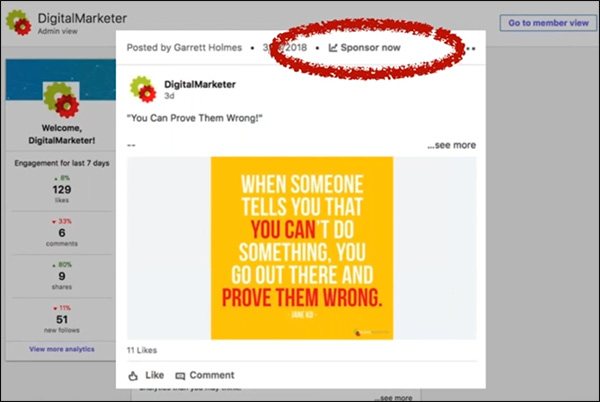
That will take you into the Campaign Manager, where you can create your new campaign.
And there are 5 main steps to doing this:
1) Create Your Campaign
In the Campaign Manager, click “Create campaign”:
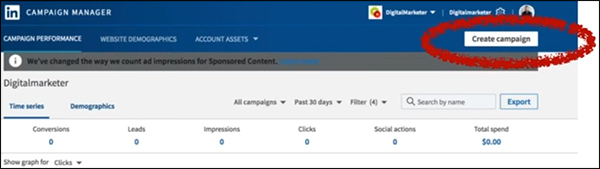
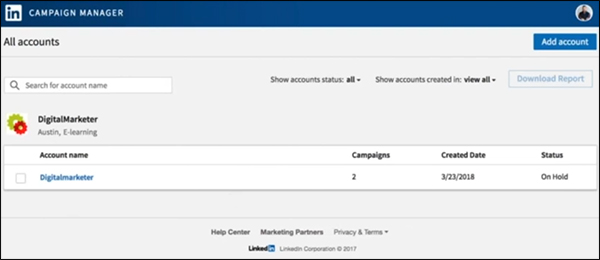
Next, you’ll choose which account to use for this campaign.
Each account is tied to a different company page, so in most cases, you’ll probably only have one to choose from.
Then specify a campaign name and choose a goal—do you want to send people to your website or collect leads using Lead Gen Forms?
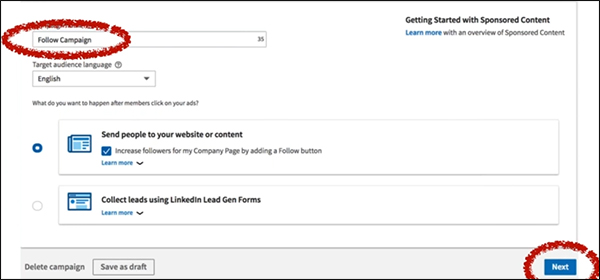
For your first campaign, I recommend just sending people to your website.
Once you click “Next,” you’ll see a list of all the content you’ve shared from your company page.
Find the content you want to sponsor and click the checkbox on the left.
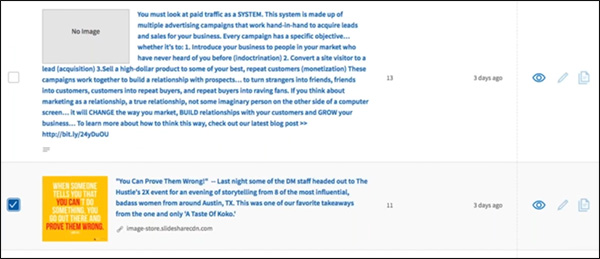
As I said, in general, you’ll get the best results if you boost content that has already performed well organically.
2) Set Your Targeting
Here’s where you’ll start to see why LinkedIn has so much potential as a B2B advertising platform.
The targeting options are amazing.
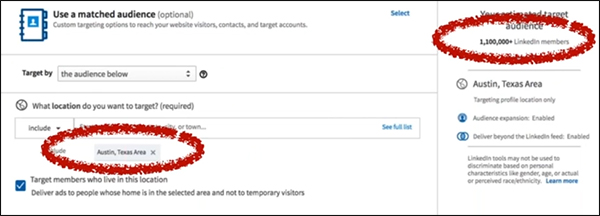
Your first option is to filter by geography. Just type in your area, and LinkedIn will tell you how many people you can reach in that area.
For example, there are over 1.1 million LinkedIn members in the Austin, TX area:
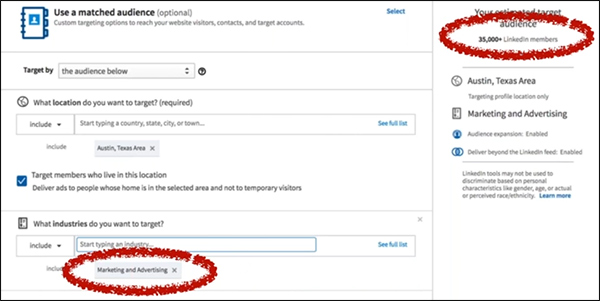
Next, you can specify which industries you want to target.
Here at DigitalMarketer, we help people who are in marketing and advertising, so I chose that industry.
As a result, my estimated target audience narrowed to 35,000:
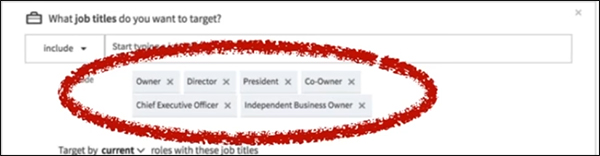
Finally, you can focus your targeting even more by targeting people based on their job titles.
So if you only want to reach decision-makers on LinkedIn, you might target titles like “Owner,” “Director,” “President,” and “Chief Executive Officer”:
When I add those job titles, my audience shrinks down to 5,000:
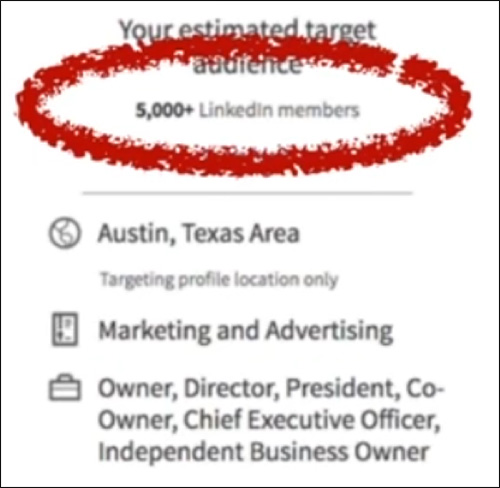
It might seem like a small audience compared to the 1.1 million we started with, but keep in mind, these are 5,000 business owners and executives in the marketing/advertising industry in the Austin area.
These are people who meet the exact specifications of my target audience.
Considering how tightly targeted this is, it’s actually a big audience with HUGE potential.
3) Decide on Your Campaign Goal
Next, you’ll need to choose a campaign goal.
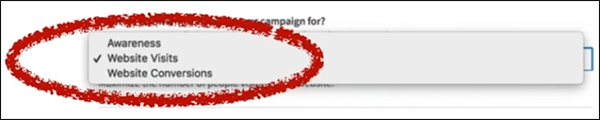
Do you want to optimize this campaign for awareness (views), visits, or conversions?
When boosting your first piece of content, I recommend Website Visits.
You really want to get people to your website where they can learn more about you. (And if you want, you can also continue to follow those people on other platforms with remarketing.)
4) Set Your Budget & Bidding Options
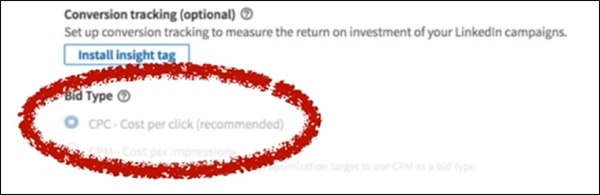
Next, you’ll have to decide between 2 different pricing models: CPC (cost per click) or CPM (cost per mille, or cost per thousand impressions).
The choice is up to you, although LinkedIn recommends CPC bidding if your campaign goal is website visits.
And now you’re almost done! Just decide on a budget, a bid limit, and your campaign dates:
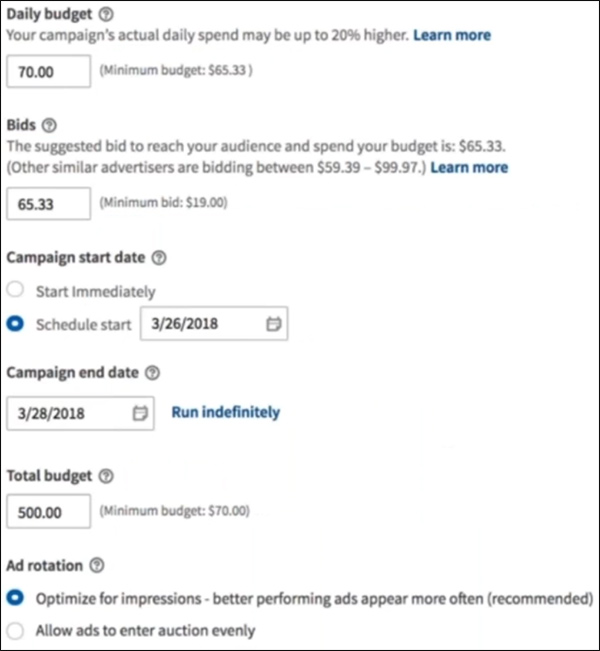
So you can specify a lot here.
Your Daily budget is how much money you’re willing to spend each day on average. (LinkedIn may spend a little more or less on any given day, but it will average out to equal your daily budget.)
Your Bid is how much you’re willing to pay per click.
LinkedIn will tell you about how much other people are bidding to reach a similar audience, so you should probably choose a bid that’s somewhere within that range.
Your Campaign start date is when your ads will begin displaying.
Pretty self-explanatory.
And your Campaign end date is exactly what it sounds like.
If you want your ads to continue showing, just click Run indefinitely.
If you want to specify a Total budget, that will give LinkedIn a total budget that it won’t exceed.
If you don’t specify a total budget, it will continue spending the daily budget for the length of the campaign (which might be more than what’s in your account)
Finally, Ad rotation tells LinkedIn how to decide which ads to display.
You can tell it to show your ads evenly or to display the better-performing ads more often. (Which is probably the way you want to go.)
5) Enter Your Payment Information
You’re almost done! The final step is to enter your credit card details.
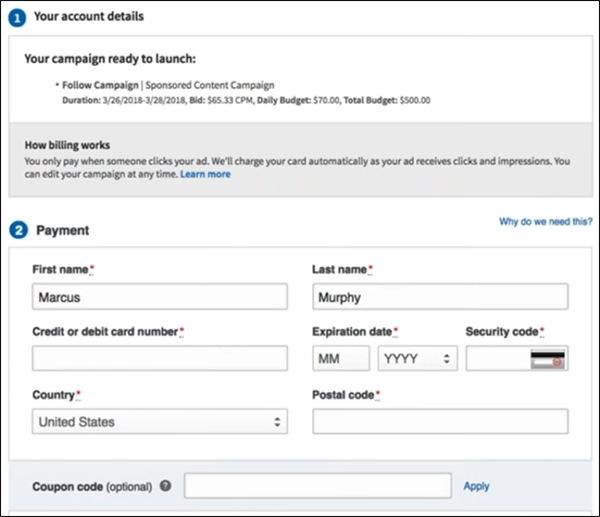
Congratulations—you’ve just created and launched your very first LinkedIn ad campaign!
Launch a LinkedIn Ads Campaign Step 5: Optimize Your Campaigns
If you’ve followed along with steps 1–4, you now have a LinkedIn ads campaign up and running.
But like any advertising campaign, your work isn’t done. You’ll need to monitor your LinkedIn ads to see how they perform, then work to improve that performance over time.
And I want to challenge you to think deeply about how you measure your results on LinkedIn.
Of course, you need to pay attention to your cost per click and/or cost per impression—because that’s how you’re actually bidding on the LinkedIn platform.
But here at DigitalMarketer, we’ve evolved beyond those standard metrics and we now measure our LinkedIn campaigns based on our cost per meeting.
When you down to it, this is a much more useful metric for our business.
And it’s a pretty easy number to come up with a quick benchmark for.
Just think about how much a new client is worth to your business, and work backward.
If a new client is worth $10,000 on average…
And if you convert 1 out of every 10 meetings to a client…
Then a meeting is worth about $1,000.
Make sense?
Knowing that you can now optimize your campaigns to generate new meetings at or below that threshold and still be profitable with your LinkedIn campaigns.
Launch a LinkedIn Ads Campaign Step 6: Tips & Best Practices
Now that you know how to create and optimize a campaign on LinkedIn, I want to share some of the most helpful tips that I’ve learned from my experience advertising on this platform.

Higher Ticket B2B Wins
LinkedIn is a perfect place to reach professionals, which means it’s ideal for B2B offers.
And because of the high costs for quality B2B traffic, high-ticket offers tend to work best on LinkedIn.
If you’re using LinkedIn to promote a B2C offer, that’s going to be tough.
Because the costs are just too high to justify most consumer purchases.
But if you’ve got a B2B product or service with a high price tag—think business coaching, exclusive communities, masterminds, etc.—then you can do really well on this platform.
Do’s & Don’ts for Sponsored InMail
In this article, I focused mainly on boosted content.
But LinkedIn has other ad types as well—including display ads and something called Sponsored InMail.
So what is Sponsored InMail?
LinkedIn is a perfect place to reach professionals, which means it’s ideal for B2B offers.
This ad type sits on top of LinkedIn’s messenger platform and allows you to deliver real-time targeted messages.
InMail also allows you to use conversion tracking for attribution, which is important because Sponsored InMails don’t send out all at once (like an email blast).
Instead, your sends will trickle out over time to avoid feeling spammy.
It’s really important to set up conversion tracking so you can measure the success of your campaign.
Generally speaking, the open rate for these messages is really high—20% or higher.
And when done right, a Sponsored InMail campaign can perform really well.
Here are my main dos and don’ts for using Sponsored InMail in LinkedIn:
- DO narrow the scope.
Use your customer data for targeting.
Just like any campaign, the more tightly targeted your campaign is, the better your response rate will be.
- DON’T be formal.
Be conversational, and people will be more likely to read and engage with your message.
- DO include a clear call to action.
Ask people to “Try” your solution, “Register” for your webinar, “Reserve” a copy of your product, “Join” your community, “Confirm” whether they meet your specifications, or “Download” a whitepaper or other online resource.
- DON’T have just anyone send the message.
You can choose who to use as your “From” profile, so choose someone high up in your organization whose message would carry the most weight and credibility with your target audience. A
nd make sure that person has a dynamite LinkedIn profile because anyone interested in your message will almost certainly check out the sender’s profile.
- DO plan for mobile.
Remember that a lot of people will see this message on mobile, so keep it to about 1,000 characters to avoid overwhelming people with too much text.
And that’s all there is to it!
When you launch your Sponsored InMail campaign, your prospects will get a message like this inside LinkedIn Messenger:
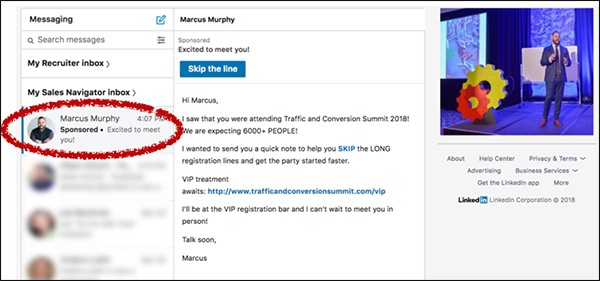
(Notice that you can also upload an image for your message, too, which will appear on the right-hand side of your message.)
Prepare for the Future of LinkedIn
LinkedIn is already a powerful platform for B2B marketers, and it’s still growing and evolving rapidly.
I believe that over the coming months and years you’ll be able to leverage even more powerful strategies on LinkedIn.
Here are a few things to keep your eyes peeled for:
- Live video.
It’s coming to LinkedIn, and it will help you connect with your audience to build more authority and generate more engagement.
Videos work, and live video works better. Watch for it and use it.
- Sales Navigator.
This tool (which is already amazing) is getting better all the time and is moving more and more toward becoming a full-fledged CRM for B2B companies.
I highly recommend using Sales Navigator.
- Education.
I think education is going to be big on LinkedIn.
So if you offer any sort of professional development services, you really need to start getting active and building a presence on LinkedIn—because this is going to be a really profitable network for you.
There it is, y’all: everything you need to know to set up your first successful LinkedIn ads campaign.
I hope this has been helpful, but as always, the best way to learn these things is by DOING them.
So go get onto LinkedIn and start going through these 6 steps to starting growing your business with LinkedIn ads.
(NOTE: Want to make sure you are capturing all the leads you can? Download the FREE 10-Point LinkedIn Audit so you know your LinkedIn Profile is honed to boost your business.)
The post 6 Steps to Launch Your First LinkedIn Ads Campaign appeared first on DigitalMarketer.
Source: digitalmarketer.com

Case Study: How a Blogger Became a Startup Founder
When Cas McCullough’s son asked for help with a letter-writing project, she had no idea it would change the course of her career. Here’s how she went from being a blogger to becoming a startup founder and CEO.
“I’m a content strategist and writer by trade. And as content marketing became more and more of a must-have, I started getting a lot of inquiries from business owners and marketers who were frustrated with how to create great content. They found it frustrating and time-consuming,” Cas says.
“When my son asked for help with writing a letter, I went looking for information on how to structure them. And it dawned on me that blog posts could be structured in much the same way. That’s basically how Writally was born.”
Writally is a content creation tool that helps people write original content when they don’t feel confident about writing for regular people, or their content lacks engagement.
Imagine a chiropractor who wants to attract patients to their clinic, or a researcher who wants to raise their profile to attract funding.
“Just as Canva gives you different layouts and images to work with, Writally gives you different story prompts to work with. Each Content Recipe combines these prompts in different ways and each is tweaked for style, tone and voice,” Cas says.
Here are Cas’s biggest tips for anyone contemplating a startup, based on what she’s learned so far.
Don’t confuse startup and blog monetization
A startup is a business you plan to scale fast. It’s not a blog monetization strategy in the same way a book or a retail line is.
A startup is time-consuming and requires a high level of commitment and the willingness to see it through for at least five to ten years.

It means planning to hire staff, learning about finance options, attending events in the startup ecosystem, and applying for numerous grants.
There’s a lot of money being thrown at startups.
But it’s not something to take on lightly. When I pondered taking the funding deal I was initially offered, I sat down with my kids and discussed it at length.
I made sure they understood what kind of commitment it was going to be.
Solve a big problem
One of the best pieces of advice I was given was to solve a big problem. A headache is one thing, a migraine is another. You’re more likely to make money by providing a solution to a migraine.
One way to test whether your problem is big enough is to pre-sell your idea through a landing page. If enough people sign up and pay money then you know you’re a winner.
After initially pitching my idea in a startup competition in early 2015, I decided to offer my idea as a service so I could validate it further.
I started testing the idea with members of a small business forum. Within a week, I had to pay customers.
I highly recommend reading Dan Norris’s classic book The 7 Day Startup for some inspiration on idea validation.
Dan was one of the first people I talked to about Writally, and his feedback and his book were invaluable.
Get to know the lingo
When I first began my startup journey, I thought MVP stood for Most Valuable Player. It turns out it meant Minimum Viable Product. An MVP is the first version of your product.

I’ve had to learn terms such as ‘convertible notes’, ‘agile’, ‘full-stack’, ‘product-market fit’, and more.
It really helps to understand the language when you’re networking with other founders, potential co-founders, accelerators, and investors. You don’t feel quite as lost in the fast-paced startup world.
Apply for accelerator programs
My idea was originally funded when I won the Suncorp Small Business Challenges Competition held by the Chamber of Commerce & Industry Queensland, startup accelerator Bluechilli, Microsoft, and Suncorp Bank.
Entering a competition like that is a great way to learn how to validate your ideas and how to put a pitch together.
Having the support of an accelerator has made a massive difference in my journey. I’ve been thoroughly trained in how to raise capital, pitch, grow hack, hire the right staff and manage board meetings.

And I’ve had access to company and investor introductions through Bluechilli’s amazing network. I still work with them as we take our next steps.
There are many opportunities to join accelerator programs in Australia, particularly if you live in a regional area or have a product that serves regional areas and primary industries.
But keep in mind that accelerators and early investors will want to take a bigger cut of your company to start off with. Ten to 20 percent is typical for early equity providers with some funding thrown in.
Be prepared to fail
While nobody enters a startup thinking they’re going to fail, in 75% of cases they do. Your first product offering (MVP) may not work, so it helps to approach your product development like a science experiment.
Many startups in accelerator programs apply what’s called ‘lean methodology’ (created by Eric Reis, author of The Lean Startup) where you test and measure whether or not a hypothesis is true.

Our MVP launch went well, and we’ve had more than 1150 users sign up to the platform so far. But we weren’t achieving the daily usage we wanted, so we had to go back to the drawing board.
We’ve had great feedback on the end product and the Content Recipes, but the process is what seemed to be getting in the way.
We’re currently experimenting with a few different ideas to work out how we can achieve product-market fit (the term that describes your product flying out the door).
In some cases, you may drop your initial idea altogether. It’s important to have good advisors so you make the right call for your situation.
Be prepared for rejection
Startups look for funding so they can accelerate growth. Investors look for opportunities that will bring them a tenfold investment within five to ten years.
Most investors want you to exit within that timeframe, too. Usually, that would be a bigger company buying you out.

If investors don’t feel confident they’ll get that kind of a return from your startup, they’ll look for other companies to fund. In essence, finding funding for your startup is a lot like dating.
Being turned down by potential investors or grant bodies is always hard, but you can’t take it personally. Each rejection is an opportunity to ask questions and seek feedback.
The biggest lesson for me has been to stand for the difference my product makes no matter what, and look for investors that get the content marketing industry.
I’m looking for a lead investor (a $100K to $200K investor who’ll be a board member of my company) for my current seed round.
Understand how being a founder will affect your family
Some days, being a parent can be a challenge in the face of board meetings, events and investor pitches. When I first started Writally I was homeschooling my boys.
Now they’re in school. I just couldn’t manage both, and they were keen to start school, so it worked a lot better that way.

Being a founder can put pressure on relationships as well. It’s often difficult for non-entrepreneurial partners to understand how the startup life works (or doesn’t work).
Founders typically don’t earn a wage for up to three years, spend a lot of time away from home attending events and meetings, and work late into the night.
Communicating with your family is essential to make that work for everyone. You definitely have to be judicious and responsible with your time and your money.
Get to know the startup ecosystem
In Brisbane, there are regular events in the startup ecosystem. It’s worth joining a startup co-working space just to start your networking.
You never know who might introduce you to a new enterprise client or investor. It’s also an opportunity for you to give back to others who have just started out.


A great way to give back is to participate in Startup Weekend. These events are a lot of fun, and a great way to test new ideas.
I’ve had some amazing opportunities by being active in the startup scene. In November 2016 I visited Facebook, and it wasn’t just the typical tour.
It was a real behind-the-scenes tour with a Facebook engineer. We saw a meeting taking place with head people including Sheryl Sandberg. We were told not to take photos or even touch our cameras, so you’ll just have to take my word for it.
A few weeks ago I had the opportunity to pitch Writally to investors and dignitaries at the Commonwealth Games.
Then shortly after that, I returned to San Francisco to join high-profile investors, startup founders, and dignitaries on #MyriadAir, a Qantas jet chartered by the Myriad Innovation Festival.
I pitched Shark Tank’s Steve Baxter on the plane and was interviewed by the Brisbane Times. I met many amazing founders on that trip and got to know some key people in the ecosystem.
Buckle up for the rollercoaster ride

Startup life is a rollercoaster ride. One week everything is going well, and the next everything’s falling apart – or at least feels like it. But it’s exciting, and I wouldn’t want to be doing anything else.
I’ve met some incredible people, including seven-time TED Presenter Jonathan Trent on #Myriadair, and Canva Ambassador and former Apple Evangelist Guy Kawasaki at the Angel Hack Global Demo Day a couple of years ago.
The personal growth I’ve experienced has blown my mind. I used to lack confidence, but now I’m very clear on what my strengths are and how I can contribute to others.
My journey is far from over, and there will be more challenges, but creating something that has a massive impact on how people express themselves makes it totally worth it.
For more information about Writally, email Cas at ‘cas at writally.com’ or visit https://writally.com
The post Case Study: How a Blogger Became a Startup Founder appeared first on ProBlogger.


Source: feeds.feedblitz.com