
Tag Archives for " Social Media Strategy "

5 Essential Tips to Help Improve Your Social Media Strategy
Organic social media is dead…
Okay, not really. But, it sure as hell is not what it used to be.
Just a few years back, Facebook was essentially an all-you-can-eat buffet of free traffic.
Even those with a small audience and zero strategies could drive a considerable number of clicks back to their site with ease.
Fast forward to today and you’re stuck with the reality that every time you publish a post on Facebook it only reaches about 3% of your audience, possibly even less.
Pair that with Facebook’s relentless attempt to keep users on their platform (not your website), and you’re left saying, “what’s even the point?”
Fear not, I have good news! You can still pay to play. Yes, that’s right… I’m talking about Facebook Ads.

(RELATED: 14 Tips to Help You Write Successful Facebook Ads)
A healthy combination of paid and organic posts—paired with a consistent posting schedule, a healthy content mix, and a bit of data analysis—is the key to a successful modern-day social media strategy that grows your audience and drives people back to your site.
Before you start pouring money into your social media advertisements you need to know what types of content perform well organically.
With that in mind, here are 5 things that you can add to your social media strategy that will help inform what types of content perform the best, giving you a clear picture of what types of content will translate into high-performing social media ads.
5 Essential Tips to Help Improve Your Social Media Strategy
#1: Optimize Your Content Mix
When I talk about a “content mix,” I’m referring to what proportion of your content should come in one form or another.
When you’re first getting started, just do something.
I like to think about the different content types in really simple terms.
When you share something on social media (particularly Facebook), it’s usually one of these 4 content types:
- Photos
- Videos
- Links
- Curated Competitor Content
You may see ratios online about the optimal content mix. But everyone seems to have a different idea of what works best.
And the truth is that none of these prescribed content mixes are ever going to be perfect for you because your brand is unique.
No other company in the world has the same size following, the same brand recognition, or the same target audience as you.
And that’s why the ideal content mix for your company is also going to be unique.
So how do I recommend figuring out what that content mix should be?
For starters, use those 4 categories listed above when determining your content mix, and keep track of how many photos, videos, and links you share on social media.
Then follow this process to optimize and improve that content mix over time:
1) Establish a Baseline
When you’re first getting started, just do something.
Maybe you decide to start by sharing 3 links, 1 piece of competitor content, 2 photos, and a video every day.
So do that for a while.
What you’re doing here is establishing a baseline—something you can use to compare your results against in the future.
2) Analyze
After a few weeks, step back and analyze how successful your social distribution has been so far.
What’s worked, and what hasn’t?
Have you succeeded as much as you wanted to?
If not, what can you change to improve things going forward?
Maybe you’re finding that your videos perform really well, but your photos just aren’t getting a whole lot of engagement.
This is valuable information to have for the next step, where you will…
3) Optimize
Now that you have a better idea of what’s working & what isn’t, try tweaking your content mix to improve your results.
If you found that your videos are outperforming your photos, maybe you want to adjust your content mix to include 1 photo and 2 videos each day.
Do that for a while to establish a new baseline.
Now you can repeat the whole process over again.
#2: Establish and Stick to a Schedule
When it comes to an effective social media strategy, consistency is King.
To achieve the most success possible with your social distribution, I recommend setting up and using a schedule.
This is hands-down the best way I know to stay consistent with your social media distribution.
I like to add this to my actual calendar and treat it like a checklist so that I’m always reminded when I need to make another post.
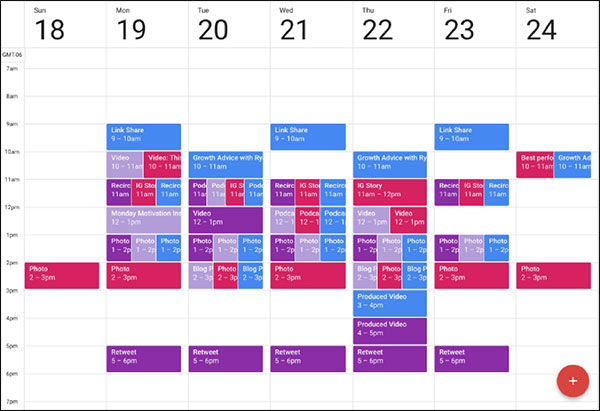
I also highly recommend scheduling your posts in advance when you can.
This is a form of “batching” that allows you to be much more efficient with your time.
This strategy also gives you more freedom throughout the rest of your day.
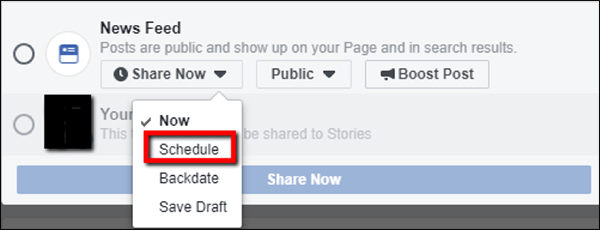
You can do this using a paid tool like Sprout Social, or in many cases, you can do it right inside of the platform itself.
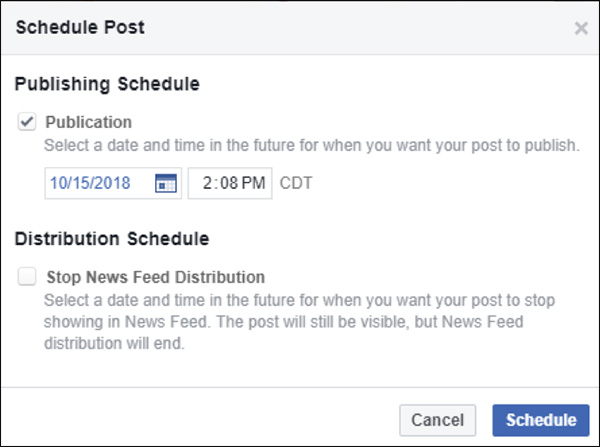
In Facebook, for example, all you have to do is click the little button that says “Share Now” and change it to “Schedule”:
Then you can decide exactly when you want your post to go live:
#3: Track Your Performance with Social Media Scorecards
Over time, you’re going to find that it’s easy to lose track of how well your social media strategy is working—that is, unless you have a system set up to help you keep your eye on it.
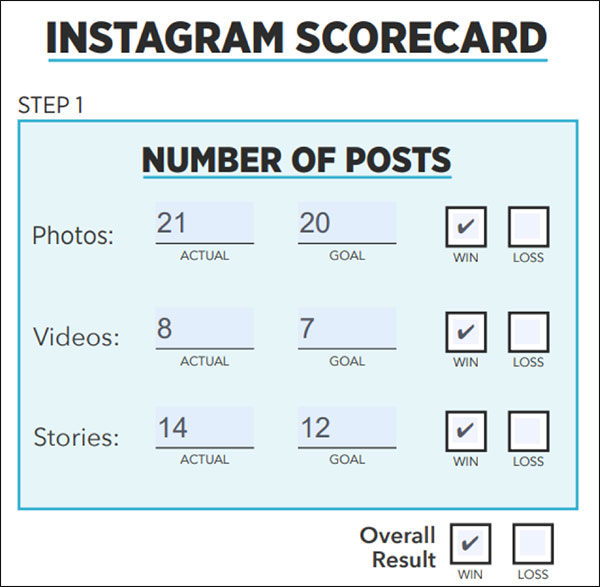
With that in mind, we created a new tool called Social Media Scorecards.
This handy download gives you a quick and easy 3-step system you can use to keep track of your social media performance.
Step 1 helps you track your posting and your content mix.
Are you publishing as many posts as you want to be?
Step 2 is where you can track your Key Performance Indicators (KPIs).
And to make this as useful as possible, we’ve pre-filled the scorecards with the most important KPIs we recommend tracking for each social media network.
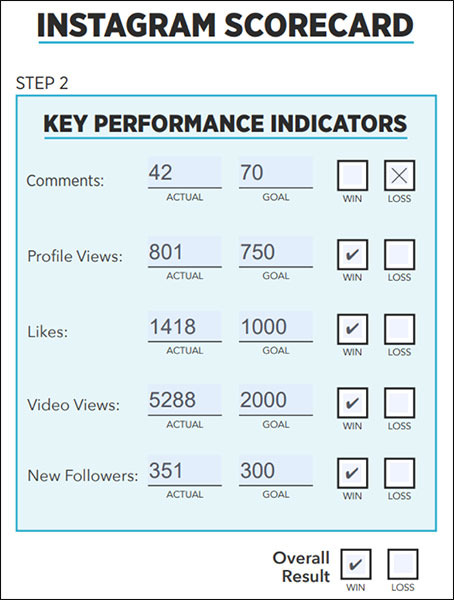
Finally, in step 3 you can track some more specific post quality metrics.
Think of these as more fun “stretch” goals.
In a way, these are your leading metrics, because achieving them will help you hit your KPIs.
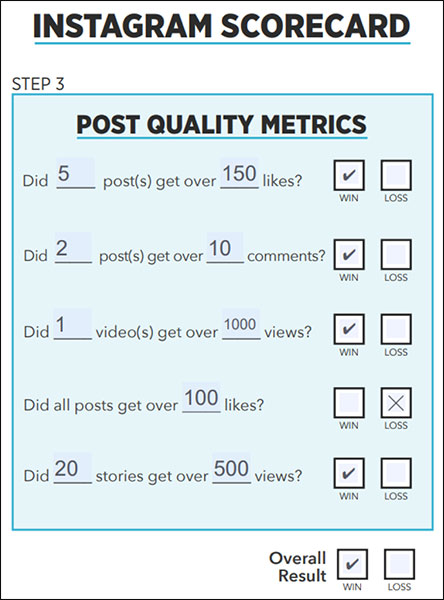
And when we’re all done, we add up our “Wins” at the bottom to calculate our total score.
This total score gives us a quick way to track our social media performance over time for each social media channel.

Filling out these social media scorecards gives us actionable information that we can use to improve our approach going forward.
If we didn’t hit our goal for comments, why not?
Are we not posting enough?
Do we need to make our content more engaging?
Maybe start asking questions in some of our posts to generate more discussion?
In a nutshell, these scorecards are a tool that helps you start asking yourself the right questions about your social media strategy.
I recommend filling these out on a weekly basis.
Once a week is frequent enough to let you make rapid changes if you need it, while also giving you enough data for useful analysis.
(NOTE: Want to make sure your social media strategy is helping to grow your business?
Download our FREE Social Media Scorecards and you can quickly find out what’s working and why, so you can do more of it! Learn more here!)
#4: Always Remember the Importance of Packaging
Now I want to talk about packaging for a minute.
But first, I want to ask you a question.
Which one of these 2 pies would you be more likely to buy?

(Cue the “Jeopardy” music.)
OK, this isn’t hard.
Obviously, the pie on the left looks a lot more appetizing than the pie on the right.
The one on the left looks well made, baked to a nice golden color, and is really well-presented.
The pie on the right just looks like a mess.
Now here’s the thing: these pies were actually baked at the same bakery.
If your blog post looks unprofessional, is hard to read, or otherwise looks unappealing…
Most people simply won’t read it.
They’re both made from the exact same ingredients by the exact same bakers.
They actually taste the exact same!
So why does everybody prefer the pie on the left?
Because of its packaging.
And this is something that’s really crucial to keep in mind with content distribution on social media.
You could have a blog post that’s profoundly insightful, well-written, and full of gems that will provide immense value to your target audience.
But if that blog post looks unprofessional, is hard to read, or otherwise looks unappealing…
Most people simply won’t read it.
Remember that social media today is full of ads and posts that are all competing for your prospect’s attention.
If you want to catch their eye and make them not just click on your content, but actually take interest and read it, you can’t just push your content.
You have to SELL it.
Here’s an example of what I mean.
This blog post on our 101 best email subject lines of 2018 is without a doubt one of our most popular posts:
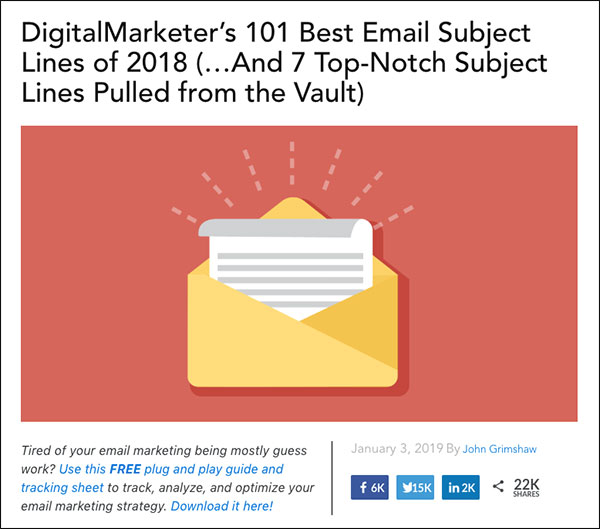
But as successful as this post was, we weren’t seeing as much success on organic social media as we would have liked.
So what did we do?
We worked on improving the packaging.
And here’s the result of that.
Notice how bold and vibrant the colors are now? You can just imagine how much more this post would jump out in your newsfeed compared to the original image, which had more muted colors.
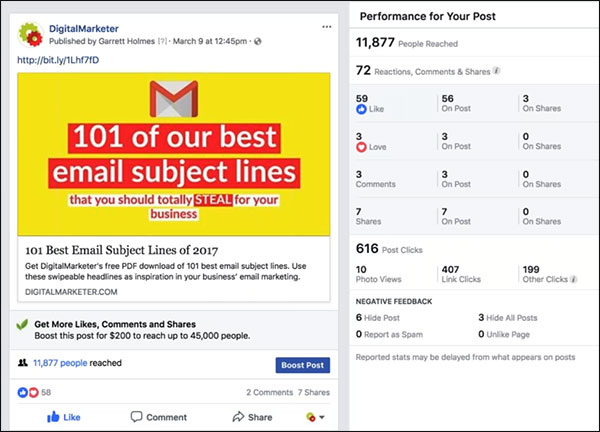
I’ve posted to social media many, many, many times, and I find that when I use bright yellow or red I tend to get the best results.
These “thumb-stopping” colors just naturally stand out against the blue theme of Facebook.
Also notice that we use the Gmail symbol here.
This is a symbol that people are familiar with.
Tons of people use Gmail and they’re used to getting notifications associated with this icon.
So when people see it in a post on Facebook, it’s almost like telling their brain: “Oh, I need to check that.”
#5: Use CTR Analysis to Inform Your Paid Social Advertising
Now I’m going to share a process I use to help analyze and improve the performance of the content on social media.
This is a simple data-driven way to find out which content is performing the best.
It can also help give you some ideas about what to do next time if a piece of content isn’t performing well.
(RELATED: 3 Google Analytics Reports Every Business Should Monitor)
It’s called doing a Click-Through Rate (CTR) Analysis.
The first step is to calculate your CTR for each post. Getting your CTR is pretty simple:
CTR = Link Clicks / Reach
Here’s where you’ll find those metrics:
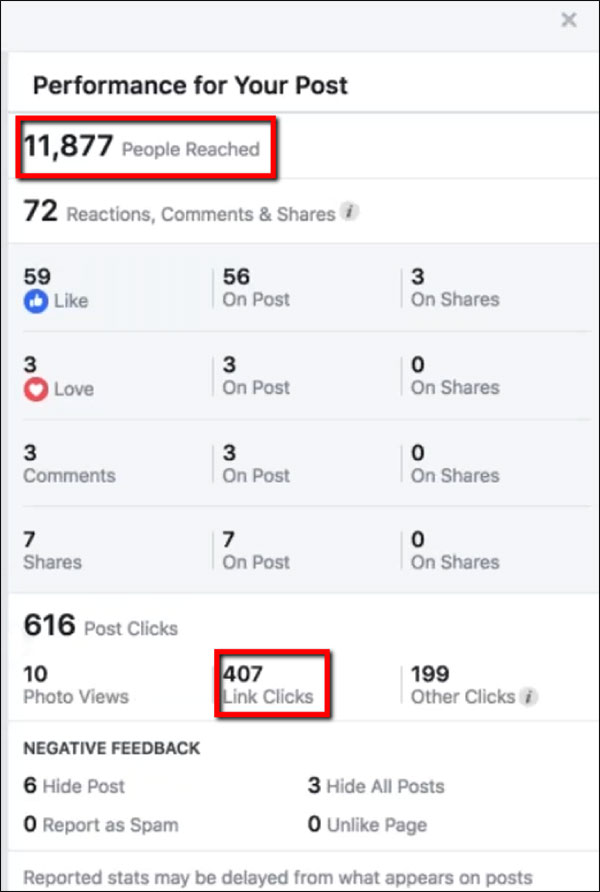
(Notice you should NOT use “Post Clicks.” That will include people who clicked on your title or who clicked to “see more” without actually visiting your site to read the post.)
Do this for all your recent posts.
Then I like to put them in a spreadsheet and rank them according to their CTR.
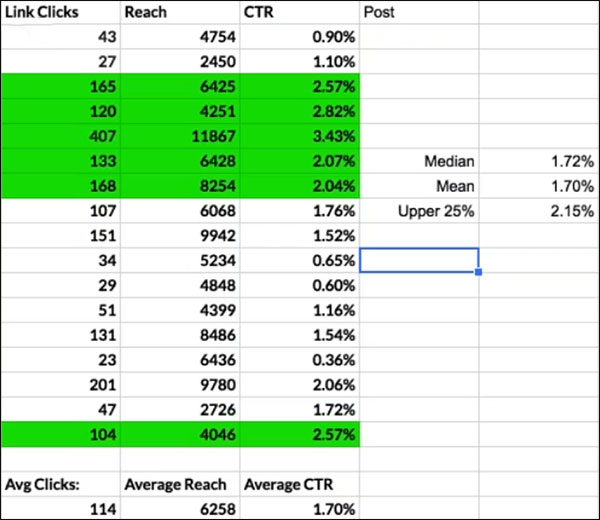
What I’ll do is separate the posts into 3 tiers (top, middle, bottom).
Then I’ll take these actions based on where each post falls in that hierarchy:
1. Top CTR Posts
If a post is in the top 25% in terms of click-through rate, then I know that post is working well.
So in that case I’ll just recirculate the post a week or so later, without changing anything about it.
(Remember, anytime you publish an organic post only a small percentage of your followers actually see it.
So don’t worry about recirculating a post that you’ve already shared.
There will be a lot less overlap than you think in terms of the people you reach.)
And after another few weeks, repackage and recirculate the post again!
This time try something new—change the image or headline. In many cases, you’ll find that you’re able to appeal to a different segment of your audience.
2. Middle CTR Posts
For any post that was middle-of-the-road in terms of its CTR, I won’t recirculate the post as it is.
Instead, I’ll immediately repackage it to try and improve the appeal.
Then I’ll recirculate the repackaged version to see if it gets more engagement than the original.
3. Bottom CTR Posts
For any underperforming post, you should also try to repackage and recirculate it.
But in this case, if the repackaged version doesn’t improve performance then that’s a good indication that this piece of content just isn’t something that resonates with your social audience.
If that happens I recommend you just stop trying to share this post on that network.
Now Translate This to Your Paid Advertising Efforts
Going through this CTR analysis process is fairly straightforward, but don’t underestimate it.
It’s a really powerful way to find out which content is performing well, and it gives you a set of straightforward action items for each post based on its past performance.
And you can even use the insights you learn to help inform your paid social media advertising!
As you start to learn which posts are performing the best on social media, you’ll get a much better idea of which posts would be the smartest ones to boost.
If you already know that a post had a high CTR when you published it organically, you can be pretty confident that that post will perform even better when you put a little money behind it.
And over time you’ll even start to learn which content topics are resonating best with your audience, which you can use to guide your content creation and paid advertising in the future.
Now Go and Implement!
Hopefully, you now have a better idea of how to think about content in a way that can grow your brand while generating a positive ROI for your company.
Unless you’re a publisher, your content isn’t directly responsible for generating revenue.
So you have to remember where your content fits into the customer journey and optimize it to do a better job of achieving its top-of-funnel goals.
Whatever you do, don’t forget about the pie.
It’s so important to make sure that you’re getting the best results possible from the effort you’re putting into your content.
And that means presenting your content in a way that makes it as appealing as possible to your target audience.
(NOTE: Want to make sure your social media strategy is helping to grow your business?
Download our FREE Social Media Scorecards and you can quickly find out what’s working and why, so you can do more of it! Learn more here!)
The post 5 Essential Tips to Help Improve Your Social Media Strategy appeared first on DigitalMarketer.
Source: digitalmarketer.com

Google + Is Shutting Down. How Does It Impact Your SEO?
Google +? Have you forgotten about it, too?
While many of you seem to have been disregarding Google + over the past few years, it was there.
But now, as the latest news confirms, we’ve found out that it will shut it down after user information was exposed.
It is no shock for some to hear that it will be locked down, while for others it is sad news.
All in all, the news might affect lots of business owners. We’ve talked on our blog before, on multiple occasions, about the effect of social signals for your website. Now, it is time to see what has actually happened and what’s next.
All the fuss was powered by the news saying that Google + will be shut down after a user data leak.
Sources say over 500,000 users are affected because Google had leaked private information to third-party app developers between 2015 and March 2018.
Google did not tell about the security breach they had in March 2018 and that came backstabbing them.
The problem is even more serious if we recall the similar situation that happened earlier this year when Facebook acknowledged that Cambridge Analytica, a British research organization that had performed work for the Trump campaign, had inadequately got access to the personal information of up to 87 million Facebook users.
1. How Google’s Officials Treated the News
The decision to stay quiet drew the attention of the cybersecurity community because the laws in California and Europe say a company must disclose a security episode.
On the other hand, Google’s decision to stay quiet was taken because it didn’t interfere with the company’s “Privacy & Data Protection Office” and it was not legal to report it.
The giant mentioned in a blog post that nobody had gained access to user information.
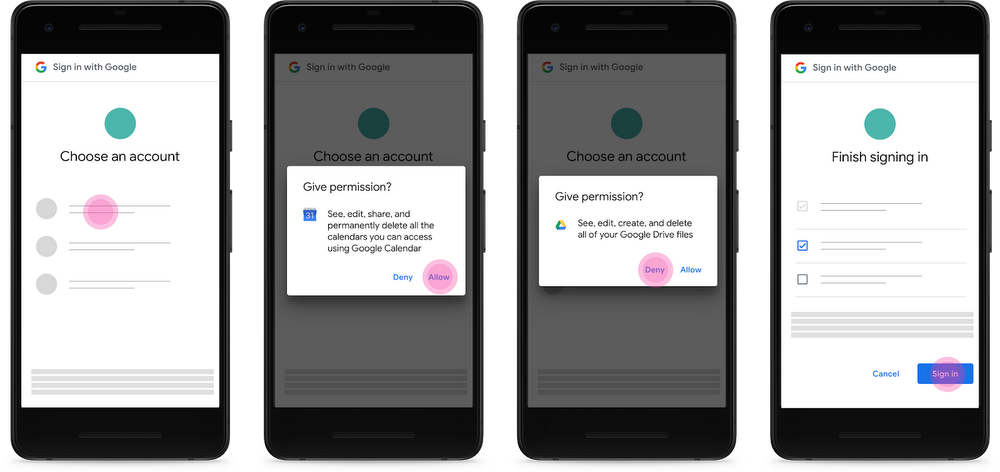
We found no evidence that any developer was aware of this bug or abusing the API, and we found no evidence that any Profile data was misused.

Google
Applications made by other companies had access to Profile fields that were shared with the user, but not marked as public. Google’s officials said that:
This data is limited to static, optional Google+ Profile fields including name, email address, occupation, gender, and age.
It does not include any other data you may have posted or connected to Google+ or any other service, like Google+ posts, messages, Google account data, phone numbers, or G Suite content.
Google
So apps did not have access to phone numbers, messages, Google Plus posts, or data from other Google accounts.
And they didn’t find any evidence that outside developers found the breach and the issue was fixed in March.
The funny thing in this situation is the fact that Google’s top managers stopped posting on Google + up to 3 years ago, in 2015.
This is kind of strange because a Wall Street Journal report showed Google exposed user data around that date, as mentioned previously.
Larry Page, the co-founder of Google, had his last post on 21 August 2015, as you can see in the next screenshot.
It seems like he gave up on Google + a long time ago.
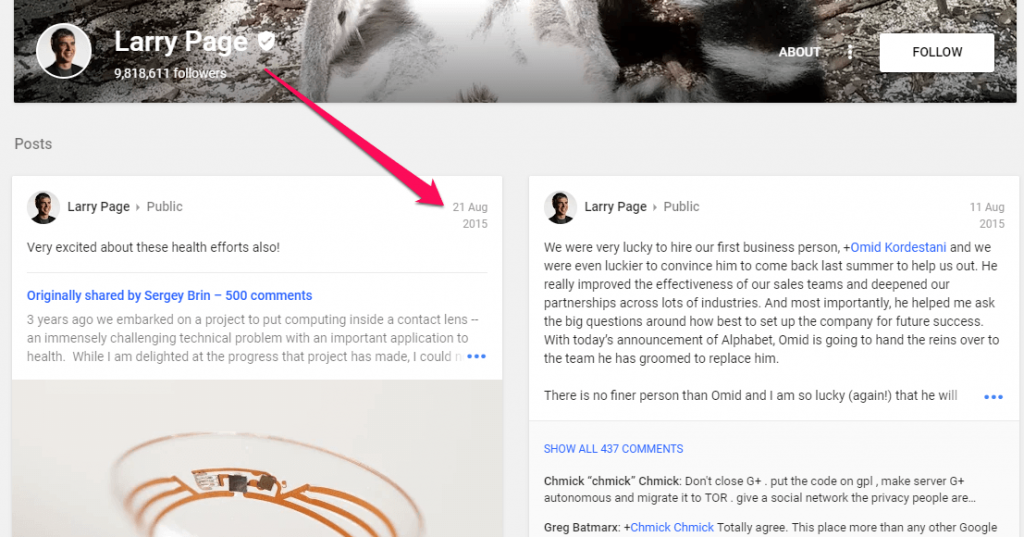
Since 30 June 2011, Larry had posted 147 times on his Google plus account.
And that’s so little!
If you take into consideration that until 2015 (when his last post was made) he had 147 posts, we could make a large assumption and say it’s like he posted 3 times per month.
Let’s take a look at the second co-founder, Sergey Brin’s Google + page.
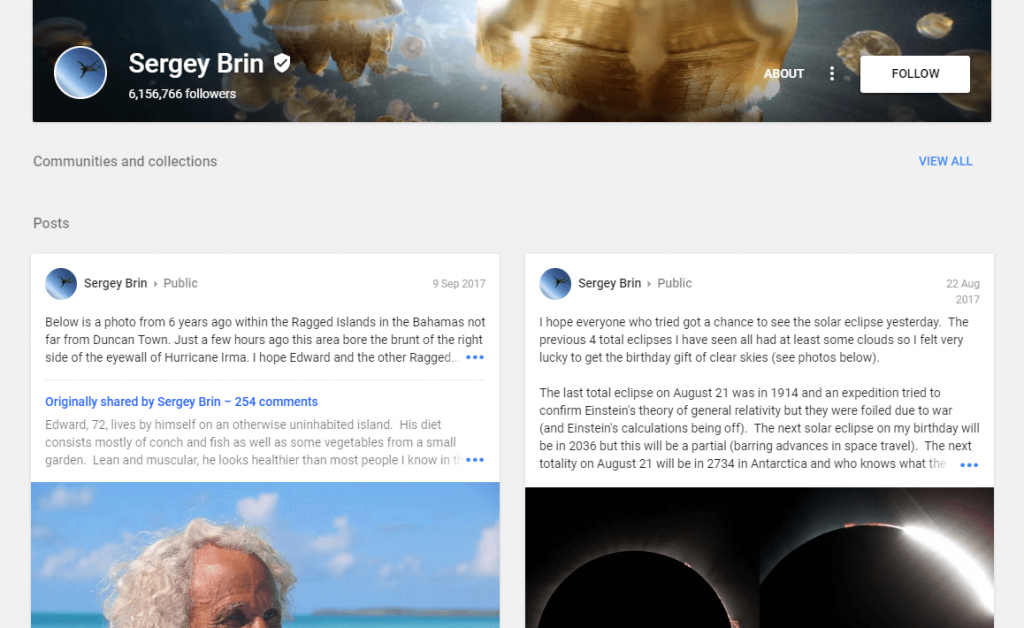
His last post isn’t so long ago – on 9 September 2017. From all of Google management, he’s the one that used Google + for a longer time.
His last post was a photo within the Ragged Islands in the Bahamas, made just a few hours before it bore the brunt of Hurricane Irma.
A few years ago, Sergey Brin said that he is not a very social person and hadn’t spent much time on Facebook and Twitter, Google +’s competition.
We discovered that more recently he lost his Twitter account (@sergeybrinn – is a suspended account). There are some voices that say he had a secret personal Facebook page, but we couldn’t find it.
There are a lot of fake accounts instead.
Although he expressly said he’s not more of a social person, he is the one that used Google plus the most from all Google’s officials.
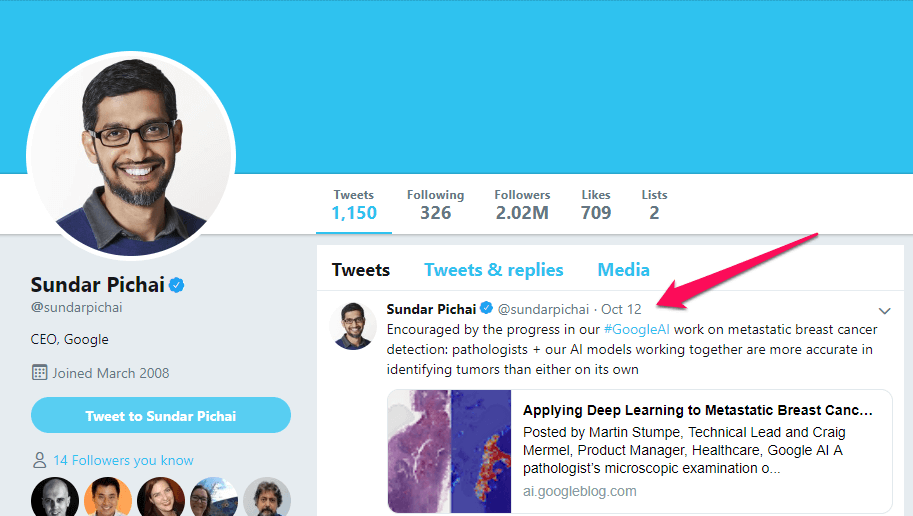
Sundar Pichai, the CEO of Google, last posted on 9 March 2016 about Google’s Deep Mind challenge.
He was the second one who gave up on Google +, after Parry Page.
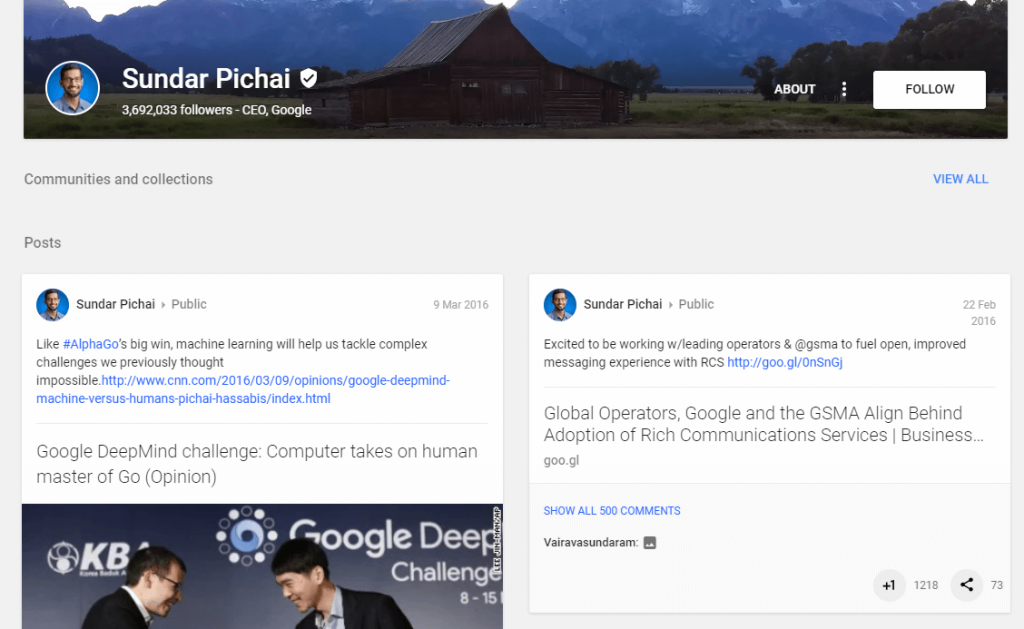
And while his Google plus account was left in ruin, his Twitter profile is flourishing.
He has 3.69M followers on Google + and only 2.02M on Twitter.
Almost ~260 posts and over 1k on Twitter.
Former Executive Chairman of Google, Eric Schmidt, quit posting on 17 February 2017, long after he left Google in 2015.
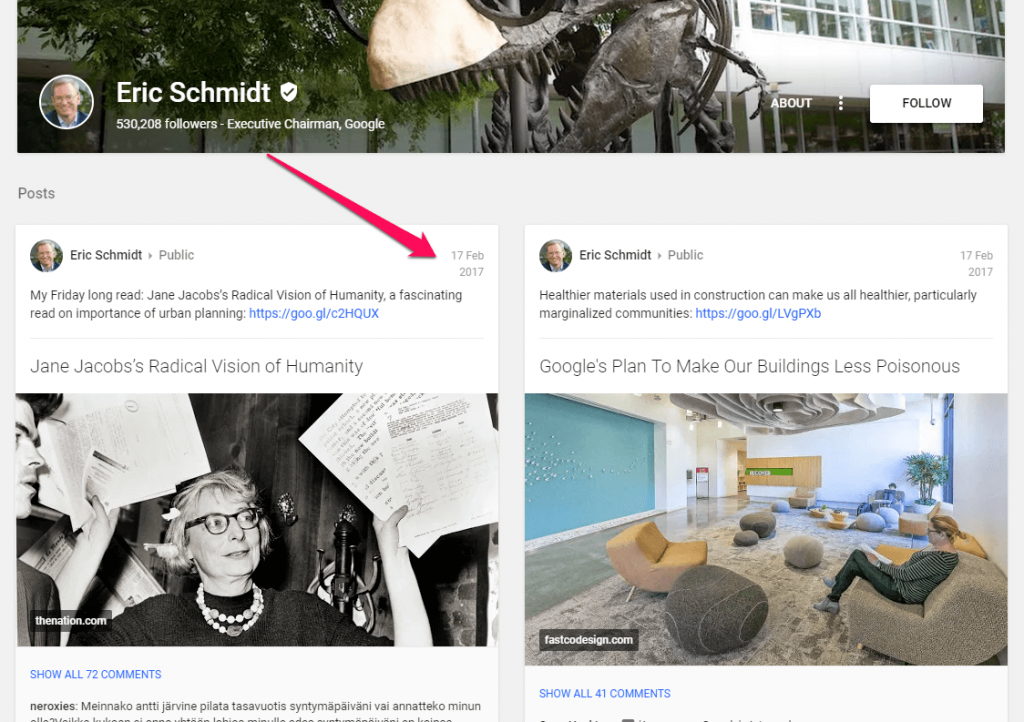
On the other hand, on Twitter, the last post was on 3 October 2018.
Even if he is posting less often, he’s more active on Twitter than on Google +.
It’s sad to see that even Google’s management left the social network to have a free fall.
The bigger shock is the fact that none of Google’s six independent board members have ever posted publicly on Google+, according to Mashable.
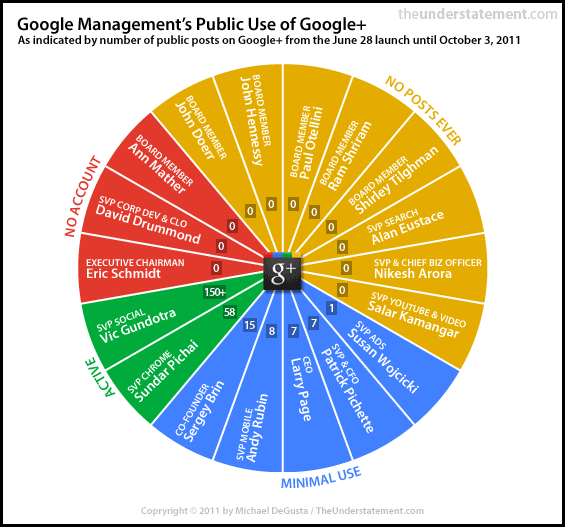
Source: mashable.com
It makes you wonder when you see these results because Google + has a high influence on a business.
And the fact that it wasn’t refurbished explains why it got to this point.
Sadly, the data breach was inevitably in this case … So, the question that we have is “How could the decision to shut down Google + influence your business, and does it affect your SEO?”
2. Will Shutting Down Google + Affect Your Business?
Probably you’re thinking:
If Google’s top representatives don’t use Google+, then why did we?
The answer is simple: because of the influence, social signals might have.
We’ve shown you multiple times that social signals are very important to drive awareness and create authority for a website to push it in SERP.
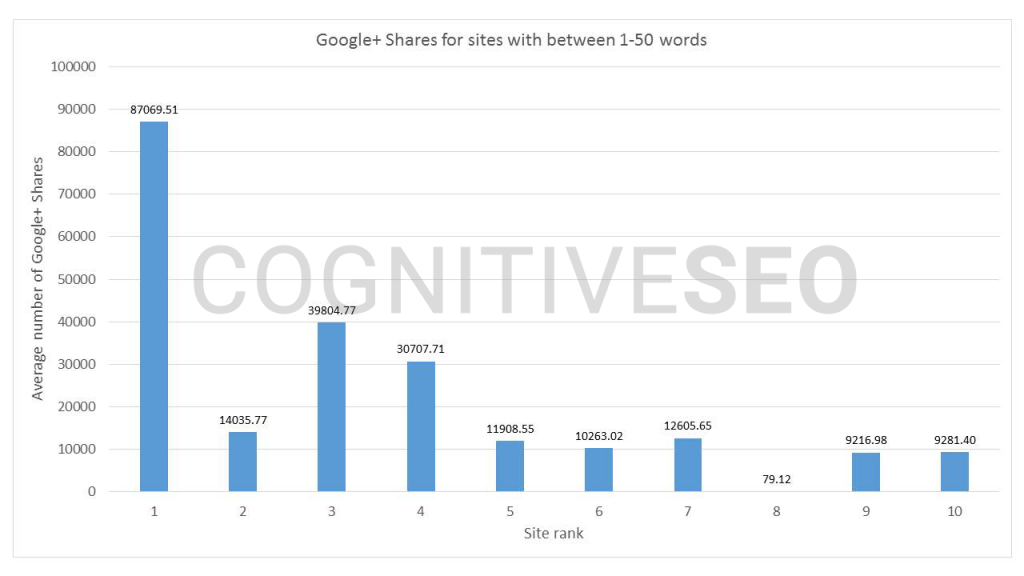
In 2016, we analyzed 23 million shares to see their impact on rankings.
We discovered that the average Google+ shares for the 1st rank are significantly higher, so they (might) have value for pushing pages to higher positions in Google.
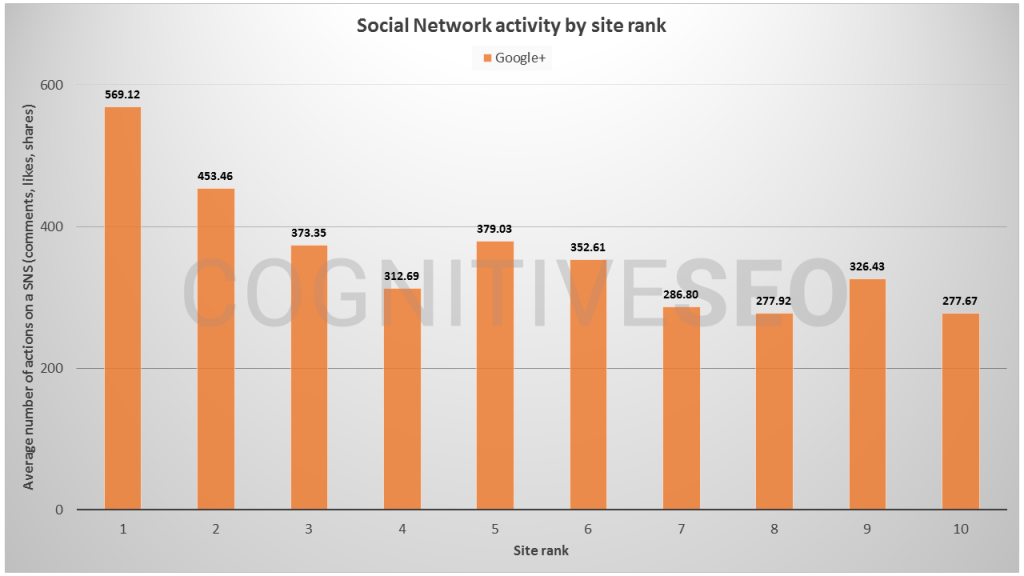
Moreover, higher rankings are correlated with Facebook, Google +, LinkedIn & Pinterest high shares altogether.
Now that you’re losing one link to the chain, it might affect your website.
But if all websites lose the same chain, wouldn’t that make loss an equal part for all?
Well, that depends. We saw that micro-content that ranks 1st is correlated with high G+ shares.
Google launched plus one button for websites in 2011.
Voices were saying that it used them as ranking signals used for search quality and rankings.
But Google denied the allegation and said they had never used Google+ or plus ones as a ranking signal.
Google + started as a promising project, but it had a slow death, with nothing intriguing to offer.
It was a time when Google tried to make people use it and drive conversations on the social network, by highlighting Google+ content in search results and in Google News, showing you the discussions on Google+.
But in the end, it was all for nothing and even made users make fun of it in the SEO community.
After a few attempts to refresh the social network, Google stopped pushing it to users and slowly lost interest in it.
The explanation comes in Google’s blog post where they made the announcement of closing the social network, they acknowledged it didn’t receive fame despite all the efforts.
Our engineering teams have put a lot of effort and dedication into building Google+ over the years, it has not achieved broad consumer or developer adoption, and has seen limited user interaction with apps.
Google
Up to this point, we can say that if Google’s algorithms are updated properly so they don’t let G+ signals influence rankings, then any website should be affected.
That would be the desired situation.
And as I mentioned before, Google + accounts will disappear for all websites so it would be an equal loss.
Looking at this with a critical eye, we can say that there might be some cases where some websites could encounter a slight impact.
For example, for websites that used mainly G+ to promote their business.
3. What’s Next in Your Social Media Strategy
What is Google planning to do in the near future now that it has lost Google +?
Should we expect to see new Google products or something similar to this one?
What we know is what Google stated.
All users have time until August 2019 to save their data.
So take whatever you need before summer when it will be closed indefinitely.
During this time, Google said it will offer additional information to users to help them download that data or migrate it.
Google might create new products or features, but only for businesses because as they said, the main focus now is to provide enterprise facilities.
We’ve decided to focus on our enterprise efforts and will be launching new features purpose-built for businesses.
We will share more information in the coming days.
Google
We’ll just have to wait to see what will happen, but one thing is clear: Google says that businesses shouldn’t suffer from this decision as they will come up with a solution.
The post, Google + Is Shutting Down. How Does It Impact Your SEO? appeared first on SEO Blog | cognitiveSEO Blog on SEO Tactics & Strategies.
Source: cognitiveseo.com