
Tag Archives for " seo "

Website Redesign SEO Checklist: Tips to Avoid Big Drops in Your Rankings
If your website is no longer reaching its potential, then it might be time for a redesign. One case study found leads improved by 314 percent following a website redesign and SEO campaign.
Although redesigns can be expensive, it’s a better option than bleeding money year after year with an inefficient website.

When redesigning your site, it’s important you avoid the pitfalls that can severely hamper your SEO. To help you do this, here’s my website redesign SEO checklist.
What Is a Website Redesign?
A website redesign involves large-scale changes to your website. During a redesign, elements of your code, content, structure, and visuals may change dramatically, giving your site a completely fresh look.
This is a natural—and important—part of a website’s development. As much as 50 percent of consumers believe website design is an important part of a company’s brand.
Even if you had the greatest website in the world back in 2001, it would be looking very out of place today if you didn’t make any large changes to it. Here’s what an Amazon web page looked like back in 2001.

Design best practices change, technology changes and your target audience’s expectations change; your website needs to change to keep up.
Accessibility plays a big part as well. When visiting a site for the first time, 38 percent of people will look at the page’s layout or navigational links.
Sometimes these will mean making smaller changes as part of a website refresh, but occasionally, you’ll need to make more large-scale changes in the form of a full-scale website redesign. Either way, you need to make sure you are following current best practices so your website redesign SEO isn’t affected.
Benefits of a Website Redesign
Website redesigns aren’t without risk (especially for website redesign SEO), but when done well, they offer significant upside. They can:
- improve SEO and site performance
- simplify the user experience
- focus your content strategy
- give your site a facelift
- offer faster load speeds
- provide up to date security
The most obvious benefit is since your website serves as a modern-day shop front, you want to make it attractive.
If a physical store has a broken sign, poor lighting, and a dingy interior, it’s going to struggle to appeal to people. It’s the same for a website; if it looks tired and out of date, your visitors are going to wonder if your business is tiring and out of date as well.
A website redesign is about more than just a facelift.
It also gives you an opportunity to change the fundamental structure of your website and make it easier for visitors to navigate. You want to start with the right approach since even doing a simple redesign with basic features can take an average of two months to complete.
Businesses change over time, and as their websites evolve and grow naturally, the structure of the website can become messy. You add new content categories, move things around on your nav bar, switch parent and child pages, and so on.
A simple rule when it comes to design and UX is that complicated design is rarely good. You want to make it as simple as possible for your visitors (and bots) to navigate your site and find what they’re looking for. A website redesign is a great opportunity to do this.
This is an ideal time to evaluate your site, decide on your goals, and create a redesign strategy that can help you achieve them.
When Are Website Redesigns Necessary?
According to a 2020 survey, here are the top reasons for a website redesign:
low conversion rates (80.8 percent)high bounce rates (65 percent)needs better UX (61 percent)not responsive on all devices (53.8 percent)outdated website (38.5 percent)not SEO-friendly (23.1 percent)
It can be tricky to know when a website redesign is necessary. Chances are, you’re investing a good chunk of money in your redesign, so you want to get the timing right.
The thing to remember is user experience is absolutely essential in digital marketing. It’s going to show in almost every metric and, ultimately, it’s going to have an impact on your bottom line.
The metric closest to most website owners’ hearts is conversion rate. This can be a big sign that it’s time for a website redesign.

Conversion rates fluctuate, but if yours is in a downward spiral, then it might be time to consider a website redesign. They are also different depending on your industry.
For example, if your website is part of the Real Estate or Home Improvement industries, your conversion rates will be around 7 percent. However, if you are part of the Media & Entertainment industry, it might be closer to 18 percent.
One of the best ways to know if it’s time to make changes to your website is to use it from the point of view of your visitors. Imagine you’re visiting your site for the very first time and ask yourself these simple questions:
- Does the branding seem on-point?
- Do pages load quickly?
- Is your site laid out in a logical way that’s easy to navigate?
- Are your pages optimized for mobile?
- Is it difficult to find the information you’re looking for?
- Is your customer journey streamlined enough?
Compare your website to your competitors and see how you stack up. If you find your site is good in certain areas but missing a few details in others, a website refresh might be the answer. If there are lots of things holding you back on the other hand, then it’s probably time for a full website redesign.
Website Redesign SEO Considerations Before Getting Started
The top reason visitors leave a website is due to slow loading times—88.6 percent of survey respondents in a 2020 survey affirmed this. Page speed, directly and indirectly, affects SEO.
This is just one reason to be vigilant about multiple factors that can affect website redesign SEO— planning a redesign isn’t something that should be taken lightly. The rewards are great when things go right, but can be a nightmare if things do go wrong.
The first step is to consider your goals.
What do you want out of your website redesign? What realistic targets can you set?
To set the right goals, you’ve got to have some benchmarks for your current website performance. Make use of your analytics and come up with SMART goals.

Once you’ve come up with your goals, then you can begin thinking about a timeline. The important part here is to be realistic. As you’ll see in the website redesign SEO checklist, there are a lot of steps to consider, so make sure you give yourself enough time to do a great job.
Then you’ll need to put together the right team to carry out your vision. You’ll need talented designers, developers, and content managers to ensure things run smoothly, but don’t underestimate one key element: communication.
Your team needs to be working together and communication is extremely important.
Website Redesign SEO Checklist
This website redesign SEO checklist will help you stay organized throughout the entire process and make sure you don’t miss anything important.
1. Audit Your Existing Content
Content powers many websites’ organic presence. Eighty-two percent of marketers actively use content marketing, and many successful businesses are built off of it.
A website redesign SEO process has the potential to take your content efforts to the next level, but first, you’ve got to have a good picture of where it’s at.
First, use a tool like Screaming Frog to pull data on all URLs included in your website.
Next, use your analytics and Ubersuggest to perform a complete content audit to determine your most important pages, see which pages are irrelevant or not needed anymore, and which should be redirected or combined with other pages.
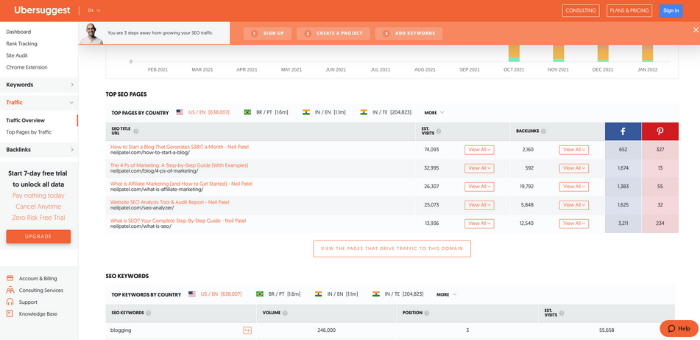
Follow these steps and you should have a clear idea of which pages (and keywords) are most important. Look at your traffic stats, rankings, and conversion goals to see where other improvements can be made.
2. Update Information Architecture
Over 60 percent of users report leaving a website due to bad navigation. Although website navigation and information architecture (IA) are different, your IA should inform how your site navigation is structured.
Information architecture is about how you organize information in your sitemap. Navigation is how you organize your website.

As mentioned earlier, 38 percent of people will look at a site’s layout and navigational links on their first visit.
Let’s use this example post: “How to Scale Mt Everest.”
If people have to find it by navigating through a tips page, then climbing strategies, then Asian peaks, before finally clicking Mt Everest, it’s going to be nearly impossible to find.

Wouldn’t it be a lot easier if the process could simply be Peaks > Mt Everest > How to Scale Mt Everest?
How you organize information all depends on what your website is about, why people come to your site, and what information is most valuable.
To update your IA:
- Start by creating a map of your current structure.
- Do competitor analysis to see how your competition organizes their websites.
- Use a tool like Hotjar to see where users click and how they interact with your site.
- Using note cards or post-its, write down the main categories for your site.
- Next, write your subheadings based on the data you’ve collected.
- Write down the URLs for pages you keep, and organize them under the subheadings.
- Create a new sitemap based on what you created.
3. Carefully Map URL Redirects
In a Semrush study that analyzed 150,000 websites, 42.5 percent of the websites considered had broken internal links.
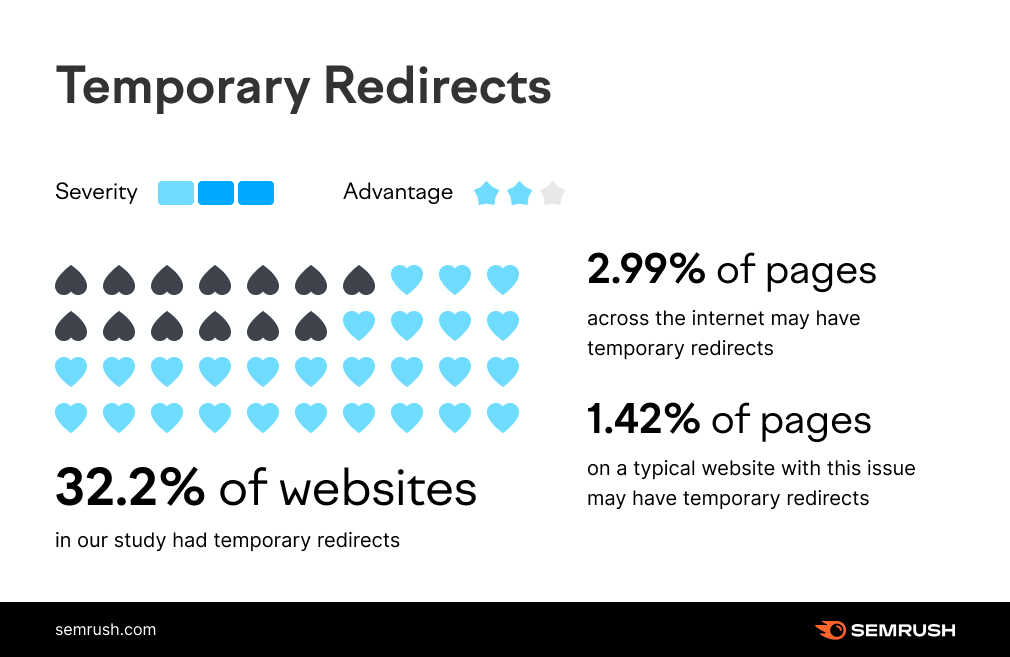
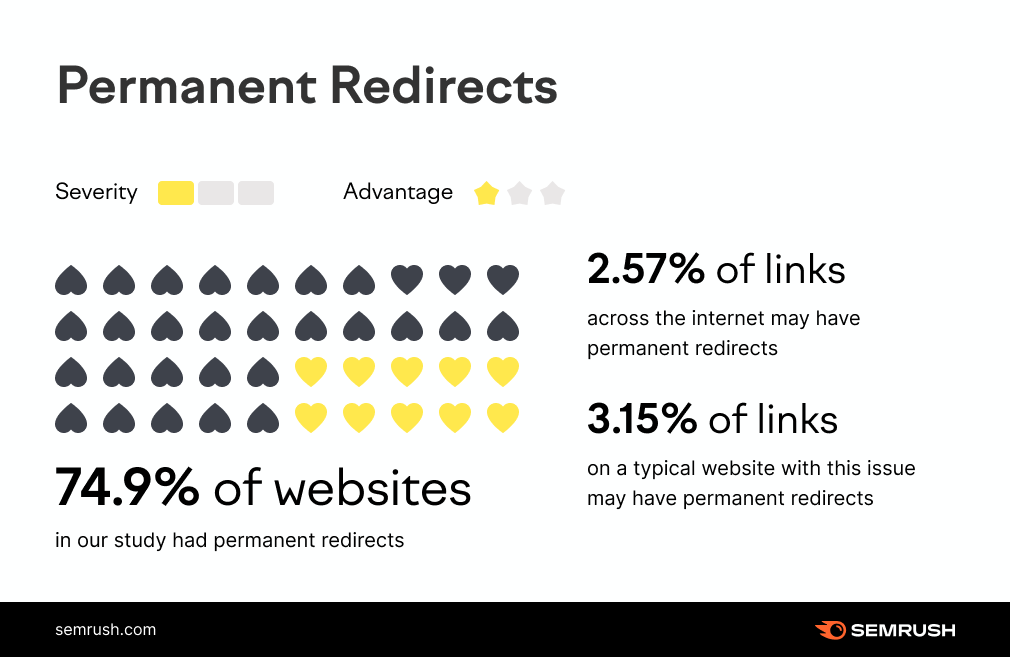
In the beginning, I mentioned how website redesign SEO processes aren’t without risk. The greatest of those risks is the potential of losing a lot of the hard work you put into building your organic profile.
A website redesign is going to change the structure of your entire site. Some pages will get moved, some will even get deleted.
The thing is, small changes can make a big difference in SEO land. As much as 60 percent of marketers say SEO and content marketing is their biggest source of leads.
Let’s go back to our amazing article on “How to Scale Mount Everest” that’s bringing in lots of organic traffic.
The problem is you posted it in a category that’s not very accurate, and you gave it a messy URL structure. Naturally, you want to fix this, so you change the category and URL.
You haven’t even touched the content, but this change can have huge consequences. This is because there are links out there already pointing back to the old URL, so when people (and bots) follow them, they end up at a blank page.
Unless you use URL redirects, you’re not only losing your referral traffic, but you also lose the page and domain authority those backlinks have already built up.
Essentially, your well-established and successful article has to start from scratch all over again.
Redirects can get very messy with a large website, so it’s important to carefully map them.
How to map URL redirects:
- Create a list of all URLs you are keeping as well as those you will no longer be using.
- Create another list of content you plan to keep that will be under a new URL.
- Match each old URL with its new URL. For the URLs you are getting rid of, match each to new content that covers a similar topic. Give the list of new content mapping scenarios to developers to implement the redirects.
4. Optimize Content You’re Keeping
After doing your content audit, you should have a good idea of what content you plan to keep. If you’ve put the time and effort into your audit, you will likely have flagged some areas of improvement for some of your best pages.
A website redesign is a perfect opportunity to refresh old content and give it a new lease of life. This process alone can increase organic traffic by as much as 106 percent.
Content decay is real. New information comes to light, competitors invest in their content, and suddenly your best pages have been pushed down the rankings.
Click through rates for the top organic rankings drop off extremely quickly:
- 1st result: 34.2 percent
- 2nd result: 17.1 percent
- 3rd result: 11.4 percent
- 4th result: 8.1 percent
- 5th result: 7.4 percent
Dropping from the top rank can immediately cut your organic traffic in half, so it’s important to optimize your existing pages.
Your website redesign SEO should help with the UX side of things, but what else can you do to improve content rankings again?
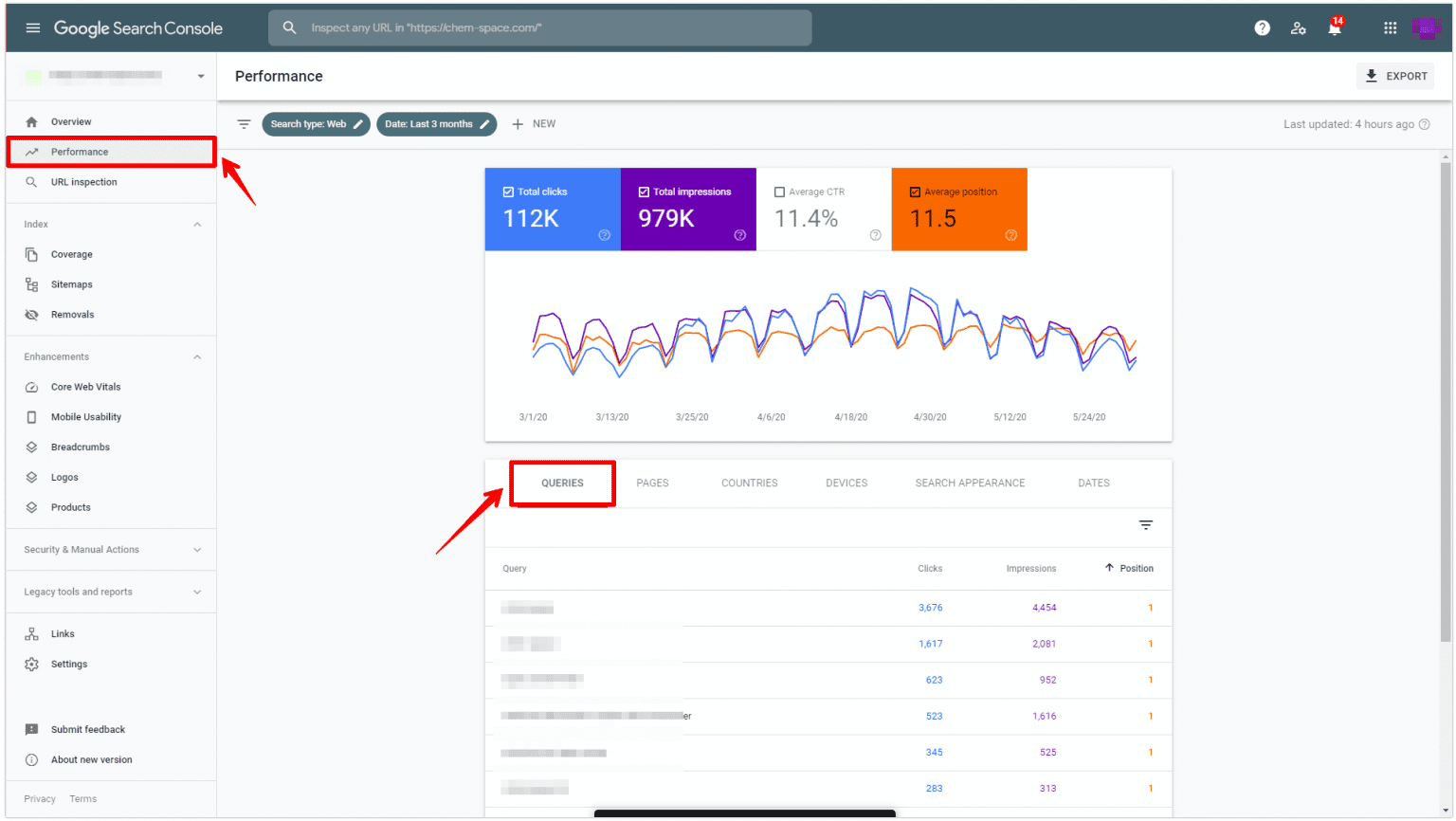
- Use Google Search Console or an SEO tool like Ubersuggest to see how your content is performing.
- See what keywords your top-performing content pieces are ranking for. To improve those rankings, even more, add target keywords to headers, increase keyword density (without stuffing) throughout the post, and use keywords in image alt text and file names.
- Dig into content that isn’t performing well. Make improvements by rewriting it or updating it with recent links and studies as well as data points, expert interviews, and visuals or videos.
5. Optimize Page Speed
You can’t underestimate the importance of page speed. Everyone knows the feeling of waiting forever for a page to load, and you know what users do when that happens; they leave and look for information elsewhere.
Technology has made people expect things much faster these days, and interacting with a website is no different. 25 percent of people leave a website if the page takes more than four seconds to load, and a one-second delay results in a 16 percent drop in customer satisfaction.
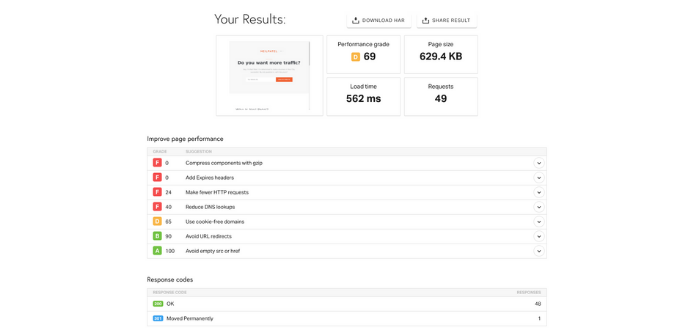
Websites tend to become bloated over time. A website redesign SEO process lets you take the opportunity to optimize page speed by addressing the bloat.
First, you want to make sure images are optimized to the correct size and format. Make embedded videos load properly and, if they don’t, use tools to decrease the file size or shorten the videos.
Next, reduce the number of HTTP requests. You should also minify your CSS and JavaScript, and clean up your HTML.
This should be something you consider from the very start of your redesign, and you need to stress it as a priority for your developer.
6. Update Your XML Sitemap
Your XML sitemap is like your website blueprint. Google and other search engines use it to understand the purpose of your content and it’s crucial for good website redesign SEO.
You can either do this manually by adding every URL in your updated site to the map or use an SEO plugin like Yoast or AIOSEO to generate one automatically.
This is a simple but important step. If Google is looking at an incorrect XML sitemap, their crawlers may ignore your site entirely (as confirmed by Google’s John Mueller).
7. Test Your Site After Redesign Is Complete
Across the internet, 0.27 percent of internal links are broken and 1.37 percent of external links are broken. Broken links are just one of the many issues you need to consider when testing your website after a redesign.
Redesigning an entire website is a huge undertaking so every detail isn’t going to come out perfect straight away.
If you launch your new site immediately without testing it first, these imperfections can have big consequences.
It’s tempting to get the ball rolling and start with your new website as quickly as possible, but you’ve got to put time into testing. Review all of the changes on your test site (get your friends and family on board as well) and go through the website with a fine-tooth comb.
You can create specific tasks for everyone involved in user testing your site.
- test CTAstest site navigation (it should make sense and all tabs/navigation links should be clickable)look at side navigation links
- Review forms, pop-ups, and exit overlays if you use them
- audit internal and external links
- pay close attention to interactive content and purchasing pages
- have people text on desktop, tablets, and mobile devices (Android and iOS)
Add any errors you find to a spreadsheet and go through them with your developer.
Again, it’s about exploring your website through the eyes of your target audience. If you do this well, then you’ll fix a lot of errors before they reach the end-user.
Website Redesign SEO Frequently Asked Questions
How much do website redesigns affect SEO?
Website redesigns can have a big impact on SEO. When done well, the improved UX can boost rankings, but if the redirects aren’t carefully mapped, it can lower your authority and result in your website losing a lot of organic traffic.
How much do website redesigns for SEO cost?
The cost of a website redesign will depend on the complexity of your website. Basic redesigns can start at around $15,000 but more complicated ones can cost upwards of $75,000.
What are the most common SEO errors in website redesigns?
Some of the most common SEO errors with website redesigns are forgetting to redirect URLs and not keeping your most successful content.
What SEO tools do I need for website redesigns?
SEO tools are useful for website redesigns because they allow you to evaluate your performance. Your Google Analytics is essential, but ranking checkers like Ubersuggest can also be very useful.
Conclusion: Website Redesign SEO
There comes a time when you need to think about website redesign SEO. This is an important moment for your business, and it needs to be handled with care.
A website redesign carries lots of risks when it comes to SEO, but at the same time, it can offer lots of rewards. To maximize those rewards and minimize the risks you need a clearly defined strategy and that is where this website redesign SEO checklist can help.
That covers the SEO side, but I’ve also got some more tips on how to safely carry out a website redesign, so check them out.
Are you planning a website redesign? Let me know in the comments below!
Source: neilpatel.com

Google Ads for eCommerce: How to Make Your Website Conversion-Ready
So, you’re eager to run Google Ads for your eCommerce business.
You took all the critical first steps to ensure your business is set up for Google Ads success—your brand identity is rock solid, your budget and time expectations are reasonable, your selling proposition is one-of-a-kind.
The next step? Make sure your website is ready to convert.

After all, those precious ad clicks will lead customers to your virtual front door. And we need to make sure that the door is open wide to welcome each visitor before we spend time and money on Google Ads campaigns.
Here’s how we’ll make that happen:
- Website CRO Best Practices
- Product Preparation
- Media (Images and Video)
- Lifestyle Images
- Robust Titles and Descriptions
- Live Chat
First Up: Website CRO (Conversion Rate Optimization) Best Practices

Building an eCommerce store isn’t that hard.
Building an eCommerce store that converts? Whew! That is a different story entirely.
Here are some CRO best practices to ensure your site is ready to make sales:
The Big Three:
1. Website Issues and Errors
You can’t drive traffic to a broken website. So, it’s crucial to ensure you catch any website issues or errors:
- Frequently (at least once a month) check your site and make sure everything is working properly and there are no high-risk issues and errors.
- Schedule a website audit at least once a month.
2. Website Speed
Website speed has a massive impact on your quality score; in fact, it is considered slightly more important than content(!) according to Google. A few things to consider:
- Mobile users are going to be less tolerant of slower websites due to the smaller size of the device and often slower connection.
- The biggest contributing factor for slow sites is large image sizes.
3. Mobile Engagement
- 60-65% of website visits are done on mobile devices. So ensure your site is mobile-friendly!
- Look at your conversion path: although many purchases happen on desktop computers, research is often done on mobile devices. In other words, consider each step of your buyer’s journey so you can make it as effortless as possible.
Conversion Rate Optimization Checklist

Now let’s put those best practices into action. First up, run through this CRO checklist to make sure visitors have a smooth journey to purchase from your site:
- Everything works properly
- Website is fast (under 2-3 seconds load time)
- (use PageSpeed Insights to measure this)
- Your email/phone number is in the header or footer
- Customers need to know they can trust you (i.e. get in touch with you)
- Website design is appealing to your audience
- Make sure the design is centered around your product and isn’t a distraction
- The website has high-quality images
- Products are described clearly with all features displayed
- CTAs are in a contrast color (bold!) and easy to find
- Check out BOOM by Cindy Joseph for inspiration
- There are reviews on product pages
- Verification badges (secure payment, BBB, SSL, guarantees, free returns, etc.)
- This helps improve the trustworthiness of your site and brand
- Turn anything you offer into a badge (free shipping? Make it a badge! Free returns? Badge! Much more exciting than text)
Website Speed Optimization Checklist
- Choose a “light” theme
- A good developer can improve your site speed a lot—but make sure you don’t rely too heavily on customization
- Scale your images properly
- Try PicResize
- Decrease the weight of your images without losing quality
- Try TinyPNG
- Limit the number of plugins/apps
- Limit the number of displayed products on category pages
- Check-in on your page speed
- Try PageSpeed Insights
- Don’t aim for a 100/100 score—just aim for a good user experience

Quality Assurance (QA) Checklist:

Include quality assurance checkups in your monthly standard operating procedures to make sure your site is in tip-top shape. You can do this through internal QA and external QA:
Internal QA: Pretend to be your own customer
- Try to break the site
- Navigate through your site the way a customer would
- Gauge how easy it is for a distracted customer to use your site.
- Ask yourself, “If I weren’t paying full attention, could I still do this?”
- Make an actual purchase
*You can hire someone to go through your site on Fiverr.
External QA: Have someone else pretend to be a customer
- Just tell them where you want them to go—but not how to get there
Analyze Top Competitors:
- What is different between their website and yours?
Pro-Tip! Diagnosing Issues: Screen Recording Software
You can install screen recording software on your site that tracks users’ navigation via heat mapping (note: it will likely slow the speed of your site). This works on desktop and mobile—so for eCommerce sites that aren’t converting, you can use this software to figure out what’s going wrong along the way.
Here are a few notable options:
Keep in mind: You don’t need to use these apps forever. Diagnostic tools are a great way to assess the state of your website and determine any site optimizations or product additions.

Product Page Preparation
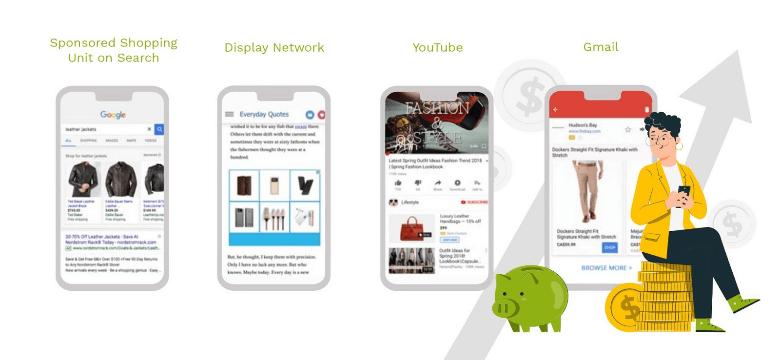
Your product pages are the most important pages on your website. In most cases, it’s the landing page for your traffic: your very first impression.
Many businesses put tons of energy into optimizing their homepage, yet neglect the product pages customers land on. What’s worse? Smart Shopping can only drive traffic to product pages. So let’s make sure your product pages are ready to shine:
Product Page Checklist
- Product title and subtitle
- Make sure the product title is clear, descriptive, and honest enough for Google to identify the product and send relevant traffic your way (Look at Amazon for inspiration)But avoid “keyword” stuffing! Honesty and simplicity are key
- Product description
- Product descriptions are supplementary to your title
- Use this opportunity to elaborate on the specifics of your product: any particular materials, special features, ingredients that are worth highlighting but would be too long for your title
- Product media (images and videos)
- We purchase with our eyes first
- Custom imagery is always going to be better than stock photos, particularly lifestyle images that help customers picture themselves using your product
- Nested navigation
- Make sure navigation is clear, easy, and accessible—we don’t want people to get lost
- Use breadcrumbs so users can always find their way back
- Social proof (i.e. reviews)
- Customers buy from businesses they trust—Enter: reviews
- Aggregating enough reviews takes time, so ask your customers for a review after 30 days of purchasing and give them an incentive or reward for the completion
- The 30-day rule gives you at least a few days/weeks to resolve any issues—and get a good review for it.
- Once you have enough five-star reviews, you can add them to your site.
- Clear call-to-action (CTA)
- If you don’t tell people what you want them to do they won’t do it
- A clear, bold CTA nudges your customer to the next step
- Isolate the action you want them to take: make the CTA a BIG button (not just a hyperlink)
- Clear customization options
- If you offer customized products, make sure the options are clear and don’t overwhelm your customers to avoid cart abandonment
Product Media
When it comes to adding images to your website, here’s the thing:
You don’t need to be a professional photographer.
In fact, all you need to create high quality images is:
 A smartphone (new iPhones or Samsung do a really good job)
A plain white background
Natural lighting
Don’t zoom in.
Don’t use flash.
And edit your photos if you can (check Fiverr or pixc for outsourcing options).
That’s all it takes!

Remember, your photos should give context and further showcase details of the product. If your product has a unique feature, it’s best to explain what that feature is in the descriptions and show it in your images.
Overwhelmed by how many products you need to capture? Start with your bestsellers. Make sure each of them has a decent product photo and (if possible) a short video. 5-7 images per product should be enough.
We are visual creatures. High quality product media will close the sale.
Product Media Part Two: Lifestyle Images
Speaking of product media, lifestyle images are critical for customers to visualize your product in action.
*Remember: Lifestyle imagery is a photo or video of products being used*
Here are some tips:
Give context
- Hey, your product doesn’t have to be the “main subject” in the photo. In fact, it could be in the background—like this poor Nespresso machine, competing with George Clooney’s eternal handsomeness:
You can use photos from your Instagram or Pinterest
- Speaking of Instagram, you can send your product to influencers (for free) in exchange for promotional content on their page
- Check out imagency.com to find influencers
Shoot a YouTube overview of the product and paste it on your product page

Robust Titles and Descriptions
Use the product description to sell the transformation
- The description sells the TRANSFORMATION, not the product
- Use the language that your avatar uses but make sure you also include in the right keywords that Google understands
Include specifications
- Size, material, weight, features
Use the product titles and descriptions to communicate with Google
- Google relies on product titles and descriptions to identify products and send relevant traffic—so, make sure they are “machine friendly” (clear and easy to understand)
Good descriptions can be repurposed
- Save some time and energy! Quality descriptions can be loosely reused for other product pages as well as for ad copy
Live Chat
We strongly recommend live chat on your website. Here’s why:
Diagnose errors
- Live chat allows you to compile visitor questions and create content that answers those questions for future customers
- Add helpful information to your product pages and place them near the top of your page
*Try tawk.to*
*Check out Shopify’s app integration here https://apps.shopify.com/tawk-to*
Identify objections
- Live chat can give you insight into what holds customers back from making a purchase—what questions do they ask before abandoning their cart? What concerns do they bring up in the chat?
Improve conversion rates
- Sometimes, all it takes is a little supportive nudge for customers to make a purchase
- By “being there” through their virtual journey, you have a higher likelihood of making a conversion
Get That Website Ready to Convert
I know, I know. I just gave you a lot of homework.
But listen up: I’ll be back with a guide on the next steps of setting up successful Google Ads campaigns—the dreaded technical and legal requirements.
But if you’re feeling extra-eager, you can check out this Google Ads Mastery Workshop.
Or, you can check out my entire step-by-step guide to Google Ads for eCommerce here.

Kasim Aslam
Kasim Aslam is the founder and CEO of Solutions 8, one of the world’s top ranked Google Ads agencies.
Recipient of the Arizona Interactive Marketing Association’s 2017 TIM Award for Person of the Year, Kasim was also named one of the Top 50 Digital Marketing Thought Leaders in the United States by The University of Missouri in 2020.
Kasim was hand-selected as the Traffic Coach for DigitalMarketer.com’s ELITE coaching program by their executive team. He is also the co-host of the long-running podcast, Perpetual Traffic.
His book, The 7 Critical Principles of Effective Digital Marketing, was featured as one of the Top 100 Digital Marketing Books of All Time by Book Authority.
Kasim helped launch the National Association of Child Helplines (NAACH) and worked with the United States Army, Intel, as well as a Gates Foundation-funded nonprofit, a 54,000 member PPO, the largest privately-owned bank in the United States, and an Academy Award-contending documentary.
He lives in Scottsdale, Arizona with his wife and two sons.
The post Google Ads for eCommerce: How to Make Your Website Conversion-Ready appeared first on DigitalMarketer.
Source: digitalmarketer.com

Do Links from Guest Posts Even Work? Here’s What We Learned from Analyzing 1,091 Sites That Accept Guest Posts.
It’s frowned upon to build links through guest posts.
If you do, they should be nofollowed and ideally you should be guest posting for brand awareness and referral traffic.
Even though that’s what I follow, it doesn’t mean others do.
Plus, I get hundreds of emails a day asking me if I accept guest posts, hence I know it’s still a popular link building method (although I ignore all those emails).
What Kind of Sites Did We Analyze?
First off, not all blogs accept guest posts. So, if a blog didn’t accept a guest post, we clearly didn’t include it in our study.
Second, we looked at sites that clearly labeled content as a guest post or as a post written by a guest author or guest contributor.
Third, we looked at sites that used dofollow links in the guest posts (even though they should have been nofollowed) to see if they had an impact on rankings.
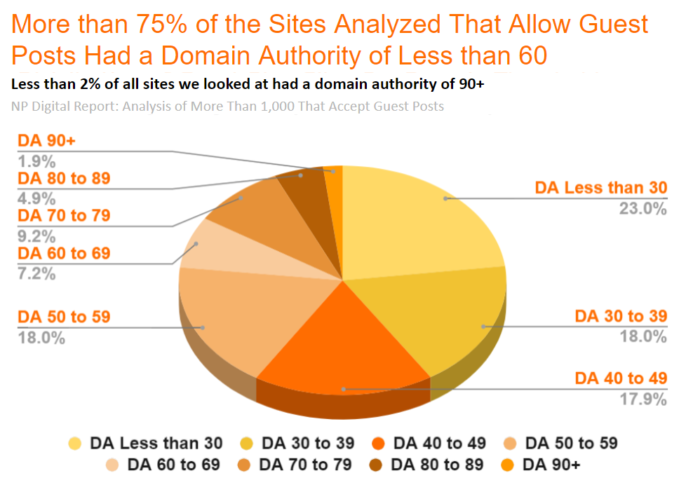
As you can see from the graph above, we looked at sites across different domain authority levels. We wanted to see what impact it had on whether a guest post received traction or not.
We also looked at sites with varied traffic ranges to see where posts might perform best.
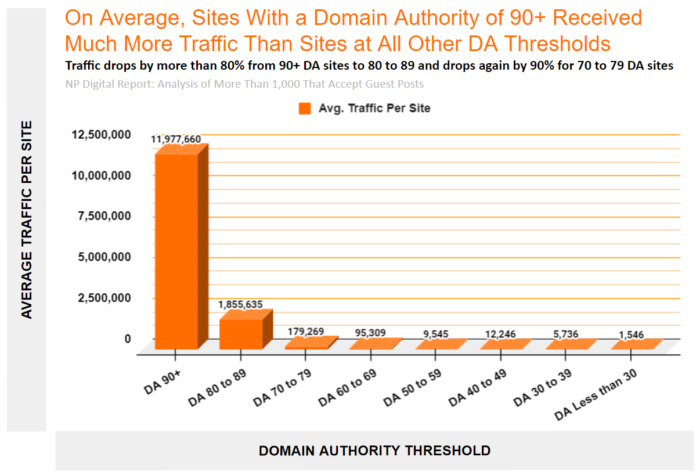
As you can see, targeting sites with a domain authority above 90 will likely lead to more traffic. At the same time, those are also the sites that will be hardest to get links from.
So, What Did We Learn?
The short answer: guest posts links kind of work and kind of don’t.

I know that isn’t a clear answer, but it is if you read the rest of the post. Because there are certain types of guest post links that work and there are others that don’t.
Here are some more insights…
Too Many External Links Is Bad
Some guest posting sites link out a lot.
Some don’t link out too much.
Although you shouldn’t be focusing on how many times you do or don’t link out, you should be focusing on providing the best user experience to your audience. If that means including a relevant link to another site in your article, by all means link out.
If it doesn’t make sense, then you shouldn’t.
Look at this chart.
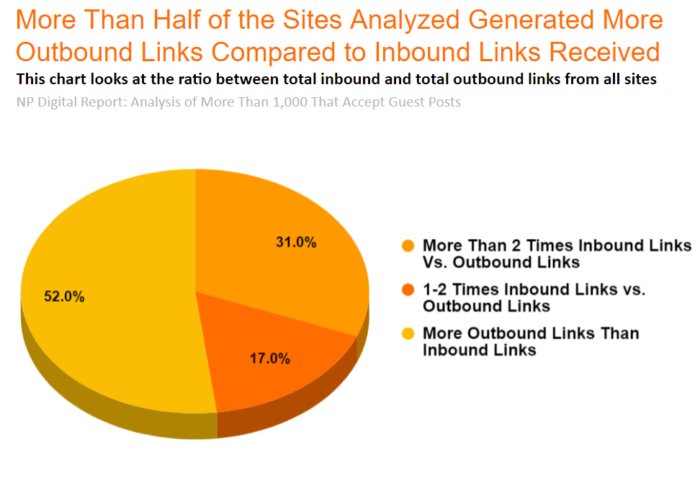
Now, it’s hard to know for sure if a link received from a guest blog site with more outbound links than inbound links is effective since websites don’t just have 1 backlink. Most websites can have hundreds and, in some cases, millions of them.
Just look at my site NeilPatel.com. Sadly some spammy websites link to me (scrapper sites) and some high authority websites link to me. It’s hard to know for sure what the impact a spammy site link has on my rankings compared to the ones received from high domain authority sites.
Instead, what we could do is look at the number of keywords a guest posting site ranks for. In theory, the more keywords a site ranks for, the better they are since they are liked by Google. I would think that a link from them would be more favorable.
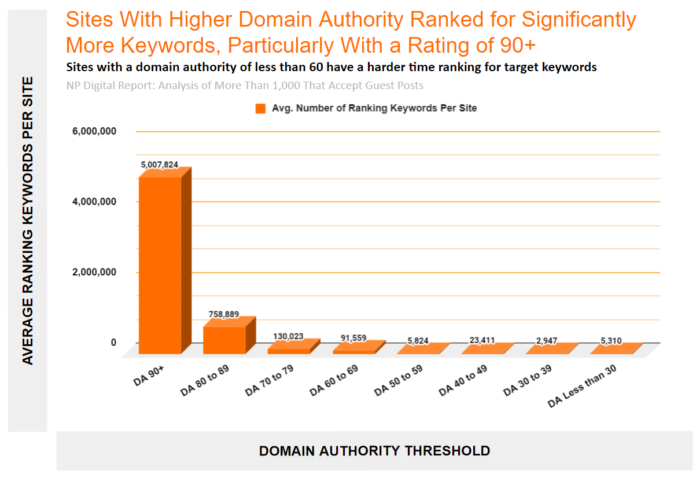
What you’ll notice is, generally speaking, the higher domain authority a site has, the more keywords it ranks for. But we already knew that.
When looking at the domain authority range from 0 to 59, you’ll notice that there isn’t a consistent upward trend. That’s because many of the domains from our analysis in this range tended to be sites that were expired or bought-out and are mainly used for guest posting purposes.
Even more interesting. The guest posting sites that had more external links than inbound links all had a domain authority of less than 60.
From this one insight, someone could infer that you should aim to get links from sites who have more inbound links than external links. As in, sites that have higher domain authority.
You should also avoid guest posting sites that exist for the sole purpose of linking out to other sites. These can be considered spam links.
The Right Links Help
From all of the guest posting sites we analyzed, we found 14 businesses who were exclusively receiving links from some of the sites we looked at. From these 14 businesses, six of them only received links from guest posting sites with a domain authority of less than 60.
In other words, they didn’t have links from any other sites.
So, we dove into their rankings and traffic.
What’s funny is that these six businesses had little to no rankings or traffic.
Let’s look at the number of page 1 Google rankings they had.
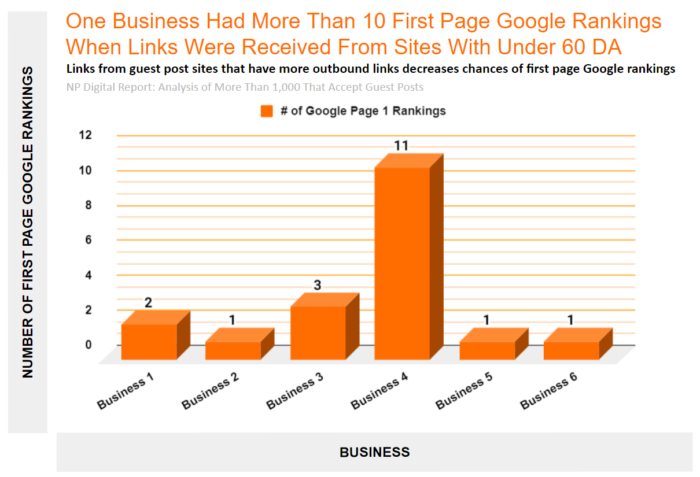
Since these six businesses only received links from spammy guest posting sites, we know that each of those sites had more outbound than inbound links. It’s clear that those sites didn’t really serve a purpose other than for guest posting.
The remaining 8 businesses we looked at also had links from spammy guest posting sites but also received links from more legitimate sources too. As in, guest posting sites that had more inbound links than outbound links.
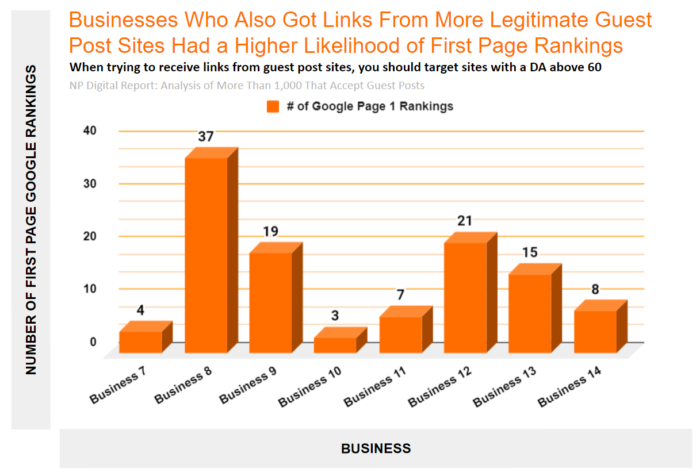
The businesses that built links from the spammy guest posting sites had, on average, 3.16 page 1 rankings on Google. On the other hand, businesses that also built links from the higher quality guest posting sites as well had, on average, 14.25 page 1 rankings on Google.
Keep in mind some industries are easier to rank for than others and some keywords drive less traffic than others, so not all page 1 rankings are created equal.
At the same time, this trend shows that if you target links from higher quality guest post sites, there is a better chance of ranking on the first page.
Conclusion: Do Links From Guest Posts Work?
When I originally said guest posting links can or can’t help it’s because the quality of the link really matters.
When you get links from spammy sites, as in sites whose sole purpose is to link out and don’t get as many links coming in, search engines know this. If this is a practice you have been doing, don’t expect your rankings to go up as much.
On the flip side, if you generate links from higher quality guest post sites, you are going to be much better off.
The goal of this post was to figure out if links from guest posts really help and now we know the answer. However, if you’re going to build links from guest posts than they should be nofollowed and you should be doing it primarily for branding and referral traffic purposes.
Source: neilpatel.com

How to Align Your SEO and Sales Teams
Have you figured out your marketing strategy for 2022 yet?
Here’s a great idea for you: Embrace collaborative marketing. Aligning your different teams is likely to open up many new opportunities for your business.
According to the recent research by Convince and Convert and Ascend2, 50% of marketers claim that integrating marketing and sales teams has proved to be very successful at achieving strategic goals.

This is huge.
Here’s how to align two of your most isolated teams: Sales and SEO.
Foster Content Marketing Collaboration
All marketing is driven by content and that includes SEO and sales. For both teams, content is fundamental. Without content, there are no rankings or sales:
- Google relies on content to identify if a page is relevant to a search query and if it satisfies a searcher’s intent. Relevancy and search intent are two key ranking signals.
- In sales, content is the most important driving force behind buyers’ journey. Content can directly impact purchasing decisions, as many studies confirm.
According to Forbes, more than 60% of B2B buyers say they are able to make their purchase decision exclusively based on digital content, without talking to sales reps or going through demos.
So why is there such a huge disconnect between SEO and sales content? Why do these two content strategies often exist separately without informing or helping each other?
“Content is King” has long been a marketing buzz phrase, especially in the B2B industry. However content is only King if it enables sales.

Too often there’s a discrepancy between those producing content and organizational teams who are trying to leverage it.
The resulting problem is two-fold:
- Sales reps lack the right content they can use to effectively engage with prospects
- SEO content creators lack sales reps’ insight which would enable them to create content that addresses the real struggles of their target audience.
Ways to Integrate SEO and Sales
Content can be the driving source for removing your organizational silos and encouraging cross-team collaboration.

How can SEO and content marketing teams collaborate on creating an integrated content strategy?
- Encourage the two teams to brainstorm on content ideas together
- Let the customer support and sales teams keep a shareable record of questions your actual customers are asking them. Any of those can and should be content ideas for the SEO team to research in terms of demand (search volume) and difficulty.
- Foster creativity from both of the teams: What are their thoughts on content promotion opportunities.
- Do they have any viral content ideas?
- Let both the teams explore further opportunities. For example, let your SEO team figure out ways to reuse sales enablement content for ESP purposes. Many of those sales demos can be used as public content that can target all kinds of long-tail ranking opportunities.
Help Them Understand Your Customers Better
When you work on traffic numbers all day, it is too easy to forget that there are real people behind those numbers.
Both SEO and sales team have unique access to valuable insights on who is your business’s target customer and how to serve them better:
- Sales teams talk to your current and future customers on a daily basis. They know their struggles and what they are looking to solve. Sharing this information with the SEO team will empower your SEO strategy with more data your competitors have no access to.
- Your SEO team knows exactly what your customers are searching for and which questions they are asking. They know the demand behind each search term and they can report on how your competitors are targeting each search query.
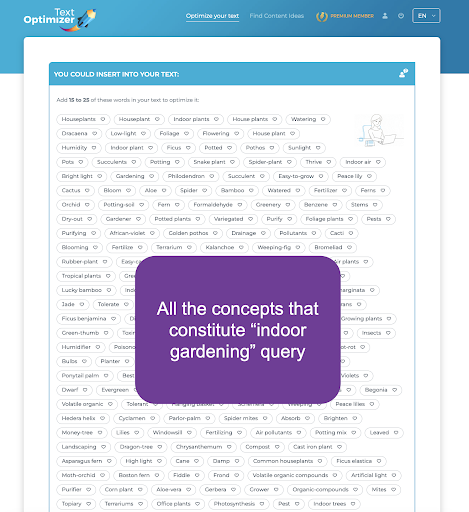
Text Optimizer allows you to better understand concepts behind any search query and help you find the ways to meet your customers’ needs easier:
Share Your Web Analytics Insights
Let the SEO team share their web analytics insights: What are the effective paths that bring those leads through the site down the conversion funnel? What works best in terms of engaging your site visitors and turning them into leads?
All of that information will help your sales team focus on what works best and nail their lead generation and onboarding strategy.
Encourage your SEO team to create custom analytics dashboards and hold regular meetings to give. This will give your sales team access to web analytics data they can understand.
Google Analytics is the first option that comes to mind. But there are also web traffic statistics solutions offered by your hosting provider, as well as many Google Analytics alternatives.
Whatagraph is an easy way to create custom reports that are delivered weekly and are very easy to understand even for a non-technical person:
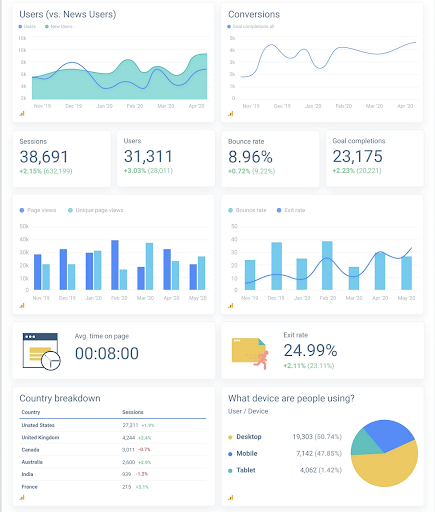
You can also integrate your web analytics into your website dashboard using these templates to let your whole company access it at any time.
Open up More Business Opportunities
The cross-team collaboration will likely discover more unexpected opportunities for you and your business. For example, letting your sales team access your SEO data may help them identify industry gaps and define your product’s unique value proposition.
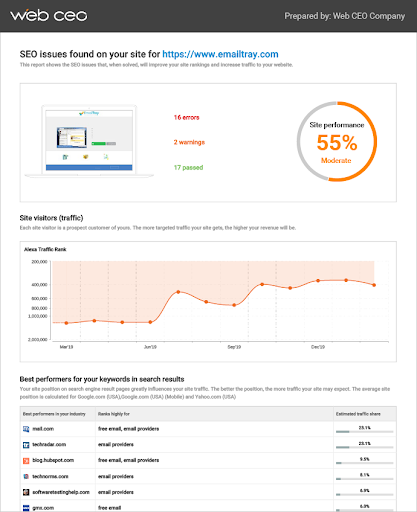
You can also discover new product or service opportunities. For example, this SEO lead generation tool can help you expand your services pretty easily.
Widgets like this help integrate SEO into the sales process in the most efficient way.
Conclusion
The power of cross-team collaboration is almost limitless. SEO and Sales collaboration can give you that competitive advantage your business needs. By combining numbers with actual sales experience, you can empower both teams.
The concept of unified communications has become even more important for business survival after COVID hit and many teams moved to work from home.

Finding more ways to let your (remote) teams keep in touch and collaborate is more important than ever.
Hopefully, the above ideas would come useful!
The post How to Align Your SEO and Sales Teams appeared first on Content Marketing Consulting and Social Media Strategy.
Source: convinceandconvert.com

7 Tips for Image Optimization
Are you looking to gain an edge in SEO? If your image optimization isn’t up to snuff, you could be missing out on traffic, user engagement, and sales.
Google looks at more than 200 factors when deciding which website to rank for a specific search query. While having a well-optimized image won’t help sub-par content rank number one, it can help you stand out from other sites that don’t optimize their images.

The good news? Image optimization isn’t particularly complicated. Just a few changes to your current image process could help your site gain more traffic and leads, resulting in more sales.
Why Is Image Optimization Important?
Well-optimized images get better visibility in Google, which brings in more traffic. That’s the number one reason sites need to optimize their images, but there are many other benefits as well:
- Improve the user experience: Well-optimized images that display correctly improve UX by making your site easier to navigate. Large images, for example, can take up the entire screen or cover other elements on the page.
- Faster site speed: When it comes to SEO, speed matters. Images that are large or formatted incorrectly can slow down your site, killing your ranking and annoying site visitors.
- Makes your site more accessible: Some optimization steps, like adding alt tags, can make your site easier to navigate for those using screen readers. Web accessibility is not only good for site visitors; it’s good for SEO, too.
While image optimization might feel like another step in a never-ending quest to improve SEO, it can have a significant impact on ranking and UX.
How do you make sure images aren’t holding your site back?
7 Image Optimization Tips for Your Website
Technical SEO can get pretty complicated, especially if you aren’t familiar with the latest Google algorithm updates and what they mean. The good news is image optimization isn’t as complicated as other aspects of SEO—and it doesn’t seem to change quite as often.
Ready to make sure your images help your SEO? Here’s what you need to know.
1. Choose the Right Image File Type
Using the wrong image file type can cause your images to be displayed incorrectly, look blurry, even impact whether users can see your images. But there’s a ton of different formats for images—vectors, JPEGs, raster, PNG, GIFs.

Which image type is best for SEO? Generally, you’ll want to use either JPEGs or PNGs.
JPEG, aka Joint Photographics Expert Group, is a popular image file type. They can be displayed by just about any type of device and can show millions of colors, so they preserve the coloring of your images well.
JPEGs do use lossy compression, resulting in some lost data during compression, so they’re not ideal for professional photography. However, they work fine for featured images in blog posts, and similar images.
Another popular type of image is PNG, which can also be displayed on any type of device. These use lossless compression, which means they don’t lose data during the compression process. They also support elements like transparent backgrounds. However, the file sizes tend to be much larger.
These are the most popular images for web publications. Here’s when I recommend using them:
Use JPEGs for blog post images, screenshots, etc. The smaller size will protect site speed, and most images will be clear enough. If the quality isn’t good enough and your site speed is good, feel free to switch to PNG format.
Use PNGs for icons, logos, and images where someone might zoom in. PNGs are larger but slightly higher-quality images. When image quality matters, use a PNG file.
I strongly recommend against using other image formats on your site, especially GIFs. I love a good GIF, but they really do slow your site down.
2. Compress Your Images
Image compression takes large image files and makes them smaller so they’re easier to load on the internet or store on your device. Image compression strikes the perfect balance between size and image quality when done well.
The two types of image compression are lossy and lossless compression. Lossy compression, which JPEGs use, essentially throws out some of the data while lossless preserves all the data. (PNGs use lossless, as I mentioned above.)
Therefore, the type of compression you use depends on the image type you select.
Here’s an example of compressed images:

The image to the far left is 824KB, which is quite large. The middle image looks virtually identical (there’s a little graininess in the background if you look carefully) but is far smaller at 76KB. The third one is even smaller, but image quality is definitely impacted.
Aim to strike the right balance between size and quality.
When deciding how much to compress your images, think about your user. In most cases, they are unlikely to care whether an image on a blog post is a tiny bit less crisp. However, if you are sending a client a new logo, that’s a different story.
The point is, use the compression type based on the file format you use and select the file format based on how the image will be used.
Now, how do you compress images? There are several tools.
I like resizing.app, it’s a free Chrome extension that lets you convert file formats, crop, and resize images in just one click. Other photo compression tools include Photoshop and PicResize.
3. Add Description Alt Text
Alt text (aka, alternative text) is a written description of an image that describes what it is and what purpose it serves. Screen readers use this data to describe images to their users, and Google uses it to determine whether an image is relevant to a search query.
If you use WordPress, adding alt text is very simple. Just highlight the block with an image and add the alt text to the provided box, like this:
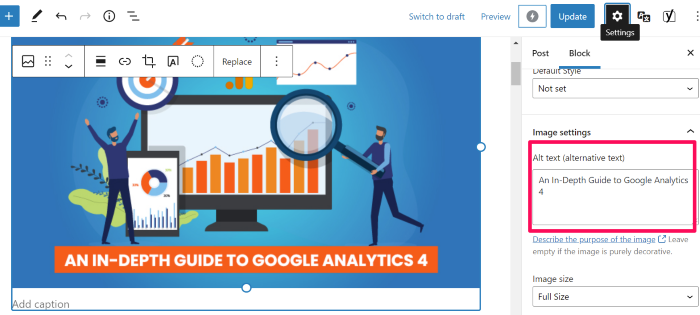
In Google Docs, right-click on images, then click Alt text, and a box will appear that allows you to add the alt text.
What do you write as your alt text? While it’s up to you, here’s the formula I use:
“Main keyword – description of image”
For the image above from WordPress, I used “image optimization guide alt text in the WordPress example.” This format makes sure screen readers know what the image is and tells Google the image is relevant for image optimization search queries.
Pro tip—if you want to see how your competitors use alt tags, navigate to their site, right-click and select “Inspect.” You’ll see the alt tags in the code of their site.
4. Write High-Quality Image Names and Descriptions
Image title provides users (and search engines) with a little more context about your images. While they don’t impact ranking directly (according to Google’s John Mu), they do provide a bit more context, and they show up in your site code.

I recommend using a short phrase that describes the image, along with the key term the post targets—similar to your alt text.
This can also make your images easier to find in Google image search since Google generates a title and snippet for images. If you include a title, they’ll take that into consideration.
5. Ensure Images Are Mobile-Friendly
If you’ve used the correct file type and compressed your images, they should be pretty mobile-friendly. However, sometimes things don’t always display the way we expect.
More than half of all internet traffic comes from a mobile device, so you want to ensure images don’t mess up the mobile experience.

For that reason, I recommend viewing your site from several different mobile devices to ensure images look their best. Remember, tablets, iPhones, and Android devices may all display your images a little differently.
I also recommend using Google’s mobile-friendly test to make sure your images aren’t slowing down site speed on mobile.
6. Use Schema Markup
Schema markup, also called structured data, is a type of code that helps search engines better understand your data.
Imagine you want to collect recipes to make a book of family recipes. Rather than having everyone send in their favorite recipe—which might use different measurements, different title formats, etc.—you send out a form and ask your family to input their recipe.
Now, all the recipes are in the same format and you can easily view the ingredients, measurements, and cooking steps.
Essentially, that’s what schema makeup does. It formats your data so Google can understand if it’s a list, a recipe, an image, and so forth. Here’s what it looks like:
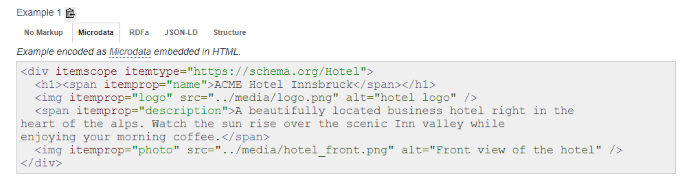
Schema.org lists three types of image schemas, including:
layoutImage (pending implementation)logophoto
This is a more technical change, so don’t stress if this feels like too much. Schema.org lists the coding you can use to add structured data to images here.
If you need more help, feel free to reach out to my team; we can help you get this set up.
7. Optimize Image File Names
According to Google, it uses the URL path and the file name to understand your images better. This means you should organize your image URLs logically and include key terms in the file name.
This can help you stay organized and help Google understand your images: a double win.
File names don’t have to be complicated. I usually use the alt text as the file name, which makes it easier to upload posts to WordPress.
I recommend using the keyword in the file name and describing the image.
Frequently Asked Questions About Image Optimization
What does image optimization mean?
Image optimization means making sure both Google and users can easily understand and view the images on a website. Examples include compressing images so they load faster and adding alt text so Google can better understand what the image is about.
Why is image optimization important?
While image optimization isn’t the most important SEO tactic out there, it can help you stand out in the competitive online world. You’ll still need high-quality content and to follow other SEO best practices, but image optimization is another way to increase your Google ranking.
What is the best image format for SEO?
There’s no specific format that is better for SEO. In general, you want images as small as possible while preserving as much data as possible. I recommend PNG if it doesn’t slow your site down too much.
How does image SEO work?
Image SEO works by making your images easier for Google to understand and making them as useful as possible to your site visitors. For example, adding alt text helps Google understand what your image is about and makes it easier for screen reader users to navigate your site.
Conclusion: Image Optimization
Google gives us a lot of information about how to optimize our sites and our images. It’s easy to get overwhelmed by all the small details.
The tips above will help you make the most of your images; however, I recommend focusing on making sure your images bring value to users. Don’t cram images in just to meet a quota, and don’t add images that don’t make sense for your content.
Have you optimized images on your website? How did it impact your traffic?
Source: neilpatel.com

The Ultimate Guide to Improving Your Website Performance
SEO is one of the most-used (and most important) website optimization strategies. However, great content, backlinks, and meta descriptions won’t help much if you don’t optimize your website performance.
If visitors land on your site and find it takes too long to load, or images don’t display correctly, they’re likely to choose a competitor.
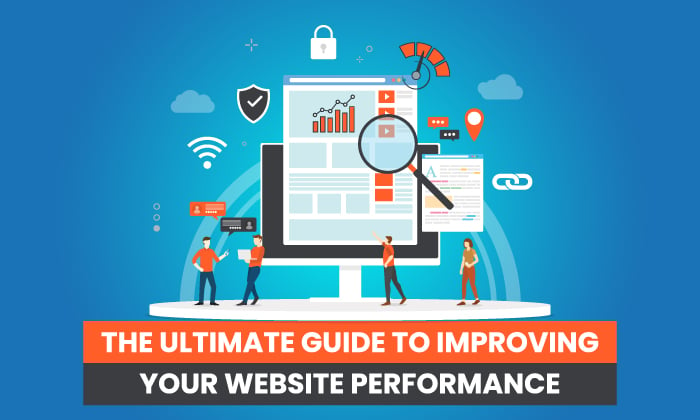
That’s why improving your website performance is crucial.
What does optimizing your site look like and how do you go about it?
Here’s a step-by-step guide to getting you started.
What Is Website Performance?
In digital marketing, website performance generally refers to how fast a web page loads and displays content. It’s all part of visitors’ experience and it’s key to online success.
Website performance can also be used more generally, to refer to the overall impact a website has on a business. However, when digital marketers talk about website performance, we’re usually talking about how fast a site loads.

Website performance can be measured by the number of server errors and the size of downloaded web pages. It might also be called page load time.
Website performance and page speed are imperative for any online business. A slow website can lead to:
- shopping cart abandonment
- lost conversions
- dissatisfied customers
- damage to your brand’s reputation
- lower ranking in the SERPs
No one wants any of that for their business.
Just how long does the average customer wait for a page to load? Not long.
Most sources say a website should load within two seconds. Anything longer and you risk losing not just traffic but customers.
Before you get started, it’s probably a good idea to know where you’re starting from. Google has a tool to help you out, while Uptrends also has a free speed test.
These are easy to use and provide a list of steps you can take to improve your website performance. But why should you care?
Why Is Website Performance Important?
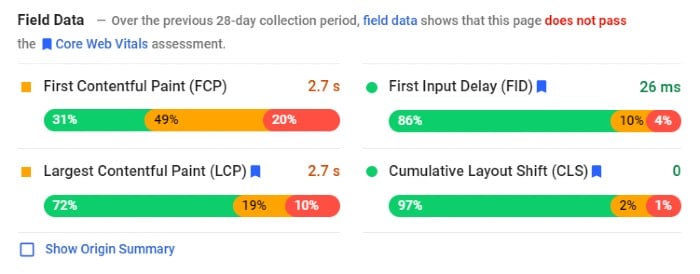
I’ve touched on the importance of website performance in the intro, but let’s delve further. A fast responding site has many advantages, such as:
- Better user experience: Your website needs to be fast if you don’t want frustrated customers to leave.
- Higher rankings: Google PageSpeed Index rewards faster websites by ranking them higher in search results.
- Customer loyalty: The easier it is for customers to buy, the more likely they are to stay loyal.
- Improved conversion rates: Website performance can impact conversion rates because slower load times result in higher abandonment rates.
- Better mobile traffic: Your mobile visitor wants rapid results. If the mobile website performance is poor, there’s a good chance you won’t see them again.
What Affects Website Performance and How to Improve It
Several factors can affect website performance. For example, image sizes and page weight can impact speed.
Then there are some of the less obvious issues, like geographical areas.
Some of these problems might sound like huge issues, but they’re not. Most have easy fixes and I’ll walk you through the steps.
1. How Image Sizes Affect Website Performance

Images are one of the most important factors for website performance.
The reason is pretty simple: the larger your images are, the heavier your page weight is, and the longer your site takes to load.
When you optimize your website images, significant areas of your site’s performance like loading times and user experience can improve, too.
As for optimal image sizes, this varies, from picture to picture. For some guidance, try this website image size cheat sheet from Strikingly.
Here are image guidelines to help improve your website performance.
- Crop images so they don’t exceed the boundaries of the screen. Use images sparingly. The fewer images on a page, the quicker it loads.
- Download a page ruler to get precise dimensions.
- Use image compressions tools and plugins.
However, don’t just focus on image size, look at areas like:
- formatting
- resolution
- dimension quality
It sounds like a lot to consider, but it just means minimizing pictures while ensuring image size doesn’t negatively affect UI.
2. How Website Performance Is Affected by the Web Page Weight/Size
Page weight refers to page size. This covers aspects like style sheets, documents, images.
Page weight is vital for website performance because it can affect how quickly web pages load on a user’s screen. The more content included on a page, the larger it is in terms of bytes.
Stats show page weight is increasing, which can make it hard to have a fast-loading website.
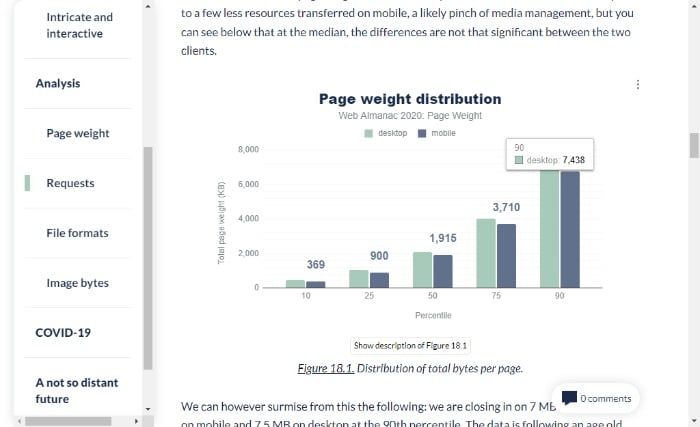
If you’re wondering what the ideal page size is, website performance expert, Tammy Everts, suggests 1MB.
Not sure of your page weight? Try searchenginereport.net’s page size checker.
Now it’s time to start working on reducing your page weight.
Many of the tips in this article, like optimizing images and limiting HTTP requests, will lower your page weight. To further improve website performance, you can:
- check for any unnecessary plugins on your site
- analyze which assets are weighing down your pages
- use offsite video hosting
- combine CSS and JavaScript
- reduce the number of requests from your browser by combining multiple assets into one file
3. Reduce Redirects and HTTP Requests to Improve Website Performance
HTTP requests are a fundamental building block of the web. They allow a web browser to request information from a server and display it on a webpage.
They work like this:
When you visit a website, your browser sends an HTTP request to the site’s server, asking for data. The server sends back the information your browser needs to display the page, including HTML, CSS, JavaScript, and images.
For your page to load quickly, there should be as few HTTP requests as possible from the server to the browser.
There are several ways to reduce HTTP requests on your site, including:
- reducing image size by optimizing images with tools like TinyPNG
- optimizing JavaScript and CSS files
- merging multiple JS files
- using a Content Distribution Network (CDN)
Redirects are another issue that can slow website performance.
These redirects take users from one page to another. If a website has too many redirects or some of them point to pages that don’t exist, the website can rank lower and it may also be slower.

There are a few ways to reduce redirects on a website:
- Implement a 301 permanent redirect. A 301 permanent redirect is when you tell Google that you want this new page to replace the old one and direct traffic there.
- Add canonical tags to manage duplicate content.
- Remove old redirects.
- Use tools like Gifts of Speed to check broken links.
4. Overcome Geographical Location Limitations
You may not consider geographical location as an issue. However, the closer the two parties are, the faster the loading time.
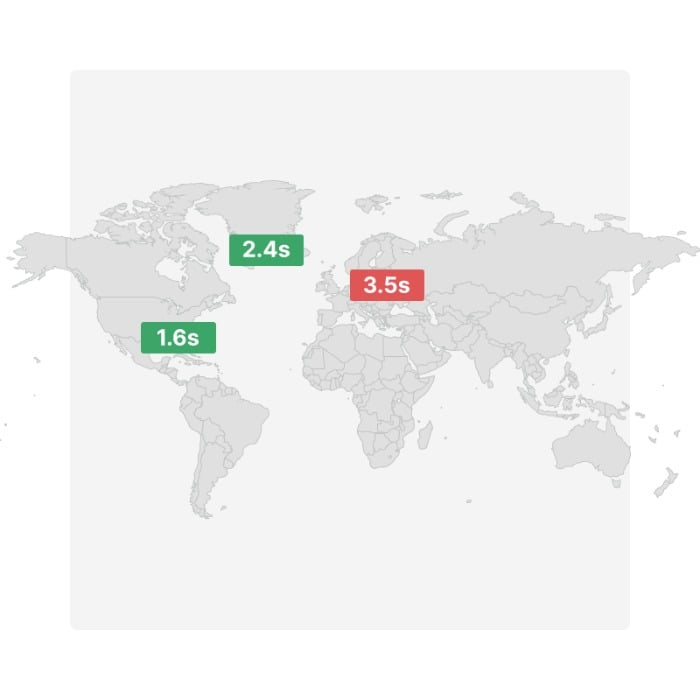
While you can’t do much about the distance between visitors to your website, you may be able to speed things up by introducing a CDN.
A CDN is a geographically distributed group of servers deployed in multiple data centers, providing content for one or more websites or web applications.
Popular CDN’s include: Rackspace, Amazon CloudFront, and Microsoft Azure.
By storing your files closer to your audience, you can reduce load time.
5. Look at Your Hosting Plan
The website hosting plan you chose years ago may have been the perfect fit, but as your site gains attention and traffic increases, it might not serve you so well anymore.
The result? A lot of downtimes, a decline in website performance, and frustration for you and your visitors.
What do you do? Upgrade to a plan that suits your growing audience. If you’re using a shared hosting plan, look at some alternatives like:
- Dedicated website servers: These provide a fast and reliable connection to the web and can be scalable to meet high traffic and bandwidth needs. They’re more expensive than shared hosting, but they offer better performance for your site. This is because you get an entire server of resources dedicated to one website.
- VPS Hosting: In a nutshell, a VPS hosting solution is an affordable and scalable way to host a website. It’s a practical way for small businesses or startups with the flexibility of scaling with them as you grow.
- Serverless websites: Or a static website. These reduce load times and increase security. There are some drawbacks, so make sure to research this option before diving in.
6. Use Browser Caching
The browser cache is a temporary storage area that allows the browser to reuse content files, such as images and scripts, to reduce network traffic.
Using browser cache has a huge impact on website performance because it can save time and bandwidth, enhance the user experience, and increase loading times.
You can use some plugins to create a cache using WordPress. For non-WordPress users, here’s Google’s tutorial.
7. Render Blocking Your CSS and JavaScript.
Render blocking causes a significant slowdown in page loading time.
This is because the browser has to wait for the page to finish rendering before downloading and executing any scripts included on the page, such as JavaScript and CSS files.
Naturally, the more render-blocking elements a webpage has, the longer it takes for a web browser to load.
Don’t panic. It’s not nearly as complicated as it sounds.
You can find some easy fixes for WordPress render-blocking and Google also has some advice.
0. Other Steps to Improve Website Performance
The above sections cover the main issues that impact website performance, but there are other areas to consider, such as:
- cleaning up unclean code
- reducing excessive Flash content
- minifying your HTML
- choosing mobile-friendly, fast-loading themes
- using Accelerated Mobile Pages (AMP) to reduce bounce rates and increase page ranking
- fixing broken links
- compressing your files with gzip
Frequently Asked Questions About Website Performance
How do you measure the performance of a website?
There are plenty of free tools to measure your page loading times, such as Google’s PageSpeed Insights. However, if you want to measure overall performance, pay attention to KPIs like customer satisfaction and conversion rates.
What tools do you need to measure website performance?
Google Analytics provides a set of tools to monitor website performance, including Site Speed, Pages per visit, Bounce Rate, and Conversion Rate.
Pingdom and GTmetrix measure your site speed, and Uptrends provides a comprehensive set of testing tools and a free speed test.
How long does it take to analyze website performance?
You can complete loading time tests in seconds, and you should analyze them at regular periods throughout the year. In addition to speed, other areas of website performance to measure are your content, on-site behavior, and user acquisition metrics.
What is a good website performance?
The best-performing sites load within two seconds, and that’s what you should aim for.
Conclusion: Website Performance
There is more to a website than SEO, great content, and good-looking images. Whether you’re an ecommerce site, blog, or website owner, website performance is crucial to online success.
Great website performance makes it easier to rank and helps keep traffic on your website.
It also enhances SEO, helping to keep your website at the top of rankings and potentially increasing your overall conversions.
Enhancing your website performance might sound complex, but it’s pretty simple. Start by reducing your image sizes, limiting page weight, and upgrading your web host package.
Do you have tips to improve website performance? Share them below.
Source: neilpatel.com

Improve Your SEO Results By Cleaning Up Your Content
If you publish content on an ongoing and consistent basis, I’m willing to bet actual money, and without looking at your analytics first, that you have a handful of blog posts that are performing really well for your organic search goals. The rest is most likely a mountain of content that, at best, ranks at a solid “meh” on the performance scale.
If you’re just continuing to create, optimize and publish new content on top of that mountain of existing underperforming content, I have bad news for you: you’re making your content and SEO life so much harder than it needs to be.
That’s because that mountain of the content may seem harmless, but it could actually be doing more harm than good. It’s high time you clean up your old content.
Removing underperforming and outdated content has the potential to massively boost SEO success
While we all know the organic search is about far more than keywords now, it’s been a long time since “search engines love fresh content” has been the SEO world’s go-to mantra. The problem is that we all still have a massive amount of content that was created under those outdated efforts. It’s all just hanging around on our websites.
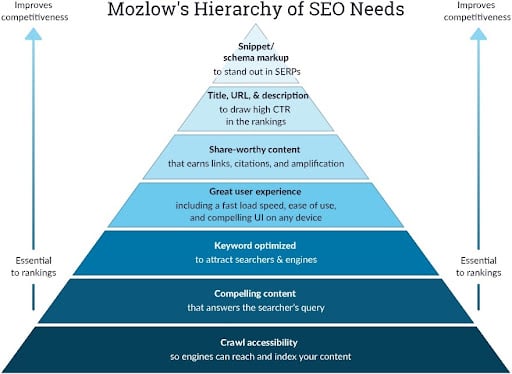
MOZ.com perfectly illustrates just how much quality content affects rankings
Yet still, even if that content is old and outdated and doesn’t bring in the results we want and need, a lot of clients and content publishers we talk to are hesitant to touch or remove content. They fear even bigger SEO dips. But, when done right, this isn’t the case.
Massive content cleanup efforts from two of digital marketing’s biggest publishers show how properly removing outdated content actually helped their SEO efforts quite a bit:

Search Engine Journal studied the results of deleting content on their own site over the course of 20 months and saw a significant year-over-year increase in pageviews and organic traffic.

Hubspot deleted more than 3,000 pieces of outdated content from their blogs and saw a clear boost in their SEO results.
Need more to help convince you it’s time to clean up and remove your outdated content? No problem.
- Andy Crestodina at Orbit Media asked seven experts to share their experiences with “pruning content” and how it affected SEO results. Three reported huge increases in search traffic, while others noted a clearly improved user experience.
- Even Neil Patel himself notes that safely removing outdated content “is crucial to the overall health of your website and overall digital marketing strategy.” In addition, he notes that it’s not just about SEO efforts, it’s also about content that accurately reflects your brand and provides the best experience possible.
Easy with the content machete! Don’t go cutting away so quickly.
Of course, deleting content has to be done the right way. You can’t just slash and hack away at content and expect results. It involves a lot of time and effort with initiatives like:
- Auditing content from a qualitative and quantitative standpoint
- Content mapping and redirect strategies
- In-depth technical SEO mapping and planning
- Lots and lots and lots of redirects
But the results can clearly be worth it, as we saw in the brands and examples noted before.
Not ready to delete? At least update outdated content.
Taking on the task of deleting outdated content can be a lot. If you don’t have the time to do it the right way, don’t do it at all…or at least not yet.
Deleting content has to be done the right way. You can’t just slash and hack away at content and expect results.
Instead, focus first on giving old content and blogs a fresh update. This will help boost SEO traffic and drive even more engaged visits by following a few basic best practices:
Start with content that you still think brings value or has potential: Review them to make sure they’re still relevant in some way to your organization and your audience.

Great Content

Updating Content
Update any outdated references: Bring in new data points, provide more or additional context (where appropriate and necessary), and remove anything that is no longer applicable or relevant. Also, focus on content quality here, not just quantity.
Optimize content according to your current SEO strategy: This includes technical SEO pieces and also metadata.

Optimize Content

Republish Content
Republish and re-promote: Include a note about when the content was originally published and when it was updated, when appropriate (like in the case of blogs, articles, whitepapers, etc.). Promote on social channels, in newsletters, on podcasts, etc., when relevant and appropriate.
When done right, the effort is worth the impact.
Cleaning up, removing, and refreshing old, outdated content isn’t an easy task, nor should it be done hastily. However, when done right, the results can be impressive and significant. It can help break the cycle of just focusing on publishing more new content on top of old outdated content.
The post Improve Your SEO Results By Cleaning Up Your Content appeared first on Content Marketing Consulting and Social Media Strategy.
Source: convinceandconvert.com

SEO for a New Site: Checklist
Starting SEO for a new site is overwhelming, especially if you haven’t done it dozens of times already.
In fact, the process can be quite intimidating, as there are so many technical tasks involved.
SEO for a new site is one of those most intimidating tasks new site owners tend to shy away from and set aside.
SEO for a New Site: Checklist
Here’s a guide that will make it doable for you:
1. Don’t Take Your Domain Name Lightly
Spend some time on this step: Your domain name will hardly have any direct impact on your organic search visibility but it will be important for your brand name recognizability.
What doesn’t matter for SEO:
- Domain age (when it was registered)
- Exact-match keywords in the domain name
- Top-level domain (as long as it is not a regional/localized TLD), i.e. don’t stress if you cannot find a .com domain.
What does matter for SEO:
- Domain meaning: Its topical associations. A good domain can get more people to click your snippet when they search
- Domain length: Too long or hyphenated domains may look spammy and hurt your brand.
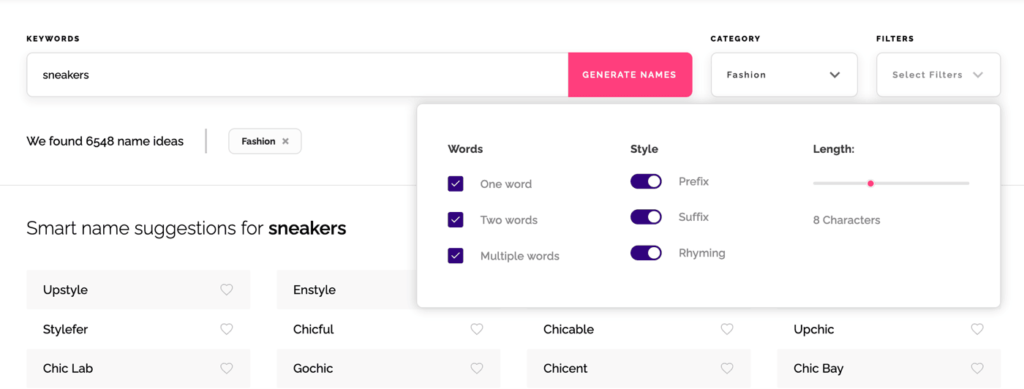
With all of that in mind, take your time. Picking a domain is a huge decision. Use this business name generator that discovers some snappy names with meaning. You can also set how long your name should be and which category it should fall under:
Once you have your domain, search Google for your name to make sure there are no existing brands in your niche that you’ll have a problem overcoming in branded search.
2. Use WordPress
WordPress is the easiest platform to set up a site. And it is also incredibly SEO-friendly and flexible.

No other content management platform has so many years of fine-tuning and such a rich directory of plugins. You can do just about anything with WordPress without having to code anything.
WordPress is free, most plugins are free or freemium, and all it takes is a few-click installation on most hosting providers.
WordPress also doesn’t require a lot of optimizing, especially at the beginning. All it takes:
- Choose a theme. Unlike your domain name, this will be easy to change down the road, so focus on the theme being lightweight rather than pretty. Here are a few fastest themes out there
- Enable HTTPS: Here’s a detailed guide on doing that on WordPress
- Set your permalinks to “Post name” and choose your time zone in “General Settings”
- Publish some fundamental content to give search engines something to crawl. More on this below:
3. Set up Your E-A-T Right Away
The first thing you can do when launching a new site is to start with Lorem ipsum text on your fundamental pages: About us, Contact, Privacy Policy, etc.
Those types of pages convince your first visitors that you are a trusted business to deal with and send quality signals to Google.
Make sure your E-A-T is set up well:
- Your foundation pages (About us, Terms of Service, Contact us, etc.)
- Your website security information (how is your visitors’ privacy protected?)
- Basic facts about your business
- Some social proof from beta testers or first product buyers
- Your author bylines detailing why they have expertise on a topic
- Links to your social media profiles
- More importantly, your service or product pages. What is it you are selling?
Ensure your service pages are as descriptive as possible. In order to achieve that, try adding not just text but also some videos that demonstrate the key benefits of your products or services.
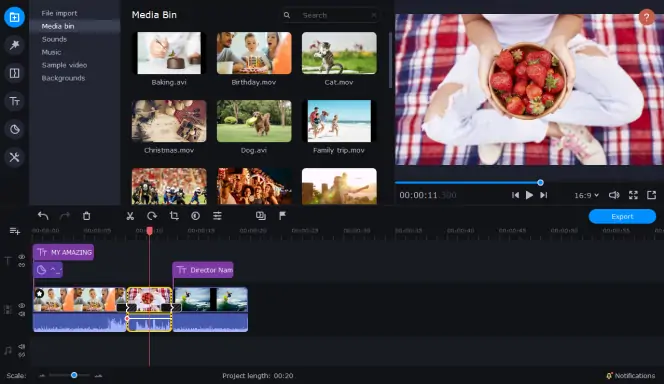
Also, since the majority of visitors prefer watching videos with sound off, make it convenient for them by adding subtitles, so that they can get to the meat of the matter even without having to listen to them.
You want your first visitors as well as search engines to know right away!
4. Start with the Least Competitive Search Queries
One of the biggest challenges of optimizing SEO for a new site is that you have no unique data to rely on.
Any data that you are going to use at this point is public, so you have zero competitive advantage unless you get really smart and creative.
When launching SEO for a brand new site, you need at least This content targeting definitive search queries at a minimum:
- Pages describing your services/products: These will target high-intent queries
- Initial content putting your products in the educational courses: What are those problems your products help solve? These could also be use cases.
#2 is where you can focus on less competitive search queries to start generating some organic search traffic earlier and send those visitors to your key “money” pages.
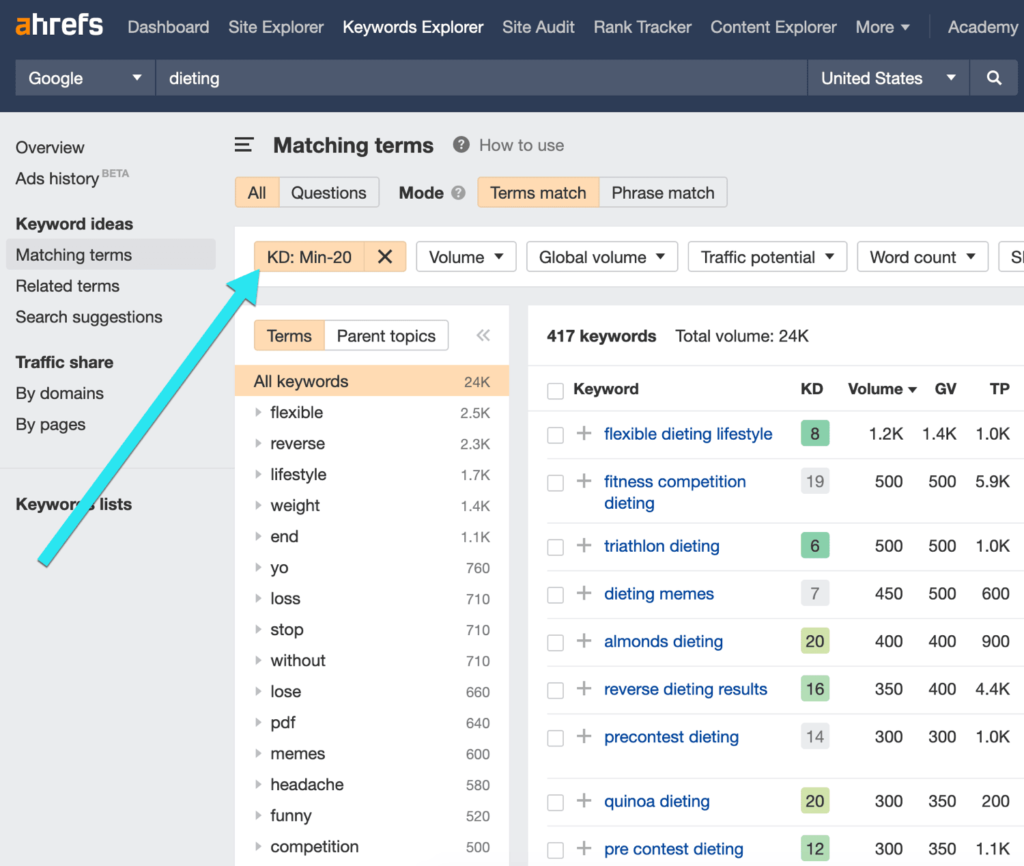
Ahrefs is a great tool to find those low-hanging-fruit keywords to target when starting a new site. The platform offers a “Difficulty” metric that shows how difficult it will be to rank for each keyword on page 1.
For a brand new site, you may want your keyword “difficulty” to be no higher than 20. For that you will need to create a filter inside the Keyword Explorer:
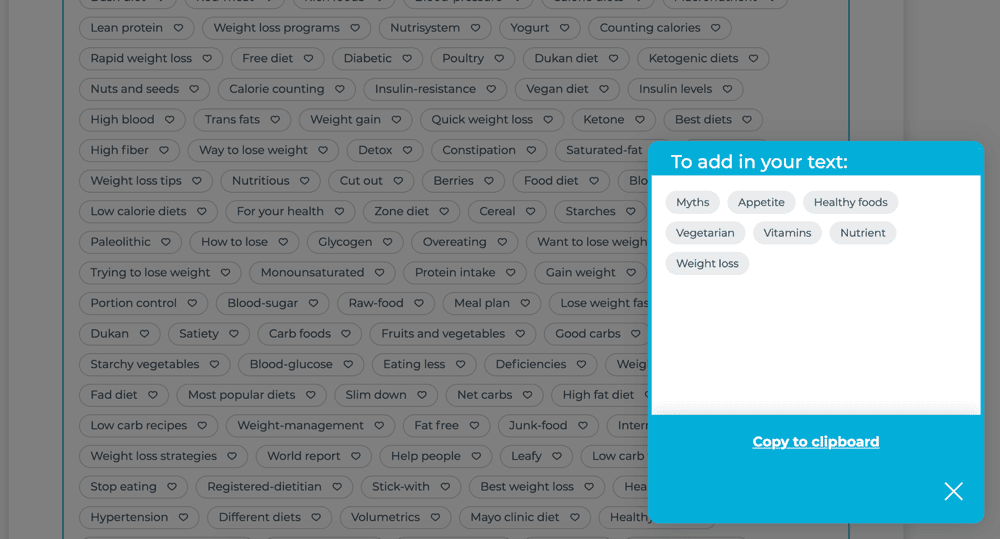
When creating your content, use Text Optimizer to build semantically relevant context and include related concepts:
5. Start Monitoring Your Progress
You want to start collecting your site’s data as early as possible. This will help you get ahead of your competition by utilizing your own data and making more informed decisions. You don’t have to do lots of web tracking systems.

These three will be enough:
- Google Analytics
- Facebook Pixel (especially if you are starting an ecommerce site and planning to use retargeting ads down the road)
- Google Search Console: Google will start collecting data about you as soon as they discover you but things like sitemaps may speed things up.
6. Focus on Content-to-Content Links
Links will help your site get discovered by Google as well as start growing its credibility. No site should be launched without a smart link acquisition strategy.
Links are still key to organic search visibility, so there’s no search engine optimization strategy without links.
Self-serving link building is a risky tactic that can bury your website in penalties and filters, and the risk is even higher for new sites that have no good record with Google.
With that in mind, don’t be in a hurry and try to avoid any link acquisition tactics where you can control the anchor text of the link.
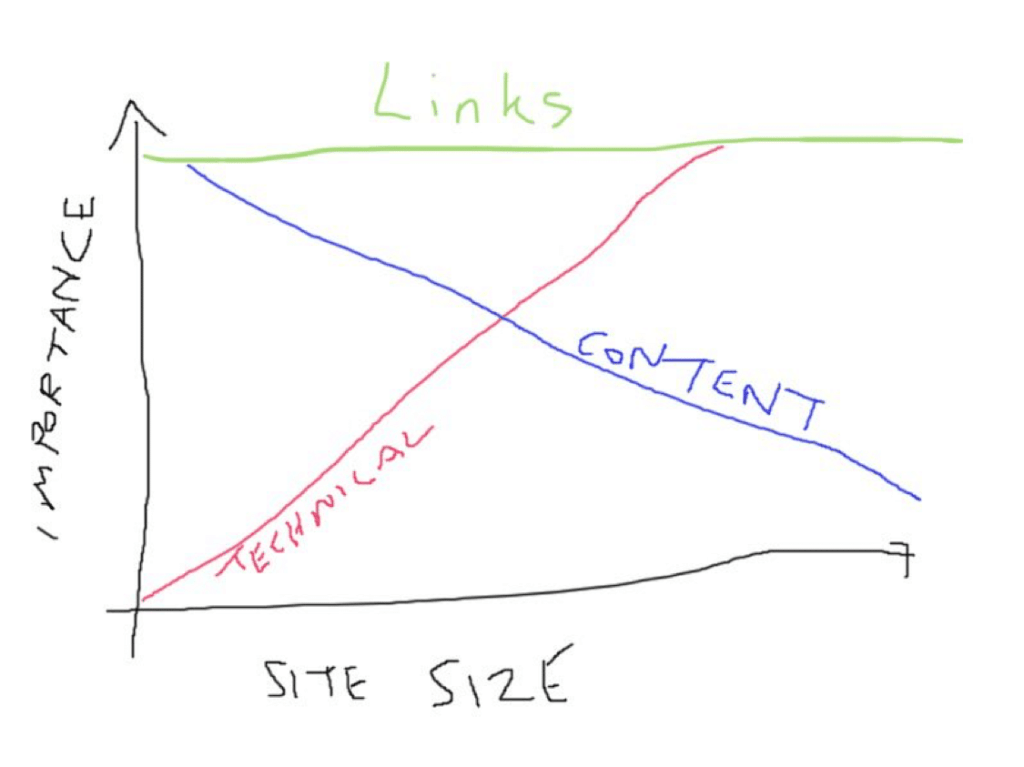
There are a few powerful and safe link building tactics, and most of them come down to one process:
- You create useful and truly unique content assets. (e.g. an original study)
- You reach out to media publications for them to consider covering it.
It takes time and effort but you just cannot put a price on contacts you’ll be building underway. Make sure you build strong relationships with all the publishers that chose to link to your content. Every further outreach campaign will be easier from there.
Your New Site Is On Its Way to Ranking
SEO for a new site is mostly about building a foundation. You don’t have to do everything perfectly when starting a site. You just need to lay a good foundation to start collecting data and expanding.
SEO takes time, so whatever you do, don’t expect fast results. Google needs to start crawling your site and forming your opinion about your content before they know it is worth showing up for its users.
The post SEO for a New Site: Checklist appeared first on Content Marketing Consulting and Social Media Strategy.
Source: convinceandconvert.com

6 Ways to Integrate SEO Across Teams
When I started in digital marketing, I splattered meta-data and keywords into content like Pollock. I am not proud of this because not only does this date me, but it is also horrifically against best practices as we see them today. If you ever read anything along the lines of “California vacation lovers and those who love California vacations? For the best California vacation, look no further than these California vacations,” I send my deepest apologies.
Fast forward 20 years, I’m now happy to say that organic SEO best practices have dramatically improved, both for the marketer and the end-user. As we move into 2022, it’s more important than ever to remember search does not take place in a silo. It should be a thoughtful, integrated strategy running across the complete customer experience.
6 Keyways to Integrate SEO Across Your Organization
Not sure how to integrate SEO? We have six key ways to de-silo your search integration across your organization when it comes to working with search engine optimization teams, agencies, or practitioners.
#1. Search Meets Research, Personas, and the Audience Journey

Search traffic provides a treasure trove of qualitative and quantitative information about your audiences’ needs, vernacular, attitudes, and more.
- Do people talk about your travel product by saying “vacation” or “trip”?
- Do high school students looking for information about their college of the chosen search for “ASU”, “Arizona State”, or “Arizona State University”?
- When searching for enterprise software, do your customers say “platform,” “tool,” or “technology”?
Using search data helps you discern what will resonate best with your audience. Couple this with surveys, stakeholder interviews, and digital data and you have a solid (and quantifiable) foundation for your personas and audience journeys.
When search teams share high-level keyword information across the organization, it can help support everything from media relations to product development to recruitment and beyond.
#2. Integrate SEO and UX
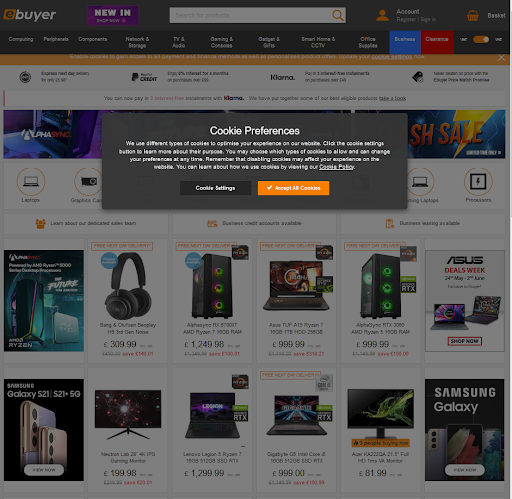
According to “SEO For Everyone” authors Rebekah Baggs & Chris Corak, search and user experience teams shouldn’t be kept on separate tasks (or quite frequently within separate silos). These practitioners or teams often have some of the same goals in mind: ensure the site is easy to find, navigate, use, and enjoy. Although, they may approach the process of getting to the end goal differently.
Don’t let the idea of The One Perfect Keyword create tunnel vision—you want to be looking at the bigger, more nuanced picture. An improved user experience means people stay on the page longer, interacting further with your site, not clicking the back button, revisiting the site anew, and sharing your content—all boons for SEO. The better the overall site experience (think UX, load times, mobile navigation, et al.), the more likely you’ll reach the coveted top ten in SERP.
– Baggs & Corak
#3. Search and….. the Offsite Experience?

During my Britney-and-Justin-era SEO days, I didn’t anticipate I’d be planning for SEO even before the site experience began.
Today Google wants you to stay on Google.
Don’t let the idea of The One Perfect Keyword create tunnel vision—you want to be looking at the bigger, more nuanced picture. Click To Tweet
It is now critical that search marketers consider how their content is presented, consumed, and shared even before the user gets to their site. Examples of this include maps, movie listings, local listings, and product descriptions.
As top search results provide answers via the SERP itself, search marketers and content creators need to button up content, images, and calls to action even before a user steps foot on your site.
#4. Search and Social
One of my favorite mash-ups over the years has been searching and social. It’s interesting to find how to search keywords and activities on your site overlap with social engagement conversions and customer care. This isn’t revealed through a pretty Venn diagram.
This typically looks like a psychologist blot experiment with various overlaps in bizarre and unpredictable ways.
As the great resignation continues and teams have more and more to do (with fewer resources, patience, and stamina), one way to offset that workload is figuring out ways to collaborate, leverage each other’s expertise, and do more together, outside of the SEO silo.
Top social sites for search engine optimization (and content distribution, amplification, and atomization too!) include LinkedIn, Pinterest, Medium, Twitter, and Meta (the artist formerly known as Facebook).
According to Pinterest, 444 million people globally come to Pinterest every month to get inspired. Last year, 88% of Pinterest users purchased a product as a result of their New Year’s Resolutions.
#5. SEO, Meet Creative and Content

Content marketers and writers need to ensure content is not just “me me me” or “product product product” copy.
What questions does your audience need answering? In what cadence? Where? Why? How (video vs text vs app, for example)? I can promise with 99% accuracy it’s not, “why are these SaaS tool features so yummy?”
Creativity is critical too. According to Google’s John Mueller:
Sometimes those small differences do play a role in regards to how people perceive your website. If, for example, you have something that is on a financial topic and people come to you and say, “well, your information is okay but it’s presented in a way that looks very amateurish,” – then that could reflect how your website is perceived. And in the long run could reflect something that is visible in search as well.
Poor design can lead to high bounce rates and short time on site, adversely impacting ratings. Search marketers working on their 2022 goal or to-do list might consider adding “meet with the creative team” (over coffee or cocktails works!)
For a goldmine of additional insights from Google’s John Mueller Bookmark This: 57 SEO Insights
#6. SEO and Video

With YouTube continuing to dominate as a primary search engine, optimizing videos for SEO should be on your radar as well. Videos should mirror your search keywords, be thoughtfully optimized, and mirror the sophistication of your brand, both from a creative and UX perspective.
Keep your eye on:
- Channel trailer, featured video, and channel sections
- Channel name, description, and site links
- Profile picture, banner image, and video watermark
- SRT Files,Tags, & Hashtags
- Titles and headlines for thumbnails
Now’s The Time To Integrate SEO
To help phase your efforts, begin by learning what terms and topics your audience is searching for, build content focusing on those phrases and issues, and use the research to understand the highest interest levels. Focus your content initiatives on those first.
In addition, tools like TubeBuddy, Google Keyword Planner, Google Trends, and YouTube Search Predictions will help you learn what is working – and what’s not as you integrate SEO.
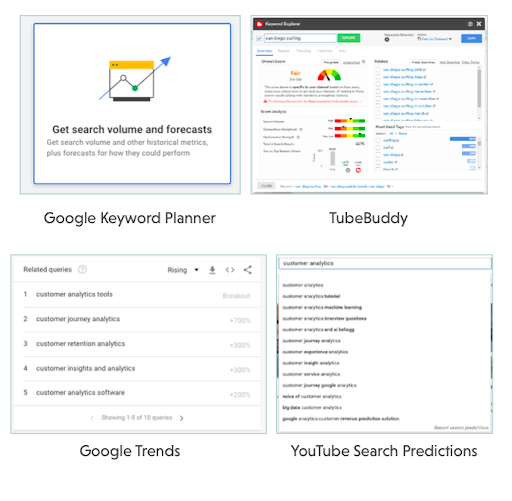
The post 6 Ways to Integrate SEO Across Teams appeared first on Content Marketing Consulting and Social Media Strategy.
Source: convinceandconvert.com

SEO Trends for 2022: How to Get on Top of Google Search
SEO is one of the youngest marketing disciplines out there, and it’s also incredibly fast-paced. It looks almost nothing like what it did when we started.
While the fundamental principle remains the same — SEO is about making websites easy to find and understand — the tactics involved are very different than they were 15, 5, and even 1 year ago
So what are the most important SEO trends for 2022 and how can you implement them?
SEO Trends for 2022
Here’s what you should know for 2022, as well as key steps for implementing these trends and tactics.
SEO Trend #1: SERP Marketing and Content Diversification
For years now, Google has been taking steps to become a destination, not just a discovery project. With knowledge graphs, quick answers, and interactive and visual results, Google is building an ultimate resource that can give comprehensive answers to any query.
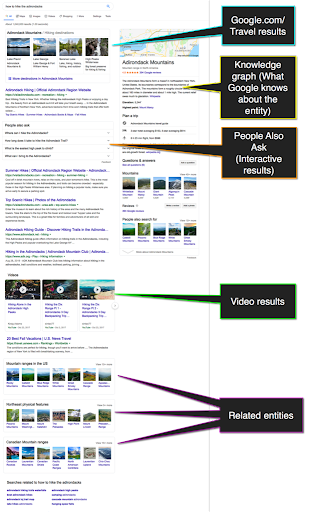
Within one search result page, we see:
- Google.com/Travel suggestions
- Knowledge graph (that includes maps, user reviews, basic facts, etc.)
- Related videos (This search element is interactive because you can scroll through the carousel to see more videos)
- “People Also Ask” results (This box is also interactive: You can click any question to read answers and expand follow-up questions. Interestingly, a question you click determines the topic of further questions that appear. I find this quite eye-opening.)
- The visual results including more similar destinations, related searches, and more
- Organic “text” results which are somehow lost in-between
This is where the concept of “SERP marketing” lies: You need to stop focusing on organic listings and start optimizing for all the other search elements, including videos, images and “quick-answer” sections (“People Also Ask” and featured snippets).
You need to take each individual search result page as a whole to achieve brand visibility there.
How to Dominate Google with SERP Marketing
There’s a lot to be done to create an effective SERP Marketing campaign. Here are some steps to get you started:
Analyze Your Current Opportunities
At IMN, we are building an ultimate SERP marketing tool that helps you determine all-important content formats that need to be created to dominate your target queries:

The tool uses your current rankings to show where you are missing out. Use this tool to understand your current opportunities better and optimize for those.
Set Up Content Collaboration Strategy
Content diversification brings in both challenges and opportunities. On the one hand, you need to continually come up with quality content assets in various formats, which is incredibly hard to scale. On the other hand, you get to leverage more mediums and try more tools and tactics, which is pretty awesome.
Content collaboration is the tactic that can solve many issues and empower your marketing with more benefits, including natural backlinks, trust and shares. And the good news is there are great projects that help you build contacts to co-create content and scale it.
Of course, unified communication is a big part of it, especially post-covid when most companies have moved to remote operations.
BizSwipe is one example that allows you to easily build B2B connections for content co-creation and marketing collaboration. You can use advanced filters and easy connection tools to find partners and influencers who can help you diversify your content strategy:
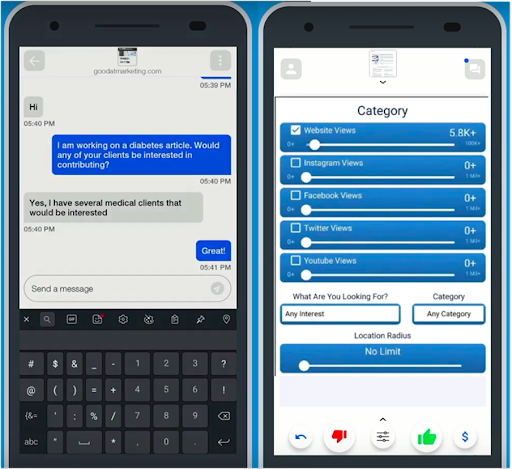
Organize Your Strategy Using an Editorial Calendar
For content collaboration and co-marketing opportunities, consider using an editorial calendar solution that will help you organize your campaigns.
ContentCal is a marketing collaboration platform that can help you organize your omnichannel content marketing strategy and boost its effectiveness:
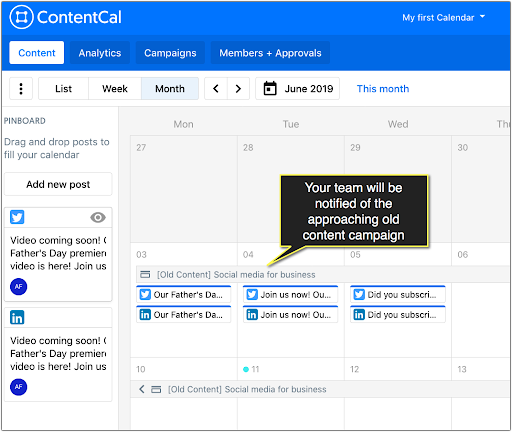
Use its “Content Campaigns” feature to schedule your upcoming content assets and put all the ideas, goals, and tasks in each campaign brief.
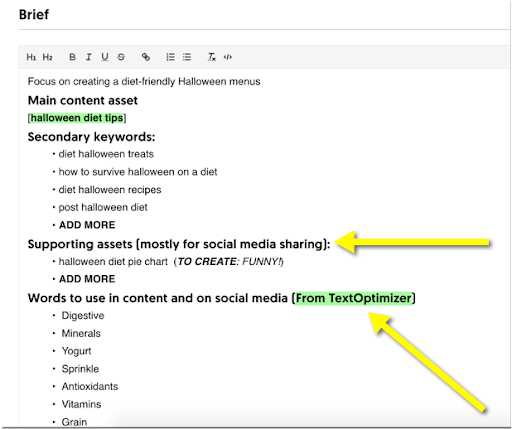
Creating a central dashboard for all your content plans to be visible for your whole team is key to a consistent and effective content strategy. With ContentCal each team member responsible for a single piece of the puzzle will be able to see and contribute to the whole picture.
At the end of the day, content diversification lies at the foundation of omnichannel marketing that has multiple benefits (including cross-device compatibility, smoother shopping experience, creation of more marketing channels, and more). So you may want to start working on it whether you are worried about your search visibility or not.
SEO Trend #2: Rich Results
Google search results are becoming increasingly richer and more interactive.
The good news is that this gives SEOs a competitive advantage over those website owners who are not keeping up with Google’s moves.
As an example, here’s what FAQPage schema looks like in search results once you implement it:
This search snippet is interactive — you can click any question to unfold the answer, and from there, even get to the site for more answers:
How to Implement Structured Data
There are many tools, plugins, and solutions, allowing any website owner to implement structured markup with no technical knowledge required.
Check out a few options:
- Here are free Schema markup generators and how to use each one
- Here are WordPress plugins that support Schema
SEO Trend #3: Mobile and Voice Search
Voice search is no longer a trend. It is a habit. Most of us are routinely asking questions to a mobile device or a smart speaker. It is something that has become part of our lives.
Obviously, mobile search is going strong, and we have many sources to confirm that, including:
Back in 2015, Google revealed that more people were using mobile search than desktop search in 10 countries, including the US and Japan
In 2018, more than half of website traffic in the US was coming from mobile devices
Last year consumers spent three and a half hours a day on their mobile devices
Google switched its priorities by introducing the Mobile-First Index, which means that Google predominantly uses the mobile version of a page for indexing and ranking. In other words, if your page doesn’t look good on a mobile device, or if the mobile version has less content, you may lose rankings in both mobile and desktop search results.
Given that mobile device users often use voice search to find answers while on the go, it is safe to assume that voice search is getting popular, and these two trends are very well connected:
- Both mobile and voice users are likely to be looking for answers while in the middle of the task (so they need clear, concise answers right away)
- In both of the cases, the top result (which is often the featured snippet) is really what matters. So we are competing for the top result now, versus the top 5 positions as we did a few years ago
How to Optimize Your Site for Mobile and Voice Search
- Obviously, make your site mobile-friendly and fast (page speed is important!)
- Adapt your content strategy to catch those featured snippet opportunities to outrank your competitors. Mobile users seldom have time to scroll, and with voice search, there’s only one result being read to the user. This makes featured snippet optimization incredibly essential for your online visibility — you are either there or nowhere.
There’s a lot to featured snippet optimization (which deserves a whole separate article which I already did), but it all comes down to:
- Researching current featured snippets for your important queries (and learning from them)
- Structuring your content with H2-H3 subheadings that address questions behind queries triggering featured snippets
- Provide quick, concise answers (no longer than 90 characters) below each subhead for Google to grab and feature.
If you include these steps in your writing guidelines for your content creators to use, you are halfway there:
- Use this writing checklist that includes both of the above (and more useful) guidelines
- Scale your content creation process using Narrato to build a team of content creators that do a good job following those guidelines.
The beauty of this platform is that it matches you to the most suitable writers automatically. After some time, you have a solid team that knows your requirements and creates content fast. In an era when you need a lot of content, and you need it fast, this is a life-saver:
SEO Trend #4: Semantic Search and Intent Optimization
Google moved away from exact-matching keyword optimization years ago, yet our industry is somewhat slow to keep up. These days, Google doesn’t use the actual string of words that are being typed in the search box. Instead, it looks at the query context and analyzes the possible search intent to deliver results.
You can see this all around the SERPs and even in Google Suggest results. I wrote a detailed article on semantic search, and here’s one of the examples from it:
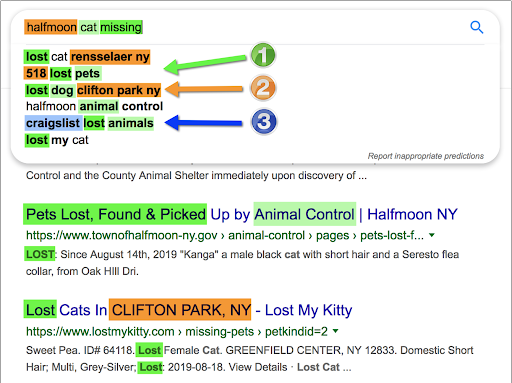
Notice how Google interprets the query on the fly to realize:
- You may have lost your cat, but you may be interested in pet and animal control centers, not just cat facilities
- Your cat may have gone missing in the town of Halfmoon but it has legs, so chances are you may be able to find the cat in the nearby towns, including Clifton Park and Rensselaer
- You may also post on Craigslist or search there in case someone already found it—which is an absolutely awesome idea!
What does this tell us?
Google has got very good at understanding searcher intent, and old-school content creation methods that focus on a single keyword string don’t work.
We need to create content that solves problems. That’s what Google is after, and so are our potential customers.
How to Optimize Content for Semantic Search and Search Intent
Simply Searching Google to get an idea of how it is interpreting a query is a great first step. Do the same type of research I did with that cat missing query. Look for other ways Google is trying to solve the problem for the user.
Using semantic research tools is another good idea. Text Optimizer is an intent optimization platform that helps you cluster any search query into related concepts and entities. It uses Google’s search snippets to come up with ideas to expand your initial copy to provide more solutions and meet Google’s and its users’ needs:
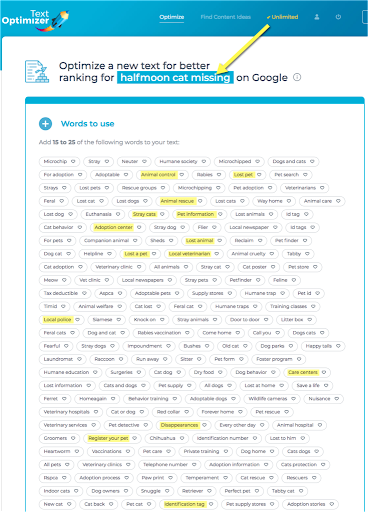
Based on semantic research, it will even help you build sentences based on common co-occurrence analysis of the terms you select:

If you are using a remote team of content writers or Narrato, it is a good idea to run TextOptimizer before creating your assignment and provide your writers with the list of concepts to cover.
SEO Trend #5: The Power of E-A-T vs Domain Names
For years, SEO has relied on a low-hanging fruit: The power of a chosen domain name:
- Keywords in domains names did wonder to your rankings
- Domain age and previously accumulated authority did wonder to your rankings
Both of those signals were pretty easy to fake: You could invest into buying a well-established domain or buy a keyword-rich domain name by sacrificing its “brandability”.
These days, your domain name has no direct impact on your rankings. Thanks to its smarter algorithm and knowledge graph, Google can tell if there’s a real entity behind the domain and determine each page EAT (Expertise, Authoritativeness, Trustworthiness).
The road to higher rankings is no longer fast or predictable. You need to keep building an established brand, work on your trustability and collective authorship. Your domain name is still important but mostly indirectly: How memorable is it and how easy is it to associate your business with your niche?
Generating a business name is more important than finding a keyword-rich domain name. Building a strong brand and becoming an entity is more important than finding an established domain name. Page experience signals are more important than clicks. It’s all about focusing on real metrics now!
Now, You Are Ready to Rock 2022
SEO is moving fast — it is a very exciting industry to be in. From the earlier days on, those people who were fast to “get it” found themselves ahead of slower-moving competitors. Use the tools and tips above to get ahead of yours in 2022 and beyond!
The post SEO Trends for 2022: How to Get on Top of Google Search appeared first on Content Marketing Consulting and Social Media Strategy.
Source: convinceandconvert.com