
Tag Archives for " SEO tool "

The Ultimate SEO Tool: Ubersuggest 3.0
In 2018, I promised you I would release a better version of Ubersuggest for free, and I did that.
But there was one big issue: Ubersuggest only worked on a keyword level. When you put in a keyword, you get a list of more keyword ideas and content ideas.
And then when you put in a URL, nothing happened.
Well, that was before.
You can now get domain-level metrics!
So let’s dive into the new Ubersuggest.
Traffic Analyzer Overview
The traffic analyzer is broken down into 3 main sections: overview, top pages, and keywords.
The overview looks like this:
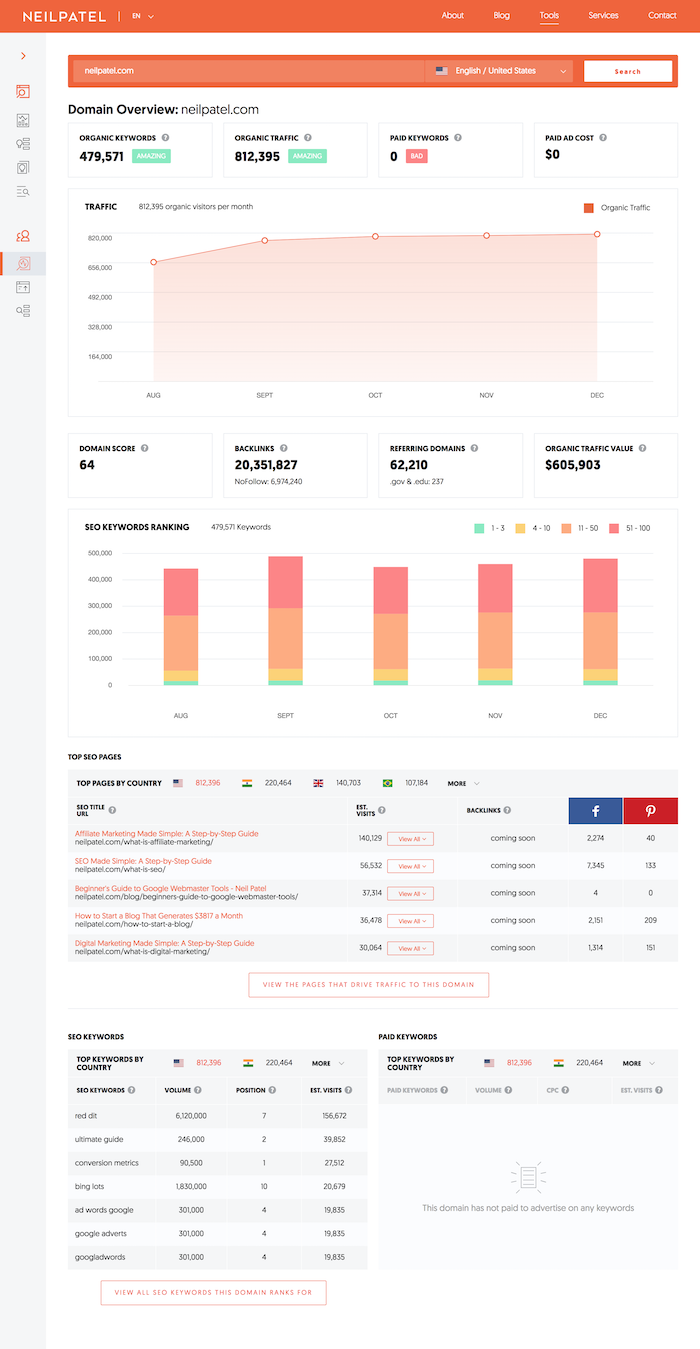
The first section breaks some basic stats and a graph of the domain’s search traffic.
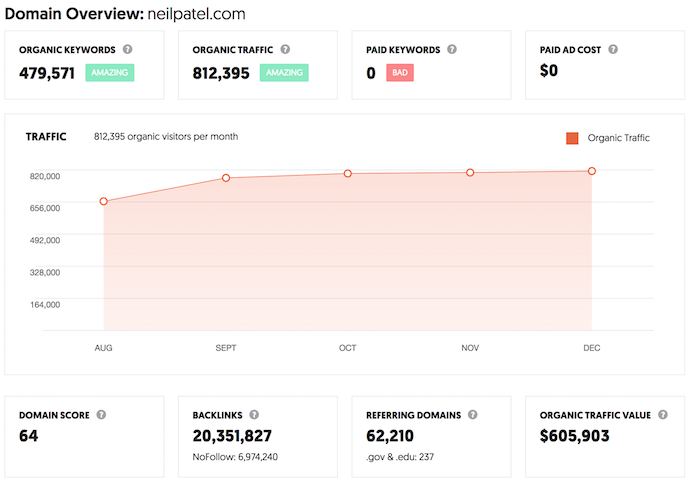
As you can see from the screenshot above, you’ll see how many keywords a domain ranks for, the total estimated search traffic from that region, the number of paid keywords a site is bidding on, and how much they are spending on Google Ads.
In addition to that, you’ll see a traffic graph that shows estimated search traffic a site receives over time.
And of course, a domain-level overview won’t be complete without data such as backlinks, referring domains, the number of .edu and .gov links, and how much the organic traffic is worth if you had to pay for it.
Now, before you head over to Ubersuggest and type in a domain, there is one thing you need to keep in mind…
Ubersuggest treats subdomains as separate sites.
So, if you enter store.nike.com you will get different results than if you typed in nike.com.
By typing in nike.com, you would NOT see any of the data from their store unless you typed in store.nike.com.
We did this on purpose as it allows you to analyze sites more thoroughly.
Also, within the traffic analyzer, you’ll see bar graphs that contain the overall positioning of the keywords you rank for overtime.
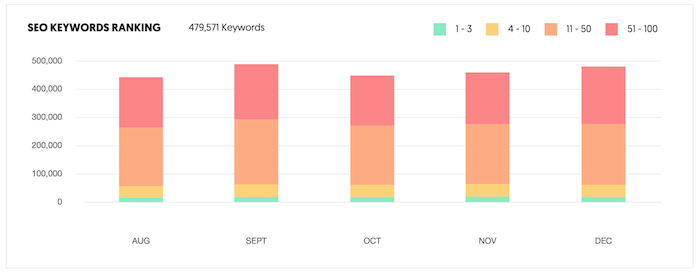
The chart above shows how many keywords a domain ranks for that are in the top 3 positions in Google, the top 10 positions, the top 50 positions, and the top 100 positions.
You already know no one clicks beyond page one, but over time you’ll want to see your site climbing the ranks.
Hence, we track how many keywords are ranking in the first 100 positions.
Now let’s get into my favorite feature of the traffic analyzer.
Top SEO Pages
The second part of the traffic analyzer is a list of the most popular pages for a given domain.
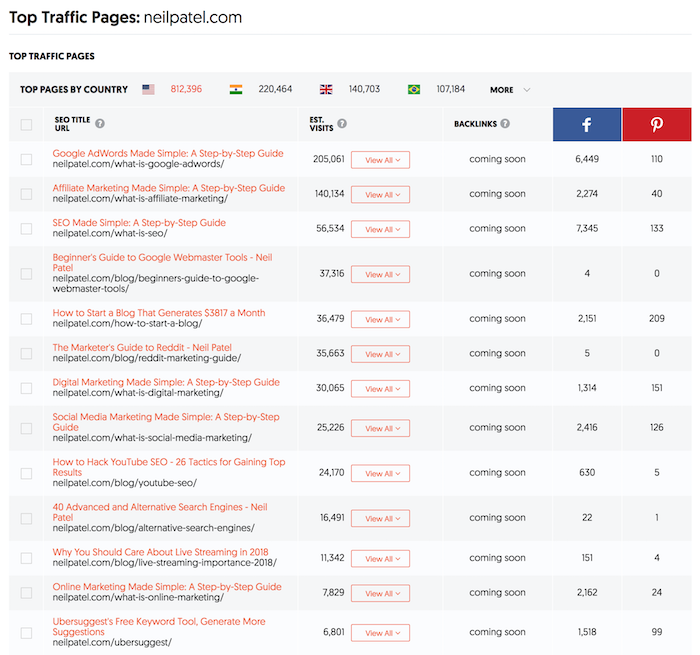
For each page, you are given the title, URL, the number of visits a page receives from Google on a monthly basis, and the number of times the URL has been shared on the social web.
My favorite part about the top SEO pages report is when you click on “view all” you’ll see a list of keywords a page ranks for.
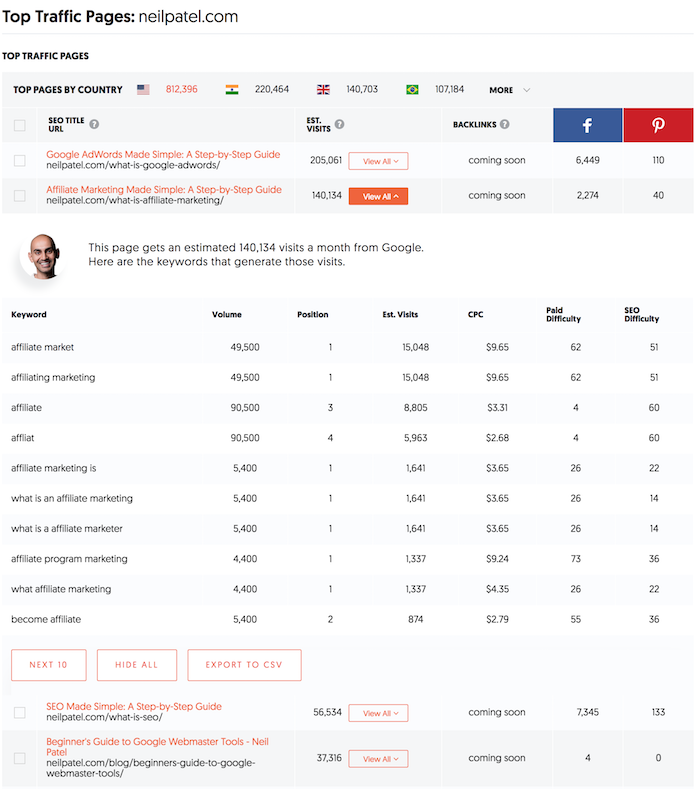
This one report will not only list out each keyword a webpage ranks for, but the position, estimated visits, cost per click data if you paid for that keyword, and how difficult it would be to rank for it.
What I love about this report is that I can put in a competing URL and see what’s working really well for my competition and then copy them.
Or even better, create a more in-depth page than my competition.
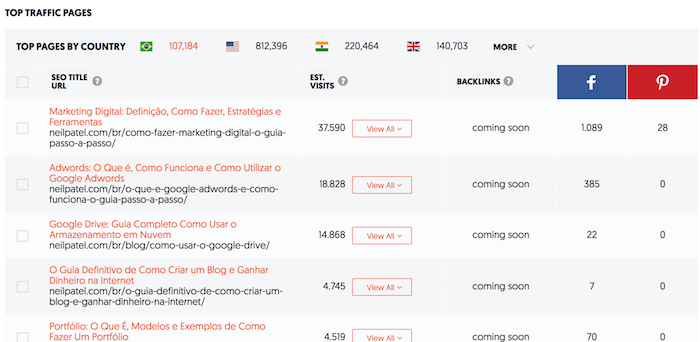
Plus, if you have clients who are global, you can click on the flag at the top and see the top pages for any domain in all of the major countries.
For example, here are my most popular pages in Brazil.
Top Keywords
The last section in the new Ubersuggest is the top keywords.
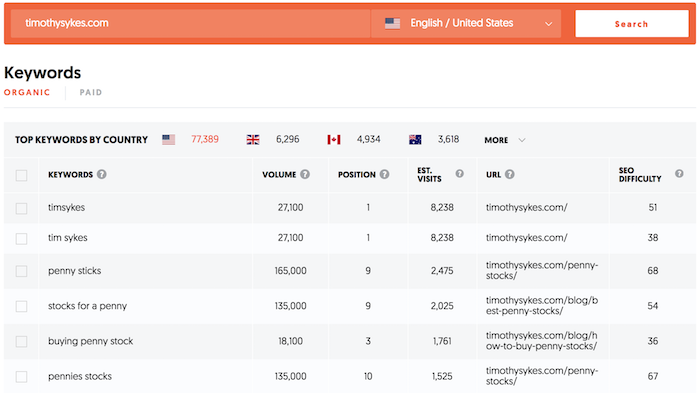
Whether you put in your own domain or competitors, you’ll be able to see all of the organic keywords and paid keywords a site is going after.
When you click on the “paid” button you’ll see the list of paid keywords as well.
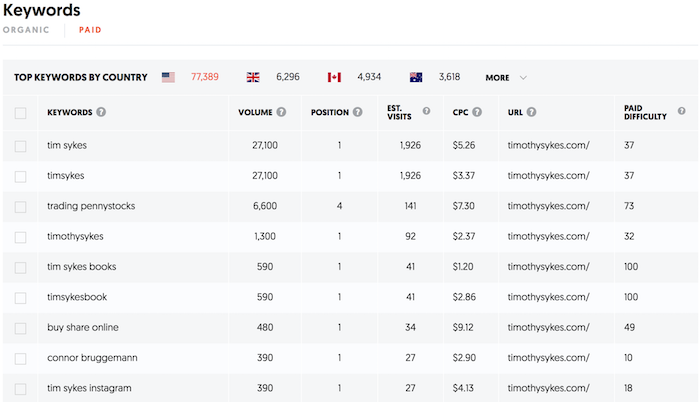
And just like the keyword research reports within Ubersuggest, you’ll have data on URLs, paid difficulty, and SEO difficulty.
Conclusion
I hope you enjoy the new version of Ubersuggest.
I know there are still some bugs in which the reports don’t load as fast as you want (Top SEO Pages can take up to 20 seconds to load) and you may have to clear your cache to see the new features, but hopefully, you enjoy the updates.
There are also some issues with duplicate keywords and misspellings. The engineering team is continually looking to fix this.
We do know there are many issues with duplicate keywords and misspellings in our Japan database, but we are working on fixing this as soon as possible.
So overall, I know it’s not perfect, but what do you think so far?
And if you haven’t tried it, head over to Ubersuggest and type in a domain.
PS: If you find any bugs, please email [email protected]
The post The Ultimate SEO Tool: Ubersuggest 3.0 appeared first on Neil Patel.
Source: feedproxy.google.com

My New SEO Tool: Ubersuggest 2.0
I promised you months back that I was going to release a newer, better version of Ubersuggest for free.
And can you guess what?
I just released it! 🙂
Before I go into the features of the new Ubersuggest and how it works, I just want to tell you that not all of the features have been released yet.
For the first release, I focused on keyword research.
So let’s dive into the new Ubersuggest.
Keyword Overview
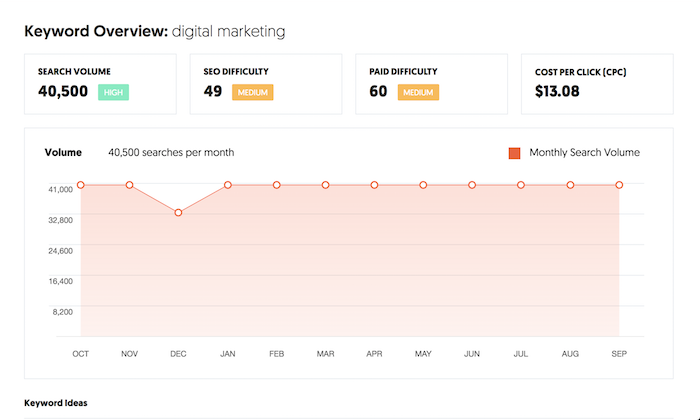
The keyword research is broken down into 3 main sections: overview, keyword ideas, and SERP analysis.
The overview looks like this:
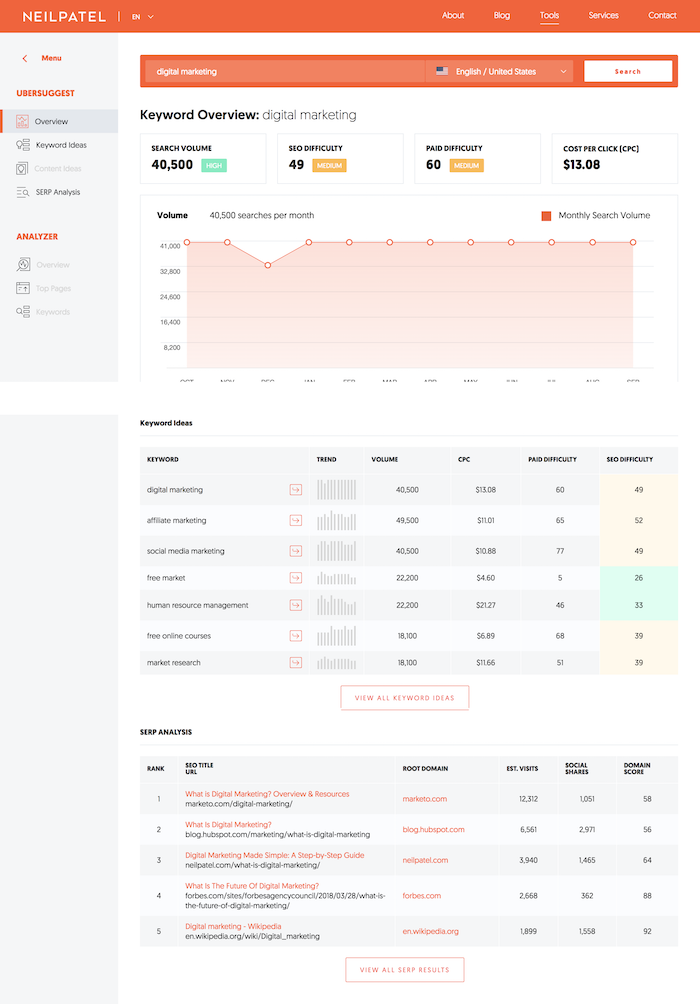
The first section is a graph that breaks down the search volume over time.
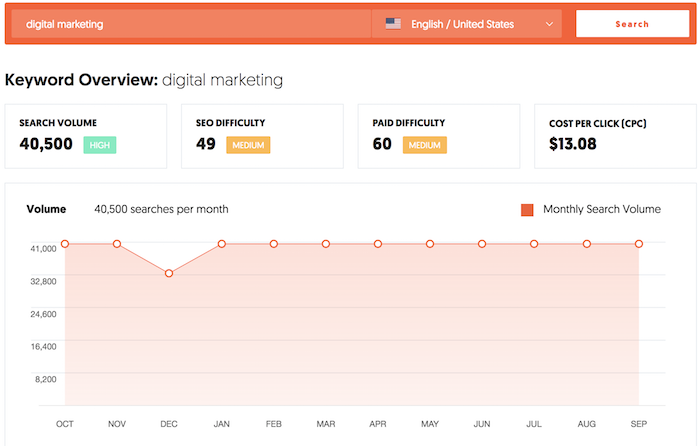
You can see the search volume for any keyword in any country and language over the course of the last 12 months.
The graph will show you if the keyword is gaining or declining in popularity or if it has seasonality.
In addition to that, it breaks down the cost per click, the SEO difficulty, and the paid difficulty.
The difficulty scores are from 1 to 100.
The higher the number the harder it will be to compete for that keyword.
And the lower the number the easier it is to compete.
Keyword Ideas
The second part of the keyword research is the ideas section.
This is the section that is most similar to the prior Ubersuggest but with a few more features.
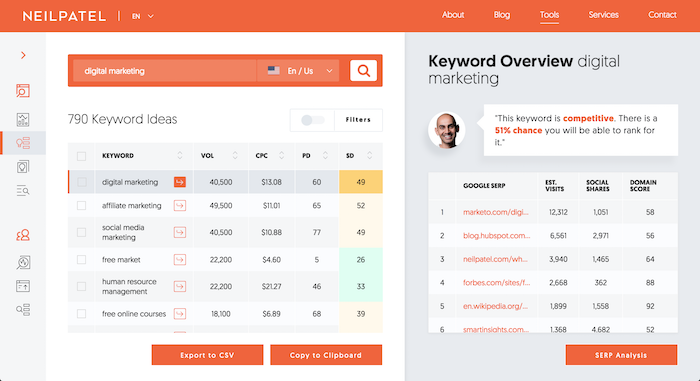
You’ll see a list of keyword ideas.
The keywords are pulled using both Google Suggest and AdWords recommendations.
This way you can get a comprehensive list of potential keywords you may want to rank for.
And similar to the overview section, you’ll also be able to see volume data for each keyword as well as cost per click (CPC), paid difficulty (PD), and SEO difficulty (SD) data.
Now on the right side of the keyword ideas report you’ll see all of the sites that rank in the top 100 for that term.
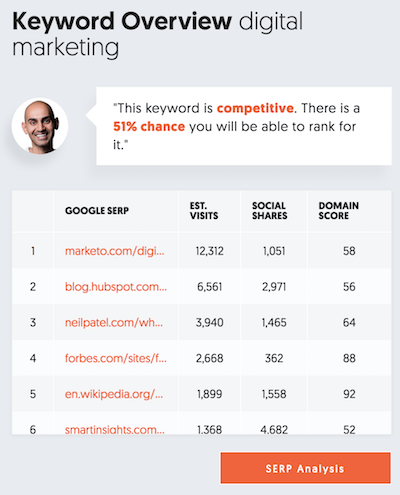
This is my favorite part of the keyword ideas report because you can easily see the estimated visit count based on rankings.
This metric looks at whether a keyword has seasonality and if there are any rich snippets or paid listings for the term.
In addition to showing you the estimated visits based on rank, you’ll also see how many social shares each URL has and its domain score.
Domain score is a metric between 1 and 100.
The higher the number, the more authoritative a domain is and the harder it will be to beat that site.
As for the social shares, this will tell you how much people loved that particular web page.
If more people are sharing it, they must have really enjoyed it.
The last feature in the keywords idea report (other than the exporting to CSV feature which doesn’t need much of an explanation) is the filtering.
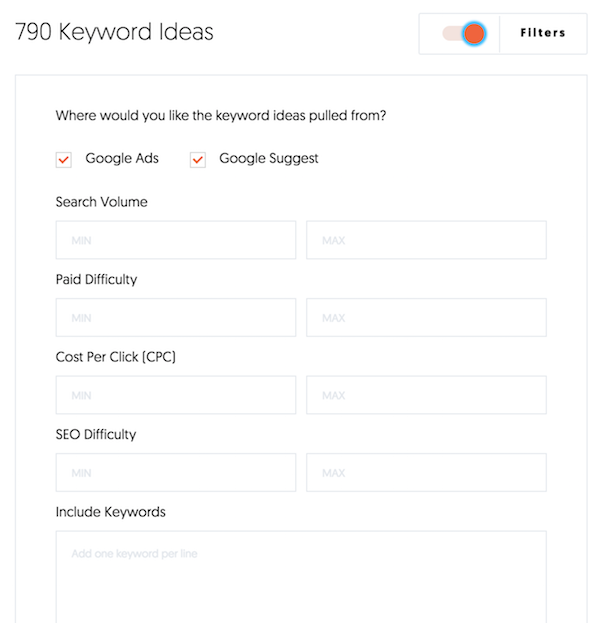
This is where you can filter the keyword results based on any data point you want.
From limiting the results to just Google Suggest or AdWords or by filtering keywords based on their popularity and competition.
If there are also too many results like the screenshot above, you can exclude or include certain terms or phrases.
This will help you filter the results even faster.
And if you want to focus on long-tail terms, just “uncheck” the “Google Ads” option and you will see all of the long-tail terms.
SERP Analysis
The last section, SERP analysis, shows you a simple view of the top 100 sites that rank for any given term.
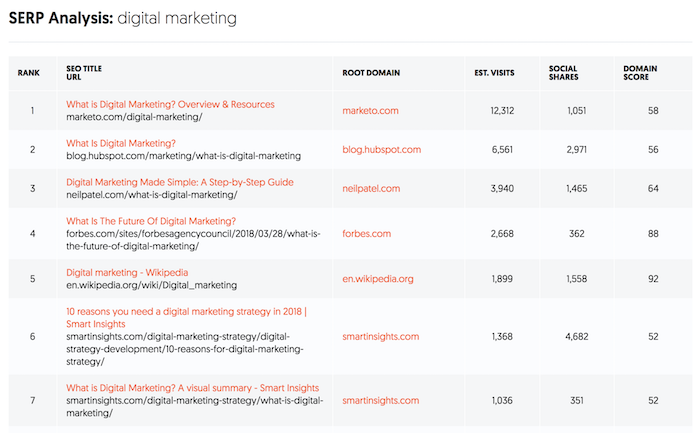
I know many of you are doing keyword research in different languages and regions and you’ll be able to do that with all of the reports, including the SERP analysis.
Eventually, I’ll showcase rich snippets and paid advertising data in this report.
We are already taking those two things into account when we run our calculations on estimated visits.
And of course, you’ll also see social share data and domain scores.
So, what’s next?
I wish I was able to release everything at once, but development is never easy or fast.
I have an amazing team… but good things just take time.
A few of the features I want to release over the next few months include a traffic analyzer report, which shows how much traffic a domain receives from Google.
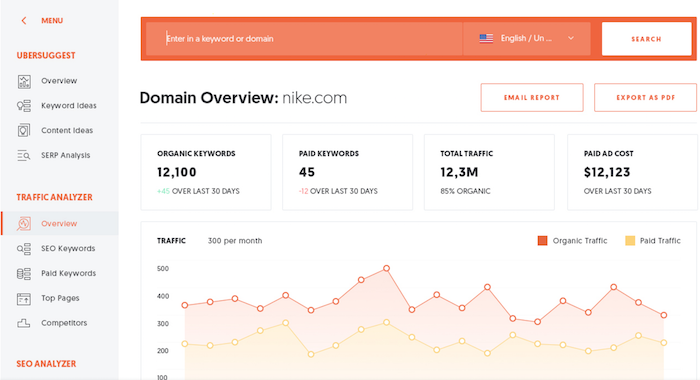
Another feature I will release will be a report that showcases top pages for any given website and the search terms that each of those pages ranks for.
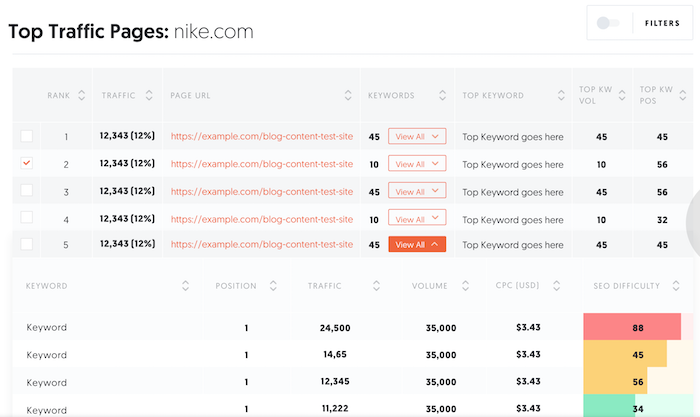
Once I release the traffic analyzer report, the team will be focusing on the content ideas report.
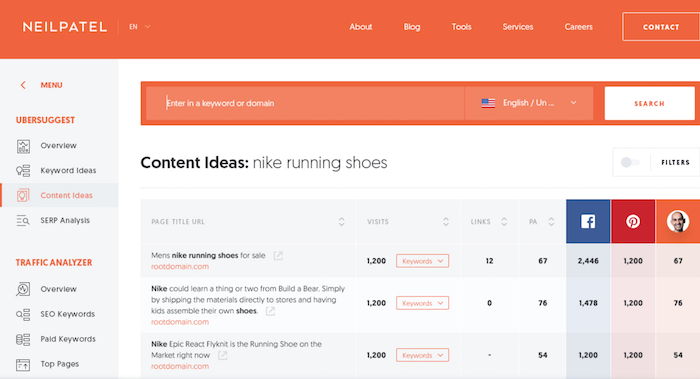
The content ideas will be part of the keyword research section.
When you research any keywords, you’ll be able to see the most popular articles on that subject based on search traffic and social shares (similar to Buzzsumo).
Conclusion
What do you think about the new Ubersuggest?
If you haven’t used it, go check it out.
And if you find any bugs, please email them to [email protected] so my team and I can work on fixing them.
Like I mentioned earlier, this is a work in progress and other amazing features are already being worked on for future releases.
A lot of these ideas come from you guys so, please, the more feedback the better.
So, what do you think about the new Ubersuggest?
The post My New SEO Tool: Ubersuggest 2.0 appeared first on Neil Patel.
Source: feedproxy.google.com