
Tag Archives for " secure sockets layer certificate "

Best SSL Certificate Provider
You want people to trust your site, and that requires a valid secure sockets layer (SSL) certificate.
SSL certificates are issued by a certificate authority (CA) and they build trust in two important ways:

Disclosure: This content is reader-supported, which means if you click on some of our links that we may earn a commission.
- The CA authenticates the identity of the organization that wants the certificate. This way, people know that they are in fact sending their information to PayPal, for example, and not someone who has set up a fake PayPal site.
- The SSL certificate encrypts the data traveling between your website and visitors. This way, potential attackers can’t steal the information people share on your sites, such as their username, password, or credit card number.
Today, all of the popular browsers like Google Chrome will warn users anytime they attempt to visit a site without an SSL certificate.
It’ll say something like “This site is not secure,” or “Any information you share may be vulnerable to attackers.”
Would-be visitors are going to head to a different site where they feel comfortable entering their credit numbers.
I know I would.
There are a lot of different CAs to choose from and they sell a range of SSL certificates designed to help companies establish their online identity and protect their customer’s privacy.
For some people, going with a free SSL certificate is going to be fine.
All that’s required is a quick demonstration that you control a particular domain.
Free SSL certificate providers
These are known as DV (domain validated) SSL certificates.
But they are not enough to protect a major website or online store.
Paid SSL certificate providers
For companies that need to establish a greater level of trust, OV (organization validated) or EV (extended validation) SSL certificates involve real-world background checks on the organization making the request.
The rigorous authentication process isn’t free, but it conveys a much higher level of trust.
Paid SSL certificate providers also make the process of obtaining and renewing certificates much easier through an intuitive online platform.
Choosing the right provider can seem tricky at first, given that they are all selling the same essential service.
There are important differences, though, and you want to figure them out before you decide.
In this post, I’ve reviewed the top SSL certificate providers.
These are big names with a long history of protecting websites.
The reviews are followed by a short guide that will help you make sense of your options and ask the right questions moving forward.
Best SSL certificate providers
#1 – SSL.com Review — The Best for Budget-Friendly SSL Certificates
SSL.com is perfectly suited for small and growing businesses that need to secure their sites, but can’t afford to spend thousands of dollars a year.
It’s a mid-range product, which works for companies that have outgrown their ability to use free SSL certificates, but don’t have especially complex security needs that justify the premium pricing of DigiCert or GlobalSign.
The best part about the budget prices is that the level of encryption is the same as you get with much more expensive SSL certificates.
You might think that the downside would be lower-quality customer service, but nothing could be further from the truth.
SSL.com offers 24/7 chat, email, and phone support.
In review after review, happy customers have thanked their SSL.com customer service agent for walking them through installing their first SSL certificate or helping them handle a complex issue.
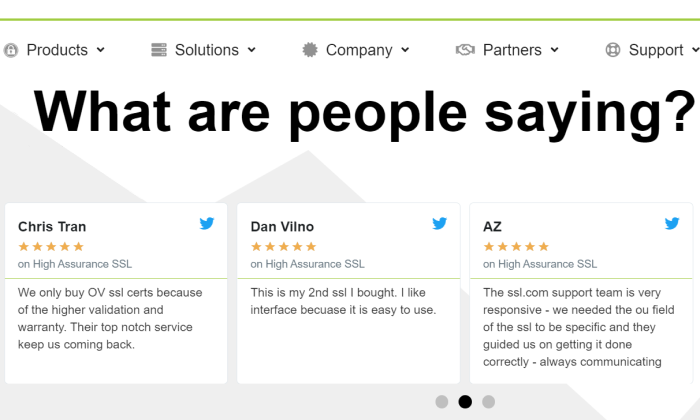
I think SSL.com has struck a good balance between price and customer service.
It’s not dirt cheap, by any means, but it’s certainly less expensive than some of the enterprise-focused SSL certificate providers.
Along with affordable pricing, SSL.com offers a range of certificates flexible enough to accommodate the needs of many different businesses:
- Basic SSL: starting at $36.75/year (domain validation)
- Premium SSL: starting at $74.25/year (comes with three subdomains)
- Paid SSL certificate providers: starting at $48.40/year (organization validation)
- Enterprise EV SSL: starting at $239.50/year
- Wildcard SSL Certificate: starting at $224.25/year
- Multi-domain UCC/SAN: starting at $141.60/year
- Enterprise EV UCC/SAN SSL: $319.20/year
Like other SSL certificate providers, you have to sign a longer contract to get the lowest price.
With SSL.com, however, the single-year pricing still comes in lower than competitors.
As you can see above, SSL.com has really low rates for wildcard and Subject Alternative Name (SAN) certificates.
This can save a ton of money and streamline certificate management.
Wildcard certificates cover an unlimited number of subdomains.
Instead of buying, installing, and renewing a separate certificate for neilpatel.com, info.neilpatel.com, and so on, I just need one Wildcard.
SAN Certificates protect multiple domains.
The exact number depends on the SSL certificate provider.
More domains covered with fewer certificates will make your life much easier.
Just for comparison, GlobalSign’s EV SSL certificate starts at $599 and it costs extra to add domains and subdomains from there.
With SSL.com, on the other hand, the Enterprise EV UCC/SAN SSL lets you secure up to 500 additional domains for a lot less money.
And with GlobalSign, you are limited to 100 additional subdomains per SAN certificate.
Compared to Digicert, the difference is more pronounced as a multi-domain EV is nearly $3,000 per year.
If you think that SSL.com is coming in at the right price for you, give it a shot.
The 30-day unconditional refund is not a marketing gimmick.
If you are not happy, they will credit your account immediately. Get started now.
#2 – GlobalSign Review — The Best Managed SSL for Enterprise
GlobalSign is the SSL Certificate provider of choice for large organizations with complex needs.
They have some of the highest rates in the industry, but also some of the happiest customers because of the quality of their service.
If you just need a couple of SSL certificates, I would go with something less expensive.
On the other hand, if you need a lot of certificates, and managing so many of them is starting to cause problems, then GlobalSign is a wise choice.
Its best-in-breed certificate monitoring and inventory tool, combined with heavy discounts for volume licensing, reduce the total cost of ownership for complete SSL security.
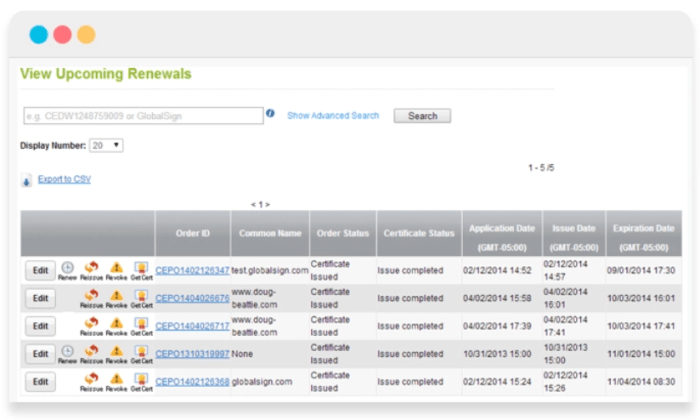
Decrease the frequency of the costly problems associated with certificate expiry, regardless of how many you have to manage.
You can even set policy preferences and receive reminders when certificates aren’t compliant, regardless of who issued the certificate.
No more having to track down certificates manually.
Everything is available with a quick scan.
Think about it.
If your staff saves an extra couple of hours each month due to GlobalSign’s intuitive platform and concierge support, then the service has already paid for itself.
I highly recommend GlobalSign for businesses that can’t play the normal waiting game to get new certificates.
After GlobalSign authenticates your business, they can issue certificates virtually on-demand because they have pre-vetted all domains.
The initial authentication process is fairly quick (between three and four business days for EV).
Some people have reported being able to get certificates quicker due to emergency situations simply by calling up GlobalSign.
GlobalSign offers the full range of traditional SSL certificates:
- DV SSL certificate: starting at $249/year
- OV SSL certificate: starting at $349/year
- EV SSL certificate: starting at $599/year
- DV Wildcard SSL certificate: starting at $849/year
- OV Wildcard SSL certificate: starting at $949/year
GlobalSign offers SAN SSL certificates for multiple domains at $199/year on top of the base certificate price.
So, an OV SAN SSL from GlobalSign would run you $549/year.
A single SAN certificate will cover up to 100 additional domains.
You can choose to add subdomains for an additional cost, as well, though a wildcard SSL certificate will be more cost-effective if you need coverage for a lot.
The warranty for the GlobalSign EV tops out at $1.5 million.
If your digital certificates don’t provide the protection promised, GlobalSign will foot the bill for damages.
This is half a million less than a comparable certificate from DigiCert.
Ideally, you’ll never have to worry about the difference, but it’s something to be aware of.
Another nice aspect for enterprise customers is that GlobalSign supports document signing, code signing, digital signatures, and secure email.
Being able to centralize all of these SSL security concerns in a single platform can make managing them much easier.
GlobalSign also offers intranet SSL for securing internal servers and applications.
This means companies no longer have to run their own CA or use self-signed certificates.
For companies that provide cloud-based services, GlobalSign’s CloudSSL can help them meet the complex security requirements of these next-generation environments.
Not every company will realize the benefit from GlobalSign’s premium suite of managed SSL certificates and services. For simple websites, it’s overkill.
But for enterprises, especially companies with complex SSL security needs, going with GlobalSign is worth every penny.
Request a GlobalSign managed SSL demo today, and see the difference it makes.
#3 – DigiCert Review — The Best for Premium SSL Certificates
Digicert Group owns a handful of the most trusted CAs (GeoTrust, RapidSSL, Thawte, and Verisign) and has become one of the largest SSL certificate providers in the world.
It’s one of the more expensive options, for sure, but Digicert includes security features with its premium SSL certificates that can make a huge difference for the right businesses.
This includes automatic malware detection across all your sites, PCI (payment card industry) compliance scans, and blocklist checks, which ensure that your site isn’t under suspicion on any government or country-specific blocklist.
Importantly, most of these features only come with Digicert’s higher-tier plans.
The provider breaks down its offerings into three tiers: Basic, Secure Site, and Secure Site Pro.
You can buy different types of certificates for each tier, but I don’t recommend going with Basic.
It costs a lot more than comparable protection from other SSL certificate providers and you miss out on the extra security features that make Digicert’s premium pricing a good buy.
If you need the basic domain validation that comes with Digicert Basic, I’d go with SSL.com. On the other hand, if you are running an ecommerce website where users are entering financial information, Digicert offers a high level of protection that is very appealing.
At the Secure Site tier (which comes with organization validation), pricing breaks down as follows:
- Secure Site SSL: starting at $399/year
- Secure Site EV SSL: starting at $995/year
- Secure Site Multi-domain SSL: starting at $1,296/year
- Secure Site Multi-domain EV SSL: starting at $2,785/year
- Secure Site Wildcard SSL: starting at $1,999/year
All Secure Site certificates are backed by a $1.75 million Netsure Protection Warranty for your businesses, and a $2 million aggregate Relying Party Warranty for your customers.
This is one of the most comprehensive warranties out there, and this isn’t even the premium DigiCert plan.
You also get priority support, which means that Digicert agents will respond to your concerns faster than they would if you went with the Basic tier.
Another good reason to avoid that.
Of course, people still run into issues, but DigiCert customers with priority support constantly praise the company for their responsiveness and expert advice.
The company really does walk its customers through the installation process for free.
They expect you to have questions and they are ready to help.
All of this and more comes with the SecureSitePro tier:
- Secure Site Pro SSL: starting at $995/year
- Secure Site Pro EV SSL: starting at $1,499/year
These plans are backed by a slightly better warranty, which covers your business up to $2 million.
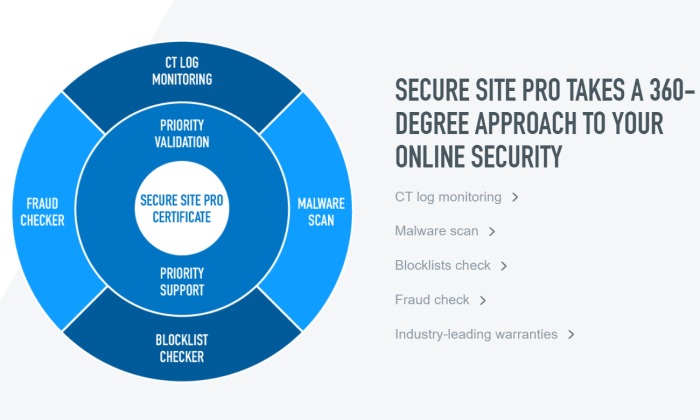
There’s also certificate transparency log monitoring that alerts businesses whenever an unauthorized certificate is assigned to one of their domains.
In addition to priority support Secure Site Pro also includes priority validation, which cuts down the time it takes to issue new certificates.
Not every company needs the extra security, but those that do will appreciate the totality of what Digicert offers with its Site Secure Pro certificates:
All Digicert certificates are managed via CertCentral, which is remarkably easy to use.
CertCentral is designed to work at scale, so it doesn’t matter how many certificates you have—it’s going to be easy to manage.
DigiCert backs all of their SSL certificates with a 30-day, money-back guarantee. No questions asked, no hassles.
What I Looked at to Find the Best SSL-Certificate Provider?
You want people to know, without a doubt, that your site is safe and trustworthy.
The exact range of SSL certificates and capabilities you need will depend on the type and number of websites your company operates.
Price is an important factor—especially when you look at long-term costs—but it can’t be the only thing you focus on. In a very real sense, you get what you pay for.
Some companies will be completely covered by the bargain SSL certificates.
Others will be extremely grateful they went with a premium product that really delivers the security they need.
To find out which SSL certificate provider is going to work best for your specific situation, pay attention to the following X criteria as you evaluate your options.
Types of SSL Certificates
You want to get the right type of SSL certificates for your site.
Understanding the basic differences between them will help you avoid buying more than you need, or not getting enough.
There are three types of SSL certificates you’ll encounter.
They vary according to validation level:
1. Domain Validated (DV):
DV certificates show that the certificate authority has validated that you are the owner of a particular domain.
These are typically free, but since you don’t have to demonstrate anything beyond control over a domain, they have the lowest level of trust.
2. Organization Validated (OV):
OV certificates show that the certificate authority has validated that your organization is real, has a known physical location, and controls the domain.
These are not free and may take several days to acquire, as they require a real-world identity check.
As such, OV certificates have a higher level of trust than DVs.
3. Extended Validation (EV):
EV certificates have the most extensive validation process.
In addition to checking everything required for an OV, an EV also requires the examination of corporate documents.
Generally speaking, different types of SSL certificates from the same provider will have the same level of encryption.
It’s the authentication process that adds an extra level of trust.
The encryption that comes with DV certificates is key.
But when encryption is tied to the rigorous identity check of and OV or EV certificates, it becomes much harder for bad actors to carry out phishing or man-in-the-middle attacks.
In some industries, like finance and healthcare, you may have to get an EV SSL certificate.
This is just a bullet to bite.
This is also true if you have a high-profile website that could be a juicy target for attackers.
Some choose to get OV or EV certificates for branding purposes.
This was more important when browsers like Chrome showed a green padlock next to the site’s URL.
Google started phasing that out and now everyone gets the same gray padlock, regardless of the type of validation.
Even PayPal doesn’t have a green lock in Chrome anymore:
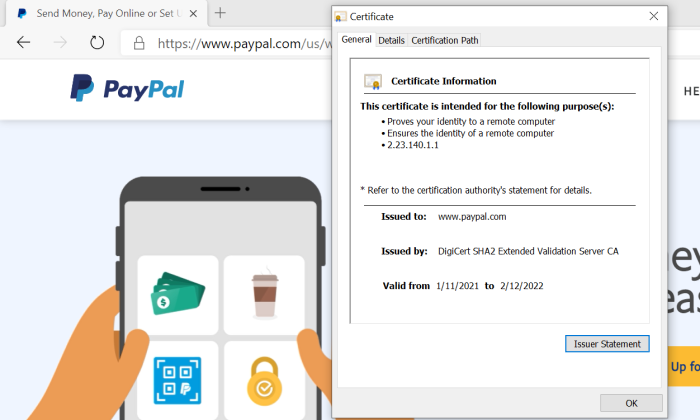
There is, of course, more information about the organization in the certificate details if you get an OV or EV, but who is checking that?
If you can avoid paying for OV or EV, I recommend doing that.
Just check to make sure that it’s going to work for your industry and with any payment gateway software you use.
In terms of picking between different vendors, be sure you are making an apples-to-apples comparison.
For example, Secure Site SSL from DigiCert is an OV certification, though it doesn’t say so by name, whereas a Single Domain OV certificate from Sectigo makes it more obvious.
Speaking of single domain certificates, there are two important subtypes of SSL certificates:
- Wildcard SSL certificates cover an unlimited number of subdomains.
- Subject Alternative Name (SAN) SSL certificates cover a certain number of additional domains. These may also be called “multi-domain” or UCC (unified communications certificate).
The exact limitations will vary from provider to provider.
With GlobalSign, for example, you purchase the type of SSL certificate you want (DV, OV, or EV) and then pay an extra $199/year for every additional domain, and $99/year for each subdomain.
Alternatively, GlobalSign offers a Wildcard SSL that will secure an unlimited number of subdomains for $849/year.
If you need to secure multiple domains or lots of subdomains on a tight budget, I recommend SSL.com.
They have Wildcards starting as low as $225 and SAN certificates that can secure up to 500 domains for $142/year.
One final note: it’s possible to use multiple certificate providers.
Many company’s use free SSL certificates from Let’s Encrypt for everything they can, and use paid SSL certificates to cover everything else.
Speed to Issuance
How fast can you get the SSL certificates you need?
While DV SSL certificates can be issued more or less instantly, the OV and EV SSL certificates can take several days and possibly longer.
If you need one of these higher validation certificates badly, then definitely go with an SSL certificate provider who promises in the 1-3 day range, like DigiCert.
Of course, you’ll want to check the reviews to see if they walk the walk when it comes to shipping certificates quickly.
SSL.com has some of the fastest turn-around times, judging from reviews, so they can be a good choice if you need an SSL certificate yesterday.
For companies that develop software, Digicert and GlobalSign solve the problem of issuing certificates at the speed of DevOps.
They set up an enterprise account, which lets you pre-validate domains.
With Digicert and Globalsign, this is simple to manage, so you pre-validate as many domains as you think you might need, and certificates can then be issued on-demand.
Warranty Policy
One of the major benefits of going with a paid SSL certificate over a free one is that you are covered by a warranty.
It’s like an insurance policy.
If an incorrectly issued SSL certificate causes problems, you won’t be on the hook for making it right.
These warranties vary depending on which type of certificate you choose.
DV SSL certificates are backed by warranties of around $10,000, whereas EV SSL certificates may cover more than $1 million.
DigiCert has one of the most comprehensive warranties.
For their EV SSL certificate, your business is covered by a $2 million warranty and your customers are backed by a separate $2 million warranty.
Hopefully, you will never need this, but if you do, it’s important to know which companies are backing you with a suitable warranty.
Customer Service
Whether you are purchasing a single SSL certificate or thousands a week, the quality of customer service matters a lot.
There can be a lot of steps to installing and renewing SSL certificates.
It’s a little different for every host and type of server.
Sometimes the “easy installation” process is going to be more difficult based on your specific hardware.
Being able to pick up the phone and talk to an expert who can walk you through the process is worth a lot.
SSL.com has a great reputation, with hundreds of reviewers describing reassuring customer service throughout their first installation of an SSL certificate.
The agents stay on the line, from start to finish, ensuring that everything is done right.
Let’s Encrypt is a great option for free SSL certificates, but are you saving money if it takes your paid employees several hours a month to finagle with an unfamiliar system?
This is why companies like GlobalSign and Digicert can charge a lot more for SSL certificates than others.
You are paying for the on-demand, concierge customer service so that you don’t have to hire experts yourself.
Conclusion
If you can’t use the best free SSL certificates to protect your sites, it’s important to find the right paid option.
Much is going to depend on finding an SSL certificate provider who offers the range of certificates you need at a price that makes sense.
My recommendations are a good place to get started:
- SSL.com – Best for budget-friendly SSL certificates
- GlobalSign – Best managed SSL for enterprise
- DigiCert – Best for premium SSL certificates
- For companies looking for affordable SSL certificates, make
- SSL.com your first and only stop.
On top of their excellent prices, they have a great reputation for helping their customers.
If you need a Wildcard or SAN certificate, going with SSL.com could save you thousands of dollars each year.
If you only need OV or EV certificates, and you want a serious warranty to back them up, Digicert is a great choice.
There’s definitely a higher price tag, but the platform comes with many additional tools to maintain top-level SSL security across all of your sites.
GlobalSign is my recommendation for enterprise customers who want a provider that helps them manage their complex SSL needs.
There is no more user-friendly certificate management system out there, and you can depend on their customer service agents to be there when you need them.
There are many, many more options out there for SSL certificates.
These are my top three.
They have stood the test of time, helped thousands of companies keep their sites secure, and continuously evolve their technology to stay on top.
Source: neilpatel.com
Best Free SSL Certificate
You need a secure sockets layer (SSL) certificate to keep information on your website private.
It’s also going to let Google know that your site is safe and trustworthy.
This is really important. Some web hosting providers like Bluehost provide an SSL certificate for free when people sign up.
Disclosure: This content is reader-supported, which means if you click on some of our links that we may earn a commission.
If you are stuck getting this digital certificate yourself, though, I can show you how to get as many free SSL certificates as you need.
Don’t put this off.
You can get one in a couple of minutes.
Why?
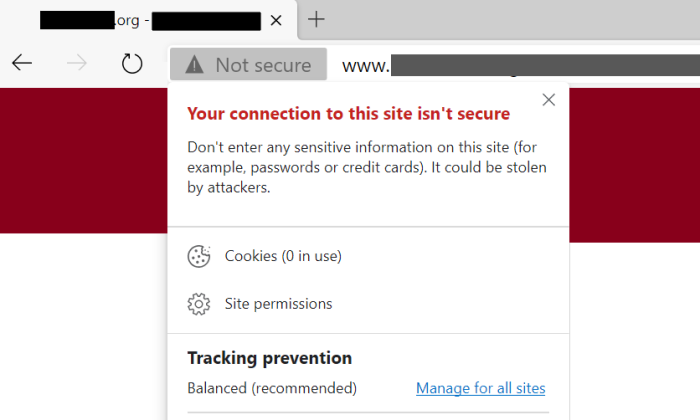
If you don’t have an SSL certificate, all the popular browsers like Chrome and Safari are going to warn users that your site is potentially unsafe:
I can’t think of a better way to scare people away.
Would you click through?
So, what about those free SSL certificates?
It’s way better to get one and let every potential visitor know that your site is safe and trustworthy.
Once you have an SSL certificate, people can access your site from any device and know that the information they share—like login credentials or credit card numbers, for example—remains private.
SSL is like sending a message in a sealed envelope instead of passing an open note.
Of course, it’s more technical than that, but the simple truth is this: If you own a website, you need an SSL certificate.
Instead of an aggressive warning, people will see a closed padlock logo next to your web address:
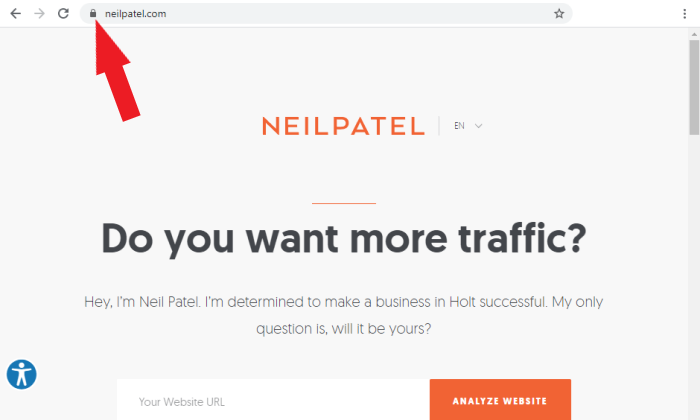
Ahhhhh. That’s much better.
Okay, let’s get you set up.
Here’s my list of the only four free SSL certificate options you need to check out.
After the reviews, there’s a brief buyer’s guide that highlights key considerations in making your decision.
Word to the wise: There are a lot more “free” SSL certificate options out there.
BUT they either are not free forever or have annoying limits for how many certificates you can get.
Don’t waste your time—these are the best free SSL certificates you can get.
Best Free SSL Certificate Providers
#1 – Bluehost Review — The Best Web Hosting with a Free SSL Certificate
Pros:
- Free SSL certificate included with hosting
- Incredibly easy to enable and renew
- Protects unlimited subdomains free
Cons:
You still have to pay for hosting
Additional SSL Certificates are not free (but it may not matter)
Why You Prefer Bluehost?
Bluehost is one of the most affordable web hosting solutions out there.
It’s a well-known and widely trusted company that delivers a ton of value to customers.
For example, Bluehost includes a free SSL certificate when you sign up for any hosting plan.
You’ll also get a free domain name for the first year, which makes it a perfect all-in-one package for people who want to get their first site online.
Domains typically cost $10-15 per year, which helps keep costs low.
You still have to pay for hosting, but you have to do that one way or another. Why not go with the host that gives you a free SSL?
I recommend the shared hosting plans because they are the best price and make SSL security as simple as humanly possible.
You are limited to a single shared SSL certificate per hosting account, but that may be all you need.
That’s because the free SSL certificate through Bluehost covers all of your parked domains and subdomains. Whoa.
Wildcard SSL Certificate
Usually, you have to pay for a Wildcard SSL certificate to cover all your subdomains, like www.neilpatel.com, www.mail.neilpatel.com, and so on.
Wildcards can cost a pretty penny, but you don’t have to worry about it with Bluehost shared hosting.
It also covers parked domains, which are basically sites you own that point to your main site.
I could buy up www.neilpatelmarketing.com and point it to www.neilpatel.com, for example.
Maybe I want that for future development or to make sure no one else is using my name.
Whatever the reason, securing parked domains is no charge with Bluehost shared hosting.
With VPS and dedicated hosting, you get more control over how many SSL certificates you can use.
If you need it, get it, but the customizability comes with increased responsibility.
It’s a lot less hands-off than the shared plans.
Plus, you can get an exclusive deal on Bluehost shared hosting because you are a reader of my blog:
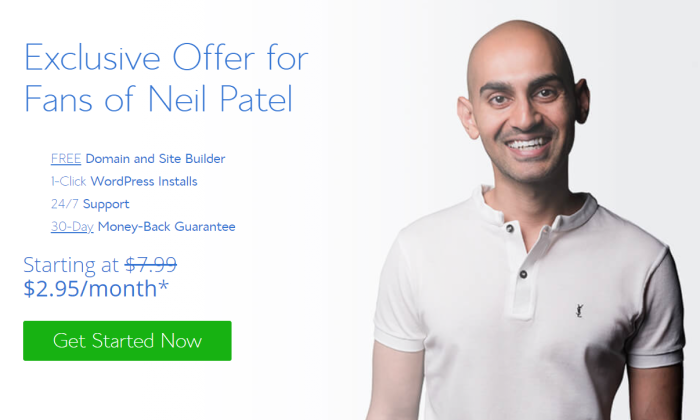
In addition to their phenomenal prices, Bluehost makes it remarkably easy to install and renew SSL certificates on your site.
Bluehost uses Let’s Encrypt as the certificate authority, but almost all the technical legwork is off your plate.
Instead of having to set up the automated monitoring and renewal process on your server, you push a button.
It’s pretty slick.
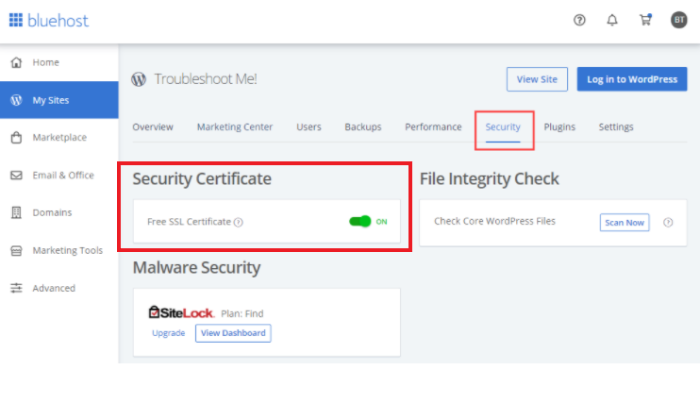
Below, you can see an example where the free SSL certificate has been enabled with one click for a WordPress site.
Simply turn it on and Bluehost does the rest.
How to Renew SSL Certificate?
No wonder Bluehost is one of the most popular ways for people with WordPress sites and blogs to keep their visitors’ personal information secure.
Renewing the certificate is just as easy.
Just make sure that AutoSSL is enabled. If you are on the shared hosting plan with the free SSL certificate enabled, AutoSSL is already running.
I highly recommend Bluehost if you don’t have a hosting provider.
It takes care of hosting, domain, and SSL in one fell swoop.
If you already have a web host, they should help you install SSL certificates, because it probably won’t be as easy as Bluehost.
And, if your hosting customer support isn’t helping, it’s time to jump ship. SSL encryption is a must for every website and there’s no point in sticking around if the service is lacking in something so essential.
Sign up with Bluehost today. Get a great deal and rest easy with their 30-day money-back guarantee.
#2 – Let’s Encrypt Review — The Best Source for Free SSL Certificates
Pros:
- Virtually unlimited free SSL certificates
- Free Wildcard and SAN certificates available
Cons:
- Some technical skills required for setup
- Recommended certificate renewal every 60 days
Why Do You Prefer Let’s Encrypt?
Let’s Encrypt is a well-known certificate authority operated by the nonprofit organization Internet Security Research Group.
Their mission is to “create a more secure and privacy-respecting Web.”
It accomplishes this goal by offering SSL certificates that are free to obtain, easy to renew, and simple to manage.
You can use them for any server that uses a domain name, such as a web server, FTP server, or mail server.
The rate limits for creating SSL certificates on Let’s Encrypt are quite high:
- 50 per registered domain per week
- 100 subdomains per certificate
That’s enough to issue certificates for 5,000 unique subdomains each week.
The vast majority of people will never hit this limit.
One of the major advantages of Let’s Encrypt over other free options is that you can create Wildcard and Subject Alternative Name (SAN) certificates.
That means the same Let’s Encrypt certificate can be used to secure multiple domains and subdomains.
For people with a lot of sites, the ability to generate SANs and Wildcards can make SSL certificate management much easier.
Instead of needing to install, monitor, and renew a separate certificate for each domain/subdomain, they can manage several that cover them all.
You might have seen Wildcard and SAN certificates going for hundreds and thousands of dollars.
Those ones in particular come with much more rigorous validation processes, where the certificate authority does a background check on your organization.
Let’s Encrypt only authenticates that you control the domain.
Plus, the spendy SSLs come as part of an online platform that makes certificate installation and management easier.
With Let’s Encrypt, you have to figure that process out on your own.
This can be challenging for people who aren’t techies, especially for Wildcards and SANs, but by no means impossible.
Thousands of users without a computer science degree have raved about Let’s Encrypt.
Yes, it takes some time to learn, but it doesn’t cost a dime.
There are lots of videos and documentation out there to help you with this.
Let’s Encrypt wants people to use SSL certificates, so the nonprofit has made it as easy as possible, even if it doesn’t feel like it at first.
Renewing certificates is much the same.
A little bit of learning with a big payoff.
Let’s Encrypt uses the Automatic Certificate Management Environment (ACME) protocol to make the process of protecting your servers much easier.
The purpose of ACME is to automate the process of renewing certificates without any human intervention.
Here’s how it works.
There are many ACME client options that will work better in the case of non-Windows servers.
If your web host supports Let’s Encrypt, getting the ACME software setup should be pretty straightforward.
Some web hosts, like Bluehost, partner with Let’s Encrypt to take the technical backend out of the equation.
Bluehost’s AutoSSL tool lets users simply enable SSL protection once and soon-to-expire certificates are automatically renewed with new Let’s Encrypt certificates.
If you want privacy and security for your website, but you don’t want to spend money, Let’s Encrypt is the first place you should look.
#3 – Cloudflare Review — The Best Free SSL Certificate Alternative
Pros:
- The easiest form of SSL security to implement
- Faster page load times
Cons:
- The free plan doesn’t encrypt data between your servers and Cloudflare
- Still advisable to get a traditional SSL certificate
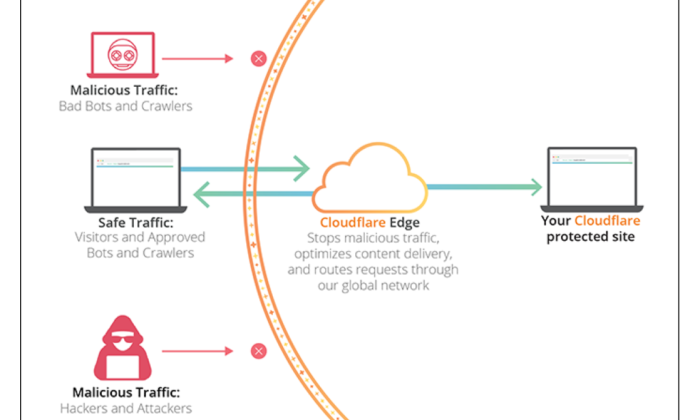
Cloudflare is a content delivery network that helps people improve their website security and performance.
It’s not a certificate authority like Let’s Encrypt, so it doesn’t issue SSL certificates, but it can help you accomplish some of the same goals.
You can start using Cloudflare immediately, regardless of the platform you are on.
Simply sign up for a free account and change your domain nameservers to Cloudflare.
That way, all traffic to your website will be routed through Cloudflare, where malicious attacks are stopped in their tracks.
You don’t have to worry about SAN and Wildcard certificates, because you can cover as many domains and subdomains as you like via Cloudflare.
Basically, you let Cloudflare handle all the SSL certificates on their servers.
Instead of managing your own certificates, Cloudflare is like the bouncer to your nightclub.
No bad apples get in the door.
The upside to this is that you simply enable SSL with Cloudflare and you don’t have to worry about renewing certificates.
Here’s a breakdown that shows the difference between traditional SSL management and configuring it with Cloudflare:
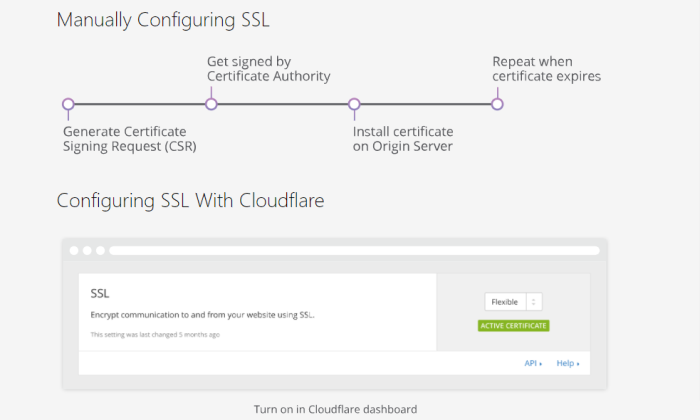
Simply by enabling Cloudflare, you can ensure that visitors to your site are never going to receive a warning from Google that your site is unsafe.
Is there a downside to letting Cloudflare take the reins on SSL security?
Well, if Cloudflare were ever compromised, you’d be in trouble, but the same can be said for Let’s Encrypt or any other service you trust.
I wouldn’t worry about that.
The real issue is that Cloudflare doesn’t protect the traffic between your servers and Cloudflare.
With their free version, you are only encrypting traffic between Cloudflare and the people trying to visit your site:
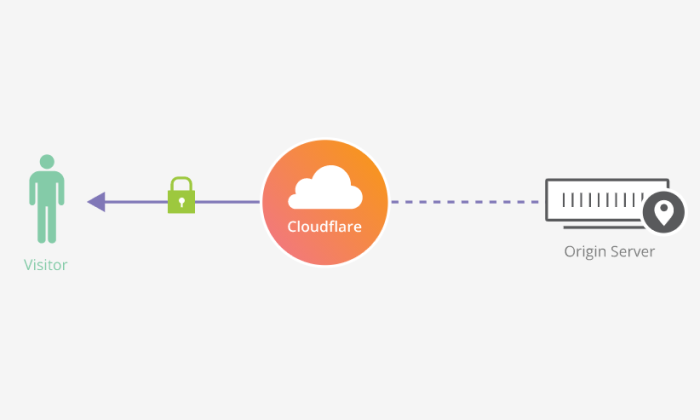
With Cloudflare’s paid SSL options, you can also encrypt the traffic flowing between your servers and Cloudflare.
If you want complete encryption, use Cloudflare along with a free SSL certificate from Buypass or Let’s Encrypt.
This way, you can still get full encryption without spending a dime.
So why not just go with one of the other free options if Cloudflare provides incomplete encryption?
Because Cloudflare will also improve your site’s performance.
It’s a content delivery network after all, so you are going to get faster page loads and better rankings in Google.
It’s also going to lower the risk of DDoS (distributed denial-of-service) attacks, which are very common.
Depending on your site, you might be fine letting Cloudflare handle all of the SSL security.
Others may want to use a free SSL certificate to protect their own servers in addition to Cloudflare.
At the end of the day, it’s going to increase your site’s performance and security with almost no work needed on your end.
Start using Cloudflare today to see what a difference it makes.
#4 – Buypass — The Best for Free 180-Day SSL Certificates
Pros:
- SSL certificates are good for 180 days
- Secure multiple domains and subdomains with a single certificate
Cons:
- No Wildcard certificates
- Some technical skills required for setup
Buypass is a relative newcomer to the SSL certificate scene, but it has earned a good reputation for robust, dependable solutions.
Buypass is trusted by all major browsers.
It offers both free SSL certificates—known as Buypass Go SSL—and paid options for people who need to validate their organization’s legal business status.
The major perk to using Buypass is that their SSL certificates are good for 180 days, compared to the 90-day period for SSL from Let’s Encrypt.
So, you don’t have to worry about renewing certificates as often.
Like Let’s Encrypt, Buypass uses the ACME protocol to automate the renewal of certificates, which makes the process even easier.
This takes a little effort to set up, but once you have installed the ACME client on your server, the renewal process will be fully automated.
While Buypass will let you secure multiple domains and subdomains with a single SSL certificate, it doesn’t offer a true Wildcard that secures unlimited domains.
Let’s Encrypt still has the leg up there.
The rate limits for Buypass are not as generous as Let’s Encrypt, but they are still more than enough for most people. You can create up to 20 certificates per domain each week.
If the rate limit is not an issue and you don’t need Wildcard certificates, Buypass Go SSL is a great free forever option.
It more or less has the same features as Let’s Encrypt but with an SSL certificate that lasts twice as long.
Check out Buypass today and see why this up-and-coming certificate authority is growing in popularity.
What I Looked at to Find the Best Free SSL Certificate
I wanted to find free-forever SSL certificates.
Free trials are great, but you’re going to have to pay after you start to depend on their service, and sometimes quite a bit.
The options I chose aren’t going to raise your budget a single penny, ever.
So why does anyone pay for an SSL certificate?
The short answer is that only one type of SSL certificate is free and some companies need the other types.
My SSL certificate guide explains all three types:
- Domain validated (DV)
- Organization validated (OV)
- Extended Validated (EV)
If you need an OV or EV certificate, I’m sorry, but there is no way to get one for free.
There’s too much legwork involved in the real-world validation process.
In fact, if you see an OV or EV for free, it’s definitely a scam to avoid.
The good news is that a DV certificate is still going to protect your site and keep Google from warning people that your page is not secure.
When it comes to free forever SSL certificates, you still have a few good options.
Each company does things a little differently.
Here are the key criteria you should use to make your decision about which option is going to work best for your situation.
SSL Certificates Rate Limits
How many free SSL certificates do you need?
If you need one, or even just a few, you are going to be fine choosing any one of the options on this list.
On the other hand, if you need a lot, the rate limits matter.
Let’s Encrypt has the highest rate limits (50 certificates per domain per week), which means you can generate the most free SSL certificates with their platform.
Buypass gives you fewer (20 certificates per domain per week), though it is still quite a lot.
Another option for people who need to protect a lot of sites is Cloudflare.
Since it handles all of the SSL certificates, the rate limits aren’t really a factor.
Do note that this won’t protect traffic between your server and Cloudflare, so you may want to use a combination.
Free SAN and Wildcard SSL Certificates
Now you don’t need to get an individual SSL certificate for every domain and subdomain you have.
A DV certificate typically works for a single domain, but there are special kinds of SSL certificates that can do more.
Depending on the SSL certificate provider you choose, you may be able to get:
Wildcard:
These let you use a single SSL certificate to protect an unlimited amount of subdomains.
For example, I could use a wildcard certificate to protect both neilpatel.com, mail.neilpatel.com, support.neilpatel.com, and so on.
SAN:
Subject Alternative Name certificates let you use a single SSL certificate to protect multiple domain names.
For example, I could use an SAN certificate to protect neilpatel.com and npdigital.com.
These may also be called Unified Communications Certificates (UCC).
Let’s Encrypt issues both Wildcard and SAN certificates.
Buypass issues SSL certificates that can be used for multiple domains and subdomains, but not a true Wildcard.
If you only have one site to worry about, this isn’t such a big deal.
But people with many sites and subdomains can use Wildcard and SAN certificates to drastically cut down on the number of SSL certificates they use.
This makes managing and renewing certificates a lot easier.
With Cloudflare, you don’t have to worry about these distinctions once you are set up.
Compatible Hosting Providers
Some hosting providers have partnered with certificate authorities like Let’s Encrypt to make the process of installing an SSL certificate incredibly easy.
This is what Bluehost does and enabling your SSL certificate through them is simple as pie.
As soon as you enable SSL by turning it on with one click, the certificates will install and activate themselves.
If you are thinking about Let’s Encrypt or Buypass, make sure that the host supports ACME protocols.
Otherwise, you won’t be able to automate the process of renewing SSL certificates, which means you’ll be stuck doing everything manually.
Sometimes the technology doesn’t line up great. If you try to use Let’s Encrypt with GoDaddy shared hosting, for example, you will be on the hook for configuring everything.
Going with Cloudflare or jumping over to Bluehost could save a lot of time in this situation.
It’s really case-by-case, though, so it’s worth looking into which options are going to work well with your current provider.
I recommend reaching out to your provider directly, as the field is constantly changing.
What was true about compatibility last year may no longer be true, for good or for ill.
SSL Certificate Renewal
Here I’m looking at two things:
- How often do you have to renew the SSL certificate?
- How easy is managing the renewal process?
The vast majority of free SSL certificates need to be renewed every 90 days.
Let’s Encrypt are good for 90 days, but it’s recommended to renew every 60.
Buypass stands out from the crowd because of its free SSL certificate that’s good for 180 days.
This means people have to renew it twice a year, as opposed to four times.
If you don’t renew your certificate before it expires, it ceases to protect your site. Potential visitors will see the same type of security warning they would if you didn’t have an SSL certificate at all.
Now if you just have one site with one SSL certificate, renewing it every three months isn’t going to be a major hassle.
If you have a lot of sites, though, keeping track of renewals can get pretty complex.
Bluehost is nice because you can enable AutoSSL, which automates the process of identifying and replacing certificates that will expire soon.
Let’s Encrypt and Buypass let you use the ACME protocol to automate the renewal process.
This will take a little time to configure especially if the technical side of web hosting is not your forte.
That said, there are plenty of videos out there to help just about anyone get set up.
Cloudflare, on the other hand, takes the entire certificate renewal process off your plate.
Once you enable their service, you benefit from Cloudflare’s SSL certificate management.
As I noted earlier, if you use Cloudflare, it can still be a good idea to use a traditional SSL certificate to protect the unencrypted traffic going from your servers to Cloudflare.
Conclusion
If you have had to find free SSL certificates in the past, you may be wondering why ZeroSSL and SSLforFree aren’t on this list.
They used to be great sources for free SSLs, but both companies have been bought by new owners that are apparently not as generous.
Many people who use these options wind up on the hook for paying.
With the options I outlined above, you are not going to have to worry about that at all:
- Bluehost – Best web hosting with a free SSL certificate
- Let’s Encrypt – Best source for free SSL certificates
- Cloudflare – Best free SSL certificate alternative
- Buypass – Best for free 180-day SSL certificates
For most people, Let’s Encrypt is going to help them issue and renew as many SSL certificates as they need, including Wildcards and SAN certificates.
Buypass is a comparable option to Let’s Encrypt, but their SSL certificates only need to be renewed every 180 days, instead of every 90.
This can make certificate management a lot easier, even though Buypass doesn’t offer true Wildcards or SAN certificates.
Cloudflare is your SSL certificate alternative.
Your site will be safe for visitors, but you don’t have any of the headaches associated with managing certificates.
On top of that, you get a boost in site performance because of Cloudflare’s content delivery network.
That said, if you want complete encryption, it’s going to take a traditional SSL certificate in addition to Cloudflare.
At the end of the day, the best option for free SSL protection comes from using a mix of these options.
By enabling Cloudflare and one of the traditional SSL options, you can reap all the benefits of these free services, leaving no gaps in security.
Source: neilpatel.com