
Tag Archives for " posts "

2021 Social Media Benchmark Report: 4 Takeaways for Your Social Refresh
Take a peek into the Convince & Convert team messaging threads and you’ll find us sharing all sorts of research and new data. In fact, when the Rival IQ 2021 Social Media Benchmark report was first released, Corynn shared it with the note, “TL;DR–everyone needs more carousels.”

You can stop reading now if that’s all you need to refresh your social content plans. But for the rest of you, I’ve got a few more ideas.
The Social Media Benchmark report is an annual study from Rival IQ, our friends in the social content performance data business. The 2021 edition evaluates thousands of brand accounts across 14 industries to set the benchmarks that marketers use to measure social content performance.
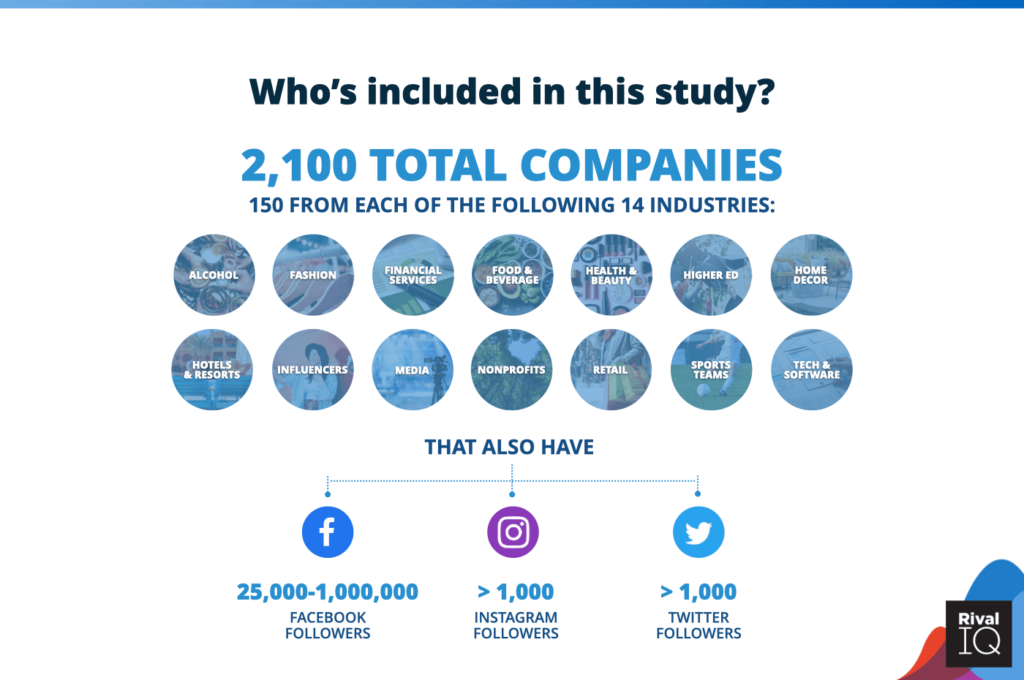
Keep in mind that most of the data analyzed were pulled from 2020/early 2021. Social media platforms are constantly shifting their algorithms to respond to new content types, technology, and audience habits.
What is presented in any benchmark study shouldn’t be taken as gospel, but it does enlighten how to plan for your 2022 social media content strategy.
4 Cues For Your Social Media Strategy Refresh
1. Posting every weekday may be “expected” but is not necessary.

Creating enough content to post once a weekday on each channel is a common expectation of social teams. Yet as social media engagement rates decline or stay stagnant, brands respond with fewer main feed posts on each channel.
Rival IQ discovered that brands posted on Facebook on average the most per week; but outside of Media brands sharing 53.5 posts a week (7.5 a day!), the average was 5.5 posts weekly.
We’ll take the exception with the finding that brands are only posting content on Instagram four times a week. The API that makes data available is news feed specific. Yet remember that Instagram has 12 different ways in the channel to serve up content or connect with audiences.
This data point is a bit misleading because we can’t accurately benchmark Stories, Reels, Highlights, and Guides with the API.
Twitter was the channel that saw the most volume by brands, almost 3x more tweets than Instagram news feed posts. But Instagram is the clear social media royalty based on Engagements. Instagram audiences responded with more than 7x engagements than on Twitter, on just one-third of the total content.
Quality Over Quantity of Posts Matters Most

No doubt you’ve heard quality outranks quantity. This is especially true for B2B brands that are building content to support longer awareness and consideration timelines in their customer’s decision journey.
Focus on creating less social media content that resonates more with key audiences.
Show up in the nooks and crannies of social media channels; focus on different content outlets, like Reels, Stories, and Reddit threads. Even better, explore participation in ways that create more 1:1 micro-connections with your audience.
Direct interaction with audiences in spaces like AMAs, TwitterChats, Audio Rooms, and even DMs can go a long way with building affinity with audience members.
When everything is important, nothing stands out. So when there is actually an opportunity for different-than-usual content, make it shine. Increase frequency around real-time opportunities, like events, webinars, launches, behind-the-scenes. Take a cue from Media and Sports, which hyper-focus on wall-to-wall coverage of the top story or game day. Media and Sports teams tweeted more than all of the other industries combined.
When everything is important, nothing stands out.
2. Mix Up Content Types

We’ve been saying “Video Wins Social” for several years. While in some instances that can be true, the social media benchmarking data shows that in main news feed posts, actually photos and carousels now outrank videos for engagement.
The algorithm may prioritize video content when it’s available, but audiences care less. The reality is that even today, video is still more difficult for content teams to produce at scale unless it is a core part of the business (media, sports, etc). That’s why video appears less frequently as a post type across most industries.
What can B2B brands do without a consistent video workflow? Remember that in today’s visually dominated social feeds, carousels and photos perform well. Avoid posting a simple status in text-only on Twitter or Facebook, especially when it’s easy enough to include a GIF, image, or infographic.

Carousel impressions are repeated in a user’s news feed if they don’t engage the first time. On subsequent impressions, Carousels will display images two and three. You don’t have to win with the first image in a Carousel. Be sure the second and third ones are just as compelling.
3. Identify And Measure What Metrics Matter
An engagement rate is calculated based on all measurable interactions on a post. Social networks are diversifying how audiences choose to engage with any post on their newsfeed–Facebook alone has up to six emotional reactions along with commenting, sharing, and saving posts.
Does an Angry reaction carry more weight or meaning than a Laugh? How does Love compare to a Share?
A better way to measure engagement is to identify what specific reactions are most valuable for your brand. Metrics are like pizza toppings–each one of us has our favorites, so we tend to always stick with those and overlook the other options.
Measure specific, meaningful reactions as a percentage of total engagements to ensure you don’t lose sight of engagements that move the needle. Padding posts to garner more “Likes” to hit engagement numbers is easy to do — but Likes don’t pay the bills (even for Influencers).
Take a Look at Your Own. Social Metrics
Rival IQ acknowledged a better way to measure engagement rates is by using the engagement rate per post metric. Engagement rate per post is the [best] metric because it controls for post volume and audience size and helps marketers understand how they’re doing in relation to their competitors.
Unfortunately, social network APIs continue to skinny the data that is publicly available, so Rival IQ and others cannot do this type of competitive reporting at scale. But you can with your own native metric reports.
4. Plan Seasonal Content and Align Hashtags Accordingly
Hashtags were all about the holidays on Instagram and Twitter this year, so that signals brands must keep up with content that aligns with the seasons. Work ahead by identifying these in your annual and quarterly editorial calendars and planning.
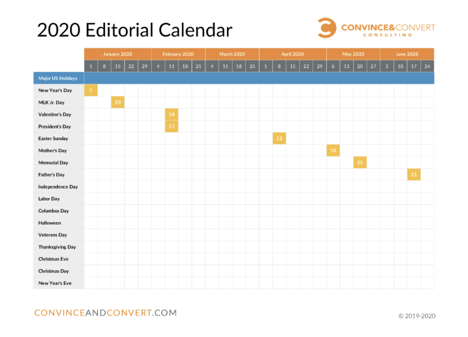
Planning in advance means your team is better positioned to capitalize on seasonal content by finally deploying all the “next year we should do this” ideas that are missed after the fact.
Hashtags that performed consistently well across all industries included: giveaways, alcohol-related, or those relating to holidays and current events. One smart note from the social media benchmark report is that hashtags are not equally used across social media channels.
Use research and hashtag tools to identify the right hashtags and how many to use for each social channel. Update these monthly or quarterly for best effect.
—
Get started with benchmarking and analyzing social content performance with the Head to Head Social Snapshot, where brands can see 1:1 performance against the Rival IQ benchmarks.
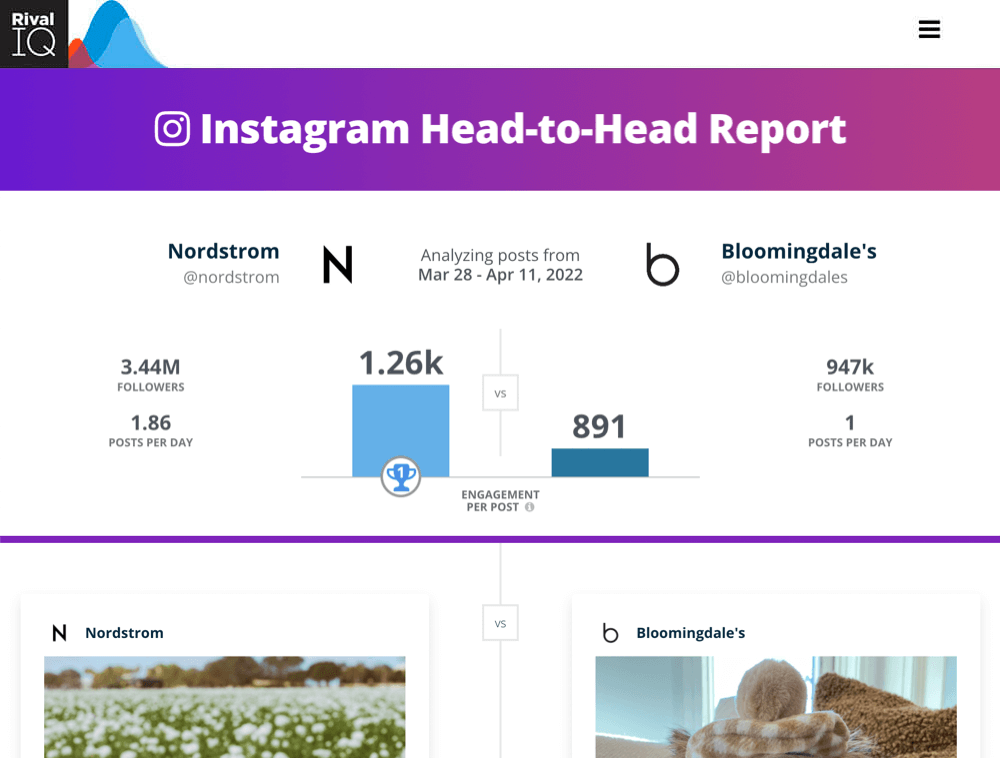
Go further by completing a social media audit that identifies the insights to set up strategic decisions for next year’s social media plans. I built a self-paced, free course that explains social auditing and insights, available to guide you through using social media metrics to audit and build social media strategy.
How will you approach social media differently in 2022? Tweet me @LaurenTTeague to let me know.
The post-2021 Social Media Benchmark Report: 4 Takeaways for Your Social Refresh appeared first on Content Marketing Consulting and Social Media Strategy.
Source: convinceandconvert.com

Seven Easy Ways to Write Better Titles for Your Blog Posts
Today’s post is by ProBlogger Writing Expert Ali Luke
The most important words in your post are the 6–10 words in the title (also known as the headline).
These words determine whether or not the rest of your post ever gets read. They can guarantee failure, or give your post a great shot at success.
And yet many bloggers treat their title as an afterthought. They either run with the working title they thought up when planning their post or come up with something half-hearted just so they can publish.
So you can see how much titles matter, let me offer you three different posts. I’ll call them:
- More Reader Engagement
- How to Get More Comments
- Five Ways to Encourage Readers to Comment More Often on Your Posts
Which would you prefer to read?
I’m guessing it’s #3. (Which is, in fact, one of my posts on ProBlogger.) But each title could refer to the same post.
The good news is it’s not hard to get better at writing titles. There are a few straightforward techniques you can use instantly (or with just a little bit of work) to dramatically improve your titles.
Easy Ways to Write Better Titles for Your Blog Posts
Here are my seven favorites:
#1: Be Specific, Not General
A post titled ‘More Reader Engagement’ could mean almost anything. Is it about comments, social media, readers taking action, or what? It’s a general title that could apply to all sorts of posts.
But a post titled ‘Five Ways to Encourage Readers to Comment More Often on Your Posts’ is clear and specific. If you see that title on Twitter or in your email inbox, you’ll know exactly what you’ll get from that post.
Some bloggers think a vague title will intrigue readers, who’ll then click it to find out what the post is about.
The truth is, readers have so many other calls on their time and attention that unless you’re a personal friend they’re probably won’t care enough to click.
#2: Use Numbers Where Appropriate
If you look at any magazine cover, you’ll see that numbers are used prominently.
Numbers are a great form of specificity. A post that promises ‘five ways’ is very different from a post that promises ‘100 ways’.
Here is a few examples of how different types of titles could be adapted to include numbers:
How to Set Up WordPress
How to Set Up WordPress in Five Simple Steps
My Top Lessons Learned from My First Year of Blogging
My Ten Top Lessons Learned from My First Year of Blogging
How I Dramatically Increased the Size of My Newsletter List
How I Increased the Size of My Newsletter List by a Whopping 351%
Should You Have Comments On Your Blog?
Should You Have Comments On Your Blog? Four Experts Speak Out
It won’t always make sense to use a number in the title of your post, but quite often it will. Of course, it often makes good sense to use numbers in your post, too.
(For more on that, check out How to Use Numbers Effectively in Your Blog Posts.)
#3: Use Powerful Adverbs, Adjectives, and Phrases
Although I’m not a fan of hype (which I’ll come to in a moment), you do need to sell your blog post a bit in a title. This means using powerful words that grab readers’ attention.
Here are a few examples of titles from ProBlogger, with the powerful adverbs, adjectives, and/or phrases highlighted:
- 7 Easy Ways to Write Better Titles for Your Blog Posts (this post)
- Tools and Techniques to Blog Effectively on the Road
- How to Use the WordPress WYSIWYG Toolbar to Format Your Blog Posts Like a Pro
- 9 Key Ingredients for Creating the Perfect Sales Page
Try reading each of those without the highlighted words. They still sound like interesting posts, but aren’t quite so compelling.
Some good words to consider using are:
Words that promise something readers can do easily:
- Easy
- Quick
- Simple
- Straightforward
Words that promise something readers (probably) won’t already know about:
- Secret
- Little-known
- X won’t tell you (e.g. “ten secrets top bloggers won’t tell you”)
Words that position the reader alongside experts and people they look up to:
- Like a pro
- Expert
- Professional (e.g. “the tools professional editors use”)
Words that promise a comprehensive resource:
- Epic
- Ultimate
- Only (e.g. “the only guide to WordPress you’ll ever need”)
Words that warn readers of danger to avoid:
- Mistakes
- Red Flags
- Warning
But make sure the words are justified. Don’t say your suggestions are “easy” if they require substantial background knowledge or take a lot of time. Don’t call your 500-word blog post an ‘ultimate’ guide. This leads me to…
#4: Don’t Over-Hype
Your title is a promise. It sets readers’ expectations for your post. Unfortunately, some blog posts have a great title, but the post itself doesn’t deliver on its promise.
Yes, you might get readers. But they definitely won’t be sticking around to read anything else you’ve written. You might even get comments, but they won’t be complimentary!
I don’t want to worry you or make you feel anxious about titling your posts. Most bloggers are likely to under- rather than over-hype.
But if you’re using a particularly powerful promise in the title (such as ‘The only WordPress Guide You’ll Ever Need’), ask an honest friend or fellow blogger to take a quick look and tell you if the post really lives up to the title.
#5: Don’t Make Your Title Too Long
There’s no absolute rule on how long your title should be. But try not to make it any longer than it needs to be.
‘Seven Easy Ways to Write Better Titles for Your Blog Posts’ is 60 characters long, meaning it will display in full in search engine results and can fit into a short tweet or social media post.
It’s also short enough for a reader to take in quickly.
But it I called this post ‘Let Me Share My Top Seven Easy Ways to Write Much Better Titles for Every Single Blog Post You Ever Create’, it would lose a lot of its impact.
It’s too long (106 characters) to display in full in search engine results. And it’s much too wordy: readers might glaze over partway through.
And if I’m this wordy in the title itself, they might think the post is going to be similarly bogged down.
As a very rough guide, I suggest aiming at around 5–10 words or 50–80 characters for your blog post titles. CoSchedule has some great information on optimal title (headline) length here: What Really Is the Best Headline Length?
#6: Use Square Brackets to Add Extra Information
One nifty trick to keep a title short but still give readers an idea of what they’ll be getting is to use square brackets.
You simply add them to the end of your title, like this:
- How to Set Up WordPress in Just 20 Minutes [Video]
- Five Powerful Ways to Start Your Blog Post [With Examples]
- Your Ultimate Guide to Editing Images for Your Blog [Roundup]
There’s no rule about what you can or can’t put in square brackets, though the ones I most often see used are ‘
and ‘[with examples]’. It’s a way to concisely promise an extra benefit and/or of give readers more details about what to expect from your post.
#7: Swipe Other People’s Titles (Then Twist Them)
Finally, one of my very favorite titling tricks (especially if I’m stuck) is to swipe someone else’s title.
Is this legal? Yes, there’s no copyright on titles.
Is it ethical? Yes. I’d avoid doing it if they used a very unusual title format. In most cases, the formula they used for their title is very similar to plenty of other titles out there already. And I’m going to be ‘twisting’ the title anyway.
Here’s a worked example of how you could choose a title and come up with your own spin on it:
Original title: Deadlines – Are they Good or Bad for Your Blogging?
This could become:
Blogging blog: Comments – Are They Good or Bad for Your Blog?
Academic blog: Deadlines – Are They Good or Bad for Your Students?
Small business blog: Email Sign-Up Incentives – Are They Good or Bad for Your List?
Each of these follows the same underlying format as the original (a keyword or phrase followed by a dash, then ‘Are They Good or Bad for…’). But each is unique.
Here’s another example:
Original title: 3 Principles of Building an Engaged Blog Audience
This could become:
- Parenting blog: 3 Principles of Raising Kind Children
- Organization blog: 5 Key Principles of Organising Your Kitchen
- Leadership blog: 7 Principles of Running Engaging Meetings
Go back into your archives and take a look at the titles of three posts from earlier this year. (I suggest you look at these rather than more recent posts so you have some distance from them.)
Would you read those posts if you had only the titles to go on?
Can you spend a few minutes tweaking the titles to make them more compelling? For example, could you add a number or a powerful adjective? (Be careful you don’t change the post URL though, or links to your post will break.)
If you’ve got questions, or you’d like to share your ‘before and after versions of your titles, just pop a comment below.
The post Seven Easy Ways to Write Better Titles for Your Blog Posts appeared first on ProBlogger.


Source: feeds.feedblitz.com