
Tag Archives for " Online Groups "

5 Alternatives to Yahoo Groups
Thankfully, if you were a fan, there are a plethora of alternatives to Yahoo Groups. Below, we’ll discuss our favorites so you can pick the best online group platforms for you.
Yahoo Groups was one of the original online communities. You could use it to create or participate in online chats with people from across the world who have the same interests and ideas as you.
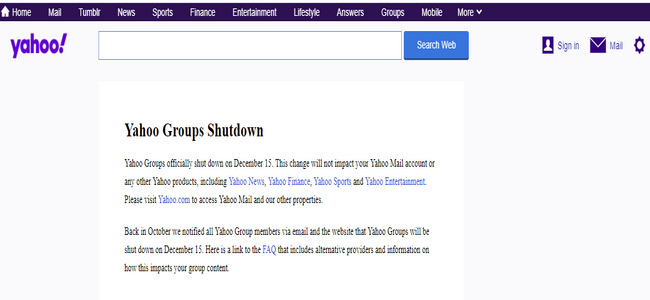
A host of new online communication tools have been released in recent years. Many of these new platforms offer features Yahoo Groups doesn’t. After lagging behind their competitors for a few years, Yahoo Groups officially shut down in December of 2020.
Thankfully, if you were a fan, there are a plethora of alternatives to Yahoo Groups. Below, we’ll discuss our favorites so you can pick the best online group platforms for you.
What Was Yahoo Groups Used For?
Yahoo launched Groups in January 2001. Users could post messages, polls, photos, events, files, mailing lists, links to websites, and more. The platform soon became a popular host for vibrant online discussion boards.
If you owned a group, you could also assign moderators to help you run and oversee all the group’s activities.
Online businesses and marketers took advantage of the platform. This is a place where you could easily post a recent blog, image, or file to drive brand awareness and increase website traffic.
I know what you’re thinking—this sounds very similar to many of the online tools we have today. That’s because Yahoo Groups was similar. In fact, you could argue that Yahoo Groups was the foundation for many popular social media and online groups.
At the height of its popularity, Yahoo announced it had 115 million users and 10 million groups.
But a quick search for the platform today will show you this:
Where do you go from here?
Here’s a list of the best Yahoo Group alternatives to create valuable online connections with your market.
What Are the Best Alternatives to Yahoo Groups?
If you used Yahoo Groups and want to continue creating online communities with like-minded people, drive traffic to your website, or build brand awareness, it’s essential to look for an alternative that will meet your needs—and the needs of your audience.
Here are five options to consider.
1. Facebook Groups
Facebook has over 2 billion monthly active users, and over 1 billion users participate in Facebook Groups each month.
Besides catching up with old and new friends, creating a group on this platform makes sense, especially for businesses. It can help you position your brand, find potential customers, and build long-term relationships with them.
Like Yahoo Groups, Facebook Groups allow you to schedule group events, share files, images, and other useful tools to continue engaging and connecting with your market.
While many brands may have Facebook Pages, Facebook Groups are where the magic lies because they see a lot more engagement than Pages.
Facebook Groups allow members to start and participate in conversations easily. They can also be private—when you have a closed group, members can engage and share their thoughts in a private setting that can only be seen by group members.
There are three types of Groups to choose from. Depending on your needs, you can create:
- A Public Group: Anyone can access the group and see what users post.
- A Closed Group: This is a private group. You can search and find the group, but members still need approval before gaining access to the group.
- A Secret Group: These are invite-only groups where only invited users can find the group or see what other users post.
Here’s how to create a Facebook Group:
After logging into your account, click the + button from the top right and select Group.

Next, enter your group name, choose privacy options, and invite people to join the group.
Once you’ve filled in the details, select Create.
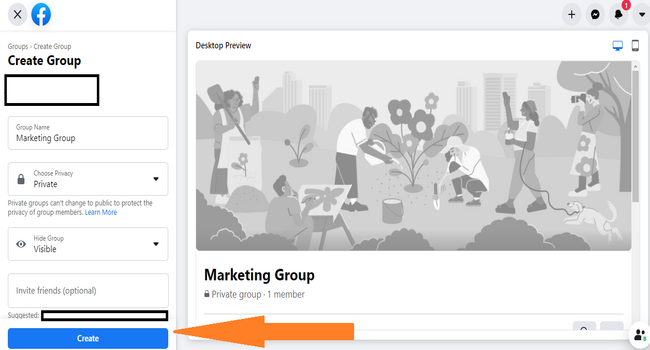
You can further personalize the group by adding a description and cover photo.
If you want to start a successful Facebook Group for your brand, the first step is to decide on your Group’s purpose.
- Are you a new brand and trying to increase brand awareness?
- Are you trying to reach new customers?
- Do you want to provide a group for your existing customers where you can nurture long-term relationships?
- Would you like to showcase your expertise and establish authority in a niche market?
Understanding the purpose of your group will help direct all the content you create.
For instance, let’s say you sell a weight loss coaching program that lasts for six months. You can create a private Group for customers who are currently in coaching to share unique content and allow members to support each other.
Creating this type of group allows members to learn more about your brand and get the support they need while using your service.
2. Meetup
The concept behind Meetup is simple—choose what you’re interested in or passionate about, find a local group that shares that same interest, attend events the group organizes, and connect with like-minded people.
The groups you join or create on this platform can be about anything: book clubs, bike rides, business networking, music, or other niche social activities.
Of course, the main difference between Meetup and Yahoo Groups is that Meetup focuses on creating real-life encounters with the people you meet online.
If your business or brand caters to local communities, then Meetup could be a great fit.
Let’s say you own a coffee shop in New York. You can find and join groups of other coffee lovers in the area. Once you’ve joined the groups, you can engage with members, build relationships, and invite them to a company event.
If you can’t find a relevant group, you can create one.
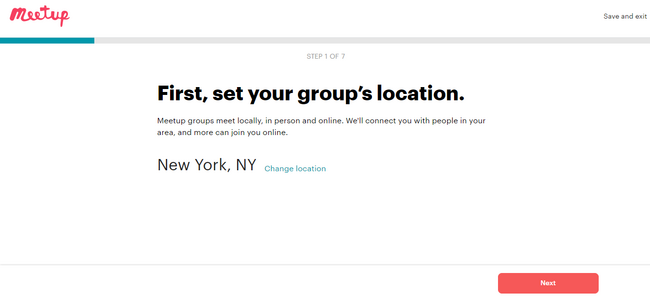
Once you’ve signed up, you’ll go through a seven-step process. This includes:
Selecting your group’s location:
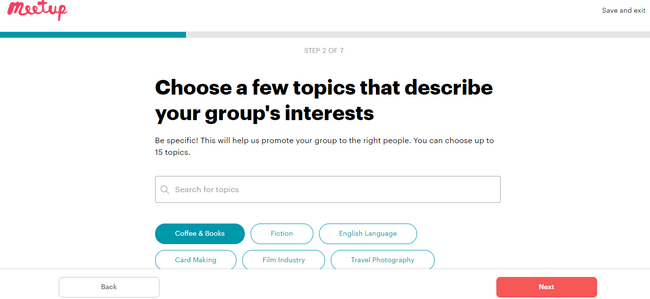
Choosing topics that best relate to your group:
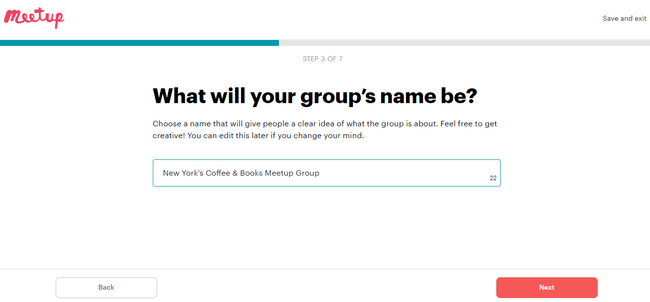
Choosing a group name:
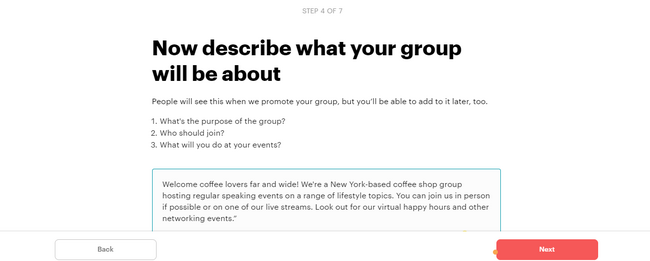
Describing what your group will be about:
It is free for users to sign up for the service. However, meeting organizers pay a monthly fee.
There are currently two pricing options:
- $4.99 per month for six months. This plan is for smaller groups.
- $15.00 per group per month for six months. This plan includes unlimited groups and allows you access to attendee emails.
Whichever plan you choose, creating a Meetup group will help you connect with relevant people in real-life.
3. Nextdoor
Like Meetup, Nextdoor is a platform where local communities connect in real life, outside of online communications.
For Nextdoor, you must be a part of a particular neighborhood, as the focus is more on building a good network with your neighbors.

On the site, they explain:
“It’s where communities come together to greet newcomers, exchange recommendations, and read the latest local news. Where neighbors support local businesses and get updates from public agencies, borrow tools, and sell couches. It’s how to get the most out of everything nearby. Welcome, neighbor.”
Nextdoor shares a few similar features to Yahoo Groups, such as file sharing, chat messaging, and wiki pages.
For a local business or brand, creating a Nextdoor account makes sense as the platform has grown exponentially. It doesn’t just focus on residential neighbors anymore. Local businesses, public agencies, nonprofits, and brands are also recognized on the platform.
You can then decide whether you want to create an open or a private group.
For an open group:
- Anyone in the neighborhood can search, find, and join the group.
- Potential group members outside the community can still request to join if you send them a link.
For a private group:
- Anyone in the neighborhood can find and request to join the group.
- Group admins approve requests.
- Only members of the group can view messages and discussions.
The platform is completely free to use, but you can also advertise your business or brand using Local Deals to gain traction. This is where you can share discounts and promotions with your neighborhood.
The price for Local Deals depends on your neighborhood and how long you want to advertise, but the average cost is $75.
4. Groups.io
Mark Fletcher created groups.io. You might have heard of him before. He founded ONElist, which eventually became known as Yahoo Groups.

When he introduced Groups.io, Fletcher explained that:
Yahoo Groups and Google Groups both exude the dank air of benign neglect. Google Groups hasn’t been updated in years, and some of Yahoo’s recent changes have actually made Yahoo Groups worse! And yet, millions of people put up with this uncertainty and neglect, because email groups are still one of the best ways to communicate with groups of people. And I have a plan to make them even better.
Groups.io is an email-based service with features that include:
- Integration with other popular products, such as Slack, GitHub, Facebook Pages, and Dropbox
- Hashtags to help keep group messages organized
- Unlimited chat rooms
Groups.io is a Freemium product, which means the basic features are free to use, but you can pay extra to customize your homepage, access extra storage space, schedule events, and send reminders.
The best part about Groups.io is that there is no advertising! If you spend a lot of time online, you’ll appreciate this.
5. Discourse
Another popular online discussion forum is Discourse. Users can use it as a discussion forum, mailing list, or chat room.

Creating an online group on a different and unfamiliar site can be an overwhelming process. There’s a free 14-day trial, which you can use to help familiarize yourself with the platform and see if it can be a good fit for you and your needs.
Like Yahoo Groups and the other options on our list, Discourse is an online discussion forum that allows you to create discussions, share links, files, and integrate with various devices and online tools.
If you’ve been on online discussion forums for a while, you’ll know that some users don’t follow the rules. The platforms we’ve covered so far allow group moderators to filter out inappropriate content and users.
On Discourse, the focus is more on community moderation. However, they do offer various moderation tools, including the ability to move posts to an existing topic, merge with other posts, or delete.
Members who’ve displayed consistently positive behaviors earn likes and badges. Furthermore, they can help to maintain and moderate content and resolve disputes.
There are three pricing plan options:
- Standard: $100 per month
- Business: $300 per month
- Enterprise: You’ll need to contact them for a custom quote
Conclusion
A lot has changed in the world of online communication. Yahoo Groups was once a popular pioneer of online communities, but it’s closed down, like many other trailblazers. Thankfully, there are plenty of advanced Yahoo alternatives to choose from.
Whatever you decide on, I hope you found the above information helpful.
Can you think of other alternative online groups that are great for building connections?
The post 5 Alternatives to Yahoo Groups appeared first on Neil Patel.
Source: neilpatel.com

6 Questions To Ask Yourself to See If an Online Community Is Right For Your Business
We’re assuming by the point that you’re reading this article, you’ve heard about a community creating traffic, conversions, and customer advocates for a product or business and you’re wondering—how do I do that?!
And we’re with you. We have our own Facebook group because we realized several years ago that creating a community was a huge value-add to our Lab members and our business.
Regardless of what type of community you’re trying to build, there is a 100% chance that you’ll be able to find the platform to host it.
You can create communities on Facebook, Instagram, Patreon, your own membership platform, etc.
Our Facebook community has been able to foster incredible relationships between community members that have helped them nail their marketing strategies and business endeavors.
We’ve also created an open line of communication between our members and us so we can always see what we could be doing to help them out more.
Using this experience, we’ve figured out there are 6 questions that every business owner needs to ask themselves before they invest time and resources into their online community.

6 Questions To Ask Yourself to See If an Online Community Is Right For Your Business
Ask yourself these 6 questions to see if an online community is right for your business.
#1: Is a community a good value-add to your offer?
For some products and services, having a community is a huge value add to your current offer.
For example, a one-time purchase YouTube coaching program can come with access to a Facebook group.
Sunny Lenarduzzi, creator of the Authority Accelerator program that helps her clients get sales on YouTube has a value-add of access to the Facebook group with the purchase of the program.

Using her community, she can showcase that her clients aren’t just getting a course that they have to figure out on their own—they’ll get access to Sunny and other Authority Accelerator members who can help with challenges or cheer them on when they need some motivation.
#2: Would your customers benefit from talking to each other?
For some products, bringing the community together creates even more success for customers.
DigitalMarketer is the walking and talking example of this.
Part of being a Lab member at DM means that you get access to our Facebook group, DigitalMarketer Engage.
This is where our members can get advice from each other, collaborate, and have their mastermind of savvy marketers, agency owners, and entrepreneurs who can offer help that’s backed by experience.
By giving our members access to each other, we can foster those valuable relationships.
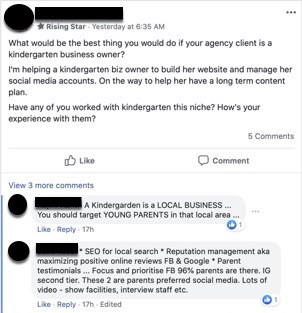
#3: Could you use your community to answer the same questions at scale?
Using a community, you could help out a lot of people with only one message.
For example, let’s say an online fitness trainer has their community on Instagram.
They can answer the same question at scale, by publishing the answer to their community.
For example, Kayla Itsines uses Instagram as the main hub of the lead generation side of her community.
Once someone buys her fitness app, Sweat, they’ll have a community inside of the Sweat platform.
For now, we’ll focus on the Instagram community.
If Kayla keeps seeing that community members are interested to see what she eats for breakfast, instead of answering each person she can create a post that everyone will see.

This helps her answer the same question at scale.
If you’re finding that you’re constantly answering the same question but for different people, a community can create a space where you can answer those questions and then point people to the answer as the question keeps being asked.

#4: Is your community a good place to host events?
Using your community as your digital headquarters, you can host events inside of your community.
These events can range from one day to one week, or longer depending on your incentive.
For example, if you’re about to come out with a book, you can start to host events around the topic of your book a few months before it’s published.
Using the events, you can create excitement around your book launch and all of the juicy content inside.
Another option is to go live and have conversations with your community members.
Rachel Hollis is a great example of this; she and her husband went ‘Live’ every weekday morning to foster a deeper relationship with their audience and to promote their products.
They used Rachel’s Facebook page to go live, which meant that everyone watching could interact in the comments during the Start Today with Rach & Dave Morning Show.

Rachel talked about how this was a huge part of her business’s success during her interview at the 2019 Traffic & Conversion Summit.
#5: Would your customers want to learn about new products and services in the community?
Having a community gives your customers a place to learn more about your future products, new services, and epic offers.
It’s like having the ultimate Facebook audience—but you don’t have to pay to run ads to them.
Using your community, you can tell them about new things that are coming their way.
You can also create funnels that help excite them about the purchase (ahem, like the book example from above).
Another example is the email newsletter Trends, which has a value-add of a Facebook group community for all subscribers.
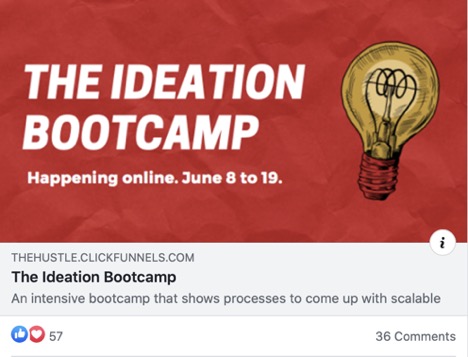
When the founder, Sam Parr decided that he was going to launch a new product: The Ideation Bootcamp for $599, where was the first place he posted about it?
Inside of the Trends.co Facebook community (he also created an email funnel for it).
If your customers love the current product or service they have from you, they’re going to be beyonddddd excited to have first dibs on the next projects that you’re rolling out.
If this could be of use to your business, you can consider creating a community that you can bring into the Excite stage of the Customer Value Journey, again and again.
#6: Does a community foster a relationship between you and your customers?
This is the ultimate question to ask yourself before starting a community.
In the best-case scenario, could this community build a tighter relationship between yourself and your customers?
If the answer is yes, you can pretty much green light your community now.
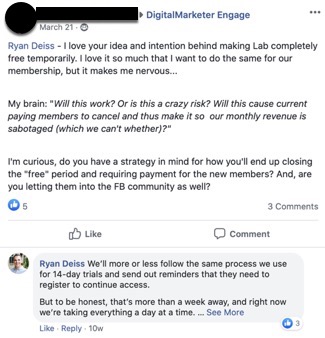
For example, members of our DigitalMarketer Engage get access to Ryan Deiss.
When he can, Ryan can help them out with their questions (see below).
People want to buy things from other people they know.
That’s why a huge part of marketing is getting over the Know, Like, and Trust factor. People don’t necessarily want to buy from complete strangers.
They want to feel like they know you through reading your content, following you on social media, having a friend refer them, and getting to talk to you directly in the community.
The deeper you can create that relationship, the easier it will be in the future for you to get the traffic and conversions that you’re looking for.
This also works two-fold.
Your community will get to know you, and YOU will get to know your community.
This means that the products and services you create for them are perfectly tailored for what THEY need and marketed exactly how they would need it to be.
Count that as Double Jeopardy.
Online communities are the place to connect your customers, scale your conversations, create a stronger relationship with your customers (or leads), and more.
If you’re wondering if an online community is still for you—you can use Facebook groups to create a free community and test it out.
Just remember the golden rule of marketing: if there’s no value in it for your customers, they’re not going to be interested.
So make your community useful, value-driven, and exciting.
The post 6 Questions To Ask Yourself to See If an Online Community Is Right For Your Business appeared first on DigitalMarketer.
Source: digitalmarketer.com