
Tag Archives for " Nofollow link "

Are Press Releases Still Relevant for SEO in 2019?
Although there’s a big chance you haven’t used them, I’m sure you’ve heard about the notion of Press Releases. They used to be very popular in the SEO community back in the day. But are press releases still relevant for SEO in 2019? Is it worth spending your time dealing with a press release?

The short answer is yes. Press Releases are still relevant and probably will be for a long time to come, not only for search engine optimization but for marketing, in general.
However, many webmasters don’t really understand the concept and often end up doing things that eventually harm their websites.
Yes, you’ve heard me right. Sometimes,
Press Releases can negatively affect SEO if they are not done the right way.
Keep reading, as later in this article I’ll tell you how you can avoid these mistakes.
What Are Press Releases?
Press Releases are a way of distributing and announcing events to the press.
Google defines them as “an official statement issued to newspapers giving information on a particular matter”.
Usually, they come in written format, but they can also be in audio or video format.
Once someone has an event and wants it to become more popular, the best way to do it is to get the media’s attention, quickly and effectively.
But how can they do that? Well, the answer is press releases.
You write a piece of content that will then be distributed to news publishers that might be interested.
Press Releases follow this line of events:
Event Happens > Press Release is Written > Press Release is Distributed to News Publishers > News Publishers Pick Up the Press Release > News is Published
The thing is, however, that it’s pretty hard to get the media’s attention.
It’s even harder for editors, who are constantly bombarded with news topics from all directions.
They need to filter and curate them in order to publish only the best, most interesting news.
And this is how Press Release Platforms like HARO were created.
Instead of sending your press release to news publishers, you post the press release on one of these popular distribution platforms where reporters and news publishers hang out to find interesting topics.

The problem is that these platforms often become a junkyard for spammers.
But before we discuss the possibility of harming your website by using these platforms, let’s have a better look at how they can help your website.
How Do Press Releases Help SEO?
Having information about your company or an event published on big news sites is not only beneficial for your brand, but also for SEO.
How, you might ask? For the most part, it’s about backlinks.
If news publishers start talking about you, not only can you get backlinks from the news sites themselves, which hold a very high amount of equity, but you can also score a high number of backlinks from other webmasters who will read the news.
We all know that building backlinks are one of the most difficult tasks for SEO.
Building high quality backlinks is even harder.
And don’t even get me started on how hard it is to do all this naturally, without buying them or using risky tricks such as PBNs.

Well, Press Releases combine all the 3 above, which makes it probably the best link-building method available.
Why?
Well, it helps you build links rather quickly, the links are high quality and they’re all also completely natural and won’t result in any penalties.
If done right, of course. If not, it’s a waste of time and it can result in penalties.
Press Releases are a good way of quickly obtaining high quality links in a natural manner.
However, if not done properly, it becomes a complete waste of time and can potentially be harmful to your website.
About Press Releases & Penalties
Researching press release tactics on the internet will mostly put you on the right track.
However, people quickly learn that it’s easier to get links from the Press Releases themselves rather than from the news publishers (which mostly ignore their poorly written stories).
Press Release Spam
Instead of focusing on what’s important and improving their business in ways that will produce interesting news stories, people distribute as many ‘Press Releases’ as possible to as many press release platforms as possible.
Some platforms are free and make money out of advertising so they have no problem with people coming there and posting their ‘news’.
But even the paid ones are full of irrelevant ‘news’ articles.
With webmasters asking for hundreds of dollars for a backlink or guest post, Press Releases are the cheap way of getting some initial backlinks.
These posts are way too long for a press release (because Google loves longer content, right?) and full of keyword-rich anchor text links, which naturally attract penalties.
This way, the quality of the press release websites starts to decline.
Very few companies and websites (one of them being HARO) still manage to keep the site relevant.
Why?
Well, because it doesn’t index its press releases.
They are available only for logged-in users.
This way, instead of posting a press release just for the sake of getting a backlink, you will focus on posting a press release that will actually attract the attention of a reporter.
Use Nofollow Links
You might be wondering yourself: “Won’t nofollow links be useless?”
Well… first of all, no.
I’ve already written about how nofollow backlinks can help your website rank better.
Second, the nofollow links will only be used on the press release websites, considering these sites index their content on Google.
Any other links that you will obtain as a result of a successful press release will be a mix of both nofollow and dofollow links, depending on the internal policies of the websites that link to you.

But why use nofollow links?
The reason is that nofollow links reduce most risks of penalty.
Google says that you shouldn’t be building or buying backlinks.
Since the links on press releases are either built manually or paid for, then Google’s Guidelines require them to be nofollow.
Don’t get me wrong. I’m not necessarily a Google fanboy but if you don’t want to risk anything, then it’s the right way to go.
Remember: Nofollow can also help your website rank higher.
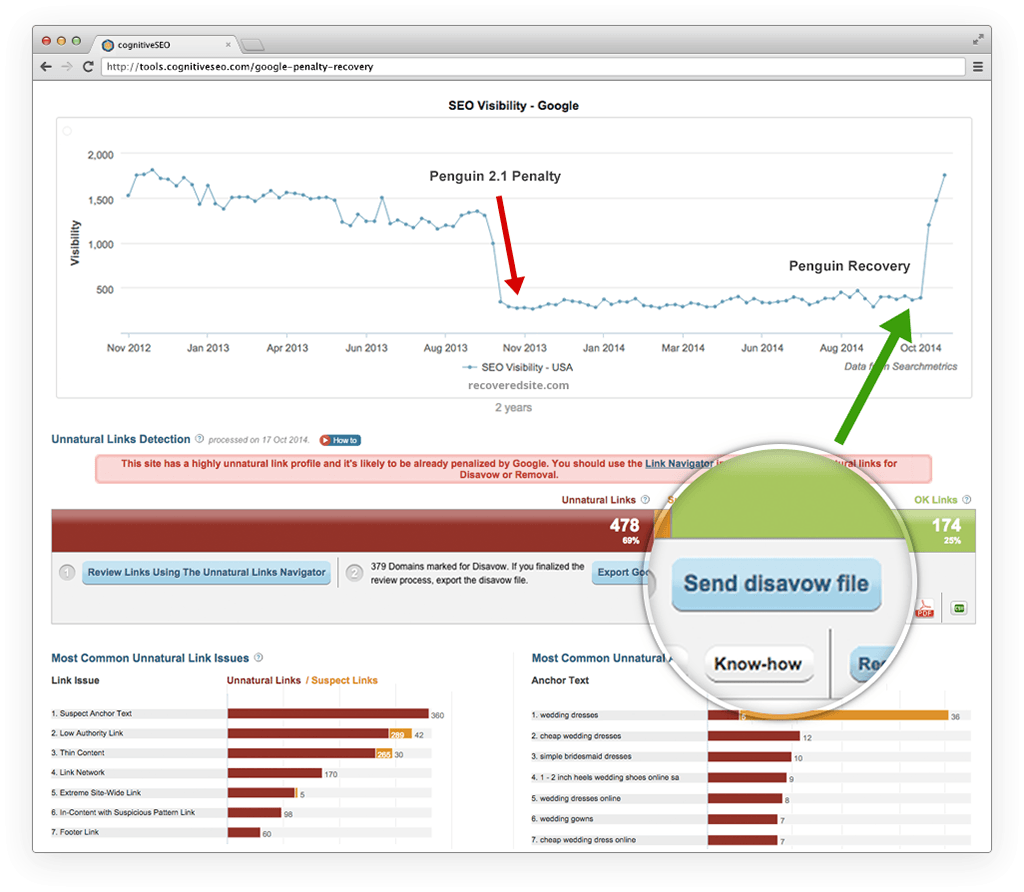
If you have already published many press releases, then it would be a good idea to check them with the Unnatural Link Detection tool to make sure they’re not suspicious or coming from suspicious domains.
Are Press Releases Still Worth It in 2019?
Unless we will be dominated by some advanced form of artificial intelligence that will watch our every step, publishers will always be in need of news topics.
Without pushing yourself out, there’s virtually (almost) no chance of ever gaining any popularity.
Press releases can start a chain reaction not only with backlinks but also with social media likes shares and comments.
So, as long as we will have news, Press Releases will be useful.

However, why do Press Releases seem to be less popular than they were back in 2009?
Well, the answer is SPAM. As the internet and SEO grew more popular, editors and journalists have been spammed daily.
So they started filtering the news stories more and more, making Press Releases a less effective strategy not in terms of SEO, but in terms of how accessible it is.
A second reason could be the penalties themselves.
Press Releases were mostly popular not because they would help with news coverage but because they could provide easy links from distribution websites.
With the SEO community pulling itself away from mass link building, “naturally” (see what I did there?), press releases became less popular.
However, if you’re focusing on the right things, which are improving your business, website, services, or products, and issue a press release focused on getting the media’s attention instead of grabbing a backlink, then press releases are more than worth it in 2019+.
If you focus on getting the media’s attention instead of grabbing just another backlink, Press Releases are very useful for the years to come.
The truth is you only need one reporter to pay attention to you.
Get covered by just one reporter on one renowned site and the rest will follow.
Your chances of getting featured are actually higher if you can target individual reporters.
Have great news about graphics cards, find a reporter that’s also a gamer.
Have shocking or great news about child care?
Find a reporter who’s also a devoted parent.
You don’t necessarily have to use press release platforms to make a press release effective.
You might e-mail reporters personally or even message them on their social media profiles, such as LinkedIn or Twitter.
How to Make Press Releases Effective?
An article about how to write a good press release is a topic for another time.
However, the general consensus is:
- Have an interesting piece of news
- Create a killer headline
- Write the Press Release short and to the point
- Distribute only to relevant places
- Wait and monitor results
I’m not elaborating on it because making a press release effective specifically for SEO is about what you don’t do rather than about what you do.
So here are 3 don’ts to take into account when writing Press Releases.
Don’t do #1: Don’t try to write a press release about anything.
Don’t just post press releases monthly about your company.
Unless you have something innovative original and exciting, writing about it will probably be a waste of time.
Don’t do #2: Don’t try to constantly SPAM editors.
You’ll get yourself in their spam box and not be taken for granted ever again.
What people hate more than anything is spam.
If a reporter sees your content over and over again with the same uninteresting things, they will filter you out, eventually.

Don’t do #3: Don’t post on as many Press Release platforms as possible.
Focus on the most relevant ones.
There might be places fit for your location and audience and places that are not.
For example, although HARO is a great website, it serves little purpose for international clients.
If you think you’re unfit for writing a good press release, there are services out there that will write them for you!
Conclusion
Press releases are useful for SEO and will still be for many years to come, as long as you don’t abuse their distribution to as many websites as you can.
Although they’re not as popular in the SEO community as they used to be, if done properly, a single press release can bring massive results.
- Have you been issuing press releases recently?
- What was your experience with them?
- Easy to create?
- Are journalists ever interested in your content or has it been just a waste of time?
Let us know about your experience in the comments section!
The post Are Press Releases Still Relevant for SEO in 2019? appeared first on SEO Blog | cognitiveSEO Blog on SEO Tactics & Strategies.
Source: cognitiveseo.com

Internal Linking for Massive SEO Results. Why & How to Do Internal Link Building
You’ve probably heard about internal linking a lot because everyone is talking about it. But what’s all the fuss about? Should you really bother doing it? Is it really that effective? If yes, why? There are many questions to be answered.

During our cognitiveSEO talks, many guests talked about the importance of interlinking between your own web pages. Therefore we decided to tackle this subject and let you know about the best internal linking strategies.
We’ve been doing internal linking for years, we’ve been talking about it here and there, but nowhere have we stated step by step how to do proper internal link building. But all that changes today.
If you’re looking for an SEO move that can quickly boost the position of your website, then internal linking is the move you want to make. Keep reading.
What Is Internal Linking and Why Does It Help SEO
Internal links are hyperlinks between two pages of the same website.
Internal links work just like backlinks. However, backlinks are hyperlinks between two different websites. When you link to another website from your own website, you call that link an external link.
When you link within your own website, you call those links internal links.
A proper internal linking strategy can really boost your ranking power because it does two things:
#1: It helps search engines understand the structure of your website, how different pages interact with one another and which pages are truly important within the structure of your website.
#2: It helps users navigate the website and it keeps users on the website by providing relevant content through links that can be followed. This ultimately sends search engines another signal that your website is great, because it provides a good user experience.
These things can account for why Google boosts websites that take internal linking seriously. It’s not just a matter of adding ranking factors to Google’s algorithm, but it actually helps users have a better experience with your website. They’re both considered ranking factors.
Of course, this is just the surface. There are a lot of things that you should take into account when interlinking between your own pages. However, although it might appear difficult, in the end you’ll learn that internal linking is actually very simple.
Internal Linking Basics
To be able to implement a good and effective internal linking strategy quickly, we must first understand the basics of internal link building. When you link from one page to another, you should keep these things in mind, both for best results and avoiding penalties.
1. Structure & Hierarchy
Your website’s structure is very important for its success on search engines. The site structure is bound to internal links, because search engines use internal links for SEO and, most importantly, to crawl your website.
When a new domain is registered and a new website is built, a request can be sent to search engines to crawl and index it. Search engines then access (crawl) the homepage of that website, analyze it, take notes (index) of what’s important for ranking it and look for links to other pages.
When they find a link to a new page, they ‘click’ it and access the new web page, analyze it, look for other links and so on. The process is repeated until the search engines crawl and index the entire site.
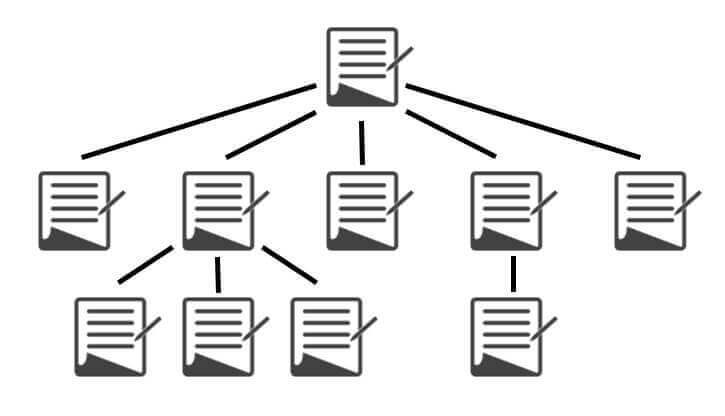
Site structure and internal linking of pages (source: searchenginejournal.com)
The link structure of your website is critical because it dictates the importance of its pages. Your HomePage stands at the top. All pages on your site usually link to your homepage, considering you have a header and a logo with a hyperlink on it.
For informational websites, the link structure is pretty simple. Article URLs are usually right after the root domain.
Most blogs and news sites also have a category hierarchy, which can be more or less important to webmasters. Interlinking usually happens only between the articles and a few more pages.
Then, we have fully hierarchical websites, such as online stores and business websites listing services, maybe some local businesses.
A hierarchically structured website shouldn’t put unimportant categories side by side with important ones, as siblings, but rather as their children. This will help point out which pages are more important.
Let’s take an example for a music store, where there are categories for different instruments and also accessories for each and one of them:
Option one:
- musicstore.com/guitars/
- musicstore.com/pianos/
- musicstore.com/drums/
- musicstore.com/guitar-accesories/
- musicstore.com/piano-accesories/
- musicstore.com/drum-accesories/
Hypothetically, I could also just use musicstore.com/category/accesories/ where I would mix the accessories altogether, but that would be a hell of a mess, don’t you think?
Option two:
- musicstore.com/guitars/
- musicstore.com/guitars/accessories/
- musicstore.com//pianos/
- musicstore.com/pianos/accessories/
- musicstore.com/drums/
- musicstore.com/drums/accessories/
Which option do you think looks nicer, for humans and search engines alike?
I hope you answered with Option Two because it definitely is the better option.
Depending on the platform you’re running your online store on, some issues can arise. URLs are oftentimes really stubborn and difficult to set up.
Now, I don’t really know about other platforms, but I work a lot with WordPress and I know what happens. WordPress runs with unique slugs, so each ‘accessories’ page will have a unique identifier.
In this case, it will be accessories, accessories-2, accessories-3 and so forth. This will also manifest in the URLs, so the results for Option 2 will be the following:
- musicstore.com/guitars/
- musicstore.com/guitars/accessories/
- musicstore.com/pianos/
- musicstore.com/pianos/accessories-2/
- musicstore.com/drums/
- musicstore.com/drums/accessories-3/
In order to bypass these rules, we need to use URL rewrites. If you’re good at coding, you can teach your theme/plugin (in this case WooCommerce) to do that automatically.
It can also be done via the .htaccess file in your WordPress install. However, a much easier option would be to use a plugin that can rewrite URLs.
Another common problem is duplicate content.
If you have one product in multiple categories and use hierarchical URLs for products as well, you’ll end up having the same content on multiple URLs.
To prevent that, WordPress and WooCommerce use separate prefixes for categories and products.
However, if you don’t have a ton of products and you’re 100% sure that products won’t be in multiple categories, you can definitely add it to the category’s URL and extend it.
When following this hierarchical structure, a common internal linking structure mistake is that people forget to link back to the main category pages from their children.
Because when we create websites, we build the pyramid from the top to the bottom and we forget that the top pages are actually the important ones.
So far, we’ve only linked right from the parents to the children. However, in order to really point out that the parent categories are the important ones, we need to link them back to them.
This is where Breadcrumbs come in handy. If you don’t know what they are, I’ll show you an example:
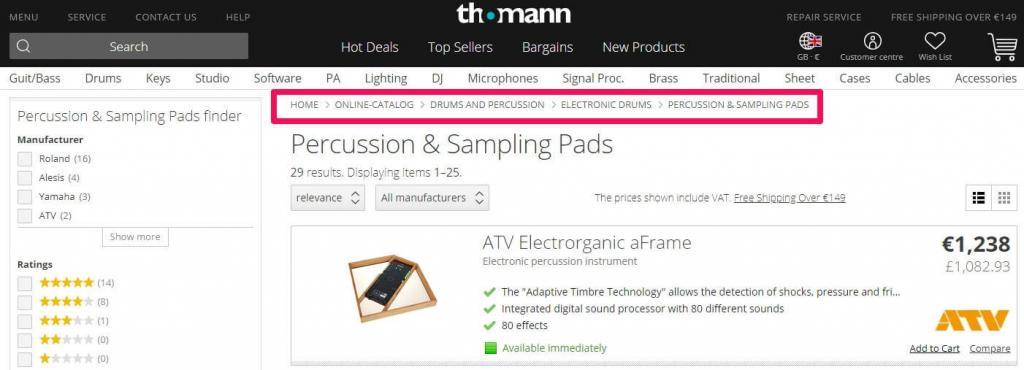
By using breadcrumbs, you can seamlessly link from all your non-important subcategories to the important categories, optimized for high search volume keywords.
You should be able to activate breadcrumbs from your theme’s settings. However, there are plenty of plugins available out there.
By simply creating a good hierarchical structure for your store, your internal linking structure is already taking effect. However, if you implement a blog and a content marketing strategy on your eCommerce website, you can gain a lot more.
I’m talking about having a blog and creating awesome content on it so you can promote it, get backlinks and then interlink to your category pages.
Quick tip: You can also implement a sitemap that matches the structure of your website. Google doesn’t always follow it, but it can be helpful for very big sites.
2. Boilerplate Content vs. Unique Content
Boilerplate content is content that is or can be repeated on multiple pages of your website. It’s usually split into 3 categories: header, footer and sidebars.
The header section is always at the top of the website. In our case, it’s this section:

As you can see, it links to some of our most important category pages from the blog.
Down at the bottom, we have the footer section:
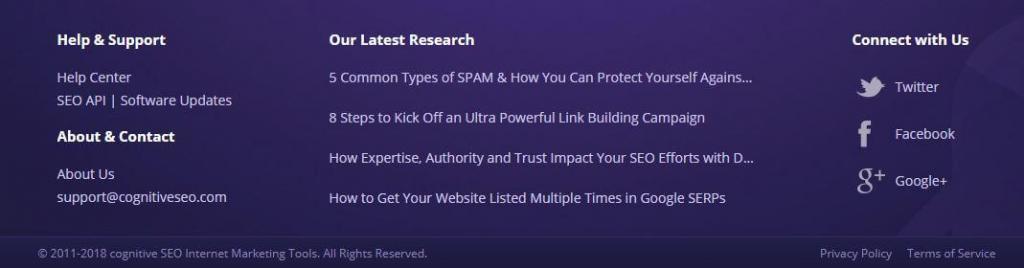
Here we link to our 5 most recent articles from the blog, to give them an initial boost from all our pages when we add them.
We also link to relevant locations for our users, such as the support pages. Here, for example, you could also add a link to your sitemap.
For a really big hierarchical website, footer links can be dangerous. Don’t just put all your categories there. Only put the most important ones. If you feel like adding them all, split them into chunks, on different pages.
Kayak does a really great job at internal linking. That’s why they rank so high for all car rental keywords, even though they mostly use doorway pages.
If you take a look at the image below, you’ll be able to see that they use two-footers. The bottom section is actual boilerplate content, which is visible on all pages, listing the most important car rental locations.
However, the upper section is only for this particular page. I’ve also spotted other pages with similar sections but listing other cities, probably related to the city that the respective page is targeting.
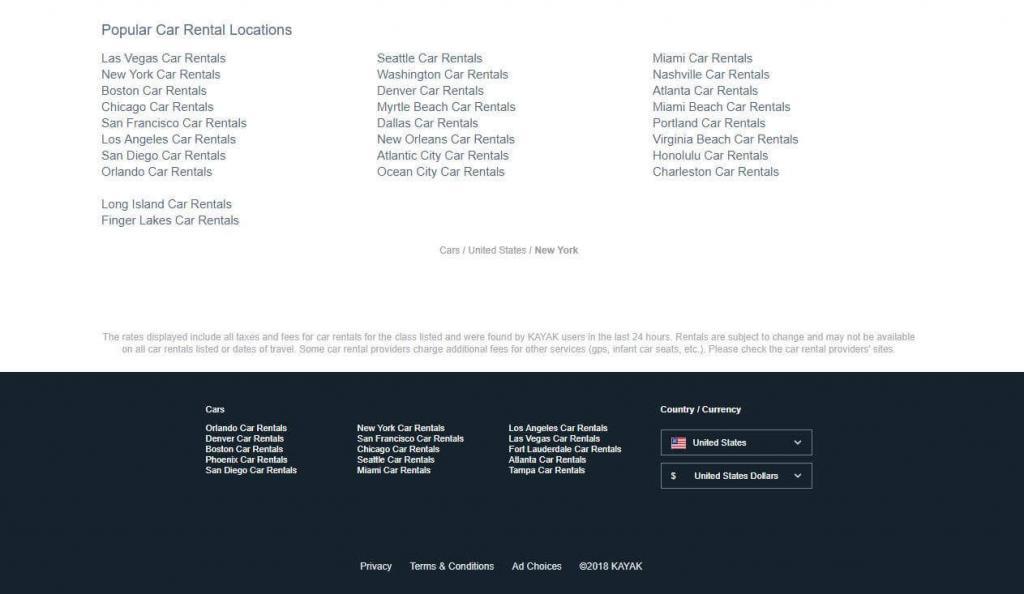
Kayak doing a great job at internal linking
On our website, we don’t have a sidebar, but I’m sure you’ve seen plenty of sidebars on other websites.
They usually contain links to the most recent articles and comments, but they should also contain useful navigation links and links to very important pillar content.
Boilerplate content should hold links to the most important parts of your website, the ones that users will really find useful, especially for navigating the website.
It’s often dangerous because people try to abuse it to create as many links as possible to important pages. These practices are penalized by Google and we will discuss them later.
Unique content is basically the actual content of a page. It’s what lies between the header, footer and sidebars.
Sometimes, it can get duplicated on multiple URLs, but Google doesn’t recommend it and large quantities of duplicate content can greatly harm your website and rankings.
Unique content can hold any links. Their very valuable, as the links can be relevant in terms of topic and anchor texts. However, they should always be more relevant to the user than to the search engines. Simply stuffing links here and there won’t help you much.
3. Internal page performance
As you probably know, the more backlinks a page has, the more valuable it is for that website and also the more value it can pass onward to another page, through a link of its own.
This SEO signal is very important for Google and it will be for a long time (although other search engines like Yandex don’t use links as a signal anymore).
Here’s a video of Matt Cutts (former Head of Spam @ Google) explaining link value and link juice for ranking on Google.
It’s still important to have a good link-building strategy in place to get top positions, especially in highly competitive niches.
Internal links work in a similar way. As with regular external links, the more internal links pointing to one page of your website, the greater the value of that page within the website.
If you have a page with 30 internal links pointing to it, it will hold a greater value in the site than the pages with only 10 internal links.
If you link to another page from that page with 30 internal links, it will pass greater value than linking from the ones that only have 10 links.
Backlinks (from other websites) are also very useful. For example, if you have 10 backlinks to one page but 0 backlinks to another, you can link from the first page to the second to pass some of that link equity, within your own site.
You obviously want backlinks more than you want internal links, but that’s just because backlinks are out of your reach and we all know the nature of humans. Start with what you have control over, and build your way up. A combination of backlinks and internal links is the true key to success.
4. Number of Internal Links
As with any other SEO strategy, method, or category, things can and will be abused by some. Google penalizes such abuses, internal links included.
There isn’t a general rule of thumb when it comes to how many links you can have on a page, but it can come down to the size of the website. As long as you keep things relevant, you shouldn’t be pouring in too many links.
Generally, a normal ratio would be 10-15 links for every 1,000 words written. However, by adding the boilerplate content links to the count, the number can grow pretty fast.
I guess that even 200-250 links per page can be a decent amount on a very large website, but anything over that might look suspicious, to users and search engines as well.
However, you do want to consider that the value a page passes is divided between the number of links it has on it. So, if you had a hypothetical value of 10 and you had 5 links on that page, each link would carry a value of 2.
The more links you have on a page, the less value gets passed through each of those links.
5. Use & Risks of Anchor Texts
Anchor texts are the phrases that users see when they click on a hyperlink. It’s the phrase that’s highlighted usually with blue, but it can be another color, depending on a website’s design (in our case it’s purple).
Example: <a href=”http:/site.com/page/”>This is the anchor text</a>
As with regular backlinks, anchor texts should use keywords, because they say what that link is about and help pages rank higher for those keywords.
However, trying to abuse this will get you in trouble. It’s the exact same thing with internal links.
Quick tip: Image links can also account for internal links. In this case, the alt attribute will be the anchor text of that link. However, text links are more common.
6. Importance of Relevancy
Google has recently put a lot of emphasis on user experience. So, please just don’t fill up your pages with useless links, just for the sake of having them. If they clearly serve no purpose for the reader, you’re better off without them.
For example, you might use 3 variations of a keyword within 100-150 words. If you use all 3 of them to link to the same piece of content, what will that tell the user?
Absolutely nothing. They might, at most, wonder why you would commit such a dreadful act. However, Google will clearly know you’re trying to manipulate it and it will penalize you for it.
A link between relevant posts, with relevant topics to one another and avoid using exact match anchor texts too often. If you’ve mentioned a topic that is required for a better understanding of the phrase, you may use exact match anchor texts.
You don’t really want to expand on that topic and explain what it means there, because most of your readers already know it. But for those that might be new and don’t know what it is, you provide that link to an explanation.
It’s useful to have anchor texts that fit the keywords you’re trying to rank for, but don’t overdo it. To get away with it, you can write things like “To find out more, check out this article about Keyword Phrase“, where the bolded part represents the actual anchor text of the hyperlink.
7. Dofollow & Nofollow
When you interlink between your pages, you want to make sure that those links are dofollow. There’s actually no such thing as a dofollow tag. A dofollow link is just a regular link, lacking the nofollow tag. A normal HTML text link passes equity/value.
Example of dofollow link: <a href=”http:/site.com/page/”>Anchor Text</a>
The nofollow link tag specifies to the search engines that the equity should not be passed and that the vote doesn’t count anymore ( <a href=”http:/site.com/page/”>Anchor Text</a> ).
Example of nofollow link: <a href=”http:/site.com/page/” rel=”nofollow”>Anchor Text</a>
This was often used in practices such as PageRank sculpting, where you would nofollow some links in order to maximize the equity of others.
If we take the same example as above, if you have a hypothetical value of 10 and you have 5 links on your page but 3 of them have the nofollow tag, then the other two would each get a value of 5.
However, this doesn’t really work anymore, as Google countered this by splitting the value regardless of whether the nofollow tag is applied or not.
So now, nofollowing a link in order to ‘pagerank sculpt’ will actually put the value of that link to waste.
However, there are places where you do want to use internal nofollow links. This is when you are linking to a page within your site that has the noindex meta tag. A good example would be login pages.
Why bother to nofollow them? Wouldn’t that equity go to waste? Well, if it’s not going to be indexed, then nothing actually goes to waste. And it’s not like that page is going to pass anything forward.
Google won’t even look at that content to see what other links that page has.
I don’t know about you, but I’d be pretty pissed if someone said to me “Hey, yo Google, check out this awesome link!” and then go “HA HA, just kidding! Don’t index it, tinhead!”
Quick tip: It’s always a good idea to use relative sources ( /contact/ ) instead of absolute ones ( https://cognitiveseo.com/contact/) when linking within your own website. This can come in handy if you ever change your domain.
Step by Step Internal Linking Guide
Considering you now know the basics mentioned above and you won’t use a bad structure or abuse exact match anchors when you interlink, you can start an internal linking strategy on your own website.
Step 1. Mapping Everything
If you haven’t done this on a regular basis before, you really need to plan it out, especially if you have a big website. To do this, you’ll need an Excel File or a Google Spreadsheet.
You can add any other headers you think would be relevant, but I’ll stick with these:
- Page Title
- URL
- Main Keyword
- Other Keywords
- Pages to link from
- Anchor Text

We’ve added just one page as an example but for better results, you should add as many pages as possible.
If necessary, you can split the mapping into multiple sheets (categories, for example). If you have a really big website this can help.
Step 2. Keyword Research
For this example, I’ll just pull out the keywords from the title itself. You can also pull keywords out from the headings and even content. If you want, you can use cognitiveSEO’s Keyword Explorer to get more keyword ideas. Another option would be Google’s Keyword Planner.
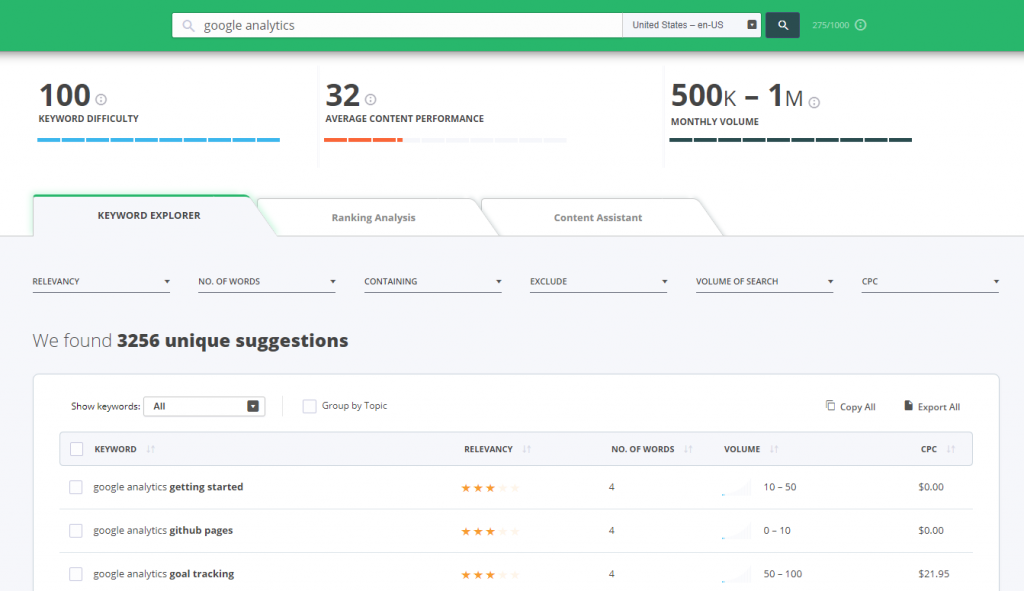
The key here, however, is to think of keywords that will help you find content to which that particular article will be relevant.
Look at how I added ‘monitoring’ as a relevant keyword for the Google Analytics article. You can also use variations, such as ‘monitor’ or ‘monitor your traffic’.
Step 3. Searching Your Website
It’s now time to use those keywords to find relevant, older articles that we can link to our most recent 5 articles. There are two ways you can do this:
The first one is to use your site’s search feature:

After you identify the articles you want to link from, skim through them to find the relevant section and map them down, with their corresponding anchor text:
If your site doesn’t have a search feature (hard to believe… but anything’s possible) you can use Google to search your website, considering your pages are indexed. Use the search operator site:yourdomain.com followed by the keyword you’re searching for.
After you finish the mapping, you can start adding the links. I won’t cover how to actually do that, because you can ask Google. You’re a big guy!
Step 4. Interlink from & to New Pages
Every time you post something new, link to other older articles that are relevant to the topic. It’s better if you do it on the spot, as you write. That way, you won’t forget what you wanted to link to.
However, always double-check at the end to see if you can add some more relevant links.
Also, take the time to quickly perform the process above. Use some keywords to identify relevant articles and then link it from those articles to your new article.
Step 5. Fetch and Render
After each internal linking session, be it a bigger one or for a new post, remember to send your pages for crawling.
This will tell Google to take another look at your pages, so it can see the modifications you’ve made and better understand your website. You can do this via the Google Search Console, in the Crawl section.
Quick tip: If you’re just starting a website, follow the last three steps as a rule of thumb every time you’re posting new content and you can bypass the rest of the steps.
Conclusion
Measuring the results is the final step of correctly implementing an internal linking strategy. You can’t say anything really works until you’ve measured its results. In order to do this, you’ll have to benchmark your site’s positions before and after implementing the strategy.
You can do this by using cognitiveSEO’s Rank Tracker. You can also use Google analytics to monitor your traffic.
You can only really do this well if you implement a more massive internal linking to your website and if you isolate it from other SEO strategies. If you interlink all the time and you’ve been doing it since the beginning, you probably won’t see much of a difference.
Also, publishing an article that gets 100 external links (while your average is usually 1-2) might boycott your internal linking strategy measurement.
Internal linking isn’t hard to implement. Sure, it might bring up a headache if you have a million web pages, but it is definitely worth it.
What are your experiences with internal linking? Have you had success with it? Have you seen any difference whatsoever? I’m eager to find out your opinion. Start typing in the comments section below and let’s get a conversation started. I’ll gladly answer any questions.
The post, Internal Linking for Massive SEO Results. Why & How to Do Internal Link Building appeared first on SEO Blog | cognitiveSEO Blog on SEO Tactics & Strategies.
Source: cognitiveseo.com