
Tag Archives for " news "

10 Alternative RSS Readers if You Still Miss Google Reader
While RSS feeds aren’t the must-use resource they once were, there’s still a dedicated base of users who aren’t prepared to say goodbye.
The mid-aughts to early 2010s were the heyday for RSS feeds like Google Reader. It felt like everyone was using them.
Then, in 2013, Google Reader was switched off, and their popularity has dwindled.
Dwindled, but not vanished entirely. Google Trends data shows a massive dropoff since RSS hit its peak back around 2005. But interest has been pretty stable since about 2015:
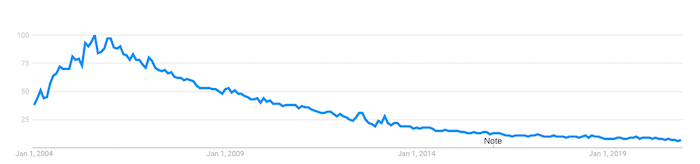
What does this tell us?
While RSS feeds aren’t the must-use resource they once were, there’s still a dedicated base of users who aren’t prepared to say goodbye.
If you’re one of them, you might still be searching for the perfect alternative to your beloved Google Reader. Here are a few options, as well as some practical tips on using them to improve your content marketing strategy.
What Was Google Reader?
Google Reader was an RSS reader. RSS, which stands for “really simple syndication,” is an XML-based format used to distribute and share online content. It allows users to subscribe to news feeds from their favorite website and receive updates every time they post new content.
Google launched Google Reader in 2005 and quickly built up a loyal following because it was simple, efficient, and free. But as online habits changed, usage declined, prompting the search giant to permanently retire Google Reader back in July 2013.
10 Alternative RSS Readers to Google Reader
While Google no longer saw the value in RSS readers, lots of people still find them useful. Presumably, if you’re reading this article, you’re one of them, so here are ten Google Reader alternatives to try out.
Feedly
Priced from: FreeBest for: Cutting through the noise
RSS readers can become victims of their own effectiveness. Say you want to curate all the latest news on a topic like a blockchain, or a keyword like Microsoft. Pretty soon, you’ll have more relevant content than you could ever read.
Feedly is all about providing a decluttered RSS experience. Its free tier allows you to follow up to 100 sources, from news sites to YouTube channels. But the real value comes from its AI assistant, Leo.
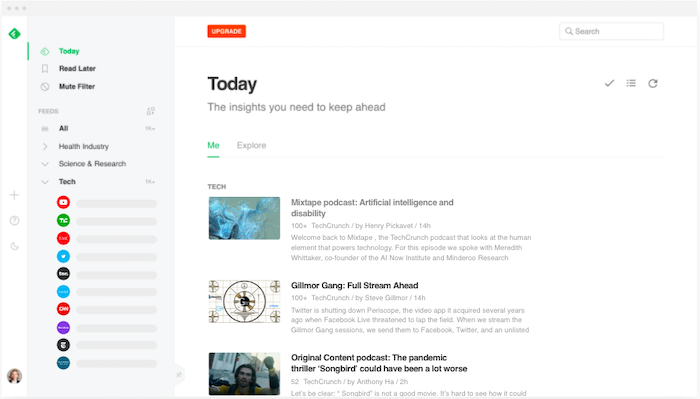
Leo allows users to define what content is most relevant to them. You can prioritize by keywords, trends, topics, similar articles, and even critical software vulnerabilities. Then teach Leo what’s useful to you by upvoting or downvoting its recommendations.
Inoreader
Priced from: FreeBest for: Saving the content you love long-term
Inoreader has one feature that sets it apart from all the other Google Reader alternatives: the ability to build long-term archives of content.
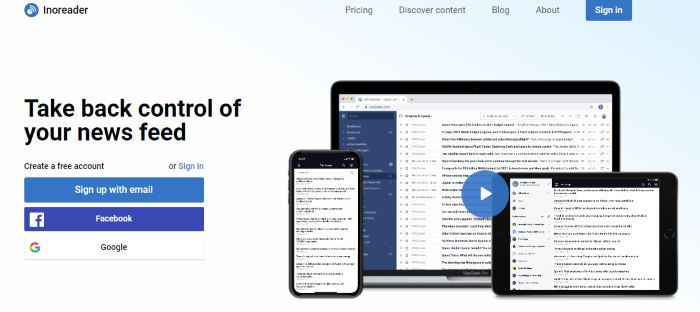
Most RSS readers only store content for a short period. But with Inoreader, limited-time archives aren’t a thing. The content you’ve already read is stored permanently, so you can access it at any time.
To stop things from getting unmanageable, Inoreader allows you to categorize your feeds into folders and add tags to individual articles.
Bloglovin’
Priced from: FreeBest for Lifestyle content curation
Unlike most Google Reader alternatives, Bloglovin’ focuses on a single niche: lifestyle content. That means everything from fashion and beauty, to travel and interior design. Its colorful, image-heavy interface feels more like a social media site than an RSS reader.
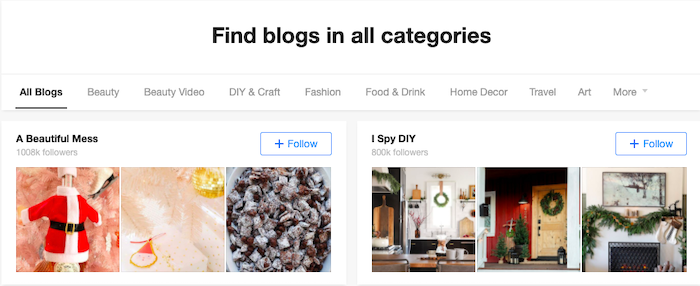
Similar to Pinterest, Bloglovin’ lets you curate content around the lifestyle topics and themes most helpful to you. So if you’re planning a wedding or a big DIY project, you can start a new collection and expand it with relevant content.
Flowreader
Priced from: FreeBest for Combining RSS and social feeds
Flowreader is an easy-to-use tool that acts as a one-stop-shop for content from all your favorite websites, plus your most-loved accounts on Twitter, YouTube, Reddit, and Pinterest. It saves you a lot of time navigating between multiple sites to access the content you most want to see.
Because it posts content in chronological order, Flowreader effectively lets you bypass Twitter’s recommendations algorithm, which means you can read tweets in the order they were posted.
Feedreader
Priced from: FreeBest for: Doing the basics
There’s nothing too complex about Feedreader; it just works. Basic and ad-free, this web-based RSS reader lets you subscribe to your favorite feeds and star items to view later. Your subscriptions can be categorized for easier navigation, while a bunch of keyboard shortcuts makes it simple to expand articles, mark items as starred, or refresh the results.
NewsBlur
Priced from: FreeBest for Filtering what you don’t like
It may not have the slickest interface, but NewsBlur is deceptively sophisticated. For one thing, it allows you to access the full text from each source right there in the RSS reader, which keeps your browser clean and uncluttered, while the free product tier lets you subscribe to up to 64 feeds.
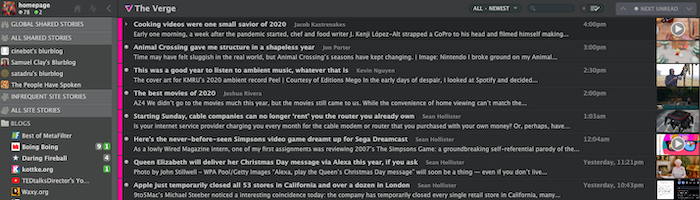
NewsBlur’s most interesting feature is its filtering. Select a piece of content, then tell the app what you like or dislike about it, including:
Key phrases in the headline or body copyThe authorThe publicationThe categories that are relevant to that piece of content
Spend some time selecting your preferences and NewsBlur becomes a super helpful tool for accessing only the types of content you find most valuable.
Feedspot
Priced from: FreeBest for Advanced filtering
While it does all the things you’d expect a Google Reader alternative to do, Feedspot goes a step further with its advanced filtering functionality. This allows you to:
- Make searches within all the feeds you follow, including blogs, news sites, RSS feeds, YouTube channels and social sites
- Filter results from one or more specific feeds
- Search phrases within the title only
- Browse by exact phrase matches
All of which makes it easier to track down the content you most want to see, right now, from the sites and platforms that are most relevant to you.
The Old Reader
Priced from: FreeBest for: Finding recommendations from people you trust
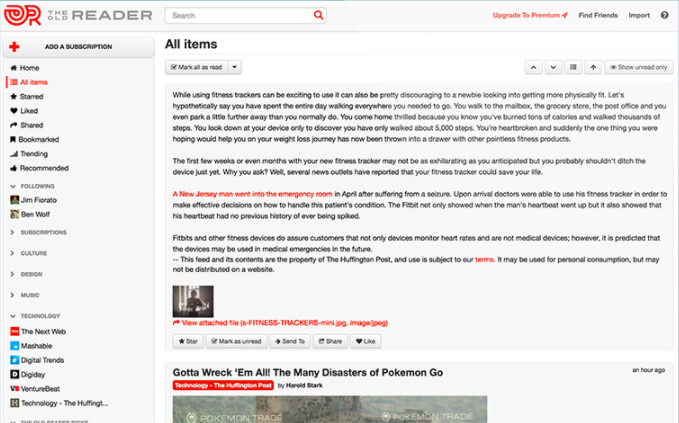
The Old Reader works best when used in groups. Connect with your Facebook or Google account to follow people in your network who also use The Old Reader, then you’ll be able to see the content they recommend. That way, you’ll never miss a piece of content they find useful or interesting.
Feeder
Priced from: Free & Best for RSS on the go
Feeder offers Chrome, Firefox, Safari, and Yandex extensions, making it easy to view your RSS feeds on desktop. But perhaps its most useful feature is the dedicated Android and iOS apps, which allow you to see all the headlines from your favorite sites, plus a simple view of the full content, on mobile. Great for when you absolutely need to keep up with the news but aren’t at your computer.
Netvibes
Priced from: Free, Best for Social media monitoring
While Netvibes works great as a traditional RSS reader, its real strength lies in its ability to automate interactions between multiple platforms, apps, and devices. Think of it as like the Zapier of RSS readers.
So how does that work in practice?
Well, Netvibes currently integrates with 43 apps, including Gmail, Google Drive, LinkedIn, and Twitter. It also does a ton of stuff, from monitoring stocks to tracking your health. From a marketing perspective, the biggest “win” is as a social media monitoring tool.
Rather than presenting you with a feed of new social posts from people you follow, Netvibes allows you to dig deeper. For example, you can create a feed for @mentions of your brand on Twitter, or one dedicated to a certain hashtag.
That makes it easy for you to keep updated on what people are saying about you or follow topics relevant to your business.
How to Use RSS Readers to Benefit Your Content Marketing
Google Reader alternatives aren’t purely for finding content. They can be a vital part of your content marketing efforts, too.
Create Your Own RSS Feed
You’ve got a blog or resource hub, and you’re producing fantastic content. But you’re struggling to bring people back to your site.
Setting up your own RSS feed can be a big help. That way, subscribers will see all your latest content every time they access their favored RSS reader. It’s a great way to amplify your content, and best of all it’s completely passive. Once you’ve implemented your RSS feed, it’ll do all the hard work.
Be sure to compel readers to subscribe to your feed by incorporating clear calls-to-action (CTAs) throughout your content. Consider adding an RSS button to your content hub landing page, too:
Keep on Top of Industry News & Thought Leadership
Does your audience come to you for your take on the latest news impacting your industry? Then an RSS reader can ensure you’ll always be one of the first to know about any new developments and key announcements.
Let’s say you’re in the marketing niche. You want to keep up to date with what’s going on, so you can react to it fast by creating your own content. Consider adding the following types of accounts to your favorite Google Reader alternative:
The Twitter accounts of thought leaders like Rand Fishkin, Jeff Bullas, and Mari Smith (and me!)Marketing blogs and social feeds from big industry players like Google and FacebookIndustry news sites like NeilPatel.com, Search Engine Journal, and DigidayYour biggest competitors’ blogs (it pays to be aware of the content they’re creating, too)
Segment all of those feeds into categories so they’re easy to browse. Then get into the habit of spending five minutes at the start of every day, or on your lunch or coffee break, reading through all the latest news.
Curate Your Own Newsletter
Why do people subscribe to newsletters? Well, according to one study, about three-quarters of people subscribe to learn more about topics they find interesting, or to keep abreast of content from their favorite websites.
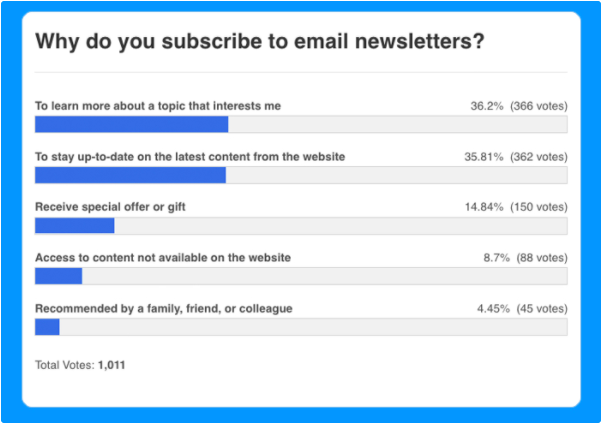
With that in mind, you can quickly and easily create your own newsletter featuring all the biggest developments in your industry, simply by curating all the top content pulled in by your RSS reader.
Include a couple of CTAs to sign up in prominent spots on your website, and you’ve got yourself a low-effort way to build up a mailing list and generate a bunch of leads.
Inspire Your Content Creation
Sure, I create a lot of content, but even I get writer’s block sometimes! If you’re struggling to come up with new topics for your blog, or podcast, or YouTube channel, your RSS reader can help.
Check out what other people in your niche are discussing. Look out for trends, breaking news, or subjects you feel passionately about and have an opinion on. And presto, there’s all the content inspiration you need.
Conclusion
RSS feeds may have gone out of fashion in the last few years, but that doesn’t mean they’re not worth your time. While everyone else gets their news from the cluttered, algorithm-influenced world of social media, you can use a Google Reader alternative to cut through all the noise and find the most relevant content.
That means you’ll never miss an important piece of news ever again. Use my tips to drive your content marketing plans, or even help you with lead generation. What’s not to like?
What’s your favorite Google Reader alternative and why?
The post 10 Alternative RSS Readers if You Still Miss Google Reader appeared first on Neil Patel.
Source: neilpatel.com

Are Press Releases Still Relevant for SEO in 2019?
Although there’s a big chance you haven’t used them, I’m sure you’ve heard about the notion of Press Releases. They used to be very popular in the SEO community back in the day. But are press releases still relevant for SEO in 2019? Is it worth spending your time dealing with a press release?

The short answer is yes. Press Releases are still relevant and probably will be for a long time to come, not only for search engine optimization but for marketing, in general.
However, many webmasters don’t really understand the concept and often end up doing things that eventually harm their websites.
Yes, you’ve heard me right. Sometimes,
Press Releases can negatively affect SEO if they are not done the right way.
Keep reading, as later in this article I’ll tell you how you can avoid these mistakes.
What Are Press Releases?
Press Releases are a way of distributing and announcing events to the press.
Google defines them as “an official statement issued to newspapers giving information on a particular matter”.
Usually, they come in written format, but they can also be in audio or video format.
Once someone has an event and wants it to become more popular, the best way to do it is to get the media’s attention, quickly and effectively.
But how can they do that? Well, the answer is press releases.
You write a piece of content that will then be distributed to news publishers that might be interested.
Press Releases follow this line of events:
Event Happens > Press Release is Written > Press Release is Distributed to News Publishers > News Publishers Pick Up the Press Release > News is Published
The thing is, however, that it’s pretty hard to get the media’s attention.
It’s even harder for editors, who are constantly bombarded with news topics from all directions.
They need to filter and curate them in order to publish only the best, most interesting news.
And this is how Press Release Platforms like HARO were created.
Instead of sending your press release to news publishers, you post the press release on one of these popular distribution platforms where reporters and news publishers hang out to find interesting topics.

The problem is that these platforms often become a junkyard for spammers.
But before we discuss the possibility of harming your website by using these platforms, let’s have a better look at how they can help your website.
How Do Press Releases Help SEO?
Having information about your company or an event published on big news sites is not only beneficial for your brand, but also for SEO.
How, you might ask? For the most part, it’s about backlinks.
If news publishers start talking about you, not only can you get backlinks from the news sites themselves, which hold a very high amount of equity, but you can also score a high number of backlinks from other webmasters who will read the news.
We all know that building backlinks are one of the most difficult tasks for SEO.
Building high quality backlinks is even harder.
And don’t even get me started on how hard it is to do all this naturally, without buying them or using risky tricks such as PBNs.

Well, Press Releases combine all the 3 above, which makes it probably the best link-building method available.
Why?
Well, it helps you build links rather quickly, the links are high quality and they’re all also completely natural and won’t result in any penalties.
If done right, of course. If not, it’s a waste of time and it can result in penalties.
Press Releases are a good way of quickly obtaining high quality links in a natural manner.
However, if not done properly, it becomes a complete waste of time and can potentially be harmful to your website.
About Press Releases & Penalties
Researching press release tactics on the internet will mostly put you on the right track.
However, people quickly learn that it’s easier to get links from the Press Releases themselves rather than from the news publishers (which mostly ignore their poorly written stories).
Press Release Spam
Instead of focusing on what’s important and improving their business in ways that will produce interesting news stories, people distribute as many ‘Press Releases’ as possible to as many press release platforms as possible.
Some platforms are free and make money out of advertising so they have no problem with people coming there and posting their ‘news’.
But even the paid ones are full of irrelevant ‘news’ articles.
With webmasters asking for hundreds of dollars for a backlink or guest post, Press Releases are the cheap way of getting some initial backlinks.
These posts are way too long for a press release (because Google loves longer content, right?) and full of keyword-rich anchor text links, which naturally attract penalties.
This way, the quality of the press release websites starts to decline.
Very few companies and websites (one of them being HARO) still manage to keep the site relevant.
Why?
Well, because it doesn’t index its press releases.
They are available only for logged-in users.
This way, instead of posting a press release just for the sake of getting a backlink, you will focus on posting a press release that will actually attract the attention of a reporter.
Use Nofollow Links
You might be wondering yourself: “Won’t nofollow links be useless?”
Well… first of all, no.
I’ve already written about how nofollow backlinks can help your website rank better.
Second, the nofollow links will only be used on the press release websites, considering these sites index their content on Google.
Any other links that you will obtain as a result of a successful press release will be a mix of both nofollow and dofollow links, depending on the internal policies of the websites that link to you.
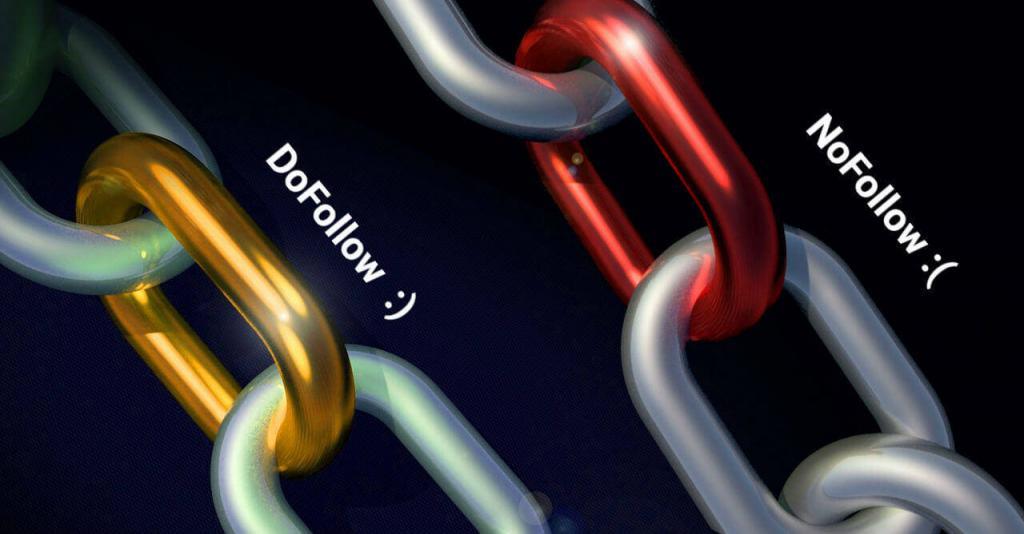
But why use nofollow links?
The reason is that nofollow links reduce most risks of penalty.
Google says that you shouldn’t be building or buying backlinks.
Since the links on press releases are either built manually or paid for, then Google’s Guidelines require them to be nofollow.
Don’t get me wrong. I’m not necessarily a Google fanboy but if you don’t want to risk anything, then it’s the right way to go.
Remember: Nofollow can also help your website rank higher.
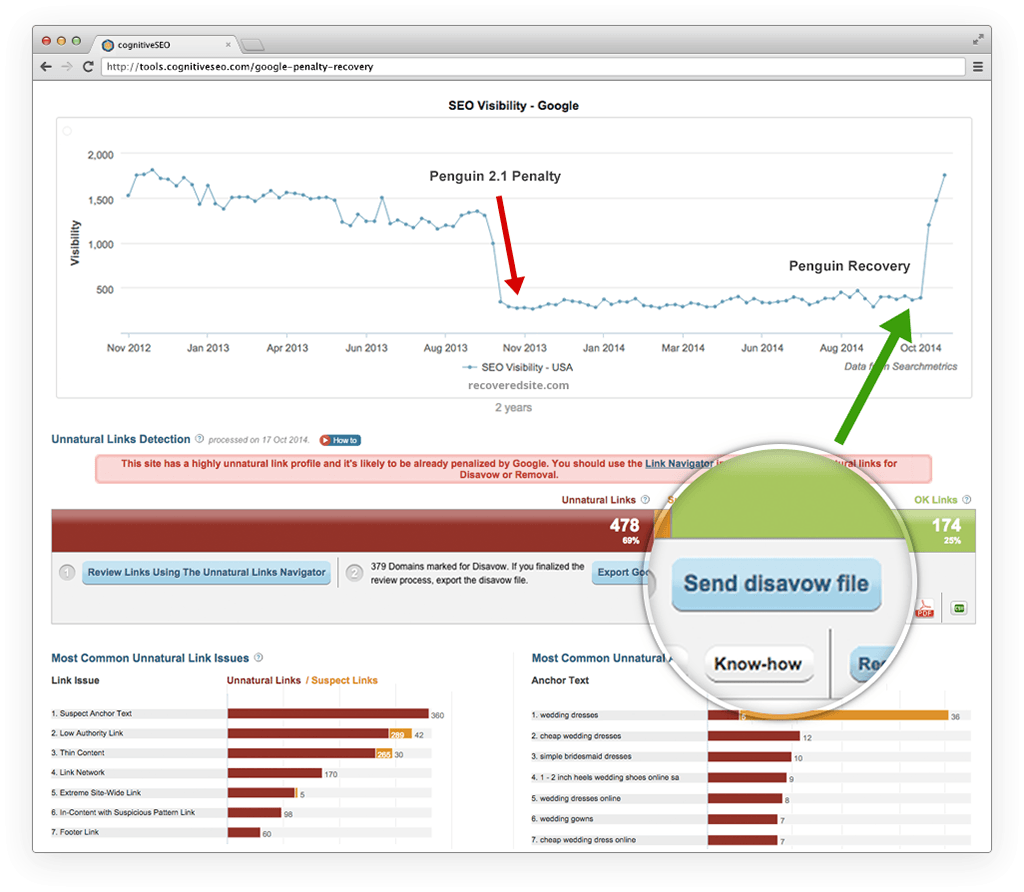
If you have already published many press releases, then it would be a good idea to check them with the Unnatural Link Detection tool to make sure they’re not suspicious or coming from suspicious domains.
Are Press Releases Still Worth It in 2019?
Unless we will be dominated by some advanced form of artificial intelligence that will watch our every step, publishers will always be in need of news topics.
Without pushing yourself out, there’s virtually (almost) no chance of ever gaining any popularity.
Press releases can start a chain reaction not only with backlinks but also with social media likes shares and comments.
So, as long as we will have news, Press Releases will be useful.

However, why do Press Releases seem to be less popular than they were back in 2009?
Well, the answer is SPAM. As the internet and SEO grew more popular, editors and journalists have been spammed daily.
So they started filtering the news stories more and more, making Press Releases a less effective strategy not in terms of SEO, but in terms of how accessible it is.
A second reason could be the penalties themselves.
Press Releases were mostly popular not because they would help with news coverage but because they could provide easy links from distribution websites.
With the SEO community pulling itself away from mass link building, “naturally” (see what I did there?), press releases became less popular.
However, if you’re focusing on the right things, which are improving your business, website, services, or products, and issue a press release focused on getting the media’s attention instead of grabbing a backlink, then press releases are more than worth it in 2019+.
If you focus on getting the media’s attention instead of grabbing just another backlink, Press Releases are very useful for the years to come.
The truth is you only need one reporter to pay attention to you.
Get covered by just one reporter on one renowned site and the rest will follow.
Your chances of getting featured are actually higher if you can target individual reporters.
Have great news about graphics cards, find a reporter that’s also a gamer.
Have shocking or great news about child care?
Find a reporter who’s also a devoted parent.
You don’t necessarily have to use press release platforms to make a press release effective.
You might e-mail reporters personally or even message them on their social media profiles, such as LinkedIn or Twitter.
How to Make Press Releases Effective?
An article about how to write a good press release is a topic for another time.
However, the general consensus is:
- Have an interesting piece of news
- Create a killer headline
- Write the Press Release short and to the point
- Distribute only to relevant places
- Wait and monitor results
I’m not elaborating on it because making a press release effective specifically for SEO is about what you don’t do rather than about what you do.
So here are 3 don’ts to take into account when writing Press Releases.
Don’t do #1: Don’t try to write a press release about anything.
Don’t just post press releases monthly about your company.
Unless you have something innovative original and exciting, writing about it will probably be a waste of time.
Don’t do #2: Don’t try to constantly SPAM editors.
You’ll get yourself in their spam box and not be taken for granted ever again.
What people hate more than anything is spam.
If a reporter sees your content over and over again with the same uninteresting things, they will filter you out, eventually.
Don’t do #3: Don’t post on as many Press Release platforms as possible.
Focus on the most relevant ones.
There might be places fit for your location and audience and places that are not.
For example, although HARO is a great website, it serves little purpose for international clients.
If you think you’re unfit for writing a good press release, there are services out there that will write them for you!
Conclusion
Press releases are useful for SEO and will still be for many years to come, as long as you don’t abuse their distribution to as many websites as you can.
Although they’re not as popular in the SEO community as they used to be, if done properly, a single press release can bring massive results.
- Have you been issuing press releases recently?
- What was your experience with them?
- Easy to create?
- Are journalists ever interested in your content or has it been just a waste of time?
Let us know about your experience in the comments section!
The post Are Press Releases Still Relevant for SEO in 2019? appeared first on SEO Blog | cognitiveSEO Blog on SEO Tactics & Strategies.
Source: cognitiveseo.com