
Tag Archives for " mobile app "

How to Use Firebase Dynamic Links in Your App
Are you a marketer working for a client or company with an app?
If you answered yes to this question, do you have a dedicated strategy for driving website visitors to specific locations within the app?
If you don’t have one, this blog is for you.
If you do have a strategy involving deep linking, this blog is also for you.
Disclosure: This content is reader-supported, which means if you click on some of our links that we may earn a commission.
Read on to learn how Firebase Dynamic Links can help marketers achieve their app goals while boosting overall marketing strategy.
What Are Firebase Dynamic Links?
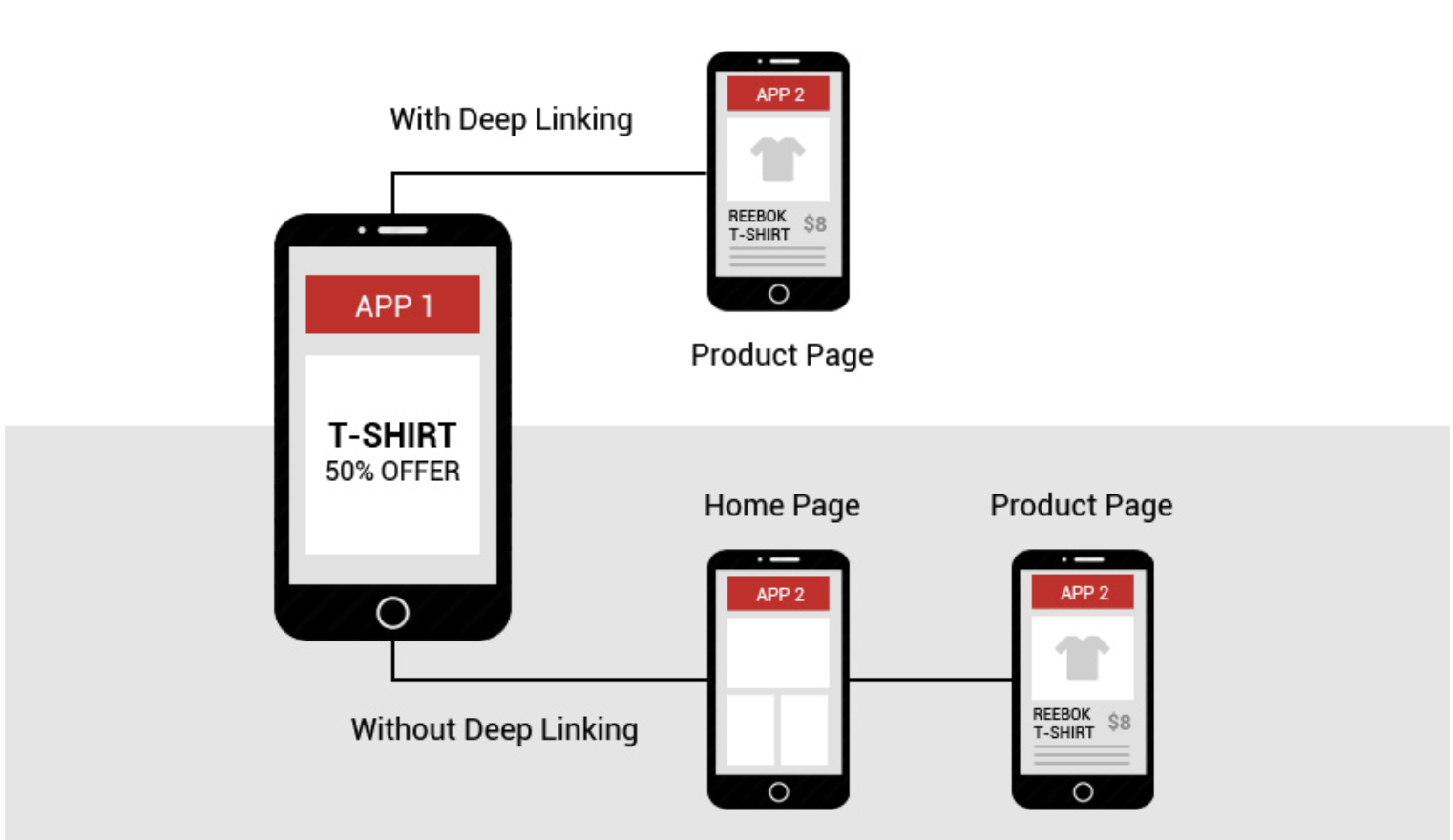
Before we dive into Firebase Dynamic Links, let’s talk about deep linking: a strategy allowing a single URL to drive traffic to a particular app location.

While this may sound ideal in theory, in practice, deep linking can result in a lack of cohesion between iOS and Android apps, broken links, and other headaches.
Firebase Dynamic Links, however, help control where a user lands with much more precision than deep links.
With Firebase Dynamic Links, you can direct users to an IOS or Android app or the appropriate mobile store listing. In addition, given the dynamic nature of these links, when a user opens the app for the first time, you can retrieve the deep link URL that drove them to the app.
How Do Firebase Dynamic Links Work?
Dynamic Links are smart URLs that send users anywhere within an app.

They even allow new users to immediately see the content they were initially searching for after installing the app.
How Firebase Dynamic Links Can Help Your Marketing Strategy
While the links primarily drive users to their intended locations within your app, Firebase Dynamic Links also benefit marketers.
Below, we break down six ways Firebase Dynamic Links can help your marketing strategy.
Convert Site Users to App Users
If you’re trying to market an app, you’re dreaming of driving downloads.
With Firebase Dynamic Links, a web user can jump from site to app seamlessly.
Imagine, for example, a web user is listening to a music player on their web browser and decides to install the app.
With Firebase Dynamic Links, they can navigate to the app store, download the app, and resume listening to the original song on the app.
Pretty cool, right?
This seamless transition from website to the app can eliminate distraction and improve user experience.
Omnichannel Campaigns
Omnichannel marketing campaigns employ a variety of channel strategies, including social, email, and others.
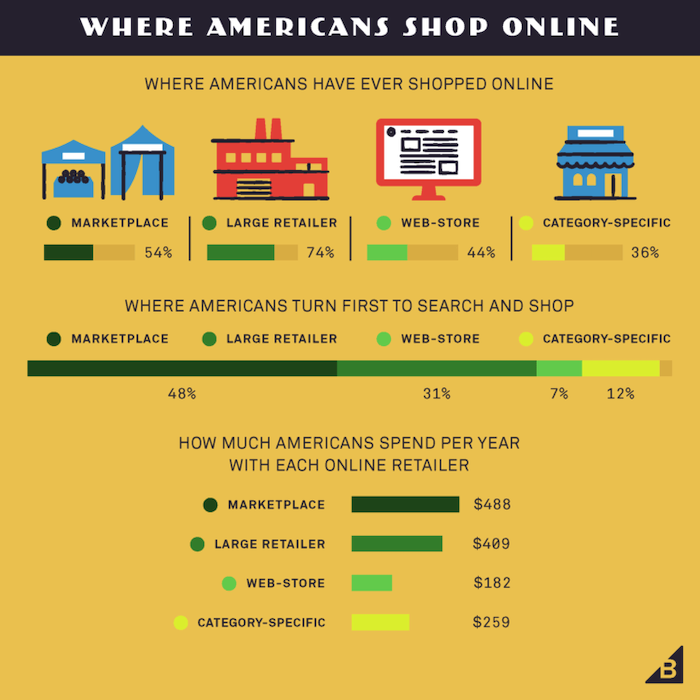
By using Firebase Dynamic Links, you can improve your marketing campaigns across all channels.
Here’s how:
Social Campaigns
If you’re running a social campaign featuring an in-app discount, Firebase Dynamic Links lets users move seamlessly from social channels to the offer within the app.
They can even download the app along the way.
Email Campaigns
Much like with social campaigns, try crafting a well-designed email with Firebase Dynamic Links to drive to your app.
Regardless of whether recipients have already downloaded your app or not, the link will still ultimately take them to their desired location.
SMS Marketing Campaigns
Much like email and social, consider offering a discount through SMS via a Firebase Dynamic Link.
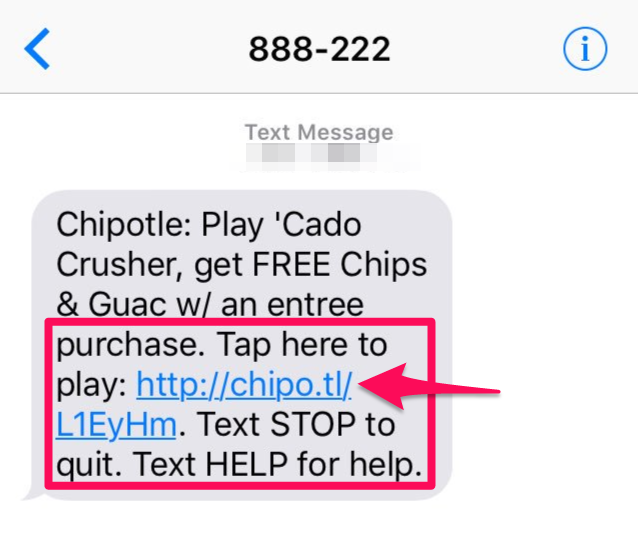
Again, you can drive users to a specific location without losing them along the way, improving the experience and increasing the likelihood of the desired action.
Allow Users to Share Your App Content
Make sharing content from your app easy with Firebase Dynamic Links.
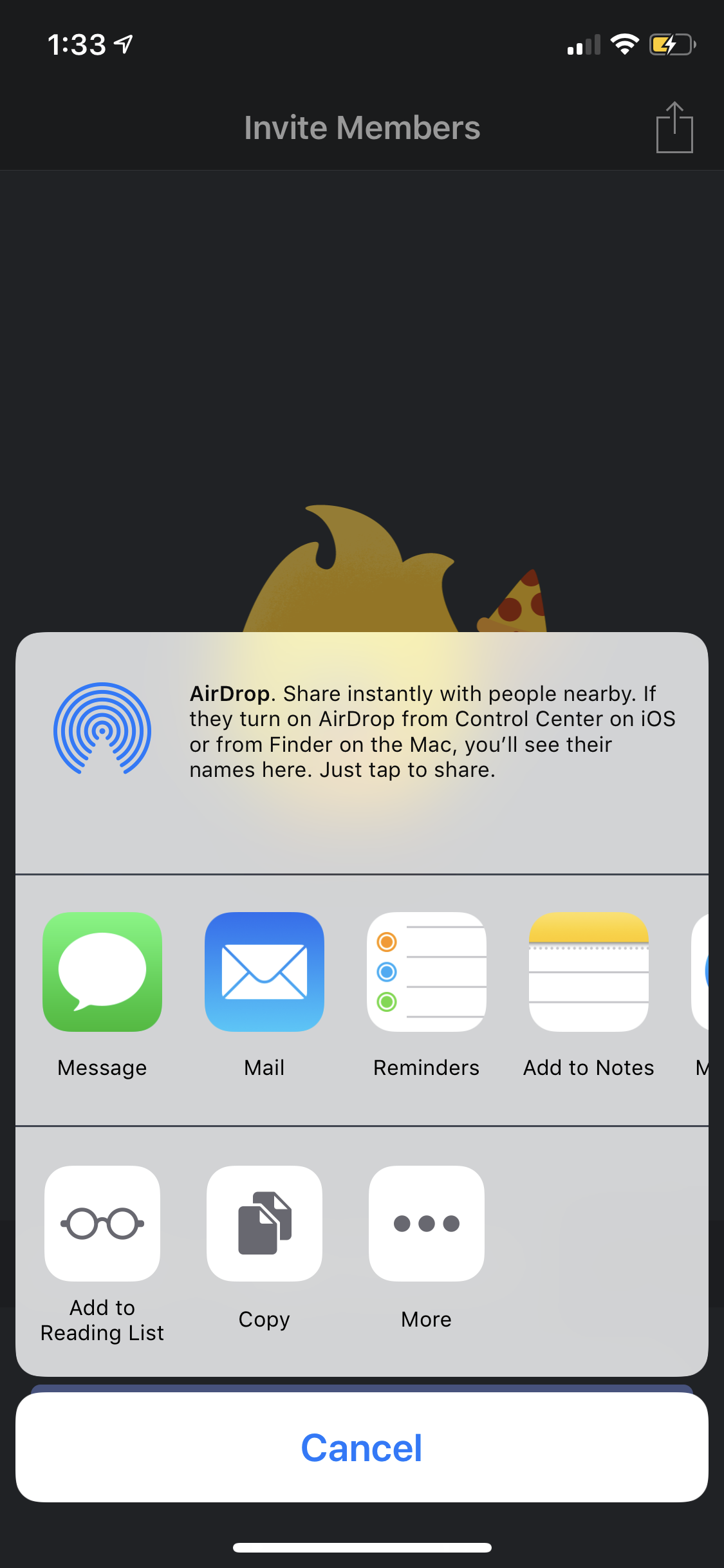
You can offer personalized content when the app is first opened, building a more robust connection and ideally solidifying the opener as a user.
Convert Desktop Visitors to App Users
With Firebase Dynamic Links, you can help users migrate from your desktop site to your app by allowing them to send themselves a deep link.
Then, when they click the link on their mobile device, it sends them to the correct location in the app, even if they have to install it first.
Improve In-Person Promotions for Your App
Out-of-home (OOH) advertising still has a massive impact on consumers.
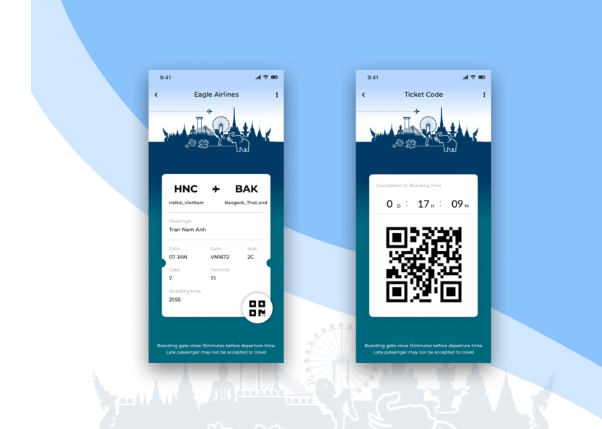
Consider using a QR code with your Firebase Dynamic Link in physical displays like billboards, subway advertisements, flyers, or benches.
Gain Better Analytics Visibility
As a marketer, you know the value of analytics.
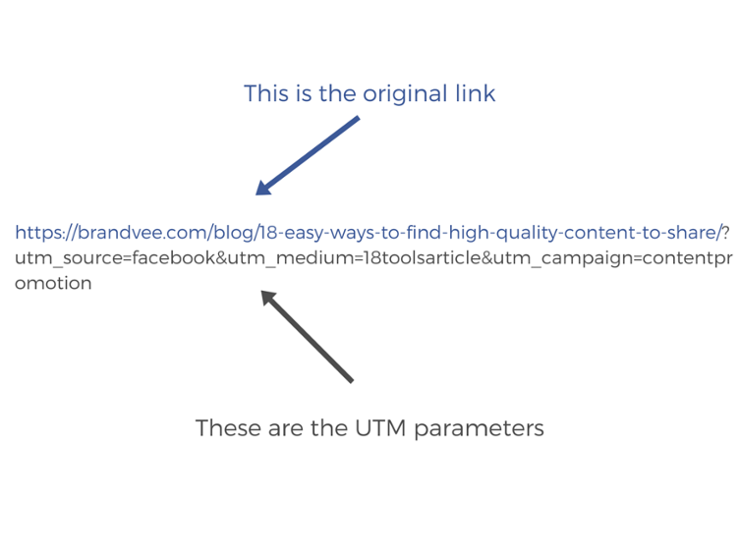
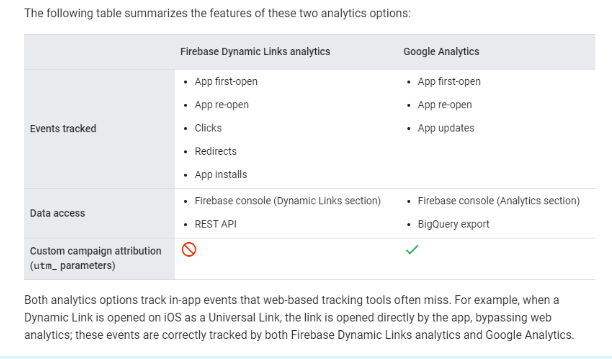
With the unique tracking abilities of Firebase Dynamic Links, you can measure and attribute your campaigns by appending your links with urchin tracking model (UTM) parameters.
By enabling conversions in the associated analytics tool, you can track the success of links by measuring in-app events and revenue.
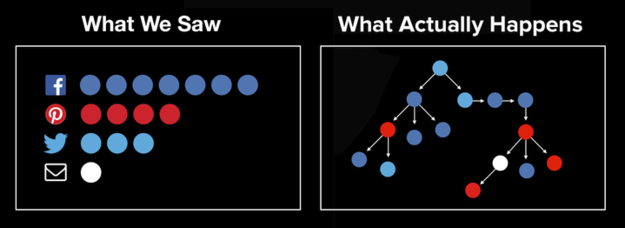
The events tracked can include:
- app first-open
- app-reopen
- sign-ups
- add to wishlist
- add to cart
- purchases
The analytics tool lets retailers assess the performance of their campaigns, which helps marketers make smarter decisions.
How to Create Firebase Dynamic Links
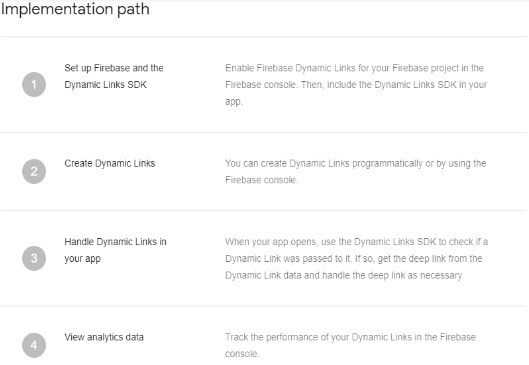
You can create Firebase Dynamic Links using your own domain name or a free custom page.link subdomain.
The implementation path for Firebase Dynamic Links is laid out on their site:
Firebase Dynamic Links Frequently Asked Questions
What are Firebase Dynamic Links?
With Firebase Dynamic Links, you can direct users to either an IOS or Android app from a page, email, or text.
If they don’t have the app installed, these links can drive users to the appropriate mobile store listing.
These links can persist beyond installation, meaning when a user opens the app for the first time, you can retrieve the deep link URL that drove the user to the app originally.
Should marketers use Firebase Dynamic Links?
Yes, marketers should take advantage of Firebase Dynamic Links.
Not only can these links improve UX by making navigating to the desired location within an app easier, but they also increase the likelihood of achieving your app marketing campaign goal.
How do you track Firebase Dynamic Links?
You track Firebase Dynamic Links within the relevant section of the Firebase console.
It also integrates with Google Analytics.
Are Firebase Dynamic Links free?
Yes, Firebase Dynamic links are free.
How do Firebase Dynamic Links work?
Dynamic Links are smart URLs able to send existing and potential users anywhere within an app.
New users can see the content they were initially searching for after installing and opening the app.

Firebase Dynamic Links Conclusion
For the savvy marketer, looking for tools to help make your campaign goals a reality is necessary.
As the way consumers search evolves, so do their expectations for what their experiences should be.
When you employ a tool like Firebase Dynamic Links, you ensure potential app downloaders not only experience a frictionless transition from mobile or desktop to your app, with the screen immediately showing exactly what they were looking for.
This ease of movement also increases the likelihood that those who download your app will keep it.

By ensuring every step of the process is simple and drives users to the correct location, you become more likely to retain the users you attracted.
What’s the best use of Firebase Dynamic links in marketing material you’ve seen?
Source: feedproxy.google.com

9 Great Mobile App Analytics Tools
You’ve done the incredible—you’ve built an app and started marketing it. While congratulations are in order, making the app is just the first step on your path to app success. The next (and arguably most important) step is optimization.

With consumers spending four and a half hours per day on their phones, it pays to make sure your app is earning some of that heavy time-spend.
And better visibility can pay. On average, consumers spend $120B in the app store and $190B on mobile ad spend.
You can check traffic and user metrics on mobile app analytics to make your app as successful as possible.
Here’s what you need to know about mobile app analytics and which tools are most effective at helping you dig into the data.
Mobile App Analytics
Mobile app analytics aren’t too different from their web counterparts; they track and analyze user activity and events on apps.
Using an app analytics tool gives you access to invaluable insight into how your app works and highlights improvement opportunities.
By seeing how users interact with your app, you can optimize your app to be as user-focused as possible.
Why Analytics Are Crucial for Your Mobile App
Without visibility, your app may fall short of satisfying your users’ needs — regardless of how beautiful or useful your app is.
When that happens, your users will look elsewhere to have their needs met.
By implementing mobile app analytics, you not only equip yourself with the tools necessary to better understand your app’s performance, but you also benefit in these four key areas:
- Real-time ROI assessment: Enhance your app value and, ultimately, increase your ROI by gaining a better understanding of customers through data.
- Data-driven strategies: With increased access to data, you can pinpoint specifics that can drive future campaigns. With clear visualization of past successes and failures, you can recalibrate your approach with data-driven strategies.
- Personalized strategies: By segmenting and targeting audiences with more specificity, you’re more likely to provide them with what they want or need. By using app analytics, you can identify these populations and start targeting them with customized strategies.
- Goal tracking: App analytics allow you to determine which acquisition channels are working for you. By identifying these channels, you can dedicate more focus here and replicate the approach.
While these four areas aren’t the only advantages of implementing a mobile app analytics tool, understanding these categories is vital to overall app success.
What KPIs You Should Track for Your Mobile App Analytics
While it’s easy to get lost in the sheer amount of mobile app analytics available, there are seven crucial key performance indicators (KPIs) you should be tracking to gauge user engagement and your mobile app’s overall success.
- Retention rate: This metric identifies the percentage of customers that continue to use your app. Conversely, this figure also alerts you to the number of customers you’re losing due to churn.
- Lifetime value (LTV): This formula helps you assess what your customers are worth over the “lifetime” of their relationship with your business.
- Uninstalls: Tracking the number of people who uninstall your app is vital to understanding why those people uninstalled your app.
- Cohort Analysis: This analysis focuses on segmenting users by traffic source, country, and device and analyzing the associated metrics.
- ROI: This number represents what you’ve spent versus what you’ve earned on a particular effort.
- Cost per acquisition (CPA): This figure lets you know exactly how much you’re spending per acquisition.
- User growth rate: This figure represents the number of new users within a specific time frame.
While these seven KPIs are by no means the only helpful app analytics you can track, they provide a comprehensive view of your app’s success and highlight areas in which improvement is necessary.
What’s The Difference? SEO vs. ASO
Just like optimizing any web page for SEO is vital to your search success, it is imperative to optimize your app for app store optimization (ASO).
ASO refers to the continuous process of measuring, testing, and assessing existing app store marketing strategies to increase your app’s visibility and driving downloads. The higher your app ranks in the app store, the more likely potential customers are to see your app.
While SEO and ASO processes are similar, they also have some significant differences, including the ways users search the web versus searching an app store.
While the web is primarily used to answer questions, the app store is used to search for a specific product that matches the searcher’s intent.
This means you’ll need to use different strategies to rank high in the app store versus search engines like Google.
This is why you don’t want to just use web-based analytics tools for SEO to track ASO.
Best Mobile App Analytics Tools
With a slew of mobile app analytics tools available, it can be challenging to figure out which ones are the right choice for you. These nine tools represent some of the most effective platforms that can help you make your app climb toward the top of the search bar.
App Annie
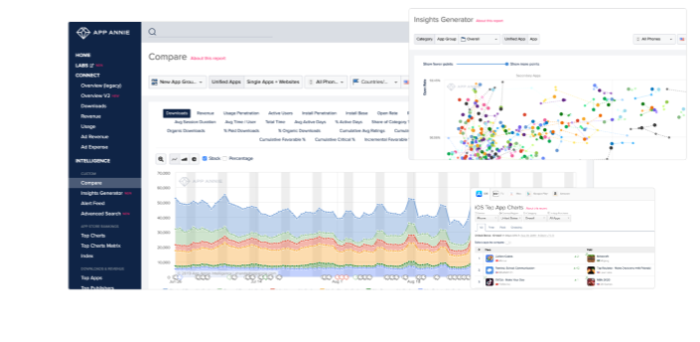
App Annie is a mobile and data analytics platform that provides unprecedented views of both your app’s data and other in-market apps. With both a paid and free subscription option, App Annie can help your app stand out among the digital crowd, whatever your budget.
What Platforms Support It?
What Data Does It provide?
How to Use It?
iOS, Android, Windows Phone.
The free version of App Annie provides ratings, rankings, reviews, charts, and app details, while the premium pricing plan adds ASO options, download and revenue estimates, usage estimates, advertising estimates, and audience estimates.
Use App Annie to access data to help you determine how to best optimize your app. Through the App Annie platform, you gain immediate access to the organization’s technology innovations and data sets, allowing you access to shared data, identify opportunities, and the ability to craft successful campaigns.
App Radar
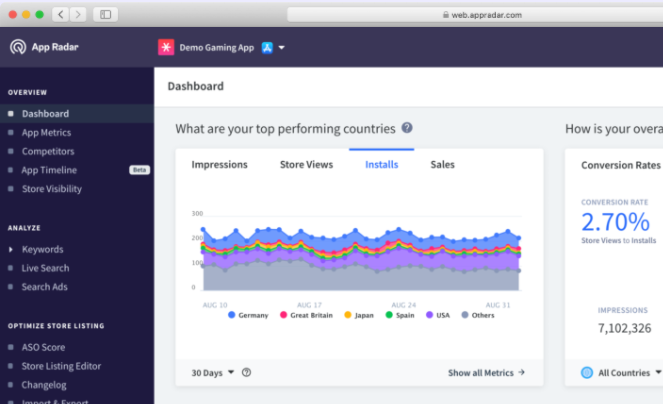
App Radar is all about making your life easier. It offers several tutorials to help you optimize your ASO from the ground up. The mobile analytics app comes with keyword tracking and research functionality, helping you build a solid ASO strategy.
What Platforms Support It?
What Data Does It Provide?
How To Use It?
Android, iOS, Windows Phone.
Key metrics tracking, localization, keyword rank tracking, keyword research tools, and more.
Use App Radar to research keywords and track competitors’ search strategies. As you build your own approach, use App Radar’s suite of tools to optimize your ASO.
Adjust
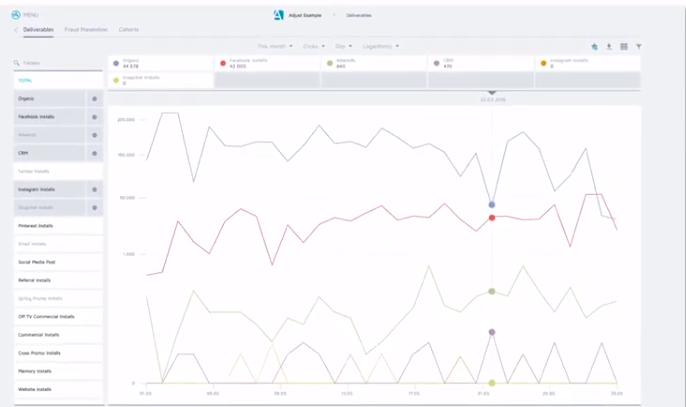
Adjust is a mobile analytics app designed to help you identify and build your user base. This mobile analytics app tracks hourly trends assesses, LTV, and analyzes cohorts.
Adjust also allows you to aggregate lifetime user data in a single dashboard. Also noteworthy is the platform’s Fraud Prevention Suite, which protects your app from fraudulent activity.
What Platforms Support It?
What Data Does It Provide?
How To Use It?
Android, BlackBerry, HTML5, iOS, Windows Phone.
Insights on churn, ROI, in-app interactions, LTV, event funnels, and more.
Use Adjust to view and understand patterns of user behavior. By identifying these patterns and metrics, you can recalibrate your app for your user and extend user engagement with the app.
Firebase
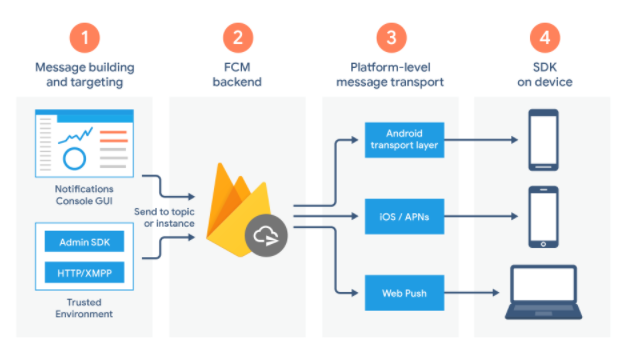
Firebase is Google’s free mobile app analytics platform that supports developing, improving, nurturing, and growing your app by displaying all metrics in a single central location.
The app aggregates user data and shares it via an immersive dashboard, allowing you a unique view of the actions happening in and around your app.
What Platforms Support It?
What Data Does It Provide?
How To Use It?
C++, iOS, Unity, and Android.
The number of users and sessions, session duration, operating systems, device models, geography, first launches, app opens, app updates, in-app purchases.
Use Firebase to identify specific audiences through segmentation. Once you’ve broken out these subsets, you can start targeting these audiences through in-app notifications or other strategies.
App Analytics
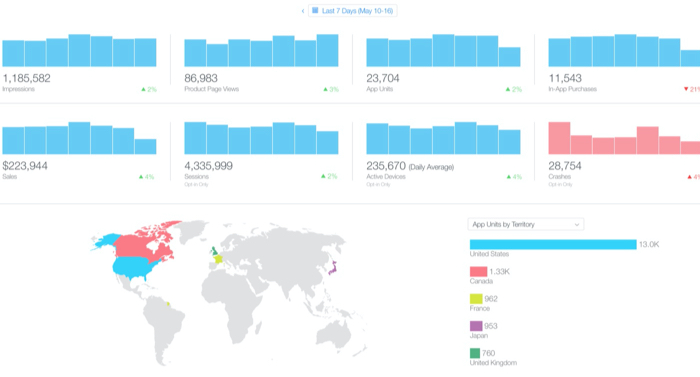
App Analytics is Apple’s mobile analytics app that provides specialized analytics for apps published in the Apple App Store.
This mobile analytics app gives you specific visibility into user interaction within the App Store, relaying how users discover your app.
What Platforms Support It?
What Data Does It Provide?
How To Use It?
iOS
This mobile analytics app provides user engagement, App Store impressions, sales and trends, and user segmentation.
Use this app to understand how users find your app in the store and replicate this experience for your target consumers.
Tune
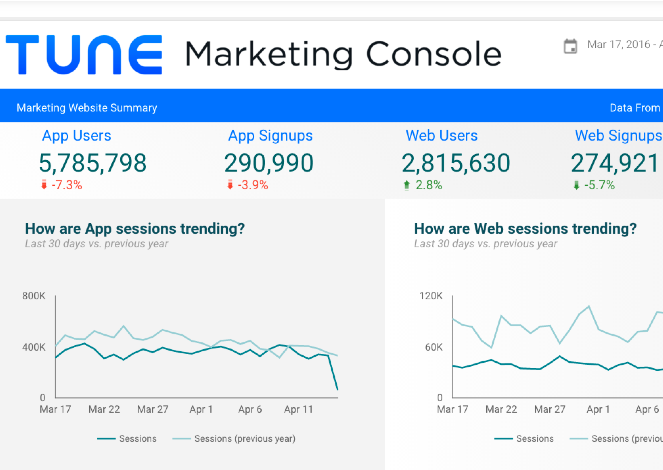
Tune is your solution for measurement and engagement throughout the customer journey, tracking a user’s trajectory by monitoring movement and unifying cross-channel touchpoints.
What Platforms Support It?
What Data Does It Provide?
How To Use It?
Android, iOS, tvOS, Javascript, Windows Phone.
Tune provides ROI, cohort ingestion, impression, click, event measuring, and more.
Use Tune to gain a complete view of the customer’s journey throughout your campaigns. By providing you with real-time data, Tune can help you identify specific improvement points with your strategy.
Kochava
Kochava is a platform designed for tracking engagement, LTV, and user acquisition. Through this mobile app analytics platform, you can view vital data points and build user groups. This platform allows you to analyze ROI through pinpointed data.
What Platforms Support It?
What Data Does It Provide?
How To Use It?
Android, iOS, tvOS, Windows & Xbox One, Unity, ReactNative, Cordova, Adobe Air, Xamarin, Web SDK, Corona Labs, Adobe DPS, Adobe Analytics.
Retention analytics, real-time ROI, location-based marketing, channel attribution, contextual targeting, and much more.
Use Kochava’s data points for real-time visualization of campaign performance and engagement, targeted audience identification and creation, targeting, and prevention of mobile ad fraud.
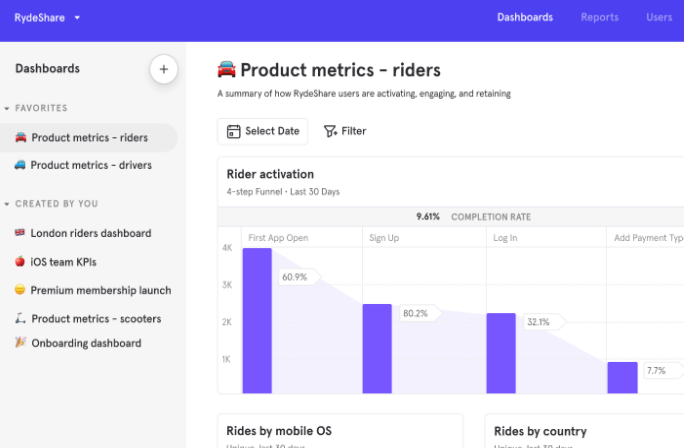
MixPanel
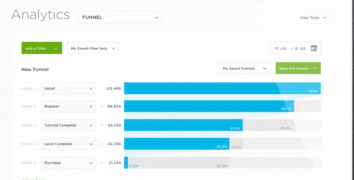
MixPanel is chock-full of unique analytics tools, including a funnel analysis and its uniquely-titled engagement tracker, the Addiction Report. These tools allow you to understand which strategies increase conversion, retention, and engagement.
What Platforms Support It?
What Data Does It Provide?
How To Use It?
iOS, Android.
Retention rate, churn, campaign segmentation, funnel analysis, and more.
MixPanel comes with interactive reports so you can pull data quickly and easily. This interactive feature provides answers to all of your audience engagement questions in seconds.
Flurry
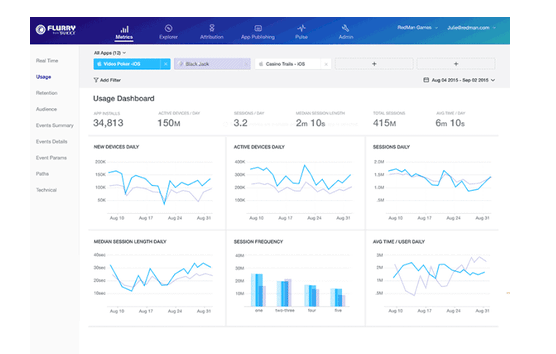
Flurry Analytics is an extension of Yahoo’s Develop Network. This mobile app analytics platform lets you track new users, active users, and sessions via a single dashboard.
What Platforms Support It?
What Data Does It Provide?
How To Use It?
iOS, Android, React Native, watchOS, Unity.
Installs, sessions, time spent, user journeys, custom events, user segmentation, and more.
Use Flurry Analytics to see app performance easily. Flurry also comes equipped with crash reporting, which helps you identify issues and fix them before they impact performance — and customer satisfaction.
Conclusion
Whether you’re just beginning your app-marketing journey and looking to increase visibility, or if you’re looking to delve into the nitty-gritty of advanced data, you need a mobile app analytics tool to help you navigate the realities of ASO.
While there are tons of mobile analytics apps available to choose from, the nine tools I highlighted above offer detailed information about your users and provide unique data points that can highlight patterns of behavior.
Armed with these new metrics, you make your app irresistible for your targeted audience.
What’s your favorite mobile app analytics tool?
The post 9 Great Mobile App Analytics Tools appeared first on Neil Patel.
Source: neilpatel.com