
Tag Archives for " #MarketingStrategy "

SEO Pack: 21 Worksheets, Templates, and Cheat Sheets
Tired of spending tons of time building SEO spreadsheets, sorting data, and double-checking each step? Getting SEO right requires a vast knowledge of data and remembering the hundreds of different steps you need to take to rank well on Google.

It’s easy to get overwhelmed. That’s why I’ve gathered this list of 21 different SEO worksheets, templates, and spreadsheets to make your life easier. From tracing organic traffic to writing the perfect blog post, these resources will streamline every step of your SEO process.
SEO Pack: 21 Worksheets, Templates, and Cheat Sheets
1. 220 Profitable Keywords to Get a Flood of Traffic
Struggling to find the right keywords? This template lists over 200 profitable keywords users often search when they are ready to buy.
It’s ideal for e-commerce stores, Google AdWords campaigns, and content marketing.
2. Google Data Studio SEMrush SEO Report template
Google Data Studio is one of my favorite data visualization tools. One of the best things about it is the number of templates available, like this one from SEMrush.
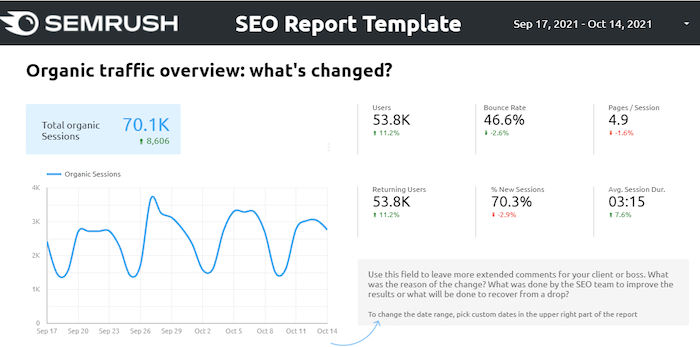
It outlines overall traffic, including users, bounce rate, pages, and returning visitors, in one easy-to-use dashboard. Plus, like most Data Studio templates, you can easily change the date and adjust the report with a few clicks.
3. Google Data Studio Overall Traffic Report Template
Another asset from Google Data Studio templates shows overall site traffic. It includes a chart to see the change over time and a list of pages to sort using the most or the least traffic stats. You can also adjust the time the report covers with the click of a button.
4. On-Page SEO Cheat Sheet
Not sure what on-page SEO factors matter the most? This SEO cheat sheet runs through the top five factors impacting page SEO, including mobile friendliness, crawlability, and content that actually drives traffic.
This isn’t a quick rundown, either. It dives deep into the small changes affecting each factor.
5. All-In-One Search Console Template
Looking to track or present your Google Search Console results? This Google Data Studio report template from Data Bloo makes it easy to see where you stand in one dashboard.
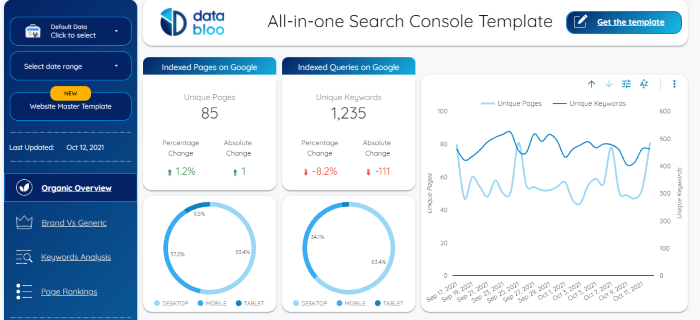
The report covers an overview of traffic, the ability to see where you stand for brand versus organic keywords, page rankings, and also allows you to see KPIs for organic search. You can also sort data, change the date, and more.
6. Verify Backlinks Spreadsheet
Backlinks are a core component of SEO.
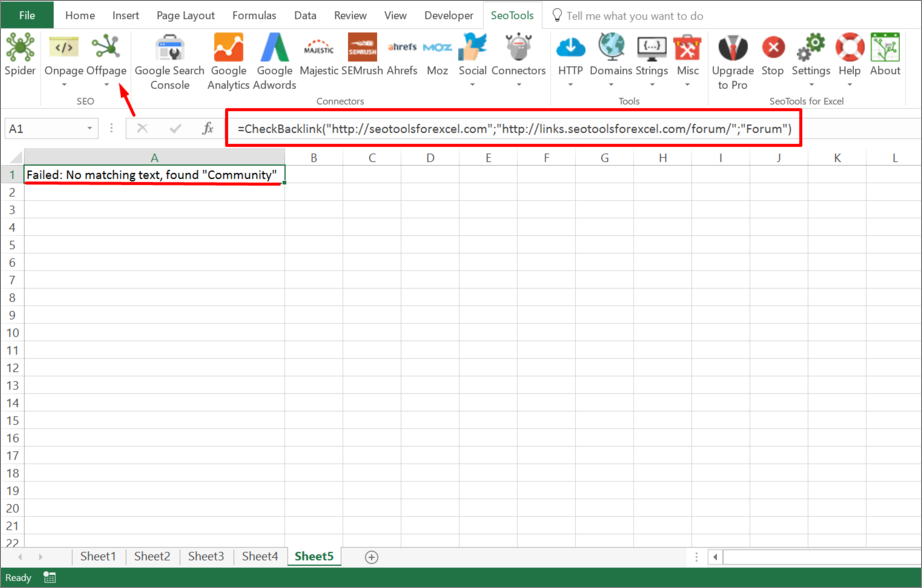
This Excel spreadsheet from SEO Tools for Excel verifies a backlink is present and uses the correct link text. It’s an easy way to make sure your backlinks are doing as much as they can for your site.
7. Optimal Breakdown of Optimized Landing Page
The perfect landing page can make or break your conversion rate.
Getting it right, however, can be a challenge.
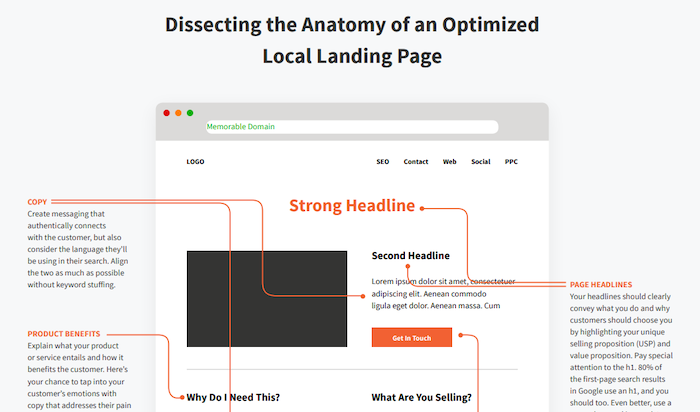
This template outlines the significant features an optimized landing page should have and why.
8. Ubersuggest Keyword Planner Spreadsheet
Need help keeping your keyword planning organized? This Excel spreadsheet (it’s an automatic download, by the way) can help you stay organized and make the most of your research.
It makes it easier to track top keywords and includes columns for average search volume, keyword difficulty, search goal value, time to rank, and more.
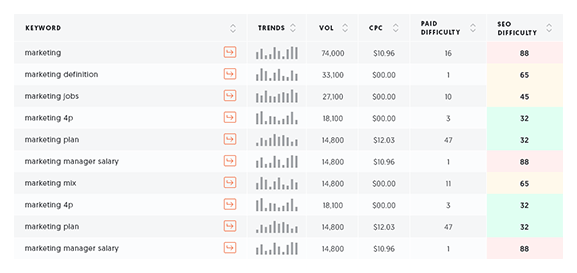
It’s the perfect companion using my (free!) tool, Ubersuggest, to dig into keyword research.
9. SEO Factors Cheat Sheet
More than 200 factors impact Google’s algorithm. Trying to nail all 200 is almost impossible—and it’s also not necessary. The biggest SEO gains come from just a handful of SEO factors.
This cheat sheet walks you through the ten core factors of a fully optimized web page, including titles, headlines, links, and more. Each point includes tips for getting those optimizations right.
10. SEO Audit Checklist
If the ten factors in the above spreadsheet aren’t enough, this full SEO checklist has you covered. It reviews just about everything you need to do for SEO, from checking your ranking to page title lengths and redirecting errors.
Even better, it walks you through how to fix any problems.
11. Meta Tag Analyzer SEO Spreadsheet
Are your meta tags driving your SEO or holding you back? This meta-tag spreadsheet can help you see which meta tags are doing well and which need tweaking.

The sheet combines data from Search Console and a Screaming Frog export to find which meta descriptions you should update and why.
12. Content Creation Template
Creating killer content is one of the most effective ways to drive traffic to your site. What makes content great? This template walks you through how to publish top-tier content with tips for creating great titles, introducing your topic, and other tricks to help your content stand out.
13. Content Editing Checklist
Do you struggle with self-editing content? This two-page editing checklist helps ensure every piece of content you produce is the best it can be. Tips include replacing complex words, checking reading level (e.g., sixth grade vs. college), and matching content to users’ pain points.
14. Editorial Calendar Spreadsheet
Creating consistent content is crucial to long-term traffic growth. This Excel spreadsheet should help you stay on track and keep your editorial plan organized. It includes columns for date, topic, author, editor, type of content, CTA, keywords the content targets, and distribution channels.
15. 6 Free Blog Post Templates
If you’re tired of getting writer’s block when you sit down to write, these templates could help. It includes outlines you can use to create posts like how-to guides, list-based, comparisons, pillar posts, and more.
.png)
Each template includes tips for titles, introductions, and headings to include.
16. Content Gaps Finder
Content gaps refer to topics users are searching for that your site doesn’t currently address. It can also refer to gaps in overall search results.
For example, if tons of people are searching for “best stainless steel dog bowls” but no articles target that key phrase, you can swoop in with a great piece of content and grab all that traffic.
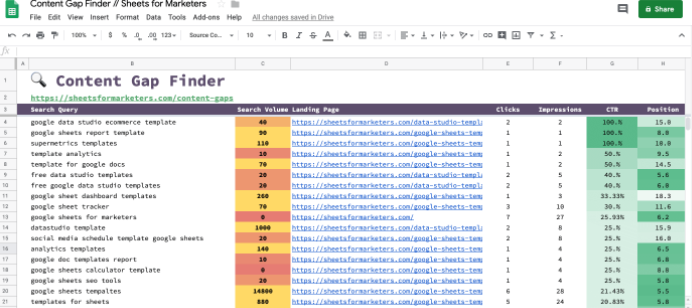
This spreadsheet combines Google Search Console and Search Analytics add-ons to highlight specific topics you can target to drive traffic to your site.
17. Link Building Search Operators
Finding good backlink opportunities doesn’t have to be a hassle.
This worksheet outlines search parameters you can use in Google searches to find backlink opportunities. For example, use “Keyword + Intitle: contact me” to find the contact information for people who write or post about your core keywords or find guest post opportunities.
18. Link Building Email Outreach Templates
Link building through outreach is uncomfortable for a lot of people. What do you say? How do you build a connection? How do you avoid saying the wrong thing?

This template sheet from HubSpot goes through all the rules and best practices for building links through email outreach and shares nine email templates you can use to reach out to websites and build links.
19. 22 Outreach Email Templates
If you’re looking to build relationships with other sites for opportunities like guest posts, broken link building, and networking, these email templates will help you get started.
I strongly suggest using these templates as a jumping-off point. Add personal details, links, and other information that shows you know who they are and what they do.
20. Improve Organic CTR Spreadsheet
You’ve got fantastic content, you’ve optimized your site, and traffic is starting to pick up. But maybe a few pages are still lagging behind.

This spreadsheet will help you locate opportunities to improve click-through rates for organic traffic by finding opportunities to include title tags and meta descriptions.
21. Local SEO Checklist
Local SEO is crucial to helping brick-and-mortar businesses rank high on search engines. It’s especially important for small to medium-sized companies going up against big-name brands with million-dollar budgets.

The local SEO checklist from MOZ will help ensure your local SEO efforts are paying off.
SEO Spreadsheets and Templates Frequently Asked Questions
What is an SEO template?
An SEO template is a spreadsheet or guide that serves as a blueprint for following SEO best practices. It might help you sort keywords, find content opportunities, improve CTR, or find linking opportunities.
How can SEO templates help my business?
SEO is complicated. Business owners often don’t have the time to research and build dashboards from scratch. Even marketers who have been in the industry for years spend a good portion of their day researching and learning new things.
Many SEO templates allow you to connect to a data source (like Google Search Console) and automatically import data into an easy-to-use dashboard. This enables you to see where you stand in just a few minutes.
How can I use Excel to improve my SEO?
Excel is a powerful SEO tool, but only if you know how to write formulas. It can be used to sort data, add sums, and so much more. If you’re new to using Excel for SEO, I suggest starting here.
What are the best SEO templates for Google Data Studio?
I suggest starting with the all-in-one template here. Google Data Studio also has a category of marketing templates here.
SEO Spreadsheets and Templates Conclusion
SEO is an ever-changing, ever-evolving field. While that helps keep things interesting, it can also make it a pain to present your findings and remember all the different factors that impact ranking.
Whether you are just getting started in SEO or are a professional looking to wow your clients or boss, I hope these SEO spreadsheets and templates will make your workday a little easier.
What SEO templates do you use? Is there any I should add to this list?
Source: neilpatel.com

How to Position Yourself in Your Customer Story
When it comes to sales, using a story is your best strategy.

Humans love stories— particularly when they’re interesting, engaging, and memorable. That’s why the people who sell with the story have so much success: they take their sales pitch from an informational seminar to an immersive experience that their potential customers love.
Donald Miller, the Founder & CEO of StoryBrand is not only an expert on selling with a story but also one of the trailblazers of the strategy. As he discussed in his recent DigitalMarketer workshop, the StoryBrand method works because it appeals to customers in so many ways, from entertainment to understanding, and even to survival.
And, in all of those different ways, the same result happens: your customer actually listens to what you have to say.
When you create a story about someone, especially one where they are the main character, they tend to listen. They tend to react. And, most importantly, they tend to buy.
There’s just one common problem that the storytellers have with this approach, and it can be summed up into one simple question…
“Where do I fit into all of this?”

Your customer is undoubtedly the main character and hero of the story. You need to illustrate the narrative arc that sees them overcoming adversity and accomplishing their goals. But, if they’re the hero of the story, then how do you need to position yourself?
What Role do You Play in The Story?
In your customer’s story, you are the guide.

The guide is the person that helps the main character overcome their challenges. They are characters like Yoda, Dumbledore, and Mr. Miyagi. They are the ones that are fondly remembered, but not the ones hoisting their hands in the air in victory at the end of the book or movie.
The guide’s role is critically important in almost every story because they are the ones that make the hero’s transformation possible. Without the guide, the hero wouldn’t be able to overcome obstacles and achieve their goals.
Just like Luke Skywalker wouldn’t be able to defeat the Sith without Yoda’s help, your customer won’t be able to achieve their goals without your products and expertise.
So, even though you play an integral part, you are not the hero in the story. And, when you are framing your customer’s story, it’s important to remember that for a couple of reasons…
You should never position yourself as the hero because it’s the hero who is ill-equipped to achieve their goals on their own. Only until the guide shows up and gives them the tools that they need can they truly achieve greatness.
You don’t want to be the character that can’t manage to achieve their goals on their own, you want to be the one that helps the main character finally reach success.
The other reason is this:
You don’t want 2 heroes in a story because it weakens the story’s impact on your customer. By introducing 2 heroes, and thereby 2 narrative arcs, your story and your customer’s story become totally different (and muddled).
So as much as you want to succeed, you need your customer to succeed even more. Invite your customer into a story, one where they defy the odds and win the day. Talk to your customer about their goals and wishes, not your own. Put your customer first in everything you do.
Then, once your customer understands and begins on the path toward success, you will also succeed in the process. Don’t focus on your own wants and needs. Do nothing but be helpful, and then stand back and watch the pieces fall into place.
If you can manage to do that, then you won’t ever have to worry about your own personal success. It’ll just happen on its own.
How to Establish Yourself as the Guide
Now that you understand the role that you’re supposed to play, you now have to understand how to actually play it. We talked about it broadly, but let’s get more specific.
To truly position yourself as the guide, you have to show that you are the person who can help your customer accomplish their goals. To do that, you have to exhibit empathy and authority.

In the case of empathy, you have to show your customer that you actually care. You should make them understand that not only do you feel bad that they are going through a problem with their business, but that you think it’s borderline unfair that they are having to experience it in the first place.
If you can show that you actually care about your customer’s problem (and helping them solve it), then they will be significantly more inclined to have you help them fix it.
In the case of authority, you essentially need to demonstrate your competency. You need to prove that this isn’t the first time that you’ve helped a customer solve a problem and achieve their goals.
By showing to your customer that you are equipped to help them solve their problems and that you have a track record of success, you are going to sell them on you as the solution to their problems.
You’re going to establish trust, which is a necessary component of any business relationship.
Crafting your Brand Script
Empathy and authority are the two parts of the equation when it comes to your specific role as the guide in your brand “script.” It’s also important to note that they aren’t exclusive to each other. If you can only establish one of either empathy and authority, then your whole positioning plan will fall apart.
You need to establish both empathy and authority and, when talking to your customer, you ideally need to do it in one or two sentences. If you can quickly establish both of those things, then you’re going to have an enormous amount of success.
So, what that really means is you need to plan ahead. You need to attempt to anticipate what kind of problem your customer is going to have. That way you can integrate the skeleton of your statement of authority and empathy into your brand script, and then fill it in with the specifics when they become known to you.

Once you have that statement strong and clear, then you will have effectively set the framework to position yourself as the guide. Then you can focus on making sure the rest of the parts of your customer’s story fall into place. You can worry about filling out the rest of your brand script.
Just remember that, no matter how important it is, where you fit in your customer’s story is only one piece of a very large puzzle. If you want to learn more about the StoryBrand process and learn how to finish your customer story, check out Donald Miller’s workshop.
Wrap-Up
By positioning yourself as the guide in your customer story, you play an integral part in their success without detracting from the fact that it’s their success, not yours.
You want your customer to be able to turn to you in their time of need so you can help them solve their problems, and the best way to do that is by showing them that not only are you capable, but you also care.
Once your customer believes that, you can effectively help them achieve the success that they envision for themselves.
And, in the process, you’re going to get paid.
Then, once your customer is happy and their story is fulfilled, you can move on to the next one and repeat the process. What could be better than that?
The post How to Position Yourself in Your Customer Story appeared first on DigitalMarketer.
Source: digitalmarketer.com

Are Press Releases Still Relevant for SEO in 2019?
Although there’s a big chance you haven’t used them, I’m sure you’ve heard about the notion of Press Releases. They used to be very popular in the SEO community back in the day. But are press releases still relevant for SEO in 2019? Is it worth spending your time dealing with a press release?

The short answer is yes. Press Releases are still relevant and probably will be for a long time to come, not only for search engine optimization but for marketing, in general.
However, many webmasters don’t really understand the concept and often end up doing things that eventually harm their websites.
Yes, you’ve heard me right. Sometimes,
Press Releases can negatively affect SEO if they are not done the right way.
Keep reading, as later in this article I’ll tell you how you can avoid these mistakes.
What Are Press Releases?
Press Releases are a way of distributing and announcing events to the press.
Google defines them as “an official statement issued to newspapers giving information on a particular matter”.
Usually, they come in written format, but they can also be in audio or video format.
Once someone has an event and wants it to become more popular, the best way to do it is to get the media’s attention, quickly and effectively.
But how can they do that? Well, the answer is press releases.
You write a piece of content that will then be distributed to news publishers that might be interested.
Press Releases follow this line of events:
Event Happens > Press Release is Written > Press Release is Distributed to News Publishers > News Publishers Pick Up the Press Release > News is Published
The thing is, however, that it’s pretty hard to get the media’s attention.
It’s even harder for editors, who are constantly bombarded with news topics from all directions.
They need to filter and curate them in order to publish only the best, most interesting news.
And this is how Press Release Platforms like HARO were created.
Instead of sending your press release to news publishers, you post the press release on one of these popular distribution platforms where reporters and news publishers hang out to find interesting topics.

The problem is that these platforms often become a junkyard for spammers.
But before we discuss the possibility of harming your website by using these platforms, let’s have a better look at how they can help your website.
How Do Press Releases Help SEO?
Having information about your company or an event published on big news sites is not only beneficial for your brand, but also for SEO.
How, you might ask? For the most part, it’s about backlinks.
If news publishers start talking about you, not only can you get backlinks from the news sites themselves, which hold a very high amount of equity, but you can also score a high number of backlinks from other webmasters who will read the news.
We all know that building backlinks are one of the most difficult tasks for SEO.
Building high quality backlinks is even harder.
And don’t even get me started on how hard it is to do all this naturally, without buying them or using risky tricks such as PBNs.

Well, Press Releases combine all the 3 above, which makes it probably the best link-building method available.
Why?
Well, it helps you build links rather quickly, the links are high quality and they’re all also completely natural and won’t result in any penalties.
If done right, of course. If not, it’s a waste of time and it can result in penalties.
Press Releases are a good way of quickly obtaining high quality links in a natural manner.
However, if not done properly, it becomes a complete waste of time and can potentially be harmful to your website.
About Press Releases & Penalties
Researching press release tactics on the internet will mostly put you on the right track.
However, people quickly learn that it’s easier to get links from the Press Releases themselves rather than from the news publishers (which mostly ignore their poorly written stories).
Press Release Spam
Instead of focusing on what’s important and improving their business in ways that will produce interesting news stories, people distribute as many ‘Press Releases’ as possible to as many press release platforms as possible.
Some platforms are free and make money out of advertising so they have no problem with people coming there and posting their ‘news’.
But even the paid ones are full of irrelevant ‘news’ articles.
With webmasters asking for hundreds of dollars for a backlink or guest post, Press Releases are the cheap way of getting some initial backlinks.
These posts are way too long for a press release (because Google loves longer content, right?) and full of keyword-rich anchor text links, which naturally attract penalties.
This way, the quality of the press release websites starts to decline.
Very few companies and websites (one of them being HARO) still manage to keep the site relevant.
Why?
Well, because it doesn’t index its press releases.
They are available only for logged-in users.
This way, instead of posting a press release just for the sake of getting a backlink, you will focus on posting a press release that will actually attract the attention of a reporter.
Use Nofollow Links
You might be wondering yourself: “Won’t nofollow links be useless?”
Well… first of all, no.
I’ve already written about how nofollow backlinks can help your website rank better.
Second, the nofollow links will only be used on the press release websites, considering these sites index their content on Google.
Any other links that you will obtain as a result of a successful press release will be a mix of both nofollow and dofollow links, depending on the internal policies of the websites that link to you.

But why use nofollow links?
The reason is that nofollow links reduce most risks of penalty.
Google says that you shouldn’t be building or buying backlinks.
Since the links on press releases are either built manually or paid for, then Google’s Guidelines require them to be nofollow.
Don’t get me wrong. I’m not necessarily a Google fanboy but if you don’t want to risk anything, then it’s the right way to go.
Remember: Nofollow can also help your website rank higher.
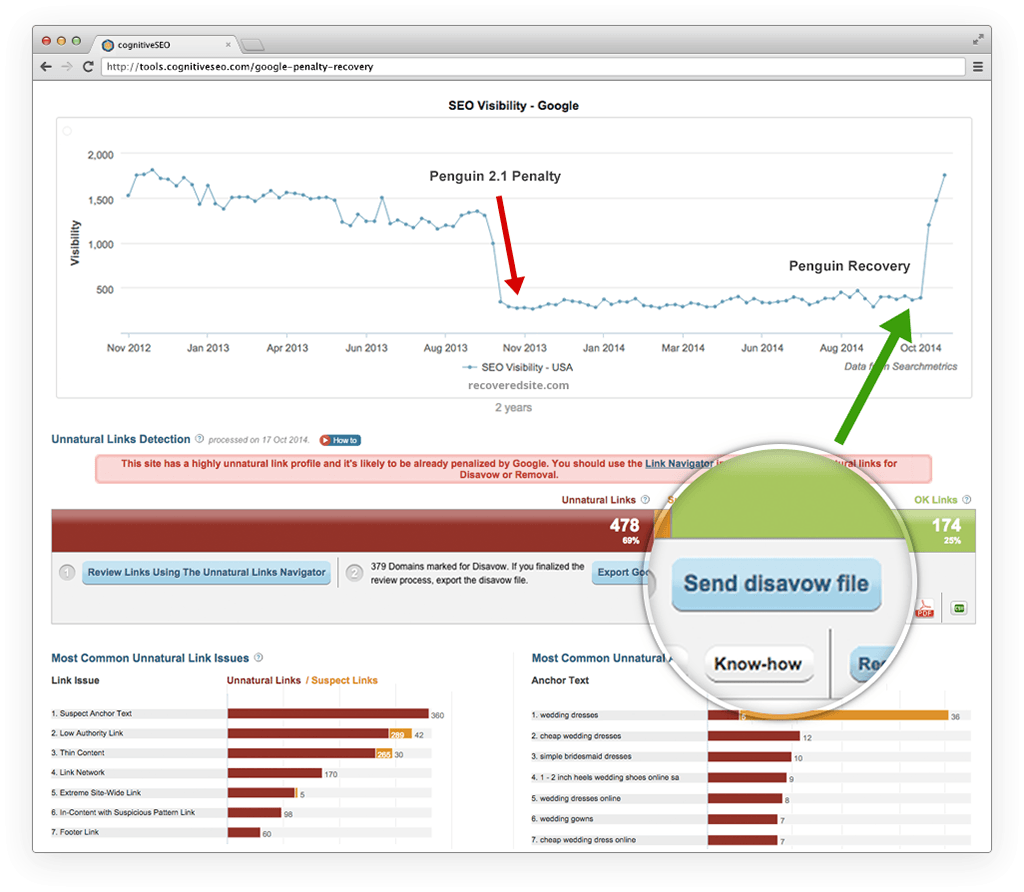
If you have already published many press releases, then it would be a good idea to check them with the Unnatural Link Detection tool to make sure they’re not suspicious or coming from suspicious domains.
Are Press Releases Still Worth It in 2019?
Unless we will be dominated by some advanced form of artificial intelligence that will watch our every step, publishers will always be in need of news topics.
Without pushing yourself out, there’s virtually (almost) no chance of ever gaining any popularity.
Press releases can start a chain reaction not only with backlinks but also with social media likes shares and comments.
So, as long as we will have news, Press Releases will be useful.

However, why do Press Releases seem to be less popular than they were back in 2009?
Well, the answer is SPAM. As the internet and SEO grew more popular, editors and journalists have been spammed daily.
So they started filtering the news stories more and more, making Press Releases a less effective strategy not in terms of SEO, but in terms of how accessible it is.
A second reason could be the penalties themselves.
Press Releases were mostly popular not because they would help with news coverage but because they could provide easy links from distribution websites.
With the SEO community pulling itself away from mass link building, “naturally” (see what I did there?), press releases became less popular.
However, if you’re focusing on the right things, which are improving your business, website, services, or products, and issue a press release focused on getting the media’s attention instead of grabbing a backlink, then press releases are more than worth it in 2019+.
If you focus on getting the media’s attention instead of grabbing just another backlink, Press Releases are very useful for the years to come.
The truth is you only need one reporter to pay attention to you.
Get covered by just one reporter on one renowned site and the rest will follow.
Your chances of getting featured are actually higher if you can target individual reporters.
Have great news about graphics cards, find a reporter that’s also a gamer.
Have shocking or great news about child care?
Find a reporter who’s also a devoted parent.
You don’t necessarily have to use press release platforms to make a press release effective.
You might e-mail reporters personally or even message them on their social media profiles, such as LinkedIn or Twitter.
How to Make Press Releases Effective?
An article about how to write a good press release is a topic for another time.
However, the general consensus is:
- Have an interesting piece of news
- Create a killer headline
- Write the Press Release short and to the point
- Distribute only to relevant places
- Wait and monitor results
I’m not elaborating on it because making a press release effective specifically for SEO is about what you don’t do rather than about what you do.
So here are 3 don’ts to take into account when writing Press Releases.
Don’t do #1: Don’t try to write a press release about anything.
Don’t just post press releases monthly about your company.
Unless you have something innovative original and exciting, writing about it will probably be a waste of time.
Don’t do #2: Don’t try to constantly SPAM editors.
You’ll get yourself in their spam box and not be taken for granted ever again.
What people hate more than anything is spam.
If a reporter sees your content over and over again with the same uninteresting things, they will filter you out, eventually.

Don’t do #3: Don’t post on as many Press Release platforms as possible.
Focus on the most relevant ones.
There might be places fit for your location and audience and places that are not.
For example, although HARO is a great website, it serves little purpose for international clients.
If you think you’re unfit for writing a good press release, there are services out there that will write them for you!
Conclusion
Press releases are useful for SEO and will still be for many years to come, as long as you don’t abuse their distribution to as many websites as you can.
Although they’re not as popular in the SEO community as they used to be, if done properly, a single press release can bring massive results.
- Have you been issuing press releases recently?
- What was your experience with them?
- Easy to create?
- Are journalists ever interested in your content or has it been just a waste of time?
Let us know about your experience in the comments section!
The post Are Press Releases Still Relevant for SEO in 2019? appeared first on SEO Blog | cognitiveSEO Blog on SEO Tactics & Strategies.
Source: cognitiveseo.com