
Tag Archives for " marketing tools "

Everything You Should Know to Create a Useful Competitor Report
Analyzing and monitoring your competition is fundamental to any business’s success.
So what should a good competitive report include and how to take it from research to action?

Why Does My Business Need a Competitive Report?
There are many reasons why a business may need a competitive report, and all of these are valid:
- To better understand your target audience by researching how they find and engage with your more established competitor
- For market research: Understand what is currently available on the market and where your business fits inTo get an estimate of your future marketing budget
- To identify effective marketing tactics, etc.
Business owners that claim they don’t need a competitive report because they already know everything are clearly missing out. Competitive research is much more than copying your more successful competitor’s marketing tactics.
Actually, it is not at all about that because copying would never bring you ahead.
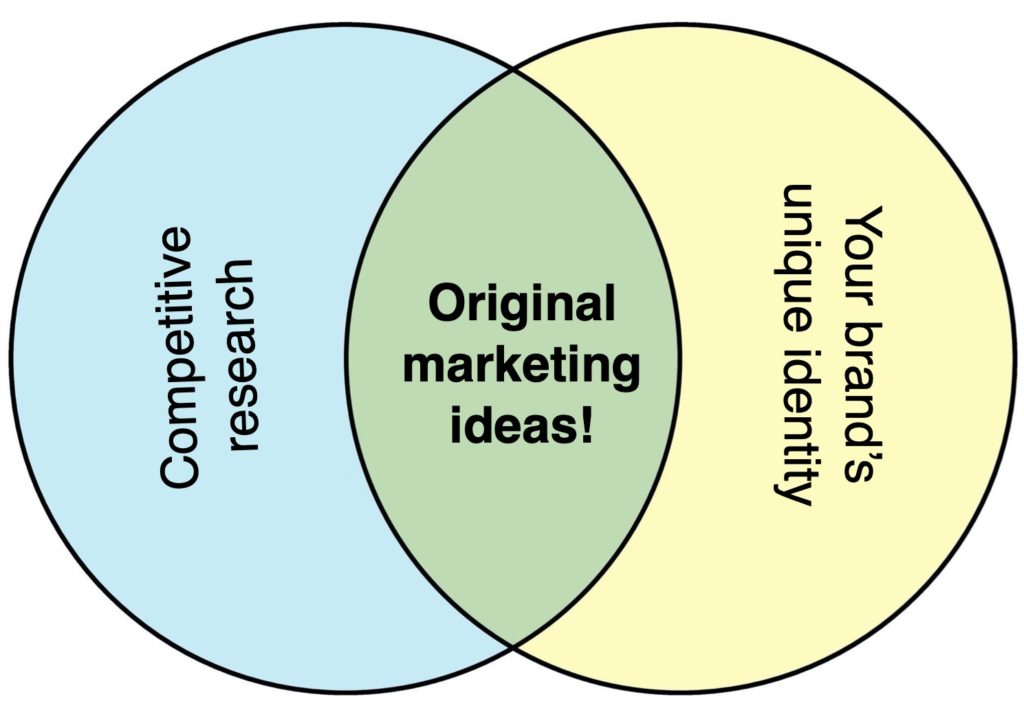
Competitive research is about understanding your target market and distinguishing your unique value proposition and consequently your unique marketing strategy to conquer it.
So what should a solid competitive report include?
Competitive Benchmarking
Competitive benchmarking means collecting the performance data of your competitors and comparing it to your business. It is used to measure and monitor your business’s performance against its competitors.
You can choose your own performance indicators to track and compare. These may include:
- Public traffic data (from tools like Ahrefs, Alexa, and Similar Web)
- Organic rankings
- Brand awareness and sentiment (based on brand mentions), etc.
This section in your report is going to always evolve but it is also fundamental because your whole competitive analysis will evolve based on KPIs you will identify as the most important for you.
Basic Overview of Competition
There are fundamental KPIs you are going to focus on and there are secondary metrics that will help you identify competitors to keep an eye on.
This section is about the latter. This basic section helps you look at your competitors’ secondary metrics at a glance to identify if there’s a definitive pattern to look deeper into:
- Backlinks
- Organic traffic
- Social media followers
- Social media engagement, etc.
- Tools like Ahrefs, Keyhole, and Similarweb will help you collect all the necessary data.
Detailed Dive into Organic Search Engine Optimization Tactics
Look at some key search engine optimization tactics your competitors are using:
- Which keywords are they focusing on?
- How are they optimizing their title tags and meta descriptions?
- Are they optimizing their old content and how often?
- What does their site architecture look like?
- How are they organizing their main navigation?
- What’s their internal linking strategy?
- What are their most successful pages (i.e. those that rank for the most competitive search queries)?
- What’s their semantic optimization strategy?
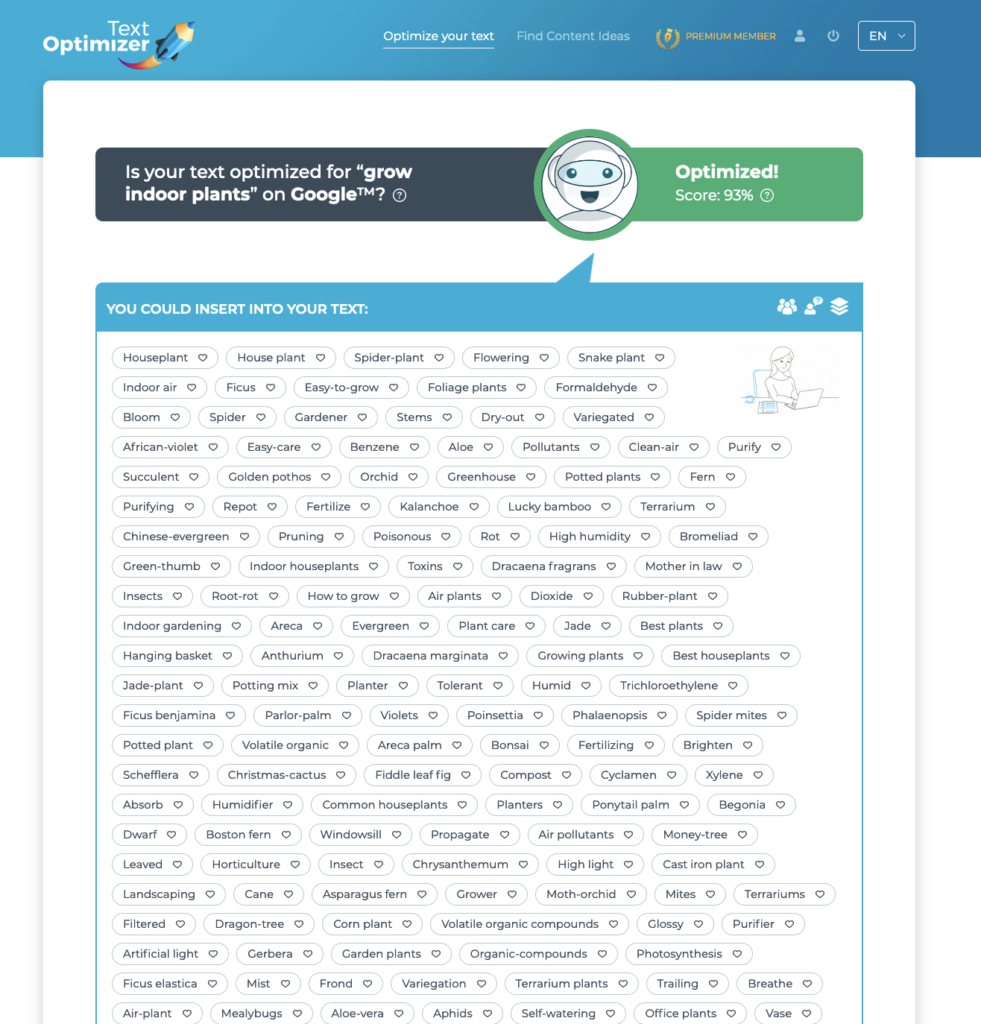
Try running a few of the most important pages through a tool called Text Optimizer to determine whether your competitors are doing a good job optimizing for search intent:
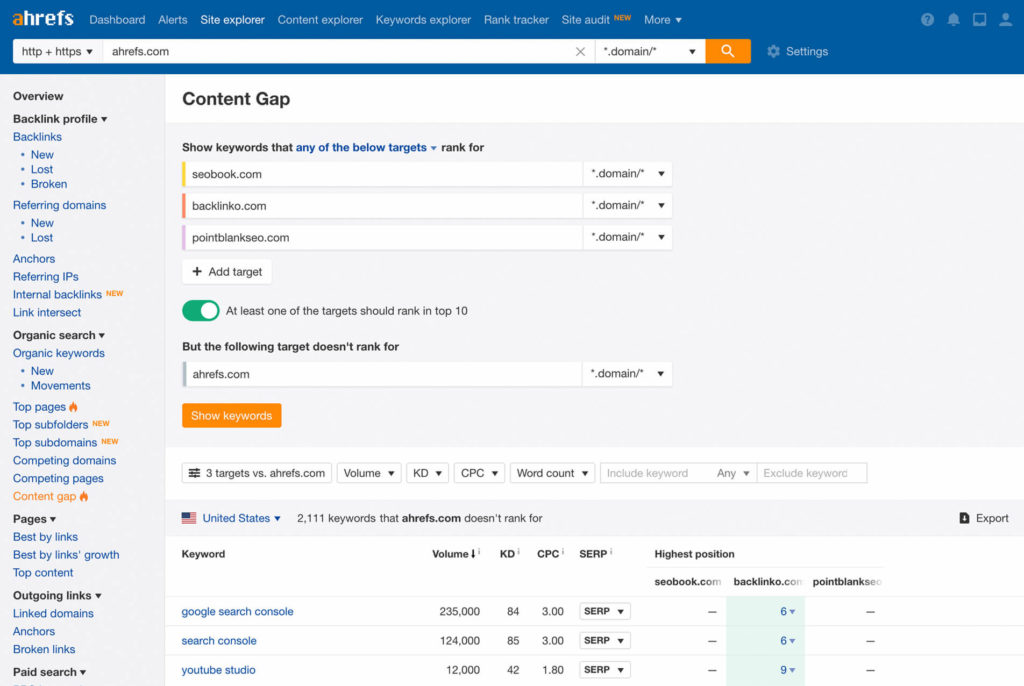
One of the most actionable steps here is to look at Content Gaps, i.e. researching which keywords your competitors are ranking but your site is not. This is a great way to expand your content strategy to include new keywords. Ahrefs provides this analysis, so it is both easy and effective:
Competitors’ Backlink Research
Backlink research is important for many reasons but doesn’t just use it in an effort to “steal” some of those tactics or claim some of those links. Look at a bigger picture:
- Who are your competitors’ promoters (i.e. people who link to them) and how did your competitors win their hearts?
- Which PR tactics seemed to work best for your competitors and why?
- How are they utilizing content to generate backlinks?
The purpose of competitive backlink research is to understand what works for niche publishers and how you can build your own long-term relationships with them to outmatch your competitors in the long run.
There are quite a few backlink checking tools that would help you create this report.
Social Media Growth and Engagement
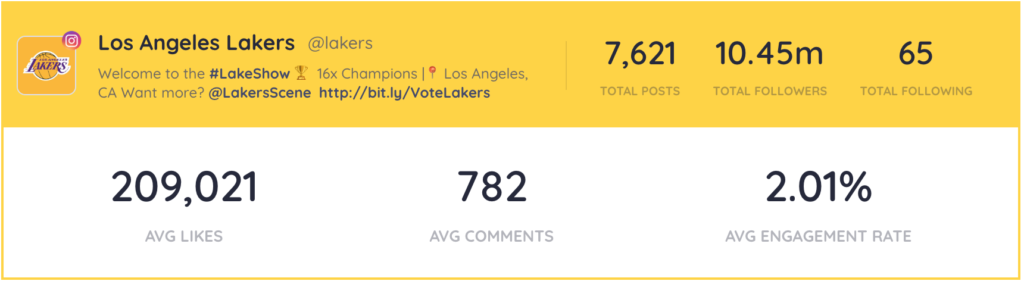
The first part of this section is, again, an overview giving you an idea on who to research further. Create a quick chart summarizing your competitors’ active social media channels, number of followers and friends, and their overall activity.
Keyhole can help you with that section:
Social Media Tactics to Take a Note of
Here I suggest highlighting some creative tactics your competitors are using on social media. Forget about numbers: Highlight what you found ingenious even if that didn’t yield obvious great results. Make lots of screenshots!
- Did your competitor use humor when replying to a customer?
- Did you like the video they uploaded for a holiday?
- Was their sponsored update particularly creative and attention-grabbing?
- Did they manage to get attention from a niche influencer?
- Did you like the idea behind their social media contest or poll?
This section is supposed to inspire your social media team. Discourage them from copying anything your competitor did on social media (this could quickly turn into a reputation crisis). Instead, let this section be a conversation starter for your team to come up with their own ideas.
Conclusion
There are very few business ideas or models that have no competition. If you have found one: Good for you! For the rest of us, a competitive report is a key to marketing success, especially if you make it actionable and use it as a starting point for your own brainstorming meetings.
Distinguish tactics to discuss and use unified communications to come up with the ideas to improve and expand those tactics, as well as find unique angles and maintain your brand identity. Good luck!

The post Everything You Should Know to Create a Useful Competitor Report appeared first on DigitalMarketer.
Source: digitalmarketer.com

8 Visual Storytelling Tools and How They’ll Help Your Content Marketing
Storytelling and visuals are two of the most powerful tools content marketers have. Both can help get ideas across more effectively and increase engagement. Combining these two elements—well, that’s a recipe for success.

How can marketers go about creating a successful visual story?
Luckily, there are plenty of tools available to help you take a marketing yarn and weave it into a beautiful visual.
8 Visual Storytelling Tools
Here are eight visual storytelling tools we love for weaving visual content into the content marketing mix.
1. Canva
Canva is the visual content and storytelling tool we use most often at Convince & Convert.
It empowers marketers to easily create beautiful designs and animations without any technical or design expertise.
We use it for creating blog graphics (like the one above), infographics, social media graphics, and more.
For important templates, I like to work with a graphic designer or team (we use Lightboard.io, big fans! hi Devin & Heather  ) to come up with beautiful, functional templates in Canva that we can use over and over again.
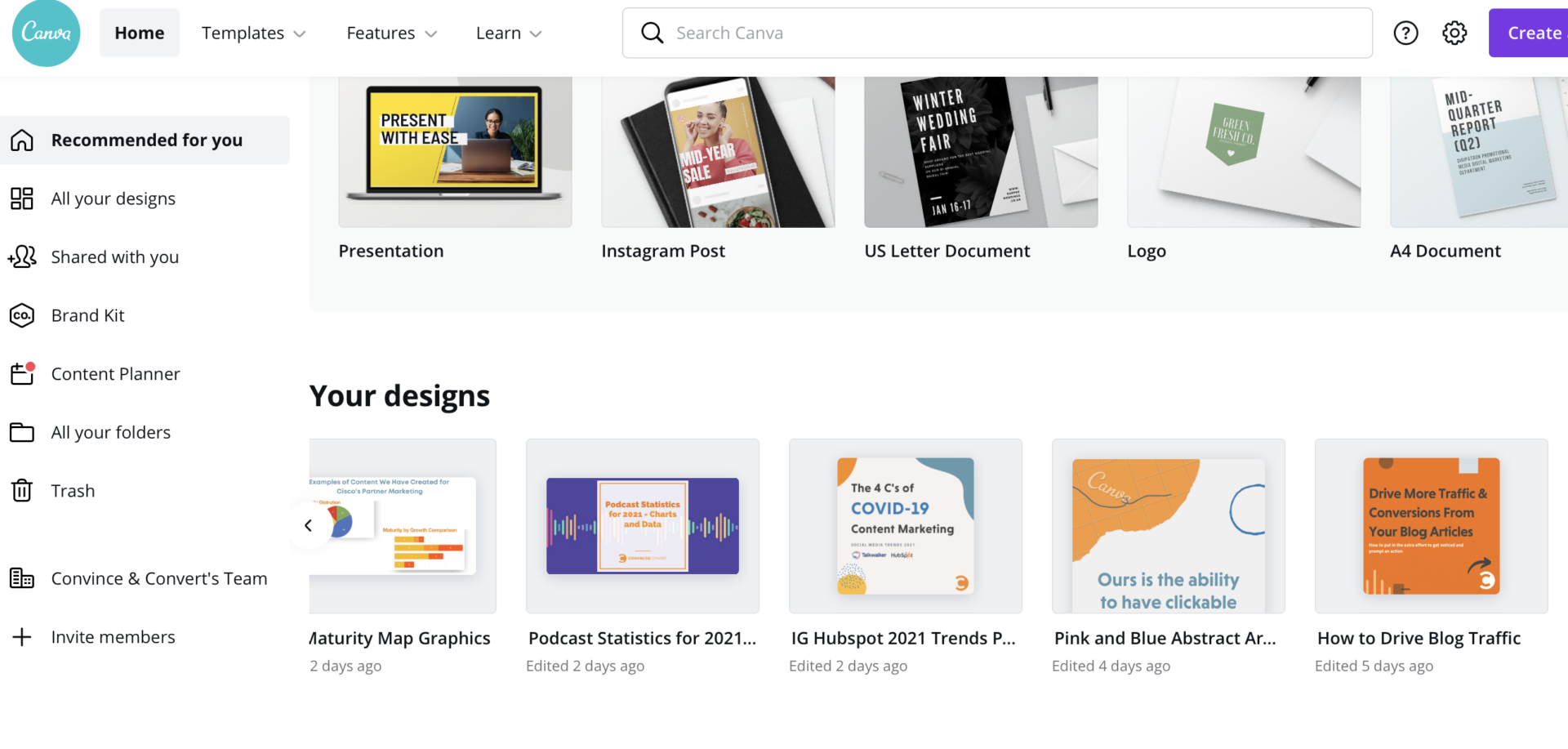
Here’s a peek into our Canva account at Convince & Convert.
We use Canva to create blog graphics, social media graphics, infographics, and more.
Canva even gives you access to images, fonts, icons, and photo filters, so you don’t have to go looking for stuff to add to your design, although I use iStock to access a wider selection of photos and illustrations.
Because visual content performs so well on social media, being able to create it is crucial for marketers.
Here’s are a few examples of the type of visual content you can create for social media with Canva.

Happy #NationalPetDay from our furry friends at C&C! 
 pic.twitter.com/F22wItRjrg
— Convince & Convert (@convince) April 11, 2021
2. Ceros
Ceros is an interactive content platform that makes it easy for marketers—or anyone, really—to create infographics, e-books, and websites without the need for coding knowledge.

It enables you to create aesthetically pleasing designs easily, animate them, and input features like social media plug-ins and pop-ups.
It also includes access to a catalog of fonts and icons.
Here’s an example of interactive content created in Ceros: The State of Hiring in the COVID Economy.
With Ceros, the team at 24 Seven was able to take research on hiring and turn it into an interactive report.
Study after study shows that interactive content engages users more than static content, and with a solution like Ceros, you can take your static research or copy-based content and insert it into one of their templates for a more engaging user experience.
3. Prezi
If you’re looking for an amazing way to create gorgeous, engaging presentations for webinars, meetings, and other events you should check out Prezi.

The company offers a number of sleek templates to which you can add text, images, audio, and more.
You can then easily share and present your creation.
You could use Prezi for your next big meeting or try using it to create an interactive video for your website.
We’re big fans of Prezi here at Convince & Convert, and last year, Jay Baer presented a webinar (created in Prezi) on “How to Unsuck Your B2B Webinars” with Brian Fanzo and our friends at Prezi.
If you’re creating webinars, you need to check them out.

Watch “How to Unsuck Your B2B Webinars” and see Prezi in action now.
4. Infogram
Infographics are a fantastic way to organize information visually. Users love them. They make text easy to digest and tend to get shared a lot on social media.

Infogram is a tool that makes designing your own interactive infographics a simple process. You can also make cool charts and maps by using one of Infogram’s themes.
Here’s an example of an interactive infographic about the Deepwater Horizon Oil Spill — it takes a look at what has happened in the ten years since the spill.
5. Uberflip
Uberflip helps content marketers create engaging content and keep it all organized.

It features tools for creating interactive flipbooks, infographics, white papers, and more, as well as an attractive home for all your content.
Uberflip also includes tools for adding in things like calls to action and social media buttons.
There’s even a place where marketers can manage all their content and receive insights about it.
6. Loupe
If you’ve got a bunch of photos from a company event or some other function and want to share them with your customers, try using Loupe to help you present them in an interesting way.
Loupe lets you make a collage of your photos in a custom shape, send them in a card, or even look for photos in a Where’s Waldo-inspired game.
Here’s an example made with Loupe of the Apple logo made up of a collage of photos.
Sharing your photos in a creative way like this can make your content more interesting and help develop a strong brand identity.

7. WordArt
WordArt is more or less what it sounds like. It’s a website that lets you make art out of words.

All you have to do is copy and paste words from, say, your latest blog posts and choose a shape, and you’ll get a cool-looking shape made up of the words you uploaded.
You could use this to visually sum up a piece of text, but there’s another benefit: The words used most often appear largest, which can give you some helpful hints when optimizing for search engines.
Here’s an example of a visual made with WordArt that features the words “Michael Jordan,” “basket,” and “NBA.” You might have guessed this already, but it’s also shaped like a basketball.
8. Visage
If you want to easily design your own graphics and still have the possibility of working with a graphic designer, you might want to try out Visage.

This company offers an easy-to-use tool that allows a team to collaboratively design and edit visual content.
The company also has graphic designers on staff that you can work with on your projects.
Here’s a cool infographic like the ones Visage helps design.
It looks at the Beatles and breaks down stats like their biggest hits, who wrote most of their songs, and what words they include most often in their lyrics.
Wrapping It Up
Visuals and storytelling are two of the biggest assets marketers have.
Taking advantage of the various tools that are available to help you create visual stories can make a huge difference in your marketing campaigns.
Try out these 8 examples, and feel free to scour the internet for more helpful resources.
This post was originally written by Kayla Matthews in 2017 and updated by Megan Leap in 2021.
The post 8 Visual Storytelling Tools and How They’ll Help Your Content Marketing appeared first on Content Marketing Consulting and Social Media Strategy.
Source: convinceandconvert.com

Move Over SEO: How Developers Can Generate You More Traffic
I’m a marketer. I know more about traffic generation than most others, and I surely know more about marketing than developers.

But what if I told you that developers can generate you more traffic than an SEO or any other type of marketer?
And no, it’s not because the developer implements changes to your site… they are just able to produce more traffic.
What’s crazy about this is that it’s cheaper in the long run than paying marketers.
Most of you know that I have an ad agency, Neil Patel Digital.
And although I always want more big companies to pay us, typically a developer can generate you more traffic than I (or any other ad agency) can drive.
It sounds bad, but it’s true.
Here’s what I mean…
My traffic growth
I’ve shown you my traffic over time.
You already know I get a lot of traffic, but, in case you forget, here’s my latest traffic numbers:
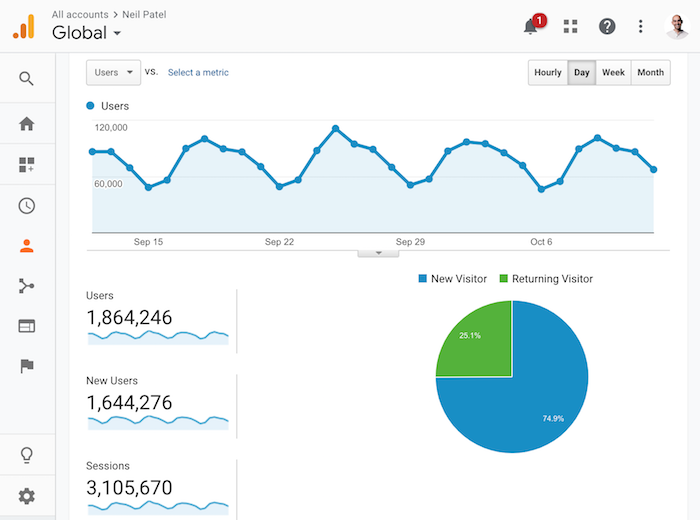
In the last 31 days, you’ve helped me generate 1,864,246 unique visitors and 4,764,739 pageviews. That’s not too shabby!
Even at my level, I still haven’t tapped out as only 25.1% of my traffic is repeat visitors.
Now, can you guess how much traffic I had during the beginning of the year?
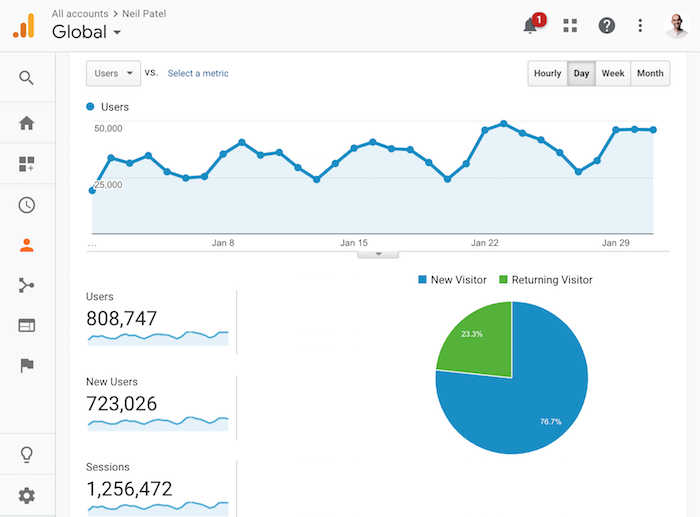
808,747 unique visitors.
So how have I grown from 808,747 to 1,864,246 in 10 or so months?
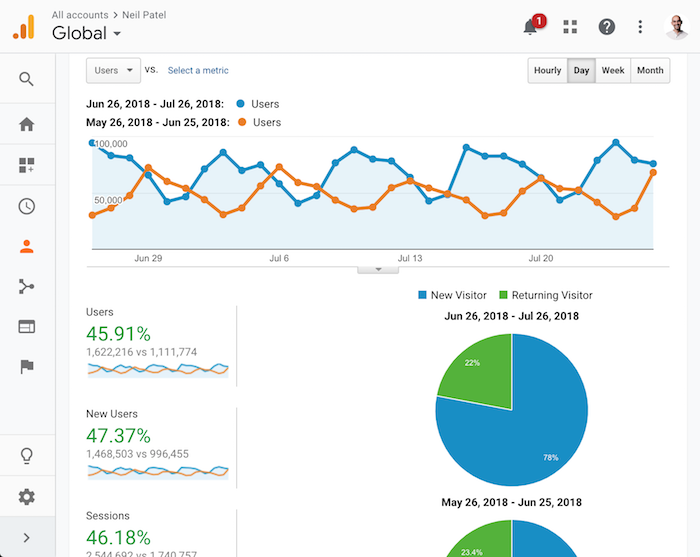
Well, one thing that helped was the purchase of the KISSmetrics blog.
By combining both of the blogs together, I instantly increased my traffic.
It helped me generate an extra 510,442 visitors per month.
But that’s not what I am talking about when I say developers can drive you more traffic with SEO.
There was another thing I did this year which really helped my traffic grow… more than the KISSmetrics blog purchase.
Can you guess what it is?
How much traffic does Ubersuggest generate?
I bought Ubersuggest back in early 2017, and I ended up merging the tool into NeilPatel.com in February 2018.
The moment I merged the tool into NeilPatel.com, here’s what happened to my traffic (keep in mind the last month is on a partial month):
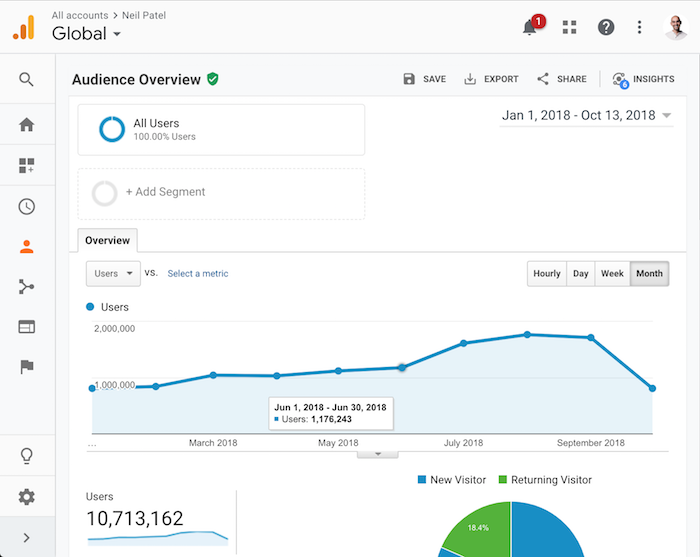
My traffic went from 808,747 to a bit more than 1,176,243 visitors a month between February and March.
The original Ubersuggest (version 1.0) doesn’t look anything like what it looks today.
It looked more like this:
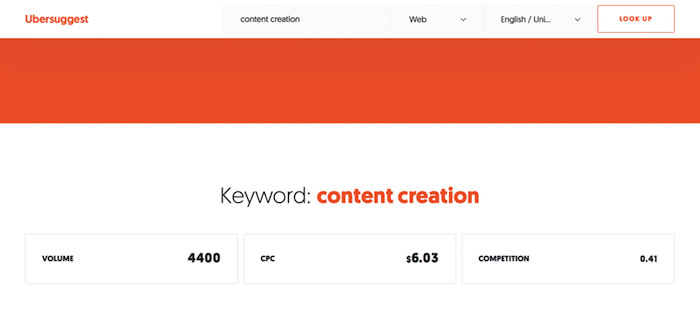
And…
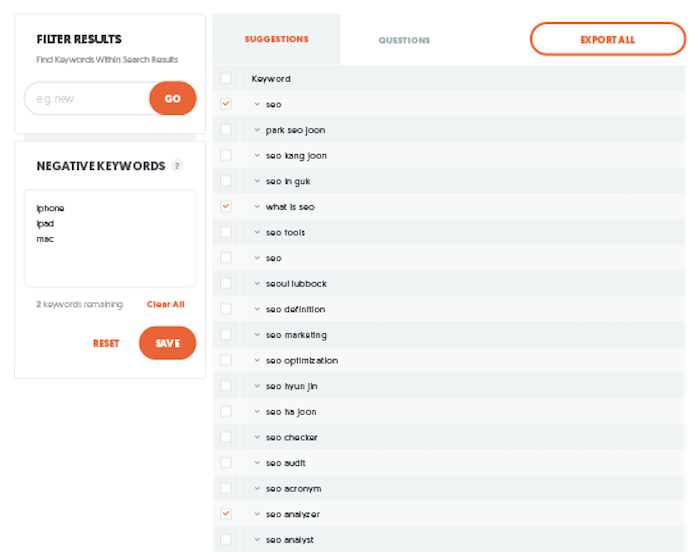
The original tool cost $120,000 to acquire and $15,000 on development to clean up the code, add some simple features, and merge it into NeilPatel.com.
In addition to that, I had API expenses that cost me around $2,000 a month.
That alone got me Ubersuggest 1.0.
Now I didn’t have to buy the tool, I could have created something from scratch like my SEO Analyzer, which I am currently redoing and merging into Ubersuggest.
The first version of the SEO Analyzer cost me around $30,000 and since then I have continually spent more to improve it.
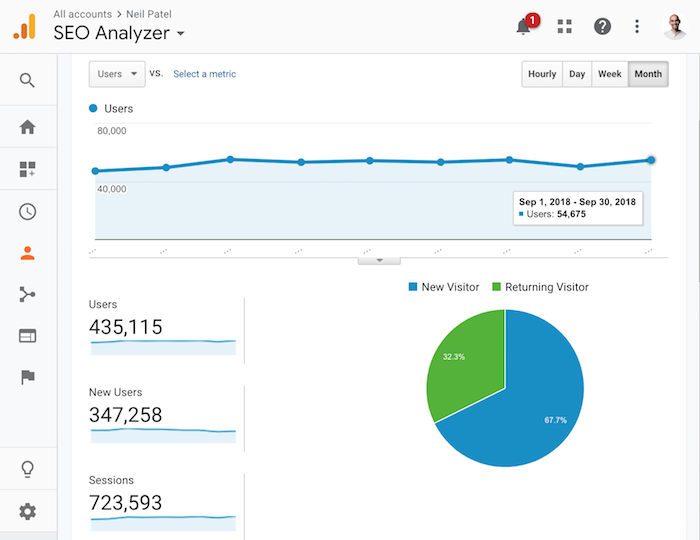
As you can see from the graph, the SEO Analyzer has driven me 435,115 unique visitors so far this year.
And those visitors generated 3,143,220 pageviews.
The best part about the SEO Analyzer is that it is easier to maintain than my blog.
It only costs $1,173 a month for hosting.
All in all, tools have generated me more consistent traffic than anything else.
I don’t have to worry about social media algorithms or Google updates… people just keep using them even when you stop putting effort into them.
How hard is to generate traffic through tools?
At this point, you are probably wondering how hard it is to market these tools.
Because if you pay a developer, they probably won’t just get instantly popular.
And you are right, they won’t.
But it isn’t rocket science.
If you build something that is somewhat decent, it will naturally gain popularity.
All you have to do is write a blog post or two about your tool and just be patient.
If you can get others to blog about your tool, it will, of course, help even more.
Just look at Ubersuggest.
It has continually grown even though I haven’t done much marketing for it till the last 30 days.
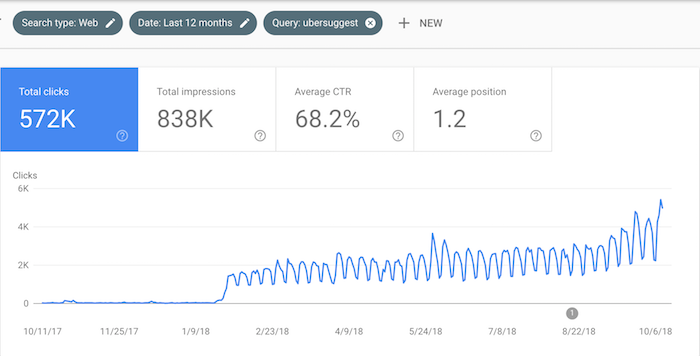
As you can see during the earlier months it kept growing in popularity just because I kept it up and running.
If you don’t have an audience as I do, what I’ve found is people will mention your tool if you just email them.
I know link building is tough, but not when you are giving away free tools.
You can search Google for list-based posts within your industry.
Some of these lists will focus on or include other tools. Just email out people and see if they will mention your tool.
Hey John,
I love JohnChow.com and I have to say I am a huge fan for years.
I know you are busy so I will get to the point.
I noticed that you wrote a blog post called “10 Marketing Tools You Ought to Use” but I noticed that most of those tools cost money.
I recently released a free marketing tool called Ubersugget and it helps people get more traffic from Google for free. 🙂
Let me know what you think of the tool and I would be honored if you included it in your list.
Cheers,
Neil Patel
In addition to that, you can always put your tool on Product Hunt.
When I wrote a blog post about the latest release (Ubersuggest 2.0) and then I got on Product Hunt, I saw a big spike in traffic and usage.
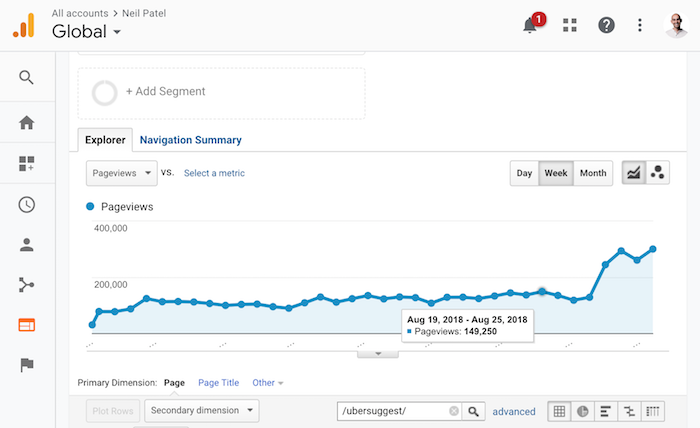
Over time, the traffic normalized and came down… but as you can see from the graph above, the traffic is still better off than before.
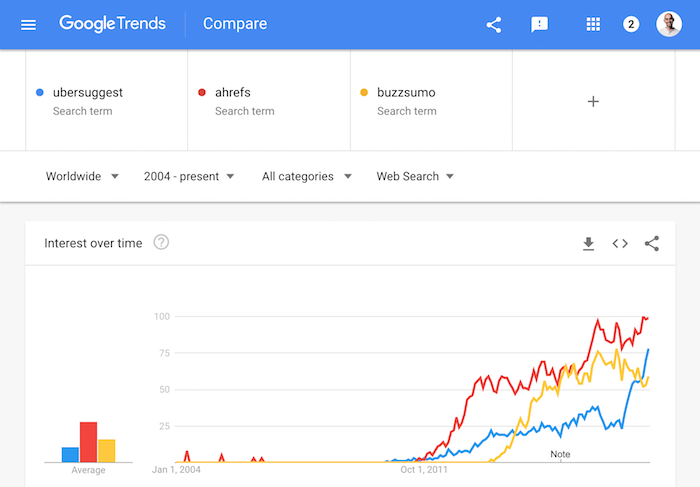
Best of all, it is also causing my brand signals to go up, which is a huge factor in Google’s algorithm.
Just look at the chart from Google Trends.
I am catching up to Buzzsumo and Ahrefs fast.
SEMrush, on the other hand, is still crushing me.
The crazy experiment
You guys know I am crazy, or at least my friends say I am.
So, in the spirit of craziness, I thought it would be fun to make Ubersuggest a good marketing tool instead of something that was mediocre.
You’ve already seen how I have cleaned up the UI and added data from sources like Facebook.
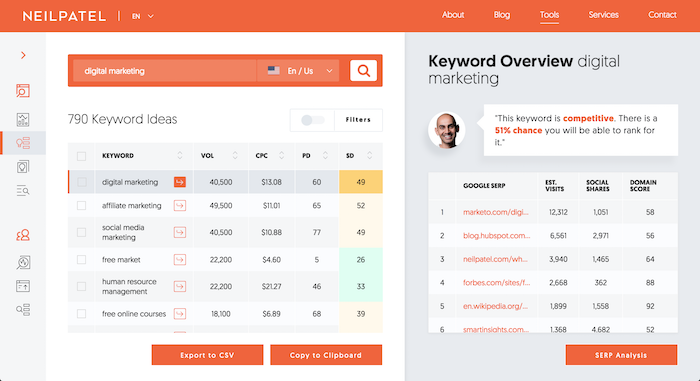
And just by doing that I got a 38.12% increase in branded traffic.
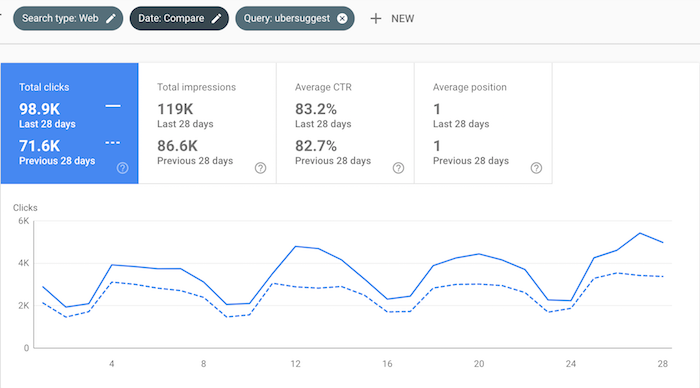
In the next few weeks, I am going to make the tool even better by adding more keyword ideas.
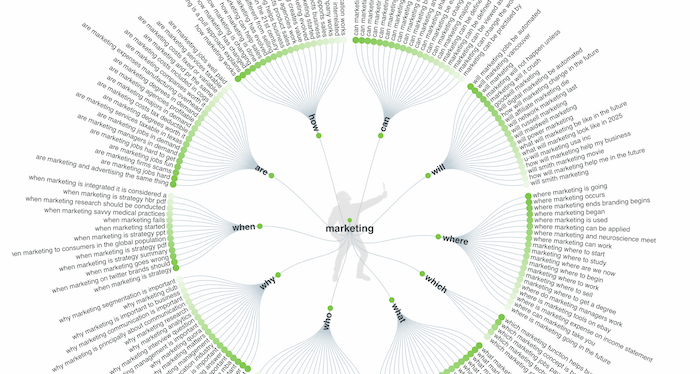
I am going to take concepts from Answers the Public and start showing comparison and question-related keywords.
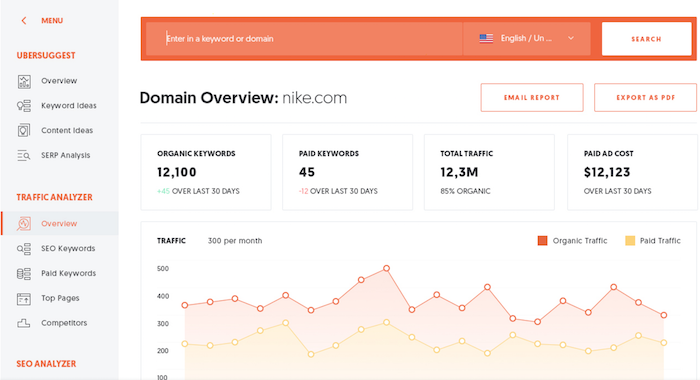
From there I am going to add traffic estimation data on URLs, which I hope to release by the end of the year.
That way, you’ll be able to type in a URL and get data on how many visitors from Google a site is generating as well as their top keywords and pages.
And then I am going to add all of Buzzsumo’s features.
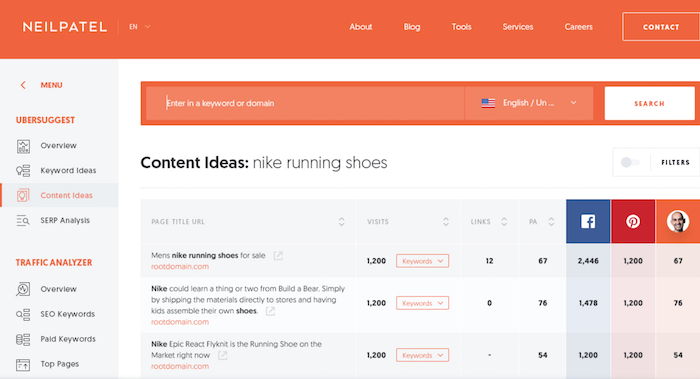
The overall goal is to keep releasing new features, and then announce them each time.
As I do this, my brand queries and traffic should increase each time.
This is how I am going to grow from 1.8 million unique visitors to 3 million by the end of 2019 (that’s at least my personal goal).
Conclusion
It really is easier to grow your traffic by just paying a developer to create free tools than it is to pay marketers.
I know I am a bit crazy and am spending more than most people are comfortable with, but that doesn’t mean you can’t follow in my footsteps.
Just go on Google and search for “scripts” within your industry.
For example, if you are in the real estate industry, search for “mortgage calculator scripts”.
You can do this for any industry.
You’ll find tools that you can buy for a few hundred dollars (sometimes even for free) and use the code and just put it on your website.
This will allow you to have a tool that you can release for free with little to no effort.
Now, I will warn you that you won’t do as well as me because I am spending a ton of money on development.
But you will probably do better in the long run than just burning money on ads.
In an ideal world, you should release tools, do SEO, run paid ads, send promotional emails, etc.
In other words, you should use all of the channels out there to grow your business.
Especially leveraging developers!
So what do you think about the concept of generating traffic through developers?
Are you going to start leveraging it?
The post Move Over SEO: How Developers Can Generate You More Traffic appeared first on Neil Patel.
Source: feedproxy.google.com