
Tag Archives for " marketing automation software "

Best Marketing Automation Software
From enterprise-grade solutions to the most affordable options, my team and I have researched, tested, and used just about every software you can imagine. And I can honestly say… that’s not an exaggeration.
Disclosure: This content is reader-supported, which means if you click on some of our links that we may earn a commission.
Marketing campaigns get more complex by the day.
Which… is great news for the consumer experience but a nightmare for you as a marketing manager handling thousands of moving parts (and countless employees) on a daily basis.
To put it lightly, there’s a lot going on behind the scenes.
Especially complex technical challenges that most consumers and employees will never see or fully understand.
But thankfully more and more automation tools are popping up to make your life a bit easier.
However, that means choosing the best marketing automation software for your business and team is harder than its ever been.
From enterprise-grade solutions to the most affordable options, my team and I have researched, tested, and used just about every software you can imagine. And I can honestly say… that’s not an exaggeration.
But the good news is that I narrowed it down to my top six recommendations, reviewed them, and developed an all-inclusive list of what to consider when making your final decision.
The top 6 options for marketing automation software
- Freshmarketer – best for small to midsize businesses
- Pardot by Salesforce – best for B2B companies
- ActiveCampaign – best for email marketing automation
- Acoustic – best for enterprise multi-channel marketing automation
- HubSpot – best for sales, customer service, and marketing automation
- Act-On – best for marketing agencies
How to choose the best marketing automation software for you
I stand behind all of my top recommendations. However, choosing the right one for you isn’t always easy because it depends on various factors.
So, before we dive in, let’s talk about how to narrow things down and find the best marketing automation software for your business.
Type of business
B2B businesses have different marketing needs than D2C companies.
Furthermore, marketing agencies present a new set of marketing automation challenges. Because of that, specialized software may be necessary to meet your specific needs at a reasonable price point.
The size of your business matters too. Large companies run complex, massive-scale campaigns and have bigger pockets. So, small business tools aren’t a good match.
However, smaller companies will probably find enterprise-grade features confusing and wildly out of budget, which is why those small business tools exist in the first place.
So, pay attention to who the software is built for when making your final decision.
Number of contacts
Most pricing plans depend on the number of contacts or leads you have. The larger your list, the more you need to pay to maintain it and stay in touch with them.
If you have tens or hundreds of thousands of contacts, enterprise-grade solutions are probably more cost-effective. However, that’s not the case if you have a few hundred or even a few thousand leads on your list.
Just be sure to keep this in mind and remember that specific plans may limit the maximum number of contacts you can have.
And if you hit those limits, you’ll need to upgrade to a higher plan or pay an extra fee.
Your marketing channels
Different marketing automation software supports various marketing channels.
And there’s no one-size-fits-all solution.
From SMS and email marketing to social media and push notifications, it’s crucial to choose a software that handles everything you need.
Smaller businesses with simple campaigns may not utilize a wide range of channels and can get away using a more affordable tool.
However, large businesses with complex campaigns spanning numerous channels need something more robust to manage all the moving parts.
Furthermore, some software includes varying channels in different pricing tiers. So, you may start on one level and need to move up to gain access to more marketing channels. Or you may need to move to (or integrate) a new tool altogether.
It may help to map out your upcoming campaigns and decide which channels you plan to use.
Automation features
Automation is at the heart of every tool on this list. But some offer more advanced automation features than others.
Do you need to score leads and prospects? Maybe you want to combine SMS, email marketing, and Facebook ads in the same customer journey. Or perhaps you need the ability to send hyper-targeted emails on autopilot.
Regardless of the complexity of your campaigns, don’t forget to consider:
- Split A/B testing
- Automated email campaigns
- Event and website tracking
- Contact management
- Visual customer journey mapping
- Automated segmentation and personalization
- Prospect and lead scoring
- Dynamic content
- Transactional emails
- AI-powered recommendations
- Action and logic-based triggers
- Reporting and analytics
You may not need all of them, and some tools don’t include them. So it’s critical to understand what you need (and don’t need) before making your decision.
Additional features
It’s not uncommon for marketing automation software to include a handful of features typically found in a CRM tool, like live chat or customer support capabilities.
Before making a final decision, it’s essential to understand which additional features you need to fill the gap between marketing and sales or customer service.
You may already have these systems in place. So, you won’t need these additional features. But if you don’t, you might be able to save money, hassle, and time by choosing software that includes everything you’re missing under one roof.
Hubspot is an excellent example of this.
It includes customer service, sales, and marketing automation tools in a centralized location to streamline data movement and foster automation across your entire business.

The different types of marketing automation software
Marketing comes in all shapes, sizes, and complexities.
From physical mailers and print campaigns to social media and email marketing, the best marketing automation software helps you build, automate, and optimize all types of marketing campaigns.
Marketing automation software is often confused with customer relationship management (CRM). However, the two aren’t the same or interchangeable.
CRM software focuses on sales activities, while marketing automation software focuses on marketing tasks. Going further, marketing automation software is for generating, nurturing, and qualifying leads.
On the other hand, CRM software is to close the sale and foster communications or relationships after the sale.
In a perfect world, the two systems play well together and create a seamless flow of data from your marketing team to your sales team.
Taking things further, there are numerous subsets of marketing automation software, including:
- Email marketing
- Social media marketing
- Advertising management
- SMS marketing
- Live chat
Each different tool is powerful on its own. But true marketing automation software lets you create and optimize customer journeys across marketing platforms for varying complexity campaigns.
Examples of Marketing Automation Software in the Market
#1 – Freshmarketer Review — The best marketing automation software for small to midsize businesses
Around here, we’re big fans of Freshworks (if you couldn’t tell).
Freshmarketer is their intelligent marketing automation platform built to help small to midsize businesses save time, attract the right people, nurture their audiences, and make more money.
It’s my #1 recommendation for most users—and for a good reason.
From awareness to retention, you get all the automation features you need to gain more leads, turn those leads into customers, and keep those customers around for life. All while doing less work with better results.
Plus, you don’t need any technical skills or a dedicated support team to get started. And it takes about a minute to get up and running.
You also get access to incredible features like:
- Email campaigns and contact management
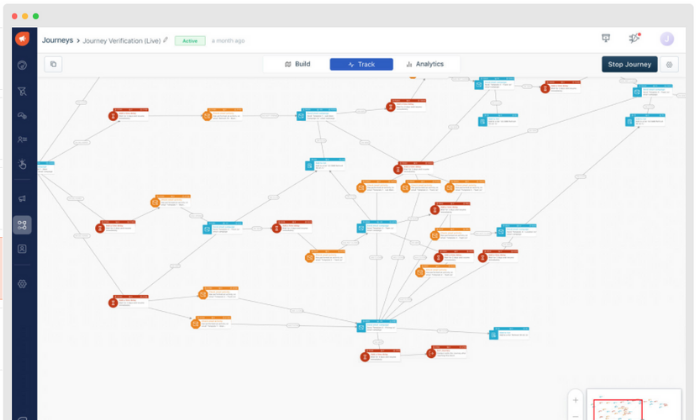
- Visual drag and drop customer journey builder
- Website, form, and offline event tracking
- Conversion rate optimization toolsA/B and split testing
- Advanced personalizationDynamic heat maps
- Audience segmentationReal-time funnel analytics
Furthermore, the software seamlessly integrates with Freshworks’ other tools, so it’s an excellent choice if you currently use or plan to use any of their business software.
You can try Freshmarketer on their limited free forever plan or a 21-day free trial of their paid plans, which are incredibly affordable and accessible for businesses of all sizes. However, they depend on the number of contacts you have, so keep that in mind.
Their plans include:
- Sprout — Free for up to 500 contacts with limited features
- Garden — $49 per month for 1,000 contacts (ideal for growing teams)Estate — $99 per month for 1,000 contacts (best for large teams)
Just remember the cost for each plan goes up after you max out your 1,000 contacts.
#2 – Pardot by Salesforce Review — The best marketing automation software for B2B businesses
As a B2B business, you market to other companies, which presents a unique set of marketing challenges. As such, you need a marketing automation tool built for the job.
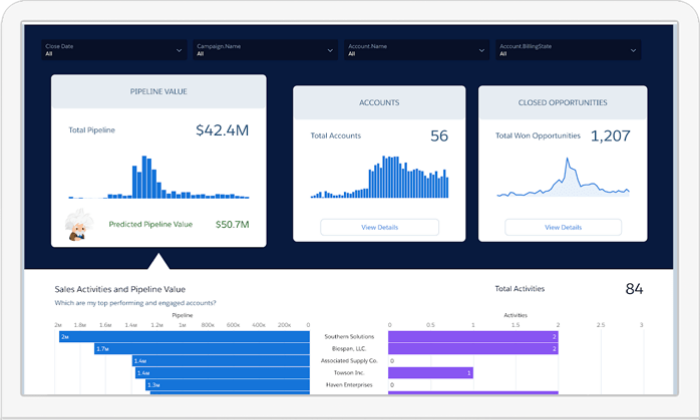
Pardot exists to help B2B companies build relationships and turn those relationships into revenue. Plus, it’s a fantastic marketing automation software built around the world’s #1 CRM.
So, you know you’re in good hands.
From lead generation to sales alignment, the software offers a wide range of features, including:
- Dynamic content and data-based personalization
- Lead-nurturing email automation
- Prospect and lead scoring
- Visual multi-part automation creator
- Advanced segmentation
- Landing page builder
- Smart forms + drag and drop builder
- Social media scheduling, profiling, and analytics
- Lead activity tracking
- Campaign performance reporting
- Lifecycle and funnel reporting
- Pardot Einstein for lead and behavior scoring
Furthermore, over 2.8+ million worldwide users rely on Pardot for their marketing automation needs, making it one of the most popular platforms on this list.
But it is a bit expensive, so it’s best suited for larger businesses. Their paid plans include:
- Growth — $1,250/month for up to 10,000 contacts and basic features
- Plus — $2,500/month for up to 10,000 contacts with deeper automation + analytics
- Advanced — $4,000/month for up to 10,000 contacts with AI and all features
- Premium — $15,000/month for up to 75,000 contacts with supercharge features
They also offer a few add-ons that come free in the Premium plan. Those add-ons include Salesforce Engage ($50/user per month), Analytics Plus ($3,000/month), and Engagement History ($300/year).
All plans and add-ons are billed on an annual basis.
#3 – ActiveCampaign Review — The best for email marketing automation
Email is one of the most important aspects of digital marketing. All the tools on this list include email marketing in one form or another, but ActiveCampaign specializes in it.
So, it’s an excellent option if you want to hone in and focus on improving your email marketing strategy. It’s also a super affordable tool that includes numerous automation features for leads anywhere in your funnel.
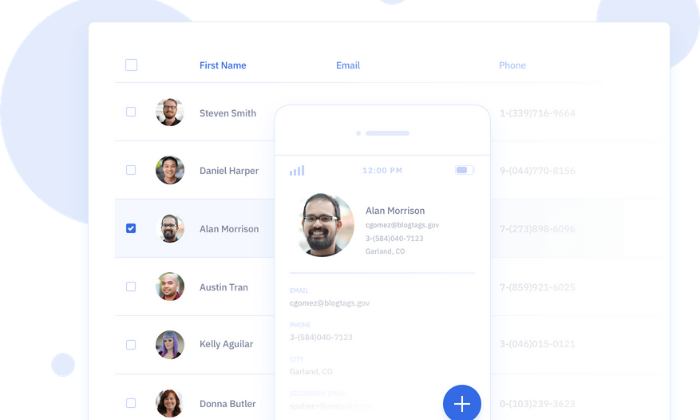
With that said, they also offer omnichannel automation, including instant messaging and SMS, live chat, and Facebook.
So, you’re not limited to just email marketing automation with ActiveCampaign.
Their most popular features cover leads at every point in the funnel, including:
- Engage – Automation maps, site tracking, and subscription forms
- Nurture – List segmenting, dynamic/predictive content, and event tracking
- Convert – Contact and lead scoring, split actions, and win probabilities
- Support – Predictive sending, SMS, A/B split testing, and ecommerce
You can also set up numerous types of emails like autoresponders, targeted or triggered emails, broadcasts, scheduled emails, and automated funnels.
And you can design those emails using their intuitive drag and drop designer, or start from one of their 25+ pre-made mobile-responsive design templates.
Whether you’re just getting started or interested in scaling and optimizing your email marketing strategy, ActiveCampaign is an excellent choice. They offer everything you need to capture, nurture, and close leads at scale.
ActiveCampaign offers four plans, with the price of each starting at:
- Lite — $9 per month with up to three users
- Plus — $49 per month with up to 25 users
- Professional — $129 per month with up to 50 users
- Enterprise — $229 per month with unlimited users
Each tier includes more advanced features, and pricing is based on the size of your list, starting for up to 500 contacts.
So, keep in mind that you will have to pay more than the prices above as your list grows.
#4 – Acoustic Review — The best enterprise-grade multi-channel marketing automation software
Acoustic offers an array of marketing automation products for centralized cross-platform multi-channel marketing. From personalization and email campaigns to web content management and experience management, they offer something for everyone.
Acoustic Campaign is their marketing automation tool, encompassing mobile apps, push notifications, SMS, group chats, social media, ads, email, print campaigns, and more.
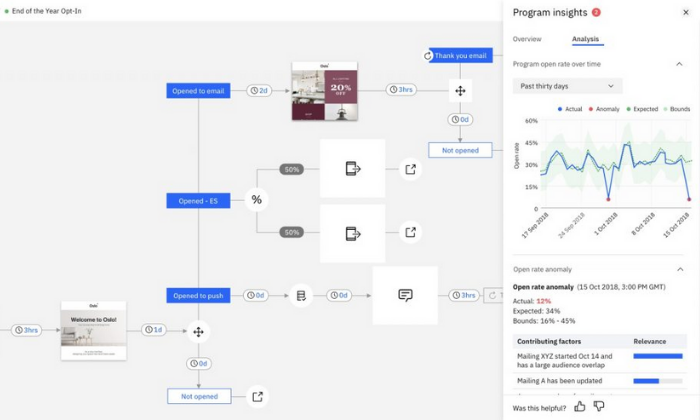
You can also combine this with Acoustic Personalization and Acoustic Analytics for a powerful combination of campaign management, data, and using that data to deliver the right message at the right time.
With Acoustic Campaign, you get access to powerful features, including:
- Drag and drop campaign builder
- Action, logic, and AI-recommended triggers
- Seamless mobile and digital channel campaigns
- Lead management and scoring
- Split A/B testing
- Customer journey mapping
- Planning and budgeting
- One-to-one ads and lookalike audiences
- Advanced personalization
- Reporting and analytics
Furthermore, they have a community forum where you can publicly ask questions. They also provide an online academy packed full of educational videos and training so you can get the most of your custom automation package.
Note: Acoustic is built for moderate to large volume campaigns with countless moving parts. So, it’s perfect for businesses managing complicated campaigns across numerous channels.
But it’s overkill for a lot of businesses and anyone running single-channel campaigns.
Pricing isn’t available online, and you have to schedule a consultation to learn more. So, keep in mind that you won’t be able to sign up and get started immediately.
#5 – Hubspot Review — The best sales, customer service, and marketing automation software
If you’re looking for an easy way to automate your sales, customer service, and marketing processes, Hubspot Growth Suite is an excellent and affordable solution.
And the best part? Hubspot goes beyond automating your business processes. It also helps integrate and optimize different departments in one centralized location, thus streamlining your entire business’s workflow.
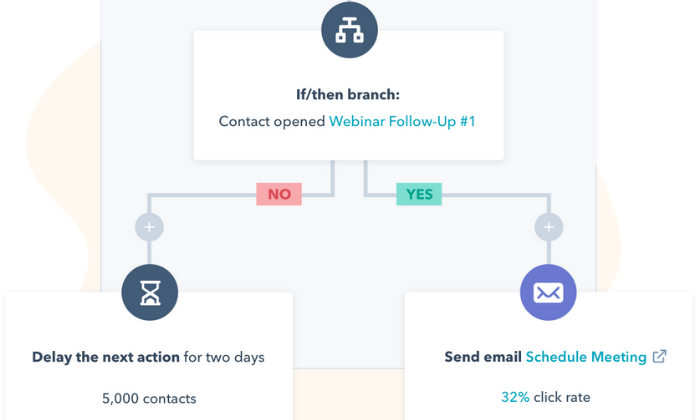
This means teams don’t have to jump from software to software to get the information they need, and you can automate the data transfer process from one team to the next.
However, their marketing automation capabilities are powerful on their own, with features like:
- Blog post and SEO planning
- Ad tracking and management
- Social media management
- AI-powered live chat
- Email marketing
- Forms and landing pages
- Revenue attribution reporting
- Visual workflow builder
- Account-based marketingA/B split testing
- Predictive lead scoring
Hubspot offers basic features, like emails, landing pages, forms, and live chat capabilities for unlimited users absolutely free. So, you can try it out without spending a penny.
Alternatively, you can sign up for a free demo to see all of their advanced features in action.
The Growth Suite (sales, marketing, CRM, and customer service) starts at $50 per month for two users and up to 1,000 contacts, making it extremely affordable for most businesses.
But they also have advanced plans for larger and more complex campaigns, including:
- Professional — $1,275 per month for advanced features
- Enterprise — $4,200 per month for all features
Each 1,000 contacts after your initial 1,000 cost $16.67 per month. And you can add more users to your sales and service hubs for $8.33 per user/month.
Plus, if you’re a current member or alumni of Hubspot’s approved incubator, accelerator, or Venture Capital partners with a round of Series A funding under your belt, you can get up to 90% off your first year.
#6 – Act-On Review — The best marketing automation software for marketing agencies
As a marketing agency, you handle marketing campaigns for several clients (if not hundreds of them) at any given time. As such, you need marketing automation software with the ability to manage everything, including your own marketing campaigns, in one place.
And Act-On offers the perfect solution.
Their scalable software features unique child and parent campaign capabilities, meaning you can easily manage and handle all of your client accounts from a single Act-On login.
Plus, you can completely brand and customize everything to deliver custom reports to clients in just a few clicks.
With Act-On, you can learn more about your clients’ audiences to personalize and tailor their message to match. Not only does this make their life easier, but it also means your team can work less to produce better results.
When you sign up, you get access to powerful marketing features, including:
- Automated engagement programs
- Website and landing page tracking
- Customer/prospect scoring
- Behavior and demographic segmentation
- Pre-built email, form, and landing page templates
- Interactive reporting dashboards
Plus, you can build custom real-time analytic dashboards for internal and external use, so you and your clients always know what’s going on.
Furthermore, you can use this information to improve customer ROI, build better technology stacks, and optimize entire marketing campaigns on behalf of your clients. From lead gathering and nurturing to transferring contact information to sales, you’re in good hands.
Sign up for a free demo to learn more and get started today!
Wrapping things up
Freshmarketer is my top recommendation for most businesses. It’s built for small to midsize companies interested in automating their marketing processes to grow their businesses and save time.
Plus, it’s affordable, easy to use, and packed full of powerful automation features.
However, it’s not the perfect solution for everyone. So, don’t forget to use the criteria we talked about as you sort through finding the best marketing automation software for you and your team.
What are your favorite marketing automation tools?
The post, Best Marketing Automation Software appeared first on Neil Patel.
Source: feedproxy.google.com

How to Choose a Marketing Automation Platform
One of the initiatives I work on with our clients here at Convince & Convert is marketing automation vendor selection. Based on our experience in this space, here is the process we use to choose the best marketing automation platform for your business.
This is the first in a three-part series delving into the process for selection and preparation for CRM + Marketing Automation implementation.
Let’s start with the basics and define what marketing automation and CRM is.
What is CRM?
Customer Relationship Management (CRM) usually refers to the database of records for prospects and/or customers.
They come in many varieties and specialized versions, so we use the term generically.
What is marketing automation?
Marketing Automation (MA) refers to the suite of tools and capabilities that allow for automated, triggered events including email, text messaging, variable content, lead scoring, conditional logic rules, communication workflows, etc.
These two sets of capabilities, (CRM + MA) can reside in one all-encompassing platform or two (or more) systems that exchange data bi-directionally.
There is no one-size-fits-all solution.
That’s part of the challenge in selecting the best systems(s) for your specific needs.
The combination of a CRM system or database of records and a process to automate marketing messages enables you to communicate based on individuals’ attributes, reactions, engagement, and channel preferences.
That is a long way of saying, “Speak with individuals as individuals in ways that are most relevant to each of them.”
There is a key principle that everyone in the decision-making process needs to be aware of.
It’s analogous to the four pillars holding up the roof to the whole CRM + Marketing Automation process. It looks like this:
Management has to be clear and committed to all four pillars to achieve success.
The Four Pillars of Nurture Program Success
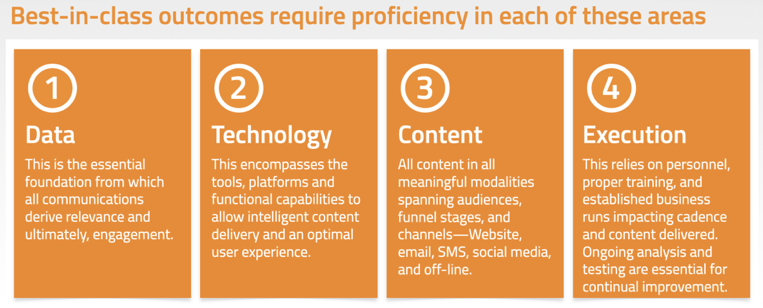
Take a close look at that.
If you remove or even short-change any one of those pillars, the whole marketing automation is doomed to a sub-optimal outcome.
This is to become the lifeblood of most organizations’ sales funnel and revenue.
This is not the place to cut corners. Management has to be clear and committed to all four pillars to achieve success.
I can write a whole post just on data, and that’s super important.
I’ll hold off on that for the second installment in this series.
The most important thing to remember when undertaking a CRM + MA upgrade is probably what not to do.
How to Consolidate and Improve the Entire CRM and Marketing Automation Process
For those who have some sort of system and tools cobbled together, where does one begin to consolidate improve the whole process?
First, let’s agree we are talking about improving the whole process for everyone: the prospects/recipients, the marketers, the tacticians, and the management.
When done correctly, everyone wins.
The most important thing to remember when undertaking a CRM + MA upgrade is probably what not to do.
Do NOT go out and start looking at demos of different systems.
They all have shiny, whiz-bang demos and colorful charts and seemingly simply drag and drop GUIs, but that’s the wrong way to go about an evaluation.
In fact, Trust Radius lists 130 individual Marketing Autonomation platforms!
There’s no way anyone has the time to demo a meaningful number of those.
The Best Way to Demo Marketing Automation Solutions
The correct way to demo marketing automation platforms — the way that is far more likely to yield a successful outcome — is to do this:
- Document your current capabilities, breakpoints, shortcomings, and limitations (this is your current state)
- Document the features and functionality you want to have in the future (future-state). It’s ok to stretch a bit here; you may not get everything you can dream of, but still, look forward a few years.
This list of future-state capabilities should be comprehensive, but not necessarily exhaustive.
More on that in a moment.
How to Evaluate Marketing Automation Solutions
Step 1: Add to your list of Features and Functional Requirements interview questions, including:
- The number of reviews and cumulative rating score (G2, Trust Radius, Capterra)
- Company size, number of employees, and how many are in customer service
- Capitalization structure (VC funder, latest round, privately help, publicly-traded, etc.)
- Implementation time
- On-boarding process: does it include data migration?
- The underlying database product (Microsoft Dynamics, Oracle, Salesforce, or proprietary?)
- Are there specialized products for your particular industry? (e.g., higher education, homebuilders, non-profits and fundraising, etc.)
And don’t worry about pricing at this stage.
Don’t even bring it up. (More on that below)
Step 2: Next, filter through the list of candidate CRM + MA packages and develop a short-list of no more than 10.
Step 3: With these 10 candidates, initiate the sales process with each, by:
- Scheduling a call with their sales rep to confirm if it is a candidate for your particular business
- Send over your list of functional requirements asking them to check the boxes and fill in any note or explanations
- Schedule your first of two demos, 90 minutes (it’s impossible to do an adequate job in less time, and there will need to be a second demo when you get down to your final two or three).
Step 4: Evaluate the Solutions Internally for a Minimum of 3-4 Weeks
Now, this is going to take some time. In our experience, it’ll take two full weeks minimum to go through the dialog, checklists, scheduling the demos, follow-up questions, etc.
And you probably can’t get 6-10 done within a two-week time frame if you and your team already have day jobs.
So candidly, plan on a minimum of 3-4 weeks.
I’ve kind of glossed over some of the process details about how to compile all the gathered information into a side-by-side comparison chart, but that’s detail stuff.
Once someone gets into that stage of analysis, we’ve got some good processes that help streamline things.
I’m happy to share those; it just doesn’t make for good interview material.
How to Choose Your Marketing Automation Solution
Once you get the shortlist down to 1 or 2 candidates, then what?
If it’s down to a list of one, your job is really simple.
Anything more than one, and you’ll have to dig a bit deeper and tease out the differentiators.
There are probably no non-starters by this stage, or they wouldn’t be on the final list.
This is where talking with reference customers and price negotiations come in.
And pricing models vary greatly.
You should be prepared for multiple licenses, user fees including admins, marketers, clerks, or whatever they each name their seat and access level licenses, and some might even be a fixed rate.
We always ask for a fee structure covering each of the first three years.
Year one is always the most expensive because migration and implementation services are usually all rolled up in that first year.
So, three years gives a better look at the annual cost of ownership.
And it is a negotiation point.
That the best reason to have at least two in your final list of candidates.
In Part Two of this series:
We delve deeper into the importance of data, the four categories of data, and how this will cause you to rethink your CTAs and webforms!
In Part Three of this series:
The implementation journey is about to begin. But you are not ready.
There is a lot that can and should be done before anyone starts loading software onto servers! (or, in the cloud)
The post How to Choose a Marketing Automation Platform appeared first on Content Marketing Consulting and Social Media Strategy.
Source: convinceandconvert.com