
Tag Archives for " LinkedIn "

How to Use LinkedIn Insights in an Actionable Way
What is an insight? According to Merriam-Webster, it’s the “power or act of seeing into something.” LinkedIn Insights gives you the ability to see information about who follows you, engages with your content, or may be of interest to you as a lead or new hire.

Whether you’re hiring, promoting, or putting together marketing strategies, LinkedIn Insights can help you make the most of an already powerful business platform.
What Are LinkedIn Insights?
As marketers, we live and thrive with the data.
Everything we do involves measuring different metrics to see what works and what doesn’t.
The key to understanding the data is knowing how to look at it and turn it into action.
That’s the goal of LinkedIn Insights.
These analytics aim to limit the amount of data you need to look at in order to get the results you want from your marketing campaign.
You’ll essentially be able to optimize the campaign and focus on a more narrow audience.
One of the most powerful aspects of LinkedIn Insights is the fact that you can cater the data to your specific industry.
Types of LinkedIn Insights
For example, they have several different types of insights:
- people,
- industry,
- advertising,
- and talent.
LinkedIn People Insights

Developing the ideal buyer persona is something all great marketers must do.
We need to understand our audience at a granular level; what makes them purchase, move, mad, sad, or happy?
We should understand all of these factors because it’s how we’ll make the most of our marketing campaigns on LinkedIn and other platforms.
The people insights section on LinkedIn can help you learn more about your audience.
The data provides you with information regarding their location, skills, occupation, and data about other people they like and follow on social media.
You can then take that data and filter it so you only get a list of the results you want.
For example, if you’re involved with real estate marketing, you may need a highly targeted list within a specific location.
LinkedIn provides ways for you to narrow it down even further.
You can get lists of people who engage with certain content similar to yours.
Use this trick to your advantage by focusing on the content you think your target demographic will like.
For example, if you’re running LinkedIn ads centered around sports training and fitness for senior citizens, you may know that people interested in the topic are also interested in related topics about aging and retirement.
Having this data allows you to narrow down your search and zero in on your audience to provide you with the best chance of success.
LinkedIn Industry Insights

Understanding the ins and outs of a specific industry can also help catapult your marketing campaign in the right direction.
Knowing what trends and insights matter to you is most important.
The industry insights section provides you with data on certain industries, such as healthcare and financial services.
You can find out information and trending news within these industries, so if you’re targeting these people, you’ll know what’s important to them.
Tools like this are powerful because it helps take a lot of the guesswork and testing out of the game.
It takes a lot of time to test ad copy, photos, and colors to see if they’ll resonate with your audience.
While you might have a good idea of what will work before you start, you’re still not 100 percent certain (and can never be).
However, having industry insights and knowing for sure what your audience is interested in could make a significant difference in the reach and success of your campaign.
Another great thing LinkedIn industry insights can do is provide examples of what others have done correctly in the past.
Thought leaders and frontrunners of a given industry tend to get a lot of attention due to their experience and reputation.
Knowing what they’re doing right can help you gain a little insight into what you can do too.
LinkedIn Advertising Insights

Advertising insights exist to help you understand the LinkedIn advertising model from every angle so you can make the most of every dollar you spend.
If marketers understand more about how advertising works, it can help them create more successful campaigns and ultimately a better ROI.
These insights assist with measuring the success of a campaign.
You need to know which metrics are important and how they translate into certain actions that get a result.
This section also helps with branding and reach so you can better measure your performance on LinkedIn.
LinkedIn Talent Insights

One of the most powerful uses of LinkedIn Insights is the talent insight section.
It’s a talent intelligence platform that helps you make better hiring decisions.
Investing in workforce development and onboarding is an expensive process.
If you’re consistently trying to hire people and dealing with turnover, it may not be so much about the process but more about your talent acquisition.
Sometimes we have to face the fact that not everyone will work out even if they’re qualified for the job.
By utilizing talent insights, you can get a snapshot of what other companies are doing and how skills are changing.
Use that for narrowing down your search with snapshots and benchmarks.
We all know LinkedIn is a great place to find new talent, but how do you tighten your search so you only discover the talent you want?
The talent insights section on LinkedIn helps you pool all your best candidates based on their experience, education, and history on the platform.
You’ll receive real-time data on the supply and demand and a 360-degree view of what the current hiring landscape is like.
This is beneficial for businesses looking to grow and scale rapidly but doesn’t want to work through all the red tape involved in hiring and onboarding.
LinkedIn talent insights help filter through the candidates so you can focus on hiring the best people for the job.
How to Use LinkedIn Insights
As we dive further into LinkedIn Insights, the benefits continue to pile up.
If you’re considering implementing LinkedIn Insights as a part of your marketing campaigns, you may experience some of the following benefits.
Highly Targeted Content
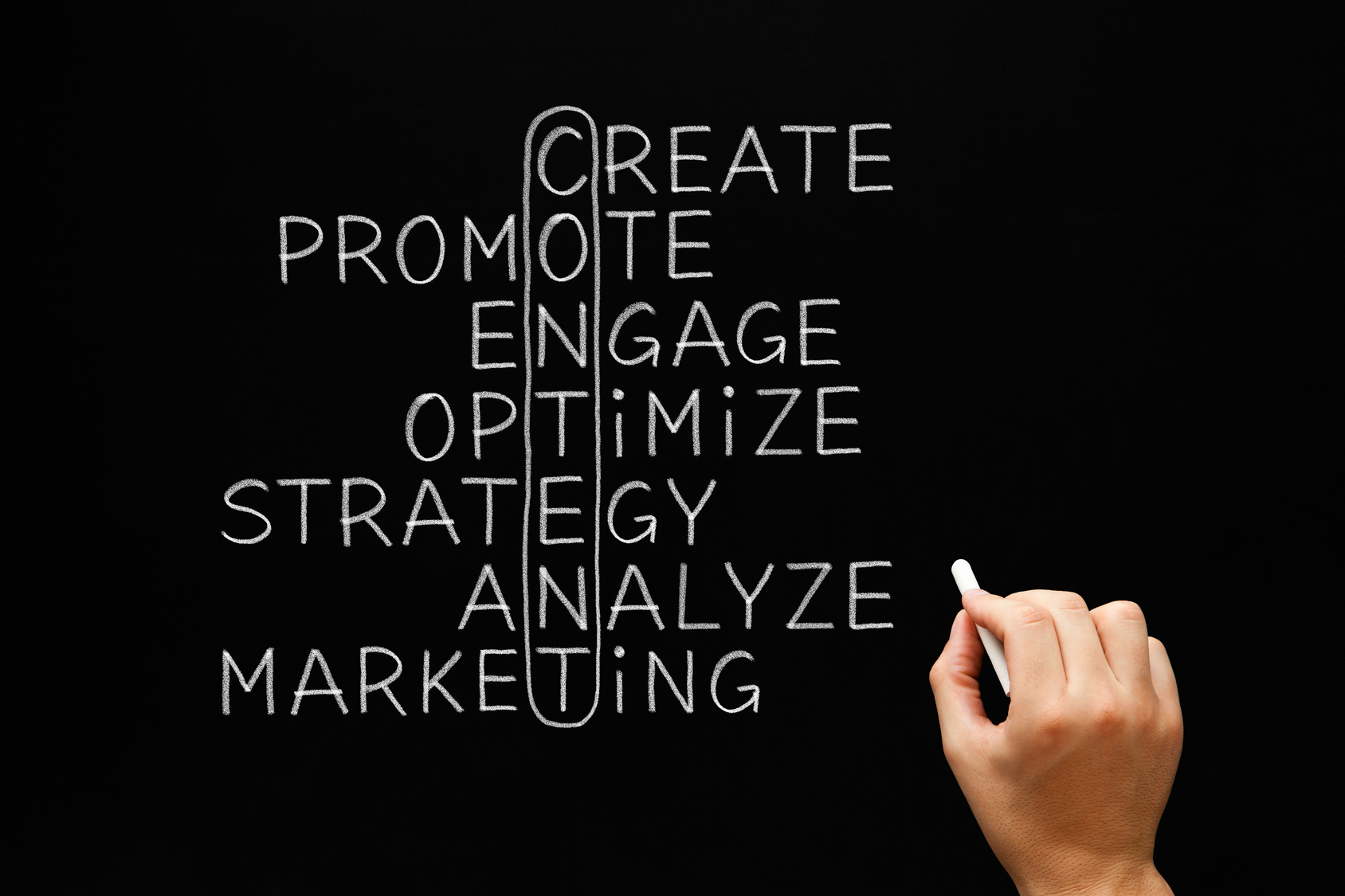
Content is the name of the game, and it’s a code we’ll spend forever trying to crack.
Unfortunately, there’s no handbook on producing highly targeted content (or is there?).
All we can do is get as close as possible and do the best we can from there.
LinkedIn Insights can help by telling us what our audience wants to know more about and what they’d like to avoid whenever possible.
We can learn this by translating the data we receive about the most engaged and least engaged content.
You can also use the insights to check out the competition and see what others are doing, then use that knowledge to craft unique content.
Improved Retargeting
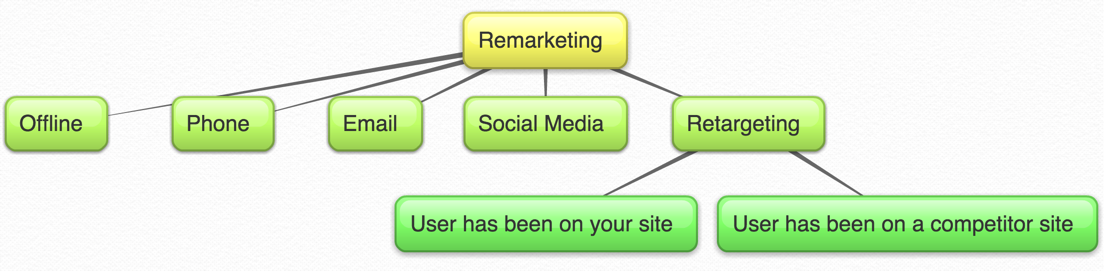
Anyone in marketing knows a retargeting ad is worth its weight in gold.
Retargeting involves finding someone who recently engaged with something you put out there but didn’t complete the desired action.
For example, you might have offered a free e-book in exchange for an email to add to your list.
If someone clicked the ad for the e-book but never entered their email, you could then retarget them with another ad.
These campaigns are so successful because the lead is already warm.
They know who you are, and they trusted you enough to at least click your link and go to the next page.
Retargeting ads can have a CTR ten times higher than a regular ad.
Increased Employee Retention
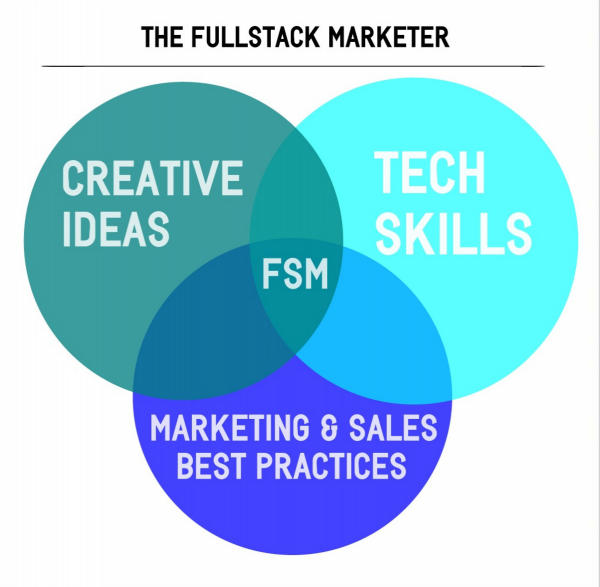
A lot of hiring managers turn to LinkedIn to find and research candidates in the industry.
The qualities and skills of candidates are changing all the time.
One of the best ways to learn about prospects is to take a look at pools of candidates on LinkedIn and see what they’re all about.
Understanding your applicants can help you better understand how to find the best ones.
If you’re looking to grow your business by hiring a few people, using LinkedIn Insights can help you find the best candidates without time-consuming trial and error hires.
Stay Hip to New Trends
Besides understanding what makes your prospective new employee tick, LinkedIn Insights also helps you learn about what customers want.
With follower insights and trends, you can see certain characteristics about all the people who follow your company.
You can also track trends that large groups of followers are interested in.
For example, let’s say you own an e-commerce store selling political-related gear, accessories, and clothing.
Your popularity would generally skew higher around election time than it would in the other years between.
As the election approaches, you could see what trends people are most interested in, what pages they follow, and what content they engage with the most.
How to Access LinkedIn Insights
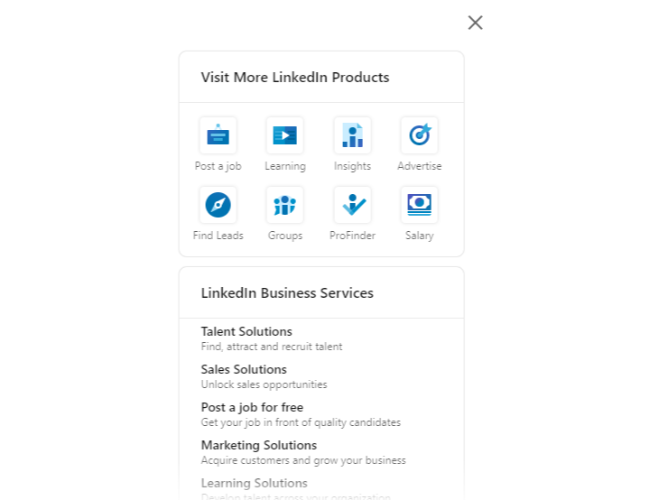
To get LinkedIn Insights up and running, you’ll want to log in to your LinkedIn account and click the “Work” button in the top right corner.
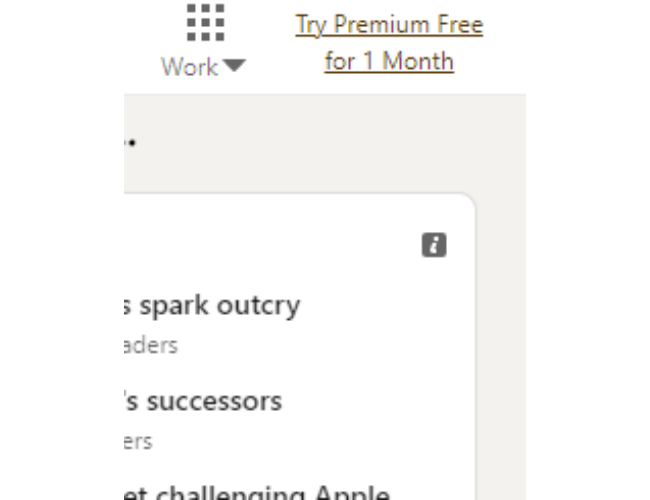
You’re brought a page that displays LinkedIn’s product offerings.
To set up insights, you will click the “Insights” button.
Next, you will fill out the following form for someone to reach out to you.
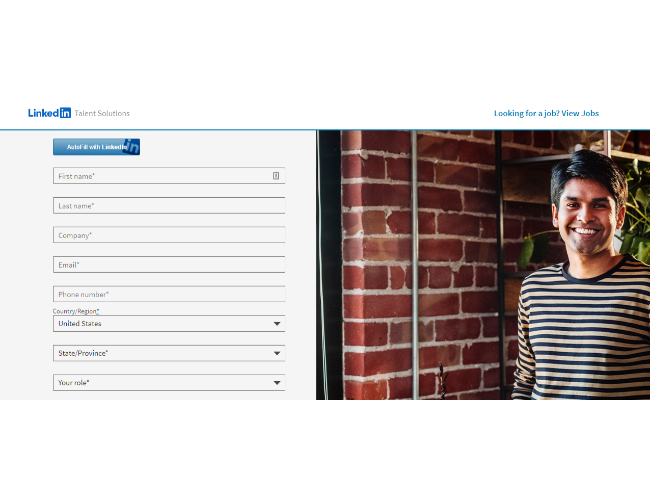
You’ll eventually receive an email from LinkedIn asking for more information about your goals and objectives. This offers a nice personal touch by catering to an individualized plan rather than having a blanket offering that everyone gets.
They also offer a LinkedIn Insights tag you can put on your website to work alongside the LinkedIn Insights process.
This tag works exactly like any other social media platform.
You’ll copy a small snippet of code and put it on your website.
You can then track all the conversions from your LinkedIn ad and gain valuable insight into who they are and what makes them tick.
LinkedIn Insights Case Study: KBC Bank

KBC Bank has one of the most prolific case studies for LinkedIn Insights.
Their goal was to improve company culture by developing the best hiring and workforce management process.
The problem was, they didn’t have a lot of data on candidates in the space their business is in.
While they had plenty of internal data about candidates they’ve hired in the past and retained, they knew in the current remote landscape it was important to understand the existing marketplace outside of their business.
The team at KBC Bank started using the real-time pool of data they received with Insights.
They were then able to take the data and develop an action plan to hire the best possible candidates.
What did they gain as a result?
They gained a better pool of talent by tapping into markets they didn’t know they had.
They took the skills and expertise of their candidates and compared them to those their competition was hiring.
Finally, they accessed new data to continue to explore the marketplace and make better decisions on candidates in a shorter time using data-driven hiring.
Conclusion
If you’re considering giving LinkedIn Insights a try, my team can help you understand how to leverage your LinkedIn business profile to make the most of your efforts.
LinkedIn has always been a powerful B2B platform, but a lot of businesses aren’t using it to its full potential.
Data is important, but it’s not just the data that matters.
It’s how you interpret it and turn it into actions and steps to grow your business.
That’s the key factor of LinkedIn Insights.
What do you use LinkedIn Insights for?
Let me know in the comments.
Source: feedproxy.google.com

3 Ways to Increase Impressions, Engagement, and Post Clicks on Your LinkedIn Company Page
As a B2B business, we can’t ignore the potential of LinkedIn. DigitalMarketer’s Senior Social Media Manager, Shannon Goodell, has been strategizing and implementing on LinkedIn.

You’ve heard LinkedIn is an engagement gold mine.
Maybe Gary Vee convinced you it was a good idea, or you heard a few too many people talk about how LinkedIn was their number one source for finding B2B clients.
LinkedIn is talked about as an underrated platform. Like TikTok, LinkedIn posts can actually go viral (take the hint Facebook and Instagram). The thing is, you’re not going viral on a platform with all types of users.
You’re going viral on a platform where everyone is there to talk about business. Hence, the goldmine.
As a B2B business, we can’t ignore the potential of LinkedIn. DigitalMarketer’s Senior Social Media Manager, Shannon Goodell, has been strategizing and implementing on LinkedIn. Recently, she stumbled on some serious success.
Over two million impressions, almost 100,000 engagements, and 62,000 post clicks (!).

3 Effective Ways to Increase Impressions, Engagement, and Post Clicks on LinkedIn
Shannon’s narrowed down our strategy to 3 effective ways to increase impressions, engagement, and post clicks on LinkedIn. Time to go panning for gold.
#1: Find LinkedIn Posts in Previously Published Content
The first step of creating LinkedIn content is realizing you don’t need to create LinkedIn content.
You already have content that could be used on LinkedIn.
It just hasn’t been put into a LinkedIn-friendly format. As Shannon explains,
“Pull out tips and advice from your blog posts, Lead Magnets, podcasts, courses, playbooks, workshops, etc., and post as text-only posts.
Add the link to the resource or resources in the comments and direct people to check out the comments for the link(s) to learn more.”
This is how Shannon has been able to create more DigitalMarketer content…without creating more DigitalMarketer content.
It’s the beauty of splintering—every piece of content you create for your brand can be turned into at least 10 other pieces of content for other platforms.
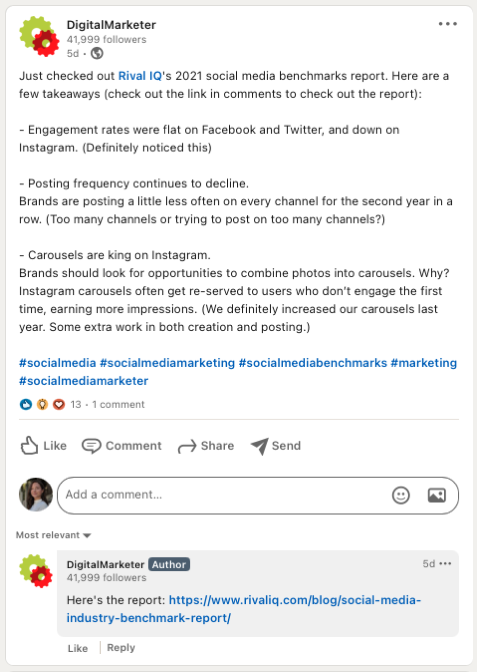
“This is a super simple post to create, and it works!
If you don’t have a lot of content to mine, post your own tips and advice and also ask your team members for theirs (based on their areas of expertise).”
Here are two of Shannon’s tips for splintering content into LinkedIn posts:
- You can use fewer characters on LinkedIn than on Facebook, so make sure to edit your copy so the post can be read clearly and easily
- If you can’t figure out how to make a post-work with the number of characters given, just post one tip at a time
Splintering content is a great strategy for LinkedIn… and every other platform you’re creating content for.
You don’t need to create a brand-new post every time you change platforms.
You just need to make your content native to the platform you’re posting on.
This means you don’t want to post a long, all text LinkedIn post to your Instagram stories.
People are on Instagram stories to see movement and engage with their phone (think GIFs and stickers).
Your Instagram story content can be a team member breaking down the post with a talking head selfie video or a graphic that explains what your LinkedIn post did—but more aesthetically for the ‘gram.
Splintering content can turn a blog post into:
- A LinkedIn post
- An Instagram feed post
- An Instagram story
- An Instagram IGTV
- An Instagram Reel
- An Instagram Live
- A Twitter thread
- A TikTok
- A YouTube video
- A podcast episode
- A Facebook post
- A Facebook Live
The wild part about this list is that we can keep going. We haven’t even mentioned Fleets or YouTube stories.
Use your previously posted content to create a stream of LinkedIn posts. Make your posts extra fancy by turning them into (free!) downloadable documents, as Shannon explains below.
#2: Create Downloadable Documents (Not Opt-In Lead Magnets)
The key is in the parenthesis. These aren’t lead magnets where users opt-in to your email list to get the resource.
You’re just going to give them the resource. We know this goes against your marketing brain, but the data doesn’t lie.
Two million impressions and over 62,000 link clicks tell us this strategy is working.
We’re establishing trust with our audience and showing them how much value we give away for free (no opt-in required!).
As co-founder and CEO of DigitalMarketer Ryan Deiss says, if you give away your best stuff, people will be dying to know what you keep behind the paywall.
You don’t need a graphic design team to create these downloadable Google Docs.
All you need to do is “copy and paste from a valuable resource (blog post, Playbooks, Lead Magnets, etc.) and add relevant links to the resource and calls-to-action in the doc.
Title it appropriately, and you’re ready to go.”
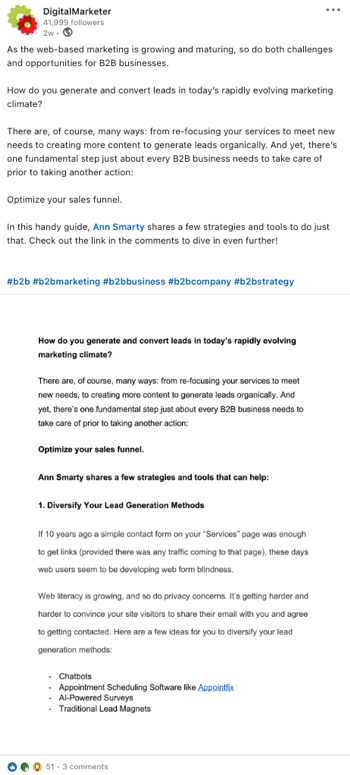
Our docs are super simple and straight to the point.
They’re focused on delivering value over taking up our graphic design team’s time.
Here are Shannon’s tips for creating these documents:
- Give Viewer access
- Use Grammarly to check your spelling and grammar
- “Once ready to post, just hit “document” and choose “Google Drive.”
- LinkedIn will ask you for access, and then you can choose that Google doc to upload as a PDF.
- Title the PDF in LinkedIn and add your text copy and post!
- I also direct people to links in the comments to learn more.”
Save these documents for your content team to keep using.
You can use these documents to outline more posts in the future.
They’re a document today, but in a few weeks you could turn that content into a LinkedIn text post, a blog article, a podcast episode, a TikTok… okay, we’ll stop now.
You get the point.
These documents are great for showing your audience how much you’re willing to give away for free (a strategy tried and tested with the Customer Value Journey and Customer Avatar Worksheet).

When Ryan and the DigitalMarketer team first considered giving away our Customer Value Journey and Customer Avatar Worksheet for free, it felt like too much.

We were giving away our secret sauce.
What would people pay us for?
It turns out the opposite was true.
We had given away some of our best stuff, and in return, people wanted to pay us to know more.
If that’s what we would give for free, they couldn’t imagine what was hiding on the other side of that paywall.
As much as it might feel like you should at least be asking for an email opt-in, you’ll have to trust us and karma on this one.
#3: Lean into Employee-Generated Content
Your LinkedIn content has been splintered from other posts, but now you want to get as much engagement on it as possible.
It’s time to lean on your team. If you’re not utilizing employee-generated content yet—the time to start is now.
Employee-generated content gets higher engagement, follows, and conversions than branded content.
Brands like Morning Brew show us the importance of putting faces to your brand, creating an audience-attracting magnet acquired for $75 million.
The key to getting employees to share branded content is to ask them.
Without the green light to create company content, employees will avoid stepping on toes.
They don’t want to get in trouble, and it’s safer not to take the risk.
Leadership is a huge part of employee engagement.
Have your company’s leaders explain what employee-generated content is, how it can help the business, and what they’d love to see from employees in the future.
In our case, we want our DigitalMarketer team to share our LinkedIn posts so we can get more impressions.
Here’s Matthew Douglas, our Content Manager of Sponsored Content, sharing a LinkedIn post highlighting an article published to the DigitalMarketer blog:
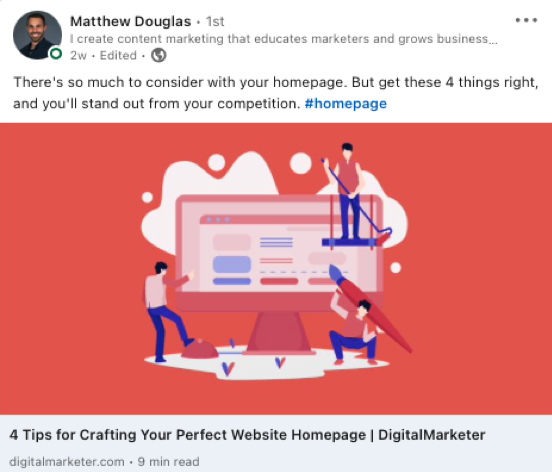
To organize the process of sharing the post with your team, use Shannon’s strategy:
“Create a Google doc with links to your recent company LinkedIn posts plus brand new copy divided into categories (sales, marketing, human resources, etc.).
Include your company’s LinkedIn handle in all of the posts. Then share with your company.
Before you ask your team to engage with your branded content online, we have to make sure you’re clear on the goal. As Shannon explains,
“The goal here isn’t web traffic (although it can be an added benefit).
It’s to get new people to your company page to explore and engage.
The goal is to get them to share your previously published LinkedIn posts plus brand new posts that all tag your company’s LinkedIn.”
Obviously, web traffic is an important (massive) part of your LinkedIn strategy.
But, your employee-generated content isn’t necessarily there to pull massive traffic.
Your employees might only have a few engaged friends and family on LinkedIn—so don’t be hard on them if you’re not going viral because of their shares.
What you’re doing is getting your brand acquainted with more LinkedIn users.
This is Stage 1 of the Customer Value Journey, Awareness.
For someone to buy a product from you, they have to first know you exist.
You don’t want to ask them to buy your products the second they find out about you.
That’s like asking someone to marry you while they’re walking down the street.
You have to let them warm up to you, ask for a first date, and then give them some time to decide you’re the right person for them!
Luckily business works faster than relationships that lead to marriage, but it’s still a relationship.
When your customer avatar discovers your brand through a colleague, friend, or family member, you’re walking into that relationship with established trust.
That will help move new leads through your CVJ faster and help people get to know you, even if they don’t need your services.
How many times have you referred someone to a brand without ever buying their products because you saw them online, and it seems to fit the solution your friend is asking about?
The answer is all the time. Position your brand in the same way by using employee-generated content.
We are not stopping this LinkedIn strategy anytime soon.
Shannon has figured out how to increase our impressions, engagement, and post clicks, and we’re really excited about this strategy.
LinkedIn is an engagement goldmine for B2B businesses.

LinkedIn Page
Instead of pushing through the noise of every customer avatar in existence on other social platforms, you can focus on business-minded people on LinkedIn.
People don’t open LinkedIn to find recipes, see fancy car photos, or get inspired by home decor.
They’re on LinkedIn with their business hat on.
And that sure seems like the best possible time to show them what you have to offer their business.
The post 3 Ways to Increase Impressions, Engagement and Post Clicks on Your LinkedIn Company Page appeared first on DigitalMarketer.
Source: digitalmarketer.com

The Marketer’s Guide to LinkedIn Stories
LinkedIn Stories are here, and the first thing you might be thinking is, “How can I use them to grow my business”?
We all see how powerful stories are for brands on platforms like Instagram. Over 500 million people use Stories each day, but how can you use this social strategy to boost your professional reputation on LinkedIn?
In this guide, I’ll show you how to use LinkedIn Stories and share strategies you can start implementing today.
What Are LinkedIn Stories?
If you’ve ever made a story on Instagram, Facebook, or Snapchat, LinkedIn Stories operate in pretty much the same way. You create a short video of up to 20 seconds, and once you upload it, the video is available for people to see for 24 hours, and then it goes away.
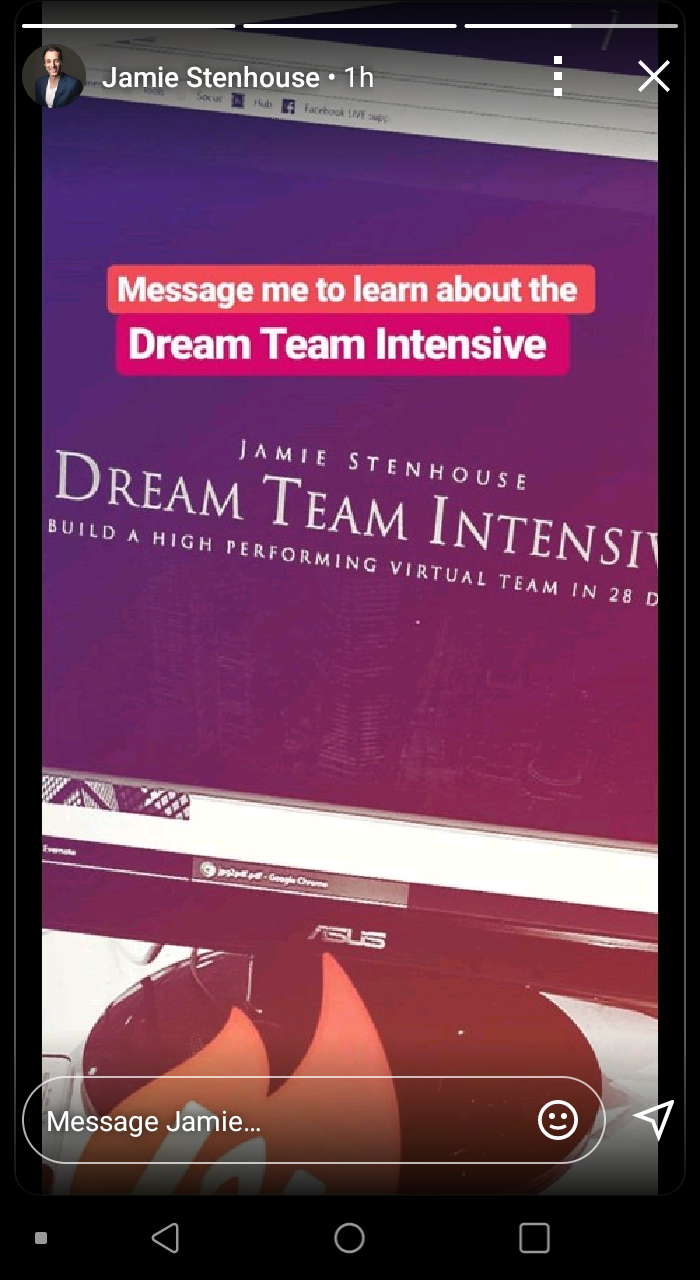
Users can post as many stories as they like, making it easy to quickly jump in, record a quick update with what you’re doing, and then allow your connections to check it out.
So, why stories? Why do I think LinkedIn is starting to roll out something so casual on a platform geared towards networking and digital resumes?
Because we’re living in the “age of sharing,” and the more you share, the bigger your brand becomes. Stories are a great way to share all of those imperfect moments in your professional life, and I think that’s what the Senior Director of Product Management, Pete Davies, is going for.
The format will help kickstart conversations and nurture the relationships that are core to everything that happens on LinkedIn.
Why Should Your Business Create LinkedIn Stories?
Now let’s talk about some of the reasons why you should consider implementing a LinkedIn Stories strategy in your business. If you’ve been using Instagram or Facebook Stories for a while, you’ll likely be able to come up with a plan pretty quickly; if not, here are some reasons to take notice.
Pull Back the Curtain
One of the best ways to generate attention for your business is to show people what’s happening behind the scenes.
Show your network there’s a personality behind the business. This helps create a more personal experience. When people see you’re more than a “brand,” you’ll build the trust that’s so necessary when trying to get someone to do business with you.
Taking this even further, you can use this strategy to give your connections some insight into your process.
For example, if you run a print on demand shirt store, use LinkedIn stories to show people how you make your shirts and why they should choose you over someone else.
There’s a great opportunity here for you to separate yourself from the competition without having to hard-sell anyone.
Document the Hustle
In years past, we were so focused on making everything perfect. We needed to buy the best equipment and do everything to ensure no one ever saw us make a mistake.
Those days are long gone.
We’re living in a world of constant connection, and we can’t be afraid to document what we’re going through as it’s happening. For those of you who are already doing this, that is excellent news. If you’re not, now is the time to get started.
Don’t be afraid to show your connections that you’re a real person with faults. If something is going wrong, do a story and explain to your colleagues what happened and how they can prevent the same thing from happening to them.
Doing this shows authenticity, and people don’t hire a brand; they hire people.
On the flip side, share your triumphs and successes as well. If you just closed on a huge contract with a big client, create a story explaining how it went and what you think you did well.
You don’t have to give away sensitive information, just let your network know what you’re winning, and it might motivate them to reach out and connect with you.
Increase Engagement With LinkedIn Stories
Stories on LinkedIn provide the most significant opportunity for engagement. On Instagram, as much as 25% of users swipe up on branded stories. Now we’re taking this same thought process but moving it to a platform entirely dedicated to business networking.
There’s a lot of power here.
Keep in mind that, even though your stories might not result in a direct sale, you’re generating awareness around you and your brand.
LinkedIn allows you to engage with the people you need to directly talk to for access to new opportunities.
For example, let’s say the Director of Marketing at a company posts a story about their SEO strategy, and you are interested in working with them. Here’s your chance to directly reply to that story with some tips and ideas you’ve used in your own business.
Keep in mind that you may get a generic response to something like this, but you’re increasing the person’s chances of checking out your profile to see what you do. If you’re active on LinkedIn and your profile is well optimized, you just might find a message in your inbox.
How to Create LinkedIn Stories?
Creating LinkedIn Stories is simple. It works the same as every other platform.
You’ll go into your LinkedIn app and click the “post” button at the bottom. Once you do that, you’ll see a new button titled “share a story.”
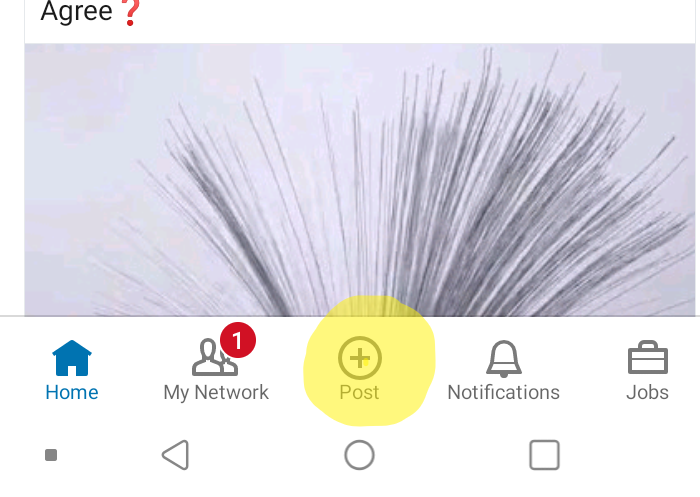
When you click it, you’ll be able to record a video or take a picture and customize it to your liking.
The story uploads, and once it’s done, you’ll find it at the top of your LinkedIn home with all the stories from your connections. This is a fantastic way to put your name at the top of everyone’s page.
Keep in mind that LinkedIn Stories are only available on the mobile app. You can’t create or view them from your desktop.
What Makes a Successful LinkedIn Story?
If you’re sitting there right now, wondering, “What steps do I need to take to create the best story?” Selling with LinkedIn Stories is easy, and I’ll guide you through it.
Looking at Instagram as an example, 50% of businesses worldwide create an average of one story per month. So, you can see where the low hanging fruit lies here. You have an excellent opportunity to generate a lot of free attention for your business — with the right strategy.
Here are the most important metrics to consider when determining the success of your LinkedIn story.
Grab Their Attention
The first thing you’ll notice about LinkedIn Stories is they don’t offer a preview at the top of the screen like Facebook and Instagram. This makes getting the initial click a bit more difficult.
You can’t create a clickbait thumbnail to get people to click on your story. So, your LinkedIn profile picture needs to get the attention of your audience.
Keep in mind that LinkedIn is a professional network, so use a professional headshot on your profile. This is not the place for a picture of your cat or your car; you need to dress and look the part.
Think about your target audience and dress to get their attention. An agency owner pitching agriculture businesses might not look the same as one pitching boutique coffee shops, right?
Start Strong
The average person only watches 40 to 60% of your story, so you must grab their attention right away. If you start with a boring message, chances are they’ll swipe away and assume your Stories aren’t worth watching.
Consider starting your story with the most exciting part of the video. While you only have 15to 20 seconds, take those first five seconds to speak directly to the camera and call out your audience.
If you’re trying to reach agency owners making $100,000+, call them out right away. Address a pain point or issue they might have within the first five seconds, and you’ll increase the chances of keeping them around for the next 15.
Keep Their Attention
At around the 10-second mark is where you will start losing people. They’ll swipe to your next story or move on to a different profile. You need to hold their attention by keeping it as interesting as possible.
Consider using props, bring in other people, and utilize statistics that draw in your audience and speak to them directly. Every business should have a customer avatar. If you don’t, now is the time to start!
Figure out exactly who your ideal customer is and bring them to life with personality traits, demographic information, pain points, and desires.
You should know exactly who they are, what they want to hear, and what you need to say to make them stick around.
Close It Out
While Stories are meant to be informal, it doesn’t mean you can’t have an objective in mind. You should always be looking for ways to convert the people watching your Stories.
These are great opportunities to get free attention, so make the most of it.
Keep in mind that a lot of people have likely swiped away by the time you get to your last five seconds. That means these people are highly interested in what you’re saying and may want to learn more.
For example, you could turn a blog post you recently posted into a Story. Take the three most important points from the post and highlight them in a story. In the end, tell the viewers where they can find the blog post and prompt them to check it out.
There are a million different options, but you want to have some type of call to action at the end of your story.
You don’t have to ask someone to buy something directly, but you should always tell them what to do next.
Tips on Converting LinkedIn Story Viewers to Clients
If you’re on LinkedIn, I can bet you’re there to get clients. Why else would you use the platform? Networking and building connections are great, but the end goal of those efforts is to add more clients to the database.
Here are a few quick tips to help you get the most out of your LinkedIn story viewers.
Stay on Brand
On Facebook, users move 41% faster on mobile than desktop. While we don’t have data from LinkedIn yet, we can expect the numbers to be similar. You need to be quick in establishing your brand and representing it the right way.
When someone taps your story, they should get hit immediately with something that makes your brand stand out so they’ll remember it.
Even if you’re just quickly recording a story about going for a run before hitting the office, talk about how it impacts your performance at your business.
Provide Value
The best way to convert traffic is by giving something away. You don’t have to overcomplicate this. Provide free information, offer a short how-to, or show them how to solve a critical problem.
Revisit your customer avatar here and think of something that might be on their to-do list. What’s something that your ideal customer hates doing? Chances are it might be the very thing you do and offer to take care of it for them if that’s the case.
Always Have a Plan
Just because LinkedIn Stories are casual doesn’t mean you need to improvise all the time. Never fill the story with something that doesn’t have an objective.
Doing this one time will hurt your brand, and people might just swipe by you because they think you have nothing to offer.
Every time you put something out to your audience, you should have a plan in mind to provide value. Give yourself enough time to plan ahead and even consider developing a content calendar for your LinkedIn stories.
Conclusion
LinkedIn Stories are an exciting addition to the networking platform. Based on what the Senior Director of Product Management said, they’re trying to make LinkedIn appear less intimidating and more informal.
Have you ever had the opportunity to stand out and become an early adopter? Maybe you have, maybe you haven’t. Either way, LinkedIn stories offer a unique chance to jump ahead of the competition and get your content in front of your target audience first.
Why wait? Create your first LinkedIn Story right now and get ahead of the pack!
Have you tried LinkedIn Stories yet?
The post The Marketer’s Guide to LinkedIn Stories appeared first on Neil Patel.
Source: neilpatel.com

6 Steps to Launch Your First LinkedIn Ads Campaign
If you have a job, you should be on LinkedIn.
If you own a business, you should also be on LinkedIn.
But especially if you provide any sort of B2B product or service, you have to be on LinkedIn.
You can go ahead and set up your new profile now before we get to the rest of the post, I’ll wait.
Those of you who are still dragging your feet, let me convince you.
With over 560 million users, including professionals in every industry you can think of, it’s the biggest source of potential new business leads available in the world.
And with LinkedIn ads, you have the ability to reach your ideal prospects through powerful targeting that allows you to customize your campaigns based on specific industries, locations, job titles, and more.
The only problem is, a lot of people seem to be confused by LinkedIn ads.
This is a different animal than Facebook, so the ad platform might seem a little unfamiliar if you’ve never used it before.
But don’t worry, y’all. I got you.
6 Steps to Launch Your First
In this post I’m going to walk you through the 6 most important steps to successfully launch your first LinkedIn ad—so you can start targeting and attracting your ideal prospects on a bigger scale than ever before.
Launch a LinkedIn Ads Campaign Step 1: Make Your Profiles Shine
So you’re going to advertise on LinkedIn? Great!
But don’t start working on your ad copy just yet.
Step #1 of launching a successful LinkedIn ad campaign is to optimize your profiles.
We have a few things to take care of first to make sure your new campaign is set up for success.
You know that account you just set up (or maybe you’ve had it a while and it just needs some love)?
You are going to have to put some work into it.
This is really important, y’all.
Remember that people do business with people.
And this is especially true on LinkedIn, where it’s super easy for anyone to check out your profile and see what you’re all about.
That’s why step #1 of launching a successful LinkedIn ad campaign is to optimize your profiles and portray yourself as the kind of person that your prospects will want to do business with.
And there are 3 pieces to doing this right:
1) Optimize Your Personal LinkedIn Profile
I recently wrote a post that goes into this topic in-depth, so rather than rehash everything again, just click here to learn how to create an all-star LinkedIn profile.

2) Create Your Company Profile
Once your personal profile is set up for success, the next thing steps are to create a great-looking company page.
If you don’t have a company page yet, you can easily create one in just 2 clicks:
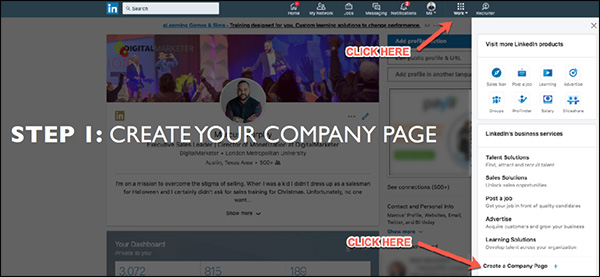
Then specify your company name and LinkedIn URL:
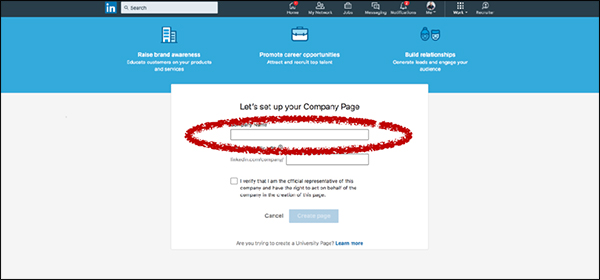
Now your company page is created on LinkedIn! Of course, you still have to complete your profile by filling out all the information, adding copy, uploading media, and so on.
The 3 things that you’ll want to add right away are your cover image, your logo, and your “About Us” summary. Here’s where you can find them:
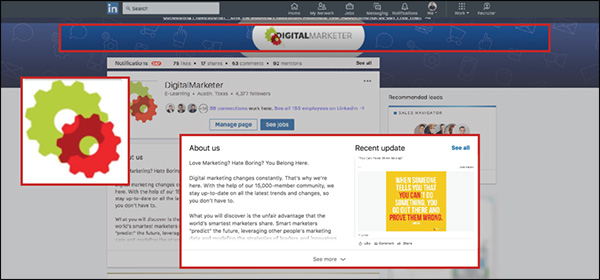
Make sure your header and profile picture are branded (a lot of companies just use their logo for the profile picture). This way when people land on your company page they’ll know right away who you are and that they’re in the right place.
In your “About Us” summary, make sure you’re speaking to your audience.
Let them know right away that what you offer is directly relevant to them, and that you offer an effective way to solve their problem.
Another thing to keep in mind here is search optimization.
LinkedIn is really good at SEO, so if you fill out your company page well, it has the potential to show up in relevant Google results.
Here are a few things to keep in mind when optimizing your company page for search:
- Google previews 156 characters.
So make sure the first 2 sentences or so of your “About Us” section do a really good job of communicating who you are, what you do, and how you can help people.
- Lead with a story.
I’m a big fan of using narrative-style copy that tells a story.
Paint a picture with your words that tell people what you do and how you can help them in a clear and compelling way.
- Members can search by keywords.
Remember that LinkedIn has its own internal search function, too—so definitely remember to include any relevant keywords that you want to show up for.
- Communicate expertise and industry focus.
Don’t try to be all things to all people.
Generalists don’t typically win on LinkedIn. Instead, tell people what industry you focus on and what you’re GREAT at.
3) Get Your Team On Board
The last step here is to get your team on board.
Because after all, everyone at your company makes up your brand.
And any potential leads or business partners who interact with you on LinkedIn are going to be able to see your employees if they want to:
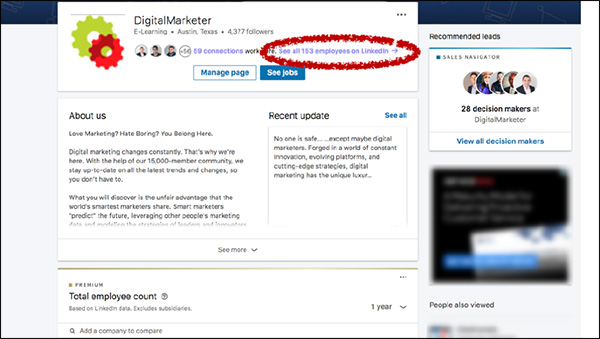
So get your team on board.
Have everyone connect with your company page, and ask them to go through the same profile optimization tips that you completed for your own personal profile.
Launch a LinkedIn Ads Campaign Step 2: Promote Great Content
OK, so now you’ve got an all-star personal profile as well as an awesome company page that stands out and speaks to your ideal prospect.
Is it time to start creating ads yet?
Nope.
I know you’re antsy, but trust me y’all—there’s a method to my madness here.
And there’s a really important reason why we’re going through all these steps before we create your actual campaign.
It takes a little more time up-front, but I promise you it will be worth it in the end.
So with that in mind, the next thing you’ll need to do is to promote great content on LinkedIn.
(RELATED: 3 Simple Steps to Creating A “Pillar Blog Post” That Generates Organic Traffic for Years to Come)
LinkedIn is hugely underrated as a content platform.
And now that they’ve launched native video, giving a massive engagement boost to your video content, it’s going to be even better.
LinkedIn is hugely underrated as a content platform.
There are about 9 billion content impressions every week on LinkedIn, which is an enormous number.
And what’s even crazier is that those 9 billion impressions are being driven by just 3 million people.
This means there’s a lot less competition here than other platforms like Facebook.
That’s why, as long as you post good content and follow a few best practices, you stand a really good chance of generating great engagement with your content on LinkedIn.
Here are my top 5 tips to help you do that:
1) Share Daily
I recommend sharing content daily.
Yes, you heard right—every single workday you should post some kind of content on LinkedIn.
That could include a huge variety of content.
Company news and updates, blog posts, industry articles, and more.
If you’re a thought leader, or if you want to be, this is a great place to promote your thought leadership.
Share articles from your industry and weigh in on what the author has to say.
(Even if you’re not the one actually writing these articles, simply the fact that you’re reading and sharing them will start to position you as a leader in your industry.)
It’s also a great idea to prompt your followers to weigh in.
Ask for thoughts, opinions, and questions.
This is a great way to keep your finger on the pulse of your audience so you can quickly respond to their changing needs and problems.
2) Optimize Your Copy
For any piece of content, the words you use are important.
The difference between good copy and bad copy often means the difference between an article people want to click on… and one they scroll past without a second glance.
But this doesn’t mean you have to agonize over every single word in your article.
Instead, you can just focus on the few places in your content where the copy is most important.
Here are a few tips for improving your content:
Keep your intro concise.
Don’t spend too long introducing your topic.
Just write a quick intro and get to the meat of your content ASAP.
Write a snappy headline.
What is a snappy headline?
Simple: it’s one that STANDS OUT IN THE NEWSFEED.
That’s your #1 goal, so keep it in mind when you write your headlines.
Ask thoughtful questions.
Many of us are so busy telling people about ourselves—what WE do, why WE are so great—that we forget to ask questions about what THEY want.
Doing this can be really powerful, and is a great way to put the focus of your content back where it belongs—on the customer.
Write a clear call to action with a link.
At the end of your content, what should people do next?
Don’t force people to hunt around for a “Contact” page if they want to do business with you. Instead, take the next step super clear by writing a compelling call to action with a link for people to click.
3) Make It Visually Appealing
After the copy, the next thing you’ll want to work on is your content’s visual appearance.
This can make a HUGE difference in your performance.
Just take a look at these pieces of content—see how these bright images really stand out?
They get much more engagement than they would without any images or video:
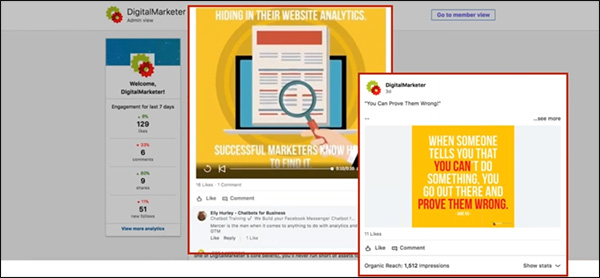
So the take-home message here is pretty simple. Use media—images, and videos—to help your content stand out in the newsfeed and grab people’s attention.
4) Be Helpful, Not Salesy
Ultimately, your goal is to generate sales. I get that.
But don’t get ahead of yourself.
When posting content, now is not the time to get salesy.
Instead, you should be using content to help generate engagement, build goodwill and trust, and position yourself as an authority in your industry.
With that in mind, you should post content that is NOT overly promotional.
Instead, make sure that your content has a benefit to your audience—it helps them solve a problem, or answer a question.
5) Use Tags
If you want to give your organic content a boost, tag companies and/or people who would find that content useful.
This will help generate some quick likes and comments right out of the gate—which will signal to the LinkedIn algorithm that this is an engaging piece of content that it should share with a wider audience.
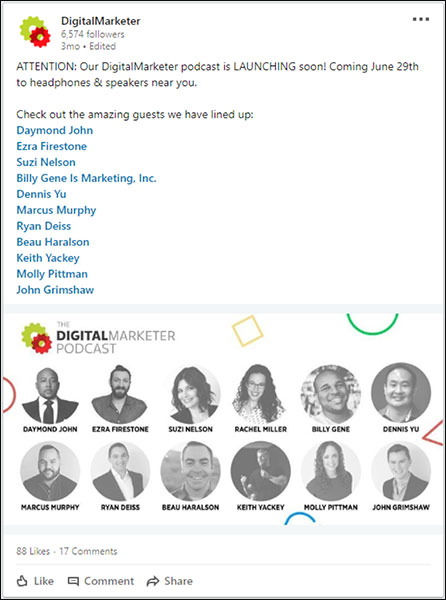
We used this strategy when we announced the new DigitalMarketer Podcast by tagging some of our upcoming guests.
The post performed really well as a result:
Launch a LinkedIn Ads Campaign Step 3: Analyze the Data
Now that you’ve been posting content on a regular basis, it’s time to analyze the data around that content to see how well it’s been performing.
In your business page Engagement highlights, you can see how well each piece of content performed in terms of impressions, clicks, video views, followers acquired, and more.
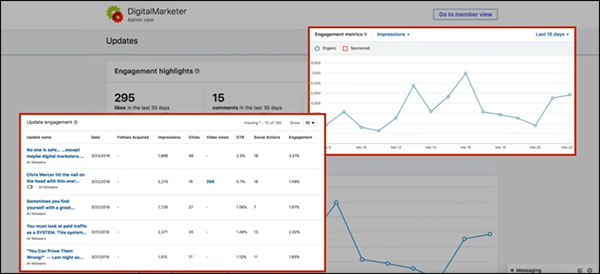
So take some time to dig into these reports.
Your goal at this step is to find out 2 main things:
First, WHO is engaging with your content?
Are you reaching the right kind of people?
If not, go back and tweak your headlines to see if you can appeal to a more appropriate audience.
If you are reaching the right people, the next thing you want to find out is:
WHAT kind of content are they engaging with the most?
Are there certain topics that appeal to your audience?
Certain formats (blogs, podcasts, videos)?
This is a really important step because you can learn so much about your audience, like what issues are important to them and what kind of content they’re most likely to engage with on LinkedIn.
And armed with that knowledge, the moment you have all been waiting for: it’s time to finally create your first LinkedIn ads campaign.
(NOTE: Want to make sure you are capturing all the leads you can? Download the FREE 10-Point LinkedIn Audit so you know your LinkedIn Profile is honed to boost your business.)

Launch a LinkedIn Ads Campaign Step 4: Target & Sponsor Content
LinkedIn offers 3 primary ad types:
- Sponsored content
- Sponsored InMails
- Text and dynamic ads
When you’re first getting started, I recommend using sponsored content.
Sponsored content is a great way to get your feet wet with LinkedIn ads.
Sponsored content is a great way to get your feet wet with LinkedIn ads because, for one thing, you don’t need a huge budget to reach a wide audience.
InMails and display ads are great, but it’s typically a lot more expensive to reach a wide audience with those ad types.
Boosted content, on the other hand, is more cost-effective… especially if you boost content that gets good organic engagement.
And this should be music to your ears because you’ve already posted and analyzed organic content, which means you should already have a really good idea of what kind of content is going to resonate best with your audience.
In other words, all you have to do at this stage is amplify your best-performing content!
Another great thing about sponsored content is how easy it is to get started. Just open the post from your business page and click “Sponsor now”:
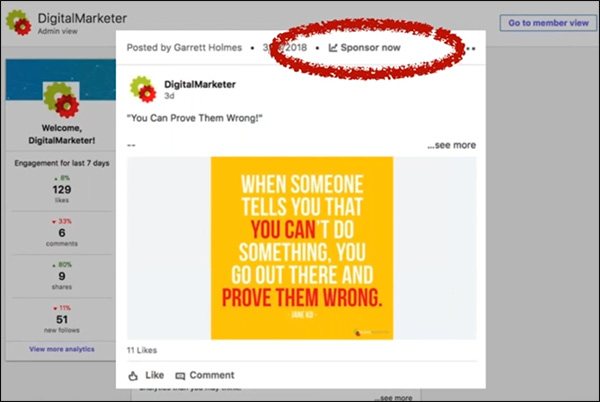
That will take you into the Campaign Manager, where you can create your new campaign.
And there are 5 main steps to doing this:
1) Create Your Campaign
In the Campaign Manager, click “Create campaign”:
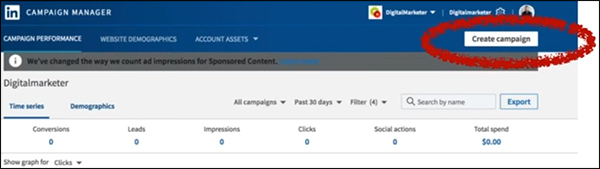
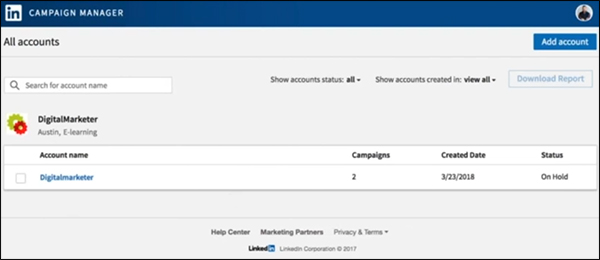
Next, you’ll choose which account to use for this campaign.
Each account is tied to a different company page, so in most cases, you’ll probably only have one to choose from.
Then specify a campaign name and choose a goal—do you want to send people to your website or collect leads using Lead Gen Forms?
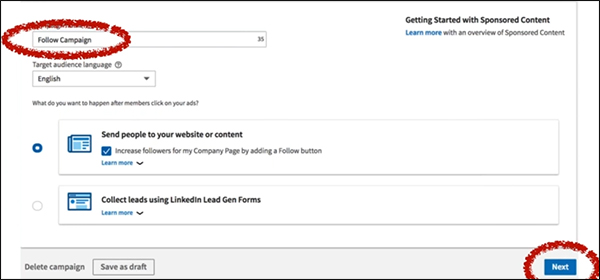
For your first campaign, I recommend just sending people to your website.
Once you click “Next,” you’ll see a list of all the content you’ve shared from your company page.
Find the content you want to sponsor and click the checkbox on the left.
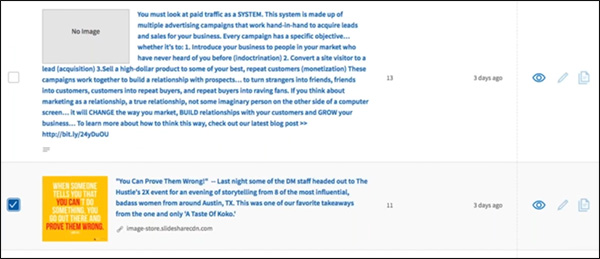
As I said, in general, you’ll get the best results if you boost content that has already performed well organically.
2) Set Your Targeting
Here’s where you’ll start to see why LinkedIn has so much potential as a B2B advertising platform.
The targeting options are amazing.
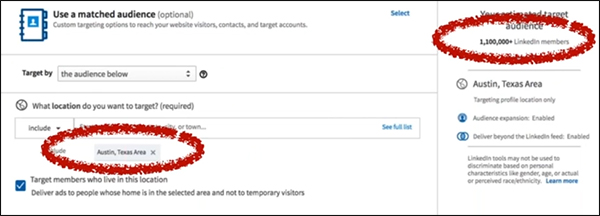
Your first option is to filter by geography. Just type in your area, and LinkedIn will tell you how many people you can reach in that area.
For example, there are over 1.1 million LinkedIn members in the Austin, TX area:
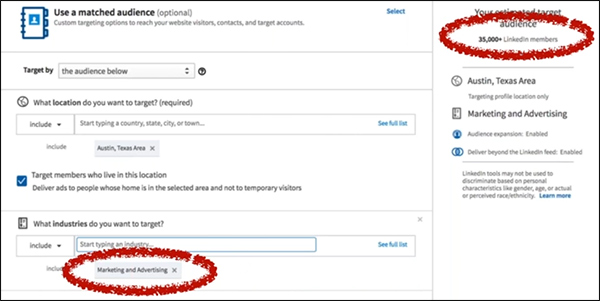
Next, you can specify which industries you want to target.
Here at DigitalMarketer, we help people who are in marketing and advertising, so I chose that industry.
As a result, my estimated target audience narrowed to 35,000:
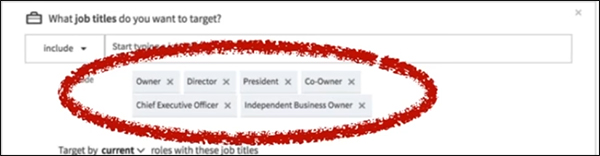
Finally, you can focus your targeting even more by targeting people based on their job titles.
So if you only want to reach decision-makers on LinkedIn, you might target titles like “Owner,” “Director,” “President,” and “Chief Executive Officer”:
When I add those job titles, my audience shrinks down to 5,000:
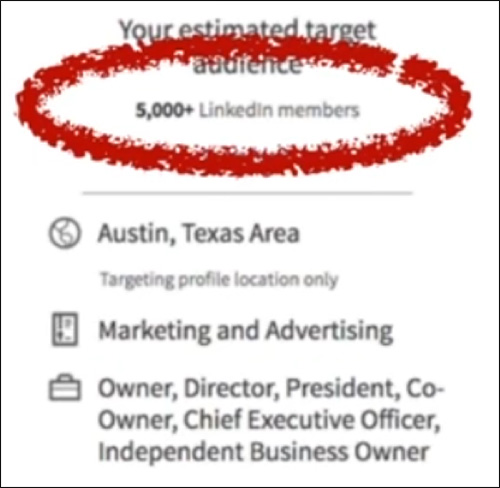
It might seem like a small audience compared to the 1.1 million we started with, but keep in mind, these are 5,000 business owners and executives in the marketing/advertising industry in the Austin area.
These are people who meet the exact specifications of my target audience.
Considering how tightly targeted this is, it’s actually a big audience with HUGE potential.
3) Decide on Your Campaign Goal
Next, you’ll need to choose a campaign goal.
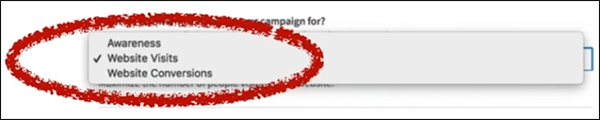
Do you want to optimize this campaign for awareness (views), visits, or conversions?
When boosting your first piece of content, I recommend Website Visits.
You really want to get people to your website where they can learn more about you. (And if you want, you can also continue to follow those people on other platforms with remarketing.)
4) Set Your Budget & Bidding Options
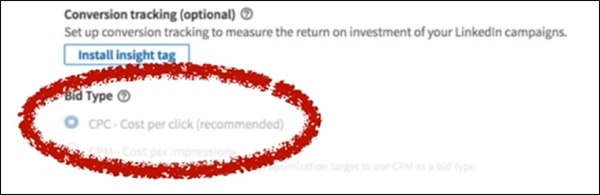
Next, you’ll have to decide between 2 different pricing models: CPC (cost per click) or CPM (cost per mille, or cost per thousand impressions).
The choice is up to you, although LinkedIn recommends CPC bidding if your campaign goal is website visits.
And now you’re almost done! Just decide on a budget, a bid limit, and your campaign dates:
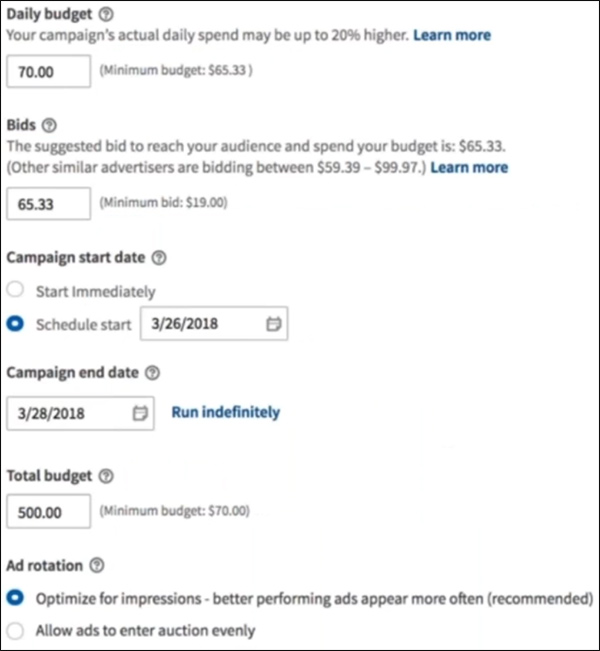
So you can specify a lot here.
Your Daily budget is how much money you’re willing to spend each day on average. (LinkedIn may spend a little more or less on any given day, but it will average out to equal your daily budget.)
Your Bid is how much you’re willing to pay per click.
LinkedIn will tell you about how much other people are bidding to reach a similar audience, so you should probably choose a bid that’s somewhere within that range.
Your Campaign start date is when your ads will begin displaying.
Pretty self-explanatory.
And your Campaign end date is exactly what it sounds like.
If you want your ads to continue showing, just click Run indefinitely.
If you want to specify a Total budget, that will give LinkedIn a total budget that it won’t exceed.
If you don’t specify a total budget, it will continue spending the daily budget for the length of the campaign (which might be more than what’s in your account)
Finally, Ad rotation tells LinkedIn how to decide which ads to display.
You can tell it to show your ads evenly or to display the better-performing ads more often. (Which is probably the way you want to go.)
5) Enter Your Payment Information
You’re almost done! The final step is to enter your credit card details.
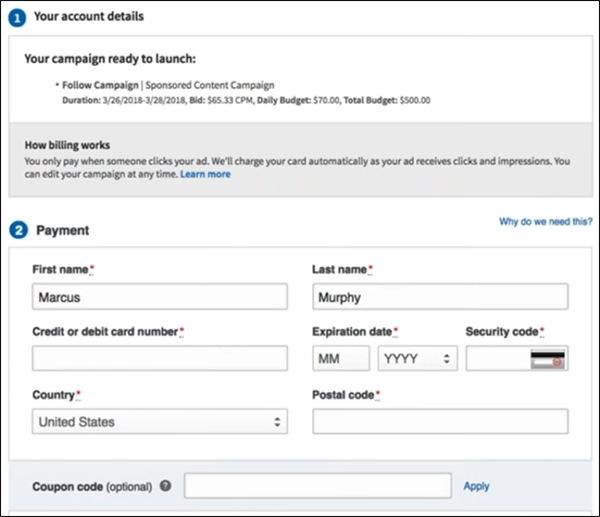
Congratulations—you’ve just created and launched your very first LinkedIn ad campaign!
Launch a LinkedIn Ads Campaign Step 5: Optimize Your Campaigns
If you’ve followed along with steps 1–4, you now have a LinkedIn ads campaign up and running.
But like any advertising campaign, your work isn’t done. You’ll need to monitor your LinkedIn ads to see how they perform, then work to improve that performance over time.
And I want to challenge you to think deeply about how you measure your results on LinkedIn.
Of course, you need to pay attention to your cost per click and/or cost per impression—because that’s how you’re actually bidding on the LinkedIn platform.
But here at DigitalMarketer, we’ve evolved beyond those standard metrics and we now measure our LinkedIn campaigns based on our cost per meeting.
When you down to it, this is a much more useful metric for our business.
And it’s a pretty easy number to come up with a quick benchmark for.
Just think about how much a new client is worth to your business, and work backward.
If a new client is worth $10,000 on average…
And if you convert 1 out of every 10 meetings to a client…
Then a meeting is worth about $1,000.
Make sense?
Knowing that you can now optimize your campaigns to generate new meetings at or below that threshold and still be profitable with your LinkedIn campaigns.
Launch a LinkedIn Ads Campaign Step 6: Tips & Best Practices
Now that you know how to create and optimize a campaign on LinkedIn, I want to share some of the most helpful tips that I’ve learned from my experience advertising on this platform.
Higher Ticket B2B Wins
LinkedIn is a perfect place to reach professionals, which means it’s ideal for B2B offers.
And because of the high costs for quality B2B traffic, high-ticket offers tend to work best on LinkedIn.
If you’re using LinkedIn to promote a B2C offer, that’s going to be tough.
Because the costs are just too high to justify most consumer purchases.
But if you’ve got a B2B product or service with a high price tag—think business coaching, exclusive communities, masterminds, etc.—then you can do really well on this platform.
Do’s & Don’ts for Sponsored InMail
In this article, I focused mainly on boosted content.
But LinkedIn has other ad types as well—including display ads and something called Sponsored InMail.
So what is Sponsored InMail?
LinkedIn is a perfect place to reach professionals, which means it’s ideal for B2B offers.
This ad type sits on top of LinkedIn’s messenger platform and allows you to deliver real-time targeted messages.
InMail also allows you to use conversion tracking for attribution, which is important because Sponsored InMails don’t send out all at once (like an email blast).
Instead, your sends will trickle out over time to avoid feeling spammy.
It’s really important to set up conversion tracking so you can measure the success of your campaign.
Generally speaking, the open rate for these messages is really high—20% or higher.
And when done right, a Sponsored InMail campaign can perform really well.
Here are my main dos and don’ts for using Sponsored InMail in LinkedIn:
- DO narrow the scope.
Use your customer data for targeting.
Just like any campaign, the more tightly targeted your campaign is, the better your response rate will be.
- DON’T be formal.
Be conversational, and people will be more likely to read and engage with your message.
- DO include a clear call to action.
Ask people to “Try” your solution, “Register” for your webinar, “Reserve” a copy of your product, “Join” your community, “Confirm” whether they meet your specifications, or “Download” a whitepaper or other online resource.
- DON’T have just anyone send the message.
You can choose who to use as your “From” profile, so choose someone high up in your organization whose message would carry the most weight and credibility with your target audience. A
nd make sure that person has a dynamite LinkedIn profile because anyone interested in your message will almost certainly check out the sender’s profile.
- DO plan for mobile.
Remember that a lot of people will see this message on mobile, so keep it to about 1,000 characters to avoid overwhelming people with too much text.
And that’s all there is to it!
When you launch your Sponsored InMail campaign, your prospects will get a message like this inside LinkedIn Messenger:
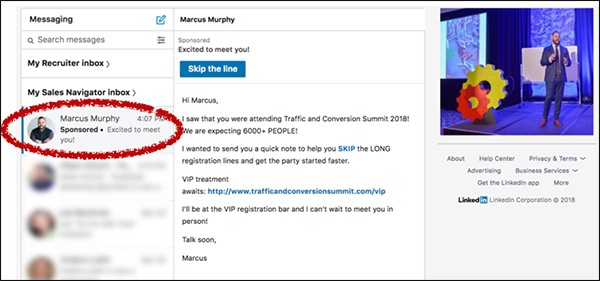
(Notice that you can also upload an image for your message, too, which will appear on the right-hand side of your message.)
Prepare for the Future of LinkedIn
LinkedIn is already a powerful platform for B2B marketers, and it’s still growing and evolving rapidly.
I believe that over the coming months and years you’ll be able to leverage even more powerful strategies on LinkedIn.
Here are a few things to keep your eyes peeled for:
- Live video.
It’s coming to LinkedIn, and it will help you connect with your audience to build more authority and generate more engagement.
Videos work, and live video works better. Watch for it and use it.
- Sales Navigator.
This tool (which is already amazing) is getting better all the time and is moving more and more toward becoming a full-fledged CRM for B2B companies.
I highly recommend using Sales Navigator.
- Education.
I think education is going to be big on LinkedIn.
So if you offer any sort of professional development services, you really need to start getting active and building a presence on LinkedIn—because this is going to be a really profitable network for you.
There it is, y’all: everything you need to know to set up your first successful LinkedIn ads campaign.
I hope this has been helpful, but as always, the best way to learn these things is by DOING them.
So go get onto LinkedIn and start going through these 6 steps to starting growing your business with LinkedIn ads.
(NOTE: Want to make sure you are capturing all the leads you can? Download the FREE 10-Point LinkedIn Audit so you know your LinkedIn Profile is honed to boost your business.)
The post 6 Steps to Launch Your First LinkedIn Ads Campaign appeared first on DigitalMarketer.
Source: digitalmarketer.com