
Tag Archives for " keywords "

How to Identify and Close Your Keyword Gaps
Would you like to uncover new traffic-driving search queries for your site?
I bet you are thinking, “Yes, of course,” right now.
If so, here is a new idea for you: Perform a keyword gap analysis.

What is Keyword Gap Analysis?
Keyword gap analysis (also referred to as content gap analysis) analysis means identifying ranking opportunities your site is missing.
Usually, it involves analyzing which queries your close competitors are ranking for and your site is not.
But there are various ways to identify content gaps.
Why is Keyword Gap Analysis Important?
There are many different ways people search for the same thing online.
It may be impossible for a single team to foresee all of those.
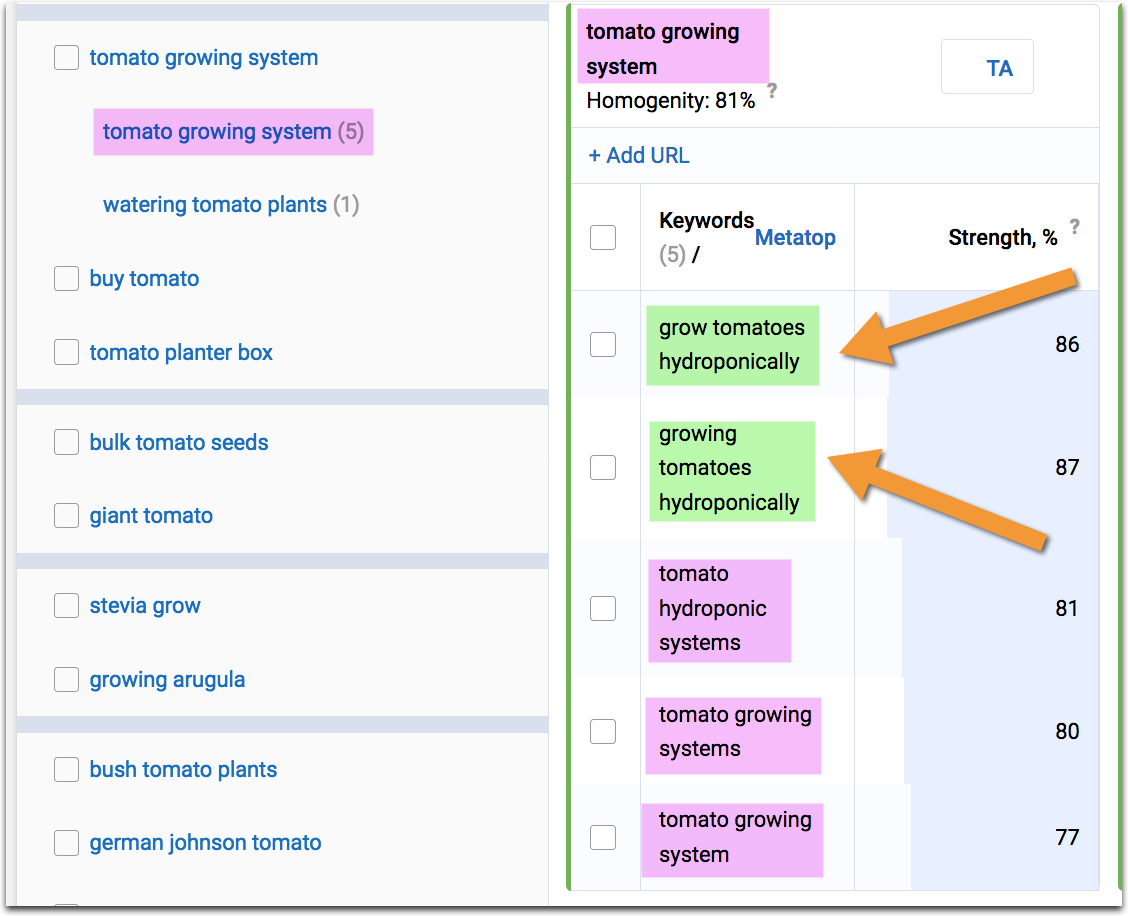
Even if you think you are pretty good at keyword research, there is one step you have always have to start with: your core term.
But what if your customers have a different idea of what that core term should be? If so, you are missing a huge chunk of keywords.
There can be synonyms, local terms, jargon, etc. you are not considering.
There may be products or product features you are not offering.
There may be problems your service is solving, but you fail to mention them on your site.
In all of those cases, content/keyword gap research is helpful.
How to Perform Keyword Gap Analysis
Here is how to perform keyword gap analysis:
1. See what your competitors are ranking for, but you are not.
This type of analysis is available through any SEO platform these days. My two favorite ones are:
Spyfu
Spyfu offers an easy and quick way to find your keyword gaps.
All you need is to enter your domain.
The tool will identify your organic or paid competitors and generate the list of keywords that you are missing.
In Spyfu, the feature is called Kombat, and it allows you to research your keyword gaps based on the following intersections:
- Keyword universe: Keywords unique to any of the entered domains
- Weakness: Keywords both of your competitors are ranking, but you are not.
- Exclusive keywords: Keywords that are unique to your domain (your competitors’ keyword gap).

The detailed view will let you see and export all your missing keywords together with their search volume and “keyword difficulty” that takes into account various factors (like title optimization, quality of backlinks pointing to the page, etc.)
What I love about Spyfu’s tool is that it allows you to find keyword gaps for both organic and paid keywords.
You’ll find similar sections inside Ahrefs and Semrush, but I don’t believe either of those offers paid keyword research.
Ahrefs
As mentioned, Ahrefs’s “content gap” tool works similarly to Spyfu’s.
What I like about Ahrefs is that it helps you research a section of your site, not just your domain or URL.
I find it pretty handy when I want a close look at a specific part of the site and identify higher-level gaps.

For example, if you were to analyze a flower shop using Ahrefs, you would be able to investigate keyword gaps for its /special-offers/ section, including all URLs that are included in that section.
This is a very handy option to have, especially if you are dealing with a large and/or multi-category site.
2. Semantic Analysis
Unlike Spyfu and Ahrefs, Text Optimizer doesn’t look at your specific competitors. Instead, it:
- Takes your search query
- Performs a search for it in Google or Bing
- Grabs search snippets those returned
- Applies semantic analysis to identify underlying concepts and entities
- Reads your content and identifies related concepts you failed to include in your copy.

There is no need to include ALL the suggestions in your content.
But the more you include, the closer the gap between your page and its organic competitors will be.
I like the tool because it pushes you to create longer, better-researched copy.
3. Your Own Analytics
Finally, you can also find content gaps within your own website analytics.
Look for under-performing pages—pages that seem to send people off from your site and pages that don’t engage your audience.
These pages obviously need some help.
Finteza is a web analytics suite that focuses on conversion and engagement analysis.
For example, if I see a graph like this, I know there’s a page that doesn’t perform well:

This is an obvious sign of a content gap:
- This page does rank and brings clicks to the site, so we cannot just trash it
- Yet, the page fails to engage anyone, so it needs content gap research.
At this point, I’d look at competing pages to see how they cater to the target audience, which questions they address, how they engage their visitors, and how their copy is better than mine.
Here are more ways to diagnose and fix lead generation problems on any content-based page, and here’s how to use analytics to improve conversions.
There are many more analytics solutions out there— here are more options.
How to Close Those Content Gaps

Keyword gap research is not simply a content optimization technique.
By identifying keyword gaps, you may discover new ways to present your products (e.g. colors, sizes, etc.), such as content-based landing pages that address problems your customers are facing and introduce your products as a solution.
Chances are, you will need to involve your product development, customer support, sales, and reputation management teams, as many gaps you are discovering can be turned into new product ideas, selling points, and competitive advantages.
While researching your newly discovered queries, look for other things you can pick up during your research.
What are your competitors doing better?
Maybe it is a nice page layout, an engaging content element, or a new way to structure content — there’s always something more to learn from your competitors.
The post How to Identify and Close Your Keyword Gaps appeared first on Content Marketing Consulting and Social Media Strategy.
Source: convinceandconvert.com

5 Keyword Research Tips That Will Blow Your Mind
The trick with ranking is not to force it. When everybody’s trying to rank for the same keywords, there’s not much room for long-term development. This is where you can improve and find keywords semantically related to your niche, but not necessarily used by your competitors.

It’s in Google’s best interest to suggest semantic results, as closely related to the search query as possible.
This should be in your best interest, too.
But what happens when your industry’s a crowded market share where every digital marketing campaign is survival of the fittest at its best?
5 Keyword Research Tips
There are lots of recommendations, tips, and alternatives to paid tools.
We thought of 5 fresh and unique tips to find the right keywords for SEO.
Anxious to get started?
Before we get started on finding lots of keyword opportunities, there’s just one more thing.
Take a second to understand how much search engines have evolved.
When you type ‘Halloween costume Batman’ on Google, it won’t distinctly show you results of Halloween costumes in general and Batman-related content.
Now, it looks beyond your words and shows you whatever is most relevant for you, in this case understanding that it’s a Batman costume you’re looking for.
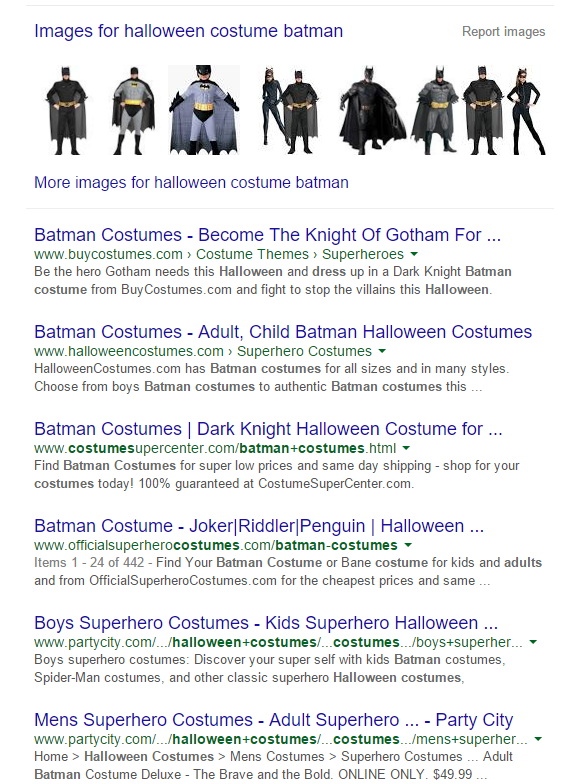
This is why approximately 70% of the search results have derived from the words typed when searching, according to studies made by Google itself – because the search engine is beginning to understand your intention more than the words you’re expressing it with.
It’s true that results can vary depending on your previous searches, your location, and other variables, but browsing in Incognito mode can change this if you’re looking for more ‘objective’ results.
1. Get Keyword Suggestions Using Free Stock Image Sites
At this point, it’s clear therefore that the key is to look in new places for relevant keywords.
Depending on your niche, it may be a great start to look for pictures.
Now, Googlebot can understand by itself very accurately the content of a picture using Automatic Object Detection in Images.

On top of that, we are encouraged to add ALT descriptions to every image we have on our websites in terms of SEO purposes.
Reversing this principle, we’ll notice that looking for keywords on picture descriptions is an easy, effective way to generate new ideas.
For that matter, photo sites are a great source of inspiration, particularly if your niche has enough graphic applications to find useful photo-related keywords.
For instance, if you’re looking for dog food, you’ll be shown both branded and non-commercial descriptions of dog food, as they are characterized in the photo captions.
There are various sites where you’ll find access to online pictures that are not protected by copyrights, and you should find the most suitable ones for your industry.
You’ll see that the sites are of impressive versatility, which means that the search patterns differ, along with the suggested keywords and the images you’ll find. Here are some great sources of inspiration:
1.1 Pixabay
Pixabay has a lot of great value since it has over 1.6 million photos, and you can split your search by category. This way, it’s easier to find out how searches differ from one category to another.

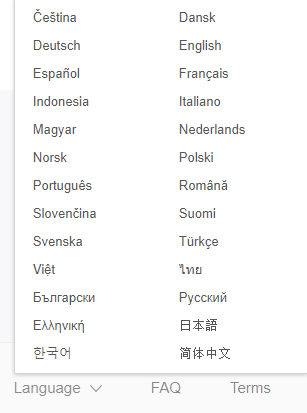
The nice part of this “keyword research tool” is the multiple choices for language support, which allows you to search for keyword ideas in your own language.
You don’t have to translate them by yourself.
Pixabay is more of a community than a conglomerate of pictures, and it can work as a niched, micro social-media site with followers, messages, and all the perks.
I find it important to have a constant source of copyright-free images for current usage, and Pixabay seems to solve two problems at once: free photos and brand new keywords from their descriptions.
Also, being a community-based website, it is free to use and your contribution should consist of uploading photos on your behalf.
This social payment isn’t, however, compulsory, and you can use the site regardless of your personal portfolio.
I would suggest uploading images whenever it’s possible, but it is a matter of personal choice.
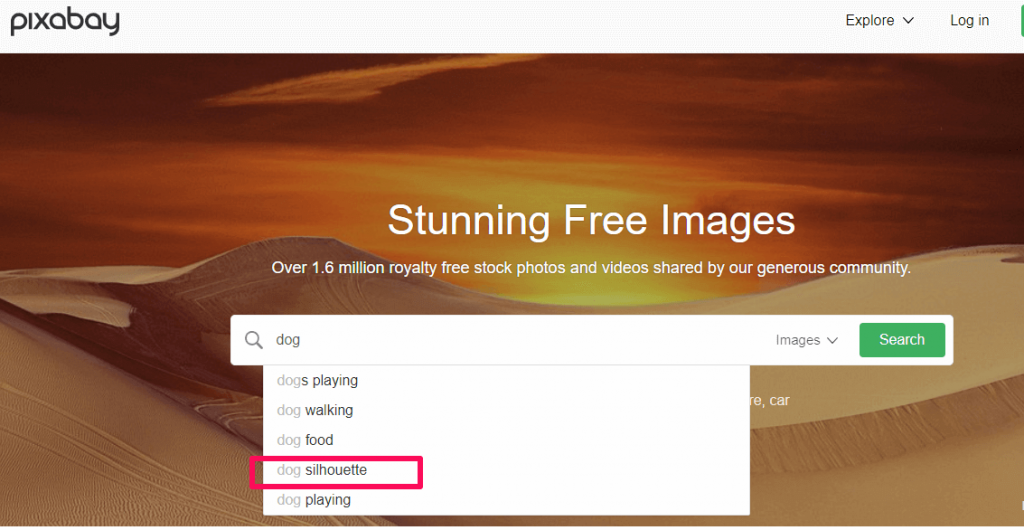
We typed “dog” into the search box and one of the search keywords – “silhouette” – it isn’t your generic keyword when it comes to dog-related content, neither is it one of the most popularly encountered.
Despite this, it’s a suitable word to be integrated into your articles, and the search engine will associate it with your topic without any problems.
1.2 Shutterstock
Shutterstock is a paid service.
The pictures here do have copyright, but this is an additional sign of quality.
People who pay for this service to be given relevant photos are tech-oriented people, who work in online industries and value precision.
Therefore, the keywords you’ll find generated from previous searches and from photo descriptions are both specific in nature and refreshing for your niche.
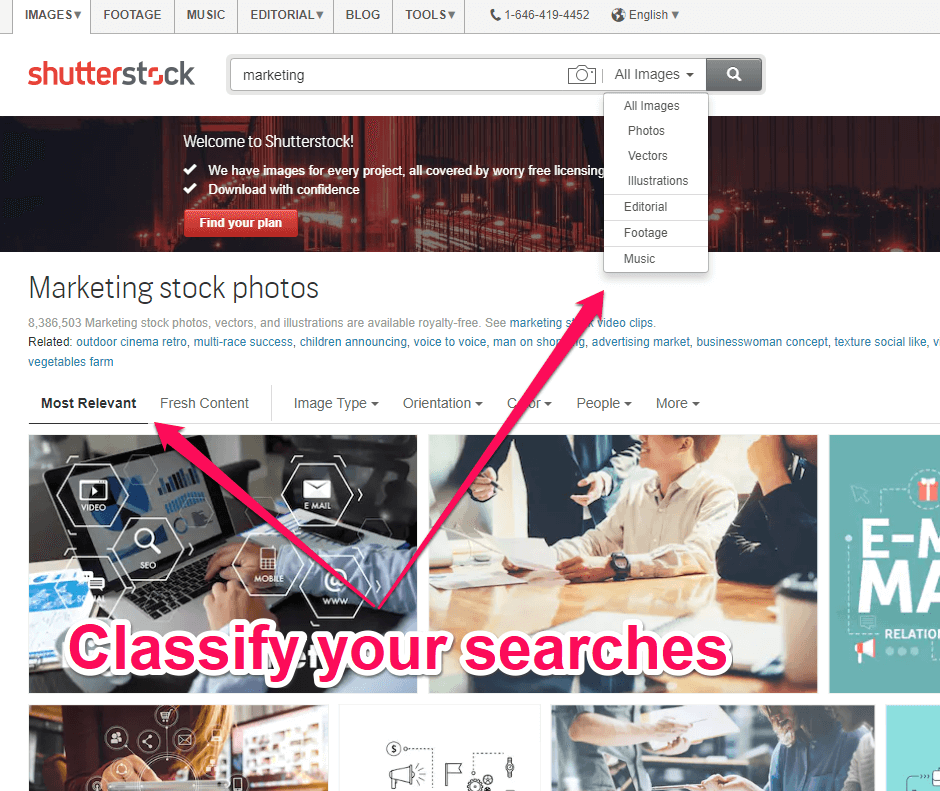
The subscribers will target keywords that are most relevant in order to be shown the proper photos.
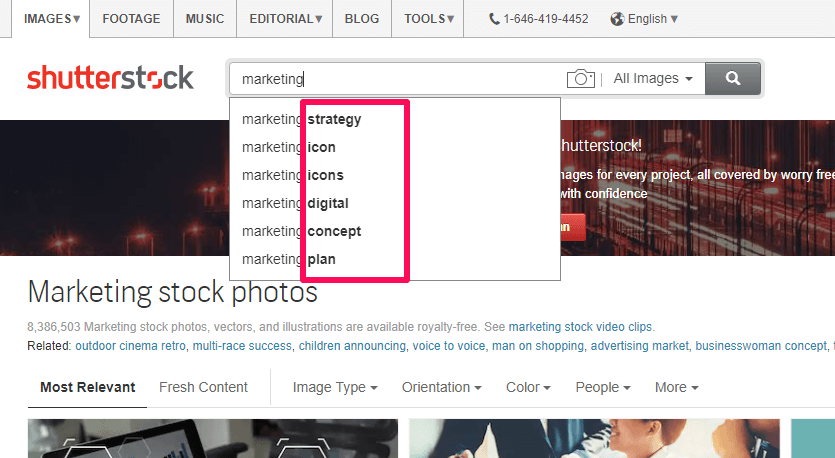
It’s the paid subscription and the reputation for reliability that makes this a viable source for taking a fresh look at the most fitting keywords in your niche.
The autocomplete suggestions will be relevant and refreshing, although not always very niched.
But in the context of semantic focus from the search engines, being relevant trumps being specific – if the autofill suggests previous searches on a word, this can be easily integrated semantically on our topic.
1.3 Stockvault
Stockvault is a free micro search engine for photos and it’s great for searches of highly popular industries, and not very specific niches since it’s used by people from different environments.
It has probably one of the most complete category lists which makes it very easy to search and see accurate keyword results.
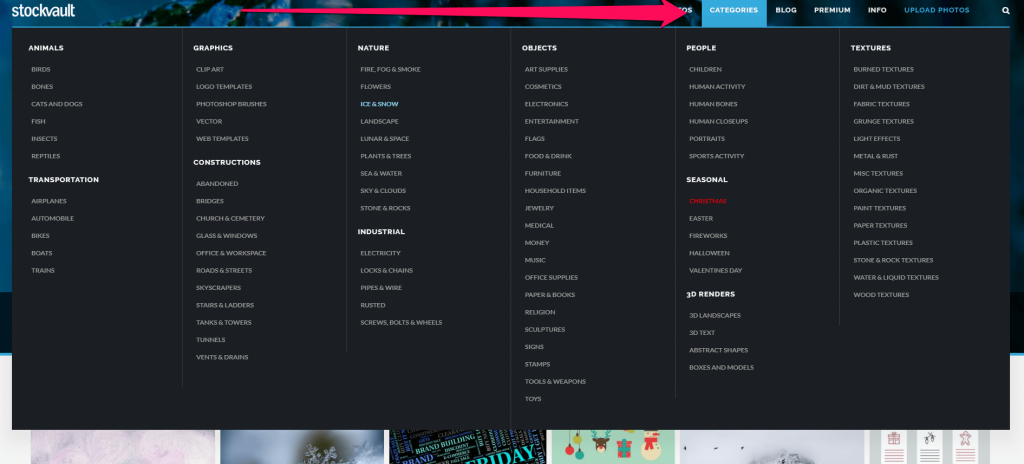
And because they’re so versatile, it’s best to search for a word in a category, and then see the description of the pictures returned as results.
Also, you can see how they differ depending on the category you choose (for instance, men vs. women).
The returned results, as well as the autofill suggestions, will differ depending on the previous searching behavior on that particular category.
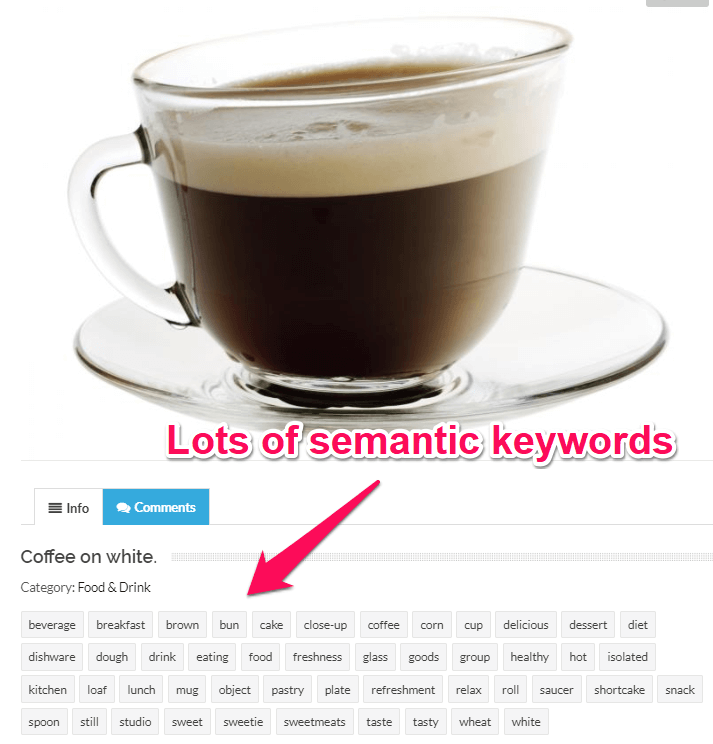
For example, if you search for coffee and click on an image, you’ll see the category and lots of tags that can be used as semantic keywords in your content creation process.
Stockvault offers valuable contextual keywords and backgrounds for every search term and every picture you find.
It can be an intelligent Adwords Keyword Planner alternative.
This is, therefore, the cornucopia of differential approach for distinct targets.
If you’re looking for keywords for distinct approaches between several target groups, this site does the job pretty well.
1.4 Freedigitalphotos
Freedigitalphotos is another reliable source when looking for popular keyword ideas.
Despite being free, there’s nothing cheap about it.
You’ll always have plenty of search results, each of which has a caption text, which you’ll find more than useful since it doesn’t require manually going through all the results.
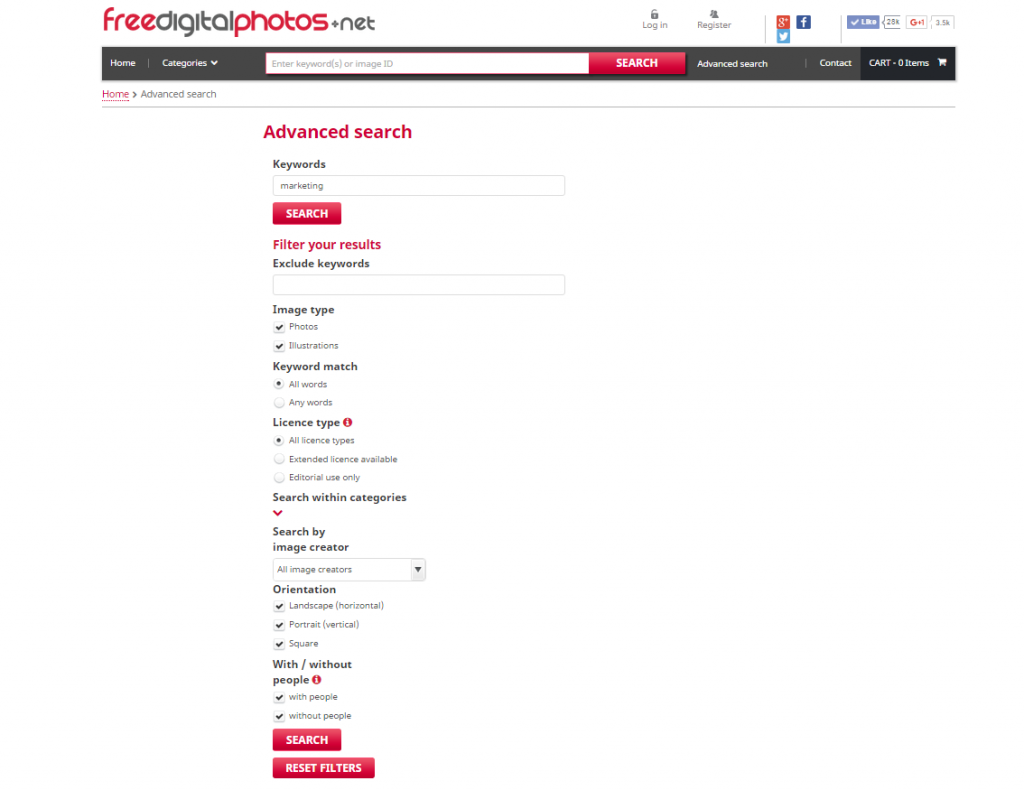
You can set up your search by an advanced set of parameters, thus influencing the results.
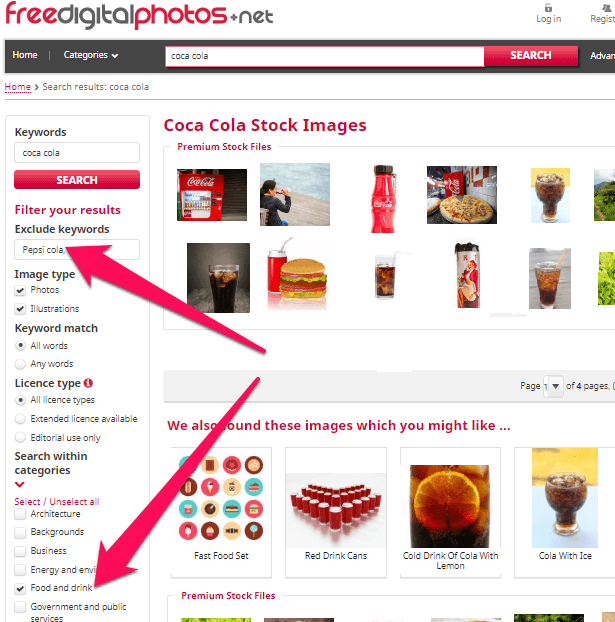
One other very interesting feature is the ability to exclude keywords from your returned searches.
If, for instance, you want to search “Coca-Cola“ but not “Pepsi Cola“, you can always use the ‘Exclude Keywords’ filter.
In this particular case, “Pepsi Cola” would categorize as a negative keyword.
2. Generate Keyword Ideas Using Offline Magazines
Start reading magazines.
See which keywords are used by those in your industry in content marketing – as the general style is so different from online to print, you’ll get plenty of ideas that you’ve been ignoring because of SEO assumptions.
When working online, it’s crucial to keep a fresh mind.
And if you want different results in rankings than your competitors, maybe you should look where they don’t, too.
As we’ve documented before, magazines are a divergent resource with unique content, that could generate great keywords for your business.
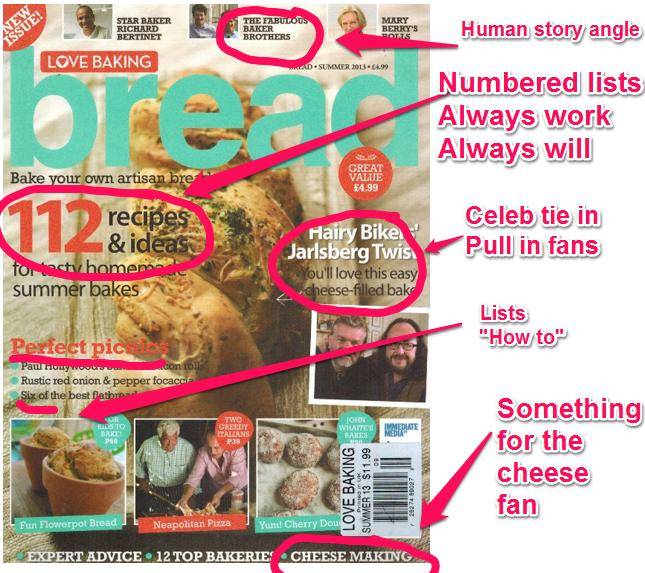
I’ll only cover the most important reason – magazines are a perfect resource for someone preoccupied with words.
After all, they provide what we hope for the web to become one day in terms of content: articles that attract through subject and writing, without being obsessed with keywords and rankings.
And perhaps this is what we should all turn towards to keep a fresh mind.
There are hyper-targeted niches in the magazine market.
If your industry allows it (and chances are, if you’re reading this post, it does!), take a look in the niche magazines.
The intent for great content on a magazine is exceedingly higher since the investment is thousands of dollars and the editors don’t afford to make mistakes, while a blog is much easier to manage, promote and reinvent every time article chops of the numbers of the audience.
3. More Keywords Suggestions from Amazon
Another alternative to Google Keywords Planner is Amazon.
It is the Google of selling.
Its power consists of being so huge, that it’s impossible not to find what you’re looking for, from beauty products to books and video games.
It’s also where you can find out what people search for, to a very specific extent.
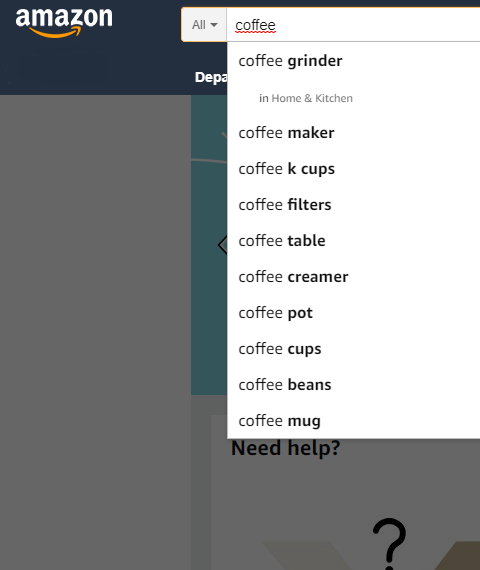
Because of all its categories, there are two kinds of insight: one from the different search suggestions you’ll get for the same word in distinct categories and one from the category and its suggestions that you’re offered when searching for a product.
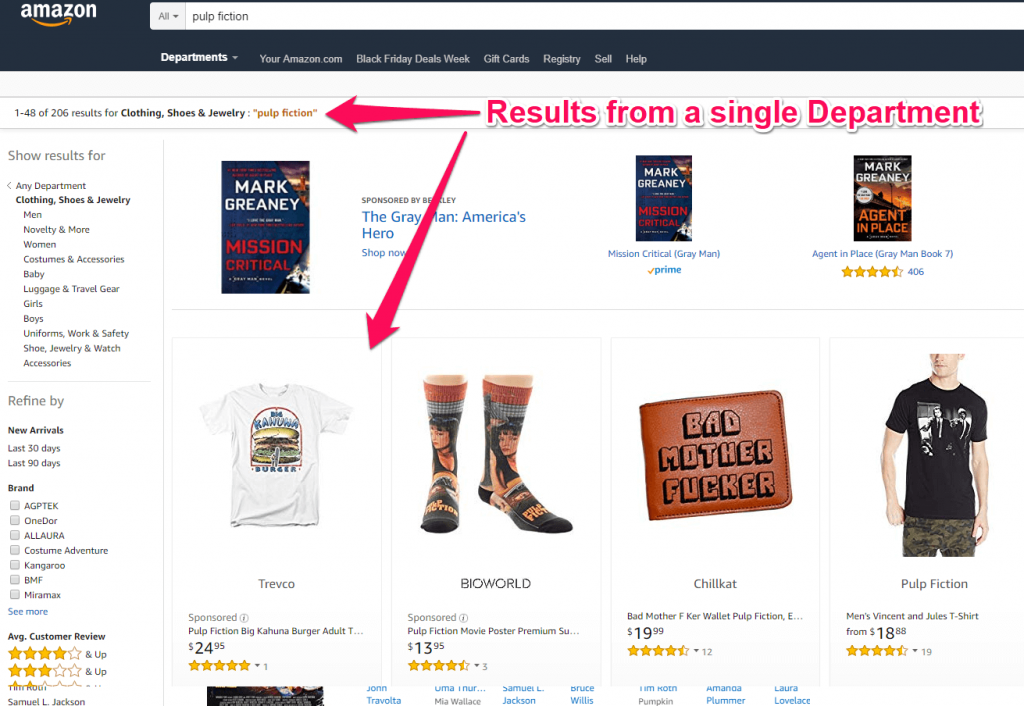
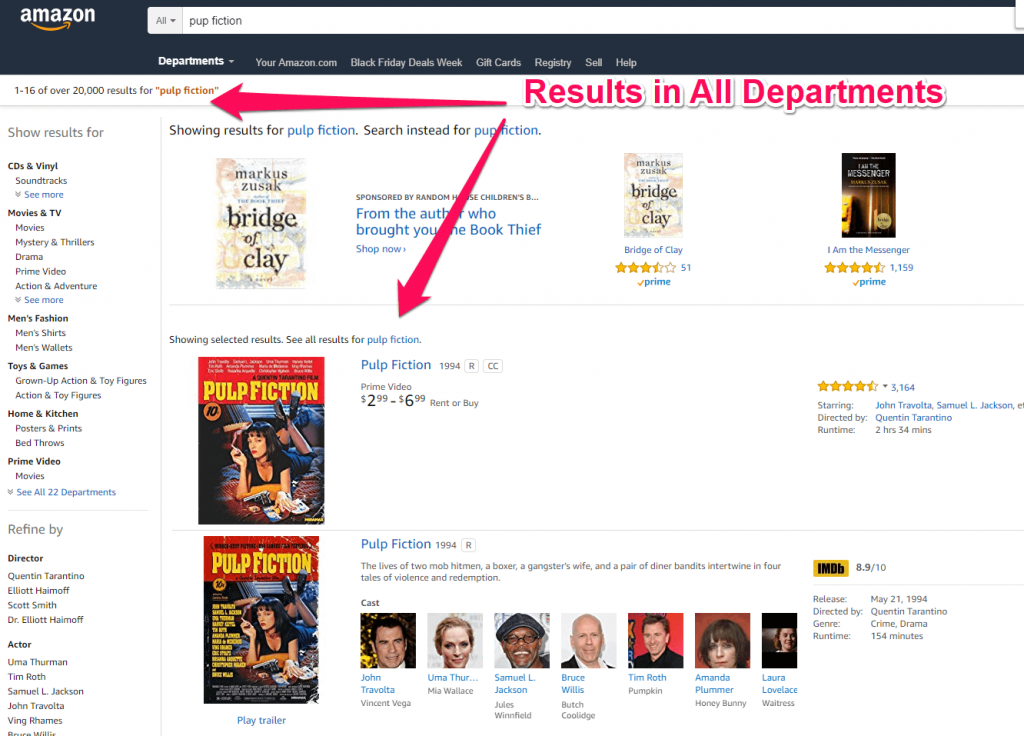
Because Amazon is such a valuable source, you can consult third parties for advanced results for what are people searching for.
Merchantwords, for instance, is a highly professional paid service that puts the Amazon search database in perspective.
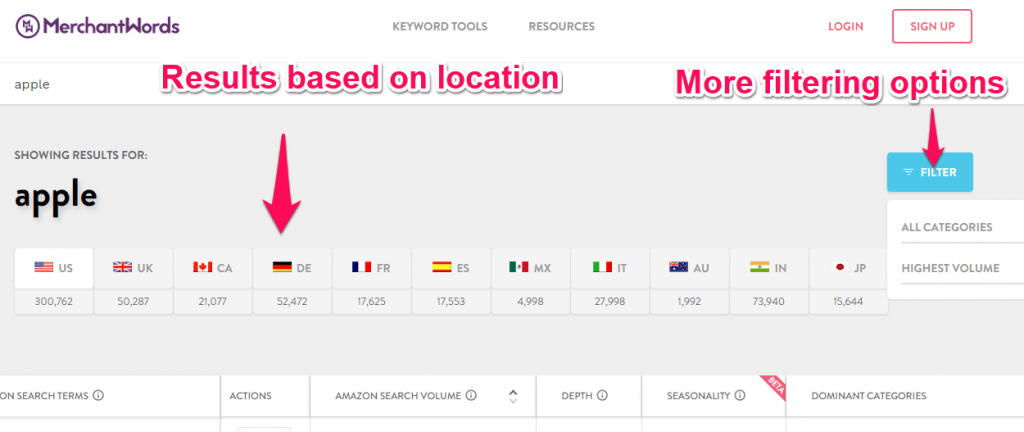
“Apple“ is one of the most popular Amazon searches.
Being able to organize the results after the highest/lowest monthly search volume or by category order allows us to examine the specific parts that we find most relevant for our online business.
Depending on how trending your results are, using this tool can help you find keywords more than just once, by identifying the trending topics the exact ways they’re being searched on the site.
4. Answer the Public
Writing perennial articles isn’t easy, particularly when evergreen content seems to have additional requirements for making a good impression and not looking like junk.
It takes vision to maintain relevance over time. Answer the public can be used as a keyword research tool very easily.
It is a site that suggests questions people would ask on a different topic or keyword that you insert, which you can materialize in new keywords or – why not? – in new content ideas.

The homepage of this site is a very impatient man, in a sweater, who seems eager to hear you answering a question that is of elevated interest for a larger public.
There’s also a number of popular countries from which you can select, and the results differ from each local trending search.

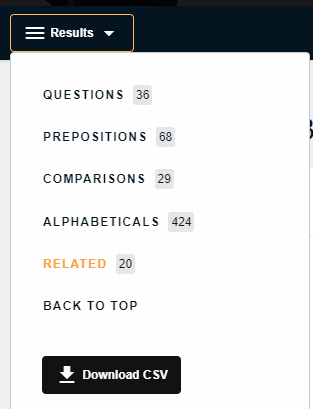
The results are formulated as popular questions, comparisons, popular phrases containing the keyword, and they’re followed by alphabetical suggestions of the desired topics.
You can download the whole keyword data into a .csv.
5. The Wikipedia Database
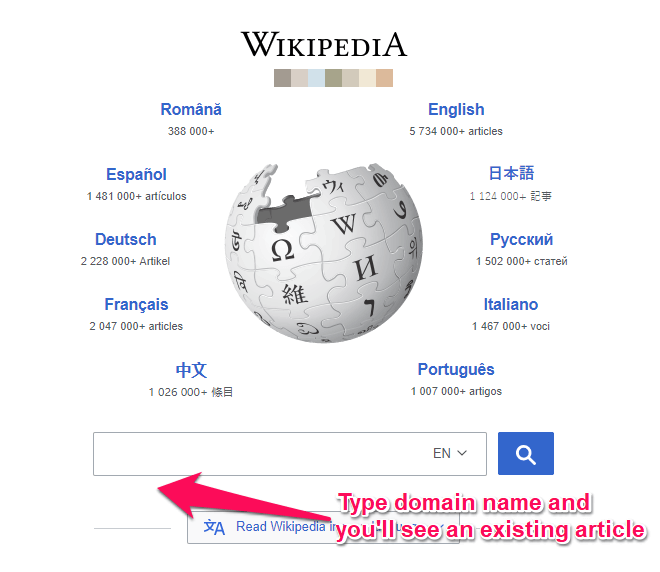
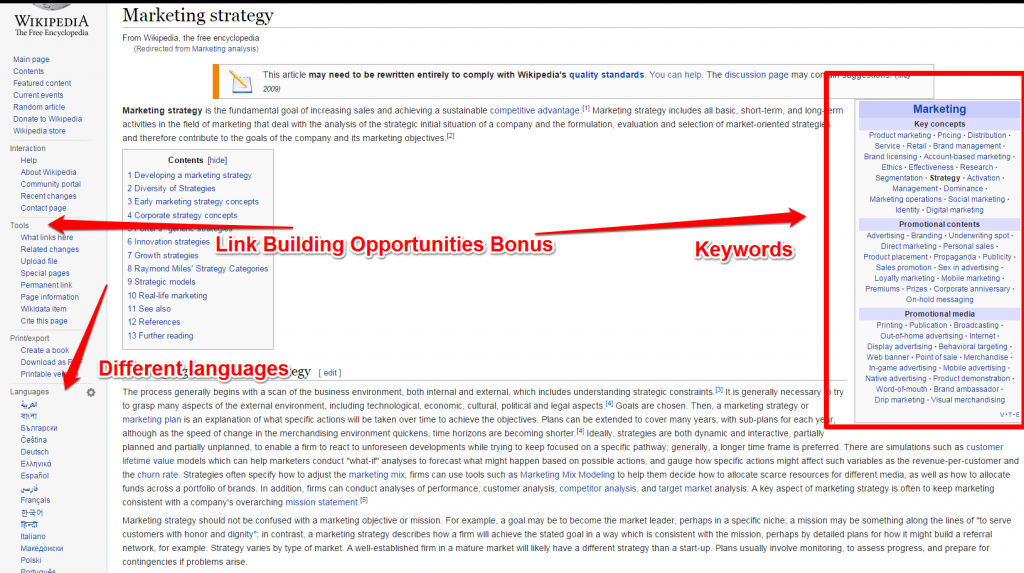
Wikipedia is a source of keyword research in multiple languages, especially since it covers a lot of topics.
Because the articles here are information-centric and not keyword-centric, you may find a reinvigorating perspective on the textual approach.
Of course, the encyclopedia is unbiased (or it should be), and most of the articles aren’t necessarily written in a very creative way.
But by not abiding by the general rules of online writings, the result will be similar to the one produced by reading niche magazines – only in a different writing style.
Conclusion
Whenever the competition is too high, you risk tilting at windmills.
This happens because you, as well as your competitors, are trying hard to rank for the same keywords, suggested by (roughly) the same sources.
I always search incognito whenever there’s something I want to take a fresh look at.
Because, smart as they are, search engines memorize my history and suggest answers related to my previous queries.
The same kind of story happens here – you’ll get to run in circles pretty soon.
Using the same keywords as your competitors when writing in your niche often turns the common words into ground zero in SERPs.
On the other hand, there are plenty of creative ways of keeping a fresh perspective on your work.
Looking for answers (or questions?) where nobody else does makes the difference between a trendsetter and the next in line.
Plus, finding unique keywords research tools can help you give a boost to your SEO strategy.
Note: This blog post is an improved version of an older one we had.
We considered this article to be valuable for those interested in outranking their competitors and the information needed a refresh because the online market is evolving very quickly.
The post 5 Keyword Research Tips That Will Blow Your Mind appeared first on SEO Blog | cognitiveSEO Blog on SEO Tactics & Strategies.
Source: cognitiveseo.com

Here’s How to Rank for Multiple Keywords with One Piece of Content
Keyword targeting is dead. Algorithm changes such as Google’s RankBrain have all but killed your ability to rank well using keyword targeting. I bet you’re wondering why I’m about to talk about ranking for keywords then, right?
Well, there’s a difference between using keywords and targeting keywords.
Keywords are just phrases that people type into search boxes to describe what they’re looking for.
They help search engines sort through the billions of potential websites and posts to find relevant content.
When I say “keyword targeting” is dead, I mean the way that we used to use keywords.
Due to advancements such as Hummingbird, search engines are getting much better at understanding the meaning of a search and matching results to that meaning.
In other words, matching the exact phrase is becoming irrelevant, and it’s much more important to match intent.
In the past, you found a single keyword that had low competition and high traffic, and you wrote a post about it. You made sure to repeat it lots of times and voila, you were on the first page of Google.
Alright, it wasn’t quite that simple, but you get my point.
That approach doesn’t work anymore.
Now you need to target user intent.
This is actually a good thing!
Why?
Well, targeting user intent makes it even easier to build multiple keywords into one piece of content.
I’m going to show you how to create content that not only has multiple keywords but ranks on them.
But first, let’s check out the likelihood of one post ranking well for multiple keywords so you can understand the competition.
Is it possible to rank well for multiple keywords?
There’s no point building a ton of keywords into a post if you know you can’t rank well for them all, right?
So, just how many keywords can a single piece of content rank well for?
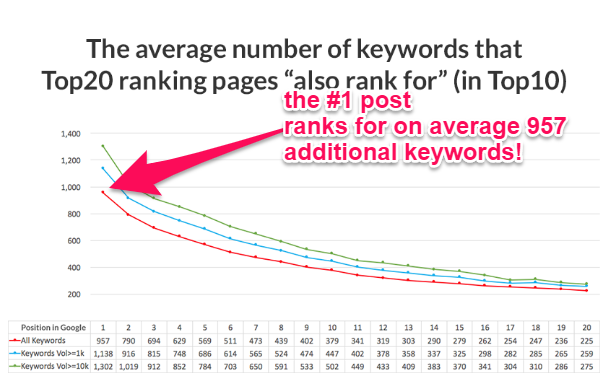
According to Ahrefs, the top-ranking pages rank for 957 additional keywords, on average.
We know it’s pretty hard to get the first spot on Google. If you’re new, it can hurt your ROI to even try.
But check out #20.
That’s not even a page one of Google.
But they still have an average of 225 additional keywords ranking on the first page.
So your primary keyword is on page two, and you have over 200 other ones showing up on page one.
That’s why you should always build keyword clusters into your content.
Of course, just because it’s a keyword you’re ranking for, it doesn’t mean it’s a good one.
After all, ranking first for something that’s only searched by one person a month isn’t a reason to celebrate, right?
This means we need to understand how many high-volume keywords you can rank for in one post.
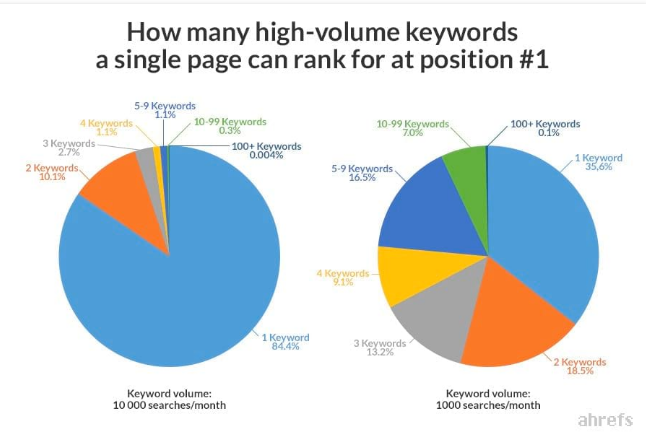
If you’re trying to rank for a keyword that gets at least 10,000 searches a month, chances aren’t good.
Over 84% of pages that get 1st place for a search that popular only rank for the one keyword.
Things start to get more attractive when we take a look at traffic volumes around 1,000 searches a month.
Only 35.6% of pieces in the number one spot rank for only one keyword.
This means 64.4% of posts that rank in 1st place for one keyword also rank in 1st place for at least one more.
You can see the largest percentages are two keywords (at 18,5%), followed by five to nine keywords (at 16.5%).
This means if your SEO skills are helping you rank on the first page of Google for one keyword, you have pretty great chances of ranking on the first page for multiple keywords.
What do sites ranking for multiple keywords have in common?
We now know that over 3 in 5 pages (64.4%) that rank 1st in Google for keywords with traffic around 1,000 searches a month achieve that ranking for more than one keyword.
What do they have in common that the other ones don’t?
Anything that helps you rank 1st for one keyword also generally helps you rank 1st for multiples.
This means that articles with more words, better URL ratings, and more backlinks will have an easier time ranking well for multiple keywords.
The big takeaway though should be what the multiple keywords have in common.
When looking at which keywords sites were ranking high for, the majority of them shared at least one word.
In other words, it’s important to pick related keywords and not try to fit too many unrelated topics into one post.
You can use a keyword clustering tool like SerpStat to help you understand how well keywords fit together.
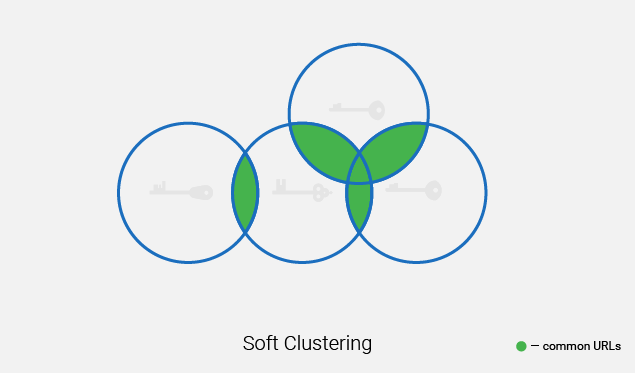
You can opt for keywords that are softly related, like the diagram above, or ones that have a hard relationship:
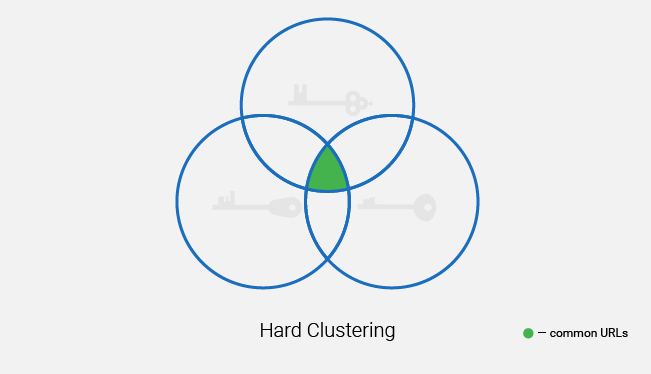
If you think about the way we target audiences, this intuitively makes sense. Trying to offer too much to too many different people in one post won’t work for anyone.
The best way to have multiple keywords in one post is to group ones that naturally fit together.
Four ways to come up with multiple keywords that rank
So how do you come up with multiple, related keywords that will rank well?
Here are four different methods to help you find the right keywords:
1. Use Ubersuggest to find LSI keywords.
If you’re not familiar with LSI, it stands for Latent Semantic Indexing.
Semantic means, “relating to meaning in language or logic.”
In other words, you want to find words that are related to each other.
There are a few ways to find LSI keywords. One of my favorites is Ubersuggest.
Another one is LSI Graph.
Step #1: Enter Your Keyword and Click “Search”
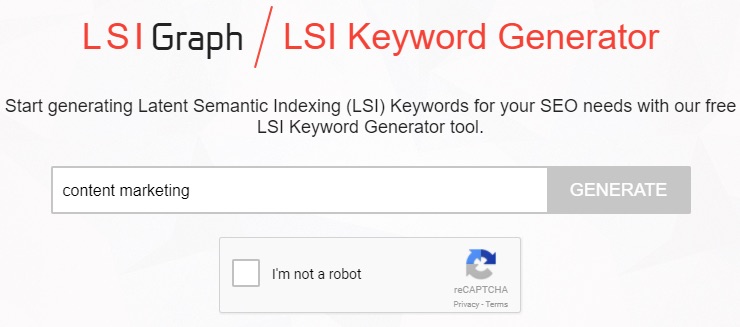
It’s a free tool that will provide you with related keywords for whatever term you search.
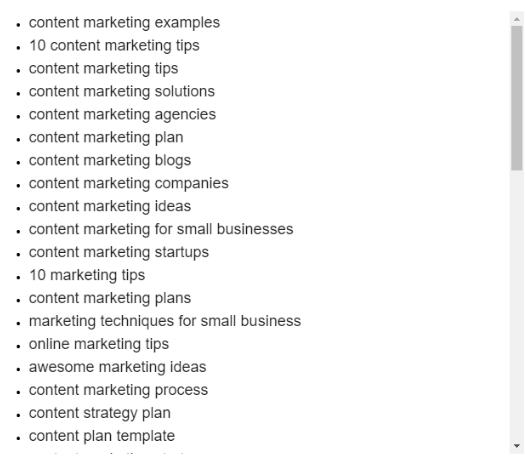
The generator brings back a ton of related words that you can use to build into your content.
You can often use these keyword results to help build your outline for a long-form piece of content.
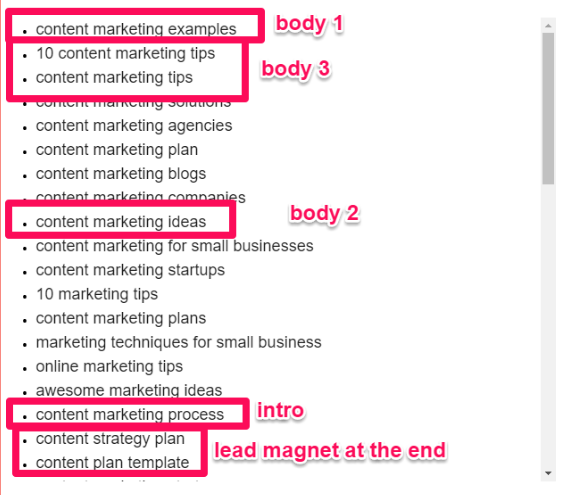
For example, you could select a few of the keywords above to build an outline like this:
- Content marketing process (intro)
- Content marketing examples
- Content marketing ideas
- 10 content marketing tips
- Conclusion with a PDF of a content strategy plan offering built into a CTA
You can use a tool such as LSIGraph to give you multiple keywords and help you build your outlines all with one simple click.
One thing to note is that there is a daily limit:
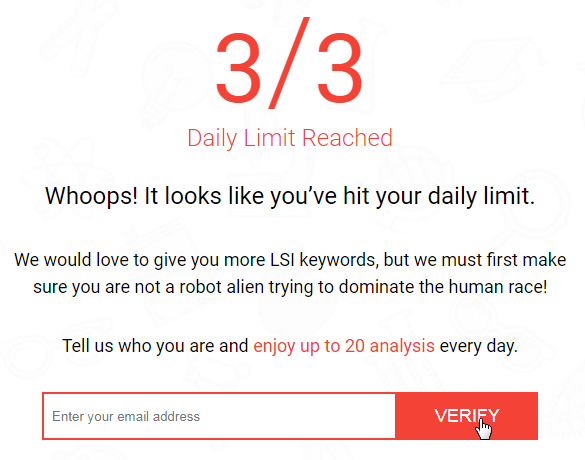
It’s 3 searches a day if you want to remain unknown, and 20 searches if you sign up by email.
2. Use Google to generate related keywords.
In addition to the above, you should always use Google to help you generate related keywords.
Google wants to provide the best, most relevant content to searchers.
Luckily, that also helps us provide the best, most relevant content to searchers. And Google is helping us do it for free.
When you search for something in Google, it tries to help you out in a number of ways.
Auto-suggest. As soon as you start typing, Google starts automatically populating suggestions of what it thinks you might be looking for.
For example, try typing “content marketing” into Google.
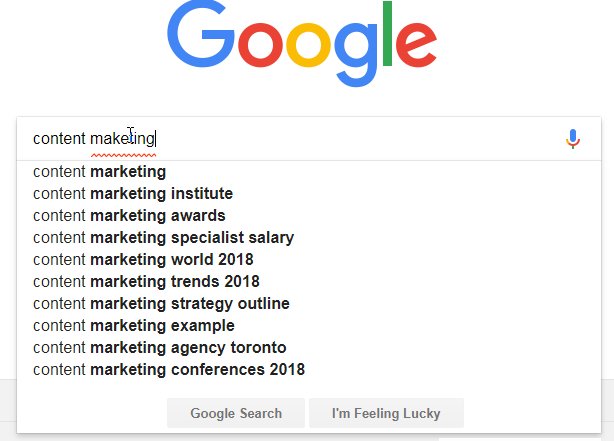
You’ll notice I didn’t even spell it right and Google is already trying to auto-suggest ten different possible keywords before I hit enter.
This instantly tells you the most commonly searched keywords relating to content marketing.
There’s no need to worry about the relevance of their results either. Google updates every two-three weeks to make sure it’s offering searchers the most relevant choices.
Related searches. After you hit enter, you can scroll down to the bottom of the search results page.
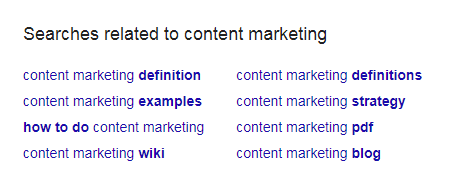
Here are eight more related keywords for content marketing. You’ll notice that they’re new ones and not just a repeat of the ones Google just tried to offer you.
People also ask. For some searches, Google will also provide you with a “People also ask” section. This didn’t pop up for content marketing.
If I narrow down my search to ‘how to use content marketing,’ I now get the following four suggestions.
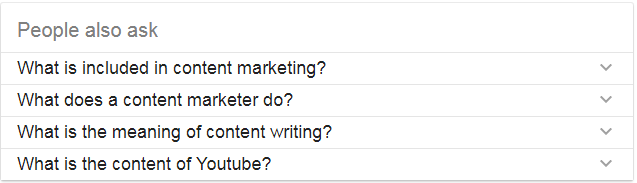
These are common questions Google is asked that it thinks are similar to what you’re trying to find.
If you click one and search for it, it will populate even more related questions.
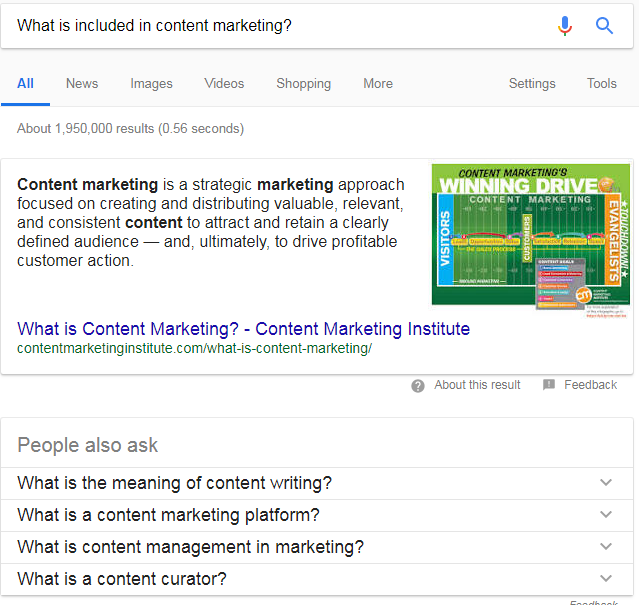
Google will give you a practically limitless list of related keywords.
3. Ask your audience for “seed” keywords.
“Seed” keywords help you figure out what keywords real people in your target market are searching for.
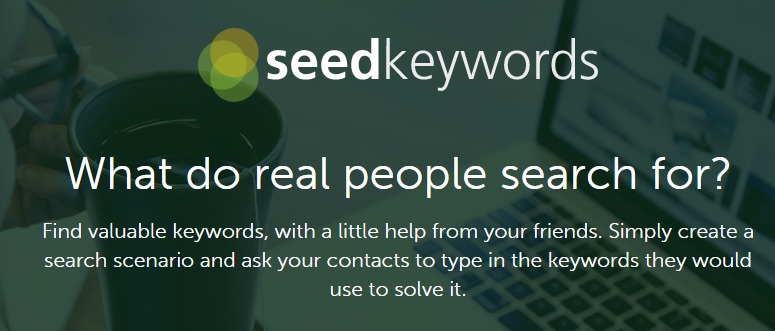
This is a free tool that can help you grow a keyword list that’s perfect for your target market.
Start by clicking on “Creating My Scenario.”

Then type in your search query:

You need to type in a question to your audience, such as “what would you search for if you wanted to start your own blog?”
Then the software will give you a unique URL that you share will your audience through social media, email or any other way you prefer.
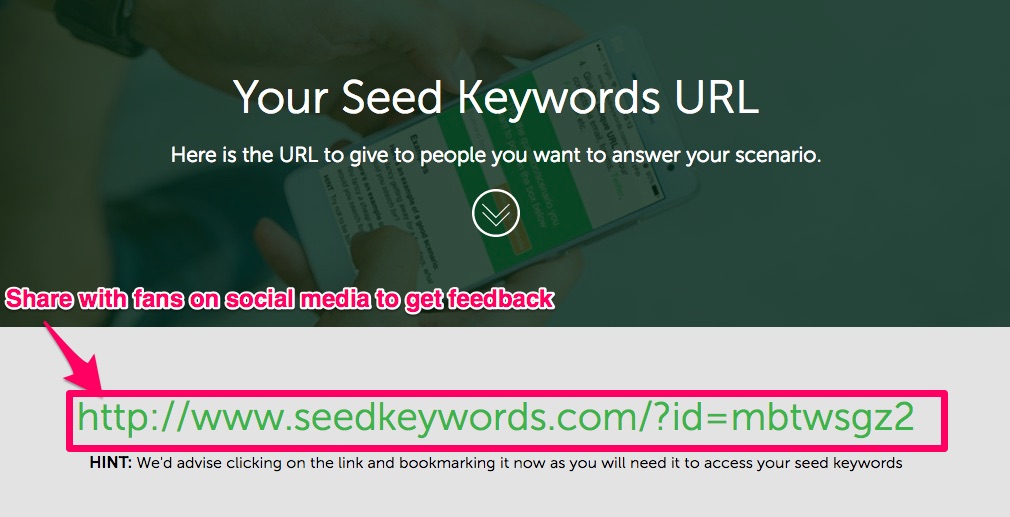
As people respond, your keyword list will automatically start to grow.

This obviously works best when you have clear questions you want to ask, and you have a large audience likely to respond.
The benefit is that your ideal customers are telling you what topics they want you to write about and they’re doing all the work for you.
4. Check out a site like Answer the Public.
Answer the Public is a great way to come up with new topic ideas and keywords.
It’s a mix between Google’s “People also ask” and Seed Keywords.
Answer the Public provides you with a list of questions directly from the minds of your customers, around a specific topic or keyword.
This site can give you hundreds of questions and related keywords with one quick and simple search.
To get started you just enter your general keyword or question into the search bar:
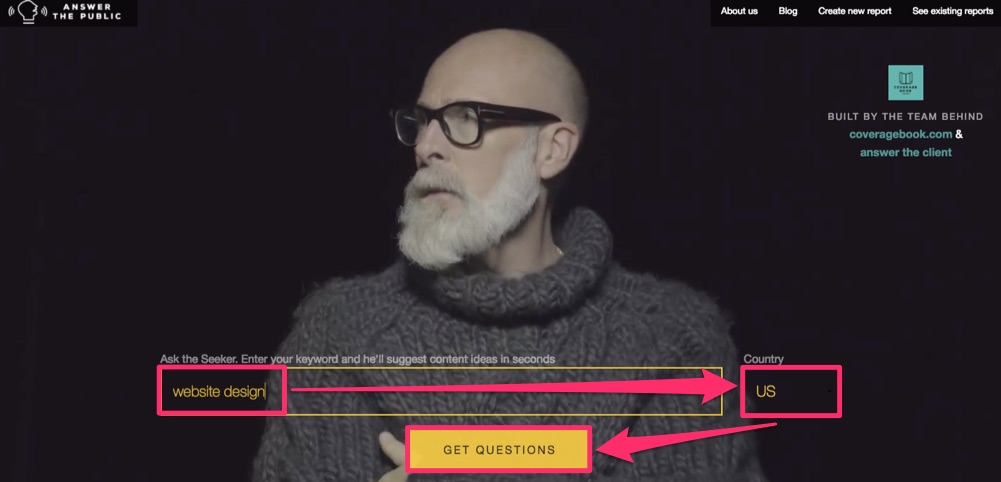
You need to choose the country you want to target, and then you click the “Get Questions” button.
At first, your results will look something like this:
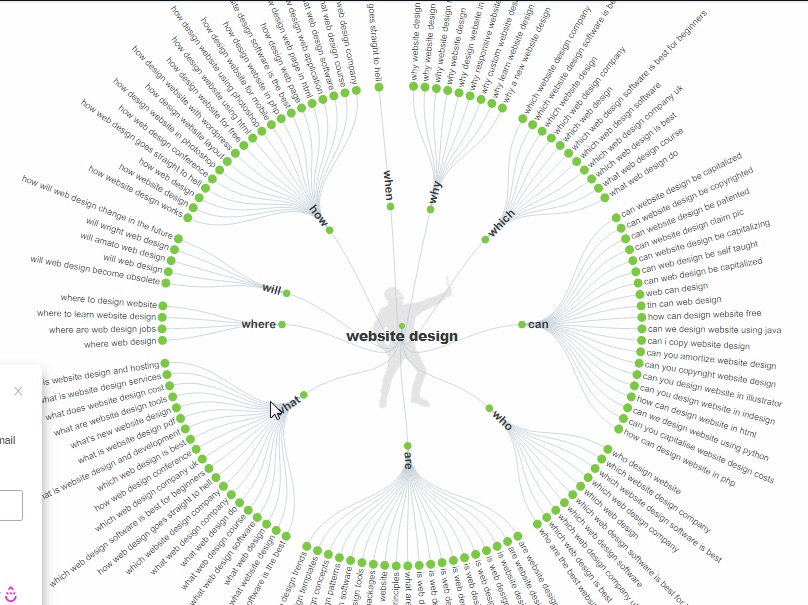
It’s kind of cool looking but not the easiest to navigate.
Don’t worry. You can fix that!
Select “Questions” and then “Data” to translate your results into grouped lists.
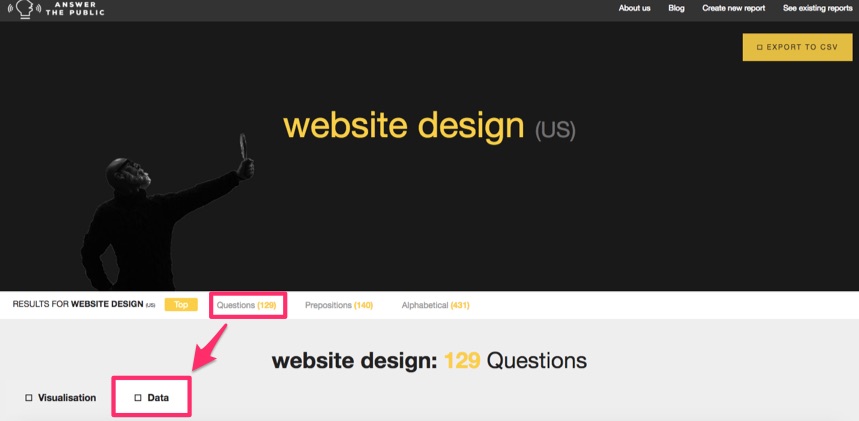
The first lists are the question-based results:
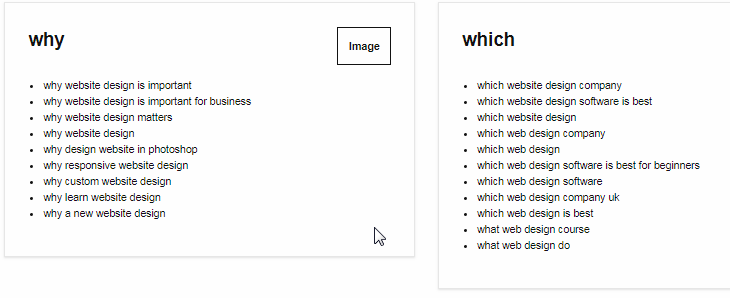
Next comes the “preposition” results.
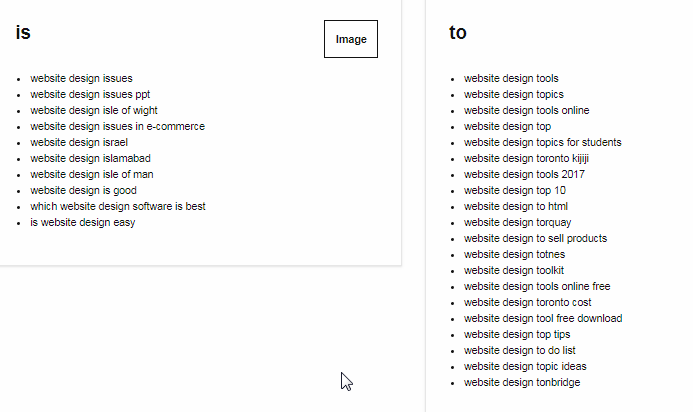
The third grouping is comparisons:
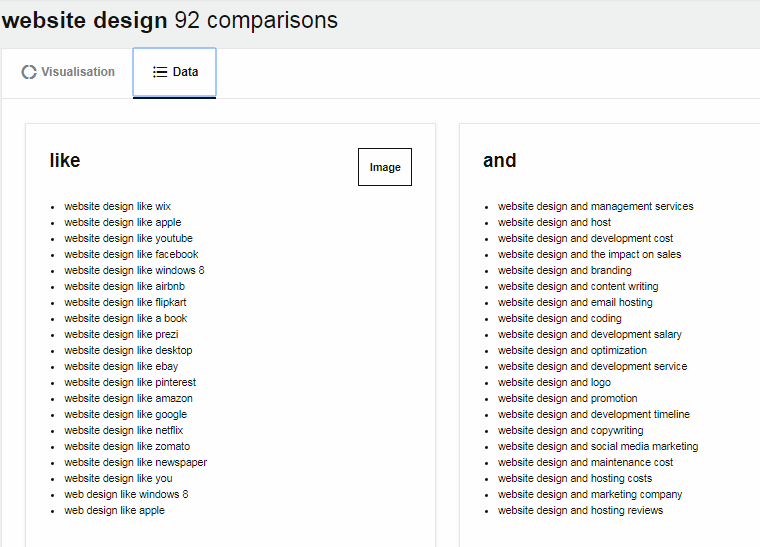
Finally, it also gives you results in alphabetical order.
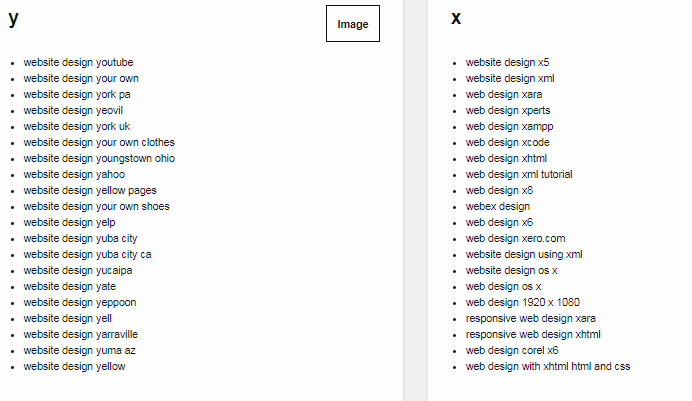
For “website design,” it returned a total of 519 questions, all within seconds.
All four of these tools are free. You can use any or all of them to easily come up with hundreds of relevant, related keywords you can build into one piece of content to rank in search results.
Some final tips to keep in mind
You now know the best way to rank for multiple keywords is to find relevant, related keywords to build into a single piece of content.
Here are some additional tips you should consider when building multiple keywords into one post or article.
Consider the use of synonyms.
When you’re focusing on building out your list of related keywords, make sure you consider synonyms.
A synonym is, “a word or phrase that means exactly or nearly the same as another word or phrase in the same language.”
For example, “halt” and “stop” are synonyms.
Think about our product and consider different ways your customers could ask the same question.
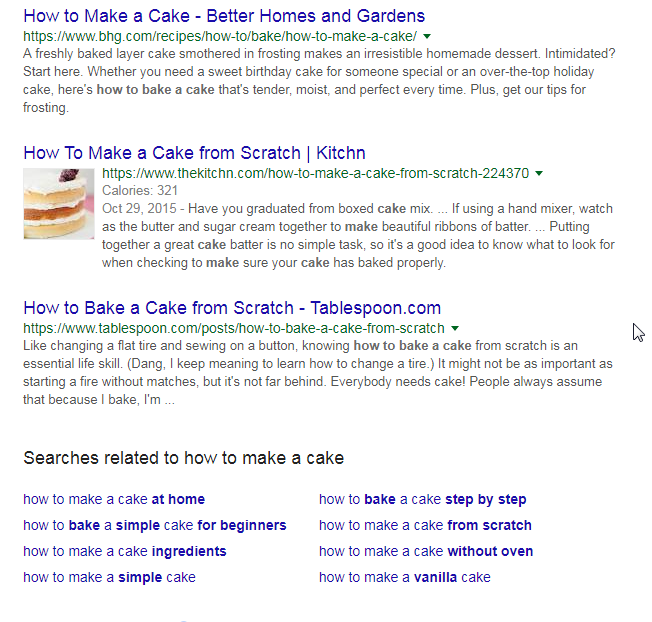
For example, “how to make a cake” and “how to bake a cake” mean the same thing.
In this context they’re synonyms.
If you are writing an article about baking cakes, you ideally want to cover both of these keywords in your content.
You can see under Google search results for “how to make a cake” it’s bringing back articles and suggestions that capture both phrases.
Use long-tailed keywords.
It’s easier to rank in search engines for long-tailed keywords.
Not only that, long-tailed keywords are more likely to convert.
People searching for something specific enough to be long-tailed are more likely to be in the ‘ready to buy’ stage of a marketing funnel.
They have gone from considering shoes to knowing exactly which shoes they want.
Remember that the reason we want to rank is to get traffic, but traffic is pointless without conversions.
Long-tailed keywords help you succeed at both goals at once, by narrowing your focus down to consumers ready to buy.
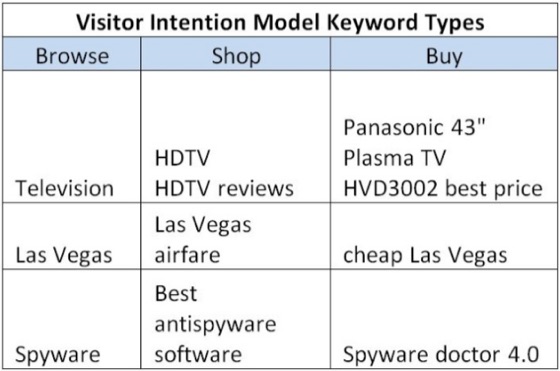
You can see that long-tailed keywords are trying to include enough detail to narrow down the search results to exactly what they’re looking for.
This means they’re going to be the lower competition than the shorter, more generic keywords.
The search volumes will also likely be lower, but you have better chances of ranking well, and the people who do search are more likely to convert.
Don’t try to stick them all in your title.
Targeting multiple keywords does not mean having to stick them all into your title.
The main title of your content should have an H1 tag, and it should have one main keyword.
Don’t worry that you won’t be able to rank for others; you will.
The H1 tag helps search engines know what your main title and topic are but remember they’re getting better and better at understanding intent.
Your priority for the title of your post is to make it attention-grabbing so that people want to click it.
Putting in too many keywords can make it sound repetitive, hard to read or unnatural.
Here’s an example of a title that has too much going on:
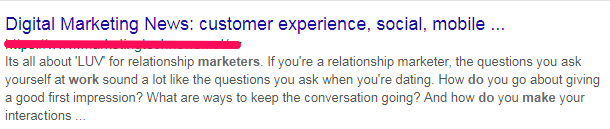
This company is trying to fit so much into their heading that it doesn’t all fit in the search result.
If you want to rank on the first page of Google, then keep your headings short and to the point.
Use heading tags.
To help your other keywords get indexed by Google, you can build them into the outline of your content as subheadings.
Each one should have its own H2 or H3 tag.
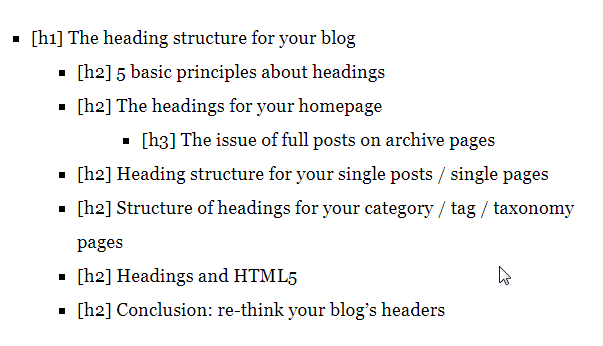
This will help Google bots and readers understand the intent of your content.
It also breaks up your long-form content for easier skimming and reading.
Use your meta description.
Your meta description is the text that summarizes what your webpage is about.
It’s only a short snippet, up to roughly 230 characters in length.
Whenever your page shows up in SERPs, the meta description appears underneath your title.

As you can see, the meta description is there to briefly describe to searchers what the article is about.
This helps them know which link to click, especially if the titles are too vague or too similar to each other.
The best meta descriptions will entice people to click your link through to your page instead of the other search results.
Not only should you use your meta description as a call to action, but you should also use it as a perfect spot for building in some of your other keywords.
You can see from the example above that the title has “Google Meta Tags,” while the meta descriptions also have “meta tags,” and “tags.”
They also swapped out “Google” for “search engines” in the description.
You can use this as a great place to build some of your related keywords into search results, without stuffing them in your title or impacting readability.
Don’t worry about keyword density.
Like I said at the beginning of this post, keyword targeting is dead.
That means trying to hit a certain density of keywords should no longer be part of your SEO strategy.
In fact, if your keyword % is too dense, you could actually get penalized by Google.
What is too dense?
While there’s no perfect number, generally 1 – 3% seems to be a safe range.
When you’re building multiple keywords into one piece of content, stick to the lower end of that range.
After all, 3% might seem low, but if you suddenly have ten different variations of the same keyword and they’re each 3% of your total content, that’s 30%!
You can see how that would get ugly fast. No one would want to read it.
Not sure how to check your density?
Here’s a handy formula:
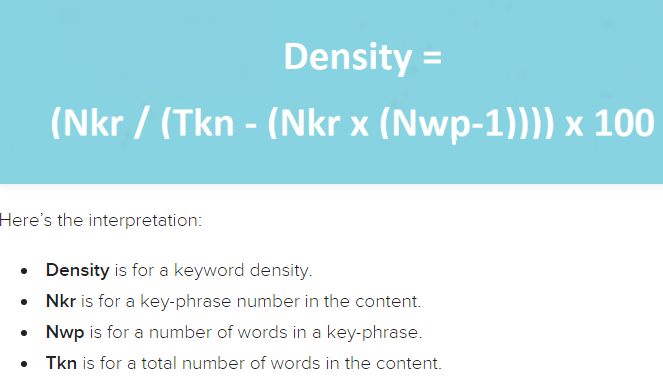
Don’t focus too much on what the exact number is or should be.
Remember that your focus should be on the quality of your content and the value you’re providing to your readers.
As long as you use natural language and your content is easy to read, your density is likely fine.
The same points are relevant for the number of different keywords you should include.
After all, I just showed you how you can easily create a list of hundreds of related keywords.
If you feel like you’re trying to stuff multiple different keywords into the body of your post, just don’t.
Try to naturally fit each keyword you want once or twice. If it feels forced, then leave it out and save it for your next piece.
Whatever you do, make your readers’ experience top priority. Keyword placement, density, and number should all be a lower priority.
SEO is incredibly competitive, and customer engagement is becoming increasingly important. If you sacrifice reader enjoyment in an attempt to “trick” Google into rankings, you won’t rank.
Conclusion
Targeting keywords and keyword stuffing are tactics that no longer work.
Due to advancements in algorithms and artificial intelligence, the focus needs to shift to targeting intent and getting customer engagement.
But just because you’re not targeting keywords does not mean you give up on using them.
After all, they help Google understand what your intent is and match it to searchers.
Google’s ability to decipher intent actually makes it easier than ever to rank for multiple keywords within one piece of content.
Choose related keywords that fit well together. Consider synonyms or similar questions and phrases to your initial keyword idea.
You can try using a free tool such as LSIGraph, Seed Keywords or Answer the Public.
You can also simply use Google. It provides three different ways of generating popular related keywords, and it offers it all for free.
Focus on long-tailed keywords. Make use of headings and meta descriptions the right way and don’t focus on keyword density.
If you do all this, suddenly your top content will be ranking for multiple keywords. It may even end up being in the 1st spot for a keyword that was never your main focus.
Which tool is your favorite for coming up with relevant, related keywords?
About the Author: Neil Patel is the cofounder of Neil Patel Digital.
Source: feedproxy.google.com