
Tag Archives for " keyword research "

The Ultimate SEO Tool: Ubersuggest 3.0
In 2018, I promised you I would release a better version of Ubersuggest for free, and I did that.
But there was one big issue: Ubersuggest only worked on a keyword level. When you put in a keyword, you get a list of more keyword ideas and content ideas.
And then when you put in a URL, nothing happened.
Well, that was before.
You can now get domain-level metrics!
So let’s dive into the new Ubersuggest.
Traffic Analyzer Overview
The traffic analyzer is broken down into 3 main sections: overview, top pages, and keywords.
The overview looks like this:
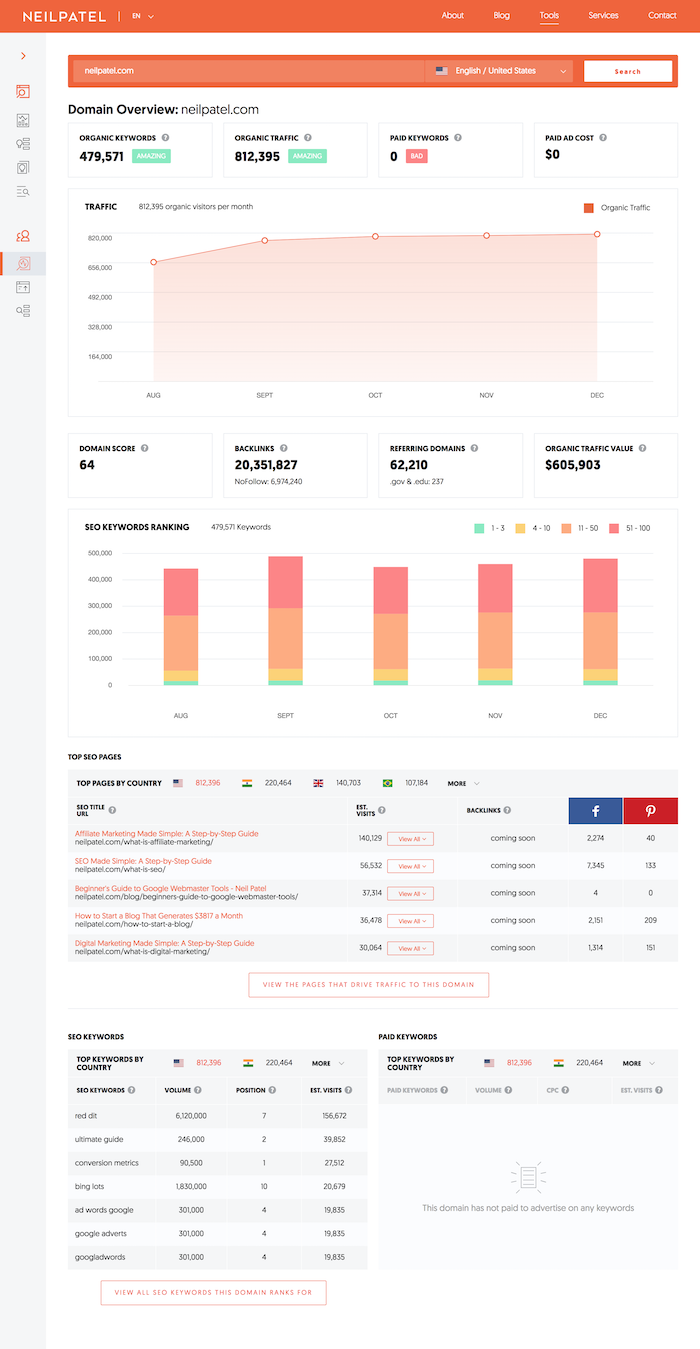
The first section breaks some basic stats and a graph of the domain’s search traffic.
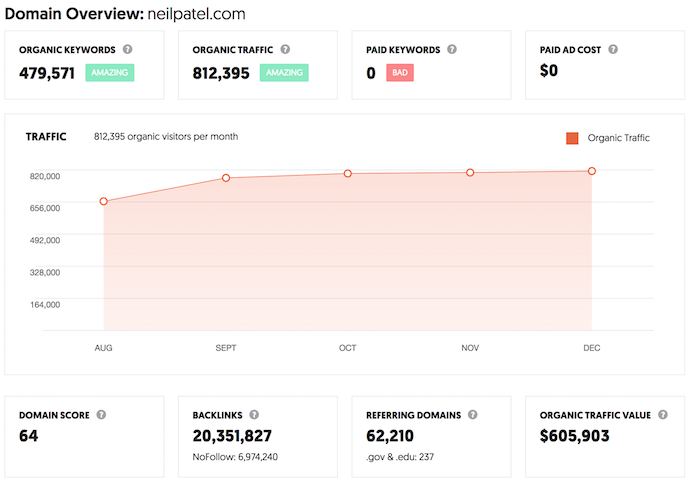
As you can see from the screenshot above, you’ll see how many keywords a domain ranks for, the total estimated search traffic from that region, the number of paid keywords a site is bidding on, and how much they are spending on Google Ads.
In addition to that, you’ll see a traffic graph that shows estimated search traffic a site receives over time.
And of course, a domain-level overview won’t be complete without data such as backlinks, referring domains, the number of .edu and .gov links, and how much the organic traffic is worth if you had to pay for it.
Now, before you head over to Ubersuggest and type in a domain, there is one thing you need to keep in mind…
Ubersuggest treats subdomains as separate sites.
So, if you enter store.nike.com you will get different results than if you typed in nike.com.
By typing in nike.com, you would NOT see any of the data from their store unless you typed in store.nike.com.
We did this on purpose as it allows you to analyze sites more thoroughly.
Also, within the traffic analyzer, you’ll see bar graphs that contain the overall positioning of the keywords you rank for overtime.
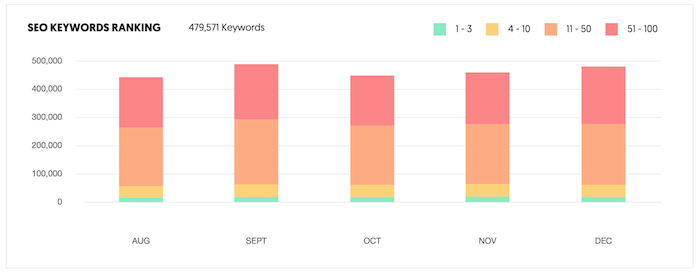
The chart above shows how many keywords a domain ranks for that are in the top 3 positions in Google, the top 10 positions, the top 50 positions, and the top 100 positions.
You already know no one clicks beyond page one, but over time you’ll want to see your site climbing the ranks.
Hence, we track how many keywords are ranking in the first 100 positions.
Now let’s get into my favorite feature of the traffic analyzer.
Top SEO Pages
The second part of the traffic analyzer is a list of the most popular pages for a given domain.
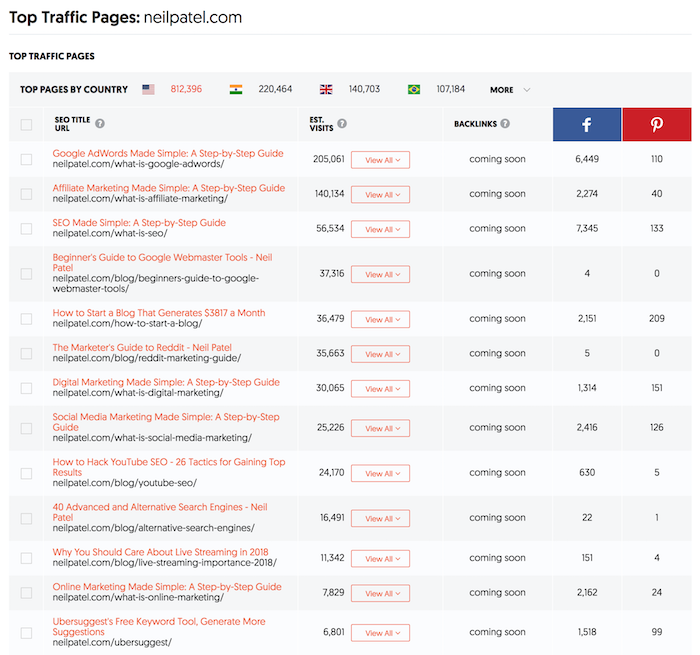
For each page, you are given the title, URL, the number of visits a page receives from Google on a monthly basis, and the number of times the URL has been shared on the social web.
My favorite part about the top SEO pages report is when you click on “view all” you’ll see a list of keywords a page ranks for.
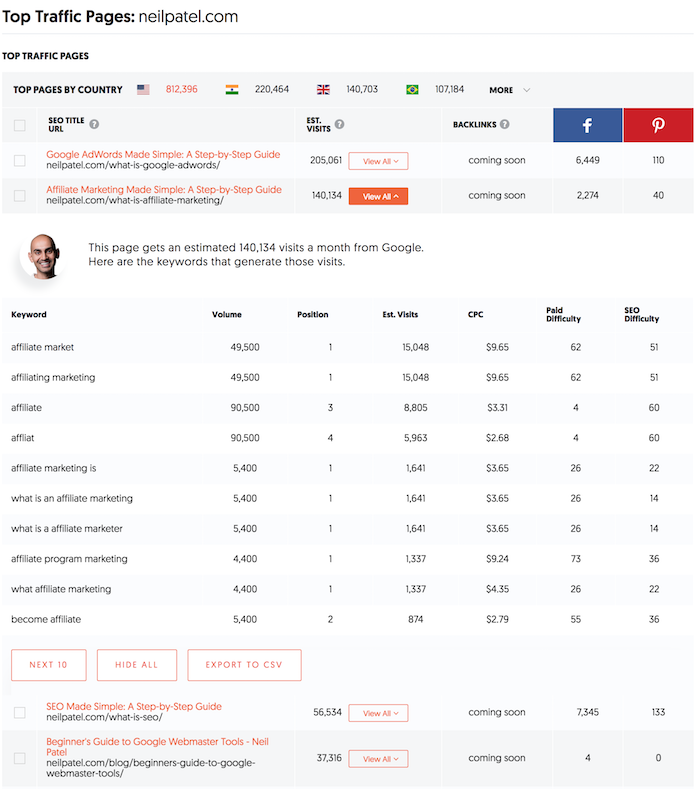
This one report will not only list out each keyword a webpage ranks for, but the position, estimated visits, cost per click data if you paid for that keyword, and how difficult it would be to rank for it.
What I love about this report is that I can put in a competing URL and see what’s working really well for my competition and then copy them.
Or even better, create a more in-depth page than my competition.
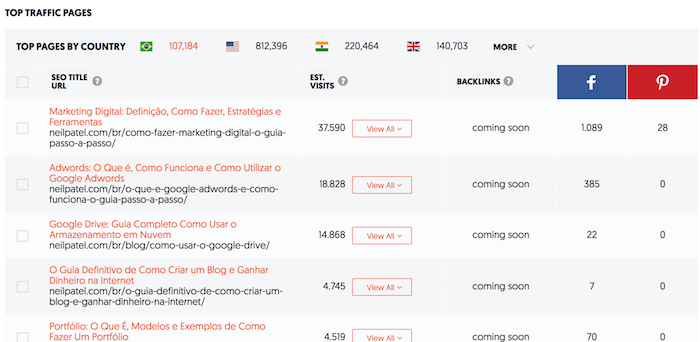
Plus, if you have clients who are global, you can click on the flag at the top and see the top pages for any domain in all of the major countries.
For example, here are my most popular pages in Brazil.
Top Keywords
The last section in the new Ubersuggest is the top keywords.
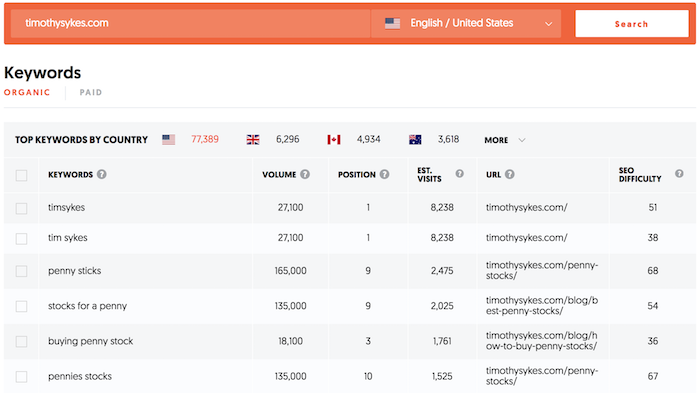
Whether you put in your own domain or competitors, you’ll be able to see all of the organic keywords and paid keywords a site is going after.
When you click on the “paid” button you’ll see the list of paid keywords as well.
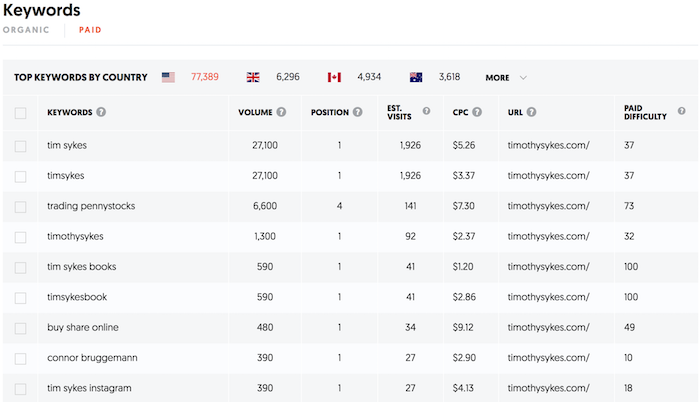
And just like the keyword research reports within Ubersuggest, you’ll have data on URLs, paid difficulty, and SEO difficulty.
Conclusion
I hope you enjoy the new version of Ubersuggest.
I know there are still some bugs in which the reports don’t load as fast as you want (Top SEO Pages can take up to 20 seconds to load) and you may have to clear your cache to see the new features, but hopefully, you enjoy the updates.
There are also some issues with duplicate keywords and misspellings. The engineering team is continually looking to fix this.
We do know there are many issues with duplicate keywords and misspellings in our Japan database, but we are working on fixing this as soon as possible.
So overall, I know it’s not perfect, but what do you think so far?
And if you haven’t tried it, head over to Ubersuggest and type in a domain.
PS: If you find any bugs, please email [email protected]
The post The Ultimate SEO Tool: Ubersuggest 3.0 appeared first on Neil Patel.
Source: feedproxy.google.com

My New SEO Tool: Ubersuggest 2.0
I promised you months back that I was going to release a newer, better version of Ubersuggest for free.
And can you guess what?
I just released it! 🙂
Before I go into the features of the new Ubersuggest and how it works, I just want to tell you that not all of the features have been released yet.
For the first release, I focused on keyword research.
So let’s dive into the new Ubersuggest.
Keyword Overview
The keyword research is broken down into 3 main sections: overview, keyword ideas, and SERP analysis.
The overview looks like this:
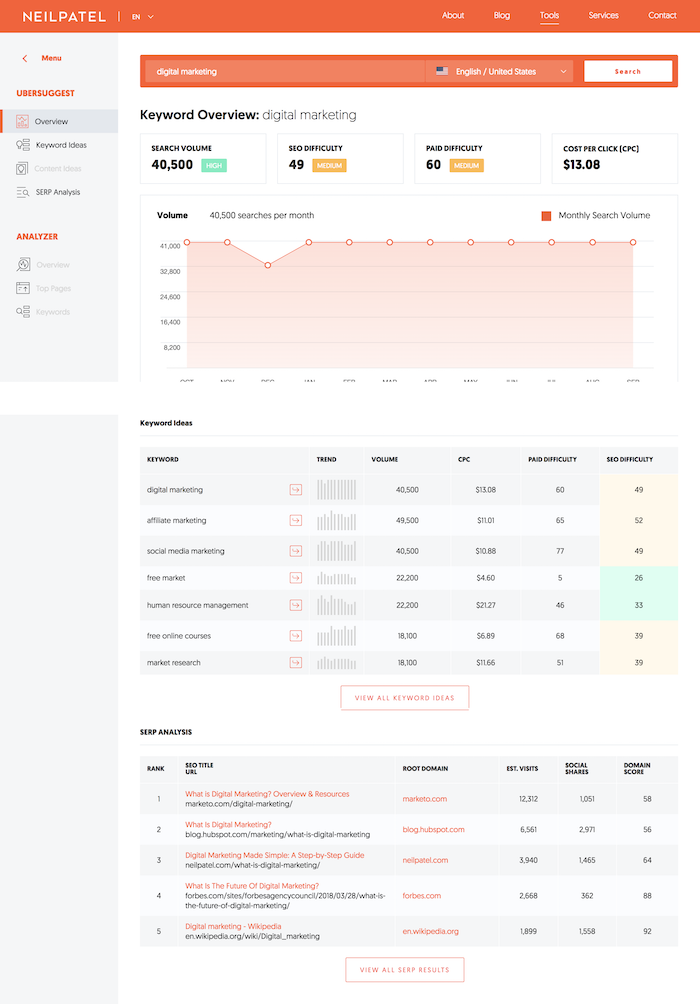
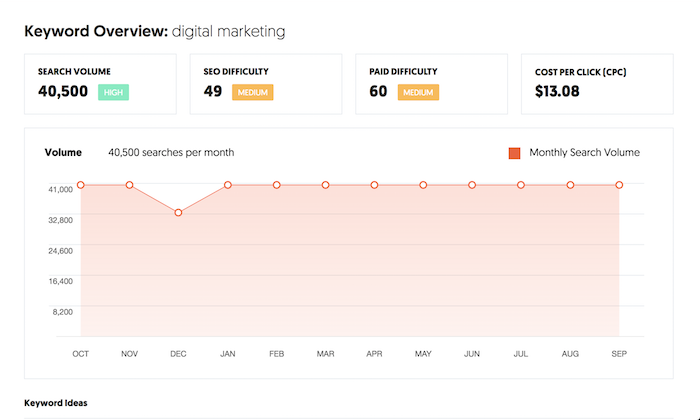
The first section is a graph that breaks down the search volume over time.
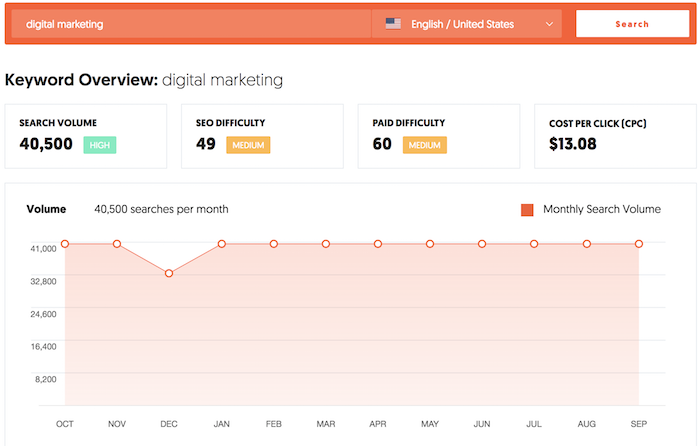
You can see the search volume for any keyword in any country and language over the course of the last 12 months.
The graph will show you if the keyword is gaining or declining in popularity or if it has seasonality.
In addition to that, it breaks down the cost per click, the SEO difficulty, and the paid difficulty.
The difficulty scores are from 1 to 100.
The higher the number the harder it will be to compete for that keyword.
And the lower the number the easier it is to compete.
Keyword Ideas
The second part of the keyword research is the ideas section.
This is the section that is most similar to the prior Ubersuggest but with a few more features.
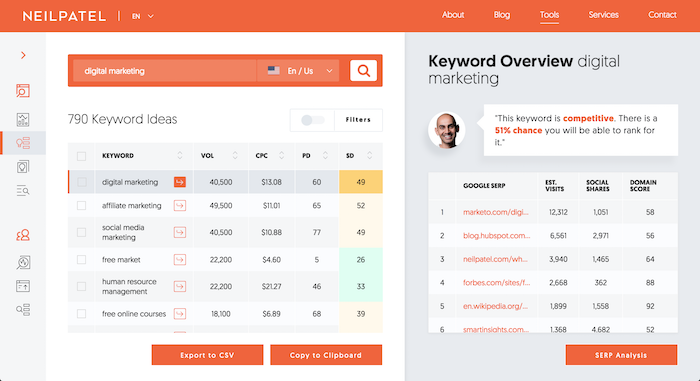
You’ll see a list of keyword ideas.
The keywords are pulled using both Google Suggest and AdWords recommendations.
This way you can get a comprehensive list of potential keywords you may want to rank for.
And similar to the overview section, you’ll also be able to see volume data for each keyword as well as cost per click (CPC), paid difficulty (PD), and SEO difficulty (SD) data.
Now on the right side of the keyword ideas report you’ll see all of the sites that rank in the top 100 for that term.
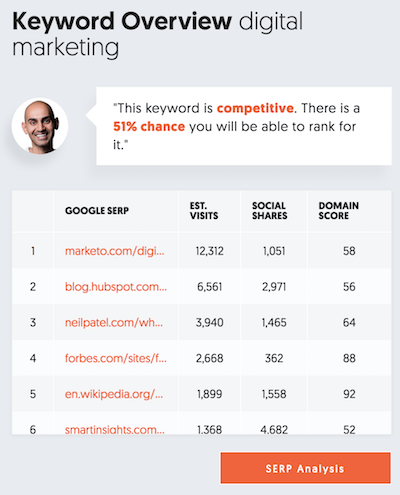
This is my favorite part of the keyword ideas report because you can easily see the estimated visit count based on rankings.
This metric looks at whether a keyword has seasonality and if there are any rich snippets or paid listings for the term.
In addition to showing you the estimated visits based on rank, you’ll also see how many social shares each URL has and its domain score.
Domain score is a metric between 1 and 100.
The higher the number, the more authoritative a domain is and the harder it will be to beat that site.
As for the social shares, this will tell you how much people loved that particular web page.
If more people are sharing it, they must have really enjoyed it.
The last feature in the keywords idea report (other than the exporting to CSV feature which doesn’t need much of an explanation) is the filtering.
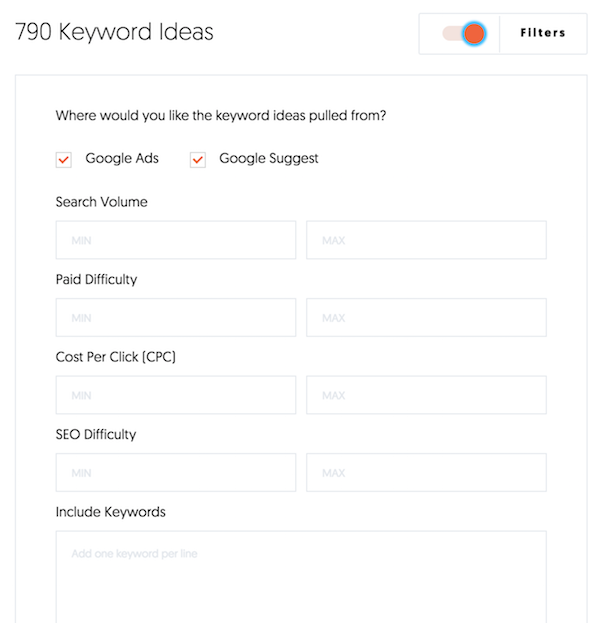
This is where you can filter the keyword results based on any data point you want.
From limiting the results to just Google Suggest or AdWords or by filtering keywords based on their popularity and competition.
If there are also too many results like the screenshot above, you can exclude or include certain terms or phrases.
This will help you filter the results even faster.
And if you want to focus on long-tail terms, just “uncheck” the “Google Ads” option and you will see all of the long-tail terms.
SERP Analysis
The last section, SERP analysis, shows you a simple view of the top 100 sites that rank for any given term.
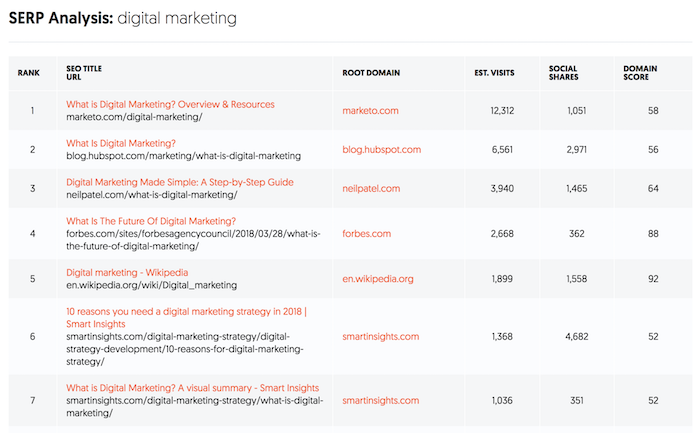
I know many of you are doing keyword research in different languages and regions and you’ll be able to do that with all of the reports, including the SERP analysis.
Eventually, I’ll showcase rich snippets and paid advertising data in this report.
We are already taking those two things into account when we run our calculations on estimated visits.
And of course, you’ll also see social share data and domain scores.
So, what’s next?
I wish I was able to release everything at once, but development is never easy or fast.
I have an amazing team… but good things just take time.
A few of the features I want to release over the next few months include a traffic analyzer report, which shows how much traffic a domain receives from Google.
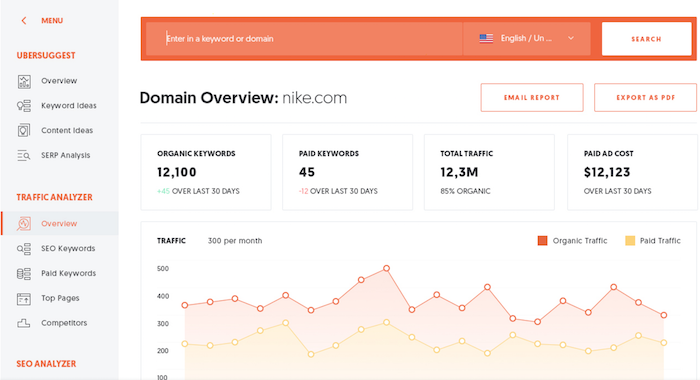
Another feature I will release will be a report that showcases top pages for any given website and the search terms that each of those pages ranks for.
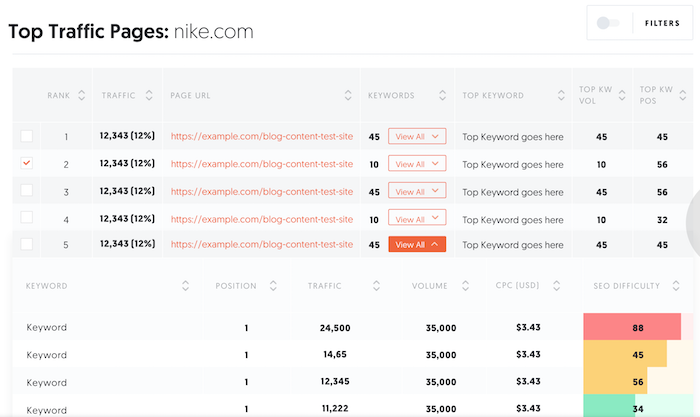
Once I release the traffic analyzer report, the team will be focusing on the content ideas report.
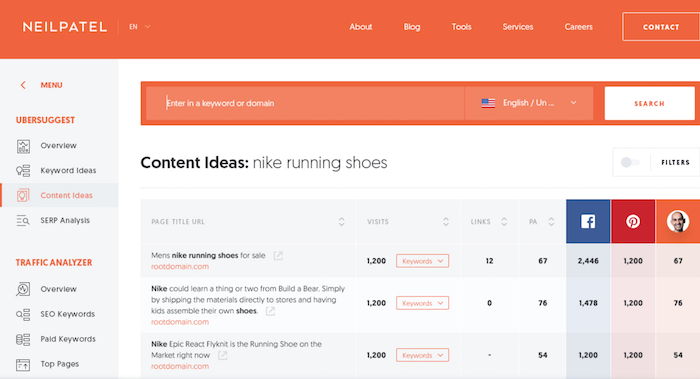
The content ideas will be part of the keyword research section.
When you research any keywords, you’ll be able to see the most popular articles on that subject based on search traffic and social shares (similar to Buzzsumo).
Conclusion
What do you think about the new Ubersuggest?
If you haven’t used it, go check it out.
And if you find any bugs, please email them to [email protected] so my team and I can work on fixing them.
Like I mentioned earlier, this is a work in progress and other amazing features are already being worked on for future releases.
A lot of these ideas come from you guys so, please, the more feedback the better.
So, what do you think about the new Ubersuggest?
The post My New SEO Tool: Ubersuggest 2.0 appeared first on Neil Patel.
Source: feedproxy.google.com

5 Keyword Research Tips That Will Blow Your Mind
The trick with ranking is not to force it. When everybody’s trying to rank for the same keywords, there’s not much room for long-term development. This is where you can improve and find keywords semantically related to your niche, but not necessarily used by your competitors.

It’s in Google’s best interest to suggest semantic results, as closely related to the search query as possible.
This should be in your best interest, too.
But what happens when your industry’s a crowded market share where every digital marketing campaign is survival of the fittest at its best?
5 Keyword Research Tips
There are lots of recommendations, tips, and alternatives to paid tools.
We thought of 5 fresh and unique tips to find the right keywords for SEO.
Anxious to get started?
Before we get started on finding lots of keyword opportunities, there’s just one more thing.
Take a second to understand how much search engines have evolved.
When you type ‘Halloween costume Batman’ on Google, it won’t distinctly show you results of Halloween costumes in general and Batman-related content.
Now, it looks beyond your words and shows you whatever is most relevant for you, in this case understanding that it’s a Batman costume you’re looking for.
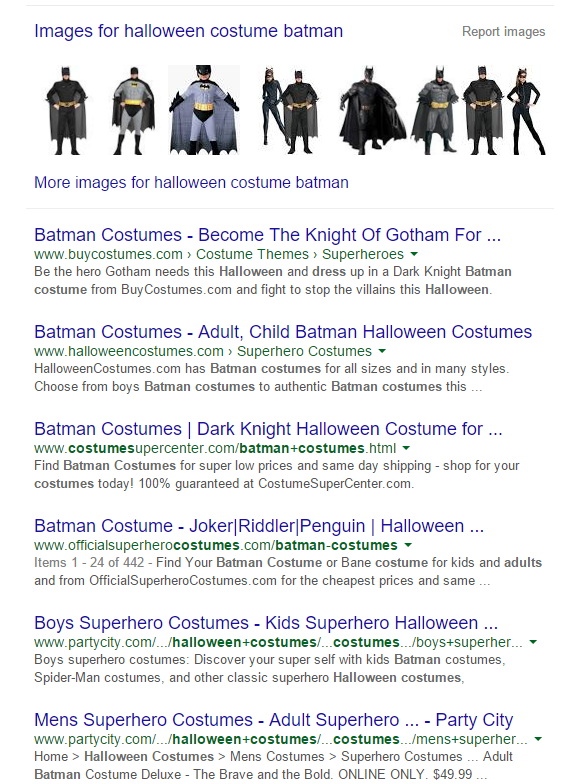
This is why approximately 70% of the search results have derived from the words typed when searching, according to studies made by Google itself – because the search engine is beginning to understand your intention more than the words you’re expressing it with.
It’s true that results can vary depending on your previous searches, your location, and other variables, but browsing in Incognito mode can change this if you’re looking for more ‘objective’ results.
1. Get Keyword Suggestions Using Free Stock Image Sites
At this point, it’s clear therefore that the key is to look in new places for relevant keywords.
Depending on your niche, it may be a great start to look for pictures.
Now, Googlebot can understand by itself very accurately the content of a picture using Automatic Object Detection in Images.

On top of that, we are encouraged to add ALT descriptions to every image we have on our websites in terms of SEO purposes.
Reversing this principle, we’ll notice that looking for keywords on picture descriptions is an easy, effective way to generate new ideas.
For that matter, photo sites are a great source of inspiration, particularly if your niche has enough graphic applications to find useful photo-related keywords.
For instance, if you’re looking for dog food, you’ll be shown both branded and non-commercial descriptions of dog food, as they are characterized in the photo captions.
There are various sites where you’ll find access to online pictures that are not protected by copyrights, and you should find the most suitable ones for your industry.
You’ll see that the sites are of impressive versatility, which means that the search patterns differ, along with the suggested keywords and the images you’ll find. Here are some great sources of inspiration:
1.1 Pixabay
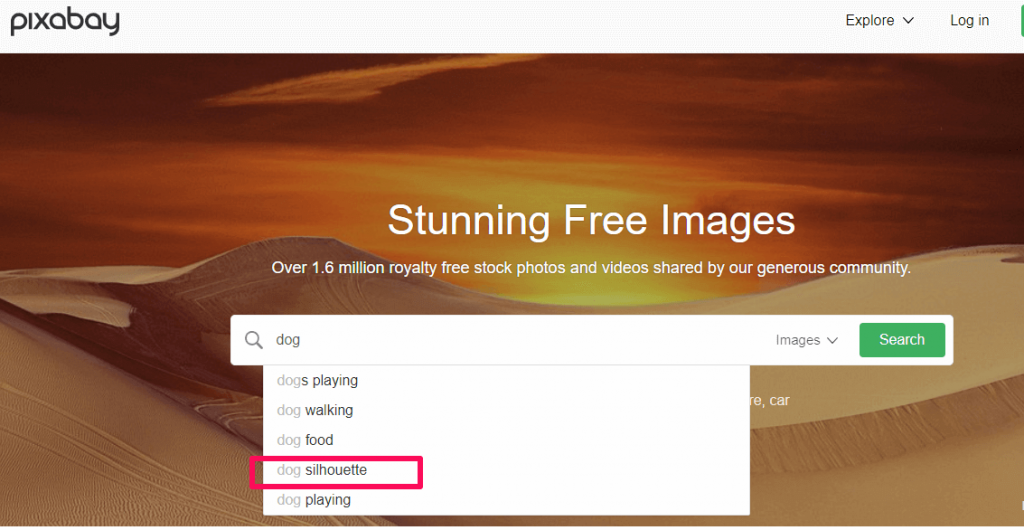
Pixabay has a lot of great value since it has over 1.6 million photos, and you can split your search by category. This way, it’s easier to find out how searches differ from one category to another.
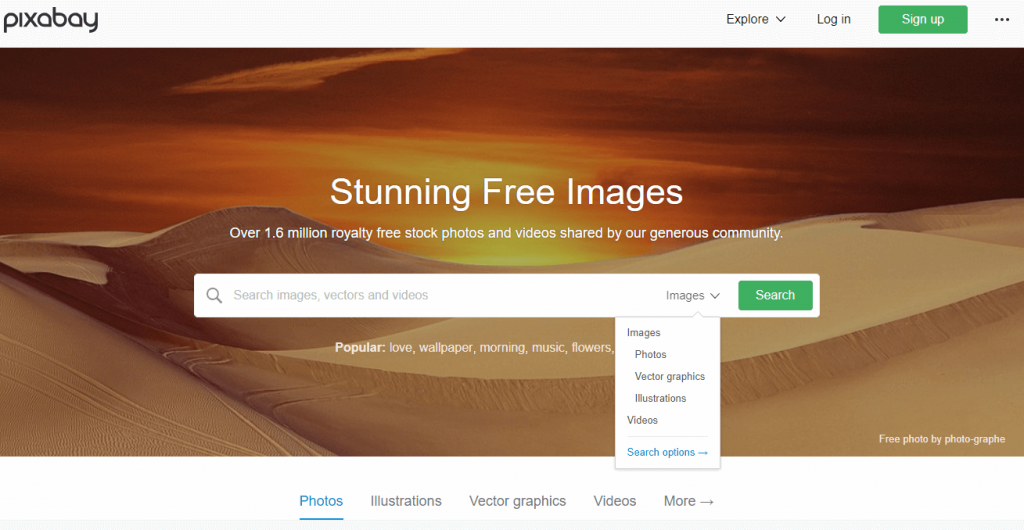
The nice part of this “keyword research tool” is the multiple choices for language support, which allows you to search for keyword ideas in your own language.
You don’t have to translate them by yourself.
Pixabay is more of a community than a conglomerate of pictures, and it can work as a niched, micro social-media site with followers, messages, and all the perks.
I find it important to have a constant source of copyright-free images for current usage, and Pixabay seems to solve two problems at once: free photos and brand new keywords from their descriptions.
Also, being a community-based website, it is free to use and your contribution should consist of uploading photos on your behalf.
This social payment isn’t, however, compulsory, and you can use the site regardless of your personal portfolio.
I would suggest uploading images whenever it’s possible, but it is a matter of personal choice.
We typed “dog” into the search box and one of the search keywords – “silhouette” – it isn’t your generic keyword when it comes to dog-related content, neither is it one of the most popularly encountered.
Despite this, it’s a suitable word to be integrated into your articles, and the search engine will associate it with your topic without any problems.
1.2 Shutterstock
Shutterstock is a paid service.
The pictures here do have copyright, but this is an additional sign of quality.
People who pay for this service to be given relevant photos are tech-oriented people, who work in online industries and value precision.
Therefore, the keywords you’ll find generated from previous searches and from photo descriptions are both specific in nature and refreshing for your niche.
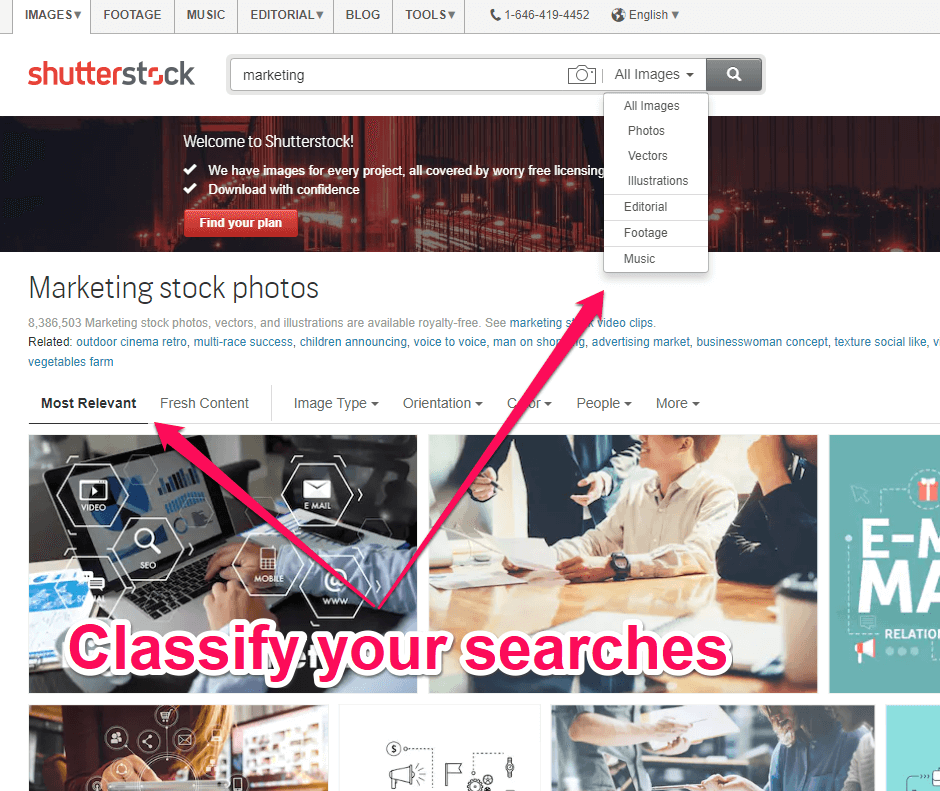
The subscribers will target keywords that are most relevant in order to be shown the proper photos.
It’s the paid subscription and the reputation for reliability that makes this a viable source for taking a fresh look at the most fitting keywords in your niche.
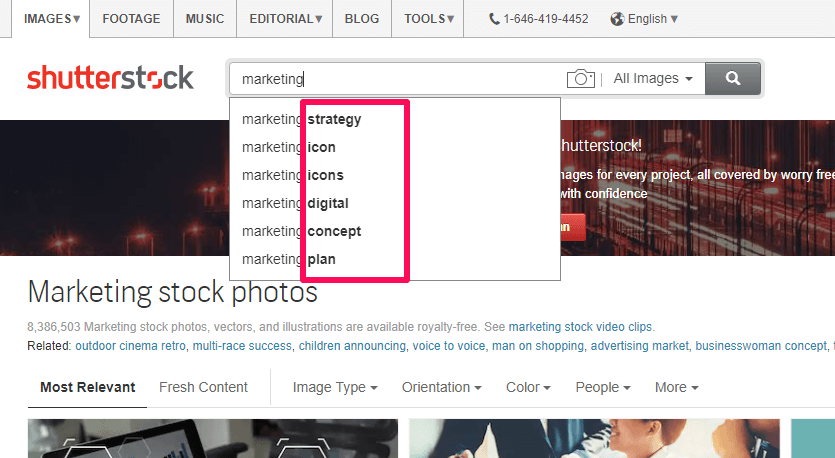
The autocomplete suggestions will be relevant and refreshing, although not always very niched.
But in the context of semantic focus from the search engines, being relevant trumps being specific – if the autofill suggests previous searches on a word, this can be easily integrated semantically on our topic.
1.3 Stockvault
Stockvault is a free micro search engine for photos and it’s great for searches of highly popular industries, and not very specific niches since it’s used by people from different environments.
It has probably one of the most complete category lists which makes it very easy to search and see accurate keyword results.
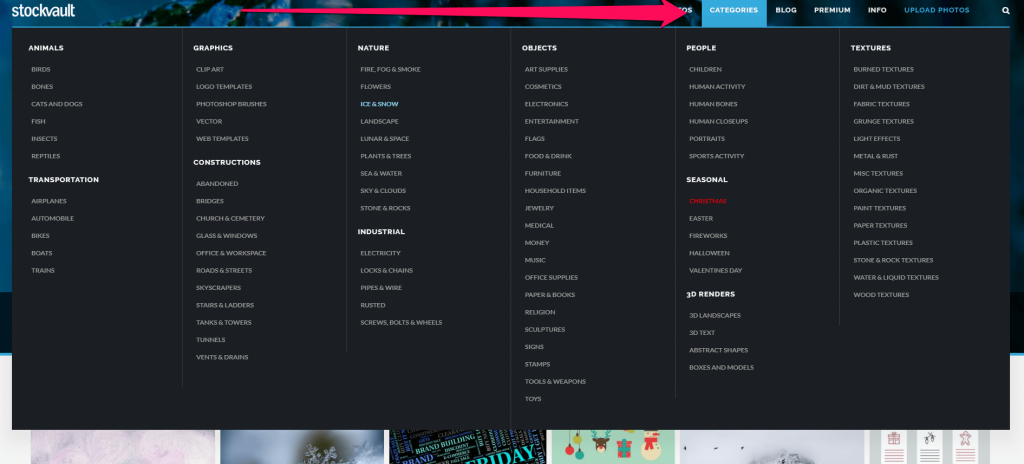
And because they’re so versatile, it’s best to search for a word in a category, and then see the description of the pictures returned as results.
Also, you can see how they differ depending on the category you choose (for instance, men vs. women).
The returned results, as well as the autofill suggestions, will differ depending on the previous searching behavior on that particular category.
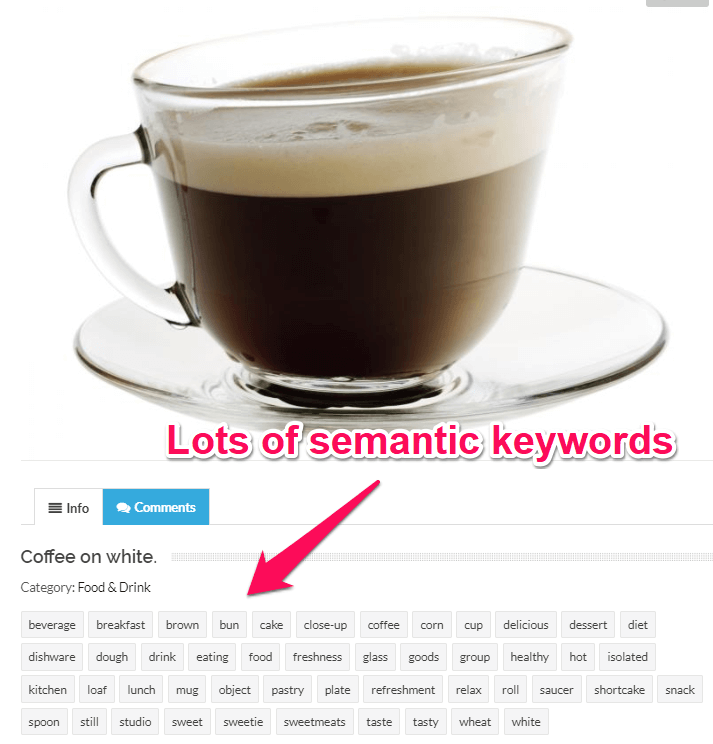
For example, if you search for coffee and click on an image, you’ll see the category and lots of tags that can be used as semantic keywords in your content creation process.
Stockvault offers valuable contextual keywords and backgrounds for every search term and every picture you find.
It can be an intelligent Adwords Keyword Planner alternative.
This is, therefore, the cornucopia of differential approach for distinct targets.
If you’re looking for keywords for distinct approaches between several target groups, this site does the job pretty well.
1.4 Freedigitalphotos
Freedigitalphotos is another reliable source when looking for popular keyword ideas.
Despite being free, there’s nothing cheap about it.
You’ll always have plenty of search results, each of which has a caption text, which you’ll find more than useful since it doesn’t require manually going through all the results.
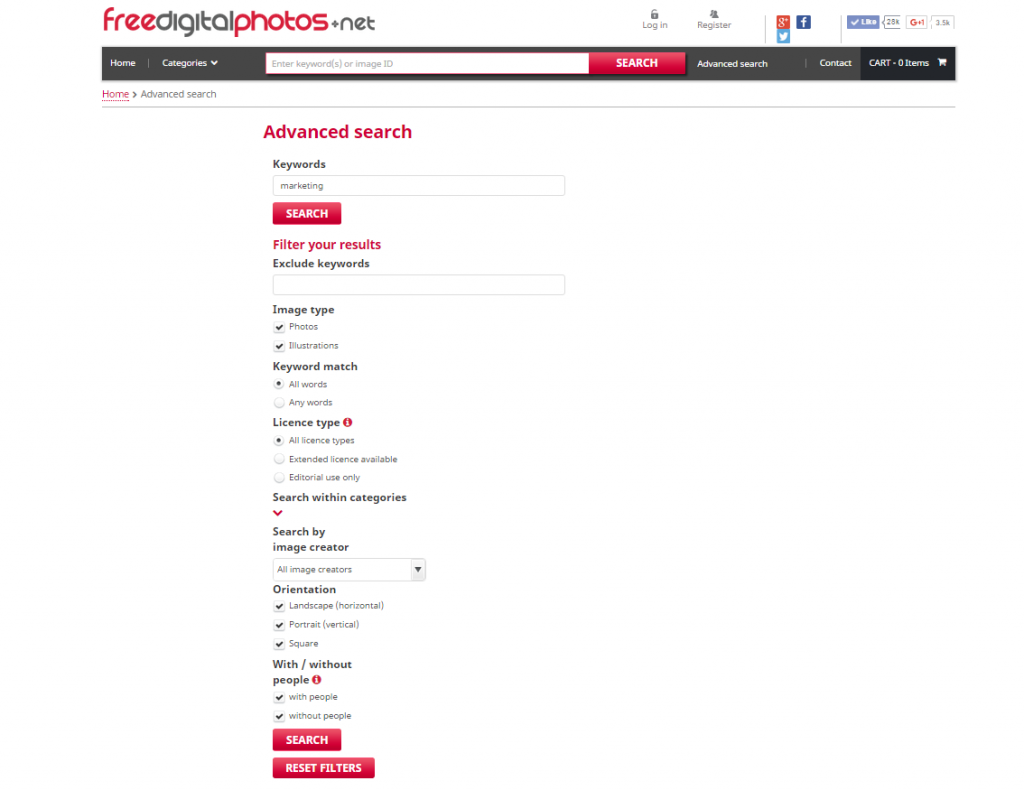
You can set up your search by an advanced set of parameters, thus influencing the results.
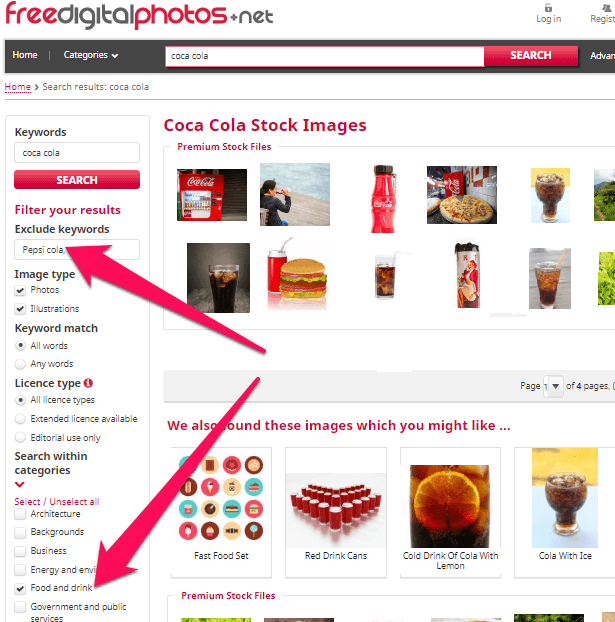
One other very interesting feature is the ability to exclude keywords from your returned searches.
If, for instance, you want to search “Coca-Cola“ but not “Pepsi Cola“, you can always use the ‘Exclude Keywords’ filter.
In this particular case, “Pepsi Cola” would categorize as a negative keyword.
2. Generate Keyword Ideas Using Offline Magazines
Start reading magazines.
See which keywords are used by those in your industry in content marketing – as the general style is so different from online to print, you’ll get plenty of ideas that you’ve been ignoring because of SEO assumptions.
When working online, it’s crucial to keep a fresh mind.
And if you want different results in rankings than your competitors, maybe you should look where they don’t, too.
As we’ve documented before, magazines are a divergent resource with unique content, that could generate great keywords for your business.
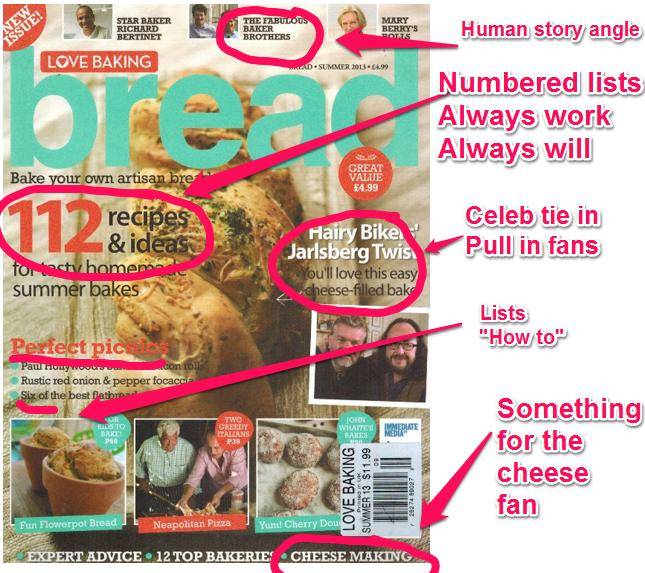
I’ll only cover the most important reason – magazines are a perfect resource for someone preoccupied with words.
After all, they provide what we hope for the web to become one day in terms of content: articles that attract through subject and writing, without being obsessed with keywords and rankings.
And perhaps this is what we should all turn towards to keep a fresh mind.
There are hyper-targeted niches in the magazine market.
If your industry allows it (and chances are, if you’re reading this post, it does!), take a look in the niche magazines.
The intent for great content on a magazine is exceedingly higher since the investment is thousands of dollars and the editors don’t afford to make mistakes, while a blog is much easier to manage, promote and reinvent every time article chops of the numbers of the audience.
3. More Keywords Suggestions from Amazon
Another alternative to Google Keywords Planner is Amazon.
It is the Google of selling.
Its power consists of being so huge, that it’s impossible not to find what you’re looking for, from beauty products to books and video games.
It’s also where you can find out what people search for, to a very specific extent.
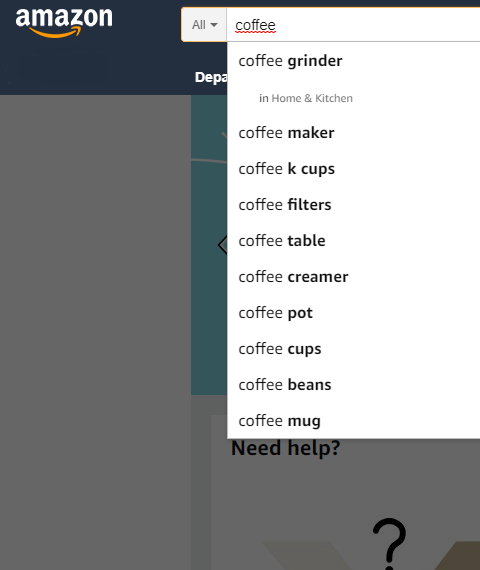
Because of all its categories, there are two kinds of insight: one from the different search suggestions you’ll get for the same word in distinct categories and one from the category and its suggestions that you’re offered when searching for a product.
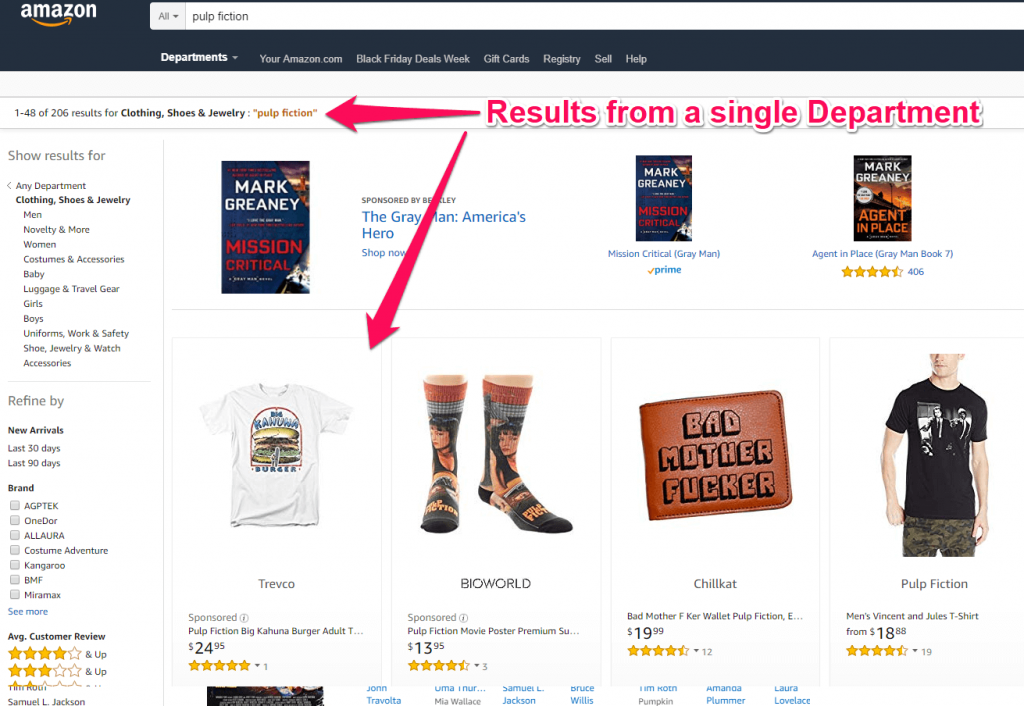
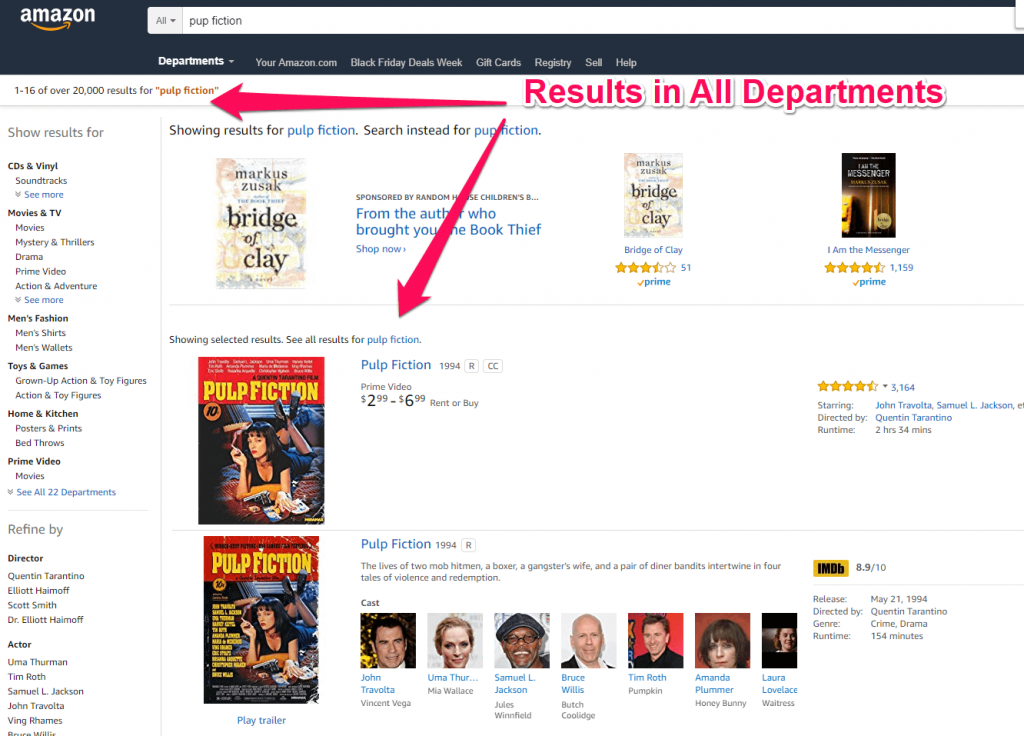
Because Amazon is such a valuable source, you can consult third parties for advanced results for what are people searching for.
Merchantwords, for instance, is a highly professional paid service that puts the Amazon search database in perspective.
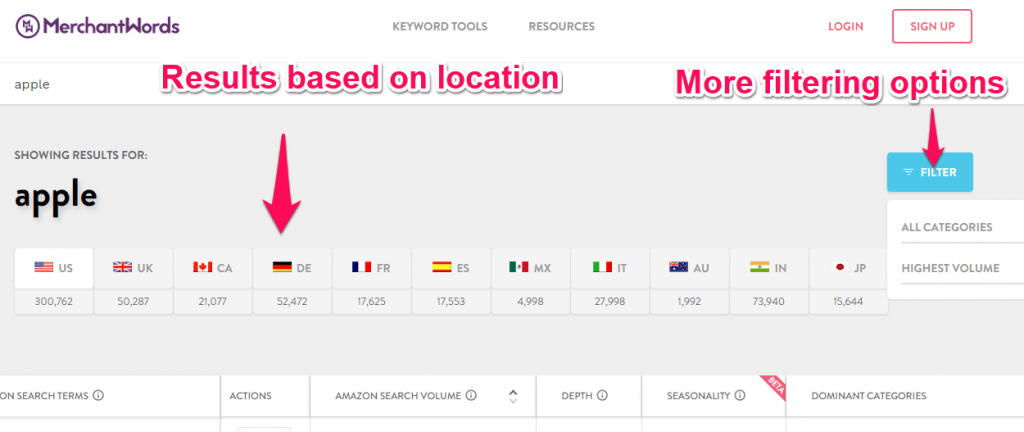
“Apple“ is one of the most popular Amazon searches.
Being able to organize the results after the highest/lowest monthly search volume or by category order allows us to examine the specific parts that we find most relevant for our online business.
Depending on how trending your results are, using this tool can help you find keywords more than just once, by identifying the trending topics the exact ways they’re being searched on the site.
4. Answer the Public
Writing perennial articles isn’t easy, particularly when evergreen content seems to have additional requirements for making a good impression and not looking like junk.
It takes vision to maintain relevance over time. Answer the public can be used as a keyword research tool very easily.
It is a site that suggests questions people would ask on a different topic or keyword that you insert, which you can materialize in new keywords or – why not? – in new content ideas.

The homepage of this site is a very impatient man, in a sweater, who seems eager to hear you answering a question that is of elevated interest for a larger public.
There’s also a number of popular countries from which you can select, and the results differ from each local trending search.

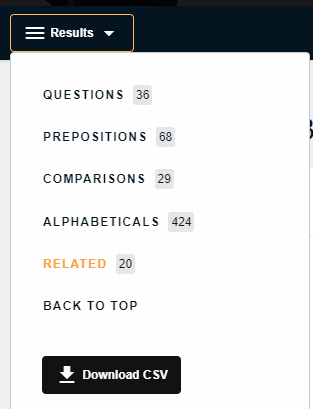
The results are formulated as popular questions, comparisons, popular phrases containing the keyword, and they’re followed by alphabetical suggestions of the desired topics.
You can download the whole keyword data into a .csv.
5. The Wikipedia Database
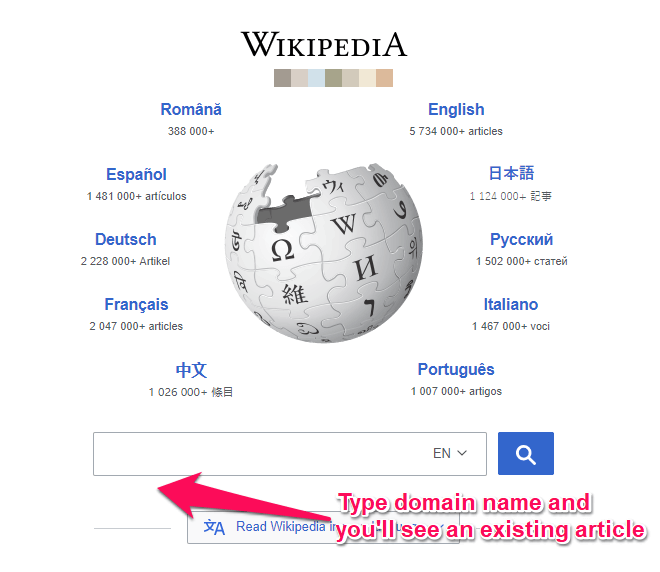
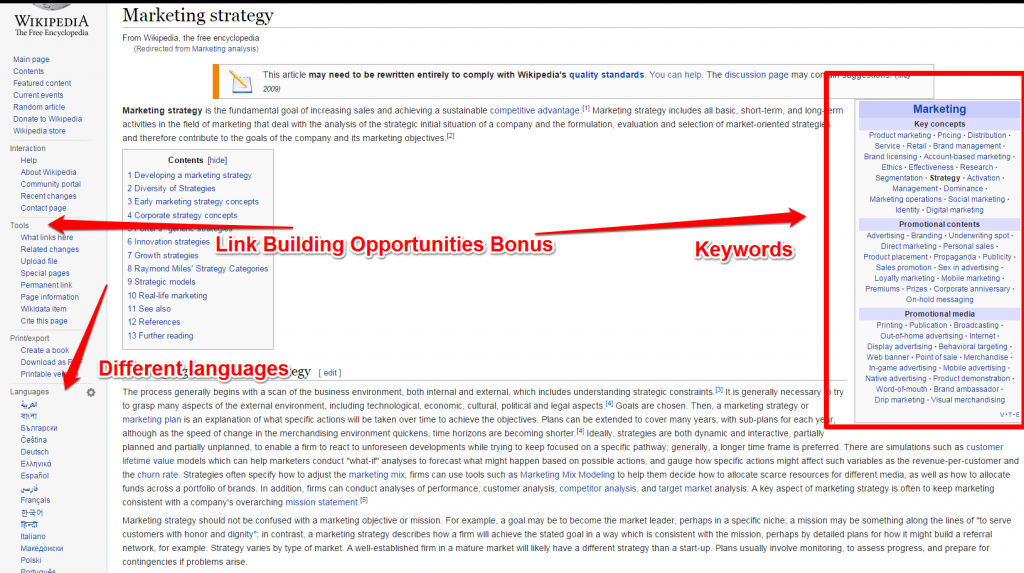
Wikipedia is a source of keyword research in multiple languages, especially since it covers a lot of topics.
Because the articles here are information-centric and not keyword-centric, you may find a reinvigorating perspective on the textual approach.
Of course, the encyclopedia is unbiased (or it should be), and most of the articles aren’t necessarily written in a very creative way.
But by not abiding by the general rules of online writings, the result will be similar to the one produced by reading niche magazines – only in a different writing style.
Conclusion
Whenever the competition is too high, you risk tilting at windmills.
This happens because you, as well as your competitors, are trying hard to rank for the same keywords, suggested by (roughly) the same sources.
I always search incognito whenever there’s something I want to take a fresh look at.
Because, smart as they are, search engines memorize my history and suggest answers related to my previous queries.
The same kind of story happens here – you’ll get to run in circles pretty soon.
Using the same keywords as your competitors when writing in your niche often turns the common words into ground zero in SERPs.
On the other hand, there are plenty of creative ways of keeping a fresh perspective on your work.
Looking for answers (or questions?) where nobody else does makes the difference between a trendsetter and the next in line.
Plus, finding unique keywords research tools can help you give a boost to your SEO strategy.
Note: This blog post is an improved version of an older one we had.
We considered this article to be valuable for those interested in outranking their competitors and the information needed a refresh because the online market is evolving very quickly.
The post 5 Keyword Research Tips That Will Blow Your Mind appeared first on SEO Blog | cognitiveSEO Blog on SEO Tactics & Strategies.
Source: cognitiveseo.com