
Tag Archives for " help "

3 Key Reasons to Use Augmented Intelligence Tools in Digital Marketing

Reasons to use AI
Do terms like “AI” and “machine learning” make you think of robots and science fiction?
These technologies are being used everywhere, and the age of AI is already in full swing.
AI and technology offer a solution to inefficiency. Deloitte has shown that 83 percent of early adopters of AI and cognitive technologies achieved either “moderate” or “substantial” benefits.
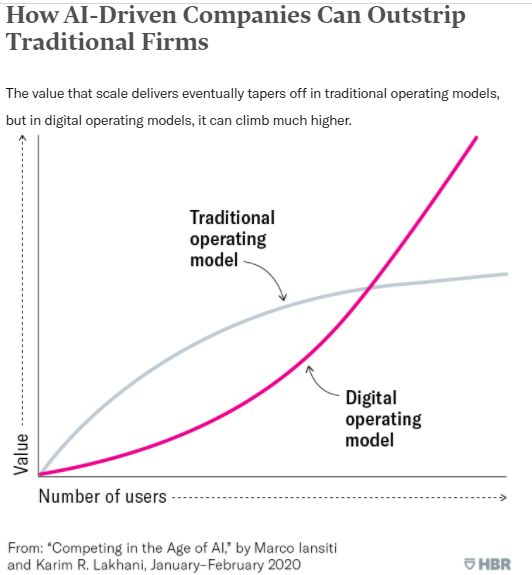
AI vs. traditional comparison
AI is somewhat part of augmented intelligence tools’ technology, but how is it used in marketing right now?
What is Augmented Intelligence?
Gartner defines “augmented intelligence” as “a human-centric partnership model of people and artificial intelligence working together to enhance cognitive performance.”
What that means is that augmented intelligence isn’t just about creating super-smart machines. It’s about creating technology that can help you and your brain do things better.
Augmented intelligence is sometimes also called intelligence automation (IA).
How is Augmented Intelligence Different From Artificial Intelligence (AI)?
Artificial intelligence is all about computers making decisions. But augmented intelligence is about you making better decisions, with the help of a computer.
Let’s dive into some specific examples so we can see how this works:
Artificial Intelligence Examples
Artificial intelligence operates on its own, without help from humans.
That might make you think of autonomous killer robots, but the reality is usually a little less exciting.
Ever used a grammar checker tool? Lots of those use AI to give you more sophisticated grammar recommendations.
Even Google Docs uses an AI grammar checker. Google’s engineers train the model using correct sentences. It’s then able to predict whether sentences are correct or incorrect on their own, without needing to be programmed with every single grammar rule.
Know where else Google uses AI? In its search engine algorithms.
Updates like RankBrain and BERT have brought AI to the search engine, and SEOs have needed to update their strategies accordingly with AI SEO.
Augmented Intelligence Examples
Now that we’ve seen how AI is used, how is augmented intelligence used? How are its applications different from AI?
Augmented intelligence is a pretty general term. You can use it to talk about basically any machine that helps humans enhance their capabilities and make better decisions, even something as simple as a compass or telescope.
But in practice, augmented intelligence is usually used to talk about automated systems that need direction or input from humans to function. Augmented reality tools, like Google Glass, are just one example.

Virtual Try on glasses
Augmented intelligence can be used in a bunch of different fields. It can support financial professionals in making regulatory decisions, or help health care professionals make medical decisions.
The augmented intelligence tool gives recommendations, and then the human makes the final call. Feedback from humans helps the tool to learn and grow continuously.
Why would you want to use augmented intelligence when you could use “true AI?” Well, augmented intelligence allows us to do more with the technology we currently have, without needing to wait for AI to advance.
It also adds a human element to the decision-making process, which can be helpful for complying with regulation in some industries. Plus, with augmented intelligence, we can take advantage of new technologies while also continuing to use human talent.
But the best thing about augmented intelligence? When humans and machines work together, they can achieve better results than one or the other working alone.

Wayfair Furniture AR
For example, an experiment by a team from a Harvard Medical School hospital at the Camelyon Grand Challenge showed that an algorithm could accurately detect breast cancer 92% of the time, while a human pathologist accurately detected it 96% of the time. When the pathologist worked together with the algorithm, the results were accurate 99% of the time.
Overall, augmented intelligence is just a different philosophy that can help us get the most from AI, without needing really sophisticated capabilities.
How Can Augmented Intelligence Help Your Business?
The truth is, augmented intelligence can do huge things for your company.
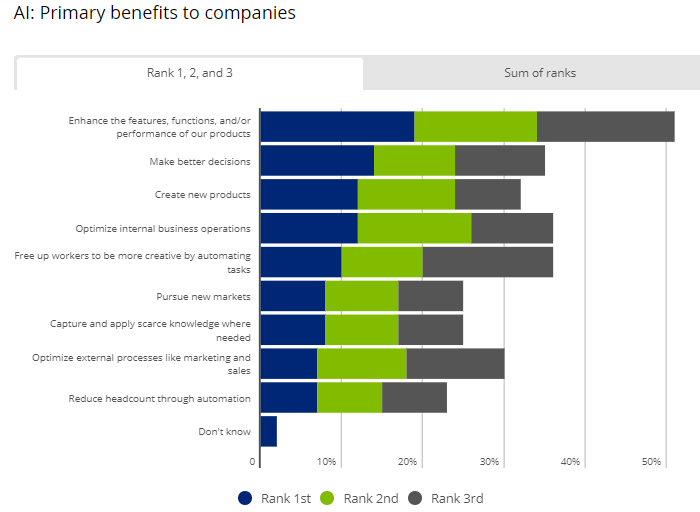
Benefits of AI to companies
There are tons of different ways to use augmented intelligence. There’s probably an IA application out there that can help you streamline and improve every single area of your business.
Here’s an example: Augmented intelligence can help you sell things online.
Think about the last time you thought about buying something online. What were some reasons you might have hesitated before making a purchase?
You might not want to lay out money for certain items before trying them out in person. Furniture, glasses, clothes are examples of products users want to see how they look up close before you buy.
Enter augmented intelligence. With augmented reality (AR) applications, your customers can “try on” things virtually. Even if they’d prefer to shop from home, they can still get a feel for your merchandise.
Want to know how this works in practice?
Check out some of the companies using augmented reality to sell furniture (Wayfair), glasses (EyeBuyDirect), and makeup (MAC Cosmetics).

MAC-cosmetics
To use the virtual try-on tools, you can upload a photo or open your webcam, and the tool will show you what the product looks like in real life.
But sales aren’t the only area where augmented intelligence can help your business.
Want to make your product safer? Car companies are already using augmented reality to help drivers spot dangers on the road and avoid looking down at their phones.
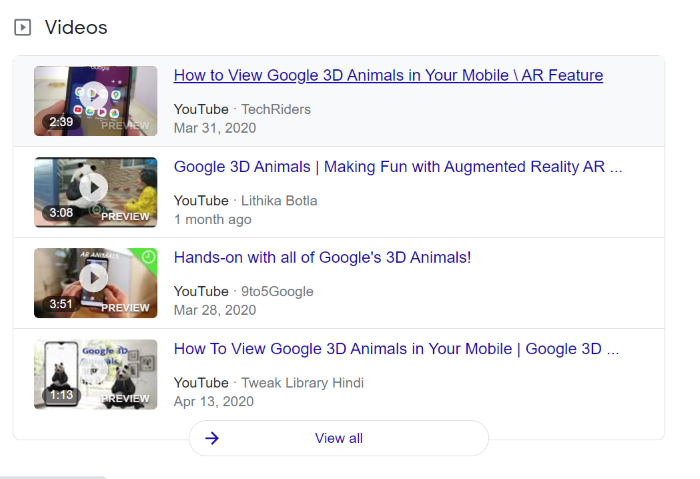
Want to thrill your customers with a cool new feature? Google did that when they introduced internet searchers to AR animals.
You can improve your customer service with augmented intelligence, too. Chatbots can help answer some more straightforward customer questions, freeing up more time for your human staff. IA can also help support your customer service reps when they need more information to help customers.
Finally, just like with sales, product, and customer service, augmented intelligence tools can take your marketing efforts to the next level.

AR in action
Here are three crucial reasons why you should use augmented intelligence tools to supercharge your marketing.
#1 – Augmented Intelligence Creates Positive Customer Experiences
If you use augmented intelligence to create an extra cool or innovative product, your marketing will basically be halfway done for you. An awesome customer experience pretty much markets itself. Just look at all the videos people have made about Google’s AR animals:
Check out all these articles people have written about Wayfair’s augmented reality feature for furniture:
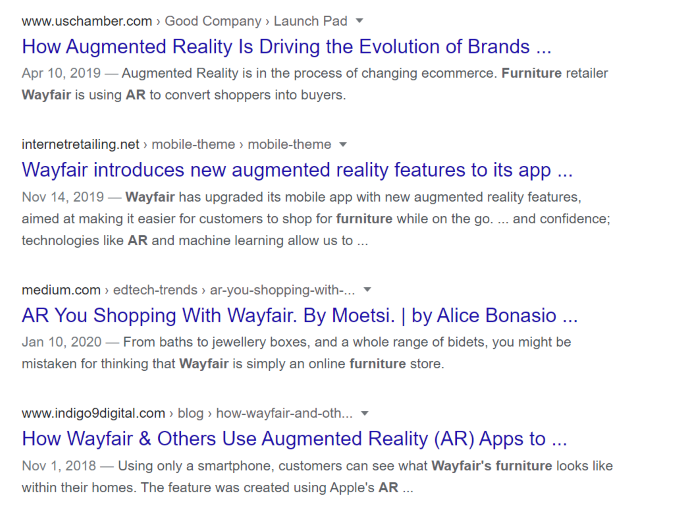
If you make something interesting enough, you might end up getting lots of new backlinks and traffic without even trying.
Besides creating new product features, you can also improve your customer experience with augmented intelligence in other ways.
For instance, customers are more likely to be satisfied if they can get their questions answered faster with technology like automated chatbots, as mentioned above.
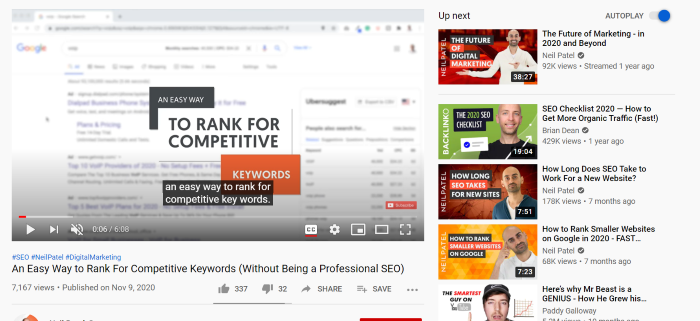
You can also use augmented intelligence to help personalize the customer experience. An example of this would be user recommendations. You’ve probably seen these on YouTube on the right-hand side:
And on Amazon as suggested product examples:
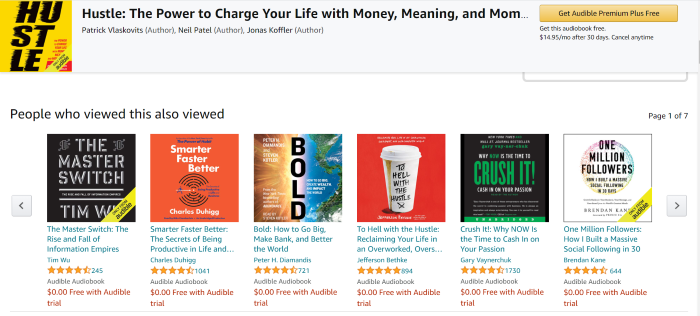
These websites use algorithms to make recommendations based on the videos you’ve already watched or products you’ve already shown interest in. When you click on a recommendation, you’re sending a signal to the algorithm that the recommendation was relevant.
Recommendations help you offer a better experience by helping your customers find things they might be interested in. They are also a way to convince customers to stay on your website for longer.
#2 – Augmented Intelligence Can Reduce Busywork
Another major reason why companies are interested in automation is that it saves time. According to WorkMarket’s 2020 In(Sight) Report, over half of employees think they could save 240 hours every year through automation.
IA can help your marketing department save time in lots of different ways. If you’re currently using data for strategic planning, augmented intelligence tools can help.
You can use these tools to help clean data sets, forecast future trends with predictive modeling, or even keep an eye on competitors, social trends, and customer feedback. This can help you create more effective marketing plans more quickly.
If you decide to use augmented intelligence in your marketing, you won’t be alone. According to a Forrester report, 46% of respondents say that marketing and sales teams are leading AI adoption.
It’s no wonder marketers are excited to adopt this technology. Hubspot found that using AI software cut the time one agency spent on reporting by 97 percent.
#3 – Augmented Intelligence Can Help Write Content
Here’s another way that augmented intelligence can help with your marketing: It can help you write better content, faster.
If you’re a marketer, you know that writing quality content takes serious time and effort.
A survey by Orbit Media Studios states that the average blog post takes almost four hours to write. That’s actually a 63% increase over 2014 when the average blog post took just under 2.5 hours.
If you’re wondering why the writing time has gone up so much, it’s because Google’s algorithm updates have started to favor long-form content.
Besides the actual writing, researching, adding photos, and publishing also take up lots of time, not to mention content planning and SEO.
Augmented intelligence can helpfully write text, but it can’t add much research, facts, or emotions to it.
AI’s writing style can be a little different from what we’re used to, so it needs human polishing.

That’s an excerpt from an article written by an AI, published in The Guardian.
As you can see, AI can write sentences, but you might need to edit or adjust them to fit your content needs.
Even if you don’t want a robot to write your articles, you can still use augmented intelligence tools to help you in your writing. Spelling and grammar checkers, like Grammarly, are a good example of this.
Augmented intelligence can also help you create better content by coming up with more relevant topics for your audience.
If you’re using augmented intelligence for data collection and analytics, you can use the knowledge you gain from that to help you write more data-driven, personalized content.
If you want to do a content audit to review the content that’s already on your website, augmented intelligence can help with that, too.
Augmented Intelligence is Becoming the Norm
It looks like AI, and automation in general, are here to stay. McKinsey predicts that “half of today’s work activities could be automated by 2055.”
With “AI’s adoption increasing year-on-year,” marketing departments are leading the charge.
Augmented intelligence offers the perfect approach to AI, because it’s all about pairing AI’s strengths with human strengths.
Conclusion
As a marketer, you’re all about staying ahead of the competition.
To do that, you’ll need to have the best tools, including artificial intelligence.
However, a lot of people are skeptical about AI. In fact, research by PwC shows that 67% of CEOs think AI and automation will have a negative impact on trust in their industry over the next five years.
With augmented intelligence tools, you don’t have to rely on AI alone. Instead, you can use AI’s strengths and human strengths together to get better results.
If you’ve already started using augmented intelligence in your marketing, or if you’re thinking about using it soon, tell us about your experience in the comments.
The post 3 Key Reasons to Use Augmented Intelligence Tools in Digital Marketing appeared first on Neil Patel.
Source: feedproxy.google.com

What is an SSL Certificate and How It Can Help Your Website
You might be wondering: “Why is my website showing up as an unsecured site in Google Chrome?” The answer is because you don’t have an SSL certificate that converts your pages into secure, encrypted HTTPS pages.
Some people may think that there’s no need for an SSL certificate if your website isn’t used to store or process sensitive information, or that an HTTP protocol is enough.
That may have been the case a decade ago, but it simply doesn’t hold true today.

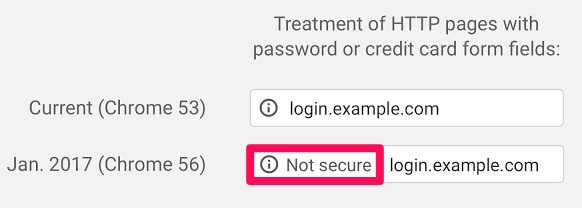
When visitors see the “Not secure” tag that comes along with the lack of an SSL certificate, they’ll be less likely to stay on your site or interact with your company.
Or buy anything from you at all.
In this post, we’re going to cover what an SSL certificate is and how it can be used to help your website.
So what does SSL stand for, anyway?
What is an SSL Certificate?
SSL certificates are data files that add a cryptographic key together with a company’s details. SSL stands for Secure Sockets Layer.
In layman’s terms, SSL certificates bind a domain name, server name, or hostname together with a company name and location.
When they’re installed on a web server, they activate a padlock that shows that a secure connection is present between a browser and the webserver.
These padlocks, which are added to most of your favorite websites, look something like this:
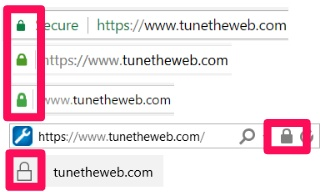
They signify to site visitors that the owner of a website is encrypting connections on the page, which makes for a more secure experience.
Usually, SSLs can be used to secure transactions, logins, and data transfer. In today’s world, it has become commonplace for social media sites to have SSL certificates, too.
Twitter has one:

Facebook has one:

And even Reddit has one:

When you open an SSL certificate up, it usually looks something like this:
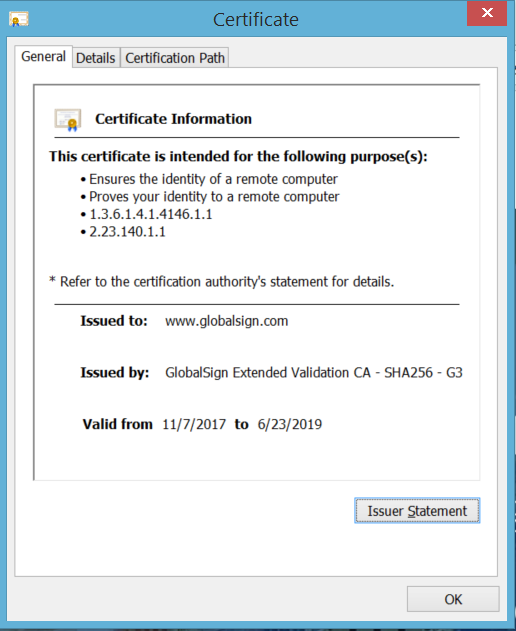
This particular certificate lists who it was issued to, who it was issued by, and the dates that it is valid from and to. This one is valid until 2019.
That way, site visitors won’t have to second guess if your web page is safe, secure, or legitimate.
The bottom line? If you want your site to be trustworthy, you’ll need an SSL certificate.
Here’s how an SSL certificate works.
How Does an SSL Work
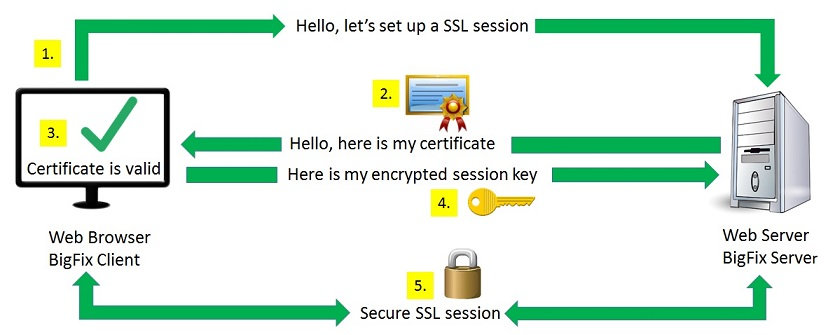
When you access a website, the browser or server requests that your web server reveals its identity.
A webserver with an SSL certificate sends the browser or server a copy of it for review.
Then, the browser or server will check to determine whether or not it trusts the certificate. If it does, it relays the message back to the webserver.
Then, the webserver sends back a digitally signed acknowledgment and an SSL encrypted session begins.
Encrypted, secured data is then shared between the browser or server and the webserver.
The benefits of using SSL certificates are huge. For starters, SSL makes browsing safer for your customers, builds trust and boosts conversions, and protects both internal and customer data.
They also help you rank higher in Google since they’re made possible with HTTPS.
But what is HTTPS and why is it important?
Why HTTPS?
HTTPS stands for Hypertext Transfer Protocol Secure. It is an application layer protocol that was created to transfer and receive data over the internet.
In comparison to plain old Hypertext Transfer Protocol, or HTTP, HTTPS encrypts all communication between a browser and a website.
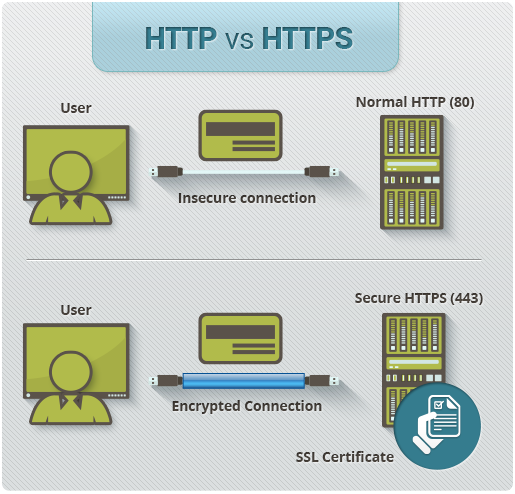
HTTP does not. The added S in HTTPS is much more than a letter.
This means that data sent through an HTTPS connection is converted into a nearly impenetrable code to prevent unauthorized hackers from getting their hands on it.
And even if they do, they won’t be able to understand it or make sense of it. Encryption can take a simple message, like “hello” and turn it into an unidentifiable code, like “6EB6957008E03CE4.”
An application layer protocol doesn’t discriminate when it comes to how information is transferred between sources, so your site visitors will all be treated with equal security.
HTTPS is commonly used by e-commerce websites in order to ensure secure transactions for customers when purchasing products.
Let’s take a closer look at the importance and advantages of the HTTPS protocol that SSL certificates provide.
The Importance and Advantages of SSL
Google’s main goal is to provide users with secure browsing options. That’s why they’re encouraging site owners to make the switch over to HTTPS.
In fact, Google is now marking all non-HTTPS sites as insecure.
And if you’re selling products or services from your site, an HTTPS seal of approval could help you sell even more.
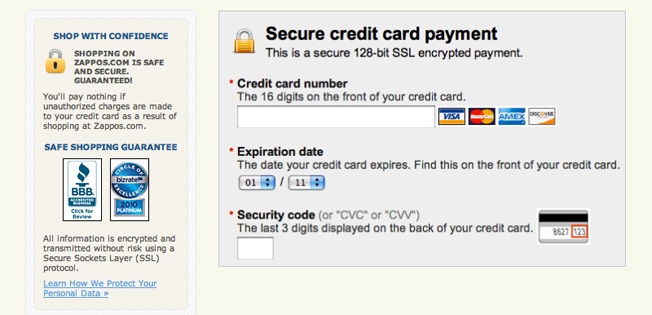
Think about it: would you hesitate if you were ready to buy something and you saw a header like “Secure payment?” Probably not.
But if you saw something on a checkout page mentioning that things were “not secure,” you’d probably be gone faster than a toupee in a hurricane.
Once you have an SSL certificate and an HTTPS protocol, don’t be afraid to show it off to your customers and boast about it to help boost sales and transparency.
HTTPS can also help your SEO and conversions.
How SSL Can Help Your SEO And Conversions
Google rewards URLs with HTTPS protocols for being secure, which gives them a minor SEO boost in comparison to sites without them.
This means increased rankings and more referral data.
Referral data is preserved when it passes through HTTPS sites, which can also help to increase your search engine placements.
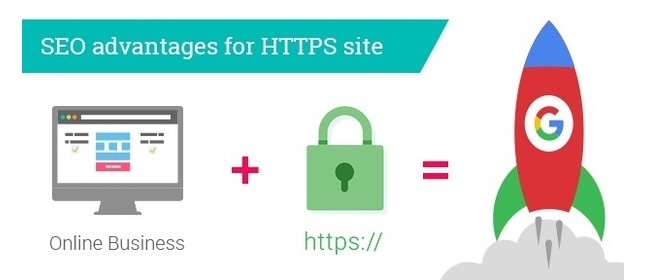
Rankings will continue to increase over time if your site operates on HTTPS since visitors can always rest assured that browsing on your site is secure.
But there are several different types of SSL certificates you should be aware of.
Types of SSL Certificates
When choosing an SSL certificate, you need to pick the one that works best for you and your site.
There are three main types of SSL certificates.
- Domain Validated (DV SSL) Certificates
- Organization Validated (OV SSL) Certificates
- Extended Validation (EV SSL) Certificates
DV SSL certificates are issued almost immediately, and no company paperwork is required to obtain one.
No company identity is displayed on this type of SSL certificate other than encryption information, but it is enough to activate the “secure” padlock on your URL.
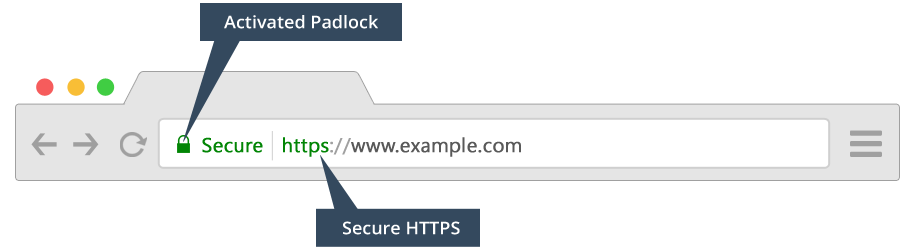
While there’s no questioning that your information will be encrypted when visiting a site with a DV SSL certificate, there’s no way for customers to verify who is on the other end of the data.
These certificates are the easiest and quickest to get, and they’re also the cheapest. But they’re the least secure of all SSL certificates.
If you just have a small personal website or forum that needs some added encryption, a DV SSL certificate is a solid choice.
OV SSL certificates are more secure than DV SSL certificates but less secure than EV SSL certificates. They’re also usually right in the middle of the two when it comes to cost, as well.
They are issued within a couple of days and require you to:
- Authenticate your organization
- Prove your right to request a certification
When you obtain an OV SSL certificate, the “secure” padlock will be added to your URL, as well as some kind of site seal, depending on where you purchase it from.

If you have a large, public-facing website that handles some non-sensitive transactional data on a regular basis, an OV SSL is a good certificate to go with.
EV SSL certificates, on the other hand, require several steps before they can be obtained. To get an EV SSL certificate, you must usually:
- Verify the legal existence of your company
- Verify that the identity of your company matches official records
- Verify that your company has the right to use the domain listed in the EV SSL certificate
- Verify that your company has authorized the issuance of the SSL certificate
EV SSL certificates are harder to get in comparison to other types, but they are more secure than DV SSL and OV SSL certificates.
You know exactly who is on the other end of the website with this kind of certificate.
These certificates are usually issued within several days and are the most expensive to obtain. The company name is displayed in the URL next to the “secure” padlock.
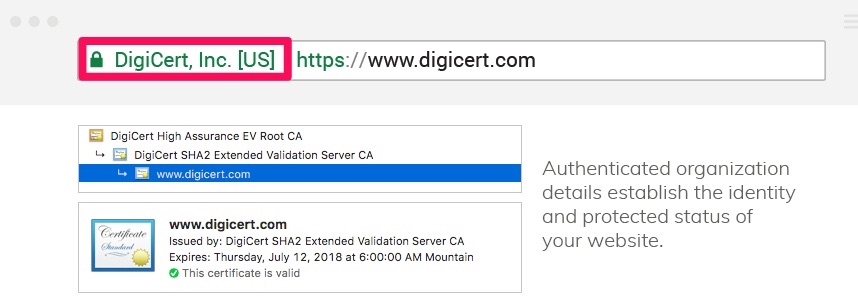
Your address bar may also turn green.
If you are an e-commerce site or you handle credit card payments and other sensitive data regularly, you need an EV SSL for maximum security.
How do you know what the best SSL certificate is for you?
What’s the Best SSL Certificate?
While all three different kinds of SSL certificates are better than no certificate, you have to pick the one that works the best for your budget and site needs.
Most sites that offer SSL certificates, like GoDaddy, Cloudflare, and Comodo, offer all three.
Let’s analyze GoDaddy first.
GoDaddy
All SSL certificates from GoDaddy include SHA-2 and 2048-bit encryption, which is about the strongest out there on the market today.
With a certificate from GoDaddy, you’ll be able to protect unlimited servers, reissue your certificate as many times as needed for free, and reach 24/7 security support.
You’ll also receive as much as $1 million in liability protection and 30-day money-back guarantee.
A DV SSL is $59.99 a year, an OV SSL is $103.99 per year, and an EV SSL is $99.99 per year.
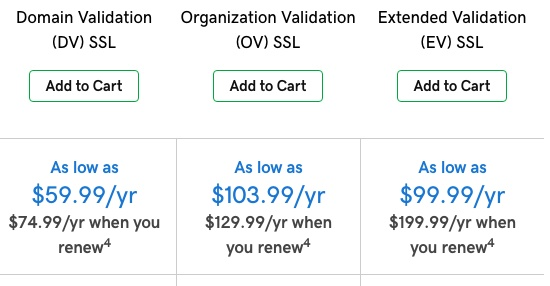
With Cloudflare, you can get a base SSL for a more affordable price.
Cloudflare
With Cloudflare, you can get the base SSL service for free. There are no hidden details or fine print.
For more advanced features or SSL certificates, you’ll need to upgrade to a paid plan.
All that you need to implement Cloudflare’s SSL services is to create an account and update your site’s DNS records.
Cloudflare’s HTTPS options provide additional services beyond regular HTTS that can help you boost page loading times and site speed.
Cloudflare serves your site visitors a cached version of your site to help make it faster for users.
However, SSL with Cloudflare only encrypts the connection between site visitors and the cached version of your site.
It doesn’t encrypt the connection that exists between your site and your server.

This means that your server connection could still be hacked.
If you want a full SSL certificate complete with encryption for your server, you might have to pay as much as $200 per month per domain for Cloudflare’s Business plan.
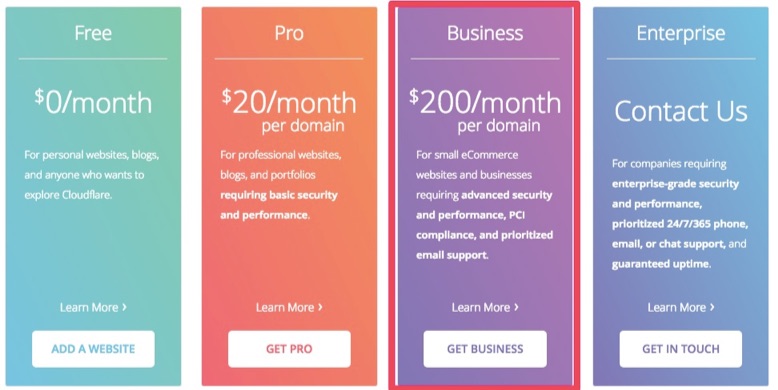
Other features included in the Business package include a web application firewall, prioritized email support, and guaranteed 100% uptime for your website.
Comodo SSL certificates are a bit more secure than Cloudflare.
Comodo
A DV SSL certificate from Comodo will set you back about $70.95 per year. A warranty level of $10,000 is included.
OV SSL certificates can cost anywhere from $88.95 to $427.95 per year, depending on the one you choose. Warranty levels are anywhere from $50,000 to $250,000 for this SSL.
An EV SSL is $199.50 per year and includes a warranty level of $1,750,000.
Every SSL certificate from Comodo features 128/256-bit encryption, 2048 bit root keys, unlimited re-issuance, and a 30-day money-back guarantee,
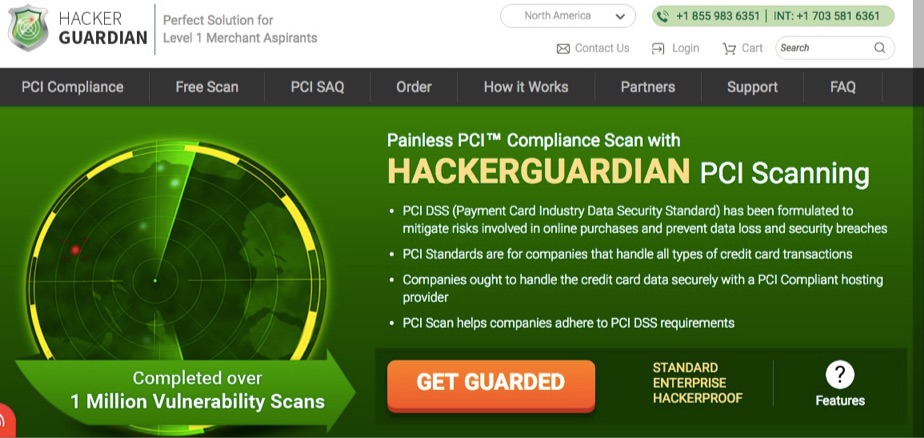
Each certificate features HackerGuardian PCI scanning service, as well.
Once you decide on the SSL certificate that works best for you, get ready to install it.
How to Install an SSL Certificate
Installing an SSL certificate might sound intimidating, but it isn’t anything to be afraid of. Start off by purchasing the SSL certificate of your choice.
1) Purchase the SSL certificate
Be sure to only purchase an SSL certificate from a reputable source.
After all, you don’t want to compromise your company’s security, so don’t just purchase an SSL certificate from anywhere.
You will probably need to upload a copy of your Certificate Signing Request (CSR) when you order the SSL certificate of your choosing.
A finished CSR should look something like this:
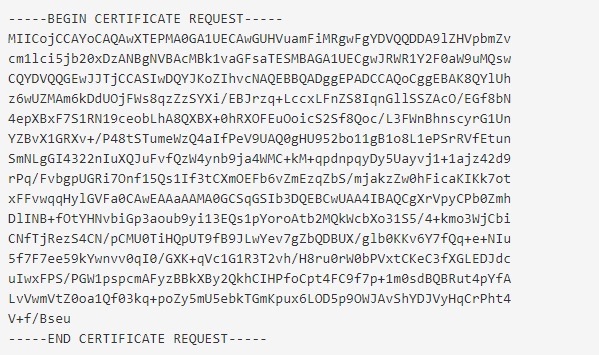
You can find a list of all CSR creation instructions for nearly every platform and operating system here.
Once you’ve purchased your SSL certificate, you’re ready to activate it.
2) Activate it
The method used to activate your SSL certificate will depend on where you ultimately decide to purchase it from. Sometimes, your web host will activate your SSL for you.
For example, if you purchase an SSL from GoDaddy, you’ll have to log into your account, head to “SSL Certificates” and click “Set up.”
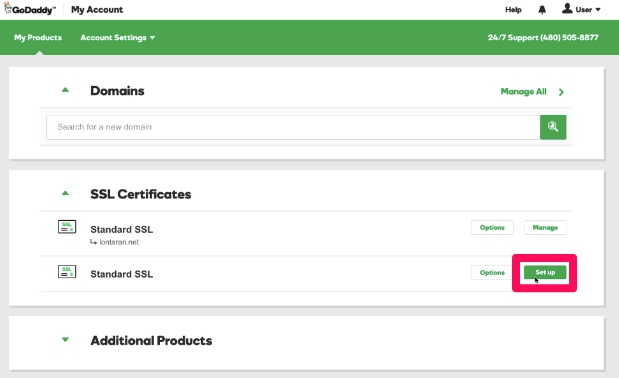
Once you refresh the page, you should see your new and ready-to-use certificate.
When you have activated your certificate, you should validate it.
3) Validate the certificate
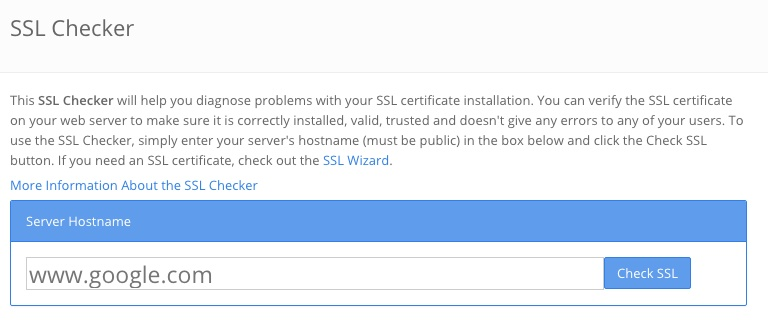
Before you officially begin to use an SSL certificate, you need to diagnose any issues with it.
Use an SSL Checker tool like this one from SSL Shopper to validate your certificate.
Next, install the certificate on your hosting server if it hasn’t already been done by your web host.
4) Install the certificate on the hosting server
The process for installing your certificate on your hosting server will depend on where you’ve built your site.
For example, if you’ve used Duda to build your website, you can navigate over to “Site Settings” and click “Site SSL” to set up a certificate.
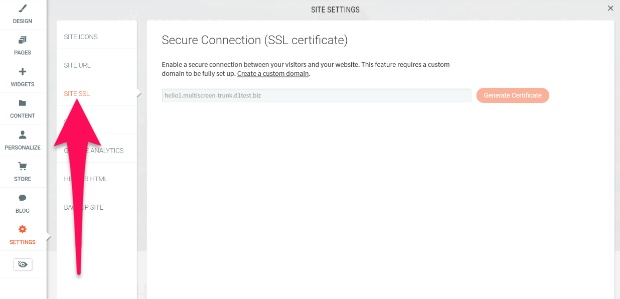
Then, click “Generate certificate.”
Note that your SSL certificate should never be removed unless you manually take it off of your site.
Once your SSL certificate is up and running, you need to set up 301 redirects and check your links.
5) Set up 301 redirects and check the links
If you have old google links or dated links to your pages on other sites, you need to set up a redirect so that HTTP requests can be changed to HTTPS ones.
You can do this by adding the following code to the top of your .htcaaccess file located in your root folder:
RewriteEngine On
RewriteCond %{HTTPS} off
RewriteRule (.*) https://%{HTTP_HOST}%{REQUEST_URI} [R=301,L]
Once you’ve added that code, double-check that your site is still working well and that requests are being redirected to the new version of your URLs.
You can also use HTTP Strict Transport Security (HSTS) to force all connections to become HTTPS links all at once.
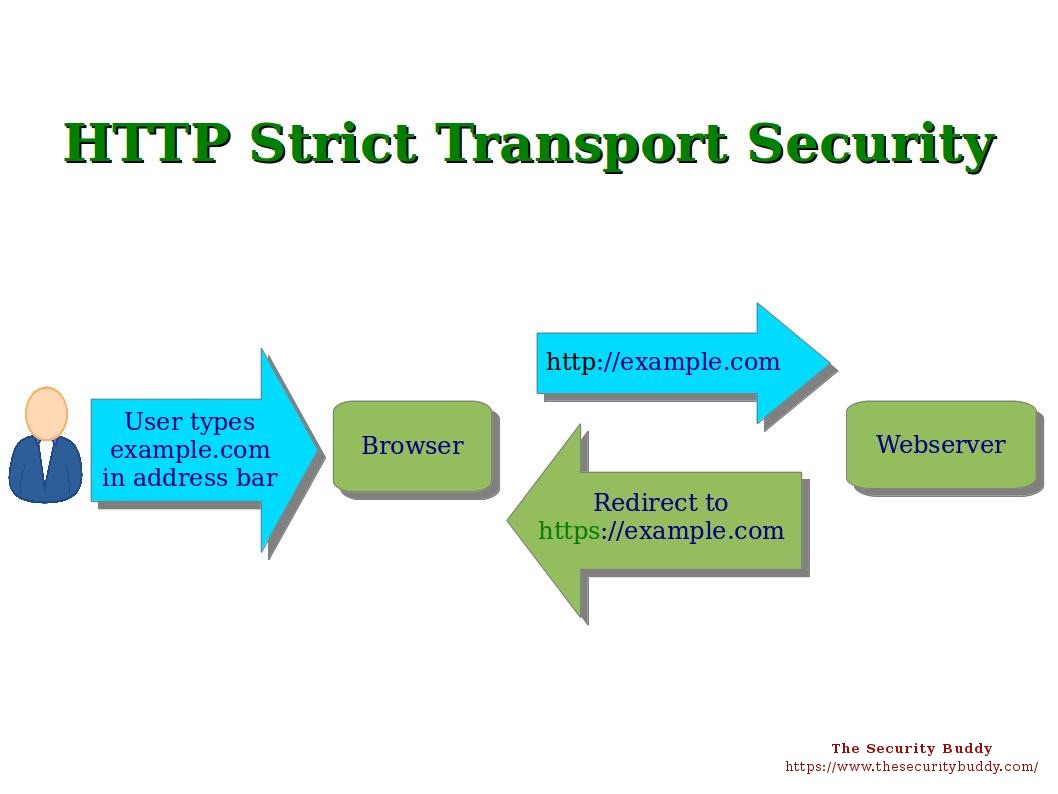
All you have to do is add the code to your site.
For example, if you have an Apache web server, you can add the following code to your .htaaccess file:
# Use HTTP Strict Transport Security to force the client to use secure connections only Header always set Strict-Transport-Security “max-age=300; includeSubDomains; preload”
Here’s how to view SSL certificates in Chrome.
How to View SSL Certificates in Chrome
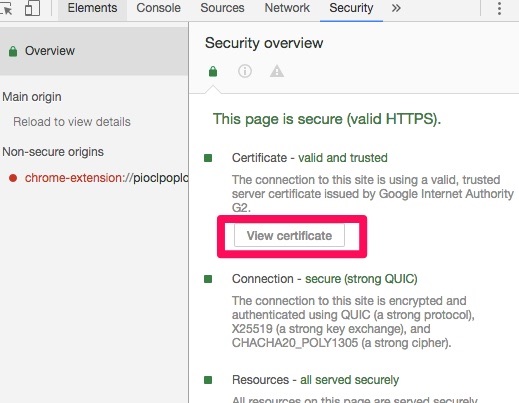
To view SSL certificates for any site (including your own) in Chrome, open Developer tools.
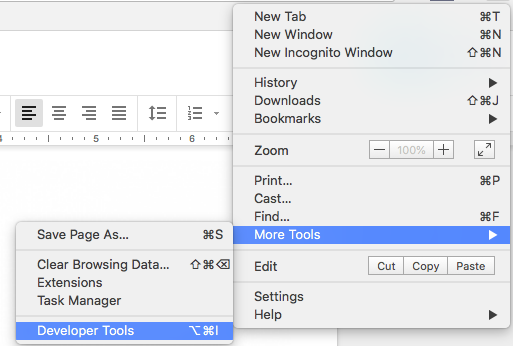
From there, head to the Security tab and click “View certificate.”
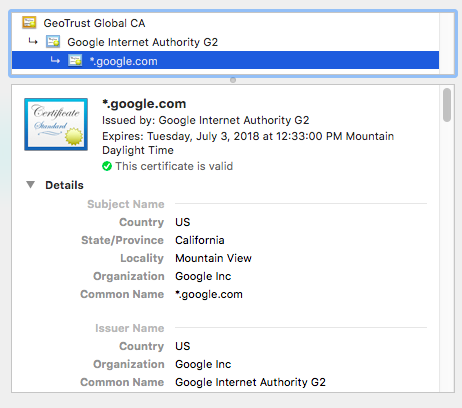
Then, the full certificate should appear for your viewing.
Finally, you need to test your HTTPS to make sure that all web elements are as secure as possible.
Testing your HTTPS
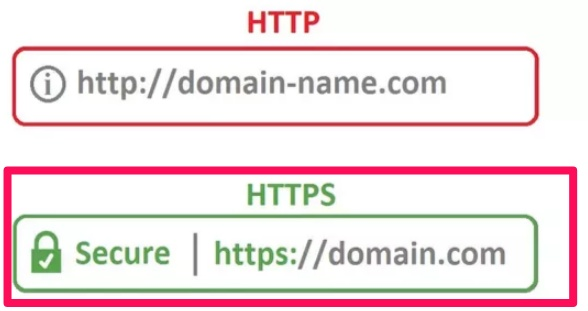
The easiest and fastest way to verify that your HTTPS is working is to head to your website and verify that you see HTTPS: before your site name.
If you want a more in-depth test, use an advanced SSL-Check tool like this one from JitBit.
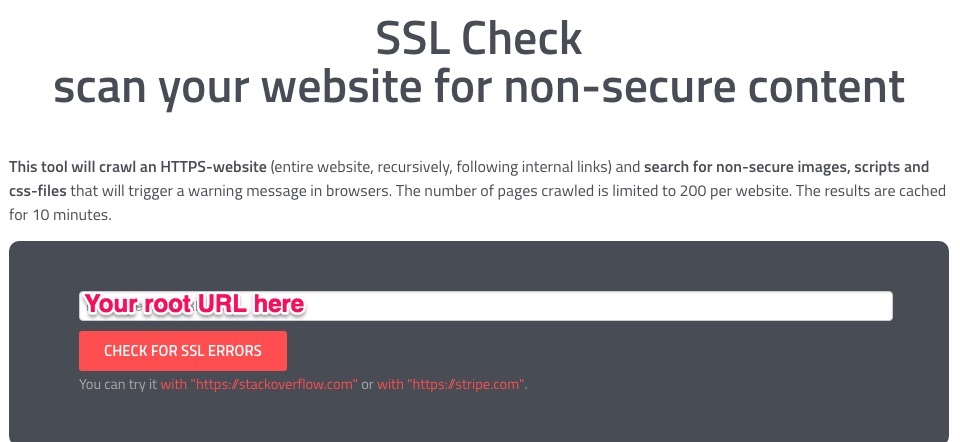
This tool will crawl an entire HTTPS website (and even it’s internal links) to uncover unsecure images, scripts or CSS files that trigger unsecure warnings in browsers.
You can crawl 200 pages of your site for free using the tool if you tweet about it, which is a pretty small price to pay for zero cost HTTPS testing.
Conclusion
If your site is marked as unsecure, you’re losing valuable site visitors every minute.
An SSL certificate can help, since it verifies and encrypts your website, making your pages safe for both you and your customers.
If you think you can avoid getting an SSL certificate, you’re wrong. The HTTPS protocol that SSLs provide is vital if you want to build a trusted and reputable site.
HTTPS tags show up with a padlock and a “secure” tag in visitors’ browsers, notifying them that your site is legit.
And HTTPS can help your SEO and conversions, since HTTPs pages are proven to have higher rankings and more referral data.
There are three different types of SSL certificates to choose from.
- These include Domain Validated (DV SSL) Certificates, Organization Validated (OV SSL) Certificates, and Extended Validation (EV SSL) Certificates.
DV SSLs offer the least amount of security, while OV SSLs are more secure. EV SSLs are the most secure form of SSL certificate.
- Choose an SSL certificate that works best for you, your company, and your budget.
If you want a reasonably priced SSL with high encryption, try GoDaddy. With Cloudflare, you can get a free DV SSL extension, but it may not be as secure as other certificates out there.
Comodo offers a wider variety of certificates than GoDaddy with similar encryption. However, they’re a bit more expensive.
- To install an SSL certificate, you’ll have to purchase one from a trusted source, first.
Then, activate it and validate it. Install the certificate on your hosting server and set up 301 redirects to your new HTTPS URLs. Don’t forget to check the links.
If you want to view SSL certificates in Chrome, you can open them up for any site you visit using Developer Tools.
Finally, to test your HTTPS, use an advanced SSL Checker like the one created by JitBit.
Double-check that your URLs have a secure padlock, too, just in case.
Which type of SSL certificate are you going to add to your website?
About the Author: Neil Patel is the co-founder of Neil Patel Digital.
Source: feedproxy.google.com