
Tag Archives for " hackers "

How to Protect Your Website from Hackers and Data Breaches
The number of website data breaches is steadily growing. Statista data shows the number of U.S. breaches rose from 662 to more than a thousand in recent years.
Some industries like government and healthcare have been particularly affected. For instance, recent data by Verizon shows data breaches in the healthcare industry increased by 58 percent.

You may be thinking, “What is a website data breach exactly, and should I be worried?”
Like most things in technology, there are no one-size-fits-all warning signs and solutions for website data breaches. However, understanding what these threats entail and learning effective ways to prevent and deal with them can make a huge difference to your business.
What Is a Website Data-Breach?
A data breach occurs when information is taken from a system without the owner’s knowledge or authorization. This stolen data may include confidential details, personal data, trade secrets, and even sensitive information that could majorly threaten the organization’s security.
Some common examples of data stolen during a website data breach include:
- stolen passwords
- identity information (date of birth, email ID, location, etc.)
- credit card information
- banking details
- medical history
If a data breach occurs and this information is stolen for misuse, it could mean harm for both the business and the person whose information is being taken.
Think about it: If you’re a business owner handling sensitive customer information such as their financial history, you must protect this data. When a website data breach occurs, these personal details can be misused, leading to identity theft, empty bank accounts, and unauthorized transfers among other types of fraud.
Ecommerce businesses need to be particularly careful about website data breaches as most of their dealings happen online, so nearly all the information is at risk.
This is important because you’re not just losing data but also money. Consider this: Data by RiskIQ suggests cybercrime costs organizations $2.9 million every minute, and major businesses lose $25 per minute as a result of data breaches.

Do you still want to risk a data breach?
What Causes Data Breaches?
A data breach doesn’t need a trained hacker. Something as simple as losing your device can be enough for a website data breach to occur. Some other causes of website breaches include:
Hacking:

Various types of hackers work alone or in teams to compromise and sell sensitive data. This is one of the leading causes of data breaches and tends to cause the most damage as not only could you lose the data, but your entire system could be compromised.
Accidental access:

If you’ve ever logged in to a coworker’s computer for a minute and got access to sensitive information you weren’t supposed to see, it’s a data breach. This happens more often than you’d think, as many colleagues sometimes share a device to work on a common project.
Internal spy:
If an employee inside the company shares information to outsiders for money or other gains, the data is breached by an “internal spy.”
While these causes can be dangerous for businesses dealing with sensitive data (think payment processing apps), most of them can be prevented. To help you bolster your security, below we’ll talk more about common data breach strategies and how to protect your business against them.
What Strategies Do People Use to Cause Data Breaches?
There are various strategies people use to cause website data breaches. These can be spontaneous or well-planned depending on the type of data being breached, whether it’s a solo or a team venture, and the purpose of the breach.
Here are some of the most common strategies cybersecurity experts recommend watching out for:
Phishing
Phishing attacks are designed to fool users into giving up their information. These look like genuine messages from trusted institutions but actually are clever traps designed by hackers to get access to your data.
Users who are not tech-savvy or those in a hurry may accidentally click on the false links and give away important information straight to the fraudsters.
Here’s an example of a phishing email impersonating Netflix:

Brute Force
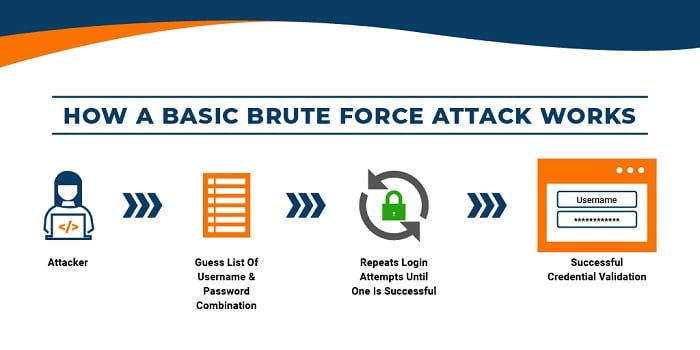
Brute force attacks cause website data breaches by working through all possible combinations to crack your passwords. This used to take a long time as there could be endless variations of letters, numbers, and symbols to try, but nowadays the use of sophisticated software makes this process much easier. In fact, some hackers use fully automated brute force attacks.
This graphic explains how a brute force attack works to cause website data breaches:
Malware
Malware attacks capitalize on your device’s security flaws to gain access to your system. Hackers shove viruses and spyware into your system to view, access, lock or change your files, which causes a massive data breach.
In fact, data shows nearly half of the security professionals surveyed say ransomware and malware pose the biggest IT risks, so businesses should be extra careful to protect themselves against such cyber threats.
How to Prevent Data Breaches
While every business that operates online faces some cyber threats, there are many ways to prevent data breaches or at least minimize their impact. Let’s take a look at some of them below.
Look for Vulnerabilities
No system is perfect. Every system, network, server, and the device has a flaw that hackers use to grab access. The sooner you identify these flaws, the better you can protect your business from website data breaches.
One way to do this is to proactively look for vulnerabilities in your security system. You can do this by using security software specifically designed to test your system for such vulnerabilities.

If you don’t want to rely on software, there’s another option for you. Many companies hire trained white-hat hackers to spot system vulnerabilities and patch them before other hackers can get a chance. This is more time-consuming but can also offer more reliable results, especially when it comes to larger organizations handling a lot of data.
Human testers are also better at recognizing patterns, so if there’s a recurring issue, paid white-hat hackers might be able to identify the problem before it’s too late.
Train Your Employees
While human testers can be a great benefit to your organization, sometimes it’s your very own employees causing the very breaches you are trying to prevent.
Many incidents of website data breaches occur when employees accidentally leak information to people who do not have authorized access to this data.

For instance, if an employee accidentally emails private information to a third-party client, or if sensitive information is leaked through a shared device in the office, this data is considered to be “accidentally” breached.
It’s still harmful to the company, but it’s caused by human error, often due to the employee’s negligence, lack of technical knowledge, or skills in handling data.
Accidental website data breaches like these are easy to prevent through appropriate employee training to improve their understanding of data management. Organizations can use various programs like the Polymer DLP Behavioral Approach to training up their employees on cybersecurity.
If a complete program is too big of a time or budget commitment, consider hosting small webinars. Invite a guest speaker or show a documentary that highlights the impact accidental website data breaches can have on a company, and how to prevent them.
These might sound like small steps offering minimal results, but training your employees early on can go a long way in securing your organization and minimizing the chance of accidental data breaches down the road.
Have Backups for Your Data
In some cases, despite your best attempts at preventing them, a website data breach can wipe out important information from your system. While it may or may not be able to be recovered, it’s always a good idea to backup any and all information that might be important.
This way, if data is stolen, you’re not completely lost. You still have something to fall back on. For this, you can invest in a cloud backup solution or use a third-party service depends on your company’s needs.

Install a Firewall
Firewalls are one of the most basic yet secure ways to defend yourself against website data breaches. By installing a firewall, you will prevent unauthorized traffic and malicious software from entering your network.
This can act as the first line of defense and work well with other security measures to minimize the threat of hackers and other cybercrime.
Encrypt Sensitive Data
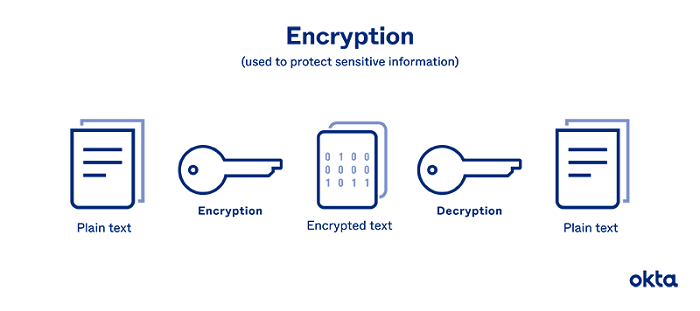
The process of encryption involves encoding data in a way that only authorized parties can read it. This is another basic but effective strategy to protect your business against website data breaches.
Different types of encryption processes can safeguard confidential data that is only meant to be shared with specific people in an organization. Only these people will be able to access and share it, keeping it in tight circles.
Online payment apps, email service providers, and messaging apps like WhatsApp use encryption to protect user privacy and boost security around sharing personal information on these platforms.
This graphic by Okta, explains encryption in simple terms:
Monitor Database Activity
Want something that gives you a high-level view of your security system? Consider monitoring database activity. This might be a new concept for many teams who are still in the early stages of adopting data security tech, but it’s worth taking a look at and can be effective for organizations of all sizes.
A database activity monitor (DAM) observes, identifies, and reports on database activities. These monitoring tools use real-time security technology to monitor all actions across the database. Additionally, they can detect abnormal and unauthorized activity, internally and externally, while gauging the effectiveness of your existing security protocols.
Like most other measures, this has multiple layers, and it’s important to consider your security needs before implementing any complex programs.
Website Data Breaches: Frequently Asked Questions
How common are website data breaches?
The number of data breaches happening in the United States is growing. For instance, Statista data shows the number of data breaches in the U.S. has drastically increased in recent years, from 662 breaches in 2010 to over a thousand breaches in 2020.
Which industries are the most affected by website data breaches?
Data from TechRepublic shows 95 percent of data breaches occurred in the government, retail, and technology sectors. Healthcare and finance industries are also particularly affected by such cyber threats. Researchers at IBM found that the healthcare and financial industries spent the most time in the data breach lifecycle, which is 329 days and 233 days, respectively.
What is the most common cause of website data breaches?
Hacking has consistently been one of the most common causes of website data breaches. Human error is also a common cause, as a lot of confidential data is accidentally leaked by employees in the organization. Losing, sharing, and leaking passwords is also a type of human error that can lead to accidental website data breaches.
What is the best way to prevent website data breaches?
Some of the best ways to protect your business from data breaches include: looking for vulnerabilities within your security system, training your employees to reduce the chance of accidental breaches, having a backup of important data, using a firewall, encrypting confidential information, and monitoring database activity.
Conclusion: Website Data Breaches
In the age of the internet, cyber threats are expected—which means you need to be prepared. Learning more about what causes breaches and finding personalized solutions to prevent those attacks can go a long way in keeping your business—and customer information—safe.
If you’d like to take this a step further, learn how to effectively manage your website, get an SSL certificate, or focus on security and trust throughout your website.
Which cybersecurity technique will you use to protect your website from hackers and data breaches?
Source: neilpatel.com

How to Make Your Site Secure: A Guide for Non-Technical Marketers
With technology quickly advancing, there is one distinct problem we are all facing: keeping our private lives private.
And while each of us can take steps in making our private data harder to steal (like enabling two-factor authentication when it is available, keeping our passwords secure, etc.), website owners, developers and marketers face a more challenging task.
We need to keep our site visitors and users safe.

You see, our users and visitors trust us.
When they visit our website, they may very well submit a form or install a script or software your site is inviting to install.
But what if your site was hacked and all of those invitations were not sent from you but from the hacker, and all that information is now owned by him?
What if your loyal customers will suffer identity theft simply because you failed to protect them and their information?
This is where a data breach is not just an inconvenience to you — it is a reputation crisis and possibly even a liability.
And cybercrime statistics are really scary:
- According to Aura, a person becomes a victim of identity theft every ten seconds
- Cybercrime increased by 600% due to the COVID-19 pandemic
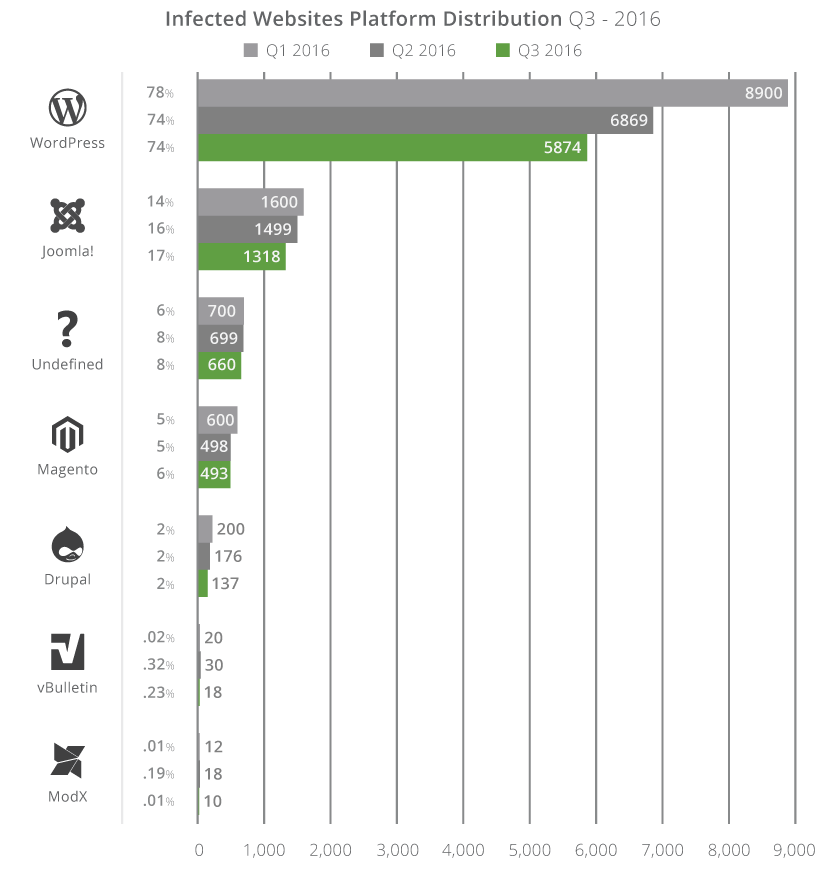
- In the search by Sucuri, out of 8000 infected websites, ¾ of those were run by WordPress.
- Every month, about 4,800 websites are compromised with form-jacking code.
If you are still not convinced, security is a ranking signal.
This is why Google forced most websites to switch to HTTPS protocols.
This has been a major crackdown by Google and its commitment to delivering its users to safe and reputable sources. Hypertext Transfer Protocol Secure (HTTPS) is absolutely essential in the modern-day and age, and Google is far more likely to connect its searchers to HTTPS sites rather than standard HTTP sites.
Source: Digital Eagles
Steps to Make Your Website Secure
Here are a few steps you need to take to make your site (as well as your users’ personal information) more secure:
1. Make sure your hosting service is secure.
Lots of malicious attacks happen through your hosting provider, so make sure your provider is taking all the necessary steps to keep your site secure.
Do your research.
Read your hosting provider’s reviews, search for something like [hosting-company security], [hosting-company hacked], [hosting-company security], etc.
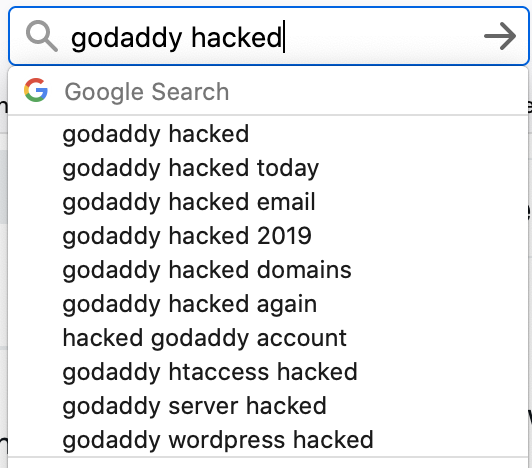
Search for your hosting provider with a query like [hosting-company security], [hosting-company hacked], [hosting-company security], etc.
Check Twitter for something like [hosting-company malware :(] or [hosting-company malware :(]. You might find out that customers are suffering from poor hosting security practices.

It is not just about the issue itself; most hosting companies have experienced at least one data breach at one time or another.
What’s more important is how they handled it.
- Did they reply to their customers?
- Did they act fast?
- Did they work with their customers on cleaning up their websites?
Check if the hosting company is responsive on Twitter and how willing they are to solve any issues.
2. Verify your site with Google Search Console.
If you need just another reason to verify your site with Google Search Console, here’s one: this is one of the fastest malware alert systems out there.
And it’s also completely free.
Google’s Search Console relies on the safe browsing API which alerts site users of possible malware attacks.
It is also used by most browsers (including, obviously, Google Chrome).
Thanks to the API, users are usually warned when they are trying to access an infected website.
Security issues Google reports to website owners.
They are categorized into three major groups:
- Malware and unwanted software: this is what can harm your site users by infecting their devices
- Hacked content: when third-party content (usual links) is added to your site
- Social engineering: this type prompts your site users to share their personal information.

Google also provides helpful instructions on how to fix each of the detected issues.
Again, the most valuable aspect of these reports is how fast they are in reporting problems.
Google will also report on your SSL (Secure Sockets Layer) and TLS (Transport Layer Security) issues, which signal possible security loopholes.
Apart from Google’s Search Console, many more security scanning tools allow you to find security loopholes in your setup and content management platforms.
3. Keep an eye on your bot traffic.
What is bot traffic?
Bot traffic is any non-human traffic to a website or app.
In many cases, bot traffic is not bad.
Bot traffic includes automatic crawlers (like Google’s crawler) and digital assistants (Siri, Alexa, etc.)
It’s a spike in bot traffic that can signal a problem.
This problem may be:
- Beginning of a DDoS attack (this is when a massive amount of traffic is being sent to kill your servers)
- Credential stuffing (when bots attempt to guess your backend login information)
- Data scraping (when your content is being automatically copied)
Finteza is a helpful tool that detects and alerts you of bot traffic spikes that may signal the beginning of a problem.

These reports are helpful because they give you more details to discuss with your developer and/or hosting provider.
Conclusion
Keeping your site secure is one of the most important fundamentals of your online presence.
Don’t ignore problems until it’s too late.
Use the easy steps above to prevent some issues and create processes to fix any security breaches fast and minimize the impact.
The post How to Make Your Site Secure: A Guide for Non-Technical Marketers appeared first on Content Marketing Consulting and Social Media Strategy.
Source: convinceandconvert.com