
Tag Archives for " Guides "

How to Create Ultimate Guides to Drive Leads, Traffic, and Conversions
Ultimate guides are everywhere. You’ve probably read your fair share, and maybe you’ve even written a couple.
They can be a great way to get traffic, build links, and increase your authority, but they’re far from easy to create.
The issue most people run into is the sheer amount of content out there nowadays.
How do you create an ultimate guide if there are already tons of posts on your chosen subject?
In this post, we’ll look at the steps to creating the ultimate guide on just about anything.

Disclosure: This content is reader-supported, which means if you click on some of our links that we may earn a commission.
What Is an Ultimate Guide?
What turns a lengthy blog post into an ultimate guide?
Well, there are a few things that almost every in-depth guide has in common:
- It goes very deep into a pretty broad topic.
- It contains several chapters that look at the topic from a variety of angles.
- An industry expert or researcher writes it.
Apart from that, what you put in your ultimate guide and how you design it is up to you.
Why You Should Create an Ultimate Guide
If you didn’t know how powerful ultimate guides are already, here’s why you should start creating them right now.
Rank for Many Keywords
The length, depth, and authority that go into ultimate guides make them a fantastic weapon in your SEO arsenal.
The fact that they are so detailed means they should rank for a huge number of keywords.
Including internal links to your other blog posts boosts their rankings, too.

Get Backlinks
A big, in-depth resource like an ultimate guide can be a fantastic source of links.
Not only can you use it to go out there and request a backlink as part of your link-building process, but other sites naturally start linking to an authoritative resource, too.
So much so that your ultimate guide can continue to attract links for years to come.
Build Your Authority
There are few pieces of marketing collateral better at positioning your brand as an authority in your industry than an ultimate guide.
This is your opportunity to showcase how much you know about your subject to the world and go above and beyond what has previously been written about your topic.

How to Pick Topics for Your Ultimate Guide
Picking a topic can be a huge stumbling block for many aspiring writers.
Don’t get bogged down overthinking it, though. Here’s how you can find the perfect topic quickly.
Choose a Topic You Know About
This first point is obvious, but it needs to be said.
You need to know your topic inside and out if you want to write an excellent guide.
That doesn’t mean you can’t use a freelance writer to help you out, but you should give them a thorough brief and create the outline of the guide yourself.

Choose a Topic With High Search Traffic
Not every guide needs to be written with the express purpose of ranking in Google, but it can seriously help drive traffic and generate customers.
That’s why I recommend you enter your topic ideas into a tool like Ubersuggest to see the keyword volumes of the main topic and the volumes of every other related keyword.
Don’t just pick the topic that has the main keyword with the highest search volume, however.
You may find another topic has so many more related keywords that it could actually generate more traffic overall.
Choose a Topic That’s Trending
Ultimate guides are successful when they’re written about trending topics.
When people are excited about a topic, they want to consume all the information they can find about it.
Your guide should be a part of that, too.
That’s not the only reason you want to focus on what’s trending, though.
The newer your post is, the better it might do in search results if someone is searching by posts made within the last week, month, and so on.
How to Create an Ultimate Guide

With your topic picked, it’s time to get to work creating your guide.
Here’s how I recommend you go about it.
1. Consume as Much Content as You Can
Even if you’re an expert in your field, you’ll still want to read blog posts on your topic before you start writing.
Doing so will help you understand the level of content currently out there, the common threads writers pull, and the things you need to mention.
Pay attention to the results that Google serves up, too.
You’ll find that specific formats are more popular than others, and you’ll want to try to mirror these when it comes to writing your content.
2. Identify What’s Missing
While you’re reading other people’s content, make a note of everything that’s missing from the posts.
If you’re writing a how-to post, be sure to go through the steps yourself after reading posts by others.
Then, jot down things you notice during the process that others might have missed or not explained thoroughly.
It also might help to sit down with someone who is unfamiliar with your topic and see what questions they come up with.
3. Do Research
You can write an ultimate guide off the back of your expertise alone—but you can make it stand head and shoulders above everyone else’s content if you conduct your research.
For some, this is a case of canvassing their colleagues and contacts for their opinion on a certain topic.
Others might want to commit to more detailed research and partner with a market research company that’ll carry out a study on their behalf.
The more effort you put into the research, the more valuable and link-worthy your ultimate guide will become.
4. Put It All Together
To create your ultimate guide, simply combine the basics plus the additional details you found were missing from other posts and your research.
This way, people coming across your guide as the first piece of content they have read about a topic will get all of the basic information, and people who have read many other guides will be wowed by all of the missing pieces that you included.
5. Promote, Promote, Promote
An ultimate guide is no good if no one reads it.
Considering the amount of time and energy you have spent on your ultimate guide, you owe it to yourself and your readers to promote it well. Do so by:
Sharing it on all of your social networks:
Twitter, Facebook, and LinkedIn are the best.
Promote it on your personal and business accounts, if possible.
Sharing it in groups on social networks:
LinkedIn, for example, has some great groups on particular topics.
Facebook has some as well, although many are full of spammers who are just there for their promotions.
This will expand your guide’s exposure from just your network to all of the members of the groups you select.
Emailing your list:
If you have a mailing list, let them know about your latest and greatest piece of content.
Repurposing your content:
If you can turn your ultimate guide into an infographic, video, slide presentation, or PDF document, you can spread it on even more networks.
4 Tips to Create an Awesome Ultimate Guide
If you want to take your ultimate guide to the next level, bear in mind these four tips when writing.
1. Write Clearly and Format Appropriately
You don’t have to be Hemingway to write a great ultimate guide, but take a lesson from Ernest regarding clarity.
Short, clear, punchy sentences win out here, especially when writing thousands of words on your topic.
Long, convoluted paragraphs may help you get your message across, but they’ll only cause the reader’s mind to wander.
Formatting will also help in this regard.
Clearly labeled titles and subheadings will make your guide much more digestible.
Short paragraphs will, too.
Don’t forget that most of your audience will be reading your advice on a screen, so consider how they might skim it for the information they’re looking for.
2. Include Images and Screenshots
One thing I sometimes find missing from other ultimate guides is good screenshots.
Take yours using your account of the topic as opposed to generic stock photos.
This will make it easier for others to follow along and visualize the process.

3. Use Real-Life Examples
Once you have the basics and missing pieces down for your ultimate guide, look for some good examples of your tips in action.
If you’re talking about creating great timeline cover photos, then include some examples from pages in different industries.
If you’re talking about using Pinterest to drive traffic, then link to top Pinterest users who are doing things right.
Think about your target audience and find examples that they can easily relate to so they feel they must follow your advice to be successful.
4. Don’t Break Up Your Hard Work
There is a lot of advice out there suggesting you should take long posts and break them up into a series, so you can get people to come back to your website over and over again.
However, I find that if someone hits a piece of content that says 101 Tips on ___, and the post only includes steps 1–20 with the promise of more to come, they move on to find everything they’re looking for elsewhere.
People want to consume information now, not wait for it. When they read the words ultimate guide, they’re going to expect to get everything in one chunk, so unless you are planning to write 5,000+ words on a topic, keep it in one piece.
Examples of Great Ultimate Guides
There are a lot of great ultimate guides out there, but here are some of my all-time favorites.
The Ultimate Guide to Startup Marketing
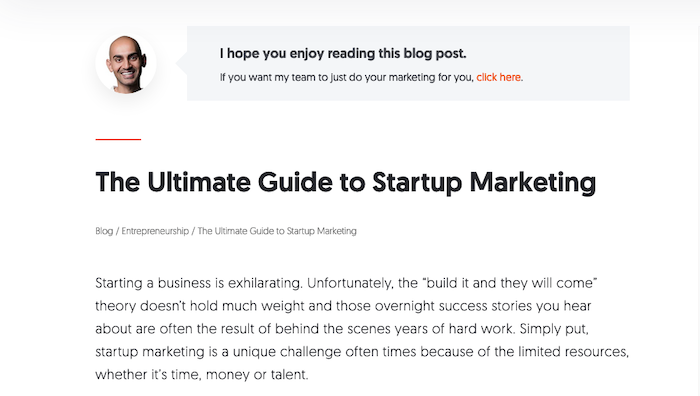
If you’re looking to grow your startup, I’m pretty sure you’ll get a huge amount of value out of my ultimate guide on the topic.
How to Design a Logo: The Ultimate Guide
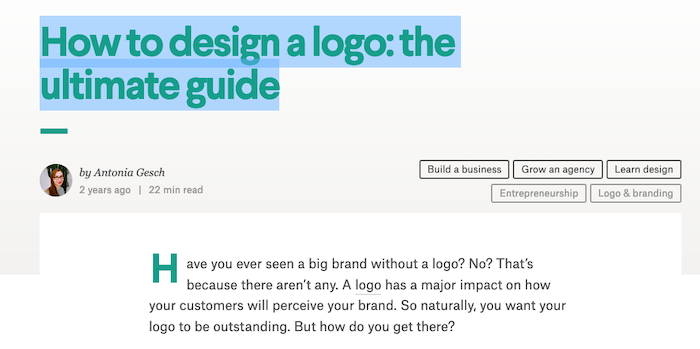
With 12 chapters and virtually every angle covered, there’s no reason to read another guide before creating your logo.
The Ultimate Guide to Cart Abandonment
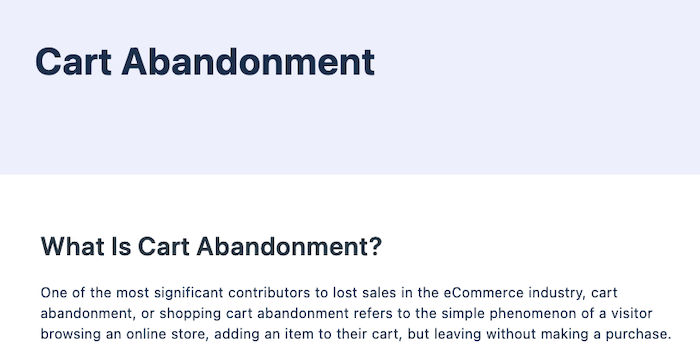
If you’ve ever wondered why shoppers are leaving your website at checkout, this mammoth guide by VWO will answer all your questions.
The Ultimate Guide to Writing & Illustrating Your First Children’s Book

Ultimate guides don’t have to be about marketing, as this guide by Eevi Jones proves.
How to Pick a Career

While Tim Urban hasn’t called this an ultimate guide, you’re unlikely to find a more thoughtful or detailed blog post on picking a career anywhere online.
Further Resources on Ultimate Guides
This blog post isn’t exhaustive by any means. If you want to dive deep into creating high-quality long-form content, then check out these five resources:
How to Create an Ebook From Start to Finish by HubSpot
The Ultimate Guide Template by Copyhackers
Your Ultimate Guide on How to Write an Ultimate Guide (Infographic) by Express Writers
The Ultimate Guide to Creating a True ‘Ultimate Guide’ by Search Engine Journal
The Ultimate Guide To Content Promotion by Marketing Insider Group
How to Create Specs for an Ultimate Guide
You don’t have to write your ultimate guide yourself.
If you’re hiring a freelance writer to write your guide for you, here’s how you can create a spec they can follow with ease.
Give an overview.
A top-level overview can help a writer quickly get to grips with the topic and goals of the ultimate guide.
Create a clear structure.
Take the initiative and write an outline that includes all of the major points you want the writer to talk about.
This makes sure all of the gaps you identified in other pieces of content get covered.
Include keyword research.
If improved rankings are one of your main goals, then highlight the keywords you’re aiming to rank for.
Note or record your expertise.
Where appropriate, make notes for the writer to help guide them.
Alternatively, you can record yourself talking about the topic.
Provide additional resources.
Highlight a handful of top-quality resources your writer can turn to for inspiration.
Set a deadline
Expect an ultimate guide to take a fair bit longer to write than a standard blog post.
Ultimate Guide Frequently Asked Questions
How long should my ultimate guide be?
There isn’t a defined length for an ultimate guide, but most are at least 3,000 words in length.
How do I distribute my ultimate guide to my target audience?
You can use social media and email to get your ultimate guide in front of your target audience.
Should I create more than one ultimate guide for my website?
Absolutely. Ultimate guides offer a lot of value in terms of SEO and building your authority, so you should write as many as you can.
At what part of the funnel are ultimate guides most useful?
Ultimate guides can be used at any part of your funnel, but they’ll be most useful towards the top.
They are great at attracting users into your funnel and converting them to email subscribers.
Conclusion
Ultimate guides are an incredibly valuable marketing resource.
I’ve used them to generate huge levels of traffic, build my reputation as an authority in the industry, and improve my site’s SEO.
Follow the advice I’ve given above, and you’ll be on your way to achieving your content goals while sharing valuable insights about your chosen topic.
Have you created an ultimate guide on your website or blog?
What other tips would you add to making your ultimate guide a success?
Source: feedproxy.google.com

Writing Content That Is Too In-Depth Is Like Throwing Money Out the Window
You’ve heard people telling you that you need to write in-depth content because that’s what Google wants.
And it’s true… the average page that ranks on page 1 of Google contains 1,890 words.
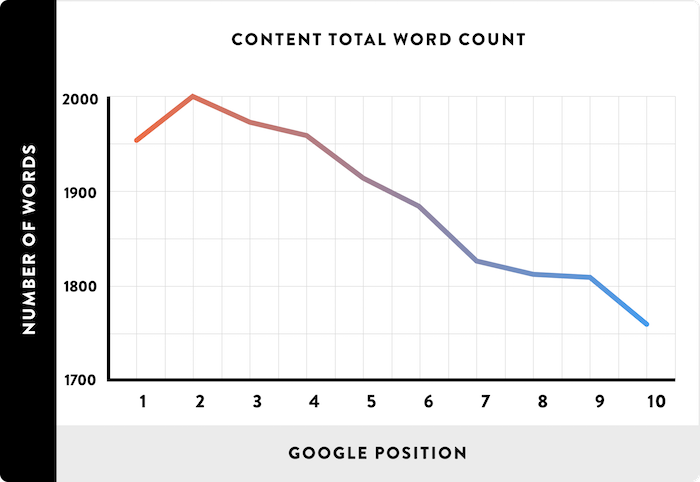
But you already know that.
The question is, should you be writing 2,000-word articles? 5,000? Or maybe even go crazy and create ultimate guides that are 30,000 words?
What’s funny is, I have done it all.
I’ve even tested out adding custom images and illustrations to these in-depth articles to see if that helps.
And of course, I tested if having one super long page with tens of thousands of words or having multiple pages with 4,000 or 5,000 words is better.
So, what do you think? How in-depth should your content be?
Well, let’s first look at my first marketing blog, Quick Sprout.
Short articles don’t rank well
With Quick Sprout, it started off just like any normal blog.
I would write 500 to 1,000-word blog posts and Google loved me.
Just look at my traffic during January 2011.
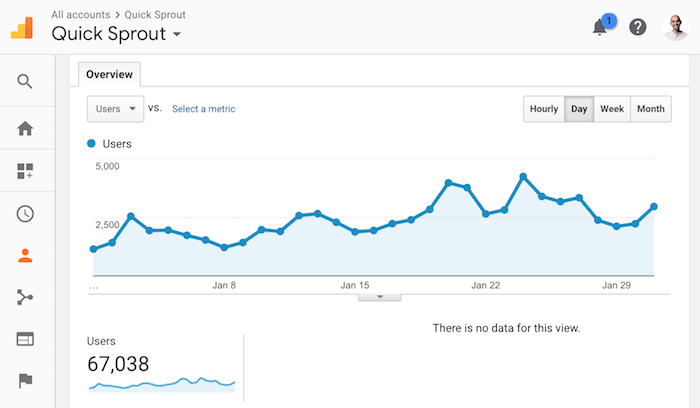
As you can see, I had a whopping 67,038 unique visitors. That’s not too bad.
Even with the content being short, it did fairly well on Google over the years.
But over time, more marketing blogs started to pop up, competition increased, and I had no choice but to write more detailed content.
I started writing posts that were anywhere from 1,000 to a few thousand words. When I started to do that, I was able to rapidly grow my traffic from 67,038 to 115,759 in one year.
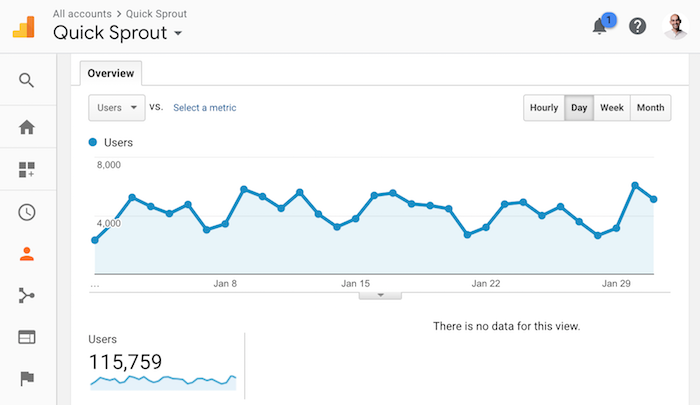
That’s a 72.67% increase in traffic in just 1 year.
It was one of my best years, and all I had to do was write longer content.
So naturally, I kept up with the trend and continually focused on longer content.
But as the competition kept increasing, my traffic started to stagnate, even though I was producing in-depth content.
Here are my traffic stats for November 2012 on Quick Sprout.
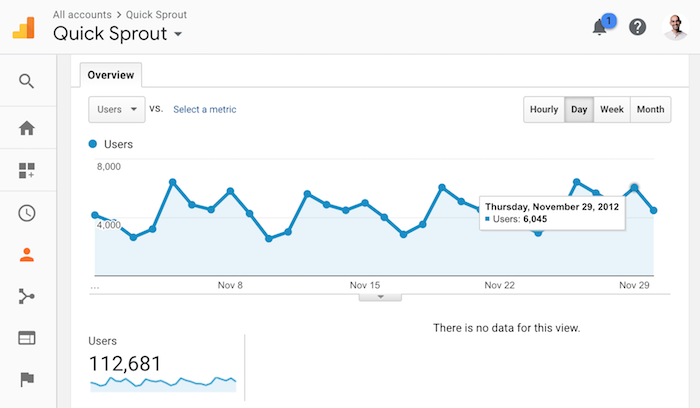
I understand that Thanksgiving takes place in November, hence traffic wasn’t as high as it could be. But still, there really wasn’t any growth from January to November of 2012.
In other words, writing in-depth content that was a few thousand words max wasn’t working out.
So what next?
Well, my traffic had plateaued. I had to figure something else out.
Writing longer, more in-depth content had helped me before… so I thought, why not try the 10x formula.
I decided to create content 10 times longer, better, and more in-depth than everyone else. I was going to the extreme because I knew it would reduce the chance of others copying me.
Plus, I was hoping that you would love it as a reader.
So, on January 24, 2013, I released my first in-depth guide.
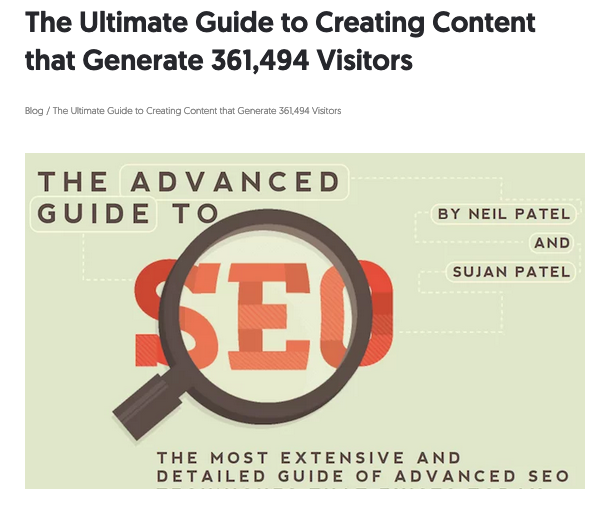
It was called The Advanced Guide to SEO.
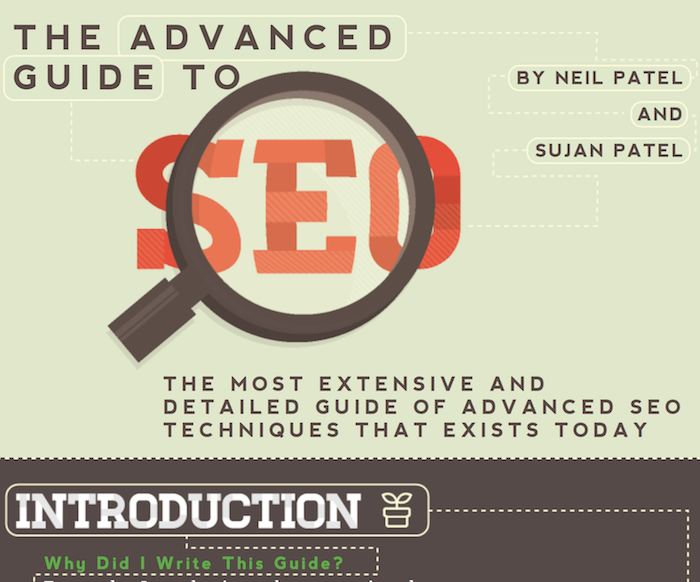
It was so in-depth that it could have been a book.
Literally!
Heck, some say it was even better than a book as I paid someone for custom illustration work.
Now let’s look at the traffic stats for January 2013 when I published the guide.
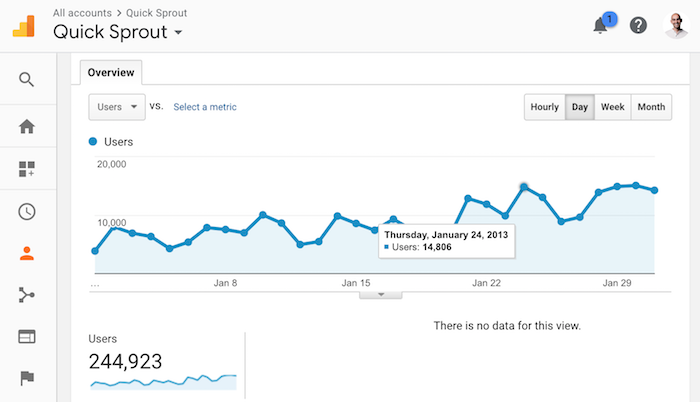
As you can see my traffic really started to climb again.
I went from 112,681 visitors in November to 244,923 visitors in January. Within 2 months I grew my traffic by 117%.
That’s crazy!!!!
The only difference: I was creating content that was so in-depth that no one else dared to copy to me (at that time).
Sure, some tried and a few were able to create some great content, but it wasn’t like hundreds of competing in-depth guides were coming out each year. Not even close!
Now, when I published the guide I broke it down into multiple chapters like a book because when I tested out making it one long page, it loaded so slow that the user experience was terrible.
Nonetheless, the strategy was effective.
So what did I do next?
I created 12 in-depth guides
I partnered up with other marketers and created over 280,000 words of marketing content. I picked every major subject… from online marketing to landing pages to growth hacking.
I did whatever I could to generate the most traffic within the digital marketing space.
It took a lot of time and money to create all 12 of these guides, but it was worth it.
By January of 2014, my traffic had reached all-time highs.
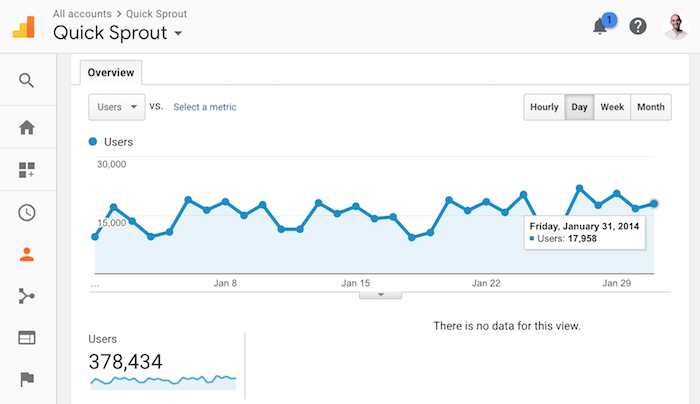
I was generating 378,434 visitors a month. That’s a lot for a personal blog on marketing.
Heck, that’s a lot for any blog.
In other words, writing 10x content that was super in-depth worked really well. Even when I stopped producing guides, my traffic, continually rose.
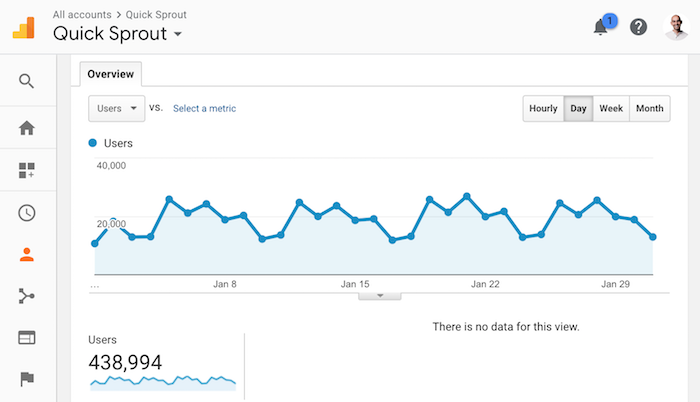
Here’s my traffic in January 2015:
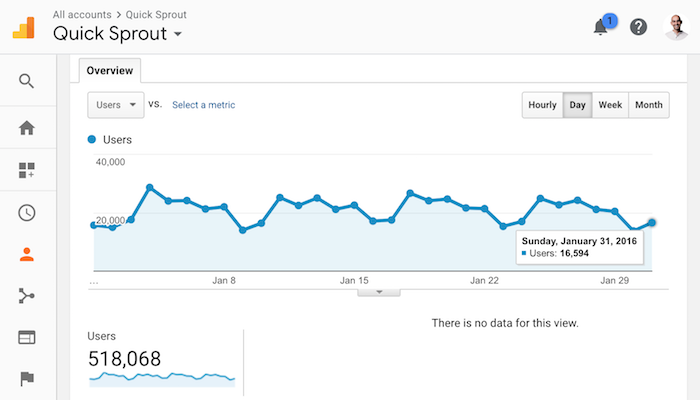
And here’s January 2016 for Quick Sprout:
But over time something happened. My traffic didn’t keep growing. And it didn’t stay flat either… it started to drop.
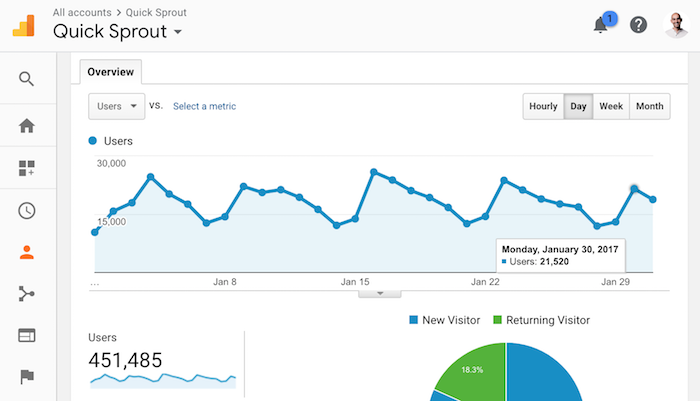
In 2017, my traffic dropped for the first time.
It went from 518,068 monthly visitors to 451,485. It wasn’t a huge drop, but it was a drop.
And in 2018 my traffic dropped even more:
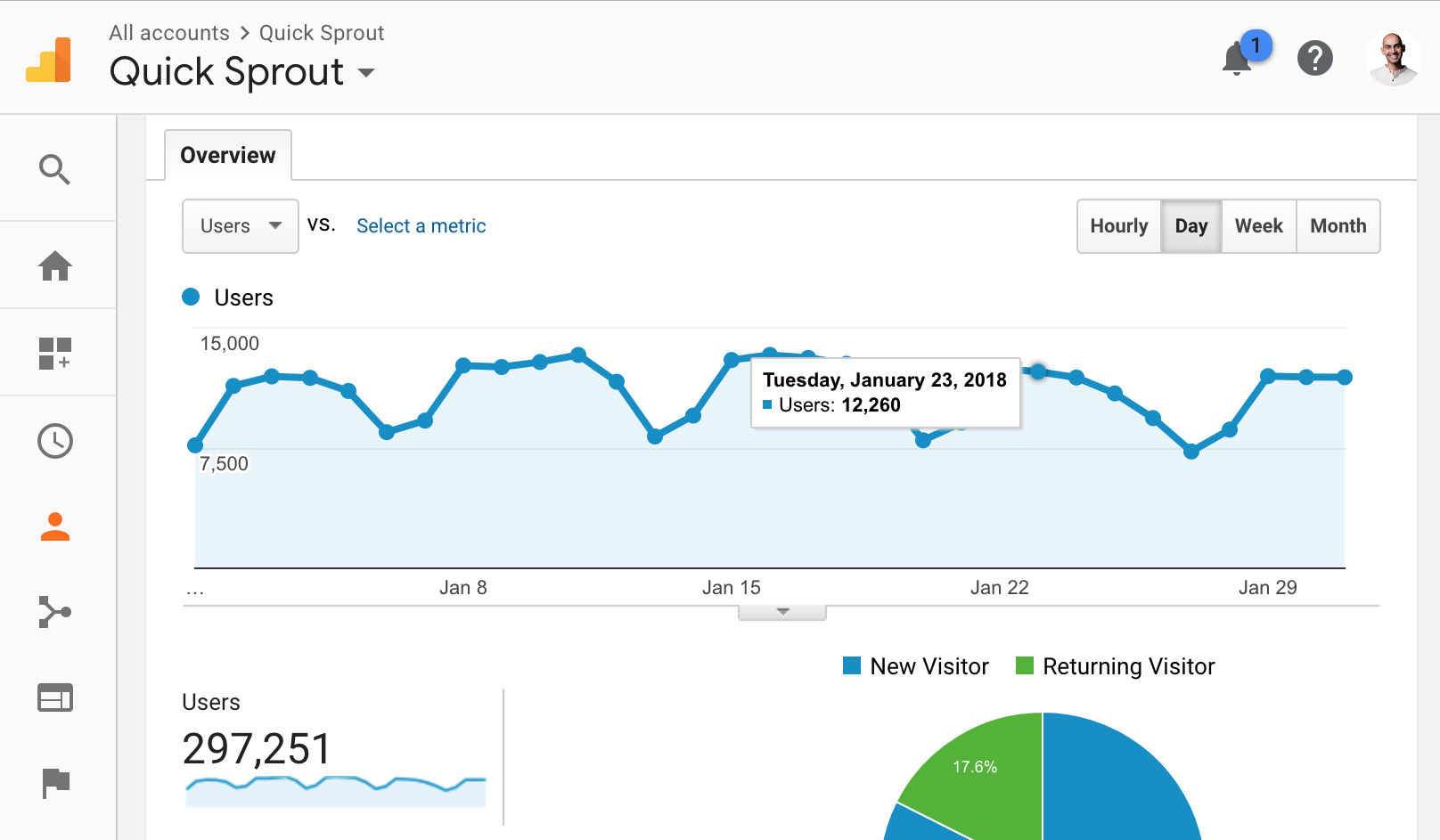
I saw a huge drop in 2018. Traffic went down to just 297,251 monthly visitors.
And sure, part of that is because I shifted my focus to NeilPatel.com, which has become the main place I blog now.
But it’s largely that I learned something new when building up NeilPatel.com.
Longer isn’t always better
Similar to Quick Sprout, I have in-depth guides on NeilPatel.com.
I have guides on online marketing, SEO, Google ads, Facebook ads, and the list goes on and on.
If you happened to click on any of the guides above you’ll notice that they are drastically different than the ones on Quick Sprout.
Here are the main differences:
- No fancy design – I found with the Quick Sprout experience, people love the fancy designs, but over time content gets old and outdated. To update content when there are so many custom illustrations is tough, which means you probably won’t update it as often as you should. This causes traffic to go down over time because people want to read up-to-date and relevant information.
- Shorter and to the point – I’ve found that you don’t need super in-depth content. The guides on NeilPatel.com rank in similar positions on Google and cap out at around 10,000 words. They are still in-depth, but I found that after 10,000 or so words there are diminishing returns.
Now let’s look at the stats.
Here’s the traffic to the advanced SEO guide on Quick Sprout over the last 30 days:
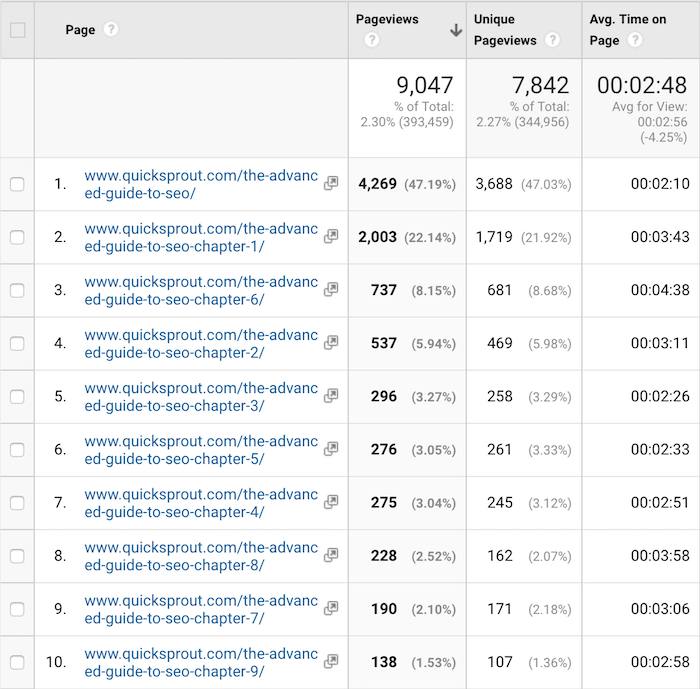
Over 7,842 unique pageviews. There are tons of chapters and as you can see people are going through all of them.
And now let’s look at the NeilPatel.com SEO guide:
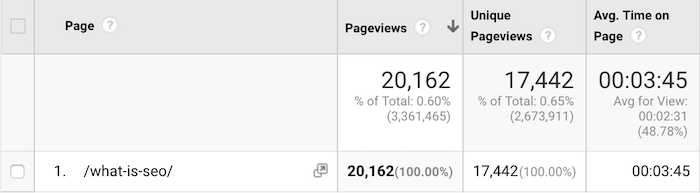
I spent a lot less time, energy, and money creating the guide on NeilPatel.com, yet it receives 17,442 unique pageviews per month, which is more than the Quick Sprout guide. That’s a 122% difference!
But how is that possible?
I know what you are thinking. Google wants people to create higher quality content that benefits people.
So how is it that the NeilPatel.com one ranks higher?
Is it because of backlinks?
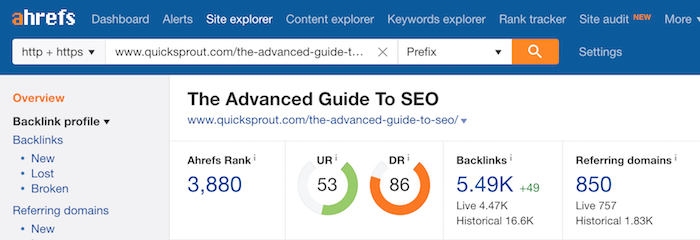
Well, the guide on Quick Sprout has 850 referring domains:
And the NeilPatel.com has 831 referring domains:
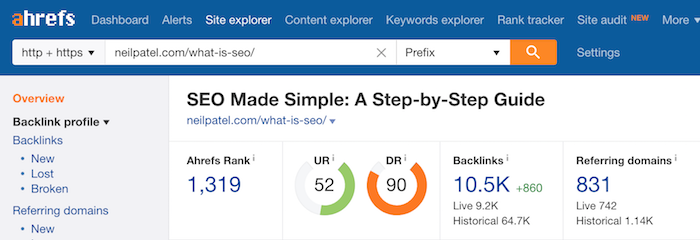
Plus, they have similar URL ratings and domain ratings according to Ahrefs so that can’t be it.
So, what gives?
Google is a machine. It doesn’t think with emotions, it uses logic. While we as a user look at the guide on Quick Sprout and think that it looks better and is more in-depth, Google focuses on the facts.
See, Google doesn’t determine if one article is better than another by asking people for their opinion. Instead, they look at the data.
For example, they can look at the following metrics:
- Time on site – which content piece has a better time on site?
- Bounce rate – which content piece has the lowest bounce rate?
- Back button – does the article solve all of the visitors’ questions and concerns? So much so the visitor doesn’t have to hit the back button and go back to Google to find another web page?
And those are just a few things that Google looks at from their 200+ ranking factors.
Because of this, I took a different approach to NeilPatel.com, which is why my traffic has continually gone up over time.
Instead of using opinion and spending tons of energy creating content that I think is amazing, I decided to let Google guide me.
With NeilPatel.com, my articles range from 2,000 to 3,000 words. I’ve tried articles with 5,000+ words, but there is no guarantee that the more in-depth content will generate more traffic or that users will love it.
Now to clarify, I’m not trying to be lazy.
Instead, I’m trying to create amazing content while being short and to the point. I want to be efficient with both my time and your time while still delivering immense value.
Here’s the process I use to ensure I am not writing tons of content that people don’t want to read.
Be data-driven
Because there is no guarantee that an article or blog post will do well, I focus on writing amazing content that is 2,000 to 3,000-words long.
I stick within that region because it is short enough where you will read it and long enough that I can go in-depth enough to provide value.
Once I release a handful of articles, I then look to see which ones you prefer based on social shares and search traffic.
Now that I have a list of articles that are doing somewhat well, I log into Google Search Console and find those URLs.
You can find a list of URLs within Google Search Console by clicking on “Search Traffic” and then “Search Analytics”.
You’ll see a screen load that looks something like this:
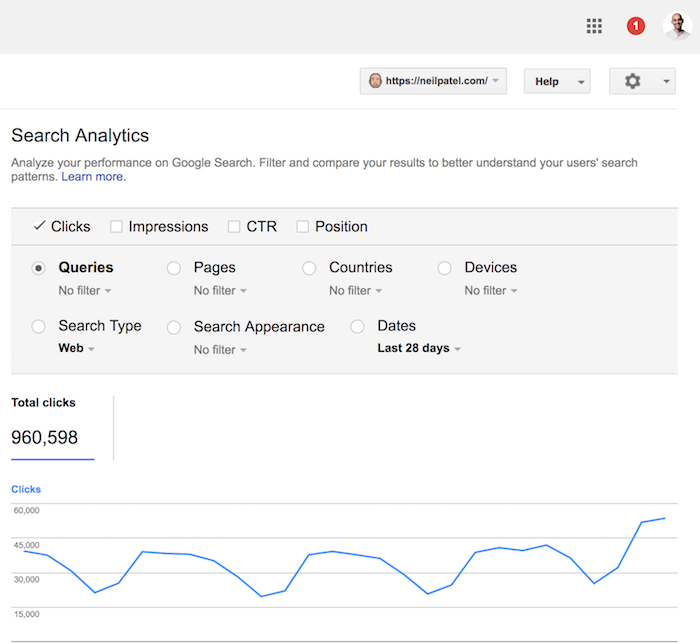
From there you’ll want to click on the “pages” button. You should be looking at a screen that looks similar to this:
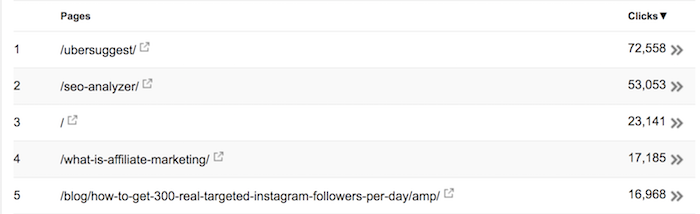
Find the pages that are gaining traction based on total search traffic and social shares and then click on them (you can input URLs into Shared Count to find out social sharing data).
Once you click on the URL, you’ll want to select the “Queries” icon to see which search terms people are finding that article from.
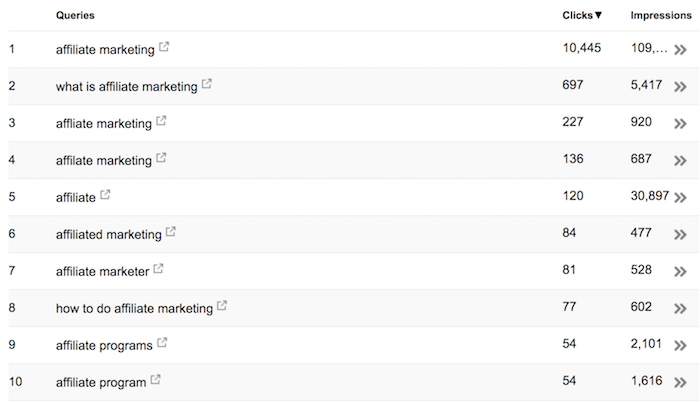
Now go back to your article and make it more in-depth.
And when I say in-depth, I am not talking about word count like I used to focus on at Quick Sprout.
Instead, I am talking depth… did the article cover everything that the user was looking for?
If you can cover everything in 3,000 words then you are good. If not, you’ll have to make it longer.
The way you do this is by seeing which search queries people are using to find your articles (like in the screenshot above). Keep in mind that people aren’t searching Google in a deliberate effort to land on your site… people use Google because they are looking for a solution to their problem.
Think of those queries that Google Search Console is showing you as “questions” people have.
If your article is in-depth enough to answer all of those questions, then you have done a good job.
If not, you’ll have to go more in-depth.
In essence, you are adding more words to your article, but you aren’t adding fluff.
You’re not keyword stuffing either. You are simply making sure to cover all aspects of the subject within your article.
This is how you write in-depth articles and not waste your time (or money) on word count.
And that’s how I grew NeilPatel.com without writing too many unnecessary words.
Conclusion
If you are writing 10,000-word articles you are wasting your time. Heck, even articles over 5,000 words could be wasting your time if you are only going after as many words as possible and adding tons of fluff along the way.
You don’t know what people want to read. You’re just taking a guess.
The best approach is to write content that is amazing and within the 2,000-word to 3,000-word range, assuming you’re in a competitive industry. If your industry isn’t as competitive (and it lacks content online) then you can get away with posts under 1,000 words.
Once you publish the content, give it a few months and then look at search traffic as well as social sharing data to see what people love.
Take those articles and invest more resources into making them better and ultimately more in-depth (in terms of quality and information, not word count).
The last thing you want to do is write in-depth articles on subjects that very few people care about For example:
Just look at the Advanced Guide to SEO on Quick Sprout… I made an obvious mistake. I made it super in-depth on “advanced SEO”. But when you search Google for the term “SEO” and you scroll to the bottom to see related queries you see this…
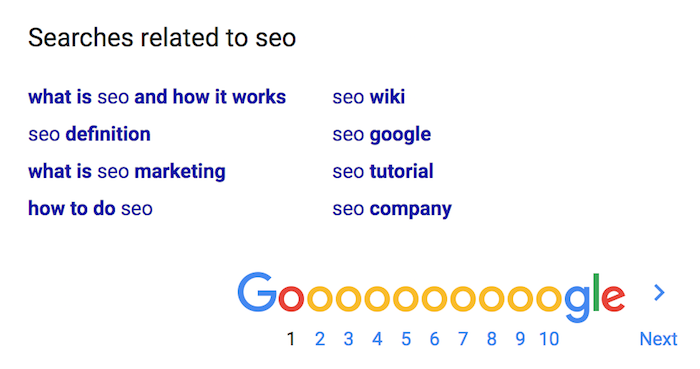
People are looking for the basics of SEO, not advanced SEO information.
If I wrote a 2,000-word blog post instead of a 20,000-word guide, I could have caught this early on and adapted the article more to what people want versus what I thought they wanted.
That’s a major difference.
So how in-depth are you going to make your content?
The post Writing Content That Is Too In-Depth Is Like Throwing Money Out the Window appeared first on Neil Patel.
Source: feedproxy.google.com