
Tag Archives for " Guide "

An In-Depth Guide to Google Analytics 4
When it comes to website analytics, Google Analytics is second to none.
With the rollout of the latest release, Google Analytics 4 (GA4), the same can now be said of applications analytics, too.
Google Analytics 4 was designed to be the latest generation of web analytics platforms—providing a base for marketers around the world to effectively analyze important customer usage metrics.
New report functions, enhanced features, and predictive insights make it an essential addition to any current Google Analytics setup.
What Is Google Analytics 4?
Google Analytics 4 (formerly known as App+Web), is a new property available on Google Analytics. It replaces the former property type “Universal Analytics.”
The latest generation of Google Analytics sells itself as focused on customer privacy. This comes in the face of some of the latest privacy laws, such as GDPR and CCPA. With privacy-first tracking, cross-channel data measurement, and AI-driven predictive analytics, GA4 is certainly an advanced property that many websites and apps will benefit from.
Google Analytics 4 Vs. Google Analytics (Universal Analytics)
The most obvious difference between Google Analytics 4 and Universal Analytics is that GA4 is a property that enables you to report on websites and applications. Universal Analytics only supports website analytics.
The measurement model itself is also different between the two.
Google Analytics 4 uses a new model that measures events and parameters. Universal Analytics uses a model based on sessions and pageviews.
That’s not all, however. GA4 has an array of new metrics.
These include engagement metrics such as:
- engaged sessions
- engagement rate
- engagement time
What Are the Benefits of Google Analytics 4?
Google Analytics 4 offers numerous benefits to users. Here are a few that stand out against the older generation of the property.
Cross-Platform Tracking
What happens when users are active on more than one platform? With the old Google Analytics, it was a manual process that took time and effort.
The new Google Analytics 4 tracks both web and app data in one property (hence the beta name of Google Analytics App+Web).
Cross-platform tracking enables you to see the complete customer journey, including acquisition, engagement, monetization, and retention.
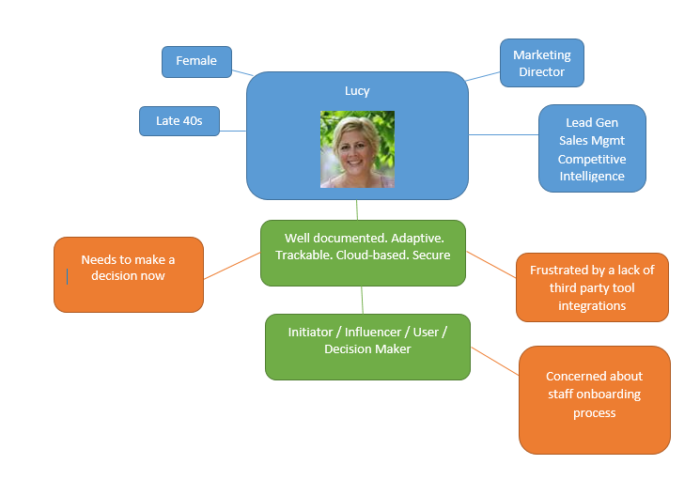
You can use GA4 to track the user experience from start to finish—and from platform to platform.
This is done through unique user IDs assigned during app or website login.
With the appropriate gtag.js script, the user ID for each logged-in session will be sent from either the website or the application to Google Analytics. The ID will be reported to the GA4 property and any user metrics will be logged.
When the user logs in again on an alternative platform, the reports will connect the user’s data to their unique ID and pick up where it left off.
This is incredibly useful information for any marketer, as it allows you to better understand the cross-platform experience of your users. The data can also be used to extrapolate information for a generalized demographic and build more accurate customer models.
All Measurements Are Events
With Universal Analytics, page views were the most important metric. This, and other hit metrics such as screen time, events, and transactions, were tracked extensively. The problem is that this gives a myopic view of customer interactions.
With Google Analytics 4, all measurements are events. What does this mean for you?

Instead of measuring at just the session level, GA4 collects and stores all user interactions as separate events. You can still view session-level reporting, but the ability to break it down by interaction means more in-depth reports and insights.
Instead of seeing generalized data, you can now gain a fuller understanding of your individual users when it suits your needs.
AI Insights for Predictive Metrics
While looking at past behaviors is helpful in understanding your audience, it doesn’t enable you to always make proactive decisions. With GA4’s powered predictive metrics, you can make data-driven decisions on a large scale.

What does this look like? For most businesses, predictive analytics can significantly impact retargeting campaigns. The metrics included in GA4 as of this writing are:
- purchase probability
- churn probability
- revenue prediction
With the above metrics, you can create audiences based on their predicted behaviors. For example, users who are likely to purchase in the next 7 days or users that are likely to spend more than $500 in one shop.
These audiences can then be targeted using active Google Ads campaigns or even on social media.
These metrics cannot only help to improve retargeting campaign success, but also improve website performance. You can create custom funnels for different audiences based on their behaviors and needs. The suggestions will continue to improve as more data is collected.
More Control
The greater the control you have over the data, the more you can do with it. While the Universal Analytics property has no shortage of data, it does have a lack of user control. You can create custom reports to a certain extent, but in many cases the customization possibilities are limited.
Google Analytics 4 offers more flexibility than the old Google Analytics. With GA4, you can create your own dashboard, enabling you to see the reports that matter most to your business.
It even works well in conjunction with Google Data Studio so you can create custom visualizations of the data collected.

Even more than greater control over specific reporting, GA4 offers expanded segmentation capabilities.
With GA4, you can create segments based on events which are essentially a subset of events that occurred on your website or application. This enables you to more accurately track customer interactions.
For example, you can create segments on all conversion events that occurred in a particular location. These capabilities make it possible to take a more granular view of your users and their behaviors.
Should I Make the Switch to Google Analytics 4?
While the switch to Google Analytics 4 may seem overwhelming, it’s important to start gathering data for future use as soon as possible. The thing to remember is that Google Analytics 4 can only collect data from the date it is set up and enabled. It cannot collect historical data prior to that time.
There has been no word from Google whether Universal Analytics will become obsolete in the future. However, it’s best to get used to the new property while you still have the time. The good news is you can have both a Universal Analytics property and a Google Analytics 4 property for your account.
They will run side-by-side collecting data so you can begin to accustom yourself to the new property without losing your current reporting capabilities.
How to Set Up Google Analytics 4
Since Google Analytics 4 can be used for your website or application (or both), there are two separate setup processes. They are outlined below.
Alongside an Existing Property
If you currently have a Universal Analytics property for your website, then the setup of a Google Analytics 4 property can be completed with the GA4 Setup Assistant.
In Google Analytics, click “Admin” on the lower left of the screen.
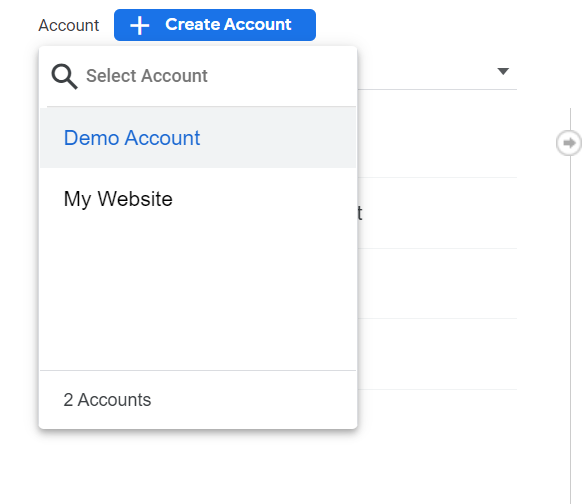
In the Account column, select the desired account:
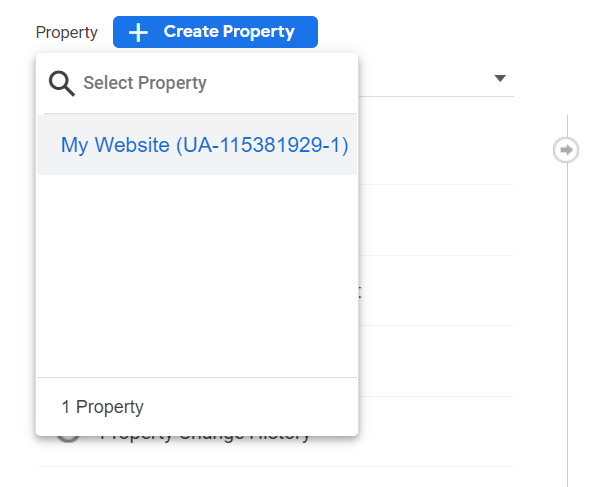
In the Property column, select the Universal Analytics property that currently collects data for your website:
In the Property column, select GA4 Setup Assistant:
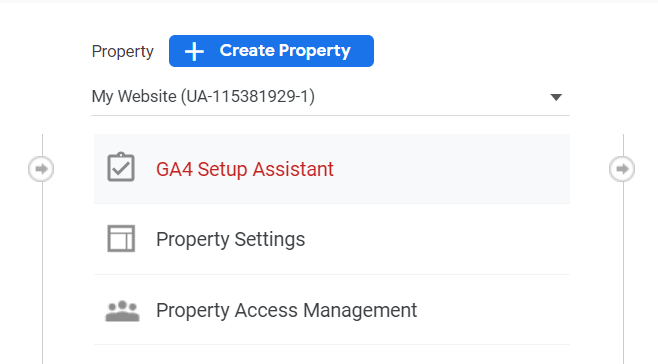
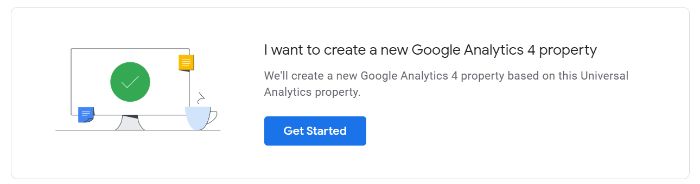
Click “Get started” under “I want to create a new Google Analytics 4 property:”
If your site uses the gtag.js tag, you can select “Enable data collection using your existing tags.”Click “Create Property.”
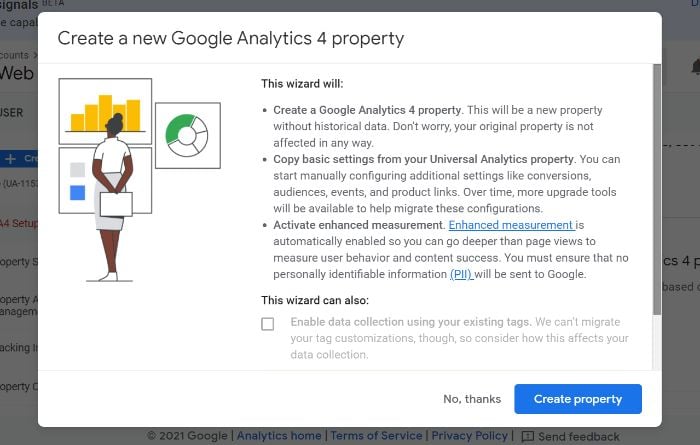
If you are unable to “Enable data collection using your existing tags,” it’s for one of three reasons:
- Your website builder/CMS doesn’t yet support the gtag.js tag.
- You use Google Tag Manager.
- Your website is tagged with analytics.js.
In all three cases, you’ll need to add the tag yourself.
Google Analytics for Firebase
To upgrade your Firebase account to Google Analytics 4, follow these steps:
- Log in to the Firebase console.
- Go to Analytics > Dashboard on the left panel.
- Click “Begin upgrade” in the banner at the top of the page.
- Follow the on-screen instructions to complete the upgrade.
Once upgraded, you can find app analytics in both the Firebase console and Google Analytics.
Frequently Asked Questions About Google Analytics 4
What is Google Analytics 4?
Google Analytics 4 is a new analytics property offered by Google. It enables users to analyze data from websites, apps, or both websites and apps.
What is the difference between Google Analytics 4 and the old GA?
The main difference between Google Analytics 4 and the old GA is in what the two different property types track. Google Analytics 4 can track the analytics of both websites and applications, while the old GA can track only website analytics.
Is Google Analytics 4 free?
Similar to Universal Analytics, Google Analytics 4 is a free property type. There are no costs associated with using one (or more) GA4 properties on your account.
Are they getting rid of the old Google Analytics?
As of this writing, the “old” Google Analytics (Universal Analytics) is still available. This is unlikely to change in the near future. However, Google will likely discontinue Universal Analytics sometime in the future so as to focus on the continued development of GA4.
An In-Depth Guide to Google Analytics 4: Conclusion
When used to its fullest potential, Google Analytics is a powerful analytics tool that can provide invaluable insights. This is why it’s important to upgrade your account when possible. The latest upgrade available to users is the new property, Google Analytics 4.
There are numerous benefits to GA4, including cross-platform tracking, more control over data, and AI-driven insights. When you create a new GA4 property, it works alongside your current Universal Analytics property while also allowing you to gain additional data for future use.
While UA is available indefinitely, the transition to GA4 isn’t mandatory but it’s highly recommended.
Fortunately, setting up a GA4 property on your website or app is easy. The steps as outlined above should take you less than 10 minutes to complete so there’s no excuse to put off the transition.
Which of Google Analytics 4’s features are you most excited about?
Source: neilpatel.com

The Essential Guide to Brand Reputation Analysis
Much of your company’s growth depends on discussions that take place in rooms you are not in or don’t even know exist.
According to Gartner, nearly 52% of SMBs looking to buy software use user reviews to assess their options. Other studies found that customers read at least ten reviews before making a purchase, and 76% of software buyers trust online reviews as much as referrals.
The truth is before people buy from you, they process what others say about your brand to evaluate your credibility. That means there has never been a better time to start monitoring your brand reputation.
In this article, you’ll learn how to conduct a brand reputation analysis and mistakes to avoid.
First things first, why do you need to perform a brand reputation analysis?
Are you familiar with the adage in the IT industry that says, “Nobody ever got fired for buying IBM?” It implies that IBM is a safe choice because it is well-known.
Most importantly, that statement lies on the premise that IBM has a better reputation in the IT industry than most companies.
Companies today should constantly be seeking ways to assess and improve their reputation. Reputation analysis will come as a savior where your marketing and sales material fail you.
Here are two reasons you need to conduct a brand reputation analysis for your organization.

Conducting a reputation analysis gives your brand a competitive edge.
It’s all about knowing how the general audience feels about your brand. You can quickly analyze the leading companies in the market and sketch outgrowth perspectives for your brand.
The truth is before people buy from you, they process what others say about your brand to evaluate your credibility.Click To Tweet
Take Nike, for example. Most of their commercials are inspired by social issues or controversies. Yet, each of these campaigns generates significant results because Nike’s audience identifies with it. However, when Pepsi tried the same approach in collaborating with Kylie Jenner, it caused an unprecedented backlash.
The underlying message is clear: you have a competitive edge over your competitors when you constantly analyze your brand reputation. That is because such analysis tells you what your audience likes and dislikes.
Conducting a reputation analysis increases your income.
According to Prophet’s 2020 Brand Relevance Index, brands with excellent reputations have revenue growth that exceeds the average revenue growth of the S&P 500 by 230%. For the record, the S&P 500 includes the 500 largest companies listed on the United States stock exchanges and has a market cap of over 40 trillion.
The same study showed that the most reputable companies had EBIT (Earnings before interest and taxes) growth of 1.040% over the last ten years.
By objectively conducting your brand reputation analysis, you can reverse your trajectory whenever you notice a poor reputation score and reap the many benefits of having a good reputation.
Two Mistakes That Bias Your Brand Reputation Analysis
Analyzing your brand’s reputation is a good thing, but doing it without eliminating bias doesn’t help you at all. Here are some mistakes you should avoid if you want to keep your analysis data clean.
Putting metrics over strategy.
Throughout every organization, strategy is being hijacked by figures almost every day. You can associate Nike’s “Just do it” strategy to the number of sales it generated, Coca-Cola’s “Love story” to the number of recycled plastics, etc.
Strategy in itself is an abstract concept that only comes to life when associated with numbers.
But in the race to make the abstract tangible, many companies end up putting the cart before the horse–which always ends in a backlash.
Take Wells Fargo, for example. As part of their “cross-selling” campaign, their employees opened 3.5 million credit cards and deposit accounts without customers’ consent. Why did they do this? Well, because they wanted to execute the said strategy and “make it a success.”
In the end, the campaign that was supposed to have a cheerful ending turned into a nightmare because they prioritized metrics over strategy.
Not tying customer satisfaction to brand romance.
Most brands gauge their brand reputation with metrics like “number of people who like/dislike our brand.” While this is a good metric to start with, it is not necessarily accurate.
Just because I like your brand doesn’t mean I’m satisfied with your products and services. It’s a bit of a subtle nuance to make but think about it. You like Microsoft but are not happy with Windows Vista. Or you’re unhappy with the Tesla Cybertruck but still love Tesla.
Companies are focused on measuring surface-level sentiment when the underlying feeling is quite the opposite.
When a customer says, “I love Amazon, but their customer service sucks,” it doesn’t mean they love Amazon. In fact, not the way you think.
As such, when you conduct a survey and simply ask that SAME customer, “Do you like Amazon?” their answer will always be YES. It takes a few more profound questions to get them to the actual feeling, which is “I don’t really like Amazon.”
A step-by-step guide to nailing your brand reputation analysis
Brand reputation is not only about bad customer reviews and comments on the internet. To be as accurate as possible in your reputation analysis, you need to collect a set of quantifiable and non-quantifiable data.
Here’s how to leverage data to ace your brand reputation analysis.
Step 1: Identify primary sources where the talk happens
It’s great to know what people say about your brand when you are not in the room. It’s even better to know which rooms these people are talking to each other in. It matters because it stops you from meandering across many websites and gets you focused on those that matter for your brand.
Have you ever wondered why Lamborghini doesn’t do TV ads and prefers to advertise on Instagram or using video marketing? Simply because their target audience does not spend their time in front of the TV and an ad through this channel would have no effect.
Consequently, to analyze Lamborghini’s brand reputation, you can’t rely on metrics you’ve gotten from sample TV viewers.
Another example is Whatsapp and WeChat. The first one is popular in India and the second one in China. To have some accuracy in your reputation analysis, you need to address the geographies accordingly.
Step 2: Track your brand’s mentions over time.
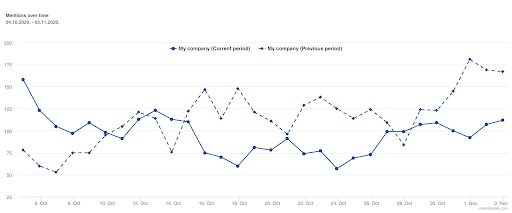
Once you figure out where the people who influence your reputation are, one essential brand reputation metrics you should start tracking is Mention Over Time.
It helps you better understand your brand’s popularity over some time. It is usually expressed as a chart displaying whether mentions of your brand are constant, peaking, or decreasing.
SOURCE: Mediatoolkit.com
If your mentions increase, you can check the underlying drivers and evaluate the data to see if they are positive or negative–and act accordingly.
Step 3: Conduct sentiment analysis
If the metrics you track for your brand analysis are only expressed in figures, you are missing a big deal. There may be much talk around your brand, but there’s no guarantee the talks are piling up a good reputation. There may be terrible reviews, people using irony and sarcasm.
A simple brand mention doesn’t give you an accurate picture of a person’s attitude towards your brand. That is why sentiment analysis is such an essential metric for brand reputation analysis. It sets a frame of reference for the data you obtain and helps you to understand it.
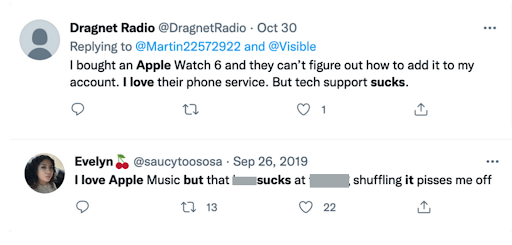
In the above two tweets, for example, the authors make it seem like they love Apple and its services. But the last words of their tweets reveal their real thoughts about the products–which is that they think it sucks. From a reputation analysis standpoint, these last words are more important than the sentences that precede them.
Step 4: Keep an eye out for your brand’s share of voice.
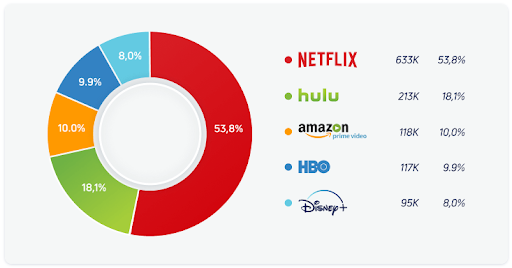
The share of voice (or SOV) is the most reliable metric used in PR and the first indicator of brand popularity. It is different from Mention Over Time in that it gives you an idea of where you stand in your industry and vis-à-vis the competition.
It helps you spot any talk waves regarding your brand and the underlying sentiment driving those conversations.
SOURCE: Awario.com
For instance, between 2008 and 2013, grocery giant Lidl suffered from brand perception issues that caused them too much damage. First, in 2008, the company was criticized too much for the way it observed its employees. Then in 2013, they were involved in a case of selling horse meat.
Not only has this scandal had an impact on Lidl but also on its competitors. Indeed, a study proved that 6 out of 10 people changed their shopping habits because of this scandal. In addition, some shoppers have stated that their trust in the food industry has dropped by a quarter.
To address these issues, Lidl launched the ‘Lidl Surprises‘ campaign, which is a strategy to boost their share of voice and brand perception.
According to Marketing Week, the campaign increased the brand’s share of voice from 5% to 19% in 2016 and 2017, leading to £2.7bn in incremental sales.
Lidl’s case is living proof of the importance of the share of voice in a reputation analysis.
Top 4 brand reputation analysis tools
If you’ve been following our rationale from the start, you can tell you can’t conduct a practical brand reputation analysis by yourself. You will need to use some tools to track, organize, and track the data.
“To manage your brand reputation, it’s essential to adopt tools and processes that adhere to your marketing strategy, not vice versa. It’s more beneficial to change your tools than trying and making your marketing strategy fit them.” -Chris Norris, Founder and Managing Editor of SleepStandards
The list is pretty extensive, but here are four brand reputation tools you can easily adapt to your marketing strategy.
Google Alert
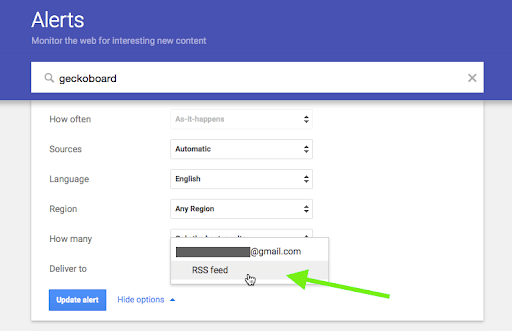
Google Alert is a free and straightforward mention tracker designed by Google. All it takes is for you to set up a specific keyword you want to be alerted for and put your email address.
SOURCE: Geckoboard.com
Once you’ve done that, anytime Google picks up on a mention of the keyword, you will receive an alert notification through email that’ll redirect you to the place you were mentioned. So, it’s reliable and straightforward. However, it does not track social media platforms. You can try it here.
SocialMention
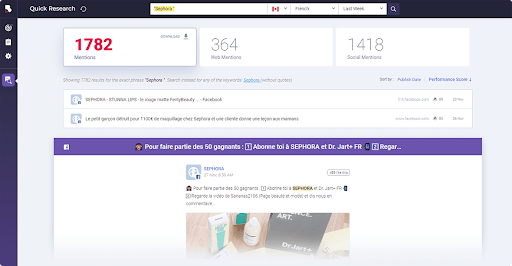
Technically speaking, SocialMention is an improvement on Google Alert. It is yet less powerful than advanced brand mention monitoring tools. It’s also free and straightforward to use.
SOURCE: brandmentions.com
You just need to put in the name you want to monitor online, and you’re done. The dashboard will present all of the mentions, along with some basic analytics. You can try it here.
Mediatoolkit
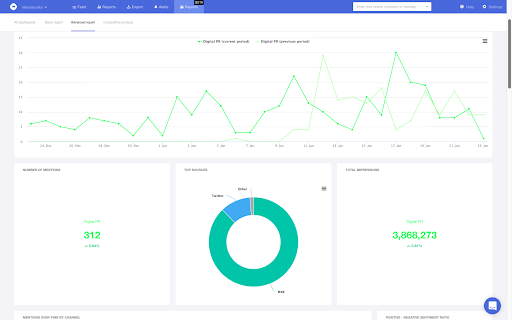
While Google Alert can boast about its reliability and simplicity, these characteristics are nothing new to Mediatoolkit, and it doesn’t even make up for its lack of features.
Source: Mediatoolkit.com
For a thorough and utter brand reputation analysis, you will need a tool you can rely on every step of the process, from data gathering to making sense of it.
Mediatoolkit offers a library of features that can help you achieve this efficiently. It tracks your mentions both on Google and social media platforms. Businesses across the globe trust Mediatoolkit because of its advanced features. You can try it here.
Brand24
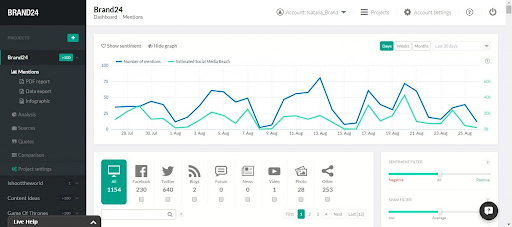
Buffer recently rated Brand24 as one of their favorite tools for tracking brand reputation. Brand24 is a media monitoring tool with solid marketing and analytical features.
source: Brand24.com
The tool gathers public brand mentions in real-time and covers everything from review sites, newsletters, blogs, podcasts, forums to social media networks.
It also packs great features such as sentiment analysis, social media reach, etc. Plus, it notifies you as you get mentioned so you can rapidly act on it–in real-time. You can try it here.
The post The Essential Guide to Brand Reputation Analysis appeared first on Content Marketing Consulting and Social Media Strategy.
Source: convinceandconvert.com