
Tag Archives for " google "

How to Keep Your Marketing Team Together Using Calendar Apps
To manage my projects, I work with a team of five people, including myself. It’s not a big team, but it took us time to set up an effective marketing routine among the 5 of us.
Every month we take on a series of tasks for our brand, working to increase exposure, solidify social presence, enhance the authority and generate leads that become conversions.
This is difficult, not only the tasks we set for ourselves but also coordination among five people, three of whom live outside of the country and three who handle matters on a local and national level.
Add to this struggle the recurring need to include other people into the mix. We have premium members with whom we need to schedule support calls, #vcbuzz hosts with whom we need to coordinate weekly Twitter chats, and influencers and partners with whom we need to meet.
We have been through every possible productivity tool, team management platform, and task manager known to man. We sat through demos of major SaaS solutions that offer task management features and even got their help in setup.
It wasn’t until we had been working together more than a year that things finally clicked into place. Which calendar apps actually worked for our ragtag team of global misfits?
Google Calendar App and Emails Notifications
You see, it came down to simple convenience. Having these fancy platforms would work for a while, but it was a hassle. No one used them for any other work, and they didn’t want to stop using what they had been using before.
Some of my team used Evernote, Trello, or Producteev. I use Zenkit. Getting on a whole other dashboard just for our projects and being unable to integrate them into our wider ones made it a chore that no one wanted to deal with.
Google Calendars and emails became the most effective solution for us. It was not only easy to integrate into different platforms but also familiar in that we already used both tools on a daily basis. They were easy to sync up on any device and could be shared and worked on with others.
Different calendars could be made, and mass emails could be sent with a record of the conversation.
To this day, we use this combo for our task list and conversations, which includes links to event announcements and necessary pending items on the to-do list in emails.
First, you will need to create a dedicated calendar for your in-team tasks and meetings. Once it is created, you can grab your link by:
- Clicking on “Settings” in the top-right
- Selecting your new calendar in the list
- Clicking “Access permissions”
- Setting your calendar to “Public”
- Clicking the “Get sharable link” button and copy your link from there
Once you share this link with your team members, friends, and community, they will see your newly added events without you having to manually notify anyone.
From there:
Step One – Create Event
To create an event in Google Calendars, sign in to your account and go to the main Calendars page. There will be a big button that says “Create”. This is where you can put your event details (name, date, involved people, etc.).

The event name should be something relevant, such as the project name, and then add events in there.
What makes this convenient is that you can choose to see only that calendar by clicking on the little arrow on each individual calendar. That will show you events related only to that set.
Step Two – Double Check Details
In the popup that appears when you choose to create an event, you will be able to select your details. These include name, date, time, location, description, who is invited/has to be notified, who can make changes to the event, and if/when it repeats.
One of the most important tasks is to double-check these details before sending the notification! While it might not seem like a huge deal, you can send a notification to everyone signed up for the event when you make a change). Be cautious though, since it gets annoying really quickly if multiple changed events are going to your email. Trust me.
Step Three – Use Your Link Everywhere
Finally, you need to hyperlink the event entry in your emails. This is pretty self-explanatory.
Following the link will take them to the Google Calendar entry or will allow them to add it to their own calendar by clicking on one of the button options. They will find all of the information you included there.
Depending on your event, there may be different places you may want to include your link, for example:
- Embed your calendar on your master page. If you have an internal page that you use for cross-team updates, you can embed your whole calendar there. This is what we did on our Twitter chat page.
- The beauty of this method is that you need to do that once: The embedded calendar will update itself.
Import Google Calendar events to your Facebook page using this Zapier integration to alert your fans or team members of each newly added event. - Include your calendar link in your email signature. This will automatically update everyone who receives your email. You can use these email signature examples to set up yours, so it is highly informative, yet usable.

You can add your calendar link to your email signature using the “HTML” app from the “Add-ons” tab inside the WiseStamp dashboard
All in all, Google Calendar is free, extremely flexible, and easily integrate into other Google products including my favorite one, Google Spreadsheets, which makes it my preferred scheduling solution.
ContentCal and Campaign Calendar
While Google Calendar is great for all kinds of scheduling and organizing workflow, we had to find another app for content and social media marketing.
When you work with remote employees, you are facing two main problems:
- Keeping everyone on track and productive.
- Keeping everyone motivated (It is too easy to focus on your current tasks and never look out of the box when you are isolated from the rest of the team).
I think we have solved both of these problems with ContentCal, a collaborative social media sharing platform that unites your whole team around building up your brand-owned channels.

ContentCal is pretty lightweight: There aren’t hundreds of task management and reporting features to manipulate. But it does its job very well, without taking lots of time on set-up and training.
- Add your team members as contributors (can contribute social media updates) or managers (can edit and publish).
- Create a system where every team member is responsible for their own piece (for example, if someone is working on a chat schedule, they are tasked with publicizing and promoting each event).

Once set, your calendar will build itself with everyone participating on a daily basis.
Furthermore, you can schedule upcoming campaigns for your whole team to see what’s coming. Each campaign can have a brief, and your team members also can contribute to it to share their research results and ideas.
Campaign briefs are minimal, but they work great for storing ideas and organizing your upcoming plans:

Use campaign briefs to put down your ideas for keywords, assets, etc.
It’s Easy!
I am in love with these calendar apps, and, of course, we all use email. So using these apps for task management, team management, marketing, and audience reach makes perfect sense. Add in the fact that both are free, and you have a powerful reason to give it a try.
The post How to Keep Your Marketing Team Together Using Calendar Apps appeared first on Content Marketing Consulting and Social Media Strategy.
Source: convinceandconvert.com

7 Tips for Image Optimization
Are you looking to gain an edge in SEO? If your image optimization isn’t up to snuff, you could be missing out on traffic, user engagement, and sales.
Google looks at more than 200 factors when deciding which website to rank for a specific search query. While having a well-optimized image won’t help sub-par content rank number one, it can help you stand out from other sites that don’t optimize their images.
The good news? Image optimization isn’t particularly complicated. Just a few changes to your current image process could help your site gain more traffic and leads, resulting in more sales.
Why Is Image Optimization Important?
Well-optimized images get better visibility in Google, which brings in more traffic. That’s the number one reason sites need to optimize their images, but there are many other benefits as well:
- Improve the user experience: Well-optimized images that display correctly improve UX by making your site easier to navigate. Large images, for example, can take up the entire screen or cover other elements on the page.
- Faster site speed: When it comes to SEO, speed matters. Images that are large or formatted incorrectly can slow down your site, killing your ranking and annoying site visitors.
- Makes your site more accessible: Some optimization steps, like adding alt tags, can make your site easier to navigate for those using screen readers. Web accessibility is not only good for site visitors; it’s good for SEO, too.
While image optimization might feel like another step in a never-ending quest to improve SEO, it can have a significant impact on ranking and UX.
How do you make sure images aren’t holding your site back?
7 Image Optimization Tips for Your Website
Technical SEO can get pretty complicated, especially if you aren’t familiar with the latest Google algorithm updates and what they mean. The good news is image optimization isn’t as complicated as other aspects of SEO—and it doesn’t seem to change quite as often.
Ready to make sure your images help your SEO? Here’s what you need to know.
1. Choose the Right Image File Type
Using the wrong image file type can cause your images to be displayed incorrectly, look blurry, even impact whether users can see your images. But there’s a ton of different formats for images—vectors, JPEGs, raster, PNG, GIFs.

Which image type is best for SEO? Generally, you’ll want to use either JPEGs or PNGs.
JPEG, aka Joint Photographics Expert Group, is a popular image file type. They can be displayed by just about any type of device and can show millions of colors, so they preserve the coloring of your images well.
JPEGs do use lossy compression, resulting in some lost data during compression, so they’re not ideal for professional photography. However, they work fine for featured images in blog posts, and similar images.
Another popular type of image is PNG, which can also be displayed on any type of device. These use lossless compression, which means they don’t lose data during the compression process. They also support elements like transparent backgrounds. However, the file sizes tend to be much larger.
These are the most popular images for web publications. Here’s when I recommend using them:
Use JPEGs for blog post images, screenshots, etc. The smaller size will protect site speed, and most images will be clear enough. If the quality isn’t good enough and your site speed is good, feel free to switch to PNG format.
Use PNGs for icons, logos, and images where someone might zoom in. PNGs are larger but slightly higher-quality images. When image quality matters, use a PNG file.
I strongly recommend against using other image formats on your site, especially GIFs. I love a good GIF, but they really do slow your site down.
2. Compress Your Images
Image compression takes large image files and makes them smaller so they’re easier to load on the internet or store on your device. Image compression strikes the perfect balance between size and image quality when done well.
The two types of image compression are lossy and lossless compression. Lossy compression, which JPEGs use, essentially throws out some of the data while lossless preserves all the data. (PNGs use lossless, as I mentioned above.)
Therefore, the type of compression you use depends on the image type you select.
Here’s an example of compressed images:

The image to the far left is 824KB, which is quite large. The middle image looks virtually identical (there’s a little graininess in the background if you look carefully) but is far smaller at 76KB. The third one is even smaller, but image quality is definitely impacted.
Aim to strike the right balance between size and quality.
When deciding how much to compress your images, think about your user. In most cases, they are unlikely to care whether an image on a blog post is a tiny bit less crisp. However, if you are sending a client a new logo, that’s a different story.
The point is, use the compression type based on the file format you use and select the file format based on how the image will be used.
Now, how do you compress images? There are several tools.
I like resizing.app, it’s a free Chrome extension that lets you convert file formats, crop, and resize images in just one click. Other photo compression tools include Photoshop and PicResize.
3. Add Description Alt Text
Alt text (aka, alternative text) is a written description of an image that describes what it is and what purpose it serves. Screen readers use this data to describe images to their users, and Google uses it to determine whether an image is relevant to a search query.
If you use WordPress, adding alt text is very simple. Just highlight the block with an image and add the alt text to the provided box, like this:
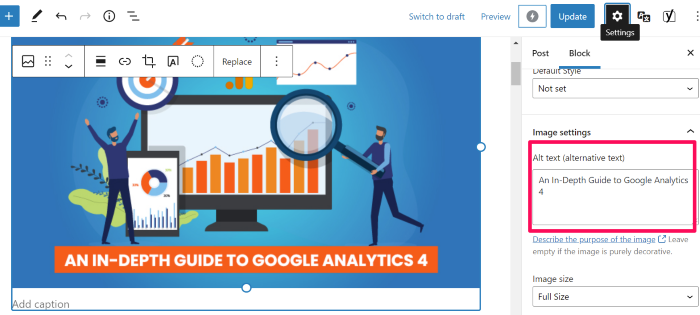
In Google Docs, right-click on images, then click Alt text, and a box will appear that allows you to add the alt text.
What do you write as your alt text? While it’s up to you, here’s the formula I use:
“Main keyword – description of image”
For the image above from WordPress, I used “image optimization guide alt text in the WordPress example.” This format makes sure screen readers know what the image is and tells Google the image is relevant for image optimization search queries.
Pro tip—if you want to see how your competitors use alt tags, navigate to their site, right-click and select “Inspect.” You’ll see the alt tags in the code of their site.
4. Write High-Quality Image Names and Descriptions
Image title provides users (and search engines) with a little more context about your images. While they don’t impact ranking directly (according to Google’s John Mu), they do provide a bit more context, and they show up in your site code.

I recommend using a short phrase that describes the image, along with the key term the post targets—similar to your alt text.
This can also make your images easier to find in Google image search since Google generates a title and snippet for images. If you include a title, they’ll take that into consideration.
5. Ensure Images Are Mobile-Friendly
If you’ve used the correct file type and compressed your images, they should be pretty mobile-friendly. However, sometimes things don’t always display the way we expect.
More than half of all internet traffic comes from a mobile device, so you want to ensure images don’t mess up the mobile experience.

For that reason, I recommend viewing your site from several different mobile devices to ensure images look their best. Remember, tablets, iPhones, and Android devices may all display your images a little differently.
I also recommend using Google’s mobile-friendly test to make sure your images aren’t slowing down site speed on mobile.
6. Use Schema Markup
Schema markup, also called structured data, is a type of code that helps search engines better understand your data.
Imagine you want to collect recipes to make a book of family recipes. Rather than having everyone send in their favorite recipe—which might use different measurements, different title formats, etc.—you send out a form and ask your family to input their recipe.
Now, all the recipes are in the same format and you can easily view the ingredients, measurements, and cooking steps.
Essentially, that’s what schema makeup does. It formats your data so Google can understand if it’s a list, a recipe, an image, and so forth. Here’s what it looks like:
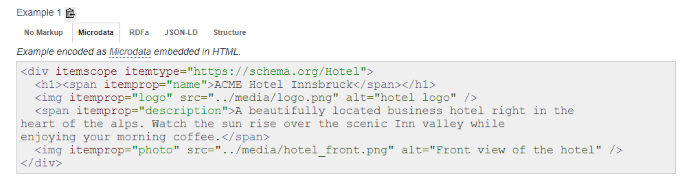
Schema.org lists three types of image schemas, including:
layoutImage (pending implementation)logophoto
This is a more technical change, so don’t stress if this feels like too much. Schema.org lists the coding you can use to add structured data to images here.
If you need more help, feel free to reach out to my team; we can help you get this set up.
7. Optimize Image File Names
According to Google, it uses the URL path and the file name to understand your images better. This means you should organize your image URLs logically and include key terms in the file name.
This can help you stay organized and help Google understand your images: a double win.
File names don’t have to be complicated. I usually use the alt text as the file name, which makes it easier to upload posts to WordPress.
I recommend using the keyword in the file name and describing the image.
Frequently Asked Questions About Image Optimization
What does image optimization mean?
Image optimization means making sure both Google and users can easily understand and view the images on a website. Examples include compressing images so they load faster and adding alt text so Google can better understand what the image is about.
Why is image optimization important?
While image optimization isn’t the most important SEO tactic out there, it can help you stand out in the competitive online world. You’ll still need high-quality content and to follow other SEO best practices, but image optimization is another way to increase your Google ranking.
What is the best image format for SEO?
There’s no specific format that is better for SEO. In general, you want images as small as possible while preserving as much data as possible. I recommend PNG if it doesn’t slow your site down too much.
How does image SEO work?
Image SEO works by making your images easier for Google to understand and making them as useful as possible to your site visitors. For example, adding alt text helps Google understand what your image is about and makes it easier for screen reader users to navigate your site.
Conclusion: Image Optimization
Google gives us a lot of information about how to optimize our sites and our images. It’s easy to get overwhelmed by all the small details.
The tips above will help you make the most of your images; however, I recommend focusing on making sure your images bring value to users. Don’t cram images in just to meet a quota, and don’t add images that don’t make sense for your content.
Have you optimized images on your website? How did it impact your traffic?
Source: neilpatel.com

Using the Google Search Trends 2021 Report to Generate Content Ideas
As marketers, we’re constantly attuned to Google’s ever-changing algorithm, keeping an eye toward shifts in prioritization and SERPs.
Google is pretty good at equipping users (and businesses) with information about what it considers important by providing resources like their search engine optimization (SEO) guides and the annual Search Trends report.
The Google Search Trends report can be an incredible asset that allows you to dig into users’ search habits and gain access to a steady stream of content ideas.
In this blog, we’ll unpack how to mine the Google Search Trends report for content gold to flesh out your content calendar into 2022 and beyond.

What Is the Google Search Trends Report?
Published each year, the Google Search Trends report aggregates the highest-ranking terms for the year.
Curious readers—or those of us looking for content ideas—can visit the mini-site to explore search volume through several lenses.
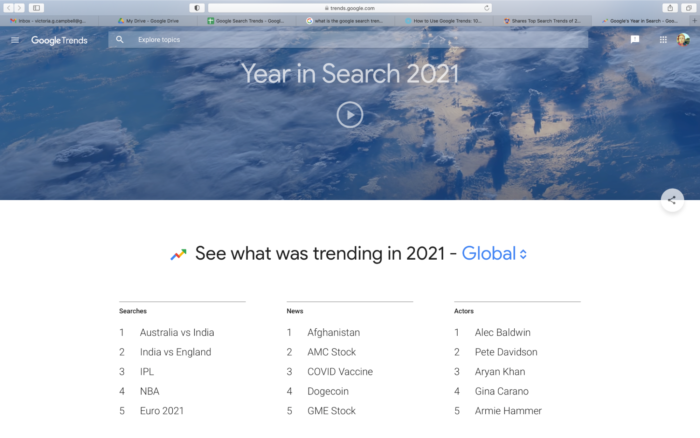
You can break it down by region and then a topic, including categories like actors, TV shows, sports teams, songs, and many more.
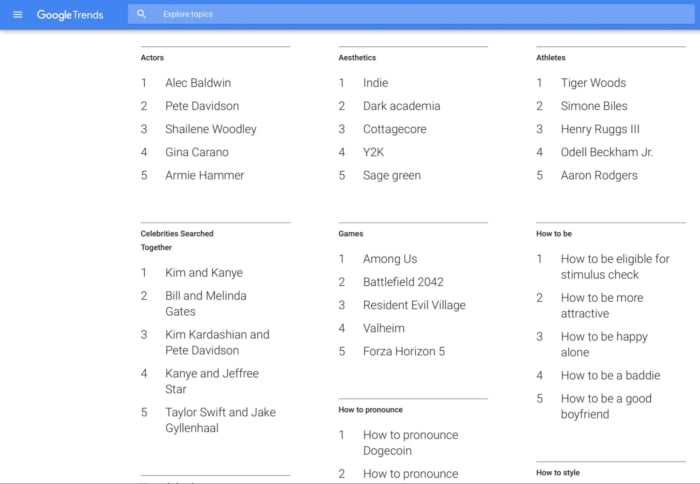
While this report can certainly generate year-end nostalgia, it also offers a unique perspective into the terms that gained the most search volume and traction in the last year.
For marketers, that data can be gold.
Top Trends from the 2021 Google Search Trends Report
Regardless of what region you’re researching, you’ll find a common theme in this year’s report: perseverance.
2021 saw searchers looking for “how to heal” and “how to be hopeful.” This theme resonated in more concrete searches as well with high volume searches including, “how to start a business in 2021” and “how to get a job in 2021.”
Entertainment was another balm in a complicated year. We looked to Google for distraction and clarification, typing in searches like “Squid Game” and “Amanda Gorman.”

Here are a few other Google Search Trends that got a lot of attention around the globe this year:
- Australia vs India
- India vs England
- IPL
- NBA
- Euro 2021
- Copa América
- India vs New Zealand
- T20 World Cup
- Squid Game
- DMX
In the United States, here’s what users were most interested in overall:
- NBA
- DMX
- Gabby Petito
- Kyle Rittenhouse
- Brian Laundrie
- Mega Millions
- AMC Stock
- Stimulus Check
- Georgia Senate Race
- Squid Game
While these searches can entertain, they can also inform your content strategy, by helping you create content that users are likely to be interested in.
How to Use the Search Trends Report to Generate Content Ideas
Struggling to come up with fresh, new content ideas? I’m no stranger to the frustration that comes with this.
Using Google Search Trends, you can determine what topics users are interested in, increasing engagement while building relationships and goodwill.
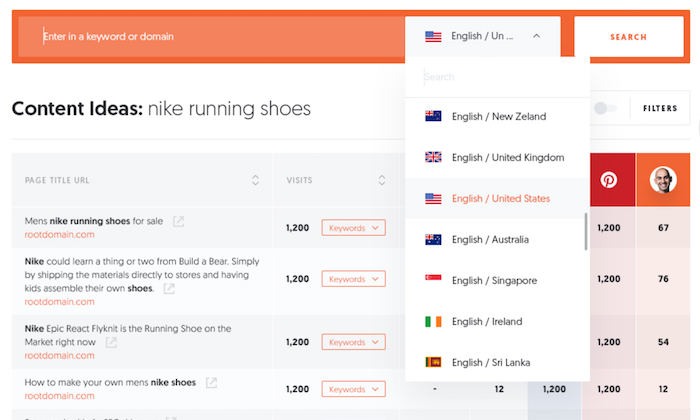
Below, I’ll break down the five best strategies for harnessing the insights associated with the search trends report to generate content ideas.
1. Use Popular Search Terms and Find a Unique Angle to Cover the Topic
While a blog post about the permanence of the cottage come aesthetic might be popular, this topic may not align with your brand. However, also topping the aesthetics search list is “sage green,” a topic that might be related to more industries.
Whether you’re a small boutique or a landscaping company, you can take advantage of this particularly high-volume query and build out a content plan to address it.
Sage green might not be in your wheelhouse.
If that’s the case, look for other search terms that might meet your audience’s interest in some way.

This part of the Search Trends reports breaks down searches by different topics, including:
- culture
- economy
- entertainment
- environment
- health and wellness
- news and events
- philanthropy
- representation sports
“How to maintain mental health” was searched more than ever in 2021—most industries could leverage that to provide mental health advice and tips to their audience. For example, I might write about how to maintain mental health as a remote digital marketer or how to help your remote team maintain their mental health.
By aligning your audience’s interest with a popular search query, you not only increase the visibility of your content, you also offer your existing and would-be audience a fresh perspective within your industry.
2. Search for Topics Using the Search Bar
Suppose you’re curious about the search visibility behind a certain query. In that case, you can use the Google Search Trends report to explore how much a specific term resonates, as well as related queries and terms.
For example, we searched “digital marketing.”
In addition to highlighting the term’s prominence, the report also offers tons of valuable detail. We could build a content strategy with a pretty solid idea of what type of content will and won’t resonate from this one search.
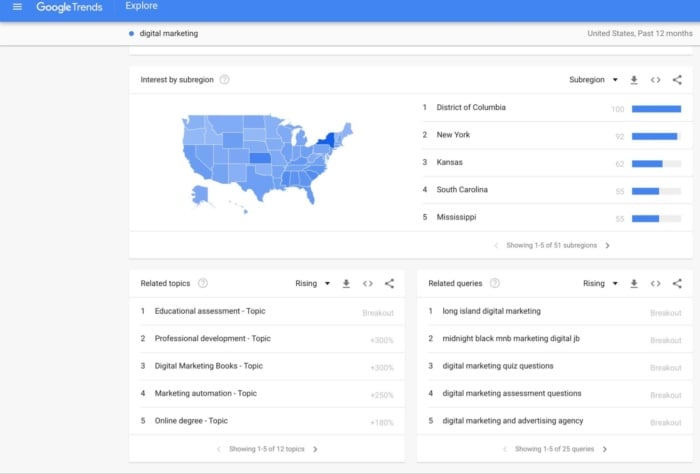
In the “related topics” section, I see terms like education assessment and professional development, which means a list of digital marketing courses or training might do well.
Search the name of your industry and the main key terms you target and see what content ideas pop up.
3. Use the Google Trends Report to Find Topics that Appeal to Gen Z
In 2019, Gen Z officially outnumbered millennials, tallying 32.2 percent of the world’s population.

Even more impactful, Gen Z makes up over 40 percent of U.S. consumers.
Consider this: a third of the world’s population is Gen Z. You’re doing your brand a huge disservice if you don’t consider how to speak to this massive, tech-empowered group.
After you’ve identified topics you know resonate through your search bar exploration, how can you ensure your content resonates with this unique group?
The answer is pretty straightforward.
Your content needs to be more interactive and appealing.
Here’s how to do that:
Create More Interactive Content
The more opportunities audience members have to interact with your content, the more likely they will.

By incorporating interactive elements, you encourage action. Next time you’re planning content, consider including a poll, stickers, or slider that allows your audience to truly engage with your brand.
Personalize Your Messages
Gen Z grew up amid a time of increased personalization. In fact, they’ve come to expect it. Be sure that you use every personalization opportunity to reach this coveted demographic.
Time-Sensitive
Fear of missing out, or FOMO, is still very much a thing. Take advantage of this fear by incorporating time-sensitive offers into your content, forcing your audience members to take action or miss out on a one-day-only deal.
Make Your Content More Visually Appealing
It’s no secret that Gen Zers flock to platforms like Instagram and TikTok, home to bite-sized video content. Take advantage of this content preference by drawing inspiration from the short, visually appealing videos that spread like wildfire.
4. Create Content Around Topics You’re Passionate About
It’s always easier to create compelling content around topics that resonate with you. As you peruse the 2021 Google Search Trends, keep an eye toward topics that resonate personally with both you and your brand identity.
Start by looking at the major search terms in each main topic I listed out above. Let’s say you work or own a coaching business and are looking for more topic ideas.

A quick look at popular “culture” topics shows us doom scrolling is the most popular topic in the culture section. How can you use that to your advantage? By matching it to your brand identity.
As a coach, you might write about how to avoid doom scrolling, how doom scrolling impacts your job search, or create a challenge to encourage your followers to stop doom scrolling and improve their mental health (which was another popular search term, as you might recall!)
After identifying high-performing topics, create a content plan to address them. Will you create blog posts, ebooks, or courses? Can you use these ideas in other areas of your marketing, like paid ads?
5. Identify New Niches
If you’re searching for a new niche, Google Search Trends is a great way to identify rapidly-expanding niches that may have content gaps you can fill.
To see search growth for a particular topic, simply set your search duration to “2003 to present,” so you can see long-term traffic on the topic.

This can also help you see when topics are most popular in a specific year, allowing you to plan your content publication around timeframes when Google users are historically searching for specific terms each year.
For example, topics around “fly fishing” tend to peak in the summer, when the weather’s nice. Tips for Black Friday marketing tend to peak in late November, as you might have guessed.
Frequently Asked Questions About the Google Search Trends 2021 Report
What is the most searched thing on Google in 2021?
Globally, the highest-volume search term was “Australia vs India.” In the United States, the most searched term in 2021 was “NBA.”
How do you find what is trending on Google?
Google releases its year-end search trend report once a year. In these pages, you’ll find the highest-volume search phrases in a variety of different categories, as well as through a geographical lens.
Throughout the remainder of the year, you can visit Google trends to see what the world is searching for.
How can you capitalize on search trends in marketing?
You can use search trends to power your content plan, perform keyword research, find seasonal trends, optimize your SEO strategy for video, and find related terms to outperform your competitors.
What are the search trends for late 2021?
The most popular search trends for late 2021 include mammography, why people are quitting their jobs, back to work bonus, potluck, small business Saturday, and how to become a volunteer firefighter.
Conclusion: Google Search Trends 2021 Report
The Google Search Trends report provides a nostalgic look at the year in review, with pop culture topics like Squid Game and news stories like the disappearance of Gabby Petito. However, they’ve also given us a tool we need to gain greater visibility into search patterns.
By mining these trends for insights into search patterns and behavior, you can create a content plan that speaks to the topics users care about.
The uses of the Google Search Trends report go beyond content ideas. You can also perform in-depth keyword research, use popular trends in your ad copy, and find new niches to target.
As you wade into your 2022 content planning, keep an eye toward the information Google has generously handed over—your click-through rate (CTR) will thank you.
What’s the most useful thing you’ve learned from the Google Search Trends report?
Source: neilpatel.com

SEO Trends for 2022: How to Get on Top of Google Search
SEO is one of the youngest marketing disciplines out there, and it’s also incredibly fast-paced. It looks almost nothing like what it did when we started.
While the fundamental principle remains the same — SEO is about making websites easy to find and understand — the tactics involved are very different than they were 15, 5, and even 1 year ago
So what are the most important SEO trends for 2022 and how can you implement them?
SEO Trends for 2022
Here’s what you should know for 2022, as well as key steps for implementing these trends and tactics.
SEO Trend #1: SERP Marketing and Content Diversification
For years now, Google has been taking steps to become a destination, not just a discovery project. With knowledge graphs, quick answers, and interactive and visual results, Google is building an ultimate resource that can give comprehensive answers to any query.
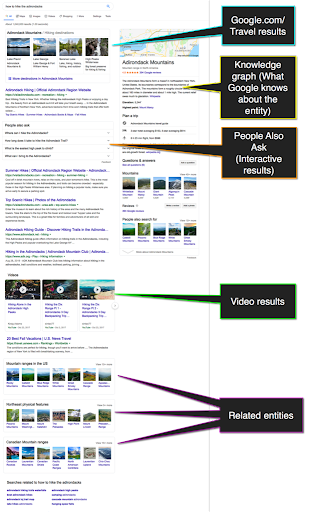
Within one search result page, we see:
- Google.com/Travel suggestions
- Knowledge graph (that includes maps, user reviews, basic facts, etc.)
- Related videos (This search element is interactive because you can scroll through the carousel to see more videos)
- “People Also Ask” results (This box is also interactive: You can click any question to read answers and expand follow-up questions. Interestingly, a question you click determines the topic of further questions that appear. I find this quite eye-opening.)
- The visual results including more similar destinations, related searches, and more
- Organic “text” results which are somehow lost in-between
This is where the concept of “SERP marketing” lies: You need to stop focusing on organic listings and start optimizing for all the other search elements, including videos, images and “quick-answer” sections (“People Also Ask” and featured snippets).
You need to take each individual search result page as a whole to achieve brand visibility there.
How to Dominate Google with SERP Marketing
There’s a lot to be done to create an effective SERP Marketing campaign. Here are some steps to get you started:
Analyze Your Current Opportunities
At IMN, we are building an ultimate SERP marketing tool that helps you determine all-important content formats that need to be created to dominate your target queries:

The tool uses your current rankings to show where you are missing out. Use this tool to understand your current opportunities better and optimize for those.
Set Up Content Collaboration Strategy
Content diversification brings in both challenges and opportunities. On the one hand, you need to continually come up with quality content assets in various formats, which is incredibly hard to scale. On the other hand, you get to leverage more mediums and try more tools and tactics, which is pretty awesome.
Content collaboration is the tactic that can solve many issues and empower your marketing with more benefits, including natural backlinks, trust and shares. And the good news is there are great projects that help you build contacts to co-create content and scale it.
Of course, unified communication is a big part of it, especially post-covid when most companies have moved to remote operations.
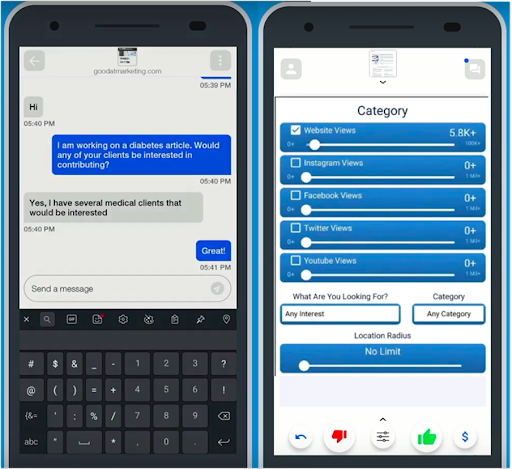
BizSwipe is one example that allows you to easily build B2B connections for content co-creation and marketing collaboration. You can use advanced filters and easy connection tools to find partners and influencers who can help you diversify your content strategy:
Organize Your Strategy Using an Editorial Calendar
For content collaboration and co-marketing opportunities, consider using an editorial calendar solution that will help you organize your campaigns.
ContentCal is a marketing collaboration platform that can help you organize your omnichannel content marketing strategy and boost its effectiveness:
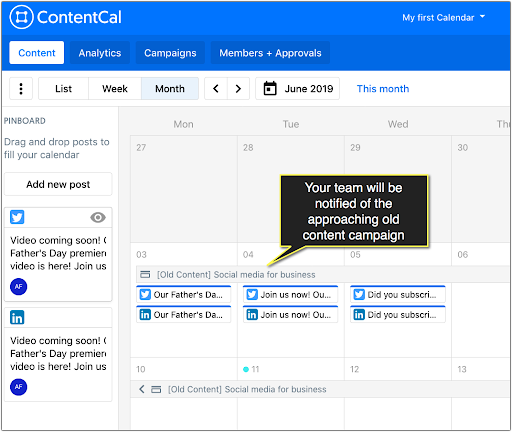
Use its “Content Campaigns” feature to schedule your upcoming content assets and put all the ideas, goals, and tasks in each campaign brief.
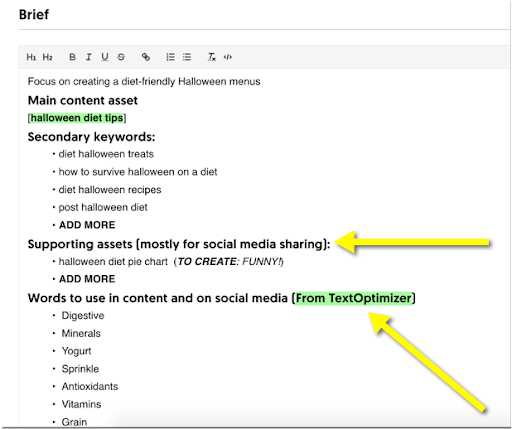
Creating a central dashboard for all your content plans to be visible for your whole team is key to a consistent and effective content strategy. With ContentCal each team member responsible for a single piece of the puzzle will be able to see and contribute to the whole picture.
At the end of the day, content diversification lies at the foundation of omnichannel marketing that has multiple benefits (including cross-device compatibility, smoother shopping experience, creation of more marketing channels, and more). So you may want to start working on it whether you are worried about your search visibility or not.
SEO Trend #2: Rich Results
Google search results are becoming increasingly richer and more interactive.
The good news is that this gives SEOs a competitive advantage over those website owners who are not keeping up with Google’s moves.
As an example, here’s what FAQPage schema looks like in search results once you implement it:
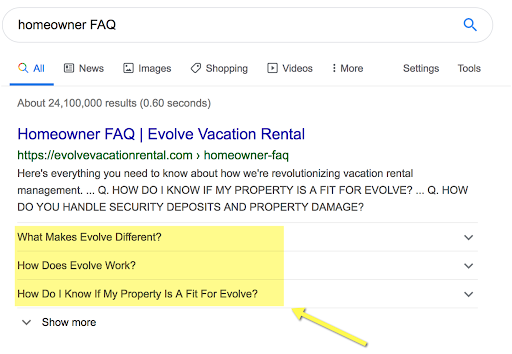
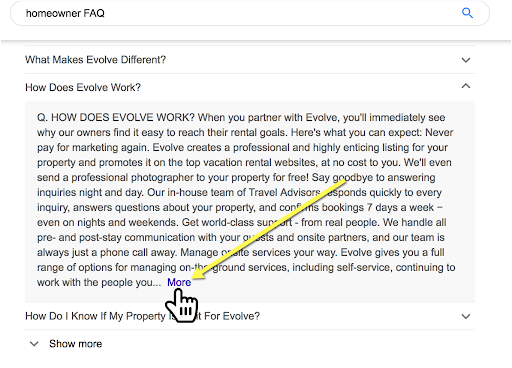
This search snippet is interactive — you can click any question to unfold the answer, and from there, even get to the site for more answers:
How to Implement Structured Data
There are many tools, plugins, and solutions, allowing any website owner to implement structured markup with no technical knowledge required.
Check out a few options:
- Here are free Schema markup generators and how to use each one
- Here are WordPress plugins that support Schema
SEO Trend #3: Mobile and Voice Search
Voice search is no longer a trend. It is a habit. Most of us are routinely asking questions to a mobile device or a smart speaker. It is something that has become part of our lives.
Obviously, mobile search is going strong, and we have many sources to confirm that, including:
Back in 2015, Google revealed that more people were using mobile search than desktop search in 10 countries, including the US and Japan
In 2018, more than half of website traffic in the US was coming from mobile devices
Last year consumers spent three and a half hours a day on their mobile devices
Google switched its priorities by introducing the Mobile-First Index, which means that Google predominantly uses the mobile version of a page for indexing and ranking. In other words, if your page doesn’t look good on a mobile device, or if the mobile version has less content, you may lose rankings in both mobile and desktop search results.
Given that mobile device users often use voice search to find answers while on the go, it is safe to assume that voice search is getting popular, and these two trends are very well connected:
- Both mobile and voice users are likely to be looking for answers while in the middle of the task (so they need clear, concise answers right away)
- In both of the cases, the top result (which is often the featured snippet) is really what matters. So we are competing for the top result now, versus the top 5 positions as we did a few years ago
How to Optimize Your Site for Mobile and Voice Search
- Obviously, make your site mobile-friendly and fast (page speed is important!)
- Adapt your content strategy to catch those featured snippet opportunities to outrank your competitors. Mobile users seldom have time to scroll, and with voice search, there’s only one result being read to the user. This makes featured snippet optimization incredibly essential for your online visibility — you are either there or nowhere.
There’s a lot to featured snippet optimization (which deserves a whole separate article which I already did), but it all comes down to:
- Researching current featured snippets for your important queries (and learning from them)
- Structuring your content with H2-H3 subheadings that address questions behind queries triggering featured snippets
- Provide quick, concise answers (no longer than 90 characters) below each subhead for Google to grab and feature.
If you include these steps in your writing guidelines for your content creators to use, you are halfway there:
- Use this writing checklist that includes both of the above (and more useful) guidelines
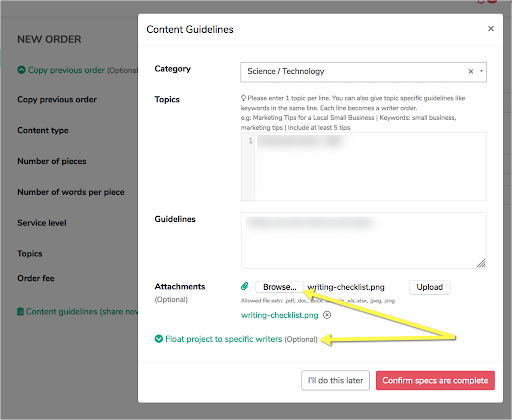
- Scale your content creation process using Narrato to build a team of content creators that do a good job following those guidelines.
The beauty of this platform is that it matches you to the most suitable writers automatically. After some time, you have a solid team that knows your requirements and creates content fast. In an era when you need a lot of content, and you need it fast, this is a life-saver:
SEO Trend #4: Semantic Search and Intent Optimization
Google moved away from exact-matching keyword optimization years ago, yet our industry is somewhat slow to keep up. These days, Google doesn’t use the actual string of words that are being typed in the search box. Instead, it looks at the query context and analyzes the possible search intent to deliver results.
You can see this all around the SERPs and even in Google Suggest results. I wrote a detailed article on semantic search, and here’s one of the examples from it:
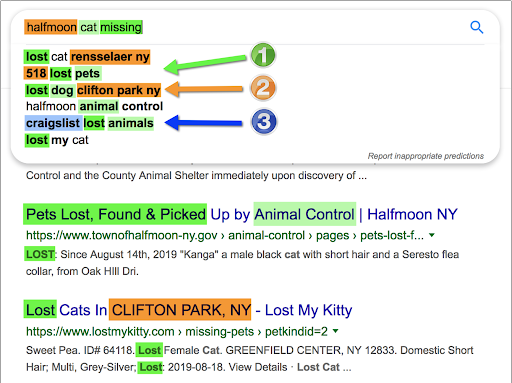
Notice how Google interprets the query on the fly to realize:
- You may have lost your cat, but you may be interested in pet and animal control centers, not just cat facilities
- Your cat may have gone missing in the town of Halfmoon but it has legs, so chances are you may be able to find the cat in the nearby towns, including Clifton Park and Rensselaer
- You may also post on Craigslist or search there in case someone already found it—which is an absolutely awesome idea!
What does this tell us?
Google has got very good at understanding searcher intent, and old-school content creation methods that focus on a single keyword string don’t work.
We need to create content that solves problems. That’s what Google is after, and so are our potential customers.
How to Optimize Content for Semantic Search and Search Intent
Simply Searching Google to get an idea of how it is interpreting a query is a great first step. Do the same type of research I did with that cat missing query. Look for other ways Google is trying to solve the problem for the user.
Using semantic research tools is another good idea. Text Optimizer is an intent optimization platform that helps you cluster any search query into related concepts and entities. It uses Google’s search snippets to come up with ideas to expand your initial copy to provide more solutions and meet Google’s and its users’ needs:
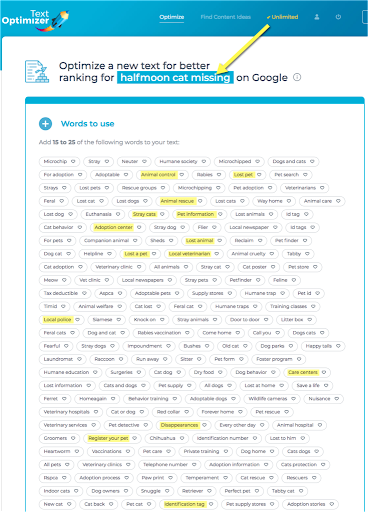
Based on semantic research, it will even help you build sentences based on common co-occurrence analysis of the terms you select:

If you are using a remote team of content writers or Narrato, it is a good idea to run TextOptimizer before creating your assignment and provide your writers with the list of concepts to cover.
SEO Trend #5: The Power of E-A-T vs Domain Names
For years, SEO has relied on a low-hanging fruit: The power of a chosen domain name:
- Keywords in domains names did wonder to your rankings
- Domain age and previously accumulated authority did wonder to your rankings
Both of those signals were pretty easy to fake: You could invest into buying a well-established domain or buy a keyword-rich domain name by sacrificing its “brandability”.
These days, your domain name has no direct impact on your rankings. Thanks to its smarter algorithm and knowledge graph, Google can tell if there’s a real entity behind the domain and determine each page EAT (Expertise, Authoritativeness, Trustworthiness).
The road to higher rankings is no longer fast or predictable. You need to keep building an established brand, work on your trustability and collective authorship. Your domain name is still important but mostly indirectly: How memorable is it and how easy is it to associate your business with your niche?
Generating a business name is more important than finding a keyword-rich domain name. Building a strong brand and becoming an entity is more important than finding an established domain name. Page experience signals are more important than clicks. It’s all about focusing on real metrics now!
Now, You Are Ready to Rock 2022
SEO is moving fast — it is a very exciting industry to be in. From the earlier days on, those people who were fast to “get it” found themselves ahead of slower-moving competitors. Use the tools and tips above to get ahead of yours in 2022 and beyond!
The post SEO Trends for 2022: How to Get on Top of Google Search appeared first on Content Marketing Consulting and Social Media Strategy.
Source: convinceandconvert.com

How to Market Without Cookies
For several years, many digital marketing teams relied on cookies for marketing. However, everything is about to change. Mozilla Firefox and Apple Safari already block third-party cookies, and recently, Google revealed it would no longer support cookies on ad networks and its Chrome browser.
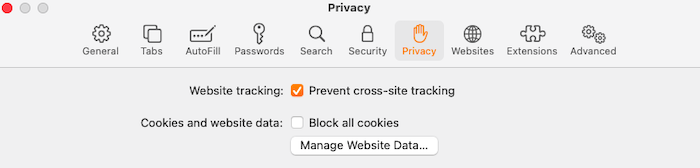
What does this mean for marketing teams, and what can you do to ensure your business keeps running smoothly when you are marketing without cookies? Let’s find out.
Why Are Third-Party Cookies Going Away & Why Does it Matter?
Whenever you use the internet, especially on browsers like Chrome, your actions are tracked through cookies.
These cookies can help marketing teams understand user behaviors and ad performance, but they may feel like an intrusion of privacy for many users.
By blocking these cookies, users can increase their privacy and security. Browsers like Firefox, Safari, and Brave have already started doing this. Google will also begin phasing out third-party cookies from its browsers to strengthen user privacy and promote itself as a secure search engine.
This represents a considerable change for marketers who heavily relied on cookies for their ad campaigns.
When creating paid ad campaigns on browsers and social media platforms, you need customer details to customize the copy. Marketing without cookies means you’d have to rely on first-party data (more on that below) rather than third-party cookies.
Now Google is launching “The Privacy Sandbox” as a response to the cookieless future. Here data will be stored anonymously to form a middle ground where companies can obtain customer data without intrusive cookie tracking.
Beyond this, there are various ways to market without cookies. Below, we’ll discuss some of the most effective strategies and offer tips for marketing without relying on the use of third-party cookies.
4 Tips to Prepare for Cookieless Marketing
Your marketing campaigns don’t have to suffer because you don’t have access to third-party cookies.
Using the strategies and tips below, you can learn to leverage tools like first-party data to increase the effectiveness of your marketing efforts without depending on cookies.
1. Turn on Google Analytics 4
An upgraded version of Universal Analytics, Google Analytics 4 supports both app and website-based tracking. It helps if you use both formats (app and website), as most businesses do today.
Whether you already run GA for an existing website or you want to create a different account for a new site, turning on Google Analytics 4 is simple. Here’s a detailed guide to help you get started.
2. Start Gathering First-Party Data
Third-party cookies are blocked, but marketing teams can continue to collect first-party data. This means you can still use data from email sign-up forms or newsletters, surveys, and other direct methods.
The biggest benefit of working with first-party data is you own the data. You don’t have to worry about buying it from someone else or losing the right to use it.
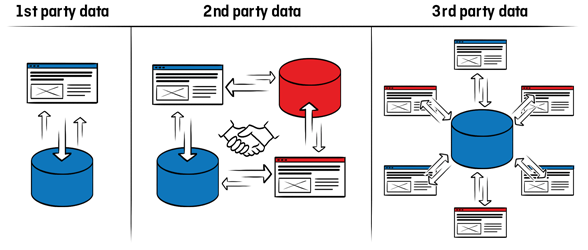
The second benefit is first-party data tends to be more accurate than third-party cookies because you know your customers and have the tools to figure out exactly where the data came from.
Another massive benefit is your competitors don’t have the same data. When you buy third-party data, there may be another company, most likely your competitor, that buys the same information.
Sounds exciting? Here are some ways to collect first-party data to help you get started:
- online surveys
- sign-up forms
- newsletters
- community polls
- SMS answers
- mobile notification responses
- direct mail (offline post), etc.
These are some of the tools marketers typically use to gather first-party data from both new visitors and seasoned users. You may not want to start using all of them at once as it could overwhelm your customers.
Instead, try one or two approaches first. See how your audience responds to it. Are they receptive to your methods, or do they need a different approach? Experiment with different techniques to see what best suits your business model.
3. Invest More in Market Research
Market research goes hand-in-hand with collecting first-party data. When marketing without cookies, you need to know who your audience is.
Understanding their needs and pain points will help you tailor your campaigns to suit their needs without having to rely on external cookies data.
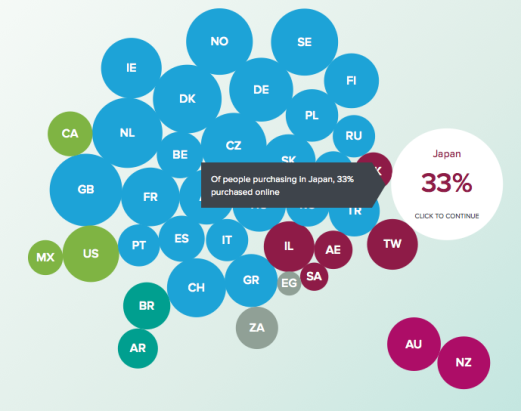
If you’re new to this, here are some ways to get started with market research:
- Launch a targeted survey.
- Collect questions and feedback from your current users.
- Work with analytics to understand what’s working and what isn’t.
- Hold focus groups with incentives for participants.
- Observe how customers interact without interfering with their actions.
- Post simple polls in community forms to get a broad view of audience interests.
- Leverage the power of social media to understand what your target market wants.
No matter which method you choose, the bottom line is this: Start investing more in market research. Get to know your customers and target market with surveys, buyer personas, and most importantly, constantly testing your findings with A/B testing.
4. Focus on Personalization
What would you prefer? An email that addresses you by your name, or one that starts with a “hello there!?”
Research says people prefer the first option. Studies show 90 percent of users find personalization appealing and 80 percent of consumers are more likely to make a purchase when brands provide personalized experiences.
If you want to take your marketing efforts to the next level, it’s best to focus on personalization.
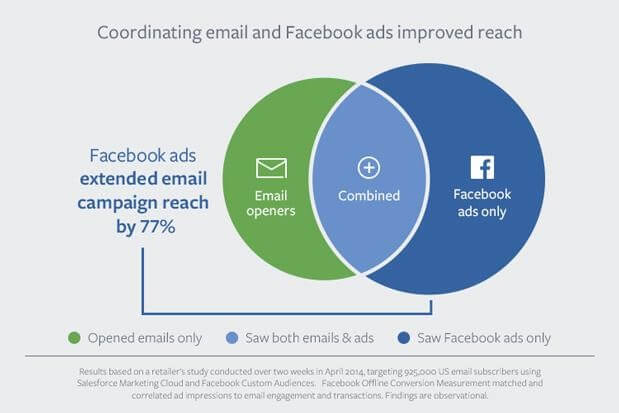
Now that you’re already working with first-party data, this will be easier.
Start with using the customer’s name. There are dozens of tools in the market, including ones that work with newsletters to automatically personalize your campaigns.
Then address customer pain points. Get really specific about what bothers them and position yourself as a solution for those problems. This will help customers connect with your brand better.
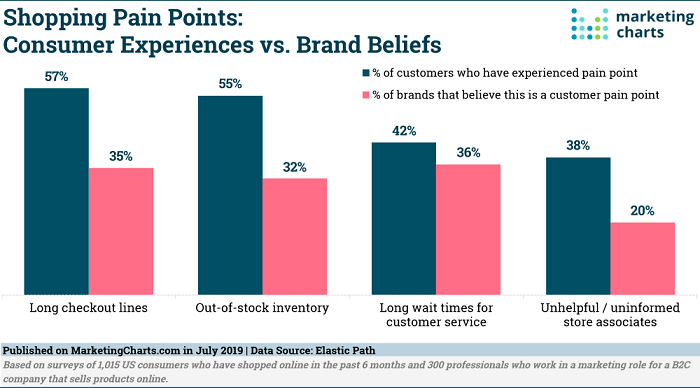
Here’s an eye-opening graphic about pain points to keep in mind when working on personalization.
Rethinking PPC: 4 Tips for PPC Marketing Without Cookies
If you’ve ever run online advertising campaigns, you know the best way to get effective results is to target your ads to specific audiences.

How can you do that when marketing without cookies? Here’s how.
A. Use AI-Based Bidding
By analyzing search data, AI-driven bidding determines which keywords and trends generate the most conversions. Then it optimizes your bids in real-time, maximizes efficiency for your ad spend, and improves the return on your investment.
Here’s an example from Google.
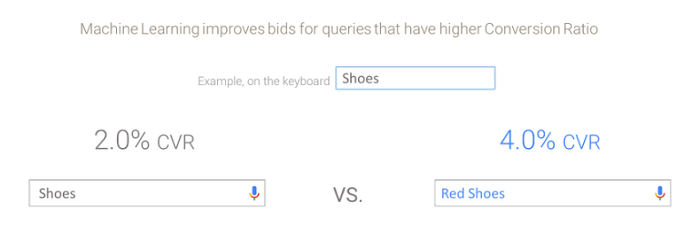
The Smart Bidding feature of Google AI-based bidding provides bid strategies based on conversions. As a result, you can make targeted bid decisions for every auction in which your ads are entered.
What does it mean? Simply speaking, it means you can get more reliable results without resorting to guesswork.
Such automated bid decisions are based on data that includes information about the device, the current location, the time of day, remarketing list, enabled languages, operating system, and other relevant details.
Still, confused about AI-based bidding? Don’t worry. Here’s a Google guide to help you get started.
B. Reconsider KPIs
Key performance indicators (KPIs) measure progress towards achieving ad campaign goals, so the success of your PPC marketing campaign often depends on what you’re actually measuring.
Here’s where it gets interesting. When marketing without cookies, you may have to reconsider these KPIs to better align with your business goals. For instance, you may want to pay more attention to conversion numbers (how many users convert vs. how many users bounce from your homepage).
Cost per acquisition is another important KPI you need to consider to ensure your ad campaigns are profitable in the long run.
Here’s a thorough representation of evolving KPIs to help you plan your cookieless marketing strategies more effectively.
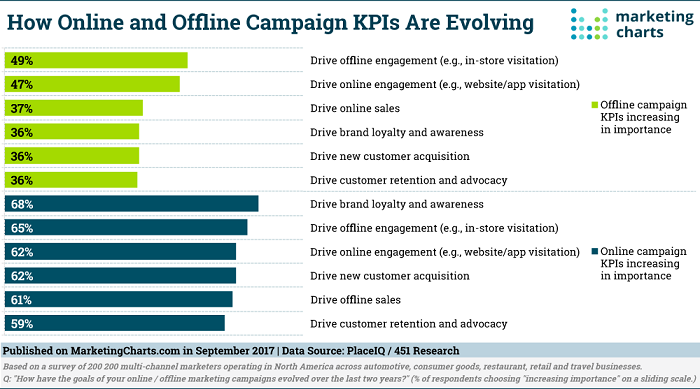
Fully understanding and leveraging these KPIs can help you make better marketing decisions, especially when you’re navigating this new territory of a cookieless marketing future.
C. Use Contextual-Based Advertising
Now that third-party cookies are out of the picture, you may be wondering: How can I know which ads to place where if I don’t have data about consumer behavior?
That’s where contextual advertising comes in. In context-based advertising, ads are placed on web pages according to the website’s content. For example, a tech blog may display ads about computer accessories, while a vegan-living website may display ads about vegan food products.
Look at the NYT Books section, for another example.
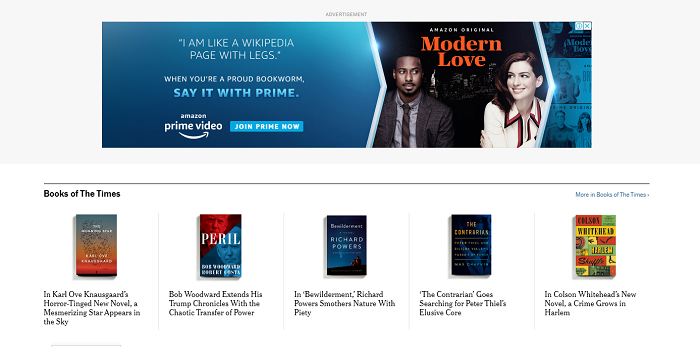
The Amazon Prime Video ad copy literally talks about being a “bookworm.” This is contextual advertising as users who read the NYT Books section are obviously readers in some capacity.
One more: Look at WSJ’s Life and Work section. It has a classic lifestyle content ad, considering users visiting this section have already shown an interest in lifestyle content.

D. Target Based on Location and Time
Say you want something more personal than contextual advertising. Then consider targeting users based on their current location and time of the day.
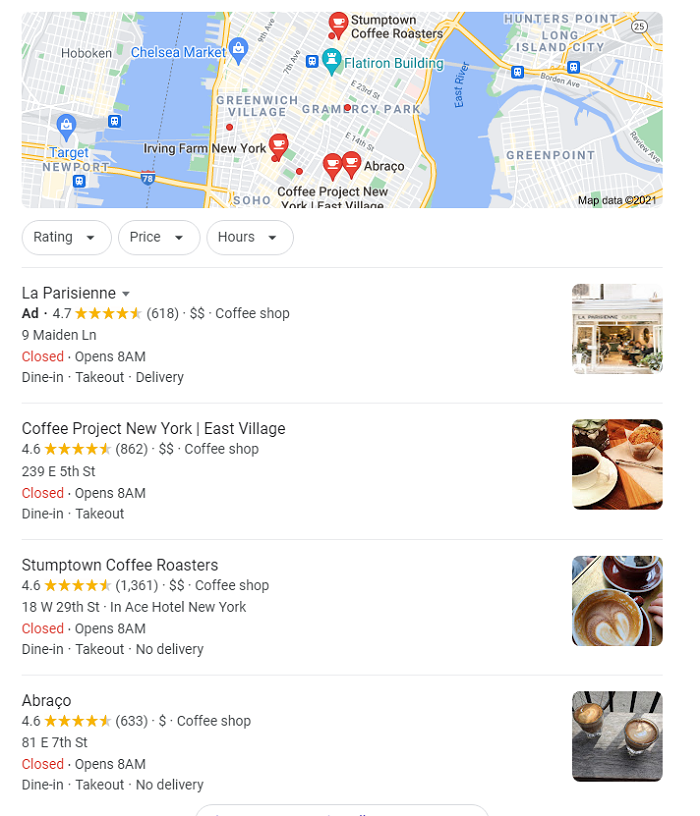
This can be as simple as “geotargeting,” where you change the ad copy to suit users from different regions. You see this in most search results.
For example, if you look up “coffee shops” from New York, you’ll see ads and search results for coffee shops in NY, even if the same brand has a franchise elsewhere.
The most interesting part? It doesn’t even have to be a huge brand. As long as the business has some web presence and works with geotargeted ads, it’ll show up for location-based searches.
Time-based marketing is similar, with the only difference being you’re now using time data to personalize your copy. Imagine getting an email greeting you with a Good Morning when it’s actually morning in your region. Feels good, doesn’t it?
This approach can also be useful to determine when ads will appear for users.
Say you want to market coffee products. It’s better to show these ads in the morning when users are considering buying coffee, rather than at night when they are more likely to avoid it.
Frequently Asked Questions About Marketing in a Cookieless Future
Here are some frequently asked questions about marketing without cookies.
Why is Google getting rid of third-party cookies?
Google’s plan to phase out third-party cookies comes as part of a comprehensive strategy to create a privacy sandbox so users can be tracked (for marketing purposes) while maintaining their privacy.
How will the end of third-party cookies impact marketing?
Most marketing teams were used to using third-party cookies for launching marketing campaigns. Losing access to those would mean you have to rethink your strategy, find better ways to collect information (first-party data) and personalize ad campaigns without relying on cookies.
What is the Google Privacy Sandbox?
Google has launched the Privacy Sandbox initiative to develop web standards that allow websites to access user information without compromising privacy. In essence, it facilitates online advertising without relying on third-party cookies.
What does cookieless marketing mean?
Cookies are bits of data that contain identifiers for consumers (personal and usage information), so cookieless marketing relies less on them in comparison to other marketing approaches. This involves using first-party data and personalization to increase the effectiveness of ad campaigns.
Cookieless Marketing Conclusion
Marketing without cookies may seem like a daunting task at first. However, it doesn’t have to be so hard.
Using the strategies and tips outlined above, you can improve your ad campaigns without relying on third-party cookies to find marketing success.
The best part is these methods give you more control and accuracy compared to cookie-based marketing, which has you sharing data with your competitors.
Which strategy will you try for marketing without cookies?
Source: feedproxy.google.com

How to Use Google Translate for Content Ideas
Content, content, content. At times, it seems it’s all marketers think about. Even so, you may eventually find yourself in a content desert, desperately searching for a well of fresh content ideas.
Disclosure: This content is reader-supported, which means if you click on some of our links that we may earn a commission.
You’ve exhausted every Google search, every whiteboard brainstorm.
However, there’s one strategy you may not have thought of.
Have you explored industry blogs in other languages with Google Translate? If not, it’s time to go international.
In this post, we break down the why and how of using Google Translate to generate content ideas.
4 Ways to Use Google Translate for Content Ideas
Google translate is an incredible resource, so it’s no wonder that in addition to having over 100 languages, we can look to the translating superpower for content ideas.

Below, we unpack the four best ways to generate new content ideas.
1. Check Out Top Blogs Around the World
Looking to broaden your content horizons?
Start by broadening your search horizons.
If you’ve exhausted industry content ideas in your native language, look beyond your linguistic borders to other voices in the industry.
By enabling Google Translate to translate websites, you can explore far beyond any language barriers that may exist and find troves of content to inspire you to create your own, similar asset in your language.
To begin searching for content in other languages, you must first select a different language through Chrome settings, either through the app or through your browser.
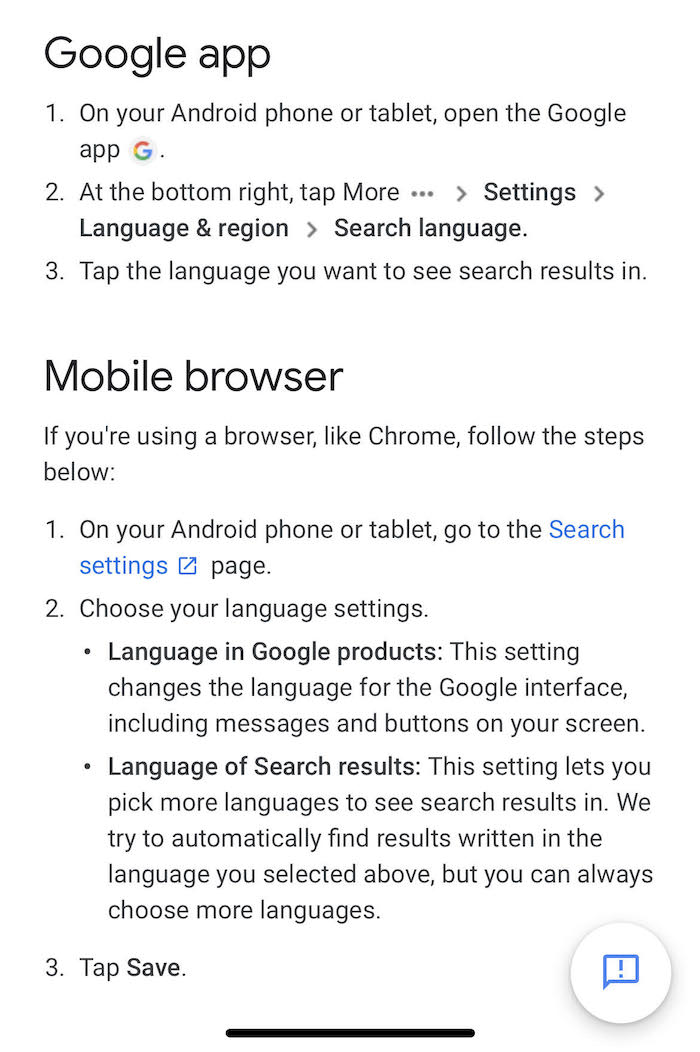
Now begin searching within your new language settings. When you encounter a page you want to be translated, simply:
- Open Google Chrome
- Navigate to the page you would like translated
- Click “Translate” at the top of the page
Et voilà! You have a fully translated page that you can borrow inspiration from for your next blog post, white paper, infographic, or graphic.
2. Explore Social Media Brand Accounts for Different Countries
Don’t stop your inspiration search at mere Googling: head to social accounts to find brands from different companies.
Let’s take Twitter, for example.
You can change the language settings for your app through the browser views by visiting Settings.
After you’ve changed to the language you’d like to search, explore what top brands in the space are sharing and saying.
For example, we changed our language to French and searched #digitalmarketing to see what was trending conversationally.
From there, we dug into French digital marketing corporations, exploring their social presence, websites, and blogs, all in search of content inspiration.
While we uncovered a number of topics and enviable content, we were particularly taken with this social post that shared stock images to use with a current, global event.

3. Find Globally Trending Topics
If we stay in the Twittersphere, trending topics tend to be in your country, if not in your locale.
To enable all globally trending topics from your browser, simply:
Select #Explore from the left-hand column of your homepage
From there, click the gear icon in the top right of the screen
The location window will open, displaying a box ticked that reads “Show content in this location
”Untick the box, displaying more options
Select the Explore option button to find all the locations where Twitter is available
Select your desired locations to see the trending topics
By exploring topics outside of your own worldview, you can find new areas of discussion and new niches in need of filling.
These hashtags can allow you to tailor your content to the larger conversation.
4. Dig Into Your Industry Internationally
While we’ve covered exploring by hashtag, you can also discover inspiring content through finding the top influencers or companies in your specific sphere.
A lot of aggregation sites provide a ranking for industry leaders in other countries.
When we searched for the best digital marketing agencies in Germany, we pared down a list of 20 to a list of 10.
From there, we navigated to their websites and explored their blogs.
By exploring what other digital marketers are creating globally, we can tap into trends larger than those before us, borrow content ideas and find inspiration across borders.
5 Tips for Using Google Translate to Generate Content Topics
While finding content that relates to your field is a feat in itself, you want to ensure the content you’ve found is truly relevant.
Below, we break down five tips to keep in mind as you explore international content waters.
1. Be Aware of Cultural/Linguistic Nuances
While looking for inspiration and ideas across continental divides is all well and good, if you use Google Translate, be aware of cultural and linguistic nuances that can change the meaning and interpretation of the text.
For example, colloquialisms hardly ever translate across linguistic divides.
In these cases, if you’re borrowing heavily from existing text, you must be sure to adjust the language to reflect terminology that makes sense for your reader.
Otherwise, your work will go to waste completely.
2. Be Cognizant of Being Offensive
Wading into a larger conversation always poses a risk for the unindoctrinated.
If you choose to use Google Translate to enter an ongoing discussion about an industry topic, be sure you’ve educated yourself on the nuances and realities of said topic.
Regardless of intent, there is always the possibility your entrance into the conversation may not be as productive as you had hoped.
In terms of borrowing from existing content, read the translation with an eye toward how it will be perceived by your future audience, reworking and removing anything that may not come across as intended.
3. Discover Content in Industry-Adjacent Niches
Perhaps you’ve gone through all of the search exercises noted above and still came up empty-handed.
To look even deeper into your topic, explore industry-adjacent niches that can help drive even more content ideas.
Let’s stay with our digital marketing example.
Rather than casting a net that wide, we can delve into email marketing, and from email marketing into email metrics, and from email metrics into strongest email calls to action (CTA).

By moving beyond the overarching umbrella of your industry, you can find more granular content that speaks to your market, providing you inspiration and guidance along the way.
4. Explore Content All Around the World
With 109 languages and counting, there’s no limit to content you can explore with Google Translate.
As you get accustomed to delving into different languages, go beyond your usual searches and seek out different points of view from different individuals.
With each search, you can find more and more content inspiration and involve yourself in the global, ongoing conversation about the largest trends, topics, and issues impacting your field.
5. Keep SEO in Mind
As a marketer, you’re well aware of the importance of search engine optimization (SEO) on your content, regardless of format.
When you use Google Translate to translate a content piece, you will have to reoptimize the piece for SEO to ensure that it meets your standards and drives searchability.
Be sure to include your respective keywords and adjust content as needed to reflect your goals throughout any piece that goes through Google Translate.
Frequently Asked Questions About Google Translate
Is translated content considered duplicate content?
In short, no. The translated content is not duplicate content.
With different words and phrases, nuances and colloquialisms, translated content is entirely different from its origin.
To learn more about this, watch this excerpt from Google’s John Mueller.

How do I get Google to automatically translate a page?
To get Google to translate for you, simply follow these three steps:
1. Open Google Chrome
2. Navigate to the page you would like translated
3. Click “Translate” at the top of the page
How can Google Translate help me find content ideas?
By harnessing Google’s translation powers, you can find inspiring content from all over the world to recreate for your own brand.
What’s more, you can join a larger conversation that is ongoing globally, widening your audience reach even further and establishing you as an international thought leader.
Is Google Translate accurate?
For everyday use, Google Translate is pretty accurate.
For the specific use of searching for content inspiration, Google Translate is very accurate.
With that said, be sure to read for linguistic nuance and appropriateness before sharing or replicating in total.
/cdn.vox-cdn.com/uploads/chorus_image/image/68934786/VRG_ILLO_1777_AK_science.0.0.jpg)
Google Translate Conclusion
As the demand for quality content continues to rise in every industry, it is vital marketers identify new sources to inspire and replicate content that hasn’t been duplicated by every brand in your industry.

By looking beyond the traditional bounds of your content-sphere, you can tap into conversations and ideas that can inspire similar content creation, while simultaneously inviting you into a global conversation about your industry.
As you explore more and more languages, be sure to keep nuance and perception in mind.
Don’t forget to continuously optimize any borrowed content for SEO so your version of the content can rank as high as possible.
What’s the best place you’ve found content inspiration?
Source: neilpatel.com

Why Is My Organic Traffic Down? Here Are 4 Things to Check
Before you rush to find a new agency to try and figure out what happened, here are 4 ways to diagnose a decline in organic traffic.
Do you see a negative trend in your Google Analytics account?
Are you wondering why your organic traffic is down?
Is this time to panic?
Not necessarily.
Before you rush to find a new agency to try and figure out what happened, here are 4 ways to diagnose a decline in organic traffic.
First Things First: Which Page is Declining in Traffic?
So you see some unfortunate trends on your overall Google Analytics reports.
How to tell what exactly is being affected?
For that:
- Login to your Google Analytics account and click Acquisition -> All Traffic -> Channels -> There select “Organic Search”
- Select the time range (if the trend is most recent, the 7-day time frame would work best)
- Check the box that reads “Compare” to and keep the “Previous period” option there intact
- Click to “Landing Page” and scroll through the results
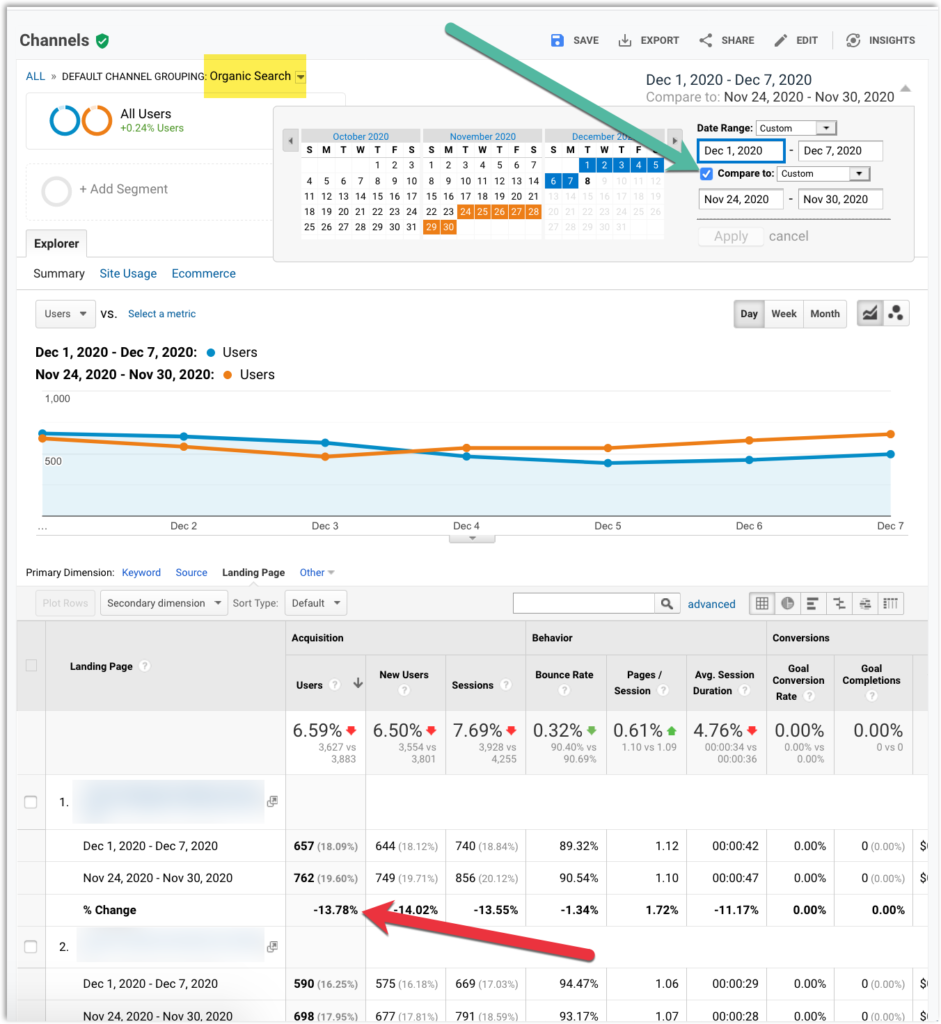
Now that you know which page needs your attention, go ahead and run some checks.
1. Check Which Search Queries Have Been Impacted
Google’s Search Console will be able to help you identify your most impacted search queries:
- Login to your Google Search Console account and proceed to the “Performance” report
- There, again, select the timeframe and choose to compare it to the previous period:
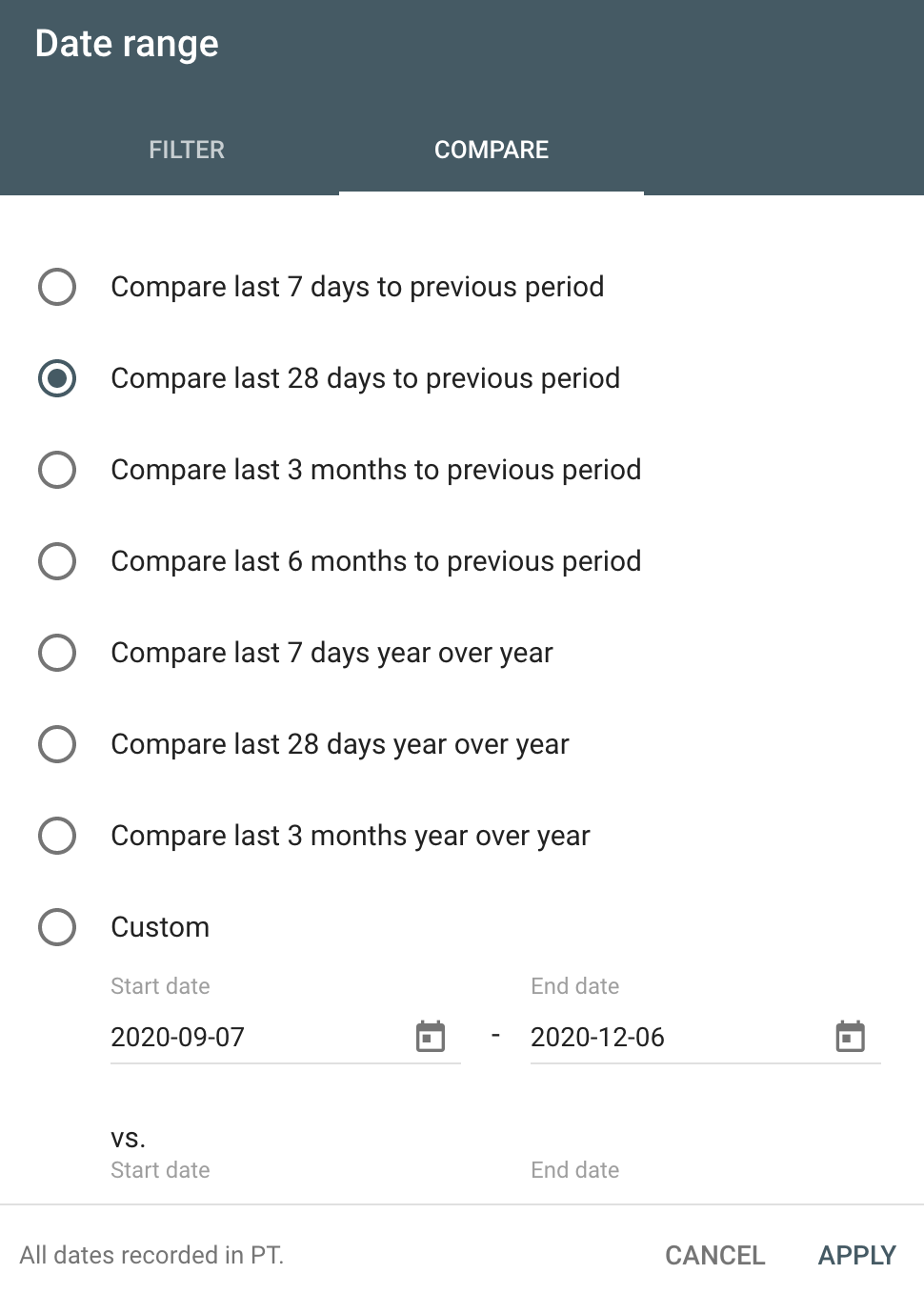
Next:
- Click the “Pages” tab and click the page you identified in step #1 above
- Go back to the “Queries” tab and sort by “Difference”
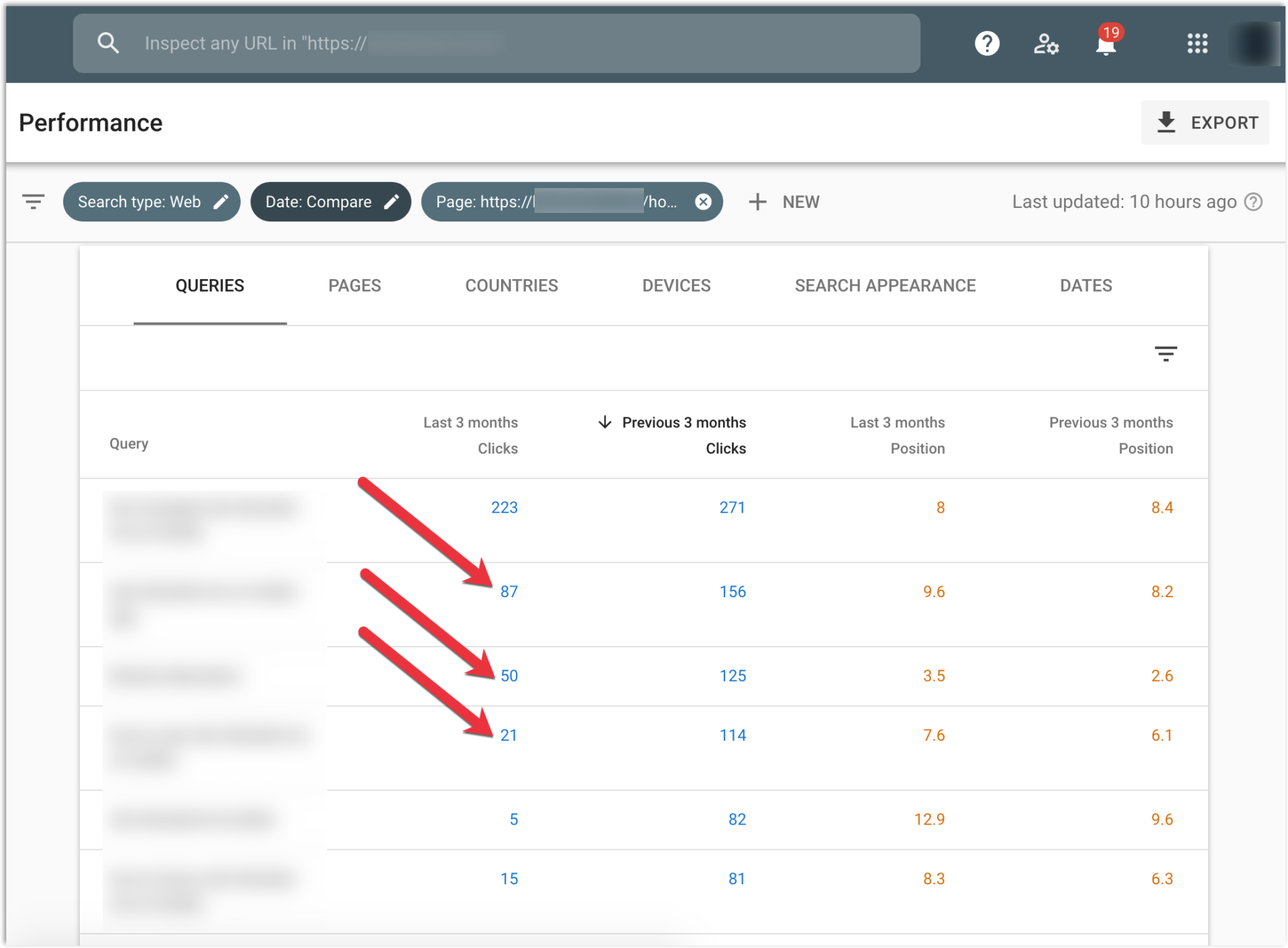
You only want to pay attention to your top 10 rankings, as nothing else was driving many clicks, so you can also sort results by the number of clicks the page was generating during the previous period.
This task would be much easier if you were tracking your most important search queries.
In that case, it would just take one click to your tracked #1 positions.
Site Checker does a good job saving your time here:
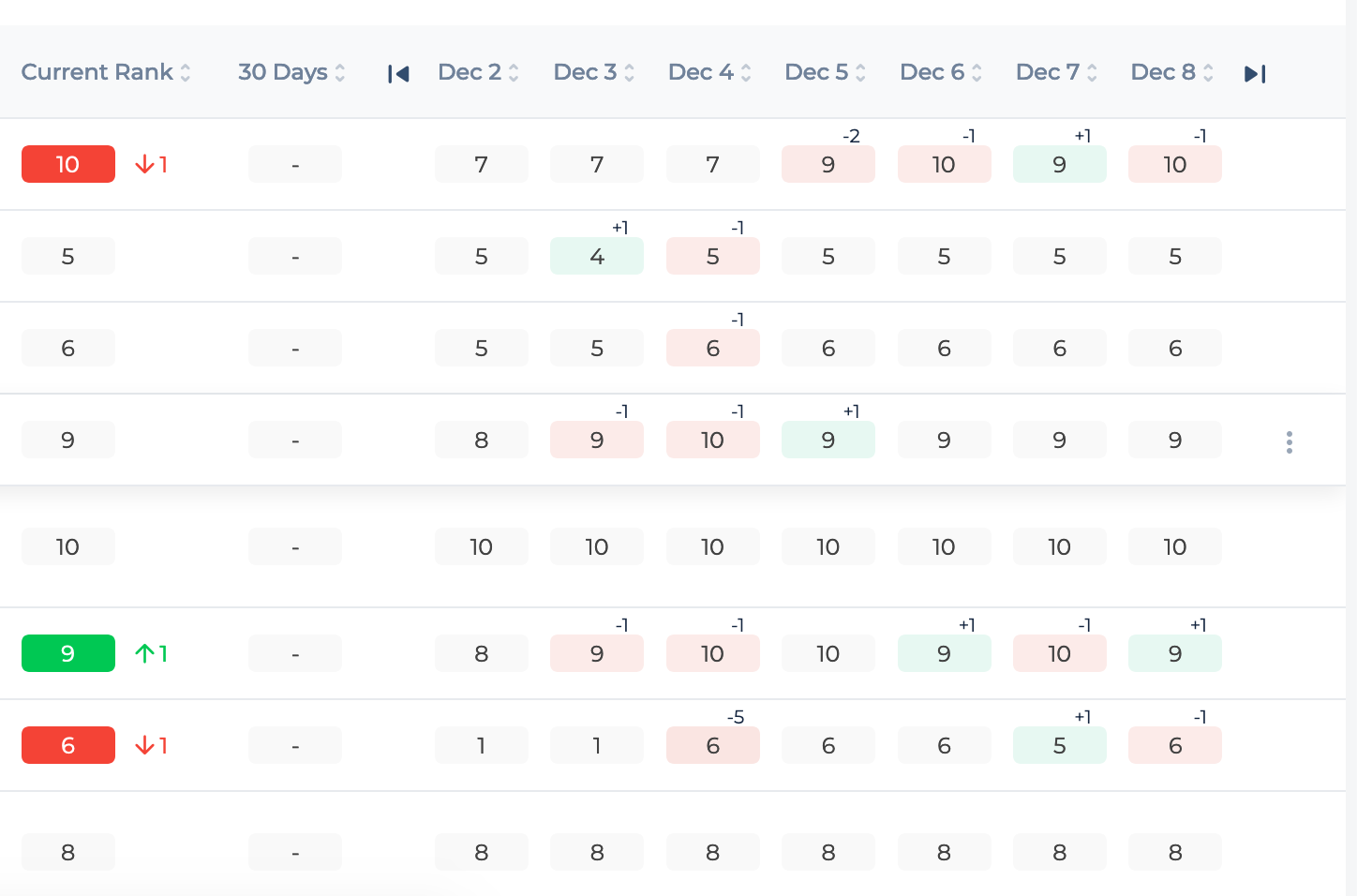
2. Check SERPs Changes
The good news is you are not alone.
There are at least 9 more pages ranking for that query as well as many other search features that may start stealing your clicks.
So next steps are:
Search for the identified query on Google.
Is there a new search element you didn’t see before?
Examples of click-stealing search elements include featured snippets, image, and video carousels, etc.
Don’t forget to search on both mobile and desktop devices.
Check the recent SERP movements.
Again, a solid rank monitoring solution should come with a comprehensive SERP monitoring feature.
Here’s one Site Checker is equipped with:
SpyFu comes with that feature as well, so if you were not tracking your keyword check if SpyFu has records for it:
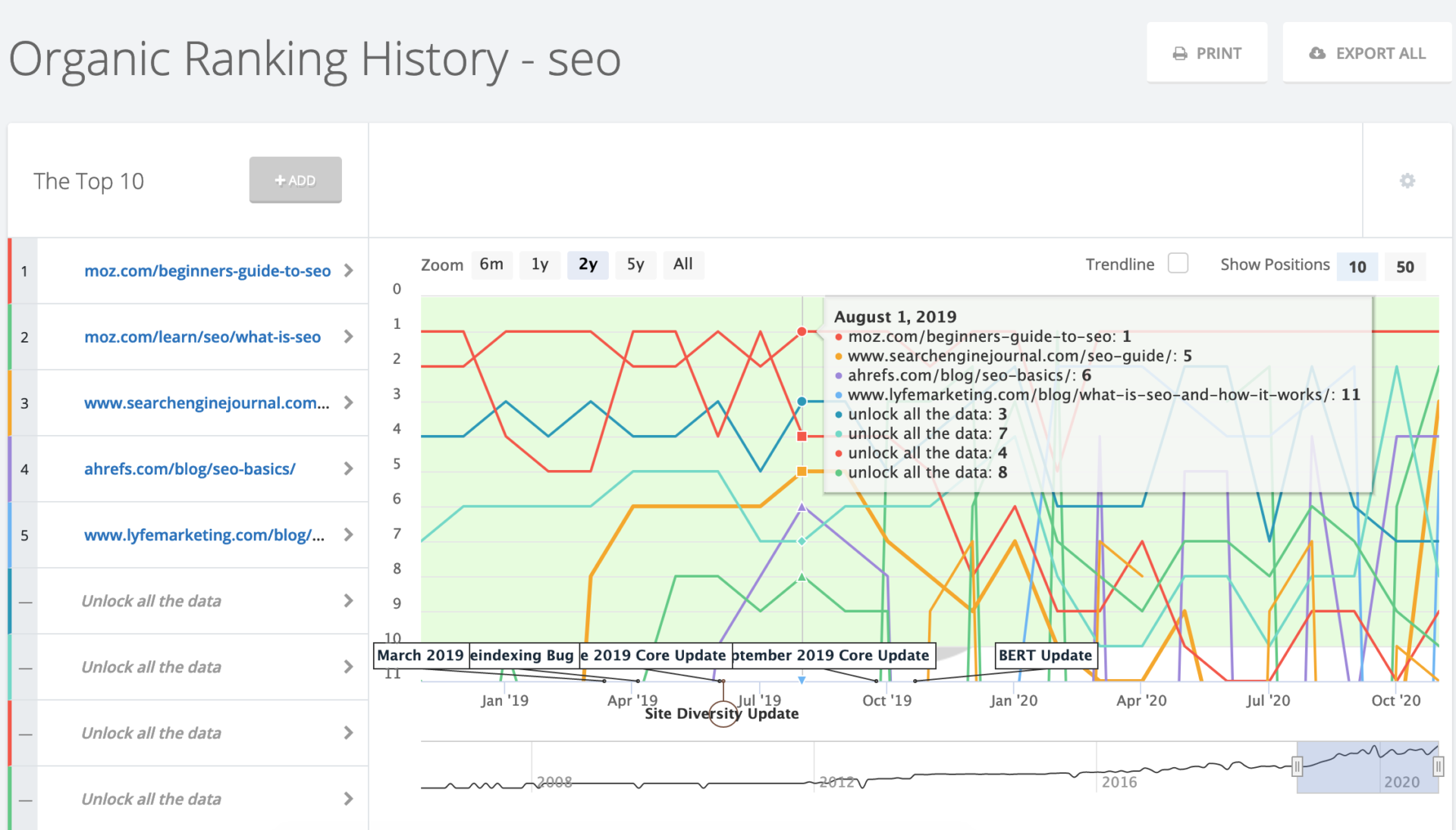
If you notice a competing page that is confidently moving up, check it out.
Is there link-building or content tactics that may be moving the needle?
3. Check If Anyone Else Is Experiencing Anything Similar
Are you alone in seeing some unusual organic traffic fluctuations?
A few quick resources to check here are:
Barry does an awesome job monitoring all the active discussions across SEO forums and on Twitter.
If there’s anything going on, you will definitely see him reporting here within hours.
Barry’s Twitter account @rustybrick is another source to watch as sometimes he shares stuff on Twitter that didn’t yet make it to his blog.
Knowing that there’s an update going on will help you understand whether it is anything that needs an immediate fix.
If there’s a global update going on, you will need to give it some time.
Things take time to stabilize, and there’s never anything urgent.
4. Audit Your Content
First things first: Is the information outdated?
In many cases, this is the first thing to look at.
Can it be expanded?
As Google is moving to seek better answers to more specific questions, it is always a good idea to edit your content to cover more related angles, questions, and concepts.
More importantly, is the page doing a good job satisfying a searcher’s intent?
Keyword intent optimization will boost both organic rankings and conversions, so it is a must when auditing content that is losing rankings.
Commercial (or purchasing) intent is something you need to look out for. Lior Krolewicz of Yael Consulting explains purchasing intent as:
a measurement of the likelihood that a given individual will be purchasing specific goods or services at some point in the future.
Optimizing for what your potential site user intends to do on that page is crucial.
To help you expand your copy as well as optimize for search intent, use Text Optimizer.
The tool uses semantic analysis to help you discover related concepts and entities to be covered in your content for it to do a better job to address a target query:
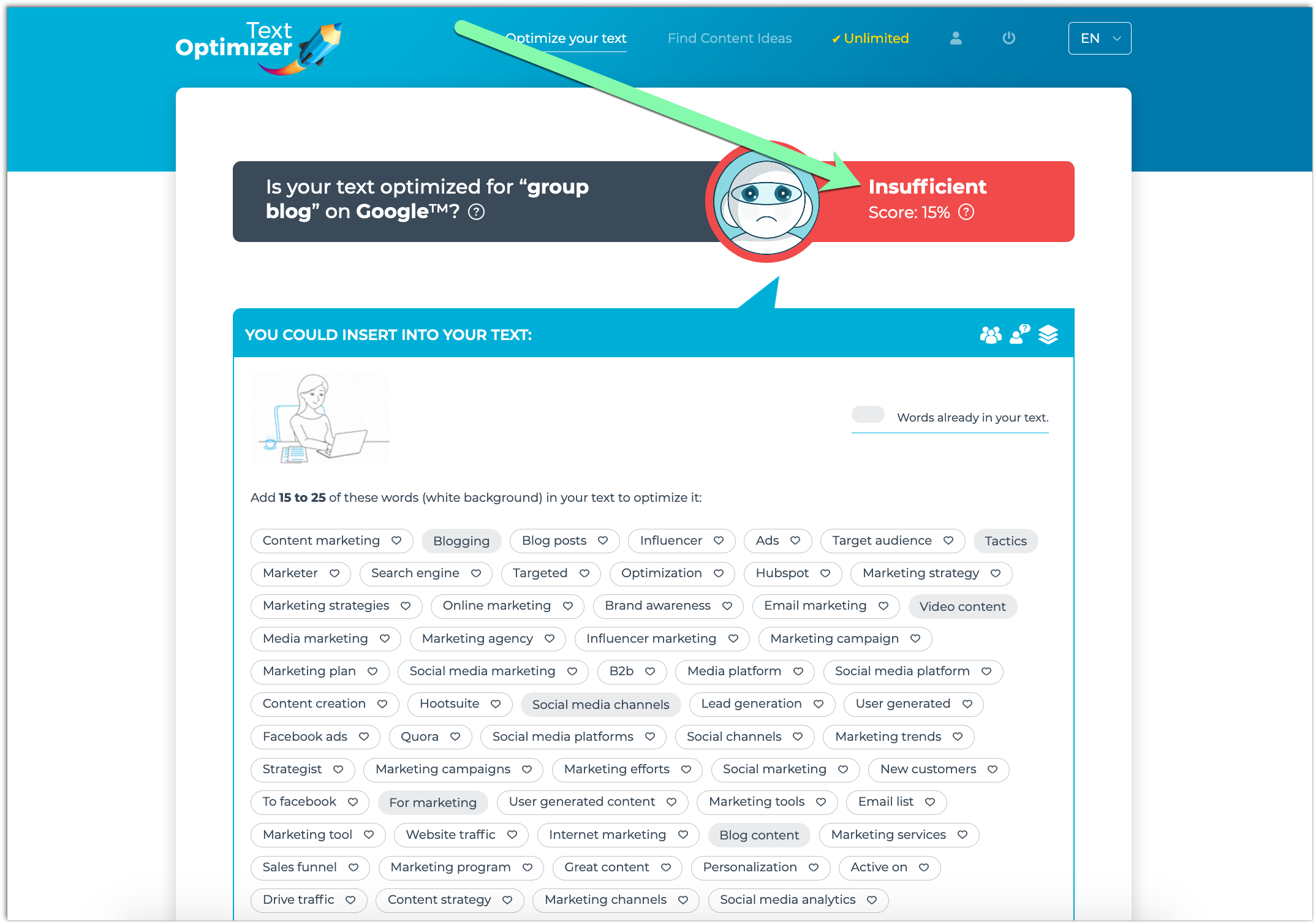
To start, run your current content through Text Optimizer and see your current score.
Aim for a score of 60 and higher for better results.
Also, make sure your grammar is always perfect.
There are a lot of tools that can help to see your errors, illogical constrictions and make your speech smooth.
Conclusion
Organic traffic fluctuations are normal and need to always be expected, so really the most important tip here is “Stay calm”.
Once you notice something going on, give it a couple of days and then look into that.
Auditing traffic declines can be done at home, so save yourself some time and money and look into that using the steps above.
The post Why Is My Organic Traffic Down? Here Are 4 Things to Check appeared first on Content Marketing Consulting and Social Media Strategy.
Source: convinceandconvert.com

10 Successful Google Advertising Ideas
Google Ads (previously known as Google AdWords) is an advertising platform for PPC ads. With the right strategy, you can drive qualified traffic, connect with your target customers, and drive sales.
 Coming up with Google advertising ideas is challenging. However, it’s well worth it to have a solid strategy.
With around 3.5 billion searches per day, Google gives you an incredible opportunity to get in front of the right audience. Of course, you first need to know what you’re doing.
If you’ve been looking for ways to get the most out of your Google ad campaigns, this article is just for you.
What Google Ads Are?
Before we get to strategy, let’s first understand what Google ads are.
Google Ads (previously known as Google AdWords) is an advertising platform for PPC ads. With the right strategy, you can drive qualified traffic, connect with your target customers, and drive sales.
One of the platform’s best aspects is that it allows you to stick within your ad budget by setting your ads to stay within a certain daily, weekly, or monthly cap. You can also pause or completely stop the ads at any time.
Sometimes in marketing, keeping a close eye on the budget can be a challenge. This flexibility allows you complete control over your budget.
If you’re not yet convinced about how effective the platform is, perhaps these numbers can give you more clarity:
- 58 percent of Millennials say they purchased a product because of an online or social media ad.
- 63 percent of users have clicked on a Google ad.
- 43 percent of users bought a product after going online and seeing the ad.
It’s clear that Google ads can do wonders for your business and your bottom line.
The only questions now are: With so many marketers using the platform, how do you stand out in this virtual crowd? How do you create the right Google ads that get you in front of the right audience at the right time?
Let’s find out!
Tips for Generating Google Advertising Ideas
There are a lot of components involved in generating and executing successful Google advertising campaigns.
Here are a couple of tips to set you on the right path:
Keyword Research
Keyword research is an essential element of your campaign. If you don’t get this part right, it will be challenging to achieve the results you’re looking for.
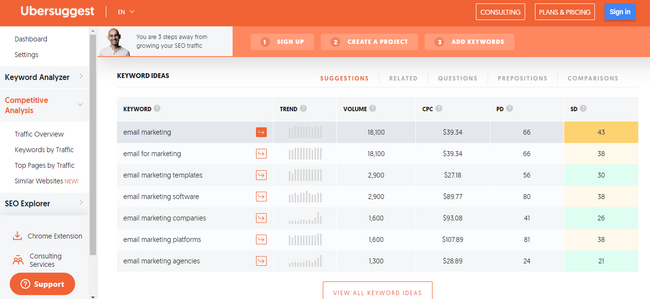
Below, we’ll talk more about keyword research for Google ads, but for now, it’s important to start generating some keyword ideas. To get started, you can use a tool like Ubersuggest.
It’s a free keyword research tool that allows you to generate keyword ideas and look at some of your competitors and the keywords they’re using.
Trend Forecasting
Predictions are an essential part of marketing. Before you start any campaign, it’s necessary to have some idea of what your success (or not) might look like.
Of course, the best way to predict this is with data.
Google Ads offers a keyword planner, which you can use to get forecasts for your chosen keywords.
This planner can provide you with essential information, such as the number of clicks your ad might get every day, the average cost for those clicks, the number of impressions, the click-through-rate (CTR), and more.
With this information, you can start building a solid Google advertising campaign.
Keyword research and trend forecasting are just a couple of essential steps to get started. Now, let’s get into the nitty-gritty, the strategies, and everything that can help make your campaign a success.
Top 10 Google Advertising Ideas
It’s time to get down to the good stuff: What are the Google advertising ideas that can help you reach your goals?
1. Write a Good Headline
John Caples once wrote: “If the headline is poor, the copy will not be read. And copy that is not read does not sell goods.”
There’s no denying the impact that a strong headline has on your audience. Of course, this is what convinces people to click on the ad!
Here are some basic pointers for writing strong headlines:
- Understand your audience. Who are you speaking to? Include your main keyword.
- Address a problem your audience is facing.
- Highlight the biggest benefit in the headline.
- Don’t overcomplicate things. Keep things simple.
- Don’t be afraid to add some humor.
Creating a headline can be one of the challenging parts of the campaign.
Sometimes, you just don’t know where or how to start. Consider following a strategy, like Melanie Duncan’s 4U formula, to create useful, urgent, unique, and ultra-specific headlines to help you get started.
2. Think About User Intent Before Diving into Google Advertising Ideas
When we research keywords, we tend to focus on the numbers. How much search volume does this keyword get per month? What’s the cost per click (CPC)? What about the paid difficulty?
While all these numbers are essential to consider, the most important element of a keyword strategy should be the user intent.
Why? Because user intent (sometimes referred to as “search intent”) gives you the “why” behind the keyword.
Why did your audience search for that particular keyword? Were they trying to purchase something, or were they just trying to get more information about it?
Understanding your audience’s intentions can help you discover which keywords are the best to target for higher ROI.
There are four different kinds of user intents:
- Informational: This is when a user wants more information about a topic. For instance, “How many calories in a donut?”
- Navigational: This is when a user wants to go to a particular web page. For instance, if you want to go to the Neil Patel blog, you type that into your Google search bar.
- Commercial: This is when a user wants to research a particular product or service. This user will likely make a purchase in the near future, but right now, they are at the research phase. For instance, “New iPhone specs” or “iPhone vs. Samsung.”
- Transactional: This is when a user wants to take action, like buy a product. For instance, “iPhone charger” or “cheapest flights from LA to Chicago.”
Understanding user intent will help you target the right keywords.
If someone is searching for how many calories are in a donut, they want content related to that. If your product is a calorie calculator, that’s great!
They’re likely to go to the calorie calculator because it helps them fulfill what they’re looking for at that time.
Paying attention to user intent can help you rank higher and attract more clicks because you’ll be giving your audience what they want.
3. Advertise Limited Offer Sales
Any offer with a ticking clock naturally encourages your audience to act faster and purchase the product or service. That’s why limited offer sales work so well.
In a nutshell, a limited offer sale is any deal, discount, or reward you offer to consumers who make a purchase during a certain period.
An excellent example of this is Black Friday Sales. Every year, Black Friday sales seem to hit a new record, with consumers spending more and more.
That’s because consumers know they’ll have to wait a long time before they can get the product at the discounted price again, so they’re encouraged to make the purchase quickly.
For your Google ad campaign, if you offer seasonal sales for any of your products, you can create ads around these sales and have them go live when your sale launches.
4. Track and Use Google Advertising Data for Iterating
One of the most important elements of any successful advertising campaign is your KPIs.
Depending on your ad goals, there are a lot of important metrics you can track, including:
- number of clicks
- CTR
- CPC
- conversion rate
Tracking your KPIs helps you know if you’re on track to meeting your goals or not.
For instance, if you see that you’re getting great clicks on your ads, but your CTR is on the lower side, it can mean your headline and keywords are getting you in front of your audience’s eyes.
However, something about the ad isn’t connecting.
It could be the copy. It could be the cost of the product or service.
Maybe the headline doesn’t connect with the offer in the actual ad.
Whatever the case, now’s the time to look into it and adjust what you need to.
5. Choose the Right Campaign Type for Your Google Ad
You can use one of five different types of Google ad campaigns for your Google advertising ideas.
Search Ad Campaigns
These ads appear at the top of the Search Engine Results Pages (SERPs).
For instance, if someone searches for “nursery furniture,” this is what the results look like:
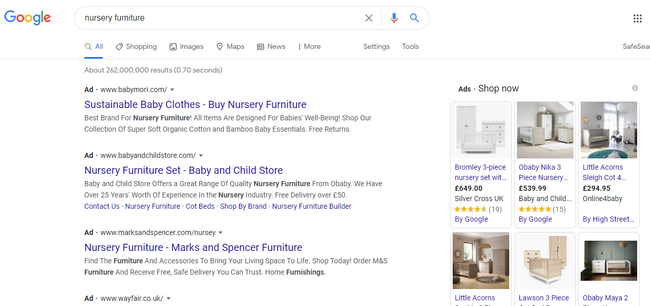
Creating search ads is great because of what we highlighted earlier:
The platform receives over 3.5 billion searches per day! This is the perfect place because many people (including your audience) are already searching for products you offer.
Video Ad Campaigns
Video ads show up before, after, and sometimes in between YouTube videos. Research has shown how effective video has become over the past few years.
Creating a video ad campaign, which is different from a text ad, might help you stand out and grab your market’s attention.
Display Ad Campaigns
Display ads are a way of attracting the market of a particular social media platform, website, or other digital channels to your product or service.
The best way to go about this is to find the website or brand that best connects with your audience.
Display ads are great because these are a win-win situation for both you and the owner of the site or digital platform.
The website owner gets an agreed-upon commission (usually based on clicks or impressions), and you have the opportunity to advertise in front of an audience that connects to your brand.
App Ad Campaigns
If you have an ad, perhaps Google app campaigns can be the right choice.
Here, you can advertise your mobile app through Google Play, Google Search Network, Google Display Network, YouTube, and many more channels.
For app campaigns, you can run ads that encourage your target market to install your app on their devices, or if there’s a new upgrade or version to the app, you can encourage them to take a particular action.
Shopping Ad Campaigns
Lastly, there are Google shopping ad campaigns. These ads include your product’s images and prices, and you can run them from Google Merchant Center.
You’ll input information about the product, and Google creates your ad from this information.
Shopping ads make sense if you’re trying to market a particular product but not necessarily your brand as a whole.
These are all examples of the different types of Google Ad campaigns.
As you can see, it’s essential to understand your product and your market. From this, you’ll be able to know which campaign best suits your needs.
6. Perfect Your Landing Page
You’ve done all the hard work of creating a great headline, finding the right keywords, and bidding for them.
While these steps may get you clicks, it’s what happens after your market has clicked that’s so important. As you know, they still need to buy into the product or service you’re selling.
Your landing page is essential because this is what your user sees as soon as they click on your ad. Ask yourself whether the landing page addresses your market’s pain points clearly.
Besides just addressing, does it also solve your audience’s challenges?
There are many elements to creating a perfect landing page, including using testimonials, the right images, and shorter forms, to name a few.
For some inspiration, here are some examples of great landing pages:
From the above examples, you’ll notice that the landing pages are all simple and clear, and the copy and graphics immediately grab your attention.
These are crucial elements of a successful landing page.
7. Make Your Google Ads Specific
Earlier, we mentioned the importance of understanding user intent when doing your keyword research because this helps you target the right keywords.
Now we want to highlight the importance of specificity. Your keywords shouldn’t be too broad as this might cause Google to place your ad in front of the wrong market.
Naturally, this would lead to fewer conversions.
For instance, “nursery furniture” may seem like a good keyword at first, but you can do better by getting more specific.
Aim for clarity and specificity in your keywords. Instead of just “nursery furniture,” how about:
- “nursery furniture for boys”
- “nursery furniture for girls”
- “nursery furniture in Florida”
It might take a while to get the right keywords, but that’s fine.
Remember to keep reviewing which keywords are getting the most clicks and which aren’t.
This can help you understand what you should focus on and what to add, remove, or tweak to get the high conversions you’re looking for.
8. Target Your Google Ads
When trying to get the right Google advertising ideas, remember there are three keyword match types: exact, phrase, and broad matches.
Exact Match
Compared to the other keyword match types, the exact match is extremely specific. Initially, if you used this match type, users could only see your ad if they typed in the same keyword phrase.
Since then, Google made a few changes so that even if your user doesn’t enter the exact keyword phrase, your ads might still match.
For this, the match might be with plurals, synonyms, or different variations of your chosen keyword.
Using the exact match type is great because users who type in your specific keyword are more likely to convert.
Phrase Match
Your ad appears for a phrase match if a user enters your key phrase in the exact order, but there can be other words before and after the phrase.
This leaves you with the possibility of increasing traffic.
However, if the key phrase is too broad, this could mean getting lots of clicks that don’t convert because the phrase wasn’t specific enough.
Broad Match
The broad match reaches more people because your ad appears when a user types in any word of your key phrase, in no particular order.
Like with phrase matches, you might get lots of traffic and clicks to your ads, but because it’s not specific enough, there may be fewer conversions.
As you can see, there are pros and cons to all three phrases.
To get the most out of your Google advertising campaign, use a combination of all three so that you get a lot of traffic and conversions.
9. Optimize Your Google Ads for Mobile
While creating your ads and coming up with creative Google advertising ideas, it’s important to keep in mind that many users are using their mobile devices for searches.
Research shows that 61 percent of US Google visits happen via mobile devices. Most people are using their phones for searches, and it makes sense to keep these users in mind.
Optimizing your ads for mobile includes:
- choosing responsive landing page designs
- compressing images
- making sure the loading speed is fast
These small details can make a huge impact on how your ads display in front of your audience and your overall conversion rate.
10. Make Your Google Ads Available in Other Languages
It depends on the nature of your business, but if you have an international audience or you’re in a multi-lingual area, consider making your ads available in different languages to cater to your audience that may not speak or understand English very well.
This may seem like a little detail, but don’t forget that language is powerful and helps us communicate and connect.
If you have a non-English speaking audience you’re trying to reach, help bridge the gap by making the Google ads available in their languages.
Conclusion
It takes a lot to generate great Google advertising ideas. While the process may be a lengthy one, it’s certainly worth it to see increased clicks and conversions.
The above tips can help get you on the right path, but don’t forget to A/B test your ads to see what your audience responds to.
Do you have any other Google advertising ideas you swear by?
The post 10 Successful Google Advertising Ideas appeared first on Neil Patel.
Source: feedproxy.google.com

10 Alternative RSS Readers if You Still Miss Google Reader
While RSS feeds aren’t the must-use resource they once were, there’s still a dedicated base of users who aren’t prepared to say goodbye.

The mid-aughts to early 2010s were the heyday for RSS feeds like Google Reader. It felt like everyone was using them.
Then, in 2013, Google Reader was switched off, and their popularity has dwindled.
Dwindled, but not vanished entirely. Google Trends data shows a massive dropoff since RSS hit its peak back around 2005. But interest has been pretty stable since about 2015:
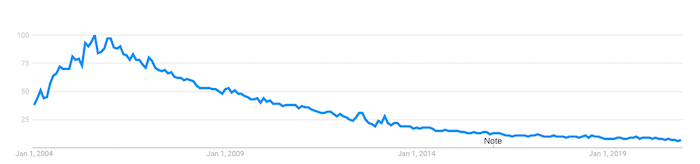
What does this tell us?
While RSS feeds aren’t the must-use resource they once were, there’s still a dedicated base of users who aren’t prepared to say goodbye.
If you’re one of them, you might still be searching for the perfect alternative to your beloved Google Reader. Here are a few options, as well as some practical tips on using them to improve your content marketing strategy.
What Was Google Reader?
Google Reader was an RSS reader. RSS, which stands for “really simple syndication,” is an XML-based format used to distribute and share online content. It allows users to subscribe to news feeds from their favorite website and receive updates every time they post new content.
Google launched Google Reader in 2005 and quickly built up a loyal following because it was simple, efficient, and free. But as online habits changed, usage declined, prompting the search giant to permanently retire Google Reader back in July 2013.
10 Alternative RSS Readers to Google Reader
While Google no longer saw the value in RSS readers, lots of people still find them useful. Presumably, if you’re reading this article, you’re one of them, so here are ten Google Reader alternatives to try out.
Feedly
Priced from: FreeBest for: Cutting through the noise
RSS readers can become victims of their own effectiveness. Say you want to curate all the latest news on a topic like a blockchain, or a keyword like Microsoft. Pretty soon, you’ll have more relevant content than you could ever read.
Feedly is all about providing a decluttered RSS experience. Its free tier allows you to follow up to 100 sources, from news sites to YouTube channels. But the real value comes from its AI assistant, Leo.
Leo allows users to define what content is most relevant to them. You can prioritize by keywords, trends, topics, similar articles, and even critical software vulnerabilities. Then teach Leo what’s useful to you by upvoting or downvoting its recommendations.
Inoreader
Priced from: FreeBest for: Saving the content you love long-term
Inoreader has one feature that sets it apart from all the other Google Reader alternatives: the ability to build long-term archives of content.
Most RSS readers only store content for a short period. But with Inoreader, limited-time archives aren’t a thing. The content you’ve already read is stored permanently, so you can access it at any time.
To stop things from getting unmanageable, Inoreader allows you to categorize your feeds into folders and add tags to individual articles.
Bloglovin’
Priced from: FreeBest for Lifestyle content curation
Unlike most Google Reader alternatives, Bloglovin’ focuses on a single niche: lifestyle content. That means everything from fashion and beauty, to travel and interior design. Its colorful, image-heavy interface feels more like a social media site than an RSS reader.
Similar to Pinterest, Bloglovin’ lets you curate content around the lifestyle topics and themes most helpful to you. So if you’re planning a wedding or a big DIY project, you can start a new collection and expand it with relevant content.
Flowreader
Priced from: FreeBest for Combining RSS and social feeds
Flowreader is an easy-to-use tool that acts as a one-stop-shop for content from all your favorite websites, plus your most-loved accounts on Twitter, YouTube, Reddit, and Pinterest. It saves you a lot of time navigating between multiple sites to access the content you most want to see.
Because it posts content in chronological order, Flowreader effectively lets you bypass Twitter’s recommendations algorithm, which means you can read tweets in the order they were posted.
Feedreader
Priced from: FreeBest for: Doing the basics
There’s nothing too complex about Feedreader; it just works. Basic and ad-free, this web-based RSS reader lets you subscribe to your favorite feeds and star items to view later. Your subscriptions can be categorized for easier navigation, while a bunch of keyboard shortcuts makes it simple to expand articles, mark items as starred, or refresh the results.
NewsBlur
Priced from: FreeBest for Filtering what you don’t like
It may not have the slickest interface, but NewsBlur is deceptively sophisticated. For one thing, it allows you to access the full text from each source right there in the RSS reader, which keeps your browser clean and uncluttered, while the free product tier lets you subscribe to up to 64 feeds.
NewsBlur’s most interesting feature is its filtering. Select a piece of content, then tell the app what you like or dislike about it, including:
Key phrases in the headline or body copyThe authorThe publicationThe categories that are relevant to that piece of content
Spend some time selecting your preferences and NewsBlur becomes a super helpful tool for accessing only the types of content you find most valuable.
Feedspot
Priced from: FreeBest for Advanced filtering
While it does all the things you’d expect a Google Reader alternative to do, Feedspot goes a step further with its advanced filtering functionality. This allows you to:
- Make searches within all the feeds you follow, including blogs, news sites, RSS feeds, YouTube channels and social sites
- Filter results from one or more specific feeds
- Search phrases within the title only
- Browse by exact phrase matches
All of which makes it easier to track down the content you most want to see, right now, from the sites and platforms that are most relevant to you.
The Old Reader
Priced from: FreeBest for: Finding recommendations from people you trust
The Old Reader works best when used in groups. Connect with your Facebook or Google account to follow people in your network who also use The Old Reader, then you’ll be able to see the content they recommend. That way, you’ll never miss a piece of content they find useful or interesting.
Feeder
Priced from: Free & Best for RSS on the go
Feeder offers Chrome, Firefox, Safari, and Yandex extensions, making it easy to view your RSS feeds on desktop. But perhaps its most useful feature is the dedicated Android and iOS apps, which allow you to see all the headlines from your favorite sites, plus a simple view of the full content, on mobile. Great for when you absolutely need to keep up with the news but aren’t at your computer.
Netvibes
Priced from: Free, Best for Social media monitoring
While Netvibes works great as a traditional RSS reader, its real strength lies in its ability to automate interactions between multiple platforms, apps, and devices. Think of it as like the Zapier of RSS readers.
So how does that work in practice?
Well, Netvibes currently integrates with 43 apps, including Gmail, Google Drive, LinkedIn, and Twitter. It also does a ton of stuff, from monitoring stocks to tracking your health. From a marketing perspective, the biggest “win” is as a social media monitoring tool.
Rather than presenting you with a feed of new social posts from people you follow, Netvibes allows you to dig deeper. For example, you can create a feed for @mentions of your brand on Twitter, or one dedicated to a certain hashtag.
That makes it easy for you to keep updated on what people are saying about you or follow topics relevant to your business.
How to Use RSS Readers to Benefit Your Content Marketing
Google Reader alternatives aren’t purely for finding content. They can be a vital part of your content marketing efforts, too.
Create Your Own RSS Feed
You’ve got a blog or resource hub, and you’re producing fantastic content. But you’re struggling to bring people back to your site.
Setting up your own RSS feed can be a big help. That way, subscribers will see all your latest content every time they access their favored RSS reader. It’s a great way to amplify your content, and best of all it’s completely passive. Once you’ve implemented your RSS feed, it’ll do all the hard work.
Be sure to compel readers to subscribe to your feed by incorporating clear calls-to-action (CTAs) throughout your content. Consider adding an RSS button to your content hub landing page, too:
Keep on Top of Industry News & Thought Leadership
Does your audience come to you for your take on the latest news impacting your industry? Then an RSS reader can ensure you’ll always be one of the first to know about any new developments and key announcements.
Let’s say you’re in the marketing niche. You want to keep up to date with what’s going on, so you can react to it fast by creating your own content. Consider adding the following types of accounts to your favorite Google Reader alternative:
The Twitter accounts of thought leaders like Rand Fishkin, Jeff Bullas, and Mari Smith (and me!)Marketing blogs and social feeds from big industry players like Google and FacebookIndustry news sites like NeilPatel.com, Search Engine Journal, and DigidayYour biggest competitors’ blogs (it pays to be aware of the content they’re creating, too)
Segment all of those feeds into categories so they’re easy to browse. Then get into the habit of spending five minutes at the start of every day, or on your lunch or coffee break, reading through all the latest news.
Curate Your Own Newsletter
Why do people subscribe to newsletters? Well, according to one study, about three-quarters of people subscribe to learn more about topics they find interesting, or to keep abreast of content from their favorite websites.
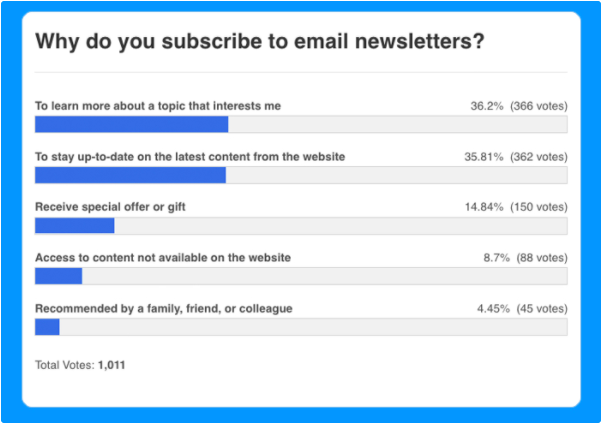
With that in mind, you can quickly and easily create your own newsletter featuring all the biggest developments in your industry, simply by curating all the top content pulled in by your RSS reader.
Include a couple of CTAs to sign up in prominent spots on your website, and you’ve got yourself a low-effort way to build up a mailing list and generate a bunch of leads.
Inspire Your Content Creation
Sure, I create a lot of content, but even I get writer’s block sometimes! If you’re struggling to come up with new topics for your blog, or podcast, or YouTube channel, your RSS reader can help.
Check out what other people in your niche are discussing. Look out for trends, breaking news, or subjects you feel passionately about and have an opinion on. And presto, there’s all the content inspiration you need.
Conclusion
RSS feeds may have gone out of fashion in the last few years, but that doesn’t mean they’re not worth your time. While everyone else gets their news from the cluttered, algorithm-influenced world of social media, you can use a Google Reader alternative to cut through all the noise and find the most relevant content.
That means you’ll never miss an important piece of news ever again. Use my tips to drive your content marketing plans, or even help you with lead generation. What’s not to like?
What’s your favorite Google Reader alternative and why?
The post 10 Alternative RSS Readers if You Still Miss Google Reader appeared first on Neil Patel.
Source: neilpatel.com

10 Alternatives to Google Hangouts on Air
Google Play Music, Google Glass, and now Google Hangouts on Air have been retired, which may come as a surprise to users who relied on these products. Google Hangouts on Air launched in 2012, with Google adding live-streaming and community elements to their already existing Hangouts platform.
Google has an impressive resume of highly impactful, successful products. For instance, products like Google Search and Google Docs are used by millions around the world daily.
But no business is perfect. Even the most inspired innovation can fail if the market just doesn’t get into it. That’s why, over the last few years, Google has started to cut their losses and kill products that never quite hit the mark.
Google Play Music, Google Glass, and now Google Hangouts on Air have been retired, which may come as a surprise to users who relied on these products.
Don’t worry, though—it’s not all bad news! While you may have lost your favorite live-streaming service, there are plenty of Google Hangouts on Air replacements.
What Was Google Hangouts on Air?
Google Hangouts on Air launched in 2012, with Google adding live-streaming and community elements to their already existing Hangouts platform.
At the time, it made perfect sense. Effective live-streaming services weren’t particularly well-designed, so Google had a massive window to establish themselves in this space.
Their plan worked for a while. Google managed to get President Obama and Pope Francis to live-stream on its platform. Combine this with a list of solid support features, and Google Hangouts on Air managed to attract quite a few users.
This usage didn’t last long, though, as the market began to flood with competitors. Eventually, YouTube Live began to pick up steam, and live video was a more natural extension to that platform. Over time, it became clear Hangouts on Air should be absorbed by YouTube Live.
The 10 Alternatives to Google Hangouts on Air
Here’s a list of ten Google Hangouts on Air replacements on the market. Whether you’re live-streaming a podcast, a Q&A, or your cooking channel, you may find the tools you need here.
1. Be.Live
Be.Live is a simple, reliable streaming tool. If you’re looking to expand your audience and reach, Be.Live lets you stream on sites like Facebook Live and YouTube Live.
You can sign up using your Facebook or Google accounts and quickly set up your stream in either space.
Beyond that, there’s a surprisingly deep level of customization in Be.Live’s presentation. When you start using Be.Live, you’ll be able to add your logo, custom frames, and branding colors to the stream.
If you want to go even further, you can add name tags and agendas to the lower third of the screen during your streams. You can even download your streams in HD once they’re over and upload them to Facebook, Twitter, and Instagram.
Whether you’re looking to stream on Facebook Live or YouTube Live, Be.Live could be a strong Google Hangouts on Air replacement. You can try their basic plan for free to test it out yourself.
2. Discord
Discord is often seen as a gaming-centric platform. While there are certainly plenty of gamers using this service, what makes Discord stand out is their emphasis on two things: community and transparency.
This is a live-streaming tool that works best if your community is already on Discord. This doesn’t mean it’s off-limits to you if your audience doesn’t already use it, but it may take some extra legwork to get people on board.
If your audience and products revolve around gaming, you want to try Discord. It lets streamers display the games they play and the activities they’re engaging in. This is a fantastic Google Hangouts on Air alternative if you’re looking for a way to engage with this demographic.
3. Zoom
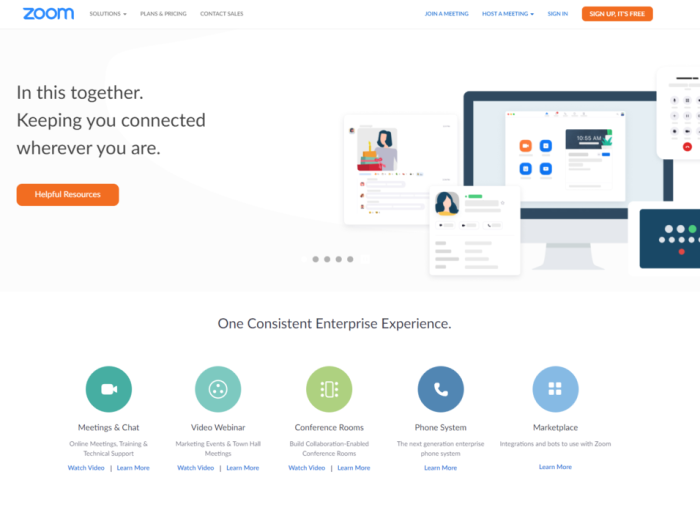
At this point, you’ve probably heard about Zoom. In fact, “zooming” seems to be the word used for video chatting, even if a different platform is being used! But there’s a good reason it’s on everyone’s mind: Zoom is a robust live-streaming product.
One of the most compelling points of replacing Google Hangouts on Air with Zoom Live is that many communities are already familiar with Zoom. Millions of people are using Zoom daily, whether for work, school, or catching up with old friends.
Getting users to adopt an entirely new service or tool can be challenging, no matter how loyal your community is. Zoom’s level of familiarity may make it easier to retain your audience while you transition from Google Hangouts on Air.
Zoom offers a variety of features like virtual hand raising and polling to keep your community engaged. The fact that they let you stream your webinars and meetings to multiple platforms simultaneously is just the icing on the cake.
4. Streamyard
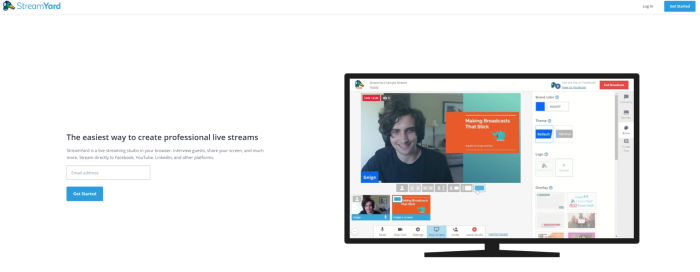
Streamyard is built around a simple idea: create an experience for live streamers that’s easy to learn and use.
This platform doesn’t ask you to download anything; it runs in your browser. If you already have a following on LinkedIn, Facebook, or YouTube, you can live-stream to all of them using Streamyard.
Streamyard recognizes complexity makes it difficult for streamers to connect with their communities. If you’re looking for a Google Hangouts on Air replacement that removes technical barriers and limitations, this is a tool you’ll want to try.
With useful features like audience comments popping up on screen and call to action buttons in your streams, Streamyard simplifies your live-streaming process so you can focus on what matters most: your audience.
5. Talky.io
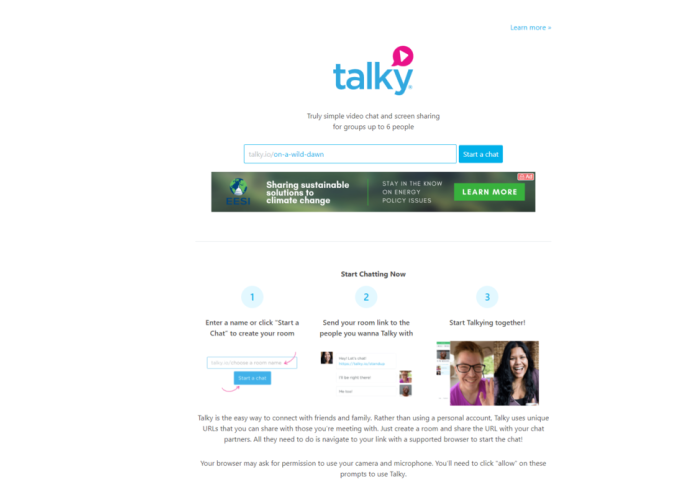
In the hunt for your Google Hangouts on Air alternative, you’re going to find lots of products that promise to offer more. Many alternatives promise more features and integration.
But Talky.io doesn’t take that approach. Instead, Talky addresses a smaller niche, focusing on providing a simple video chat tool designed for groups of up to 6 people.
What Talky lacks in features, it makes up for with its simplicity and ease of use. Using Talky is as simple as starting a chat and sending your room link to the people you need to chat with.
In a sea of feature-heavy tools, Talky might seem underwhelming at first. But if you’re looking for a Google Hangouts on Air replacement anyone should be able to use, this may be a fantastic option.
6. OBS Studio
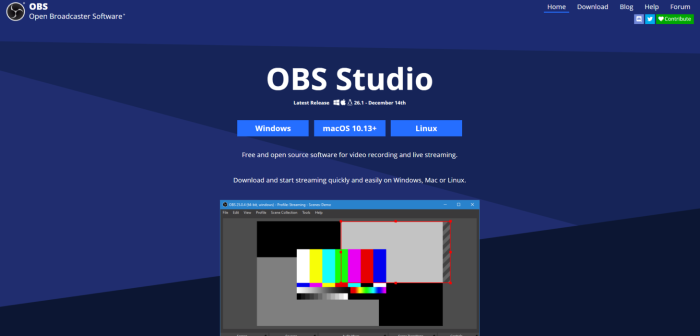
For a lot of streamers, this is the gold standard of live-streaming tools. What makes OBS Studio so noteworthy? Simple: the customization.
Aside from being a free, open-source software you can download and start using instantly, it’s sponsored by some of the biggest names in live-streaming. Facebook, YouTube, and Twitch have all supported OBS Studio. It’s safe to say if you have a favorite streamer, they’re likely using this.
Who is OBS Studio for? Well, it’s technically for everyone looking to start live-streaming. This depth makes it such a powerful tool, but it can also present some issues.
Think of it this way: OBS Studio is like Photoshop, with most other alternatives being more like Canva. OBS Studio is often a great tool for veterans of the live-streaming world and those not afraid to get their hands dirty.
7. Twitch
Speaking of noteworthy live-streaming tools, we can’t ignore the current king of the live-streaming world: Twitch.
The company that put Mixer out of business, there’s no denying Twitch is one of the most popular live-streaming tools on the market. And while many think Twitch is a platform primarily about gaming, that’s not the case.
Businesses regularly promote their products on Twitch with marathons of shows. Art and philosophy streams have also started to take the spotlight, with a heavy emphasis on community engagement.
While it can be challenging to establish a presence on the site, success on Twitch may mean a massive increase in your community size and quality. It’s worth looking into if you’re looking for a Google Hangouts on Air replacement.
8. Spreaker
Spreaker does one thing, and they do it exceptionally well: it supports podcasts.
Whether you’re looking to host, create, distribute, or even monetize your podcast, Spreaker has something for you.
The reason Spreaker made the Google Hangouts on Air alternative list is simple: there aren’t enough tools dedicated to podcast live-streamers. What really makes Spreaker stand out is they go above and beyond for podcasters.
With Spreaker, you can publish your podcast quickly and easily using their Content Management System. From there, you can distribute your podcast across major podcast platforms.
Spreaker handles monetization, too, letting streamers auto-insert ads at any point in their podcasts.
If you’re serious about podcasting, Spreaker is a tool you should consider.
9. YouTube Live
If you’re wondering which of these tools Google wants you to use, it’s probably YouTube Live. Initially, Google tried to merge Google Hangouts on Air with YouTube Live, but the transition didn’t go incredibly well.
Still, there’s an appeal to using YouTube Live. Aside from the rich infrastructure YouTube and Google offer—plenty of features and a robust support system—live streaming on YouTube is made simpler by one thing: the platform understands user expectations.
When users are on YouTube, they already expect to consume content. This means when you create live content for them to engage with, it’s probably an easy transition for them to make.
Likewise, if you love the Google Hangouts on Air ecosystem, you’ll probably feel right at home in the relatively similar YouTube Live ecosystem.
10. Facebook Live
As far as innovation goes, Facebook Live doesn’t offer much that YouTube Live and Twitch don’t. That said, Facebook Live does have one ace up their sleeve: when you stream on this platform, you have access to billions of people.
We can argue about how impactful social media sites like Facebook have been in popular culture, but one thing is for sure: everyone and their grandmother is on Facebook. This means if you want access to a massive audience, being on Facebook may be a good idea.
Their live streaming tools aren’t as robust as others on this list, and the tools aren’t tailored to a particular industry or genre. But, Facebook has a reach that’s second to none.
Conclusion
Seeing your favorite live streaming platform vanish is frustrating. But there’s no reason to worry about the future of your content. As long as you’re willing to explore and adapt, you’re sure to find the right tool for your brand.
Gaming, cooking, and art streams have great community-focused tools like Twitch, Discord, and Talky.
Streamers looking for massive audiences and reach can use Facebook Live and YouTube Live.
Whatever you’re looking for, you may find the right Google Hangouts on Air replacement right here.
What alternative to Google Hangouts on Air is your favorite?
The post 10 Alternatives to Google Hangouts on Air appeared first on Neil Patel.
Source: feedproxy.google.com