
Tag Archives for " Google Analytics "

An In-Depth Guide to Google Analytics 4
When it comes to website analytics, Google Analytics is second to none.
With the rollout of the latest release, Google Analytics 4 (GA4), the same can now be said of applications analytics, too.
Google Analytics 4 was designed to be the latest generation of web analytics platforms—providing a base for marketers around the world to effectively analyze important customer usage metrics.
New report functions, enhanced features, and predictive insights make it an essential addition to any current Google Analytics setup.
What Is Google Analytics 4?
Google Analytics 4 (formerly known as App+Web), is a new property available on Google Analytics. It replaces the former property type “Universal Analytics.”
The latest generation of Google Analytics sells itself as focused on customer privacy. This comes in the face of some of the latest privacy laws, such as GDPR and CCPA. With privacy-first tracking, cross-channel data measurement, and AI-driven predictive analytics, GA4 is certainly an advanced property that many websites and apps will benefit from.
Google Analytics 4 Vs. Google Analytics (Universal Analytics)
The most obvious difference between Google Analytics 4 and Universal Analytics is that GA4 is a property that enables you to report on websites and applications. Universal Analytics only supports website analytics.
The measurement model itself is also different between the two.
Google Analytics 4 uses a new model that measures events and parameters. Universal Analytics uses a model based on sessions and pageviews.
That’s not all, however. GA4 has an array of new metrics.
These include engagement metrics such as:
- engaged sessions
- engagement rate
- engagement time
What Are the Benefits of Google Analytics 4?
Google Analytics 4 offers numerous benefits to users. Here are a few that stand out against the older generation of the property.
Cross-Platform Tracking
What happens when users are active on more than one platform? With the old Google Analytics, it was a manual process that took time and effort.
The new Google Analytics 4 tracks both web and app data in one property (hence the beta name of Google Analytics App+Web).
Cross-platform tracking enables you to see the complete customer journey, including acquisition, engagement, monetization, and retention.
You can use GA4 to track the user experience from start to finish—and from platform to platform.
This is done through unique user IDs assigned during app or website login.
With the appropriate gtag.js script, the user ID for each logged-in session will be sent from either the website or the application to Google Analytics. The ID will be reported to the GA4 property and any user metrics will be logged.
When the user logs in again on an alternative platform, the reports will connect the user’s data to their unique ID and pick up where it left off.
This is incredibly useful information for any marketer, as it allows you to better understand the cross-platform experience of your users. The data can also be used to extrapolate information for a generalized demographic and build more accurate customer models.
All Measurements Are Events
With Universal Analytics, page views were the most important metric. This, and other hit metrics such as screen time, events, and transactions, were tracked extensively. The problem is that this gives a myopic view of customer interactions.
With Google Analytics 4, all measurements are events. What does this mean for you?

Instead of measuring at just the session level, GA4 collects and stores all user interactions as separate events. You can still view session-level reporting, but the ability to break it down by interaction means more in-depth reports and insights.
Instead of seeing generalized data, you can now gain a fuller understanding of your individual users when it suits your needs.
AI Insights for Predictive Metrics
While looking at past behaviors is helpful in understanding your audience, it doesn’t enable you to always make proactive decisions. With GA4’s powered predictive metrics, you can make data-driven decisions on a large scale.

What does this look like? For most businesses, predictive analytics can significantly impact retargeting campaigns. The metrics included in GA4 as of this writing are:
- purchase probability
- churn probability
- revenue prediction
With the above metrics, you can create audiences based on their predicted behaviors. For example, users who are likely to purchase in the next 7 days or users that are likely to spend more than $500 in one shop.
These audiences can then be targeted using active Google Ads campaigns or even on social media.
These metrics cannot only help to improve retargeting campaign success, but also improve website performance. You can create custom funnels for different audiences based on their behaviors and needs. The suggestions will continue to improve as more data is collected.
More Control
The greater the control you have over the data, the more you can do with it. While the Universal Analytics property has no shortage of data, it does have a lack of user control. You can create custom reports to a certain extent, but in many cases the customization possibilities are limited.
Google Analytics 4 offers more flexibility than the old Google Analytics. With GA4, you can create your own dashboard, enabling you to see the reports that matter most to your business.
It even works well in conjunction with Google Data Studio so you can create custom visualizations of the data collected.

Even more than greater control over specific reporting, GA4 offers expanded segmentation capabilities.
With GA4, you can create segments based on events which are essentially a subset of events that occurred on your website or application. This enables you to more accurately track customer interactions.
For example, you can create segments on all conversion events that occurred in a particular location. These capabilities make it possible to take a more granular view of your users and their behaviors.
Should I Make the Switch to Google Analytics 4?
While the switch to Google Analytics 4 may seem overwhelming, it’s important to start gathering data for future use as soon as possible. The thing to remember is that Google Analytics 4 can only collect data from the date it is set up and enabled. It cannot collect historical data prior to that time.
There has been no word from Google whether Universal Analytics will become obsolete in the future. However, it’s best to get used to the new property while you still have the time. The good news is you can have both a Universal Analytics property and a Google Analytics 4 property for your account.
They will run side-by-side collecting data so you can begin to accustom yourself to the new property without losing your current reporting capabilities.
How to Set Up Google Analytics 4
Since Google Analytics 4 can be used for your website or application (or both), there are two separate setup processes. They are outlined below.
Alongside an Existing Property
If you currently have a Universal Analytics property for your website, then the setup of a Google Analytics 4 property can be completed with the GA4 Setup Assistant.
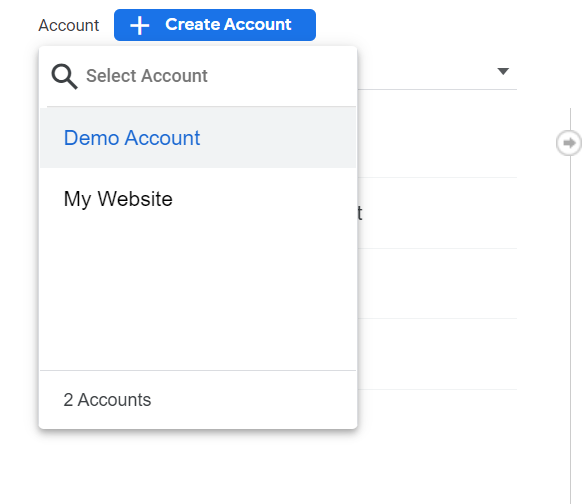
In Google Analytics, click “Admin” on the lower left of the screen.
In the Account column, select the desired account:
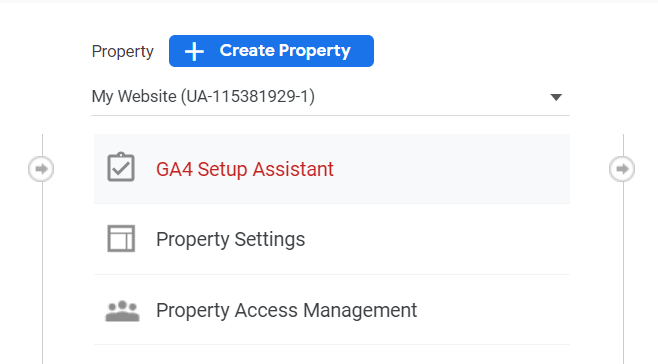
In the Property column, select the Universal Analytics property that currently collects data for your website:
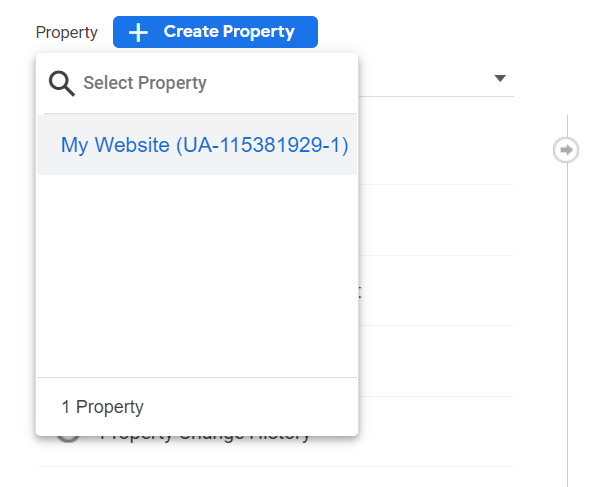
In the Property column, select GA4 Setup Assistant:
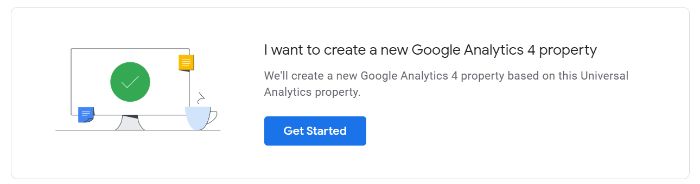
Click “Get started” under “I want to create a new Google Analytics 4 property:”
If your site uses the gtag.js tag, you can select “Enable data collection using your existing tags.”Click “Create Property.”
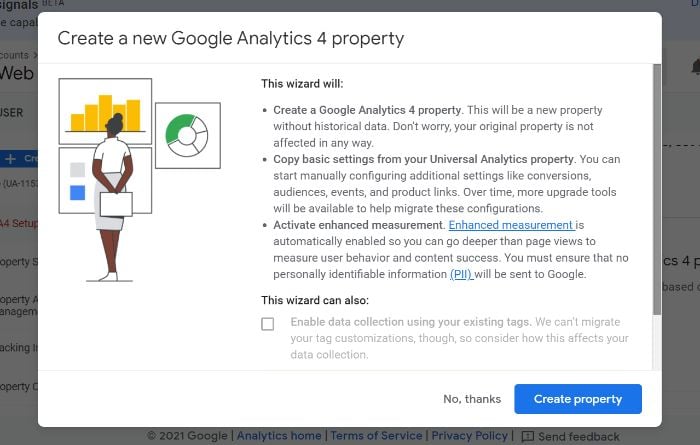
If you are unable to “Enable data collection using your existing tags,” it’s for one of three reasons:
- Your website builder/CMS doesn’t yet support the gtag.js tag.
- You use Google Tag Manager.
- Your website is tagged with analytics.js.
In all three cases, you’ll need to add the tag yourself.
Google Analytics for Firebase
To upgrade your Firebase account to Google Analytics 4, follow these steps:
- Log in to the Firebase console.
- Go to Analytics > Dashboard on the left panel.
- Click “Begin upgrade” in the banner at the top of the page.
- Follow the on-screen instructions to complete the upgrade.
Once upgraded, you can find app analytics in both the Firebase console and Google Analytics.
Frequently Asked Questions About Google Analytics 4
What is Google Analytics 4?
Google Analytics 4 is a new analytics property offered by Google. It enables users to analyze data from websites, apps, or both websites and apps.
What is the difference between Google Analytics 4 and the old GA?
The main difference between Google Analytics 4 and the old GA is in what the two different property types track. Google Analytics 4 can track the analytics of both websites and applications, while the old GA can track only website analytics.
Is Google Analytics 4 free?
Similar to Universal Analytics, Google Analytics 4 is a free property type. There are no costs associated with using one (or more) GA4 properties on your account.
Are they getting rid of the old Google Analytics?
As of this writing, the “old” Google Analytics (Universal Analytics) is still available. This is unlikely to change in the near future. However, Google will likely discontinue Universal Analytics sometime in the future so as to focus on the continued development of GA4.
An In-Depth Guide to Google Analytics 4: Conclusion
When used to its fullest potential, Google Analytics is a powerful analytics tool that can provide invaluable insights. This is why it’s important to upgrade your account when possible. The latest upgrade available to users is the new property, Google Analytics 4.
There are numerous benefits to GA4, including cross-platform tracking, more control over data, and AI-driven insights. When you create a new GA4 property, it works alongside your current Universal Analytics property while also allowing you to gain additional data for future use.
While UA is available indefinitely, the transition to GA4 isn’t mandatory but it’s highly recommended.
Fortunately, setting up a GA4 property on your website or app is easy. The steps as outlined above should take you less than 10 minutes to complete so there’s no excuse to put off the transition.
Which of Google Analytics 4’s features are you most excited about?
Source: neilpatel.com

Analytics Consulting
Most companies think their data is clean; that they’re making good decisions with the data they have. Most of these companies are wrong; they just don’t know it yet. This is why companies need analytics consulting. They don’t know what they don’t know.
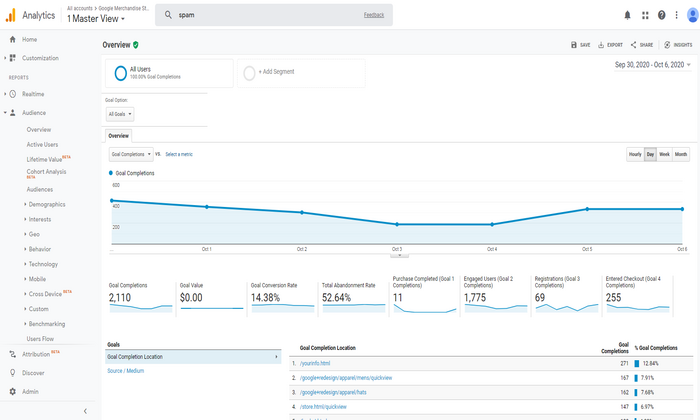
Your analytics should tell you everything.
Tools like Google Analytics are incredibly valuable for businesses. Once you’re setup, you’ll have everything you need to analyze your performance data properly. Instead, many companies have realized that their analytics tools have introduced a lot of unexpected problems.
They’re not getting the kind of value they need.
That’s good news. Most companies think their data is clean; that they’re making good decisions with the data they have. Most of these companies are wrong; they just don’t know it yet. This is why companies need analytics consulting. They don’t know what they don’t know.
Today, I’ll show you how to find the right analytics consultant for your business.
4 Ways an Analytics Consultant Can Help Grow Your Business
Many companies make the wrong assumptions. Using a tool like Google Analytics, clients think all they have to do is drop the tracking code into their web pages, log into their account, and begin analyzing their data. It sounds easy, but it often isn’t.
There’s more to it than that.
This is why you need an analytics consultant. With the right consultant, you’ll have the education you need to grow your business. You’ll be able to pull insights out of your data using a variety of methods. Each of these strategies is important because they have a cumulative effect on your business.
Here are four ways analytics consulting can help you grow your business.
1. Exclude spam traffic via bots, scrapers, and spiders
How much of your traffic comes from real visitors? How much of it comes from bots, scrapers, and spiders? According to Imperva, almost half of all internet traffic is non-human. In 2014, Google introduced an obscure setting that enables you to filter out bots and spiders listed in IAB’s Interactional Spiders and Bots list.
This low-key setting is buried in Google Analytics, but it’s incredibly important; many small businesses still aren’t aware of this setting.
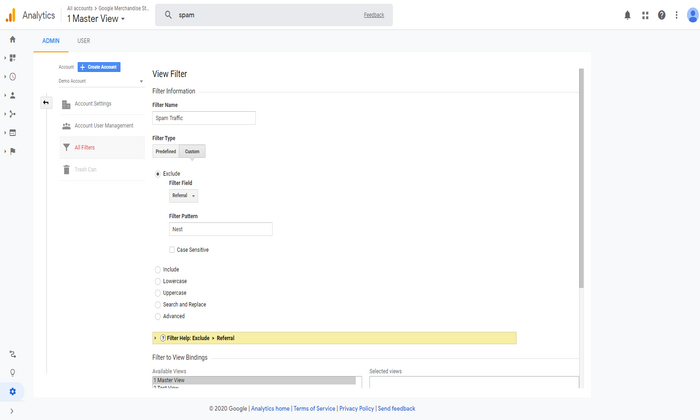
You’ll also need help to filter out referral spam.
Referral spam is basically fake website hits; these bots, scrapers, and spiders land on your site. Site owners send their spam to your site. They hope you’ll see these referrals in your Google Analytics account, clickthrough, and visit their site.
This junk traffic poisons your data.
It gives you false readings based on inaccurate data. Your site may be more or less profitable, depending on your visits-to-spam ratio on your site. This isn’t something many businesses watch for in their analytics reports.
A good analytics consultant will consistently filter the variations of spam traffic (e.g., direct spam traffic, referral spam traffic, etc.) out of your reports, so you get a clear picture of your marketing performance.
2. Help you analyze your data properly
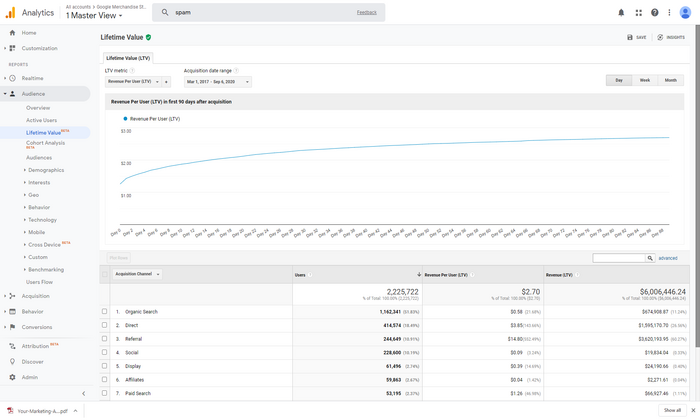
A lot of companies don’t know how to analyze their data properly. According to Forrester, between 60 and 73 percent of a company’s analytics data goes unused. Companies collect lots of data on customer activity, but they aren’t using it, why?
There are lots of reasons.
- Companies don’t know what they have Companies aren’t aware of the value of their data
- They don’t know how to evaluate or analyze their data
- Their data isn’t available to those who can use it There’s too much data to go through and not enough time to use it
Think about it.
Right now, your company has valuable data about your customers. This is data you can use to attract more customers, lower expenses, grow faster, jump ahead of competitors, etc.
If you’re unaware of the data, you can’t use it.
A good analytics consultant will help you analyze your data properly, showing you what you have and how you can use it to grow your business.
3. Identify the list of problems you’re trying to fix
Your data isn’t as valuable without context.
If you know the problem you’re trying to solve, you have a pretty good idea of the answers you’re looking for in your data.
That’s the problem though.
A lot of companies treat their analytics tools as a technology issue. They focus their attention on the obvious issues like hardware or software. They rarely treat their analytics as a question and answer tool. That’s exactly what it is, though.
Target had the right idea when they started their analysis with a problem/question.
Remember the story?“If we wanted to figure out if a customer is pregnant, even if she didn’t want us to know, can you do that?” It’s a creepy story that shows the power of questions and problems. A great analytics consultant will help you discover the issues you’re trying to solve and the questions that need answers.
4. Focus your attention on the metrics that explain why
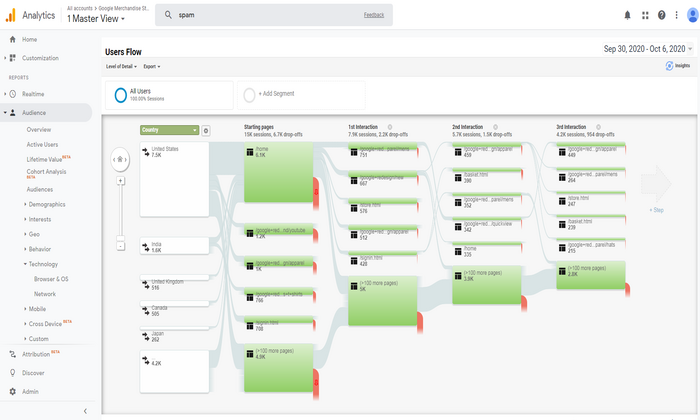
Analytics tells you what happened — what visitors did when they arrived on your site, the ads they responded to, what they read most often, etc. It doesn’t tell you why visitors do the things they do. Understanding what is important, but it’s more important to understand why something happens.
Focusing on the right metrics is the answer.
The right analytics consultant will help you answer the “what” — basically looking in the rearview mirror. But they’ll also help you look ahead; They’ll dig deeper, showing you the why behind visitor and customer behaviors.
Your analytics consultant should provide you with the education and support you need to squeeze more value out of your data.
How to Get Started With an Analytics Consultant
Avinash Kaushik has a three-step framework he uses to help analytics consultants support their clients. He calls it Data Capture. Data Reporting. Data Analysis. The nice part about this framework is the fact that it’s easy for both clients and consultants.
Consultants can use each of these buckets to analyze your goals, objectives, and the results they want to accomplish with each.
You’re basically goal setting with this framework.
Here’s a closer look at each of these three buckets and the goals for each of these.
Data Capture:
Work in this bucket is focused on audits or updating data capture methods (e.g., updating, editing, or customizing tags). This step is especially important because it determines the quality of what comes afterward. If you’ve done a good job with your data capture methods, you’ll have accurate data and reporting you can use for your analysis.
Data Reporting:
Your consultant sets up the reports you need on the intervals required. Your consultants help you identify the reports you’ll need, and they provide you with the reports you need regularly.
Data Analysis:
This is what Avinash calls an open-ended assignment, but it’s one you’ve provided to your consultant. You’re asking them to answer specific questions for you — your consultant should be able to show you what to measure, what your data is saying, what to do based on your data, and why you should do it.
Here’s what this means for you.
You’ll want to find an analytics consultant or agency that can handle all three steps in this framework. This also means you’ll need a clear idea of problems you’re dealing with ahead of time.
Measuring the ROI of Analytics Consulting Services
Many companies don’t understand analytics. If you don’t understand analytics, that’s okay; you just need to know whether you’re generating a return on your analytics investment. According to Nucleus Research, analytics returns $13.01 for every $1 invested.
Your consultant should be able to calculate your return on analytics investment.
This obviously much easier if your consultant is focused on the data analysis bucket. Suppose they’ve made several data-driven improvements to your site over three to six months. Their recommendations lead to an increase in revenue, profit, or a return on investment for you.
They should be able to verify your return on investment using the worksheet I’ve linked above.
The good news is the fact that analytics, as a discipline, is data-driven.
Checklist For Finding the Right Analytics Consultant
Choosing the right analytics consultant requires a very different set of skills. If you’re working with an independent analytics consultant, you’ll need to approach this in one of two ways.
Choose a consultant with all of the skills needed to perform across all three buckets (data capture, reporting, analysis). Choose an agency with analysts and implementation specialists needed to generate the results you need.
Here’s a list of the skills needed for each of the three roles in your buckets. Avinash breaks these skills down in detail in his web analytics consulting framework post.
Here’s a quick summary.
- For the data capture bucket, your consultant should have the skills of an implementation specialist. They’re experienced with tag managers; they understand data dimensioning and working knowledge of tracking variables.
- With the data reporting bucket, your consultant should be familiar with report creation in your analytics platform; they should also have a master list of the custom reports you’ll need for various options. It’s also ideal if your consultant has a working knowledge of his own set of customizations.
- For the data analysis bucket, your consultant should be a web analyst. Your consultant should be comfortable with advanced statistics and analytical techniques. They should be experienced in descriptive, diagnostic, predictive, and prescriptive analytics.
If you’re working with an independent consultant, they should be an industry veteran with the skills I’ve listed above. If you’re working with an agency, they should have employees with the skills for each bucket. If you have implementation specialists, you can handle data capture and possibly reporting.
Just make sure they’re a fit for that role.
Conclusion
Many companies aren’t familiar with analytics consulting. They’re not entirely sure how analytics impacts their organization. That’s okay, as long as the ROI is there.
Using a tool like Google Analytics, many companies assume that all they need to do is customize the tracking code, drop it onto their web pages, log into their account, and begin analyzing their data. It should be that easy, but it isn’t.
There’s more to it than that.
With most companies, their analytics data goes unused, they collect lots of data on customer activity, but they don’t know how to squeeze value out of their data. Analytics consulting can help you evaluate your performance data properly. Choose the right team, and your data will tell you what you need to know.
The post Analytics Consulting appeared first on Neil Patel.
Source: feedproxy.google.com