
Tag Archives for " Google Ads "

Google Ads for eCommerce: How to Make Your Website Conversion-Ready
So, you’re eager to run Google Ads for your eCommerce business.
You took all the critical first steps to ensure your business is set up for Google Ads success—your brand identity is rock solid, your budget and time expectations are reasonable, your selling proposition is one-of-a-kind.
The next step? Make sure your website is ready to convert.

After all, those precious ad clicks will lead customers to your virtual front door. And we need to make sure that the door is open wide to welcome each visitor before we spend time and money on Google Ads campaigns.
Here’s how we’ll make that happen:
- Website CRO Best Practices
- Product Preparation
- Media (Images and Video)
- Lifestyle Images
- Robust Titles and Descriptions
- Live Chat
First Up: Website CRO (Conversion Rate Optimization) Best Practices

Building an eCommerce store isn’t that hard.
Building an eCommerce store that converts? Whew! That is a different story entirely.
Here are some CRO best practices to ensure your site is ready to make sales:
The Big Three:
1. Website Issues and Errors
You can’t drive traffic to a broken website. So, it’s crucial to ensure you catch any website issues or errors:
- Frequently (at least once a month) check your site and make sure everything is working properly and there are no high-risk issues and errors.
- Schedule a website audit at least once a month.
2. Website Speed
Website speed has a massive impact on your quality score; in fact, it is considered slightly more important than content(!) according to Google. A few things to consider:
- Mobile users are going to be less tolerant of slower websites due to the smaller size of the device and often slower connection.
- The biggest contributing factor for slow sites is large image sizes.
3. Mobile Engagement
- 60-65% of website visits are done on mobile devices. So ensure your site is mobile-friendly!
- Look at your conversion path: although many purchases happen on desktop computers, research is often done on mobile devices. In other words, consider each step of your buyer’s journey so you can make it as effortless as possible.
Conversion Rate Optimization Checklist

Now let’s put those best practices into action. First up, run through this CRO checklist to make sure visitors have a smooth journey to purchase from your site:
- Everything works properly
- Website is fast (under 2-3 seconds load time)
- (use PageSpeed Insights to measure this)
- Your email/phone number is in the header or footer
- Customers need to know they can trust you (i.e. get in touch with you)
- Website design is appealing to your audience
- Make sure the design is centered around your product and isn’t a distraction
- The website has high-quality images
- Products are described clearly with all features displayed
- CTAs are in a contrast color (bold!) and easy to find
- Check out BOOM by Cindy Joseph for inspiration
- There are reviews on product pages
- Verification badges (secure payment, BBB, SSL, guarantees, free returns, etc.)
- This helps improve the trustworthiness of your site and brand
- Turn anything you offer into a badge (free shipping? Make it a badge! Free returns? Badge! Much more exciting than text)
Website Speed Optimization Checklist
- Choose a “light” theme
- A good developer can improve your site speed a lot—but make sure you don’t rely too heavily on customization
- Scale your images properly
- Try PicResize
- Decrease the weight of your images without losing quality
- Try TinyPNG
- Limit the number of plugins/apps
- Limit the number of displayed products on category pages
- Check-in on your page speed
- Try PageSpeed Insights
- Don’t aim for a 100/100 score—just aim for a good user experience

Quality Assurance (QA) Checklist:

Include quality assurance checkups in your monthly standard operating procedures to make sure your site is in tip-top shape. You can do this through internal QA and external QA:
Internal QA: Pretend to be your own customer
- Try to break the site
- Navigate through your site the way a customer would
- Gauge how easy it is for a distracted customer to use your site.
- Ask yourself, “If I weren’t paying full attention, could I still do this?”
- Make an actual purchase
*You can hire someone to go through your site on Fiverr.
External QA: Have someone else pretend to be a customer
- Just tell them where you want them to go—but not how to get there
Analyze Top Competitors:
- What is different between their website and yours?
Pro-Tip! Diagnosing Issues: Screen Recording Software
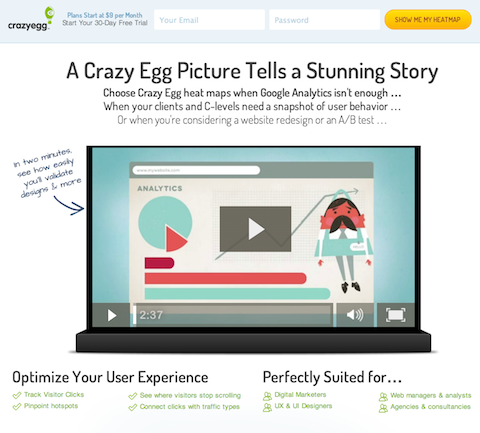
You can install screen recording software on your site that tracks users’ navigation via heat mapping (note: it will likely slow the speed of your site). This works on desktop and mobile—so for eCommerce sites that aren’t converting, you can use this software to figure out what’s going wrong along the way.
Here are a few notable options:
Keep in mind: You don’t need to use these apps forever. Diagnostic tools are a great way to assess the state of your website and determine any site optimizations or product additions.

Product Page Preparation
Your product pages are the most important pages on your website. In most cases, it’s the landing page for your traffic: your very first impression.
Many businesses put tons of energy into optimizing their homepage, yet neglect the product pages customers land on. What’s worse? Smart Shopping can only drive traffic to product pages. So let’s make sure your product pages are ready to shine:
Product Page Checklist
- Product title and subtitle
- Make sure the product title is clear, descriptive, and honest enough for Google to identify the product and send relevant traffic your way (Look at Amazon for inspiration)But avoid “keyword” stuffing! Honesty and simplicity are key
- Product description
- Product descriptions are supplementary to your title
- Use this opportunity to elaborate on the specifics of your product: any particular materials, special features, ingredients that are worth highlighting but would be too long for your title
- Product media (images and videos)
- We purchase with our eyes first
- Custom imagery is always going to be better than stock photos, particularly lifestyle images that help customers picture themselves using your product
- Nested navigation
- Make sure navigation is clear, easy, and accessible—we don’t want people to get lost
- Use breadcrumbs so users can always find their way back
- Social proof (i.e. reviews)
- Customers buy from businesses they trust—Enter: reviews
- Aggregating enough reviews takes time, so ask your customers for a review after 30 days of purchasing and give them an incentive or reward for the completion
- The 30-day rule gives you at least a few days/weeks to resolve any issues—and get a good review for it.
- Once you have enough five-star reviews, you can add them to your site.
- Clear call-to-action (CTA)
- If you don’t tell people what you want them to do they won’t do it
- A clear, bold CTA nudges your customer to the next step
- Isolate the action you want them to take: make the CTA a BIG button (not just a hyperlink)
- Clear customization options
- If you offer customized products, make sure the options are clear and don’t overwhelm your customers to avoid cart abandonment
Product Media
When it comes to adding images to your website, here’s the thing:
You don’t need to be a professional photographer.
In fact, all you need to create high quality images is:
 A smartphone (new iPhones or Samsung do a really good job)
A plain white background
Natural lighting
Don’t zoom in.
Don’t use flash.
And edit your photos if you can (check Fiverr or pixc for outsourcing options).
That’s all it takes!

Remember, your photos should give context and further showcase details of the product. If your product has a unique feature, it’s best to explain what that feature is in the descriptions and show it in your images.
Overwhelmed by how many products you need to capture? Start with your bestsellers. Make sure each of them has a decent product photo and (if possible) a short video. 5-7 images per product should be enough.
We are visual creatures. High quality product media will close the sale.
Product Media Part Two: Lifestyle Images
Speaking of product media, lifestyle images are critical for customers to visualize your product in action.
*Remember: Lifestyle imagery is a photo or video of products being used*
Here are some tips:
Give context
- Hey, your product doesn’t have to be the “main subject” in the photo. In fact, it could be in the background—like this poor Nespresso machine, competing with George Clooney’s eternal handsomeness:
You can use photos from your Instagram or Pinterest
- Speaking of Instagram, you can send your product to influencers (for free) in exchange for promotional content on their page
- Check out imagency.com to find influencers
Shoot a YouTube overview of the product and paste it on your product page

Robust Titles and Descriptions
Use the product description to sell the transformation
- The description sells the TRANSFORMATION, not the product
- Use the language that your avatar uses but make sure you also include in the right keywords that Google understands
Include specifications
- Size, material, weight, features
Use the product titles and descriptions to communicate with Google
- Google relies on product titles and descriptions to identify products and send relevant traffic—so, make sure they are “machine friendly” (clear and easy to understand)
Good descriptions can be repurposed
- Save some time and energy! Quality descriptions can be loosely reused for other product pages as well as for ad copy
Live Chat
We strongly recommend live chat on your website. Here’s why:
Diagnose errors
- Live chat allows you to compile visitor questions and create content that answers those questions for future customers
- Add helpful information to your product pages and place them near the top of your page
*Try tawk.to*
*Check out Shopify’s app integration here https://apps.shopify.com/tawk-to*
Identify objections
- Live chat can give you insight into what holds customers back from making a purchase—what questions do they ask before abandoning their cart? What concerns do they bring up in the chat?
Improve conversion rates
- Sometimes, all it takes is a little supportive nudge for customers to make a purchase
- By “being there” through their virtual journey, you have a higher likelihood of making a conversion
Get That Website Ready to Convert
I know, I know. I just gave you a lot of homework.
But listen up: I’ll be back with a guide on the next steps of setting up successful Google Ads campaigns—the dreaded technical and legal requirements.
But if you’re feeling extra-eager, you can check out this Google Ads Mastery Workshop.
Or, you can check out my entire step-by-step guide to Google Ads for eCommerce here.

Kasim Aslam
Kasim Aslam is the founder and CEO of Solutions 8, one of the world’s top ranked Google Ads agencies.
Recipient of the Arizona Interactive Marketing Association’s 2017 TIM Award for Person of the Year, Kasim was also named one of the Top 50 Digital Marketing Thought Leaders in the United States by The University of Missouri in 2020.
Kasim was hand-selected as the Traffic Coach for DigitalMarketer.com’s ELITE coaching program by their executive team. He is also the co-host of the long-running podcast, Perpetual Traffic.
His book, The 7 Critical Principles of Effective Digital Marketing, was featured as one of the Top 100 Digital Marketing Books of All Time by Book Authority.
Kasim helped launch the National Association of Child Helplines (NAACH) and worked with the United States Army, Intel, as well as a Gates Foundation-funded nonprofit, a 54,000 member PPO, the largest privately-owned bank in the United States, and an Academy Award-contending documentary.
He lives in Scottsdale, Arizona with his wife and two sons.
The post Google Ads for eCommerce: How to Make Your Website Conversion-Ready appeared first on DigitalMarketer.
Source: digitalmarketer.com

What Are Performance Max Campaigns?
Do you wish you could spend less time managing your paid ads campaign while driving the same, if not more, conversions? Then you’re in luck. Your Google Fairy Godmother is here to make that dream come true.
Enter Performance Max campaigns, which use AI and machine learning to improve your advertising strategy and offer a hands-off approach to winning with PPC.
Excited? Well, here’s everything you need to know about Performance Max campaigns, when to use them, and how to create your own.

Performance Max Campaigns: What Are They?
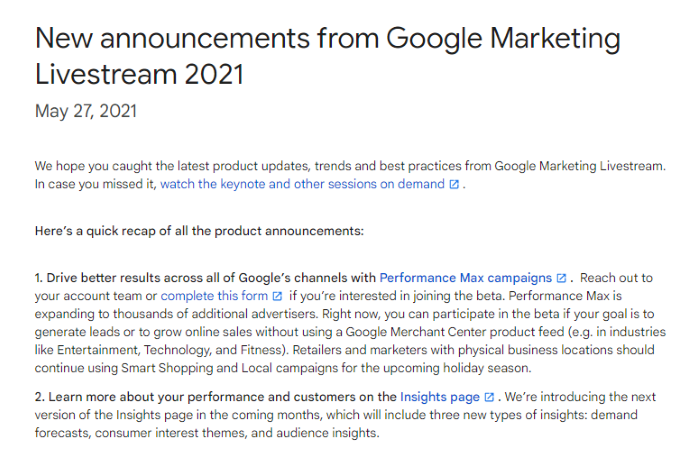
Google first introduced Performance Max campaigns at its Google Marketing Livestream event in May 2021.
Performance Max campaigns are the first fully automated ad campaign of their kind. Unlike traditional Google Ad campaigns, Google automates the targeting and delivery of Performance Max campaigns based on the information you provide.
All advertisers need to do is provide a series of ad creatives (a call to action, additional ad copy, and relevant images or videos), and Google takes care of the rest.
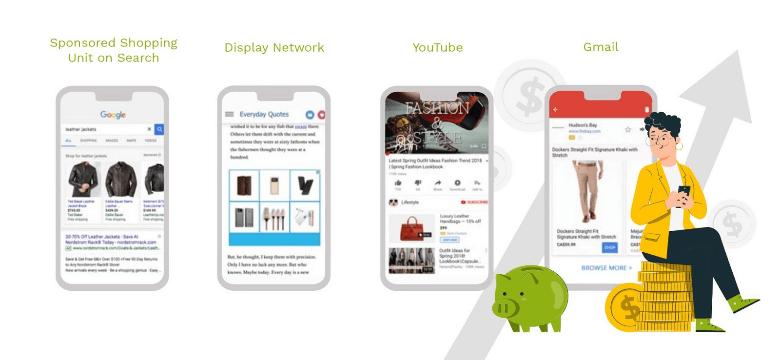
It also stands apart from anything else currently on offer by allowing you to access all of Google’s ad inventory from one lone campaign. YouTube, Search, Display, Gmail, Google will run and test creatives on every channel to meet your goals.
In short, you get access to Google’s entire inventory of ad space and a fully automated ad campaign with as little effort as possible.
Who and When Should You Use Performance Max Campaigns?
The great thing about Performance Max campaigns is that they use all of Google’s ad inventory, you can use them for pretty much any kind of campaign.
That doesn’t mean Performance Max campaigns will be everyone’s cup of tea, however. PPC experts who can eke out a lot more revenue by optimizing every facet of a campaign probably won’t enjoy the set-and-forget nature of Performance Max campaigns.
However, it makes the campaigns perfect for small and medium-sized business owners who don’t have much time or a dedicated team to run campaigns.
Performance Max campaigns are also perfect if you:
- don’t have the time or knowledge to optimize your own campaigns
- want good ad performance but don’t want to pay for a PPC agency
- don’t have the necessary budget to target all of Google’s ad inventory individually
- have a large budget and want to discover new angles that result from these campaigns
- want to optimize the performance of your campaigns but don’t care which channels your ads appear on
- want to simplify your PPC advertising with a single campaign
As for which industries are best served by these ads, it’s a little difficult to tell given how new they are. Whether you’re an e-commerce store, a physical retailer, a SaaS brand, or a B2B company, I’d recommend trying them out.
Pretty much any industry can have success with Performance Max campaigns. Just make sure to set specific goals when launching your campaign.
By that, I mean focus ads on a specific product or offer, rather than your brand as a whole. Awareness campaigns aren’t as likely to see results with Performance Max advertising.
What Are the Main Advantages of a Performance Max Campaign?
Not sure if these new ads are the right choice for your brand? Let’s take a look at the advantages.
Focus on Goals
The major benefit of Performance Max is the goal-focused nature of campaigns. The primary target for Google’s campaign optimizations is to meet the goal you set at the start of the campaign.

If you have a very specific goal, like acquiring trial customers for your new product, Performance Max campaigns are a great way to drive conversion.
Hands-Off Ad Optimization and Creation
Another of the biggest advantages of Performance Max campaigns is the hands-off approach that advertisers can take with their PPC campaigns. Once you’ve set the campaign up (which is incredibly quick and easy, as you’ll see below), there’s not a lot more to do.
Setting up and managing the campaign is much faster, too. There’s no need to design your creatives with Performance Max campaigns, just provide Google with all of the individual assets, and it creates ads on your behalf.
You don’t need to spend time selecting which networks to run, and there’s no need to tweak the campaign while it’s life, either. Google does it all for you.
How you spend the time you save is up to you. Some business owners will focus on optimizing their business as a whole, but you could also choose to spend time optimizing your ad creatives (the one element of Performance Max campaigns you do control) to boost the campaign performance even more.
Access to More Ad Inventory
Getting access to all of Google’s inventory in one campaign is another major benefit. Before Performance Max campaigns, the barrier to entry for creating a campaign that leverages all of Google’s ad inventory would have been incredibly high. Only the biggest spending marketers would have been able to do it.
Performance Max campaigns democratize access to Google’s ad inventory in a way that we’ve never seen before and give everyone the chance to advertise across Google’s entire ad ecosystem.

Not only is this a great way to quickly reach new customer segments, but it’s also a great way to generate more PPC data you can use to inform new campaigns in the future. Who knows, you may discover an audience segment and ad inventory combination that converts like a dream.
Save Money On Marketing Costs
You don’t need to be a PPC expert to run these campaigns, either. There’s no need to guess manual testing, bidding strategies, or which ad inventory will deliver the best results.

Of course, some business owners who have experience with PPC advertising may not relish relinquishing control in this manner, but it may still be profitable to experiment with Max Performance campaigns to see the kind of results it can deliver.
If it does work, you won’t need to worry about spending time managing their own campaigns, no matter how experienced they are with PPC campaigns.
Drawbacks of Performance Max Campaigns
If there’s one drawback of using Performance Max campaigns it’s reporting—an issue raised during the Google Marketing Livestream conference.
Google announced advertisers had raised issues with reporting transparency, but the search giant is taking steps to improve this feature. Reports are still limited as of writing, but this may improve in the future.
A Google Performance Max Campaign Case Study
Naturally, Google has been quick to share the positive results companies have seen from its new campaign format. This has primarily been through a case study. It was published with consumer loan provider MoneyMe.
The company, which was looking to rapidly increase its customer base, worked with Australian agency Sparro to launch Performance Max campaigns. The goal of the campaign was to drive newly funded loans for the company’s feature product, personal loans.
They started by maximizing conversions to find a baseline CPA target before switching to a target CPA strategy to boost the profitability of campaigns.
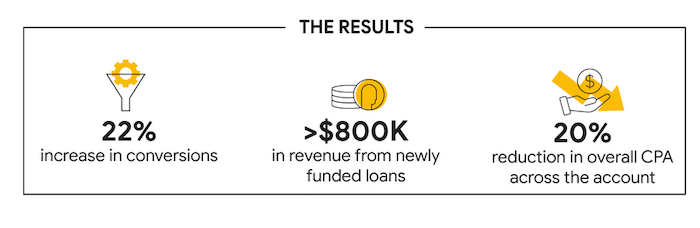
The results are impressive. Performance Max campaigns helped MoneyMe increase conversions by 22 percent and drive more than $800,000 in revenue from new loans. They also managed to reduce their CPA by 20 percent, too.
How to Create a Performance Max Campaign
Google is currently beta testing Performance Max Campaigns. You’ll need to enquire using this form to launch a campaign as soon as possible. You’ll also need to have Google Ads Conversion Tracking implemented on your site.
Once you’ve done both, follow the instructions below.
Step 1: Set a Goal
The first step in creating a Performance Max campaign is to set a goal. This could be online sales, lead generation, or offline sales.
Step 2: Set a Budget and Bidding Strategy
Next, set a budget and a bidding strategy. You can choose to maximize conversion or spend, set a maximum CPA, or set a target cost or conversion.
Step 3: Create an Asset Group
As we have discussed above, this is not an ad. It’s a collection of assets Google will use to create static and dynamic ads depending on the ad placement.
In total, you’ll need to provide Google:
- 3 headline versions
- 2 ad description
- sone longer headline
- a 600×316 landscape image
- a 300×300 square image
- a 314×314 square image
- a 128×128 logo
- a 10-second-plus video for video ads
Step 4: Select a Target Audience (Optional)
If you want to give Google a little help getting started, you can select a target audience. Google will automatically show your ads to the users who are most likely to convert, but you can provide signals to help Google quickly find your ideal customers.
Of course, by doing this, you may miss out on finding a yet undiscovered audience segment.
Step 5: Add Extensions
These can either be existing site-level extensions or you can create your own site links for your Performance Max campaign. Helpfully, Google suggests creating specific formats depending on your campaign objectives, like adding a form extension if you want to acquire leads.
Performance Max Campaigns Frequently Asked Questions
Do Performance Max campaigns work?
Performance Max campaigns have been proven to increase conversions, reduce CPA, and deliver positive ROI.
How much do Performance Max campaigns cost?
The cost of Performance Max campaigns will depend on your goals and budget. You’ll need to spend at least several thousand dollars on the campaigns to see results initially.
What do you need to know about Performance Max campaigns?
Performance Max campaigns are Google’s first fully automated PPC campaign that gives you access to Google’s entire ad inventory. Just provide Google with a campaign goal and a set of creative assets and they’ll create and optimize everything for you.
How does Google support Performance Max campaigns?
Google uses AI and machine learning to optimize performance max campaigns on an ongoing basis. Since they were first released in May 2021, it has also committed itself to improve reports and insights from Performance Max campaigns.

Performance Max Campaigns Conclusion
You don’t have to be a PPC expert or hire a PPC marketing agency to drive leads and sales for your business. Google’s Performance Max campaigns take all the hard work out of creating an effective PPC campaign, so you can focus on your business while your ads drive conversions and, most importantly, positive ROI.
These campaigns may not be profitable straight away—just like any other PPC campaign strategy—but they may deliver solid results over time. They’re definitely worth testing.
Have you launched a Performance Max campaign yet? What were your results?
Source: neilpatel.com

How to Use Google Discovery Ads
Google discovery ads are changing the game by implementing a more powerful AI to take a lot of the guesswork out of paid advertising on Google.
Instead of manually optimizing your ads over time, Google AI will take care of it for you using its massive amounts of data.
How?
That’s what we’re going to cover in this article.
If you’ve never tried Google discovery ads, now is the time to dive in with both feet and take them for a spin.
What Are Google Discovery Ads?
Discovery ads allow you to take advantage of the AI that Google has created to deliver the most accurate and interesting ads to the people who want them the most.
It’s essentially a newsfeed on the Google app that is catered directly to the user’s search intent.
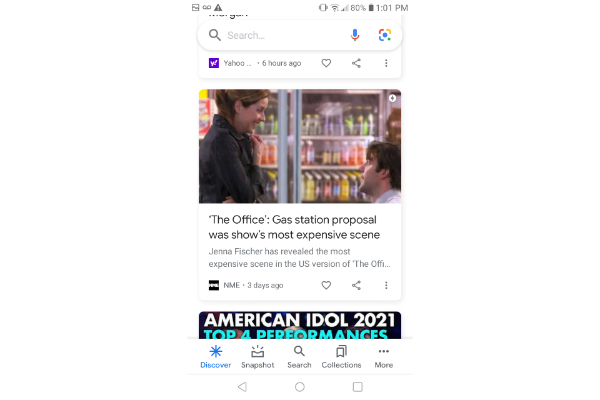
In addition to being a standard “Google ad,” there’s also a visual aspect now.
Instead of a title tag, meta description, and slug, you’re also getting a vibrant image at the top of the display to help draw the attention of the user.
There’s one major difference here.
Instead of the ads being driven by a query, they’re driven by Google AI.
This means that the goal of the discovery ads page is to solve the user’s problem or answer their question before they even have to type anything into the search bar.
As the user engages more with the Google discovery page, the AI will pick up on their interests and provide a more accurate representation of what they want to know and what they’re looking for.
In the event that the discovery page isn’t accurate, you can toggle based on what you want or don’t want to see.
You can even break it down to exact keywords that you want to see less of.
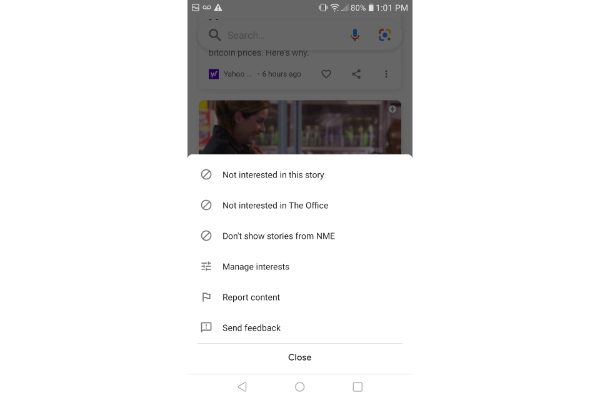
Using the show “The Office” as an example, you can tell Google that you’re not interested in the specific story.
You can also say you’re not interested in anything to do with the keyword “The Office,” or you can ask Google to stop displaying content from the media source “NME.”
Either way, it puts you in the driver’s seat so you can gradually optimize the newsfeed to see more and more of what you want.
Benefits of Google Discovery Ads
Let’s shift gears now to an advertiser standpoint. You understand the benefits to the user, but what about advertisers on Google?
The process of creating these ads is simple and effective.
Plus, just like for the user, the advertiser can take advantage of Google AI as well.
Running this ad to test out a new product or spread awareness of something makes the most sense.
The goal is for people to “discover” things they might not have known or seen before.
Since Google AI is deciding who to display the ad to, this is also great for retargeting.
As users see more and more of your ads, they’ll become more familiar with your brand, and that will build trust.
Here are some of the benefits of this ad type:
Farther reach with one campaign:
With one single campaign, you can reach up to three billion people per month.
This is because Google discovery ads don’t stop at the Google app.
You also advertise on the YouTube homepage, Watch Next, and the Gmail promotions and social tab.
Utilize more relevant advertising:
Google is taking the need for user intent out of your hands and putting it into its own.
The goal is to deliver the most meaningful and powerful content to the exact people who want it.
You don’t need to do your own research anymore to determine what is most relevant because Google AI can take care of it for you.
Drive engagement with visually rich ads:
The goal of Google discovery ads is for you to “discover” new things and take an interest in the information and content you find on Google.
One great way to do this is with visuals to spark interest and create action.
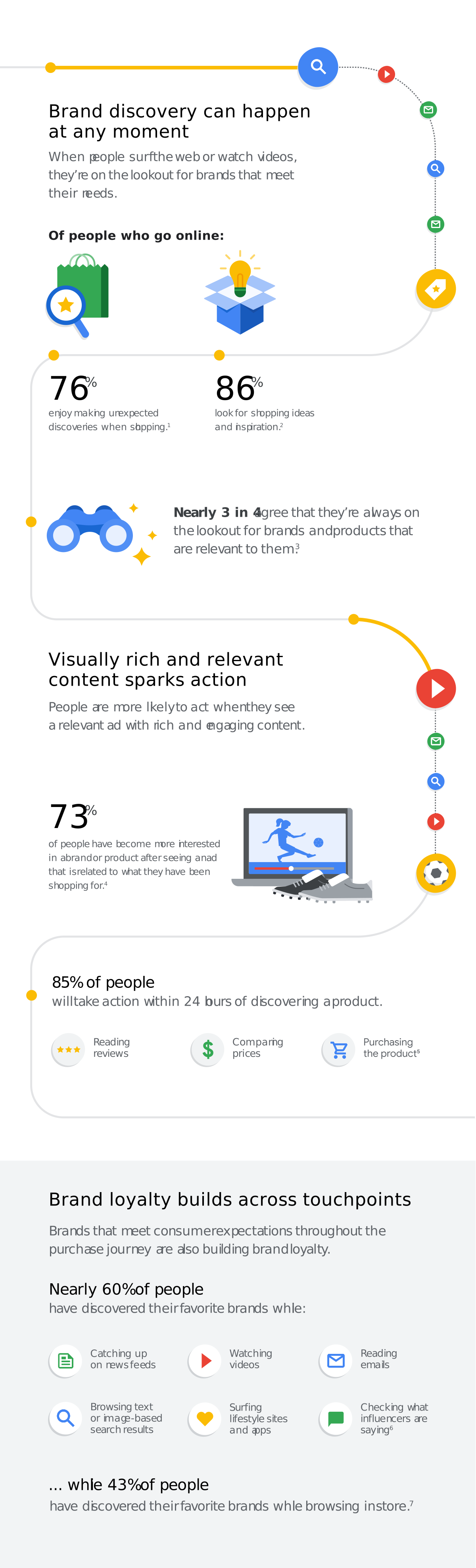
According to Google, 76 percent of people enjoy making unexpected discoveries while shopping.
That sounds about right!
Use automated bidding:
Choosing your bid is one of the most challenging aspects of managing your ad budget.
Google takes this out of your hands with maximized conversion bidding and target CPA to help optimize your campaign.
Many of us are putting a lot of trust in Google with this advertising, but what better person than Big G to handle it for us?
Advertise consistently:
One of the greatest features of Google discovery campaigns is the fact that your ad will almost always align with the people you reach. There’s no more testing or guessing.
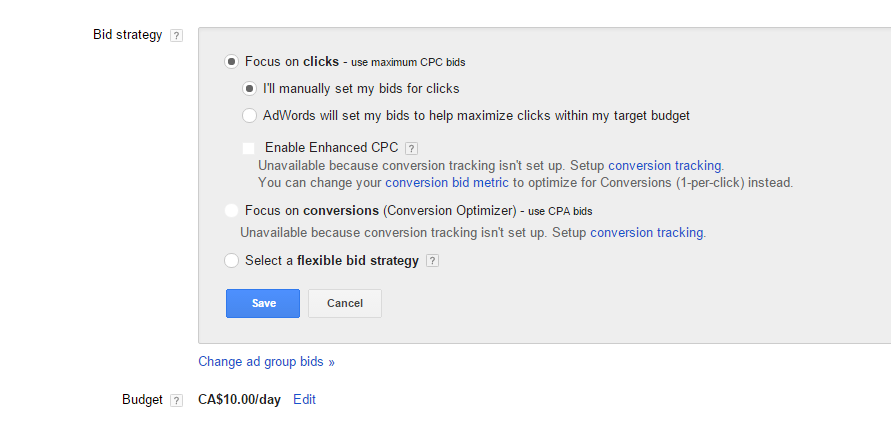
Since 85 percent of people take action in 24 hours after discovering something, you’ll stay fresh in their mind if your ad continues to display.
3 Tips for Creating Great Google Discovery Ads
As with any type of digital marketing, be it SEO or paid ads, the right way and wrong way to do it aren’t so clear cut.
However, here are some helpful tips to get you closer to the right side of the scale:
Use your best images:
These are visual ads that demand high-quality photos and images.
You can’t expect anyone to want to click on a low-quality image or an obvious stock photo.
The image needs to also create interest and intrigue.
Limit text in images:

The goal of these images is not to give it all away so the user never clicks through.
By limiting text in the images and reserving all that space for imagery, you’re telling a story that will make them wonder what is happening on the other side.
Build trust right away:
Remember that most of the people that see these ads have no idea who you are or what your business is.
You’re meeting them for the first time, and like any other newsfeed, they can keep on scrolling pretty quickly.

You need to build trust, so use the text space to qualify yourself and tell them why they should click through.
Examples of Google Discovery Ads
Take a look at the Google discovery ad example below.
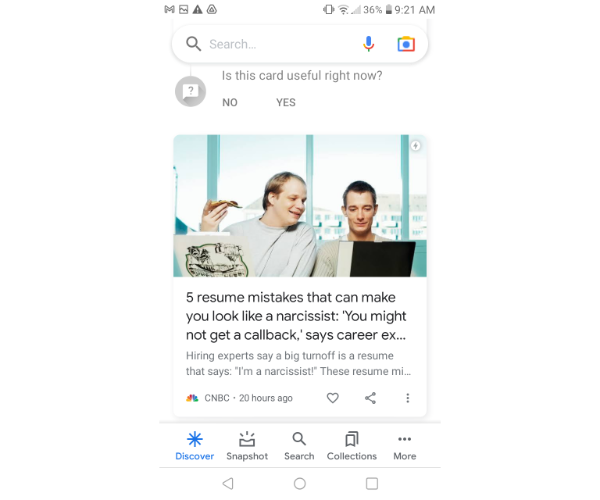
You’ll see a really interesting headline paired with an interesting image as well.
The image is of two men eating pizza while they both look at their laptops.
Plus, the headline and body text are both very interesting.
If I were applying for jobs or trying to get the career of my dreams, I might want to know what makes me look like a narcissist in my resume.
That said, I’m not looking for a job, so this is actually a situation where the ad doesn’t apply to me.
One great thing about Google discovery is that you can optimize it.
Right above the image, it asks you if the card is useful.
In this case, it’s not, so I would want to get rid of that ad and not see ones that are similar, even though it’s an interesting topic.
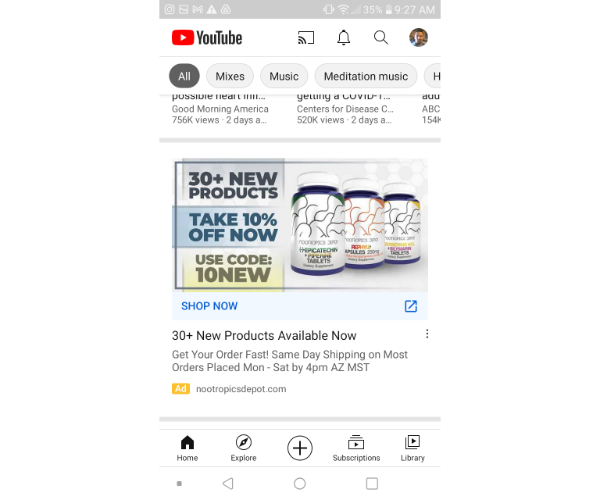
The next example is one from the YouTube homepage, advertising health supplements.
My favorite thing about this ad is how direct and clear it is.
There’s nothing hiding behind this image.
It’s transparent, clear, and straight to the point, which is something that Google looks for in advertisers.
Once you tap through, you can shop for some of the new nootropics mentioned and enter the promo code.
They even provide a bit of scarcity in the body text by telling you that the promotion runs out on Saturday.
How to Create Google Discovery Ads
Before we dive into the actual steps you’ll take, there are some things you’ll need to get together first.
Make sure you have many different headlines, descriptions, images, and logos because Google AI will play around with these for you to determine what converts the best.
Be sure that the images are extremely high-quality and optimized properly for mobile use.
You’ll also want to test out a variety of messaging based on whatever it is you’re selling.
Enabling sitewide tagging and conversion tracking are the final pieces.
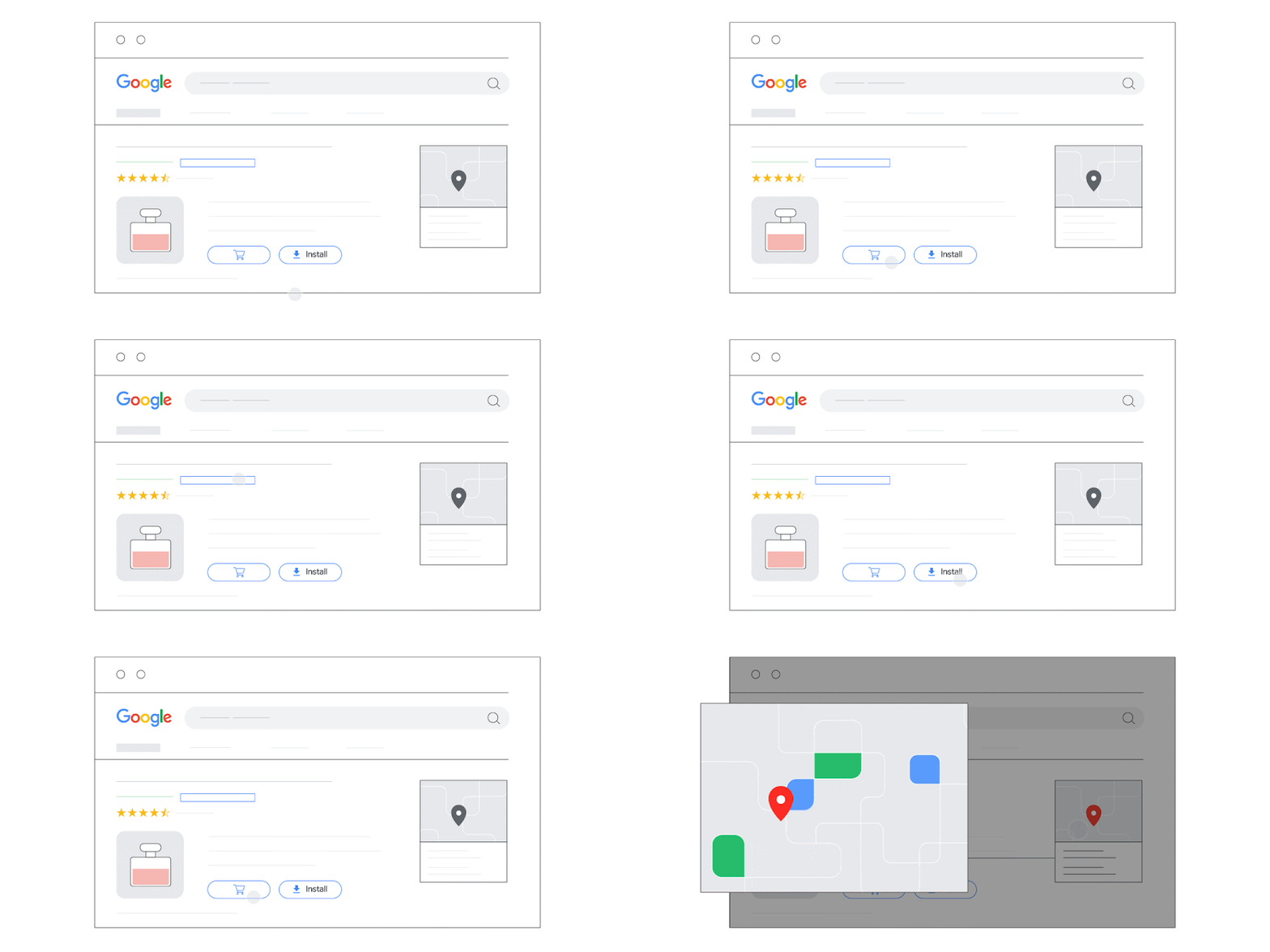
These make sure your ads are eligible for conversions and help you keep track of every hit you get.
1. Set Up the Campaign
To get started, sign in to your Google Ads account and click the Campaigns tab on the left.
Click the Plus button and select a new campaign.
You’ll need to choose an objective such as website traffic, leads, or sales.
You can also select “no goal,” but I recommend choosing one because it will give Google a better idea of what you want to accomplish.
Select the discovery campaign type of either a single image ad, carousel, or both, and then click continue.
From there, you’ll choose your demographic and target language, as well as a variety of other audience information.
Once you’ve done that, you’ll set up your daily budget and bidding strategy. Save and continue.
2. Set Up Single-Image Ad
If you’re using a single-image ad like many of the examples featured above, you’ll want to go to your discovery ad and click “Ads and Extensions” from the left panel.
Click the Plus button, choose the discovery ad, and then enter all the variable information.
Some of these include:
- headline
- description
- images
- business name
- logos
- URL
- call-to-action text
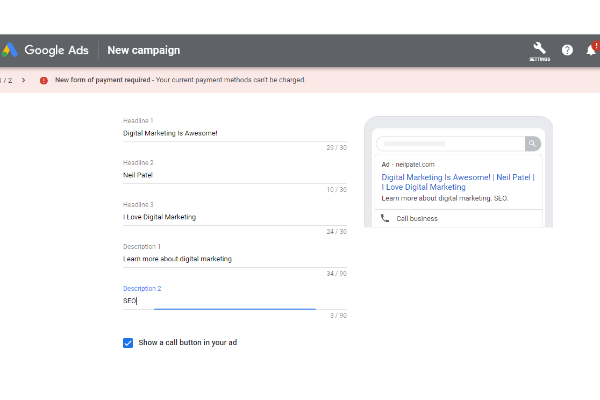
None of this is out of the ordinary, but I have plenty of resources available to help you write the best headlines and descriptions.
3. Set Up Carousel Ad
If you’re using a carousel ad, you’ll follow a lot of the same steps by going to ads and extensions, but you’ll choose “discovery carousel ad” this time.
For this one, you’ll need to choose somewhere between two and ten different card images.
They each have their own unique shape and size requirements, so you’ll want to pay attention when doing this.
With carousel ads, you can also choose two different URLs: one for mobile and one for desktop.
4. Allow Ramp-Up Time
When you have all your assets and messaging together, you need to give the campaigns a little time.
Set the budget for high volume but realize no matter what your budget is, it will take some time for Google to identify your ideal user.
Be sure you have enough budget for at least two weeks and wait to see at least 40 conversions before making any adjustments.
The good news is, Google AI handles a lot of that for you here, and you shouldn’t often have to make adjustments unless you entirely missed the mark with your advertising copy and images.
5. Use Automatic Targeting
By choosing automatic targeting, you’re letting Google discovery decide for you how you want to display the ads and who you want them to go to.
To do this, you need to go into your discovery ads panel and choose audiences from the navigation menu.
Click the pencil and choose Edit Ad Group Targeting.
Here you can choose how far you want Google to expand your audience.
When you’re satisfied, click Save.
Google Discovery Ads FAQs
I’ve answered the question, “What is Google Discovery?”
Now, let’s take a look at some of the other most frequently asked questions.
How Much Do Google Discovery Ads Cost?
Google Discovery works with cost per view (CPV), so that’s how you’ll pay for your ads.
A view is counted when someone interacts with your ad.
In the case of a video ad, the view is counted when someone watches at least 30 seconds of your ad.
The average CPA for Google Ads discovery campaigns is about $12, so it’s a great way for businesses and marketers with small budgets to get started in paid advertising.
Where Do Google Discovery Ads Appear?
Google discovery ads appear on the Google app homepage, YouTube homepage, Watch Next feed, and Gmail promotions and social tabs.
What Does a Google Discovery Ad Look Like?
A Google discovery ad looks different based on its location. The example below is from the Google discovery newsfeed in the app.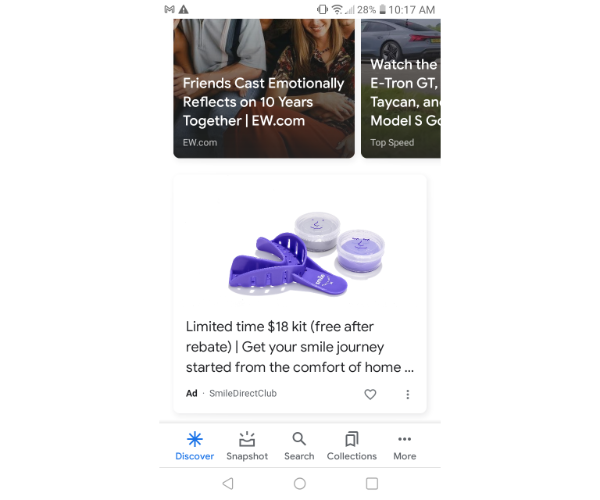
How Are Google Discovery Ads Different From Google’s Other Ad Types?
There are two main differences.
First, Google AI takes control of a lot of things for you.
The AI plays around with your headlines, images, and messaging to determine what converts the best.
You don’t have to manually do it if you don’t want to.
Second, these ads are more visual than most Google ads.
Instead of just having text, you can display a high-quality image to go along with it.
Google Discovery Conclusion: Discover Your Potential
Google discovery ads are a great way to take advantage of everything Google has to offer.
It’s offered a way to make advertising even easier with the implementation of AI.
I expect to see more of this happening with search ads as well as display ads.
Have you tested out Google discovery ads yet?
What has your experience been?
Source: neilpatel.com

10 Successful Google Advertising Ideas
Google Ads (previously known as Google AdWords) is an advertising platform for PPC ads. With the right strategy, you can drive qualified traffic, connect with your target customers, and drive sales.
 Coming up with Google advertising ideas is challenging. However, it’s well worth it to have a solid strategy.
With around 3.5 billion searches per day, Google gives you an incredible opportunity to get in front of the right audience. Of course, you first need to know what you’re doing.
If you’ve been looking for ways to get the most out of your Google ad campaigns, this article is just for you.
What Google Ads Are?
Before we get to strategy, let’s first understand what Google ads are.
Google Ads (previously known as Google AdWords) is an advertising platform for PPC ads. With the right strategy, you can drive qualified traffic, connect with your target customers, and drive sales.
One of the platform’s best aspects is that it allows you to stick within your ad budget by setting your ads to stay within a certain daily, weekly, or monthly cap. You can also pause or completely stop the ads at any time.
Sometimes in marketing, keeping a close eye on the budget can be a challenge. This flexibility allows you complete control over your budget.
If you’re not yet convinced about how effective the platform is, perhaps these numbers can give you more clarity:
- 58 percent of Millennials say they purchased a product because of an online or social media ad.
- 63 percent of users have clicked on a Google ad.
- 43 percent of users bought a product after going online and seeing the ad.
It’s clear that Google ads can do wonders for your business and your bottom line.
The only questions now are: With so many marketers using the platform, how do you stand out in this virtual crowd? How do you create the right Google ads that get you in front of the right audience at the right time?
Let’s find out!
Tips for Generating Google Advertising Ideas
There are a lot of components involved in generating and executing successful Google advertising campaigns.
Here are a couple of tips to set you on the right path:
Keyword Research
Keyword research is an essential element of your campaign. If you don’t get this part right, it will be challenging to achieve the results you’re looking for.
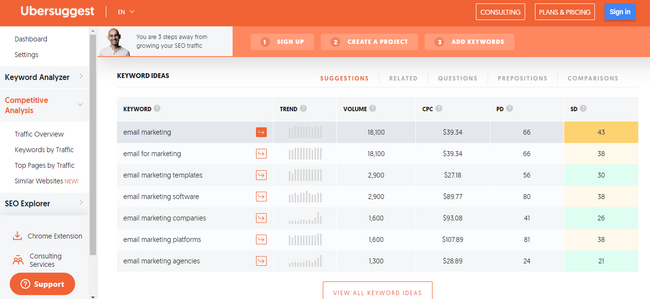
Below, we’ll talk more about keyword research for Google ads, but for now, it’s important to start generating some keyword ideas. To get started, you can use a tool like Ubersuggest.
It’s a free keyword research tool that allows you to generate keyword ideas and look at some of your competitors and the keywords they’re using.
Trend Forecasting
Predictions are an essential part of marketing. Before you start any campaign, it’s necessary to have some idea of what your success (or not) might look like.
Of course, the best way to predict this is with data.
Google Ads offers a keyword planner, which you can use to get forecasts for your chosen keywords.
This planner can provide you with essential information, such as the number of clicks your ad might get every day, the average cost for those clicks, the number of impressions, the click-through-rate (CTR), and more.
With this information, you can start building a solid Google advertising campaign.
Keyword research and trend forecasting are just a couple of essential steps to get started. Now, let’s get into the nitty-gritty, the strategies, and everything that can help make your campaign a success.
Top 10 Google Advertising Ideas
It’s time to get down to the good stuff: What are the Google advertising ideas that can help you reach your goals?
1. Write a Good Headline
John Caples once wrote: “If the headline is poor, the copy will not be read. And copy that is not read does not sell goods.”
There’s no denying the impact that a strong headline has on your audience. Of course, this is what convinces people to click on the ad!
Here are some basic pointers for writing strong headlines:
- Understand your audience. Who are you speaking to? Include your main keyword.
- Address a problem your audience is facing.
- Highlight the biggest benefit in the headline.
- Don’t overcomplicate things. Keep things simple.
- Don’t be afraid to add some humor.
Creating a headline can be one of the challenging parts of the campaign.
Sometimes, you just don’t know where or how to start. Consider following a strategy, like Melanie Duncan’s 4U formula, to create useful, urgent, unique, and ultra-specific headlines to help you get started.
2. Think About User Intent Before Diving into Google Advertising Ideas
When we research keywords, we tend to focus on the numbers. How much search volume does this keyword get per month? What’s the cost per click (CPC)? What about the paid difficulty?
While all these numbers are essential to consider, the most important element of a keyword strategy should be the user intent.
Why? Because user intent (sometimes referred to as “search intent”) gives you the “why” behind the keyword.
Why did your audience search for that particular keyword? Were they trying to purchase something, or were they just trying to get more information about it?
Understanding your audience’s intentions can help you discover which keywords are the best to target for higher ROI.
There are four different kinds of user intents:
- Informational: This is when a user wants more information about a topic. For instance, “How many calories in a donut?”
- Navigational: This is when a user wants to go to a particular web page. For instance, if you want to go to the Neil Patel blog, you type that into your Google search bar.
- Commercial: This is when a user wants to research a particular product or service. This user will likely make a purchase in the near future, but right now, they are at the research phase. For instance, “New iPhone specs” or “iPhone vs. Samsung.”
- Transactional: This is when a user wants to take action, like buy a product. For instance, “iPhone charger” or “cheapest flights from LA to Chicago.”
Understanding user intent will help you target the right keywords.
If someone is searching for how many calories are in a donut, they want content related to that. If your product is a calorie calculator, that’s great!
They’re likely to go to the calorie calculator because it helps them fulfill what they’re looking for at that time.
Paying attention to user intent can help you rank higher and attract more clicks because you’ll be giving your audience what they want.
3. Advertise Limited Offer Sales
Any offer with a ticking clock naturally encourages your audience to act faster and purchase the product or service. That’s why limited offer sales work so well.
In a nutshell, a limited offer sale is any deal, discount, or reward you offer to consumers who make a purchase during a certain period.
An excellent example of this is Black Friday Sales. Every year, Black Friday sales seem to hit a new record, with consumers spending more and more.
That’s because consumers know they’ll have to wait a long time before they can get the product at the discounted price again, so they’re encouraged to make the purchase quickly.
For your Google ad campaign, if you offer seasonal sales for any of your products, you can create ads around these sales and have them go live when your sale launches.
4. Track and Use Google Advertising Data for Iterating
One of the most important elements of any successful advertising campaign is your KPIs.
Depending on your ad goals, there are a lot of important metrics you can track, including:
- number of clicks
- CTR
- CPC
- conversion rate
Tracking your KPIs helps you know if you’re on track to meeting your goals or not.
For instance, if you see that you’re getting great clicks on your ads, but your CTR is on the lower side, it can mean your headline and keywords are getting you in front of your audience’s eyes.
However, something about the ad isn’t connecting.
It could be the copy. It could be the cost of the product or service.
Maybe the headline doesn’t connect with the offer in the actual ad.
Whatever the case, now’s the time to look into it and adjust what you need to.
5. Choose the Right Campaign Type for Your Google Ad
You can use one of five different types of Google ad campaigns for your Google advertising ideas.
Search Ad Campaigns
These ads appear at the top of the Search Engine Results Pages (SERPs).
For instance, if someone searches for “nursery furniture,” this is what the results look like:
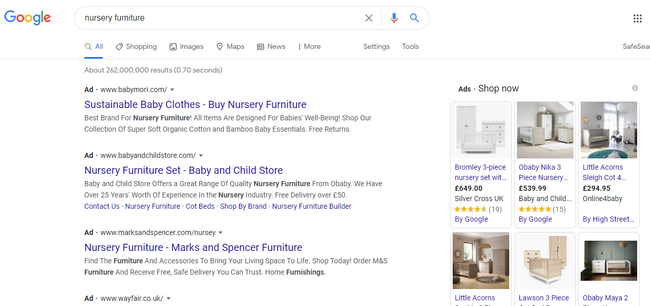
Creating search ads is great because of what we highlighted earlier:
The platform receives over 3.5 billion searches per day! This is the perfect place because many people (including your audience) are already searching for products you offer.
Video Ad Campaigns
Video ads show up before, after, and sometimes in between YouTube videos. Research has shown how effective video has become over the past few years.
Creating a video ad campaign, which is different from a text ad, might help you stand out and grab your market’s attention.
Display Ad Campaigns
Display ads are a way of attracting the market of a particular social media platform, website, or other digital channels to your product or service.
The best way to go about this is to find the website or brand that best connects with your audience.
Display ads are great because these are a win-win situation for both you and the owner of the site or digital platform.
The website owner gets an agreed-upon commission (usually based on clicks or impressions), and you have the opportunity to advertise in front of an audience that connects to your brand.
App Ad Campaigns
If you have an ad, perhaps Google app campaigns can be the right choice.
Here, you can advertise your mobile app through Google Play, Google Search Network, Google Display Network, YouTube, and many more channels.
For app campaigns, you can run ads that encourage your target market to install your app on their devices, or if there’s a new upgrade or version to the app, you can encourage them to take a particular action.
Shopping Ad Campaigns
Lastly, there are Google shopping ad campaigns. These ads include your product’s images and prices, and you can run them from Google Merchant Center.
You’ll input information about the product, and Google creates your ad from this information.
Shopping ads make sense if you’re trying to market a particular product but not necessarily your brand as a whole.
These are all examples of the different types of Google Ad campaigns.
As you can see, it’s essential to understand your product and your market. From this, you’ll be able to know which campaign best suits your needs.
6. Perfect Your Landing Page
You’ve done all the hard work of creating a great headline, finding the right keywords, and bidding for them.
While these steps may get you clicks, it’s what happens after your market has clicked that’s so important. As you know, they still need to buy into the product or service you’re selling.
Your landing page is essential because this is what your user sees as soon as they click on your ad. Ask yourself whether the landing page addresses your market’s pain points clearly.
Besides just addressing, does it also solve your audience’s challenges?
There are many elements to creating a perfect landing page, including using testimonials, the right images, and shorter forms, to name a few.
For some inspiration, here are some examples of great landing pages:
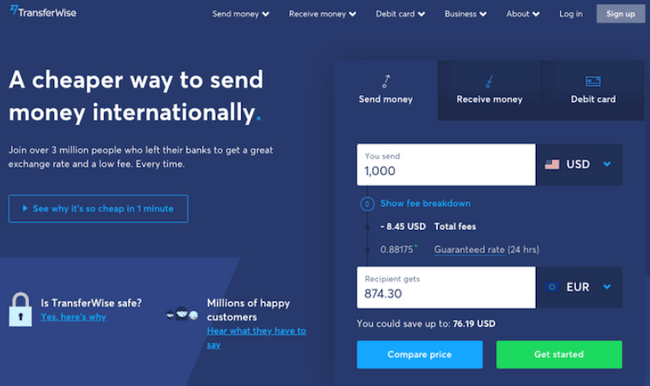
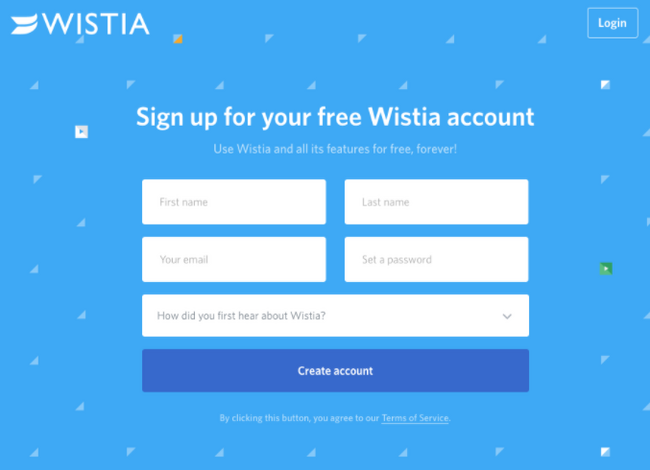
From the above examples, you’ll notice that the landing pages are all simple and clear, and the copy and graphics immediately grab your attention.
These are crucial elements of a successful landing page.
7. Make Your Google Ads Specific
Earlier, we mentioned the importance of understanding user intent when doing your keyword research because this helps you target the right keywords.
Now we want to highlight the importance of specificity. Your keywords shouldn’t be too broad as this might cause Google to place your ad in front of the wrong market.
Naturally, this would lead to fewer conversions.
For instance, “nursery furniture” may seem like a good keyword at first, but you can do better by getting more specific.
Aim for clarity and specificity in your keywords. Instead of just “nursery furniture,” how about:
- “nursery furniture for boys”
- “nursery furniture for girls”
- “nursery furniture in Florida”
It might take a while to get the right keywords, but that’s fine.
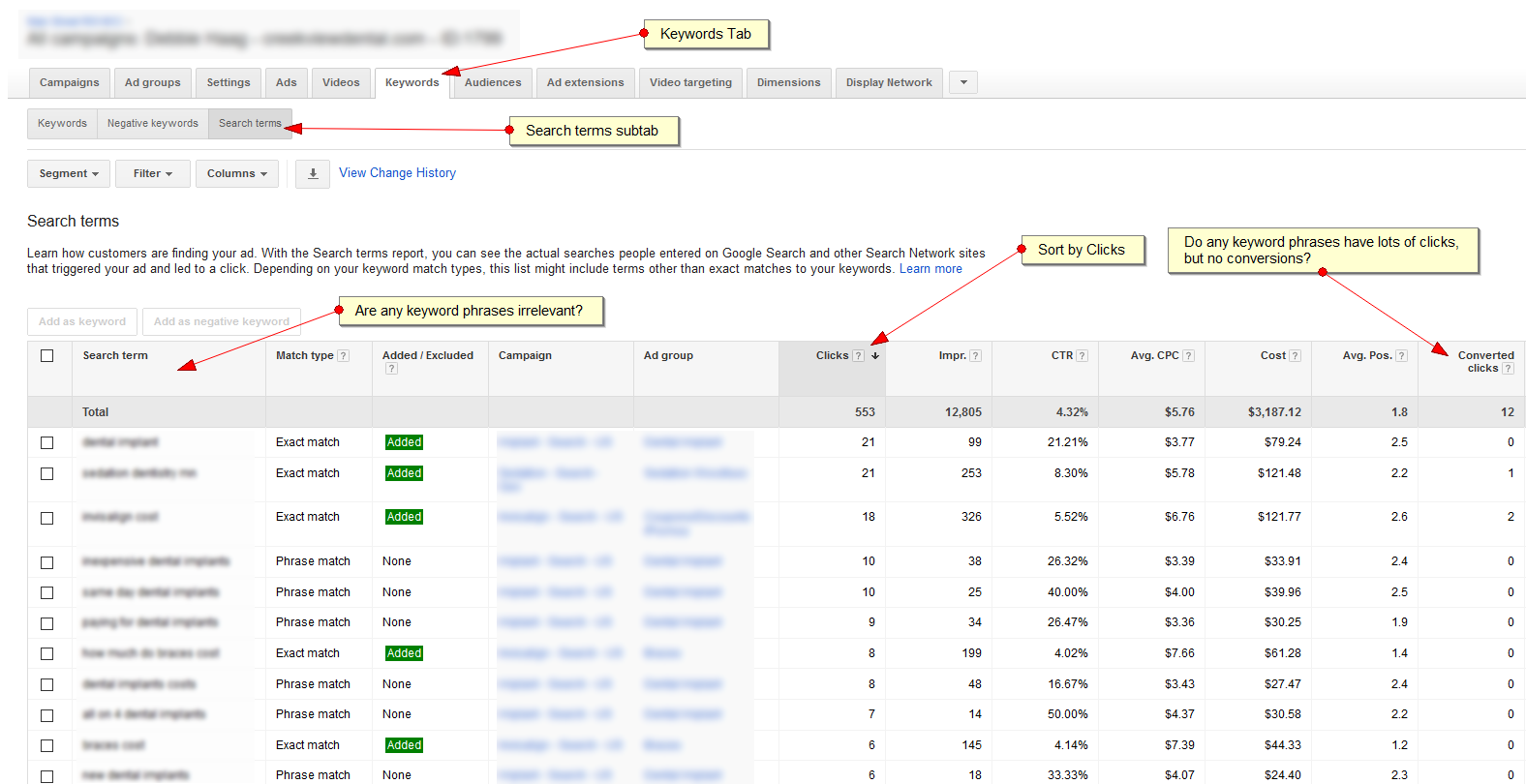
Remember to keep reviewing which keywords are getting the most clicks and which aren’t.
This can help you understand what you should focus on and what to add, remove, or tweak to get the high conversions you’re looking for.
8. Target Your Google Ads
When trying to get the right Google advertising ideas, remember there are three keyword match types: exact, phrase, and broad matches.
Exact Match
Compared to the other keyword match types, the exact match is extremely specific. Initially, if you used this match type, users could only see your ad if they typed in the same keyword phrase.
Since then, Google made a few changes so that even if your user doesn’t enter the exact keyword phrase, your ads might still match.
For this, the match might be with plurals, synonyms, or different variations of your chosen keyword.
Using the exact match type is great because users who type in your specific keyword are more likely to convert.
Phrase Match
Your ad appears for a phrase match if a user enters your key phrase in the exact order, but there can be other words before and after the phrase.
This leaves you with the possibility of increasing traffic.
However, if the key phrase is too broad, this could mean getting lots of clicks that don’t convert because the phrase wasn’t specific enough.
Broad Match
The broad match reaches more people because your ad appears when a user types in any word of your key phrase, in no particular order.
Like with phrase matches, you might get lots of traffic and clicks to your ads, but because it’s not specific enough, there may be fewer conversions.
As you can see, there are pros and cons to all three phrases.
To get the most out of your Google advertising campaign, use a combination of all three so that you get a lot of traffic and conversions.
9. Optimize Your Google Ads for Mobile
While creating your ads and coming up with creative Google advertising ideas, it’s important to keep in mind that many users are using their mobile devices for searches.
Research shows that 61 percent of US Google visits happen via mobile devices. Most people are using their phones for searches, and it makes sense to keep these users in mind.
Optimizing your ads for mobile includes:
- choosing responsive landing page designs
- compressing images
- making sure the loading speed is fast
These small details can make a huge impact on how your ads display in front of your audience and your overall conversion rate.
10. Make Your Google Ads Available in Other Languages
It depends on the nature of your business, but if you have an international audience or you’re in a multi-lingual area, consider making your ads available in different languages to cater to your audience that may not speak or understand English very well.
This may seem like a little detail, but don’t forget that language is powerful and helps us communicate and connect.
If you have a non-English speaking audience you’re trying to reach, help bridge the gap by making the Google ads available in their languages.
Conclusion
It takes a lot to generate great Google advertising ideas. While the process may be a lengthy one, it’s certainly worth it to see increased clicks and conversions.
The above tips can help get you on the right path, but don’t forget to A/B test your ads to see what your audience responds to.
Do you have any other Google advertising ideas you swear by?
The post 10 Successful Google Advertising Ideas appeared first on Neil Patel.
Source: feedproxy.google.com

Become a Google Partner and Join the Google Ads Inner Circle
Does your company manage Google Ads for third parties, and do you maintain some success with the pay-per-click (PPC) platform? If so, you may want to become a Google Partner, the search giant’s members-only club.

Joining the Google Partners program can provide you with immense benefits, such as specialized training, invitations to exciting events, and focused instruction to help you boost your Google Ads performance.
You already know Google Ads work. They convert 50% better than organic traffic, and most businesses earn double their ad spend, making advertising on Google highly effective and a no-brainer.
Almost anyone can use Google’s PPC system to advertise on Google and grow their business (with the right budget and know-how).
Only a select few applicants become Google Partners and earn the endorsement from the world’s most popular search engine, and other significant benefits as well.
How To Become Google Partner?
Here’s what to know about becoming a Google partner.
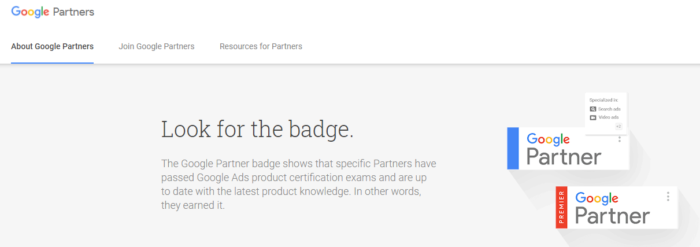
Google Partner Members Get to Display a Google Badge
The definition of prestige on the search engine’s paid advertising platform is a Google Partner badge.
Displaying the badge on your site shows that you’ve passed Google Ads product certification exams.
It also tells customers you possess in-depth product knowledge, making you a Google PPC superstar.
Find the Google Partner Specialties That Interest You
As a Google Partner, you have the option of specializing in one or more Google Ads product areas. These include
- Search Advertising;
- Video Advertising,
- Display Advertising,
- And Shopping Advertising.
Let’s run through them one by one.
Search:
By just passing this certification course, you highlight your ability to create and optimize ads that perform well on Google search.
That means they’re prominently displayed and receive clicks with buyer intent.
And if you need to, you’re able to advise others on keyword strategy and budget planning because you’re a search engine master.
Video:
This certification indicates your expertise in implementing and optimizing YouTube ad campaigns.
Display:
This certification area gives you the means to create compelling visual ads that snag the attention of customers on two million sites and 650,000 apps in Google’s combined networks.
Shopping:
As a Shopping Advertising Google Partner, you know how to place products on Google Search and set up your Merchant Center inventory.
You also know how to create winning Google Shopping campaigns.
Keep in mind: this certification is not available in all languages. See the Google Ads Help Center & learn more.
How Do You Join the Google Partners Program?
Applying to become a Google Partner is free, and anyone can try to join the program.
Google gives you all the information you need to pass the exams and flourish in your chosen certification area.
Whether or not you pass the certification exams is up to you.
What Are the Benefits of Becoming a Google Partner?
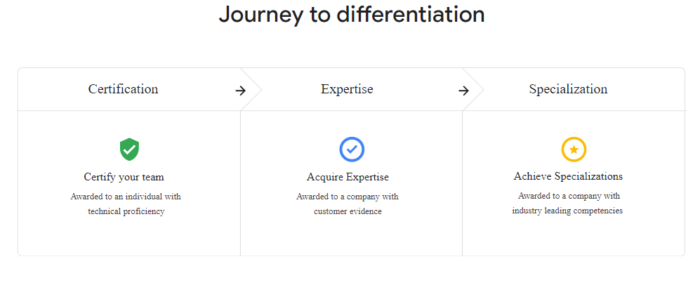
Google wants you to pass the exams and be successful in your Google Ads endeavors.
To help you out, Google gives you access to a range of essential benefits, including education, support, expanded reach, and other rewards.
Education to Succeed

Google has pulled out all the stops to ensure you get the best Google Ad education possible.
Skillshop learning courses help you develop and hone your skills, while certifications are provided to prove your knowledge.
Google also makes available a host of valuable case studies, access to like-minded professionals, and much more on Think with Google and Google Trends.
Valuable Support
Google’s product support is available to help you by giving you access to relevant advice and a range of resources, including Google Ads Recommendations and Google Ads Help Center.
Expanded Reach
With Google Connect, you can display your thought leadership and host co-branded events.
You can even onboard new clients or pitch potential ones with Google Ads promotional offers.
Business Acceleration
Google’s Acceleration program is a specialized online education system designed to help you boost your skills and business growth.
Bonus Rewards
By taking part in the Google Partners Rewards program, you get a chance to expand your knowledge by engaging in a series of quarterly challenges designed to help you gain new clients, optimize campaigns, or obtain certification.
You even get access to seasonal insights, pitch decks, product advice, and a suite of other exciting rewards.
You also have a chance to win prizes.
How Do You Qualify to Become a Google Partner?
The first thing you’ll need to do is pass the required Google Ads certification courses for your specialty areas.
You must also meet the spend requirement across your managed accounts.
Finally, you must demonstrate performance by consistently delivering strong client and company growth.
In other words, you must become an active and exemplary Google Ads user.
What Are the Partner Badge Requirements?
Once you’ve become a Google Partner and have demonstrated your expertise in Google Ads, you can be considered for a Partner Badge. You’ll need to meet a few additional requirements to apply.
Growth
You must consistently show advancing ad revenue and growth, as well as an expanding customer base.
Ad Spend
You must meet a 90-day ad spend requirement of $10,000 across your managed accounts.
This sends a message to Partners that your company has a healthy level of activity.
Google Partners will evaluate your account based on your manager account during an 18-month period.
Certification
Your company needs one user certified in Google Ads who has admin or standard access to the Google Ads manager account.
It can also be any account linked to your manager account.
Google Badge Requirement Changes

Be prepared for a new set of rules to qualify for a Partner Badge.
Many of the basic rules will still apply, but you won’t be required to adopt all the recommendations or achieve a 100% optimization score to earn a badge.
Going forward, you must achieve a 70% optimization score to qualify.
Google introduced this optimization score to help users understand what was working and what wasn’t, and how to fix elements that weren’t performing.
Pay close attention to any suggestions Google gives you, as advertisers who increase their optimization scores by 10 points see a 10% conversion boost, on average.
New Ad Spend Requirements
To qualify for a Google Badge in 2020, your Google Ad spend must be at least $10,000 in 90 days.
In 2021, this requirement will change to a $20,000 ad spend over 90 days, across your managed accounts, to prove your company maintains healthy advertising activity.
Certification
This year, In 2020, your company needs a user to certify in Google Ads or have standard access to the Google Ads manager account.
In 2021, half of your eligible users will have to obtain certifications from Skillshop.
As a partner, you’ll need to demonstrate your proficiency consistently.
Premier Badge Requirements

To meet the requirements for a Premier Partner Badge, you must deliver strong Google Ads revenue and growth, meet a higher ad spend across your managed accounts, and have two or more users in your company who are certified in Google Ads (or who have admin or standard status on your organization’s Google Ads manager account).
In 2021, once your company has succeeded in earning a Google Partners Badge, you have an opportunity to be chosen for Premier status.
The program will grant Premier status to the top 3% of participating companies each calendar year.
The companies are selected based on annual ad spend, client growth, client retention, and other information.
The evaluation process is conducted annually and may exclude some markets.
Get Listed as a Google Partner on the Marketing Platform Directory
When you become certified as a Google Ads Partner, you’ll be listed in the Marketing Platform Directory.
Your listing will include your business name, a short description of your organization, partner type, and the product certifications you possess.
There are two types of marketing platform partners: Certified Companies and Sales Partners.
Certified Company
This descriptor means you’re educated about Google Marketing Platform products.
You’re able to use your expertise to offer quality services to your customers, whether you’re consulting, training, implementing Google products, or offering technical support.
Sales Partner
Certified Companies that help Google sell products are known as Sales Partners.
Becoming one gives you access to special perks such as customer management tools, sales opportunities, and co-marketing opportunities.
How to Obtain Company Certification

Know the Rules
Familiarize yourself with Google’s Partners Terms and Conditions.
It is essential to read the document when you get time. You have a lot invested in Google Ads.
The better you know the rules of the game, the more successful you can be at it.
Initial Requirements
Google will ask for your company’s size and structure, the services you provide, and pricing practices.
You’ll be judged on your track record of client satisfaction and your consistent Google Ad investments’ success.
The reason for this level of scrutiny is that Google wants to work with forward-driven companies that maintain a healthy ad budget and use it wisely.
Google vets you for Partner certification by scouring the web for clear documentation that proves client engagement, planning processes, frameworks, and templates.
Google wants to know your clients can rely on you for complex solutions and receive pleasing results.
Lastly, your website should be populated with useful content that clearly describes your offerings.
Product Expertise Requirements
Certification rules stipulate you must have at least five local, full-time experts working with Google Marketing Platform products.
Each must have passed an associated certification exam.
Google considers your team’s size, expertise, and rate of certification.
The company notes that it does make exceptions for smaller companies who have difficulty meeting this particular requirement.
You’ll also need to submit a comprehensive review of each product you offer.
The review is meant to represent advanced work that shows strategic planning and optimization toward your organization’s goals.
The review will also display your ability to go beyond basic or standard implementations and use and demonstrate your client’s goal through statistics and testimonials.
Google essentially wants a case study that proves you can walk the walk.
How Do You Check Your Partner Status?
You applied for the Partners Program, and you’ve been waiting, but haven’t received a response.
Take action and check the status of your certification.
If you don’t receive certification, keep trying and using the resources Google gives you.
Do that, and you’re sure to become a Google Partner before long.
Conclusion
Being vouched for by Google and having a Google Badge to show for it are just two of the benefits of becoming a Google Partner.
Being a Google partner also gives you access to easily consumable courses.
Google gives you everything you need to maintain a Google Ads campaign and keep it growing far into the future.
And when customers see your Google Badge, watch out.
That may be all they need to choose you for the successful future of their Google Ad campaigns.
Have you tried joining the Google Partners Program?
What was your experience?
The post Become a Google Partner and Join the Google Ads Inner Circle appeared first on Neil Patel.
Source: feedproxy.google.com

How to Choose The Right AdWords Agency
According to Unbounce, half of the people who click on your ads are more likely to make a purchase than those who came from an organic link. That’s a bit surprising.

You’d think with 600 million devices running ad blockers —advertising would be less effective.
Google Ads commands 73.1 percent of search advertising, roughly $40.3 billion. Advertisers couldn’t afford to continue spending that much money on ads if they didn’t work.

Google Ads are effective.
What’s tough for many companies is choosing the right AdWords Agency.
Managing Google Ads takes a lot of time, effort, and energy.
Most companies choose to outsource that hard work to a PPC agency.
If you plan on doing the same, you’re going to need to know how to choose the right agency to manage your Google Ads.
Here’s how you do it.
Know Your Goals and Desired Outcomes
Google Ads is a direct response platform where customers are searching directly for your product or service.
To achieve profitable results with your Google Ads campaigns, you’ll need to have some concrete goals in mind.
In general, companies focus their attention on a few specific goals, such as these listed on Google’s website:
Get more calls to your business:
Use this goal to book appointments, schedule a job, get customers, on the phone, or close a deal.
Increase visits to your store:
If you’re a local business, you’ll want to generate foot traffic to your physical location via your Google Ads campaign.
This goal would be all about generating offline demand.
Drive people to your website:
The all-purpose goal that’s focused on sending people to a specific website so they can fill out a form, purchase your product, request more information about your services, or opt-in to your mailing list.
The ultimate goal for each of these is revenue; each of the examples above would be considered a lead.
Unlike SEO, where results require weeks or months of work, Google Ads is a direct response channel.
A successful ad triggers immediate action from searchers.
The focus is on the action.
Next, you’ll want to create specificity around your goals.
This depends on a few factors like your budget, the keywords you choose, match types, etc.
For example, if you’re running a service business, you know you’ll need a certain amount of leads.
This means you’ll need to identify details like your:
Breakeven cost per click (CPC):
This is the most you’re able to pay to receive a click without losing money.
Conversion rate:
Most people know this one; it’s the total number of conversions divided by the total number of visitors you’ve received.
How many conversions do you need to be profitable?
Breakeven cost per conversion (CPA):
The average cost of a conversion.
Breakeven cost per lead (CPL):
The most you can afford to spend to acquire a new lead.
Customer lifetime value:
This measures the total value of a customer over the course of the relationship.
There are more metrics you’ll need to track, but your agency can manage these for you and provide you with the reporting you need once you’re up and running.
Providing your agency with these numbers makes it easier to set things up; you can use these to set your daily/monthly budget, identify profitable campaigns at-a-glance, or set goals to boost profitability.
It would be best if you had a rough idea of the numbers you need to be profitable — the number of leads, sales, and customers you need each month for the campaign to be self-sustaining.
7 Characteristics That Make a Great AdWords Agency
Here are some things you’ll want to look for when vetting an AdWords agency.
These characteristics are important must-haves.
Use them to determine if the agencies you’re considering are a good fit.
1. Professional certification
The agencies you’re considering should have Google Partners status.
Google explains this more, sharing why this is so important for your agency:
“Achieving Partner status means that your company has demonstrated Google Ads skill and expertise, met Google ad spend requirements, delivered company agency and client revenue growth, and sustained and grown its client base.
Partner status gives your company access to a number of benefits, including the Google Partner badge that can be shown on your website and marketing materials.”
If you’re looking for an agency to manage Google Ads on your behalf, this is important for a few reasons.
It shows prospective clients that:
- Your agency has enough clients to meet Google’s spend requirements
- Active clients are achieving revenue growth, and you’re delivering on your promises
- Your agency is growing (i.e., more clients and revenue)
- Google feels you have the expertise needed to manage Google Ads accounts for clients
If you’re looking for a clear indication that your AdWords agency is legit, this is it.
You’ll also want to verify that each of the paid search strategists on your account is individually certified.
You can verify your agency’s partner status with Google at this URL.
Verification will provide you with a list of Google products your agency has received certification for, their partnership type, and the number of offices certified by Google.
If they have a banner/badge on their website, you should be able to click to verify your agency’s status with Google.
If you’ve requested a proposal, you should receive links to the certification URLs for each of the strategists assigned to your account.
The URL should be displayed in the following format:
https://academy.exceedlms.com/student/award/20xxxxx
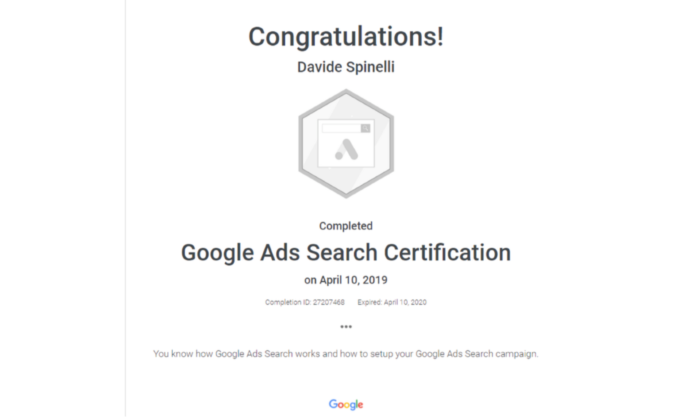
Their certification should provide you with a completion identification number and the completion and expiration dates for their certification.
Here’s what an individual’s certification looks like:
2. You keep assets and creative stuff
Some PPC agencies rely on a pay-per-lead model.
Using this model, they drive traffic to a general landing page or advertorial that generates leads for their clients.
The downside to this model is the fact that clients don’t receive the landing pages, creative, or assets that went into producing the landing page.
This arrangement is great for agencies but bad for clients.
It’s great for agencies because they’re able to use one landing page or ad with multiple clients in the same industry.
Sure, clients receive the leads that they need, but they’re always dependent on the agency that produced them.
They never really figure out how to make things work for themselves.
This approach can work.
If you’re only interested in the leads and you’re not interested in creating your own content, landing pages, or marketing in the future, there’s nothing to worry about.
If you’re also interested in sticking with the same agency indefinitely, there’s no problem.
Change any of those things, and you may not be able to continue to receive the same amazing results you’ve come to expect in the long term.
Insist that your agency provides you with the assets and creative stuff they’ve produced for your business.
3. Total agency transparency
Google requires agencies to be transparent with their clients.
This has been a requirement for some time, and it’s another reason why Google Partner and individual certifications are so important.
“If you work with another company to manage your AdWords campaigns, you should be able to find out how much of your advertising budget (cost) was spent on AdWords, how many times your ads appeared (impressions), and how many times users clicked on your ads (clicks).
We’ll include these requirements in our legal terms and agreements.”
Google also mentions that almost all of its certified partners are already offering this transparency to its clients.
Transparency isn’t common with non-certified agencies; most agencies won’t provide this if clients don’t know any better.
If you’re working with your agency, you should have access to all reports.
You should also have access to metrics including impressions, clickthrough rates, keywords, account and ad group structure, and more.
If you have questions about where or how your money is being spent, you should receive straightforward answers.
Ask your agency about the information they provide to clients if you’re unsure.
4. Short term contracts
Some agencies prefer to lock you into a long-term contract (e.g., 12 or 24 months); this makes sense when you realize it takes a lot of time and resources to set up and launch a new client account.
Most AdWords agencies don’t make money on the account until they’re a few months into the campaign.
This arrangement isn’t always what’s best for clients, especially if the agency fails to perform.
Clients should be able to come and go as they please.
When agencies focus on performing well for clients, the relationship is more stable.
Some agencies can offer month-to-month arrangements profitably.
A compromise could be an initial three-month contract that switches to a month-to-month agreement afterward.
Whatever you negotiate with your agency, it needs to be beneficial for both.
If you’re unhappy with your agency, you should be free to leave.
5. A proven and consistent track record
Your agency should be able to provide you with references and case studies to validate their expertise.
There shouldn’t be any doubt about your agency’s ability to perform.
You should have the data you need to vet their experience and track record accordingly.
It’s not enough to prove that you’ve achieved amazing results for your clients.
You need to demonstrate that you’ve been able to do it consistently over time.
Ask your agency for all of the data you need to validate their performance —references, case studies, anonymized campaign data, and before and after campaign data.
6. A clear process and methodology
Your agency should have an established process for managing and maintaining your account.
They should be able to tell you when they add keywords and create new ads, how they set and maintain budgets across keywords and ad groups, and the adjustments or changes they’ll need to make for various markets.
They should also be able to tell you which tests will be run, how they’ll be run, and the metrics or KPIs they’ll be using to validate performance.
7. Optimize for conversions and revenue
I’m not talking about the Ads setting in your account.
I’m talking about your agency’s focus on boosting revenue.
It’s common for many agencies to focus their attention on impressions or clicks.
Your agency should focus on helping you convert those clicks to revenue.
This means your agency needs to focus its attention on:
- Ad messaging, improving the timing, targeting, and placement of your ads
- Conversion rate optimization to improve the performance of copy, landing pages, and offers
- Setting up analytics and reporting to track performance from keywords to ad groups, to landing pages
- A/B split/multivariate testing to improve campaign performance based on the data you receive from analytics
Google Ads is a direct response platform, so optimizing for conversions and revenue should be your agency’s primary focus.
If they’re focused on anything else, they’re not a good fit.
How to Work With an AdWords Agency
Here’s a list of the things your agency will need from you.
These requirements aren’t hard, but they do require some effort on your part.
Trust your agency:
Your agency needs your trust. If you’re worried about being burned, watch them closely at the beginning of the relationship.
Once you see that they’re competent and they’re able to manage your campaign properly, give them your trust.
Set quantifiable goals:
Clear, measurable goals are what you need.
If you’re looking for leads, set realistic goals on the number you need per day/mo.
If you have a specific conversion rate, make that clear to your agency.
Are you looking for a certain number of bookings?
Make the requirements specified.
Stability and focus:
Goal setting is important, but you’ll want to avoid changing your goals and KPIs repeatedly.
Your agency needs time to gain traction.
Your account managers need time to run tests, analyze performance data, and optimize for KPIs.
Changing your goals repeatedly sets progress back, so you’re unable to get the results you want.
Commit to improvement:
If your website can’t convert visitors, PPC is a waste of your time and money.
This means tactics like website usability and conversion optimization are important must-haves if you’d like to improve your campaign performance.
Be flexible with your offers and price:
Use promos, discounts, bonuses, or incentives to attract shoppers’ attention.
Give your agency the flexibility they need to attract the volume of visitors you need. Let your agency know what your breakeven costs are, then permit them to work with the parameters you’ve set.
Create good products and services:
If your product or service is terrible, conversions will be low.
If you’re selling a product no one wants, or they’re unfamiliar with it, PPC won’t change much.
Advertising can’t save awful products.
Be willing to have a frank conversation about your products and services with your agency.
Give your agency the permission they need to make important decisions on your behalf.
Establish a clear point-of-contact so your account strategists can reach out when they need your help.
Spell out your expectations and communication standards ahead of time.
If you want weekly communication, let your agency know.
How to Find the Right AdWords Agency For You
You can use Google Marketing Platform Partners, HubSpot Agency Directory, or Clutch.co to find an AdWords Agency.
We’ve added a few of the best agencies to make things easier for you.
1. NP Digital – Best for Driving Revenue
My agency, NP Digital, is focused on conversions and revenue.
While many agencies are focused on clicks, we focus specifically on driving immediate revenue for our clients.
Many agencies focus specifically on PPC ads via Google or Facebook.
We offer A to Z paid search support covering: paid media, paid search/shopping, paid social, Amazon, and programmatic advertising.
2. Adventure Media Group – Best for Enterprise AdWords Management
Adventure Media Group got its start as an AdWords training company, then they pivoted to Agency services, focusing specifically on AdWords and landing page design.
They’ve grown quickly, shifting their focus to Enterprise AdWords Management.
3. Ignite Visibility – Best for ROI Focus
Ignite Visibility lists WeddingWire, Tony Robbins, and Mission Federal Credit Union as their clients.
Their agency model is focused on returns.
They’re a full-service agency, but they have the experience to manage paid search campaigns across several channels, including — social, display, and programmatic advertising.
4. Disruptive – Best for larger budget PPC focus (10k minimum)
Disruptive Advertising focuses on something they call results-based relationships.
Their agency has 152 employees and a high concentration of paid search consultants, something uncommon in the industry.
They’ve been listed as a top agency by Clutch.co, Upcity, and others.
Their agency focuses on brands with larger PPC budgets.
5. Voy Media – Best for cross-platform ads
Voy Media focuses on client growth via paid advertising.
They describe themselves as the Swiss Army knife of advertising.
They’re Facebook Ad specialists as well, so their agency is a good fit for clients who are looking to optimize their ad spend and who also rely on multichannel advertising to grow.
6. Megethos – Best for Technical Industries
They’re listed as the #1 PPC Agency in Phoenix.
They offer clients paid search management and conversion rate optimization services that are backed by their data-driven model.
As an agency, they focus on 100 percent transparency with clients.
They’re experienced pros when it comes to promoting tech companies, whether they’re in SaaS, Ecommerce, Tech, or Transportation.
7. KlientBoost – Best for Low Budgets
KlientBoost has a unique business model that works well with low/entry budgets.
PPC is typically an expensive thing for agencies to ramp up, but KlientBoost can make it work consistently for their clients.
Their agency works well with small or local businesses.
8. WebMechanix – Best for Mid-to-Large Businesses
WebMechanix is a performance-based digital marketing agency for mid to large companies.
They’re an award-winning firm that’s focused on paid search advertising.
They offer other agency services as well, but they focus on measurable results and financial impact for their clients.
9. Directive – Best for SAAS Companies
The Directive is a paid search agency for software and SaaS companies.
They describe themselves as next-gen performance marketing for software.
They focus their attention on increasing qualified leads (MQLs) for their clients, helping their sales and marketing teams hit their performance numbers.
10. JumpFly – Best for PPC Specialists
JumpFly specializes in digital advertising focusing on PPC account setup and management for Google Ads, Microsoft Ads, Facebook & Amazon.
If you’re looking for a PPC specialist or you’d like PPC specialists to work with your in-house team, JumpFly may be a good fit.
Conclusion
Clicks on your PPC ads are more likely to lead to a sale.
It sounds surprising, but paid advertising is still more effective than organic links, even with the growth of ad blockers.
Google Ads work.
But AdWords management is difficult, that’s why you need an agency.
Use this post as a guide to choose the right agency to manage your Google Ads.
Vet your agency carefully.
Then, once you’ve found the agency that fits your needs, give them the tools and resources they need to boost your revenue.
The post How to Choose The Right AdWords Agency appeared first on Neil Patel.
Source: feedproxy.google.com