
Tag Archives for " facebook "

Facebook Lead Ads: What They Are and How to Use Them
It has 2.89 billion monthly active users, a global presence, and a massive influence on consumer buying decisions.
What am I talking about? Facebook, of course!
Given its broad audience, marketers and businesses can’t afford to ignore Facebook if they want a fresh pool of prospects to target.
However, there’s another reason why you should use Facebook: they provide many innovative tools to help anyone drive more attention to their products and services by targeting specific audiences.
One of those tools is Facebook lead ads.
What Are Facebook Lead Ads?
Facebook lead ads allow marketers to generate leads on Facebook among users who might be looking to buy your product or services.
Rather than the traditional landing page, these ads keep users on social media while the prospect fills out a simple lead form with basic details such as their name, email address, and other contact information.
When a prospect completes an “Instant Form”, they get added to the company’s email list where they receive updates and offers (if you have an active mailing list).
Alternatively, you can customize Facebook Instant Forms—making it easier to target your audience (and filter out non-relevant customers).
With Facebook lead ads, you can choose from several campaign types, including:
- demos
- downloads, like PDFs
- discounts
- event advertising
Facebook users will then see lead ads in different site areas, including news feeds, Messenger, and even articles.
How Facebook Lead Ads Work
Facebook lead ads work in much the same way as other advertising. You can create your adverts by going to Facebook’s Ads Manager.
Once there, you establish your budget while adding your descriptions, images/videos, and other design elements for a successful ad. You can also customize your ad by using specified interests or demographics to target your ideal audience.
Ads then get shown in users’ feeds, where they can respond to your offer, helping your ability to generate more leads.
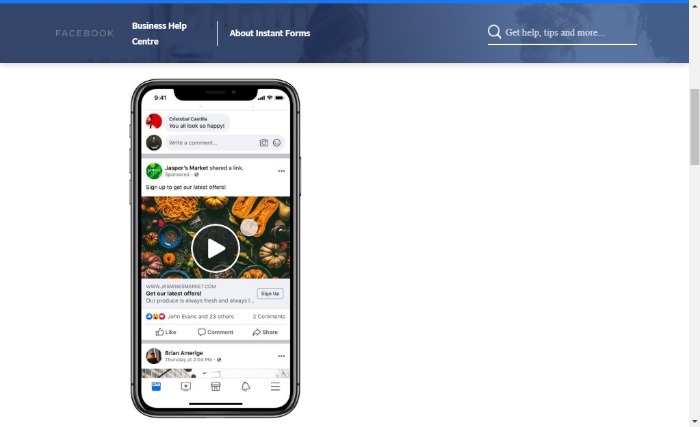
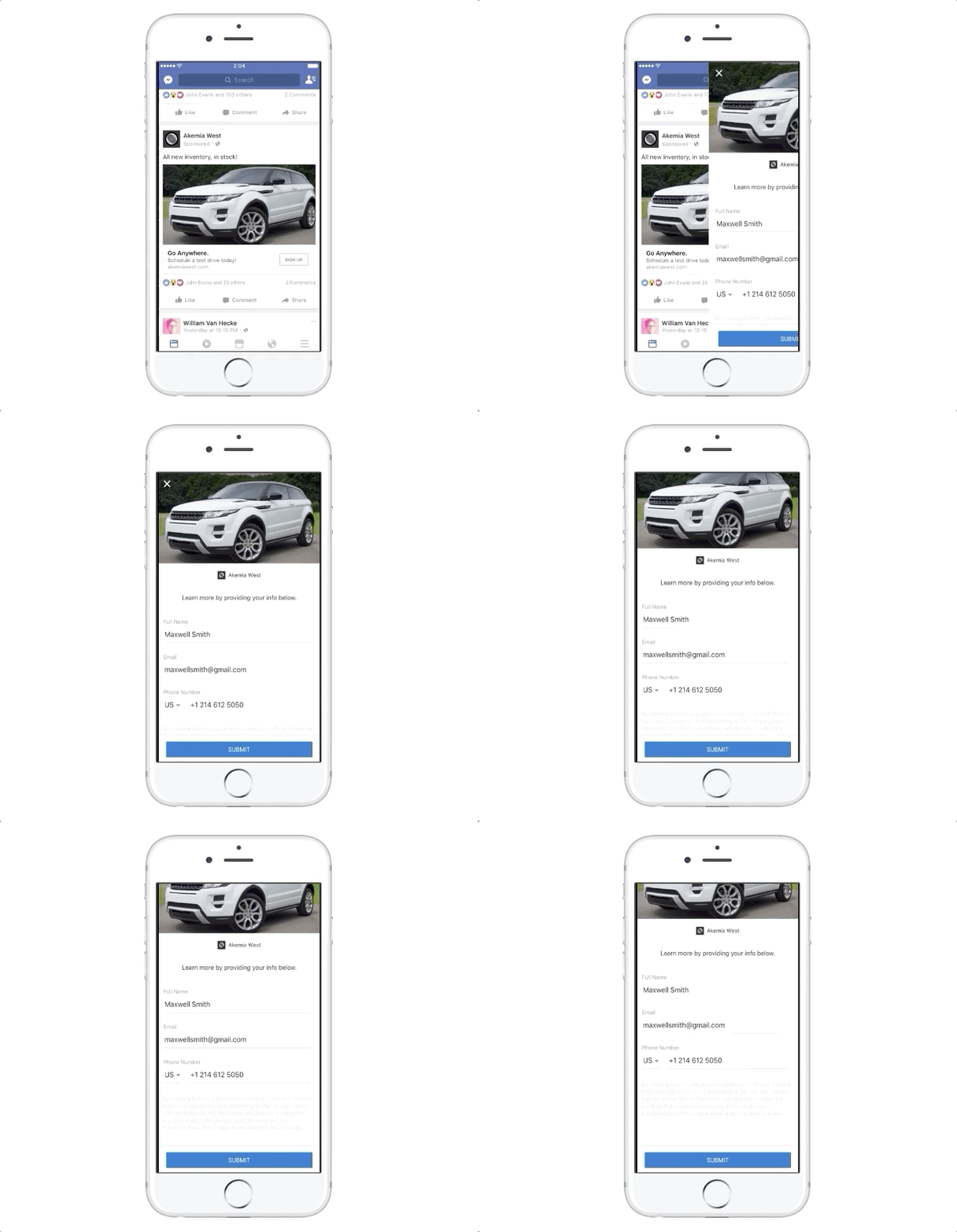
From a user’s perspective, Facebook Lead Ads don’t look different from other link ads. Once clicked, they take the Facebook user to a form rather than a website, like in the example below.
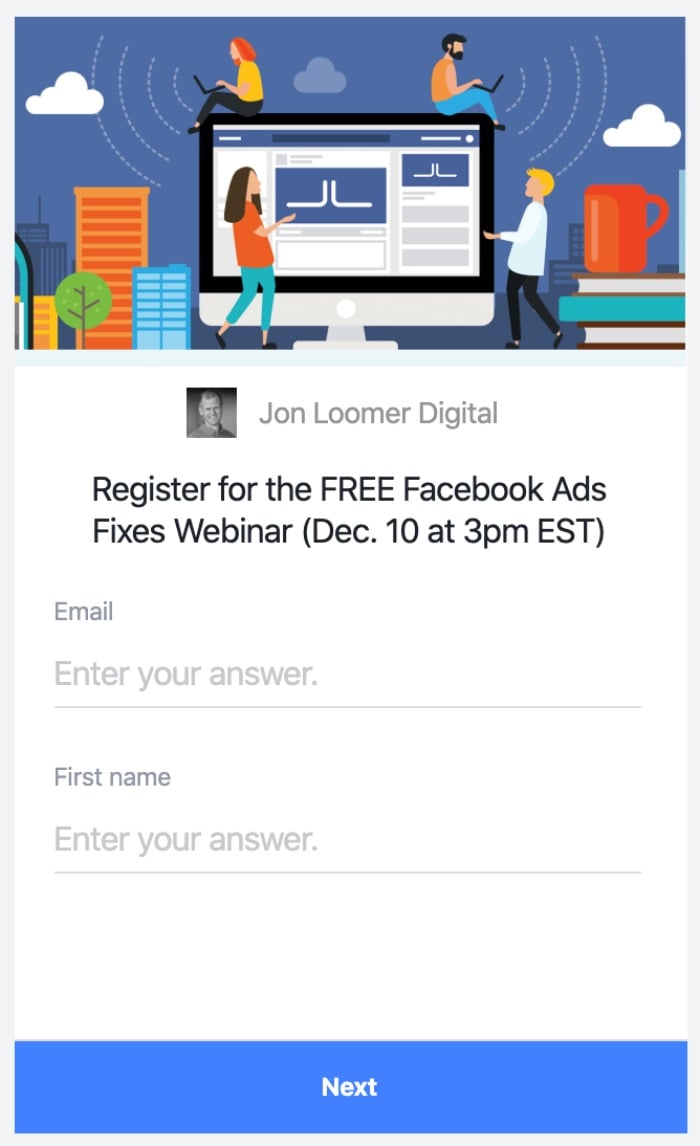
When creating the Facebook lead ad form, you get to decide what information you’d like to ask for. Aside from the pre-filled data, you can also select from a list of custom questions types such as:
- multiple choice
- short answer
- store locator
- conditional
- appointment request
Benefits of Facebook Lead Ads
The most obvious benefit of Facebook lead ads is that they give prospects an easy way to provide their information—especially if you choose the pre-fill option—allowing you to collect leads in a more efficient and straightforward way.
As for marketer and small business owner benefits, you can customize questions for your forms, have a better chance at increasing conversions, and access a mix of new lead generation campaigns.
Some other significant benefits of Facebook lead ads are:
- targeted audience segmentation
- easy data collection
- mobile responsiveness
- a better understanding of your customers
As you can see, you’ve got plenty of reasons to explore these ads and get to know how they may work for you in your business.
Why Should Marketers and Small Businesses Use Facebook Lead Ads?
The reality is marketers and small business owners are busy and can’t be everywhere at once, even if you might want to be.
That means you need to focus your marketing efforts on maximizing success.
That’s why it makes sense to use tools like form-driven ads to capture leads efficiently and dynamically (without too much effort and time commitment on your part).
You can use Facebook lead ads in any number of ways, including:
- finding prospects for your products/services
- gathering subscriber details for newsletters
- gaining insights into consumers behaviors
- encouraging people to sign up for courses and events
Facebook Lead Ads Best Practices
There are plenty of ways to make the most of your Facebook lead ads. Let’s start with the basics.
A few best practices include:
- ensure your ads are in line with your business goals
- make sure your ad messaging is consistent with your brand
- create a clear and effective call to action (CTA)
- use CTAs that speak to your specific audience
- keep the ads simple
- spell out the benefits
Facebook has a heap of helpful suggestions too. These include:
- Decide on the right budget and use ad scheduling.
- Create lookalike audiences to help find your ideal customers.
- Reach previous prospects with the Engagement Custom Audience feature.
- Run ads on both Facebook and Instagram.
- Add an engaging image/video.
Just a quick note: it’s definitely worth reading up on Facebook-published articles for a wealth of tips on increasing conversions from Instant Forms.
Before moving on, here are a few more things to consider:
- Find the right leads: By pairing Facebook lead ads with the platform’s audience selection and optimization tools, you can reach the right audience at the right time every time.
- Ask the right questions: Only you know what information you’re looking for from your audience. Ask the most important questions up top to ensure that you get the information you’re angling for.
- Integrate your CRM: Rather than losing your leads, you can integrate Facebook lead ads directly with your CRM, allowing your system to immediately reach out to interested parties.
Now you know what makes a great ad, let us look at some examples.
Examples of Great Facebook Lead Ads
Many brands in different niches are using Facebook lead ads to their advantage and, as you can see from the following examples, there’s a ton you can learn from them.
Let’s start with the Wealth Factory.
The Wealth Factory
Let’s face it. If someone is going to click on a link, they want to know what’s in it for them. When the benefits are clear, and they can see what they gain from clicking through, they are more likely to take that extra step.
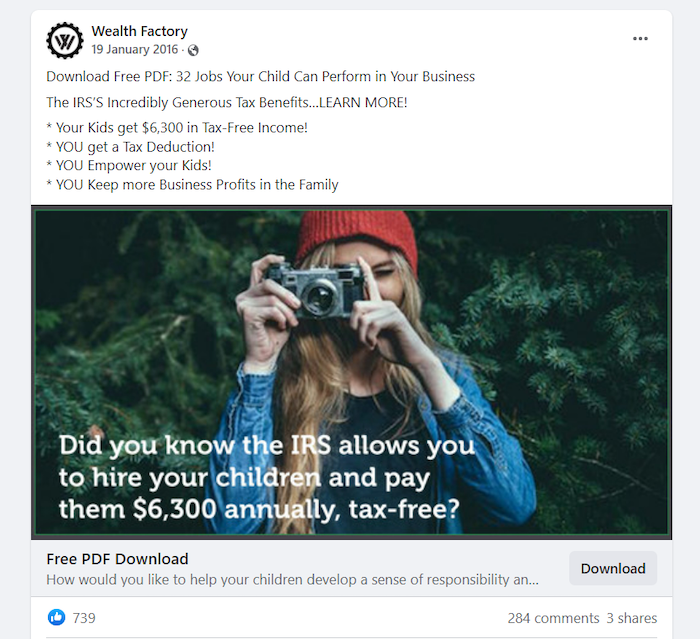
That’s what The Wealth Factory does so well with its Facebook lead ads. The free PDF details the IRS’s tax benefits and lists 32 jobs that your child can do to help you in your business.
As you can see from the ad, the benefits include a sizable tax-free income for your child and a tax deduction for you as a business owner.
To find out more, Facebook users complete the super-short form and click send. It doesn’t get much easier than that.
This is an approach you can adapt for your campaigns.
Make the benefits clear and bullet point them, so people see at a glance what they’re set to gain, and you can encourage Facebook users to click through with a clear CTA.
Boux Avenue
Another proven technique guaranteed to inspire consumers to spring into action is offering a discount. After all, who doesn’t love a bargain?
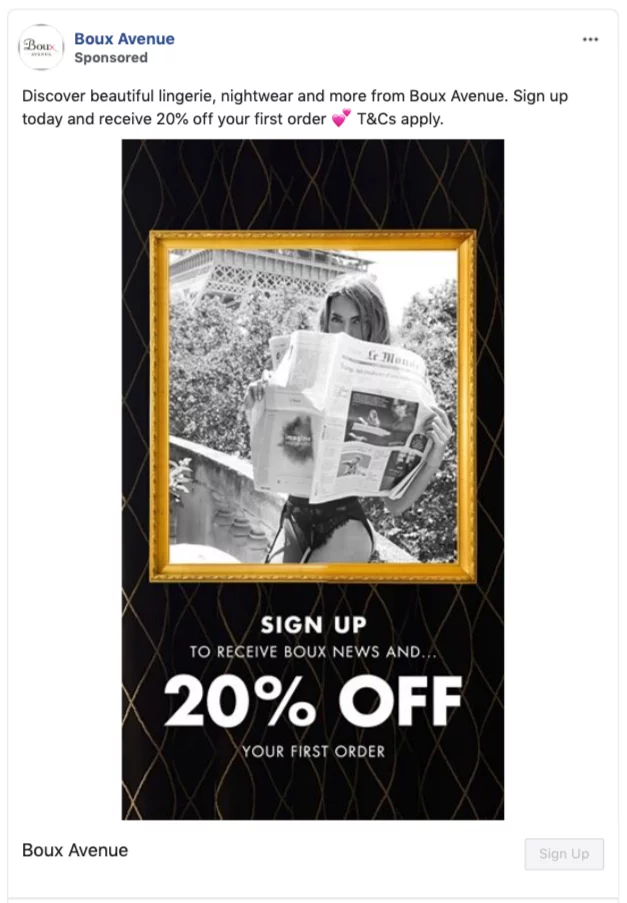
That’s what Boux Avenue does with its Facebook lead ads form. Like the Wealth Factory, it’s very clear about the benefits of signing up (a 20 percent discount and a regular newsletter).
To make the decision even easier, Boux Avenue makes signing up a snap with pre-filled information and a CTA button.
Offering a discount is something most businesses can do, and by simplifying form completion, you’re increasing the chances of prospects clicking. Bear that in mind with your ads, and add a time limitation to discounts to create urgency.
How to Set Up Facebook Lead Ads
Creating Facebook lead ads involves some basic preparation.
First, Facebook advises businesses to familiarize themselves with the terms of service and its advertising policies. If you want to list some questions on your form, Facebook suggests you ask your legal team to look them over first.
Then there’s just one more bit of prep: you need the link for your privacy policy as it will appear on the form.
With all that done, you’re ready to start creating your first ad. It’s simple to do. Just follow these steps:
Creating a Successful Facebook Lead Ad
- Log into your Facebook business account and click on “Publishing Tools.”
- Go to the “Forms Library” on the left-hand side of the page and click.
- Next, click “+Create”.
- Select “New Form” or “Duplicate” if you already have a form.
- Go to the “Create Form” window and fill out the “Form Name” box.
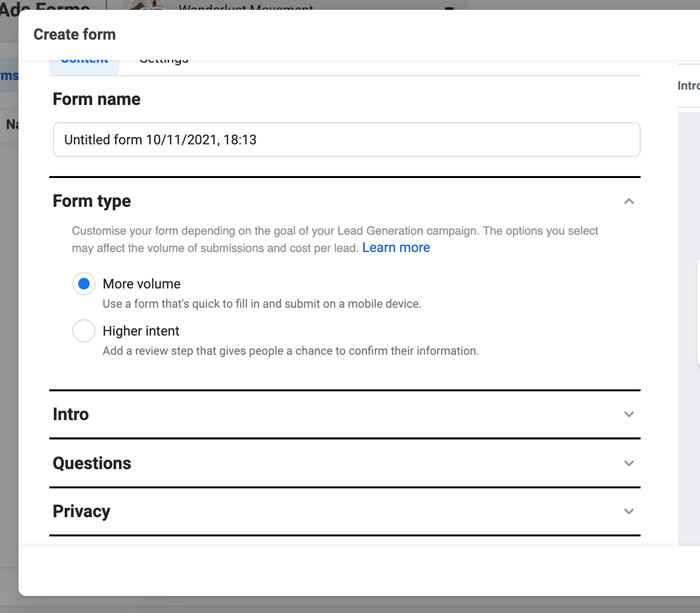
- Now, go to the “Form Type” field and select which form you’d like. There are two choices: Selecting “More Volume” lets you make accessible fillable forms suitable for mobile users. While setting “Higher Intent” allows users to review and confirm their details first.
- Next, go to the “Intro” section and create an introduction screen. Facebook has details on how to complete this stage. Here, you can add your images, headlines, and descriptions about your products/services.
- Go to “Questions” and choose + “Add Question.” Facebook lets you list up to 15.
- Next, move to the “Prefill Questions Section.” Fill out the description and explain how you intend to use or share the information people give you. Remember, you can’t use the info you gather for any other purpose other than the one you state.
- Select any pre-filled information you want for your form. Select categories by clicking “+ Add Category.”
- Go to “Privacy” and include your link text and the URL to the “Privacy Policy” box. You can also add a custom disclaimer by clicking “+Add Custom Disclaimer.”
- Move to “Completion.” Put in your headline, descriptions, CTA button, and add a link. You can include up to 60 characters for Headlines and CTAs.
- Click on the arrows on the top of “Form Preview.”
- Select “Publish” or “Save Draft” if you want to edit later. Ensure all your details are as you want them because you cannot edit your Instant Form once you’ve published it.
- Choose “Boost” to send out your form as an ad. Select your image/video, text, audience, length of publication, and budget.
- Click “Promote.”
- Congratulations! You’ve just created your first Facebook lead ad.
Frequently Asked Questions About Facebook Lead Ads
How much do Facebook lead ads cost?
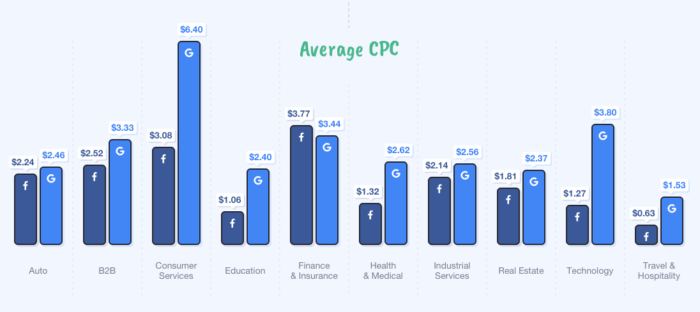
Compared to other platforms, Facebook ads are not wildly expensive. On average, Facebook advertising costs $0.97 per click and $7.19 per 1000 impressions. These low numbers make advertising on Facebook extremely attractive to marketers across industries, with over seven million advertisers actively trying to engage consumers on the platform.
What are dynamic Facebook lead ads?
Dynamic Facebook lead ads are a cost-effective way to create and test ad variations and choose which one performs best. They allow advertisers to show different offers, images, and CTAs to each individual. Dynamic Facebook lead ads offer greater personalization and let you create locally relevant ads to enhance lead quality and increase sales.
What is the format of Facebook lead ads?
Ads come in-text links and carousels, and appear on different areas of the site, like feeds. Users see them labeled as “sponsored.”
Are there any tools for testing Facebook lead ads?
Marketo has a Facebook lead ads testing tool for checking functionality and Hevo Data has a similar tool. You can also measure parameters by adding them to your lead form.
Don’t forget to do some A/B testing as well to see which ads work best for your ideal audience.
Conclusion: Facebook Lead Ads
Facebook has a massive reach, which is why it makes sense for marketers and business owners to explore the available tools to get your products and services in front of a considerable audience. One of those tools is Facebook lead ads.
With the ability to create custom leads, Facebook lead ads provide significant advantages to advertisers.
Marketers can customize form fields, capture more prospect information, and target more relevant audiences while making the experience as simple as possible for users.
Aside from customization, Facebook lead ads offer many other advantages including increased conversions and getting a better understanding of your customers—making them an important part of any lead generation strategy.
Do you use Facebook lead ads? How are they working for you?
Source: neilpatel.com

How to Use Facebook Business Suite
Are you struggling to keep up with your Instagram and Facebook marketing?
DMs and comments falling through the cracks?
Do the multiple tabs for all your accounts and features like the Ad Manager drive you nuts?
Then you’re going to fall head over heels with Facebook Business Suite.
It’s the platform’s newest creation, designed to iron out the time-sucking road bumps in social media management and make it easier for businesses to manage their Instagram and Facebook profiles.
Below, I’m breaking down everything you need to know about Facebook Business Suite. We’ll unpack what it is, everything you can do with the tool, how it can benefit your business and a quick walkthrough on how to set up your account.
What Is Facebook Business Suite and How Does It Work?
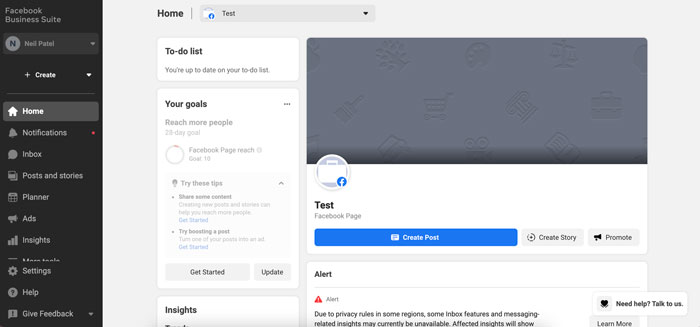
Facebook Business Suite streamlines your Facebook and Instagram accounts into one easy-to-use dashboard.
Through the platform, you can manage all accounts you own or administrate with various tools to make controlling your business’s social media presence much easier.
The best part? It’s free and available on mobile and desktop.
All you need to do is link up your accounts, and you’ll instantly have access to an overview dashboard of your Facebook Pages and Instagram accounts.
You’ll be able to:
- a to-do list of notifications to manage
- check insights on your performance and audience growth
- create or see recent posts or stories
- create or manage recent ads
- see content calendar
- view content inspiration
- communicate with an inbox for Facebook and Instagram DMs and comments
- access the Commerce Managercheck Business Suite updates
That’s only the tip of the iceberg.
There’s an entire “more tools” section with 12 other features to play around with, including:
- appointments
- ad manager
- events manager
- instant forms
- media library
How to Use Facebook Business Suite
Before you can start streamlining your social media management with Facebook Business Suite, you’ll need to follow a simple setup process.
Step 1: Create a Facebook Business Account
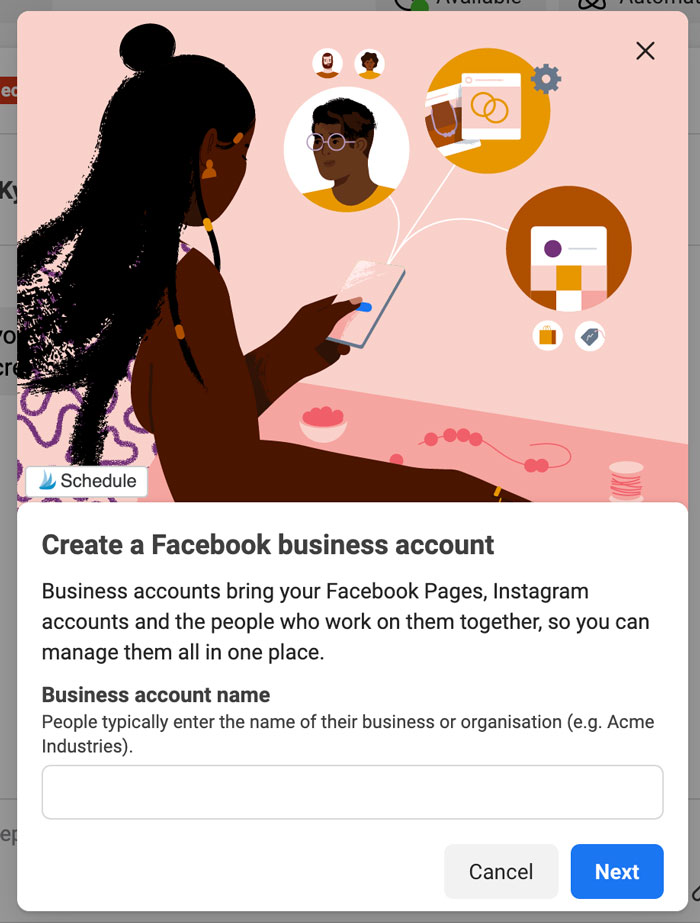
Go to https://business.facebook.com/ and select “Create a Facebook Business Account.” Enter your business account name and select “Next” when you’re done.
Step 2: Fill in Your Contact Information
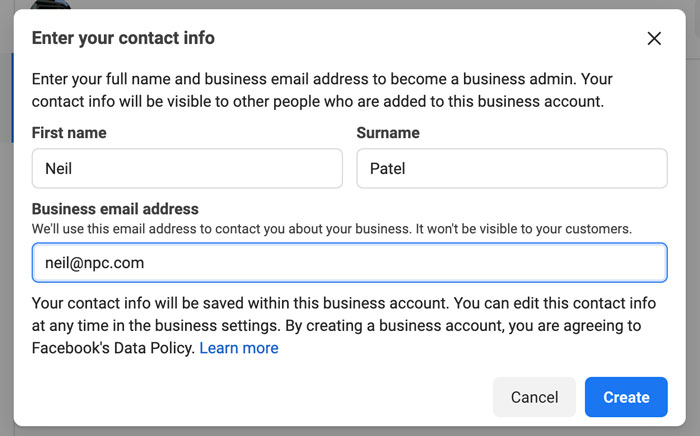
Enter your full name and business email address. This information won’t be shared with your followers. Facebook will only use it to contact you.
Step 3: Select Your Facebook and Instagram Accounts
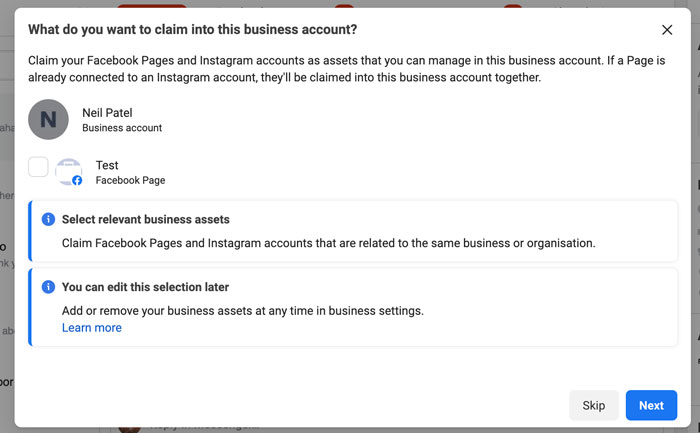
The Facebook and Instagram accounts you own are available for you to claim. If you’re managing an account someone else owns, you won’t be able to select it.
In order to select an Instagram account, it needs to be converted to a business or creator account. If you try to select a personal account, Facebook will ask you to switch before continuing the setup process.
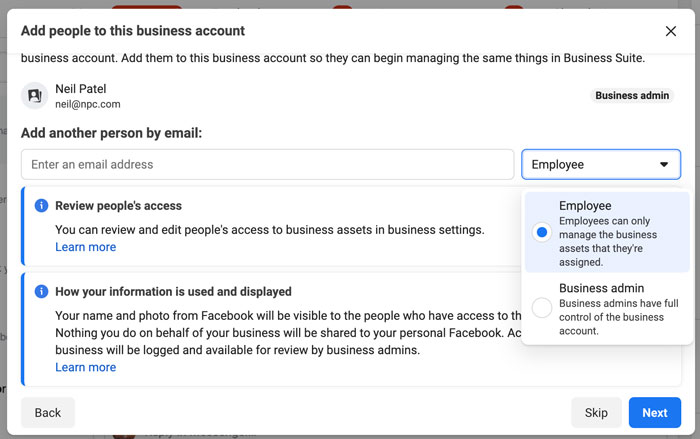
Step 4: Add People to Your Business Account
Here, you can select your page admins. Enter their email address and assign each contact as an employee (limited access) or business admin (full access).
If you’re running your accounts solo, you can skip this step.
Step 5: Review Your Business Account
When you’re happy with your selection and who has access to your Business Suite, click on “Confirm.” Facebook will then take you to your dashboard overview, and you can start using all the tools inside the platform.
Tools to Use in Facebook Business Suite
Curious about the tools inside Facebook Business Suite? Let’s take a deep dive and look at what you can do with the platform and how it can benefit your business.
Monitor Your Inbox
Are comments one of your biggest time suckers? Do you constantly find yourself hopping between apps on your phone or getting inundated with notifications on your desktop?
With the inbox tool in Business Suite, you can see all your Instagram and Facebook comments in one place.
Pop the kettle on, make some coffee, block out 30-minutes in your calendar and respond to everything at once.
- What about direct messages (DMs)? You’ll find that here too.
- Got the Facebook chat plugin on your website? You can manage all your messages here as well.
- Sick of replying to the same question every single day? Business Suite lets you create automated replies for your frequently asked questions.
How’s that for efficiency?
Explore Insights
There are tons of free and paid tools that show you Facebook and Instagram analytics, but few compare the platform’s built-in option.
With Business Suite, you can see your latest statistics for all your accounts.
Gone are the days of toggling between the different apps or going in and out of individual posts.
On the Insights dashboard, you can see an overview of how your content is performing over a specific time period, and sort your posts by:
- reach
- likes and reactions
- comments
- shares
- results
- cost per result
- link clicks
- recent content
One of the most interesting features of Insights is the Audience section. It breaks down your current audience for both platforms, and you can see at a glance:
- age and gender
- towns and cities
- stop countries
There’s also a potential audience tab. It details your estimated audience size if you run an ad, as well as the top pages liked by your potential audience.
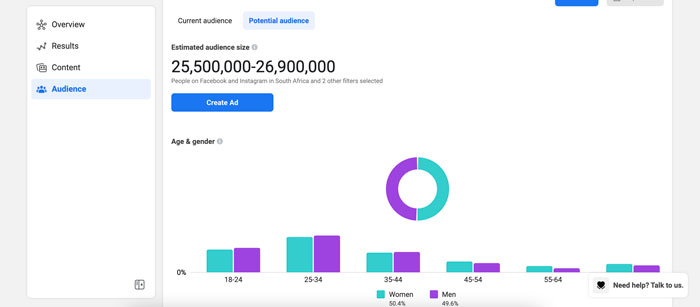
Not liking what you’re seeing? You can create a custom audience by clicking on the “filter” button and refining the results based on:
- location
- age
- gender
- interests
- language
Create Posts and Stories
Are you using post-creation apps like Later or Planoly? Business Suite sets itself up as a rival by giving you the ability to create your posts and stories in one place and schedule each one out.
That’s not all.
If you go to the Planner section on your dashboard, you’ll see a calendar view of your past and upcoming posts.
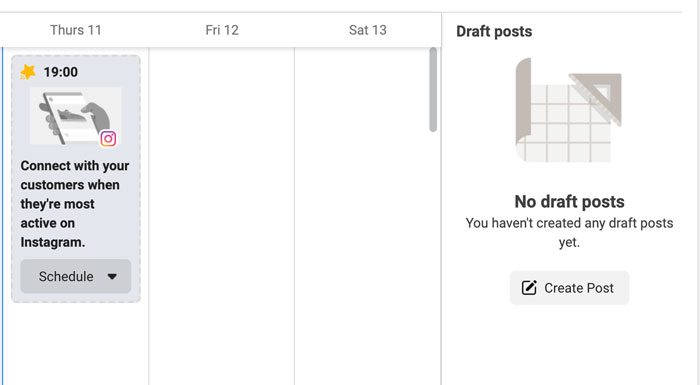
Facebook also recommends a timeslot of when your audience is most online. Click on it, and you can start creating a new post or story.
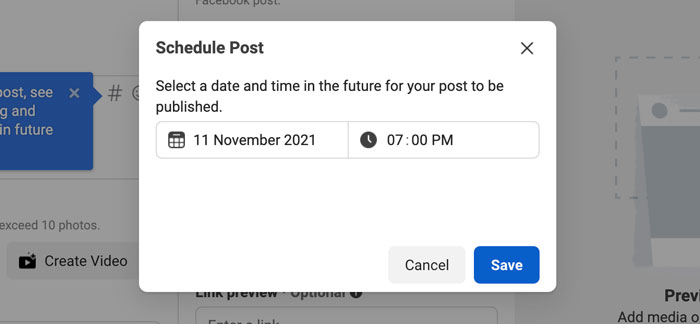
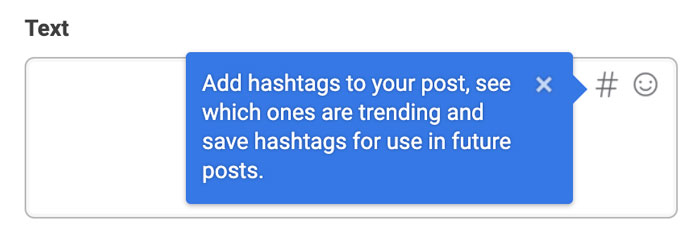
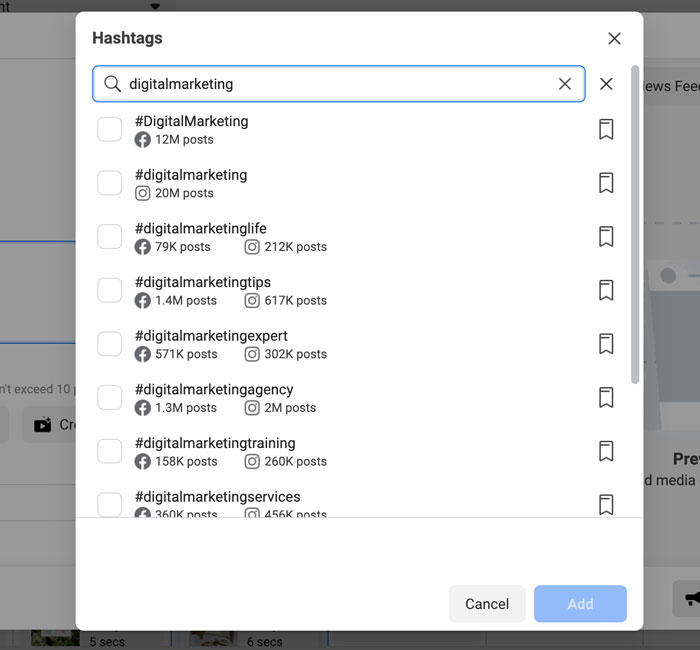
One of my favorite features in the “New Post” box is the hashtag tool. It shows you which hashtags are trending, the number of posts using a tag, and lets you save your favorites for later.
Plus, it shows you hashtag results for each platform and gives you recommendations based on what you’ve already selected.
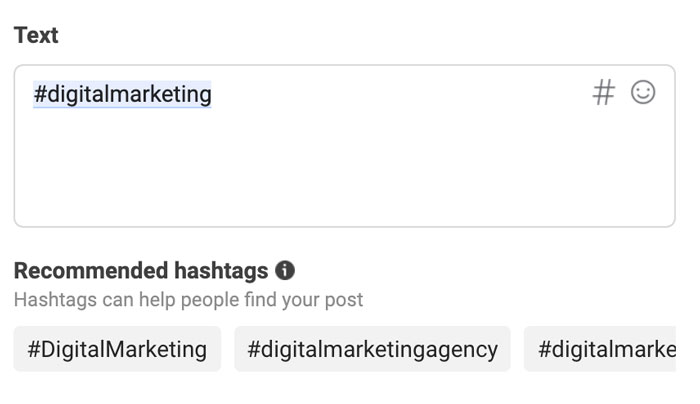
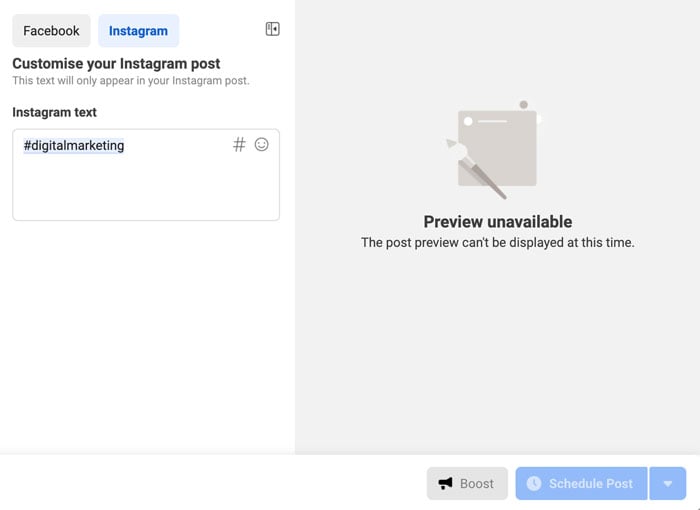
While in create mode, you can put together your Instagram and Facebook posts at the same time. Switch between the different tabs, and you can see exactly how your post will look on the two platforms.
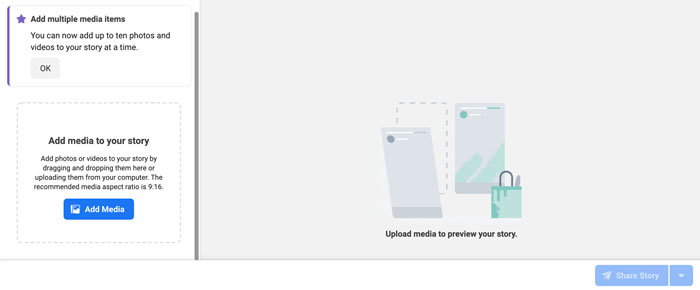
For Stories, it works the same. Upload up to 10 photos or videos at once and schedule each one out when you’re done.
Create Ads
Don’t want to have another tab open for Facebook Ad Manager? You can keep track of your ad performance and create ads from the Business Suite.
It’s another time-saver and allows you to see how you’re tracking towards goals.
On the dashboard, you can see:
- reach
- post engagement
- link clicks
- page likes
Switch between the different filter views to see your results over the last 90, 60, 30, and 7 days.
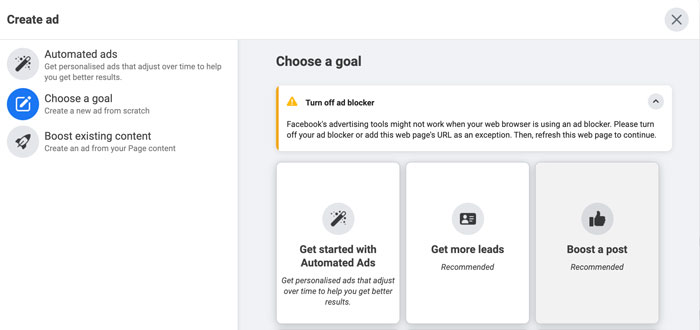
Click on the blue “Create Ad” button in the top right-hand corner to create an ad. A pop-up will load and take you through a step-by-step process for setting up a creative that converts.
First, you’ll select your ad goal. You can choose from:
- automated ads
- get more leads
- boost a post
- boost an Instagram post
- promote a page
- get more website visitors
- get more messages
Next, start designing your ad creative. You’ll see a live preview as you adjust your text and media.
Turn on automatic adjustments if you want Facebook to tweak your ad for each viewer. For example, the platform might adjust the brightness or show the original aspect ratio if it thinks the ad will perform better.
Scroll down to select your audience or create a new one, placements, and set your campaign budget and duration.
When you’re done, click on “Promote Now” for your ad to go into review.
Create Appointments for Your Business
Remember those extra options I spoke about earlier?
One of the most important features of an online business is the appointments scheduler.
If you’re running a service-based business, take advantage of Facebook’s capabilities and empower your audience to book directly through the platform.
When people don’t need to log onto another site to complete the process, you’re removing an extra step and making it that much easier to close a sale.
The result? A boost in your bottom line!
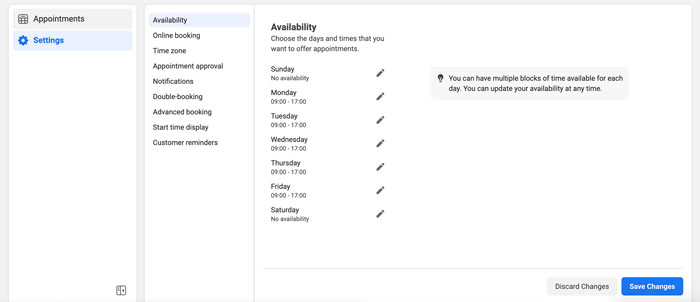
Inside Business Suite, you can manage your appointments, view requests, and adjust the settings to suit your schedule.
Generate Leads With Instant Forms
Does your business rely heavily on lead gen? Start using Facebook’s Instant Forms.
What are Instant Forms? Think of it as a mini CRM system. When you create an ad and set your objective to find leads, you can create custom forms users can fill out without leaving the platform.
Again, you’re removing the obstacle of trying to get them to go from one website to another. Thus, improving your chances of someone filling out the form and requesting a callback.
With Business Suite, you can manage your forms and set up the CRM system.
When you create a form, Facebook offers different options depending on your lead generation goal.
For example, you can create a “more volume” form (a quick option) or a “higher intent” (adds an extra step for users to review their information before submitting).
Frequently Asked Questions About Facebook Business Suite
What’s the difference between Facebook Business Suite and Business Manager?
The difference between Business Suite and Business Manager is the features. While Business Suite has all the same features as Business Manager, it has many other capabilities that make it the more robust option for social media management.
What is Facebook Business Suite used for?
The Facebook Business Suite is used for managing your Facebook Pages and Instagram accounts in one dashboard. You can reply to comments, create posts, schedule stories, run ads, and more.
How do you qualify for Facebook Business Suite?
You need to have a Facebook page. If you have an Instagram account, you’ll need to convert it to a business account if you want to sync it to your Business Suite.
Is Business Suite on Facebook free?
Yes, Facebook Business Suite is free to set up and use. All you need is a Facebook account and a Facebook Page to get started on the platform.
Facebook Business Suite: Conclusion
Facebook Business Suite is perfect for creators, personal brands, and businesses to streamline their social media management across Facebook and Instagram.
It gives you everything you need to monitor your growth, stay on top of comments and DMs from your audience, schedule your content, create ads, and so much more.
If you’re only using these two platforms to run your business and you’re using other social media management tools, it’s worthwhile to take a peek inside Business Suite. You might find it’s a more robust tool, and you can nip another business expense from your monthly budget.
What are your thoughts on Facebook Business Suite? Are you going to make the switch and use it to manage your Facebook and Instagram accounts?
Source: neilpatel.com

How to use GIFs in Instagram, Facebook, and Snapchat Stories
Learning how to use GIFs on Instagram Stories is a great way to give your audience exactly what they want: To know who you are and why they should do business with you.
GIFs get the point across quickly and save the small talk for later. In this guide, you’ll learn why you should start using them and how to do so.
Why Should You Use GIFs in Instagram, Facebook, and Snapchat Stories?
Posting GIFs on Instagram Stories isn’t just fun or quirky thing to do. As marketers, we always have our ultimate goal in mind: To create conversions.
Believe it or not, GIFs are powerful marketing tools that you can use across all social media platforms.
Here are some of the ways that the best marketers use GIFs to their advantage.
Increase Brand Awareness
We all know the internet loves cats. A cat GIF is sure to show them how great your company is, right?
Not necessarily.
When it comes to GIF usage, context and branding matter. You can’t just throw a GIF up and expect it’ll draw people in. You still want people to recognize your brand and its personality.
If you work for a funeral home, it’s unlikely a cat GIF will ever be appropriate.
However, if you work for a lighthearted company that sells hydration products for the morning after a night of partying, this cat gif from Corporation Cats could be perfect when posted with an amusing caption:

This goes double if your brand colors just happen to be yellow and pink!
Develop Brand Interest

While this point goes hand-in-hand, it’s essential to understand the difference between brand awareness and interest.
If you’re developing brand awareness, you’re letting people know about you for the first time.
If you’re building brand interest, you’re trying to appeal to those who are on the fence about you.
Now you have warm leads, and you’re trying to reel them in so they’ll make a purchase. Take that GIF of the cats with the wine glass hats, and add a 25 percent off code.
By showing your brand’s personality and giving an incentive to buy, you may go from awareness to interest to conversion, all through one very short video.
Deliver Your Important Message
As brands realize that their audience, particularly millennials, care about causes and make purchasing decisions based on brands’ values, they have gotten increasingly on board with taking sides.
To draw extra attention to a cause your company believes in, you can use a GIF rather than a block of text or a static image. For instance, if global climate change is your company’s focus, you can use a GIF about that to draw the eye.

If a potential customer’s values align with yours and their eye is drawn to this GIF, they may be more likely to click on it to learn more about you and your beliefs.
Simpler Than Video but Better than Images
Visual communication helps you better communicate with your audience. In fact, producing visual content is becoming an industry standard.

Images generally draw the eye better than text.
Videos usually draw the eye better than images.
However, videos can be expensive to produce. GIFs? You can often find them for free! You just need to make sure your message gets across when you choose your short, moving image.
GIFs Communicate a Lot in a Short Time
GIFs are great for helping users consume a lot in a short amount of time. Plus, they usually loop. If they missed your message the first time, it’ll come back around again.
GIFs could serve as the ultimate “pattern interrupt.”
How to Use GIFs in Instagram, Facebook, and Snapchat Stories
In marketing, there’s always a right and wrong way to do everything. In this case, we want to discuss some of the best ways to use GIFs on Instagram Stories, Facebook, and Snapchat.
Create Branded GIFs
While you may see similar GIFs over and over while scrolling through social media, this doesn’t mean you’re limited to those created by others. Instead, you can design branded GIFs that combine many of the factors we’ve discussed so far.
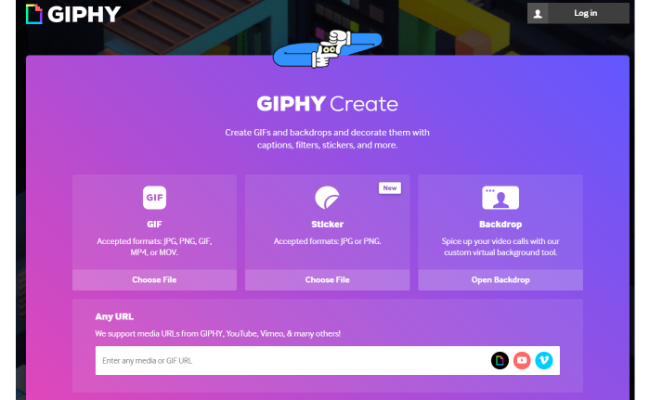
A great way to do this is with GIPHY. This tool allows you to create GIFs and add captions, filters, stickers, and more. Many of the GIFs you find on the internet are made using this tool.
The process doesn’t take too long, and they provide many customization options for you to choose from.
Other, more advanced companies are also out there. Depending on what you want to do, you may need to upload images, and some premium features require a subscription.
How can you use a branded GIF to make a positive impact on your business?
By using these in Instagram or Snapchat stories, you’re doing more than making a post or updating people on what you’re doing—you’re pulling back the curtain on your business.
It’s an excellent opportunity for you to show people what you have going on and allow them to see some of the things they may not realize you do all the time.
Show Your Brand’s Personality
What is it about your brand that differs from your competitors?
Do you have a unique process for creating your product or service? Do you have an interesting office policy? Do you let employees wear ugly sweaters for the entire month of December?
Whatever it is, show it off in your branded GIFs.
Humanizing your brand can make consumers trust you more and feel they’re buying not from some faceless corporation but real, live people.
Speaking of which…
Introduce Your Team

A lot of data shows that more and more consumers prefer to do business with small businesses. This especially applies to millennials and other younger generations.
This is in part because those businesses often have few workers who consumers get to know, whether in person or entirely online.
What if you don’t have a small business? That’s okay! You still have people who work for you, and you can introduce them. Don’t just focus on the CEO and management teams—create GIFs introducing Betsy in accounting, Steve in sales, and Chris in the warehouse.
Or, show entire teams working or enjoying each others’ company. Imagine how successful a GIF of you showing your team celebrating a birthday or a holiday together could be. With the right caption and CTA, that could be incredibly powerful.
Showcase a New Product

I think that pet brands do this best. They’re great at showcasing products because pets are cute, cuddly, and capable of getting attention pretty quickly.
Even if you’re not in the business of pets, you can still use GIFs to show people how great your product is.
For example, maybe you sell beauty products. You could upload GIFs of someone using a new product, smiling, and showing how great it is to your Instagram story.
Then, if you write a great caption about how the product benefits people and include a promo code, perhaps you’ll get a number of conversions out of that.
Next time you have a new product, consider introducing it to the public with a GIF.
Fit in Your Target Keywords
Never forget that keywords don’t end with SEO. You need to use keywords for your Instagram marketing as well. Use keywords in your GIF, its caption, and in any other way you can.
When you post GIFs on Instagram stories, you have a unique opportunity to speak to your target audience.
What’s the problem they have? What’s a pain point that bothers your customer? How does your product or service solve it? Those are all keyword-related questions, and you can often answer them—and throw those keywords in—via a gif.
Let’s say someone is searching for a local dentist who understands tooth sensitivity. A short GIF showing a tooth, say, walking through a snowstorm and getting increasingly uncomfortable, could indicate that the dentist understands just how it feels to have sensitive teeth.
It’s done in a judgment-free way, as the viewer won’t think, “Oh, they’re saying it’s because I eat too much candy.”
Pair that with “Teeth sensitive to cold? Dr. Dentist can help!” and you’ve fit in tooth sensitivity, what the tooth is sensitive to, and the name of the dentist.
This could be comforting to someone who has been dealing with tooth pain but doesn’t know where to go. Making that GIF has made you more approachable and could lead more people to do business with you.
Frequently Asked Questions About GIFs in Instagram Stories
Here are some of the most frequently asked questions about GIFs for Instagram Stories:
What tools can I use to create GIFs?
Giphy and Kapwing are two of the most popular ways to make GIFs.
Where can I find GIFs to use on Instagram, Facebook, and Snapchat?
A quick Google search will bring a lot of great results for GIFs. However, keep an eye on licensing requirements.
What drawbacks are there to using GIFs on social media?
The primary drawback to using GIFs in social media marketing is the risk of some viewers disliking them—a risk you take with most marketing initiatives.
When considering using GIFs, it’s essential to keep your target audience in mind. Study their demographics to discover what draws them in. Additionally, remember your business structure—if you run a somber brand, a GIF may not be appropriate.
Even if a GIF is perfectly appropriate for your brand and audience, some people just may not like them. As long as you don’t exclusively use GIFs for communication, though, chances are you won’t lose them.
How to Use GIFs in Instagram Stories: Conclusion
Using GIFs on Instagram stories is an exciting strategy that a lot of marketers overlook. Frequently, we see text, images, or videos alone, but GIFs combine all of this in an easily digestible way.
This makes them able to generate a lot of brand awareness, interest, and, potentially, conversions.
I think the best use of GIFs for marketing is offering an inside look into your business, showing off your work and your brand’s personality.
This type of marketing shows your consumers you’re working hard for them and that you’re a community of people, not just a set of products or a logo.
That’s becoming increasingly important. In fact, you could say GIFs are really…moving.
What do you think is the most helpful type of GIF for your business?
Source: feedproxy.google.com

How to Cross-Post to Instagram and Facebook
The Facebook/Instagram relationship provides businesses with an opportunity to leverage the audiences and tools of both simultaneously.
Have you ever thought about cross-posting on the platforms as part of your social media marketing strategy?
It’s a step that could save your time and ensure campaigns go out simultaneously and consistently. Doing it well, however, requires taking the time to set the systems upright. You’ll also need to decide what kind of content you want to push out simultaneously and when.
Here’s how to use cross-posting to make the most of both accounts.


We sometimes include products we think are useful for our readers. If you buy through links on this page, we may earn a small commission. Read our affiliate disclosure.
How to Link Your Instagram and Facebook Accounts
Before cross-post to Facebook and Instagram, you’ll have to connect the two accounts. Once they are connected, the two accounts can talk to each other and ensure content is posted in both places.
Note, you will need to link your Instagram account on Facebook if you want to push from Facebook to Instagram. Alternatively, you will need to link your Facebook account to your Instagram account, if you want to push from Instagram to Facebook.
In other words, if you want to be able to cross-post content from one to the other and vice versa, you need to link both accounts both ways.
Keep in mind that you need to think about whether you are using personal accounts or professional pages before linking things. If you choose to link to Instagram from your Facebook page, rather than a personal account, Instagram will make your account a professional, public account by default.
Think about where you want to cross-post to and from before linking to ensure you take the correct steps.
To link your Facebook account to Instagram, go to your settings and look for “Instagram.” Choose to connect an account and type in the login credentials of the Instagram account you want to connect to.
You can go back and choose “Disconnect” at a later time if you need to.
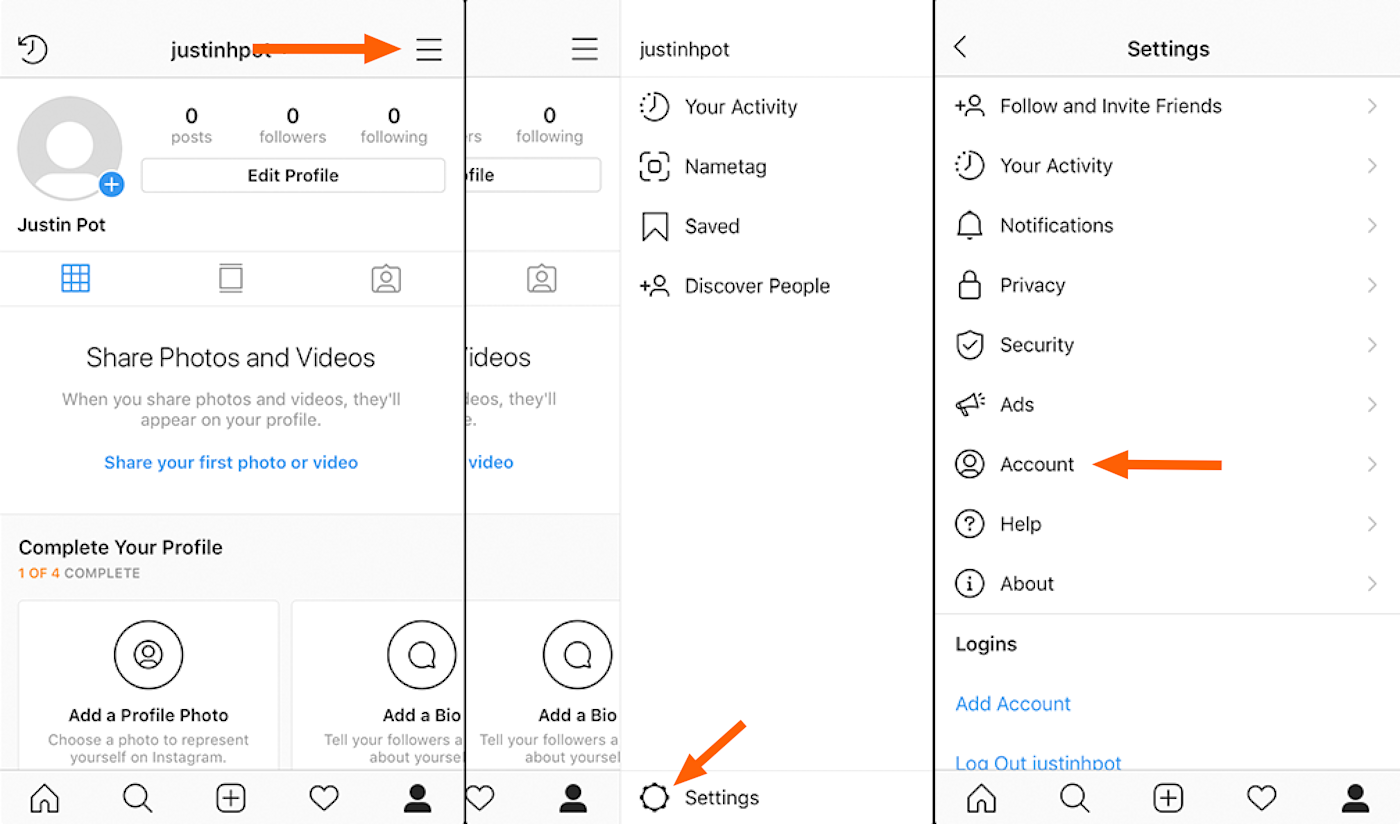
To link your Instagram account to Facebook, you’ll need to use the Instagram app. Go to the Account Center and choose to add a Facebook Account.
Just as before, you’ll need to enter your login credentials. To disconnect later, you can go through the Account Center again and choose to remove the correct account.
How to Cross-Post Photos and Videos on Instagram and Facebook
Once you link your Instagram and Facebook accounts, you can choose to post from Facebook to Instagram or Instagram to Facebook when you share photos, videos, or other standard posts.
The steps are similar whether you are posting from Facebook to Instagram or the other way around, and whether you are on desktop or mobile.
In all cases, you’ll prepare your content and then check the settings as you go to post. In the sharing options, you will have the opportunity to cross-post to the other accounts connected to your account.
To give yourself more options, such as posting to multiple accounts, you can choose a third-party solution such as Zapier. With these integrations, your posting will trigger a notification and the third-party software will post on the other platform.
The pros of this option include being able to overcome Facebook Instagram limitations within the platforms. However, because it’s not native, you could come up against some obstacles, so you’ll need to check to make sure the cross-posted content looks right. 
How to Cross-Post Stories on Instagram and Facebook
Stories can also be cross-posted across platforms. Facebook and Instagram stories are short-lived posts in the Story section of either Facebook or Instagram. They can be a great way to share live updates or quick looks into your brand. You can also use these to push people to your Instagram shop or Facebook page.
When you share a story from Facebook to Instagram or Instagram to Facebook, you can choose to cross-post to the other platform, with each post or automatically with every post.
You’ll want to do the automatic option if you create a lot of stories you want to be pushed to the platform, to maximize your audience reach. However, if you want to be more particular about which posts are shared across the board, choose the manual option.
To cross-post your stories, create your story on the platform of your choice. Before you post, you’ll see the sharing setting options. You can choose to share to the other platform, once or automatically every time.
Here’s a tip: You can choose once this time if you are still experimenting. If you end up cross-posting a lot, you can choose “every time” down the line.
How to Livestream on Instagram and Facebook Simultaneously
- One of the most popular media opportunities available on Instagram and Facebook is live streaming. Whether you are hosting an event or just want to hop on life and speak with your audience, you probably want to post simultaneously so you can reach your full audience.
- The problem is there isn’t a cross-posting, or in this case cross-streaming, button available to easily push the Livestream from one platform to another.
- However, there are many workarounds and third-party software to help you do this seamlessly.
- The first option is to just have two devices and turn one on to Instagram and one onto Facebook. If you are just starting to get into live streaming, it may not make sense to take the time to set up third-party software. If that’s the case, just use two devices.
- As you get into this though, you’ll start to see the problems. It’s not the exact same video stream, since two devices have to be in two different places. Even if they are close, the video perspective is slightly different.
You’ll also have to remember to start and stop the stream on two different devices and manage comments on two different platforms—which can be a lot to handle.
To overcome these obstacles, here are some software integrations to help you cross-post your live streams.
OneStream
OneStream Live does just as the name promises. It allows you to create one stream to go out to multiple places, including Facebook, Instagram, Vimeo, YouTube, and more. The platform comes with other features, including pre-scheduled and live streaming, analytics, storage, and embeddable video options.
There’s a free option, but to get the cross-posting features, you will need to choose at least the $39 per month option.
StreamYard

StreamYard promises not only cross-posting opportunities but also adds a touch of professionalism to your videos. You can brand them with your logos, colors, and more. You can also add guests to your live streams.
Socialive

Socialive allows even beginner live casters to create professional and high-quality casting opportunities. Like the others shared here, you can cross-post your live streaming to Facebook and Instagram.
There are also various viewer engagement options, as well as pre-recorded broadcasting and recordings.
How to Cross-Post Old Posts on Instagram and Facebook
What if you want to go back and share old posts from Instagram or Facebook? If you are new to one platform, this can be a good way to fill the new platform with content your customers care about.
You might also want to do this if you’re trying to build up engagement on one of the platforms and have one type of content that is particularly popular.
In general, the best way to go is to go to the post you want to share and click on the settings of that post. Then choose to share to the other platform.
For instance, if you want to share an old Instagram post, you can click on your post from your desktop and then click on the three dots in the upper right corner.
Then click on “Share to…”
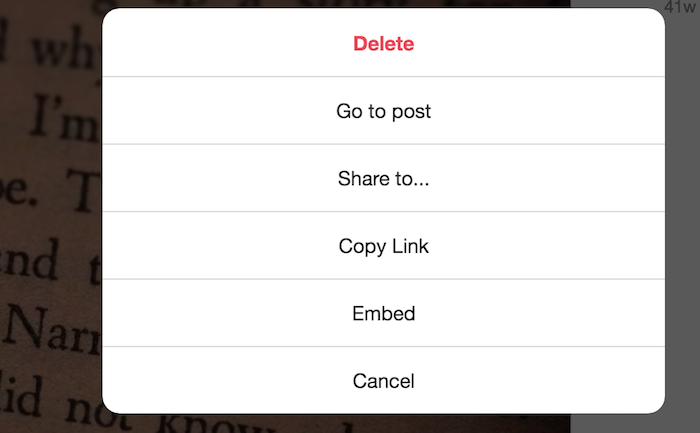
Then click “Share to Facebook.”
Should You Cross-Post on Facebook and Instagram?
Simultaneous Facebook Instagram posting may seem like an easy way to streamline your social media strategy, but there are disadvantages as well.
Just like any marketing technology, there are situations where you may want to employ this in your overall strategy. In other cases, it may make more sense to post manually and separately.
Saving time is the biggest reason to use this method. If you’re trying to get a lot of content out quickly, or if you don’t want to choose one platform over the others, cross-posting can take an extra step off your plate.
Especially if you are posting great content, consistently, you don’t want anyone to miss what you’re sharing. Sharing content on both platforms can help to increase your exposure and ensure maximum reach.
However, there are sometimes when this isn’t the right strategy.
For instance, if you have followers on both platforms, they may get tired of seeing the same content posted in both places. It can also lower engagement. If users hop on Facebook and see your message, even if they like it and interact with it, they’re less likely to engage with the same content a second time on Instagram.
If you are trying to build up your social media following, and likely have the same loyal followers on both platforms, show them some love by posting unique content on each platform.
Furthermore, people tend to consume and interact with content differently on different social media platforms. Some types of content perform better on various platforms.
Posting the same content on Instagram and Facebook indiscriminately misses the opportunity to leverage the most popular types of content on each platform.
Cross-Posting to Instagram and Facebook Frequently Asked Questions
Can I post to Facebook and Instagram at the same time?
Yes. You can link your Facebook and Instagram accounts and cross-post your content across both platforms at once.
How do I share an Instagram post on Facebook after posting?
If your Instagram and Facebook accounts are linked, you can click on the three dots next to your post and choose to share content on Facebook.
Can I cross-post a video from Facebook to Instagram?
Yes. Before you can cross-post a video, you will need to connect your Instagram account to Facebook. Once they are connected, you can create a video post on Facebook and choose to share it on Instagram before posting.
Why can’t I cross-post from Facebook to Instagram?
The top reason cross-posting doesn’t work between Facebook and Instagram is you haven’t connected your accounts yet. You need to go to your Facebook settings and add your Instagram account by inputting your login credentials.
Cross-Posting to Instagram and Facebook Conclusion
Cross-posting content can help improve your social media marketing strategy and save you time—if you do it right. It can help you get the word out to your target audience on more platforms and drive traffic to your carefully crafted content.
However, it’s important to know your target audience well. Shouting into the proverbial wind may not produce the results you expect. Know where your audience is and what kind of media they want to consume. Then you can move forward with confidence.
Will you be cross-posting across both platforms?
Source: neilpatel.com

4 Spectacular Site Traffic Sources That’ll Help You Move Beyond Google
Until a few years ago, every online business owner used to start their media marketing campaign solely by keeping the ‘big daddy’ in mind.
It was the chief source of exposure – the number one search engine traffic source that helped websites get visitors.
It was the most visited website on the internet, dwarfing every other site.
A whole new industry was created to optimize business websites as per this big daddy’s requirements.
Until one day when a new media marketing era started that made people socialize online.
These new social media platforms also became a breeding ground for publishers to attract eyeballs to their content and to try and attract direct traffic from those sources.
The ‘big daddy’ is Google.

If you’ve started a website to get online exposure, then you must have read a couple of articles on search engine optimization (SEO).
You might have achieved great search engine traffic results from Google.
However, you shouldn’t put all your eggs in one basket.

Diversifying your website traffic sources will ensure that your business does not tank in the wake of a single Google algorithmic update.
Algorithm Impacts
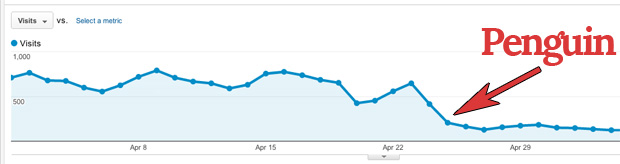
Consider Andrew, who lost 80 percent of his website traffic to Trollingmotors.net with the release of the Penguin update.
It was after this loss of direct traffic he realized the risk of relying solely on Google for customers.
Don’t you dread being in a similar situation, losing all your web traffic because Google decides to change the game?
SEO Game

Building traffic from Google requires consistent effort for 3 months or more.
You need to target long-tail keywords, build authoritative backlinks and optimize your website pages for Google.
Not to mention the dominance of the click-throughs received by the top 3 spots in Google.
If you aren’t in the top 6, don’t expect more than 4 percent of clicks to your website.
And if you aren’t on the first page, you can almost abandon thinking about organic traffic, direct traffic and any other kind of web traffic from Google.
If you’re not on the first two pages,
you aren’t getting any visibility.
I don’t think I need to tell you the difficulty in ranking in the top 3 spots for keywords that have good search volume.
The hard-hitting reality is most businesses fail to rank for their targeted commercial keywords and don’t get intended results from SEO.
Are you willing to build a more sustainable and robust source of organic traffic for your website?
Then let’s roll with five alternative search engines besides Googles that drive traffic your way.

5 Alternatives that Drive Traffic Your Way
1. Capture Emails of Those Cold First-time Visitors
Email is the first and probably the best social channel for conversing with your audience.
It commands the daily attention of most people, drives engagement and accelerates business results.

The email has a high conversion rate and that outperforms search and social media by far.
But effective email return traffic rise does not happen overnight. It starts from your previous efforts and snowballs.
I’ve been able to increase my email traffic consistently since I’ve prepared my blog to capture new leads as part of my marketing campaign.
How to Increase Direct Traffic from Email Campaigns?
Would you like to know the 3 basic steps to increase direct traffic from your email campaigns?
Prepare a lead magnet like a free eBook or an email course that interests your visitors.
As an example, I offer free courses to learn SEO, CRO, and more.
You can also offer a swipe file like Digital Marketer.
It generated 28,507 subscribers in 45 days.
If you want to considerably boost your conversions and reduce your bounce rate, then you’ll need to put in extra effort and prepare a content upgrade for at least your most popular posts.
It can lift your conversions by a whopping 785 percent in one day.
So what are content upgrades?
They’re generally bonus resources.
If you don’t have the time to create more content, a simple checklist will do. The idea is to help the visitor take the first step after reading your article.
Setup lead capturing tools on your website
Marketing technology has come a long way.
You can do much more than simply adding an opt-in form in the right sidebar of your blog (that typically has less than a 1 percent conversion rate).
I would recommend that you experiment with slide-up, left sidebar sign-up forums, hello bars, and other tools.
A controversial, but extremely effective tool that deserves special mention is the popup or banner ad.
Popups can literally take your sign-ups through the roof.
But, if they’re so effective, then what’s the roadblock that may prevent you from using them?
They’re annoying and equate to a bad user experience which will contribute to a higher bounce rate.
You need to test triggering them at the appropriate time.
Your audience might like to spend 30 seconds on your website before they give you their email.
Your visitors should not feel intruded on or tricked into giving their email.
Don’t show the popups and banner ads repeatedly to a visitor after he has shown disinterest in giving you his email.
I would advise you to use an improved pop-up technology that decreases pop-up annoyance.
Properly onboard your new subscribers
The welcome email is your first point of contact with the subscriber.
Don’t waste the opportunity to add value and impress them early in your relationship with them.
So what can you deliver in your first email?
Ask the ‘number one’ problem that your subscriber is facing.
This encourages interaction and lays a strong foundation for your association with them.
(Optional but recommended) – Test your email subject lines
Only after they open your emails will you get the chance to engage with your audience.
Churning of readers is fairly common.
MailChimp found that average click-throughs last only 3.5 percent after the 100th email campaign for the users that last (as compared with 5 percent open rate for the first campaign).
Tweaking your subject lines can make all the difference in increasing your open rates and getting more engagement.
2. Write High-quality Guest Posts for Authority Blogs
Guest Posting has already been written off by Google.
I’ve seen bloggers derive tremendous referral traffic and build complete businesses from guest posting referral traffic.
It’s awesome to get organic traffic this way.
It’s such great exposure that I’ve guest posted regularly at likes of Entrepreneur, Search Engine Journal, HubSpot and Forbes.
Here are five tips to get good results and potential direct traffic from guest posting.
1. Understand the publication
Before sending a guest post pitch, get a feel for the type of content published in the publication.
Only then will you be able to think of post ideas that add value to their audience.
All bloggers are seeking valuable content to be shared on social media and to improve their own search engine traffic – you need to be able to add to this.
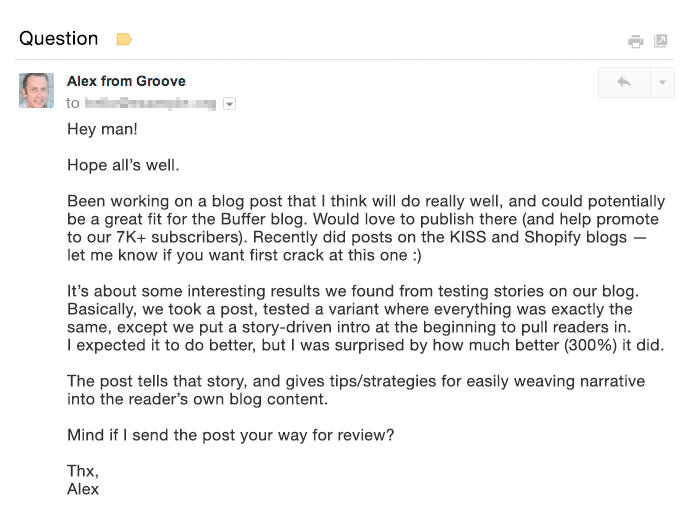
A great pitch puts the target blog’s audience first and proves why you’re the right fit for guest posting on their blog.
Want an example?
Then look at the email by Alex from GrooveHQ below.
2. Aim to get published on the biggest blogs where your target audience hangs around (not necessarily in your industry).
I received 0 conversions from some industry blogs (although they drive considerable organic traffic).
Yet I received a total of 16 conversions (lower visitor volume but high-converting direct traffic) from Entrepreneur Magazine and Inc.
3. If you’re short on time, rely on quality rather than quantity.
By putting in 18 hours to write an awesomely detailed guest post at HuffPo, Ramit Sethi was able to drive 100,000 visitors to his website. This would have had exceptional results not only for his search engine traffic but also for his social media traffic.
Compare that with a quickly written guest post that brought just a few hundred visitors for 1.5 hours of Ramit’s time.
4. Try to squeeze as many quality guest posts into your content production time as possible.
I’ve personally found that organic traffic is spread out from guest posts and adds up only over time.
5. Finally, spend extra time to create a content upgrade for your guest posts.
A content upgrade can have a tremendous impact on the number of emails you’ll collect.
Giles Thomas earned 408 subscribers from a single guest post by offering an upgrade.
3. Interview an Influencer or Get Interviewed by a High-traffic Website
Have you heard of the Four Hour Work Week author Tim Ferriss?
Right now, a staple content type that he serves his audience is his podcast.
He interviews world-class performers who share their wisdom on a plethora of subjects on Tim’s show and he is loved across social media.
Do Tim’s followers like the show?
Well, the show has surpassed 50,000,000 downloads.
And is the #1 business podcast on all of iTunes on most days.
Be it video or audio, interviews are inherently conversational, dynamic, and engaging.
The best part:t’s a win-win for both parties.
The interviewer gets exposure to the new audience while the interviewee gets to serve new engaging and authoritative content to his website visitors.
If you interview an industry influencer, you can request that they share the interview with their followers on social media.
Think of the organic traffic you will drive from hundreds of thousands of their social media followers.
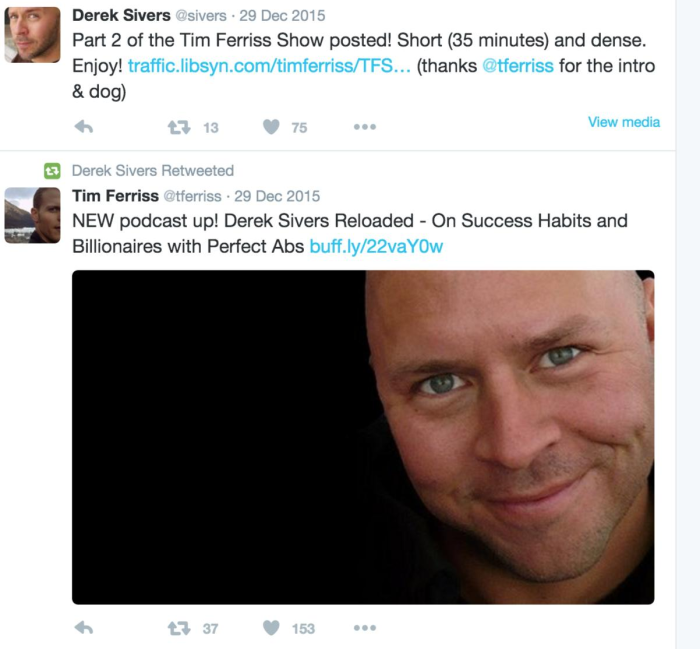
As an example look at the engagement received by a past interview of Derek Sivers on the Tim Ferriss Show. Derek tweeted the show’s link to his 283K followers.
It won’t hurt that you’ll also start a relationship with the influencer through such an interview.
Similarly getting interviewed by a high-authority website can bring you a huge amount of search engine traffic.
Getting interviewed by YourStory brought Harsh Agrawal 35,000+ views on his blog, Shoutmeloud, in a single day.
That was his highest search engine traffic source for the blog (having 600,000+ visitors/month).
Since interviews offer consolidated value, they serve as a lead generation source for your brand for a long period.
Just think of the number of bloggers you discovered through their interviews on YouTube and other high authority websites.
If you’ve got a really interesting story to share, you can also consider doing a Reddit AMA.
Mateen got 2000 pageviews from doing this AMA on earning $85,000 in profit by selling TeeSpring shirts/hoodies. He also increased his average daily visitors.
You can also answer questions from journalists at HARO by signing up as a source.
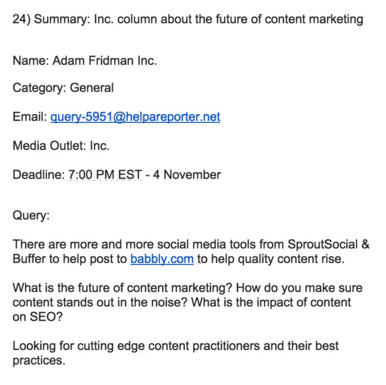
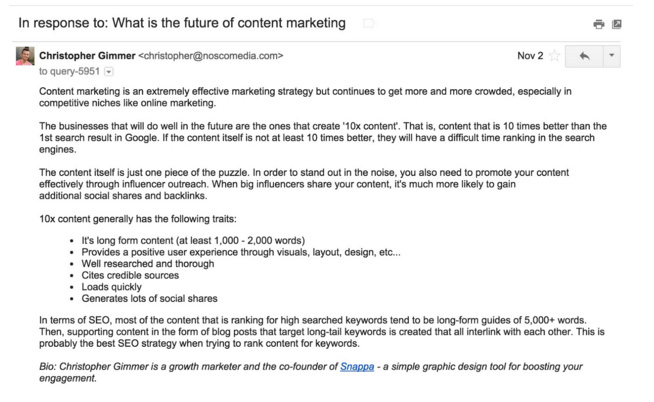
Christopher from Snappa saw this query on the future of content marketing from Inc Magazine on HARO.
He quickly sent a detailed reply.
This earned him a mention in Inc a few weeks later.
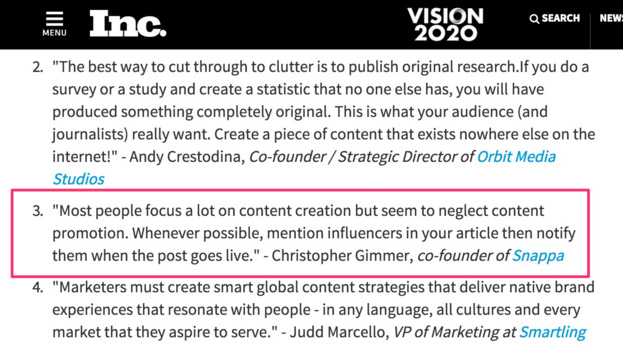
HARO is a great strategy to get a brand mention on authority news websites like Entrepreneur and Inc.
Those backlinks will sweetly lift your reputation in the eyes of Google, driving your search engine traffic up, and boosting your marketing campaign.
4. Invest in Facebook Ads
I know a paid strategy might raise a few eyebrows when it comes to the idea of organic traffic.
Inbound marketers generally don’t like to pay for play in the form of banner ads or other pricey methods.
If you’re one of those, you might be frustrated with the declining organic Facebook reach.
If you’re having only a handful of fans on your Facebook page, then you will not get good results from your organic traffic reach.
So you’ll need to invest in Facebook Ads.
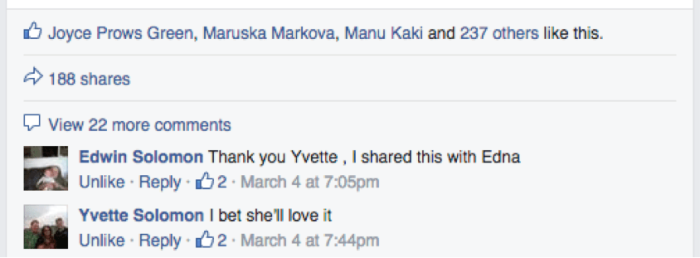
A US accounting firm (having 156 likes) didn’t get good engagement on their posts. Just a couple of likes.

After spending $20 on Facebook Ads they started getting great interaction. Look at the interaction on the post in two months.
Sparing some cash for running Facebook Ads can tremendously accelerate your email list growth (one of the best repeat traffic sources for your website).
Because there are very specific demographic targeting options available. You can also A/B test various images and text in your banner ads.
Let me share another case study to show you the kind of results you can achieve.
Matthew Woodward spent around $600 on Facebook Ads running two campaigns.
His cost per lead in running both campaigns was under 80 cents.
The ROI from running the campaign was over 2500 percent.
Aren’t the results incredible?
If you don’t want to splurge and spend $500, then even $5 a day can get you great results.
Mary earned 532 new subscribers in 43 days of running Facebook Ads.
The total amount she paid was just $227.05.
If you want to drive more traffic to your blog, then you can choose your most engaged Facebook posts and boost them to extend your reach.
You can even use Facebook Video Ads and add a CTA to drive traffic back to your website.
For native videos on Facebook, Mike Gingerich found anywhere between a 30 percent to 200 percent increase in engagement and reach compared with other types of posts.
Conclusion
Google’s algorithmic updates are unpredictable.
Relying solely on SEO to rope in traffic and customers can kill your business.
So experiment with traffic sources other than Google.
If you put in the necessary steps, you can also reap the benefits like others whose case studies I shared with you in this article.
Have you experimented with any of the above traffic sources and achieved good business growth?
How did you boost your direct traffic? I would love to hear your insights in the comments.
Source: neilpatel.com

7 Advanced Facebook Search Operators
Facebook might have started as a way to connect college students, but today it is a full-fledged search engine, much like Google or Bing. The social media giant’s rise to search engine status includes the addition of advanced features, like Facebook search operators.
What are Facebook search operators, and why should you care about them?
Search operators are a powerful tool for filtering search results, but they also have added benefits for marketers and business owners.
Before we get into that, let’s first talk about what search operators are and why they matter.
What Are Search Operators?
Search operators are advanced search commands that make it easier to filter search results based on what you do (or don’t) want to see in search results.
For example, if you were looking up recipes for chicken soup but didn’t want to see results from Pinterest, you could use a search operator to remove Pinterest results by typing in:
“Chicken soup -Pinterest”
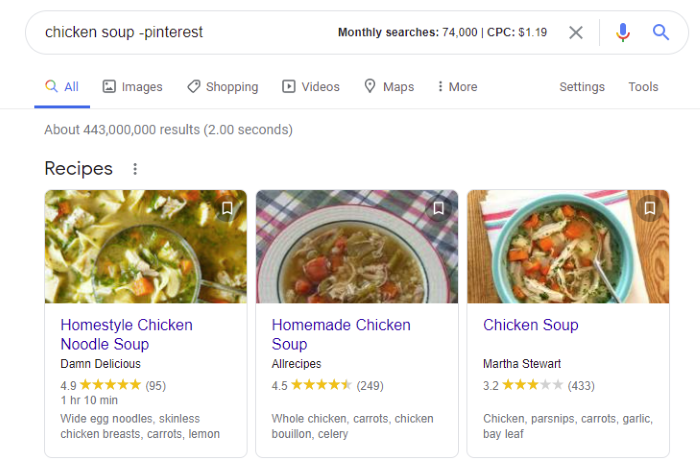
Google uses a wide range of these search functions that make it easier to use the search engine, including:
- @: to search social media sites
- $: to search for a price
- –: to leave a word out
- “Quotes”: to search for an exact match.
- . .: to search a range of numbers
- OR: to combine searches
- Site: to search a specific site
- Related: to search for similar websites
You can also combine these commands if you want to get fancy. For example, you could use “@ neil patel OR kelsey jones” to search for social accounts for both Neil Patel and Kelsey Jones.
Search operators make it easier to find the exact data you are looking for, but they also come in handy for marketers.
4 Reasons to Use Facebook Search Operators
Facebook used to have a feature called the Facebook Graph Search, which allowed users to search for specific content on the platform by using sentences rather than just keywords.
It also allowed you to find who liked a page or visited a specific city.
Facebook Graph was changed in 2019, making it much harder to search the platform.
Search operators, however, fill that gap by allowing users to search for highly specific content.
How can Facebook search operators help marketers?
Here are a few ways you can use those advanced search features:
- Research your competitors: See what your competition is up to, including what type of content they share and what topics they talk about. You can also find new competitors in your geographical area.
- Find content to share: Search for multiple topics or exact phrase matches to find content your audience will connect with.
- Find user-generated content (UGC): Search for your brand name (and common misspellings of your brand name) to find content users have shared about your brand, even if they didn’t tag you.
- Research your audience: Understanding who your audience is and what type of content they like can help you build a stronger relationship. Use Facebook search operators to find content on related topics or specific phrases.
7 Facebook Search Operators to Try (and How to Use Them)
Facebook search operators use Boolean operators, which are the basis of database logic.
In layperson’s terms, Boolean operators are terms that allow you to broaden or tighten the search results.
For example, you could use AND -to search for two search terms at the same time.
Below, I’ll cover how to perform each type of Facebook search, explain what information it will help you find, and explore how to use the search operators to grow your business.
I know it might sound complicated, but I promise it’s pretty simple, and the results are worth the effort.
1. Basic Boolean Facebook Search
Boolean searches don’t work using Facebook search, so you’ll need to use Google to perform all the searches we’re about to cover.
Using site: before the name of a site will display search results just for that specific website.
Here’s how it works in practice.
Type in site: Facebook and then whatever search term you’re searching.
Example:
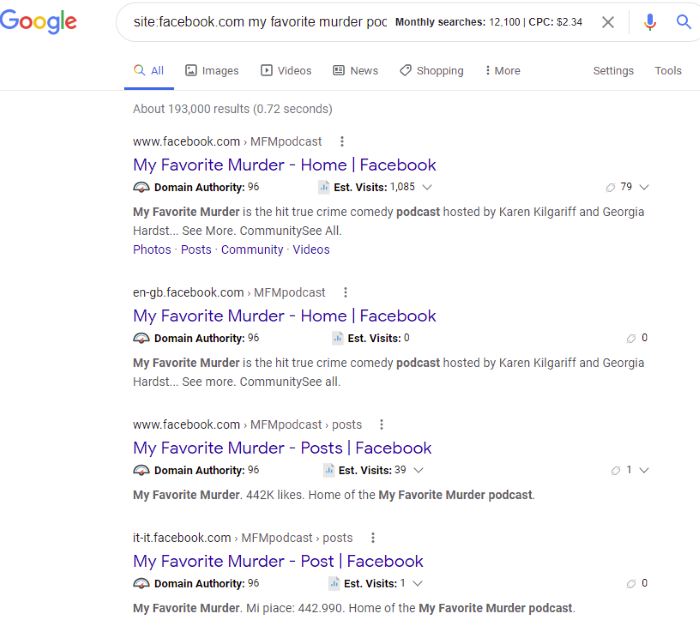
site:facebook.com my favorite murder podcast
This will display the results of groups or posts about the My Favorite Murder podcast.
How to Use This Facebook Search Operator to Grow Your Business
Use this to find groups, pages, and users related to a specific topic.
For example, if your target audience is small business owners, you could search for groups and pages for small business owners.
Pro tip: This search works for all websites, not just Facebook. Say you want to find a post from your favorite digital marketing blog or by a specific writer.
Then you would perform a search for “site: <website URL> <the term you’re looking for>.”
2. Boolean Facebook Search for Two Terms Needing to Be Present
Using the AND Boolean search function, you can search for two terms simultaneously.
For example, if you want to find information about digital marketing and small businesses, you would search:
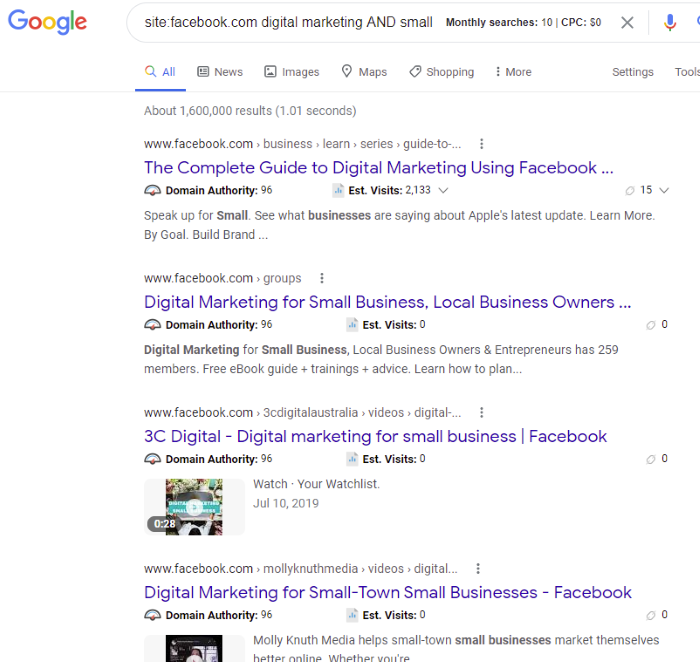
site:facebook.com digital marketing AND small business
This will display search results related to both digital marketing and small businesses:
How to Use This Facebook Search Operator to Grow Your Business
Perform competitive research for a specific niche or find groups your target audience belongs to on Facebook.
3. Boolean Facebook Search for One of Two Terms Needing to Be Present
Similar to the AND function, this search operator allows you to find results for one term or another.
Unlike AND, which requires both terms to be present, the OR function allows you to find results including either term.
Let’s say you have a software company that targets customers who have SaaS (software as a service) or those who have a membership site. You would search:
site:facebook.com SaaS OR membership sites
The results will display groups, pages, and posts related to SaaS or membership sites.
How to Use This Facebook Search Operator to Grow Your Business
Research several competitors simultaneously or search for content related to your brand using both your official brand name and a misspelling or commonly used term.
For example, site:facebook.com Moz OR Hubspot would return terms related to both brand names.
4. Boolean Facebook Search for Terms That Should Not Be Present
What if you want to search for a specific term, but you keep getting unrelated results?
The NOT Boolean function allows you to remove unrelated search terms.
For example, let’s say you are looking to hire a web developer, but you keep seeing results for designers. You would search:
site:facebook.com web developer NOT designer
The results will include videos, pages, and profiles related to web developers but not web designers.
How to Use This Facebook Search Operator to Grow Your Business
Search for employees or more specific content related to your industry by excluding specific terms. You can also use it to narrow geographical areas with the same or similar names, such as Paris, Georgia NOT France.
5. Boolean Facebook Search for Exact Phrase
Google and Facebook’s search features have gotten smarter in recent years, but sometimes they still don’t get it quite right. If you find your search results are slightly off, you can use the exact phrase match search operator.
This Boolean function tells search engines to only return matches that are precisely the same as your search.
To use this function, add quotation marks to the term you want to search.
Example:
site:facebook.com “mexican restaurant in kansas city”
A list of Mexican restaurants’ Facebook pages will appear in the SERPs, like this:
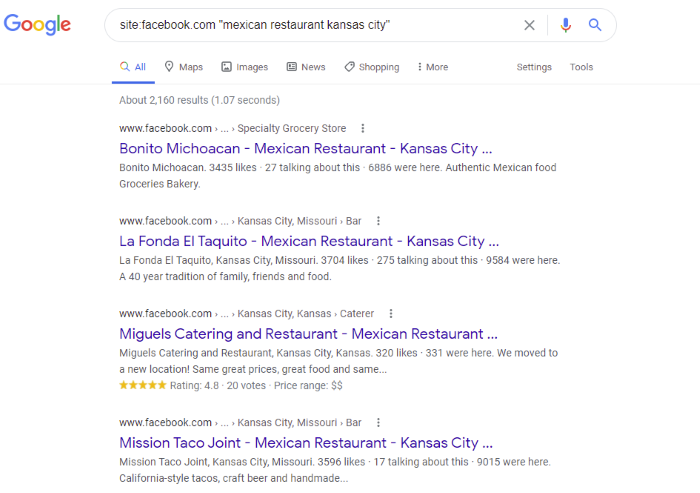
Remember this is an exact match search. The search engine won’t return results that deviate even slightly.
Search results for “Mexican restaurant in Kansas City” versus “Mexican restaurants in Kansas City” could be extremely different.
How to Use This Facebook Search Operator to Grow Your Business
Find competitors in your area or look for groups or videos related to a specific key term. It might also help you find UGC if your brand name is very similar to another brand or phrase.
6. Boolean Facebook Search to Fill in Blanks
What if you don’t know exactly what you are looking for? The fill-in-the-blank function might come in handy.
For example, if you’re looking for a specific person but can’t quite remember their name, you can use an * (asterisk) to tell Google to fill in the blank.
Say you work for Hardrock Cafe and are looking for UGC.
Some users might type in Hard Rock Cafe, while others might use Hardrock Cafe.
The fill-in-the-blank search operator will return results for both.
Here’s how to use it:
site:facebook.com hard * cafe
Note that this will turn up more than just Hard Rock and HardRock; it returns any results that include Hard and Cafe, no matter what is between them.
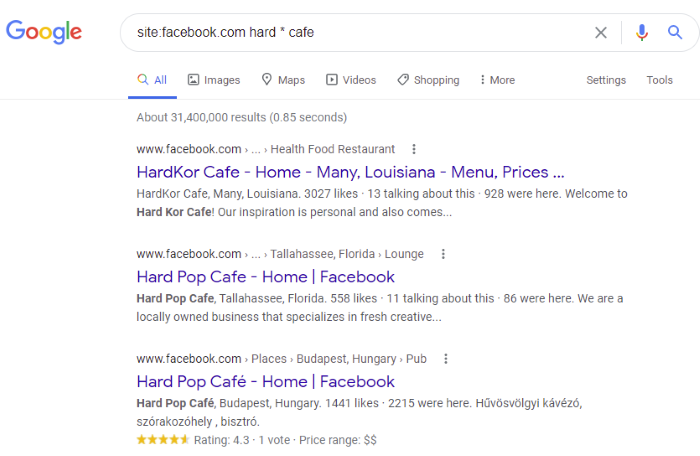
How to Use This Facebook Search Operator to Grow Your Business
Use the fill-in-the-blank function to find information about terms that are often misspelled or formatted differently, or if you can’t remember the exact spelling.
This search operator is ideal when users might not remember the exact format of your brand name. It can also help with competitive research by broadening searches.
7. Boolean Facebook Search for Local Businesses
Facebook is a powerful tool for local SEO, with more than 1.85 billion daily active users in the United States alone.
Using a search operator for local searches can help marketers and business owners find local businesses.
Say you are considering opening a coffee shop in the Rogers Park neighborhood of Chicago. You could use this search:
site:facebook.com coffee shop rogers park Chicago
This returns a list of all the coffee shops in that neighborhood.
How to Use This Facebook Search Operator to Grow Your Business
Local businesses can perform competitive analysis or market research to find local businesses in their niche.
It might also help you to find brands for a cross-promotion strategy.

Learn the Course.
Conclusion
Search algorithms have come a long way in recent years. However, they aren’t perfect.
Facebook search operators let you filter and refine search results for competitive analysis, find content to share with your users, and even locate groups where your target audience hangs out.
If you want to improve your Facebook marketing strategy, search operators are another tool in your toolbelt.
Have you used Facebook search operators before? Which one is most useful?
The post 7 Advanced Facebook Search Operators appeared first on Neil Patel.
Source: feedproxy.google.com

The Advanced Guide to Facebook Watch
In 2017, Facebook launched its answer to the burgeoning streaming video market: Facebook Watch. Through Watch, users could view both scripted and live video from professional networks, brands, influencers, and everyday people.
Facebook released Watch to a limited group of users, and for that first year, it flew pretty much under the radar. In 2018, they launched it globally, and the service took off like a rocket.
By 2019, Watch had 270 million monthly users, and by 2020, that number had shot up to over 1.25 billion, according to Facebook.
I covered Facebook Watch in a previous post when it initially launched. Since then, they have expanded their content offerings (even getting into the music space!) and added a ton of features for brands and marketers.
In this post, I’ll dive deep into how to use Facebook Watch for marketing, now that the platform has matured.
Content on Facebook Watch
Facebook is still experimenting with different content types by adding, subtracting, and tweaking to find the right balance for their platform. In 2019, Facebook’s head of global creative strategy Rick Van Veen told Variety,
We’re still figuring it out and learning. When you start a new platform, you’re going to have to throw a bunch of stuff at the wall and see what works and what doesn’t.
Scripted Content
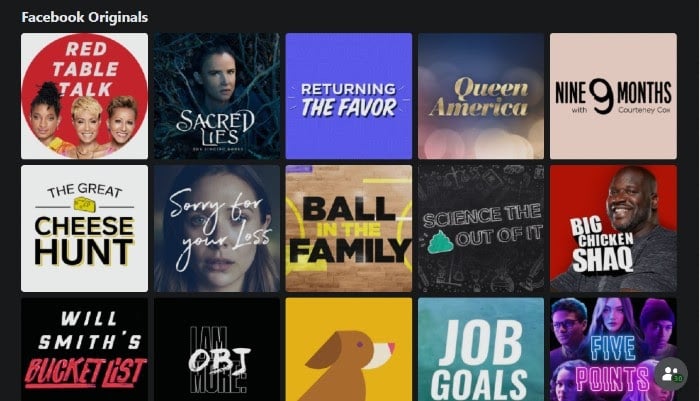
Facebook’s scripted content can be found under the Show tab. This section is where they’ve entered the ring with the likes of Netflix, Apple+, and Hulu. Here, users can find everything from comedies to critically acclaimed dramas to reality and talk shows.
“Red Table Talk,” for example, is a popular show starring Jada Pinkett Smith, where she brings on guests to discuss sensitive topics such as divorce and gender identity. Meanwhile, Mike Rowe of “Dirty Jobs” fame stars in “Return the Favor,” which won a Daytime Emmy.

However, they’ve recently scaled back on their scripted content, canceling some of their popular shows in favor of live and sourced content from brands and users.
Live Content
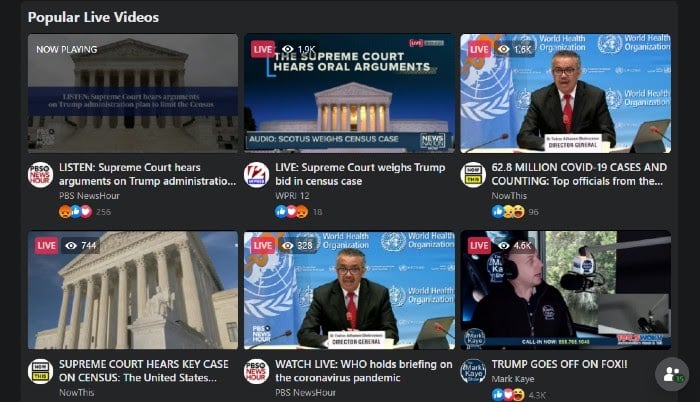
Facebook Live predates Watch by a year. When Watch launched, however, Live was bundled in with the rest of the video content.
Types of videos on Live range from U.S. Senate committee hearings to live author readings and skiers showing off their tricks.
Small businesses have also rushed to Live, creating events and classes to increase revenue.
Music Videos
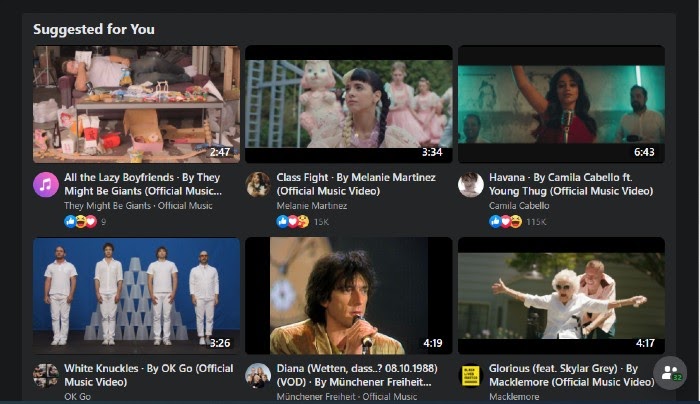
In August 2020, Facebook launched its new music discovery platform, Facebook Music. Here, users can explore videos by genre, trending topics, artist, and even mood. Currently, the app is only available in the U.S., India, and Thailand, but it’s already garnered a lot of attention.
For instance, Katy Perry debuted her music video “Smile,” the title track of her fifth album, on Facebook Watch.
How Facebook Watch Works
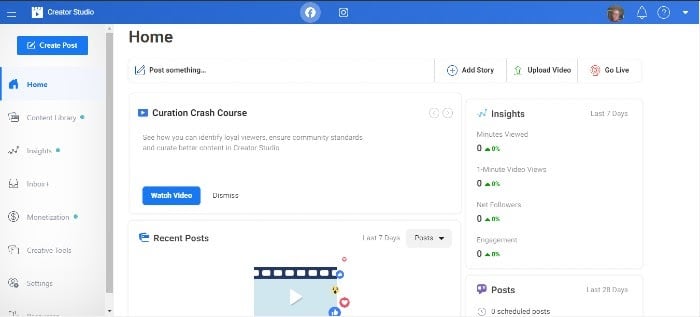
When you create a video on Facebook Watch, whether it’s a live event or a scripted show, you upload it to Facebook using their Creator Studio.
The Creator Studio is the hub for all of your business content for Facebook. From here, you can bulk upload videos, crosspost to different pages, schedule posts, consolidate engagement, and monetize. You can also use their in-depth analytics tools to monitor your content.
On the videos you upload, Facebook places mid-roll ads. Forty-five percent of the revenue from those ads goes to Facebook, while the remaining 55 percent goes to you.
Helpful Hint: Facebook prioritizes longer videos (3+ minutes) and content that engages the audience and sparks conversation. They’re looking for content creators who respond to user comments and pin the best comments to the top of the feed.
How Your Business Can Benefit from Using Advanced Facebook Watch Features
In France, according to Facebook, national broadcaster M6 began creating videos for Watch. Their one-minute video views more than doubled in nine months and they acquired 6 million new follows organically.
Here in the U.S., says Facebook, Buzzfeed has increased their revenue by creating videos over three minutes across their Tasty, Goodful, Nifty, BringMe, Cocoa Butter, and Pero Like pages.
“We moved quickly and increased our payout from total in-stream ads by 20% compared to the previous half,” Maycie Timpone, Executive Director, Video & Publishing at BuzzFeed, told Facebook.
Facebook Watch has become a powerful tool in marketers’ pockets. Let’s take a look at a few ways Watch helps you increase revenue and attract new followers.
Hyper-Personalized Content
Facebook is all about personalized content, and Facebook Watch lets you upload videos right to your target audience. Your videos will also appear in specific categories, such as “Shows Friends Are Following.”
Facebook will also categorize your videos by genre, topic, and even mood.
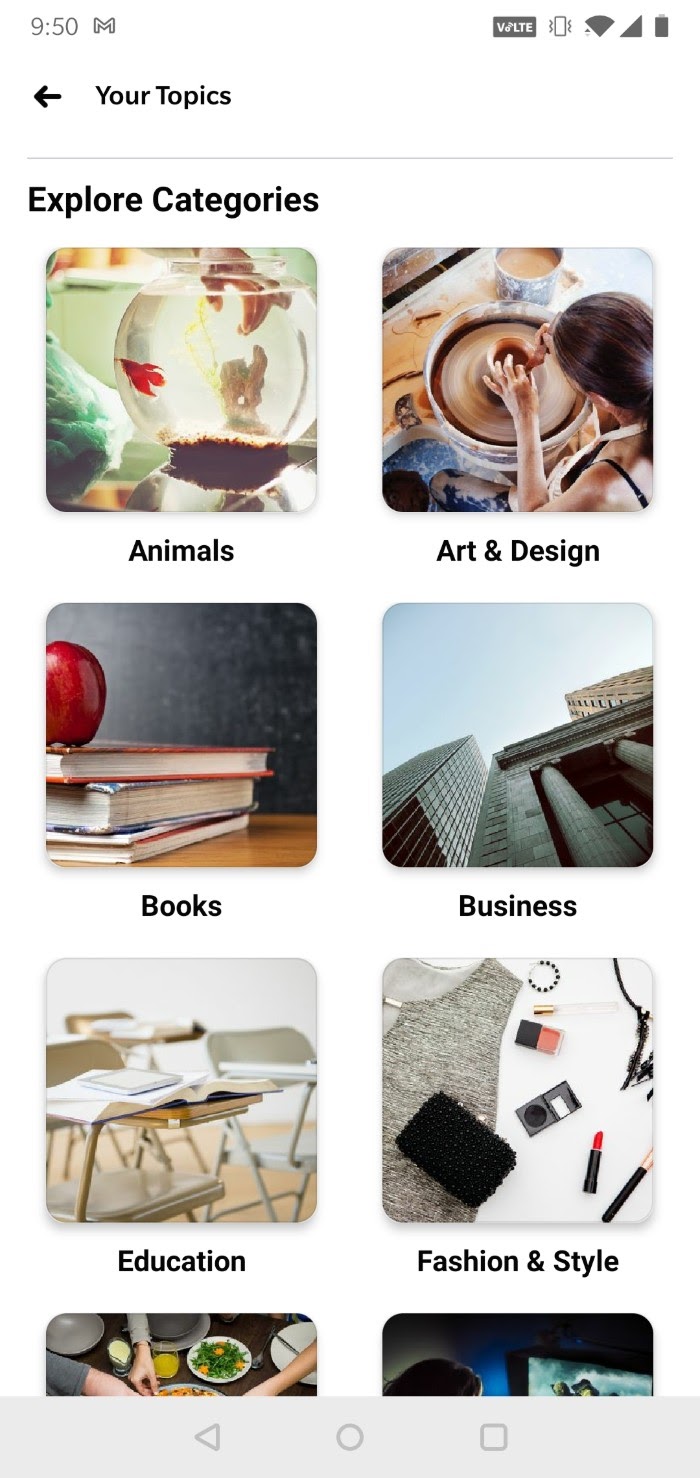
Recently, Facebook introduced Topics to mobile users. Topics allow users to further customize their video feed by choosing categories that interest them.
Show Pages
Show pages allow users to interact with show creators and fans. They can leave comments, ask questions, or even engage in interactive video content. Just like any other Facebook page, they can like, follow, and share pages with friends.
Real-Time Engagement
This feature is particularly helpful with live video. Viewers can react to, share, and comment on a video in real-time.
Real-time engagement is a great opportunity to get initial feedback on your video and engage with your audience by asking and answering questions and becoming part of the conversation.
Facebook Watch Parties
Facebook’s number one goal is to bring people together. It’s why they added groups a few years back, to allow people with similar interests to find each other.
With Facebook Watch Parties, viewers can bring a group of friends together to watch videos and chat about them in real-time.
Video creators can make content tailored to watch parties to boost engagement.
Playlists
Playlists allow video creators to group videos and post them to their pages. Videos play consecutively to boost views.
Marketers can use playlists for video series or to group videos by topic.
Optimizing Your Facebook Watch Videos
You may be creating killer content for YouTube already, but optimizing Facebook Watch videos is a little different. Here are some tips for getting the most out of your Facebook video content:
First, Make Sure It’s Original
Pulling content over from YouTube or even your website won’t work for many reasons. First, the aspect ratio may be wrong (more on that next). Second, original content exclusive to Facebook will keep people coming back, allowing you to take advantage of Facebook’s monetization tools.
Pay Attention to Aspect Ratio
Facebook gives video creators specific aspect ratios for all pages on both Facebook and Instagram.
You’ll want to follow those guidelines, but in general, make sure your video is shot for mobile. The vast majority of Facebook users access it via mobile, and more than half of ad revenue comes from mobile-first video ads.
Add Captions
Eighty-five percent of videos on Facebook are watched without sound. So, adding captions to all of your video content will naturally boost engagement.
Include a CTA
When you upload a video, Facebook allows you to add a CTA at the end. Whether it’s an invitation to watch more videos, check out a product, or simply like your page, adding a CTA can increase engagement and even boost conversions.
Beyond the Basics: Advanced Uses and Features of Facebook Watch
Recently, Facebook has added a bunch of cool new features that marketers can take advantage of. Let’s take a look at them.
ThruPlay
ThruPlay is a default setting and one you should keep on. With ThruPlay, if your video is shorter than 15 seconds, it will post it to users who are more likely to watch the whole thing. If it’s longer than that, it will deliver it to users who generally watch videos longer than 15 seconds all the way through.
Paid Online Events
Paid online events are a function of live video and have become an essential tool for businesses. Brands can create, host, and promote an event all in one place. They can also set a price and collect payment easily.
Helpful Hint: Facebook normally collects a fee for a paid online event. At least until August 2021, however, they have waived their fees.
Fan Subscriptions
Creating the ability for fans to subscribe to your video page boosts engagement. It also allows you to foster customer loyalty through exclusive offers and content for subscribers.
According to Facebook, it also allows you to predict revenue monthly.
Stars
Another feature is Stars, a tool that allows fans to support your work. Users can purchase stars to send to you. For every star a fan sends to you, Facebook gives you 1 cent.
(Think “Ralph Breaks the Internet” and the hearts he had to earn on his videos.)
The more you engage with users, the more likely they are to send you stars.
Facebook is still rolling out this program to a limited number of users, but you can sign up to show your interest.
A/B Testing Tools
On the back end, Organic Video Post Testing allows video creators to test between two and four variations of a video at a time. Videos are distributed to your target audience, but they’re not posted to your page. The video with the most engagement after a period of time is then posted to your page automatically.
In-Stream Ads
According to Variety, Facebook takes in 22 percent of U.S. digital ad spend. Before Watch, ads that appeared in newsfeeds and the right rail kind of got lost in the mix, right?
However, as pointed out previously, ads that would usually get lost in Facebook feeds get a lot more attention when they appear in the middle of a video.
Mining Audience Data from Your Facebook Watch Viewers
When it comes to analytics, Facebook Creator Studio is a veritable treasure trove. Here are some of the cooler stats you can mine from your dashboard:
Views
There are so many different ways you can parse these metrics. For example, if you want to see the number of minutes viewed, you don’t have to settle for a lump sum. You can break it down by minutes viewed on your page, in shared posts, and crossposts.
You can also see how many views were over three seconds long or how many people viewed the whole video, depending on what comes first.
You can also filter by auto-played vs. click-played and paid vs. organic.
All of the views are measured over a 28-day period.
Audience Engagement and Retention
To get a quick overview of your posts, you can look at the number of reactions, comments, and shares for videos with at least 100 views.
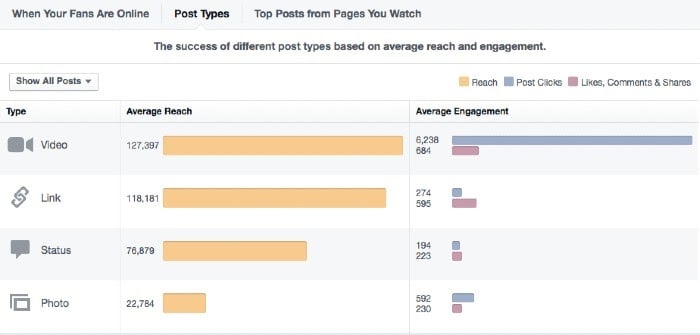
You can also go way beyond that. You can see audience demographics, and you can filter by fans and non-fans to know who you’re truly reaching.
If a video is performing well, you can choose to boost it right from your dashboard.
To dig even deeper into each video, Facebook shows your viewer retention through the entire length of the video. Line graphs like this one show you exactly where viewers dropped off in your video so you can make adjustments.
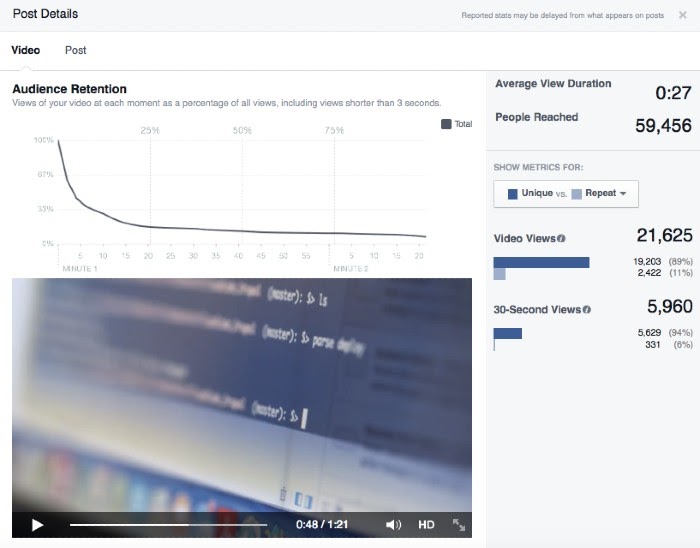
What’s really neat: when you hover over the line graph, each point of the line displays your video’s corresponding frame.
Finally, you can measure each post against other posts to assess which types of videos and content are working well (or not) for you.
Negative Feedback
Just as important as the positive metrics are the negative ones. Facebook can show you negative comments, as well as how many times people hid your video from their feed or reported it as inappropriate.
Click-Throughs
Finally, Facebook can differentiate between clicks to play your video, clicks on links embedded in your video description, and clicks on your CTA.
Increasing User Engagement Via Facebook Watch (and Why This Matters!)
We’ve talked about all the levers you can pull with Facebook Watch, but how do you use them to increase user engagement? Here’s how to use all their cool features to do just that:
Take Advantage of Real-Time Commenting
Comments give context to all those reactions and shares, but you probably knew that. Of course, you can use them to improve your content by creating more of what gets positive comments and less of what doesn’t.
More importantly, you should be responding to comments, not only on your videos but also on your pages. Show your fans that you’re paying attention, and they will be engaged followers.
Spark Conversations
Instead of simply reacting to conversations already happening, create and direct the discourse yourself. Invite fans to comment on specific elements of your videos, share their tips, or ask questions.
If you’re a part of the Star program, this is a great way to encourage people to send some your way.
Use the Subscription Function
Subscriptions are a great way to create that velvet rope effect. Create an exclusive space for fans to get updates on content before anyone else. Offer content and giveaways for subscribers.
Make them feel special, and they’ll keep coming back for more.
Put That Mined Data to Good Use
As you’ve seen, Facebook gives you a wealth of analytics about your videos, right down to the minute viewers stopped watching your videos.
Use that information to compare and tweak content, experiment with longer or shorter videos, or introduce and keep track of new content.
Don’t Neglect the A/B Testing Functionality
While it is time-consuming to create more than one video, A/B testing multiple versions of videos will only increase your engagement, and you can’t deny how easy Facebook makes it.
Since they don’t post anything to your page until the end of the testing period (which they do automatically), you really have nothing to lose.
Conclusion
Facebook Watch has had explosive growth and attracted the attention of brands, celebrities, small businesses, and influencers. The sheer number of viewers and the amount of ad revenue on the table makes creating original content for Facebook a no-brainer.
The real trick is pulling the right levers to create engaging videos that get reactions, shares, and comments. If you can get subscriptions, even better.
Dive into your Creative Studio to look at all the advanced tools Facebook offers.
How will you use Facebook Watch to build your audience and boost your revenue?
The post The Advanced Guide to Facebook Watch appeared first on Neil Patel.
Source: feedproxy.google.com

How to Create the Best Facebook Cover Photos for Your Business
It seems like every week there’s a new article about how people don’t use Facebook anymore. You may hear that it’s only for “old people,” that it’s not relevant, that brands are abandoning it.
The thing is, that’s just not supported by the user data. In reality, Facebook has barely seen a slowdown in audience growth at any point in the last 12 years. It’s been super consistent:
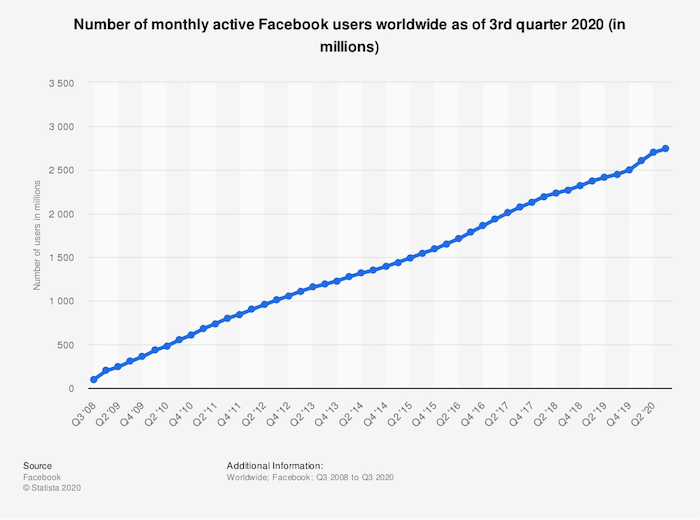
With approximately 2.5 billion monthly active users, Facebook is comfortably bigger than Twitter, Snapchat, Reddit, and Instagram combined.
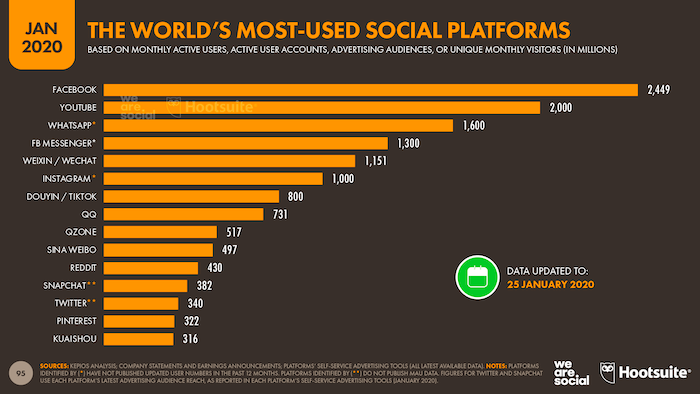
So what does this tell us?
Simply put, if you’re a brand, you can’t afford to ignore Facebook. It might not be your audience’s favorite social platform, but they’ll almost certainly be on there, which means you need to be, too. It would be best if you were using it to promote your products, advertise your brand, and generally represent your company.
The starting point for all of those things is your Facebook Business Page. Your current and prospective customers or subscribers will visit it to check you out, see what you’re talking about, and engage with your content.
What’s the first thing they’ll see? Your Facebook cover photo. Read on to learn how to make a Facebook cover photo that shows off your brand in the best possible light.
Steps to Create an Effective Facebook Cover Photo
Ever heard of Hitchcock’s rule? Named for the legendary movie director, it states that the size of an object on-screen should be proportional to its impact on the story at that specific moment.
Well, given that your Facebook cover photo takes up almost half the page on desktop …
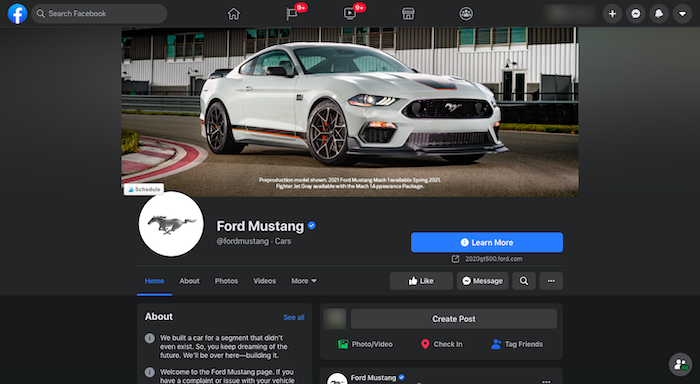
… it’s reasonable to say Facebook considers it pretty important! You’ve got a whole lot of digital real estate to play with, so you definitely want to make it count.
Designing a Facebook cover photo for your business page is much more than just choosing an eye-catching picture, cropping it to the right dimensions, and publishing it. Here are five key considerations to creating a cover photo that draws your audience in.
1. Keep Your Facebook Cover Photo Simple
Facebook used to say only 20 percent of your cover photo could be made up of text, but it dropped that rule in 2013.
With all that space to play with and no limit on the amount of text you can include, it’s tempting to cram in as much information as possible. Don’t do that.
When it comes to creating an impactful Facebook cover photo, simplicity is your friend. Focus on communicating a single message as clearly as possible, so your audience is in no doubt of what you’re trying to say.
Apple does this better than most. While the tech giant famously doesn’t really “do” social, it’s branding on Facebook is still spot on.
Apple’s Facebook cover photo is an exercise in simplicity: no words, just one clean and instantly recognizable product image showcasing its iconic MacBook. The use of color is super effective, naturally drawing your eyes to the center of the image.
2. Complement Your Brand Through a Facebook Cover Photo
Can you sum up your entire brand in a single image? It’s not as simple as it sounds! But that’s exactly what you need to do with your Facebook cover photo. If it doesn’t compliment your brand, you risk confusing your audience.
Adidas is a huge brand that sells everything from skateboarding sneakers to golf attire. It’s pretty tricky to encapsulate such a huge brand in one picture, so Adidas has chosen to combine three separate images for its Facebook cover photo.
This works really well, allowing the brand to speak to three different markets at the same time. In one cover image, Adidas encapsulates men’s and women’s sportswear, plus streetwear.
3. Keep Your Audience Front of Mind
As humans, we find it easier to connect with people than abstract concepts or inanimate objects. That’s why so many of the best Facebook cover photos feature images of people.
Of course, if you’re going to represent and speak to your audience through your cover photo, you first need to understand who they are. Fortunately, Facebook gives you a couple of ways to find this out:
Facebook’s Audience Insights tool allows you to deep dive into the demographics, page likes, location, and Facebook activity of people who follow your page are based in your area or are interested in brands like yours. For instance, here’s a bunch of demographic information for people who like Major League Baseball:
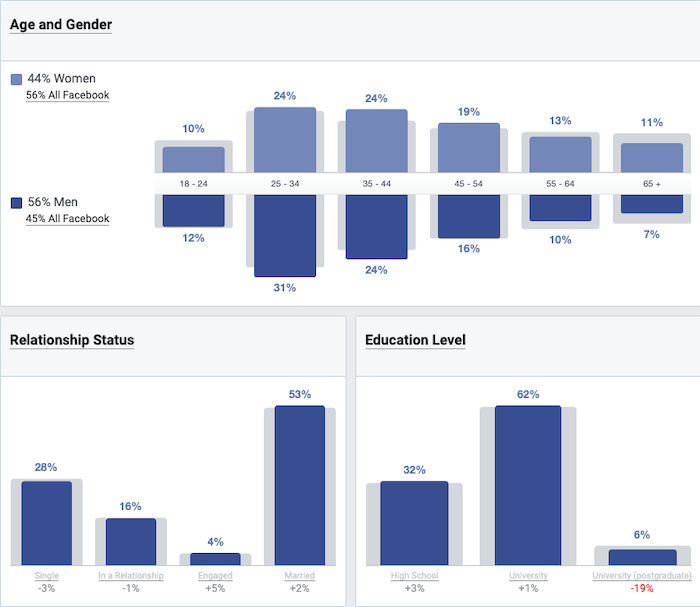
You can find out who engages with it most in the Actions on the Page section by visiting your Facebook Business page. It shows you who clicked your contact information, call-to-action (CTA) button, or website, and segments the information by age, gender, device, and location.
So what does all this information tell us? Well, say you discover 80 percent of the people who follow your page are men, 75 percent live in Mexico and speak Spanish as their first language, and 90 percent are between the ages of 18 and 25. Your Facebook cover photo should probably incorporate a young Mexican man and maybe some Spanish text.
Here are a couple of examples of how Google targets its various audiences through its cover photos. First off, the brand’s UK Facebook page incorporates a bunch of cartoony imagery featuring recognizably British landscapes and structures like the Angel of the North, Stonehenge, and a red London bus.
Meanwhile, the Google Students cover photo features pictures of young people from diverse backgrounds, often working in teams and using technology. In other words, they’re exactly the sort of people you’d expect to be interested in a Google page aimed at students.
4. Pair the Facebook Cover Photo With Your Profile Pic
Just as your Facebook cover photo should complement your brand, it should also go hand in hand with your profile picture.
That’s really important because they sit alongside one another at the top of your Facebook Business Page. If they don’t fit together naturally, the results can be pretty jarring.
Nike is America’s most famous clothing and footwear brand, with 99% audience recognition, so it’s no real surprise that the company gets its Facebook branding perfect.
With just three words, two colors, and the classic “swoosh” logo, Nike somehow manages to encapsulate its whole brand across its cover photo and profile picture.
5. Promote Your Products and Events Through a Facebook Cover Photo
When your cover photo takes up so much space, why wouldn’t you use it to talk about the things you want to promote? Whether that’s a new product, a special offer, a big piece of content, or an event, your cover photo is a fantastic place to show it off.
For example, PlayStation uses its cover image to showcase a high-profile new release for its PS5 console. Notice how the brand combines this with a CTA urging people to play the game, effectively transforming the top half of its business page into an interactive advert.
Taking things in a different direction, Gucci’s Facebook cover photo and profile picture are given over to promoting an online event, Guccifest.
Again, the fashion brand has added some interactivity by including a scannable QR code in its cover photo. The whole image is extremely text-heavy, which isn’t what you’d expect from a brand selling a physical product, but this makes the cover photo even more striking in Gucci’s case.
4 Steps to Designing an Impactful Facebook Cover Photo
Now that you understand the theory behind creating a striking Facebook cover photo for your business, it’s time to make it happen for your brand. Follow this simple four-step process to turn your Facebook cover photo vision into reality.
1. Pick a Facebook Cover Photo CTA Technique That Works for You
Take another look at all those Facebook cover photo examples I included above. None of them could appear in all five sections.
The PlayStation example is really effective at promoting a product, but it arguably doesn’t pair up well with the brand’s profile picture. Nike keeps things simple, complements its brand, and matches its profile image, but doesn’t directly feature its audience or showcase a product.
Does that mean they’re all bad cover photos? Far from it. Instead, this demonstrates that your Facebook cover photo shouldn’t be all things to all people. Pick out one or two of those techniques and use them to inform your image. For instance:
- About to launch a high-profile new product? Use your cover photo to promote it.
- Got a particular audience? Speak directly to them in your cover photo.
- Have a recognizable logo or slogan? Keep your cover photo super simple; let your branding do the talking.
2. Choose a Facebook Cover Photo Editing Tool
You don’t need to be a skilled graphic designer to create an effective Facebook cover photo. There are tons of easy-to-use, free photo editing tools that do all the hard work for you.
Arguably the most popular is Canva. It’s free to sign up and features a bunch of Facebook cover photo templates cropped to the correct dimensions. To find them, create your own Canva profile, select social media imagery, and choose the dedicated Facebook Cover option:
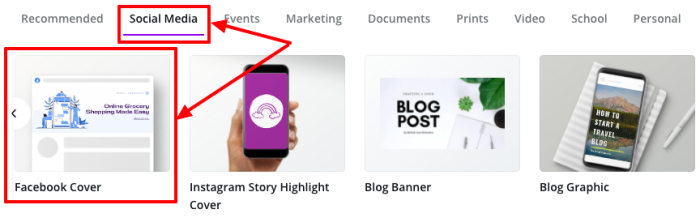
Just one word of caution here: While Canva is free to use, you’ll need to pay for some design elements.
There are lots of other options, too. If Canva isn’t working for you, try PicMonkey, Visme, Snappa, Bannersnack, or countless others.
3. Start With a Photo
Again, unless you’re a qualified graphic designer (or have access to one), you’re likely looking for the simplest possible way to create an impactful Facebook cover photo.
In that case, you definitely want to start by finding a suitable image. Something that encapsulates your brand and speaks to your audience.
Just as there are lots of brilliant graphic design tools available online, there are also tons of fantastic free stock image libraries packed with hundreds of thousands of visuals you can use to design your cover photo.
Alternatively, feel free to incorporate your existing website imagery if you’re planning to use your cover photo to showcase a product or service.
4. Remember to Use the Right Facebook Cover Photo Size
Last but not least, you must use the right dimensions for your cover photo. Otherwise, Facebook will crop or stretch it, and all your hard work designing a beautiful, eye-catching image will be wasted.
So what are the right dimensions? There’s no easy answer, as frustrating as that sounds. Because 70 percent of Facebook users access the site on their phones, your cover photo has to work across both desktop and mobile. Yet cover photos display differently based on the device you’re using:
On the desktop, the cover photo displays at 820 pixels wide by 312 pixels tallOn mobile, it displays at 640 pixels wide by 360 pixels tall.
If you want to use a single image that works across both formats, Buffer recommends cropping it to 820 pixels wide by 462 pixels tall.
As an absolute minimum, Facebook says your cover photo should be 400 pixels wide and 150 pixels tall. It also advises keeping your image to less than 100 kilobytes for the fastest-possible loading.
Conclusion
Remember that your Facebook cover photo isn’t just a striking image. Choosing the right one for you isn’t necessarily about utilizing the brightest colors or the boldest copy.
It has to tie into your brand, speak to your audience, and effectively communicate your message. Ideally, anyone who knows your brand already should find it instantly recognizable.
If you’re struggling, remember the value of keeping things simple. Don’t try to be too abstract or clever. A basic image that clearly represents who you are and what you do will be much more effective than something complex that leaves people scratching their heads.
How are you using your Facebook Business Page to generate leads or sales?
The post How to Create the Best Facebook Cover Photos for Your Business appeared first on Neil Patel.
Source: feedproxy.google.com

The 5 Best Facebook Ad Companies of 2020
2.6 billion.
That’s the total number of people on Facebook today.
This also means you get direct access to 2.6 billion people on a single platform.
So why not make the most of this opportunity and use Facebook to market your products and services for generating leads and driving sales?
Advertising on Facebook can be customized to suit your brand image and business goals. You can focus your efforts on a very specific target audience and create a lot of buzz for your offerings – all this without breaking the bank!
It’s actually quite cheap to reach out to people on Facebook, with a plethora of options available at your disposal, such as pay per click or per email conversion.
Plus, according to research:
Facebook ads reach 1.95 billion of the total active users, which is a staggering 32% of the world’s population over the age of 13.Globally, the average Facebook user has clicked 12 ads in the last 30 days.Over 80% of social reference to e-commerce sites came from Facebook.
While all this sounds fun and dandy, all your efforts can still backfire if you don’t have an efficient Facebook ad campaign in place.
And not only that, you need to support your ad strategy with agility and in-depth knowledge to keep up with Facebook‘s best practices and fast-evolving changes.
This is precisely where the world‘s best Facebook ad companies step in.
Our team at Neil Patel Digital has reviewed the five best Facebook ad agencies to help you master advertising on the platform. We‘re confident that you‘ll have a positive experience with all our top picks.
The 5 Top Facebook Ad Companies in the World
1. Neil Patel Digital – The Best Overall Facebook Ad Company
Branding our company, Neil Patel Digital, as the best isn’t us being vain – we have a solid backing to this statement.
Founded by hardcore marketers who know the art of marketing like the back of their hands, you get top-level expertise coupled with solid experience that can take your businesses to the heights you’re aiming for – and maybe even further!
If you Google “Facebook advertising” or “Facebook advertisements,” you‘ll find multiple articles by our co-founder, Neil Patel, take the top spots. Also, let us clarify that all this has been achieved organically.
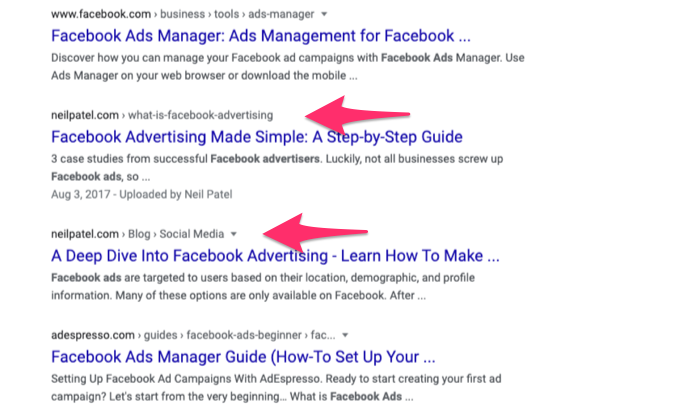
Neil is one of the most successful, ubiquitous digital marketers you can find. We don’t claim this, Inc. does.
Additionally, our team of experts – top-level and in-house marketing managers – are well-versed in what clicks and what doesn’t on a social media platform like Facebook. We know the nuances of creating unique, impactful ads that drive the viewer to take immediate action.
We take care of everything: carrying out paid social media campaigns, customer targeting, sending them messages, and recommending creative and copy best practices. Everything.
If there’s one thing that Neil Patel Digital can deliver, it’s results.
Our ad campaigns are customized to suit your budget and marketing objectives. From writing attention-grabbing headlines, choosing the right CTAs, and doing A/B testing – you need to worry about nothing.
We do the magic to make the whole process as effective as possible.
Our clientele includes market heavyweights like Google, Viacom, eBay, NBC, TechCrunch, Thomson Reuters Foundation, and even Facebook itself.
Client expectations are undoubtedly high because of this, but if you take a look at our case studies, you know that we can do some pretty spectacular things for your business:
We helped an online fashion brand surpass the global pandemic slump by recording 3x to 6x ROAS in three months via NPDI’s performance marketing efforts. A 40% reduction in cost per sale and a 141% increase in conversion rates were other wins.
We shifted a luxury retail client to online marketing with NPDI’s full-funnel per advertising strategy that recorded 0x to 4x return within two months.
We increased the lead flow of our healthcare client by 60% and cut down the cost per lead expense by 12% – both of these in just two months with NPDI’s lead generation strategy.
In short, our clients have been happy with the results. Plus, we have a 4.3-star rating on Glassdoor.
And since you’re still here, book your free consultation with Neil Patel Digital here.
2. Hibu – The Best Facebook Ad Company for an All-in-One Solution
A full-service digital marketing agency, Hibu offers a comprehensive Facebook advertising campaign set-up, management, optimization, and reporting services. It doesn’t hurt that the company is Facebook’s marketing partner too:
The agency has very flexible pricing and can customize its services to meet your needs. Its Facebook advertising services start at $250 per month, which comes with a dedicated digital specialist who can create an effective social media plan for your brand.
Besides an end-to-end Facebook ad service, you can avail of the following services:
- Social media marketing
- Listings management
- Website design and development
- Online review management
- SEO
- Display Marketing
Hibu will set up your Facebook business page and use its team of dedicated marketers to craft highly targeted ads that convert visitors.
It starts with identifying your goals for creating Facebook ads and then generating appropriate variations to determine the right fit. Once the ads are live, the agency analyzes ad performance and continuously optimizes them for better results.
Client testimonials also speak volumes about its amazing results.
Owners of The Mudpie Company, Berry Floor Leveling LLC, and Rutzick Law are all praised for Hibu’s efficient service and professionalism. The company developed a custom digital marketing solution for one of its clients that helped drive traffic, causing a phenomenal 12x increase in page views.
Hibu enjoys more than a four-star rating on major review sites, such as ConsumerAffairs and Better Business Bureau. You‘ll also find multiple five-star reviews on the company‘s ‘Client Review’ section.
3. Voy Media – The Best Facebook Ad Company for À La Carte Services
Voy Media is your best bet if returns are your top priority.
It‘s the brainchild of Kevin Urrutia and Wilson Lin and was founded in 2015. You get plenty of variety, including single or ongoing Facebook advertising services.
Precisely why this agency can be an excellent option for businesses that want to test the market by opting for one-off services before considering something permanent.
Voy Media strives to guide its clients on a journey to discover their products and make them their own fans. In addition to developing a collection of eye-catching ads and copy, they adopt a performance-based approach by using carefully thought-out strategies and tactics like target audience development and A/B testing.
It uses proprietary AI software as well for optimizing and scaling Facebook campaigns.
In terms of pricing, you can avail the à la carte Facebook ad copywriting services for $49.99, while outsourced Facebook advertising costs 10% and 15% of your total budget, depending on the range.
You must have a minimum $5000/month budget for advertising, though.
Several big companies, such as Big Life Journal, UMG Gaming, Paw.com, Lacoste, and XG Cargo, form a part of its clientele.
The company is also fully transparent about results and has multiple case studies showcasing its expertise.
Voy Media helped one of its clients to scale and amplify its paid media strategy to boost its ROAS with a corresponding decrease in CPA and CPM. They delivered the following results:
1,500% increase in revenue140,000+ purchases1,000,000+ landing page views26,000,000+ post engagements
Thanks to its strong communication and fantastic team of marketers, Voy Media has scored a 4.5 rating on Yelp. Many have mentioned how the company has given them better ROI, increased click-through rates, and reduced conversion costs.
4. MuteSix – The Best Facebook Ad Company for Innovation Graphic Design
MuteSix is a full-funnel ad agency that can create value for DTC brands, starting at 15% of your total ad budget. And considering that reputable brands like LA Times, National Hockey League (NHL), Headspace, and Chicago Tribune trust MuteSix, you should too.
Their weapon of choice? Breakthrough creativity, which is backed by targeted media buying and data-driven analysis.
Not only does the company produce quality ads for your target audience, but it also optimizes ads, recommends good website designs, and provides regular performance reports.
They also place a Facebook Pixel on your website for tracking user actions and sales to carry out A/B tests. You can use the Facebook Pixel for retargeting purposes too.
MuteSix has an in-house video studio and graphic design team that can help businesses expand their reach through unique visuals. Furthermore, it tests multiple versions of visually appealing ads on different target audience segments for enhanced effectiveness.
For instance, the company selected a unique carousel ad format for one of its clients that allowed visitors to scroll through its catalog without leaving their News Feed. This helped the client in the following ways:
4x increase in revenue33% decrease in cost per action
Bonus: MuteSix can help you make great landing pages and video stories.
In addition to the previously-mentioned brands, several other companies have enlisted the services of MuteSix. Besides the clients, the agency also treats its employees equally well.
It has received several accolades, with Inc. featuring the company on its 500 list for Best Companies to Work For. The fact that they take such excellent care of their employees gives the latter more initiative to work harder for the company’s clients, a.k.a you.
As one would expect, this Facebook ad agency has excellent customer reviews – from Glassdoor to FeaturedCustomers to Google. MuteSix’s biggest advantage is its knowledgeable and skilled team, innovative video production, and fast results according to customers.
The only catch here is that the company prioritizes clients with monthly budgets over $20,000 in ad spend. So it may not be the best bet for small companies.
5. Lyfe Marketing – The Best Facebook Ad Company for Small Companies
Small companies often don’t have the flexibility to splurge when it comes to advertising.
They have to operate within their budget limitations and maximize results – something that Lyfe Marketing can help achieve.
Located in Atlanta, GA, Lyfe Marketing is a boutique social media management company that offers social media advertising and management, PPC, SEO, and website design services.
It has less than 50 members, making it suitable for small and medium-sized businesses. In fact, the company has been explicitly clear about its primary goal of helping small businesses grow.
The company is well aware of how Facebook can be a driving force for enhancing marketing efforts. You can use its services to grow brand awareness, develop relationships, and promote website traffic.
Lyfe provides bespoke solutions to leverage cost-effective advertising methods and has an expert team to assure tangible results. Their work involves optimizing existing campaigns to decrease cost and increase conversion rates.
Additionally, every account is managed by an experienced social media manager to gain greater insight into your target audience.
If you prefer an intimate working relationship with your Facebook ad company, this could be an excellent fit.
Plus, you can rest easy when it comes to ad quality too. Lyfe knows the art of providing creative, impactful ads that can help your clientele grow.
With a 4.7- and 4.8-star rating on Clutch and Upcity, respectively, you can imagine Lyfe’s customer satisfaction proficiency. The company claims to have driven over 2,137,349 leads and has listed several case studies that breakdown every client’s journey to success.
We would highly recommend enlisting this agency’s services, joining the likes of Domino’s Pizza, Georgia State University, Hilton, and the Atlanta Hawks.
4 Characteristics That Make a Great Facebook Ad Company
While we’ve chosen our top five picks, you should still be aware of the factors that make a good Facebook ad company.
After all, it’s a sure-shot way to find your perfect match out of the thousands of Facebook ad agencies operating today.
Expertise in Create Objective-Specific Ads
Of course, you want results, and the only way you can ascertain this is through a company that has the skills.
Mentioning “objective-specific ad“ isn’t us trying to sound fancy too.
You see, every company has different business goals. Some want leads; some want to enhance their reach. Others may want to increase store visits or boost engagement.
Whatever be your objective, your chosen Facebook ad company should know how to help you achieve it.
The best way to ensure this? Looking for a diverse portfolio.
Working with different clients and industries helps companies bring greater value, creativity, and innovation to their future clients. Finding a company that has Facebook on its client list would make the deal even sweeter.
Talented Team of Experts
A Facebook ad agency should have an incredible team to back up its success claims.
If it doesn’t, you might want to start looking for other options. After all, how can a company deliver on its bazillion promises without the brain and muscle?
Ask yourself the following questions:
- How much experience does the team have when it comes to social media marketing?
- How well are they able to communicate with you and understand your needs?
These considerations can help determine whether the company has a team that knows how to drive results for your brand.
Real Life Testimonials
Vanity isn’t always bad.
In this case, for instance, you want a company that doesn’t mind tooting its horn.
Try partnering with a company that provides a positive experience and has a long list of client testimonials to prove it. You want this experience to be posted directly on the website.
Good testimonials often translate to a similar experience for future customers. Plus, clients are more than happy to give testimonials for a company that they loved working with. If you find a company that has a lot of testimonials, consider it a good sign.
Familiarity With the Latest Tech and Practices
Facebook ad companies must be familiar with the necessary equipment to get the job done.
They should have no learning curve for software/tech – be it Facebook ads manager, Facebook Pixel, power editor, or any other cutting-edge advertising technologies.
Without up-to-date knowledge on tools, your Facebook advertising campaign will lack a punch and hence, will take longer to get results.
While you’re at it, look for ad agencies that are intimately familiar with third-party data sources and creative testing tools in addition to ad software expertise.
What To Expect From a Great Facebook Ad Company
Let’s discuss expectations next. More particularly, what can you expect from your brand?
Introductory Session
As mentioned before, you can have various objectives for enlisting the services of a Facebook ad company.
However, there is no cookie-cutter approach, as every business case has different needs and limitations.
The team should begin with hearing your vision and then devise methods to achieve it. Just because an ad worked for one company gives no guarantee that it’ll work for you.
Always be vocal about what you want; it’s exactly what the agency wants to know.
In-depth Research and Best Practice Recommendations
Once they know what you want, they should use their experience and expertise to carry out in-depth research to formulate a draft campaign framework.
Everything has to be in sync here: you, your target audience, and your niche.
You can expect the Facebook ad company to hold meetings where they recommend the best practices for maximizing results.
Campaign Kickoff
If you and the ad agency seem to be a good fit for each other, you‘ll receive a contract.
This will contain a detailed list of terms and conditions, expectations, a business plan, and an estimated time frame of when you can expect results.
Next, you’ll have to introduce the team to your in-house staff and give them access to your website, blog, analytics login codes, and so on.
Once the onboarding is done, the Facebook ad company should start scoping your project, creating timelines and task lists, and chalk out an understanding of how they will manage the project.
Wrapping Up
Advertising isn’t easy.
Without knowledge and experience, you and your staff can get overwhelmed and maybe even incur losses.
It’s wiser to rope in an experienced and reputable Facebook ad company that can drive new business and save you money at the same time.
The five companies we’ve listed above tick all the right boxes. They have a stellar reputation for delivering results, creating thriving ad campaigns, and provide excellent customer service. Choose any one from them, and you’ll be able to boost traffic and convert visitors into leads and customers.
It’ll only get better with time once things pick up – you only need to find the right company for you.
The post The 5 Best Facebook Ad Companies of 2020 appeared first on Neil Patel.
Source: feedproxy.google.com

How to Train Your Facebook Pixel
Facebook’s goal is to put your ad in front of users who will take you up on your call to action. To make this goal a reality, they created the Facebook pixel. It’s as futuristic tech as it sounds…

The pixel is a piece of code that goes on your website that reports back to Facebook whether or not someone performed the call to action on your website.
For example, if your call to action is to buy a tea bundle, the Facebook pixel code on your tea website is going to tell Facebook whether or not a user that saw your ad and clicked through to your website:
- Put the tea in their cart
- Bought the tea
- Didn’t do either of these
As a marketer—the pixel is badass. It can help you reach the users who are most likely to take your desired action, making your ad budget go way farther than it used to be able to.
For example, if they know that a user was just looking at different tea flavors on ANOTHER tea company’s website… they can show your ad to that user.
Pretty cool, huh?
But, here’s the problem.
The pixel needs you to help it out a bit.
While the pixel can pull from their *impossible to comprehend database*, that doesn’t mean they’re going to nail it the first time around.
That’s where training your pixel comes in.
Why You Need to Train Your Pixel
Facebook’s goal is to get you conversions and your goal is to help Facebook…get you conversions.
When you train your Facebook pixel, you run a campaign that isn’t necessarily optimized to make you money.
It’s optimized to train your pixel.
This is called the Learning Phase because like a post-graduation gap year you’re setting your pixel out into the world to go and learn new things.

It’s going to come back with a ton of new knowledge and it’s going to use its new knowledge to get you more conversions.
During this Learning Phase, your ad set is going to be seen by different people who are within the target audience you chose.
Facebook’s going to keep tabs on who performs actions and who doesn’t and then help you create a custom audience based on this initial target audience.
Start training your pixel:
Step: 1
Choose a low-tier objective like video views, website clicks (not asking to purchase), etc.
Step: 2
Create ONE ad set with a CTA for the low-tier objectiveChoose your target audience
Step: 3
Let the ad set run for approximately 50 conversions or at least one week
Step: 4
Do not change anything once you’ve published your ad set
It’s time to summon your inner patience, because as much as you want to tweak your copy or change your objective—you can’t.
This is like choosing to train your dog to “Lay Down” in the middle of teaching them how to “Sit” for the first time.
They’re going to be super confused, you’re not going to get the end result you wanted, and you’re going to have to start fresh another day. 
You can shut these ads off once you’ve reached about 50 conversions or you’ve hit 5–7 days.
Congrats, you trained your pixel!
While it’s not nearly as cute as your dog sitting when you ask them to, you’ll get that warm, fuzzy feeling when you start to get conversions and see real people wanting your products and services.
Now that you’ve trained your pixel, you’ll be able to use this as a custom audience for your future campaigns.
Just a quick note:
If you have a larger budget, you might be able to hit 50 conversions within a few days.
Since Facebook uses your budget to show your ad to more people, you’ll be able to get more eyes on your ad in less time.
If this is the case, you can shut off this ad set and start running your purchase conversion-optimized ads to this new custom audience.
If you have a smaller budget—no big deal.
Just wait for 50 conversions or 5-7 days (whichever comes first) and then start running your conversion-optimized ads to your new custom audience.
Create a Custom Audience Based on Your Trained Pixel
Let’s say your Learning Phase ad set had the conversion objective of video views.
You were able to get 50+ people to watch your video and now you’re ready to run your real ads to them.
When you choose your audience for these ads, you’ll have the option to choose custom audiences that weren’t available to you PRIOR to training your pixel.
Step One:
Go to your Ad Set and click “Custom Audience”
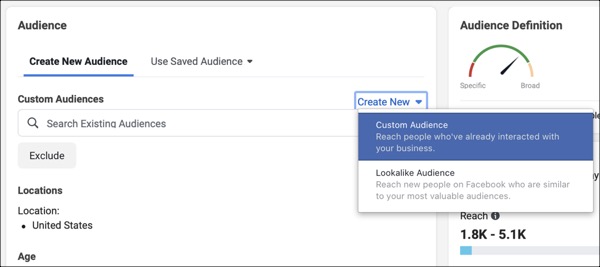
Step Two:
Choose “Video Views”
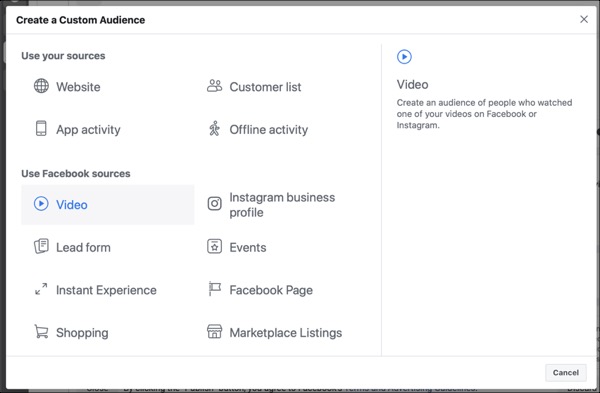
Step Three:
Choose the Video View durations (you can choose more than one)
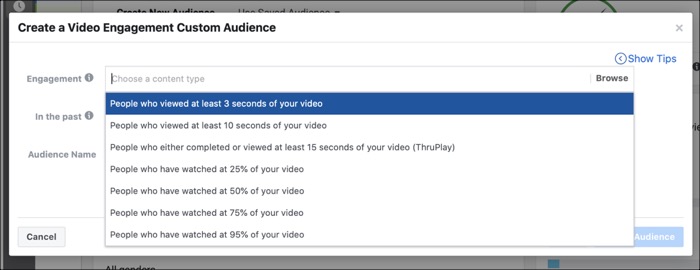
Step Four:
Choose the video viewers you want to show the ad set to based on how long ago they viewed your video
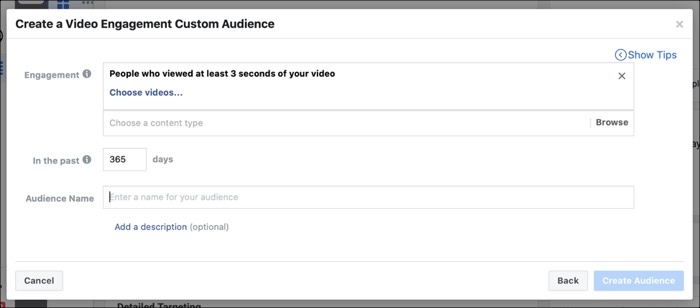
Step Five:
Name your custom audience
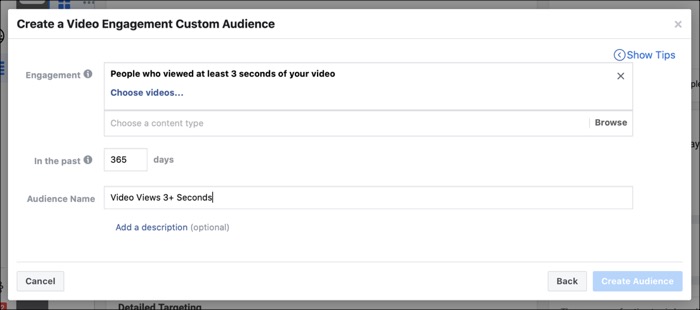
Now you’re advertising to a warm audience of people Facebook knows is interested in your product.
Instead of asking them to convert the first time they ever see your business, you’re asking them to convert once they’ve gotten a better chance to know you.
Marketing is like any relationship—you can’t just walk up to somebody in the produce aisle and ask them to marry you.
You both need to get to know each other first.
By training your Facebook pixel, you skip the produce aisle proposal and build a relationship first, ask them to marry you (aka buy your products) later.
And just like that, you’ve trained your pixel and now you can optimize your future ads based on everything your pixel now knows.
Technology is nuts…
Takeaways
- Training your Facebook pixel creates a custom audience of people most likely to convert for your future offers
- Train your pixel with a low-tier; ask objective like video views or reading a blog post on your website
- Don’t change anything about your ad set for one week or at least 50 conversions
- Create a custom audience based on the conversions

The post How to Train Your Facebook Pixel appeared first on DigitalMarketer.
Source: digitalmarketer.com