
Tag Archives for " employee "

How to Make Social Advocacy Part of Your Employees’ Daily Routine
Your employees each have a morning ritual. Grab a cup of coffee. Scroll through Facebook’s News Feed. Respond to emails. Dial into a conference call. Start the workday.
What if your company could become a part of employees’ daily routines? What if there was a way for you to use this downtime to inform others and increase brand awareness?
Welcome employee social advocacy! By tapping into a daily habit that already exists, you can create social advocacy and amplify your marketing efforts.
According to a 2016 survey from Bambu by Sprout Social, seven in ten employees are using social media at work. Blocking popular networks and monitoring browsing history isn’t going to stop anyone from checking Facebook—especially when 11 percent of those surveyed admitted to using social media during bathroom breaks.
Instead of trying to fight a habit that’s already ingrained in your workplace culture, embrace it! Encourage your employees to use their time on social to speak on your brand’s behalf. By outlining the individual benefits, identifying existing champions, and educating and empowering employees, you can strategically build a powerful advocacy program.
Answering the Question: What’s In It for Me?
One of the biggest hurdles in getting people involved in an advocacy program is convincing them that there’s a personal benefit. Before you introduce a formal or informal program, you need to answer the frequently asked question, “What’s in it for me?”.
The best way to do this is by not only communicating but also demonstrating the benefits of sharing company content on social.
Collect and share testimonials from sales representatives who have seen an increase in revenue by sharing curated content. Who has had success at positioning themselves as thought leaders within the marketplace? Identify a new employee who learned about the position through a social post.
If these use cases aren’t applicable, try surveying engaged employees to learn what they think is most valuable.

Additionally, you need to demystify the idea using social media at work negatively impacts productivity. Believe it or not, four in five people believe that.
Sure, there’s always going to be the 10 percent of surveyed employees who spend over two hours on social. However, a vast majority spend less than an hour scrolling through their feeds.
You may want your employees to hit the ground running sharing your awesome content, but that may not happen right away. What’s most important, initially, is that your employees are reading the information you’re posting. You want them to experience a more transparent and forthcoming workplace.
Identifying and Educating Existing Internal Advocates
Do a quick search on Instagram of your office location and a Twitter query of your branded hashtag. These employees are your initial allies and should be the first group of stakeholders you bring into your employee advocacy initiatives.
That’s what Katie Gear, Area E-Commerce Marketing Manager for Hyatt hotels in Chicago, Indianapolis, and Cincinnati, did when she first launched her advocacy efforts. Gear spoke with Sprout Social’s Community Outreach Manager, Sarah Nagel, about how she scaled her program and identified its first participants.
“Harness employees who are already sharing. Create a more meaningful conversation with their employer, and keep the dialogue they’re already participating in more open-ended,” Gear told Nagel.
Gear identified these brand advocates by searching social and approaching directors in sales and marketing. She asked them who from their teams would be a good fit. 54 percent of those surveyed responded that they don’t have a lot of guidance on how to use social media to advocate for their company.

To address this, Gear followed up by hosting informal social media 101 classes for Instagram, Facebook, and Twitter.
“The courses help them understand what I’m doing with the content and what I look for—and what content works best on what channel,” Gear told Nagel.
So, first, identify and then educate existing internal advocates to help you implement a more effective employee advocacy program. Leverage this highly engaged focus group for feedback. Lean on their insights to help revise your efforts before rolling it out to a larger audience.
Empowering Your Employees
Participants in your program shouldn’t view engaging with company news and relevant content as extra work—otherwise, they won’t opt-in.

In fact, 53 percent of employees surveyed don’t think that the marketing team makes it easy for them to advocate for the company on social media. Don’t make engaging with your brand more cumbersome than it needs to be.
Along with internal education on social media best practices, you need to streamline the sharing process and provide your employees with all the tools they need to be the best advocates possible.
When you’re sharing social content with your team, try this:
- Accompany each post with suggested social messaging per each popular network.
- Include a note with each piece of content that tells why what you’re sharing is important and who the internal stakeholders involved with the initiatives are.
- If you’re citing a third-party source, make sure you’re highlighting a reputable publication.
- Make sure that you’re asking your team members to share content and information that they think would resonate with all of the company’s employees or a departmental audience. Employee engagement, just like social media, should be a two-way dialogue.
Quantifying Employee Advocacy Success
Strategizing and implementing an employee advocacy program takes time and resources. Be sure that you’ll be able to measure the impact of your efforts. Adding UTM codes to the end of each piece of owned content you share with employees will make it easy to track, measure, and benchmark.
Some of the same social metrics you apply to your marketing efforts can be applied to your advocacy initiatives.

Keep in mind that those surveyed were 16 times more likely to read a social media post from a friend than from a brand. 81 percent of participants went as far as saying they would rather see a friend’s social post than a brand’s post.
Keep a close eye on your efforts, and continue to use the data and anecdotal feedback you receive to revise and refresh your program.
Cheers to Your Advocacy Leaders!
As your program gains momentum, your employees will see that advocating on social media isn’t as confusing or hard as they may think. Be sure to start out with a proper framework and approach. Getting your employees to incorporate advocacy into their daily routines can be a seamless and mutually beneficial process.

This post was originally written by Andrew Caravella and updated by Michelle Saunders in 2021.
The post How to Make Social Advocacy Part of Your Employees’ Daily Routine appeared first on Content Marketing Consulting and Social Media Strategy.
Source: convinceandconvert.com

Do’s and Don’ts for a Successful Employee Advocacy Program
According to the 2021 Edelman Trust Barometer, trust in organizations and every category has plummeted across the board, especially in comparison to other years. But one of the few areas that remains one of the most trusted sources of information? People.
That means when it comes to building trust and gaining your audiences’ attention, your employees are your greatest asset, and it’s even better when they can advocate on your behalf.
But you can’t just put an employee advocacy program in place and hope for the best. Instead, follow a few do’s and don’ts to help make efforts more successful.

DO start with your goals for employee advocacy
Why exactly are you trying to kickstart your organization’s employee advocacy efforts?
Before you go all-in on getting employee advocacy off the ground and getting everyone involved, make sure you understand exactly how employee advocacy fits into your current content marketing and social media efforts.
For example, are you hoping employee advocacy will:
- Provide a surround sound effect by amplifying key brand messages and efforts?
- Reinforce your brand’s commitment to authenticity by using real, genuine voices?
- Reach even more people with messages shared by more messengers?

Whatever your goals are, make sure you solidify them before you jump in. It also doesn’t hurt to make them S.M.A.R.T:
- S: Specific – What exactly will be accomplished?
- M: Measurable – What are you measuring, and how?
- A: Actionable – Is the goal realistic? Can you actually accomplish it?
- R: Relevant – How does this goal ladder up to the big picture for your organization?
- T: Time-bound – When do your goals need to be accomplished?
DON’T assume everyone is on the same page
It’s one thing to create an employee advocacy program, but it’s another to participate in one.
While you may understand exactly what employee advocacy efforts look like based on your S.M.A.R.T. goals, you can’t assume the same for everyone else.
But you can help them better understand by creating and documenting clear guidelines that help explain:
- What employee advocacy is and looks like for your company
- What you want to accomplish with their participation (i.e., your S.M.A.R.T. goals)
- What’s in it for them for participating (e.g., become a thought-leader, raise visibility for things they’re
- excited about working on, promoting skills and talents, etc.)
- How all of this will come to life and get done

While this document can’t and won’t answer every question they have, it should give them a very good idea of what employee advocacy efforts look like for your organization.
And when it comes to putting the document together, keep it simple. It should be skimmable, scannable, and easy for them to digest.
DO provide multiple ways for employees to be advocates
How fantastic would it be if every single employee had the extra time and drive to create beautifully written thought-leadership articles, develop attention-grabbing LinkedIn updates, or share and comment on every single social media post your organization publishes?

Yeah, it’s not going to happen.
That’s why you need to have several, different options available to get the most participation with employee advocacy efforts.
- Maybe an employee can only create one thought-leadership article per quarter. Great!
- Maybe someone only has enough bandwidth to react to a Facebook post. Awesome!
- Maybe a team member is more comfortable consistently sharing branded posts. Fantastic!
Not every employee has to be 100% all-in and onboard with being your brand’s megafan to participate in employee advocacy efforts. That’s not the point of employee advocacy efforts.
The point is for employees to advocate in genuine and authentic ways, and those ways look different for everyone. So, provide multiple different options for getting involved (if they’re interested in participating, of course).
DON’T expect employees to add advocacy efforts on top of their to-do list

Let’s face it: the pandemic has left pretty much the entire workforce over-stressed and rethinking their entire work life and career. As NPR found:
“As pandemic life recedes in the U.S., people are leaving their jobs in search of more money, more flexibility, and more happiness. Many are rethinking what work means to them, how they are valued, and how they spend their time.”
Bottom line: You cannot have an employee advocacy program if your employees don’t feel valued. And asking them to advocate on behalf of your company by adding to their already-overwhelming to-do lists and never-ending tasks will absolutely not help.
Instead, depending on their level of involvement, let them know they’re able to participate in employee advocacy efforts by giving them the time and resources to do so…not just another to-do so they feel even more overwhelmed.
DO communicate regularly and consistently
Employee advocacy efforts are not a Ronco Showtime Rotisserie. You can’t just “Set it and forget it!”, even if that is the best tagline ever created.
You have to communicate regularly for efforts to work, especially after the initial excitement and rush of employee advocacy participation starts to wane.

To keep everyone motivated and encourage ongoing efforts:
- Provide regular status updates: Include updates on efforts, what the team has accomplished, and how much their participation has helped toward the goals set. Also, be sure to ask for feedback and open the floor to new ideas, too.
- Use advocacy tools to push content to employees: Adopt tools that can help you push messages, requests, and content to advocates, such as Bambu. But no matter which tool you use, make sure it’s user-friendly and can be easily adopted by anyone.
- Be clear and direct with advocacy asks: Need a specific event amplified on social media? Want more people to share the latest blog post? Need someone to write a thought-leadership article? Ask them directly, be specific with what you need them to do, and make sure they have all the information they need to participate.
Employee advocacy efforts are not a Ronco Showtime Rotisserie. You can’t just “Set it and forget it!”.Click To Tweet
Do It Together!
In the end, employee advocacy is a powerful tool that can help you harness the power of your team’s genuine, authentic and real voices. Putting a few safeguards in place, and following a few simple do’s and don’ts, you can take your efforts from just so-so to so successful.
The post Do’s and Don’ts for a Successful Employee Advocacy Program appeared first on Content Marketing Consulting and Social Media Strategy.
Source: convinceandconvert.com

Best HR Software
Human resources can be a tough department to manage. Between hiring, onboarding, scheduling, benefits, and compliance, there are dozens of responsibilities to navigate. What if an employee wants to view an old paystub? How does someone access information about their vacation days or benefits?
Disclosure: This content is reader-supported, which means if you click on some of our links that we may earn a commission.
Without the right technology, it’s a hassle for everyone involved.
That’s why specialized HR software has become so popular.
Businesses of all sizes are using these tools to improve efficiency and employee experience at the same time.
Here are the five best HR software options out there.
I’ve reviewed each one in-depth and included a short buyer’s guide that highlights the key criteria you should use as you evaluate.
5 Best HR Software Options
#1 – Namely Review — The Best for Employee Self-Service
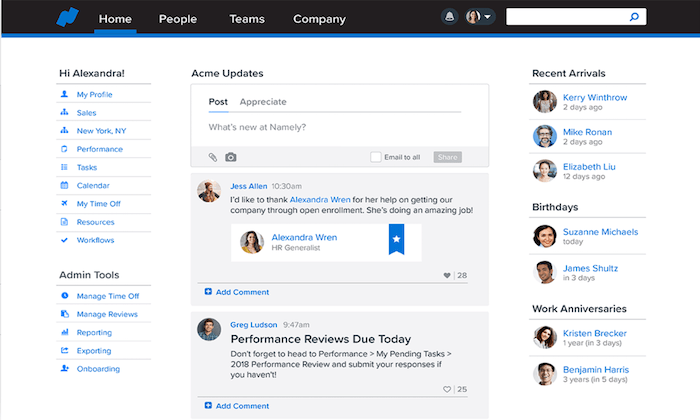
Namely is an all-in-one solution for HR, talent management, payroll, and benefits.
The platform makes it easy for businesses to improve their HR processes while remaining compliant.
It’s trusted by 1,400+ organizations worldwide.
The software is actually branded as a “people operations platform.”
It includes features for employee management, onboarding, talent management, recruiting, time and attendance, analytics, and more.
I’d say that Namely definitely falls into the human resources information systems (HRIS) category.
You’ll be able to manage all of your HR policies and procedures from the centralized platform.
I like Namely because the software is designed to improve employee engagement.
It gives your staff access to all of the HR information they could possibly need from an easy-to-use employee portal.
The software can be accessed from anywhere from the Namely mobile app.
You can even use Namely to share company news, improve communication, and set up a company directory.
Namely’s core HR package comes with tools and features like:
- Onboarding
- Performance and goal tracking
- Task lists
- Time off management
- Compliance database
- E-signature
- Employee self-service and workflows
- Custom fields
Then there are add-ons and extensions for things like payroll, benefits administration, recruiting, time & attendance, and managed services.
You get the powerful core system, and then customize it to fit your company.
Everything is synced, and your employees aren’t trying to get a payroll system to integrate with time clock software made by another vendor.
Overall, Namely is a good fit for midsize organizations.
#2 – APS Review — The Best for Payroll
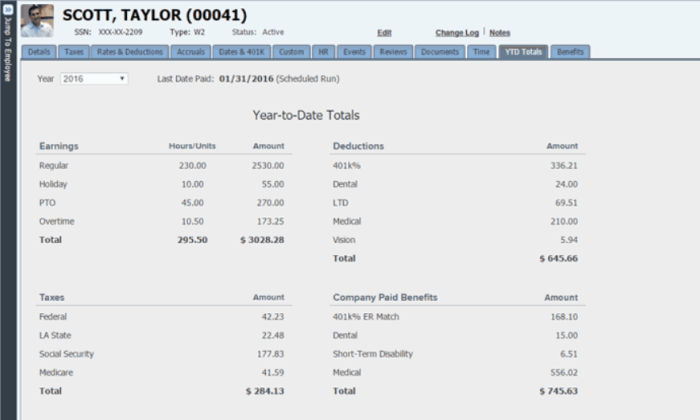
The acronym “APS” actually stands for “Automatic Payroll Systems.”
As this name clearly implies, payroll is their specialty.
But with that said, APS is not a standalone payroll software; it’s an all-in-one solution for HR and payroll alike.
In addition to payroll, APS has HR features for benefits:
- administration,
- performance management,
- employee scheduling,
- recruiting,
- onboarding,
- compliance,
- employee self-service, and more.
They also have industry-specific solutions for:
- healthcare,
- restaurants,
- wholesalers,
- nonprofits,
- manufacturing,
- hospitality,
- financial services, and other unique categories.
Let’s take a closer look at some of the top benefits of using APS for payroll:
- Streamline tax compliance with accuracy, timeliness, and wage garnishment
- Automate your tax system to reduce your burden and risk
- Reduce time spent processing payroll with paycheck reconciliation
- Automate federal, state, and local tax filings
- Improve your efficiencies and reduce costs with paperless payroll processing
The self-service tools provided by APS are outstanding; on the employee end and administrative sides alike.
More than 2,000 businesses across different industries rely on APS. For those of you looking for an all-in-one solution for HR and payroll, APS should be at the top of your list.
#3 – BerniePortal Review — The Best Human Resources Information Software (HRIS)
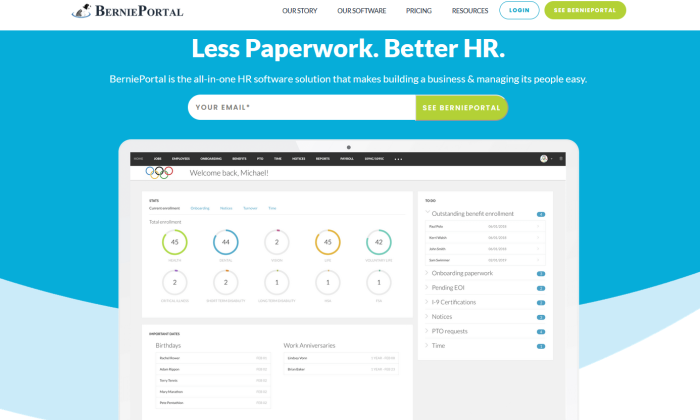
BerniePortal isn’t as well-known as some of the other HR solutions available on the market today.
But that shouldn’t be a reason for you to pass up on considering it.
In terms of human resources information software (HRIS), BerniePortal really has everything you could possibly need.
For those of you who want to use technology to improve the total lifecycle management of your employees, BerniePortal should be at the top of your list.
BerniePortal was founded back in 2008, so they have over a decade of experience in the HR software space.
The software has been deployed in 5,000+ HR departments in all 50 states, and it has 210,000+ active users.
Why BerniePortal?
Let’s take a closer look at what this HRIS software has to offer:
- Attract and retain top-level talent with benefits administration
- Compliance, custom enrollment, and payroll reporting
- Improve productivity and engagement with seamless employee onboarding Collaborative hiring decisions with built-in applicant tracking features
- PTO tracking, time-off management, and custom policies
- Tools for time and attendance tracking with detailed reporting
- Mobile access with employee self-service tools
- Performance management and compliance features
You can even use BerniePortal for things like IRS filings.
While the software doesn’t have built-in payroll features, it can seamlessly integrate with your existing payroll system.
BerniePortal offers a free version, which helps with recruiting and applicant tracking.
Paid plans start at $9 per employee per month if you sign up for a year, or $11 per employee if you pay month-to-month.
#4 – Workday Review — The Best for Human Capital Management (HCM)
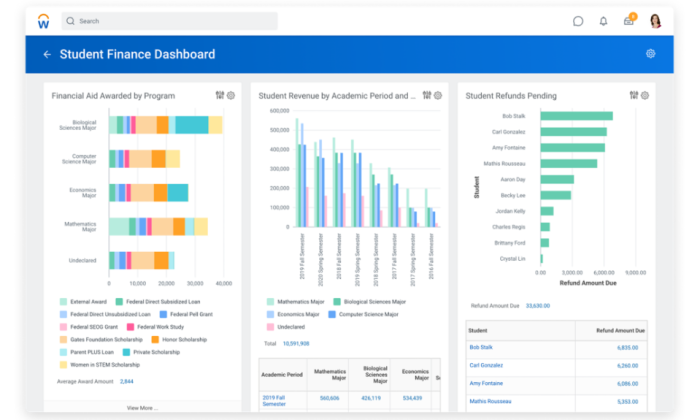
Workday is a popular HR software with a unique twist.
Every component of the tool is focused on finance.
It helps you manage your HR processes while always keeping your bottom line in mind—all from a single platform.
The software is used by industry leaders in a wide range of categories. Some of the well-known companies that rely on Workday include Visa, Toyota, Salesforce, CE, Target, Charles Schwab, and Adobe.
Overall, Workday is pretty versatile.
The software has solutions for human capital management, talent management, enterprise planning, payroll, and workforce management, spend management, and more.
Workday is robust, but also really easy to use.
You’ll benefit from features like:
- Automation to eliminate manual work and improve productivity
- Advanced analytics to guide decision making
- Improve communication and engagement
- Machine learning to identify employees’ skills
- Time tracking toolsCompensation, payroll, and benefits administration
- Employee directories and self-service tools
- The software can also adapt as your HCM needs evolve over time.
Another reason why Workday ranks so high on our list is because of its industry-specific HR solutions across a wide range of categories.
Some of these include healthcare, government, hospitality, insurance, manufacturing, professional services, energy, and more.
#5 – Kissflow Review — The Best for Employee Onboarding and Applicant Tracking
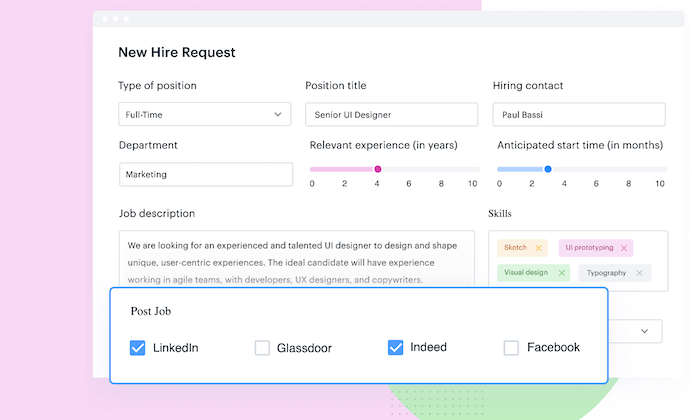
Kissflow is one of my favorite tools for managing HR processes.
It’s a top choice for businesses that want to improve the talent management aspect of human resources.
The software comes with features for applicant tracking, employee onboarding, attendance management, absence management, leave management, and employee offboarding.
With Kissflow, you’ll benefit from features and functionality like:
- Get open jobs in front of top-level talent at the perfect time
- Improve employee engagement
- Employee self-service tools360-degree feedback and evaluations
- Customizable HR solutions
Kissflow pricing starts at $16 per user per month for the Basic plan.
There is a minimum of ten users required.
You’ll be able to start automating your HR workflows without writing a line of code.
The downside of Kissflow is that it’s not a true all-in-one HR solution.
It focuses on certain areas but lacks functionality for things like payroll. With that said, Kissflow does have a wide range of integrations, so you can sync it with your existing tools.
What I Looked at to Find the Best HR Software
There’s no one-size-fits-all HR software.
Products have evolved to meet the needs of businesses that face very different challenges.
Some companies need a system to recruit, hire, and onboard hundreds of people each month.
Others just want something dependable for payroll and benefits.
You know your organization’s situation better than anyone else.
Which capabilities are going to make the biggest difference for HR and employees?
Let’s walk through the major features of HR software, and how they can make a positive impact.
Employee Self-Service
HR software with an employee self-service portal is a must-have in today’s day and age.
This portal will give your staff access to crucial information, without having to call, email, or physically visit the HR department.
Want to access the employee handbook?
Log in and look it up. Have questions about your benefits?
It’s available in the portal.
Need to request a day off?
Just a few clicks away.
All of this information, and more, is available 24/7.
So if one of your employees is sitting home on a Saturday night and wants to look at an old paystub, they don’t have to wait until 9:00 AM Monday morning to call HR.
As a result, everyone on your team will be more productive, and your HR staff won’t be wasting time answering questions all day.
Mobile Access
The best HR software will have a free mobile app.
This app can be used on the employee side for the self-service tools mentioned above, but it’s also helpful from an administrative perspective.
HR managers and other admins can complete tasks and view important information in real-time from anywhere.
HR responsibilities won’t be tied to a physical office.
In some cases, you can even use these apps to communicate with your employees.
They can opt-in for notifications delivered straight to their devices, which can reach them faster than an email.
Payroll and Benefits Administration
The vast majority of HR solutions will allow you to run payroll directly through the platform.
This isn’t necessarily a make or break feature; it depends on your personal needs.
But since HR and payroll typically go hand-in-hand, lots of businesses look for an all-in-one solution for the two.
If you’re happy with your current payroll solution and don’t want to switch, that’s fine too.
See if you can find an HR software that integrates with whatever you’re using for payroll.
Your HR team and employees will like having access to everything from a single place.
Automation
Efficiency is the main concept behind using HR software.
Nothing is more efficient than automating repetitive tasks.
Look for software that eliminates manual labor.
For example, some HR tools will automatically track and calculate time-off requests, taxes, government filings, and more.
Think about how much money you’ll save in labor hours if you can eliminate even just 5-10 hours per week on these types of tasks. At scale, the savings are astronomical.
Company Size
Another way to narrow down your choices is by looking for software that fits the needs of your business size.
A small business with 15 employees won’t have the same HR needs as firm with 150 employees or an enterprise with 1,500 employees.
It sounds simple, but so many companies overlook this aspect.
Larger organizations will have more complex HR needs that some software just won’t accommodate.
On the flip side, small businesses usually won’t need all of the features offered by certain HR solutions.
Conclusion
Every business can benefit from HR software.
This statement holds true regardless of your company size or industry.
The five solutions recommended in this guide will be the best place for you to start your search:
- Namely — Best for employee self-service
- APS— Best for payroll
- BerniePortal — Best human resources information system (HRIS)
- Workday — Best for human capital management (HCM)
- Kissflow — Best for employee onboarding and applicant tracking
Before you finalize a decision, make sure you go through the process explained in this guide. Figure out what type of HR software fits your needs the best by assessing the criteria I laid out.
It won’t take long, and you can ensure that you are choosing an HR software option that will meet the challenges you face.
Source: feedproxy.google.com

Best Employee Scheduling Software
It’s no fun being shorthanded or overstaffed.
For a small business, a single absence can turn a morning upside down.
For large businesses with multiple locations, staying organized is even harder.
Employee scheduling software makes it so much easier for managers to staff appropriately.
Disclosure: This content is reader-supported, which means if you click on some of our links that we may earn a commission.
They can create a schedule in minutes, update it on the fly, and switch people around as need be.
Plus, your team will appreciate a schedule that’s always up-to-date and accessible from any device.
Cut down on miscommunications with everyone looking at the same schedule no matter where they are.
Which employee scheduling software is the best?
You’ll find in-depth reviews of each of my top picks below, followed by a short guide to help you find the best tool for your workplace.
#1 – Homebase Review — The Best Employee Scheduling Software For Small Businesses
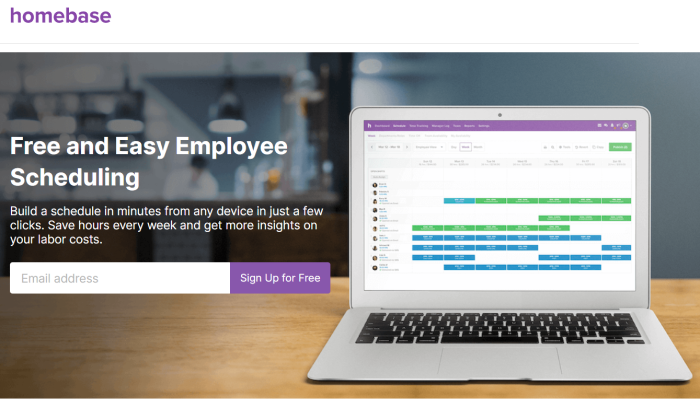
Homebase is an employee scheduling tool designed with small businesses in mind.
It’s versatile enough to accommodate scheduling needs across a wide range of industries, including retail, health and beauty, service businesses, and restaurants.
More than 100,000 businesses rely on Homebase, and not all of them pay for it.
I’m serious. Homebase has a freemium business model.
If you need advanced features, you can look at one of the paid plans.
But if all you need just need a scheduling system,
Homebase more than has you covered.
You get a beautiful interface that employees and managers can access 24/7.
The calendar updates in real-time, so everyone is on the same page.
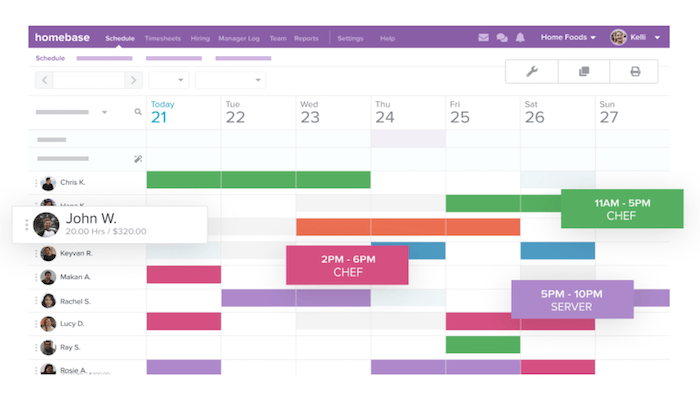
With Homebase, you’ll benefit from top features and functionality like:
- Simple scheduling templates that can be edited on the fly
- Easy schedule sharing with your entire team
- Ability to forecast your labor costs
- Employees can access real-time schedule updates from the mobile app
- Track employee availability, time-off requests, and approvals
- Automatically remind your staff about upcoming shifts
- Manage shift trading from anywhere
- Calculate overtime and get alerts about scheduling conflicts
In addition to these robust scheduling features, Homebase is an all-in-one solution for time clocks, hiring, onboarding, team communication, HR, and compliance.
You can also improve your labor forecasts by integrating your sales data from POS systems like Square, Clover, Shopify, Upserve, Revel, Lightspeed, and more.
Popular payroll software, like Paychex and Gusto, is also integrated with Homebase.
For hourly workers, having a schedule tied into payroll is going to save a ton of time.
The free version of Homebase works for an unlimited number of employees.
You don’t get every feature, but you do get scheduling, time tracking, team messaging, and the payroll & POS integrations.
To get the most out of the software, you can upgrade to a paid plan, starting at $14 per month per location. Learn more and sign up now.
#2 – Sage HR Review — The Best All-in-One HR Solution
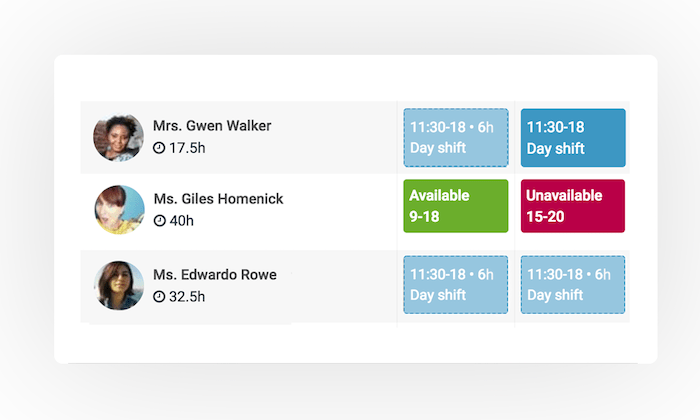
Sage HR (formerly CakeHR) is a complete HR software.
Within this all-in-one HR solution, you’ll find robust tools for shift scheduling.
Overall, Sage HR is a great choice for any business that wants to automate its human resources tasks, in addition to improving its scheduling process.
Other noteworthy standouts of the employee scheduling features include:
- Interactive shift planning with an easy-to-use interface
- Compatible for single sites and multiple locations
- Easy to split up schedules into groups and departments with multiple shift managers
- Employee-self service tools with the ability to add preferred times and unavailable times
- Drag-and-drop shift management
- Daily, weekly, and monthly reportsComplete data exports
Aside from the scheduling tools, you’ll also benefit from features related to leaving management, timesheets, recruitment, performance management, employee records, and other HR essentials.
Sage HR starts at $8.50 per month for core HR and shift scheduling.
Additional modules cost extra.
The software is easy to set up, and you can try it free for 14 days.
#3 – Deputy Review — The Best For Time and Attendance Management
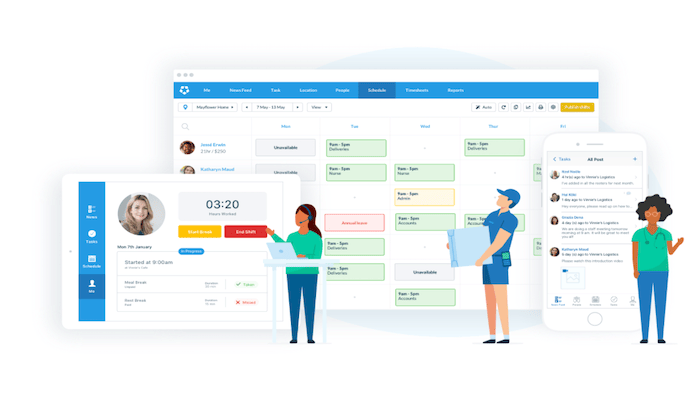
Deputy is one of the most popular employee scheduling tools on the market today.
It’s trusted by 200,000+ brands across the globe, including big names like Nike, Amazon, HubSpot, and Peloton.
I like Deputy because it’s feature-rich, but also has simple and straightforward pricing.
You can bundle employee scheduling with time tracking software for just $4 per user per month.
Alternatively, each of these functions can be purchased separately for $2.50 per user.
Here’s a quick look at some of the other top features and benefits that you’ll get from this software:
- Easy to fill open shifts based on staff availability, qualifications, and costInstantly share schedules with your team Real-time labor costing data
- Auto-scheduling capabilities using AIBreak planning and rest compliance
- Manage schedules from anywhere with the iOS and Android apps
- Request, approve and track PTOAutomate wage calculations
- Collect timesheets and export them to payroll with a single click
- View who’s currently on shift, taking or a break, or late in real-time
Any business that wants a simple way to manage employee scheduling and time tracking from a single solution will definitely benefit from Deputy.
Try it free for 31 days; no credit card required.
#4 – ShiftNote Review — The The Simplest Employee Scheduling Software
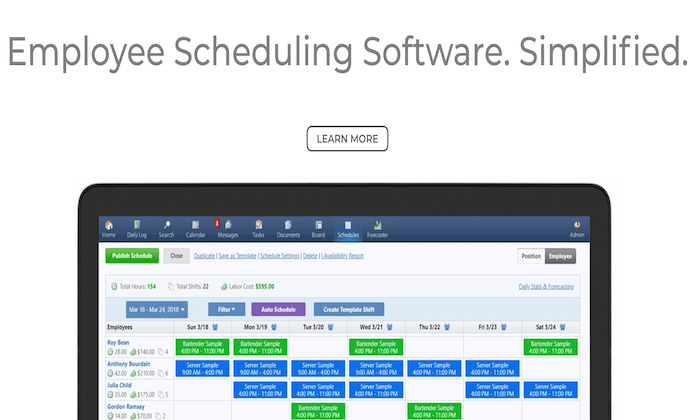
ShiftNote is one of the most straightforward employee scheduling tools on the market today.
It’s trusted by 75,000+ users across a wide range of different industries.
I like ShiftNote because they have industry-specific solutions for categories like restaurants, hotels, retail, manufacturing, healthcare, education, and breweries.
Here are some of the top reasons why ShiftNote ranks so high on my list:
- The free mobile app, free team messaging, and free customer support
- Employees can update their availability and swap shifts
- Scheduling templates so managers don’t have to build from scratch
- Free setups and one-on-one training
- Multi-location dashboard
- Time off request management
- Sales and labor forecasting tools
- Daily log reports
Overall, ShiftNote drastically improves the speed of your scheduling process while optimizing the efficiency of your schedules.
It’s a reliable way for your management team and staff to communicate from anywhere as well.
It’s worth noting that ShiftNote lacks some of the HR and time-tracking features offered by other tools on the market today.
But if you’re just looking for a straightforward scheduling solution, this should definitely be a top consideration.
You can try ShiftNote for free with a 30-day trial.
#5 – Shiftboard Review — The Best For Labor Cost Management
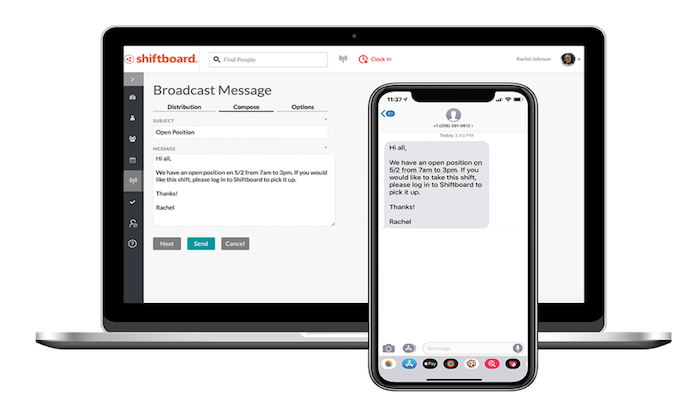
Shiftboard is another excellent workforce management solution designed for scheduling hourly employees.
It’s a feature-rich software with lots of different options to solve common business challenges associated with scheduling.
This includes things like labor cost management, employee retention, fatigue management, compliance, and more.
Shiftboard actually has two different scheduling tools—SchedulePro and ScheduleFlex.
The Pro version is designed for high compliance industries like corrections, oil and gas, and petrochemical.
The Flex version is built for organizations with changing scheduling needs, like healthcare, staffing, call centers, warehouse and distribution, public safety, and manufacturing.
Other noteworthy highlights of the Shiftboard software include:
- Real-time communication about schedule updates and newly available shifts
- Auto-fill shifts with call outs and no-shows
- Employees can confirm last-minute shift requests directly from the mobile app
- Employees can pick up extra shifts and trade shifts (with approval)
- Tailored fit schedules based on departments and locations
- Smart team groupings based on staff qualifications, certifications, and moreAccurate labor forecasting based on demand
- Avoid over/understaffingScheduling automation tools
60,000+ teams rely on Shiftboard for employee scheduling.
They even have additional features for applicant tracking and time clocks with geofencing.
Request a free demo today to get started.
#6 – HotSchedules by Fourth — Best Labor Management System For Restaurants and Hospitality
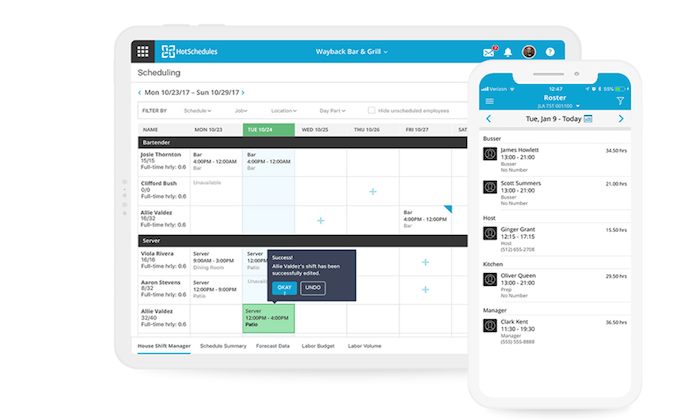
HotSchedules (now part of Fourth) is a complete workforce management solution built specifically for businesses in the restaurant and hospitality industries.
In addition to employee scheduling, HotSchedules has tools for applicant tracking, onboarding, time and attendance management, manager logbooks, and more.
They even have solutions for inventory management, HR, and payroll.
In terms of the employee scheduling features, here’s a closer look at the top benefits provided by HotSchedules:
- Simple drag-and-drop scheduling tool
- Ready-made scheduling templates
- Reduce scheduling errors, understaffing, and overages
- Limit unplanned overtime
- PTO management and employee availability
- Approve or deny shift requests from any device
- Quick access to your daily roster reports
- Compliance tools for meals, breaks, fair work weeks, and more
Depending on your needs, HotSchedules can be as simple or complex as you want it to be.
You can take advantage of just the employee scheduling tools, or build a robust and custom solution with lots of features and add-ons for your business.
Whichever option you choose, HotSchedules is definitely my top pick for restaurants and hospitality businesses.
Request your free demo to get started.
What I Looked at to Find the Best Employee Scheduling Software
Two restaurants in the same city might have completely different employee scheduling needs based on how they operate.
In other words, there’s no one-size-fits-all solution that’s going to work for every business or even business within the same industry.
Keep your daily operations at the front of your mind, and continually assess how each employee scheduling tool maps on to your actual needs.
Here are the key criteria you should use to evaluate the solutions available.
Number of Employees and Locations
A small coffee shop with six employees at a single location won’t have the same needs as a restaurant chain with 500 workers across a dozen sites.
Some software is built to scale, while others are intended for smaller businesses and single sites.
Think about the future of your business as you’re evaluating options as well. While you might only have 50 employees today, how many will you have in six months? 12 months? If you’re scaling rapidly, make sure the software you choose can accommodate your growth.
Time Tracking Functionality
Scheduling and time tracking go hand-in-hand for some businesses. Employees need to clock in, clock out, and record their time.
For other companies, time-tracking is less important. Employees are either present for their shift, or not. A simple attendance feature will be all you need.
If time tracking is a key part of how your employees show their work and get paid, I highly recommend getting employee scheduling software with that functionality built-in.
First of all, you don’t have to get a separate time tracking software that may have trouble integrating with your schedule.
This simplifies everything.
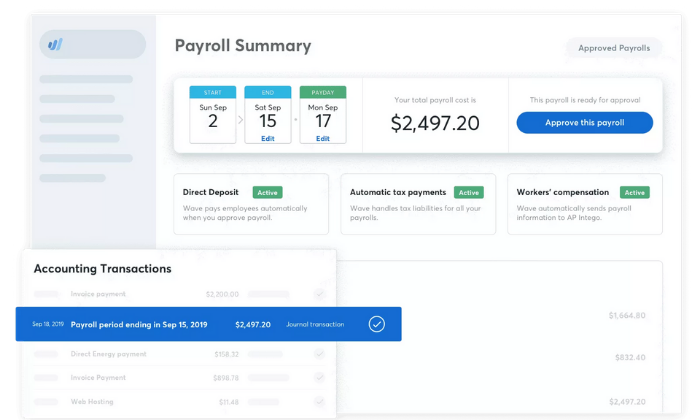
It’s even better if your employee scheduling software ties directly into your payroll service, as this will eliminate the process of entering times manually.
With time tracking, scheduling, and payroll all working together, there are going to be fewer mistakes that annoy employees and frustrate managers.
Flexible Access
The best employee scheduling software is usually offered as a web-based solution.
You want to make it easy for your staff to access their schedules from anywhere.
This isn’t possible with desktop software.
I also recommend looking for an employee scheduling solution that comes standard with a free mobile app.
Then your staff can essentially carry a schedule with real-time updates on them 24/7.
These apps are great for things like team communication features and push notifications with schedule changes or shift reminders.
Mobile and browser-based access to the schedule is a must if you have employees working remotely or in the field.
And even if everyone is in a single office or restaurant, chances are employees will appreciate the ability to check the schedule or send a message no matter where they are.
Industry-Specific Solutions
There are plenty of general-purpose employee scheduling tools on the market today.
But if you fall into certain categories, look for an industry-specific tool.
Restaurants and hospitality industries are two that come to mind.
Lots of software is geared towards these types of businesses because the scheduling needs are more involved in these cases.
If you have the opportunity to use software that’s designed specifically for your particular industry, I tend to lean in that direction as you’re making a final decision.
Additional Features and Extras
As I said before, lots of employee scheduling software does much more than just allow managers to post weekly schedules.
The best tools will also have shift swapping, employee self-service tools, HR features, labor cost management, leave management, attendance tracking, team messaging, overtime control, time clocks, etc.
Some extras are definitely more important to consider than others, depending on your business type and needs.
So keep a close on these various options as you’re shopping around.
Summary
What’s the best employee scheduling software?
The answer really depends on what you’re looking for.
But regardless of your needs, you can find the right option for your business based on my recommendations in this guide:
Best Employee Scheduling Software
- Homebase – Best employee scheduling software for small businesses
- Sage HR (formerly CakeHR) – Best all-in-one HR solution
- Deputy – Best for time and attendance management
- ShiftNote – The simplest employee scheduling software
- Shiftboard – Best for labor cost management
- HotSchedules by Fourth – Best labor management system for restaurants and hospitality
Just refer back to the methodology I described earlier to simplify the buying process. This will make it much easier to narrow down your options.
Source: feedproxy.google.com