
Tag Archives for " conversion "

Google Ads for eCommerce: How to Make Your Website Conversion-Ready
So, you’re eager to run Google Ads for your eCommerce business.
You took all the critical first steps to ensure your business is set up for Google Ads success—your brand identity is rock solid, your budget and time expectations are reasonable, your selling proposition is one-of-a-kind.
The next step? Make sure your website is ready to convert.

After all, those precious ad clicks will lead customers to your virtual front door. And we need to make sure that the door is open wide to welcome each visitor before we spend time and money on Google Ads campaigns.
Here’s how we’ll make that happen:
- Website CRO Best Practices
- Product Preparation
- Media (Images and Video)
- Lifestyle Images
- Robust Titles and Descriptions
- Live Chat
First Up: Website CRO (Conversion Rate Optimization) Best Practices

Building an eCommerce store isn’t that hard.
Building an eCommerce store that converts? Whew! That is a different story entirely.
Here are some CRO best practices to ensure your site is ready to make sales:
The Big Three:
1. Website Issues and Errors
You can’t drive traffic to a broken website. So, it’s crucial to ensure you catch any website issues or errors:
- Frequently (at least once a month) check your site and make sure everything is working properly and there are no high-risk issues and errors.
- Schedule a website audit at least once a month.
2. Website Speed
Website speed has a massive impact on your quality score; in fact, it is considered slightly more important than content(!) according to Google. A few things to consider:
- Mobile users are going to be less tolerant of slower websites due to the smaller size of the device and often slower connection.
- The biggest contributing factor for slow sites is large image sizes.
3. Mobile Engagement
- 60-65% of website visits are done on mobile devices. So ensure your site is mobile-friendly!
- Look at your conversion path: although many purchases happen on desktop computers, research is often done on mobile devices. In other words, consider each step of your buyer’s journey so you can make it as effortless as possible.
Conversion Rate Optimization Checklist

Now let’s put those best practices into action. First up, run through this CRO checklist to make sure visitors have a smooth journey to purchase from your site:
- Everything works properly
- Website is fast (under 2-3 seconds load time)
- (use PageSpeed Insights to measure this)
- Your email/phone number is in the header or footer
- Customers need to know they can trust you (i.e. get in touch with you)
- Website design is appealing to your audience
- Make sure the design is centered around your product and isn’t a distraction
- The website has high-quality images
- Products are described clearly with all features displayed
- CTAs are in a contrast color (bold!) and easy to find
- Check out BOOM by Cindy Joseph for inspiration
- There are reviews on product pages
- Verification badges (secure payment, BBB, SSL, guarantees, free returns, etc.)
- This helps improve the trustworthiness of your site and brand
- Turn anything you offer into a badge (free shipping? Make it a badge! Free returns? Badge! Much more exciting than text)
Website Speed Optimization Checklist
- Choose a “light” theme
- A good developer can improve your site speed a lot—but make sure you don’t rely too heavily on customization
- Scale your images properly
- Try PicResize
- Decrease the weight of your images without losing quality
- Try TinyPNG
- Limit the number of plugins/apps
- Limit the number of displayed products on category pages
- Check-in on your page speed
- Try PageSpeed Insights
- Don’t aim for a 100/100 score—just aim for a good user experience
Quality Assurance (QA) Checklist:

Include quality assurance checkups in your monthly standard operating procedures to make sure your site is in tip-top shape. You can do this through internal QA and external QA:
Internal QA: Pretend to be your own customer
- Try to break the site
- Navigate through your site the way a customer would
- Gauge how easy it is for a distracted customer to use your site.
- Ask yourself, “If I weren’t paying full attention, could I still do this?”
- Make an actual purchase
*You can hire someone to go through your site on Fiverr.
External QA: Have someone else pretend to be a customer
- Just tell them where you want them to go—but not how to get there
Analyze Top Competitors:
- What is different between their website and yours?
Pro-Tip! Diagnosing Issues: Screen Recording Software
You can install screen recording software on your site that tracks users’ navigation via heat mapping (note: it will likely slow the speed of your site). This works on desktop and mobile—so for eCommerce sites that aren’t converting, you can use this software to figure out what’s going wrong along the way.
Here are a few notable options:
Keep in mind: You don’t need to use these apps forever. Diagnostic tools are a great way to assess the state of your website and determine any site optimizations or product additions.

Product Page Preparation
Your product pages are the most important pages on your website. In most cases, it’s the landing page for your traffic: your very first impression.
Many businesses put tons of energy into optimizing their homepage, yet neglect the product pages customers land on. What’s worse? Smart Shopping can only drive traffic to product pages. So let’s make sure your product pages are ready to shine:
Product Page Checklist
- Product title and subtitle
- Make sure the product title is clear, descriptive, and honest enough for Google to identify the product and send relevant traffic your way (Look at Amazon for inspiration)But avoid “keyword” stuffing! Honesty and simplicity are key
- Product description
- Product descriptions are supplementary to your title
- Use this opportunity to elaborate on the specifics of your product: any particular materials, special features, ingredients that are worth highlighting but would be too long for your title
- Product media (images and videos)
- We purchase with our eyes first
- Custom imagery is always going to be better than stock photos, particularly lifestyle images that help customers picture themselves using your product
- Nested navigation
- Make sure navigation is clear, easy, and accessible—we don’t want people to get lost
- Use breadcrumbs so users can always find their way back
- Social proof (i.e. reviews)
- Customers buy from businesses they trust—Enter: reviews
- Aggregating enough reviews takes time, so ask your customers for a review after 30 days of purchasing and give them an incentive or reward for the completion
- The 30-day rule gives you at least a few days/weeks to resolve any issues—and get a good review for it.
- Once you have enough five-star reviews, you can add them to your site.
- Clear call-to-action (CTA)
- If you don’t tell people what you want them to do they won’t do it
- A clear, bold CTA nudges your customer to the next step
- Isolate the action you want them to take: make the CTA a BIG button (not just a hyperlink)
- Clear customization options
- If you offer customized products, make sure the options are clear and don’t overwhelm your customers to avoid cart abandonment
Product Media
When it comes to adding images to your website, here’s the thing:
You don’t need to be a professional photographer.
In fact, all you need to create high quality images is:
 A smartphone (new iPhones or Samsung do a really good job)
A plain white background
Natural lighting
Don’t zoom in.
Don’t use flash.
And edit your photos if you can (check Fiverr or pixc for outsourcing options).
That’s all it takes!

Remember, your photos should give context and further showcase details of the product. If your product has a unique feature, it’s best to explain what that feature is in the descriptions and show it in your images.
Overwhelmed by how many products you need to capture? Start with your bestsellers. Make sure each of them has a decent product photo and (if possible) a short video. 5-7 images per product should be enough.
We are visual creatures. High quality product media will close the sale.
Product Media Part Two: Lifestyle Images
Speaking of product media, lifestyle images are critical for customers to visualize your product in action.
*Remember: Lifestyle imagery is a photo or video of products being used*
Here are some tips:
Give context
- Hey, your product doesn’t have to be the “main subject” in the photo. In fact, it could be in the background—like this poor Nespresso machine, competing with George Clooney’s eternal handsomeness:
You can use photos from your Instagram or Pinterest
- Speaking of Instagram, you can send your product to influencers (for free) in exchange for promotional content on their page
- Check out imagency.com to find influencers
Shoot a YouTube overview of the product and paste it on your product page

Robust Titles and Descriptions
Use the product description to sell the transformation
- The description sells the TRANSFORMATION, not the product
- Use the language that your avatar uses but make sure you also include in the right keywords that Google understands
Include specifications
- Size, material, weight, features
Use the product titles and descriptions to communicate with Google
- Google relies on product titles and descriptions to identify products and send relevant traffic—so, make sure they are “machine friendly” (clear and easy to understand)
Good descriptions can be repurposed
- Save some time and energy! Quality descriptions can be loosely reused for other product pages as well as for ad copy
Live Chat
We strongly recommend live chat on your website. Here’s why:
Diagnose errors
- Live chat allows you to compile visitor questions and create content that answers those questions for future customers
- Add helpful information to your product pages and place them near the top of your page
*Try tawk.to*
*Check out Shopify’s app integration here https://apps.shopify.com/tawk-to*
Identify objections
- Live chat can give you insight into what holds customers back from making a purchase—what questions do they ask before abandoning their cart? What concerns do they bring up in the chat?
Improve conversion rates
- Sometimes, all it takes is a little supportive nudge for customers to make a purchase
- By “being there” through their virtual journey, you have a higher likelihood of making a conversion
Get That Website Ready to Convert
I know, I know. I just gave you a lot of homework.
But listen up: I’ll be back with a guide on the next steps of setting up successful Google Ads campaigns—the dreaded technical and legal requirements.
But if you’re feeling extra-eager, you can check out this Google Ads Mastery Workshop.
Or, you can check out my entire step-by-step guide to Google Ads for eCommerce here.

Kasim Aslam
Kasim Aslam is the founder and CEO of Solutions 8, one of the world’s top ranked Google Ads agencies.
Recipient of the Arizona Interactive Marketing Association’s 2017 TIM Award for Person of the Year, Kasim was also named one of the Top 50 Digital Marketing Thought Leaders in the United States by The University of Missouri in 2020.
Kasim was hand-selected as the Traffic Coach for DigitalMarketer.com’s ELITE coaching program by their executive team. He is also the co-host of the long-running podcast, Perpetual Traffic.
His book, The 7 Critical Principles of Effective Digital Marketing, was featured as one of the Top 100 Digital Marketing Books of All Time by Book Authority.
Kasim helped launch the National Association of Child Helplines (NAACH) and worked with the United States Army, Intel, as well as a Gates Foundation-funded nonprofit, a 54,000 member PPO, the largest privately-owned bank in the United States, and an Academy Award-contending documentary.
He lives in Scottsdale, Arizona with his wife and two sons.
The post Google Ads for eCommerce: How to Make Your Website Conversion-Ready appeared first on DigitalMarketer.
Source: digitalmarketer.com

62.41% of All Google Searches Generate 0 Clicks
According to data that we pulled from Ubersuggest, 62.41% of all searches globally get 0 clicks. Literally 0 clicks. But here’s where it gets interesting…

SEO is all about ranking high on Google.
The higher your rank the more clicks you get to your website.
But what if Google starts sending fewer clicks to websites over time, what should you do?
Well, just look at the graph below. It breaks down the last 4 years of click on Google.
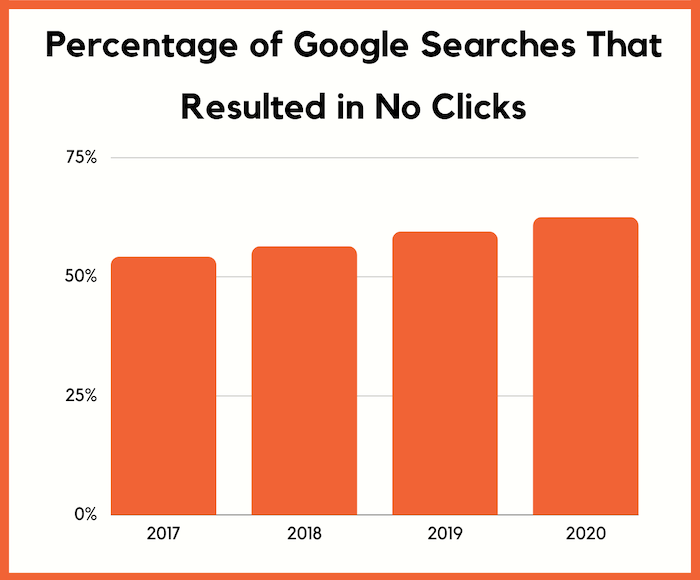
According to data that we pulled from Ubersuggest, 62.41% of all searches globally get 0 clicks.
Literally 0 clicks.
But here’s where it gets interesting…
Expect fewer clicks over time
Over time the number of people that clicked on no result has increased.
It went from 54.11% in 2017 to 62.41% in 2020.
Now keep in mind we don’t have data on every single Google search, as only Google would have that.
But we buy data from a few different providers and we have data on hundreds of millions of searches each year.
So directionally the data is accurate.
Here’s where it gets interesting.
According to Comscore, 50% of the searches are voice searches.
The data providers we get our Ubersuggest data from don’t have access to voice search data yet.
So, you can assume the number of “no clicks” is actually greater than what’s presented above.
Nonetheless, you should expect it to get worse over time as the graph is showing.
Now, why is this?
Well, it’s because Google is answering your questions when you search.
For example, if you type in, “Las Vegas weather”, you’ll see a listing like this:
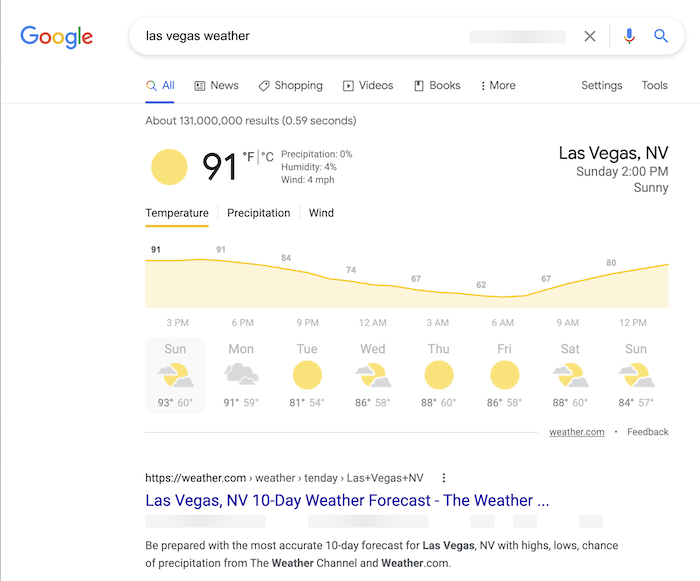
Google’s pulling the data from weather.com, but there really isn’t a need for you to click on over to weather.com.
And as a user, this provides me with a better user experience, so I like it. But if I was a website like weather.com I probably wouldn’t as it decreases my traffic, which decreases my ad revenue.
Expect Google to continually do this more over time as it tends to create a better user experience.
Is it fair that Google does this?
Before I dive more into the data and give you ways to increase your SEO traffic, even though Google is taking away some of your clicks… I want you to keep this in mind.
A lot of marketers and business owners don’t like this, and they complain that what Google is doing isn’t fair.
But hey, it’s up to you if you want Google to even crawl your site.
If you don’t like it, you can always block Google from your site.
I personally don’t have an issue.
Just imagine life with Google, it would suck.
And as a searcher, I don’t want to search for the weather and have to click on a few links to get my answer, I just want to know the weather right now in the least number of clicks.
I recommend that you focus on what you can control versus worries about what you can’t, such as Google’s future plans or random algorithm updates.
So, what can you do?
I want you to look at this as two separate problems.
The first is how can you get more clicks when people are clicking less.
And the second is how can you get more conversions from the clicks you are getting to make up for the loss in traffic.
Typically, with clicks, the main thing that impacts it is your meta tags.
You know your title and meta description.
Here’s what I am talking about… when you perform a search on Google, this is what it looks like:
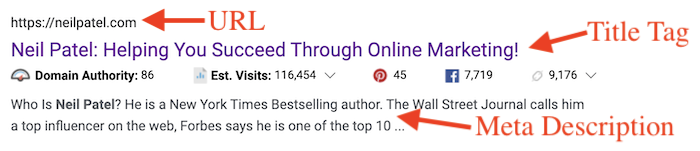
Here are 10 ways to adjust them to help you get more clicks (some of the data came from Clickflow, others from Ubersuggest):
- Questions have a 14.1% higher CTR – For example, your title tag could be, “What is SEO?”.
- 8.6% higher CTRs for 15 to 40 characters title tags – I would recommend that you keep yours closer to the 40 character mark so you can include more keywords.
- 45% increase in CTR when the exact query is in URL – make sure your main keyword is in your URL. It doesn’t have to be in your domain name, just the URL. So if I was trying to rank for the term “SEO” my URL maybe https://neilpatel.com/what-is-seo/.
- Power words increase CTR by 13.9% – some power words examples are: effortless, incredible, best, or amazing.
- 7.3% higher CTR for titles that contained emotions versus ones that didn’t have emotion – an example of an emotional headline is, “Learn how to stand up to your boss (without getting fired)”. You can find more examples of emotional headlines here.
- 5.8% higher CTR if you have a meta description – if you don’t manually create one for each page, Google will just pull one for you.
- Titles with years generate 4.9% higher CTR – a great example of this is “how to start a blog in 2021”. You would want to update year every year to make sure you don’t have an old date in your title tag or it can hurt your clicks.
- Evoking curiosity increased CTR by 5.9% – my favorite example of this is, “The 7 Benefits of Green Tea (#6 Will Shock You)”.
- Titles that resembled education had 10.4% more clicks – think how-to titles. People love learning how to do things step-by-step.
- You’re more likely to be successful if you look at the paid ads – Google uses the quality score to determine where ads should be placed. If an ad gets no clicks Google doesn’t make money. By look at the paid ads, you can get ideas of copy that is appealing for any keyword you are trying to rank for.
Don’t forget to optimize for conversions
As I mentioned above, the second thing you need to optimize for is conversions.
When you do get clicks, you’ll want to drive as many sales as possible.
Here are some articles I wrote that you should read.
They will teach you how to boost your conversions.
- 19 A/B Tests You Should Run on Your Website
- How to Craft and Measure Profitable Funnel Conversions from Scratch
- How to Use the Psychology of Color to Increase Website Conversions
- How to Leverage Storytelling to Increase Your Conversions
- How to Create an Engaging Value Proposition
- 12 Best Landing Page Examples
- How to Increase Conversions by Analyzing Bounce Rate Analytics
- 9 Steps to Creating a Landing Page That Reads Your Prospects’ Minds
Don’t forget about mobile
When optimizing your site, don’t just think about the desktop version of your site either.
It’s even more important to go through this process for your mobile traffic.
According to our Ubersuggest data, 61% of all searches are mobile.
And based on our data providers, the no-click data for mobile is even worse.
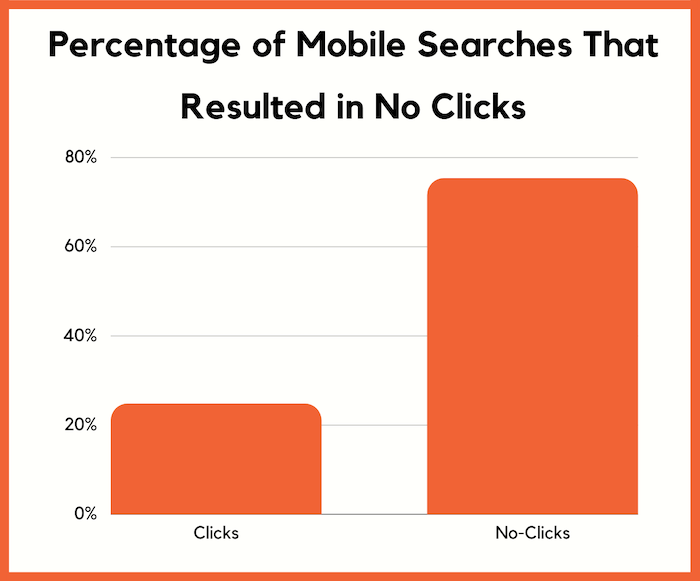
Typically, when it comes to optimizing your meta tags, you don’t have to worry as much as you are going to use the same meta tags for both the mobile and desktop versions of your site as most sites are responsive.
But when it comes to conversion optimization, you’ll want to create a different mobile experience, which you can easily do through a responsive design.
Conclusion
Don’t focus on the fact that Google is driving fewer clicks to websites.
Focus on what you can control and make the best out of the situation.
If I were you, I would do 3 things.
- Optimize your meta tags as I described above.
- Optimize your conversion rate so you can generate more revenue.
- Start creating question-based content because it drives 34.17% of the SEO traffic to popular blogs.
So what do you think of the data I shared above?
Source: feedproxy.google.com

How SiteGeek Saved and Then Doubled Their Business and Started Landing More Qualified Leads and 10X Bigger Clients (Plus 3 Proven Tips to Help You Grow Your Own Business)
At DigitalMarketer, we get to work with a lot of incredible businesses, and our absolute favorite thing is seeing a great company find even greater success with the training and strategies we teach.
And it’s not just because we love celebrating our customers’ success (though we really do love shouting them all out!).
It’s also that we want to see what exactly it was that pushed the needle, landed those clients, and took their sales to the next level.
Because our second favorite thing is passing on those successful tricks and strategies to the next struggling marketer.
It’s a never-ending cycle of marketing gold, see?
One such success story comes from SiteGeek, an award-winning digital marketing training consultancy.
By implementing the strategies and processes from the DigitalMarketer Certified Partner Program, SiteGeek started to rake in more, better-qualified leads and landed bigger, higher-ticket clients.
This meant they were able to save and then double the size of their business!
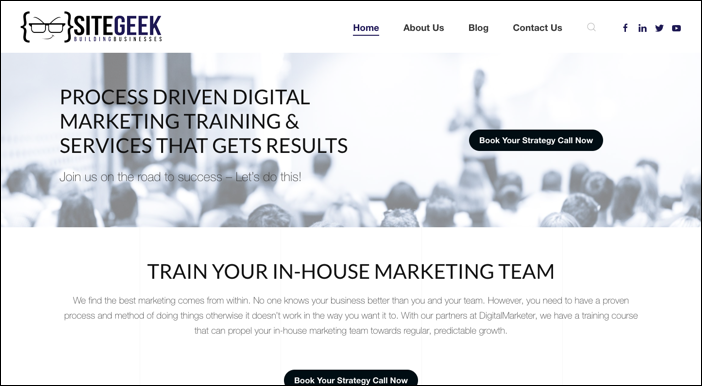
We wanted to share this story, and then in case you are struggling to find your own success, we’ve broken down 3 strategies you can try for yourself.
We know they worked for SiteGeek, so they will probably work for you!
Struggling to Find High Ground
When Steve Hooper, the Founder of SiteGeek, first joined the DigitalMarketer Certified Partner Program, he was struggling.
His company was in deep water because of a catastrophic accounting error, and while he had a steady stream of customers, he wasn’t happy with the direction his company was headed.
Steve was relying heavily on word of mouth and referrals from years of SEO and networking to get customers.
And the clients he did get were usually low budget, often with less than $500 total to spend.
It was a constant, daily grind of building websites and doing minor consulting work, and Steve felt more like he was up the creek in a leaky boat with teaspoons for paddles, when he should have felt like an elite-level white water rafting expert, navigating the sharp rocks and rough currents of the marketing world.
And then he found DigitalMarketer.
Or more like, DigitalMarketer found him.
One evening, while scrolling through Facebook, Steve happened upon a video from Ryan Deiss (the man, the myth, the legend), whom he recognized from a conference several years prior.

And before he knew it, Steve was joining on as a new partner in the Certified Partner program, looking for structure and direction, as well as ways to grow his business and hone his process.
The Ah-Ha Moment
Joining the CP Program gave Steve access to a wealth of marketing tools and tactics that he could not only use to help his clients but could also use to better his own marketing efforts.
What’s the biggest problem most marketing agencies face? Hint: it’s not bad marketing. They can create some of the best marketing for their clients, but they often don’t have the time or energy to market their own business.
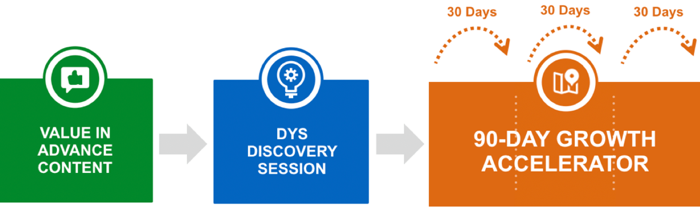
Steve dove right in and started to implement programs like the Double Your Sales sessions (a legacy DM product), which took his conversions to a rate he’d never seen in his previous one-on-one or email conversations with potential clients.
The one-page product sheets, Agency Growth toolkits, and video training all gave Steve the structure and direction he needed in his own marketing, and soon he was able to do it in a quarter of the time—which meant he could spend more time working on his clients’ businesses.
It wasn’t all sunshine and daisies.
Anyone who’s ever taken great training or learned a new strategy can understand that it’s not as simple as just snapping your fingers.
With so much new material to work with, Steve found himself struggling to see how some of it fit into his business model.
But after mastering the foundations laid out in the CP Program (like the Customer Value Journey we will cover later), he began to see how it all fit together.
This Side of Success
With all these new tools and tactics, Steve is seeing his company rise to new heights.
He has fewer, better clients with budgets upwards of $5000/month.
More than 10X what they were before. And he is able to hire more team members to work with those clients.
He is seeing a return on ad spend that has doubled because his funnels work better than ever, and he has even launched a podcast, Digital Marketing Confessions, where he talks with marketing experts about what’s working (and not working) in digital marketing right now.
SiteGeek has doubled in size, and since Steve is currently going through the 90-Day Accelerator, he expects to see even more growth in the coming months and years.
When Steve was looking into becoming a Certified Partner, he was trying really hard to discover new ways of doing things and a true path for himself and his business.
The training he found in the program allowed for exactly that, and he dug deep and pushed himself to do the work that got results.
But what were those specific things that got results, you ask?
There were 3 specific tactics that Steve found to make the most impact in his business, and in his success as a CP.
3 Tactics to Help You Grow Your Own Business As SiteGeek Did
When we talked to Steve about what really made the biggest difference, he said that honing his Customer Value Journey, providing value in advance, and leaning on the CP community were the most important strategies.
So we’ve broken those ideas down a bit more, that way you can use them yourself. We’re providing you the value in advance  .
.
The Customer Value Journey
We talk about this framework a lot. Like, A LOT a lot.
But if you’re new to the game, the Customer Value Journey is a marketing framework that breaks down the different stages your customer will go through in their relationship with your business, from just becoming aware of you to shouting your name from the rooftops telling everyone to be your customer.
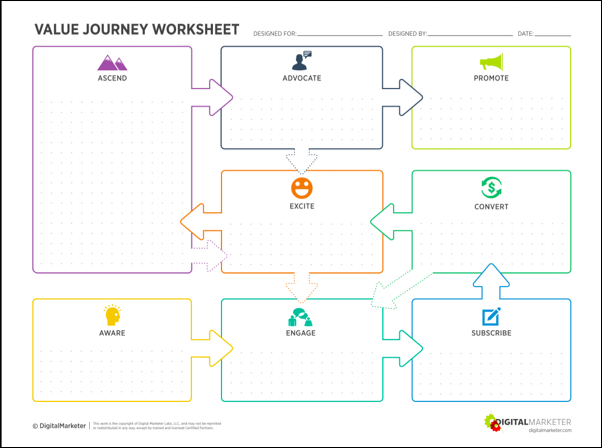
This should be one of the most important foundations of your business and your marketing.
You should know exactly what content, emails, or ads your customers are seeing depending on where they are in the value journey.
And different stages should have different content.
After all, if someone just learned about your company, you don’t want to immediately ask them to buy your highest-priced item or service.
You want to make sure your customers are flowing through this in the right order and hitting every step.
And when you map out how your funnels align with the CVJ, you might just find that you are missing steps or getting ahead of yourself.
So map out your own customer’s journey through your business and you’ll be better prepared to guide new potential customers who could have gotten lost without this map.
Provide Value in Advance
A lot of business owners (and marketers in general) are leery of giving away too much information or content before they get a contract signed and a check in the mail.
After all, what’s stopping potential customers from taking what you give them for free and then going to someone else, or even trying to do it themselves?
Nothing. Absolutely nothing.
But Steve learned (and we have always taught) that when you provide value to your customers before you ever ask for a dime, most times they don’t just cut and run.
Usually, they stick around and see what else you have to offer.
When you give value, you are getting something worth way more than money in return (and we all know that money is worth a LOT).
You are getting trust. By showing your customers just how much you know, and giving away some of your expertise for free, you are proving that you are the expert they should turn to when they are ready to break out the checkbook.
Because remember, marketing is hard.
There’s a reason that marketing agencies stay in business. If you do give away a strategy for free, most people are going to see what it takes to implement and turn right around and ask you to do it for them.
So always start your sales conversation by providing value in advance.
Maybe this means you fill your blog with tactical content (like you can see SiteGeek did below), or maybe you set up a sales presentation that is full of useful strategies before you ever bring up contracts.
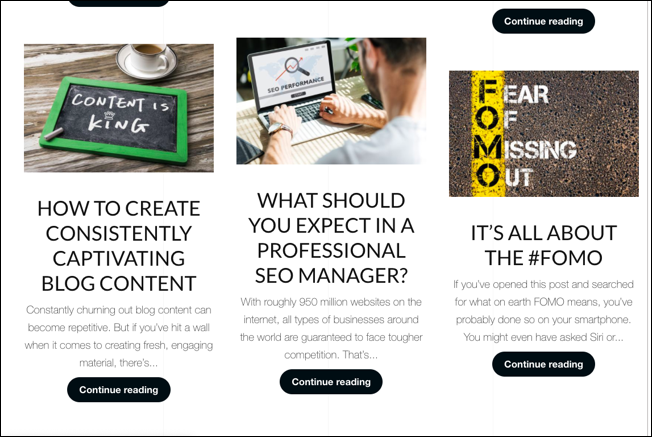

Whatever is best for your business, when you start with value, you’re guaranteed to see a return.
Lean on Your Community
This was the tip that came up again and again. Steve’s favorite thing in the CP program, and his biggest piece of advice to anyone joining the program, was to really take advantage of the community.
In the case of the CP Program, we have a Facebook Group where all our CPs can talk about their businesses and help each other out with any sticking points.
This community is often what keeps our partners in the program for years and years.
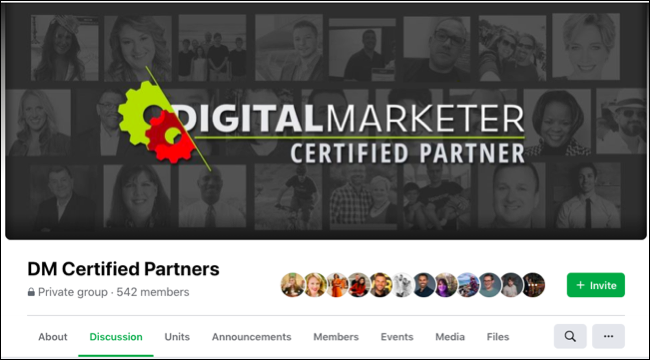
But you don’t have to be in this specific community to benefit from this tactic.
Whether you are in this CP group, the DM Engage group, a different online marketing group, or just part of a brunch crew with other business owners, the community can make or break your success as a business.
When you are a part of a community of people in similar situations or with similar problems, you can not only get advice about your particular issues, but you can help other people with theirs.
You can build up your authority in the industry and find new networking opportunities (just make sure you aren’t that person trying to hark your product in the Facebook group if it’s not allowed).
A community is usually a safe place to discuss roadblocks and the best place to bounce ideas off people who really know their stuff, and may have gone through a similar thing.
Remember, you don’t have to go it alone. Take your community with you.
And no matter what stage your business is or what you hope you improve, these 3 tactics will give you a step up.
So if you want to double your business, just follow the advice above.
After all, we know they work!
The post How SiteGeek Saved and Then Doubled Their Business and Started Landing More Qualified Leads and 10X Bigger Clients (Plus 3 Proven Tips to Help You Grow Your Own Business) appeared first on DigitalMarketer.
Source: digitalmarketer.com

What is an Email Funnel?
As a consumer—it would be nearly impossible to count the number of email funnels that have hit your inbox.
We can safely say, it’s been a lot.
Businesses love email funnels because they swiftly move new subscribers toward their first purchase.

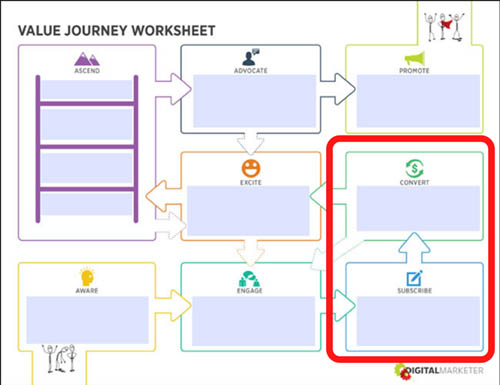
Let’s take a look at the Customer Value Journey to get an idea of where your prospects are when they become subscribers.
The Customer Value Journey is the journey a prospect takes from finding out a business exists (Stage 1: Awareness) to become such a raving fan of it they’re actively promoting the business like a salesperson only they pay you (Stage 8: Promote). 
When we talk about email funnels, we’re talking about the shift of a prospect choosing to become a subscriber (Stage 3: Subscribe) to buying your first offer (Stage 4: Convert).

Email funnels are a big deal in the marketing world because they work… really, really well.
People are still tuned into their inboxes, check out these statistics from OptinMonster:
- 99% of email users check their email every day
- 85% of the people you send an email to will receive your email
- More than 75% of teenagers still use email
Yep, you don’t need to figure out how to renegade on TikTok anytime soon; emails can reach every demographic you’re interested in.
How Email Funnels Work
Email funnels turn subscribers into customers by using specific strategies that sell products or services.
We’ll get into those strategies in a minute, but first, take a look at the return businesses are seeing on their email funnels:
- For every $1 spent, email has an average ROI of $38
- Segmented campaigns can reach a 760% increase in revenue
- Compared to Facebook or Twitter, email is 40 times more effective at acquiring new customers
The number of emails you use in your funnel is going to depend on what you’re selling, but generally, you’ll use a minimum of 4 and a maximum of 7.
If your subscriber hasn’t converted by your seventh email about this offer—then you don’t want to keep bombarding them with it.
When you’re putting together your email funnel, you’re going to be highly focused on the copy you use.
There are 4 emotional triggers to use in your email funnels:
- Gain: What does the subscriber gain by buying the product/service?
- Logic: Why does buying the product/service make total sense for them?
- Fear: What happens if they don’t buy the product/service?
- Scarcity: How long do they have to choose to buy this specific product/service?
Each email is going to follow a similar template:
- Introduction: Give a warm introduction to what you’re about to talk about (you wouldn’t walk up to somebody and start talking without at least saying a few introductory words first)
- Body: Use gain, logic, fear, and/or scarcity to show them why this offers matters to them NOW
- Close: Craft a clear call to action
- P.S. (Not always used): Add in extra gain, logic, fear, or scarcity
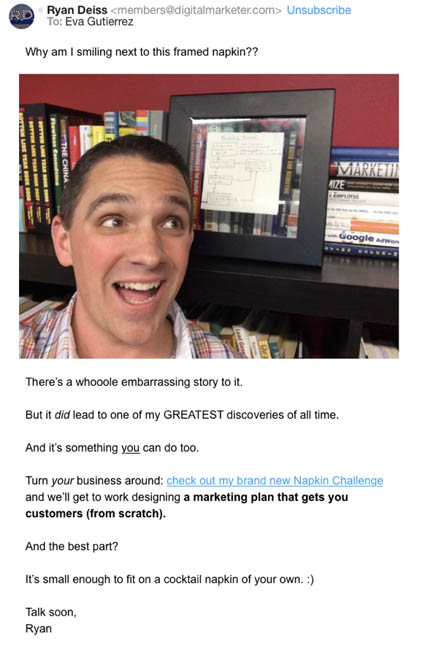
Here’s an example of an email funnel we ran for our Napkin Challenge.
The first email uses logic and curiosity to drive the subscriber to want to create a marketing plan that gets them, customers.
Subject Line: The napkin that cleaned up a $248k mess
Preview Text: A how-to guide for fixing a BIG problem

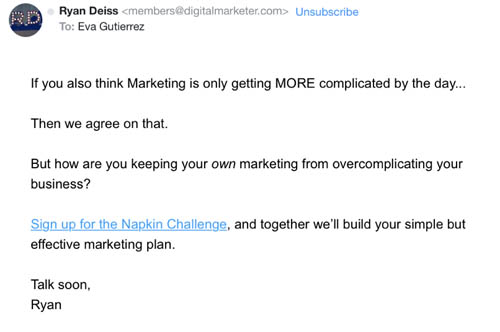
Touching on the fear business owners have over the complication of marketing these days, our second email was quick and to the point.
Subject Line: Why is this so complicated?
Preview Text: Maybe marketing isn’t the problem.

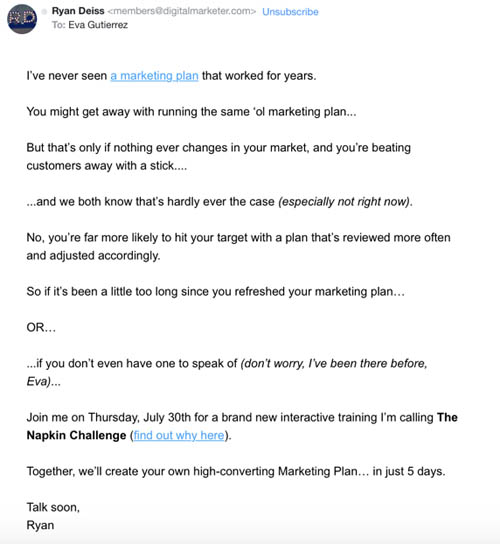
And then our third email used everything we know about the pain points of our avatars (thanks to the Customer Avatar Worksheet) to show them what they would gain from taking part in The Napkin Challenge.
Subject Line: time to hit the reset button
Preview Text: There’s no “do-over” button, just “do better”

If you want to look at more email funnels, take a look at your inbox.
Now that you’re familiar with what an email funnel is, you’ll realize that you’ve gotten a lot of these emails in the past.
Some may have worked well (you bought the product) and others not so well (either the funnel was off, or you weren’t their target avatar).
Email funnels are a BIG part of marketing strategies because they’re the platform that moves subscribers from Stage 3 of the Customer Value Journey to Stage 4, the stage where they become first-time customers of your business.
And that’s a big deal for every business. 
The post What is an Email Funnel? appeared first on DigitalMarketer.
Source: digitalmarketer.com

Traffic & Conversion Summit Has Been Acquired
It’s official, Traffic & Conversion Summit has been acquired by Clarion Events. That’s right, T&C, the largest digital marketing event in North America, is officially under new ownership.
In late August 2018, DigitalMarketer finalized a purchase and partnership agreement with Clarion Events, a UK-based company that has been launching and growing exhibitions since 1947.
Thanks to this business acquisition, we will finally have the resources and knowledge we need to not only uplevel the Traffic & Conversion Summit our attendees and sponsors already know and love, but also to expand the event both domestically and internationally.
Now, you may be wondering, “Is this a good thing?”
It’s a valid question.
Acquisitions are sometimes good and sometimes very, very bad.
In this case, it’s a very good thing for DigitalMarketer, for Clarion, and—more importantly—for T&C and its community.
Long story short, we are ready to expand and grow to continue our mission of educating, training, and serving digital marketing professionals, founders, and digital agencies.
But since I know that change can sometimes be a little scary, I want to clarify exactly what WILL and what WILL NOT be changing.
Growing Traffic & Conversion Summit Beyond San Diego
We have wanted to expand T&C internationally for many, many years.
But we didn’t have the resources and know-how to make it happen.
Now we do.
Launched in 2009, T&C has grown into a premier digital marketing event that I am very proud of. And the goal of this business acquisition is to make it the largest digital marketing event in the world.
And this expansion of T&C is happening quickly.
In addition to T&C taking place at the end of February 2019 in San Diego, California, T&C will move into New York City in September 2019, with plans to expand to Europe and Southeast Asia in 2020.
So that’s “the why” behind the deal. Now, let’s look at what’s changing, starting with…
What’s NOT Changing?
- DigitalMarketer is NOT under new ownership—Clarion is solely purchasing T&C, so the event will be spun out and become its own company
- No one from the DigitalMarketer team will be leaving to work for Clarion (so all the friendly, smiling faces you’re used to seeing will still be around)
- DigitalMarketer will remain the Presenting Sponsor of the event and will continue to drive the content programming and marketing for the event (in other words, the thing that put T&C on the map… ITS CONTENT… won’t be changing)
- Our Customer Care team will continue to support our attendees (although this will eventually transition to the Clarion team)
What WILL Change?
- Production values and venues will get an upgrade (we’re already planning a move to the San Diego convention center in 2020, which will give us some much-needed breathing room)
- Attendee size will increase as we expand the venue size, marketing budgets, and as T&C receives additional exposure via Clarion’s existing portfolio events (this means a bigger and an even MORE resourceful T&C community for attendees to learn from and network with)
- And the biggest change of all… T&C will be launching outside the US, with plans to expand to Europe and Southeast Asia in 2020
I know I already said that last one, but I’m really excited about it. 
In short, even with this acquisition, very little will look or feel different for the T&C 2019 event, and the attendee/sponsor experience will only improve in future years.
Looking to the Future
What started as 189 people in a small room in Austin, Texas has grown into something bigger than I ever could have imagined.

I am confident that this new partnership with Clarion will only serve to further the ultimate vision for T&C, which is to become THE premier gathering for digital marketers in the world, and the changes we have in store are a giant leap toward DigitalMarketer achieving its mission of doubling the size of 10,000 businesses.

But as excited as I am about the future, I believe it’s also appropriate to look back and appreciate everything that brought us to this moment and that includes YOU!
The fact is, Traffic & Conversion Summit would not be where it is today without this amazing community.
So thank YOU for making this day possible.
It’s truly a testament to the power of this community and the power of our mission.
I couldn’t be more excited about our future, and I’m thrilled to have you along for the ride.
The post Traffic & Conversion Summit Has Been Acquired appeared first on DigitalMarketer.
Source: digitalmarketer.com