
Tag Archives for " content writing "

Examples of Sites with Great Content & What You Can Learn From Them
Sites with great content are the types of things you know when you see them. You don’t even know why you love them. You just do. Creating it can be a different story. It’s easy to get lost in the trappings of a great site and lose focus on what makes it great.

No matter what your brand is about and what you’re trying to sell or convert, you can create a site with great content. You just need to break down what makes those sites great in the first place and use the same approach for whatever your topic is.
How Important Is Good Content?
You know when you’re drawn to specific websites. You spend more time there. You always read their newest blogs and click through on their social posts or in their newsletters. You look forward to consuming the content, and you spend lots of time on the website absorbing it all.
Content refers to everything you create on your website for the visitors’ consumption, including written pieces, videos, images, and more. Content covers everything from blog posts to product descriptions to case studies.
Basically, if it’s on your site, it’s content.
Because people engage more with sites with great content, they spend more time on the website, which improves your SEO. Further, people who love your content are more likely to share with others and convert customers.
What Makes Good Content?
Search engines have gotten smart, and people have grown accustomed to truly well-created, resource-rich content. As a result, you can no longer get away with following specific sneaky techniques to game the SEO system or trick people into visiting your website.
Good content answers the questions people search for on search engines and provides educational, entertaining, insightful, and empowering information.
Best practices for more in-depth written content include pieces running about 2,000 to 3,000 words and easily skimmed.
Good content is consistent, as well. People remain more engaged with your brand if you are regularly putting out high-quality content for them to consume.
Examples of Sites With Great Content
We’ve put together a list of websites whose content stands out for a particular reason. Let’s explore what makes sites’ content great and why.
1. Tell Engaging Stories: charity: water
We, humans, love stories. You can leverage this proclivity by telling stories in your content.
The best stories appeal to people’s emotions. It’s easy to assume your brand doesn’t have stories to tell—but you do. Think about what your brand brings to the table. What do you do? Who do you help?
Check out charity: water for an example. They provide water resources to people who need them, but their writing focuses on reaching those who can get water at the turn of a faucet handle. By telling stories of those who don’t have that luxury, they can reach the best help audiences.
Stories can change the narrative.
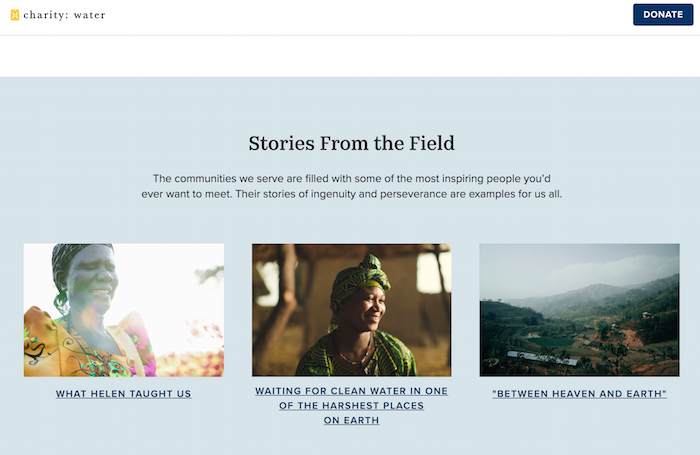
Case studies are excellent for telling stories. Think about your most loyal and happy customers or clients. What did you do for them? Tell the story. You can keep specifics and identifiers out of the story. Even a vague story is better than no story.
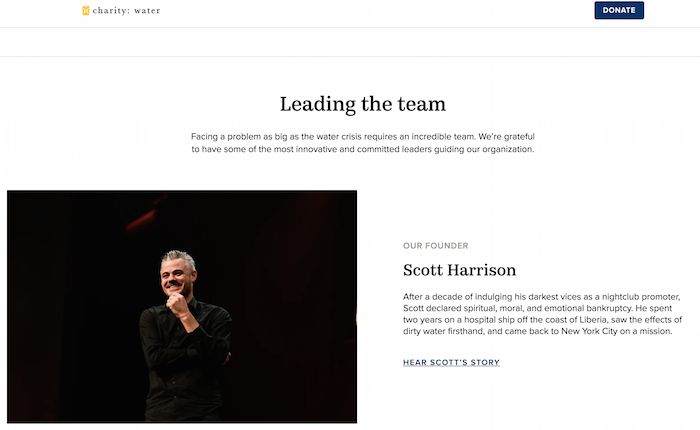
You can also tell your own story. Help people understand what you do and why. charity: water does this on the About Us page.
2. Stay Current and Break Industry News: thredUP
Sites with great content update regularly, and Google notices. Websites that update more often are seen as current and relevant, and therefore usually rank higher than websites that grow stale.
As a result, posting current, even breaking, the news is a great way to do this. But not every brand can be a news site that’s rolling out the latest headlines constantly. So how can you stay current without going into a newsroom? Check out thredUP.
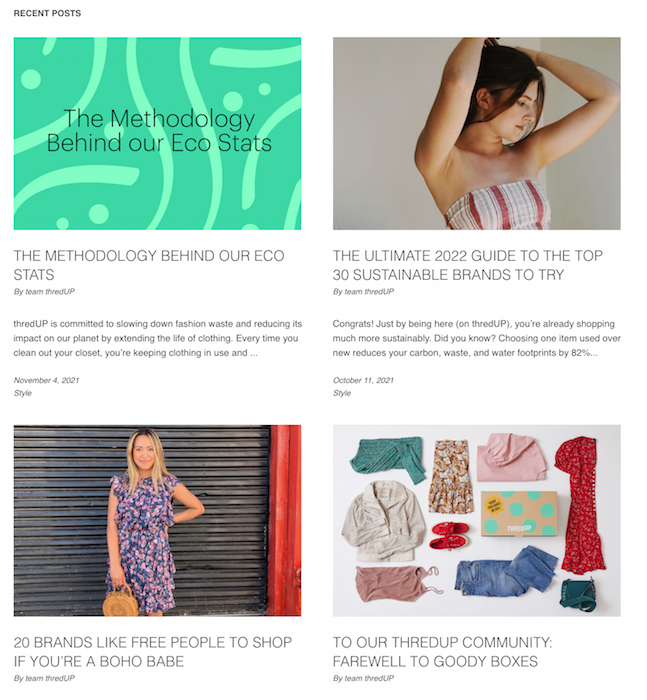
thredUP is a secondhand clothing brand, but their blog is a treasure trove of information about sustainability, clothing trends, and more. They see a bigger picture in their content. In fact, they have set themselves up as an expert to turn to for news.
Any brand can do this. What are your customers interested in? Set up Google alerts and create blogs and posts that react to the latest news in your field. Get ahead of the game and write articles exploring and expounding on trends to set your brand up as the expert.
3. Use Subject Matter Experts (Industry Insiders): Etsy
As you build content, don’t be afraid to pull in other voices. Subject matter experts can help you appeal to a broader audience and dive deeper into topics your audience cares about. They can also lend credibility to your brand, which matters for your SEO.
Google uses the EAT acronym to describe and rank quality standards in human analysis. EAT stands for expertise, authoritativeness, and trustworthiness. Bringing in subject matter experts can bring those qualities to your content.
For example, check out Etsy’s blog. They pull in industry leaders and changemakers all the time.
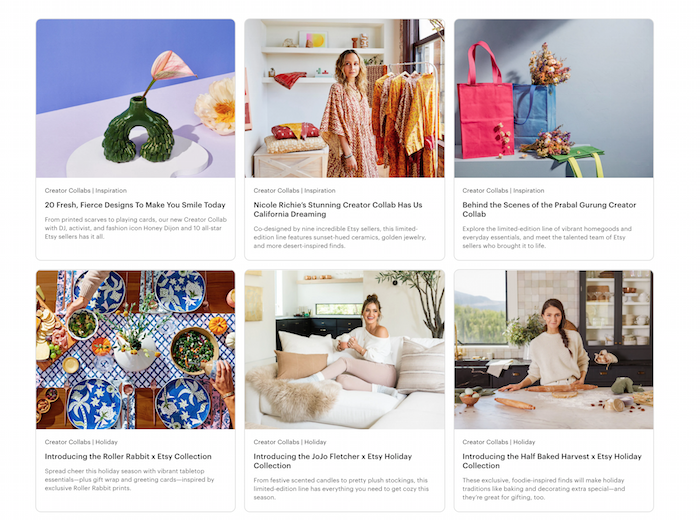
You can also interview experts. And you aren’t restricted to written work—you can host these on YouTube, Instagram, or Facebook. You could even start a podcast.
4. Make Sure Your Copy Sounds Human: Bissell
Human copy is personal and conversational, not necessarily casual, but approachable. It brings emotion without being salesy or pushy. It’s clear and straightforward.
For a more human touch, check out the Bissell blog and website. They take what could be a dry, boring topic and make it approachable and personal.
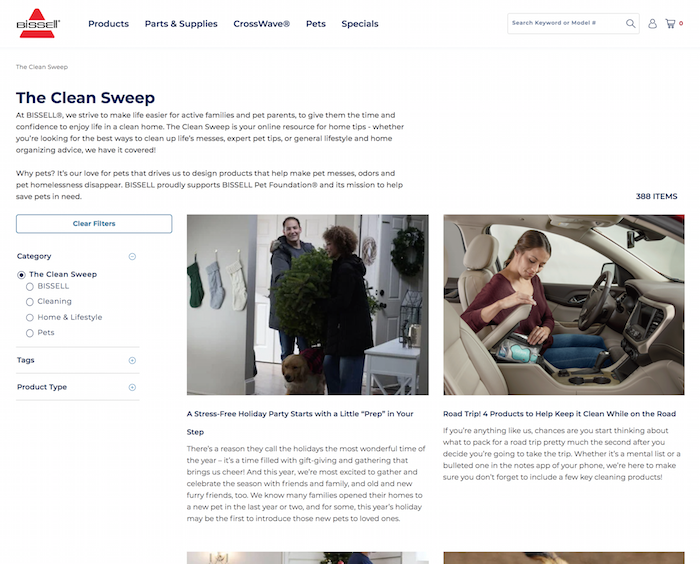
If you have trouble with this style of writing, give yourself a break. Be authentic and write as naturally as you talk. You can use a voice-to-text app to help you translate genuine conversation into writing.
5. Offer Interactive Content: QVC
One of the best ways to remain human and build engagement with your audience is to use your website to interact with people.
Interactive content can start with allowing your audience to offer you feedback and respond to your content. This can be in the form of comment boxes after your blogs or social media posts.
You can also add audio and video elements to your post to engage your viewers.
QVC leverages this type of content to keep its audience invested and coming back for more.
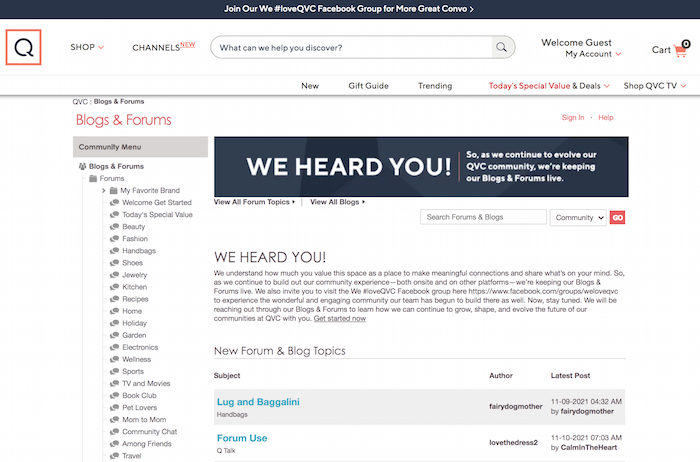
During live shows and events, they invite their viewers to interact on forums and social media groups. As a result, they become more than customers. They feel part of the QVC community.
6. Incorporate Different Media Types: BarkBox
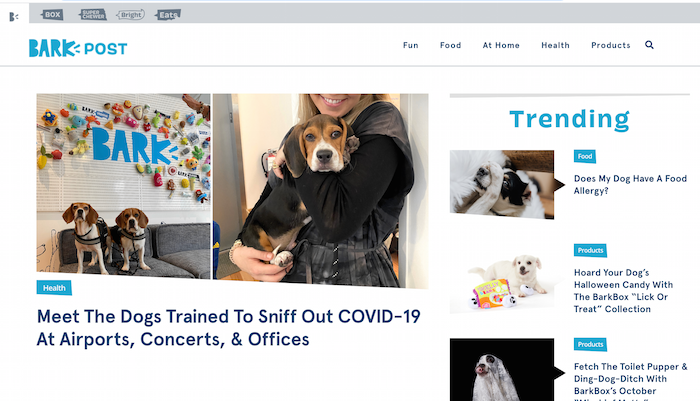
Sites with excellent content pull in lots of different types of media. This might include a video on a blog post, a slide deck, a downloadable, lots of images, photos, videos, audio, and more.
Using different elements can bring your stories to life while helping you get your message out in many ways people can absorb it.
If you need some inspiration, check out BarkBox’s blog.
7. Answer Users’ Most FAQs: NeilPatel.com
Strive to answer frequently asked questions your customers have. Sites with effective answers to frequent questions can get picked up for featured snippets in search results on Google.
You can do this by asking and answering questions in your content. Make sure those are prominent and easy to scroll. Style is up to you: You can incorporate questions into headers and subheaders or use lists or bullet points.
Not to toot our own horn, but we think we’re pretty good at this! Check out our method below:
Frequently Asked Questions About Good Content
What is an example of great content marketing?
Great content marketing makes visitors want to return and consume more. Sites with the strongest content provide current information, interactive elements, and answers to questions.
How is website content strategy different from social media content strategy?
Website content strategy focuses on what will be posted on the site itself. In contrast, social media content strategy focuses on how and what information will be posted to social media sites. The way things are presented on your site and social media will likely be quite different.
What are the different types of content?
Many different types of content can be used on your website, including audio, visual, interactive, and written content. Using a variety of content can enliven your message and entice a growing audience.
Is short or long content better?
In general, longer written content ranks better for SEO. However, even long-form content should be broken down into digestible paragraphs with headings and bullet points, answering frequently asked questions along the way. Video and audio content varies based on subject and audience.
Conclusion for Sites with Great Content
The internet is full of sites with great content. You probably know of plenty of examples that draw you back for more.
As you put together your digital marketing strategy for your brand or e-commerce shop, think about the elements that make those websites great.
What’s your favorite type of online content?
Source: neilpatel.com

How to Use the Customer Avatar Worksheet to Nail Your Copy
Copy is one of the most important parts of your marketing strategy—but it’s also one of the most intimidating.
And with good reason.
Writing copy can be REALLY hard.
How should you know what to say in your email campaign that’s going to make someone decide to finally buy your product?
We have a solution for you.
The type of solution that’s going to spell out exactly what to say when you want a reader to become a subscriber or a subscriber to become a customer.
Excited? So are we!
We’re going to show you how to write copy specifically based on your customer avatar.
If you haven’t heard of it, we have a Customer Avatar Worksheet that helps you figure out exactly who your customers are.
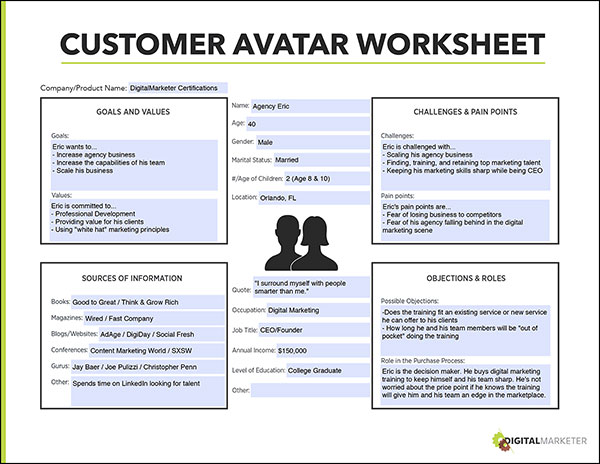
This worksheet talks about their pain points, challenges, goals, values, and buying power.
It even talks about what podcasts they listen to, what YouTube channels they’re watching, and what books are on their bookshelf.
We get so specific that by the end of it you’re going to be able to tell us the name, age, and marital status of your ideal customer.
Why do you need to know THIS MUCH about your customers?
Because that’s how you figure out what you need to say to them to show you have the solution (aka product) they are looking for.
Let’s get into it!
Use Your Customers’ Pain Points and Challenges to Remind Them of What Happens if They Don’t Solve Their Problem
Every customer is just a person with a problem looking for a solution.
That solution is your product and your copy is going to convey how well your product solves their problem.
A lot of the time, businesses have great products—they just don’t know how to show their customer avatar the value of those products.
That’s where this copy comes in.
Your customer avatar’s problem is causing them pain points and challenges.
For example, at DigitalMarketer, we teach you how to be a great marketer.
Our customer avatar’s pain point is that they’re struggling with their marketing efforts for their small business.
Their challenge is that they don’t know where or how to improve.
We have courses and workshops to teach them how to become really, really good marketers.
That means that our copy is going to talk about how tough it is to market and not see the conversion and traffic you were hoping for (pain point), and not know how to improve (challenge).
Copy that converts talks about the pain point and challenges a customer is struggling through without your solution.
Let’s look at another example that you’ve probably seen a few hundred times in your life—a weight loss program.
Customers of this program have the pain point that they want to lose weight and the challenge of not being able to stick to workout routines long enough to see a payoff.
You’ve seen the copy on magazines or website ads saying, “Lose 20 pounds in one month and only workout ONCE a week!”
While we’ve been inundated by these types of advertisements for workouts, there’s a reason—they worked.
Why?
Because the copy pointed out the customer’s pain point (being 20 pounds overweight) and their challenge (not being able to stick to workout routines… working out only once a week is totally doable!).
See what’s going on here?

Talk About Their Goals and Values to Show Them the After State They’ll Experience Once They Have Your Solution
Your customers have goals that are bigger than just your product’s solution.
For example, our business owner customers have a big goal of making more money for their company—marketing is just the turbo boost they’ll use to reach that goal.
These goals go hand-in-hand with their values.
For example, our business owner customers also value the experience of owning a successful company and the freedom that gives them.
This makes writing copy that motivates them to buy our products much easier.

We can show them how our courses and workshops will help them make more money, help them attain that successful company vision, and feel like they’ve reached the ultimate entrepreneurial dream: freedom.
Every customer has goals and values.
For example, an ecommerce trendy clothing company for women has customers who have a goal of being fashionable.
Their customers value how they look and the feeling that it gives them.
This ecommerce company can use its copy to talk about how owning certain products will help them achieve their goals and in turn, live their values.
Show Your Customers How Well You Know Them by Talking About the Books, Podcasts, Gurus, Etc. That They Look Up to
Who are you more likely to buy a product from, your best friend or a stranger on the street?
If you said best friend, you’re with the majority. If you said stranger on the street, you’re the ultimate “Yes Woman/Man.” 
When you’re writing your copy, you want to talk about your customer’s pain points, challenges, goals, and values. You also want to show them how well you know them.
By referencing books that have impacted their lives, podcast episodes that were just published in your industry, or something that a guru that everyone looks up to is doing—you’re showing them how well you know them.
You move past marketing to…” Wow, these people really get me.”
For example, a financial business blog could mention the Robinhood Snacks Daily podcast.
They know their ideal reader is probably listening to this financial podcast every morning, so by referencing this specific podcast their readers are going to know that this blog gets them.
Or, let’s say that one of the biggest movers and shakers of your industry just published a book.
You’d want to reference that book in your copy, showing how “in the know” your business is.
And just like that, you move from a stranger on the street to (virtual) best friend.
Tell Them How to Get Your Solution Based Off on Their Buying Power
Every customer has different levels of buying power.
For example, the ecommerce trendy clothing company’s customers have total buying power.
Their customers are the ones that is going to put their credit card information in and hit the purchase button.
But not every customer has the same level of power.
For example, a marketer who wants to attend our annual Traffic & Conversion Summit might need to have their boss greenlight the purchase.
In that case, you want your copy to show that you know they’ll need help with getting their boss to buy the ticket for you.
To do this, we create an email template that marketers can use to send their bosses and show them why it would be valuable for them to come to the Traffic & Conversion Summit.
In our drip email campaign, we’ll make sure to link out to that email template in our copy so that our customers know that we’re not leaving them high and dry wishing for a ticket.
We’ve got them covered.
And that’s how you can use the Customer Avatar Worksheet to nail your copy by writing exactly what your customers need to hear.
Download the Customer Avatar Worksheet for free below so you can start writing conversion-driving copy.
The post How to Use the Customer Avatar Worksheet to Nail Your Copy appeared first on DigitalMarketer.
Source: digitalmarketer.com

Writing Content That Is Too In-Depth Is Like Throwing Money Out the Window
You’ve heard people telling you that you need to write in-depth content because that’s what Google wants.
And it’s true… the average page that ranks on page 1 of Google contains 1,890 words.
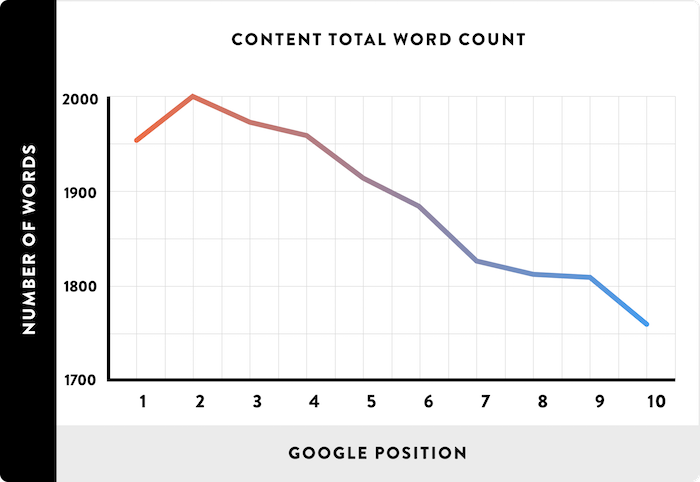
But you already know that.
The question is, should you be writing 2,000-word articles? 5,000? Or maybe even go crazy and create ultimate guides that are 30,000 words?
What’s funny is, I have done it all.
I’ve even tested out adding custom images and illustrations to these in-depth articles to see if that helps.
And of course, I tested if having one super long page with tens of thousands of words or having multiple pages with 4,000 or 5,000 words is better.
So, what do you think? How in-depth should your content be?
Well, let’s first look at my first marketing blog, Quick Sprout.
Short articles don’t rank well
With Quick Sprout, it started off just like any normal blog.
I would write 500 to 1,000-word blog posts and Google loved me.
Just look at my traffic during January 2011.
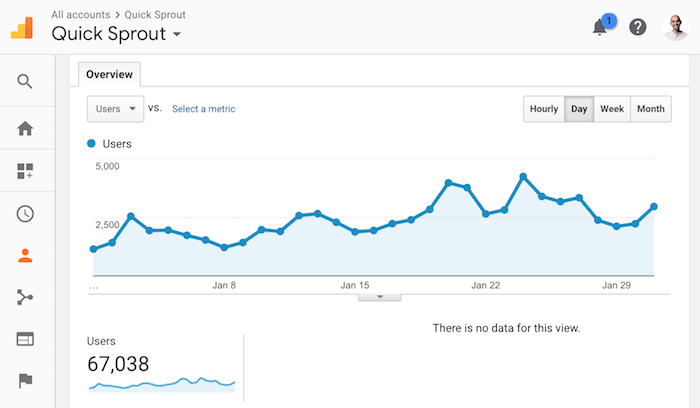
As you can see, I had a whopping 67,038 unique visitors. That’s not too bad.
Even with the content being short, it did fairly well on Google over the years.
But over time, more marketing blogs started to pop up, competition increased, and I had no choice but to write more detailed content.
I started writing posts that were anywhere from 1,000 to a few thousand words. When I started to do that, I was able to rapidly grow my traffic from 67,038 to 115,759 in one year.
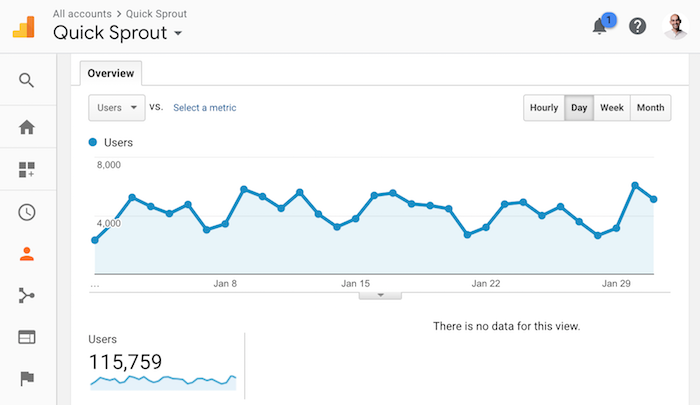
That’s a 72.67% increase in traffic in just 1 year.
It was one of my best years, and all I had to do was write longer content.
So naturally, I kept up with the trend and continually focused on longer content.
But as the competition kept increasing, my traffic started to stagnate, even though I was producing in-depth content.
Here are my traffic stats for November 2012 on Quick Sprout.
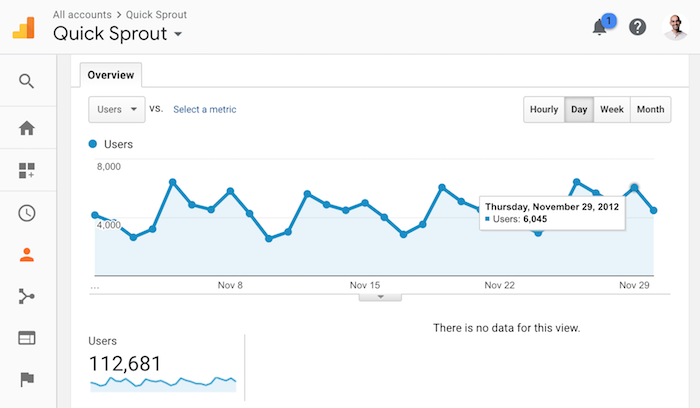
I understand that Thanksgiving takes place in November, hence traffic wasn’t as high as it could be. But still, there really wasn’t any growth from January to November of 2012.
In other words, writing in-depth content that was a few thousand words max wasn’t working out.
So what next?
Well, my traffic had plateaued. I had to figure something else out.
Writing longer, more in-depth content had helped me before… so I thought, why not try the 10x formula.
I decided to create content 10 times longer, better, and more in-depth than everyone else. I was going to the extreme because I knew it would reduce the chance of others copying me.
Plus, I was hoping that you would love it as a reader.
So, on January 24, 2013, I released my first in-depth guide.
It was called The Advanced Guide to SEO.
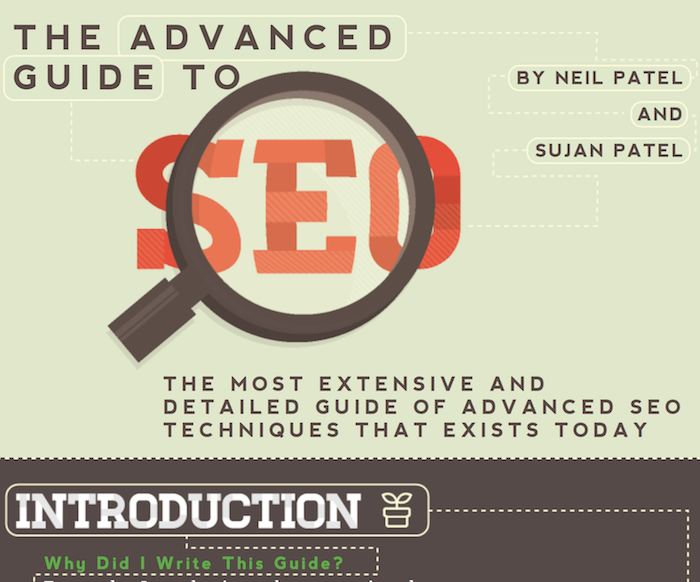
It was so in-depth that it could have been a book.
Literally!
Heck, some say it was even better than a book as I paid someone for custom illustration work.
Now let’s look at the traffic stats for January 2013 when I published the guide.
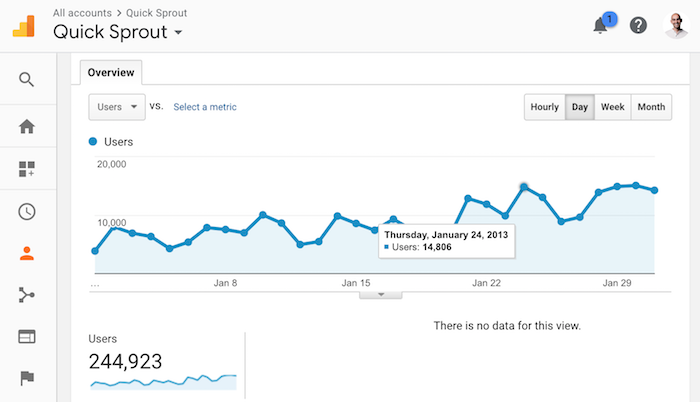
As you can see my traffic really started to climb again.
I went from 112,681 visitors in November to 244,923 visitors in January. Within 2 months I grew my traffic by 117%.
That’s crazy!!!!
The only difference: I was creating content that was so in-depth that no one else dared to copy to me (at that time).
Sure, some tried and a few were able to create some great content, but it wasn’t like hundreds of competing in-depth guides were coming out each year. Not even close!
Now, when I published the guide I broke it down into multiple chapters like a book because when I tested out making it one long page, it loaded so slow that the user experience was terrible.
Nonetheless, the strategy was effective.
So what did I do next?
I created 12 in-depth guides
I partnered up with other marketers and created over 280,000 words of marketing content. I picked every major subject… from online marketing to landing pages to growth hacking.
I did whatever I could to generate the most traffic within the digital marketing space.
It took a lot of time and money to create all 12 of these guides, but it was worth it.
By January of 2014, my traffic had reached all-time highs.
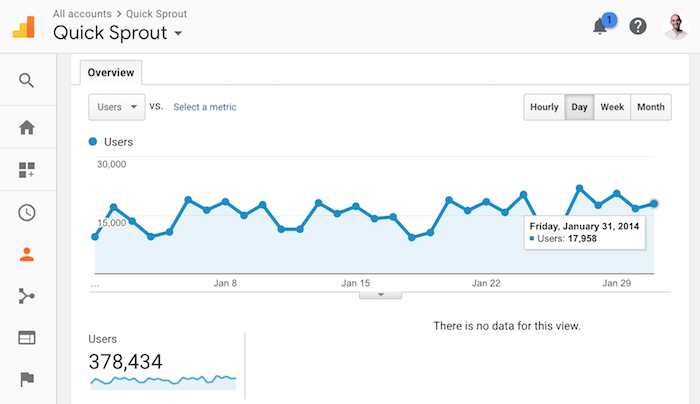
I was generating 378,434 visitors a month. That’s a lot for a personal blog on marketing.
Heck, that’s a lot for any blog.
In other words, writing 10x content that was super in-depth worked really well. Even when I stopped producing guides, my traffic, continually rose.
Here’s my traffic in January 2015:
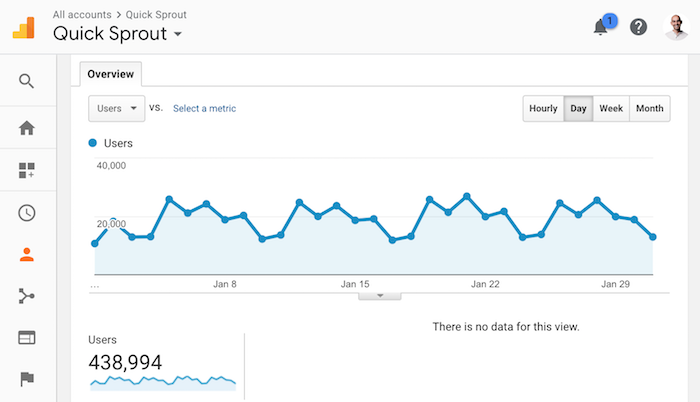
And here’s January 2016 for Quick Sprout:
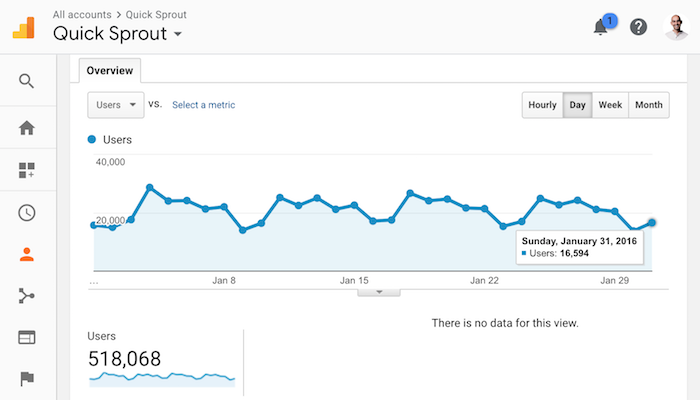
But over time something happened. My traffic didn’t keep growing. And it didn’t stay flat either… it started to drop.
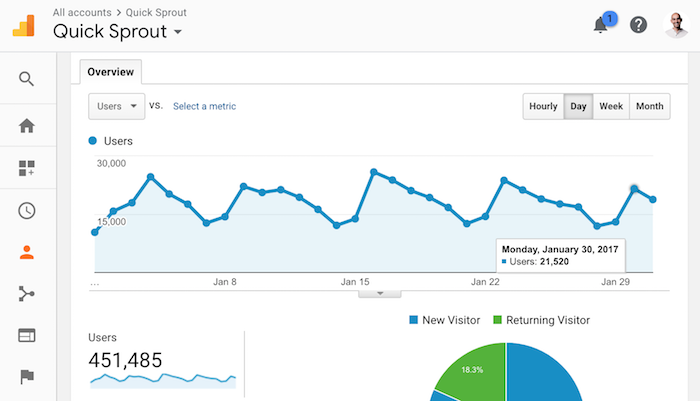
In 2017, my traffic dropped for the first time.
It went from 518,068 monthly visitors to 451,485. It wasn’t a huge drop, but it was a drop.
And in 2018 my traffic dropped even more:
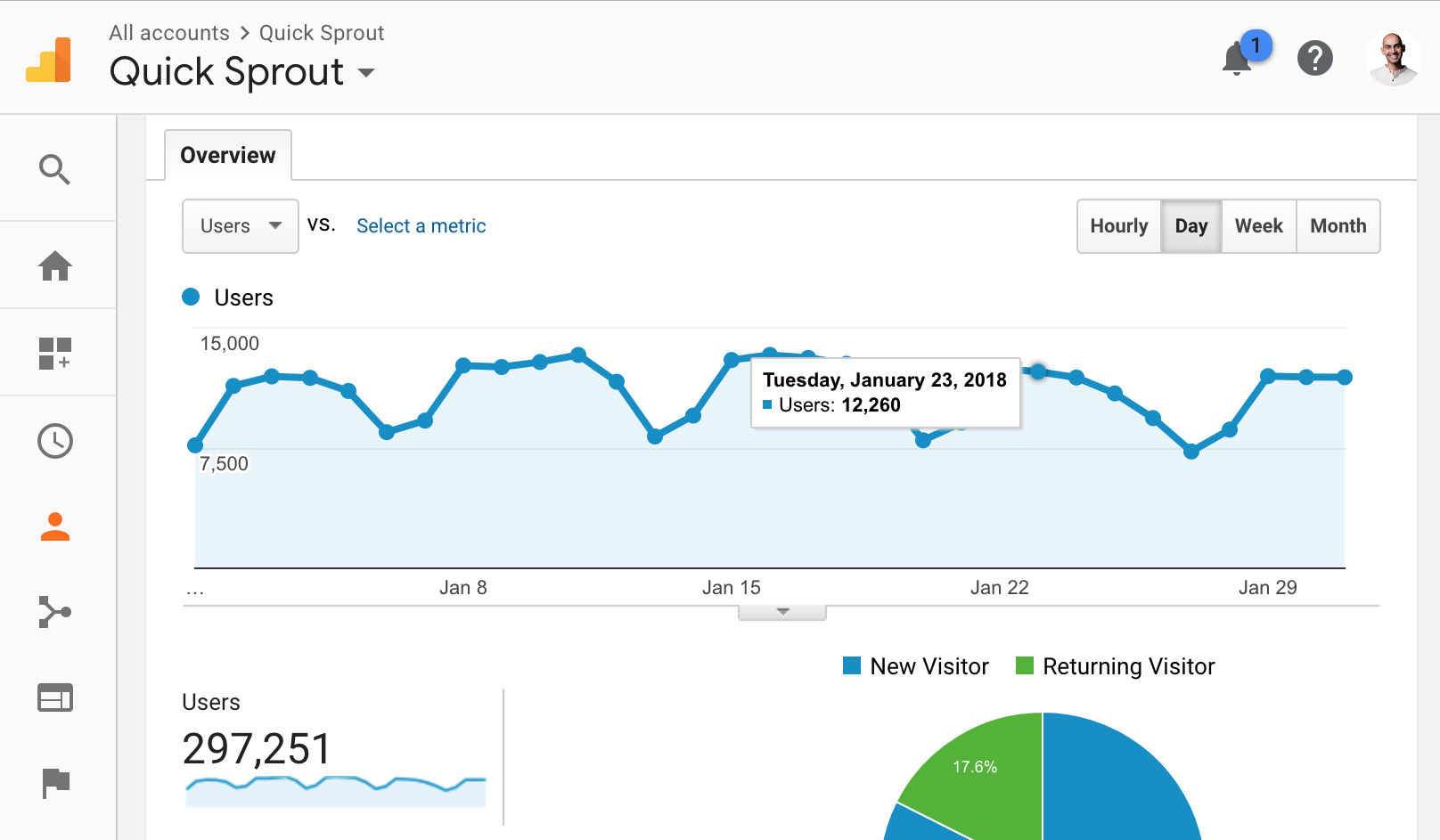
I saw a huge drop in 2018. Traffic went down to just 297,251 monthly visitors.
And sure, part of that is because I shifted my focus to NeilPatel.com, which has become the main place I blog now.
But it’s largely that I learned something new when building up NeilPatel.com.
Longer isn’t always better
Similar to Quick Sprout, I have in-depth guides on NeilPatel.com.
I have guides on online marketing, SEO, Google ads, Facebook ads, and the list goes on and on.
If you happened to click on any of the guides above you’ll notice that they are drastically different than the ones on Quick Sprout.
Here are the main differences:
- No fancy design – I found with the Quick Sprout experience, people love the fancy designs, but over time content gets old and outdated. To update content when there are so many custom illustrations is tough, which means you probably won’t update it as often as you should. This causes traffic to go down over time because people want to read up-to-date and relevant information.
- Shorter and to the point – I’ve found that you don’t need super in-depth content. The guides on NeilPatel.com rank in similar positions on Google and cap out at around 10,000 words. They are still in-depth, but I found that after 10,000 or so words there are diminishing returns.
Now let’s look at the stats.
Here’s the traffic to the advanced SEO guide on Quick Sprout over the last 30 days:
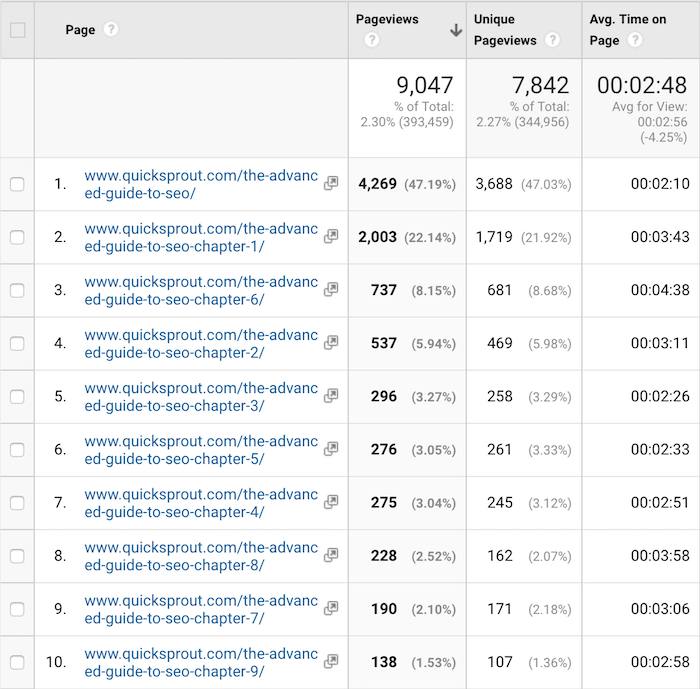
Over 7,842 unique pageviews. There are tons of chapters and as you can see people are going through all of them.
And now let’s look at the NeilPatel.com SEO guide:
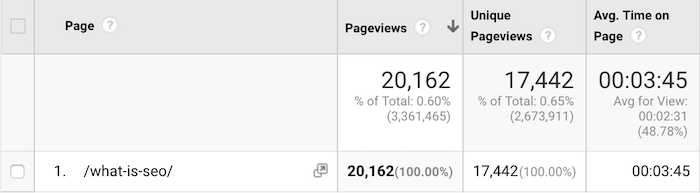
I spent a lot less time, energy, and money creating the guide on NeilPatel.com, yet it receives 17,442 unique pageviews per month, which is more than the Quick Sprout guide. That’s a 122% difference!
But how is that possible?
I know what you are thinking. Google wants people to create higher quality content that benefits people.
So how is it that the NeilPatel.com one ranks higher?
Is it because of backlinks?
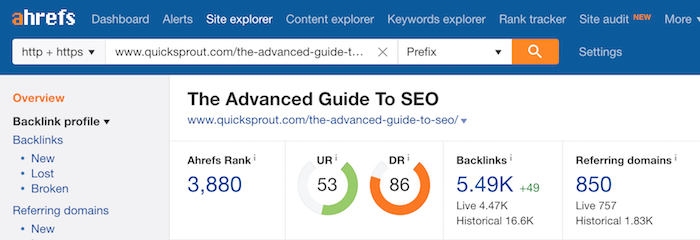
Well, the guide on Quick Sprout has 850 referring domains:
And the NeilPatel.com has 831 referring domains:
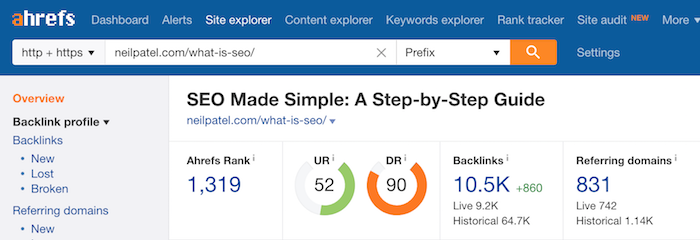
Plus, they have similar URL ratings and domain ratings according to Ahrefs so that can’t be it.
So, what gives?
Google is a machine. It doesn’t think with emotions, it uses logic. While we as a user look at the guide on Quick Sprout and think that it looks better and is more in-depth, Google focuses on the facts.
See, Google doesn’t determine if one article is better than another by asking people for their opinion. Instead, they look at the data.
For example, they can look at the following metrics:
- Time on site – which content piece has a better time on site?
- Bounce rate – which content piece has the lowest bounce rate?
- Back button – does the article solve all of the visitors’ questions and concerns? So much so the visitor doesn’t have to hit the back button and go back to Google to find another web page?
And those are just a few things that Google looks at from their 200+ ranking factors.
Because of this, I took a different approach to NeilPatel.com, which is why my traffic has continually gone up over time.
Instead of using opinion and spending tons of energy creating content that I think is amazing, I decided to let Google guide me.
With NeilPatel.com, my articles range from 2,000 to 3,000 words. I’ve tried articles with 5,000+ words, but there is no guarantee that the more in-depth content will generate more traffic or that users will love it.
Now to clarify, I’m not trying to be lazy.
Instead, I’m trying to create amazing content while being short and to the point. I want to be efficient with both my time and your time while still delivering immense value.
Here’s the process I use to ensure I am not writing tons of content that people don’t want to read.
Be data-driven
Because there is no guarantee that an article or blog post will do well, I focus on writing amazing content that is 2,000 to 3,000-words long.
I stick within that region because it is short enough where you will read it and long enough that I can go in-depth enough to provide value.
Once I release a handful of articles, I then look to see which ones you prefer based on social shares and search traffic.
Now that I have a list of articles that are doing somewhat well, I log into Google Search Console and find those URLs.
You can find a list of URLs within Google Search Console by clicking on “Search Traffic” and then “Search Analytics”.
You’ll see a screen load that looks something like this:
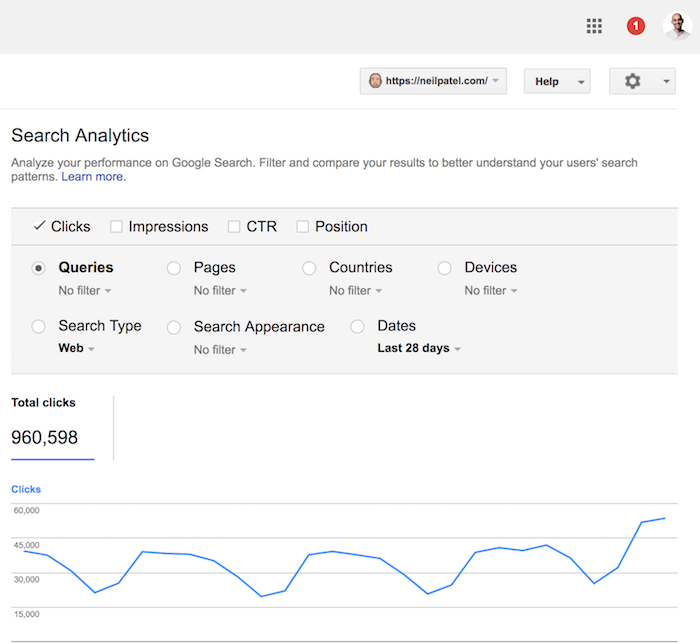
From there you’ll want to click on the “pages” button. You should be looking at a screen that looks similar to this:
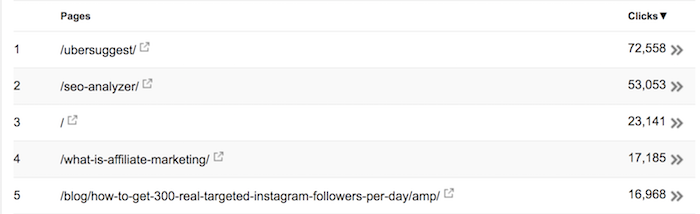
Find the pages that are gaining traction based on total search traffic and social shares and then click on them (you can input URLs into Shared Count to find out social sharing data).
Once you click on the URL, you’ll want to select the “Queries” icon to see which search terms people are finding that article from.
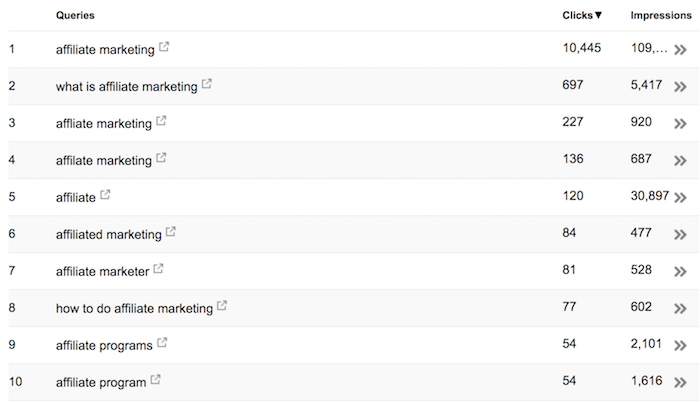
Now go back to your article and make it more in-depth.
And when I say in-depth, I am not talking about word count like I used to focus on at Quick Sprout.
Instead, I am talking depth… did the article cover everything that the user was looking for?
If you can cover everything in 3,000 words then you are good. If not, you’ll have to make it longer.
The way you do this is by seeing which search queries people are using to find your articles (like in the screenshot above). Keep in mind that people aren’t searching Google in a deliberate effort to land on your site… people use Google because they are looking for a solution to their problem.
Think of those queries that Google Search Console is showing you as “questions” people have.
If your article is in-depth enough to answer all of those questions, then you have done a good job.
If not, you’ll have to go more in-depth.
In essence, you are adding more words to your article, but you aren’t adding fluff.
You’re not keyword stuffing either. You are simply making sure to cover all aspects of the subject within your article.
This is how you write in-depth articles and not waste your time (or money) on word count.
And that’s how I grew NeilPatel.com without writing too many unnecessary words.
Conclusion
If you are writing 10,000-word articles you are wasting your time. Heck, even articles over 5,000 words could be wasting your time if you are only going after as many words as possible and adding tons of fluff along the way.
You don’t know what people want to read. You’re just taking a guess.
The best approach is to write content that is amazing and within the 2,000-word to 3,000-word range, assuming you’re in a competitive industry. If your industry isn’t as competitive (and it lacks content online) then you can get away with posts under 1,000 words.
Once you publish the content, give it a few months and then look at search traffic as well as social sharing data to see what people love.
Take those articles and invest more resources into making them better and ultimately more in-depth (in terms of quality and information, not word count).
The last thing you want to do is write in-depth articles on subjects that very few people care about For example:
Just look at the Advanced Guide to SEO on Quick Sprout… I made an obvious mistake. I made it super in-depth on “advanced SEO”. But when you search Google for the term “SEO” and you scroll to the bottom to see related queries you see this…
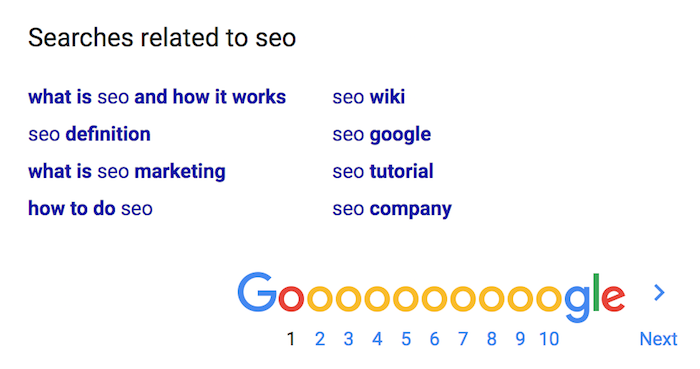
People are looking for the basics of SEO, not advanced SEO information.
If I wrote a 2,000-word blog post instead of a 20,000-word guide, I could have caught this early on and adapted the article more to what people want versus what I thought they wanted.
That’s a major difference.
So how in-depth are you going to make your content?
The post Writing Content That Is Too In-Depth Is Like Throwing Money Out the Window appeared first on Neil Patel.
Source: feedproxy.google.com

Anchor Text SEO: Everything You Need to Know
There’s a lot of conflicting information about anchor text out there.
One site tells you to focus as heavily on your keywords as you can.
Another tells you to stay as far away from any kind of anchor text and backlinks as possible.
And another says anchor text doesn’t matter.
What are you supposed to believe?
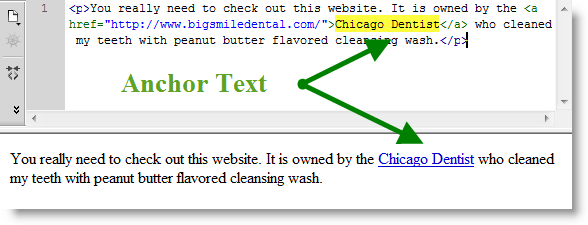
Knowing what anchor text can improve your SEO strategy isn’t always easy – especially when you have a dozen conflicting messages trying to tell you what to do.
But today, it’s essential to optimize your anchor text to attract more attention from search engines.
To help you out, let’s start from the very beginning.
Here’s what anchor text is, how it helps (or hurts) SEO, and what you can do to keep it optimized.
What is Anchor Text?
Anchor text is the clickable words that appear in place of a hyperlink.
For example, this is anchor text.
Anchor text allows you to add links within your content contextually. It also gives readers – and search engines – a better indication of what they’ll find on the other side of the link.
The anchor text usually relates back to keywords associated with the contents of the link.
However, not all anchor text is created equally.
Let’s take a look at the different kinds of anchor text you might find online.
Different Kinds of Anchor Text:
Exact Match Anchor Text
An exact match anchor text is when the anchor text directly matches the words or phrases associated with the link’s contents.
Here’s an example of anchor text within an article.

If the writer was hoping to target the keyword “chatbots,” this would be an exact match.
Partial Match Anchor Text
A partial anchor text match appears when your targeted keyword is within the anchor text, but it’s not an exact match.
Check out this example.

Say the marketer’s targeted keyword was “guest posting.”
Using “a series on guest posting” is not an exact match, but it does still include the keyword.
This means it’s still targeting the keyword you’re trying to rank for, but it seems more natural.
Branded
Branded anchor text is when the anchor text features the company or individual’s name.
Here’s an example.

This type of anchor text is frequently used when you’re linking to a company’s homepage.
Generic
Usually, anchor text is somewhat hidden within the content.
However, generic anchor text typically stands out and is obviously a link.
Here’s an example.
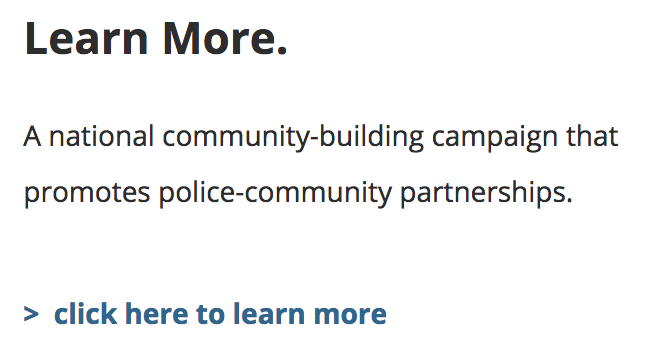
This kind of anchor text usually associates with a call to action.
Generic anchor text is also sometimes called “natural” anchor text.
Images
Images can also be anchor text.
This text occurs when you click on an image, and it brings you through to a link.
However, the actual anchor text associated with the image is the alt text that you include.
LSI Keywords
LSI keywords, or Latent Semantic Indexing keywords, are words or phrases that closely associate with the keywords you’re trying to target.
These might be different names for the same principle or product, or other keywords closely related.
Here’s an example.

The keyword “micro-influencers” is related to influencer marketing, without being a partial match.
Blog Title/Post Title
When the name of the anchor text you’re linking to is the full name of the blog title, page title, or content title, this is simply called Post Title anchor text.
Check out this example.

For example, this kind of anchor text usually appears when marketing a course, referencing a specific blog post, or showing off a page.
Naked URLs
A naked URL doesn’t have any anchor text at all.
Instead, it’s just a link to a page featured on your site.
Naked URLs may contain the “www” or might just be “Domain.com.”
Here’s an example from Sprout Social.

The anchor text for this link is the link itself.
This can still appeal to keywords because subdomains typically include keywords.
They can also appeal to branded keywords, including the company name in the domain.
How does anchor text influence SEO?
Anchor text helps search engine crawlers and readers identify what the contents of the link contain.
As more and more websites link to a particular page with various forms of anchor text, the search engine can begin to get a better idea of what kind of content the site provides.
In a way, anchor text is like a keyword that others use to describe your content.
However, it isn’t simple enough to just use anchor text directly associated with the keyword you’re trying to rank for.
In the past, Google relied heavily on anchor text.
Unfortunately, this allowed marketers, writers, and webmasters to do something called “Google Bombing.”
This led to pages ranking for keywords that weren’t related to the content that was appearing.
The most famous example of this is in 2007 when a search for “miserable failure” would result in articles about President George Bush.
In fact, now when you search “miserable failure,” you get results about the Google Bomb.
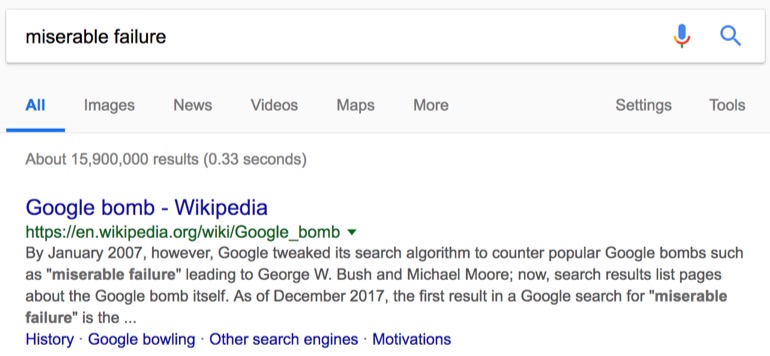
Google responded to this error in anchor text with the Penguin Update, which they launched in 2012.
Like most updates, the search engine released Penguin to help identify spammy listings and remove them from their rankings.
There are two particular triggers for Penguins.
- First, links that seem to be purchased, resulting in a number of similar links appearing on low-quality websites around the same time.
- Second, links that appear to use keyword stuffing.
This stuffing means that if your anchor text matches your keywords too directly, it could penalize you.
Julie Joyce from LinkFishMedia described anchor text’s importance to SEO by saying, “A site that has 75% exact match anchors has to look unnatural… when I overdo it and it works, it doesn’t stick.”
The idea is that if a website is linking to your content naturally, it will use a more diverse keyword phrase.
While keyword stuffing may help you get results quickly, any change in ranking will only be wiped away when Google discovers this strategy.
So, if you can’t link to the keywords that you’re trying to target, how should you use anchor text to improve your SEO?
Let’s take a look.
How to optimize anchor text for SEO today?
When trying to control your anchor text, there is one thing you want to keep in mind – relevance.
To show Google that your anchor text and the link is not black-hat, you need to prove it’s natural – even if it is strategic.
Let’s take a look at how you can do this.
1. Only include links when anchor text fits naturally.
One of the biggest reasons Penguin was first introduced was to stop website owners from adding anchor text just for SEO purposes.
This means they’re on high alert for anchor text that doesn’t seem like it fits.
With the Penguin Update, sites that over-optimized their anchor text saw severe penalties that hurt their web traffic.
To avoid this, you want each anchor text you include to fit naturally within the content.
For anchor text to be SEO-friendly, it should be succinct and relevant.
You want your anchor text to describe the contents of the link as accurately as possible in as few words as possible.
Here’s how:

Using the anchor text “start a blog” then links directly to a page about how to start a blog.
It’s direct, to the point, and only features three words.
However, you also want to avoid using an exact match to your keyword as often as possible.
Are you confused?
You don’t have to be.
When trying to decide what to use for anchor text, consider what part of your sentence might spark your reader’s interest the most.
For example, if there is a statistic in your sentence, this would be a great place to include your anchor text.
Check out this example from a Kissmetrics article.

Both readers and search engines will know you’re linking back to that site because it backs up your claim – not because you’re trying to stuff results for that keyword.
The same idea applies to quotes.
As mentioned, anchor text should be direct and to the point.
If you’re linking to an entire quote, this is usually much too long for anchor text.
Instead, make your anchor text the individual’s name or the resource you pulled the quote from like Oro Inc does on this blog.
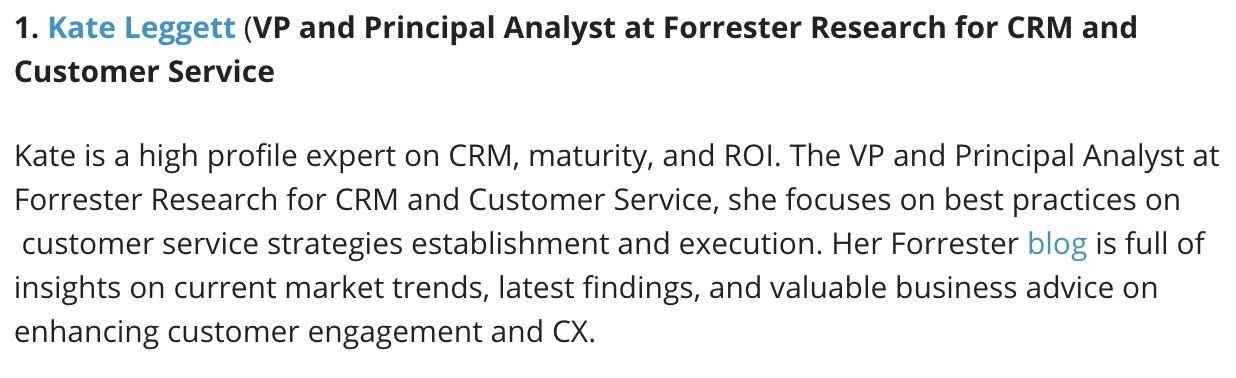
Here, we have two bits of anchor text.
First, her name is anchor text pointing the reader to her Twitter. Second, there is anchor text pushing the reader to Kate’s blog.
Again, this can show that you’re using that link to support your data or claims.
Relevance is also crucial for anchor text and links.
First, the anchor text you choose to display on your website will influence what Google believes your page is about.
While it’s okay to have a few links that may seem out of context to a search engine, you want most of your anchor text to be within your industry.
If you’re in the finance industry and all of a sudden you have anchor text about baking cakes, this might be a red flag to Google and Penguin.
When adding links and anchor text, first think if it is necessary.
Does it provide value and help make your argument stronger?
Or are you just trying to squeeze in another link to meet some imaginary quota?
Don’t add links just for the purpose of adding links.
Instead, work links into your content as naturally as possible.
2. Make sure you diversify your types of anchor text.
Anchor text variation might be one of the most significant factors when it comes to using links for SEO.
When all your links are one style, this could cause a red flag.
For example, if the only anchor text you use throughout your entire website is exact match keywords, it might seem like you’re not putting genuine thought into what you’re linking to.
A natural link profile will include many different kinds of links.
Let’s take a look at what you want your optimal anchor text profile to look like.
It’s essential to begin by saying that an anchor text profile should look different depending on if you’re a national or local website.
Your homepage and internal pages of a website will also look different.
Let’s cover a national page first.
Serpstat recommends you break down your anchor text distribution like this.
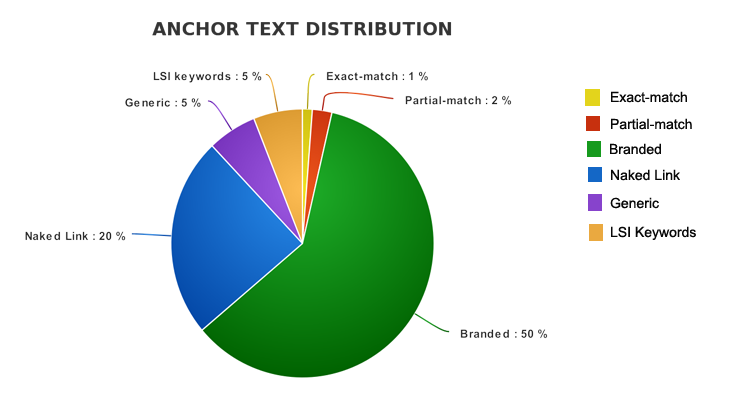
The majority of your anchor text should be branded.
In fact, over half of your anchor text should be branded. This includes anchor text that is branded with a keyword.
You should also notice that exact match anchors are incredibly small.
In fact, you only want exact match anchors to make up about 1% of your entire link distribution.
A partial match should only be about 2%.
Maybe surprisingly, naked links should also make up a sizeable chunk of your link distribution.
Now, let’s take a look at how your sub-pages should compare.
SEOJet breaks down a website sub-page link distribution like this.
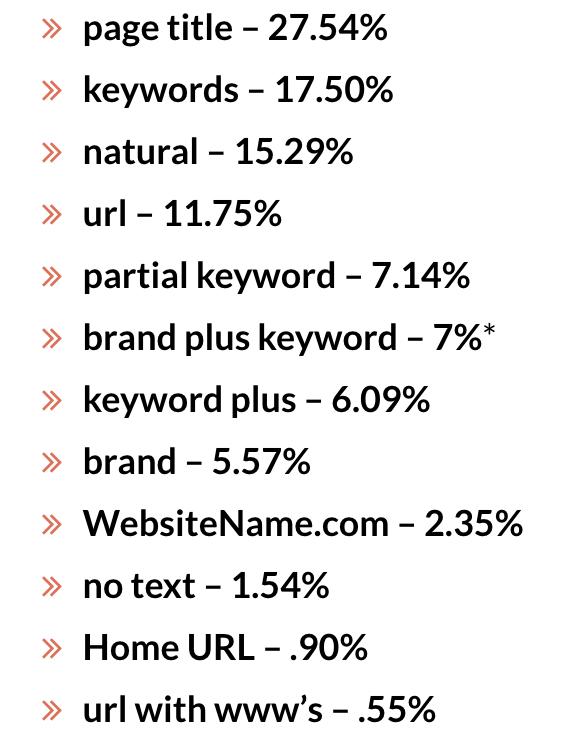
Notice how branded anchor text is much, much smaller than the homepage portion.
For sub-pages, “page title” anchor text had a significant influence on top ranking pages.
This influence typically occurs because page titles usually include the keywords you’re targeting, but they aren’t seen as “exact match” anchor text.
This allows you to easily target keywords within your anchor text without penalties for seeming unnatural.
But you’ll also see that “exact match” keywords are used much more frequently within sub-pages than they are on homepages.
Now, let’s compare this to a local homepage anchor text profile.
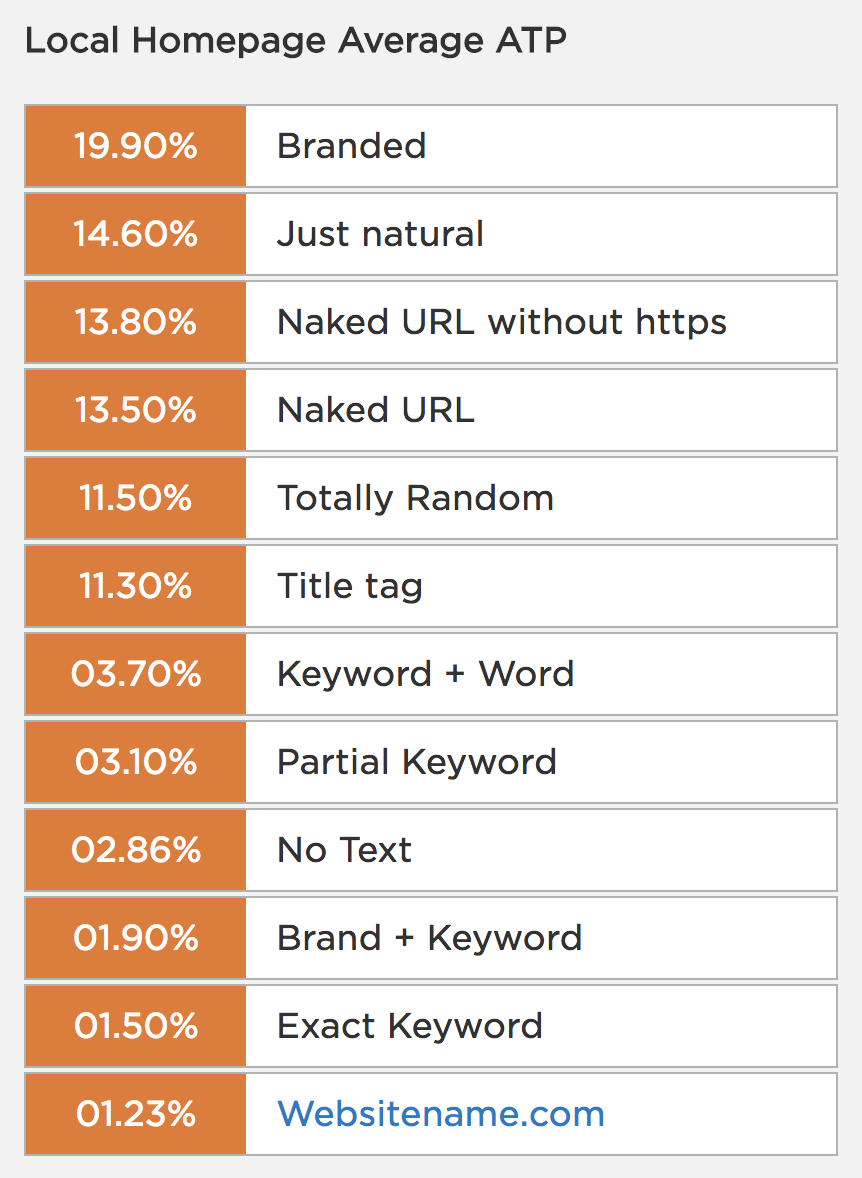
For a local homepage, your anchor text profile can be much more diverse.
Unlike the national page, you only need about 20% of your anchor texts to be branded.
But you’ll also notice that your exact match keywords should still be incredibly low.
An internal local page should have the same anchor text profile as a national page.
Keep in mind that these percentages are just recommendations.
You may find that a different distribution brings you better results.
3. Stay away from low-quality or toxic websites.
Google loves high-quality websites.
When considering who to rank at the top of their results lists, they’re going to push sites to the top that they believe fit their list of important factors.
This means gaining high-quality links from awesome pages – and avoiding those that might hurt your “cool” factor.
Let’s break down what bad links are.
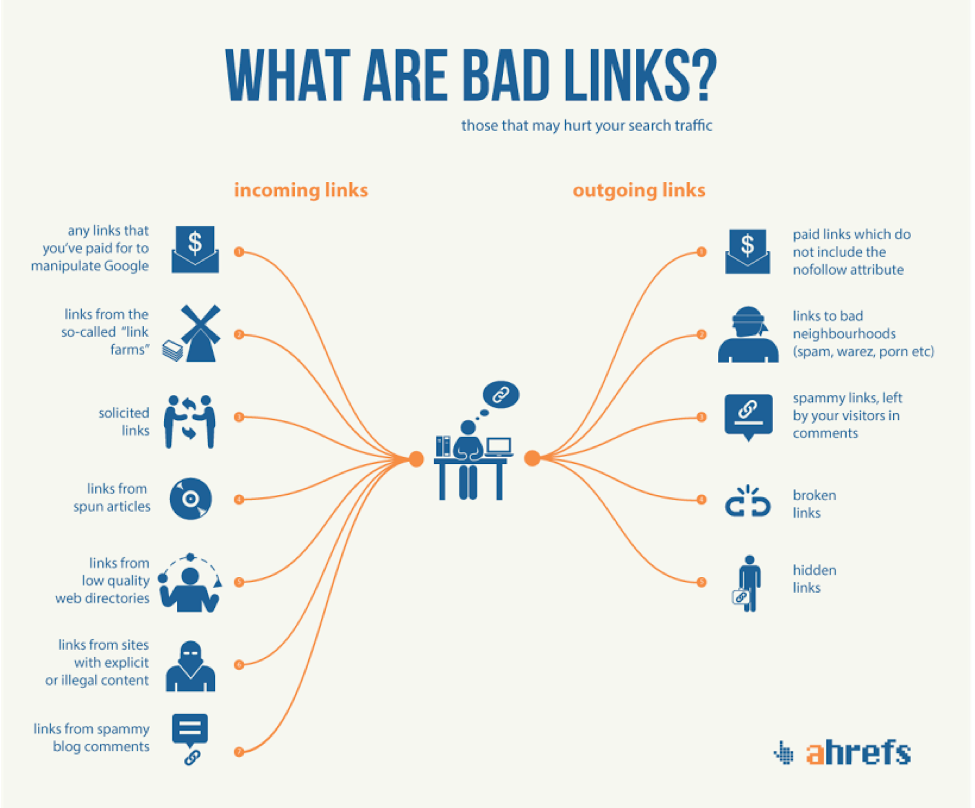
Mostly, bad links are links that Google believes you’ve gained unethically, either outgoing or incoming.
On the outgoing side, you have much more control over who you’re linking to.
However, you need to be careful of broken links or people leaving spammy links in your comments section.
If you don’t monitor your comments, they may become bogged down with low-quality backlinks that hurt your reputation.
But the real problem occurs when you have bad incoming links.
Unfortunately, these can be more difficult to control.
Because you can’t delete these links from your website like you can with low-quality outgoing links, you’ll need to find and eliminate your association with them through Google.
If you’re not paying proper attention to where your backlinks are coming from, you could ruin your credibility without even knowing it.
Now, let’s talk about how you can find these low-quality links.
The Moz Spam Analysis tool is one way you can check the quality of websites you connect with.
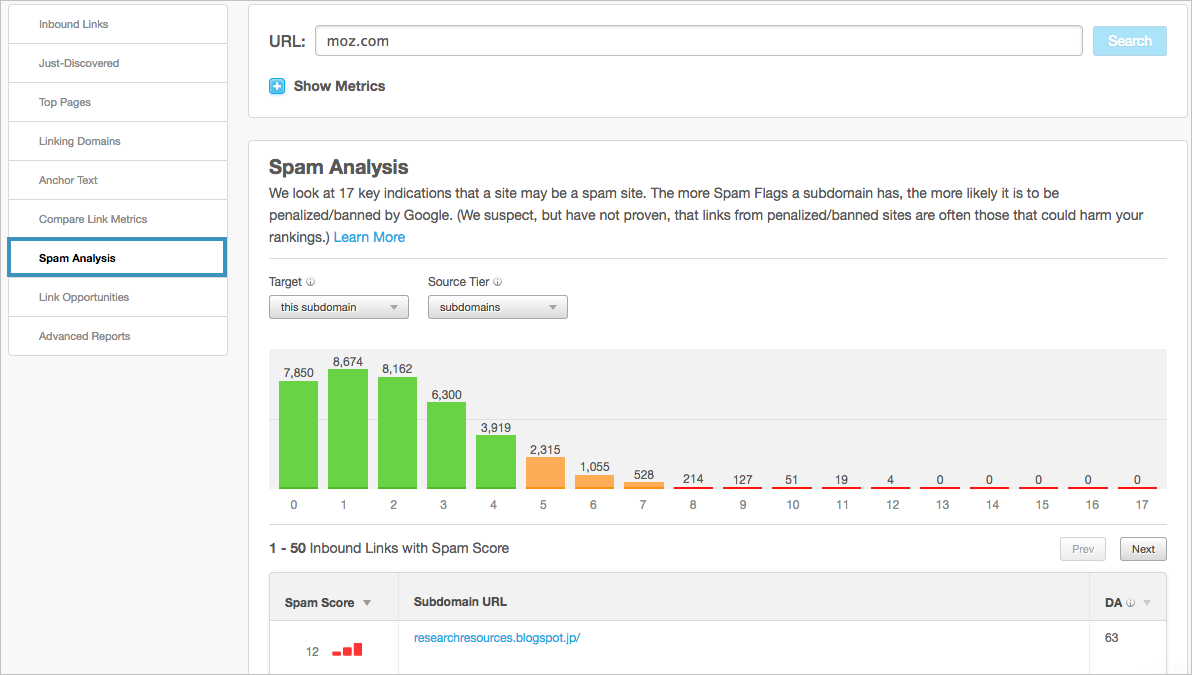
The Spam Score, which their Open Site Explorer features, gives you a ranking of each link.
The tool uses 17 different flags to identify links that might be seen as spam, including things like content strength, if there is contact info on the page, or if the domain name contains numbers.
If a domain has fewer than four flags, it is considered a strong link.
However, if there are more than seven, this could be seen as a bad link and should be looked at.
If there are links with over ten red flags, this could be severely damaging to your online reputation.
Google allows you to disavow any low-quality links that you believe is hurting your online ranking.
When you disavow a link through Google, you’re letting the search engine know that you do not wish to associate your website with that link.
To disavow your backlinks, you want to begin by finding the low-quality links that would be damaging your site.
If you’ve already done this with the Moz Spam Analysis tool or another backlink tool, you can move on to the next step.
Through the Google Disavow Tool, you can upload your list of links to disavow.
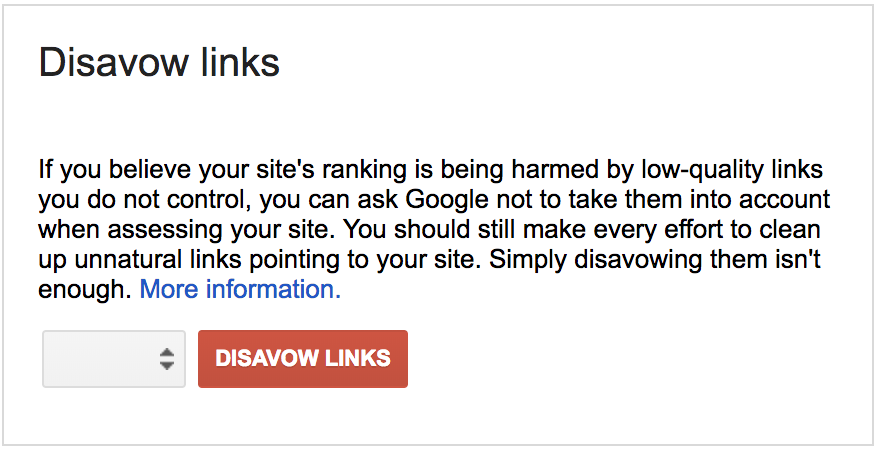
Keep in mind that it can take a few weeks before you start to see your links disavowed.
Let’s consider this case study IMPACT did on Udemy.
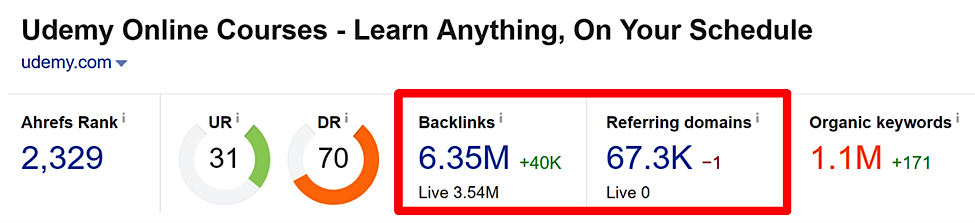
Upon doing a keyword audit, they found that just over 67,000 domains were linking to Udemy 6.35 million times.
If you break this down, it means that each site was linking to Udemy 94 times.
Unfortunately, this probably isn’t accurate and can bring up a red flag for Google.
With a bit of additional digging, they found that one website alone was linking to Udemy over 400,000 times.
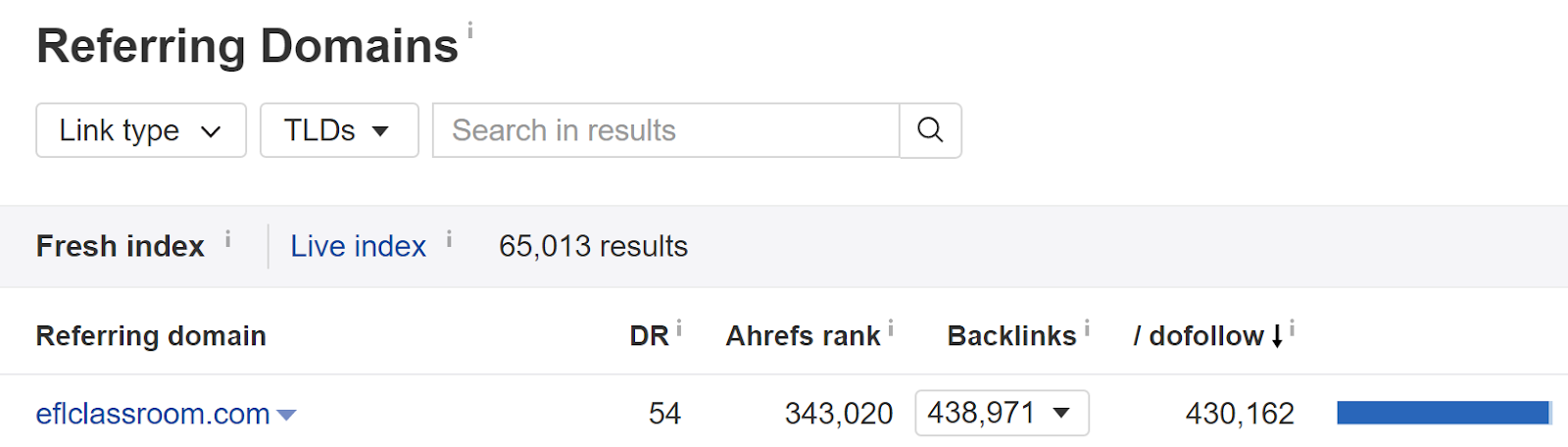
This kind of unnatural linking may not be Udemy’s fault or intention, but it can still cause severe damage to search engines.
When determining high-quality and low-quality links, you’ll also want to consider something called co-occurrence and co-citation.
Co-occurrence happens when you use similar keywords to other sites across the web.
These are similar to LSI keywords.
However, it can influence your SEO by allowing you to rank for terms you may not have been targeting.
Co-occurrence goes hand-in-hand with co-citation.
Co-citation happens when two different websites mention the same brand but do not link to that brand or website.
Those two sites then get connected through the mutual mention of the third website.
Both co-occurrence and co-citation can help you become associated with other high-quality websites.
4. Go deep with your anchors.
Another critical aspect of anchor text and backlinks is what content you’re linking to.
Google wants to see that you’re linking to valuable pages within a website.
Not only does this improve relevance, but it also seems more natural than if you’re just linking to a homepage or product page.
When deciding what to link to, choose the most relevant page possible.
If linking to a study, quote, or statistic, pull the actual page that information came from – not just the homepage.
Always opt for shareable content over surface-level generic pages.
Here’s an example from Moz.

While the anchor text says “Moz blog,” you’ll see that the link pushes back to a specific blog – not just the blog page.
This kind of specificity pushes both Google crawlers and readers deeper into the page, creating more relevance and making a more genuine impression.
It seems much more natural to link to this kind of in-depth, specific content and will improve your credibility with Google.
However, it is okay to have some of your anchor text push back to a surface-level page.
For example, if you’re going to link to a specific brand, it’s okay to have that link push to the company’s homepage.
You don’t want these kinds of links to make up the majority of your distribution.
Conclusion
As with any SEO factor, you want to include anchor text and links within your content as naturally as possible while providing clear value to your readers.
If you’re merely stuffing links into your content, you can severely damage your reputation with Google.
This can make the already uphill battle of getting web traffic even more difficult.
Understanding anchor text and adequately optimizing each link can help improve your ranking while also driving traffic to your page.
Keep these four optimization tips in mind when creating your website and backlink strategy.
What anchor text strategies are you using in 2018?
About the Author: Neil Patel is the cofounder of Neil Patel Digital.
Source: feedproxy.google.com