
Tag Archives for " communication "

How to Collect the Right Data to Boost Your Marketing
This is the second of a three-part series delving into the process for selection and preparation for CRM + marketing automation implementation.
In this installment, we delve deeper into the importance of data, the four categories of data, and how this will cause you to rethink your CTAs and webforms.
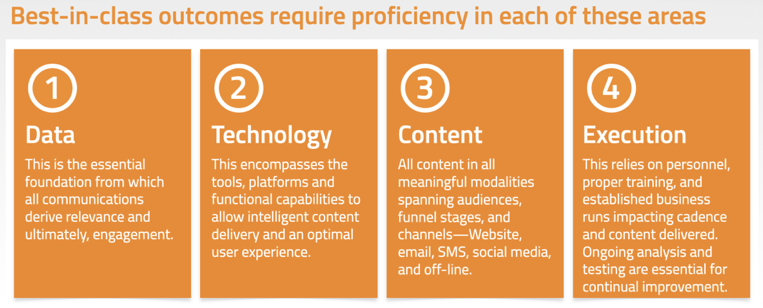
In the first series in this installment, I explained how to choose a marketing automation platform and the four essential pillars needed to support an effective marketing automation plan.
The first pillar was data.
To elaborate on that, given all the attention and resources applied to the collection and analysis of data, one would think this is pretty well buttoned-up.
But in practice, we often see major chasms across the data landscape.

For now, let’s narrow our focus to just the data collection that directly impacts marketing communications.
Data Collection Impacts Marketing Communications
There is a litany of breakpoints we typically see, including things like:
Poor Data Integrity—
Data that is not uniform in structure within the data collection points or once in the CRM system.
That makes using the data more difficult or ineffective.
Poor Data Hygiene—
Data that is outdated, inaccurate, missing, or duplicated.
Ask yourself when was the last time your prospect or customer data was screened to de-duplicate and consolidate records?
It should be a regular, ongoing process, but too often, it is not.
Data Silos—
We see this one a lot (we’re looking at you Higher Ed institutions), where decentralized organizations aren’t well set up to share and consolidate data, even though different divisions and departments have common goals.
Ironically, smaller operations are usually better at this, often only one database of record for the entire enterprise.
But as the size and complexity of the business increases, those bridges to and from the data silos are often overlooked or in disrepair.
Data Apathy—
It includes records that aren’t updated with actions or inactions, source tracking on those engagements, no record of content consumed, and we won’t even start on lead scoring and attribution models.
We’d need a whole new interview series on that.
The larger, all-encompassing CRM + MA platforms can do a pretty good job here.
But we often see gaps in the implementation of those systems, or internal—misuse is maybe too strong a term—inconsistent procedures to maintain all the desired flows of data to and from external and internal systems.
If access to good data is such a foundational element, where should someone begin to sort that out?
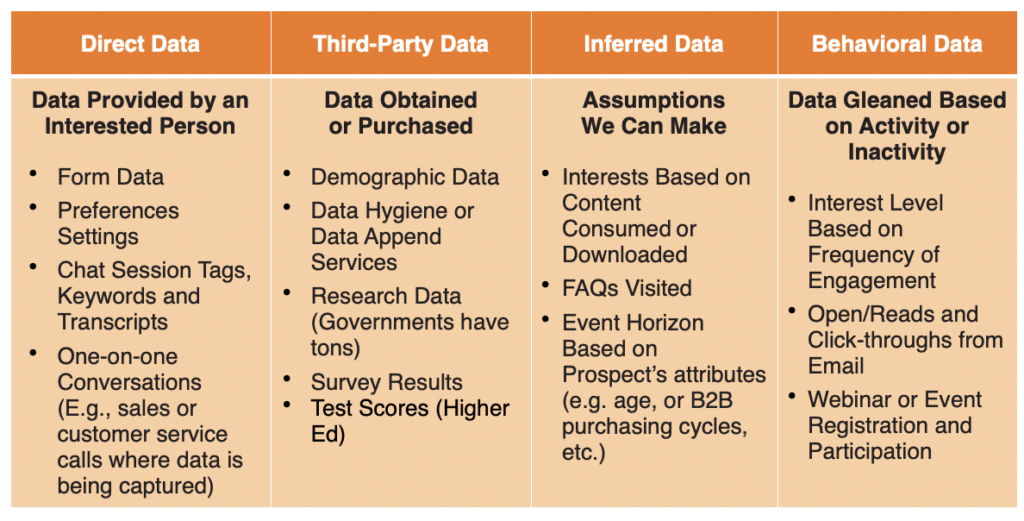
Let’s start by taking a step back and looking at the types of data, of which there are four types of categories available.
If your organization isn’t using data from all four categories, ask yourself, “Why aren’t we?”
Take a look at this table and add/edit/delete specific data points that are relevant to your organization.
The categories will probably work as-is, but the specific bullet-point examples should reflect your current state, and ideally your desired future state.
Not every organization will need to exhaustively pursue every potential source of data, that’s not practical.
The benefit of this exercise is to look at what data you collect now, how actionable is it, and is it being utilized to achieve an optimal outcome?
If not, determine what additional data collections and data bridges need to be inserted into the process.
An optimal outcome means optimal for the customer or prospect, the sales, marketing and customer service teams, finance and management.
When done correctly, everyone benefits.
Data is the key to relevancy.
And relevancy is the killer app!
—Jay Baer, Founder and CEO, Convince and Convert
Jay has espoused this truism from stages and keynote addresses across the country for the past several years, and it is still true today.
I’ll paraphrase here:
Marketers all tell themselves a big lie.
They tell themselves our prospects and customers are just too busy to read and consume all the fantastic marketing materials we make available to them.
And it’s just not true.
We all have the exact same 24-hours each day.
What everyone does is prioritize how that time is spent.
And when it comes to the consumption of marketing material, if it is not relevant here and now to that individual, it quickly plummets off any priority list.
Data is the key to relevancy.
And relevancy is the killer app!
Good data is the linchpin for relevancy.
Why Good Data Collection Drives a Rethinking of Calls-to-Action and Form Design
Take an intentional backwards approach and begin with the desired future state of what we envision our CRM + marketing automation should do.
It ties back to the “features and functional requirements” process we cover in the first part of this interview.
But it’s data and content that are the keys!
As a simple example, recently, several clients wanted to introduce text messaging as part of their marketing automation channel expansion.
But none of their lead-gen forms were set up to facilitate that.
It’s a simple change, really.
But they have to collect the data and permission before implementation is even possible.
That’s why we work backwards—the data has to be acquired before the utilization of the data can ever materialize.
Another example we see too often: brands and organizations want to personalize emails with the first name of the recipient.
But their data collection forms have only one field, labeled, “Name”. That’s a non-starter for the data integrity because you get an array of inconsistent input on that field.
- Sam
- Sammy
- Sammy Hagar
- Mr. and Mrs. Sammy Hagar
This should be an easy fix to make on the forms and within the database, and many others once you define what that desired future state looks like.
And when you do it, go back through all the currently active records and update those fields accordingly.
Always keep in mind data integrity and data continuity.
At Convince & Convert, we personalize emails with first name data when it’s available (standard default is “friend”). We make sure to collect this on as many lead-gen forms as possible.
Personalized emails have significantly higher response rates, so it’s worth it to us to collect first name (and possibly decrease conversions a tiny bit).

Lead Gen Form with First Name + Email
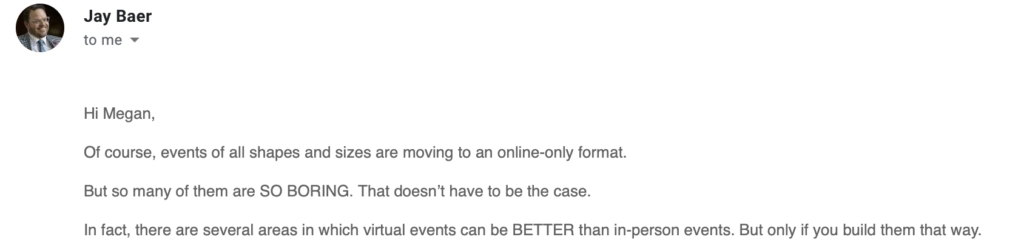
Personalized email example
Updating Calls-to-Action for Data Collection
It’s not uncommon for the primary, or only CTA to be “Buy Now”, or, “Enroll Now,” or “Schedule an Appointment Now.”
Basically, down-the-funnel CTAs that are premature in the upper stages of the customer journey.
We like to invent new, top-and middle- of the funnel CTAs that ease the prospect into the journey.
We apply a bit of progressive disclosure to it and learn what is relevant to each prospect.
That, in turn, allows us to home in on relevancy.
It drives the marketing automation process, the conditional logic, the content created or offered.
That data is at the core of everything and too few lead-gen processes we see take advantage of this.
If you ask an interested prospect a few questions to help him/her get fewer communications from you and more relevant ones when they are sent, most people will buy into that.
It’s analogous to dating.
But that’s yet another article.
Here’s a quick example of our own Email Preferences Update Form (you’re welcome to fill it out yourself).
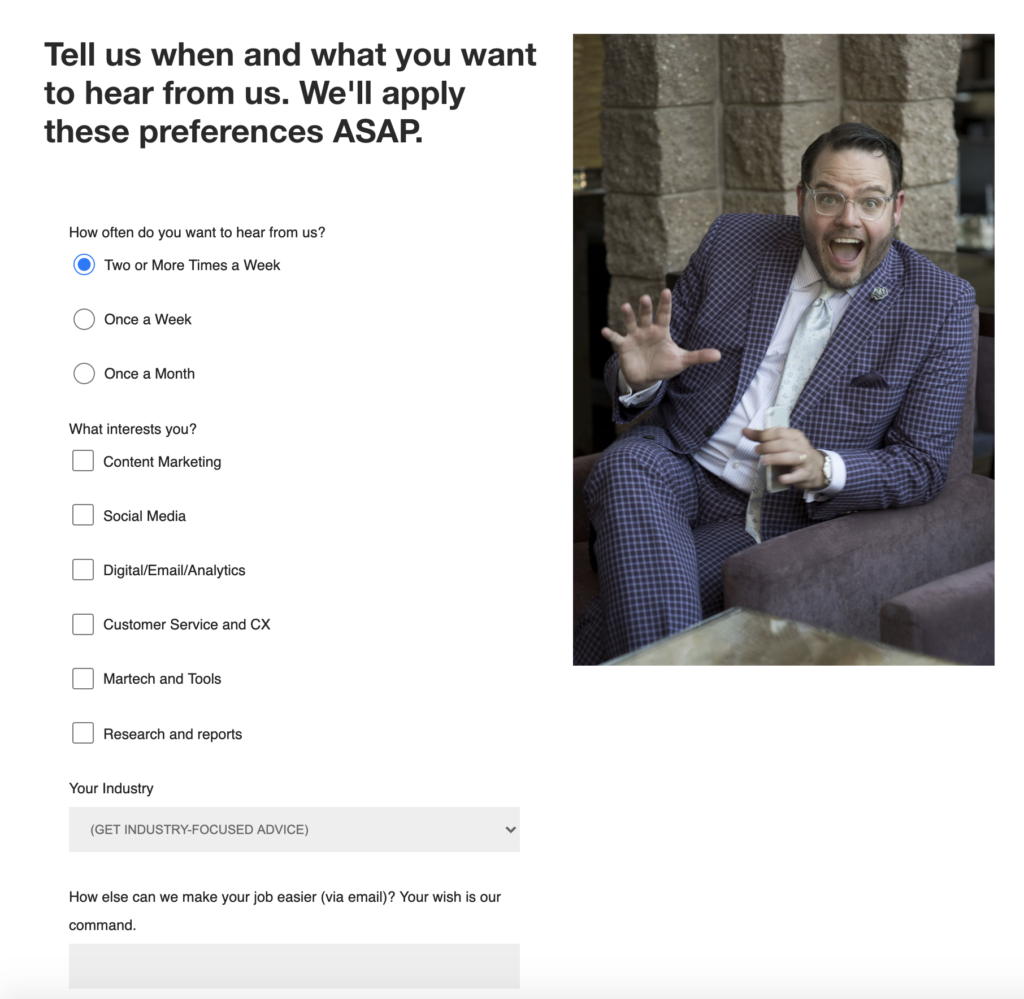
Example of a Form that Collects Frequency and Industry Data for Leads Already in Our Funnel
We’ve got some great examples of how we introduce non-obvious CTAs, all new CTAs, that fundamentally changed the way a business looks at lead-gen.
Feel free to reach out, and I’ll share them with you.
In Part Three of this series:
The implementation journey is about to begin.
But you are not ready.
There is a lot that can and should be done before anyone starts loading software onto servers.
The post How to Collect the Right Data to Boost Your Marketing appeared first on Content Marketing Consulting and Social Media Strategy.
Source: convinceandconvert.com

7 Tips to Improve Communication on Your Marketing Team
In the world of marketing, effective communication can be… challenging.
With the number of projects, assignments, and moving parts that most marketing teams have, it’s easy for communication to go by the wayside.
Deadlines creep up, stress levels rise, and the only thing anyone team member thinks they can do is work their way out of the hole.
You may also be facing a case of messages getting lost in digital mediums and people not being on the same page.
Team communication, now more than ever, is constant and hard. It can be easy to want to just give up and go about your responsibilities alone.
But communication is an extremely important skill for marketing teams to develop and constantly improve on; trust me, it will make everyone’s lives easier.

7 Tips for Better Communication
Here are 7 tips for better communication that will make your work life a lot easier.
1. Embrace Communication and Task Management Tools
As the workplace becomes increasingly digital, paper memos and emails aren’t going to cut it anymore.
You need business tools that will enable communication between team members to help supplement those other, more conventional methods.
Task managers like Trello and comprehensive, collaborative tools like G Suite and Office 365 can make it a LOT easier for team members to not only know what others are working on but help them out as well.

2. Make The Most of Your Meetings
In the fast-paced marketing world so often dictated by tight deadlines, finding a time that your team can meet together and discuss strategy is really important.
If everyone on the team can sit down and focus all of their time and energy on getting their duties clarified and their goals aligned, it will make all of your communication about work in the future that much better.
Trying to get everyone on the same page on an individual basis is nearly impossible.
If you can find a regular meeting time, and then make sure you stay on schedule, your marketing team will be working better than ever before.
Bonus Tip: have a meeting agenda for every team meeting, and stick to it to help stay on track.

3. Be Brief and Direct
Simply put, say what you need to say.
As all good marketers should know, padding your message with too many words weakens what you have to say.
To promote better communication, the best thing you can do is make all of your words worthwhile.
Whether it’s offering constructive criticism or talking about your ideas for an upcoming project, the best thing you can do is make sure everybody knows exactly what you mean.
Bonus Tip: There’s a difference between direct and rude. Don’t be rude in your pursuit of streamlining communication.
People will immediately tune you out if you have a reputation for being disagreeable or passive-aggressive.
Getting your message across is important, but not at the expense of your relationships with your co-workers.

4. Listening is More Important Than Talking
Don’t you hate it when you’re talking to your team members and they seem to like their thoughts are ten miles away?
Hate to break it to you, but odds are there are times when you do the same thing to them.
Talking is a lot easier than listening, but listening is way more important for maintaining productive relationships.
Not only does it show that you respect the other members of your marketing team, but active listening is the only way you’ll ever come to meaningful compromises and conclusions in a team setting.
It’s an essential skill for better communication, especially when your marketing team is full of creative people who want to have their ideas heard.

5. Good Writing Skills are Critical
Now that more and more professional communication is moving online and happening through text in places like Slack, there is little room for error.
Your ability to effectively communicate begins and ends with good writing.
This doesn’t mean you have to try to be the next Shakespeare or read an entire book about grammar (as fun as that sounds), but the last thing any of your co-workers want to do is try to make sense of a long, rambling, run-on sentence.
Putting more time into correct spelling and proper punctuation when talking to your co-workers may seem a bit pedantic, but it’s the difference between communicating efficiently and not communicating at all.
If you ever need an example, just remember this— “Let’s eat Grandma!” and “Let’s eat, Grandma!” mean two VERY different things.

6. Get to Know Each Other
When you’re a part of a team, working with a bunch of strangers is the last thing you want to do.
You need to have a certain level of comfort within your team because the way you talk to your friends is WAY different (and more comprehensive) than the way you’d talk to someone you hardly know.
Plus, can you imagine a world where can’t hold friendly conversations with your co-workers?
Have happy hours.
Go to lunch together.
Learn a little bit about each others’ personal lives.
It doesn’t mean you have to be best friends, but if you neglect to build any level of a personal relationship with your co-workers, your team is never going to communicate at the level they need to.

7. Have a Common Goal (And Make Sure Everyone Knows It)
Part of being a team means everyone on the team plays a role.
No one should be doing the exact same thing—that’s a waste of resources.
But it is important for everyone to know where their individual role fits into the bigger picture.
If the team has something that everyone is working toward, a clearly identifiable common goal, your marketing team will have much better communication when it comes to talking about their own individual projects.
It keeps everyone on the same page and helps them know how they can support each other better.
The post 7 Tips to Improve Communication on Your Marketing Team appeared first on DigitalMarketer.

Source: digitalmarketer.com

10 Steps to Improving Internal Communication
Internal communication isn’t something business owners generally think about when they first come up with their business idea.
They see a pain point they want to help people with and they build a team to solve the problem for customers.
You’ll see plenty of inspirational quotes around having a great business that solves a customer’s problem.
You don’t see a lot of quotes about how important internal communication is for a team.
It’s an overlooked part of building a business and because of that—business owners tend to hit walls.
- They don’t meet their monthly goals
- They don’t realize a team member is unhappy until they put their two weeks notice in
- They can’t take an idea and get traction because team members don’t know how to collaborate to bring it to life
If you’re having trouble with internal communication, or you’re a savvy business owner looking to avoid these problems, here are 10 ways to improve internal communication.
10 Ways to Improve Internal Communication
(NOTE: Head over to Recess.io to learn more about improving your internal communication!)

#1: Create a schedule for internal broadcast emails
Just like the broadcast emails, you’re sending to your email list—you’re going to send a different version to your employee email list.
Your employees need to know what’s going on in your business and they do not mind readers.
If you’re not telling them what happened in a big meeting, they’re never going to know.
Give your employees a weekly, monthly, quarterly, and annual round-up so they’re in the loop.
For example, scheduling an employee internal newsletter to go live every Friday at 12pm (written by the CEO) with Recess.

#2: Use data/evidence to prove why what you’re doing is important
When you’re telling your team about a new idea (whether it’s a product, offer, campaign, a new position to hire for, etc.), don’t tell them why you feel like it’s a good idea.
Show them the hard facts that PROVE it’s a good idea.
Just like your customers, your employees are going to buy what you can prove—not what you kind of thing is a good idea.
For example, you can show them why you should be posting to Instagram 2x a day by showcasing a competitor who is getting great engagement posting that often.
Or, you can show them how much better a marketing team performed after taking a coaching program so they know why it’s important for them to take the program seriously.

#3: Use metrics to show success or failure of initiatives
Employees can understand that you were able to grow product sales by 25% through your latest email campaign, that you’re averaging 1,500 new social media followers per week, or that customer support tickets were down by 10% last month when you make it that clear.
Using metrics to showcase the success (or failures) of new offers, products, campaigns, strategies, etc. improves internal communication by giving employees a chance to see what worked and what didn’t work.

#4: Don’t write like you’re authoring a textbook
When you send your internal email newsletter or any other communication to employees, you don’t want to have long paragraphs and little separation between text.
Nobody wants to read that…nobody.
Make sure that you’re breaking up your paragraphs consistently (you can take this article as an example) and using headings and bullets to turn long content into chunks (again, notice the headers in this article).
Make your internal emails reader-friendly using Recess.

#5: Summarize all events or necessary meetings to all employees
Understandably, not every employee can make it to every event.
Off-site events, conferences, coaching programs, and even important meetings aren’t always going to feature your entire team.
When that’s the case, you want to bring everybody back into the loop.
Summarize what happened at the off-site events, what a team learned at a conference, how the coaching program taught a new way of productivity, and what changes or goals to expect after a specific meeting (ex. a meeting with only executives that no other employee took part in)

#6: Use action items to make sure meeting discussions turn into action
After your meetings, each employee should have a list of action items they need to complete to fulfill the goals of the meeting.
This improves internal communication by ensuring that every employee understands what they need to do after the meeting.
Employees that know exactly what they need to get done post-meeting are going to be able to make it happen.
Being crystal clear on what is needed from them is going to ensure it gets done and you’re able to take meeting ideas and turn them into action.

#7: Use marketing material to get points across (infographics, videos, etc.)
You read that right—start using your marketing materials for your employee newsletter or other internal communication touchpoints.
For example, at your monthly, all-hands meeting, you can bring an infographic of how well you hit your goals in those 30 days.
You can use videos to send updates to employees about the current status of a project, a feature in a big publication that you want them to know about, or to let them know that there’s going to be a minor delay in a project they’re currently working on.
Don’t be afraid to use marketing materials to get your point across to employees easily.

#8: Make goals & KPIs available to everyone
Your goals shouldn’t be a secret.
Improving internal communication means that everybody knows what they’re working towards.
What are the sales goals the team is aiming for this quarter?
What is considered a successful month for the social media team?
How much revenue is an email campaign expected to bring in?
If your goals and KPI’s aren’t readily available for your employees to look at and understand, how are they going to be able to help you reach them?
These aren’t just your goals—they’re their goals too.

#9: Send weekly or monthly updates to investors
Board meetings aren’t happening on a regular basis.
By the time the next board meeting comes around, a lot has happened and you’re going to spend most of the time catching your investors up on what’s going on instead of getting their insight on what to do about it.
Instead of starting from scratch during each board meeting, send a weekly or monthly update to investors so they’re well aware of what’s happening.
Then, when it’s time to meet you can quickly summarize everything happening and get into the good stuff—their advice on how you can improve.

#10: Ask employees how they would want to see communication improved
And of course, you want to ask your employees where they see problems in your current internal communication and how they would want to see them resolved.
Your employees are going to know if they’re always out of the loop about new partnerships and products and they can tell you what they need to fix it.
Chances are they need an internal newsletter that gives them updates on things happening in the organization that doesn’t require their input—but do require their output.

Conclusion
Great internal communication doesn’t happen by accident. It happens on purpose when a team can get updates from their CEO, read about what’s going on in a reader-friendly newsletter, and get advice from their trusted board of investors without bogging them down with updates.
(REMEMBER: Head over to Recess.io to learn more about improving your internal communication!)
The post 10 Steps to Improving Internal Communication appeared first on DigitalMarketer.
Source: digitalmarketer.com