
Tag Archives for " calendar "

5 Ways to Better Manage Your Time
Do you often wish you had more time?
Do you feel like there are not enough in a day to complete everything?
If that’s a yes, getting better at time management can be very important for you.
Use these suggestions to help get you started.
#1. Use Calendar for Time Management
Calendars are a great way to manage time.
Many people like to use paper calendars that can be written on.
Other people prefer the versatility that a calendar on a computer or phone offers.
No matter what you use, a calendar can keep tasks organized so that you can effectively manage your time.
 #2. Respect Deadlines
Make yourself aware of deadlines if you find yourself late.
If you know that a deadline is coming, you may end up shuffling priorities and falling behind on other things.
By keeping on top of deadlines and appointment times, you will not have to leave important matters unattended to take care of things you have put off.
 #3. Learn Time Allocation
For proper time management, you should do your best to allocate time properly.
Consider how long each item will take and when you expect it to be done.
In this way, you can improve the quality of your life by managing your time wisely.
If you wind up with some extra time, take a breather and relax a bit!
 #4. List Your Tasks for a Day To Manage Your Time
Start a day by getting your schedule out and filling in blanks that may be in it.
If you know what you need to do as your day begins, the chances are better that you’ll achieve your goals.
Review your list carefully every day and make certain you have not put too much onto your list.
 #5. Include Interruptions in Your Time Management Schedule
When you are making a daily schedule, be sure to include time for interruptions.
If you don’t allow for unexpected things, you could mess up your day.
You won’t lose track of what you’re doing if you learn to expect the interruptions.
 This advice should help you to manage your time better.
Since time is so precious, never waste a minute of it.
Use your time efficiently to accomplish more throughout your life.

How to Keep Your Marketing Team Together Using Calendar Apps
To manage my projects, I work with a team of five people, including myself. It’s not a big team, but it took us time to set up an effective marketing routine among the 5 of us.
Every month we take on a series of tasks for our brand, working to increase exposure, solidify social presence, enhance the authority and generate leads that become conversions.
This is difficult, not only the tasks we set for ourselves but also coordination among five people, three of whom live outside of the country and three who handle matters on a local and national level.
Add to this struggle the recurring need to include other people into the mix. We have premium members with whom we need to schedule support calls, #vcbuzz hosts with whom we need to coordinate weekly Twitter chats, and influencers and partners with whom we need to meet.
We have been through every possible productivity tool, team management platform, and task manager known to man. We sat through demos of major SaaS solutions that offer task management features and even got their help in setup.
It wasn’t until we had been working together more than a year that things finally clicked into place. Which calendar apps actually worked for our ragtag team of global misfits?
Google Calendar App and Emails Notifications
You see, it came down to simple convenience. Having these fancy platforms would work for a while, but it was a hassle. No one used them for any other work, and they didn’t want to stop using what they had been using before.
Some of my team used Evernote, Trello, or Producteev. I use Zenkit. Getting on a whole other dashboard just for our projects and being unable to integrate them into our wider ones made it a chore that no one wanted to deal with.
Google Calendars and emails became the most effective solution for us. It was not only easy to integrate into different platforms but also familiar in that we already used both tools on a daily basis. They were easy to sync up on any device and could be shared and worked on with others.
Different calendars could be made, and mass emails could be sent with a record of the conversation.
To this day, we use this combo for our task list and conversations, which includes links to event announcements and necessary pending items on the to-do list in emails.
First, you will need to create a dedicated calendar for your in-team tasks and meetings. Once it is created, you can grab your link by:
- Clicking on “Settings” in the top-right
- Selecting your new calendar in the list
- Clicking “Access permissions”
- Setting your calendar to “Public”
- Clicking the “Get sharable link” button and copy your link from there
Once you share this link with your team members, friends, and community, they will see your newly added events without you having to manually notify anyone.
From there:
Step One – Create Event
To create an event in Google Calendars, sign in to your account and go to the main Calendars page. There will be a big button that says “Create”. This is where you can put your event details (name, date, involved people, etc.).

The event name should be something relevant, such as the project name, and then add events in there.
What makes this convenient is that you can choose to see only that calendar by clicking on the little arrow on each individual calendar. That will show you events related only to that set.
Step Two – Double Check Details
In the popup that appears when you choose to create an event, you will be able to select your details. These include name, date, time, location, description, who is invited/has to be notified, who can make changes to the event, and if/when it repeats.
One of the most important tasks is to double-check these details before sending the notification! While it might not seem like a huge deal, you can send a notification to everyone signed up for the event when you make a change). Be cautious though, since it gets annoying really quickly if multiple changed events are going to your email. Trust me.
Step Three – Use Your Link Everywhere
Finally, you need to hyperlink the event entry in your emails. This is pretty self-explanatory.
Following the link will take them to the Google Calendar entry or will allow them to add it to their own calendar by clicking on one of the button options. They will find all of the information you included there.
Depending on your event, there may be different places you may want to include your link, for example:
- Embed your calendar on your master page. If you have an internal page that you use for cross-team updates, you can embed your whole calendar there. This is what we did on our Twitter chat page.
- The beauty of this method is that you need to do that once: The embedded calendar will update itself.
Import Google Calendar events to your Facebook page using this Zapier integration to alert your fans or team members of each newly added event. - Include your calendar link in your email signature. This will automatically update everyone who receives your email. You can use these email signature examples to set up yours, so it is highly informative, yet usable.

You can add your calendar link to your email signature using the “HTML” app from the “Add-ons” tab inside the WiseStamp dashboard
All in all, Google Calendar is free, extremely flexible, and easily integrate into other Google products including my favorite one, Google Spreadsheets, which makes it my preferred scheduling solution.
ContentCal and Campaign Calendar
While Google Calendar is great for all kinds of scheduling and organizing workflow, we had to find another app for content and social media marketing.
When you work with remote employees, you are facing two main problems:
- Keeping everyone on track and productive.
- Keeping everyone motivated (It is too easy to focus on your current tasks and never look out of the box when you are isolated from the rest of the team).
I think we have solved both of these problems with ContentCal, a collaborative social media sharing platform that unites your whole team around building up your brand-owned channels.

ContentCal is pretty lightweight: There aren’t hundreds of task management and reporting features to manipulate. But it does its job very well, without taking lots of time on set-up and training.
- Add your team members as contributors (can contribute social media updates) or managers (can edit and publish).
- Create a system where every team member is responsible for their own piece (for example, if someone is working on a chat schedule, they are tasked with publicizing and promoting each event).

Once set, your calendar will build itself with everyone participating on a daily basis.
Furthermore, you can schedule upcoming campaigns for your whole team to see what’s coming. Each campaign can have a brief, and your team members also can contribute to it to share their research results and ideas.
Campaign briefs are minimal, but they work great for storing ideas and organizing your upcoming plans:

Use campaign briefs to put down your ideas for keywords, assets, etc.
It’s Easy!
I am in love with these calendar apps, and, of course, we all use email. So using these apps for task management, team management, marketing, and audience reach makes perfect sense. Add in the fact that both are free, and you have a powerful reason to give it a try.
The post How to Keep Your Marketing Team Together Using Calendar Apps appeared first on Content Marketing Consulting and Social Media Strategy.
Source: convinceandconvert.com

How to Create an Editorial Calendar That Will Streamline Your Content Strategy
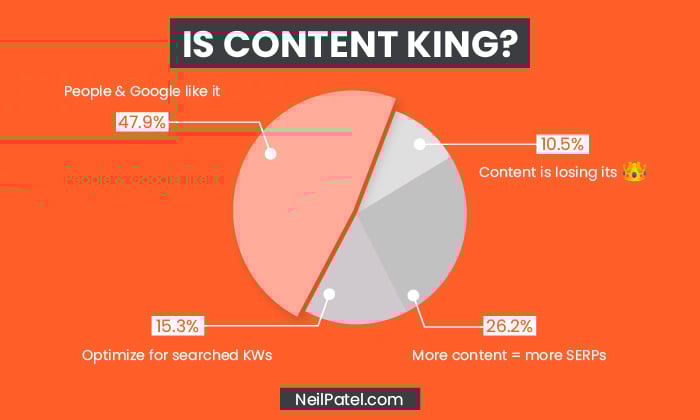
According to Bill Gates, “Content is King.” That was true in 1996, and it continues to be true today.
As consumers become savvier, content continues to play a vital role in educating and converting consumers.
However, not all marketers understand how to implement a content strategy correctly.
When you don’t start with the basics, you could be making content production more complicated than necessary.
To be successful, your content plan must be actionable, and you need to publish content consistently.
That’s where an editorial calendar comes in.
We’re going to cover the basics, including how to create and manage your editorial calendar, and how it can help your content strategy grow.
4 Reasons to Use an Editorial Calendar
An editorial calendar enables content publishers to plan, create, publish, and promote their content in an organized manner.
Many bloggers and businesses use editorial or content calendars to streamline content production.
In many ways, an editorial calendar is a lifesaver for creatives and business owners.
Whether you’re a blogger, freelance writer, business owner, or creative director at a marketing firm, an editorial content calendar can help you stay on track and keep you sane—while ensuring a consistent flow of content.
Others use an editorial calendar to improve focus because an organized approach can also limit writer’s block and keep content evergreen.
There are other ways you can benefit from an editorial content calendar, including:

1. Better Organization and Delegation
With an editorial calendar, you can see articles that need writing at a glance.
From there, you can delegate the articles to your writing team, ready for them to get to work.
No more scrambling to send writers topics at the last minute or wondering if you’ll even get around to writing this month.
With a calendar, it’s all right in front of you.
Ultimately, this level of organization saves time, keeps the content coming, and ensures every member of your content creation team knows what they’re doing.
2. Improved Planning
The better you plan your articles, the better the writing tends to be.
When you know what you want to write, you don’t waste time with last-minute research or trying to find the sources you need to support your article.
In fact, some consider planning to be more important than the content production itself.
Planning content is essential for:
- Creating the kind of content most suited to your audience.
- Writing the in-depth content your audience wants—and needs Publishing exactly when and where your customers hang out.
3. Helps Achieve Your Goals

Your editorial calendar is part of your content strategy.
Ideally, you’ve developed your content strategy around the goals you’re trying to achieve with your product, your blog, or your company overall.
An editorial content calendar assists in goal achievement by:
- Allowing you to meet critical milestones.
- Helping with promotional activities.
- Reaching new leads and making fresh conversions.
- Getting more newsletter sign-ups.Building awareness of your brand.
Whatever your goals are for your business, your editorial calendar has a vital role in allowing you to achieve them.
4. Sticking to Deadlines
According to Mark Twain, “deadlines are the greatest source of inspiration.”
However, that doesn’t mean you want to do a rush job.
To avoid rushing content creation, every team member needs to be clear on their deadlines to keep reaching your goals and your audience engaged.
Further, keeping up with these deadlines is especially important when you’re publishing new content that’s a part of your business strategy.
For example, if you are publishing blogs to support a new launch or annual sale.

How to Create an Editorial Calendar
Don’t let the thought of creating an editorial calendar stress you out—I promise it’s not that complicated once you create a plan.
This next section takes you through how to create an effective calendar, step-by-step.
This is just an outline, so feel free to adjust these steps to meet the needs of your business.
1. Determine Which Tools to Use
Your first step is deciding which tools to use.
This varies from team to team, and content managers may need a combination of tools for best results.
If you want free options for getting started, Google Docs, Excel, or Trello are popular choices.
For paid tools, there are several worth considering, including:
- Airtable
- Asana
- Monday
- BrightPod
Airtable, Asana, and HubSpot offer free content calendar templates to get you started, and there are plenty of others available, too.
Whichever tool you use, make sure it meets everyone’s needs.
As Buffer’s editorial director, Ash Read, told HubSpot:
“[your] editorial calendar should be a resource for your whole team, not just content creators.”
2. Create a Content Backlog
Next, you need to create a content backlog.
This is just a list of content ideas for easy viewing and lets you track your ideas for posts.
You could use Google Sheets or Excel for this, or one of the free templates mentioned, like Asana.
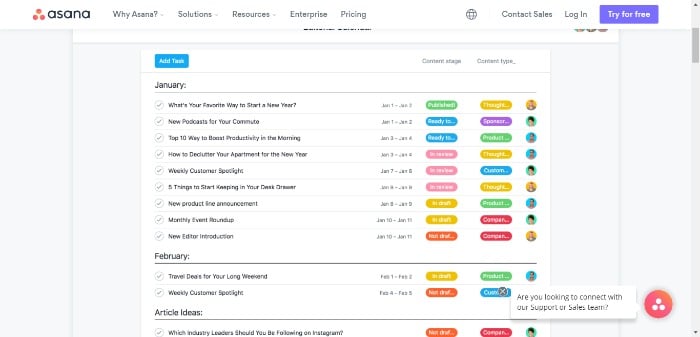
Whichever you go with, your chosen tool should allow you to create a clear, organized list.
Just remember, it’s OK to stray from your list.
Not every idea will end up as an entire post, and sometimes changing your content strategy is essential for keeping up with new trends or thinking of a new angle.
Create your sheet, then start adding a few headings like:
- title
- assigned author
- project status
- publication date
Other headings you could use are:
- Special dates and anniversaries.
- Themes and distribution channels.
- Trending topics/new launches relevant to your niche.
- Seasonal content and key sales dates.
For instance, Black Friday, where you may want to ramp up content production.
3. Develop Your Content Strategy
Don’t overthink your content strategy.
There’s a simple way of making sure your content strategy covers all the bases, and as long as you keep these parts in mind, you won’t go wrong.
First, outline steps such as how much content you want to produce a month, what topics you want to cover, and your ideal customers.
Then add strategic steps, such as managing your existing content and goal tracking.
These might include:
Define your goals:
For example, growing your mailing list or attracting new customers.
Understand your customers:
Which social media sites do your audience use?
Which content types do they prefer/respond to?
What are their pain points, and how can your products/services solve them?
Analyze your competition:
You can use a tool like Ubersuggest, which has a free and paid version to see which keywords competitors are targeting.
Positioning:
What makes your business unique, and how do you stand out in your marketplace?
You could do this in a few ways, like specializing in a targeted niche or telling your brand’s story.
Ask yourself how the content you’re creating can achieve this.
Estimate your budget:
How much is your content strategy going to cost you, and how can you maximize your ROI?
Measure your KPIs so you know your content is getting results:

For example, if you’re aiming to build brand awareness, an increase in shares and views will show you’re heading in the right direction.
4. Schedule the First Month
Many of us produce content at the last minute or create it whenever we have spare time.
If you’re looking for a less stressful (and more effective) approach, schedule your content in advance.
A month is usually enough, but you could schedule up to six weeks.
You can use Google Calendar for this.
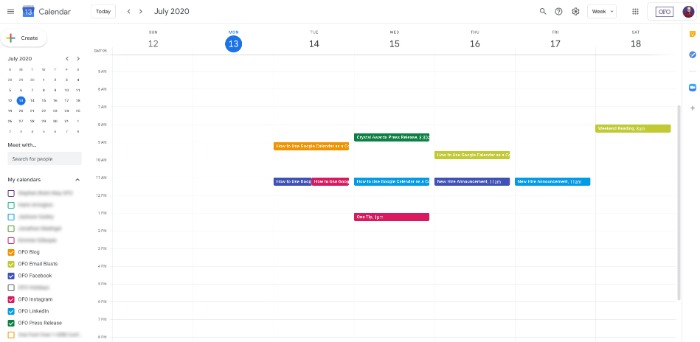
Add each step of your process, and make sure to give yourself plenty of time.
So, you might create a due date on the first Monday to write your outlines, then schedule one article a week to be written, two days for editing, set a publish date, then schedule it into your social media sharing calendar.
The process will vary based on how much content you produce and how many people are on your team, but I strongly recommend breaking each piece of content into more manageable steps.
5. Move Articles Into Production
When you’re in the full swing of producing content, it’s easy to let pieces slip through the cracks, especially if you have multiple people working on the project.
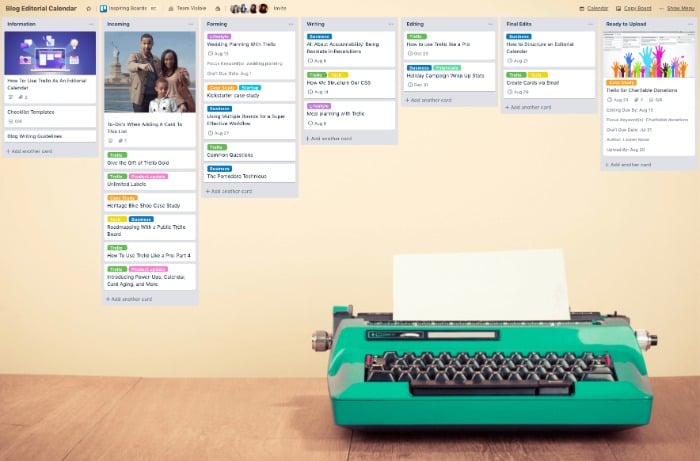
Creating a Trello account can keep you on track.
The first step in using your Trello account for content production is to decide what stages each article will need to go through.
What you need is up to you, but here are some suggestions for your Trello cards:
- assign to writer
- writing in progress ready for edits
- ready for uploading and scheduling
Alternatively, you could make it more complex and add additional steps like:
- final edits
- SEO audits
- published
Then your Trello cards might look something like this:
6. Build Your Content Queue
If you’re just starting with an editorial calendar, you need to get a few articles ready for publication.
Choose a schedule that suits you, but a forward-looking schedule of 4-6 weeks works well for most teams.
That sounds like a lot of work, but you can approach the task in two ways.
First, you could spend a few weeks writing content until you have a volume of work to publish.
However, this method isn’t suitable for everyone, unless you’ve got a team of writers to help you.
Another way is to spend a few months creating extra content every day, which is doable for most content producers.

7. Continually Optimize Your Process
So far, we’ve covered how to get your content production off the ground.
However, you can’t set it and forget it.
Over time, you might find there are bottlenecks in your processes or that certain tools don’t fit your needs.
Make sure to check in with your team regularly to ensure the editorial process you’ve created is working for everyone.
Common areas to review include:
- your schedule and the tools you’re using
- the volume of content you’re storing
- the time between stages the metrics you track
Over time, you’ll get a better understanding of whether the tools you’re working at are suitable for your team and whether the amount of articles you’re publishing is helping your business grow.
FAQs About Editorial Calendars
Why do I need an editorial calendar?
An organized approach to content production reduces time and helps you publish better quality content.
From ideation and writing to publishing and promotion, an editorial calendar helps streamline every part of the process.
Do I need paid tools to create an editorial calendar?
Not unless you want to. Free tools like Trello and Google Docs are fine, but there are also paid options like Asana available.
What headings should I include on an editorial calendar?
Not everyone’s calendar looks the same, but most marketers include titles, publication dates, and the article writer’s name.
Once you’ve added in the most obvious headings, write in the titles that work for your specific needs.
What’s the difference between an editorial calendar and a content calendar?
These terms are often used interchangeably.
However, an editorial calendar generally outlines each step of the process, while a content calendar usually covers one aspect—such as when posts are published or shared to social media.
Summary of Editorial Calendar Guide
An editorial content calendar is a must-have for any content marketer or small business looking to make the most of content production.
It helps you stay focused on your goals and produce high-quality content consistently.

Although it sounds like a lot of work, setting up a calendar isn’t difficult and allows you to seamlessly produce evergreen content while making the most of seasonal trends.
How do you use an editorial calendar?
Tell us below.
Source: neilpatel.com

Stop Wasting Time: Tips And Tricks For Time Management
Learning to use time effectively is one of the secrets of success in every life.
However, many people aren’t able to do a good job at this.
Read on to learn about the different techniques to improve your time management.
Put on a timer.

Allot only a specific amount of time per task, and use your timer to keep you focused on how much.
For instance, if you have an hour available to work, use the time to work for 15-minute increments until you have worked for the amount of time you have available.
Working in advance is a great idea for time management.

Look at your schedule so that you know what the next day will require of you.
A great way to end the workday is by preparing tomorrow’s to-do list.
Knowing what needs to be accomplished the following day allows you to focus on quickly getting to work.
Calendars can help you a lot if you would like to be a good time manager.

There are many people who like to use a paper calendar to record notes and keep track of dates.
Some people like electronic calendars on phones and computers for their flexibility.
It doesn’t matter how you keep your calendar, as long as you like it and it helps you to get things done much more efficiently!
When scheduling your day, be sure to add in any interruptions.

When an important phone call comes up, you might have to take it.
When you plan for interruptions, you can easily stay on the right track.
If time management is difficult, focus on one task at a time.
 Multi-tasking makes things harder to do effectively.
When you try to handle too many things, you become exhausted and rushed.
Poor quality will result.
Take your time with the projects and move on when the first one is done.
If you aren’t managing your time right, make sure you analyze how your current process is going.
If you have a hard time concentrating, figure out why.
If you’re serious about managing time wisely, you must identify what is keeping you from doing that.
Practice prioritization throughout each day.
 A lot of the time, you’ll find that things that aren’t important take up most of your time.
Prioritize your tasks to spend your time efficiently.
Write down what you must do and accomplish them according to importance.
If you are experiencing challenges in time management, examine your use of time.
Use it wisely.

Check emails and voicemails only if you have the time to answer them.
In this way, you can avoid being distracted by them throughout the day.
With the proper advice, you can do anything you need or want.
You can get a handle on your life and work by following the right advice.
Using the above tips can help you better manage your time.

Want To Know How To Better Manage Time? Read This
If you use your time more efficiently, you’ll improve your life, as a whole.
You are in need of advice if you can’t get everything done in the amount of time you have.
Luckily, this article has tips to help you better manage your time.

Set up your work a day ahead of time.
If you can, plan your day before it even starts.
A great way to finish your day is to create tomorrow’s to-do list.
When you have that laid out, you can work right away in the morning.

Calendars will help you manage your time better.
Some people prefer physical paper calendars they can mark up.
Other people like electronic calendars because they can access them through their phone or computer.
Whatever you choose, any calendar helps you get your priorities straight for better time management.
When scheduling a day, don’t forget to include time for interruptions.
When an important phone call comes up, you might have to take it.

Plan for any interruptions.
Take care of the most important items on your list first.
Too often people take far longer to complete tasks with minimal importance, which in turn takes up a large part of their day.
By prioritizing every task, you will ensure that you spend your time and energy effectively on your most important ones.
Note down all of the tasks you intend to see in a day.
List them in order of priority, and start with the most important ones first.

When you can’t manage your time well, consider how you spend your time.
You want to use your time efficiently.
Don’t read emails or listen to voice mails in times that are not delegated for this activity.
Looking at the computer all day long to read emails will only serve to distract you, and it can keep you from accomplishing more important things.

When time runs short, life can become miserable.
Fortunately, you are in possession of some wonderful advice that can help you maximize your days.
Keep these tips close to you and go over them again so you can work efficiently on your time management.

Excellent Article With Many Great Tips About Time Management
Managing your time wisely is an important part of life. Most people struggle with managing their time. It’s a skill you have to work on. This article is the path to your future success.

Utilize a timer.
When you can’t focus, a timer can keep you on track.
For instance, think about setting the timer for increments of time in between which you will take small breaks.
Make sure that you do not procrastinate.
When you can, schedule your day the night before.
As your day ends, create tomorrow’s to-do list. When you have that laid out, you can work right away in the morning.
When you feel constantly late, start thinking more about your deadlines ahead of time.
If deadlines always creep up on you, it has the potential to throw your whole day off.
However, if you stay on track with deadlines and appropriate time, you won’t be neglecting one job so that you can rush to finish another.

Treat your time as the precious resource that it is.
Consider each task and the time it will take to complete it, then establish a deadline for which to complete it.
You can really enhance your life and schedule with this tactic.
When you have a few minutes to spare, do a task or simply take a break.
When it comes to devising your daily schedule, remember to schedule time for unexpected interruptions that are bound to occur.
When you schedule everything back-to-back, you don’t have time for traffic, calls, or other items that can throw your time off.
You won’t lose track of what you’re doing if you learn to expect the interruptions.
If time management is a challenge to you, get better focus on individual projects.
Multi-tasking is one of the reasons that people don’t accomplish everything they set out to do.
When doing too much at the same time, you’ll become tired and annoyed, making quality go down.
Learn proper breathing and focusing techniques to assist you in your daily life.
If you are finding it difficult to manage your time well, take an objective look at your current methods.
If you don’t focus on tasks until they’re done, find out why.
This is the first step in improving your use of time.

Conclusion
With the proper advice, there is nothing you cannot tackle.
If you use time management correctly, you can really clean up your life.
Use these tips and online articles to learn more about managing your time.

Everything You Need To Know About Time Management
 One of the greatest things you can do for yourself is to manage your time wisely.
If each day becomes harder because of a lack of time to get things done, you need advice on improving that.
This article is here to help you learn how to manage your time.
 Make good use of a timer.
If you’re having trouble with focusing on things, you should get a timer and then set it for how long the tasks will take you.
You can break this time into increments to make it easier and less tedious for yourself.
Work ahead of time to get things done.
Look at your schedule so that you know what the next day will require of you.
A great way to end your workday is to prepare your to-do list for the next day.
Once you have your jobs outlined in advance, there will be no delay in the morning.
 Calendars can be a great tool to help you with your time management skills.
Some people prefer to use paper calendars.
Other people like electronic calendars because they can access them through their phone or computer.
Whichever one you like better, using calendars can help you remember much more easily.
Treat your time as the precious resource that it is.
Think about how long it takes to complete tasks and be realistic.
This can help you improve your time management.
If you find yourself with unexpected free time, spend the time on yourself or spend the time on other things.
 Begin your day by studying your schedule and making any necessary changes.
When you have a clear picture of the tasks you want to accomplish at the start of each day, your days will be more productive.
As you look at your schedule, make sure that what you are trying to do is realistic.
When you can’t find enough time in the day for your activities, life can become stressful.

Finally,
So, take the tips from this article and get your time back and make it work for you.
If you keep this advice on hand and refer to them when needed, you will soon see just how simple managing time can be.

Why Time Management Is Something You Should Work With
 At the end of each day, do you wish you had several more hours available to get everything done that you need to accomplish?
Are you struggling to get everything done?
Do you wish that you had better time management skills?
If that sounds like you, the following article will give you some great tips on effective time management.
 A calendar is a tool for time management.
A calendar is very handy when you are working on time management.
Some people prefer to use paper calendars.
Other people like how flexible an electronic calendar is that you can use it on computers or phones.
Regardless of the method you choose, you are sure to be more successful at managing your time when you use a calendar.
 A schedule for time management
Start a day by getting your schedule out and filling in blanks that may be in it.
If you know what is on the agenda for the day first thing in the morning, you increase the likelihood of completing it all.
Check your schedule carefully each day to make sure you are not overbooked.
 Focus on a task.
If you struggle with managing time, try boosting individual task focus.
Many people run into a lot of trouble when they start taking on too many projects at once.
Juggling tasks and working quickly often just leaves you stressed out and the work quality ends up sub-par.
Focus on one thing at a time to get the job done right.
Analyze the pattern of your time consumption.
If you are finding it difficult to manage your time well, take an objective look at your current methods.
Try to understand why you have difficulty focusing on particular tasks.
If you desire better time management, you need to find out if your current way of working is meeting your needs.
When you can’t manage your time well, consider how you spend your time.
Do you use it effectively?
 Save yourself from disturbance.
Don’t listen to voice mail or return emails unless you’ve assigned yourself the time to do so.
Checking them when they come in takes away from the time already allocated for other things.
Time is something that we can’t get more of once it’s gone.
There is only a limited amount of time.
You can manage your time better with this advice.

Saving Time: Helpful Advice On Making The Most Of Your Time
 Making The Most Of Your Time
Are you frequently feeling overwhelmed?
Does it seem like there are never sufficient hours to accomplish what you need to get done?
Do you sometimes wonder how people get so many things done in 24 hours?
If you answered in the affirmative, you would benefit from time management lessons.
These tips can really help you.
Use a digital timer.
If you have a problem with focusing on tasks, set a timer for the amount of time that you need for your task.
Setting it will give you the ability to focus during the task.
Try working out your day ahead of time.
Plan out your agenda the day before.
Ending your day by making a list for the next day is a smart idea.
When you can see your jobs ahead of time, you can get to work faster.
Respect Deadlines
You need to pay more attention to deadlines if you find that you are always late.
As soon as you face an impending deadline, you end up neglecting other responsibilities, and everything goes to pot.
If you are on top of deadlines, you don’t need to neglect anything or rush to finish other things.

Be sensible in allocating your time.
Consider each task and the time it will take to complete it, then establish a deadline for which to complete it.
In this way, you can improve the quality of your life by managing your time wisely.
Use any free time that you may have to get other tasks completed, or simply relax!
Think of Interruptions
When you are making a daily schedule, be sure to include time for interruptions.
If things happen that aren’t on your schedule, it could throw everything off.
You’ll be able to keep yourself on track if these interruptions are planned for.

Proper time management will make your schedule more flexible.
Review the advice in this piece to learn how to improve your life with better time management.
You will be amazed at the difference time management can have in almost every aspect of your life.

How To Manage Your Time And Improve On Your Goals
 A lot of us try to find ways to get things done, but we still don’t meet goals.
This is a great way to start learning about using your time wisely.
The following article is full of great ideas on practicing time management.
Keep reading…
 Purchase a digital timer.
If focus is hard to achieve, set your timer for the time you have available to work.
Make sure that you incorporate breaks for your tasks.
About 15-20 min. are enough.
You can go on a shorter span.
The best tip for effective time management is to get a head start on the next day’s tasks.

Establish tomorrow’s agenda at the end of each workday so that you will be fully prepared.
Preparing the next day’s list is the best thing you can do at the end of each day.
With your jobs laid out ahead of you, you’ll be able to get straight to work.
A calendar is an important tool for anyone who wants to better manage their time.
 There are those calendars that you can write upon which some people prefer.
Others prefer to use electronic calendars on their computer or phone.
Whichever you prefer, a calendar will help you manage your time and keep your tasks sorted.
If you are frequently late or behind, you should pay more attention to deadlines.
If you wait until the last minute to finish a task, other projects will suffer.
Yet, if you stay up to date with deadlines, then you never have to neglect one task to finish another at the last minute.
 Be careful as you set your schedule.
Give yourself enough time to accomplish a task without rushing through it and making mistakes.
This aids in time management and improves the quality of your life.
If you unexpectedly have some free time, use it to work on any tasks you are behind on, or just to relax.
 Conclusion
As you have discovered by reading this article, anyone can learn how to efficiently manage their time.
Using the proper techniques is all that you need to know.
Read this article again as needed.
It’ll help you learn as much as you can about effective approaches to time management.