
Tag Archives for " blog "

How to Make Money Blogging
I’ve had days where I made ten thousand dollars on my blog. It’s not even out of the ordinary.
Now it took a ton of hard work and dedication to reach millions of readers. You need serious traffic to make that kind of money. It’s not something you should expect to achieve overnight.
That said, all that stands between you and this kind of success is your time and effort.
Plus, there are way more ways to make money blogging today than when I first started. Making an extra few hundred dollars a month is not that far off if you are willing to put in the work.

Disclosure: This content is reader-supported, which means if you click on some of our links that we may earn a commission.
In this guide, I’ll show you the exact way to make money from blogging by avoiding the mistakes I’ve made in my 10-year journey.
Sound good? Let’s begin.
Your 2-Minute Cheat Sheet
The very first thing you need to start making money is to come up with an idea and the name for your blog. Think through the topics you’d want to write about often.
After that, sign up for the WordPress Starter plan with Hostinger. Even if you don’t have much of a budget, you can lock in an affordable rate of $3.99 per month for four years.
After you select your hosting plan and create your account, Hostinger’s setup wizard will help with much of the rest.
Enter some details about your site and your site-building experience level, then select WordPress as your platform of choice. Hostinger will install WordPress for you once the setup is completed, so you don’t have to do a thing.
After that, you can select a template for your site or start designing it from scratch.
The last step is to select a domain name. With Hostinger’s WordPress Starter hosting plan (and higher plans, as well), a free domain is included. Just make sure to add on WHOIS privacy. A few extra dollars for better privacy and security can be well worth it.
And with this, you’ll have your blog site up and running. Hurrah!
The next step will be finally writing and publishing your first blog post.
Once you’ve got a few posts up and have started to attract some traffic, you can work on monetizing your blog to make your first dollars.
For this, you’ll have to sign up for a Google AdSense and Amazon Associates account to make money through ads and affiliate marketing, respectively. You can also sell your own products and services after successfully driving high traffic to your site.
That was the basics. Let’s get into the details now.
How to Make Money Blogging
Step 1: Figure Out Your Blog’s Niche
The first on the agenda is to decide what your blog is going to be about. Whether you want to talk about marketing, CBD, veganism, or just random life stories, figure it out.
Remember, your idea doesn’t have to be revolutionary, but you do need a unique voice.
Here are two tips for deciding on a blog niche:
1. Choose Something That You Enjoy
I know that this sounds like a cliche, but it makes no sense to blog about it if you don’t love the topic.
Never start blogging about something that you don’t love—it will show in your writing and your readers will know. Moreover, you won’t be able to consistently produce top-notch content to build your audience and later monetize from it.
Make a list of things that get you naturally curious and that you enjoy learning about. Or think about what your friends and family come to you when seeking advice.
2. Find Out Whether a Prospective Niche Has a Readership
The only way you can earn money through your blog is if you have enough site visitors.
Let’s assume you’ve already figured out your blog niche and want to write about arts and crafts.
You make a smart decision to niche down further and develop a blog exclusively dedicated to either paper art or scrapbooking. While you enjoy writing about both topics, you prefer to focus on one primarily.
But how do you choose between the two options?
Answer: Do a quick Google search.
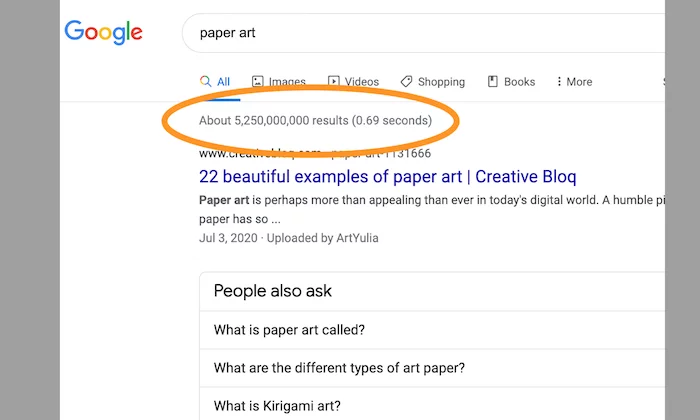
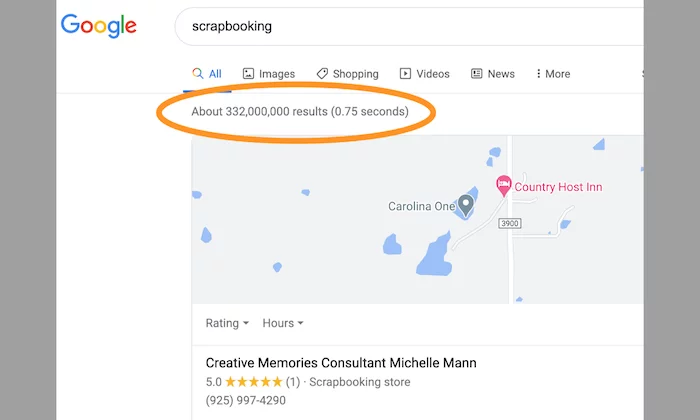
As you can see, there are far more results related to paper art as opposed to scrapbooking. Therefore, it makes more sense to write about paper art, which is what audiences are searching for.
I would also like to add that it’s better to avoid broad or generic topics. Don’t be afraid to get specific as long as you have takers for it.
For instance, if you want to create a food blog, don’t use words like “food.” Instead, use “barbecue” or “vegan.”
Get my point?
Step 2: Name Your Blog
Once an idea is in place, you need to work on naming your blog.
Does the name Stefani Joanne Angelina Germanotta ring a bell? Thought so.
But I bet Lady Gaga does.
Stefani Joanne Angelina Germanotta is Lady Gaga’s real name. She decided to go with a catchier and easier-to-remember alternative that aligns better with her music.

That’s the power of the right name.
Choosing a blog name is equal parts exciting and daunting. After all, this will be your brand name and dictate how people will remember you.
Don’t overthink it, and don’t name your blog something random or offensive.
Keep in mind the following questions when deciding on a name:
- Does it reflect what your blog is going to be about?
- Would your target audience like it?
- Is the name easy to say and spell?
- Is it short and concise?
I chose my own name as my domain (NeilPatel.com) simply because Neil Patel is who I am, and it’s also my brand. You could do what I did or come up with something entirely different.
I’d recommend opting for a .com whenever possible. But they can get expensive, I know.
If all the good .coms are taken, don’t stress. think about your main URL keywords.
If you were aiming for talkCBDtome.com but somebody else got there first, try talkCBDto.me for something cheaper and every bit as easy to remember.
Don’t buy an available domain at this point. I have something up my sleeve to help you get it for free.
Step 3: Sign up with a Web Host Like Hostinger
You need to sign up for a web hosting service to get your blog live, along with a registered domain name that will serve as your blog’s address.
I recommend Hostinger, as it’s hands down one of the best web hosting companies—not to mention, it’s affordable. Head over to Hostinger’s website and click Start Now to see their hosting plans.
I recommend the WordPress Starter plan because it’s the cheapest plan (just $3.99 per month) that also includes a free domain name.
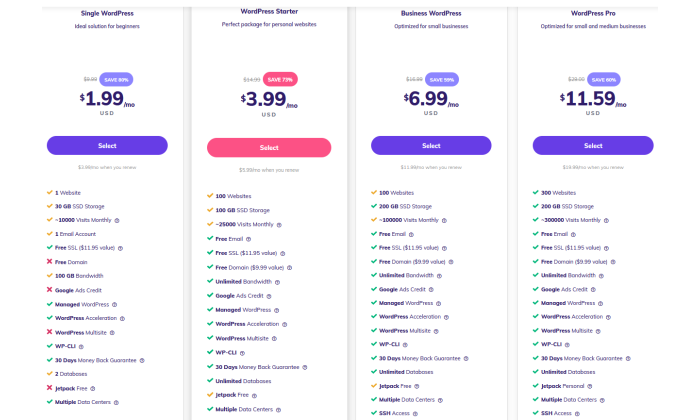
If you have a domain, you can save even more and get the $1.99/month rate of Single WordPress. It has lower limits on the on-site storage and monthly visits, but you don’t have to worry about exceeding those while you’re starting out. You can always upgrade later.
After you click Select, you’ll enter payment information and make your Hostinger account. Once the payment processes, you’ll be guided by Hostinger’s setup wizard.
It asks you three questions to start in order to give you the most helpful setup process: who you are creating the website for, what kind of website it will be, and your experience level with building a website.
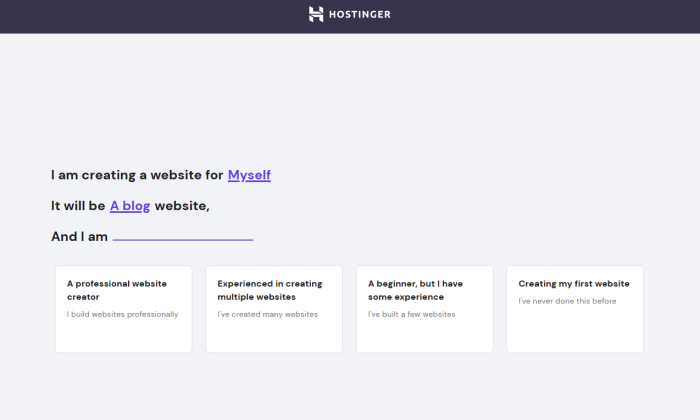
I’m pretty experienced with creating sites, but the rest of this walkthrough reflects choosing the path for beginners with some experience.
The next screen is where you’ll select WordPress as your blogging platform. If you don’t already have a WordPress account, Hostinger supplies a handy field to create one without leaving the setup wizard.
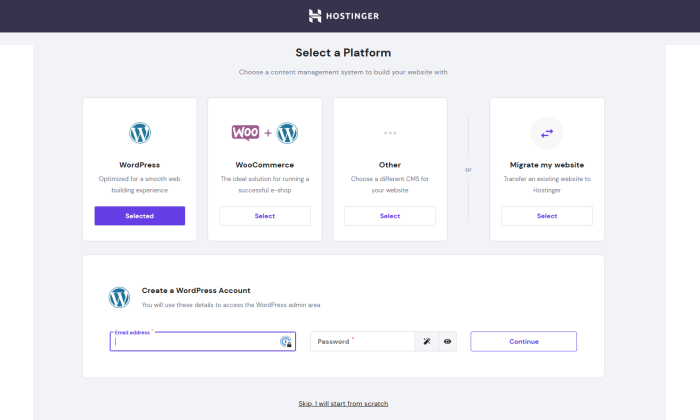
After that, Hostinger gives you the choice of picking a template or starting with a blank canvas of a site.
Then, you’ll secure that free domain included in your Hostinger plan. If you’ve already looked into the availability of your preferred domain, you’ll be able to quickly find it and check out in one step.
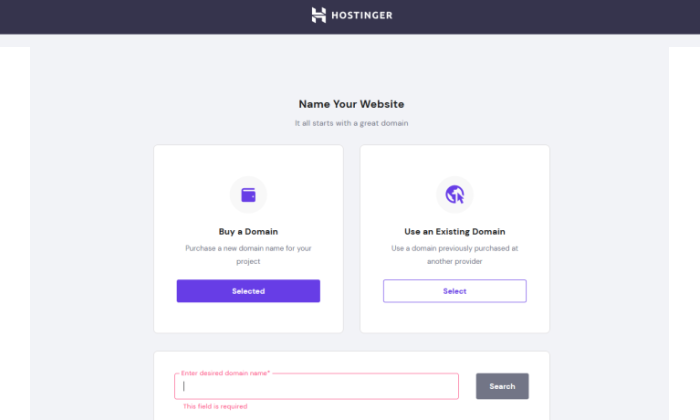
The key, though, is to add on WHOIS privacy for an extra $10 per year. It’s not too much to pay to make sure your private information as a domain purchaser is not publicly visible or searchable.
Once you’ve checked out, Hostinger will take a couple of minutes to complete the setup and install WordPress.
This is the point where you’ll have your blog!
Once the wizard is complete, you’ll be taken to Hostinger’s control panel, hPanel. Since WordPress is already installed for you, you can now start designing your blog to suit your style.
Step 4: Design Your WordPress Blog
To design a blog, you need to select an attractive and affordable WordPress theme.
Why do you need this? Well, after signing up for WordPress, your blog will look something like this:
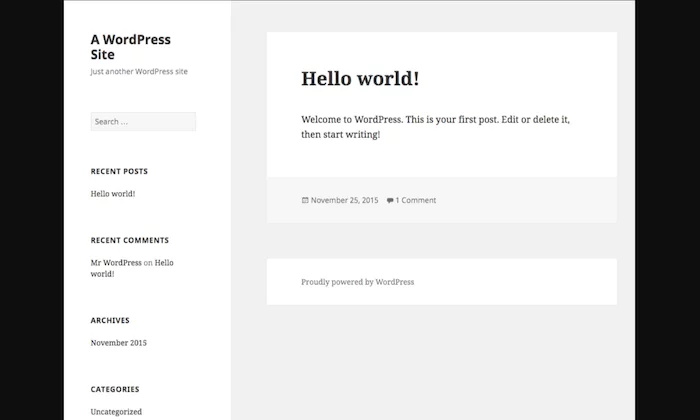
Not exactly what you’d call sleek and welcoming, right? The way your website looks can help drive more website traffic, which, in turn, will enable you to make more money.
Luckily, WordPress has thousands and thousands of themes for you to choose from. I’ve even done a roundup of some of the best ones. Here’s how you can select a WordPress theme:
Log into your WordPress account.Click on Appearance in the sidebar menu on your dashboard. From the drop-down options, select Themes.
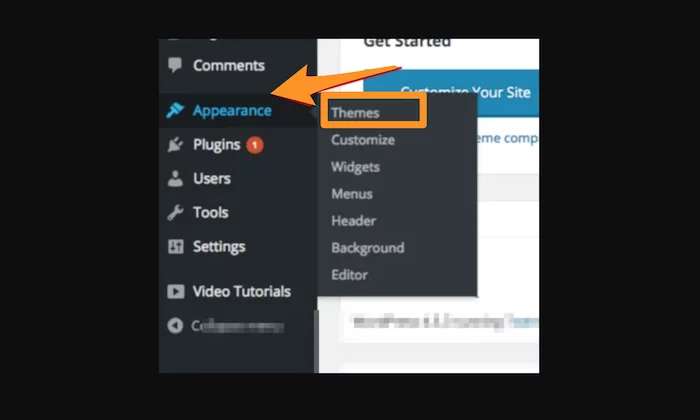
Go to Add New, located at the very top of the screen, to gain access to thousands of fancy WordPress themes. You can also click on Feature Filter to filter your search to see options more suited to your tastes.
You should choose a theme that fits your personal style, but at the same time, it should also be in sync with your blog niche.
Preview the theme to see what it will look like. If you like the sneak peek of a specific theme, click on Install and then Activate.
With a nice new theme, your website will get a much-needed upgrade that makes it look appealing to visitors.
Step 5: Come Up With Interesting Blog Topics
If you want to be successful blogging, you need to keep doing what you can to attract more website traffic or encourage more email signups. The best way to do that is through what you’re already doing on your blog posts: offering your readers interesting content.
But what if you’ve exhausted your best ideas already on previous blog posts?
My tip is to make a list of questions you get often.
Trust me, within just 30 minutes, you’ll be able to come up with a bunch of new potential blog topics. Your priority should be to look at things from your reader’s viewpoint.
You can also focus on higher-level questions. The five below are ones I suggest you ask yourself to get in your readers’ minds.
Suppose you want to start a parenting blog for stay-at-home moms. Let’s go through those five questions with that example in mind:
Q1) What could be an intriguing or exciting talking point for your readers?
For stay-at-home moms, topics related to sleep training, family activities, and budget-friendly meal ideas could be a great place to start.
Q2) What are your reader’s pain points and challenges?
Common household challenges for stay-at-home moms could be meal planning, understanding developmental milestones, and so on.
Q3) What are your readers’ character traits?
Moms are typically patient and caring and appreciate a sense of humor about the hard work of raising children.
Q4) What niche topics would appeal the most to your readers?
A child’s mental, physical, and emotional development could be effective talking points for stay-at-home moms.
Q5) What topics would your readers hate about the niche?
Stay-at-home moms don’t like to be looked down on by others. So, you could write blogs about how society views them and their impact.
Similarly, you can use the above questions to come up with ideas according to your niche. While you’re at it, don’t forget to work out a catchy headline that will make the reader instantly click on your blog.
Step 6: Optimize Your Blogs for SEO
Search engine optimization or SEO is a crucial step to earn money via blogging. Here, you will optimize your website to rank higher in search engines for specific keywords and phrases.
If you’ve been following me for a long time, you may already know how SEO is my trump card.
By incorporating particular keywords and phrases, I’ve successfully driven more than 30 million visitors to my website. Shocked?
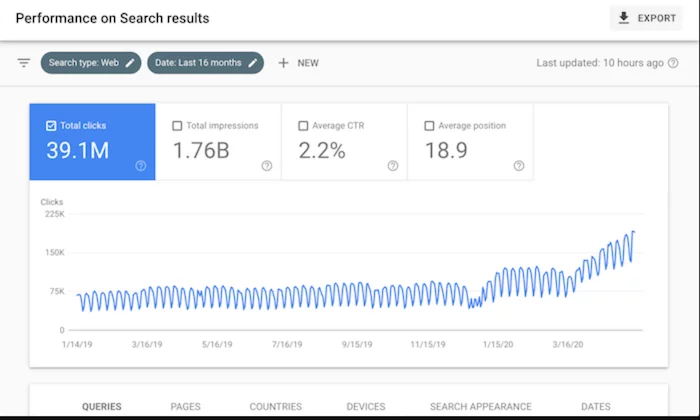
That’s the power of SEO.
On WordPress, you can optimize your content and blog by downloading a plugin called Yoast SEO.
Go to the Plugins menu, and click on Add New. Search for Yoast SEO in the search bar, and then install the plugin.
Don’t forget to activate it to complete the installation process.
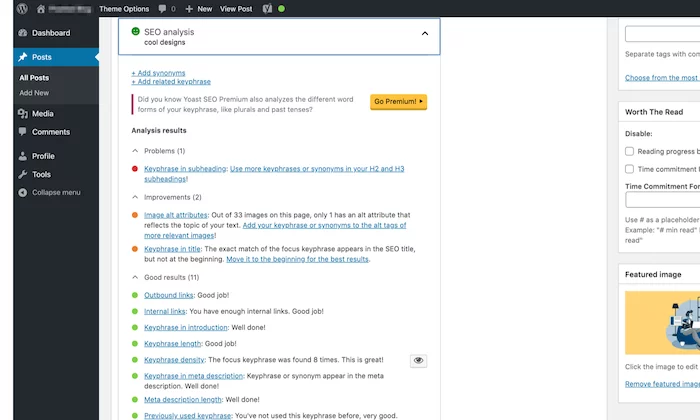
You’ll find that this plugin will give you all kinds of improvement tips and suggestions based on the keyword you select to help you optimize your content. I’d recommend incorporating as many suggestions as you can to improve SEO and content readability.
Step 7: Sign up for Google AdSense
Setting up ads is the best way to monetize your blog. But you need to be smart about it.
The biggest mistake people make is to bombard their sites with blinking ads. Avoid this at all costs.
Instead, focus on using targeted ads that appeal to your customers without annoying them.
To start earning money through ads, you need a Google AdSense account. Head over to the AdSense page, and click on Sign Up Now. If you don’t have an existing Google account, you have to set up a new one. If you already have a Google account, simply sign in.

Fill out all the relevant information before submitting your application. The AdSense team reviews every application, and if everything goes well, you’ll be in!
Next, follow the below steps to set up your account:
- Go to your AdSense dashboard and click on My Ads > New ad unit.
- Select the size of your ad and the type of ad. Once you’re done, select Save and get code.
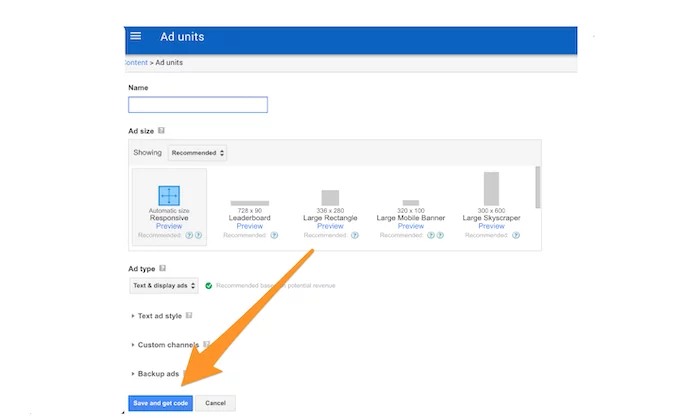
You’ll get a bit of code that you’ll then have to copy and paste between your page’s <body> tags. Here’s how it’ll look.
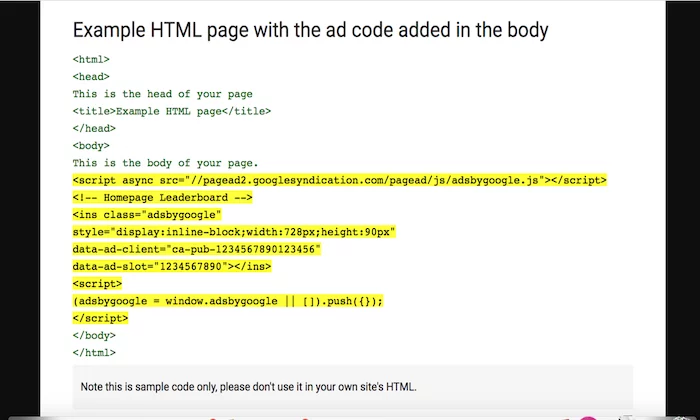
Once you’ve pasted the code, your ad will be live. Your AdSense dashboard will have all information about your earnings, so check it regularly.
While you can use ads on as many as you want, I would recommend starting with just one–maybe two max–to get an idea of how your audience responds to them.
If you see a higher bounce rate on your dashboard, you should consider repositioning your current ads for better results.
Step 8: Create an Amazon Associates Account
You might have already heard of affiliate marketing. If your goal is to earn passive income, leveraging the power of affiliates is your best bet.
You can start by signing up for Amazon Associates, which allows you to start earning right away through referral links, display ads, or Amazon-based shopping carts.
If your visitors decide to use your referral link or click on the display ads, you’ll get a small commission.
To sign up for Amazon Associates, all you need to do is visit the website and click on Join Now for Free.
This can be pretty effective. Just check out these earnings of Brendan Mace for definitive proof.
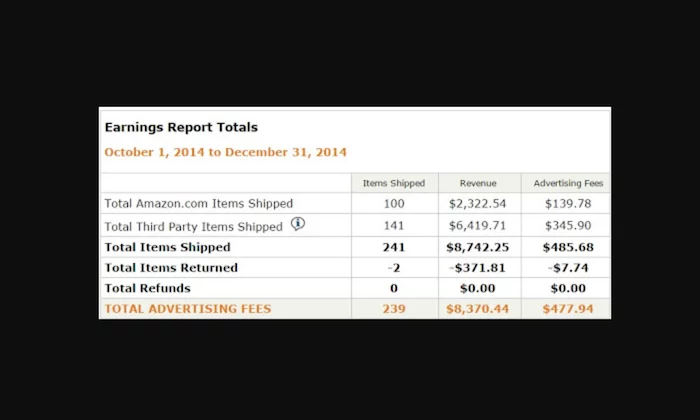
Amazon Associates isn’t the only affiliate program.
You’ll be happy to know that there are plenty of companies with their own affiliate programs, some of which pay higher commissions than Amazon. Just make sure to research before signing up to be an affiliate for a brand.
That said, I’d also like to emphasize the importance of advertising only those products or services that you’ve used yourself or genuinely believe can help your audience.
Step 9: Offer a Product or Service for Sale (Optional)
Many people think that advertisements are the only source of income for bloggers. This might be true for a few, but you’ll also find many bloggers make quite a bit of money by selling a product or service.
Of course, this will only work when you already have a loyal readership with steady website traffic like Nomadic Matt. Once you’re at this stage, you shouldn’t be afraid to take the leap.
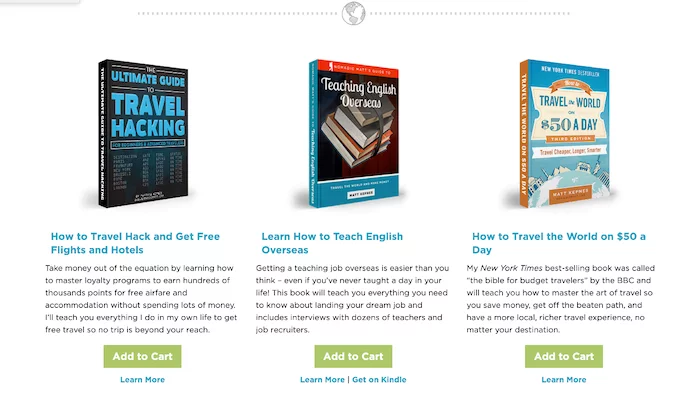
Here are a few things that you can consider selling:
- Training courses
- Books
- Video courses/webinars
- Coaching services
- Consulting services
Next, you have to figure out how you want to sell your product. Services like Shopify or WooCommerce plugins on WordPress, Amazon, or Etsy are great options for digital products.
If you’re selling a physical product (like phone cases or clothes), you’ll have to set up a more comprehensive ecommerce store.
Finally, let your audience know about your product or service by sending them emails. You can also consider developing lead magnets like pre-recorded webinars, PDFs, and whitepapers to build your email list.
How to Make Money Blogging Frequently Asked Questions
Can you make money blogging?
Yes, there are a variety of ways to make money blogging; such as running ads, doing paid partnership posts, including affiliate links, etc.
What’s the first step to creating a successful blog?
The first step in creating a successful blog is picking a niche topic for your blog. Do market research and see what other blogs are already out there; you don’t want your blog to cover an area that is already dense with similar blogs. Also, try to pick a topic that has natural ties to money-making blog techniques, like a partnership or sponsored posts, or affiliate links.
How much do successful bloggers make?
As of 2020, successful bloggers can make up to 7 figures per year. But that’s only the very top bloggers in successful and popular industries, like marketing or parenting.
How long can I expect it to take for my blog to start making money?
Your blog may be able to earn money in as little as six months from when you start it.
How to Make Money Blogging Conclusion
There’s a difference between simply having a blog and monetizing a blog. To make this transition successful, you’ll need to adopt a more proactive and focused approach.
You’ve got this!
Start with my guide for setting yours up. Get reliable hosting from Hostinger and it’ll take no time at all to get your blog up and running so you can start blogging.
Just remain focused and work consistently to keep improving your blog and build trust between you and your audience. And follow my steps above to get things started on the right track.
Remember to stick with what works, and you’ll have a successful formula.
Have you tried blogging yet? Let me know about your experience.
Source: neilpatel.com

How to Use Transcription Services to Repurpose Your Content
Keeping your audience engaged with your content is a full-time job in itself. You must constantly evaluate your current content’s engagement metrics while also anticipating the needs of your growing audience.
With this in mind, new and updated content is crucial to any successful digital marketer’s strategy. How can you generate new content without spending more time than you have available? With transcription services.

In this guide, I’ll explain what transcription services are and what they can do for digital marketers. This will include a look at one particular use case—repurposing content—to give you an idea of just how valuable these services can be.
What Are Transcription Services?
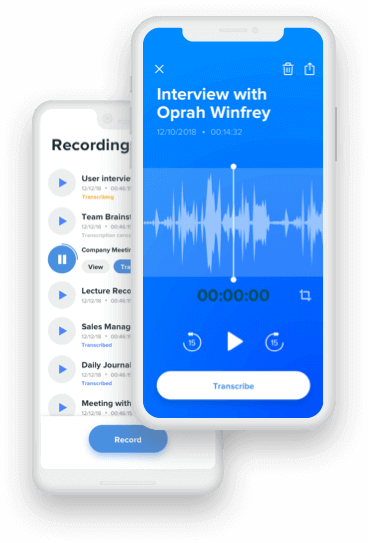
Transcription services are business services that transcribe audio to text. The audio is most often pre-recorded and is then transferred to transcription professionals, who are trained in shorthand. They are able to quickly and accurately transcribe audio from many different sources.

You also have the option of AI-powered transcription tools, such as Otter and Rev. These services combine AI with trained professionals to deliver a top-notch experience.
From podcasts and videos to workshops and live speeches, a transcription service can help you to preserve your audio in text format. This can later be used for reference or, as I’ll outline below, as a way to repurpose your marketing content.
When are Transcription Services Used
Transcription services are most often used by physicians, scientists, researchers, and other technical professionals. Their spoken notes are transcribed into written notes and reports that can be used for reference or recordkeeping.
When you think of transcription, you may also think of court proceedings and police investigations. These, too, are used for recordkeeping (often public record) and as a way to make the proceedings accessible to all.

However, transcription can offer great benefits to digital marketers, too. One of the most effective ways to use transcription is to repurpose content and create high-value content in multiple formats.
5 Ways to Use Transcription Services to Repurpose Your Content
There are plenty of benefits transcription services can provide to digital marketers, and repurposing of content is just one. Here are five ways you can use transcription to expertly repurpose your content.
1. Turn a Video Into a Blog Post
Whether a new or established digital marketer, I can safely assume you never feel as if you’re hitting your weekly or monthly blog post targets. By transcribing your videos into blog posts, you can get that much closer to reaching your goal.
How many posts should you publish a week? According to HubSpot, the sweet spot can be anywhere from one post to five posts per week.
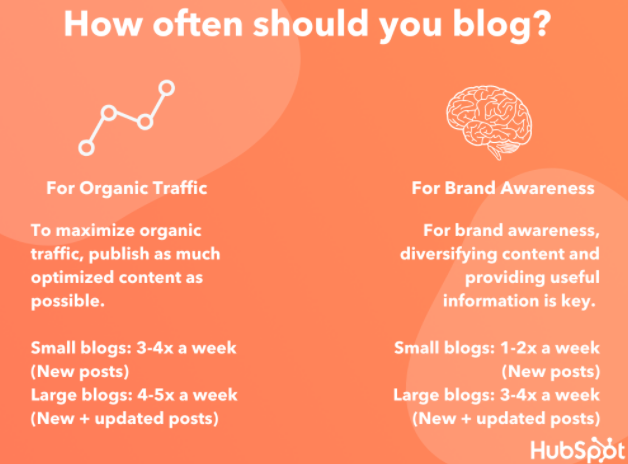
However, this will depend on the size of your website and what you hope to achieve. For a small website with a goal of maximizing organic traffic, for example, three to four new posts per week is recommended.
Another benefit of turning videos into blog posts is accessibility. While many digital media platforms offer closed captioning, they aren’t always the ideal way to digest content. By turning videos into blog posts, you can ensure all of your traffic has access to your content in multiple ways.
Of course, you should aim to bulk up these blog posts in ways that benefit the readers. These include using visuals (e.g., images, infographics, charts) and adding more in-depth examples.
The transcription should serve as a starting point to creating engaging, valuable blog posts.
2. Turn a Podcast Into a Video or Blog Post
You don’t need to forfeit multimedia content entirely! You can “upgrade” your podcast to a video using transcription services. Just add some visuals and you can now share to digital media platforms like YouTube and Vimeo.
The greatest benefit here is the ability to reach a wider audience. While there is certainly crossover between podcast listeners and video watchers, there are some people who stick strictly to one format.
By turning your podcast into a video (or vice versa), you open your content up to a whole new audience.
You have a few options here when it comes to adding visuals to your videos. The simplest is using one image (perhaps a solid background with your brand and website URL) throughout the entirety of the video.
This isn’t appealing, but it will enable you to add your content to sites like YouTube.
For more appealing visuals, you can also try stock photos, digital imagery, or even b-roll.
How can you ensure the visuals you use are appropriate and appealing to your audience? Search YouTube for similar content keywords to see what types of videos your target audience is currently engaging with.
This can ensure you are on the right track, while also giving you ideas on how to improve your content over the current offerings.
Or, you can turn your podcast into a blog post.
For example, Content Marketing Institute’s Joe Pulizzi hosts a podcast, then turns the transcript into a detailed blog post. This allows users who don’t have time to listen to still access their content.

3. Create a List-Building PDF
Do you have a video or podcast episode that would make great list-building content? Then consider hiring a transcriptionist to turn that content into text.
List-building content, also known as lead magnets, is a great way to build your email subscription list. It is an offer of free content in exchange for an email address.
However, it is not as easy to attract people to your list-building content as it was before everyone had a website. Your content must be truly compelling and high-quality.
There are plenty of lead magnet formats to choose from, including:
- checklist
- cheat sheets
- e-books
- infographics
- case studies
- white papers
Using a unique angle, you can use the above formats to attract a targeted audience. With such an array of content types, it’s likely you have a video or podcast episode that can easily be transformed into one of the above.
4. Build a Resource for Social Media Content
There’s bound to be a Tweet-worthy quote or two from your latest podcast episode. Instead of replaying the episode and scrubbing through it, turn the episode into a transcript.
This will make it incredibly easy to find social media content to share.
Without the need to scour your audio, you can now spend that time creating attractive visuals using platforms like Canva or Adobe Spark.
These services allow you to create the ideal visuals for each social media platform, and they even include templates to get you started.
Do keep in mind the cost of transcription services may increase if your episode includes more than one person. This can take time and skill to navigate.
On the other hand, the added benefit of transcribing multi-guest content is that multiple speakers can add refreshing insight to your social media pages, especially if the guest has their own social profile to engage with your audience.
5. Create an E-Course
If you want to create a substantive course, then consider combining multiple videos or podcast episodes on a similar topic. The resulting e-course can then be offered as a lead magnet or even a paid course.
With platforms like Kajabi and Thinkific, you can host your online course with ease. How can you ensure the course you create is profitable?
The steps to creating a successful online course include:
- Choosing a fail-proof, high-demand topic.
- Creating compelling course objectives.
- Structuring your course modules effectively.
- Choosing a platform to host the course.
- Marketing your course strategically.
As a paid course, the content should be of exceptional quality and it should go in-depth. Transcriptions of your previous content will be helpful to create an outline, but you should really dig deep and build out the content as best you can.
Before you employ a transcriptionist, take special care to pick your best audio and video episodes for transcription. These will form the basis of your course, but they’ll of course need to be bulked up with further examples, imagery, and more.
Transcription Services Frequently Asked Questions
Transcription is invaluable to digital marketers, but perhaps you still have a few questions. Let’s go over them.
How much does it cost to get a transcription of your content?
The cost to transcribe your content will vary. Consider that transcriptionists have various ways of charging for their work (e.g., per hour, by project) and rates will vary by experience level, location, and more.
How long does it take to transcribe audio?
Just as with cost, the length of time it takes to transcribe your audio will vary. The industry standard is two to three hours per one hour of audio.
However, that assumes the audio quality is clear with little to no background noise.

Do transcribers use the software?
Even professional transcriptionists rely on software to ensure efficiency and accuracy.
With tools like Amberscript and Happy Scribe, you (or your editors) can collaborate with your transcriptionist in real-time. This ensures a seamless transcription experience.

Do transcription services accurate?
As with most services, you get what you pay for. The same can be said for transcription software tools, as well.
The more experienced your transcriptionist (or advanced the software you use), the more accurate the transcriptions are likely to be.
Repurposing Transcriptions for Content Conclusion
Your audience craves new and updated content on a regular basis. While this can seem a daunting task, audio transcription services can offer a solution.
With transcription, you can turn your audio content into text. This text can then be repurposed into other forms of content, including blog posts, social media content, and online courses.

Transcribed content can help you to satisfy the needs of your growing traffic numbers, while also providing accessible content so as to reach a wider audience.
Depending on the quality of the services you use, you may not even need to spend much time editing the transcription. This will save you immeasurable time while also expanding your reach as a digital marketer.
Which of the above content formats will you transform your audio content into?
Source: feedproxy.google.com

The Top Outsourced Executive Function Will Be THIS in 2021
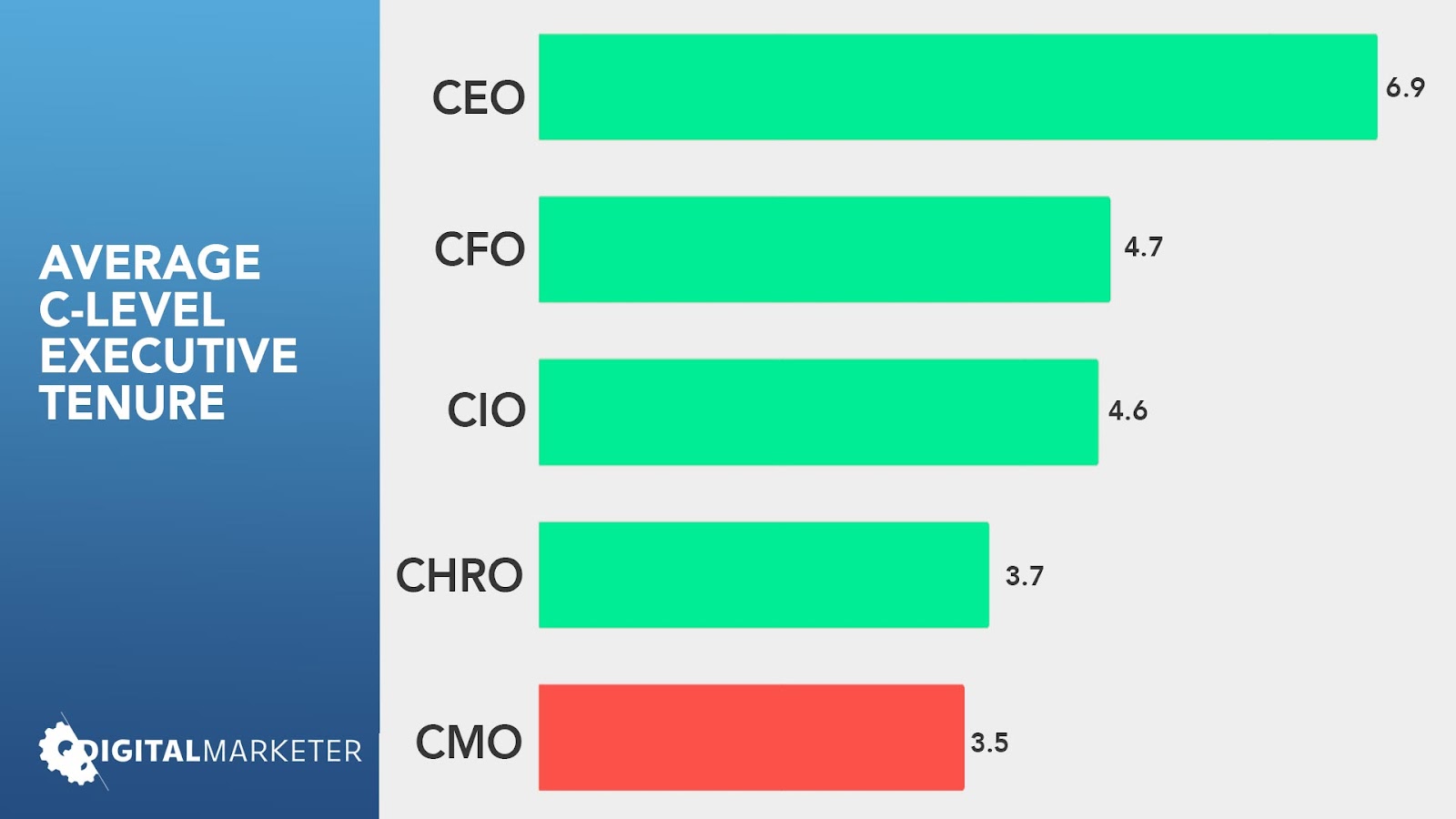
It’s not easy being a Chief Marketing Officer (CMO) these days. According to research featured in Forbes, the average tenure of a CMO is just 3.5 years. Compare this to the average 6.9-year tenure of CEOs, and you get an idea of how sad that statistic really is.
If you’ve dealt in marketing, you probably have some idea of why such a vital role can be so rapidly replaced.
Marketing (read about why we’re not referring to it as “digital marketing” specifically by Clicking Here), is a very dynamic, evolving component of business these days, and the management of it is getting more difficult all the time.
It’s the wild west in the marketing industry right now.

You have to accept that and realize that you may not be fully equipped to judge incoming marketing executives as effectively as you have in the past.
Why go through the pain, time, and expense of vetting and onboarding a CMO that might prove futile in under a year’s time?
Why not test a potential CMO prior to hiring, or get a premium CMO to guide your existing marketing department temporarily while you get your next campaign in order?
That’s where the Fractional CMO comes into play.
A fractional CMO is someone who acts as the Chief Marketing Officer for your company but is hired as a contractor or consultant.
Why Are Long-Term CMO’s So Hard to Find?
Good CMO’s are actually REALLY easy to find.
Put up an ad and you’ll probably get 100+ submissions from lots of qualified, experienced professionals.

Many will be excellent during interviews, their past results will shine, and their references will sparkle.
The problem is that they won’t be long-term. Just think of your last CMO.
It’s not that your last CMO was bad per se, they just didn’t “fit” right.
- Or the revenue didn’t grow fast enough.
- Or they misjudged their projections.
- Or the CEO/CFO/COO/etc hated their guts.
- Or whatever.
The truth is that letting go of a CMO is easy because their results are VERY tangible and obvious.
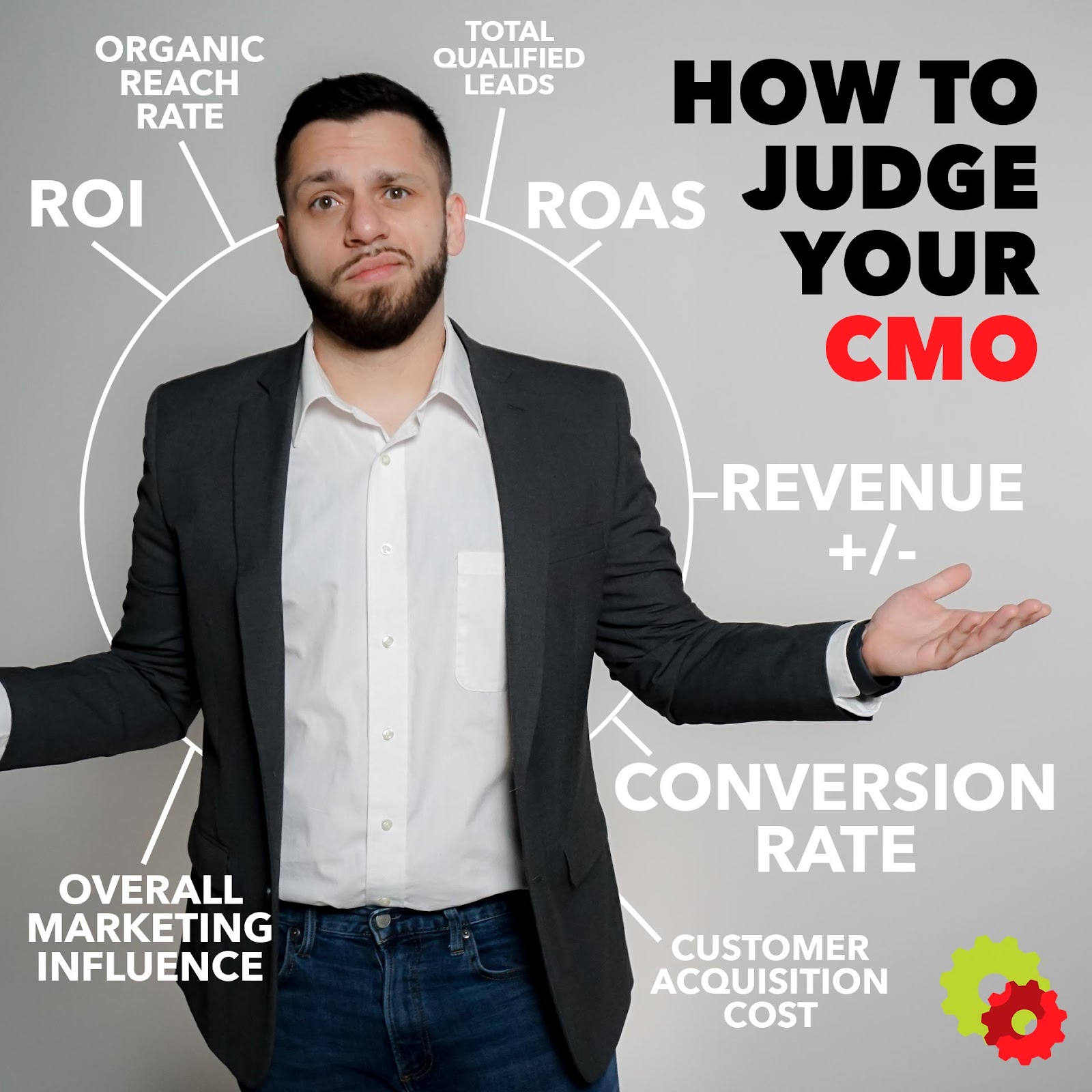
Whereas a CEO can blame a number of abstract factors like the economy, global events, competitor moves, and the actions of individual departments, the CMO’s performance analytics are simple. They look something like this:
ACTIONS OF THE CMO = REVENUE GROWTH/DECLINE
The revenue declines, they did a bad job and you can’t argue with hard numbers.
You should have gone with that other candidate that seemed better.
Then the cycle will repeat itself.
Why Aren’t CMO’s More Effective?
The Chief Marketing Officer position looks a lot different than it did five years ago.
Between new methodology, technology development, and societal change (Click Here for a more detailed breakdown), today’s CMO has a lot to think about.

Here are a few of the reasons why CMO’s are so short-lived in the business world today:
- Traditional CMOs Lack the Experience to Effectively Manage Current Marketing Techniques
- A Lack of Understanding of the Company They’re Marketing for
- Too Great a Focus on Short-Term Results Rather Than Long-Term Objectives
- Lack of Support from Other Executives
- Lack of Resources or Adequate Marketing Budget to Enact Plans
The Solution to High CMO Turnover: The Fractional CMO
With the role of marketing evolving every day, it’s easy to see how hiring a good CMO has become a monumental task.
At DigitalMarketer, our whole business is built around the skills necessary to be a capable marketing professional in the 2020s, and let me tell you, the list is not short.
Here are just a few of the benefits your business can glean by using a Fractional CMO for your next marketing push:
- Easily Assess Results Based on Limited-Term Contracts and Campaigns
- Create an Effective Brand Education Process While Transitioning Through Multiple F-CMOs
- Save Money in the Form of Employment-Related Expenses (Insurance, Workers Comp, etc)
- Test Different CMO Personality Types Before Committing to Long-Term Arrangements
Why 2021 is the Year to Use a Fractional CMO
Outsourcing in general has seen a huge upswing over the last few years.

In 2019, it was estimated that more than a third (37%) of all businesses were outsourcing a business process. Further, one of the greatest outsourced components was marketing.
After the healthcare difficulties of 2020 and 2021, you can see why that percentage may certainly increase. Everything has shifted, both the task of marketing and the environment it’s used in.
You can’t afford to make a costly hiring mistake during such a vital, transitional period.
You need to start using Fractional CMOs.

The post The Top Outsourced Executive Function Will Be THIS in 2021 appeared first on DigitalMarketer.
Source: digitalmarketer.com

Best WordPress Themes for Blogs
Presentation is paramount for blogs. Whether you want to blog as a side hobby or for a business venture, it’s essential to find the right platform and theme for your blogging needs.

Disclosure: This content is reader-supported, which means if you click on some of our links that we may earn a commission.
Luckily, WordPress is one of the largest online content management systems (CMS) and offers many customizable themes for blogs.
Different themes will determine how easy it is to navigate your blog.
As WordPress stores over 100 diverse themes, it can be daunting trying to find the right one for you.
However, there’s no need to worry, as we’ve narrowed it down and found the seven best WordPress themes for blogs.
This in-depth guide includes reviews for a mix of free and paid WordPress themes with a methodology for choosing the best theme for your needs.
Seven Best WordPress Themes for Blogs
#1 – Olsen Review – The Best WordPress Theme for Lifestyle and Fashion Blogs
If you are a lifestyle or fashion blogger looking for a place to store all of your content among a focused layout with crisp fonts, Olsen is the perfect theme for you.
Providing a fluid and peaceful reading experience, Olsen is the theme for anyone who wants their images to stand out next to their content.
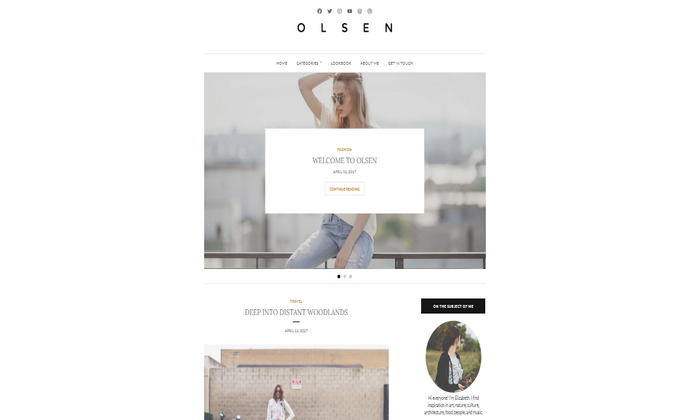
Olsen is completely customizable and is the perfect place to show off your best work.
Two unique elements this theme offers are a Featured Content slider and an Instagram footer widget.
Both elements are great for sharing your work with readers.
The Featured Content slider is a little different from the average Featured Content add-on.
This element allows you to pick up to six images or posts and include them at the front of your blog.
The reader can navigate this slider by clicking the left or right arrow.
The Instagram footer widget is unique and doesn’t appear in any other theme on this list.
This is the perfect add-on for a fashion or lifestyle blogger who wants to showcase their photos.
It shows the widget at the bottom of your blog and features your most recent Instagram posts in a large single row.
The downside is for people who want the Instagram feature for free.
Unfortunately, you must pay for the theme or buy a plan to use it, but we think this trade-off is worth it.
You can get started with Olsen today for just $57 or get it for free with a Premium or Business WordPress plan.
#2 – Baskerville 2 Review – The Best WordPress Theme for Most Standard Blogs
If you’re looking to start a blog that contains writing, photos, and videos, then Baskerville 2 is the theme for you.
WordPress restricts many themes to a particular category, making it difficult for people who want to operate a standard blog.
However, Baskerville 2 is a simple theme that is easy to use and navigate.
It has added flexibility that will allow you to use your blog to its full potential.
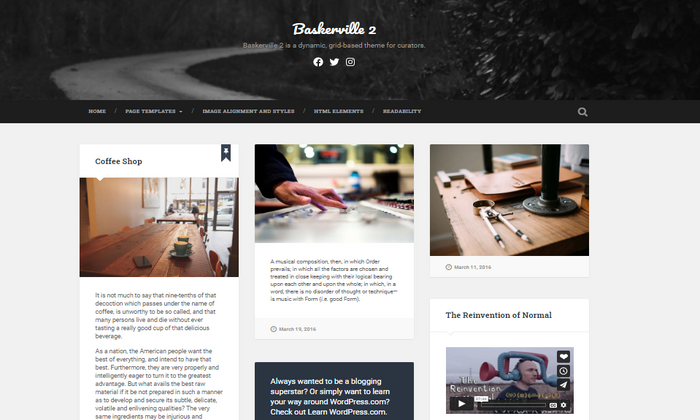
The theme is easy to customize, so you don’t have to be tech-savvy to use it.
With recently upgraded flexibility, it now comes with a custom menu option just below the header.
This allows you to easily add menus that link to different parts of your blog.
Baskerville 2 offers many features, including:
- Custom backgrounds
- Custom colors
- Custom and flexible headers
- Full-width templates
- RTL Language support
- Site logo
- Author bio
- Threaded comments
Not only does this theme have many helpful features for a standard blog, but it’s also free.
You can use Baskerville 2 to create an outstanding blog with little investment, which is great if you are blogging as a side hobby.
With the new upgrades, this theme now supports all content options stored by WordPress.
You can choose how you display your content, including choosing to showcase your work in a full post or as an excerpt.
This is a unique option for free themes, but it’s significant because customizable displays will make your blog less cluttered and easier to read.
#3 – Hemingway Rewritten Review – The Best WordPress Theme for Photography Blogs
Hemingway Rewritten is the theme made for photographers. As soon as someone enters your blog, it greets them with elegant design and stunning visuals included as part of a featured header image.
The featured header image is perfect for any photographer wanting to share their visuals boldly.
WordPress suggests using a decorative background image as the most appropriate header, as the image can vary slightly depending on desktop, mobile, or tablet use.
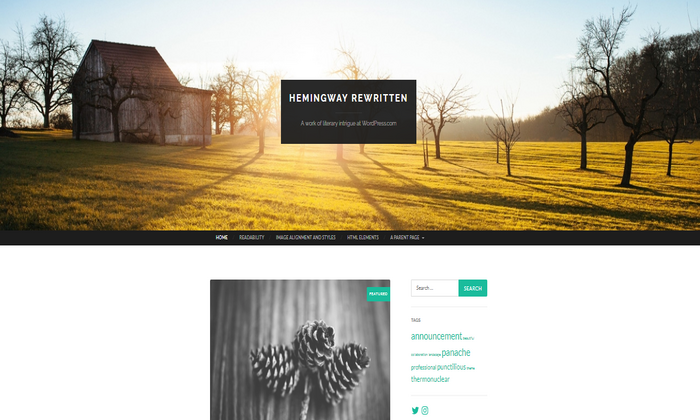
However, not being able to use any photo for the featured header can be a disadvantage.
Alongside featured images, Hemingway Rewritten supports different post formats such as ‘aside,’ ‘image,’ and ‘quote.’ I found ‘image’ to be a great format if you want to add images to your blog with a small caption underneath, which lets you tell a story.
Similar to Baskerville 2, the Hemingway Rewritten theme lets you:
- Customize your header
- Customize your background
- Customize your menu
- Add sticky posts
- Add widgets
However, a unique element of this theme is the parallax-scrolling header.
The subtle fade of your header as someone scrolls through your blog adds extra points for presentation.
Hemingway Rewritten gives you a lot of room to be creative as a theme focused on photography.
The customizable featured header is one of the most important aspects, as it’s the first thing people will see once they enter your blog.
This theme is free for WordPress users, with no limit on customizations or posting.
#4 – Maxwell Review – The Best WordPress Theme for Online Creator Blogs
Maxwell is the most expensive theme on this list, and it’s considered a premium theme. However, the price shows how high-quality it is. This modern theme is ultra-clean and is best for online creators.
If you’re a YouTuber, musician, or artist, this theme will be the best choice for you as it supports the ‘featured content’ option.
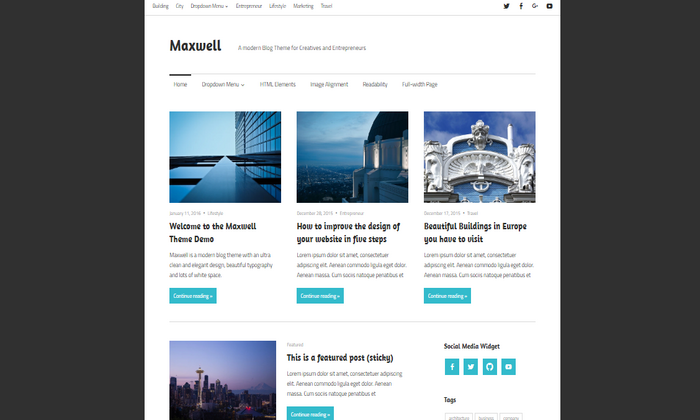
‘Featured Content’ allows you to highlight your three most important posts at the top of your blog.
You can include links to videos, too, which is especially useful for YouTubers and streamers.
Maxwell is an easy theme to navigate, with a separate customizer section for adding a site logo, header, and background.
Alongside the basic features, Maxwell includes:
- A mobile-ready layout for any device
- Multiple menus
- A hashtag section for visibility
- A location section where you can add maps
- Social media widgets
Since this is a premium theme, Maxwell gives you six free color palettes to choose from.
For unlimited customizable colors and typography packs, you will need to upgrade to a premium or business WordPress plan.
If you are a free WordPress user, you can purchase Maxwell separately for $100, which is a little pricey and may be a downside for some.
However, you receive this theme for free when purchasing either WordPress plan.
- Premium plan: $10 per month
- Business plan: $33 per month
If you love the look and features of Maxwell, it would be best to try out the premium plan, as you get advanced design customization at a cheaper price point.
#5 – Escutcheon Review – The Best WordPress Theme for Writing Blogs
Escutcheon is by far the most simple yet effective theme on this list. This theme is best for writers who want to stand out from the crowd.
The theme looks like a virtual journal, with posts listed in reverse chronological order. With bold, large typography, blog posts quickly catch the eye of the reader.
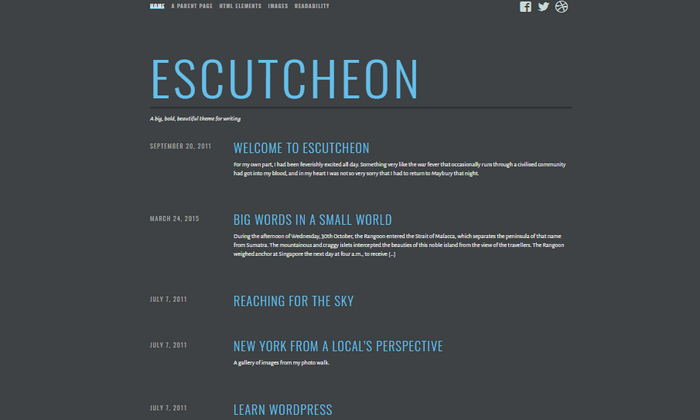
The Escutcheon is a minimalist theme that gives just enough information to entice the reader.
The font and color palette makes it easy for readers to navigate and read your blog.
As this is a theme for writers, your writing is the main showcase, leaving images on the sidelines.
However, Escutcheon supports large featured images within blog posts, displayed beneath the post title if you want to add more life into your blog posts.
Like most WordPress themes, Escutcheon comes with drop-down menus, social media widgets, and customizable headers. However, it also offers:
- A ‘related’ section so readers can find similar blog posts with ease
- A search barComment section
- Site logo
The only problem with this theme is that it shows widgets on posts instead of your actual blog or archive page.
The Escutcheon is another free WordPress theme and is the last free option on this list.
This theme is perfect for a blogger looking for a place to share their stories.
#6 – Perle Review – The Best WordPress Theme for Portfolio Blogs
Just as the name suggests, Perle is an elegant theme.
If you want to start a blog that showcases your portfolio projects, Perle is the best choice for you.
Similar to Escutcheon and Maxwell, this theme has a simple look and offers different layouts that are super clean.
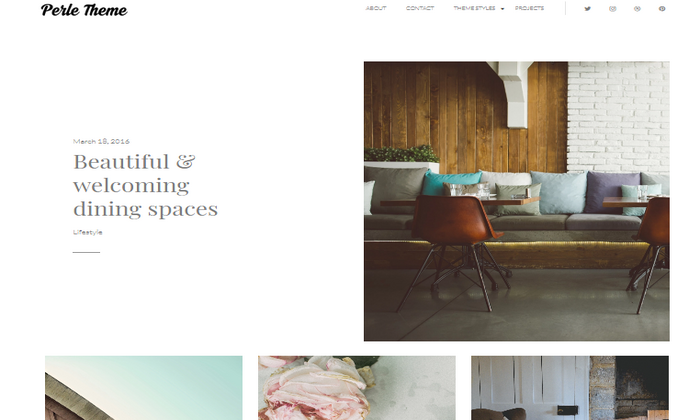
Perle keeps your portfolio polished with featured content.
You can highlight up to four portfolio pieces, pages, or posts on the front page of your blog with this add-on.
Among features like author bio, site logo, a social menu, and featured images, Perle offers a few unique elements, including:
- Overhanging images that let you place an image in the middle of your text
- Drop caps that let you enlarge the first letter of your sentence, making your text look super stylish
- Subheadings that let you italicize your text, making it stand out
- Subtle animation to create a soft fade on your image when a reader is scrolling
Perle is a little cheaper than Maxwell, costing $71.
However, you can get this theme for free when purchasing a Premium or Business WordPress plan.
#7 – Veggie Review – The Best WordPress Theme for Food Blogs
The Veggie is the perfect theme for the foodie in you.
This theme perfectly suits food bloggers or recipe writers who wish to showcase tasty treats and recipes.
This theme comes with easy-to-read typography packs and minimalist designs so you can easily share your passion with the world.
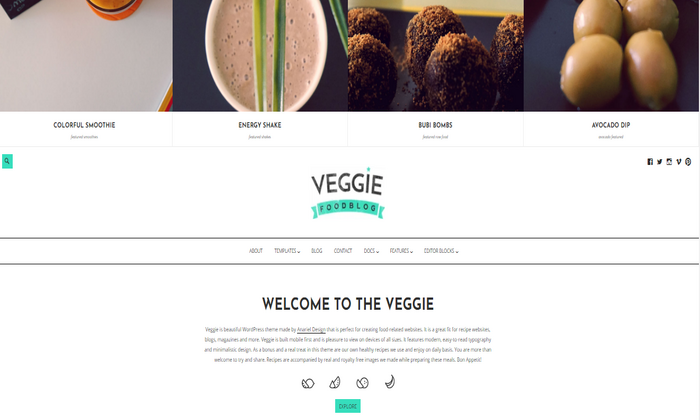
Veggie has a very responsive page and blog layout, which is customizable in seconds.
It’s easy to read and navigate on a desktop, mobile, or tablet.
This theme has a wide variety of unique options, which is paramount for blogging success.
Veggie comes with six different blog layouts and five diverse templates.
With these options, you can add a sidebar, grid, list, or full-width display.
Not only is there a wide variety, but Veggie can change into a resourceful restaurant website.
This premium theme offers several homepage layouts that let you engage with a whole new audience.
If you’re interested in this multipurpose design, Veggie is $86 as an individual theme or free with a Premium or Business WordPress plan.
What I Looked at to Find the Best WordPress Theme
Now that you know our seven best theme recommendations, it’s important to understand what matters.
Make the right decision by following these considerations.
Know Your Blogging Niche
It sounds self-explanatory, but it’s relevant when choosing the perfect theme.
Today we looked at the seven most common blogging niches, and how each theme suited for those niches is different.
When choosing a theme, you must know your blogging niche because you don’t want to install Veggie if fashion blogging is your focus.
Different niches require different themes with distinct features, layouts, and designs.
I would suggest creating a list of your most passionate hobbies and start there.
Customization is Key
Having a customizable theme is crucial for an easily-navigated blog.
It’s okay if you are not interested in investing money into your blog.
However, many free themes have limits on customizing, whether for headers, colors, or layouts.
Every theme on this list is customizable to some extent, some more than others, so it’s important to look into the nitty-gritty before installing.
Features
Every theme listed here today has some incredible features that work best for its particular niche.
However, some themes have more unique elements than others, and it’s critical to weigh whether you need them.
Paid themes are more likely to have more unique elements, such as Olsen with the Instagram footer widget, and Perle with the subtle animation.
If you know you won’t need an Instagram footer or subtle animation as a writer, it’s best to keep your money in your pocket.
Some basic features that are imperative for most blogs include:
- Custom colors
- Site logo
- Flexible display
- Classic menu
- Widgets
So, make sure you look for these when installing any theme.
Summary
Running a successful WordPress blog isn’t easy. Having the right theme helps a lot.
Here’s the complete list of my top recommendations:
- Olsen – Best WordPress theme for lifestyle and fashion blogs
- Baskerville 2 – Best WordPress theme for most standard blogs
- Hemingway Rewritten – Best WordPress theme for photography blogs
- Maxwell – Best WordPress theme for online creator blogs
- Escutcheon – Best WordPress theme for writing blogs
- Perle – Best WordPress theme for portfolio blogs
- Veggie – Best WordPress theme for food blogs
Baskerville 2, Hemingway Rewritten, and Maxwell are our top three WordPress theme recommendations for a blog.
Two of the three are free, making them very affordable.
However, Maxwell is worth the cost if you’re looking to invest in a more high-end design with features suitable for professional blogging.
All three are easy to use, non-technical, and presentable.
With that said, your niche and blogging needs will dictate the perfect theme for you. However, if you follow our considerations closely, it will make finding a theme that much easier.
The post, Best WordPress Themes for Blogs appeared first on Neil Patel.
Source: feedproxy.google.com

3 Ways to Increase Impressions, Engagement, and Post Clicks on Your LinkedIn Company Page
As a B2B business, we can’t ignore the potential of LinkedIn. DigitalMarketer’s Senior Social Media Manager, Shannon Goodell, has been strategizing and implementing on LinkedIn.

You’ve heard LinkedIn is an engagement gold mine.
Maybe Gary Vee convinced you it was a good idea, or you heard a few too many people talk about how LinkedIn was their number one source for finding B2B clients.
LinkedIn is talked about as an underrated platform. Like TikTok, LinkedIn posts can actually go viral (take the hint Facebook and Instagram). The thing is, you’re not going viral on a platform with all types of users.
You’re going viral on a platform where everyone is there to talk about business. Hence, the goldmine.
As a B2B business, we can’t ignore the potential of LinkedIn. DigitalMarketer’s Senior Social Media Manager, Shannon Goodell, has been strategizing and implementing on LinkedIn. Recently, she stumbled on some serious success.
Over two million impressions, almost 100,000 engagements, and 62,000 post clicks (!).

3 Effective Ways to Increase Impressions, Engagement, and Post Clicks on LinkedIn
Shannon’s narrowed down our strategy to 3 effective ways to increase impressions, engagement, and post clicks on LinkedIn. Time to go panning for gold.
#1: Find LinkedIn Posts in Previously Published Content
The first step of creating LinkedIn content is realizing you don’t need to create LinkedIn content.
You already have content that could be used on LinkedIn.
It just hasn’t been put into a LinkedIn-friendly format. As Shannon explains,
“Pull out tips and advice from your blog posts, Lead Magnets, podcasts, courses, playbooks, workshops, etc., and post as text-only posts.
Add the link to the resource or resources in the comments and direct people to check out the comments for the link(s) to learn more.”
This is how Shannon has been able to create more DigitalMarketer content…without creating more DigitalMarketer content.
It’s the beauty of splintering—every piece of content you create for your brand can be turned into at least 10 other pieces of content for other platforms.
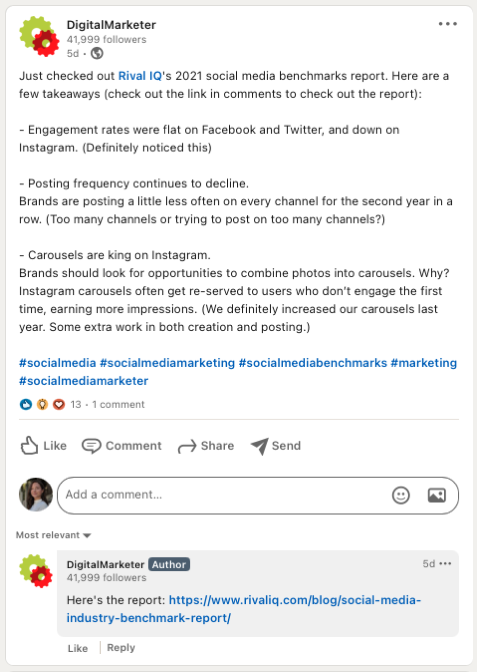
“This is a super simple post to create, and it works!
If you don’t have a lot of content to mine, post your own tips and advice and also ask your team members for theirs (based on their areas of expertise).”
Here are two of Shannon’s tips for splintering content into LinkedIn posts:
- You can use fewer characters on LinkedIn than on Facebook, so make sure to edit your copy so the post can be read clearly and easily
- If you can’t figure out how to make a post-work with the number of characters given, just post one tip at a time
Splintering content is a great strategy for LinkedIn… and every other platform you’re creating content for.
You don’t need to create a brand-new post every time you change platforms.
You just need to make your content native to the platform you’re posting on.
This means you don’t want to post a long, all text LinkedIn post to your Instagram stories.
People are on Instagram stories to see movement and engage with their phone (think GIFs and stickers).
Your Instagram story content can be a team member breaking down the post with a talking head selfie video or a graphic that explains what your LinkedIn post did—but more aesthetically for the ‘gram.
Splintering content can turn a blog post into:
- A LinkedIn post
- An Instagram feed post
- An Instagram story
- An Instagram IGTV
- An Instagram Reel
- An Instagram Live
- A Twitter thread
- A TikTok
- A YouTube video
- A podcast episode
- A Facebook post
- A Facebook Live
The wild part about this list is that we can keep going. We haven’t even mentioned Fleets or YouTube stories.
Use your previously posted content to create a stream of LinkedIn posts. Make your posts extra fancy by turning them into (free!) downloadable documents, as Shannon explains below.
#2: Create Downloadable Documents (Not Opt-In Lead Magnets)
The key is in the parenthesis. These aren’t lead magnets where users opt-in to your email list to get the resource.
You’re just going to give them the resource. We know this goes against your marketing brain, but the data doesn’t lie.
Two million impressions and over 62,000 link clicks tell us this strategy is working.
We’re establishing trust with our audience and showing them how much value we give away for free (no opt-in required!).
As co-founder and CEO of DigitalMarketer Ryan Deiss says, if you give away your best stuff, people will be dying to know what you keep behind the paywall.
You don’t need a graphic design team to create these downloadable Google Docs.
All you need to do is “copy and paste from a valuable resource (blog post, Playbooks, Lead Magnets, etc.) and add relevant links to the resource and calls-to-action in the doc.
Title it appropriately, and you’re ready to go.”
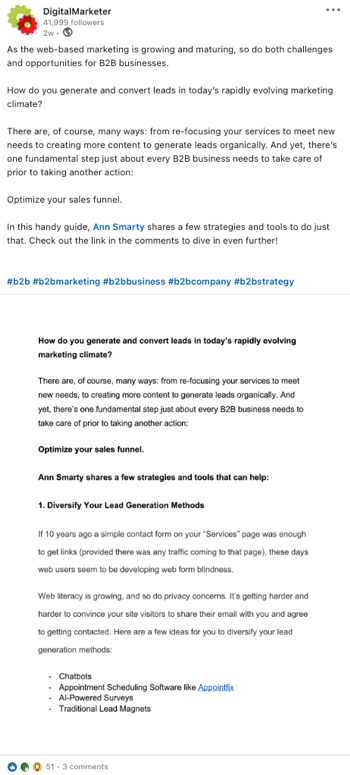
Our docs are super simple and straight to the point.
They’re focused on delivering value over taking up our graphic design team’s time.
Here are Shannon’s tips for creating these documents:
- Give Viewer access
- Use Grammarly to check your spelling and grammar
- “Once ready to post, just hit “document” and choose “Google Drive.”
- LinkedIn will ask you for access, and then you can choose that Google doc to upload as a PDF.
- Title the PDF in LinkedIn and add your text copy and post!
- I also direct people to links in the comments to learn more.”
Save these documents for your content team to keep using.
You can use these documents to outline more posts in the future.
They’re a document today, but in a few weeks you could turn that content into a LinkedIn text post, a blog article, a podcast episode, a TikTok… okay, we’ll stop now.
You get the point.
These documents are great for showing your audience how much you’re willing to give away for free (a strategy tried and tested with the Customer Value Journey and Customer Avatar Worksheet).

When Ryan and the DigitalMarketer team first considered giving away our Customer Value Journey and Customer Avatar Worksheet for free, it felt like too much.

We were giving away our secret sauce.
What would people pay us for?
It turns out the opposite was true.
We had given away some of our best stuff, and in return, people wanted to pay us to know more.
If that’s what we would give for free, they couldn’t imagine what was hiding on the other side of that paywall.
As much as it might feel like you should at least be asking for an email opt-in, you’ll have to trust us and karma on this one.
#3: Lean into Employee-Generated Content
Your LinkedIn content has been splintered from other posts, but now you want to get as much engagement on it as possible.
It’s time to lean on your team. If you’re not utilizing employee-generated content yet—the time to start is now.
Employee-generated content gets higher engagement, follows, and conversions than branded content.
Brands like Morning Brew show us the importance of putting faces to your brand, creating an audience-attracting magnet acquired for $75 million.
The key to getting employees to share branded content is to ask them.
Without the green light to create company content, employees will avoid stepping on toes.
They don’t want to get in trouble, and it’s safer not to take the risk.
Leadership is a huge part of employee engagement.
Have your company’s leaders explain what employee-generated content is, how it can help the business, and what they’d love to see from employees in the future.
In our case, we want our DigitalMarketer team to share our LinkedIn posts so we can get more impressions.
Here’s Matthew Douglas, our Content Manager of Sponsored Content, sharing a LinkedIn post highlighting an article published to the DigitalMarketer blog:

To organize the process of sharing the post with your team, use Shannon’s strategy:
“Create a Google doc with links to your recent company LinkedIn posts plus brand new copy divided into categories (sales, marketing, human resources, etc.).
Include your company’s LinkedIn handle in all of the posts. Then share with your company.
Before you ask your team to engage with your branded content online, we have to make sure you’re clear on the goal. As Shannon explains,
“The goal here isn’t web traffic (although it can be an added benefit).
It’s to get new people to your company page to explore and engage.
The goal is to get them to share your previously published LinkedIn posts plus brand new posts that all tag your company’s LinkedIn.”
Obviously, web traffic is an important (massive) part of your LinkedIn strategy.
But, your employee-generated content isn’t necessarily there to pull massive traffic.
Your employees might only have a few engaged friends and family on LinkedIn—so don’t be hard on them if you’re not going viral because of their shares.
What you’re doing is getting your brand acquainted with more LinkedIn users.
This is Stage 1 of the Customer Value Journey, Awareness.
For someone to buy a product from you, they have to first know you exist.
You don’t want to ask them to buy your products the second they find out about you.
That’s like asking someone to marry you while they’re walking down the street.
You have to let them warm up to you, ask for a first date, and then give them some time to decide you’re the right person for them!
Luckily business works faster than relationships that lead to marriage, but it’s still a relationship.
When your customer avatar discovers your brand through a colleague, friend, or family member, you’re walking into that relationship with established trust.
That will help move new leads through your CVJ faster and help people get to know you, even if they don’t need your services.
How many times have you referred someone to a brand without ever buying their products because you saw them online, and it seems to fit the solution your friend is asking about?
The answer is all the time. Position your brand in the same way by using employee-generated content.
We are not stopping this LinkedIn strategy anytime soon.
Shannon has figured out how to increase our impressions, engagement, and post clicks, and we’re really excited about this strategy.
LinkedIn is an engagement goldmine for B2B businesses.

LinkedIn Page
Instead of pushing through the noise of every customer avatar in existence on other social platforms, you can focus on business-minded people on LinkedIn.
People don’t open LinkedIn to find recipes, see fancy car photos, or get inspired by home decor.
They’re on LinkedIn with their business hat on.
And that sure seems like the best possible time to show them what you have to offer their business.
The post 3 Ways to Increase Impressions, Engagement and Post Clicks on Your LinkedIn Company Page appeared first on DigitalMarketer.
Source: digitalmarketer.com

Stock Photos are Dead: Create These Blog Images Instead
The use of images in your blog posts is a no-brainer.
Images are an easy way to break up chunks of text, add context, or give your readers a more accessible medium through which to digest your content.
With the growth of written content online, it’s harder to have your content be unique from others. Writers need to adapt to the changing landscape.
How can you continue to engage your audience when so many bloggers have written on the same topics—and will continue to do so?
The answer is the original imagery.
Blog Image Trends: Why Stock Photos Are Dead
With more content available on the web every day, it’s more important than ever to stand out.
While finding ways to put a unique spin on your blog post topics is critical, there are only so many angles on one subject. You need other types of content, such as photographs and illustrations, to make your mark.
Unfortunately, stock photos just don’t cut it anymore when you have the resources and time to make an impact.

Illustration by Laetro
This reason is in part because blog images don’t only live on your blog. They make the rounds on Twitter, Facebook, and Pinterest whenever your posts are shared. Chances are, your users have seen similar stock photos many times already, and they’re bored with them.
With so many articles to read, videos to watch, and social media news to ingest, the average reader won’t spend hours looking for the best article on your topic. They’ll choose the most visually appealing option nearly every time.
This is backed by visual content statistics, such as those collected by Venngage. When surveying marketers on content that helped them reach their marketing goals, original images performed best 40% of the time compared to stock photos at 13%.
So before you use stock photography in your next blog post, ask yourself:
Will my readers interact with the same stale image they’ve seen numerous times when researching this topic? Or will they choose to interact with an original image that more perfectly captures the content?
Top Reasons You Should Use Interactive and Original Images on Your Blog
Your goal as a digital marketer is to increase conversions.
So how do you do this even better than you already are, given the changing online landscape?
There are plenty of ways to drive traffic to your website. But what’s more important is driving the right traffic—the users who will engage with your content.
Images can help. According to BlogTyrant, images can up conversions by over 300%.

Illustration by Laetro
But keep in mind the kinds of images you use can have an impact on your conversions, too.
For years, stock imagery was the norm. But, it’s time to move away from those pictures.
Why? According to a study done by Marketing Experiments, readers are 35% more likely to convert when presented with a non-stock photo.
Original images offer authenticity stock ones can’t provide. They offer your readers a peek behind the curtain, allowing them to see a deeper side of your content.
Unique blog image content can offer other benefits, including increased customer trust and brand recognition.
According to Brain Rules, a slogan alone only sticks in the minds of 10% of people. When related imagery is added, though, retention rises to 65%. That’s an increase you can’t ignore if increasing brand recognition is on your radar.
Original image content has an often-overlooked SEO benefit, too, and that’s the improvement of Google’s E-A-T score. The E-A-T score lets Google assess content quality based on these three standards:
- Expertise
- Authoritativeness
- Trustworthiness

Illustration by Laetro
How can original imagery improve your E-A-T rating?
Whether you shoot and edit photography on your own or you work with a digital illustrator, your unique imagery will have a personal spin. If done right, this will become a vital part of your personal brand strategy.
You show expertise by including images that clearly demonstrate you understand your content.
You show authoritativeness by having consistent, unique branding people recognize immediately.
You show trustworthiness by providing information through images that are accurate and increase user’s knowledge.
A strong personal brand will bump all three elements of an E-A-T rating.
Placing Images on Your Blog
Images, just like text, can also be perceived as “fluff.” Because of this, you need to know when to use pictures on your blog to optimize the user experience and benefit your SEO.
You should use images to do three very specific things.
Break Up Large Chunks of Text
According to a study by Microsoft, the average attention span of heavy screen users is a mere eight seconds.
That means you have eight seconds to captivate your audience—and large blocks of text may make them click away pretty quickly.
However, you don’t have to write two sentence posts to make them take fewer than eight seconds to read. Instead, employ clever tactics to keep your readers engaged.

Illustration by Laetro
One tactic is to introduce other media, such as photos or digital illustrations. This creates a less intimidating reading experience while also making the post more visually appealing.
Explain a Concept
Some concepts are too abstract or complex to explain effectively in writing, especially if your audience isn’t strictly experts in your topic.
Custom diagrams and visuals can help readers understand the material.
Enliven the Content
As much as you like to think your content is witty and engaging, some topics just won’t interest readers for very long. You can use original visuals to add some life to otherwise “dull” content in these cases.
When Should You Use Custom Illustrations or Photos?
The cost of custom graphics may be prohibitive for some bloggers, but it is possible to find some middle ground.
Use custom illustrations and photography sparingly. Ask yourself where they make the most sense and insert them accordingly.
If you’re creating a landing page for a new product or service, for example, this would be the place to splurge. After all, you want this content to stand out from your competitors—what better way than with a custom graphic?
You can also utilize custom illustrations to drive a point home or explain data.
Whether a comic strip panel, a diagram, or a flow chart, you can use custom illustrations to share ideas with your readers in a way words simply can’t.
When Should You Create Interactive Graphics?
You can take your blog’s imagery one step further with interactive graphics.
Interactive graphics are custom graphics that support reader interactions like mouse pointer movement, clicks, or keyboard input.
This form of original imagery is commonly used in infographics, though other display types include side-by-side comparisons, flow charts, and graphs.
The most obvious use for interactive graphics is to catch the reader’s eye.
Perhaps more importantly, they can also be used to break complex information down into bite-sized chunks. For example, take a look at this nifty interactive graphic that shows users how Google search works without becoming overwhelmed.
Examples of Successful Blog Images
There are plenty of ways to use images on your blog.
Here’s one creative example from Oberlo:
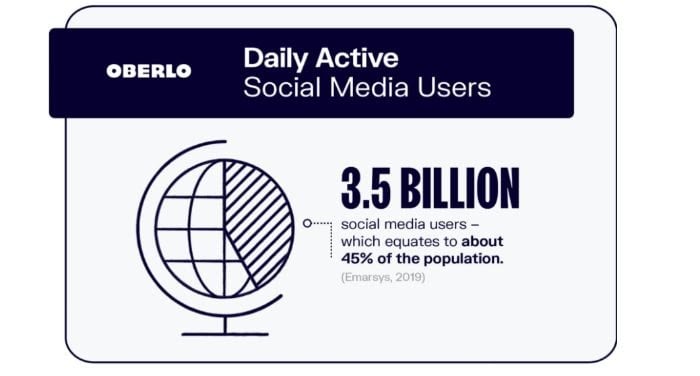
Instead of one lengthy infographic, the content creators chose individual infographic “slides” to answer each question on their post about social media statistics.
This use of graphics achieves two things:
It makes the information easy to digest.It makes it simple for readers to share information on social media.
As mentioned above, one of the benefits of original blog imagery is the personal branding aspect. When you use a particular style consistently, it becomes synonymous with your brand.
Copyblogger provides an excellent example of this:

Their featured images consistently use quotes overlaid on eye-catching images. They work as a watermark of sorts, as anyone who sees their imagery elsewhere will be able to identify them as belonging to Copyblogger immediately.
And what about interactive content? Your options are only limited by your imagination.
Take a look at this comprehensive timeline of the Marvel Cinematic Universe:

As you scroll through the timeline, new images and text content can be seen. This example tells a complex story in a linear, non-intimidating format.
What to Use Instead of Stock Photos
You know you should be using unique imagery on your blog. But what should you use instead of stock photos?
There are plenty of options for every budget and skill level.
Take Your Own Photos
You don’t need a professional setup to take photographs for your blog. Even a smartphone camera can be used to take your own photos.
Depending on the amount of time you have and your budget, you can edit these photos on your phone or by using software like Photoshop.
Edit Stock Photos
Not all stock photos are bad, but you must be purposeful in the ones you choose.
It’s best to choose stock images that haven’t been used too often. How can you know? Using Google’s reverse image search, you can search for images to see how many results they get. The less, the better.
Even more than that, though, you can make tweaks to existing stock photos to give them a new look.
Some quick edits include:
- Flipping the image horizontally
- Adding a text overlay
- Adding an image effect or filter
- Cropping the image (from rectangle to a square, for example)
The easiest edits can be done using free or low-cost online tools or your computer’s in-built image editing software.
Use Online Tools and Software
Tools exist which enable you to edit or create images in any format and style. You can use these tools to edit stock photos, as mentioned above, or build imagery using digital assets.
Many tools like Lucidpress even have pre-built templates to inspire your designs.
Use Custom Images
Images are so much more than photographs, and you don’t need to rely on photography alone to add visuals to your blog.
Custom images can also include digital assets, illustrations, and iconography.
How to Get Original or Interactive Blog Images
It’s never been easier or more affordable to get original and interactive blog images.
When it comes to hiring a professional, you have options. You can easily find freelancers on sites like Fiverr or Upwork or use a service like Design Pickle.
If you know of a digital artist with a style you like, you may be able to commission them. They are often more expensive than the freelancers you’ll find on the websites mentioned above, but they’re great if you need a specific style.
For bloggers strapped for time, there are services you can hire to do the heavy lifting. The service may be a creative agency or a blog content specialist. Either way, you provide details, and they’ll commission work on your behalf.
Do you have more time than money? You can also create blog images using tools like Canva, Pixlr, or PicMonkey. For a more professional finish, you can invest in a creative suite like Adobe Creative Cloud.
How Much Do Original Blog Images Cost?
As with most services, there are options for almost every budget.
If you hire a freelancer for a one-off gig, then the price varies based on the number of images, the complexity of the work, and how you plan to use the final product.
In some cases, you may be able to get a discount when you buy in bulk.
Commissioning a professional is likely to be the most expensive option. Unless you have money to burn, this should be reserved for high-impact projects, like illustrations for sales landing pages or campaign launches.
Tools to Create Blog Images
Whether you’re on a limited budget or just want to let the creative juices flow, you can opt to create your images.
There are free and low-cost options, such as Canva and PicMonkey. These tools have limitations, including watermarks, if you don’t opt for premium memberships. You also need to be sure all assets used in your design are copyright-free.
For 100% original work, you may find creative suites like Adobe to be the best bang for your buck. With access to tools like Photoshop, InDesign, and Illustrator, you can create and edit various blog illustrations, diagrams, and original photography.
There are plenty of tutorials available online for creating graphics using Adobe Creative Cloud—so if you’re unable to pay a designer for their services, you don’t have to just guess about how to do this.
If you’re in a time crunch, there are even services that offer quick turnaround times on unique illustrative designs. With tools such as Laetro, you can have a one-of-a-kind illustration in only 24 hours.
Conclusion
There’s no need to scroll through page after page of stock photos to find the right images for your blog post. You can create original blog images, whether by yourself or with the help of a professional.
Original blog imagery, including photography and graphics, can take your blog posts to the next level. It also helps build your overall brand and take your marketing to the next level.
With plenty of options at your fingertips, from free tools like Canva to paid software like Adobe to freelance artists, there’s no reason not to use original images on your blog.
Which of the tools mentioned above are you most likely to use to create images for your blog? Or do you prefer ones we haven’t mentioned? Let us know!
The post Stock Photos are Dead: Create These Blog Images Instead appeared first on Neil Patel.
Source: neilpatel.com

How to Navigate Working with Problem Clients
Everyone has to deal with problem clients at some point. It doesn’t mean you need to just “deal with it.” So here are a few tricks for how to navigate working with problem clients.

It’s always that one client who knows just how to ruin your day.
You see their name in your inbox and the dread pools in your stomach. “Maybe it’s not that bad,” you tell yourself. Maybe they just have a question.
But sure enough, it’s a doozy. Your recent work is performing like garbage, or they really can’t make their payments this month, or they have “just a few little changes” that are neither few nor little.
You know the client I’m talking about.
Every agency or consultant who’s been in the industry longer than a day has worked with problem clients.
Sometimes they show their bad side right away, and sometimes they wait until you’re halfway through a 6-month contract. Either way, it can be bad enough to make you seriously consider if this business is worth all the hassle.
But just because everyone has to deal with problem clients at some point doesn’t mean you need to just “deal with it.” You deserve to enjoy your work, to open your inbox without fear, to put out your best, and know it’s appreciated.
This is entirely achievable with just a few small shifts to how you run your business. And we collected them all here for you today with the help of some of our best and brightest DM Certified Partners. So here are a few tricks for how to navigate working with problem clients.
You Don’t NEED to Work with Problem Clients

The first thing you need to understand is that you absolutely do not need to work with these kinds of clients. It doesn’t matter how cash strapped you feel or “under-qualified,” you think you are.
Keeping clients who stir up trouble and make you hate your job will always do your business more harm than good. So if someone is a bad egg, you should feel empowered to turn away.
But every agency will have a few bad ones crop up, and it’s not uncommon to go through a phase where it feels like you are only getting problem clients. Luckily, there are a few things you can do that will set you up to prevent these kinds of clients from either grinding your job satisfaction into the dirt or tanking your close rate.
We got most of these tips and more from Steven Werley, one of the speakers at our recent Certified Partner Training Day—where the brightest minds of our DM Certified Partner Program get on stage and talk about what’s working for them.
See, it’s all about setting up checkpoints and keeping the commitments small at first, that way you don’t trap yourself into a contract you can’t or don’t want to fulfill. And it all starts with a single phone call.
Always Have an Introduction Call
One of the best ways to deal with problem clients is to make sure you don’t ever work with them in the first place.
And the easiest way to do this is to filter all your potential clients through an introduction call, also known as a qualification or a discovery call.

An introduction call is one of the first touchpoints with a potential client, and it’s the easiest place to turn away clients who are not a great fit for you. That way you aren’t wasting your or your client’s time in hours of meetings and consulting sessions. You’ve just spent a few minutes on a phone or video call.
The best way to find success in these calls is to have a list of “red flags” or disqualifying factors handy. That way when these things come up in a call, you have some tangible justifications for yourself and for the client for why it’s not a great fit.
What these disqualifying factors are is going to be hugely varied depending on your business and personal preferences.
If you are looking to just work on strategy with your clients, then you’ll want to filter out clients who are looking for bespoke or done-for-you services. Whereas if you are primarily working on one specific service, say you are solely a media buyer, then you’ll want to turn away clients looking for other services like web design or content creation.

The thing to remember is that you don’t need to do it all. If you back yourself into a corner and try to provide services you aren’t particularly fond of, or even particularly great at, then both you and the client will start to resent the contract, and problems will arise.
But as long as you have your list of red flags in your introduction call and you are honest with yourself and your client about what you can offer, then the relationship will be set up for success from the first contact.
Provide Value to Set Better Expectations
Sometimes, the problem client isn’t necessarily a problem client. In many cases, this is someone who just doesn’t feel heard or doesn’t see how you can help them. And when you tie in communication problems with the desperation of a client who needs help to save their failing business, it’s not uncommon for the claws to come out.
But as long as the client feels that they are getting their money’s worth, they will be happy. This means you need to be providing a ton of value as early as possible.

This is what we like to call “value first.” And if you haven’t heard of this before, then welcome to a whole new world of client relationships.
When you lean heavy on providing a ton of value from the get-go, you let your potential client know that you have a lot to offer and that you aren’t going to nickel-and-dime them along the way. Your main priority is their success, not your profit margin.
And that’s not to say you need to ignore the profit margin. In fact, you shouldn’t be giving away all your best tricks for free. But you want to make sure that the very first interaction you have with any client is a valuable one for them.
The way Steven Werley does this with his agency is through a strategy session. Basically, after his introduction call, he invites his clients to attend a 3–5 hour meeting where he provides three foundational frameworks that will immediately set them off on the right track. If they walked away from that meeting and never saw him again, their business would still be better off.
And that’s the key.
By providing a TON of value upfront, you will set your clients up to keep coming back. Because of them, you clearly heard their problems and are already helping them. And if the first meeting was well worth it, they can only imagine what a long-term contract would look like.
Start Short Term
Speaking of long-term contracts, another great way to avoid landing problem clients is to avoid long term contracts in the beginning.
Sure, knowing you’ll have a guaranteed check in the mail for the next 6 months or even a few years may sound like a good idea, but Steven has learned better, and so should you.
No matter how well your first few meetings go, you always want to start small. If your intro call is a hit, then invite them to a singular strategy session as Steven does. If that single session goes well, invite them to another single session to work through a single problem. Or offer them a short-term or single project contract.

The trick is to make sure you have lots of chances and plenty of room to exit this relationship. Because remember those good clients who go bad? Well, they can show their face at any point, even if the first few meetings went well.
Now I’m not saying you should look at every client like a ticking time bomb. But just make sure you aren’t locking yourself in a partnership before you know the client well enough. And as long as you are providing a ton of value and taking on clients that are a good fit, even your clients with shorter contracts will keep coming back for more.
Offer Them Their Money Back
Let’s be honest. Sometimes things can fall through the cracks. Maybe the client turned out to be someone they weren’t originally, or maybe they just didn’t know what they needed at first.
Even if you do everything right, some clients are just going to be a bad fit. And if you simply can’t provide what that client wants, the best thing to do is cut your losses and offer them their money back.
Steven Werley keeps an eye out during his strategy sessions, and if the client just isn’t satisfied, he offers a full refund. He knows that losing 3-5 hours of his time is way better than losing days or weeks trying to force a client to be happy.
This is a big part of why you want to start small. Not only is it less time wasted upfront if it doesn’t work out; it’s less money lost if you have to give out a refund.

And when you offer someone their money back if they are truly unsatisfied with your work or their returns, they won’t always take it; even the problem clients. But this offer signals that you really do want what’s best for them. And some clients may see it as a chance to reset the contract or change what they wanted to do.
Whether this offer resets the expectation of the relationship or just simply gets rid of a problem client before they are sending you hundreds of emails complaining, offering a refund will give you space and time to take on a better client who is a better fit. And you’ll be able to make up the money.
Wrap Up
No matter what you specialize in, you’ll deal with problem clients at one point or another. But if you can set yourself up for success with these strategies, you’ll be way more likely to weed out the bad ones before it gets really really bad.
By providing a ton of value to clients who are only looking for what you can offer, the client will be more likely to ask for more services, and you’ll be way happier doing your job. And that’s the best thing you could ask for.
The post How to Navigate Working with Problem Clients appeared first on DigitalMarketer.
Source: digitalmarketer.com

Tips For Helping People To Write A Technology Blog
Blogging is quite popular these days. Everywhere you turn nowadays it seems like someone is running a blog. It takes planning and hard work to create a successful blog. Do some research and use what you’ve learned here to create the technology blog you’ve always wanted.

Updating Technology Blog
Update your blog frequently. A big mistake that many bloggers make is they do not keep it updated and use it on an infrequent basis. Readers’ interest may be piqued at first, but they will become annoyed if they have to wait for new posts all the time. Get in the habit of updating your blog at least once per week and sending updates via email.
You should make every effort to add new content to your blog regularly. If you make a concerted effort to produce new content regularly, your audience will not only return but will recommend your blogs to others. Try to post at least daily, if possible. If new content appears infrequently, visitors won’t be motivated to come back to your blog. At a minimum, you should make at least one post per day.

Focus on Quality Content
Never copy anything you write in your blog. Nobody takes plagiarism lightly, and employing this tactic will unquestionably be very counterproductive to your efforts at establishing yourself as a reputable writer. You do not have to be a professional writer to find success with a blog. The main thing that you need is to be passionate about what you are writing.
When you set up your blog, it may be wise to buy a domain name instead of utilizing a free site. It isn’t that expensive to do and will give your blog a more professional appearance. This will allow users to find you more easily, and it will also help when it comes to search engine optimization.
You do have a life separate from your blog. It’s very easy to burnout if you jump in headfirst and spend the bulk of your time writing a blog. You need to take a bit of time away from it to stay sane. Fit normal things like taking walks or visiting friends into your day. Having some time outside of running a blog will prevent burnout and allow you to return from your break ready to write great content.

Your blog should be unique, so it stands out in the crowd. Having interesting content will increase site traffic. Using rare information is also good. Write about unique experiences or hobbies. You can give complex details about constructing a widget. The idea is to provide readers with a reason to look for posts on your site.
Writing Guest Blog
Ask already established bloggers if they would like to write guest posts on your blog. This will increase the amount of quality content on your blog. It also means more traffic for your blog once people find out about your guest writers. Use several bloggers to do this and create more rich content.
You should consider inviting guests to make posts on your blog. This helps you develop relationships with other blog owners and can come in helpful. It’s amazing what having a tight circle of bloggers will do for your site! You might need a favor in the future, and the blogger with whom you’ve been exchanging guest posts might be happy to help you.

Make lists an integral part of your blog. Lists become very useful when you’re posting specific requirements, such as ingredients to gather or tools needed for a job. Lists help to make important information front and center, so your readers can quickly find it.
Mailing List
Aim to start a mailing list for your personal blog as quickly as you can. The sooner you get started on it, the easier it will be to expand as your blog grows. You can use a list such as this to earn more money down the road. Not starting a mailing list right away can be costly.
Be Professional

Make sure that you are totally committed to the topic that you’ve chosen to blog about. You are going to seem more sincere and more interesting when you write about topics you are actually passionate about. This will translate well to your readers, increasing their commitment to return.
Blogging is an informal medium, so write accordingly. A blog should be fun and social. Be certain that you remember that. It is important to establish an enjoyable, friendly connection to readers so that they are more inclined to return.
When thinking of keywords for your blog, it is important to choose keywords that are less competitive and more unique. Unique keywords allow you to rise high in the search engine results, leading to more visitors. To increase the number of reader’s views, be unique.
Be Passionate

Whenever and wherever possible, you should try to make bullet lists and italic text segments that include the keywords that go with your niche. This is a great way to boost accessibility for both search engines and viewers. This is a simple yet powerful tip.
As previously noted, the popularity of blog posting is increasing exponentially. Blogs are created for many reasons, but they all want to get their message to their target audience. Use the information you have obtained in this article to accomplish your goals and make your blog a success.

Blogging Tips Can Really Assist You Today!

A common mistake on sites is to overload viewers with Adsense ads, plug-ins, and keywords. These behaviors will ensure the search engines flag your site as breaking the rules, limiting your readership.
Remember to write for humans, not for search engines. That means writing in a smooth, natural way.
Guest Blogger
Guest bloggers are a great boon to blogs. This will enhance your site’s profile and improve its content. It is also a great way to get a boost in traffic numbers.

Try to have a rotation of guest authors on your blog.
Blog Comments
Take the feedback you receive in your post comments into account without getting angry. There is always a critic, no matter the subject.
Use constructive criticism to help improve the quality of your blog. Negative criticism should just be answered then ignored. This projects a level of maturity and, in the end, you will gain readers.
Lists
Lists make great blog content. For instance, when writing about cooking, include lists of ingredients or the kitchen tools needed to create a memorable dish.
If you write about rebuilding the engine of your 1967 Volkswagen, include a list of parts needed. Incorporating lists helps readers quickly find the information they’re looking for.
Keep Blog Updated
Ensure that your blog remains in tip-top shape. This means that you should perform all of the maintenance that needs to be done and change small things every once in a while.
This will help keep readers from thinking your site is dull and that no one is having any problems accessing the blog.
Mailing List
Try to develop your blog’s mailing list as quickly as you can. The sooner you start, the more time you have to grow your list.
Your mailing list can be useful for generating income later on. If you put off creating a mailing list, you might lose a lot of money, along with your wasted time.
Regular Content Writing
One essential part of a successful search engine optimization strategy for a blog is simply to create lots of content.

Consequently, you will see an increase in your readership when more and more people can find your site. Keeping this in mind will help you to boost your traffic levels.
Unique Domain
Highlight Keywords
Take the time to make your keywords italic and bold. This will help your readers pick them out and the SE spiders also will like that. Keywords and phrases which stand out in your content will get clicked on by visitors, which is your goal.
Leverage Social Media
Build your blog through promotion on social networks. Social media has rapidly become a central part of the Internet experience, and if you ignore them you will turn your back on a vast potential audience for your blog.
If you want to post your blog to Facebook or even Twitter, you can get lots of new visitors to make your blog a success.
Fix Goals
Think about what you want to achieve through your blog before you create it. Would you like to become seen as an authority in your field? Maybe your main goal is to increase your income.

Maybe you have many different goals. It’s crucial that you fully understand your goals so that you can build your blog around them.
Be Responsive
You want readers to comment on your blog. This will make your readers feel like they are contributing to your blog. You also want to make sure that you take the time to respond to every comment.
This interactive exchange of views will encourage your audience to return again and again.
Improve Blog Readability
Try making sure to partition long blog posts into smaller ones. A long blog can be a lot to take in for a reader. Organize your blog into digestible sections, so it is easier to read by your intended audience.
Make sure that you always try to interlink your blogs within your content. This will help users navigate and will also keep them happy.
Enhance Blog Access
Your readers will flee if they can’t get around your blog through obvious navigation methods!
Be Contemporary
Keep your finger in the pie so to speak. Know what other bloggers are doing and adjust your site accordingly. Since they are competing against you, it is good to know their actions. Don’t forget that they will be checking out your blog, too.
Attention-grabbing Blog
Make your articles stand out since many web surfers need attention-grabbing content. The use of attention-grabbing headlines and font-enhanced keywords will allow you to do this. You can also use bullet points to attract and keep attention.
Link Bar
You should aim to use short yet relevant content up near the link bar. Link bar levels are popular hotspots. Some bloggers use it as a place to list their number of total subscribers.
While the link bar isn’t as frequently read as the beginning or end of a blog, it is still a good place to encourage new subscriptions.
Wrapping Up
After reading this article, you should know more about blog posting and how you can become a blogger. If you work hard and apply everything you’ve learned, you have a good chance of succeeding with your new blog.

The Best Blogging Platforms (In-Depth Review)
Whether you want to become a blogger for a big-time news publication, share your independent thoughts online, make millions as a blogger, or something in between, it all starts with a blogging platform.

Disclosure: This content is reader-supported, which means if you click on some of our links that we may earn a commission.
And choosing the right one sets precedence for everything else you do.
But with so many options to choose from, picking the best blogging platform can feel overwhelming.
So to help you out, I created a list of considerations to think about as you go through the process and reviewed the top five blogging platforms on the market today.
By the end of this article, you’ll be well on your way to starting your own blog.
The Top 6 Options for Blogging Platforms:
Wix – Best drag-and-drop blogging platform
WordPress.org – Best open-source blogging platform
Squarespace – Best for visual-based businesses
Medium – Best traditional blogging platform
Blogger – Best for personal blogs
How to choose the best blogging platform for you


Choosing a blogging platform is an important decision.
And the one you choose depends on what you hope to do with your new blog and how much control you want to have.
So, let’s walk through what to consider as you make your final decision.
Do you want to make money?
This is probably the most crucial question to ask yourself.
If you want to start a personal blog to share your thoughts and experiences, you’re completely fine going with a free blogging platform, like Medium or Blogger.
However, if you want to make money blogging, you have to be careful.
Most free platforms don’t let you monetize your blog.
So, you need to choose a premium blogging platform that gives you more control, like Wix, WordPress.org, or Squarespace.
Do you already have a website?
If you want to add a blog to a website you already have, I highly recommend looking into your website platform’s blogging capabilities.
This is the easiest way to add a blog to a website that already exists.
Alternatively, you can look into migrating your website to Wix, WordPress.org, or Squarespace.
However, I recommend staying with the platform you’re already using if you can.
Customization capabilities
Paid blogging platforms give you more control and design flexibility, allowing you to build a complete website and brand around your blog.
And you can customize the look and feel of nearly every aspect of your website.
If you’re serious about blogging as a business, you need that level of control.
For complete flexibility and customization options, go with WordPress.org.
And if you want something easier than WordPress, yet still flexible, Wix and Squarespace are great drag-and-drop options.
On the other hand, free blogging platforms don’t give you the ability to customize to that extent.
You may be able to change the colors and pick between a few different layouts.
But, you can’t do much aside from that.
With that said, if you’re interested in personal or hobby blogging, you don’t need anything fancy.
Free blogging platforms offer everything you need to quickly write content and share it online in just a few clicks.
The Different Types of Blogging Platforms

There are several different types of blogging platforms.
And the right one for you depends on what you want to do with your blog.
So, before we dive into my top recommendations, let’s walk through the different types and what they’re used for.
Free
Free blogging platforms come in a variety of shapes and sizes.
They’re perfect for anyone interested in personal or hobby blogging.
And it’s the easiest way to write and publish content online quickly.
However, free blogging platforms usually don’t let you make money with your content.
You can’t make money with ads, use affiliate marketing, or sell your own products.
Furthermore, they’re very limited in design flexibility and customization capabilities.
You may even be stuck with random ads placed on your blog.
And migrating your content from a free platform to another isn’t an easy process.
So, they’re not suitable for business bloggers or anyone interested in making money blogging at any point in the future.
Website builders
Website builders are all-inclusive, drag-and-drop design tools that let you quickly build an entire website without touching any code.
They’re easy to set up, simple to use, and include a full suite of blogging tools.
However, they’re not free.
But web hosting is included with your subscription, and some even offer a free custom domain name for the first year.
Furthermore, you get a significant level of flexibility and customization.
But some areas may be limited depending on the blogging platform you choose.
This is a great place to start if you want to make money, but you’ve never built a website before.
Just keep in mind that you sacrifice some flexibility in exchange for ease of use.
Open-source
Open-source blogging platforms are free to download and install. They’re completely customizable from the inside out, making them perfect for serious bloggers and business owners interested in building a full-fledged custom website.
However, there’s a steeper learning curve.
But once you get the hang of it, you’ll realize how flexible and customizable this type of blogging platform really is.
You can create ecommerce stores, business websites, portfolios, service-based websites, interactive blogs, and more.
With that said, you have to buy web hosting before you can install open-source software.
But most web hosts make this type of software easy to install with one-click installation.
Examples of The Best Blogging Platforms with In-Depth Review
#1 – Wix Review — The best drag-and-drop blogging platform
If you’re looking for the easiest premium blogging platform, you should go with Wix.
It’s an all-in-one website builder with more than 100 million users worldwide, making it one of the most popular options on the market.
Furthermore, it’s excellent for beginners interested in creating a full-fledged website with a blog included.
And Wix’s intuitive drag-and-drop builder makes creating engaging blog content a breeze.
Plus, it includes everything you need to make money with your new blog.
With Wix, you get premium blogging features, including:
- 500 professional design templates
- Industry-leading SEO tools
- Rich-text editor
- Embed HTML codes
- Categories and hashtags
- Advanced search capabilities
- Writer and editor user roles
- Easy image editing
- Social media tools
- Visitor analytics
Wix is arguably the easiest and fastest way to get your professional website and blog running.
You can also take advantage of their ADI (advanced design intelligence) tool, which creates everything you need to get started in a matter of minutes.
Simply answer a few questions, customize the design, add your website copy, update your images, and you’re ready to start blogging.
Wix offers a free plan, which is excellent for building your site and getting everything ready to go.
However, I highly recommend upgrading to a paid plan so you can remove Wix ads and connect a custom domain name.
Paid plans start at $13/mo and increase depending on the features you need.
#2 – WordPress.org Review — The best open-source blogging platform
WordPress.org is an open-source blogging platform with complete design flexibility.
It also powers 38% of the entire internet, including the blog you’re reading right now, making it the most popular blogging platform on the market.
And the best part? It’s free to download and install.
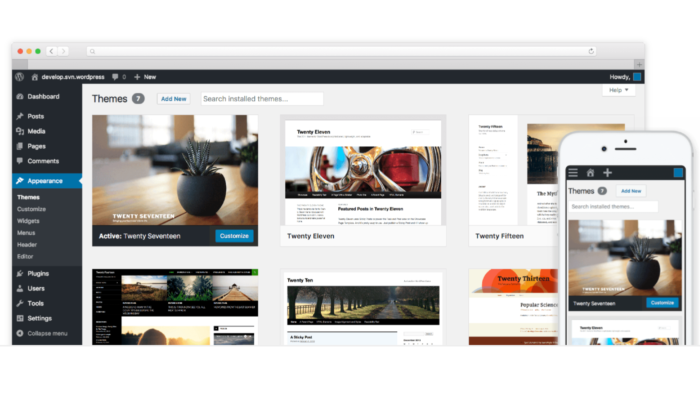
However, you do need web hosting to be able to use it.
This usually costs around $3 – $10 per month, so it’s the most affordable option on this list.
With that said, it’s not as easy as Wix.
There are a few more steps to get started, but the extra work is well worth it if you’re looking for complete design control and flexibility.
With WordPress.org, you also get:
- 55,000+ plugins to extend the functionality of your site
- Thousands of free and premium themes
- The Gutenburg block editor
- Advanced user roles and permissions
- Powerful media management
- A massive community of experts
- Infinite design control
The best part is that you have 100% control over your website and blog. Plus, you aren’t tied down by rules and regulations. You can decide what to display, what you don’t reveal, and how you make money.
There are countless ways to get started with WordPress.org.
But I highly recommend starting with Bluehost.
It’s the easiest way to get everything you need.
They also include a free domain name for the first year.
So, all you have to do is pick a hosting plan, snag your free domain, and use their one-click WordPress installation feature.
#3 – Squarespace Review — The best blogging platform for visual-based businesses
Squarespace is an all-in-one website builder, like Wix.
However, it’s famous for aesthetically pleasing templates, making it perfect for visual-based businesses like photographers, designers, and artists.
It’s also straightforward to use.
Plus, it includes web hosting services and a free domain for the first year (if you choose an annual premium plan).
It’s perfect for bloggers who want an easy, aesthetic way to share images, videos, and portfolio pieces, along with long-form and short-form blog posts.
And with Squarespace, you create blog posts the same way you create pages.
So, once you learn how the drag-and-drop editor works, you know how to use the entire platform.
You also get access to powerful blogging features, including:
- Free blogging templates to help you get started
- Five unique post layouts for your home and archive pages
- Categories, tags, and featured posts
- Built-in post scheduler
- Contributor permissions
- In-depth analytics
- SEO and social media tools
- Email marketing (additional fees)
- Expert customer service
- Mobile app
Squarespace isn’t as customizable as Wix or WordPress.org, but it’s perfect for creative bloggers and visual-based businesses looking for something captivating and easy to use.
Paid plans start at $12 per month and increase depending on the features you need.
#4 – Medium Review — The best traditional blogging platform
Medium is a platform that helps readers and writers find new ideas, knowledge, and perspectives.
It’s unique because there are no ads present on the platform.
To date, they have over 120 million readers, making this an excellent way to get your content in front of more people.
It’s also great if you want to share personal stories and perspectives to get your thoughts out to the world.
However, it’s not a great platform for making money as a blogger.
The medium does have a partner program that rewards writers for the amount of time paying members spend reading their content.
But you’ll have a hard time making a decent amount of money on Medium alone.
And you can’t include your own call-to-actions in partner posts.
So, you have to choose between making money and growing your email list.
It’s not a flawed model.
However, I highly recommend treating Medium as an extension of your Wix, Squarespace, or WordPress.org blog.
To get started, you can create a profile or a publication.
Publications look more aesthetically pleasing, and you get more organization and display features.
With publications, you can also send newsletters to your followers.
However, it doesn’t really matter which one you choose.
Note: if you use Medium as an extension of your blog, make sure you use their import feature to add existing blog posts.
This way, you can add content from your blog to Medium without creating duplicate content for SEO purposes.
#5 – Blogger Review – The best for personal blogs
Blogger is one of the original blogging platforms. It’s been around since 1999.
It’s completely free to use with no paid plans, upsells, or anything like that. And it’s incredibly easy to use.
This makes it perfect for personal or hobby bloggers looking to share their thoughts and ideas with the world.
They have several free templates to choose from that govern how your blog looks.
However, they’re not very customizable.
You can change the colors and the layout of a few things, but that’s about it.
The platform focuses solely on blogging, so that’s where the majority of its features lie.
With Blogger, you get free access to essential features, including:
- A free SSL certificate and free domain mapping
- Google integrations
- Image storage with Google Photos
- Integrated ad campaigns
- Simple text editor
And while those features are great, the platform is seriously lacking in other departments, including customization, custom post types, and overall design.
Essentially, it’s an old-school blogging platform.
It works well for simple blogging, but you can’t create a full-fledged website, so I don’t recommend it if you want to build a brand and make money blogging.
However, since Google’s acquisition in 2003, you can display Google Ads on your blog to make a little extra money on the side.
But, it’s not a sustainable or long-term way to make a full-time income with your blog.
Summary
The best blogging platform for you depends on where you want to take your blog.
For personal and hobby bloggers, a free platform like Blogger or Medium is the perfect place to start.
They’re easy to set up, incredibly simple, and the fastest way to start publishing online.
Plus, you don’t have to pay anything to share your thoughts and ideas.
However, if you want to make money and turn your blog into a business, free platforms won’t cut it.
The easiest premium blogging platforms are Wix and Squarespace, making them perfect for beginners.
However, if you want the ultimate level of control, go with WordPress.org hosted by Bluehost.
The post The Best Blogging Platforms (In-Depth Review) appeared first on Neil Patel.
Source: neilpatel.com