
Tag Archives for " backlinks "

How Backlinks from Different Page Locations Are Worth More (Or Less): Not All Backlinks Are Created Equal
If you want to get found online, you need a strong backlink profile.
The problem? Not all backlinks are created equal.
Links from high-quality, relevant sites are far more valuable than links from random sites in another industry. Links from spam sites can actually hurt your website.
How do you make the most of your backlinks? You need to pay close attention to the factors that impact backlink value.
Here is what you need to know to make the most of backlinks.
What Are Backlinks?
Backlinks are links from an external site to your website. For example, if I link to a source about how to protect your app from security issues, that creates a backlink to that website.
If another site links to your site, you receive a backlink.
For a long time, getting as many backlinks as possible was a core component of SEO. Google viewed backlinks as “votes” and rewarded sites with lots of backlinks with higher rankings.
Eventually, however, businesses began to use black-hat strategies to build backlinks. For example, paying sites to add links, buying links from shady sites, adding comments to other blogs with links to own site, or building networks of sites that are all linked to each other.
Google got wise to these strategies and issued an update that made it much harder to get away with building poor-quality backlinks. It released a number of backlink guidelines that marketers should follow and also released another update targeting spammy links in June of 2021.

How Do Backlinks Affect SEO?
As mentioned above, Google views links as votes. The more sites that “vote” for your site (meaning link to pages on your site), the more valuable and relevant Google assumes your pages and site are.
In fact, backlinks are one of several hundred factors Google considers when deciding where to rank a website in its search results.
Here’s why: A backlink to your website means another site found your content engaging, interesting, or educational. So much so that they decided to share it with their audience. Google assumes that means your content is valuable to users, and is more likely to share your content with searchers.
However, there isn’t much you can do to impact how many links another site puts on its pages. Just keep it in mind when considering which links are most valuable for your website’s SEO.
If many trusted sites link to yours, Google knows your site has great content that users will want to read. As a result, you’re more likely to rank high in the SERPs.
What Makes a Backlink Valuable?
More backlinks isn’t always better.
If you use link schemes or other black or gray hat SEO practices, Google will punish you with lower rankings or even manual action. What makes a backlink more valuable than another?
1. Location and Number of Links on a Page
Did you know that where a link is located on a page can impact backlink value? Sounds weird, right?
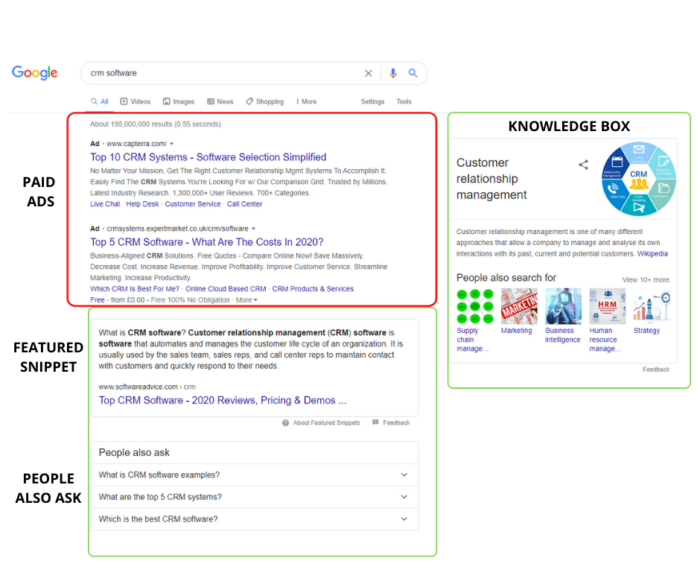
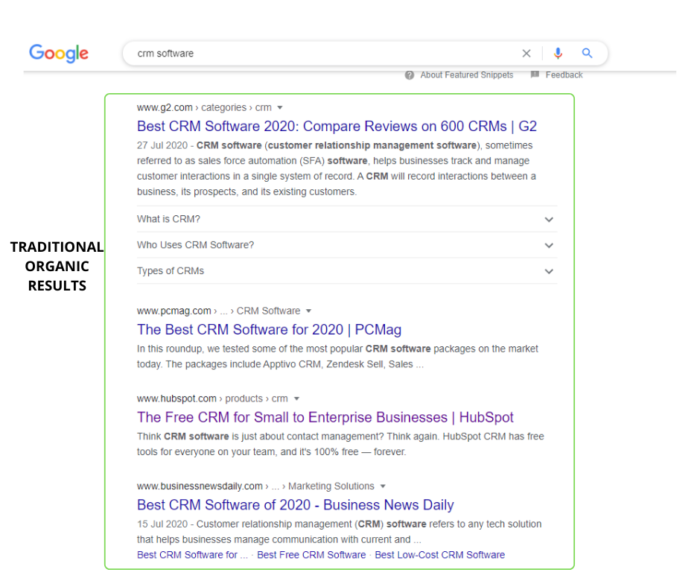
Well, Google considers the first link on a page to be the most valuable, which means it gets more of the benefits of having a backlink. In addition, the more links on a page, the less link value each link has.
In practice, this means that if your link is the only backlink on a page, you’ll see more SEO benefits than if your link is at the bottom of a page and is one of twenty other links.

2. Dofollow Vs. Nofollow Backlinks
Dofollow links are your basic backlinks. When the website owners don’t fiddle with the HTML surrounding the link, the link will always be a dofollow.
Dofollow links tell Google the linking website trusts your domain, which can help your rankings.
Nofollow links, on the other hand, look like this in HTML:

Nofollow links tell Google that this link should not pass on value (sometimes called link juice).
In other words, nofollow links still take someone from Website A to Website B, but they won’t help Website B’s rankings.

Why do sites use nofollow links? Because linking to low-quality or low-domain authority websites can hurt the link-hosting website’s rankings. Also, Google doesn’t allow you to pay for links, so some sites use nofollow links on sponsored posts.
Don’t assume nofollow links are a complete waste of time. In fact, they really help generate traffic to your website and increase the visibility of your business despite their unhelpful SEO influence.
3. Domain Authority and Page Authority
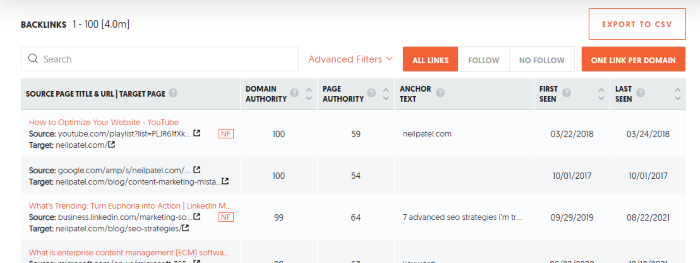
DA, or domain authority, is a metric created by Moz that predicts how likely a website is to rank well in the search engines. Scores range from one to 100, with higher numbers meaning the site is more valuable and more trusted.

Page authority is the same metric, but for a specific page on a website.
It isn’t an exact science, and it isn’t a metric Google came up with—Moz did. However, it does use machine learning to get a pretty decent idea of how well a site will rank.
What does this mean for your backlinks? If a site with a higher domain authority or page authority links to your site, Google will assume your site is more trustworthy, too. That’s a good thing!
Think of it like vouching for a friend to get a job. If you are a dedicated worker and recommend someone else, your boss is likely to assume they can be trusted to work hard, too.
TL;DR: Links from high-domain authority pages are more valuable.
You can find the domain authority of sites using Moz’s domain analysis tool.
Or, you can use Ubersuggest to run a backlink analysis on your site, and we’ll share all the domain authority and page authority metrics in one place.
4. Relevant Sites and Pages
Relevancy matters when it comes to recommendations. Let’s say you wanted to buy a new snowblower. You look around the internet and find two articles that review the top snow blowers—one is from a hardware store, and the other is from a food blogger.
Which one would you trust? You’re likely wondering what a food blogger really knows about snow blowers, right? The hardware store, on the other hand, probably sells snowblowers and talks about them to customers on a regular basis. There is a good chance they know what they’re talking about.
Google also considers relevancy when deciding how valuable a backlink is. For example, a link from a digital marketing publication or a publisher like Forbes to my site is worth more than a link from a plumber.
In general, links from irrelevant sites won’t hurt your website (unless they are spam sites!), but links from other industry websites do carry more value.
5. Quality of Other Links on the Website
It’s not just the domain authority that impacts backlink value. The quality of every other backlink on the referring domain can impact the value of a link too.
It doesn’t sound fair, does it? You can’t control what someone else does on their site. While that is true, there is a reason for this.
Let’s pretend that you receive a backlink from a website with high domain authority. Your ranking goes up, traffic is pouring in, and you feel like the SEO pro you are.

Then one day, the website that gave you that precious backlink becomes a spam site. They publish low-quality content and link to a bunch of spam sites.
It’s no longer a high-quality site in Google’s eyes, which means that link has lost its value. In other words, pages that link to spam websites devalue all other links that they host.
It’s important to evaluate the websites you get backlinks from. That will help you avoid harmful URL relationships. Make sure they are trustworthy and do their own link evaluating when choosing which links to include so that your website won’t be at risk.
Also, never buy links from websites. Even sites that seem legitimate will likely get caught by Google at some point, and your site may suffer the consequences.
6. Anchor Text
Anchor text is the text that is highlighted and often underlined that you click on to follow a link, like this.
If the site that links to your website uses anchor text that is closely related to the content on that page, Google will assume the link is more useful to users and, therefore, assigns it more value. As a result, Google made anchor text a ranking factor.
Let’s look at an example from Yoast’s website. I’ve highlighted the anchor text:
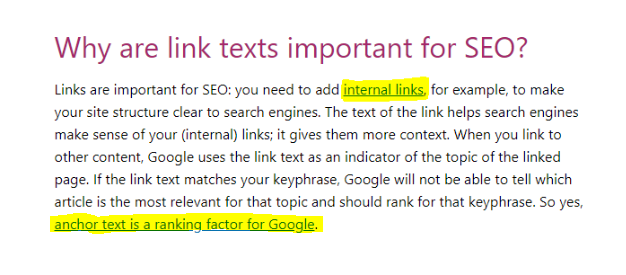
The anchor text for internal links goes to a page about, as you might expect, internal links. Because the anchor text uses the keyword the linked page targets, that link is more valuable than if they used anchor text like “click here.”
Pro tip: This applies to internal links, too. Make sure to use relevant anchor text when linking to other pages on your own website.
Frequently Asked Questions About Backlink Value
How do I identify valuable backlinks?
Backlinks that come from high-quality, relevant sites are the most valuable. Look for the following links and pay attention to other sites they link to. All of these factors impact backlink value.
What’s the easiest way to get valuable backlinks?
The easiest way to build backlinks is to create highly-valuable content that other sites will want to link to. This is often called link attracting, versus link building. Other strategies include looking for broken links on sites and asking them to replace them with yours, guest posting, creating infographics, and creating new data.
What types of backlinks are valuable?
The most valuable backlinks are dofollow links from trusted sites related to your industry with high domain authority.
How much are backlinks worth?
You can’t put a dollar amount on backlinks. However, a solid backlink profile can improve your search engine ranking, drive traffic, and increase your revenue. In that sense, they are priceless.
What is the difference between backlinks and internal links?
Backlinks are links from other websites that point to your site. Internal links are links that point from one page on your site to another. Both have SEO value, but backlinks are usually harder to get and, therefore, considered more valuable.
What do I do if I have a bunch of low-quality backlinks pointing to my site?
In most cases, Google can spot poor-quality backlinks and will ignore them. If you think they are impacting your site (or if you get a manual penalty), you can use Google’s Disavow tool to tell them to ignore those links.
Backlink Value Conclusion
Backlinks are a cornerstone of SEO. However, not all backlinks deliver the same value. Links that are higher on a page or from pages with a higher DA will help your website rank better in Google’s search results.
You can use this information to build higher-quality backlinks. Get it right, and your site can see a flood of traffic and conversions.
Do you consider backlink value when building links? Why or why not?
Source: neilpatel.com

How to Build Backlinks in Less Than 1 Hour
I have a question for you…
How do you build links?
If I had to bet, chances are you spend little to no time on link building.
Why? Because it’s hard.
But why should link building be hard?
Most parts of SEO are much simpler and cost-effective.
For example, if you want to write content… you just go and write it.
It may not be great content, but nothing is stopping you from starting, learning, and improving.
On the other hand, if you want to build links, where would you start?
That’s a bit tricky because link tools cost money… and a lot of money if you are just starting out.
But that’s going to change in 30 days with your help!
Link building made simple
As you may know, I released a new version of Ubersuggest a few weeks ago.
And with your help, I want to roll out a free link tool.
Here’s what I am thinking and, before I roll it out, I want to get your feedback.
So, with the new Ubersuggest, I made it where you can put in a URL.
Let’s say I’m your competitor… neilpatel.com.
You would head over to Ubersuggest and just put in neilpatel.com
You’ll end up with a report that looks something like this:
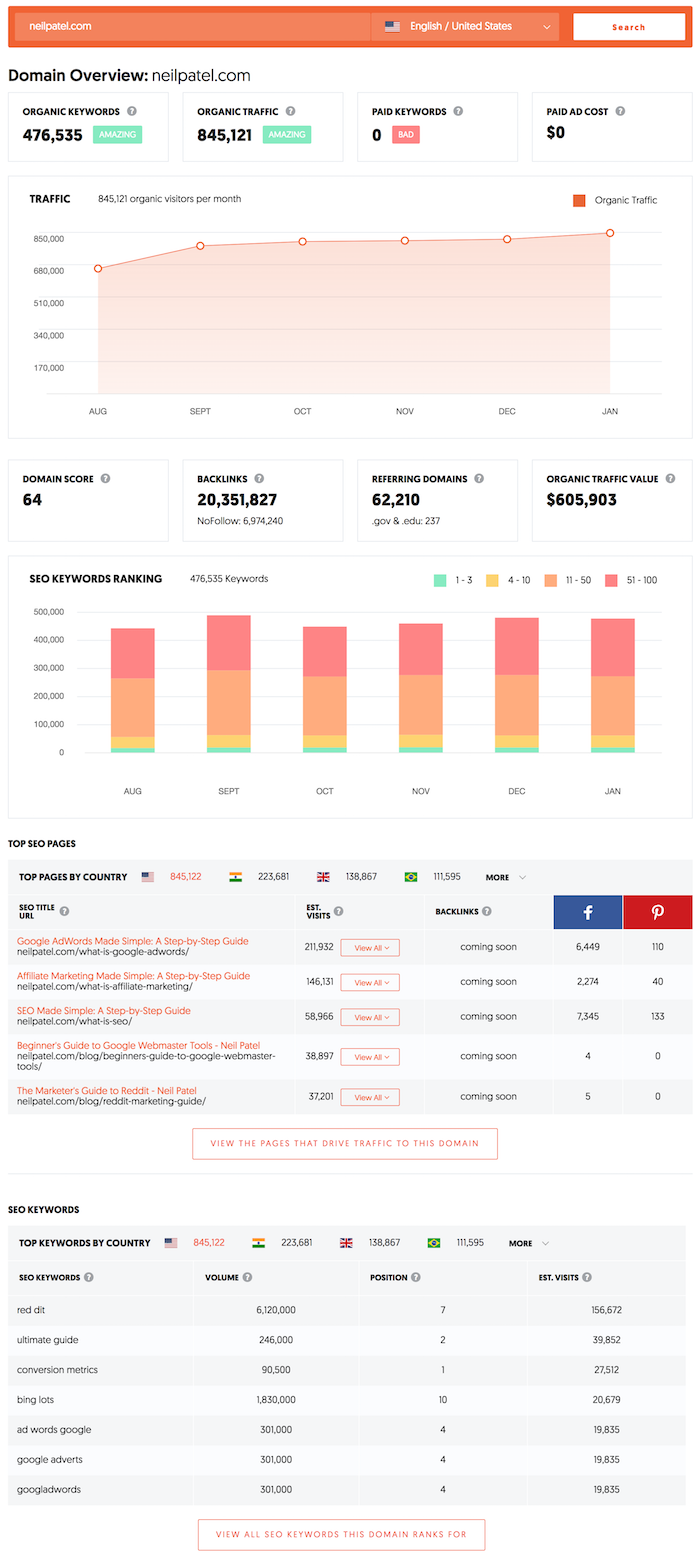
Now, the most useful part of the tool (and this is where I want to integrate link building) is the top pages.
It shows you the pages on your competitors’ sites that are the most popular.
The way most SEOs grow their traffic is by finding out what’s working for their competitor and then copying them or, even better, one-upping them.
So if you were competing with me, you could see all of my most popular pages based on Google traffic.
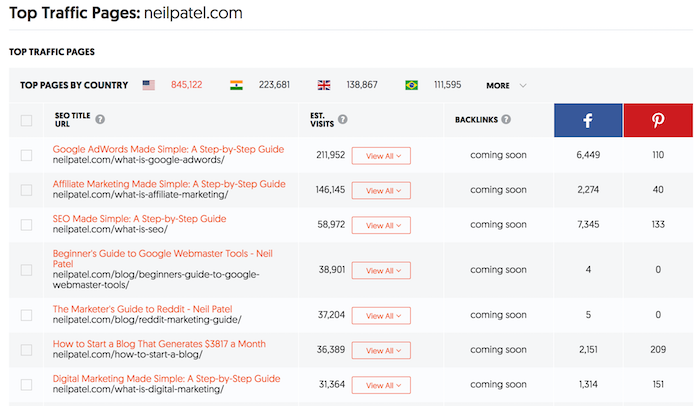
You can even click on “view all” under the Est.
Visits column to see all of the keywords that are driving traffic to my site.
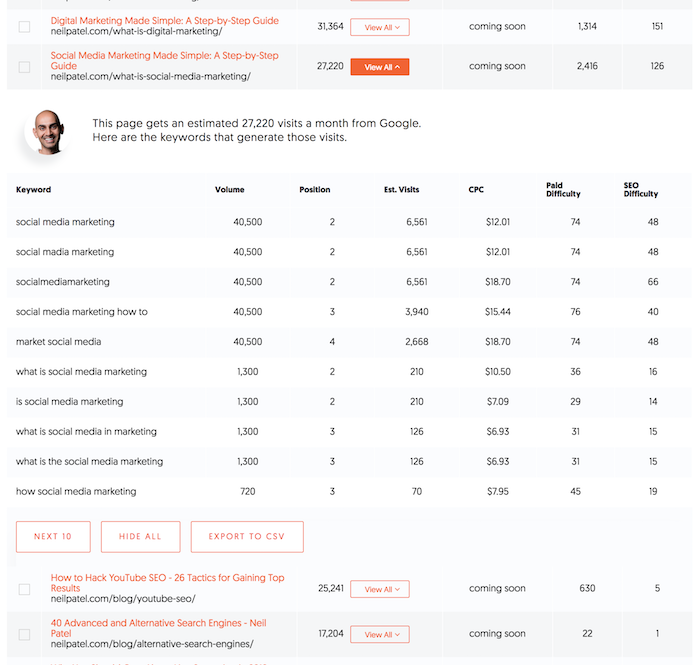
I know this report isn’t perfect, but it gives you a really good idea of what you should be targeting if you want more traffic.
Because if something is working for your competitors, it will probably work for you.
But there is one big issue… if you just write similar content to your competition, there is no guarantee that you will beat them.
Unless you build more links than them.
So on that same report, I was thinking about adding a drop-down that breaks down the exact links that drive traffic to each specific URL.
It would look something like this:
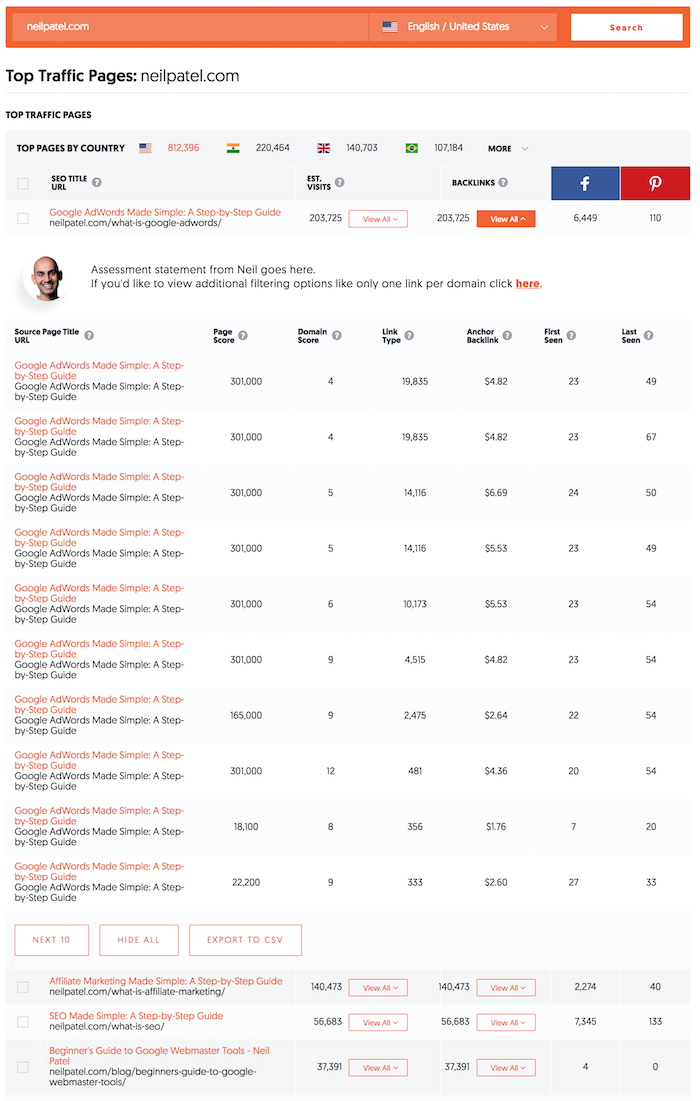
I know the data is fake and junk, but hopefully it gives you an idea of what I am thinking.
This one report will allow you to see who is linking to your competitor’s most popular pages, the anchor text they are using, when the link was last seen, and even the authority (page score) of the backlink.
Now, before you give me feedback on this report, there is one more report I’m thinking about launching within the next 30 days.
Backlinks
For those of you who are advanced SEOs, I was thinking about making it super easy to see who links to you as well as your competition.
I want to start off with something basic so I can get you this report/feature within 30 days.
It would look something like this:
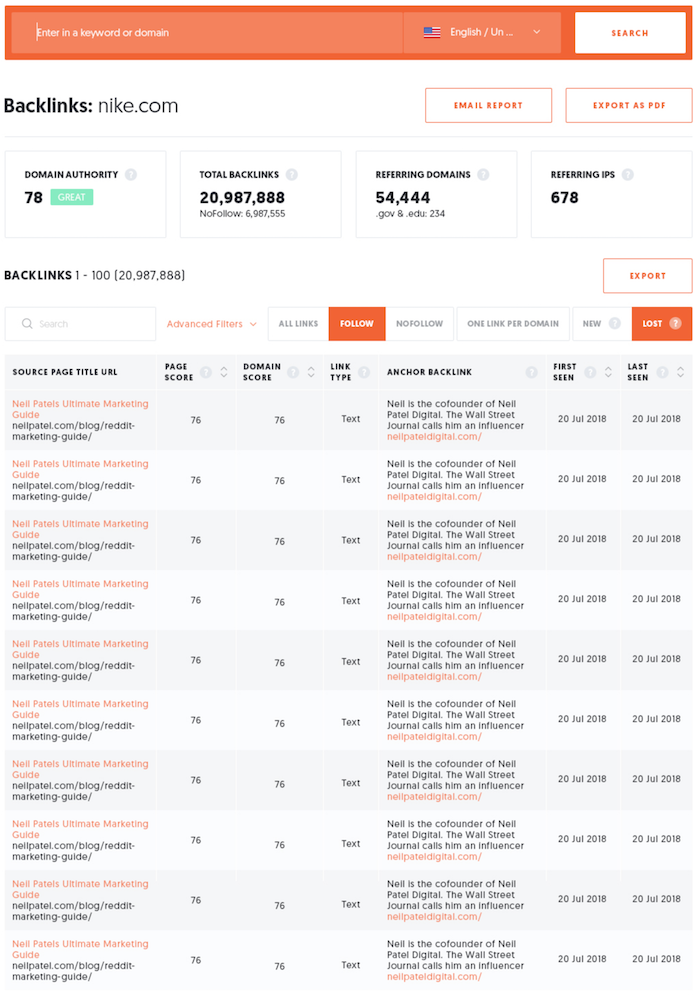
You’ll be able to see the authority of the page or a domain, the total number of backlinks, how many nofollow links, referring domains, and even referring IPs.
If you want to get granular, you can, by just looking at new links or lost links, or even one link per domain.
And of course, you can see all the details of the link, such as title, URL, anchor text, authority, if the link was a text link or an image link, and when the link was last seen.
If you want to drill down further, the filters will allow you to do that.
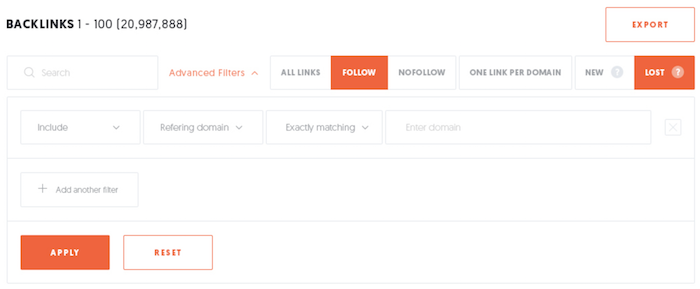
Once you have the data looking the way you want, you’ll be able to easily export the data.
Conclusion
The whole purpose of this tool would be to make link building easier for you.
You’ll be able to type in any URL, find out who links out to them, and easily hit them up and ask for them to link to your site.
The reports won’t take more than 10 seconds to load… so finding opportunities won’t be difficult.
Crafting emails and doing the outreach will be the hard part.
I know this won’t automate all of your link-building efforts, but it will make the process easier and much more efficient for you.
So, what do you think, should I release this feature within the next 30 days?
And if you think I should do it, what other features would you want me to release?
Oh, and the link data would be fresh and updated daily.
The post How to Build Backlinks in Less Than 1 Hour appeared first on Neil Patel.
Source: feedproxy.google.com

How Salesbloom Builds Excellent Traffic Without Backlinks
This is a TRUE & SUCCESSFUL story from Jim Miller – Founder of Salesbloom and one of our long-time customers.
Jim Miller is an e-commerce consultant, and founder of Salesbloom, who collaborates with world-renowned marketing gurus.
Enjoy his story, written and documented by himself, and see how we hit Google’s top SERP spots with no backlinks but with good content optimization.

Over a six to nine-month period using the content assistant optimization tool, I have seen numerous pages swiftly develop and rank to the highest pages of Google.
So getting traffic without building backlinks can be achieved with the right content strategy.
This case study was composed to help share the success I had for my client.
Why This Ought to Work For You?
Working behind the scenes with some of the fastest developing agencies in marketing, you encounter conflicting strategies both internally and externally, which promise to improve your client’s rankings.
I’m a firm believer in testing everything before foolishly trusting any information from whoever it may be, whether an influencer, agency or otherwise, so I work behind the scenes to know what actually works.
Years ago, I cracked an algorithm on eBay’s search engine with one of my first career positions, taking a small (and I do mean small) local footwear retailer from £10k online sales per month to £250k (£450,000 Christmas Peak).
All in just under six months!
Yes, it’s true – and this included outselling retail giants like ‘Barretts’, ‘Office’ and ‘Schuh’- and all without a penny of a marketing budget!
I’ve never had the luxury of limitless budgets (and I prefer not to either as the constraints bring out the best in me).
Having a typically micro-budget (maybe being a tad frugal as well), I’m always hesitant to pick something like ‘Marketmuse’ and put my house on the market for a taste!
Being overworked (and a little disorganized if I’m honest at the time) necessitated a search for a timesaving tool for obtaining the broader metrics or overarching topics and keywords which help others rank more highly.
It was then that I came across Cognitive’s Content Assistant tool – though at that time it took a little digging as the software was so new.
Cognitive’s content assistant tool allowed me the opportunity to see correlated topics and missing keywords that enable the content to shine through.
I’m not a natural writer, I rely on others to help me edit my thoughts as many e-commerce consultants do.
I might add that my thoughts are not always that easy to convey, so this tool was an immense help.
I found the experience when using the Cognitive SEO to be intuitive in the main, simple to use, and then ideal to communicate to others.

Jim Miller
Founder of Salesbloom | @salesbloomuk
Now at Salesbloom, we constantly develop existing content using Cognitive and produce new articles within the same content writing process.
Here’s how we did it (as I’m honest enough to say I have great colleagues too!) …
How We Hit the Google’s Top SERP Spots
If you’ve never used Cognitive or unless you’re comfortable enough to drop into the Google Search Console, it’s worth tracking your existing content’s keyword positions with Rank Tracker before you start.
The first things to do are:
- Find existing content you determine needs to be improved upon.
- Search for the main keyword with the ‘Cognitive Keyword Tool’.
- Optimize your content with ‘Content Assistant’.
- Fetch URL within Google Search Console
Step 1: Find Existing Content to Improve
One of the best positions to start from is by finding pages with keywords or queries that currently rank outside the top five spots on Google.
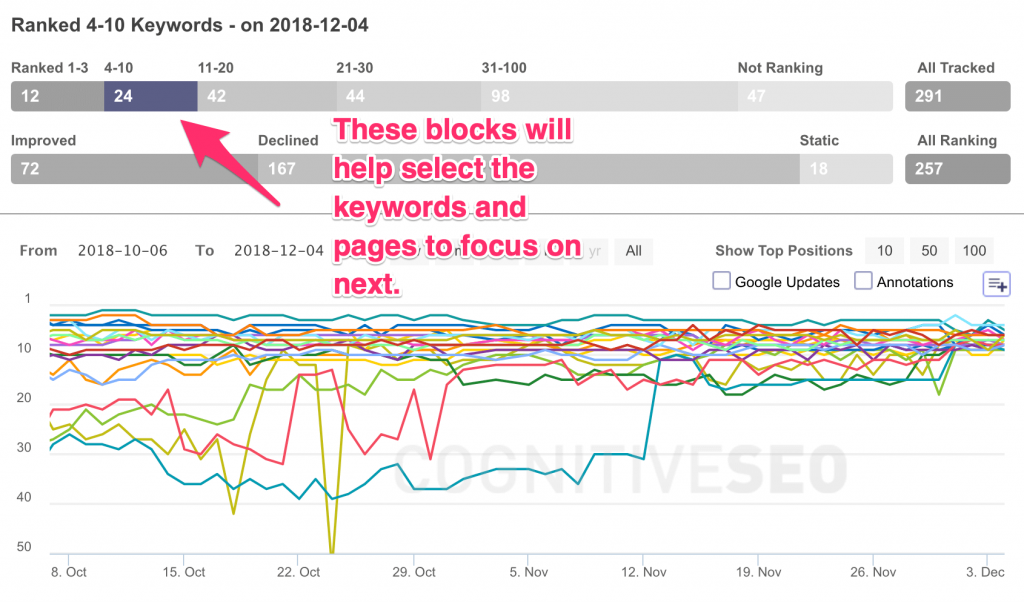
The ‘sweet spot’ is choosing keywords that sit in position 4 up to 30.
As you can see, the blue line above did brilliantly!
Step 2: Search for the Main Keyword with Cognitive’s Keyword Tool
Pick your head term or the keyword you want to rank for and search with the keyword tool.
In the example below, I chose “SEO agency” as my keyword phrase.
Feel free to pick any keyword and page you like as I’ve had success with category pages on e-commerce websites, homepages, and blog articles.
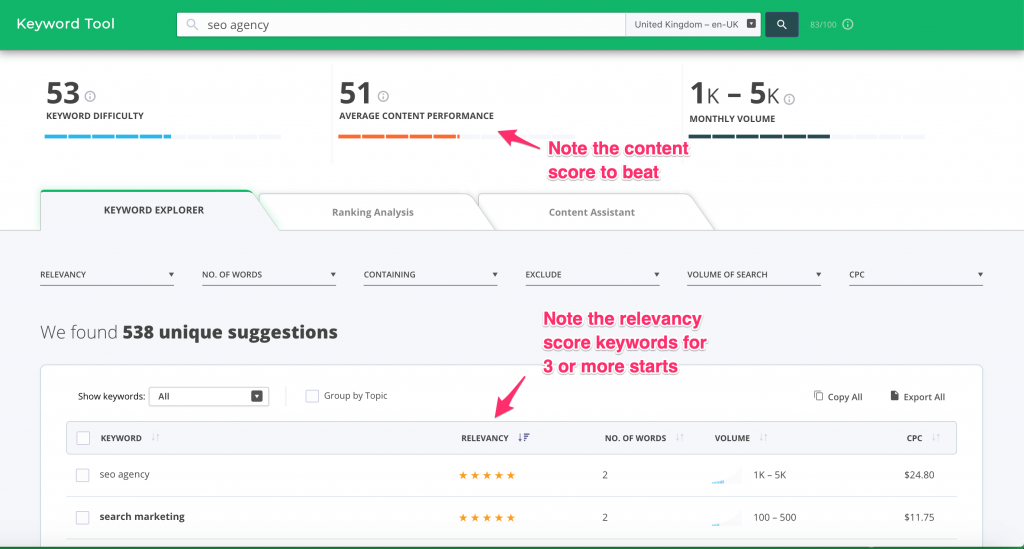
Make note of the average content performance score.
The goal is to beat that on your optimization round. (I suggest you open a new Google doc and add it at the top to remind you of your target)
It’s good to pull out the relevancy scores and consider any that score higher than 3 stars.
Create your new content so it reads well, and without worrying about key phrases initially.
Once you’ve done that, copy the list of keywords that Cognitive suggests and work out a structure for your article based upon the 3-5 star terms.
GO FOR GOLD.
Never strive to be average at anything.
Jim Miller
Founder of Salesbloom | @salesbloomuk
Take a peek at the ranking analysis tab next to see how you are performing before you continue.
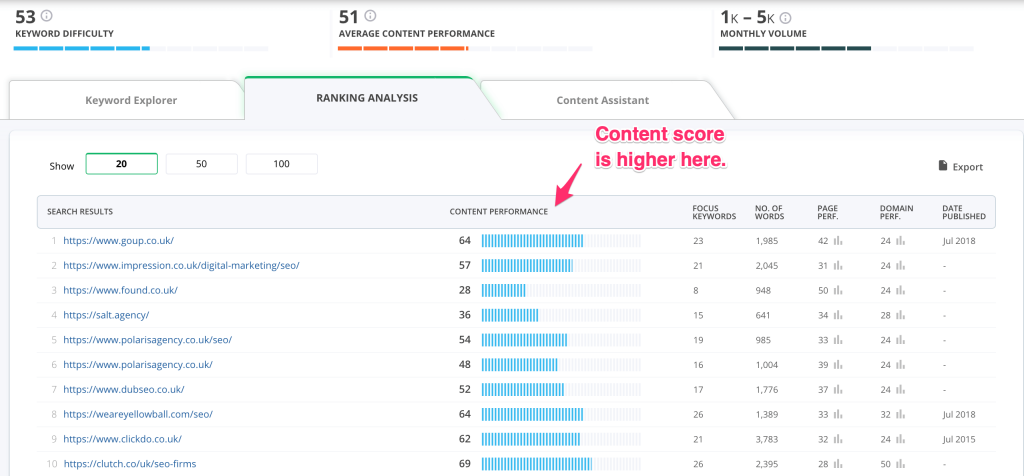
It’s a good idea to see what competitor pages do on the look and feel of the page for content flow.
Google ‘likes’ these sites for a reason so it’s a ‘no-brainer. (Ultimately, it’s because the visitors do as well!)
The action to take for this example is: Write a 700-4000 word content piece that beats 69.
Step 3: Optimise with Content Assistant
Once you’ve gone into the Content Assistant, press the top right, ‘Import link’ if it’s an existing page (and yes, it can even score raw code).
Otherwise, copy and paste your content into the relevant sections and hit ‘Check Score’.
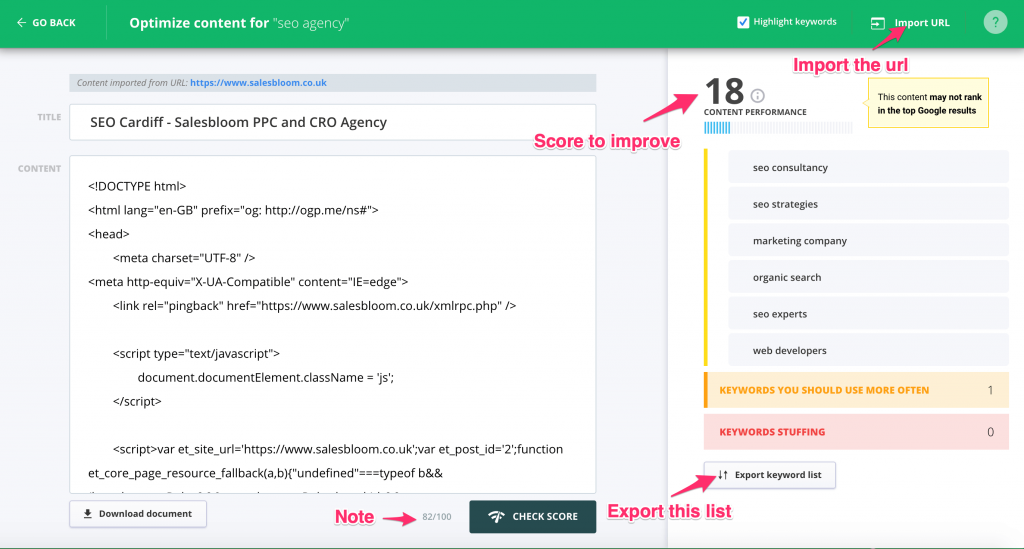
This site is new so typically it’s not going to score well yet, but if you export the list and scroll down on the right-hand side you now have keywords to export and use.
You do have the option to amend the copy on the left-hand side in real-time, but each check of the score reduces your overall monthly allowance.
I prefer to optimize outside in a Google document file so as to not squeeze keywords in when they are not needed, and to ensure your article or post still reads well.
Repeat each process, and once you feel you’ve done a good job hopefully, you’ve beaten your competition’s score. If not, take a step back and see where your content can be improved.
Step 4: Fetch URL within Google Search Console
Login to Google Search Console and retrieve the revised URL.
(I’ve not convinced this speeds it up, but it’s a habit I now do every time).
Results
Results can be manipulated but these graphs illustrate this type of content is not reliant upon seasonal wins or easy pickings.
That alone should encourage you to test this for yourself, based on my findings.
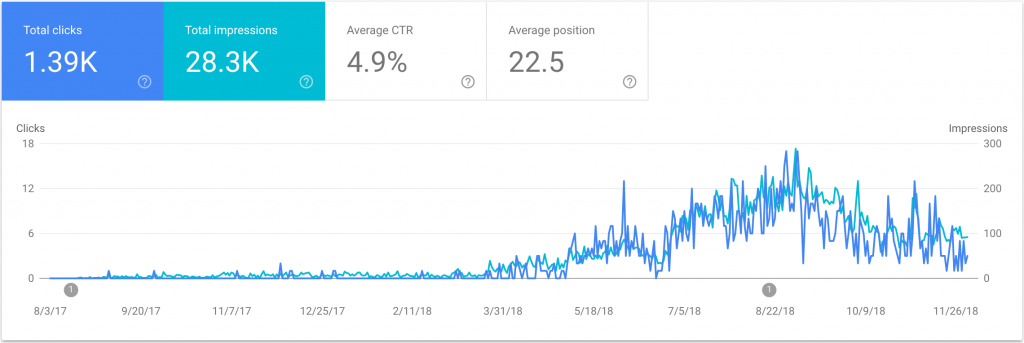
The first piece of content below was devised for a SAAS company that has grown from zero to almost 7,000 clicks in a year.
This, with no backlinks or promotion: Pure organic traffic gain.
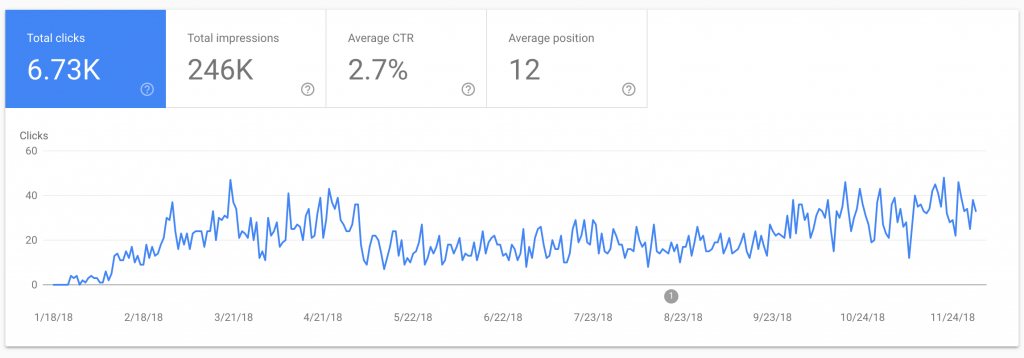
Some keywords can take longer to develop (as below) but site traffic appears when you produce good content via the ‘Content Assistant’.
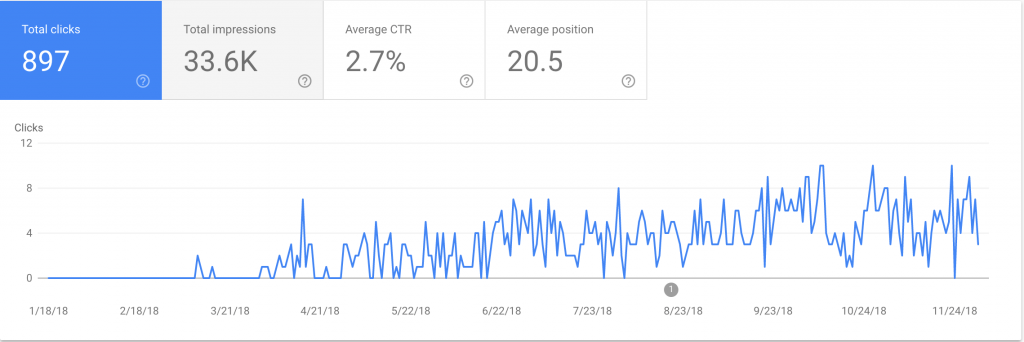
Here’s another blog article created and developing nicely below. Perfect for a revisit within a year turnaround.
Here’s a comparison (below) for much older content.
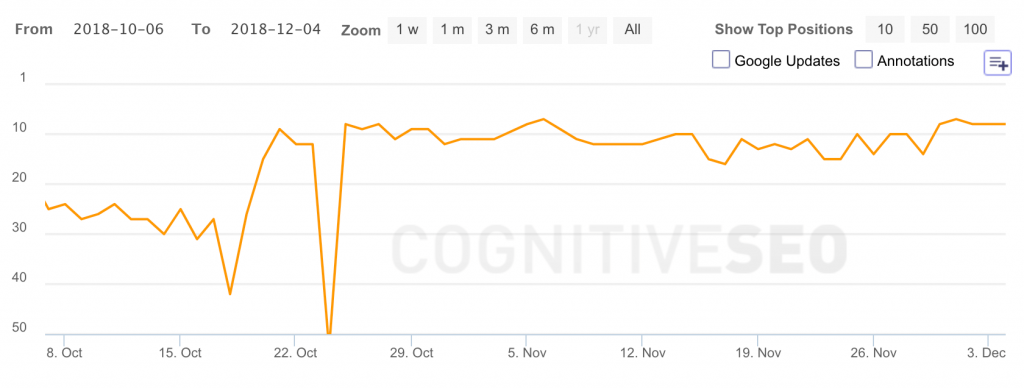

To reiterate, I’m not going for easy choices on keywords.
To my mind, there aren’t many anyway, but the example above is recently optimized and shows positive progress in a short period.
Disclaimer
This is not a paid post. cognitiveSEO made no agreement with the author.
This is Salesbloom’s and Jim’s success story, written and documented by himself.
Please feel free to share your thoughts on this story with us.
About the author

Jim Miller is an e-commerce consultant, and founder of Salesbloom, who collaborates with world-renowned marketing gurus such as Neil Patel and Eric Siu on internal projects.
The post How Salesbloom Builds Excellent Traffic Without Backlinks appeared first on SEO Blog | cognitiveSEO Blog on SEO Tactics & Strategies.
Source: cognitiveseo.com