
Tag Archives for " Amazon "

How to Set up The Amazon Associates Affiliate Program to Earn Website Revenue
Affiliate marketing is a way for online publishers (including bloggers) to make passive income by recommending products and services they love.
Amazon Associates is one of the most trusted affiliate marketing platforms where anyone can start an income stream from the comfort of their home.
Like most methods, this takes plenty of strategizing and hard work.
Once you get the hang of the basics, however, it’s relatively easy to monetize your content. Here is how to get started and drive revenue with Amazon Associates.

Point of Sale
How Does the Amazon Associates Affiliate Program Work?
The Amazon Associates Affiliate Program is an affiliate program that’s free for creators to use. As a blogger, YouTuber, or another content creator, you can insert links to products from Amazon into your posts to encourage people to click and buy.
Amazon explains the process in three simple steps:
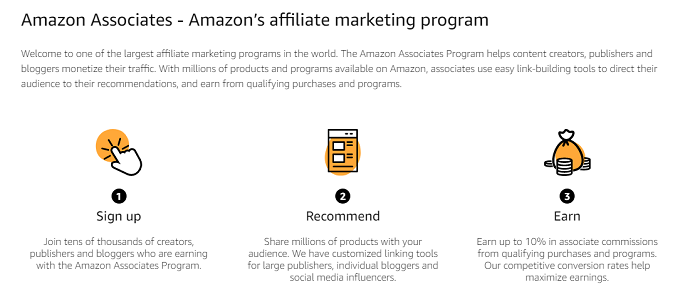
When someone uses your unique affiliate link to buy something from Amazon, you get a small revenue cut via referral fees.
You can take advantage of this by leveraging your audience’s attention.
If you’re already a big influencer, you can encourage your large following to buy from your links by posting promotional content.
However, you don’t need to be a massive influencer to make some money from Amazon Associates. Content creators of any size can make some additional cash by creating enticing work and including affiliate links in it. Just make the products look irresistible!
No matter what, make sure the products line up with your content and brand message. You don’t want to lose your audience’s interest.
These affiliate marketing techniques, among others, can help creators generate passive income streams.
Things to Keep in Mind About the Amazon Associates Program
While the Amazon Associates process is relatively straightforward, there are some essential things to keep in mind before you get started.
These reminders may help keep you out of legal and financial trouble while ensuring you have the right resources to build a successful affiliate marketing business.
1. Not All Commissions Are Equal
The Amazon Associates program operates on a commission basis, but not all commissions (also known as “referral fees”) are worth the same amount.
The official Amazon Associates page created the pay scale table below. It shows luxury items, like designer watches, bags, and perfumes, offer a 10 percent commission. Meanwhile, toys, furniture, business supplies, musical instruments, and other lifestyle items pay a 3 percent commission.
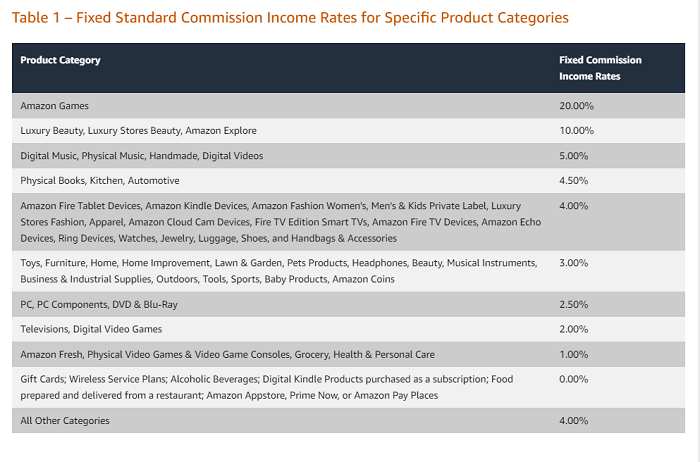
If someone buys a $1,000 luxury product from your Amazon Associates affiliate link, you get $100. If someone buys a $1,000 musical instrument with your Amazon Associates affiliate link, you get $30.
Though this difference is enormous, don’t be tempted only to sell high-commission products. For example, if you run a website where you talk about musical instruments but throw in a link to luxury shoes, your audience may be thrown off, and your content quality could decrease.
If you can find high-commission products for your page, that’s great! If not, smaller amounts add up.
For example, that $100 commission is worth just over three $30 commissions. People looking for your content are more likely to want relevant products. Are they more likely to buy the unrelated item or the one that fits naturally with your content?
2. You Must Disclose Affiliate Earnings
It can be tempting to hide links in your content and earn referral fees without telling your audience—you don’t want to seem “too salesy,” after all. However, not only is this unethical but it’s also frowned upon by Amazon.
Perhaps more importantly, it’s a U.S. Federal Trade Commission (FTC) requirement: Creators must specify if the links on the page earn them revenue.
This can look something like this:

Or this:

3. You Can’t Promote Controversial Products or Make Fake Claims
While you’re allowed to use affiliate links with almost any Amazon product, there are some limitations. For example, you can’t promote sexually explicit, obscene, violent, or illegal products. Make sure anything you promote is legitimate before adding the link.
You also may not make misleading, overly promissory, or false claims in your content.
This is particularly important when recommending health and beauty products. Avoid exaggerating benefits and give ample information about side effects and other warnings.
On a relevant note: Don’t promote products you don’t believe in. While it may be hard to prove you were intentionally misleading, you could end up losing audience members if everyone hates what you’re trying to sell—particularly if the downsides are obvious.
What Are the Pros and Cons of the Amazon Associates Affiliate Program?
The Amazon Associates program offers a great way to monetize your content and promote products you love. That said, it comes with both pros and cons.
Pros of Using Amazon Associates Program
There are several benefits to using Amazon Associates over other platforms. Here’s why you should consider this platform.
Amazon Is a Well-known Brand
Amazon has millions of shoppers, many of whom are regular customers. You can leverage this by using Amazon affiliate links to recommend trending or relevant products from this mega-popular e-commerce site.
Amazon Has a Lot of Variety
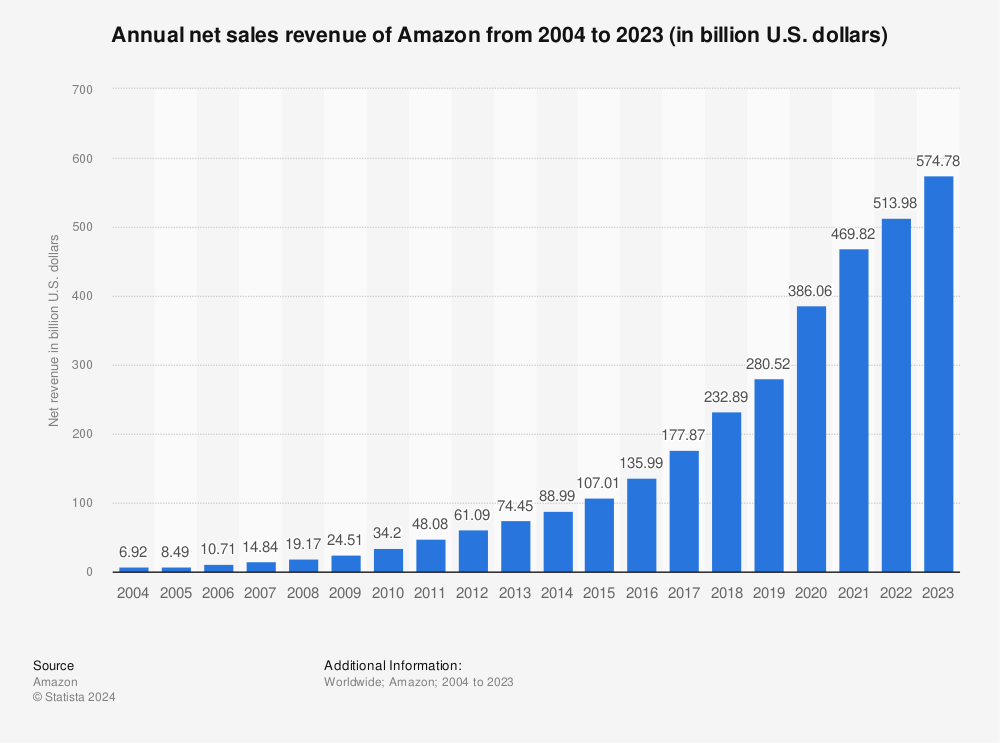
Amazon is estimated to sell more than 12 million products, so you have plenty to choose from. Whether you are an automotive blogger or a fashion influencer, you can find products that work with your content and audience’s interest.
Make Money by Recommending Products
Do you enjoy recommending new products to friends and relatives? Then you’d enjoy working with the Amazon Associates Affiliate program. You earn referral fees just for recommending products you already love (or know your readers would love).
There Are No Minimum Requirements to Get Started
Most programs have qualifications for using affiliate links, but the Amazon Associates Affiliate program has no minimum requirements. You can apply for an Amazon Associates account with any number of social media followers and web traffic.
Cons of Using Amazon Associates Program
Amazon Associates isn’t the only affiliate program on the market. Is it the right choice for you? Here are a few cons to keep in mind before diving in.
Amazon Associates Offers Low Commission Rates
While it’s easy to use the Amazon Associates Affiliate program, it offers comparatively low commission rates. You generally shouldn’t expect to make a living out of affiliate marketing alone anyway, but it’s even more challenging at these rates.
In fact, you may not even be able to cover your website hosting fees, let alone any marketing costs, using affiliate links alone. Therefore, plan accordingly and make sure your content continues to be excellent.
Buy in 24 Hours or No Commission Rule
Sometimes users may like a product you recommend. Maybe they’ll visit Amazon and check out the item but don’t buy it immediately.
Unfortunately, this becomes a problem for content creators using Amazon affiliate links. The user who clicks on your affiliate link must buy the product within 24 hours for you to qualify for referral fees. If they buy it later, you won’t earn any money, even if they put it in their cart via your link.
Amazon Associates Program Doesn’t Support PayPal Payments
Many creators use PayPal for sending and receiving money. Unfortunately, the Amazon Associates Affiliate program doesn’t send out money via PayPal. This alienates a large user base who depend on PayPal to obtain foreign currency in their local accounts.
How to Set Up the Amazon Associates Affiliate Program
Now that you understand how the Amazon Associates Affiliate program works and the pros and cons of using it, let’s go through the steps required to set up an affiliate account with an Amazon Associates ID.
Start a Blog, YouTube Channel, or Other Content Setup
You need a place to post affiliate links, so create a blog or a media channel. This doesn’t need to be fancy—just somewhere you can publish content and build an audience.
Sign Up With Amazon Associates
Visit the Amazon Associates Affiliate program homepage and click the sign-up button to get started.
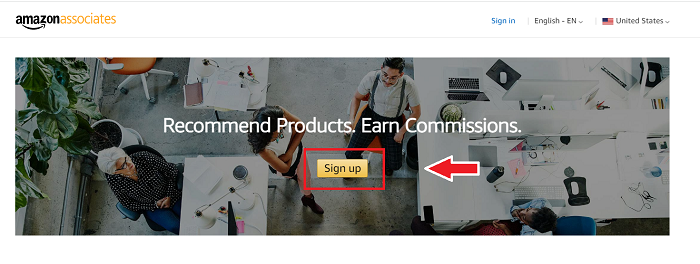
Fill Out Your Profile Information
Provide basic details like your name, address, website details, and other information necessary to set up a preliminary account.
Explain Your Marketing Strategies
You need a plan for how you’ll market the products to earn commissions. That’s why you’ll be asked for this information when filling in your account details.
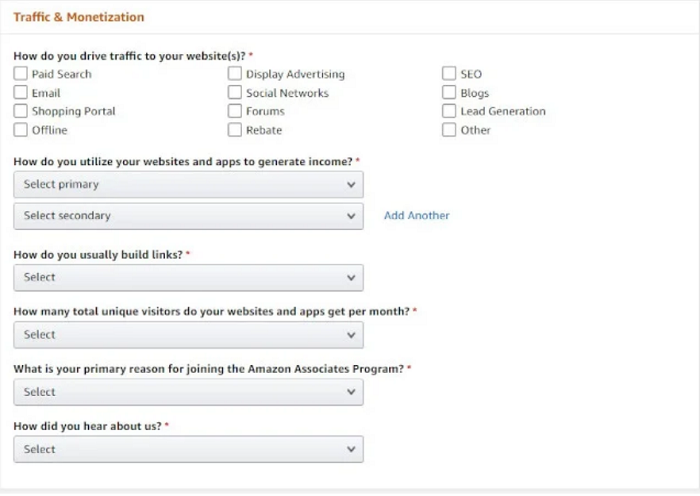
The questions are pretty straightforward and aim to narrow down your marketing strategies. Try to answer these as accurately as possible to increase your chances of approval.
Enter Your Payment Details
Once the basics of your account are set up, you come to the payments section. Here, you enter information about how you wish to get paid.
You may set this up later. If you’re in a hurry, you can skip this section and move forward with the account setup. However, I recommend doing this immediately so you can start making money as soon as your account is approved.
Start Using and Promoting Affiliate Links
Once your account is approved, head over to the dashboard and start using affiliate links for the products you love.
I recommend working on a couple of trial links to see how it works. Share them with your friends and acquaintances to see how it appears to a third person.
Once you’re satisfied with the aesthetics and practicalities of the process, you’re ready to start promoting your affiliate links officially.

Share them on social media, invite your friends to buy their favorite products through your links, and, most importantly, create engaging content to find new users and sell the products to them.
Frequently Asked Questions About the Amazon Associates Program
What are the requirements to be an Amazon affiliate?
The Amazon Associates Affiliate program does not have minimum follower or traffic requirements to set up an account. Instead, you only need to follow basic rules like adding an affiliate disclosure to your website and not promoting prohibited products.
How can I do affiliate marketing with no money?
Setting up an Amazon Associates account is free. You can also start a free blog on free-to-use platforms like WordPress and Medium.
How do Amazon affiliates get traffic?
Amazon Associate users get traffic by creating and promoting excellent content. They generate interest through social media, newsletters, or guest blog posts, and they also promote their content on different mediums and at networking events.
Can I promote Amazon affiliate links on Facebook?
Both Amazon and Facebook’s policies allow users to use affiliate links on Facebook. Therefore, you can add affiliate links in content posts on your feed to interest readers you’re already connected with.
Amazon Associates Affiliate Program Conclusion
The Amazon Associates Affiliate program is a reasonably straightforward way to set up a passive income stream. The best part is that anyone can do it from anywhere, with few geographic and financial restrictions.
Users can start a home-based business at zero cost using a free blog and a free Amazon Associates account. This makes this affiliate program a valuable option for creators who don’t have a lot of business capital but have great content and the drive to succeed.
Amazon has structured its affiliate program to be as effortless as possible, so even beginners can get started with the program with little to no help.
Even if you do get stuck somewhere, you have access to a large community of hundreds of thousands of users who’ve been through this process and may be willing to help you out.
Whether you’ve been creating content for years or are new to the world of earning income via online content, you can set up an Amazon Associates Affiliate Program account and start making some extra money.
Just make sure your content is consistently excellent and work hard to build your audience. Digital marketing is key in this, as an audience doesn’t just appear, no matter how fantastic your content is.
With some elbow grease, you could find yourself making enough passive income to continue building a successful online business via the Amazon Associates Affiliate Program.
What types of products do you think you could sell using Amazon Affiliate links?
Source: neilpatel.com

How to Use Amazon Attribution For Ad Campaigns
Every Amazon seller knows how difficult it is to track and measure the impact of external advertising channels on sales. It doesn’t matter how you are driving clicks to your Amazon page; once consumers land on the website, it’s anyone’s guess what happens.

Thankfully, that’s not the case anymore. Amazon Attribution makes it possible for certain sellers to track what happens to every user they send to the platform.
In this post, I’ll explain everything you need to know about Amazon Attribution, including:
- who can use Amazon Attribution
- the benefits of using Amazon Attribution
- how to set up Amazon Attribution
- what you can track using Amazon Attribution
What Is Amazon Attribution?
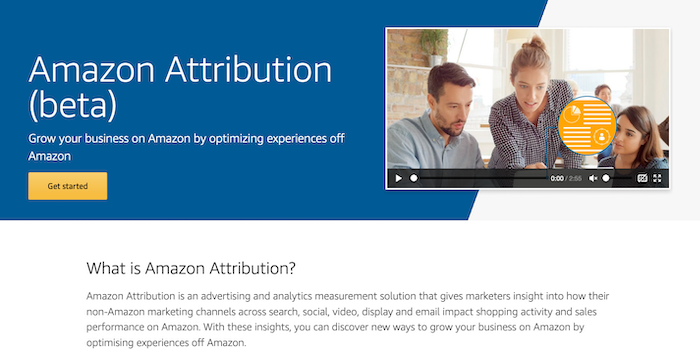
Amazon Attribution is a new tool that promises to grow your Amazon business by improving experiences away from the Amazon platform.
Specifically, the tool provides analytics insight into how non-Amazon marketing channels like search, social media, display, PPC, and email marketing impact sales on Amazon.
It can also track traffic sent to a different website that ultimately converts on Amazon.
Access to Amazon Attribution is available through either the platform’s self-service console or through tools that already integrate with the Amazon Advertising API.
What Does Amazon Attribution Cost?
Amazon Attribution is currently available for free, which is great news for e-commerce owners.
Who Can Use Amazon Attribution?

Amazon Attribution is currently only available to sellers enrolled in Amazon Brand Registry and Vendors in the U.S., Canada, the U.K., Germany, Spain, France, and Italy.
That may change in the future, so keep your eyes peeled if you are in other locations.
What Can You Track Using Amazon Attribution?
Amazon Attribution lets you track a range of metrics that can impact e-commerce sales, including:
- click-throughs
- impressions
- detailed page views
- purchase rate
- add to cart
- total sales
How Does Amazon Attribution Work?
Amazon Attribution uses parameterized URLs—essentially a tracking URL.
When users click on the link and go to your store, Amazon can track precisely what they do.
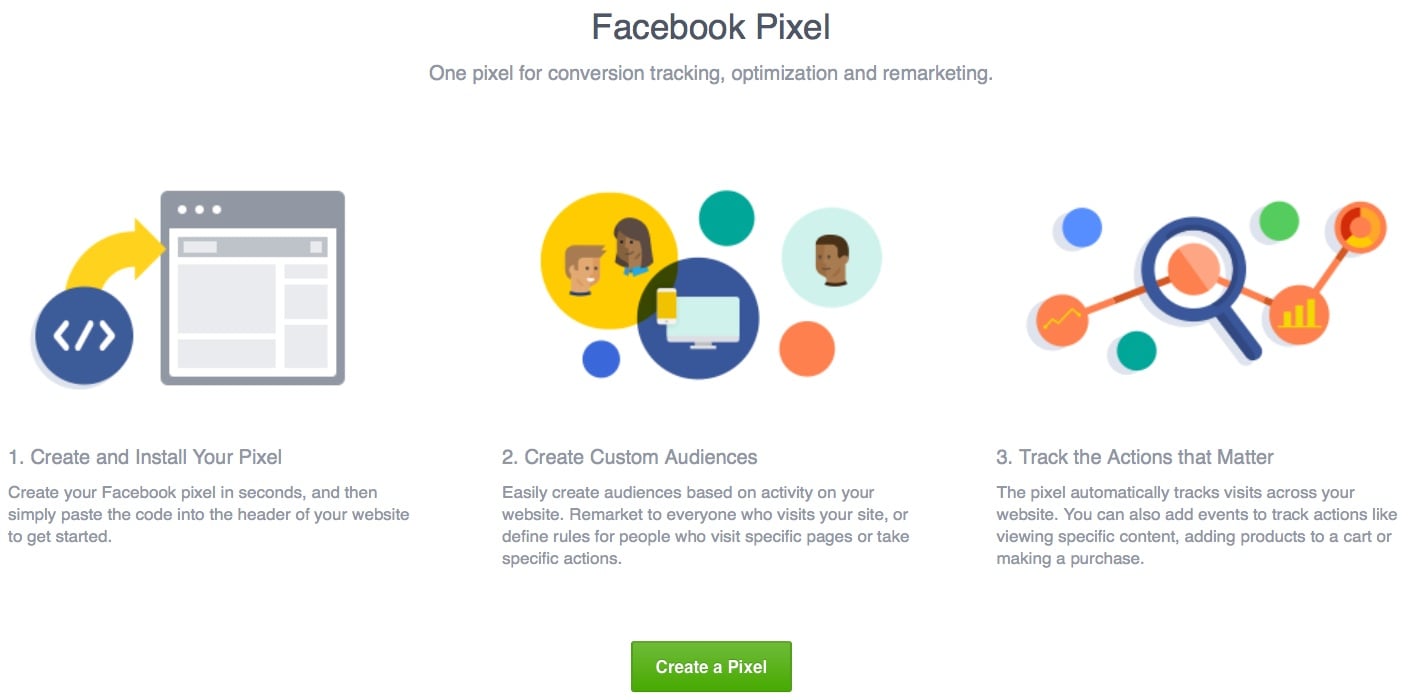
It’s a bit like a combination of Facebook’s Pixel and Google Analytics.
Everything users do once they click on your ad is tracked, and you can see it all in an easy-to-use dashboard.
4 Amazon Attribution Features You’ll Want to Try
Amazon Attribution isn’t just a URL tracking tool. It has several key features marketers will want to leverage.
1. Full-Funnel Amazon Analytics
Amazon Attribution significantly increases the number of sales funnel data brands have access to.
You’re not just limited to conversion data.
Instead, Amazon lifts the curtain on how consumers interact with your product on their platform, providing metrics like clicks, detailed page views, and how many times customers add your product to their basket.
2. On-Demand Amazon Conversion Metrics
You can see campaign performance as and when it happens.
Real-time reporting means marketers can optimize their marketing campaigns faster than ever before.
3. Customer Insights
Because of the wealth of metrics Amazon Attributes provides, marketers can understand how the users they send to their store behave once they get there.
Do they add the product to their basket as soon as they land on a page?
Do they find a different product they prefer? Do they not buy anything at all?
Amazon Attribution lets you answer all those questions and more.
4. Separate Tracking for Each Advertising Channel
Amazon Attribution lets marketers create different tags for every marketing channel. Facebook Ads, Google AdWords, blog posts, social media posts, it doesn’t matter.
You can make hundreds of tags so you always get granular detail on the performance of every channel.
Why Is Amazon Attribution Such a Big Deal?
It’s not an overstatement to say Amazon Attribution could be a transformational tool for sellers and vendors.
Before the tool was created, tracking off-Amazon marketing campaigns was an absolute nightmare.
There was simply no way to differentiate traffic from separate marketing channels.
It was all dumped together.
Let’s say you made 500 sales, and you know that your own Amazon ads generated 100 of them.
That leaves 400 sales that could have come from any marketing channel or even through an organic Amazon listing.
Do you see what a problem that is for marketers trying to find the best channel?
There’s no way they can tell.
Amazon Attribution changes everything completely.
Now marketers and brands will be able to see precisely where each sale comes from, and that comes with a bunch of benefits.
3 Benefits of Using Amazon Attribution
“Why use Amazon Attribution in the first place?” I hear some of you ask.
There are several reasons eligible brands should start using Amazon Attribution immediately.
Here are my top three.
1. It Identifies the Most Valuable Marketing Channels
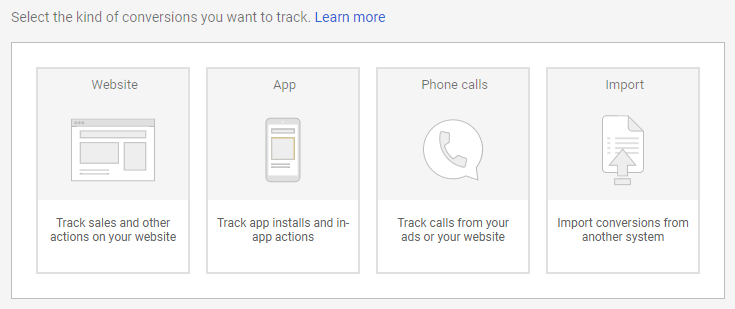
It’s not always easy to calculate the ROI of your non-Amazon marketing efforts, especially if you use multiple channels.
Amazon Attribution allows sellers to see exactly which advertising efforts drive the most sales and provide the highest ROI.
With a clear picture of what’s working and what’s not, store owners can focus on their most profitable channels.
2. It Optimizes Existing Campaigns
Amazon Attribution lets you understand how users interact with your store and the broader Amazon ecosystem.
If traffic from one demographic converts better than others, you can optimize your existing campaigns to drive more users that do convert and fewer of those that don’t.
3. It Can Drive More Sales
Some sellers may find the concept of sending external traffic to Amazon strange, but it’s becoming increasingly important.
Amazon is becoming increasingly dominant in e-commerce.
At the same time, the price of sponsored ads on the platform continues to rise.
Why Drive Traffic to Amazon in the First Place?
When you understand which marketing channels are most effective and how consumers interact with your products on Amazon, you can start to make real, data-backed decisions.
The kind of decisions that will help you sell more on Amazon For some that could be investing more in a specific marketing channel.
For others, it could be adjusting the price of their products.
What’s more, new sellers are signing up to Amazon every day.
Oberlo recently reported that a million new sellers are joining Amazon every year.
With so much competition, external traffic can be a vital lifeline to help sellers survive.
Reduce Amazon Advertising Costs
External traffic helps you sidestep the competition for listings on Amazon and drive traffic directly to your storefront.
There’s no need to pay for sponsored ads on Amazon when you drive traffic directly to your products.
Boost Your Seller Rank
External traffic can seriously increase the number of sales your store makes.
This can have a huge impact on your overall sales. Sales velocity is one of the ranking factors Amazon uses in its A9 algorithm, so the more sales you’re making, the higher your products will rank in the future.
Better Understand Your Amazon Customers
The insights from Amazon Attribution can help you learn more about your customers than ever before.
You may find that one product doesn’t convert as well as you thought it did, for instance.
Or that customers prefer one product over another.
You won’t just be improving your Amazon store’s performance, either.
These kinds of insights can improve your business outside of the Amazon platform, too.
How to Set Up Amazon Attribution
The first step to getting started with Amazon Attribution is filling out a signup form and logging in to your account.
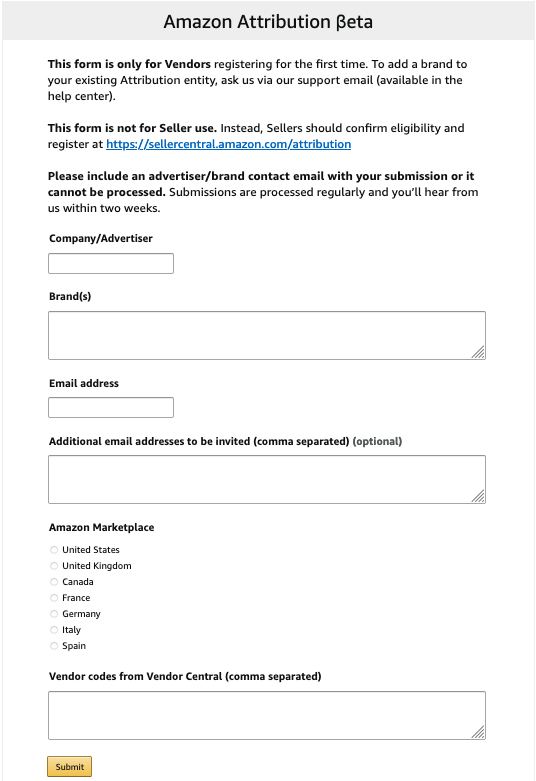
Once your account has been approved and set up, you can start matching products to the campaigns you’re tracking:
- Create a tag by clicking on the relevant advertiser’s name.
- Click “New order.”
- Select the “Set up an order” parameter.
- Choose the product you want to link to by searching for your products and clicking “Add.”
- Give a name and external ID to your attribution tag. I recommend being as obvious as possible with your name, so you know which link is which (Don’t forget you’ll have a separate tag for each of your products).
- Choose where you’re going to place this link: Facebook, AdWords, etc.
- The clickthrough URL is the URL of your product. Find your product on Amazon, copy the URL and paste it here.
- Click “Create,” and you’re done. You can now copy the Amazon Attribution tag and start using it in the wild.
Alternatives to Amazon Attribution
Amazon Attribution is an incredible tool, but unfortunately, it’s not available to everyone who sells on the platform.
Luckily, there are several alternatives you can use instead.
Amazon Associates Tracking
Amazon Associates tracking links were the most popular way to track external traffic to the store platform before Amazon Attribution.
With Associates tracking links, you get paid a commission every time a customer converts.
Unfortunately, this tracking solution is nowhere near as in-depth as Amazon Attribution.
You’ll only be able to see which items users bought, not their behavior on the site before conversion.
Plus, Amazon Associates only get one tag.
That means it can be hard to differentiate between traffic sources.
Pixelfy.me
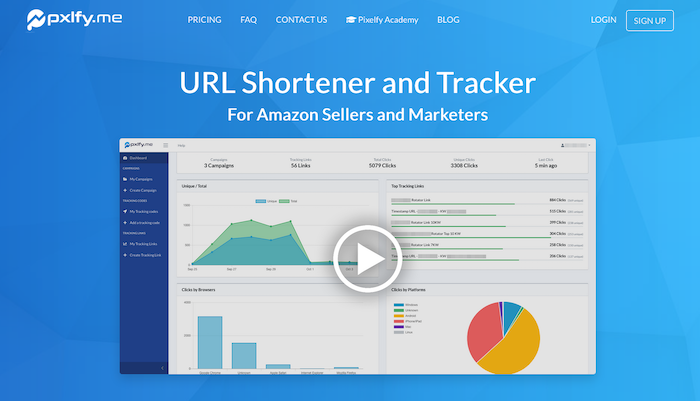
Pixelfy.me is a URL shortener and tracker built specifically for Amazon sellers.
You can create and track every kind of Amazon link, including Supreme, Brand, Canonical, Store Front, Add-to-Cart URLs, and many more.
Pixelfy.me can track almost everything apart from conversions.
While that’s not as comprehensive as Amazon Attribution, Pixelfy.me does let you pixel users to retarget them in the future.
Amazon Super URL Tool
The Amazon Super URL Tool is part of the AMZ Tracker suite of tools.
It does not offer sellers more insight into the way users shop their store, but it can significantly improve the quality of inbound traffic and boost sales as a result.
The platform’s special URL shortener makes Amazon believe visitors have searched for specific keywords on Amazon instead of going directly to the listing.
Amazon should rank your products higher for these keywords, as a result, which can lead to more sales.
Conclusion
Amazon Attribution is the best way to track how off-site traffic performs on the Amazon platform.
If you run external marketing campaigns for your Amazon store and are serious about optimizing your Amazon store, then Amazon Attribution is a must.
Not only can you optimize your marketing campaigns, but you can also increase conversions, too.
Creating Attribution tags is easy. Just follow my advice above or contact my team if you want an Amazon marketing agency to do the work for you.
How many external marketing campaigns are you currently running on Amazon?
Source: feedproxy.google.com

A Quick Guide to Using Keywords for Better Amazon SEO
How do you help your products stand out from the crowd with Amazon SEO? It’s easier than it sounds. Why? Because Amazon isn’t just an e-commerce platform. It’s a search engine with its very own algorithm, A9.

As the world’s largest e-commerce store, Amazon is a platform seller can’t afford to ignore. But on a website selling over 12 million items, how do you help your products stand out from the crowd with Amazon SEO?
It’s easier than it sounds.
Why? Because Amazon isn’t just an e-commerce platform. It’s a search engine with its very own algorithm, A9.
A Short Introduction to Amazon SEO
Just like other search engines, you can use SEO techniques to boost product rankings. You use certain phrases to boost your discoverability in organic searches, which can increase sales with Amazon.
Here are other ways Amazon acts as a search engine:
- Customers type queries into the search box.
- The Amazon algorithm presents what it thinks are the most relevant results.
- If the results are good, customers won’t go past the first page.
- Why? Because they’ve found what they’re looking for.
Remember, the whole point of Amazon is to sell things.
Amazon wants to match customers and sellers. They want customers to be happy with the search results so they’ll become repeat customers.
While there’s no guarantee you’ll secure a first-page spot on Amazon, who wants to be on page 20? You’ll never reach your target audience that way.
Let’s look at using keywords for proper optimization of your product pages.
How Do Amazon SEO Keywords Work?
Amazon keywords are the search terms (i.e., words and phrases) that people type into the Amazon search bar.
If you don’t include the right keywords:
- Your target audience won’t find your listing
- Your conversion rate falls flat
- Your discoverability drops
Here’s an example:
Someone searches for a “frying pan.” “Frying pan” is the Amazon keyword. If you’re selling frying pans, but you call them an egg pan, you’ll miss the target audience.
We can take this a step further. “Frying pan” is a good keyword, but it’s may not be enough to hit a first-page ranking. Why?
It’s really broad.
Chances are, customers want more than just a frying pan. Maybe they want one with a lid, or a non-stick pan or a cast-iron frying pan.
Luckily, Amazon’s algorithm understands this. Whenever you type a key phrase into the search bar, other suggestions pop up. Amazon bases its suggestions on other customer search terms, just like Google Autocomplete.
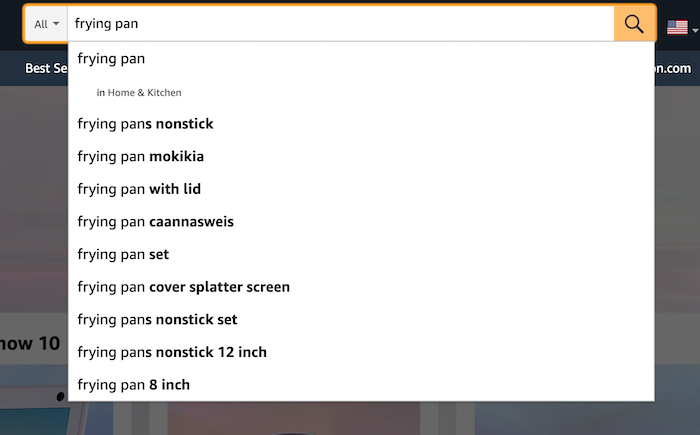
For example, if someone searches for “frying pan”, the first predicted suggestion they see is “frying pans non-stick.”
That’s because other customers often search for non-stick pans…and guess what? You’ve just found yourself another keyword.
The more relevant Amazon keywords you use, the better your chances of reaching your customer base (within reason, but we’ll get to that.)
What have we learned here?
- Amazon keywords are search terms.
- To increase your discoverability on Amazon, you need to include the right keywords in your product listings.
- Some keywords are a little too broad on their own.
- Including a few specific keywords can help you reach your audience base.
Essentially, think of Amazon keywords as another tool in your digital marketing toolbox. Once you know how to use them, they can increase your brand awareness and potentially boost sales.
Is There Anything I Shouldn’t Do With Amazon SEO?
Actually, yes. You shouldn’t use “black hat” tactics.
Black hat SEO is when you deliberately try to manipulate your page rankings using less than ethical strategies. These strategies include:
- Keyword stuffing
- Buying links
- Spam
- Leaving negative reviews on competitor pages to lower their page ranking
Sure, you might get a short-term boost in rankings if you use black hat techniques. But the drawbacks aren’t worth it.
Black hat strategies violate Amazon’s Terms of Service. If Amazon catches you manipulating the algorithms, they could:
- Lower your position within the search results
- Remove your product listings from the search results completely
- Suspend or permanently close your account
I’m very much a believer in sticking to “white hat” or fair SEO practices.
If you’re in this for the long game, then I suggest you do the same.
How to Make Amazon Keywords Work for You
When you’re selling products on Amazon, you want to avoid overusing keywords to diminish the user experience and a high bounce rate.
The high bounce rate metric measures when someone clicks on your listing, takes a look around, and leaves pretty quickly.
This action tells Amazon that users aren’t finding what they’re looking for from your product. The outcome? Your discoverability drops, and your product is shown less in Amazon SERPs.
Here’s what you need to optimize to avoid keyword stuffing and a high bounce rate:
Product Title
Always put the most important keyword(s) in the product title. If you’re selling a vacuum cleaner, make sure “vacuum cleaner” is in the title.
The title should include:
- The item’s brand name (this is a super important keyword, by the way)
- A description of what the item is, such as:
- “vacuum cleaner.”
- “The product color and size.”
There’s no need to go overboard — remember, you don’t want to keyword stuff.
Backend Keywords
Let’s be honest…sometimes users misspell product names. Or maybe they want a product like yours, but they don’t use the exact key phrase.
You still want these people to find your listing, but you can’t include all these potential keywords in your title.
What do you do to ensure people still see your product?
You put these Amazon SEO keywords in the “backend” of your Amazon Seller’s account.
These are ‘hidden’ key terms added to your listing when you create it. You only have about 250 characters, so use them wisely.
Brand Name
Sometimes people are looking for a specific brand, such as Levi jeans or a Lodge frying pan. For sellers, this means you must include an accurate brand name on your product page.
A bonus? Even if you’re a relatively new brand or seller, you can increase your brand awareness among your target audience by using brand names for the products you sell.
Remember to spell brand and product names correctly; you don’t want people missing product listings because of incorrect names they aren’t searching for.
The Product Listing Description
The product description is where Amazon keywords count. If your descriptions don’t convince people to buy, they’ll bounce off the listing which can naturally decrease your conversion rate.
How do you make the most of this space?
- Bullet points: Use bullet points in the “Technical Details” section. You’re answering FAQs preemptively, such as what makes your product unique? What are your product’s key features?
- Product description: Write a concise, snappy description, including some key phrases you didn’t use in the title. You’re telling buyers why they should move your product into their cart.
- Research: Check out how your competitors write their descriptions. What works, and what doesn’t? Use what you learn for your listings.
How to Pick Amazon SEO Keywords
So you’re ready to list your products online. How do you find the right keywords? And how do you identify the most important keywords?
Here’s what I recommend.
Amazon Keyword Research Tools
Keyword tools do the hard work for you. They pull data from Amazon websites and provide you with various keyword and key phrase options. All you need to get started is a single keyword, such as the product type.
Sonar is a user-friendly, simple option to help you get started — and it’s free to use. You could also check out Keyword Tool for Amazon or Ubersuggest.
Amazon Search Bar
Don’t dismiss the Amazon search bar itself. Simply type in the search term and see what suggestions come up. You can use these keywords in your product listings.
Similar Products
People looking for one product often scope out similar items. Have a look at competitor pages and see what items customers frequently buy in the same transaction. You never know, you might find some keyword ideas.
Google Rankings
Have an e-commerce store outside Amazon? Then check out the popular keywords on Google, too.
Plenty of people start their product search on Google, so why not make sure you’re hitting your SEO from all angles?
Again, tools like Ubersuggest can help with Google keyword research.
Just like with the Amazon search box, you can input search terms and see what products come up.
This data will help you work out which keywords rank best on Google for your product.
How Does PPC Relate to Amazon SEO?
When it comes to Amazon keywords, we should touch on one other thing: the sponsored product listing.
Here’s a look at the top of the search results for frying pans — see the word “sponsored” in the lower right corner?
That means sellers have paid to have their Calphalon pans show up at the top of the search results.
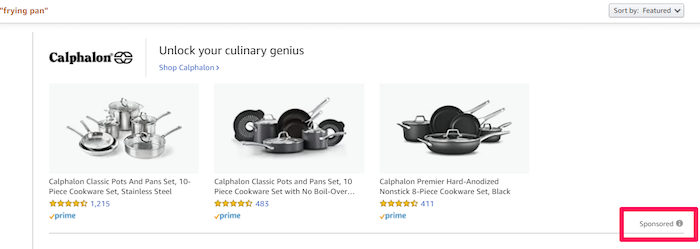
They’re known as pay-per-click (PPC) listings.
PPC lets you bypass other product listings. Whenever someone clicks on your sponsored listing, you pay a fee, but you get a prime spot for a specific keyword in return.
Of course, there’s no guarantee buyers will click your listing, but some sellers use this technique alongside their organic search strategies.
We’re not focusing on PPC in this article…it’s a whole other beast.
But you should know that it’s available on Amazon just like other search engines, and that it’s responsible for the sponsored product listings you find in the search results.
Conclusion
Understanding Amazon keywords and Amazon SEO is critical if you want to be a successful seller on Amazon.
Keyword tools for Amazon can help you find the top keywords for your product listings, and they’re fast and straightforward to use.
You can always get started by searching for products like yours and see what keywords and listings come up.
How are your Amazon product listings performing now they’re optimized for SEO?
The post A Quick Guide to Using Keywords for Better Amazon SEO appeared first on Neil Patel.
Source: neilpatel.com