
Tag Archives for " advertisement "

How to Increase Your Website Traffic Without SEO
SEO can be a brilliant strategy to increase your website traffic but it isn’t always enough.
Imagine you rely on SEO for all your traffic. What happens when the Google algorithm changes? You risk losing potential customers!
Disclosure: This content is reader-supported, which means if you click on some of our links that we may earn a commission.
That’s why diversifying your methods of increasing web traffic can offer better results.
If you have multiple traffic sources, changing algorithms won’t completely halt your business.
You will have a toolkit full of optimization strategies to keep your business running.
Diversifying your web traffic can also be helpful in cases where there’s little scope for search engine optimization (for example, podcasts).
In this post, we’re going to look at effective strategies to grow your website traffic without SEO so you’re never left stranded by algorithm changes again.
We’ll also look at practical tips you can start using right now, so you can get back in the game if your traffic has been low for a while.

Why Should You Try to Grow Traffic Without SEO?
You can generate substantial traffic from SEO alone, but not all traffic is equal. High-quality traffic (that includes users more likely to convert) offers better ROI, so you need to prioritize it.
Plus, if you aren’t an SEO expert, you may want to focus on other strategies to grow your website traffic efficiently.
This doesn’t mean you completely ignore SEO. All websites, irrespective of their niche, must follow the best SEO practices to avoid being penalized by Google and to ensure the site gets indexed.
Top Strategies to Increase Website Traffic Without SEO
The strategies we’ll discuss below can be a helpful addition to a pre-existing SEO plan.
1. Content Marketing
If you have been reading about digital marketing for a while, you must have heard the term “content marketing.”
In simple words, it’s a way to organically advertise your brand through high-quality content.
Content marketing strategies often include blog posts, podcast episodes, infographics,
YouTube videos, downloadable PDFs, etc.
For instance, Toggl, a time tracking software company frequently uploads informative blog posts and research data about productivity, work-life, and career.

This attracts users interested in time management, productivity, and wellbeing in the workplace.
When they read Toggl’s blog, they eventually discover Toggl’s time tracking app, among its other productivity tools.
Some of these users convert, helping Toggl increase their website traffic and ROI.
Content marketing isn’t limited to blog posts.
If you connect better through audio, you can try launching a podcast or host a webinar.
Nowadays, most social media apps let you post a variety of content formats including photos, audio clips, long-form text, and videos.
You can experiment with one or more of these formats to see what works best for your audience.
2. Paid Ads
Content marketing is beneficial but it can take a lot of money, especially if you’re paying established writers to create original, well-researched posts for you.
Most of these projects also take weeks or months to show results, which isn’t a practical timeline for many businesses.
If you want quicker results with a budget you can control, why not try paid ads?
Seven in ten Americans use social media today.
That’s more than two-thirds of the population.
Think about the possibilities!
Paid ads can instantly generate hundreds, if not thousands, of clicks to your website.
Plus, with new advertising and social media platforms appearing and innovating regularly, getting your ads in front of the right people is becoming easier than ever.
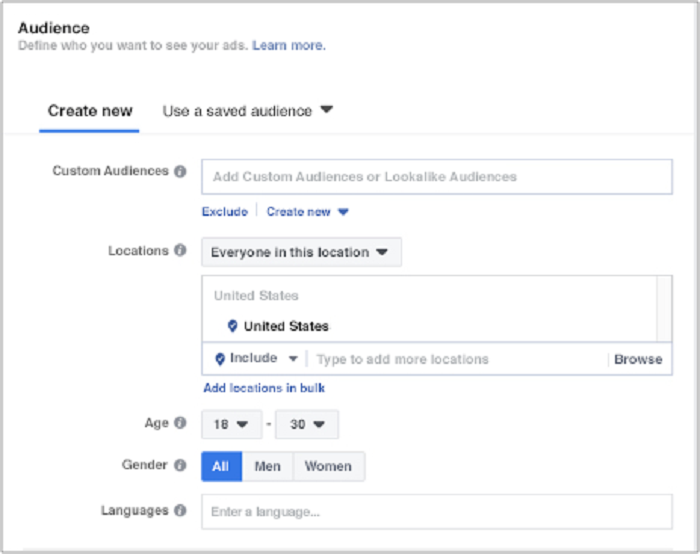
For example, Facebook offers detailed customer personas and multiple targeting options so you can put your business in front of your target customers without wasting a lot of money on mass advertising.
However, you don’t have to stick to the largest platforms for effective advertising.
In fact, advertising on lesser-known platforms whose audience aligns with your products can be more effective in the long run.
For example, if your ideal customer includes teens who enjoy memes and weird stories, you’d have much better results by advertising on Reddit, rather than Facebook or YouTube.
Another option is dating apps.
If your brand is focused on relationships or if you’re targeting young singles, advertising on dating apps like Tinder can help you find your target customers faster.

If you’re worried paid ads will take a lot of money, remember, you don’t need to spend $1,000 on your first day.
Test the waters with $5-$10 a day and see what happens.
Do that for a week, just to learn how different media platforms work.
3. Social Media Strategies
One of the best ways to increase your website traffic is to meet your customers where they like to hang out.
Like we discussed earlier, almost everyone is using social media today.
Ramping up your social media marketing efforts can help you reach new users, develop brand awareness and increase website traffic.
How to gain website traffic through social media?
When it comes to social media, you can’t just barge into “conversations” and ask people to buy something from you or to visit your website.
Think about how you’d present your brand in real life when you meet an individual for the first time.
Would you immediately talk sales in their face?
How about providing details about your product/service without introducing yourself first?
Remember, users, visit their preferred social media platforms for entertainment, not for being sold to.
To make sure your efforts are well-received, you need to provide value first and develop positive relationships with your potential “followers.”
You can do this by sharing informative posts like How-Tos, or posting fun photos of your employees, like this post from Casper.

I wrote a detailed guide to increasing social media followers and boosting engagement.
Here’s a summary of the top options to help you grow your website traffic.
- Join relevant Facebook groups
- Share helpful articles/videos in these groups
- Post updates about your company’s latest products host contests and giveaways
- Leave thoughtful comments on user-generated content
4. Link Building Strategies
When marketing teams talk about SEO, link building frequently comes to mind.
When reputable websites link to your content, the algorithm favors your website and increases its rank on the search page.
Sounds helpful, but that’s not all.
Did you know link building can help you increase web traffic without relying on SEO?
Link building for brand awareness is a process where you focus your strategies on expanding your reach, putting your content in front of new users, and generating conversations around your brand.
This is more than just a casual backlink in a blog post.
Link building for brand awareness takes more planning and resources, but the investment is worth the high-quality leads you’ll get.
Here are some tips for developing effective link building strategies to increase website traffic:
- Engage with your audience: Create interesting, shareable posts and encourage your followers to respond and share your content.
- Work with PRs: Recruit efficient PRs to help generate brand awareness and distribute your story to your desired audience.
- Guest blog intentionally: Choose unique publications that align with your readers’ key interests and post guest blogs on their page.
5. Interact With Other Blogs
Guest blogging is an effective traffic-driving strategy aimed at leveraging somebody else’s audience to widen your brand’s reach.

Think about it: Somebody in your niche has a large, engaged following.
Imagine if you could put your content in front of them.
How much traffic could you drive to your website!
Why would someone publish your work?
Probably because you’re good at what you do.
Everyone is looking for high-quality content.
If you can provide a well-researched, helpful post for free, people are often open to publishing it on their website.
After all, it’s benefiting their audience at zero cost.
Why would you give precious content away for free?
It’ll help you gain access to hundreds, if not thousands of new users, many of whom could become long-term customers.
It’s a win-win situation, but you have to be careful how you approach it.
Start by searching for blogs and media publications that publish content relevant to your business.
For example, if you run a recruiting company, publish content on business blogs read by people interested in the latest recruiting practices.
If you want to find blogs in your industry that are accepting guest posts, use the following search queries to see more specific results:
- name of your niche + “write for us”
- name of your niche + “submit guest post”
- name of your niche + “sites that accept guest posts”
- write guest article + ‘name of your niche” + blog
Solvid provides a comprehensive list of places accepting guest blogs:
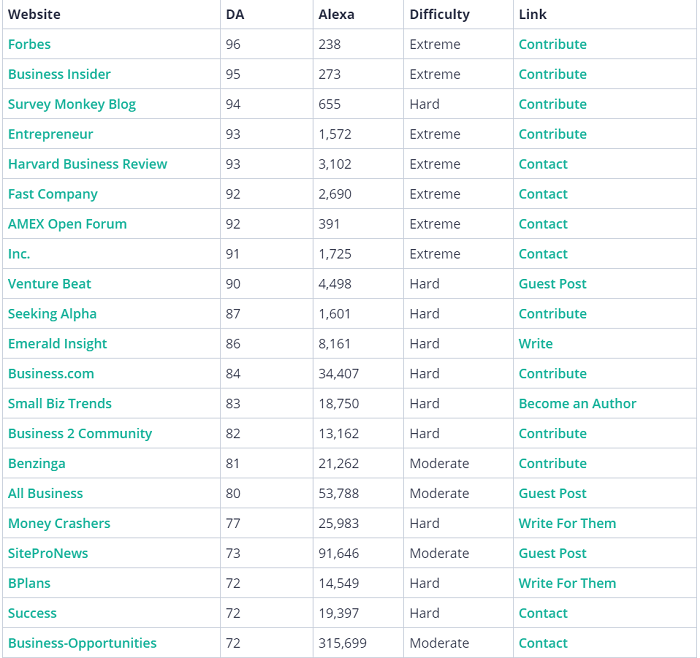
In addition, research online biographies of specific companies and bloggers.
More often than not, their web profiles contain a handy list of sites where they’ve been invited to guest post.
That’s a plethora of most fitting guest blog opportunities presented to you on a silver platter.
Then, send a request.
Most websites will have publication guidelines you can follow.
Follow these instructions carefully to increase your chances of publication.
There’s also the option of using blog comments as a way to generate traffic to your site.
In the past, I have managed to generate $25,000 as a result of 249 comments.

How exactly do you go about using comments to generate traffic?
When leaving a comment, make sure you are adding something worthwhile to the discussion.
There is no use in leaving comments like “Awesome post!” or “Nice website!”
If someone posts a question, make sure you take the time to answer thoughtfully.
This showcases your expertise in the given niche and will encourage someone reading to click on your name and be taken through to your site.
If you read an article on a subject you don’t know very well, it would be imprudent to voice your own thoughts as fact.
In this situation, you should simply ask questions.
Then the website owner would be able to elaborate more on complex topics or complicated sections.
If you’re knowledgeable about a subject, feel free to contribute (e.g., suggest something, recommend a solution, answer a question).
If you’re a novice, it’s best to ask questions.
Powerful questions can bring you website traffic by encouraging blog readers to check you out.
Avoid embedding links in your comments.
It comes off as a wretched attempt to plant your flag on someone’s lawn.
It’s okay to use your website’s link in the URL field when entering your name and email address, but your comment needs to add to the conversation or challenge an idea without lazy attempts at driving traffic to your blog.
Refrain from using the name of your business as your “commenting name.”
Use your actual full name instead.
Using a random or fake name is a missed opportunity to build strong branding because your brand actually starts with your name.
In fact, failing to use your full name will reduce your chances of the website owner approving your comment.
6. Email Marketing
If you read a few posts on digital marketing, email marketing would be mentioned in most of them.
That’s because it’s still one of the most efficient ways to increase website traffic.
One study suggests email generates $36 for every $1 spent, offering a shocking 3,600 percent ROI.
What more could you ask for?

Email marketing lets you reach potential customers directly.
It’s an ideal platform for building long-term relationships for improved customer loyalty.
You can post questions, ask for feedback, introduce soft sales, and persuade customers for the “big buy.”
Here are some tips for effective email marketing to increase website traffic:
- Be real: Share stories, post-behind-the-scenes content, and solicit original user-generated content.
- Offer value: Just like content marketing needs a high value to convert readers, emails and newsletters must provide value before they make an ask.
- Include all your links: Make it easy to read and share your post. Include links to your social media profiles, latest blog posts, and sales page in every email you send.
7. Provide Excellent Customer Service and Ask Customers to Review Your Brand
Ramping up your social media marketing efforts to increase website traffic is useless if you offer poor customer service.

According to a survey, 42 percent of customers said they bought more after pleasant customer service experiences.
Think about it: Users make complaints on social media, you offer a prompt and polite response.
What happens?
The person starts respecting your brand.
Even when users complain privately via email, it’s important to offer the best possible service so they come back for more.
How can you offer great customer service?
- reply promptly
- offer as many suggestions for customer problems as possible apologize when you make a mistake and offer coupons/refunds
If you consistently provide great customer service, you can request users to review your brand.
Platforms like Trustpilot and Yelp can be great for building positive reviews.
Many users consult these websites before making a purchase decision, so having a solid profile can help improve your reputation.
Increase Website Traffic Without SEO Frequently Asked Questions
FAQ: 1
Is it possible to increase website traffic without SEO?
Yes. You can use a combination of social media marketing strategies and content marketing techniques to increase website traffic without SEO.
FAQ: 2
Are there ways to increase website traffic for free?
Guest blogging, posting on social media, and requesting user-generated content are some of the most effective ways to increase website traffic for free.
FAQ: 3
Can I increase website traffic through marketing without an agency?
You can use techniques like guest blogging and content marketing to engage audiences without relying on any agency.
FAQ: 4
What’s the best strategy to increase website traffic quickly?
Working on improving your social media strategies can help you connect with new users, develop brand awareness and drive organic traffic relatively fast.
Increase Website Traffic Without SEO Conclusion
You shouldn’t only rely on search engines to increase website traffic.
Algorithm changes and SEO techniques become outdated quickly.
The strategies we discussed today can help you create a comprehensive digital marketing plan to increase website traffic effectively.

Whether you use one of these tactics in isolation, or you use all of them together, they can transform the way you attract customers.
Which traffic-driving strategy will you try today?
Source: neilpatel.com

5 Excel Tricks for Creating Paid Ad Campaigns
To create a paid ad campaign effectively, you need a solid strategy for organizing your data and tracking your ad performance.

Excel spreadsheets can do just that.
While a spreadsheet might not seem like the most intuitive tool for managing your marketing efforts, there are many Excel tricks you can use to quickly streamline your data, track metrics, and improve conversions.
There’s no need to be an Excel expert to master these tricks.
All you need is access to a version of Excel and a desire to learn.
Maybe you’re wondering if you should bother learning Excel if you already use other tools like CRM software or Google Analytics to manage your marketing campaigns.
Honestly, you probably should.
The humble Excel spreadsheet offers you a simple yet highly effective way to organize all your data from various project management tools in one place.
Whether you want to use your spreadsheet for keyword research or you’re turning data into a bar chart, there’s an Excel trick to make your job easier.
Plus, you never know: You could end up at a company that still strictly uses Excel for these things!
With all this in mind, let’s look at using Excel to boost your paid ad or pay-per-click (PPC) campaigns.
Should I Use Excel or Google Sheets?
Excel and Google Sheets aren’t the same thing.
Google Sheets is a fantastic (and free) alternative to Excel. I
t’s not designed to handle the enormous data sets you might want to hold in Excel, such as keyword research, but it’s excellent for managing deadlines, analyzing customer relationship data, and filtering statistics to gain some key insights into your ad performance.
I’ll be using Excel to work through examples here, but you can, of course, use Google Sheets for many of these tasks if that’s what’s available to you.
You can also check out Calc from OpenOffice since the functions on offer are very similar.
5 Excel Tricks to Use in Paid Ad Campaigns
When creating paid ad campaigns, you need to think about which keywords to use and bid on, how to boost your click-through rate, and how to increase your conversions once people land on your page.

What’s more, you need the means to compare different ads within the same family to check for underperforming content.
Excel, thankfully, can help you tackle all of these issues and more, so here are my top five Excel tricks you can use to design, track, and analyze your paid ad campaigns.
1. Filter and Sort Key Data
As I’ve touched on, the goal of creating a PPC campaign is to get as many clicks and conversions as possible.
How do you maximize your chances of success?
You first need to choose the right keywords.
If you use keyword research tools like Ubersuggest, you probably see hundreds, if not thousands, of keyword suggestions.
Excel can help you sort through this data to identify the keywords you should be using.
Depending on your campaign goals, you can filter the data based on factors including:
- SEO difficulty
- traffic relevance
- cost per click (CPC)
Say you’re creating a PPC campaign around video marketing.
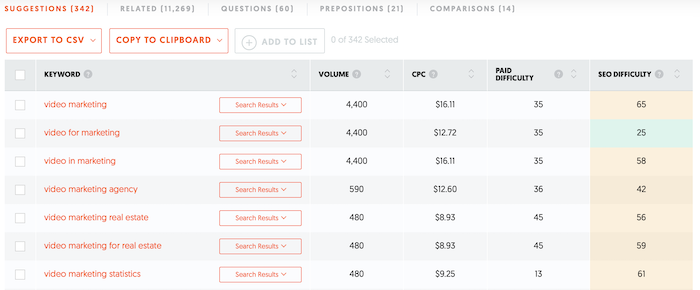
You input the keyword “video marketing” into Ubersuggest. When you click “View all keyword ideas,” you’ll see 342 suggested keywords and over 11,000 related keywords.
How do you translate this into Excel?
First, download a copy of the keywords by clicking the “Export to CSV” button:
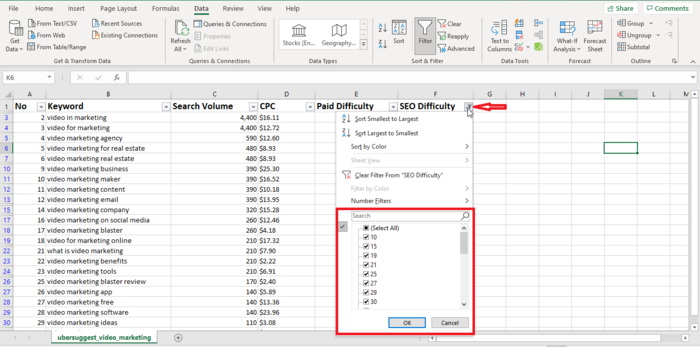
Now, filter the results to only see the keywords most relevant to you and your campaign. To do so, load up the spreadsheet, head to the “Data” tab, and click the “Filter” option:

For our example, let’s filter the keywords based on SEO difficulty.
Go to the column header and click the arrow.
From the drop-down menu, uncheck the boxes for the irrelevant keywords.
They’ll disappear from your search results so you can focus on the important keywords:
Once you’ve finished analyzing the data based on one filter, you can quickly switch to another using this Excel trick.
You can also filter out “negative” keywords from your search results.
Say you don’t want your PPC ad to appear in search results for “real estate” because you’re not targeting this audience.
Click on “Text filters” from the drop-down menu, then “Does not contain.” Input the words “real estate” into the box.
2. Use a PivotTable to Track and Compare Audience Demographics
The next Excel trick I’ll show you is how to create a PivotTable.
What is a PivotTable?
Think of it as a kind of interactive report.
It allows you to analyze massive data sets and extract critical data to inform your decision-making process.
Here’s what a PivotTable might look like:
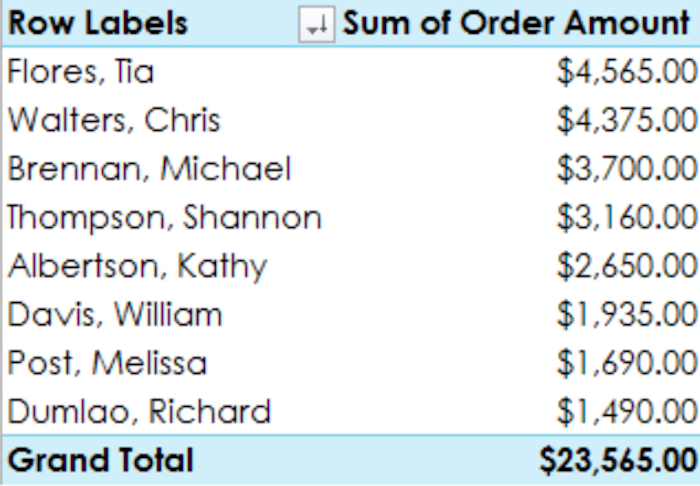
From a marketing perspective, PivotTables are invaluable.
They can show you, at a glance, who is clicking on your ad and where they’re based.
What’s more, if you’re running multiple ads, you can identify if certain demographics are clicking on one ad more than the others, and so on.
In other words, if you’re a marketer trying to track your campaign’s success, a PivotTable could be your new best friend.
To use a PivotTable effectively, first identify your data source.
You might use data from Google Analytics or another analytics tool.
Next, import this data into an Excel spreadsheet.
The easiest way to do this is by importing a CSV into Excel.
To import a CSV into a new Excel workbook, simply click the “Data” tab, then click “Get External Data” and select “Text” from the menu options:
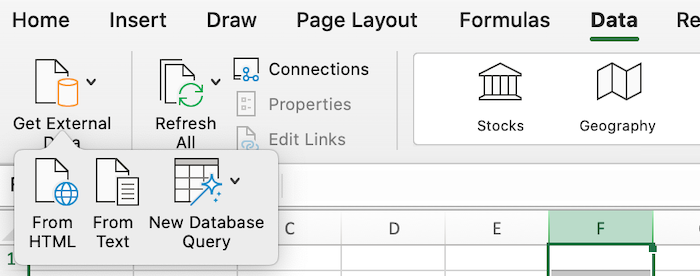
Once you’ve checked the data moved over correctly, create your PivotTable.
Include columns for demographic data such as location, age, and gender, and columns tracking metrics such as conversions and impressions.
Highlight the cells containing the data you’re interested in, then go to the “Insert” tab and click “PivotTable.”
Confirm the fields you want to include to generate your table.
Next, decide what data you want to include in your PivotTable.
For instance, if you’re tracking audience demographics, have columns for data such as location, age, and gender.
You also need columns for metrics like clicks, impressions, and conversions because you’re trying to track performance.
Finally, analyze the results and make whatever changes you need to increase your conversions and improve your PPC campaign success.
3. Use VLOOKUP to Track Metrics
Do you want to combine two sets of data from different spreadsheets or tracking tools into a single sheet?
Then you need to check out the VLOOKUP function.
Essentially, VLOOKUP allows you to quickly combine a vertical column of data from one spreadsheet into another.
Be aware: Both data sources must have at least one column in common, or this method won’t work.
Say you’re looking for new keywords for your PPC campaign.
You don’t want to duplicate keywords, so you’re looking to see if any of the new keywords you found are already on your existing keyword spreadsheet or PivotTable.
You can use the VLOOKUP Excel trick to identify any genuinely new keywords and import them into your spreadsheet.
First, identify the new column in your existing spreadsheet that you want to fill with fresh keywords.
Then, select “VLOOKUP” from the “Formulas” tab.
Next, complete the VLOOKUP formula.
You’ll need four things:
- Lookup Value: This is the value that both data sets have in common, such as a keyword.
- Table Array: The table array is the range of columns you’re pulling from.
- Column Number: The column number is what column number you’re pulling data from.
For example, if you’re pulling data from the second column in your table array, the column number is “2.” Range:
Finally, it’s best if you keep the range “FALSE” to only pull exact matches.
Once you complete the formula, the data sets merge.
VLOOKUP is pretty technical, so check out the Office support page for more help creating your formulas.
4. Use Graphs to Add Visual Elements to Your Ads
Visual marketing works.
Visuals can increase audience engagement by up to 40 percent, and 40 percent of marketers believe that infographics were their most successful visual content.
When you’re creating PPC ads, it’s worth adding original graphics or data visualization tools, like bar charts or graphs, to potentially increase your click-through rates and conversions.
Luckily, Excel can help you do this.
If you’ve already got a PivotTable, it only takes a few clicks to turn it into a chart. Simply click the “Analyze” tab, select “PivotChart,” and decide which chart type you want to use. That’s it!
Don’t have a PivotTable? Fear not.
First, select the data you want to include in your chart, click “Insert,” then hit the “Recommended Charts” button:
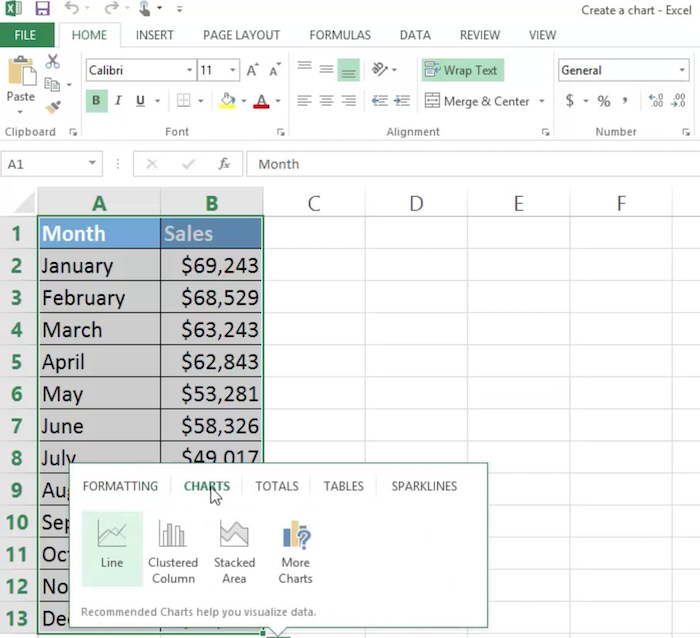
Pick the design you like most and generate the chart:
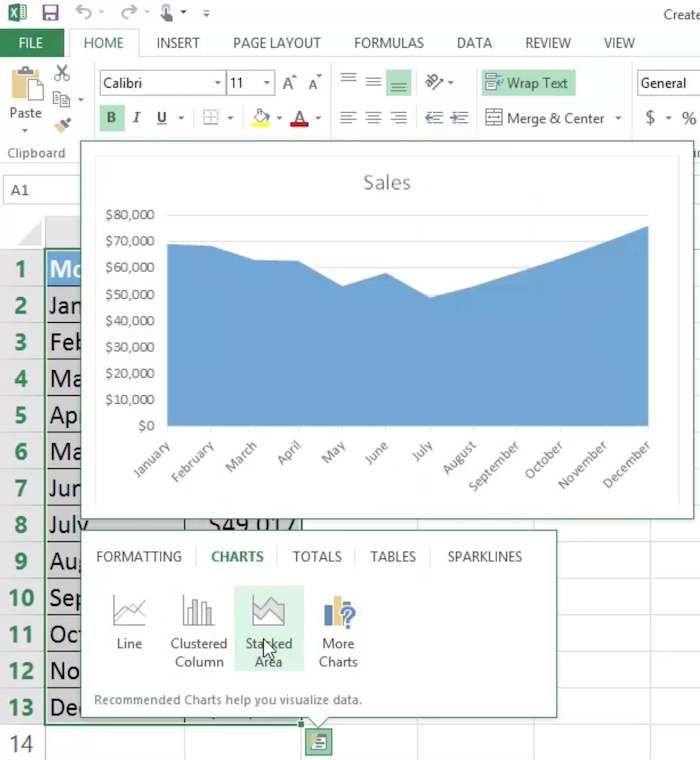
The Microsoft support page has more hints and tips for customizing your chart.
5. Save Time With Excel Macros
When you create paid ads, you often perform the same steps each time.
Excel lets you automate repetitive tasks to save you time.
How do you automate these tasks?
Through this neat little Excel feature called a macro.
Macros are essentially automated or recorded sequences. You “record” a set of actions you want Excel to automate, like keystrokes. When you need this action performed again, you simply run the macro, and Excel handles the rest for you.
Well, there’s no limit to what you can use them for, but here are some suggestions for paid ad campaign steps you might automate.
- completing keyword research generating new campaigns
- converting data into PivotTables
- building new templates
Setting up a macro should be a short process, though you can always check out the Microsoft help page if you need more guidance.
First, ensure you can see the “Developer” tab in Excel. From here, hit “Visual Basic” and then click the “Record” button. If you can’t see the Developer tab, just click the “View” tab and hit “Record Macro” there instead:

Choose a name for your macro and then start recording. Once you click “OK,” Excel records every action you take on the spreadsheet until you hit “Stop Recording.” Now you’ve got a macro set up to use whenever you need it.
Before you run a real and complicated macro, try setting up your own simple test macro to get a feel for how they work.
Conclusion
If you’re a marketer, these Excel tricks can help you create, track, and manage your paid ad campaigns more effectively than before.
There’s no need to be an Excel expert, either.
All you need to know are a few simple commands, and you could be up and running pretty quickly.
From keyword research to customer relationship management, Excel could be the tool you’re looking for.
Once you’ve tried these Excel tricks a few times, you’ll probably wonder how you managed to run your PPC campaigns without them!
If you need any more help with Excel, be sure to check out Microsoft’s Excel Community support page.
Have you used any of these Excel tricks for your paid ad campaigns?
Source: neilpatel.com

This Simple Facebook Ad Trick Gets More Leads & Customers In 5-10 Minutes Flat
Do you already have a couple of Facebook ad campaigns running?
Would you be interested in a tip that will help maximize your results?
(And not just on Facebook, but with any traffic network?)
Then you’re in luck.

Because in this post you’re going to learn a simple Facebook ad trick that will free the untapped profits that are hiding in your ad campaigns.
It’s easy to do, but don’t let that fool you—it’s a powerful tip to help convert more of those near-sales into new sales.
How It Works
Before we dive into the specifics, let me use a simple metaphor to help you understand how this tip works.
Think of your sales funnel as a series of steps. Together, they make a staircase.
In order to reach the top of the stairs (aka make a purchase), your customers have to take each step, one at a time, in the correct order.
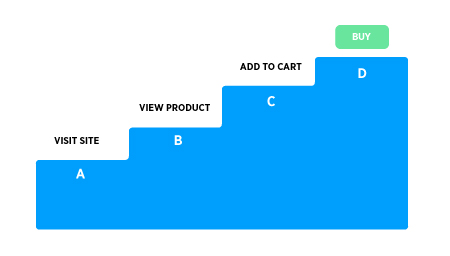
At each step in this process, you’re bound to lose people.
- Perhaps only 40% of the people who reach step A make it to step B.
- Maybe 60% of those people reach step C.
- And only 10% of those people reach step D. And so on.
If you’re a regular DigitalMarketer reader, you already know the way to squeeze more profit from this funnel (and get more leads, customers, and sales).
You just need to find the steps where most people are getting stuck and come up with solutions to help them get unstuck.
But that begs the question:
- How do you do that?
- How do you get back in front of those “stuck” people and get them moving through your sales funnel once again?
The answer, in a nutshell, is remarketing.
What Is Remarketing?
Just because someone didn’t take the next step in your sales funnel doesn’t mean they don’t WANT to.
If you’ve been following us long here on DigitalMarketer, you’ve probably heard quite a bit about remarketing.
But you may still have a few questions about how it works.
Basically, remarketing allows you to keep track of the people who visit your website.
Then it gives you the power to follow them around on the web and show them relevant ads and offers that have to do with what they viewed on your site.
Here’s an example of remarketing at work:
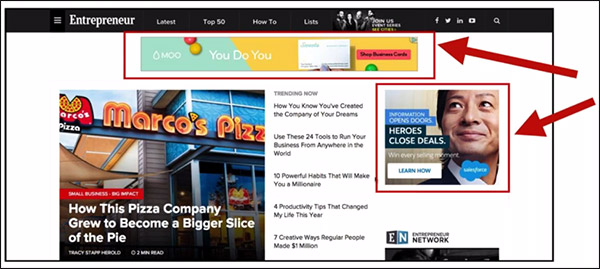
See those 2 ads highlighted in red?
The reason I’m seeing these 2 ads on Entrepreneur’s website is that I recently visited both of these websites.
As a result, they know there’s a good chance that I’m interested in their service and so they’re willing to pay to show these ads to me.
Now those ads are being shown on a 3rd-party website through an ad platform such as Google Adwords.
But you can also do remarketing on Facebook, Instagram—just about any traffic network out there.
Here’s an example of one of DigitalMarketer’s remarketing ads on Facebook:

The awesome thing about using Facebook for your remarketing is that it’s relatively simple to set up.
There’s no extra software to install or learn.
If you have the Facebook pixel installed, then you already have everything you need to keep track of what people do on your website.
And once you know what people have done on your website, it’s not that hard to figure out what kind of relevant offer makes the most sense to promote to them.
Keep this in mind:
- Just because someone didn’t take the next step in your sales funnel doesn’t mean they don’t WANT to.
- Or that they wouldn’t take the next step if they had another opportunity.
There’s a good chance that life simply got in the way: they got busy, their phone ran out of battery, something distracted them.
And when that kind of thing happens, the best thing you can do to help move people along through your sales funnel is to give them a gentle reminder.
That’s exactly what remarketing does, and that’s why it’s such a powerful way to improve your advertising.
In fact, let’s talk about that for a second.
Just how important is remarketing, anyway?
Why Remarketing is More Important Than Ever
In the early days of digital marketing, there was no such thing as remarketing.
But today it’s a vital part of any successful ad campaign.
And it’s only becoming more and more important over time.
Why? Because traffic campaigns are getting crowded.
And all that competition is leading to increased prices.
Over the past 2 years, the average cost per customer rose by roughly 40% at DigitalMarketer.
All as a result of increased traffic costs (primarily on Facebook).
Yes, you read that right—40%.
That’s a big increase.
A 40% increase in the cost of customer acquisition could mean the difference between a company that’s profitable and one that’s not.
Fortunately, there are ways to offset these rising costs.
And remarketing is one of those ways.
Through the strategic use of remarketing, we’ve been able to increase our conversion rates by 2-4% overall on any given page.
So a page that converts at 8% without remarketing can convert at 10-12% with it.
That’s huge!
And remarketing is especially powerful on Facebook.
Historically, the cost for remarketing ads on FB is way cheaper than the cost for clicks to cold traffic.
Cheaper clicks + warm traffic = high ROI campaigns and more customers flowing into your business.
I would go so far as to say that remarketing is the best way to quickly get a measurable improvement on your conversion rates and your overall advertising performance.
But…
(And that’s a big… well… let’s just say Sir Mix-a-Lot would like that “but.”)
Remarketing is like a can of worms.
Once you open it up, you realize that you can use remarketing just about anywhere!
And in order to enjoy the benefits of remarketing, you have to be able to figure out WHERE to remarket for the best results.
So how do you do that?
How can you figure out—quickly, simply, and easily—where to focus your remarketing efforts?
That’s what you’re about to learn in the rest of this post.
How to Find The Best Place To Do Remarketing
When deciding where to do remarketing, it all comes down to one thing:
Opportunity.
When deciding where to do remarketing, it all comes down to one thing: Opportunity.
You want to focus your remarketing on the steps in your sales funnel with the most opportunity.
If 300 people are stuck on step C in your funnel, and 2,000 are stuck on step D, doesn’t it stand to reason that step D has more potential than step C?
Because more opportunity = more leads, sales, and revenue.
And when it comes to measuring this opportunity, there are 2 ways you can do it:
1. Measuring Opportunity with Google Analytics
One way to measure potential is by using Google Analytics (GA). Google Analytics is really powerful.
You can use it to do super deep dives and get really detailed in your analysis.
But the downside to GA is that it’s slower, manual, and requires more math.
It also requires quite a bit of learning if you’re not already an advanced user.
So yes, GA is a great tool.
But for most people reading this, it’s probably not the best way to get started.
Instead, I recommend…
2. Measuring Opportunity with Traffic Platforms
What you can do instead is measure opportunity using the remarketing lists that are already built into your favorite traffic platforms.
That’s what I’m going to show you how to do in this blog post.
Your traffic platform’s remarketing lists are flexible and auto-updating.
They’re a great way to get quick insights to help you make smart marketing decisions.
I’m going to show you how to do this using Facebook remarketing audiences, but don’t think you have to use Facebook for this.
You can take the same principles you’re about to learn and apply them to Adwords or any other traffic platform you want.
(NOTE: Want to make creating Facebook ads way easier?
Download the FREE Ultimate Facebook Ad Template Library so you can just copy and paste these 7 proven Facebook ad campaigns to create low-cost, high-converting ads on demand.
Learn more here!)

The “Secret Sauce” to This Method
OK, if you’ve been following along then you know that you’re about to learn how to find the best place in your sales funnels to do remarketing.
And you’re going to learn how to do it quickly and easily using your ad network’s built-in remarketing lists.
But in order to make this method work, there are 2 things you’re going to want to do.
These 2 things are the secret sauces that make this method really work.
Exclusion Model
In order for these remarketing lists to work, you need 2 pieces of information for each step of the funnel:
- The URL of the last page in your funnel that the person reached
- The URL of the next page in the funnel (the page they didn’t reach)
For example, say you’re creating a list of people who reached your order form but didn’t complete their purchase.
In that case, you know that they reached the page yourwebsite.com/order-form. You also know that they did NOT reach the page yourwebsite.com/order-confirmation.
So in the language of your ad network, you want to INCLUDE people who reached yourwebsite.com/order-form.
And you want to EXCLUDE people who reached yourwebsite.com/order-confirmation.
This way you’ll be targeting everyone who reached the order form but failed to complete their order.
Make sense?
Here’s an example of what this looks like on Facebook:
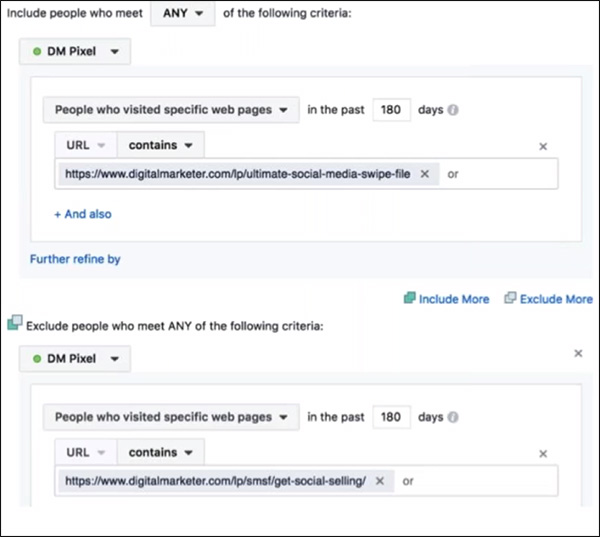
Pretty much everybody understands the “Include” half of this equation.
But it’s a common mistake for people to forget the “Exclude” part of it.
Remember that you need both parts if you want to narrow down your funnel opportunity on a step-by-step basis.
Naming Conventions
When creating these audiences, you’ll have an easier time if you use a consistent naming convention.
The naming system I like to use is:
Media – [Funnel Name] – [Stage Letter] – [Stage Description]
When you follow a consistent naming convention like this, it becomes super easy to sort and filter. That way, you can quickly see all the funnels steps you want at a glance.
For example, here are all the stages for our “FB Ad Templates” funnel:
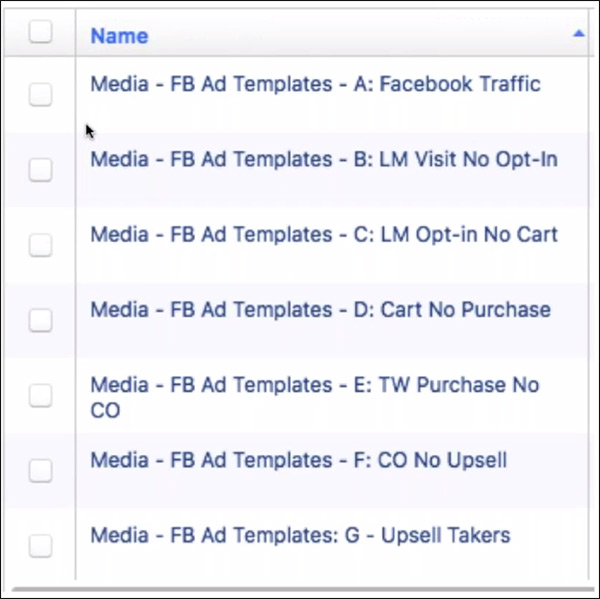
Having all this information right there in the name of the audience also makes it easy to filter them so I see only the audiences I want.
For example, if I want to compare all of our paid traffic campaigns, I just filter for the word “Media.”
If I want to look at one specific funnel, I filter for the name of the funnel (like “FB Ad Templates”).
I can also compare similar stages across funnels.
For example, if I want to compare all of our audiences of people who reached the shopping cart but didn’t make a purchase, I filter for “Cart No Purchase.”
So when you put this all together, you get a screen that looks like this:
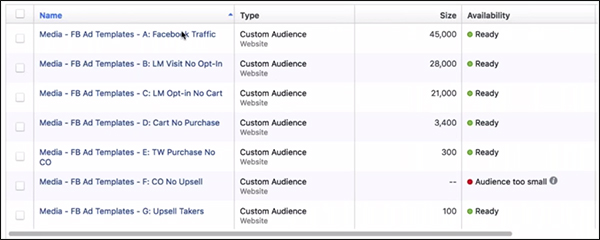
Take a look at that for a moment and just think how useful it is.
You can see at a glance how many people are stuck at each stage in the funnel.
Want some immediate revenue?
Well, there are 3,400 people who abandoned their shopping carts.
Remarketing to those people is going to generate some instant sales.
Or maybe you need more leads?
You can see right away that 28,000 people reached the Lead Magnet page but didn’t opt-in Remarketing to those people will give us an influx of new leads.
And because I use the same naming convention for all of our funnels, I can do something like this:
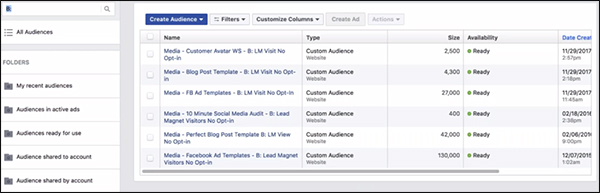
Here you see all the people who are stuck at step B in one of our funnels.
This view makes it really easy to compare the traffic potential in each of our funnels side-by-side.
Step-by-Step Example
Let me walk you through a quick step-by-step example from one of our funnels at DigitalMarketer. This might be a good time to follow along with one of your own funnels.
First, write down all the URLs of each page in the funnel:
Opt-In Page: https://digitalmarketer.com/lp/ultimate-social-media-swipe-file/
Sales Page: https://digitalmarketer.com/lp/smsf/get-social-selling/
Shopping Cart: https://digitalmarketer.com/secure/ssep/social-selling-special/
Upsell 1: https://digitalmarketer.com/secure/ssep/social-selling-special/oto1
Upsell 2: https://digitalmarketer.com/secure/ssep/social-selling-special/oto2
Order Confirmation Page: https://digitalmarketer.com/secure/ssep/social-selling-special/thank-you
Next, you want to create a Facebook audience for the people who got stuck at each step of the funnel.
To do that, the audience should include everyone who reached a certain URL:
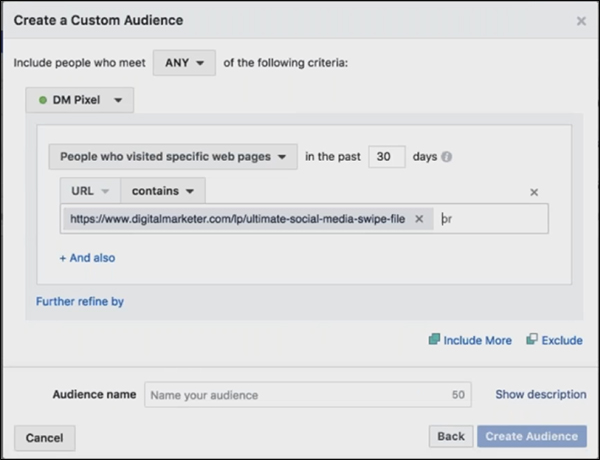
Then, exclude everyone who reached the URL of the next stage of the funnel:
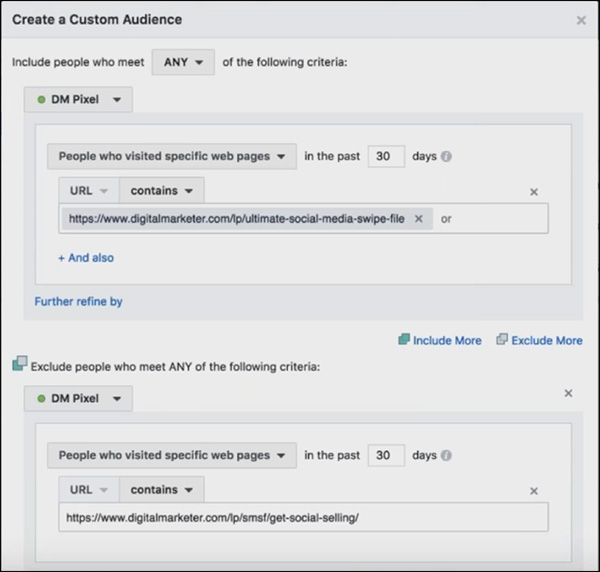
Make sense?
If we target everyone who reached the opt-in page, but who didn’t reach the sales page, then we’ll see how many people got “stuck” on that step of the funnel.
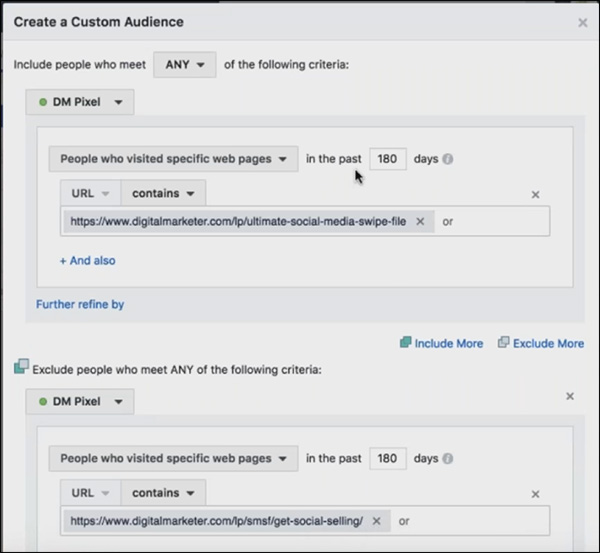
Next, I prefer to set the date ranges for 180 days, so we have more data to work with:
And finally, use the naming convention you learned (or come up with your own) to make it easy to compare different funnel steps:

When you complete the process, you’ll end up with something like this.
It’s a list of funnel steps that show exactly how many people got stuck at each step in your funnel:
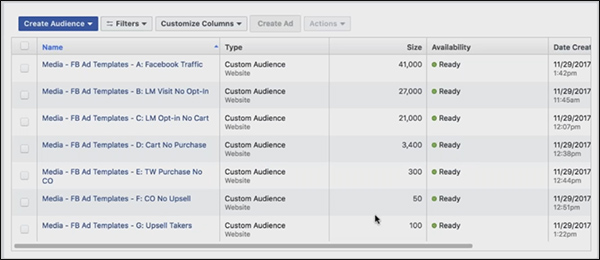
The awesome thing about this view is that all you need to interpret it is a little common sense.
You don’t need any sort of special tool or calculator to understand what’s going on here.
Another useful trick is to put this data in a spreadsheet, so you can compare the performance of several different funnels at once.
Here I’ve added the data for 3 of our funnels, so you can see exactly how many people made it to each step in each of them side-by-side:
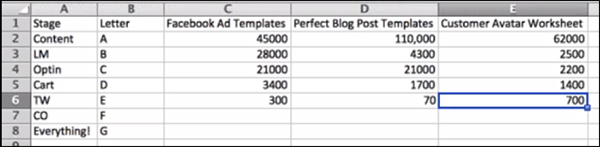
What sort of actionable information can you take away from this quick and easy chart?
First of all, take a look at the “Perfect Blog Post Templates” funnel.
In row 3 (step B) you see that only 4,300 people saw the opt-in page and didn’t opt-in.
But in the next step, we had 21,000 people who opted in but then didn’t add the product to their cart.
So the Lead Magnet section of this funnel is working great.
But the sales page might need a little work.
And if we were going to run a remarketing campaign for this funnel, we wouldn’t run it to opt-in page visitors.
Instead, we’d run it for people who viewed the sales page.
OK, now I want you to give it a try.
Take a look at the spreadsheet above and answer this question:
- If we wanted more immediate sales, where should we run a remarketing campaign?
- Which funnel, and which step in that funnel?
(I’ll give you a minute to think.)
(Hey, no peeking!)
OK, hopefully, you took a minute to think about that.
If we wanted more immediate sales, the best place to retarget is shopping cart abandoners (step D).
So scanning that row, you can quickly see that the Facebook Ad Templates funnel has twice as many cart abandoners as the other funnels.
So that’s where I would start with a shopping cart remarketing campaign.
(NOTE: Want to make creating Facebook ads way easier? Download the FREE Ultimate Facebook Ad Template Library so you can just copy and paste these 7 proven Facebook ad campaigns to create low-cost, high-converting ads on demand. Learn more here!)
4 Advanced Tips + A Disclaimer
You now have a simple process you can use to analyze traffic volume and potential in your sales funnels using Facebook remarketing lists.
But we’re not done yet.
Because with this strategy in place, there are some even more advanced things you can do to help really skyrocket your paid traffic results.
First, however, there’s 1 disclaimer I should make.
Disclaimer: Only Use This for Funnels You Trust
I want to mention a caveat to keep in mind.
You should only use this process on funnels you trust. Funnels that work. That convert well.
You should only use this process on funnels you trust. Funnels that work. That convert well.
That you’re comfortable sending paid traffic to.
Think about it for a second.
Let’s say you run traffic to a funnel that is losing you money.
Maybe the opt-in page and sales page convert really poorly.
If you send a lot of traffic through this funnel, it might show up as a high-opportunity place to do some remarketing.
But there’s nothing to be gained from sending traffic to a funnel that doesn’t convert.
That’s just throwing good money after bad.
So keep that in mind when going through this process.
If your funnel isn’t converting well enough to turn a profit, spend more time optimizing it before you start remarketing heavily.
Facebook Ad Advanced Tips:
Facebook Ad Advanced Tip 1: Choosing New Primary Traffic Campaigns
So far, you’ve learned how to use this process to improve the performance of your existing traffic campaigns. But you can also use it to help discover new traffic campaigns that you should be running.
It works along the same lines—by finding content on your website with high opportunity.
Here’s how it works.
First, come up with a list of keywords that come up a lot in your content.
For example, some of our frequent keywords at DigitalMarketer include “Facebook,” “social,” “Adwords,” etc.
Then create a Facebook audience for each of those keywords.
And make sure to exclude anybody who has already opted in for any Lead Magnets relevant to those keywords.
For example, at DigitalMarketer we have a Lead Magnet called “The Customer Avatar Worksheet.”
It’s a downloadable worksheet that you can use to help define your customer avatar and fine-tune your advertising for the right kinds of people.
But how well are we doing with this Lead Magnet?
Are we doing a good job of getting people who are interested in this topic to opt-in for the worksheet?
Or do we need to create a new ad campaign targeting these people?
To find out, we would create a custom audience like this:
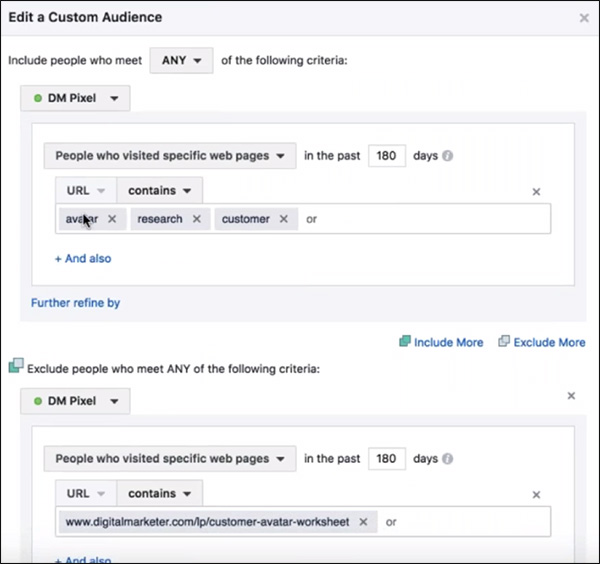
This creates a list of everyone who has read a blog post with the words avatar, research, or customer, but did not sign up for the Customer Avatar Worksheet.
And we can use the size of that audience to judge how much opportunity there is around this topic. If the audience is really small, then we know it’s not worth going after these people right now.
But if it’s a big audience, then maybe it’s time to start targeting it with a new traffic campaign.
Facebook Ad Advanced Tip 2: Tracking the Health of Your Offers/Web Pages
So far, I have been using the longest possible date range (180 days).
This is helpful because it gives you the biggest possible audience size.
Generally speaking, larger audiences will help make trends more visible.
But if you shrink down the date range to something much more recent, say the past 10 days, you can use it as a sort of health check.
Those recent audiences will let you know anytime something breaks.

For instance, let’s say you notice that nobody has made it past your opt-in page over the past week.
That’s probably a good indication that something is broken on your site.
This can help you stay on top of technical problems, so you don’t lose business to 404 pages and other website errors.
Facebook Ad Advanced Tip 3: Finding New Hooks for Lead Magnets
You can also use this process to keep your finger on the pulse of what your website visitors are interested in.
And by doing that, you can measure when it’s time to create a new Lead Magnet to bring more leads & prospects into your sales funnels.
For example, at this writing, we do not yet have a Lead Magnet that’s geared toward helping people to create a Facebook Messenger chatbot.
However, we know that this is a topic that’s growing in popularity.
So sooner or later we may want to create one.
One way we can keep our finger on that pulse and measure the popularity of chatbots is by creating a Facebook list of anyone who visited a blog page containing relevant keywords like “chatbot” and “Messenger.”
Here’s what that might look like inside Facebook:
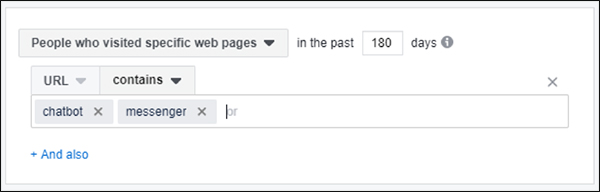
Do this for all the main keywords that come up regularly in your content, and just keep track of the volume.
When you notice any of these audiences start to grow in size, you’ll know it’s time to create a new Lead Magnet on that topic.
Facebook Ad Advanced Tip 4: Track Other Traffic Sources in Facebook
Earlier in this post, I mentioned that increasing ad costs are becoming a big problem for many advertisers.
This has been especially true on Facebook, where more and more companies start advertising every day.
More competition = higher prices.
Luckily, this is an area where remarketing can help cut your costs.
Because as I mentioned, retargeting ads on Facebook are historically much cheaper than front-end ads.
So what a lot of marketers are doing is using cheaper traffic networks to drive cold traffic at a lower cost.
(Networks like YouTube, Google Display Network, Bing, and so on.)
Then they use Facebook to remarket to those people once they’ve entered your funnel.
This way you avoid the high cost of running front-end ads on Facebook.
And as a result, you can save significantly on your ad spend without sacrificing performance.
A Great Reference for Developing Remarketing Copy & Hooks
In this post, I’ve shared a process you can use to find the funnel steps with the most opportunity for remarketing.
But simply knowing WHERE to remarket is only half the battle.
The next step is actually digging in and creating a high-converting remarketing campaign, complete with eye-catching images, benefit-rich copy, and a compelling call-to-action.
That’s beyond the scope of this blog post, but if you’re interested in a program that helps you do exactly that, I recommend checking out The Boomerang Traffic Plan Execution Plan (EP).
In a lot of ways, this blog post is kind of a primer for that EP.
You now know how to find the parts of your business that have the most potential for remarketing.
And with the Boomerang Traffic EP, you’ll get everything else you need to finish putting together an effective remarketing campaign that brings promising leads back to your website, so they can complete their purchase.
You’ll discover tricks for coming up with good ad creative, get access to copy templates, learn the exact bidding strategy that will maximize your leads while lowering your costs, and much more.
How to Put This Facebook Remarketing Tip into Action
Now that you have a step-by-step process to find the highest opportunity spots for remarketing in your sales funnel, how should you get started?
Here’s what I recommend.
Start with your biggest funnel.
The one that drives the most of new sales and customers to your business.
And go through the process you just learned, finding the step in that funnel with the biggest opportunity.
And remarket to the people who are getting stuck at that step.
That’s the way to make sure you’re getting the absolute best bang for your remarketing buck.
Then continue to repeat the process for additional funnel steps whenever you can.
The process doesn’t take much time, so if you find yourself with an extra 15 minutes, go through it again.
Each time you’ll find the next-highest opportunity for remarketing.
Easy, right? Just take it one step at a time, and watch those sales funnels start doing their job and funneling more and more new customers into your business.
(NOTE: Want to make creating Facebook ads way easier? Download the FREE Ultimate Facebook Ad Template Library so you can just copy and paste these 7 proven Facebook ad campaigns to create low-cost, high-converting ads on demand. Learn more here!)
The post This Simple Facebook Ad Trick Gets More Leads & Customers In 5-10 Minutes Flat appeared first on DigitalMarketer.
Source: digitalmarketer.com