
Tag Archives for " ads "

What Are Performance Max Campaigns?
Do you wish you could spend less time managing your paid ads campaign while driving the same, if not more, conversions? Then you’re in luck. Your Google Fairy Godmother is here to make that dream come true.
Enter Performance Max campaigns, which use AI and machine learning to improve your advertising strategy and offer a hands-off approach to winning with PPC.
Excited? Well, here’s everything you need to know about Performance Max campaigns, when to use them, and how to create your own.

Performance Max Campaigns: What Are They?
Google first introduced Performance Max campaigns at its Google Marketing Livestream event in May 2021.
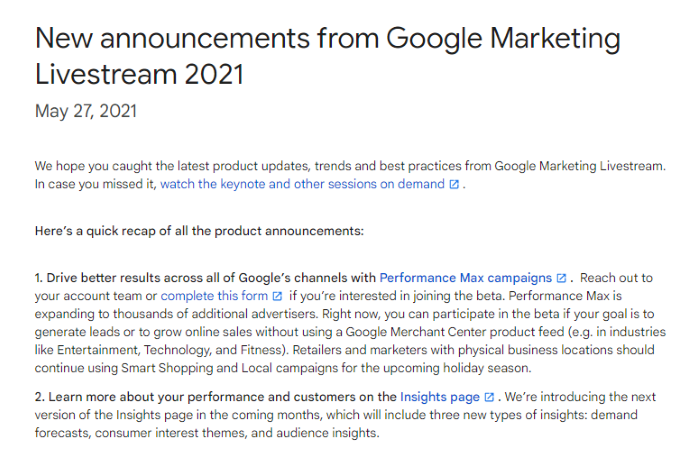
Performance Max campaigns are the first fully automated ad campaign of their kind. Unlike traditional Google Ad campaigns, Google automates the targeting and delivery of Performance Max campaigns based on the information you provide.
All advertisers need to do is provide a series of ad creatives (a call to action, additional ad copy, and relevant images or videos), and Google takes care of the rest.
It also stands apart from anything else currently on offer by allowing you to access all of Google’s ad inventory from one lone campaign. YouTube, Search, Display, Gmail, Google will run and test creatives on every channel to meet your goals.
In short, you get access to Google’s entire inventory of ad space and a fully automated ad campaign with as little effort as possible.
Who and When Should You Use Performance Max Campaigns?
The great thing about Performance Max campaigns is that they use all of Google’s ad inventory, you can use them for pretty much any kind of campaign.
That doesn’t mean Performance Max campaigns will be everyone’s cup of tea, however. PPC experts who can eke out a lot more revenue by optimizing every facet of a campaign probably won’t enjoy the set-and-forget nature of Performance Max campaigns.
However, it makes the campaigns perfect for small and medium-sized business owners who don’t have much time or a dedicated team to run campaigns.
Performance Max campaigns are also perfect if you:
- don’t have the time or knowledge to optimize your own campaigns
- want good ad performance but don’t want to pay for a PPC agency
- don’t have the necessary budget to target all of Google’s ad inventory individually
- have a large budget and want to discover new angles that result from these campaigns
- want to optimize the performance of your campaigns but don’t care which channels your ads appear on
- want to simplify your PPC advertising with a single campaign
As for which industries are best served by these ads, it’s a little difficult to tell given how new they are. Whether you’re an e-commerce store, a physical retailer, a SaaS brand, or a B2B company, I’d recommend trying them out.
Pretty much any industry can have success with Performance Max campaigns. Just make sure to set specific goals when launching your campaign.
By that, I mean focus ads on a specific product or offer, rather than your brand as a whole. Awareness campaigns aren’t as likely to see results with Performance Max advertising.
What Are the Main Advantages of a Performance Max Campaign?
Not sure if these new ads are the right choice for your brand? Let’s take a look at the advantages.
Focus on Goals
The major benefit of Performance Max is the goal-focused nature of campaigns. The primary target for Google’s campaign optimizations is to meet the goal you set at the start of the campaign.

If you have a very specific goal, like acquiring trial customers for your new product, Performance Max campaigns are a great way to drive conversion.
Hands-Off Ad Optimization and Creation
Another of the biggest advantages of Performance Max campaigns is the hands-off approach that advertisers can take with their PPC campaigns. Once you’ve set the campaign up (which is incredibly quick and easy, as you’ll see below), there’s not a lot more to do.
Setting up and managing the campaign is much faster, too. There’s no need to design your creatives with Performance Max campaigns, just provide Google with all of the individual assets, and it creates ads on your behalf.
You don’t need to spend time selecting which networks to run, and there’s no need to tweak the campaign while it’s life, either. Google does it all for you.
How you spend the time you save is up to you. Some business owners will focus on optimizing their business as a whole, but you could also choose to spend time optimizing your ad creatives (the one element of Performance Max campaigns you do control) to boost the campaign performance even more.
Access to More Ad Inventory
Getting access to all of Google’s inventory in one campaign is another major benefit. Before Performance Max campaigns, the barrier to entry for creating a campaign that leverages all of Google’s ad inventory would have been incredibly high. Only the biggest spending marketers would have been able to do it.
Performance Max campaigns democratize access to Google’s ad inventory in a way that we’ve never seen before and give everyone the chance to advertise across Google’s entire ad ecosystem.

Not only is this a great way to quickly reach new customer segments, but it’s also a great way to generate more PPC data you can use to inform new campaigns in the future. Who knows, you may discover an audience segment and ad inventory combination that converts like a dream.
Save Money On Marketing Costs
You don’t need to be a PPC expert to run these campaigns, either. There’s no need to guess manual testing, bidding strategies, or which ad inventory will deliver the best results.

Of course, some business owners who have experience with PPC advertising may not relish relinquishing control in this manner, but it may still be profitable to experiment with Max Performance campaigns to see the kind of results it can deliver.
If it does work, you won’t need to worry about spending time managing their own campaigns, no matter how experienced they are with PPC campaigns.
Drawbacks of Performance Max Campaigns
If there’s one drawback of using Performance Max campaigns it’s reporting—an issue raised during the Google Marketing Livestream conference.
Google announced advertisers had raised issues with reporting transparency, but the search giant is taking steps to improve this feature. Reports are still limited as of writing, but this may improve in the future.
A Google Performance Max Campaign Case Study
Naturally, Google has been quick to share the positive results companies have seen from its new campaign format. This has primarily been through a case study. It was published with consumer loan provider MoneyMe.
The company, which was looking to rapidly increase its customer base, worked with Australian agency Sparro to launch Performance Max campaigns. The goal of the campaign was to drive newly funded loans for the company’s feature product, personal loans.
They started by maximizing conversions to find a baseline CPA target before switching to a target CPA strategy to boost the profitability of campaigns.
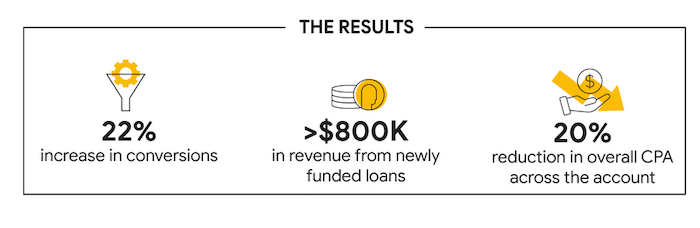
The results are impressive. Performance Max campaigns helped MoneyMe increase conversions by 22 percent and drive more than $800,000 in revenue from new loans. They also managed to reduce their CPA by 20 percent, too.
How to Create a Performance Max Campaign
Google is currently beta testing Performance Max Campaigns. You’ll need to enquire using this form to launch a campaign as soon as possible. You’ll also need to have Google Ads Conversion Tracking implemented on your site.
Once you’ve done both, follow the instructions below.
Step 1: Set a Goal
The first step in creating a Performance Max campaign is to set a goal. This could be online sales, lead generation, or offline sales.
Step 2: Set a Budget and Bidding Strategy
Next, set a budget and a bidding strategy. You can choose to maximize conversion or spend, set a maximum CPA, or set a target cost or conversion.
Step 3: Create an Asset Group
As we have discussed above, this is not an ad. It’s a collection of assets Google will use to create static and dynamic ads depending on the ad placement.
In total, you’ll need to provide Google:
- 3 headline versions
- 2 ad description
- sone longer headline
- a 600×316 landscape image
- a 300×300 square image
- a 314×314 square image
- a 128×128 logo
- a 10-second-plus video for video ads
Step 4: Select a Target Audience (Optional)
If you want to give Google a little help getting started, you can select a target audience. Google will automatically show your ads to the users who are most likely to convert, but you can provide signals to help Google quickly find your ideal customers.
Of course, by doing this, you may miss out on finding a yet undiscovered audience segment.
Step 5: Add Extensions
These can either be existing site-level extensions or you can create your own site links for your Performance Max campaign. Helpfully, Google suggests creating specific formats depending on your campaign objectives, like adding a form extension if you want to acquire leads.
Performance Max Campaigns Frequently Asked Questions
Do Performance Max campaigns work?
Performance Max campaigns have been proven to increase conversions, reduce CPA, and deliver positive ROI.
How much do Performance Max campaigns cost?
The cost of Performance Max campaigns will depend on your goals and budget. You’ll need to spend at least several thousand dollars on the campaigns to see results initially.
What do you need to know about Performance Max campaigns?
Performance Max campaigns are Google’s first fully automated PPC campaign that gives you access to Google’s entire ad inventory. Just provide Google with a campaign goal and a set of creative assets and they’ll create and optimize everything for you.
How does Google support Performance Max campaigns?
Google uses AI and machine learning to optimize performance max campaigns on an ongoing basis. Since they were first released in May 2021, it has also committed itself to improve reports and insights from Performance Max campaigns.

Performance Max Campaigns Conclusion
You don’t have to be a PPC expert or hire a PPC marketing agency to drive leads and sales for your business. Google’s Performance Max campaigns take all the hard work out of creating an effective PPC campaign, so you can focus on your business while your ads drive conversions and, most importantly, positive ROI.
These campaigns may not be profitable straight away—just like any other PPC campaign strategy—but they may deliver solid results over time. They’re definitely worth testing.
Have you launched a Performance Max campaign yet? What were your results?
Source: neilpatel.com

How to Do Quarterly Ad Planning
Perhaps you have a yearly marketing plan that provides an overview of the year. This can be helpful in understanding your overall goals but is too vague to implement. That’s why a campaign plan with a narrower window—such as a quarter—is essential to marketing success.
A quarterly ad campaign plan provides a more granular view of your objectives, goals, and success. This will enable you to keep your priorities in line and respond accordingly to KPIs and metrics as results become available.

This in-depth guide provides actionable tips for successfully planning your quarterly ad campaign. By the end of this article, you will feel confident in your ability to create a thorough campaign plan you and your team can execute.
Review Last Quarter’s KPI and Metrics
The first step to future campaign planning is to look at the previous quarter’s performance. Using Key Performance Indicators (KPIs) and metrics, you can gain a deeper understanding of the success of previous campaigns.

The KPIs can vary depending on the marketing campaign and its ultimate purpose, but a few KPIs to consider closely are:
- customer acquisition cost (CAC)
- customer lifetime value (LTV)
- return on investment (ROI)
- marketing qualified lead (MQL)
- traffic-to-lead ratio (new contact rate)
- lead-to-customer ratio
- return on ad spend (ROAS)
- conversion rate
- website traffic
- customer retention
This list is a healthy mix of short-term and long-term KPIs, which is crucial to agile marketing. You don’t need to include all of them in your quarterly business review. Instead, you should focus on one or two that most closely align with each of your objectives.
When choosing KPIs to track, ask yourself whether it is easily quantifiable and something you can influence. The more control you have over a KPI, the more valuable its inclusion in your performance tracking.
With the information above, you can make new quarterly campaign decisions based on what worked, what didn’t, and what ideas could have been better executed.
Set Campaign Goals and Metrics to Track
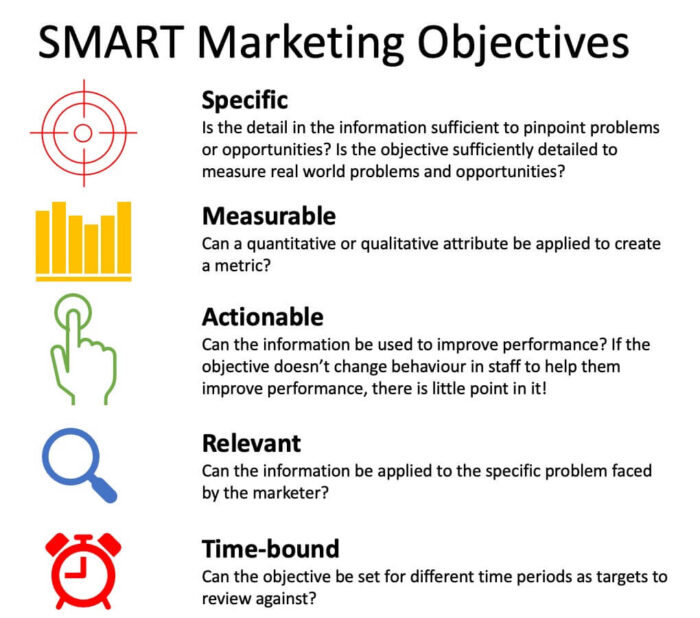
It’s not enough to create a plan. You should do so with specific goals in mind. However, setting marketing goals you can achieve requires an in-depth approach. I recommend the SMART method for goal setting. This stands for:
- specific
- measurable
- achievable
- relevant
- timebound
What does this look like for a marketing campaign?
Let’s say you’re running a campaign with the overall goal of bringing more qualified leads into your funnel. A SMART goal might look like this:
“Increase the number of MQL’s in our funnel by 8 percent by the end of Q3 via a targeted social media campaign.”
This goal hits all of the marks of a SMART goal by being specific, measurable, achievable, relevant, and timebound. By the end of the campaign, you can easily answer yes or no on whether the goal was achieved. If not, you can reevaluate for the next quarter.
Evaluate Campaign Targeting
Your ad campaigns will only be as effective as the audience they reach. Identifying your target market is a crucial step in ensuring a successful quarterly campaign season.

You should first take a closer look at the data from your existing audience. This means digging in to further determine geography, age ranges, and lifestyle. How did your audience respond to the previous campaigns, and what can you do to improve those responses?
For example, did one segment of your audience interact with the campaign media but not convert? This indicates a surface-level interest. You should not abandon your efforts with this segment entirely but instead shift your objective to a higher level of the marketing funnel (e.g., attention or interest).
You may want to consider target audience expansion, too. Based on the previous quarter’s data, perhaps you found you were reaching demographics not previously on your radar. This would be a good time to reconsider the various segments of your target audience and add new ones if needed.

Fortunately, there are free tools like Google Analytics to help you further evaluate and segment your audience.
Decide Which Platforms to Use
The list of platforms is long and growing longer. The most popular platforms include Google, Facebook, Instagram, Bing, Amazon, and YouTube.
Before you choose which platforms to advertise with, though, you should first determine how many you will use.
With just one or two platforms, you can focus more intently on a more segmented part of your audience. This may result in a higher ROI. If your interest is more in testing various ad types and audience segments, though, then three, four, or even five platforms may be a good idea.
You should focus on quality as well as quantity. Each platform offers its own ad types, and using the right one for your audience is important. Google, for example, has eight different campaign types to choose from:

With so many platforms, you may feel compelled to spread your campaign budget across the spectrum. After all, doesn’t more platforms mean an increased reach? While true in theory, it’s more important to target the right audience.
Review Campaign Budget

You can make your ad campaigns effective, whether on a small or large budget. However, it’s essential to set the budget from the start so you can plan accordingly.
The different platforms will have different tips and tricks for budget optimization. Before you consider the specifics of your budget for each platform, though, you need to determine all-in advertising costs.
It helps to use a top-down approach. This means setting a maximum budget for the quarter that includes all advertising costs. You can then split the budget for each platform based on a few different factors, such as:
- previous platform success
- target market share
- ad type and opportunity
Even further, you can split the platform budget into per-advertisement costs. For example, spending more per day on a sale campaign can make more sense if the ROI is expected to be higher.
Outline Campaign Messages and Offers
While you don’t need to have all of the copy and digital assets completed before the quarter, you should have a solid idea of the campaign messages and offers. This outline will act as your framework for the work to come.
The outline can be a simple list of dates with corresponding messages and offers, or it can be baked into your workflow. The most important thing is to answer these three questions:
- Who is the target audience?
- What is the purpose of the advertisement?
- On what platform will this advertisement be displayed?
The more detailed your campaign messages and offers are at the outset, the easier it will be to plan your workflow. It also takes a lot of guesswork out of the process so the campaign goal is clear for all members of the marketing team.
The drawback of being too detailed is the plan can feel a bit rigid. You should discuss internally just how detailed you want to get at the beginning of the quarter. Your team may prefer to flow a bit more freely, or they may prefer to have the campaigns locked in place 90 days in advance.

You can easily enter campaign details into a spreadsheet or word document. There are also more detailed campaign offer templates for those who prefer them.
Create Asset Production Workflow
At the beginning of the quarter, the list of work to be done can be long and overwhelming. It’s at this point that establishing an effective workflow is crucial to future campaign success.
An asset production workflow ensures campaign assets (including copy, images, videos, and other digital elements) are completed on time. A good workflow ensures team collaboration and clear communication.
The workflow will vary depending on the type of asset and the number of collaborators. The basic steps of creative production include ideation, creation, review, approval, and launch.
You can manage these steps in a spreadsheet, though many project management platforms exist. These platforms often offer templates to spark your creativity.
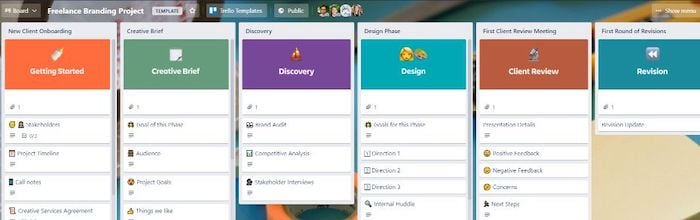
Platforms like Trello and Asana enable you to create a seamless workflow. You can add multiple collaborators to each board, as well as use deadlines, checklists, and triggers to keep on task. These platforms help you focus more thoroughly on the process and less so on process management.
Create a Campaign Testing Plan
Testing your campaigns on an ongoing basis is important to future marketing optimization. The results of campaign testing provide insight into your target audience so you can better refine your marketing campaigns.
With this in mind, it’s important to include campaign testing within your overall campaign planning. This ensures assets are created early in the process and properly vetted.

A few examples of campaign tests include:
- target audience
- budget
- time of week and day
- calls to action (CTAs)
- word order
- power words in headlines
It can be tempting to perform campaign testing off-the-cuff. However, it’s best to plan for these tests at the outset and include them in your asset workflow. You can use the results of these tests going forward.
Frequently Asked Questions (FAQs) About Ad Campaign Planning
If you still have questions about ad campaign planning, take a look at the answers to these frequently asked questions on the topic.
How often should I review my ad campaign plan?
The quarterly planning session is important for setting the outline and goals of the quarter. It is important to reevaluate regularly throughout the quarter, though, and pivot as needed. You should look at least weekly at your campaign plan to determine success.
How early should I plan my ad campaigns for the holiday season?
When it comes to holiday ad planning, the earlier, the better. For best results, you should begin to plan the next holiday season as soon as the previous holiday season concludes. If you’re already behind, then you’ll want to keep it simple and be ready to adapt.
What should an ad campaign analysis include?
An ad campaign analysis should include at least three steps: review, take-aways, and next steps. This means you should review the results, highlight the key take-aways (i.e., what the results show worked and what didn’t), and outline recommended next steps (e.g., reevaluate how goals can be improved for the next quarter).
What type of objectives should I set for my ad campaigns?
When creating an ad campaign, you should do so with one key objective in mind. The objectives can be split into three categories: awareness, consideration, and conversion. An awareness campaign aims to increase reach, a consideration campaign aims to drive engagement, and a conversion campaign aims to drive conversions.
Quarterly Ad Campaign Planning Conclusion
When you transition to quarterly ad campaign planning, you will feel more confident in your ability to carry out and evaluate your marketing goals.
This is true whether you are transitioning from an annual campaign plan, which can be too vague, or a weekly campaign plan, which can be too granular.
A quarterly campaign plan enables you to break down your goals, objectives, and budget into bite-sized chunks. This cuts down on the overwhelm while also providing flexibility.
More importantly, the 90-day window a quarterly campaign plan includes is just enough time to flawlessly execute while also evaluating your success along the way.
This agile framework enables you to respond accordingly to the results of your campaign so you can become proactive.
What objectives do you want to highlight with your next quarterly ad campaign plan?
Source: feedproxy.google.com

How to Increase Your Website Traffic Without SEO
SEO can be a brilliant strategy to increase your website traffic but it isn’t always enough.
Imagine you rely on SEO for all your traffic. What happens when the Google algorithm changes? You risk losing potential customers!
Disclosure: This content is reader-supported, which means if you click on some of our links that we may earn a commission.
That’s why diversifying your methods of increasing web traffic can offer better results.
If you have multiple traffic sources, changing algorithms won’t completely halt your business.
You will have a toolkit full of optimization strategies to keep your business running.
Diversifying your web traffic can also be helpful in cases where there’s little scope for search engine optimization (for example, podcasts).
In this post, we’re going to look at effective strategies to grow your website traffic without SEO so you’re never left stranded by algorithm changes again.
We’ll also look at practical tips you can start using right now, so you can get back in the game if your traffic has been low for a while.

Why Should You Try to Grow Traffic Without SEO?
You can generate substantial traffic from SEO alone, but not all traffic is equal. High-quality traffic (that includes users more likely to convert) offers better ROI, so you need to prioritize it.
Plus, if you aren’t an SEO expert, you may want to focus on other strategies to grow your website traffic efficiently.
This doesn’t mean you completely ignore SEO. All websites, irrespective of their niche, must follow the best SEO practices to avoid being penalized by Google and to ensure the site gets indexed.
Top Strategies to Increase Website Traffic Without SEO
The strategies we’ll discuss below can be a helpful addition to a pre-existing SEO plan.
1. Content Marketing
If you have been reading about digital marketing for a while, you must have heard the term “content marketing.”
In simple words, it’s a way to organically advertise your brand through high-quality content.
Content marketing strategies often include blog posts, podcast episodes, infographics,
YouTube videos, downloadable PDFs, etc.
For instance, Toggl, a time tracking software company frequently uploads informative blog posts and research data about productivity, work-life, and career.
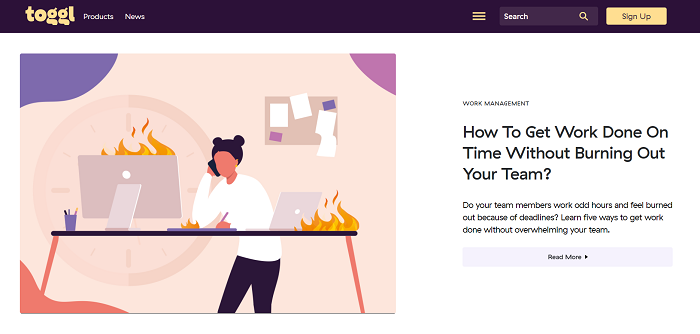
This attracts users interested in time management, productivity, and wellbeing in the workplace.
When they read Toggl’s blog, they eventually discover Toggl’s time tracking app, among its other productivity tools.
Some of these users convert, helping Toggl increase their website traffic and ROI.
Content marketing isn’t limited to blog posts.
If you connect better through audio, you can try launching a podcast or host a webinar.
Nowadays, most social media apps let you post a variety of content formats including photos, audio clips, long-form text, and videos.
You can experiment with one or more of these formats to see what works best for your audience.
2. Paid Ads
Content marketing is beneficial but it can take a lot of money, especially if you’re paying established writers to create original, well-researched posts for you.
Most of these projects also take weeks or months to show results, which isn’t a practical timeline for many businesses.
If you want quicker results with a budget you can control, why not try paid ads?
Seven in ten Americans use social media today.
That’s more than two-thirds of the population.
Think about the possibilities!
Paid ads can instantly generate hundreds, if not thousands, of clicks to your website.
Plus, with new advertising and social media platforms appearing and innovating regularly, getting your ads in front of the right people is becoming easier than ever.
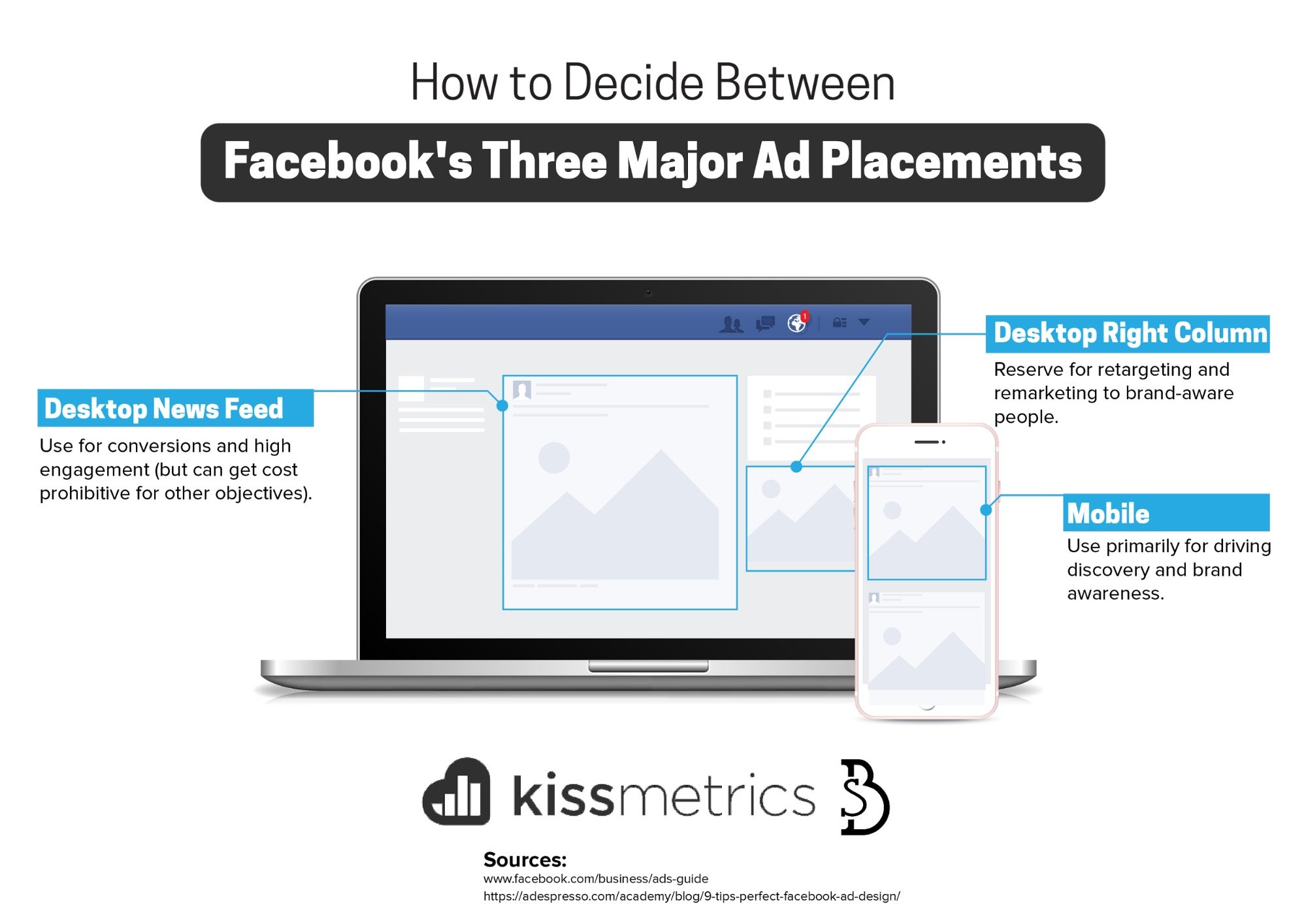
For example, Facebook offers detailed customer personas and multiple targeting options so you can put your business in front of your target customers without wasting a lot of money on mass advertising.
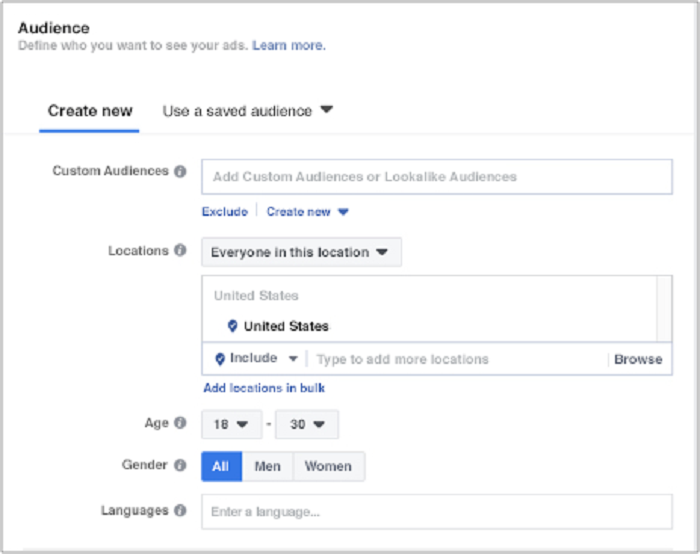
However, you don’t have to stick to the largest platforms for effective advertising.
In fact, advertising on lesser-known platforms whose audience aligns with your products can be more effective in the long run.
For example, if your ideal customer includes teens who enjoy memes and weird stories, you’d have much better results by advertising on Reddit, rather than Facebook or YouTube.
Another option is dating apps.
If your brand is focused on relationships or if you’re targeting young singles, advertising on dating apps like Tinder can help you find your target customers faster.

If you’re worried paid ads will take a lot of money, remember, you don’t need to spend $1,000 on your first day.
Test the waters with $5-$10 a day and see what happens.
Do that for a week, just to learn how different media platforms work.
3. Social Media Strategies
One of the best ways to increase your website traffic is to meet your customers where they like to hang out.
Like we discussed earlier, almost everyone is using social media today.
Ramping up your social media marketing efforts can help you reach new users, develop brand awareness and increase website traffic.
How to gain website traffic through social media?
When it comes to social media, you can’t just barge into “conversations” and ask people to buy something from you or to visit your website.
Think about how you’d present your brand in real life when you meet an individual for the first time.
Would you immediately talk sales in their face?
How about providing details about your product/service without introducing yourself first?
Remember, users, visit their preferred social media platforms for entertainment, not for being sold to.
To make sure your efforts are well-received, you need to provide value first and develop positive relationships with your potential “followers.”
You can do this by sharing informative posts like How-Tos, or posting fun photos of your employees, like this post from Casper.

I wrote a detailed guide to increasing social media followers and boosting engagement.
Here’s a summary of the top options to help you grow your website traffic.
- Join relevant Facebook groups
- Share helpful articles/videos in these groups
- Post updates about your company’s latest products host contests and giveaways
- Leave thoughtful comments on user-generated content
4. Link Building Strategies
When marketing teams talk about SEO, link building frequently comes to mind.
When reputable websites link to your content, the algorithm favors your website and increases its rank on the search page.
Sounds helpful, but that’s not all.
Did you know link building can help you increase web traffic without relying on SEO?
Link building for brand awareness is a process where you focus your strategies on expanding your reach, putting your content in front of new users, and generating conversations around your brand.
This is more than just a casual backlink in a blog post.
Link building for brand awareness takes more planning and resources, but the investment is worth the high-quality leads you’ll get.
Here are some tips for developing effective link building strategies to increase website traffic:
- Engage with your audience: Create interesting, shareable posts and encourage your followers to respond and share your content.
- Work with PRs: Recruit efficient PRs to help generate brand awareness and distribute your story to your desired audience.
- Guest blog intentionally: Choose unique publications that align with your readers’ key interests and post guest blogs on their page.
5. Interact With Other Blogs
Guest blogging is an effective traffic-driving strategy aimed at leveraging somebody else’s audience to widen your brand’s reach.

Think about it: Somebody in your niche has a large, engaged following.
Imagine if you could put your content in front of them.
How much traffic could you drive to your website!
Why would someone publish your work?
Probably because you’re good at what you do.
Everyone is looking for high-quality content.
If you can provide a well-researched, helpful post for free, people are often open to publishing it on their website.
After all, it’s benefiting their audience at zero cost.
Why would you give precious content away for free?
It’ll help you gain access to hundreds, if not thousands of new users, many of whom could become long-term customers.
It’s a win-win situation, but you have to be careful how you approach it.
Start by searching for blogs and media publications that publish content relevant to your business.
For example, if you run a recruiting company, publish content on business blogs read by people interested in the latest recruiting practices.
If you want to find blogs in your industry that are accepting guest posts, use the following search queries to see more specific results:
- name of your niche + “write for us”
- name of your niche + “submit guest post”
- name of your niche + “sites that accept guest posts”
- write guest article + ‘name of your niche” + blog
Solvid provides a comprehensive list of places accepting guest blogs:
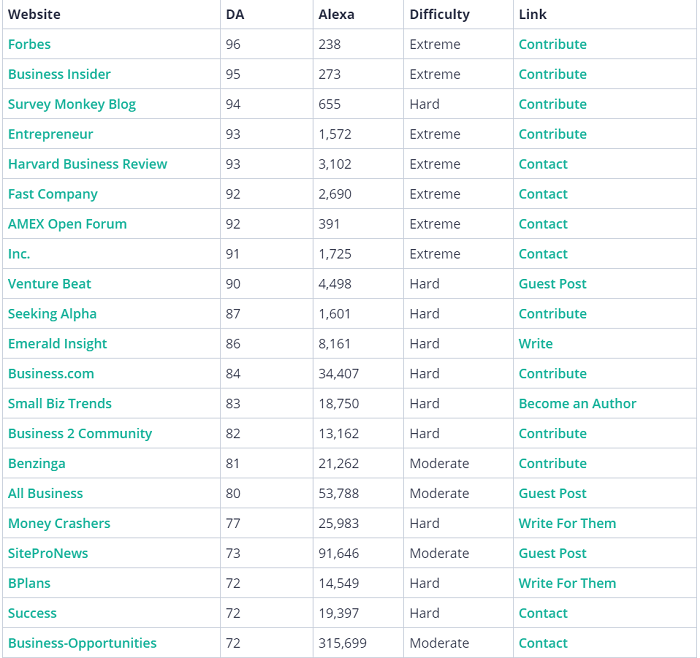
In addition, research online biographies of specific companies and bloggers.
More often than not, their web profiles contain a handy list of sites where they’ve been invited to guest post.
That’s a plethora of most fitting guest blog opportunities presented to you on a silver platter.
Then, send a request.
Most websites will have publication guidelines you can follow.
Follow these instructions carefully to increase your chances of publication.
There’s also the option of using blog comments as a way to generate traffic to your site.
In the past, I have managed to generate $25,000 as a result of 249 comments.

How exactly do you go about using comments to generate traffic?
When leaving a comment, make sure you are adding something worthwhile to the discussion.
There is no use in leaving comments like “Awesome post!” or “Nice website!”
If someone posts a question, make sure you take the time to answer thoughtfully.
This showcases your expertise in the given niche and will encourage someone reading to click on your name and be taken through to your site.
If you read an article on a subject you don’t know very well, it would be imprudent to voice your own thoughts as fact.
In this situation, you should simply ask questions.
Then the website owner would be able to elaborate more on complex topics or complicated sections.
If you’re knowledgeable about a subject, feel free to contribute (e.g., suggest something, recommend a solution, answer a question).
If you’re a novice, it’s best to ask questions.
Powerful questions can bring you website traffic by encouraging blog readers to check you out.
Avoid embedding links in your comments.
It comes off as a wretched attempt to plant your flag on someone’s lawn.
It’s okay to use your website’s link in the URL field when entering your name and email address, but your comment needs to add to the conversation or challenge an idea without lazy attempts at driving traffic to your blog.
Refrain from using the name of your business as your “commenting name.”
Use your actual full name instead.
Using a random or fake name is a missed opportunity to build strong branding because your brand actually starts with your name.
In fact, failing to use your full name will reduce your chances of the website owner approving your comment.
6. Email Marketing
If you read a few posts on digital marketing, email marketing would be mentioned in most of them.
That’s because it’s still one of the most efficient ways to increase website traffic.
One study suggests email generates $36 for every $1 spent, offering a shocking 3,600 percent ROI.
What more could you ask for?
Email marketing lets you reach potential customers directly.
It’s an ideal platform for building long-term relationships for improved customer loyalty.
You can post questions, ask for feedback, introduce soft sales, and persuade customers for the “big buy.”
Here are some tips for effective email marketing to increase website traffic:
- Be real: Share stories, post-behind-the-scenes content, and solicit original user-generated content.
- Offer value: Just like content marketing needs a high value to convert readers, emails and newsletters must provide value before they make an ask.
- Include all your links: Make it easy to read and share your post. Include links to your social media profiles, latest blog posts, and sales page in every email you send.
7. Provide Excellent Customer Service and Ask Customers to Review Your Brand
Ramping up your social media marketing efforts to increase website traffic is useless if you offer poor customer service.

According to a survey, 42 percent of customers said they bought more after pleasant customer service experiences.
Think about it: Users make complaints on social media, you offer a prompt and polite response.
What happens?
The person starts respecting your brand.
Even when users complain privately via email, it’s important to offer the best possible service so they come back for more.
How can you offer great customer service?
- reply promptly
- offer as many suggestions for customer problems as possible apologize when you make a mistake and offer coupons/refunds
If you consistently provide great customer service, you can request users to review your brand.
Platforms like Trustpilot and Yelp can be great for building positive reviews.
Many users consult these websites before making a purchase decision, so having a solid profile can help improve your reputation.
Increase Website Traffic Without SEO Frequently Asked Questions
FAQ: 1
Is it possible to increase website traffic without SEO?
Yes. You can use a combination of social media marketing strategies and content marketing techniques to increase website traffic without SEO.
FAQ: 2
Are there ways to increase website traffic for free?
Guest blogging, posting on social media, and requesting user-generated content are some of the most effective ways to increase website traffic for free.
FAQ: 3
Can I increase website traffic through marketing without an agency?
You can use techniques like guest blogging and content marketing to engage audiences without relying on any agency.
FAQ: 4
What’s the best strategy to increase website traffic quickly?
Working on improving your social media strategies can help you connect with new users, develop brand awareness and drive organic traffic relatively fast.
Increase Website Traffic Without SEO Conclusion
You shouldn’t only rely on search engines to increase website traffic.
Algorithm changes and SEO techniques become outdated quickly.
The strategies we discussed today can help you create a comprehensive digital marketing plan to increase website traffic effectively.

Whether you use one of these tactics in isolation, or you use all of them together, they can transform the way you attract customers.
Which traffic-driving strategy will you try today?
Source: neilpatel.com

10 Successful Google Advertising Ideas
Google Ads (previously known as Google AdWords) is an advertising platform for PPC ads. With the right strategy, you can drive qualified traffic, connect with your target customers, and drive sales.
 Coming up with Google advertising ideas is challenging. However, it’s well worth it to have a solid strategy.
With around 3.5 billion searches per day, Google gives you an incredible opportunity to get in front of the right audience. Of course, you first need to know what you’re doing.
If you’ve been looking for ways to get the most out of your Google ad campaigns, this article is just for you.
What Google Ads Are?
Before we get to strategy, let’s first understand what Google ads are.
Google Ads (previously known as Google AdWords) is an advertising platform for PPC ads. With the right strategy, you can drive qualified traffic, connect with your target customers, and drive sales.
One of the platform’s best aspects is that it allows you to stick within your ad budget by setting your ads to stay within a certain daily, weekly, or monthly cap. You can also pause or completely stop the ads at any time.
Sometimes in marketing, keeping a close eye on the budget can be a challenge. This flexibility allows you complete control over your budget.
If you’re not yet convinced about how effective the platform is, perhaps these numbers can give you more clarity:
- 58 percent of Millennials say they purchased a product because of an online or social media ad.
- 63 percent of users have clicked on a Google ad.
- 43 percent of users bought a product after going online and seeing the ad.
It’s clear that Google ads can do wonders for your business and your bottom line.
The only questions now are: With so many marketers using the platform, how do you stand out in this virtual crowd? How do you create the right Google ads that get you in front of the right audience at the right time?
Let’s find out!
Tips for Generating Google Advertising Ideas
There are a lot of components involved in generating and executing successful Google advertising campaigns.
Here are a couple of tips to set you on the right path:
Keyword Research
Keyword research is an essential element of your campaign. If you don’t get this part right, it will be challenging to achieve the results you’re looking for.
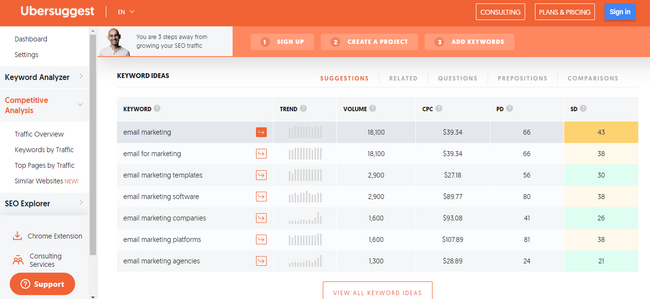
Below, we’ll talk more about keyword research for Google ads, but for now, it’s important to start generating some keyword ideas. To get started, you can use a tool like Ubersuggest.
It’s a free keyword research tool that allows you to generate keyword ideas and look at some of your competitors and the keywords they’re using.
Trend Forecasting
Predictions are an essential part of marketing. Before you start any campaign, it’s necessary to have some idea of what your success (or not) might look like.
Of course, the best way to predict this is with data.
Google Ads offers a keyword planner, which you can use to get forecasts for your chosen keywords.
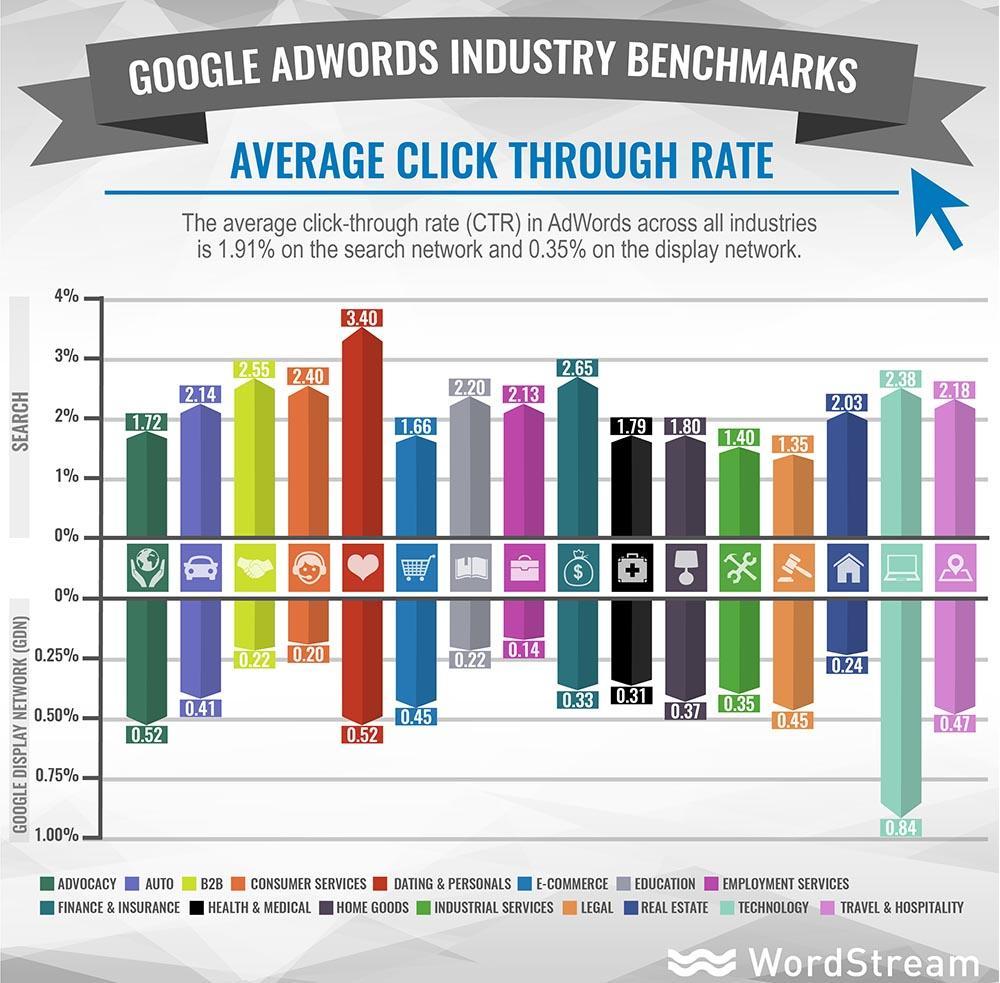
This planner can provide you with essential information, such as the number of clicks your ad might get every day, the average cost for those clicks, the number of impressions, the click-through-rate (CTR), and more.
With this information, you can start building a solid Google advertising campaign.
Keyword research and trend forecasting are just a couple of essential steps to get started. Now, let’s get into the nitty-gritty, the strategies, and everything that can help make your campaign a success.
Top 10 Google Advertising Ideas
It’s time to get down to the good stuff: What are the Google advertising ideas that can help you reach your goals?
1. Write a Good Headline
John Caples once wrote: “If the headline is poor, the copy will not be read. And copy that is not read does not sell goods.”
There’s no denying the impact that a strong headline has on your audience. Of course, this is what convinces people to click on the ad!
Here are some basic pointers for writing strong headlines:
- Understand your audience. Who are you speaking to? Include your main keyword.
- Address a problem your audience is facing.
- Highlight the biggest benefit in the headline.
- Don’t overcomplicate things. Keep things simple.
- Don’t be afraid to add some humor.
Creating a headline can be one of the challenging parts of the campaign.
Sometimes, you just don’t know where or how to start. Consider following a strategy, like Melanie Duncan’s 4U formula, to create useful, urgent, unique, and ultra-specific headlines to help you get started.
2. Think About User Intent Before Diving into Google Advertising Ideas
When we research keywords, we tend to focus on the numbers. How much search volume does this keyword get per month? What’s the cost per click (CPC)? What about the paid difficulty?
While all these numbers are essential to consider, the most important element of a keyword strategy should be the user intent.
Why? Because user intent (sometimes referred to as “search intent”) gives you the “why” behind the keyword.
Why did your audience search for that particular keyword? Were they trying to purchase something, or were they just trying to get more information about it?
Understanding your audience’s intentions can help you discover which keywords are the best to target for higher ROI.
There are four different kinds of user intents:
- Informational: This is when a user wants more information about a topic. For instance, “How many calories in a donut?”
- Navigational: This is when a user wants to go to a particular web page. For instance, if you want to go to the Neil Patel blog, you type that into your Google search bar.
- Commercial: This is when a user wants to research a particular product or service. This user will likely make a purchase in the near future, but right now, they are at the research phase. For instance, “New iPhone specs” or “iPhone vs. Samsung.”
- Transactional: This is when a user wants to take action, like buy a product. For instance, “iPhone charger” or “cheapest flights from LA to Chicago.”
Understanding user intent will help you target the right keywords.
If someone is searching for how many calories are in a donut, they want content related to that. If your product is a calorie calculator, that’s great!
They’re likely to go to the calorie calculator because it helps them fulfill what they’re looking for at that time.
Paying attention to user intent can help you rank higher and attract more clicks because you’ll be giving your audience what they want.
3. Advertise Limited Offer Sales
Any offer with a ticking clock naturally encourages your audience to act faster and purchase the product or service. That’s why limited offer sales work so well.
In a nutshell, a limited offer sale is any deal, discount, or reward you offer to consumers who make a purchase during a certain period.
An excellent example of this is Black Friday Sales. Every year, Black Friday sales seem to hit a new record, with consumers spending more and more.
That’s because consumers know they’ll have to wait a long time before they can get the product at the discounted price again, so they’re encouraged to make the purchase quickly.
For your Google ad campaign, if you offer seasonal sales for any of your products, you can create ads around these sales and have them go live when your sale launches.
4. Track and Use Google Advertising Data for Iterating
One of the most important elements of any successful advertising campaign is your KPIs.
Depending on your ad goals, there are a lot of important metrics you can track, including:
- number of clicks
- CTR
- CPC
- conversion rate
Tracking your KPIs helps you know if you’re on track to meeting your goals or not.
For instance, if you see that you’re getting great clicks on your ads, but your CTR is on the lower side, it can mean your headline and keywords are getting you in front of your audience’s eyes.
However, something about the ad isn’t connecting.
It could be the copy. It could be the cost of the product or service.
Maybe the headline doesn’t connect with the offer in the actual ad.
Whatever the case, now’s the time to look into it and adjust what you need to.
5. Choose the Right Campaign Type for Your Google Ad
You can use one of five different types of Google ad campaigns for your Google advertising ideas.
Search Ad Campaigns
These ads appear at the top of the Search Engine Results Pages (SERPs).
For instance, if someone searches for “nursery furniture,” this is what the results look like:
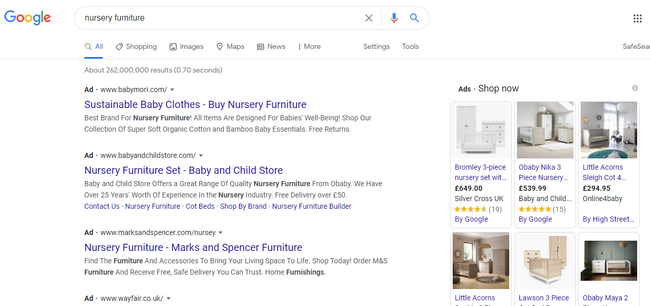
Creating search ads is great because of what we highlighted earlier:
The platform receives over 3.5 billion searches per day! This is the perfect place because many people (including your audience) are already searching for products you offer.
Video Ad Campaigns
Video ads show up before, after, and sometimes in between YouTube videos. Research has shown how effective video has become over the past few years.
Creating a video ad campaign, which is different from a text ad, might help you stand out and grab your market’s attention.
Display Ad Campaigns
Display ads are a way of attracting the market of a particular social media platform, website, or other digital channels to your product or service.
The best way to go about this is to find the website or brand that best connects with your audience.
Display ads are great because these are a win-win situation for both you and the owner of the site or digital platform.
The website owner gets an agreed-upon commission (usually based on clicks or impressions), and you have the opportunity to advertise in front of an audience that connects to your brand.
App Ad Campaigns
If you have an ad, perhaps Google app campaigns can be the right choice.
Here, you can advertise your mobile app through Google Play, Google Search Network, Google Display Network, YouTube, and many more channels.
For app campaigns, you can run ads that encourage your target market to install your app on their devices, or if there’s a new upgrade or version to the app, you can encourage them to take a particular action.
Shopping Ad Campaigns
Lastly, there are Google shopping ad campaigns. These ads include your product’s images and prices, and you can run them from Google Merchant Center.
You’ll input information about the product, and Google creates your ad from this information.
Shopping ads make sense if you’re trying to market a particular product but not necessarily your brand as a whole.
These are all examples of the different types of Google Ad campaigns.
As you can see, it’s essential to understand your product and your market. From this, you’ll be able to know which campaign best suits your needs.
6. Perfect Your Landing Page
You’ve done all the hard work of creating a great headline, finding the right keywords, and bidding for them.
While these steps may get you clicks, it’s what happens after your market has clicked that’s so important. As you know, they still need to buy into the product or service you’re selling.
Your landing page is essential because this is what your user sees as soon as they click on your ad. Ask yourself whether the landing page addresses your market’s pain points clearly.
Besides just addressing, does it also solve your audience’s challenges?
There are many elements to creating a perfect landing page, including using testimonials, the right images, and shorter forms, to name a few.
For some inspiration, here are some examples of great landing pages:
From the above examples, you’ll notice that the landing pages are all simple and clear, and the copy and graphics immediately grab your attention.
These are crucial elements of a successful landing page.
7. Make Your Google Ads Specific
Earlier, we mentioned the importance of understanding user intent when doing your keyword research because this helps you target the right keywords.
Now we want to highlight the importance of specificity. Your keywords shouldn’t be too broad as this might cause Google to place your ad in front of the wrong market.
Naturally, this would lead to fewer conversions.
For instance, “nursery furniture” may seem like a good keyword at first, but you can do better by getting more specific.
Aim for clarity and specificity in your keywords. Instead of just “nursery furniture,” how about:
- “nursery furniture for boys”
- “nursery furniture for girls”
- “nursery furniture in Florida”
It might take a while to get the right keywords, but that’s fine.
Remember to keep reviewing which keywords are getting the most clicks and which aren’t.
This can help you understand what you should focus on and what to add, remove, or tweak to get the high conversions you’re looking for.
8. Target Your Google Ads
When trying to get the right Google advertising ideas, remember there are three keyword match types: exact, phrase, and broad matches.
Exact Match
Compared to the other keyword match types, the exact match is extremely specific. Initially, if you used this match type, users could only see your ad if they typed in the same keyword phrase.
Since then, Google made a few changes so that even if your user doesn’t enter the exact keyword phrase, your ads might still match.
For this, the match might be with plurals, synonyms, or different variations of your chosen keyword.
Using the exact match type is great because users who type in your specific keyword are more likely to convert.
Phrase Match
Your ad appears for a phrase match if a user enters your key phrase in the exact order, but there can be other words before and after the phrase.
This leaves you with the possibility of increasing traffic.
However, if the key phrase is too broad, this could mean getting lots of clicks that don’t convert because the phrase wasn’t specific enough.
Broad Match
The broad match reaches more people because your ad appears when a user types in any word of your key phrase, in no particular order.
Like with phrase matches, you might get lots of traffic and clicks to your ads, but because it’s not specific enough, there may be fewer conversions.
As you can see, there are pros and cons to all three phrases.
To get the most out of your Google advertising campaign, use a combination of all three so that you get a lot of traffic and conversions.
9. Optimize Your Google Ads for Mobile
While creating your ads and coming up with creative Google advertising ideas, it’s important to keep in mind that many users are using their mobile devices for searches.
Research shows that 61 percent of US Google visits happen via mobile devices. Most people are using their phones for searches, and it makes sense to keep these users in mind.
Optimizing your ads for mobile includes:
- choosing responsive landing page designs
- compressing images
- making sure the loading speed is fast
These small details can make a huge impact on how your ads display in front of your audience and your overall conversion rate.
10. Make Your Google Ads Available in Other Languages
It depends on the nature of your business, but if you have an international audience or you’re in a multi-lingual area, consider making your ads available in different languages to cater to your audience that may not speak or understand English very well.
This may seem like a little detail, but don’t forget that language is powerful and helps us communicate and connect.
If you have a non-English speaking audience you’re trying to reach, help bridge the gap by making the Google ads available in their languages.
Conclusion
It takes a lot to generate great Google advertising ideas. While the process may be a lengthy one, it’s certainly worth it to see increased clicks and conversions.
The above tips can help get you on the right path, but don’t forget to A/B test your ads to see what your audience responds to.
Do you have any other Google advertising ideas you swear by?
The post 10 Successful Google Advertising Ideas appeared first on Neil Patel.
Source: feedproxy.google.com

How to Create Local Services Ads
Local Services Ads connect you to local customers searching for the services you offer, whether you’re a tradesperson or small business owner.
Did you know roughly a third of U.S. shoppers check out local business listings online daily? To me, this means there’s a real opportunity to grow your business if you find a way to quickly and reliably connect with the best leads.
How do you achieve this?
By creating a Local Services Ad. Let’s dive in and explore why these ads are such an invaluable tool for finding customers and building your brand.
What Are Local Services Ads?
Local Services Ads connect you to local customers searching for the services you offer, whether you’re a tradesperson or small business owner.
They’re pay-per-lead rather than pay-per-click, meaning you only pay if someone contacts you through the ad. Using these ads means you’re Google guaranteed; if someone’s unhappy with your work, Google refunds the cost. Ads “rank” based on the number of positive reviews and customers served.
Here’s an example. When customers Google a search term like “New York plumber,” businesses running Local Services Ads appear at the top of the search results.
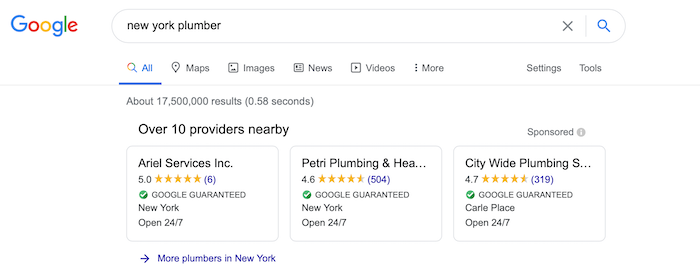
If you click to see more plumbers, multiple listings show up.
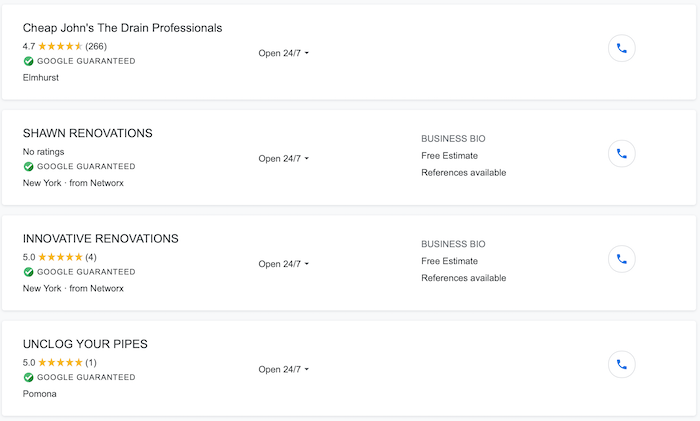
To be clear, Local Services Ads aren’t the same as Google Ads or Google My Business.
Google Ads are pay-per-click, not pay-per-lead. This means you pay whenever someone clicks the ad, even if they don’t contact you or take action. Google My Business lets you verify your business online and add contact details, including a website link. It’s not an ad.
You can use all three features, or opt for just one. It’s up to you!
How Do Local Services Ads Work?
Think of Local Services Ads as a fast-track ticket to positive leads. A few stats will show you why.
- Four in five people want to see local ads when they’re searching for goods or services online. Local ads mean you’re giving users what they want, which, as good marketers know, makes your business all the more appealing.
- Roughly 75 percent of local searches end in a phone call. In other words, these users are actively looking for goods or services, so you want to be one of the first listings to catch their eye.
- 76 percent of customers visit a business within 24 hours of searching for them online. Local ads help you connect with these leads in the quickest time possible by putting you among the top search options.
In short, these local ads help you find leads who are primed to become paying customers. They’re a highly cost-effective and efficient way to market your business at the local level.
Let’s now return to our plumbing example above and work through the features of a typical listing. If we click on “Petri Plumbing & Heating,” here’s what the listing looks like:
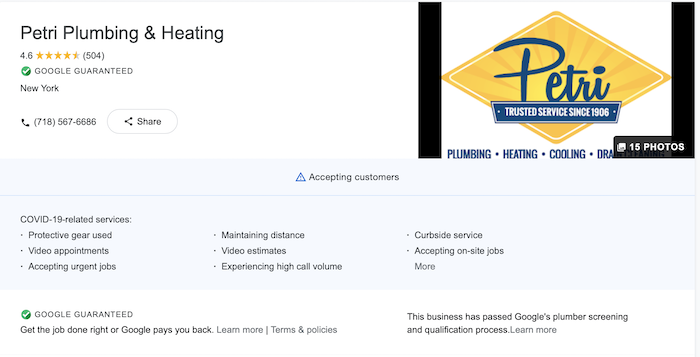
This plumber has a 4.6 out of 5-star rating with 504 reviews, they’re accepting customers, and there’s a telephone number to lead potential clients to take the next step.
If we go down further, there’s a business overview. This is where you can set out:
- Which services you offer
- Your opening hours
- The ZIP codes or area you work in
- Business highlights, e.g., if you’re locally-owned or have a BBB A+ rating
Finally, there’s a section where customers can leave a review or read reviews left by others.
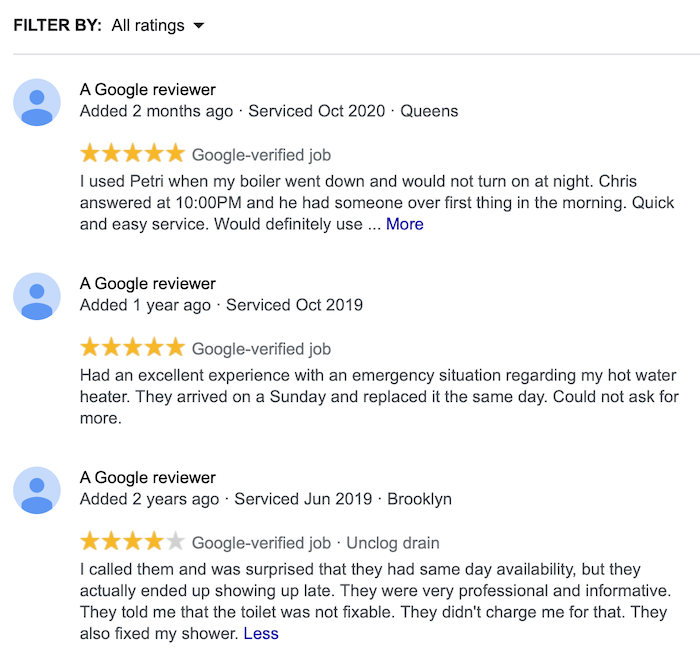
If someone books a job through your listing and leaves a review, it’s verified by Google as legitimate. Long term, this reassures prospects that you are a legitimate, trustworthy business.
Managing Local Services Ad Leads and Pricing
Do you need to take every job the ad brings your way? No.
- If a customer contacts you with a job you’re not interested in, you can reject it without penalty. You’ll still pay for the lead, though.
- You can pause your ad for a short period. Since no one’s contacting you through the ad, you won’t be charged anything during this time.
Simply put, you’re still free to choose the jobs you want, and you only pay for the ad when there’s a high chance of conversion, i.e., a prospect contacts you.
Steps to Create a Local Services Ad
Ready to create your own ad? Let’s work through the setup process together, starting with the basics.
1. Check Your Eligibility
Local Services Ads aren’t available for everyone just yet, so the first step is checking your eligibility. It’s really quick and easy to do.
Click the “Get Started” button on Google’s local service homepage.
Next, select your country, ZIP code, and job categories from the drop-down menus.
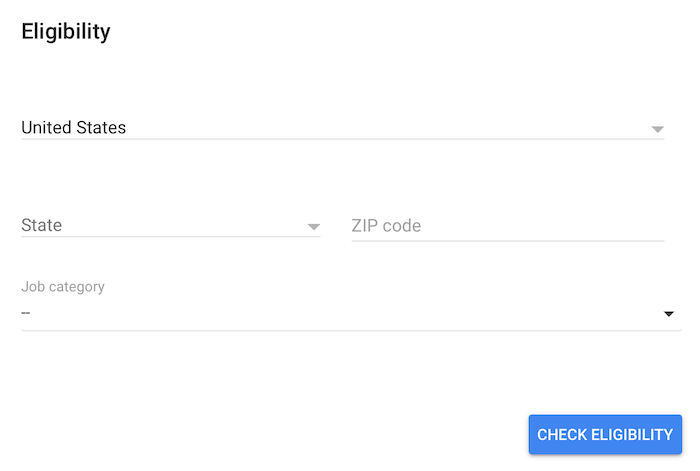
If Local Service Ads are available to you, move on to the next step.
2. Create a Local Services Ad Profile
Congratulations, you can set up a Local Services Ad! Now it’s time to write a great profile. Your profile determines, among other things:
- Who finds your listing
- Which jobs come your way
In other words, it’s important to get it right.
First, input basic details, including your business name and contact details. You need to provide your own name, too, but it won’t show up on the listing.
Once you’ve completed the first screen, it’s time to add specific details about what services you offer, how much you charge, and the ZIP codes you service.
For instance, if you’re a plumber, here are possible services you can offer:
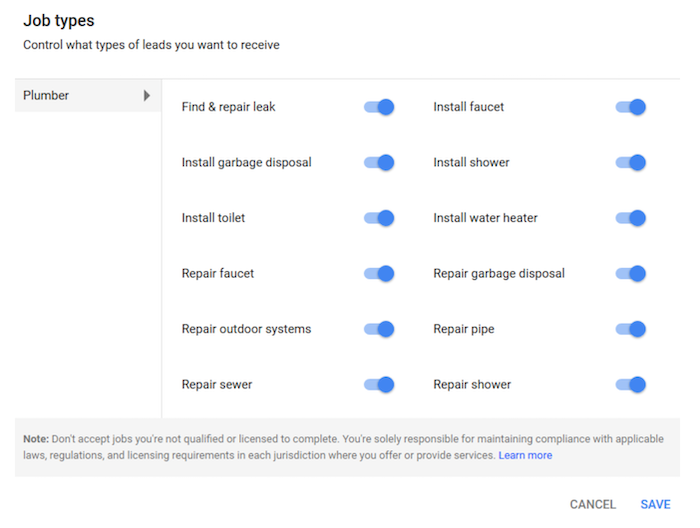
So, if you can’t repair sewers or garbage disposals (or you don’t want to offer these services), you can remove these options.
This lets prospective customers know what to expect before they contact you, meaning there’s less chance of you sifting through jobs you don’t want.
You’ll also note the important caveat at the bottom of the screen: You shouldn’t offer services that you aren’t qualified to complete safely. It’s also your responsibility to ensure you have the right licenses to work legally.
One other thing: Even if you’re registered for other Google services, like Google My Business, you still need to create a separate profile for Local Services Ads.
3. Submit Relevant Paperwork
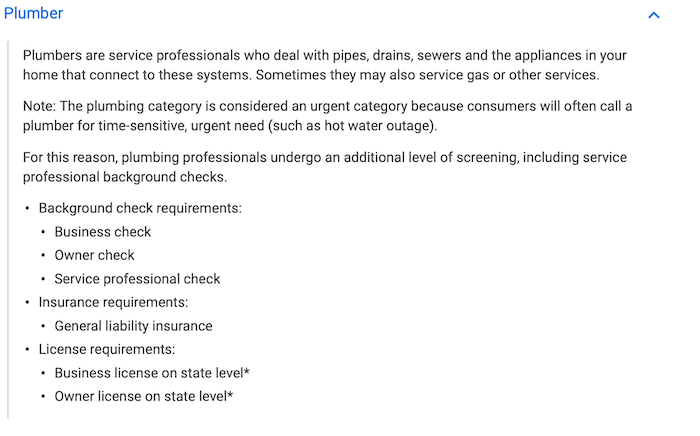
To improve service quality, Google needs you to upload various documents. You must prove you’re:
- Qualified to work in your chosen industry
- Licensed to work in the jurisdiction
Why must you upload these documents? Well, it’s all part of the Google Guarantee. Google won’t cover you unless you can prove you’re properly licensed.
Before you complete this section, verify your paperwork is accurate. I’d also suggest double-checking which licenses you need in your jurisdiction to make sure you upload the right documents.
How do you know which documents to provide? Google has a list. If we stick with our plumber example, here are which documents you need:
4. Complete the Background Check
If you’re based in the U.S. or Canada, you and all your employees must complete a background check before you can visit customers at their home address or workplace.
Again, it’s a fairly simple process. Google’s background check partner contacts you, and they’ll ask for relevant information. They’ll cross-check the info you and your team provide against national registries, and they’ll confirm your Social Security numbers are valid.
Do you pay for this background check? Thankfully, no.
5. Manage Your Budget
Once you complete your business profile and pass the background check, you’re ready to start advertising. There’s still one essential box to tick, and that’s setting your budget.
Here’s how it works.
- You decide how many leads you want in a week or month. This determines how much you’re prepared to spend. For example, if you don’t want to pay for more than 20 leads per month, don’t set a budget for 30.
- You’re only charged for each lead you generate through these ads, so if you only receive 10 leads, you won’t spend your whole budget that month.
- It’s easy to tweak your budget if you want more or fewer leads at any time.
To start, it’s probably best to set a modest budget and lead target. You can test the waters this way and increase your budget over time if you feel it’s a good service for you.
6. Review Ad Leads
Just remember, “leads” aren’t customers until you book a job. That’s why it’s key to stay ahead of your leads and follow up on them.
You can review your leads on your desktop inbox or through the mobile app. You’ll always be notified of a new lead anyway, but viewing them this way may make it easier to take action on them.
Best Practices for Local Services Ads
Not sure what to include in your Local Services Ad? Don’t worry, I’ve got you covered. Here are my five top tips for writing an effective ad and generating the best possible leads for your business.
1. Personalize Local Services Ads
First, make sure your local listing showcases your company’s plus points. Here’s what I mean.
Explain why you stand out from the competition. What makes you the right service provider for the job?Highlight selling points. For example, if you offer emergency callouts or out-of-hours services, state this in your ad. Use short sentences where possible. They’re easier to read.
The more information you provide, the more likely prospects are to contact you.
2. Include Relevant Details in Local Services Ads
Think about this from a customer’s perspective. What other details do they need to decide to use your business? Here are some examples.
Be really clear about which ZIP codes you serve and if your services vary between areas. Set out working hours in a user-friendly format.
What’s relevant varies from business to business, so give it some thought before you complete your listing.
3. Respond to Leads Promptly
Remember, these leads are users actively looking for the services you provide, so don’t let them go cold. Here are some tips to manage your inbox.
If you miss a call, return it as soon as possible, even if you’re rejecting the job. Frequently missed or unreturned calls can lower your ad ranking. Set aside blocks of time throughout the day to return messages and follow up on emails.
Most people don’t expect an instant reply, because good service providers are usually busy! However, if your goal is to book jobs and build your business through Local Services Ads, you need to keep a close eye on your dashboard.
4. Encourage Customer Reviews
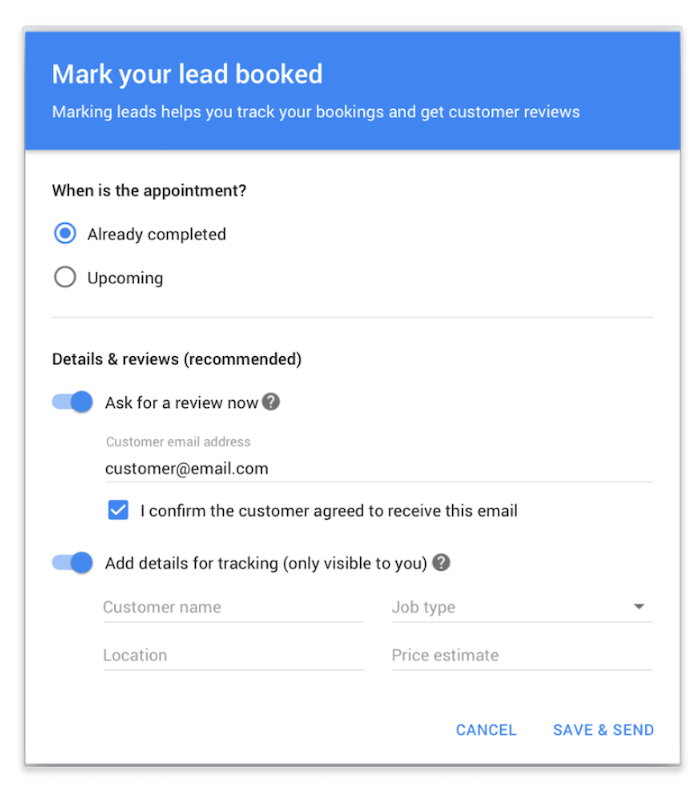
According to Google, customer reviews directly influence your ad ranking. How do you get those all-important positive reviews? Well, great service is a must, but you also need to ask for them. Here’s how.
There’s an “ask for review” button next to each job. Click it to send a review link to the customer.Or, once you book a lead and mark it as completed, ask the customer for a review.
One other point: The top search results, whether it’s a paid ad or organic result, draw over 75 percent of the traffic, so get those positive reviews rolling in.
5. Review for Accuracy
Have you moved to the premises?
Do you need to change your opening hours?
Make sure you update your Local Services Ad to reflect changes like these. Otherwise, you might deter potential customers from working with you.
Finally, keep details consistent across all your profiles, including, for example, Google My Business.
Why is consistency so important? Well, it helps potential customers find you more easily, and it might even build some trust in your brand.
Conclusion
Over 46 percent of Google searches are local, and Local Services Ads can really help you tap into this huge potential customer base. I highly recommend using these listings as part of a diverse, well-rounded digital marketing strategy.
Just remember to keep your information accurate and respond to leads promptly to make the most of your ads.
If you’re unsure where to get started with Google ads or digital marketing more generally, check out my consulting services and free SEO analyzer.
Are you using Local Services Ads to find customers? How are they working for you?
The post How to Create Local Services Ads appeared first on Neil Patel.
Source: feedproxy.google.com

6 Steps to Launch Your First LinkedIn Ads Campaign
If you have a job, you should be on LinkedIn.
If you own a business, you should also be on LinkedIn.
But especially if you provide any sort of B2B product or service, you have to be on LinkedIn.
You can go ahead and set up your new profile now before we get to the rest of the post, I’ll wait.
Those of you who are still dragging your feet, let me convince you.

With over 560 million users, including professionals in every industry you can think of, it’s the biggest source of potential new business leads available in the world.
And with LinkedIn ads, you have the ability to reach your ideal prospects through powerful targeting that allows you to customize your campaigns based on specific industries, locations, job titles, and more.
The only problem is, a lot of people seem to be confused by LinkedIn ads.
This is a different animal than Facebook, so the ad platform might seem a little unfamiliar if you’ve never used it before.
But don’t worry, y’all. I got you.
6 Steps to Launch Your First
In this post I’m going to walk you through the 6 most important steps to successfully launch your first LinkedIn ad—so you can start targeting and attracting your ideal prospects on a bigger scale than ever before.
Launch a LinkedIn Ads Campaign Step 1: Make Your Profiles Shine
So you’re going to advertise on LinkedIn? Great!
But don’t start working on your ad copy just yet.
Step #1 of launching a successful LinkedIn ad campaign is to optimize your profiles.
We have a few things to take care of first to make sure your new campaign is set up for success.
You know that account you just set up (or maybe you’ve had it a while and it just needs some love)?
You are going to have to put some work into it.
This is really important, y’all.
Remember that people do business with people.
And this is especially true on LinkedIn, where it’s super easy for anyone to check out your profile and see what you’re all about.
That’s why step #1 of launching a successful LinkedIn ad campaign is to optimize your profiles and portray yourself as the kind of person that your prospects will want to do business with.
And there are 3 pieces to doing this right:
1) Optimize Your Personal LinkedIn Profile
I recently wrote a post that goes into this topic in-depth, so rather than rehash everything again, just click here to learn how to create an all-star LinkedIn profile.

2) Create Your Company Profile
Once your personal profile is set up for success, the next thing steps are to create a great-looking company page.
If you don’t have a company page yet, you can easily create one in just 2 clicks:
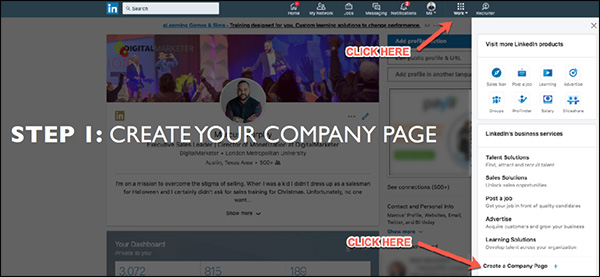
Then specify your company name and LinkedIn URL:
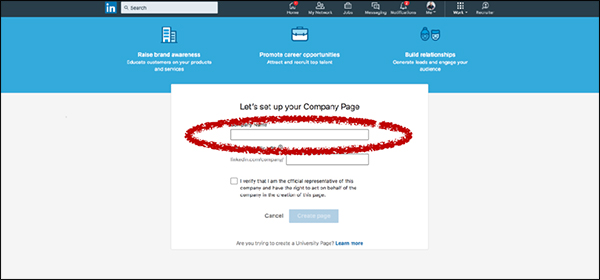
Now your company page is created on LinkedIn! Of course, you still have to complete your profile by filling out all the information, adding copy, uploading media, and so on.
The 3 things that you’ll want to add right away are your cover image, your logo, and your “About Us” summary. Here’s where you can find them:
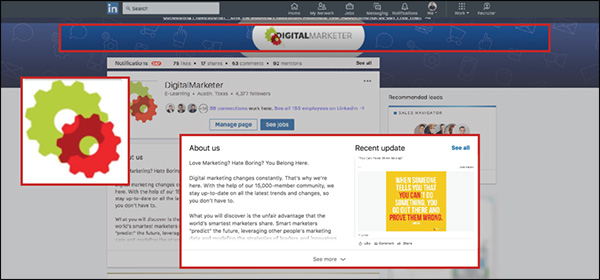
Make sure your header and profile picture are branded (a lot of companies just use their logo for the profile picture). This way when people land on your company page they’ll know right away who you are and that they’re in the right place.
In your “About Us” summary, make sure you’re speaking to your audience.
Let them know right away that what you offer is directly relevant to them, and that you offer an effective way to solve their problem.
Another thing to keep in mind here is search optimization.
LinkedIn is really good at SEO, so if you fill out your company page well, it has the potential to show up in relevant Google results.
Here are a few things to keep in mind when optimizing your company page for search:
- Google previews 156 characters.
So make sure the first 2 sentences or so of your “About Us” section do a really good job of communicating who you are, what you do, and how you can help people.
- Lead with a story.
I’m a big fan of using narrative-style copy that tells a story.
Paint a picture with your words that tell people what you do and how you can help them in a clear and compelling way.
- Members can search by keywords.
Remember that LinkedIn has its own internal search function, too—so definitely remember to include any relevant keywords that you want to show up for.
- Communicate expertise and industry focus.
Don’t try to be all things to all people.
Generalists don’t typically win on LinkedIn. Instead, tell people what industry you focus on and what you’re GREAT at.
3) Get Your Team On Board
The last step here is to get your team on board.
Because after all, everyone at your company makes up your brand.
And any potential leads or business partners who interact with you on LinkedIn are going to be able to see your employees if they want to:
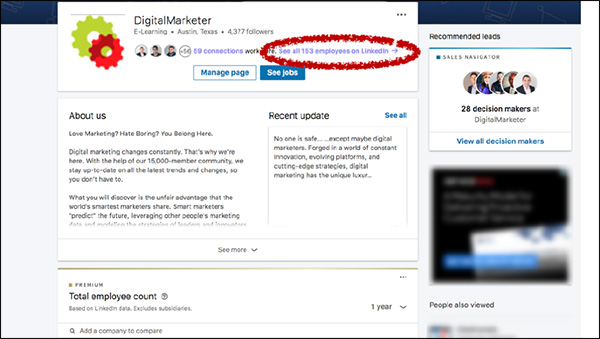
So get your team on board.
Have everyone connect with your company page, and ask them to go through the same profile optimization tips that you completed for your own personal profile.
Launch a LinkedIn Ads Campaign Step 2: Promote Great Content
OK, so now you’ve got an all-star personal profile as well as an awesome company page that stands out and speaks to your ideal prospect.
Is it time to start creating ads yet?
Nope.
I know you’re antsy, but trust me y’all—there’s a method to my madness here.
And there’s a really important reason why we’re going through all these steps before we create your actual campaign.
It takes a little more time up-front, but I promise you it will be worth it in the end.
So with that in mind, the next thing you’ll need to do is to promote great content on LinkedIn.
(RELATED: 3 Simple Steps to Creating A “Pillar Blog Post” That Generates Organic Traffic for Years to Come)
LinkedIn is hugely underrated as a content platform.
And now that they’ve launched native video, giving a massive engagement boost to your video content, it’s going to be even better.
LinkedIn is hugely underrated as a content platform.
There are about 9 billion content impressions every week on LinkedIn, which is an enormous number.
And what’s even crazier is that those 9 billion impressions are being driven by just 3 million people.
This means there’s a lot less competition here than other platforms like Facebook.
That’s why, as long as you post good content and follow a few best practices, you stand a really good chance of generating great engagement with your content on LinkedIn.
Here are my top 5 tips to help you do that:
1) Share Daily
I recommend sharing content daily.
Yes, you heard right—every single workday you should post some kind of content on LinkedIn.
That could include a huge variety of content.
Company news and updates, blog posts, industry articles, and more.
If you’re a thought leader, or if you want to be, this is a great place to promote your thought leadership.
Share articles from your industry and weigh in on what the author has to say.
(Even if you’re not the one actually writing these articles, simply the fact that you’re reading and sharing them will start to position you as a leader in your industry.)
It’s also a great idea to prompt your followers to weigh in.
Ask for thoughts, opinions, and questions.
This is a great way to keep your finger on the pulse of your audience so you can quickly respond to their changing needs and problems.
2) Optimize Your Copy
For any piece of content, the words you use are important.
The difference between good copy and bad copy often means the difference between an article people want to click on… and one they scroll past without a second glance.
But this doesn’t mean you have to agonize over every single word in your article.
Instead, you can just focus on the few places in your content where the copy is most important.
Here are a few tips for improving your content:
Keep your intro concise.
Don’t spend too long introducing your topic.
Just write a quick intro and get to the meat of your content ASAP.
Write a snappy headline.
What is a snappy headline?
Simple: it’s one that STANDS OUT IN THE NEWSFEED.
That’s your #1 goal, so keep it in mind when you write your headlines.
Ask thoughtful questions.
Many of us are so busy telling people about ourselves—what WE do, why WE are so great—that we forget to ask questions about what THEY want.
Doing this can be really powerful, and is a great way to put the focus of your content back where it belongs—on the customer.
Write a clear call to action with a link.
At the end of your content, what should people do next?
Don’t force people to hunt around for a “Contact” page if they want to do business with you. Instead, take the next step super clear by writing a compelling call to action with a link for people to click.
3) Make It Visually Appealing
After the copy, the next thing you’ll want to work on is your content’s visual appearance.
This can make a HUGE difference in your performance.
Just take a look at these pieces of content—see how these bright images really stand out?
They get much more engagement than they would without any images or video:
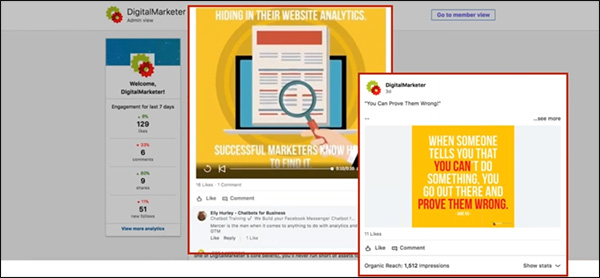
So the take-home message here is pretty simple. Use media—images, and videos—to help your content stand out in the newsfeed and grab people’s attention.
4) Be Helpful, Not Salesy
Ultimately, your goal is to generate sales. I get that.
But don’t get ahead of yourself.
When posting content, now is not the time to get salesy.
Instead, you should be using content to help generate engagement, build goodwill and trust, and position yourself as an authority in your industry.
With that in mind, you should post content that is NOT overly promotional.
Instead, make sure that your content has a benefit to your audience—it helps them solve a problem, or answer a question.
5) Use Tags
If you want to give your organic content a boost, tag companies and/or people who would find that content useful.
This will help generate some quick likes and comments right out of the gate—which will signal to the LinkedIn algorithm that this is an engaging piece of content that it should share with a wider audience.
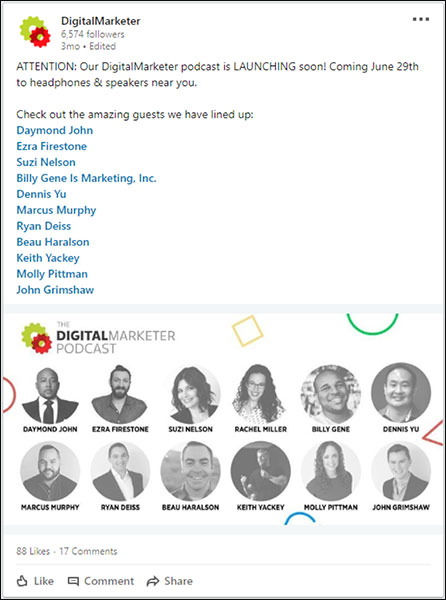
We used this strategy when we announced the new DigitalMarketer Podcast by tagging some of our upcoming guests.
The post performed really well as a result:
Launch a LinkedIn Ads Campaign Step 3: Analyze the Data
Now that you’ve been posting content on a regular basis, it’s time to analyze the data around that content to see how well it’s been performing.
In your business page Engagement highlights, you can see how well each piece of content performed in terms of impressions, clicks, video views, followers acquired, and more.
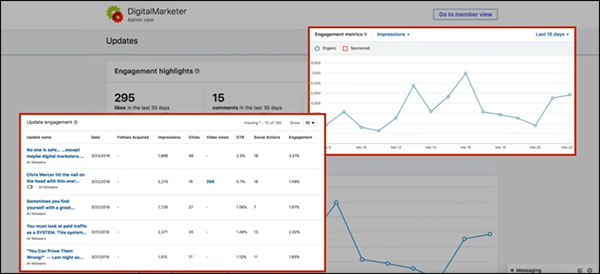
So take some time to dig into these reports.
Your goal at this step is to find out 2 main things:
First, WHO is engaging with your content?
Are you reaching the right kind of people?
If not, go back and tweak your headlines to see if you can appeal to a more appropriate audience.
If you are reaching the right people, the next thing you want to find out is:
WHAT kind of content are they engaging with the most?
Are there certain topics that appeal to your audience?
Certain formats (blogs, podcasts, videos)?
This is a really important step because you can learn so much about your audience, like what issues are important to them and what kind of content they’re most likely to engage with on LinkedIn.
And armed with that knowledge, the moment you have all been waiting for: it’s time to finally create your first LinkedIn ads campaign.
(NOTE: Want to make sure you are capturing all the leads you can? Download the FREE 10-Point LinkedIn Audit so you know your LinkedIn Profile is honed to boost your business.)

Launch a LinkedIn Ads Campaign Step 4: Target & Sponsor Content
LinkedIn offers 3 primary ad types:
- Sponsored content
- Sponsored InMails
- Text and dynamic ads

When you’re first getting started, I recommend using sponsored content.
Sponsored content is a great way to get your feet wet with LinkedIn ads.
Sponsored content is a great way to get your feet wet with LinkedIn ads because, for one thing, you don’t need a huge budget to reach a wide audience.
InMails and display ads are great, but it’s typically a lot more expensive to reach a wide audience with those ad types.
Boosted content, on the other hand, is more cost-effective… especially if you boost content that gets good organic engagement.
And this should be music to your ears because you’ve already posted and analyzed organic content, which means you should already have a really good idea of what kind of content is going to resonate best with your audience.
In other words, all you have to do at this stage is amplify your best-performing content!
Another great thing about sponsored content is how easy it is to get started. Just open the post from your business page and click “Sponsor now”:
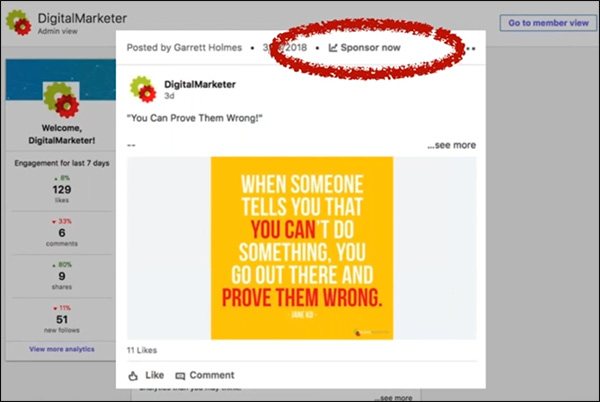
That will take you into the Campaign Manager, where you can create your new campaign.
And there are 5 main steps to doing this:
1) Create Your Campaign
In the Campaign Manager, click “Create campaign”:
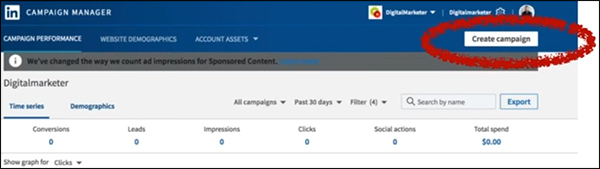
Next, you’ll choose which account to use for this campaign.
Each account is tied to a different company page, so in most cases, you’ll probably only have one to choose from.
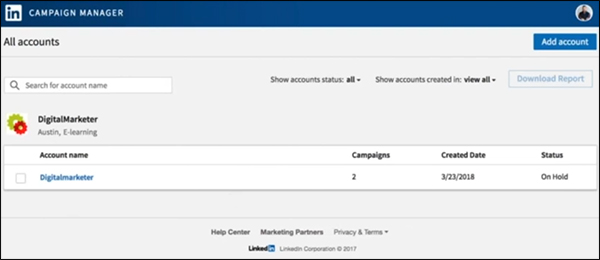
Then specify a campaign name and choose a goal—do you want to send people to your website or collect leads using Lead Gen Forms?
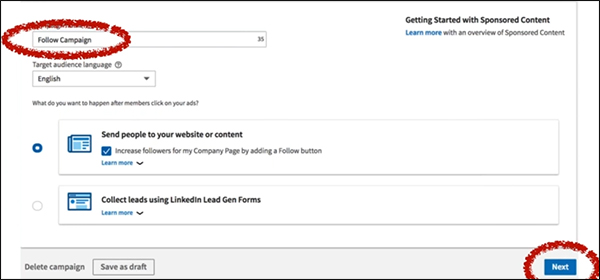
For your first campaign, I recommend just sending people to your website.
Once you click “Next,” you’ll see a list of all the content you’ve shared from your company page.
Find the content you want to sponsor and click the checkbox on the left.
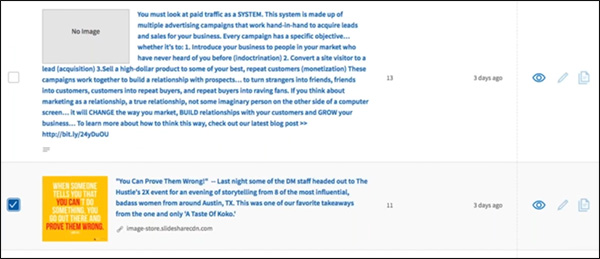
As I said, in general, you’ll get the best results if you boost content that has already performed well organically.
2) Set Your Targeting
Here’s where you’ll start to see why LinkedIn has so much potential as a B2B advertising platform.
The targeting options are amazing.
Your first option is to filter by geography. Just type in your area, and LinkedIn will tell you how many people you can reach in that area.
For example, there are over 1.1 million LinkedIn members in the Austin, TX area:
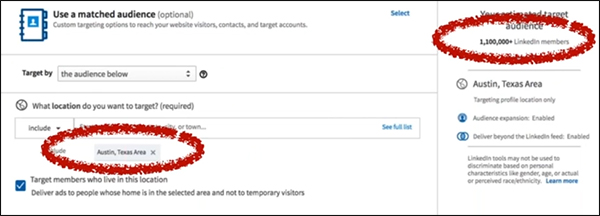
Next, you can specify which industries you want to target.
Here at DigitalMarketer, we help people who are in marketing and advertising, so I chose that industry.
As a result, my estimated target audience narrowed to 35,000:
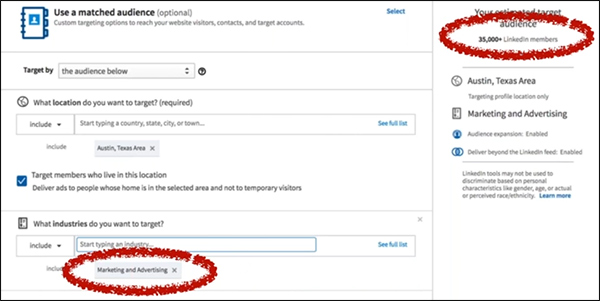
Finally, you can focus your targeting even more by targeting people based on their job titles.
So if you only want to reach decision-makers on LinkedIn, you might target titles like “Owner,” “Director,” “President,” and “Chief Executive Officer”:
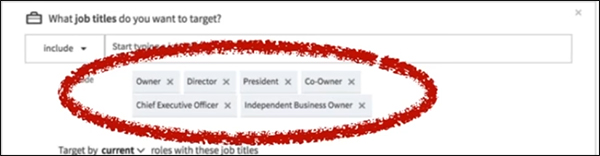
When I add those job titles, my audience shrinks down to 5,000:
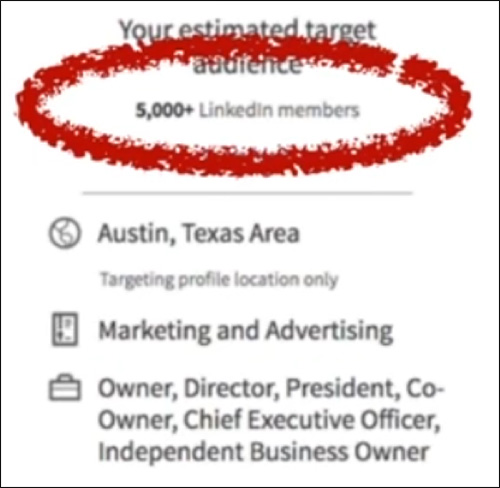
It might seem like a small audience compared to the 1.1 million we started with, but keep in mind, these are 5,000 business owners and executives in the marketing/advertising industry in the Austin area.
These are people who meet the exact specifications of my target audience.
Considering how tightly targeted this is, it’s actually a big audience with HUGE potential.
3) Decide on Your Campaign Goal
Next, you’ll need to choose a campaign goal.
Do you want to optimize this campaign for awareness (views), visits, or conversions?
When boosting your first piece of content, I recommend Website Visits.
You really want to get people to your website where they can learn more about you. (And if you want, you can also continue to follow those people on other platforms with remarketing.)

4) Set Your Budget & Bidding Options
Next, you’ll have to decide between 2 different pricing models: CPC (cost per click) or CPM (cost per mille, or cost per thousand impressions).
The choice is up to you, although LinkedIn recommends CPC bidding if your campaign goal is website visits.
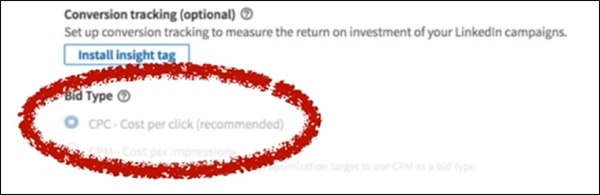
And now you’re almost done! Just decide on a budget, a bid limit, and your campaign dates:
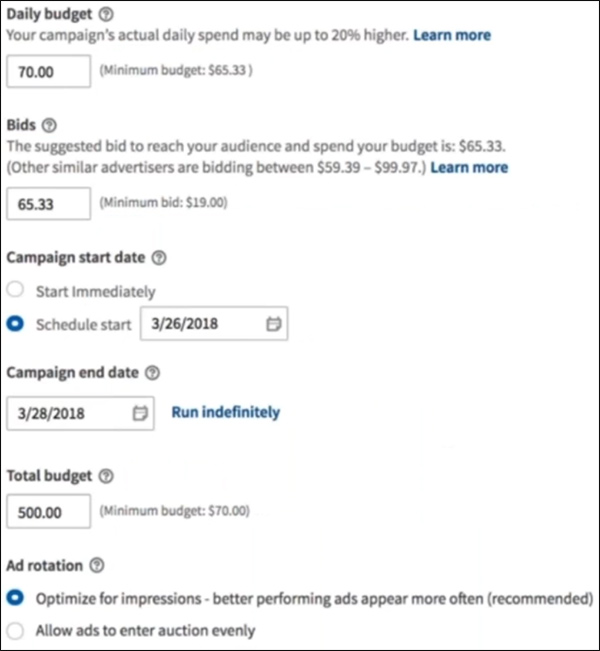
So you can specify a lot here.
Your Daily budget is how much money you’re willing to spend each day on average. (LinkedIn may spend a little more or less on any given day, but it will average out to equal your daily budget.)
Your Bid is how much you’re willing to pay per click.
LinkedIn will tell you about how much other people are bidding to reach a similar audience, so you should probably choose a bid that’s somewhere within that range.
Your Campaign start date is when your ads will begin displaying.
Pretty self-explanatory.
And your Campaign end date is exactly what it sounds like.
If you want your ads to continue showing, just click Run indefinitely.
If you want to specify a Total budget, that will give LinkedIn a total budget that it won’t exceed.
If you don’t specify a total budget, it will continue spending the daily budget for the length of the campaign (which might be more than what’s in your account)
Finally, Ad rotation tells LinkedIn how to decide which ads to display.
You can tell it to show your ads evenly or to display the better-performing ads more often. (Which is probably the way you want to go.)
5) Enter Your Payment Information
You’re almost done! The final step is to enter your credit card details.
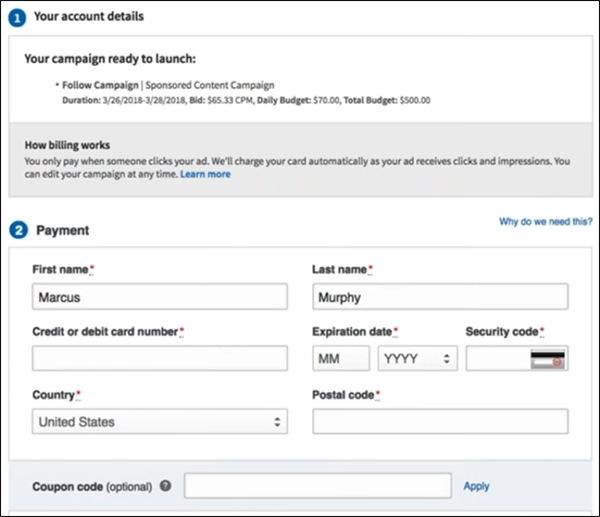
Congratulations—you’ve just created and launched your very first LinkedIn ad campaign!
Launch a LinkedIn Ads Campaign Step 5: Optimize Your Campaigns
If you’ve followed along with steps 1–4, you now have a LinkedIn ads campaign up and running.
But like any advertising campaign, your work isn’t done. You’ll need to monitor your LinkedIn ads to see how they perform, then work to improve that performance over time.
And I want to challenge you to think deeply about how you measure your results on LinkedIn.
Of course, you need to pay attention to your cost per click and/or cost per impression—because that’s how you’re actually bidding on the LinkedIn platform.
But here at DigitalMarketer, we’ve evolved beyond those standard metrics and we now measure our LinkedIn campaigns based on our cost per meeting.
When you down to it, this is a much more useful metric for our business.
And it’s a pretty easy number to come up with a quick benchmark for.
Just think about how much a new client is worth to your business, and work backward.
If a new client is worth $10,000 on average…
And if you convert 1 out of every 10 meetings to a client…
Then a meeting is worth about $1,000.
Make sense?
Knowing that you can now optimize your campaigns to generate new meetings at or below that threshold and still be profitable with your LinkedIn campaigns.
Launch a LinkedIn Ads Campaign Step 6: Tips & Best Practices
Now that you know how to create and optimize a campaign on LinkedIn, I want to share some of the most helpful tips that I’ve learned from my experience advertising on this platform.

Higher Ticket B2B Wins
LinkedIn is a perfect place to reach professionals, which means it’s ideal for B2B offers.
And because of the high costs for quality B2B traffic, high-ticket offers tend to work best on LinkedIn.
If you’re using LinkedIn to promote a B2C offer, that’s going to be tough.
Because the costs are just too high to justify most consumer purchases.
But if you’ve got a B2B product or service with a high price tag—think business coaching, exclusive communities, masterminds, etc.—then you can do really well on this platform.
Do’s & Don’ts for Sponsored InMail
In this article, I focused mainly on boosted content.
But LinkedIn has other ad types as well—including display ads and something called Sponsored InMail.
So what is Sponsored InMail?
LinkedIn is a perfect place to reach professionals, which means it’s ideal for B2B offers.
This ad type sits on top of LinkedIn’s messenger platform and allows you to deliver real-time targeted messages.
InMail also allows you to use conversion tracking for attribution, which is important because Sponsored InMails don’t send out all at once (like an email blast).
Instead, your sends will trickle out over time to avoid feeling spammy.
It’s really important to set up conversion tracking so you can measure the success of your campaign.
Generally speaking, the open rate for these messages is really high—20% or higher.
And when done right, a Sponsored InMail campaign can perform really well.
Here are my main dos and don’ts for using Sponsored InMail in LinkedIn:
- DO narrow the scope.
Use your customer data for targeting.
Just like any campaign, the more tightly targeted your campaign is, the better your response rate will be.
- DON’T be formal.
Be conversational, and people will be more likely to read and engage with your message.
- DO include a clear call to action.
Ask people to “Try” your solution, “Register” for your webinar, “Reserve” a copy of your product, “Join” your community, “Confirm” whether they meet your specifications, or “Download” a whitepaper or other online resource.
- DON’T have just anyone send the message.
You can choose who to use as your “From” profile, so choose someone high up in your organization whose message would carry the most weight and credibility with your target audience. A
nd make sure that person has a dynamite LinkedIn profile because anyone interested in your message will almost certainly check out the sender’s profile.
- DO plan for mobile.
Remember that a lot of people will see this message on mobile, so keep it to about 1,000 characters to avoid overwhelming people with too much text.
And that’s all there is to it!
When you launch your Sponsored InMail campaign, your prospects will get a message like this inside LinkedIn Messenger:
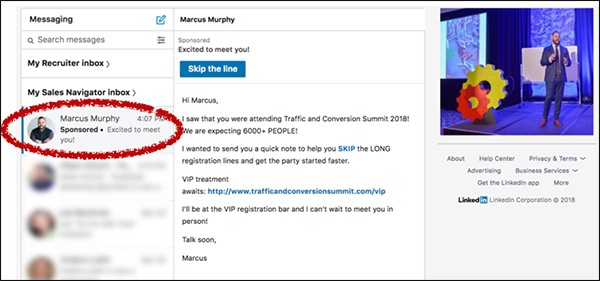
(Notice that you can also upload an image for your message, too, which will appear on the right-hand side of your message.)
Prepare for the Future of LinkedIn
LinkedIn is already a powerful platform for B2B marketers, and it’s still growing and evolving rapidly.
I believe that over the coming months and years you’ll be able to leverage even more powerful strategies on LinkedIn.
Here are a few things to keep your eyes peeled for:
- Live video.
It’s coming to LinkedIn, and it will help you connect with your audience to build more authority and generate more engagement.
Videos work, and live video works better. Watch for it and use it.
- Sales Navigator.
This tool (which is already amazing) is getting better all the time and is moving more and more toward becoming a full-fledged CRM for B2B companies.
I highly recommend using Sales Navigator.
- Education.
I think education is going to be big on LinkedIn.
So if you offer any sort of professional development services, you really need to start getting active and building a presence on LinkedIn—because this is going to be a really profitable network for you.
There it is, y’all: everything you need to know to set up your first successful LinkedIn ads campaign.
I hope this has been helpful, but as always, the best way to learn these things is by DOING them.
So go get onto LinkedIn and start going through these 6 steps to starting growing your business with LinkedIn ads.
(NOTE: Want to make sure you are capturing all the leads you can? Download the FREE 10-Point LinkedIn Audit so you know your LinkedIn Profile is honed to boost your business.)
The post 6 Steps to Launch Your First LinkedIn Ads Campaign appeared first on DigitalMarketer.
Source: digitalmarketer.com