
Tag Archives for " plugins "

Best WordPress Popup Plugins
WordPress popup plugins are one of the best ways to maximize your site’s effectiveness. Easy to use and implement, popups help to enhance your messaging and convert leads. You can use them in many ways, including upsell products, drive newsletter signups, and more.
A WordPress popup plugin can help to increase your return on the investment you’ve made in your website, your branding, and your products or services.

Disclosure: This content is reader-supported, which means if you click on some of our links that we may earn a commission.
Best WordPress Popup Plugins
I’ll show you the best WordPress popup plugins that you should consider, as well as my methodology for choosing which is right for your needs.
#1 – Ninja Popups Review — The Best For Customization
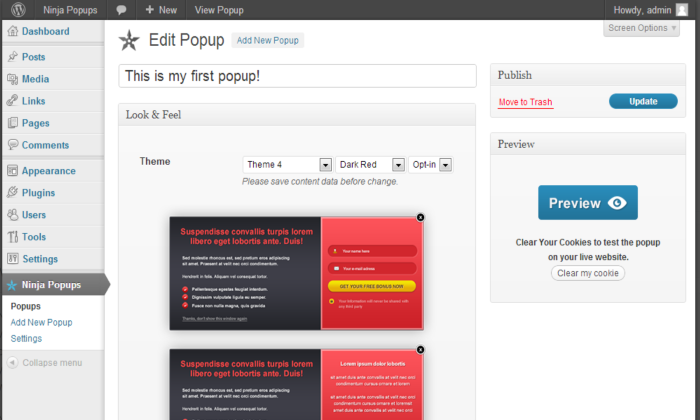
Ninja Popups was released in 2012 and has been regularly updated with features and capabilities, including new popup templates and integrations with the most popular current mailing systems.
The result is a plugin that puts you in control of all popup creation and performance elements.
Fully compatible with WordPress and WooCommerce, Ninja Popups boasts an intuitive drag-and-drop theme builder, so you can custom-build your theme from scratch.
If you want to save time, you can start with the more than 65 popup theme templates, then customize everything from colors to button sizes.
The themes are responsive, so you don’t have to worry about leads falling off because of poor mobile performance.
I always want to be able to analyze data about how my site and popups are performing, and Ninja Popups delivers that detailed analysis.
Ninja Popups allows for easy A/B testing, a must-have when you’re experimenting with its customization options.
It also provides analytics of popup views and conversion, so you can test, refine, and test your popups again.
Page-level targeting further maximizes the effectiveness of your popups. Integrations with the top email marketing platforms including MailChimp, Constant Contact, Freshmail, and HubSpot save you time and make this plugin an integral part of your sales funnel.
Ninja Popups also integrates with social networks, including:
- Google Plus
Popups are optimized for search engines for faster script loading and optimized graphics. Ninja Popups can enhance your site without bogging down its load time.
A regular license starts at $24 and includes six months of support. Extra opt-in bar, widget, and theme packs are available if you’re looking for even more features. Buy Ninja Popups.
#2 – GreenPopups Review — The Best Time-Saver
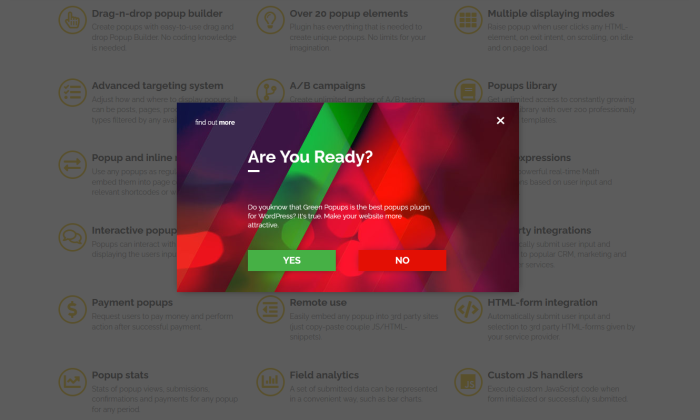
GreenPopups, formerly Layered Popups, gives you the versatility to custom-make a multi-layered animated popup with easy drag-and-drop functionality.
And if the animation isn’t enough to grab users’ attention, the more than 1,000 fonts you can choose from will do the trick.
If you’re short on time, the plugin is also equipped with more than 200 templates so you can get going quickly.
You can choose from many popup triggers, including:
- Website load
- Scrolling
- Website exiting
- Inactivity
- Adblocker use
- Clicking on certain links
With so many variables, including the ability to design your own popups, A/B testing is important. GreenPopups lets you experiment with confidence to find out what works.
One of my favorite features is that GreenPopups allows for an unlimited number of A/B campaigns.
These campaigns provide valuable statistics on popup performance, so you can test, refine, and choose the popup that’s right for your audience and goals.
Green popups are also compatible with WooCommerce.
It integrates with ConvertKit, Jetpack, Mailchimp, HubSpot, and more to create a streamlined process, automatically sending user submission information right to your CRM or newsletter service.
It also integrates with payment providers and gateways including PayPal, Stripe, and Razorpay. As users complete subscription or purchase popups, they’ll be routed to your payment provider of choice to complete payments.
This creates an ideal user experience and can reduce abandoned cart rates.
GreenPopups is optimized for PageSpeed Insights, keeping your loading speeds fast for SEO benefits.
A regular license starts at $21 and comes with six months of support. Extended licenses are $105. This plugin’s time-saving capabilities make these subscription prices an excellent value. Buy GreenPopups.
#3 – Optinly Review — The Best for Businesses on a Budget
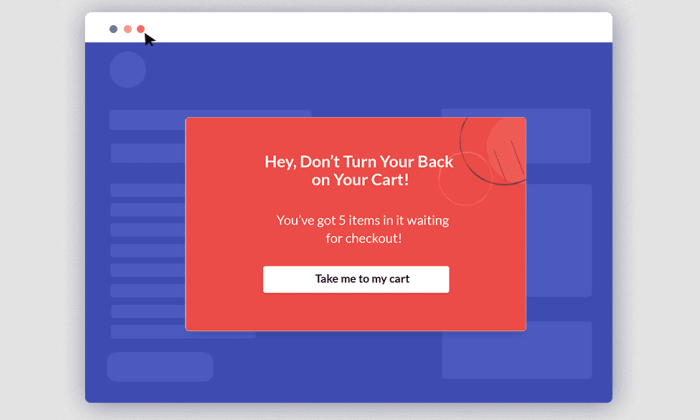
Optinly helps businesses and marketers to capture leads and drive sales. For all of the features and functionality this plugin offers, it’s impressively affordable, and even the free version offers comprehensive options.
Optinly offers an array of popup forms and templates, including:
- Fullscreen overlays
- Spin the wheel popups
- Floating bars and sidebars
- Exit-intent popups
- Notification popups
Thanks to the integrated popup builder, you can customize all of the plugin’s popup templates. Nearly everything is editable, including the text, font, font color, and background image.
You can also edit the CTA button text, color, and size to test and determine what’s most effective for your audience.
Advanced triggers, including time-based and exit triggers, allow you to customize how and when your popups are displayed.
Optinly also includes many targeting options, including page-based targeting and device-based targeting.
You can also target popups based on user interactions, and add multiple conditions to popups for increased lead conversion.
This plugin integrates with email marketing service providers, including HubSpot, ActiveCampaign, MailChimp, and ConvertKit.
You can simultaneously connect it to multiple email providers for a seamless addition to your sales and marketing campaigns.
I like Optinly because of the great value it offers. The free plan requires no credit card to sign up, and it comes complete with:
- 9 templates
- 3 types of popup forms
- Exit-intent technology
- Integration with all email service providers
- Standard support
- An analytics dashboard
The free plan supports one site and is comprehensive enough so that a business can get up and running, enjoying some of the plugin’s best features.
New free plan subscribers get access to premium features for free for the first 14 days, giving you a chance to decide which version is right for your business.
As a business grows, upgrading to the Growth Plan costs only $25 per month billed monthly or $20 per month billed annually. Still highly affordable, this plan includes perks like premium templates, priority support, and an in-depth analytics dashboard.
It’s suitable for use with up to five sites.
#4 – Elementor Pro Review — The Best For Beginners

Elementor Pro’s drag-and-drop popup-building capability makes it a top choice for beginners.
The visual builder gives you plenty of design options without being overwhelming, and its easy setup means you’ll be up and running quickly.
More than 100 popup templates can save you time if you don’t feel like designing one from scratch.
As you customize templates or create your own popup, you can include Elementor widgets like login forms, countdown timers, buttons, email opt-ins, and more.
Elementor Pro is a versatile tool, and you can create many different popup types:
- Notification bars on the top or bottom of your screen
- Full-screen overlays
- Modal popups
- Fly-ins
- Slide-ins
That versatility extends to both targeting and triggers. You can target by post type, format, categories and tags, pages, and more, allowing you to create custom popups that are highly relevant to your audience segment.
Available triggers include time, click, scroll, inactivity, and exit intent, again giving you full control of your popups’ performance.
Elementor Pro offers tiered subscriptions. While a free plan is available, it doesn’t include the popup maker functionality.
The Personal subscription for one site costs $49 per year and includes more than 50 widgets, 300 templates, and 10 full website template kits.
Since the Personal subscription also includes unlimited pageviews, popups, and interactions, I think it’s a great value if you’re just getting started.
#5 – Popup Maker Review — The Best For Detailed Targeting
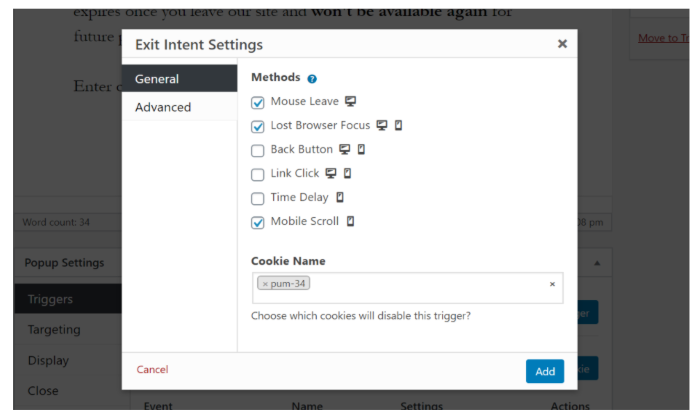
If you want comprehensive control of your popup targeting, Popup Maker is the way to go.
Not only is Popup Maker easy to use, but it also delivers targeting and triggering options that surpass what you’ll find in other plugins.
Popup Maker works with your cookies, and you can use those cookies to target audience segments. You can put this functionality to work in countless ways.
For instance, if you create a cookie when a viewer converts by completing a popup, you can trigger another popup to display only to those who have already converted.
Alternatively, you can target popups by:
- User
- Device
- Content-type, like posts or pages
- Referral
- Query parameter
Beyond standard targets, you can create custom targets or use the included advanced conditions for more specific results.
These custom targets might be the best feature Popup Maker offers, allowing you to get creative and choose exactly how your site and popups contribute to the user experience.
There are 26 separate advanced targeting options, allowing you to show a popup solely to visitors:
- From the certain sites
- From the search engines
- Who clicked on the Facebook ads
- Who is using the certain browsers
- Who has viewed your pricing pages
While Popup Maker isn’t a drag-and-drop plugin, the editor is simple and easy to use. Expert support is also available if you need help.
- Rates start at $87 per year for one site.
- The Grow Plan for three sites is $147 per year.
- The Optimized Plan for five sites is $247 and includes WooCommerce compatibility.
All plans include unlimited popups, theming, and impressions, making Popup Maker a great value. They’re also backed by a 30-day money-back guarantee, so you can buy with confidence.
What I Looked At To Find The Best WordPress Popup Plugins
A WordPress popup plugin can complement and enhance your marketing and sales funnels, convert site visitors into leads, and maximize the effectiveness of the hard work you’ve already put into your website.
But a plugin needs to be the right fit for your business to be effective.
Think of your WordPress popup plugin as being a sales associate who can interact with your website visitors to help seal the deal, whether your goal is to gain newsletter subscribers or upsell products.
To determine which plugins are the best for you, consider the following criteria essential to your business.
Customization Opportunities
The key to effective popups lies in their customization. While templates can be a great starting point, you don’t want to rely on generic popups that don’t fit your brand.
Customization is equally as important when it comes to trigger options and targeting conditions.
The more trigger options you have to choose from, like age verification, scroll, and idle time triggers, the better you can make your popup work for your site.
Customizable targeting conditions are also essential. Your popups are most effective when they reach the right audience.
Rather than using the same popup for everyone who visits your site, targeting lets you reach certain audience segments with popups designed just for them.
I’ve chosen plugins that give you customization options in nearly every stage of popup development and implementation to truly put you in the driver’s seat.

Analytics
Detailed analytics are key in helping you to develop, refine, and improve the effectiveness of your popups.
This is particularly important when you’re able to customize different elements of your popups.
A plugin that lets you perform A/B testing can help you to get better results from your work, maximizing the plugin’s value at the same time.
Even if you’re just getting started with popups, the data on each popup’s performance can help you to learn what works for your site and what doesn’t work.
That’s why I’ve chosen plugins that include analytics, A/B testing, and data to help guide your work.

Effect on Site Speed
Your WordPress plugin should enhance your site, not detract from it, but many plugins can slow down your site’s speed and overall performance.
Some plugins use WordPress to track analytics, and this increases the server load and leads to slower page speeds. Slow page speeds negatively affect your SEO and your user experience.
Instead of plugins that slow down speeds, I’ve carefully chosen options that are still packed with plenty of features that don’t negatively impact your site’s performance.

Scalability
Your needs as the owner of a single website will differ from the needs of a marketer working across five different sites.
Often, the number of sites a plugin subscription supports directly correlates with the subscription plan price.
I’ve chosen plugins that can scale with your business. These plugins include options for single-site use that can save you money.
You can also upgrade to larger plans to use the plugin across multiple sites as your business grows.
Conclusion
WordPress popup plugins are versatile, and there are lots of great options to consider.
From the highly customizable plugins that come equipped with a generous selection of templates, my top picks are suitable for many different businesses.
Available at a range of price points, there’s something for any business on this list:
- Ninja Popups — The Best For Customization
- GreenPopups — Best Time-Saver
- Optinly — Best for Businesses on a Budget
- Elementor Pro — Best For Beginners
- Popup Maker — Best For Detailed Targeting
Whether you’re just getting started with popups for the first time or need a popup plugin that can support multiple sites, you’ll find a quality solution in any of the plugins in this guide.
Source: neilpatel.com

WordPress Vs. Wix
WordPress outshines Wix in terms of flexibility for allowing users of all skill levels to create a more sophisticated website and customize it to their liking. Wix, on the other hand, forgoes some flexibility so beginners and non-coders without advanced needs can launch their websites in no time.
Disclosure: This content is reader-supported, which means if you click on some of our links that we may earn a commission.
With WordPress and Wix serving different users, the final decision ultimately depends on your experience level and purpose in launching a website.
WordPress or Wix: Which is Better?
WordPress is a content management system best for those who value flexibility and versatility.
It doesn’t come with great functionality right out of the box, but you can customize it through thousands of themes and plugins.
Get your website idea off the ground using WordPress’s powerful, flexible platform.
Wix is best for beginners who want to whip up a basic website that does not need advanced features.
It’s an entry-level tool with an intuitive drag-and-drop editor so you can churn out a website in minutes without much technical know-how. Create your own website today and let Wix do the heavy lifting.
A Review of The Best Website Builders
Website builders provide the tools you need to spin up basic or highly-versatile websites without touching any code.
But it can be challenging to decide which website builder fits your needs if you’re clueless about what to look for.
With years of experience under my belt, I’ve learned the key differentiators you should look for when shopping for a website builder.
Using this in-depth review of the top four website builders, you’ll be able to zero in on the best platform that will set up your website for future success. Both WordPress and Wix made it into the top four.
WordPress Wins
Full data ownership: With WordPress being open-source software, nobody is holding you by the neck.
Hence, transferring from one host to another isn’t complicated. You own all your files and can take them to any hosting provider that supports WordPress.
Site transfers are facilitated by the built-in WordPress Import and Export tools, features you won’t find in Wix.
In addition, Wix sites are hosted exclusively on Wix’s servers.
Therefore, transferring your website files to a self-hosted WordPress requires a complex, cumbersome process.
Limitless design options:
WordPress is generous to a fault when giving users the power to design their websites.
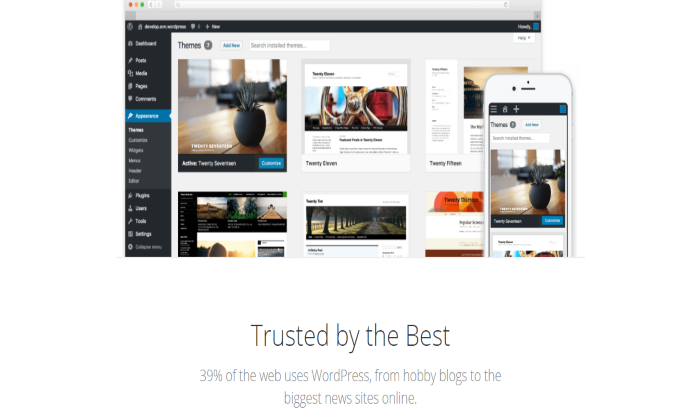
Free themes are available for starters, but if you’re looking for more functionality, you can choose from over 5,000 premium third-party themes that cost anywhere between $25 and $299.
You can also hire a developer to create a custom theme with unconventional features to make your website stand out.
The best part is you can easily switch from one theme to another, unlike Wix that doesn’t allow it once your site goes live.
No WordPress-sponsored ads: WordPress is free, but you need to purchase a domain name and a hosting plan for it to work.
But once your website is up and running, you’re free to monetize it any way you want.
Meanwhile, Wix websites are free, and most basic plans are riddled with ads you don’t control.
Wix only removes these ads once you upgrade to higher premium plans.
Unmatched customizability:
An open-source software, WordPress offers great flexibility right out of the box.
If you’re a programmer or somebody who knows how to code, you can tweak WordPress’s underlying codes to create a website exactly as you envision it.
Beginners can also customize their WordPress sites as they please.
From switching templates after the website goes live to improving site security and adding forms to blog posts, WordPress allows you to modify your site in ways that are impossible with Wix.
And even if you love Wix for its drag-and-drop builder, WordPress also offers something better with third-party page builder plugins like Elementor or Divi.
Massive selection of plugins:
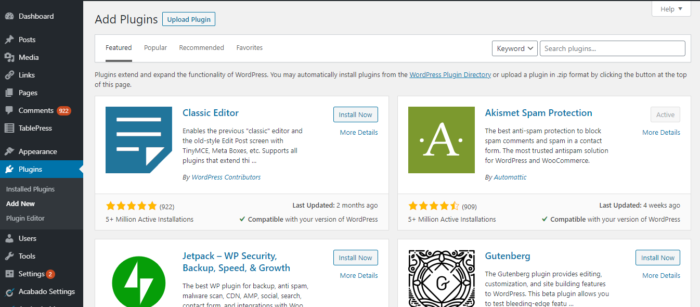
WordPress beats Wix for having the most number of plugins to enhance your website’s functionality.
Whether you want to add a table, collect your visitors’ emails, or create a landing page, there’s always a plugin that will match your needs.
There are over 55,000 free and premium plugins to choose from, so it’s easy to beef up your website without manipulating any codes.
Robust blogging platform:
Even if it has evolved into a full-blown content management system, WordPress doesn’t forget its roots and continues to be the platform of choice for all things blog-related.
It offers the same blogging features as Wix but takes it up a notch with advanced features you’ll only find in WordPress.
These include a native commenting section so you can manage your readers’ comments without the need for additional plugins.
You also have complete control over posts and pages’ visibility as you can set them to public, private, or password-protected.
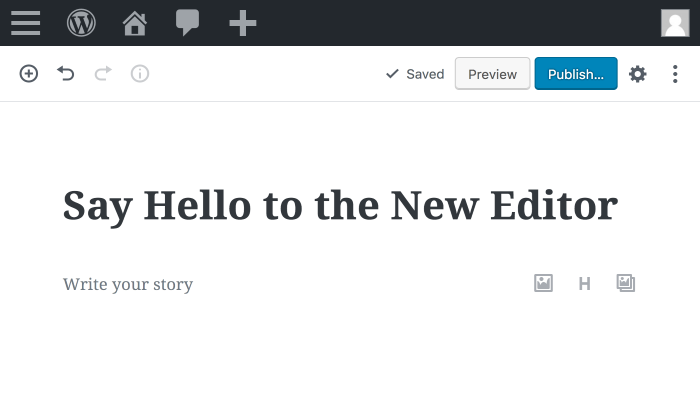
The new Gutenberg editor has its flaws, but the ease of adding, dragging, and dropping different elements without the need for scrolling up or down is second to none.
Better search visibility:
WordPress gives you more control, so your website is more likely to rank on search engine results.
Slow website? You can improve your site’s performance by applying speed-boosting strategies.
WordPress users can also install Yoast, the world’s most popular SEO plugin.
This tool helps over five million websites improve how their articles appear on search results, insert internal links, and redirect old pages to new ones, all of which help boost their rankings in the long run.
Ahrefs, a leading all-around SEO tool, once analyzed 6.4 million websites, and the results show that WordPress sites have higher domain authority, backlinks, and traffic than their Wix counterparts.
Scalable ecommerce functionality:
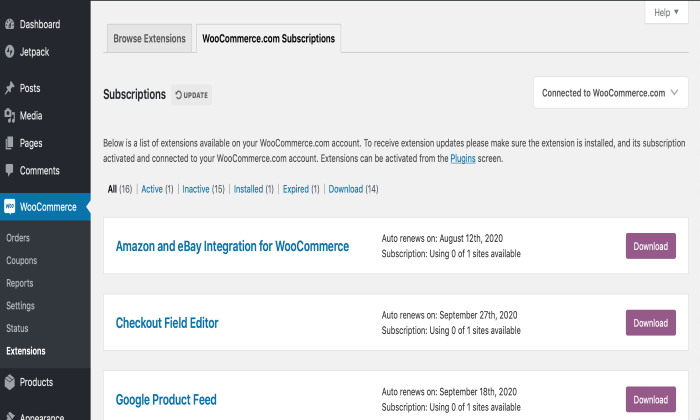
WordPress lacks built-in ecommerce features, but you can easily integrate it with a powerful ecommerce solution like WooCommerce.
Used by over 40% of ecommerce sites, this plugin can help you display products, fulfill orders, receive payments in multiple currencies, and automatically calculate tax by region.
To further boost its functionality, you can also install additional WooCommerce plugins.
For example, you can connect your store to a print-on-demand service that will process the orders on your behalf.
There’s also the free HubSpot for ecommerce plugin that lets you track your visitors and lead them into your sales funnel.
WordPress Losses
No phone support available: WordPress relies on its global community of volunteers.
Hence, there’s no customer service hotline that you can turn to if you encounter technical hiccups.
However, over 39% of websites in the world are powered by WordPress, so whatever issue you’re dealing with, chances are you’ll find a troubleshooting guide in support forums, Slack channels, or YouTube.
But having to go looking for solutions is annoying.
The cost of creating and maintaining a website varies:
WordPress is free to download. However, it can’t stand on its own, so you need to pay for a domain name and a hosting plan before you can start a website.
A custom domain name starts at $10 per year, while a hosting plan can start as cheap as $2.95 a month.
If your website gets a lot of traffic, you need to pay more for a hosting plan to avoid downtimes with each traffic spike.
Additional expenses include premium themes and plugins to enhance the functionality of your site. In total, you might spend anywhere between $200 to a few thousand every year.
Steep learning curve: WordPress is not the most intuitive, and it takes time to understand it. It doesn’t come with an official walkthrough, so you have to learn everything on your own.
WordPress’s Gutenberg editor, for instance, is not as intuitive as Wix’s drag-and-drop editor.
It lacks the what-you-see-is-what-you-get (WYSWYG) framework, so you need to preview the page you’re working on to see what it will look like once published.
DIY security and maintenance:
Website upkeep is not hands-off for WordPress users.
The WordPress software itself rolls out updates every once in a while, and it’s your responsibility to ensure you’re using the latest version.
You also need to manually update themes and plugins to fix bugs and prevent them from affecting site performance.
As for backups and security, you can handle them yourself with the help of plugins.
In exchange for fixed monthly fees, you can outsource all these to a WordPress maintenance service or choose a managed WordPress host to handle everything for you.
Wix Wins
No upfront cost: Anybody can register and create a Wix website for free.
If you want more functionality and to remove the Wix ads, you can upgrade to one of the Wix website plans or the business and ecommerce plans.
Unlike WordPress, which is 100% free but comes with extra expenses, Wix’s pricing is much more straightforward.
You don’t have to estimate anything as the pricing page has all the details.
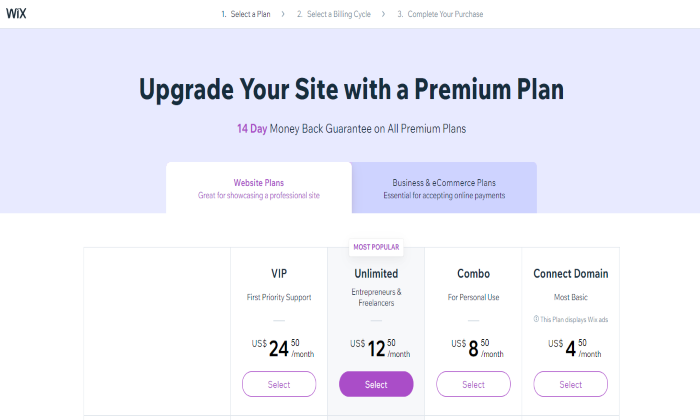
The Unlimited and VIP plans, for example, cost $12.50 and $24.50 per month (billed annually), respectively.
Both include a custom domain, unlimited bandwidth, free SSL certificate, and built-in analytics.
If you want more features like chatbots or event booking, you can also add Wix apps that are either free or premium with prices ranging from $3 to $20.
Effortless registration:
Although the software itself is free, creating a website with WordPress requires the additional steps of domain registration and signing up to a hosting provider.
With Wix, registration is as easy as signing up using your Facebook or Google account.
Then, you can start building your website right away, either through the editor or with the help of an AI tool.

Intuitive drag-and-drop editor:
Wix sacrifices flexibility so users can build websites fast with little to no learning curve.
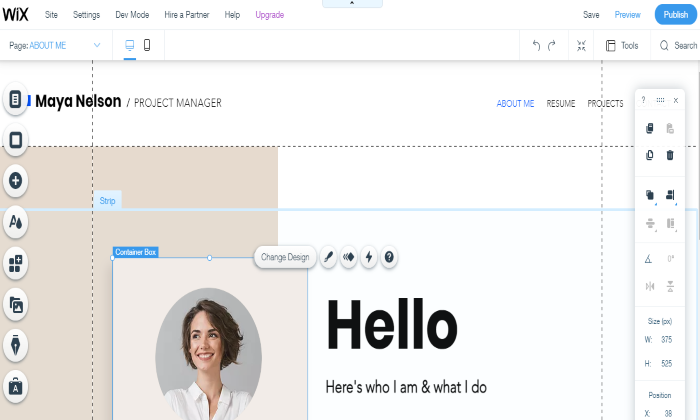
Beginners can easily customize their website templates with Wix’s drag-and-drop interface that lets you move things around and add as many features as you please.
Unlike WordPress’s Gutenberg editor, Wix’s operates on a what-you-see-is-what-you-get (WYSWYG) paradigm, so everything you see is exactly what will appear once the site goes live.
If you’re short on time, you can also let Wix’s Artificial Design Intelligence (ADI) tool automatically create a website based on your answers to a series of questions.
A wide selection of free templates:
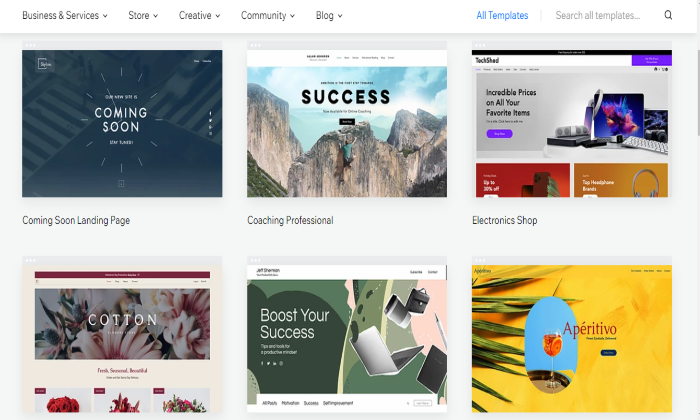
Wix offers the freest pre-made templates among all website builders.
With over 500 templates to choose from, it’s easy to pick one that best aligns with your brand, whether you’re a non-profit organization, a photographer, a small business, or a school.
Each template is packed with built-in elements that you can drag and drop wherever you want.
The editor also gives you the freedom to change the background image into a video, select a different color palette, change the font, and tweak other elements that matter to you.
Handpicked in-house and third-party apps:
Wix’s over 250 apps are the counterpart of WordPress’s plugins that enhance a website’s functionality.
WordPress plugins may outnumber Wix’s, but you have to sift through piles of clunky ones before finding what you need.
With Wix, however, quality matters more than quantity.
Everything in the Wix App Market has already passed Wix’s guidelines, so you won’t have to perform a vetting process.
In addition to that, all apps integrate well with Wix, so there’s no need to worry about incompatibility issues.
Multiple customer support channels:
Unlike WordPress that mainly relies on its support forums, Wix employs a more personal approach to customer service.
Users can request a call-back through the Wix website so a company representative can talk to them directly.
This way, they won’t have to waste time fixing the issue themselves and let a real person handle it.
If phone support is unavailable, Wix users can also reach out via email or search Wix’s online help center to find relevant articles and video tutorials.
Easy WordPress-to-Wix migration:
If you jumped on the bandwagon but soon found out that WordPress lacks the simplicity you’re looking for, Wix offers an easy way out.
All you need to do is enter the WordPress blog URL in Wix’s blog import tool, and with one click, your WordPress blog will be converted into a Wix blog.
With this import tool, you can choose only the blogs you want to move to Wix without building anything from scratch.
Hands-off security and maintenance:
The benefit of having your website hosted in a closed ecosystem like Wix is its technical team handles all maintenance and security.
This means you won’t have to lift a finger to create backups, update apps, or fix security glitches.
All updates are implemented and deployed by the in-house technical team, so you won’t even notice there’s an update taking place.
In contrast, WordPress doesn’t handle any of these right out of the box, so you’re basically on your own.
Wix Losses
Pricing page lacks transparency: At first glance, Wix’s pricing page seems to show how much you’d pay for each premium plan every month.
However, the prices are actually what each plan would cost if you avail of the annual subscription.
If the Unlimited plan’s monthly cost is $12.50 per month, you’ll actually pay $150 upfront.
If you opt for monthly payments, the cost is significantly higher.
It wouldn’t have been an issue had Wix placed a toggle button through which users can compare the prices if billed monthly or annually.
To be fair, there’s a disclaimer at the bottom saying that the prices displayed are for yearly subscriptions, but the text is so small you won’t notice it right away.
Limited flexibility:
Wix may be easier to use than WordPress, but that comes at the price of flexibility.
For instance, the free templates have good enough designs for inexperienced builders but are limiting for more advanced website creators.
Not to mention that you won’t be able to switch to a different template once the website goes live.
Wix is also not open-source, so programmers and other tech-savvy users won’t be able to tinker with its underlying codes.
Lastly, the over 250 apps inside its App Market can enhance the site functionality, but they pale in comparison to the thousands of WordPress plugins.
The underwhelming blog features:
Wix wasn’t created with bloggers in mind, so if written content is your website’s main attraction, choose WordPress instead.
Although Wix offers basic blog features like categories, tagging, cover image, and post scheduling, it lacks other vital elements like native commenting.
For readers’ comments, Wix only offers Facebook comments, which are much more vulnerable to a slew of spammers.
Also, the Wix plain blog editor doesn’t have the drag-and-drop functionality of WordPress’ Gutenberg, so the formatting options are limited.
Ad-free site not available in all plans:
A free Wix website comes with Wix ads and a Wix subdomain.
You won’t pay for anything, but it’s not good for branding.
If you already have a custom domain, you can connect it to Wix for $4.50 a month (billed annually).
However, the Wix ads remain at this level. You can only get rid of the Wix-sponsored ads if you upgrade to more expensive plans.
Difficult to get out of:
Wix websites are hosted in their infrastructure, so once you create a website with them, it’s stuck in their hosting for life.
It also lacks the Import and Export function of WordPress, so moving your website files from Wix to WordPress is tricky.
To give you an idea, your posts will be imported in the form of RSS files, while your images will need to be transferred manually. For most users, this complex procedure is enough to discourage them from making the switch.
Inferior built-in SEO functionality: Wix is not a terrible choice if you only get direct or social media traffic on your site.
But when it comes to search engine visibility, Wix lags behind WordPress.
Wix is not up to snuff from a technical SEO standpoint as it relies on Javascript to display its URLs, making them more difficult to crawl.
The Javascript also leads to code bloating, resulting in slower pages.
Wix also doesn’t have the basic features to set up a website to SEO success like hreflang and AMP support.
Users have limited control over redirects and are restricted from editing the site’s robots.txt and sitemap. Creating shorter URLs is also impossible, so you’ll be stuck with https://www.neilpatel.com/post/keyword instead of the more concise and user-friendly https://www.neilpatel.com/keyword.
Comparing The Top Website Builders
Whether you’re a tech-savvy geek or a technophobe who wants to take a stab at creating websites, there’s a website builder that meets your needs. Here are my top four recommendations:
- Wix — Best for general use
- Weebly — Best for beginners
- Shopify — Best for e-commerce
- WordPress — Best for content management
In terms of Wix and WordPress, if you’re a novice who needs a leg up in creating your first website, Wix can get you online fast.
The ease of its drag-and-drop editor is second to none, while its wide range of free templates can give you a professional-looking website without breaking the bank.
For high-traffic websites that generate income from content, WordPress remains the best content management system.
The post, WordPress Vs. Wix appeared first on Neil Patel.
Source: feedproxy.google.com

Best WordPress Directory Plugins
As there are many directory plugin options out there, I’m here to make it easier for you by narrowing it down to the top five best directory plugins for your WordPress website—so you won’t have trouble finding the right one for you.
Disclosure: This content is reader-supported, which means if you click on some of our links that we may earn a commission.
A functional online directory plugin will help you deliver business or personal information by location or category for internal or external use.
Whether you want to build a glossary of names and terms for your employees or a comprehensive business index, a good directory plugin for your WordPress website will help you do just that.
Why WordPress Directory Plugins?
Directory plugins serve a simple purpose: to create a user-friendly database with up-to-date details for both your customers and internal team. Your plugin of choice will give you access to this information along with pictures, location information, and contact details.
As there are many directory plugin options out there, I’m here to make it easier for you by narrowing it down to the top five best directory plugins for your WordPress website—so you won’t have trouble finding the right one for you.
The Top 5 Options for Directory Plugins
- Business Directory – Best for extensive directory categories
- GeoDirectory – Best customizable plugin
- Connections Business Directory – Best free WordPress plugin
- Advanced Classifieds and Directory Pro – Best plugin with multifunctional features
- Name Directory – Best plugin for an online glossary builder
Let’s check each type with details.
#1 – Business Directory – The Best for Extensive Directory Categories
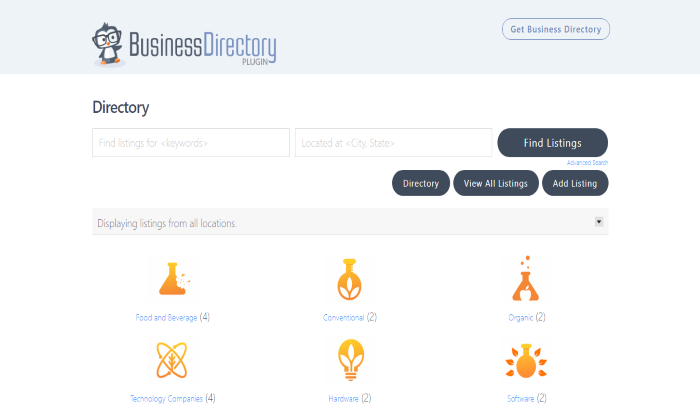
If you’re looking for a wide variety of directory categories to choose from, the Business Directory plugin is an excellent option.
This plugin allows you to easily build the directory you want by seamlessly pairing it with any WordPress website.
It doesn’t matter what type of directory you wish to build because the Business Directory plugin has it all.
The plugin covers the basic local business directories as well as employee, member, restaurant, medical, tour and travel, hotel, software review sites, and book review site directories.
Along with its extensive category list, Business Directory offers a simple installation process that WordPress users can rely on.
With its easy directory templates, you can change the style and layouts to suit your preferences. This plugin also lets you have full-field control to create your own custom fields for simple list navigation.
Features
Some other helpful features include:
- Free and paid submissions for extra traffic or revenue
- Mobile-friendly listings Google maps
- PayPal and Stripe integration
- Full image support
- Rating module
Plans
Business Directory offers three pricing plans, including:
- Basic: $199 per year for one site, unlimited listings, and one year of support
- Pro: $399 per year for up to five sites with all basic features and priority support (most popular)
- Elite: $599 per year for unlimited sites with all pro features and all directory themes
These pricing plans may be quite expensive for some, so I recommend the Business Directory plugin for those who need a diverse range of categories for their directory. All pricing plans come with a 14-day money-back guarantee. Try it today.
#2 – GeoDirectory – The Best Customizable Directory Plugin for WordPress
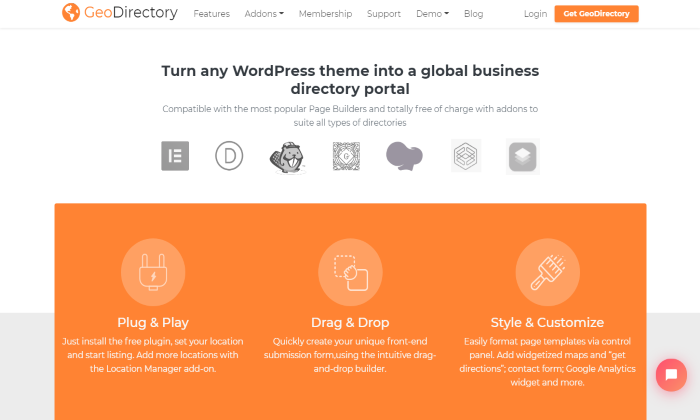
Customization is important for directory plugins, which is where GeoDirectory comes in.
GeoDirectory is an excellent option for website owners who are looking for ultimate flexibility and customization options.
With its incredible compatibility, this plugin works with any WordPress theme and allows you to easily customize your page the same way you do for your actual website and theme.
GeoDirectory also lets you customize 40+ widgets, shortcodes, and blocks, and all features are available in any format.
This plugin offers an intuitive drag-and-drop tool that helps you organize and reorder listing pages while easily adding customized tabs, fields, and content.
Custom fields also come with a fully customizable and unique badge system that you can include in your listings.
These badges include terms such as new, featured, and recently updated. You can also add badges with counts, video icons, and social links.
Features
By using GeoDirectory, your WordPress website will benefit from multiple advanced features, including:
- Add business hours to any listing
- Ratings and reviews
- Developer-friendly system
- Pre-built templates
- Advanced integrations
Plans
As one of the most comprehensive directory plugins on the web, GeoDirectory offers four different pricing plans:
- Four Months: $99 paid every four months
- Six Months: $129 paid every six months
- One Year: $199 paid every 12 months (most popular)
- Lifetime: $995 paid once
Every plan includes all products, add-ons, and premium support for the corresponding period.
If recurring subscriptions aren’t your thing, GeoDirectory offers single four, six, and 12-month plans.
A 30-day money-back guarantee covers all plans, except for the Lifetime tier. Learn more.
#3 – Connections Business Directory – The Best Free WordPress Directory Plugin
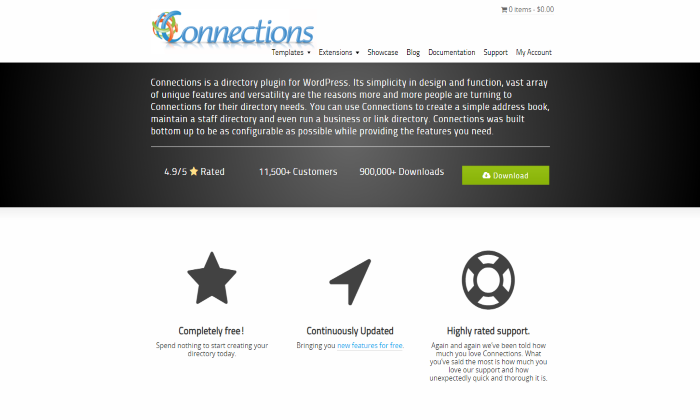
With its high-quality and supportive features, Connections Business Directory is a great free option for those looking for a starter plugin.
With over 900,000 downloads, this plugin will help you seamlessly integrate your customized directory with your WordPress website.
The Connections Business Directory system and database have been carefully crafted for maximum compatibility with WordPress, so your installation experience is smooth and simple—especially for website owners with little technical knowledge.
The plugin is also completely scalable and gives you the option to manage hundreds of entries within your directory.
Another outstanding feature of Connections Business Directory is the robust templates.
For a free plugin, it offers you a decent range of templates to get you started—with a template pro package available for an additional cost.
Features
Apart from it being free, which is a huge bonus, Connections Business Directory has prominent features, such as:
- 30+ languages are translation ready
- Many free and premium extensions
- Repeatable fields
- Free support forum
- Developer-friendly with open APIs
As you can install Connections Business Directory for free, they don’t have any pricing plans.
However, you can purchase premium add-ons and extensions for an affordable price.
Some of the most popular add-ons include the Widget Pack for $9.99 and the Custom Category Order for $4.99.
Plans
Template bundles include:
- Extension Pro Pack: $29.99 for one site
- Template Pro Pack: $59.99 for one site
- Pro Pack: $74.99 for one site
Although these prices are very affordable, it’s also important to create a budget not to overspend on the extras.
In that case, you may find a different directory plugin with additional features for around the same price.
#4 – Advanced Classifieds and Directory Pro – The Best WordPress Plugin with Multifunctional Features
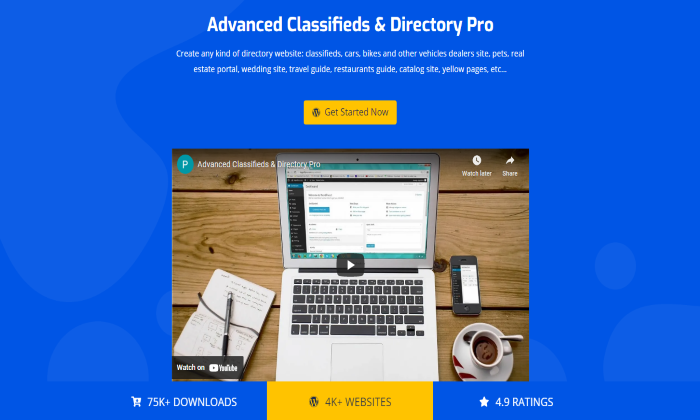
Create a powerful business directory using the Advanced Classifieds and Directory Pro (ACADP) plugin.
With its unique unlimited features, you can build an advanced directory from scratch with little to no effort.
Even though this plugin offers customizable settings and layouts for an easy view of your listings, the multifunctional widgets are by far the best feature to take advantage of.
ACADP has a wide variety of WordPress-compatible widgets that offer a more convenient way for you to add and manage content on your website without complex code, making it a perfect tool for beginners.
ACADP specifically designs the widgets to showcase listing-related information and tools for easy navigation.
The widgets include ACADP search/filter, categories, locations, listings, listing address, listing contact, and listing video.
Your website will easily support these widgets and all users need to do is hover and click on the widget they need for extra information.
Features
Being quite a comprehensive plugin, you will benefit from many features, including:
- Advertiser and user panel functions
- Backend management
- Email notifications
- Bookmark tools with advanced search and filtering
- Unlimited listings, categories, locations, and custom fields
Plans
ACADP has two pricing plans you can pay for monthly, yearly, or with a one-time life fee, which includes:
- Starter: Free and includes one site with unlimited listings, categories, locations, and custom fields plus email templates.
- Professional: $9.99 per month, $95.98 per year, or $289.99 lifetime and includes one site with all starter features and payment gateways.
ACADP offers between three and five sites on the Professional plan, but you will have to pay additional costs according to how many sites you want.
They also offer a 30-day money-back guarantee for all plans and a 20% discount on the lifetime plan.
#5 – Name Directory – The Best Directory Plugin for an Online Glossary Builder
Name Directory is another free plugin, however, it’s a little different from the other options on this list as it isn’t a standard business index plugin.
If you are a beginner looking for a more basic database that can build online glossaries for your WordPress website, Name Directory is an excellent option.
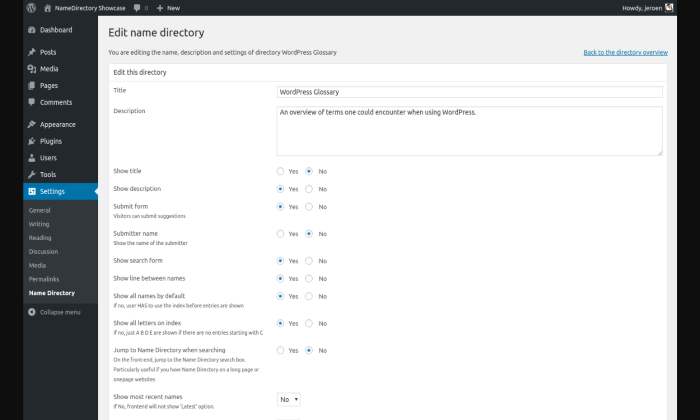
With a similar control panel view to the WordPress administration panel, you will have a simple time adding to, navigating, and managing your online glossaries through Name Directory.
You can add multiple directories with this plugin with simple shortcodes to copy and paste into the database.
Every online glossary you build also has a few customization options to alter the directory’s layout and functionality.
Even though this is a basic directory, there are still a wide variety of configuration options you can choose from to help maintain your online glossaries.
Some of these include the option to show/hide title, description, and search function, select the number of columns to display, enter the subject of the directory, and limit the number of words in your description with a ‘read more’ link.
Features
Because it is an entirely free plugin, there are limited features, but Name Directory includes:
- An in-depth support forum for the developers
- Import CSV files
- Customization for listings
- Language support
Name Directory is free to download and install. However, the developer team offers paid customization for anyone looking at a more extensive plugin at a low price.
What I Looked at To Find The Best Directory Plugin for WordPress
Now that you know my top five recommendations for the best directory plugin for WordPress, it’s time for you to look for the right product for your website.
To make it easier for you, I narrowed down the top three criteria that helped me find the best options above.
All you have to do is weigh up these criteria against your personal needs to find the perfect plugin for you.
Not every plugin will have all three criteria, but it’s important to find a plugin with at least one or two of these for you to use your website to its maximum potential.
Customization for Listings
Being able to customize your old and new listings is paramount to the success of your business index.
Having a flexible and customizable plugin like GeoDirectory will make sure your listings are up-to-date for your users.
Not being able to customize your directory will heavily impact your business due to lack of functionality, so it’s imperative to find a plugin that offers at least some customizing options.
Rating and Review System
A rating and review system is paramount for letting your users express their opinions about your listed businesses.
Just like the Business Directory Plugin that offers a rating module, it helps to bring more inclusivity to your website by allowing users to rate businesses on a scale of one to five.
Plus, ratings and reviews help users decide on the most trusted service, and you can risk losing business without it.
Bookmarking Tools
A plugin that offers any sort of bookmarking tool will help transform your website.
ACADP is one of the directory plugins that have this tool alongside advanced searching and filtering features.
This tool will allow your users to bookmark individual listings for future reference, making it incredibly convenient while saving time.
Your business index won’t completely suffer without it, but it’s a handy tool that will increase consistent traffic for your website.
Conclusion
Finding the best directory plugin for your WordPress website depends on a few factors like customization, rating and review systems, and bookmarking tools, among other features.
Looking for these elements is a great place to start, as it will ensure you get the maximum support from your desired plugin.
I’d recommend the GeoDirectory and Business Directory Plugin to anyone looking for extensive and highly customizable directory plugins for your WordPress website.
GeoDirectory is the most customizable option on the list, with excellent WordPress compatibility and an intuitive interface.
As a developer-friendly system, anyone can transform and customize the pre-existing databases to suit your every need.
Business Directory Plugin is also great for extensive categories.
If you have multiple niches and locations you wish to cater to, this plugin has it all in terms of options.
It’s also mobile-friendly and has great payment integration options if you want to earn as you go.
That being said, the other three directory plugins are excellent options that highly suit beginners.
Here’s a quick recap:
- Business Directory Plugin – Best for extensive directory categories
- GeoDirectory – Best customizable plugin
- Connections Business Directory – Best free WordPress plugin
- Advanced Classifieds and Directory Pro – Best plugin with multifunctional features
- Name Directory – Best plugin for an online glossary builder
The post, Best WordPress Directory Plugins appeared first on Neil Patel.
Source: feedproxy.google.com

Squarespace Vs. WordPress
If you’re looking to build a new website and are not sure which platform is best, check out my comparison of WordPress vs. Squarespace.

Disclosure: This content is reader-supported, which means if you click on some of our links that we may earn a commission.
WordPress is the most widely-used CMS platform, and according to a web survey, 39.6% of the world uses WordPress to manage their content.
I am part of that nearly 40%. WordPress is my go-to for managing my NeilPatel.com blog as well as my other websites.
However, several other options are growing in popularity that prove to be worthy opponents for WordPress. One such competitor is Squarespace. This beginner-friendly content management system is a favorite amongst many, but how does it hold up against the trusted WordPress?
I’ve been building websites for years, so I have gathered knowledge and experience in both WordPress and Squarespace.
If you’re looking to build a new website and are not sure which platform is best, check out my comparison of WordPress vs. Squarespace.
WordPress or Squarespace: Which is Better?

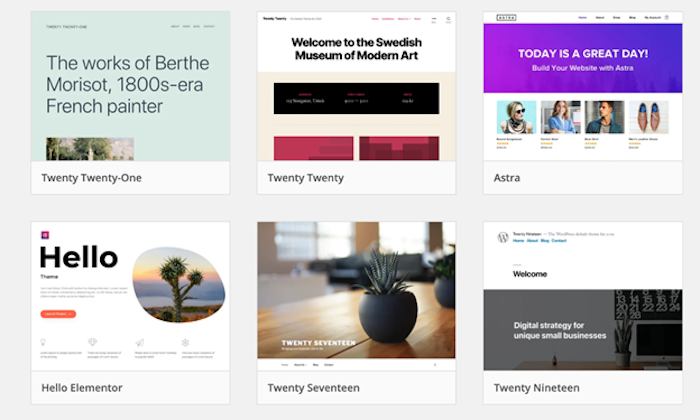
WordPress is best for customization. With this platform, the options seem unlimited. WordPress offers thousands of templates that serve as a starting point for your website.
These templates can be greatly modified to best fit your needs. WordPress also offers tens of thousands of plugins to add to your site to further improve its design and function.

Squarespace is best for beginners. The steps to creating a website on this platform are simple and easy for people just starting out.
Squarespace does not require signing up for hosting or purchasing a domain separately, and the templates give you options for customization that don’t feel overwhelming.
A Review of The Best Website Builders
We reviewed dozens of website builders and narrowed them down to the four best options. Check out our top picks and get the information you need to pick the best builder for you.
With my years of experience building websites, I have done extensive research on which ones work best in specific situations and specific people. My list of top picks reflects this work and the ones that shine the brightest for those looking to build a website.
Though Squarespace did not make the Best Website Builders list, it is still very popular and, as you’ll see in this review, has some great qualities.
WordPress made our top list for several different reasons that we cover in the article, including its thousands of template options, the plethora of extensions/plugins, the amount of control you have over your website, and more.
With the right website builder, it won’t take a great deal of technical experience to get a website up and running that looks professional and has excellent functionality.
WordPress Wins
WordPress is the chosen winner. This website builder offers several different benefits that other platforms do not.
Control:
WordPress allows for a great deal of control over how your website looks and works. With thousands of different templates to choose from, you have more options than necessary to get your website’s basic outline up and running.
Add to that the tens of thousands of plugins available, and you can personalize your WordPress website in nearly every way imaginable.
Templates:
While Squarespace offers templates, WordPress offers many more. On top of that, WordPress templates are easier for the average person to personalize even more. Many websites use WordPress templates without anyone ever knowing.
Added Functionality.
WordPress is known for its plugins. Need something on your website? It’s almost a guarantee that there is a plugin for that. WordPress currently offers nearly 60,000 different plugins, some of which are free.
Plugins have the power to do a variety of things, including help you with your website’s SEO, set up a contact form, track your site’s analytics, and much more.
Built-In Blog.
WordPress was created as a software for content management, so all of its sites have a built-in blog feature that makes adding a blog to your website easy.
There is no need to create a separate blog for your WordPress site. Simply add blog content to your existing website to share information and updates with your readers.
Community Support.
WordPress is open-source and free, so people who contribute to the platform have built a great community to support each other.
Though WordPress itself doesn’t offer a great deal of online or phone support, the forums created by the community of users has answers to all kinds of WordPress questions.
There are also events called WordCamps that exist all over the world put on by WordPress to help people learn how to better use and develop the platform.
Ticket prices are affordable and open to all WordPress users, developers, designers, and fans.
Cost.
Because WordPress is open-source, it is free to download. Templates and plugins are not always free, but the ability to download and use the platform is.
Hosting as well is something that does not come free, but that is typically done through an external site such as Bluehost.
Easy to Manage.
While many companies offer expensive packages to manage WordPress sites, it can be done easily on your own. Updating plugins is a regular occurrence but requires minimal effort.
And you get reminders when updates are available. Management also includes ensuring backups are in place (which happens through plugins or your hosting plan).
SEO Help.
Since SEO is a must for your website, it’s great to have tools to help you get there. WordPress has SEO built into it via its automatic generation of both meta descriptions and title tags.
The popular Yoast SEO plugin on WordPress is free and a must-have tool for your website.
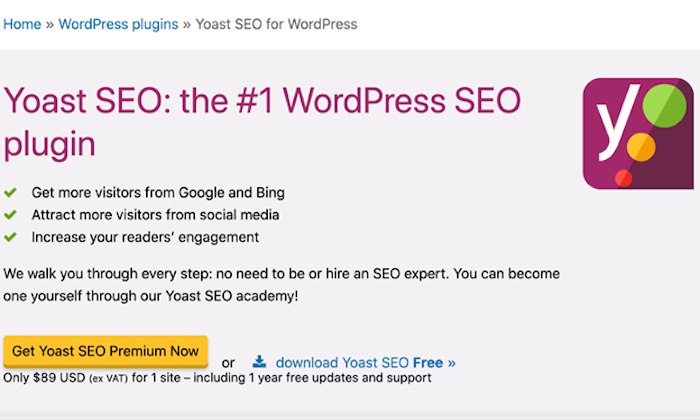
Every page and blog post you create can utilize SEO to boost it and let search engines know what you’re doing. Yoast SEO has you do things such as:
- Create a focus keyphrase
- Write a more detailed meta description
- Create an SEO title
- Create a slug
Yoast also features a readability analysis area where it determines how easily people will be able to read your content and provide suggestions on making it better.
WordPress Losses
Steep Learning Curve.
WordPress is not an intuitive platform. There is information to help you learn it, but you have to be willing to put in the time to do so. The layout of the dashboard is something that takes getting used to and learning how to navigate the editing. Since templates on WordPress are created by users, they work differently, and that means adjusting each time you use a new template.
Lack of Hosting.
To run your WordPress site, you need to purchase hosting through a third-party such as Bluehost. This adds an extra step to the building of your website and is a step that can be confusing to people new to website building.

Speed Issues.
Some of the WordPress themes are built with a lot of code, which can cause the load time of the site to slow down. If you are new to WordPress, you likely won’t know that some of the code is unnecessary and can be erased. Ridding of the excess code helps speed the site up but shouldn’t be done unless you know what you’re doing.
Hidden Costs.
Though the platform itself is free, a WordPress web site’s functionality and success depend on customizable themes and plugins. And most of these come at a price. Though it may not seem like much at first, each new paid plugin adds to the site’s overall cost.
Site Vulnerability.
Because WordPress is open-source, it is at higher risk for hackers. It is also the most widely-used content management system, so the volume of hackers increases with the platform’s increased use. WordPress plugins are also developed by different people not affiliated with the WordPress company itself, so it is possible that bad code could get into your site.
Squarespace Wins
Though not as strong of a contender as WordPress, Squarespace does still offer some great things.
Ease of Use.
It doesn’t get more straightforward than drag-and-drop, and Squarespace allows you to do just that. Squarespace templates are ready for you to use with little to no previous experience and almost no learning curve.

Simple Editing.
Changing your Squarespace website is a zero-stress task thanks to its user-friendly backend. It does not require knowledge of web design or development.
Marketing Tools Included.
While you have to pay for and individually download and install every plugin with WordPress, the marketing tools you need are included with Squarespace. This means things such as analytics, contact forms, SEO, and more.
All-in-One.
Squarespace is everything. It is your website builder, your design hub, and your host. You don’t have to hop to other sites to get what you need and then figure out how to connect it to your Squarespace site. It’s a one-stop-shop for all you need to get your website up and running.
Very Responsive.
All templates on Squarespace are responsive and built to work on all computers, phones, and tablets. You can even see while building your website how it looks on each of the different devices, as they can vary greatly.
Excellent Support.
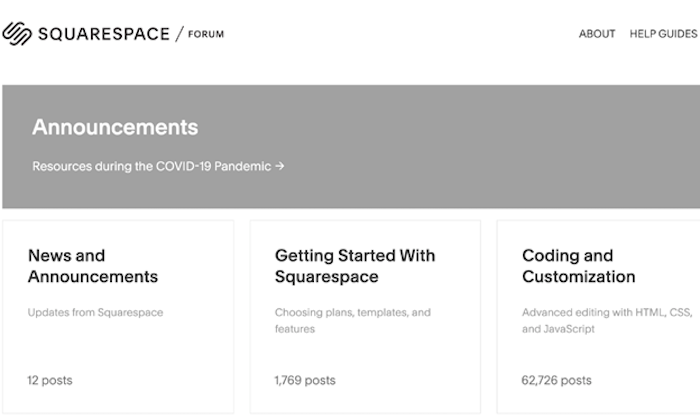
The customer care team at Squarespace is available 24/7 to troubleshoot any issues you may be having. The platform also has community forums that connect you with other Squarespace users to answer questions and get information.
Social Integration.
Squarespace offers customized widgets that allow you to integrate your social media handles easily. And they can look like they were part of the original design.
Automatic Updates.
Any new features rolled out by Squarespace automatically show up on your page or allow you to simply opt-in on them.
Squarespace Losses
Lack of Customization Options.
While I love how user-friendly Squarespace is, there is not nearly the level of customization as WordPress offers. And changes to the coding of your Squarespace website is not as easy as WordPress.
Fewer Templates.
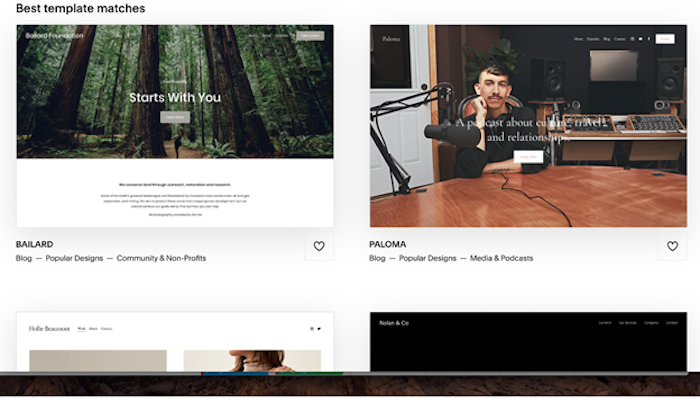
The number of templates available on Squarespace is merely a fraction of what’s available on WordPress. If you’re looking to build an ecommerce site, Squarespace only has 14 to choose from.
Basic SEO.
Squarespace offers some basic SEO tools such as HTML markup and automatic sitemaps but does not allow for the level of SEO optimization that WordPress does.
Lack of Ownership.
When you purchase a domain through Squarespace, you don’t legally own it. When you get a free domain through Squarespace, it applies WHOIS privacy, which means it is owned by Tucows Inc.
Tucows is the primary contact of the registered domain, and since WHOIS privacy is applied to all Squarespace domains, you technically don’t own it.
Limited Number of Sites.
With one Squarespace subscription plan, you are only able to have one website. Adding another one necessitates an additional subscription.
Limited Number of Contributors.
Squarespace limits you to two contributors with its personal plan. To add more, you must upgrade. WordPress allows for an unlimited number of contributors.
Comparing The Top Website Builders
Finding the best website builder is a challenge. There are great options out there for platforms to build your website, and it is not a decision to be taken lightly.
Whether it is for your small business, a personal blog, or a life-changing non-profit, your website plays a major role in your business’s success.
That’s why you need to take the time and read up on the top website builders. Here are my top picks from my research and experience:
- Wix — Best for general use
- Weebly — Best for beginners
- Shopify — Best for e-commerce
- WordPress — Best for content management
After reviewing the numerous website builders out there, I have found different options work best for different people.
If you are choosing between WordPress and Squarespace to build a great website, WordPress is our top pick.
The post, Squarespace Vs. WordPress appeared first on Neil Patel.
Source: feedproxy.google.com