
Tag Archives for " media "

2022 Social Media Prediction: The Year of the Creator
Twitter launched Communities, everyone launched a creator fund, and TikTok became the #1 website in 2021. All of these events and more have built a foundation for the creator economy to take off and shape the future of social media.
According to SignalFire, there are over 50 million content creators driving the creator economy, a “class of businesses built by independent content creators, curators, and community builders… plus the software and finance tools designed to help them with growth and monetization (SignalFire).”
The creator economy is the antithesis of the 9-5 cubical grind and overly polished online profiles. After months of lockdown and a global pandemic, consumers are pursuing purpose and looking to creators to provide an authentic escape.
This means several things for marketers:
- Niche, online communities are going to grow
- User-generated, creator, and authentic influencer content will become a necessity while brand content will continue to decline in reach and engagement
- Employee creators and employee brands will be differentiators

Niche, Online Communities Are Going to Grow
The rise of niche, online communities and groups is happening across the digital world. On Facebook alone, there are 1.8 billion users utilizing groups with the average user claiming membership to 5 or more groups.
Communities around gaming have skyrocketed with GWI reporting gaming amongst Gen Z has drastically overtaken TV in terms of interests. Google reports a 70% increase in searches containing “online games with friends” while Discord boasts millions of members in their gaming channels.
Oftentimes these communities are built around creators or moderators with immense influence.
Personally, I am part of 7+ communities on Facebook and a handful of groups across other channels. Each group meets a need or desire the others cannot. The groups are relatively small but have an immense influence on buying decisions and other choices I make.
- #BookTok in TikTok? I have screenshots of 7 books I am going to buy when I get a chance.
- The $100K Club Facebook group? I opened a Chime high-yield savings account the day Tori Dunlap suggested to
- Twitter’s Marketing Twitter community? I’m just one of 800 members and growing
- Reddit’s r/CatsAreAssholes? I have two cats that are jerks and these people just get me
For brands, this means looking at your audience in a new light and asking how you can build an online community, not just a following.

User-generated, Creator, and Authentic Influencer Content Will Be Essential
Younger generations shape our demand for fashion, products, celebrities, music, media, and more, which is why all brands, including brands with older audiences, should pay attention to Gen Z.
According to PR Daily, 13- to 17-year-olds are spending 56% of their media consumption time with user-generated content, a huge jump compared to other generations.

This means brands posting too much brand content are going to continue to see decreases in reach and engagement while UGC, creator, and authentic influencer content will become essential for performance.
What do I mean by authentic influencer content? Well, there is a measurable backlash to the pre-pandemic influencers who carefully curated glamour and luxury in each photo.
“If [Gen Z] is a sign of where global consumer sentiment is headed, it’s likely the “polished” curated self we’ve come to know won’t have the same impact it once did; this would clear a path for more diversity and self-expression in the influencer sector (GWI).”

We are seeing the rise of nano- and micro-influencers and creators because they tend to have smaller, niche followings and a more authentic look and feel.
What does this mean for brands? It means adapting your strategies to include these content types or being okay with declining content performance.
Employee creators and employee brands will be differentiators
LinkedIn’s Editor in Chief, Daniel Roth, recently wrote about the rise of the creator employee, which describes the balance between employment and being a creator.

As a marketer in social media, I see friends and colleagues navigate being a creator and employee all the time with mutual benefits to both their employer and their own careers.
For many brands, the idea of employees building personal brands is foreign and concerning but I think the benefits outweigh the risks. Daniel Murray explains it best, “employers are either threatened they will lose that employee, think it’s taking time away from their work, or they are worried about their brand.
But on everything they post, especially on LinkedIn, it has the company they work for [displayed]. So they can see this as free impressions and also as a tool for attracting future talent.”
Here at Convince and Convert, many of our strategists are known in the industry in their own right thanks to their personal brands, which means we win business across industries thanks to those personal brands.
So, what does this mean for brands? I would start with identifying employees interested in creating and then providing them the tools and space to do so.
Is Your Brand Ready for the Year of the Creator?
Brands are going to need to look for community building opportunities, ways to significantly increase their external, authentic content, and empower their employees to represent the brand as employee creators.
Start with a simple audit of your social channels. What is your current mix of content types? How can you increase the amount of external, authentic content?
The post-2022 Social Media Prediction: The Year of the Creator appeared first on Content Marketing Consulting and Social Media Strategy.
Source: convinceandconvert.com

How to Make Social Advocacy Part of Your Employees’ Daily Routine
Your employees each have a morning ritual. Grab a cup of coffee. Scroll through Facebook’s News Feed. Respond to emails. Dial into a conference call. Start the workday.
What if your company could become a part of employees’ daily routines? What if there was a way for you to use this downtime to inform others and increase brand awareness?
Welcome employee social advocacy! By tapping into a daily habit that already exists, you can create social advocacy and amplify your marketing efforts.
According to a 2016 survey from Bambu by Sprout Social, seven in ten employees are using social media at work. Blocking popular networks and monitoring browsing history isn’t going to stop anyone from checking Facebook—especially when 11 percent of those surveyed admitted to using social media during bathroom breaks.
Instead of trying to fight a habit that’s already ingrained in your workplace culture, embrace it! Encourage your employees to use their time on social to speak on your brand’s behalf. By outlining the individual benefits, identifying existing champions, and educating and empowering employees, you can strategically build a powerful advocacy program.
Answering the Question: What’s In It for Me?
One of the biggest hurdles in getting people involved in an advocacy program is convincing them that there’s a personal benefit. Before you introduce a formal or informal program, you need to answer the frequently asked question, “What’s in it for me?”.
The best way to do this is by not only communicating but also demonstrating the benefits of sharing company content on social.
Collect and share testimonials from sales representatives who have seen an increase in revenue by sharing curated content. Who has had success at positioning themselves as thought leaders within the marketplace? Identify a new employee who learned about the position through a social post.
If these use cases aren’t applicable, try surveying engaged employees to learn what they think is most valuable.

Additionally, you need to demystify the idea using social media at work negatively impacts productivity. Believe it or not, four in five people believe that.
Sure, there’s always going to be the 10 percent of surveyed employees who spend over two hours on social. However, a vast majority spend less than an hour scrolling through their feeds.
You may want your employees to hit the ground running sharing your awesome content, but that may not happen right away. What’s most important, initially, is that your employees are reading the information you’re posting. You want them to experience a more transparent and forthcoming workplace.
Identifying and Educating Existing Internal Advocates
Do a quick search on Instagram of your office location and a Twitter query of your branded hashtag. These employees are your initial allies and should be the first group of stakeholders you bring into your employee advocacy initiatives.
That’s what Katie Gear, Area E-Commerce Marketing Manager for Hyatt hotels in Chicago, Indianapolis, and Cincinnati, did when she first launched her advocacy efforts. Gear spoke with Sprout Social’s Community Outreach Manager, Sarah Nagel, about how she scaled her program and identified its first participants.
“Harness employees who are already sharing. Create a more meaningful conversation with their employer, and keep the dialogue they’re already participating in more open-ended,” Gear told Nagel.
Gear identified these brand advocates by searching social and approaching directors in sales and marketing. She asked them who from their teams would be a good fit. 54 percent of those surveyed responded that they don’t have a lot of guidance on how to use social media to advocate for their company.

To address this, Gear followed up by hosting informal social media 101 classes for Instagram, Facebook, and Twitter.
“The courses help them understand what I’m doing with the content and what I look for—and what content works best on what channel,” Gear told Nagel.
So, first, identify and then educate existing internal advocates to help you implement a more effective employee advocacy program. Leverage this highly engaged focus group for feedback. Lean on their insights to help revise your efforts before rolling it out to a larger audience.
Empowering Your Employees
Participants in your program shouldn’t view engaging with company news and relevant content as extra work—otherwise, they won’t opt-in.

In fact, 53 percent of employees surveyed don’t think that the marketing team makes it easy for them to advocate for the company on social media. Don’t make engaging with your brand more cumbersome than it needs to be.
Along with internal education on social media best practices, you need to streamline the sharing process and provide your employees with all the tools they need to be the best advocates possible.
When you’re sharing social content with your team, try this:
- Accompany each post with suggested social messaging per each popular network.
- Include a note with each piece of content that tells why what you’re sharing is important and who the internal stakeholders involved with the initiatives are.
- If you’re citing a third-party source, make sure you’re highlighting a reputable publication.
- Make sure that you’re asking your team members to share content and information that they think would resonate with all of the company’s employees or a departmental audience. Employee engagement, just like social media, should be a two-way dialogue.
Quantifying Employee Advocacy Success
Strategizing and implementing an employee advocacy program takes time and resources. Be sure that you’ll be able to measure the impact of your efforts. Adding UTM codes to the end of each piece of owned content you share with employees will make it easy to track, measure, and benchmark.
Some of the same social metrics you apply to your marketing efforts can be applied to your advocacy initiatives.

Keep in mind that those surveyed were 16 times more likely to read a social media post from a friend than from a brand. 81 percent of participants went as far as saying they would rather see a friend’s social post than a brand’s post.
Keep a close eye on your efforts, and continue to use the data and anecdotal feedback you receive to revise and refresh your program.
Cheers to Your Advocacy Leaders!
As your program gains momentum, your employees will see that advocating on social media isn’t as confusing or hard as they may think. Be sure to start out with a proper framework and approach. Getting your employees to incorporate advocacy into their daily routines can be a seamless and mutually beneficial process.

This post was originally written by Andrew Caravella and updated by Michelle Saunders in 2021.
The post How to Make Social Advocacy Part of Your Employees’ Daily Routine appeared first on Content Marketing Consulting and Social Media Strategy.
Source: convinceandconvert.com

2021 Social Media Benchmark Report: 4 Takeaways for Your Social Refresh
Take a peek into the Convince & Convert team messaging threads and you’ll find us sharing all sorts of research and new data. In fact, when the Rival IQ 2021 Social Media Benchmark report was first released, Corynn shared it with the note, “TL;DR–everyone needs more carousels.”

You can stop reading now if that’s all you need to refresh your social content plans. But for the rest of you, I’ve got a few more ideas.
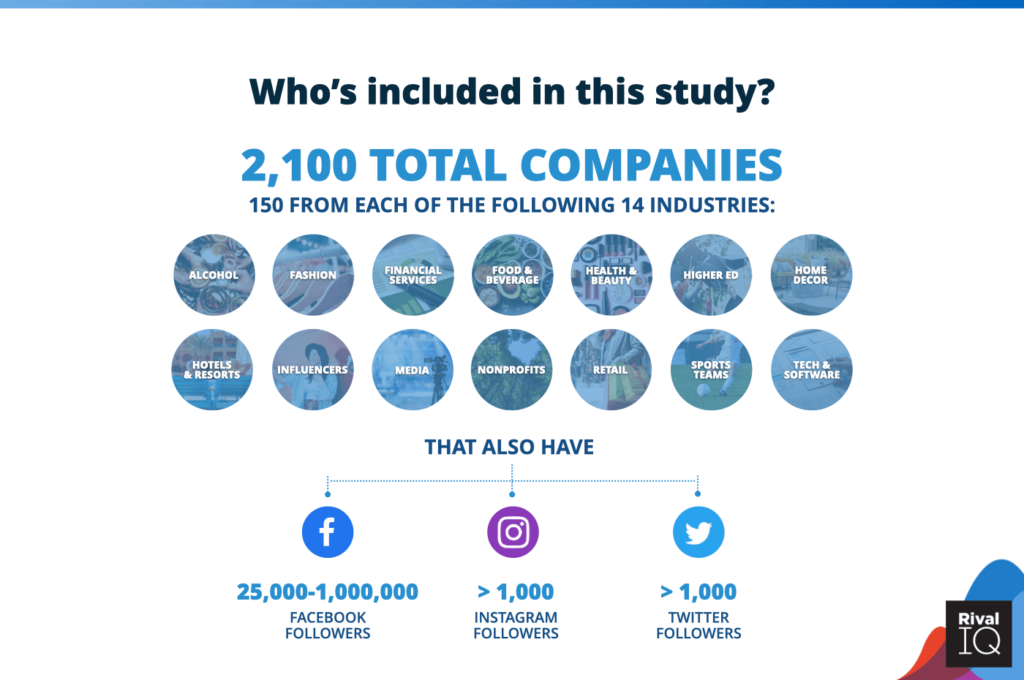
The Social Media Benchmark report is an annual study from Rival IQ, our friends in the social content performance data business. The 2021 edition evaluates thousands of brand accounts across 14 industries to set the benchmarks that marketers use to measure social content performance.
Keep in mind that most of the data analyzed were pulled from 2020/early 2021. Social media platforms are constantly shifting their algorithms to respond to new content types, technology, and audience habits.
What is presented in any benchmark study shouldn’t be taken as gospel, but it does enlighten how to plan for your 2022 social media content strategy.
4 Cues For Your Social Media Strategy Refresh
1. Posting every weekday may be “expected” but is not necessary.

Creating enough content to post once a weekday on each channel is a common expectation of social teams. Yet as social media engagement rates decline or stay stagnant, brands respond with fewer main feed posts on each channel.
Rival IQ discovered that brands posted on Facebook on average the most per week; but outside of Media brands sharing 53.5 posts a week (7.5 a day!), the average was 5.5 posts weekly.
We’ll take the exception with the finding that brands are only posting content on Instagram four times a week. The API that makes data available is news feed specific. Yet remember that Instagram has 12 different ways in the channel to serve up content or connect with audiences.
This data point is a bit misleading because we can’t accurately benchmark Stories, Reels, Highlights, and Guides with the API.
Twitter was the channel that saw the most volume by brands, almost 3x more tweets than Instagram news feed posts. But Instagram is the clear social media royalty based on Engagements. Instagram audiences responded with more than 7x engagements than on Twitter, on just one-third of the total content.
Quality Over Quantity of Posts Matters Most

No doubt you’ve heard quality outranks quantity. This is especially true for B2B brands that are building content to support longer awareness and consideration timelines in their customer’s decision journey.
Focus on creating less social media content that resonates more with key audiences.
Show up in the nooks and crannies of social media channels; focus on different content outlets, like Reels, Stories, and Reddit threads. Even better, explore participation in ways that create more 1:1 micro-connections with your audience.
Direct interaction with audiences in spaces like AMAs, TwitterChats, Audio Rooms, and even DMs can go a long way with building affinity with audience members.
When everything is important, nothing stands out. So when there is actually an opportunity for different-than-usual content, make it shine. Increase frequency around real-time opportunities, like events, webinars, launches, behind-the-scenes. Take a cue from Media and Sports, which hyper-focus on wall-to-wall coverage of the top story or game day. Media and Sports teams tweeted more than all of the other industries combined.
When everything is important, nothing stands out.
2. Mix Up Content Types

We’ve been saying “Video Wins Social” for several years. While in some instances that can be true, the social media benchmarking data shows that in main news feed posts, actually photos and carousels now outrank videos for engagement.
The algorithm may prioritize video content when it’s available, but audiences care less. The reality is that even today, video is still more difficult for content teams to produce at scale unless it is a core part of the business (media, sports, etc). That’s why video appears less frequently as a post type across most industries.
What can B2B brands do without a consistent video workflow? Remember that in today’s visually dominated social feeds, carousels and photos perform well. Avoid posting a simple status in text-only on Twitter or Facebook, especially when it’s easy enough to include a GIF, image, or infographic.

Carousel impressions are repeated in a user’s news feed if they don’t engage the first time. On subsequent impressions, Carousels will display images two and three. You don’t have to win with the first image in a Carousel. Be sure the second and third ones are just as compelling.
3. Identify And Measure What Metrics Matter
An engagement rate is calculated based on all measurable interactions on a post. Social networks are diversifying how audiences choose to engage with any post on their newsfeed–Facebook alone has up to six emotional reactions along with commenting, sharing, and saving posts.
Does an Angry reaction carry more weight or meaning than a Laugh? How does Love compare to a Share?
A better way to measure engagement is to identify what specific reactions are most valuable for your brand. Metrics are like pizza toppings–each one of us has our favorites, so we tend to always stick with those and overlook the other options.
Measure specific, meaningful reactions as a percentage of total engagements to ensure you don’t lose sight of engagements that move the needle. Padding posts to garner more “Likes” to hit engagement numbers is easy to do — but Likes don’t pay the bills (even for Influencers).
Take a Look at Your Own. Social Metrics
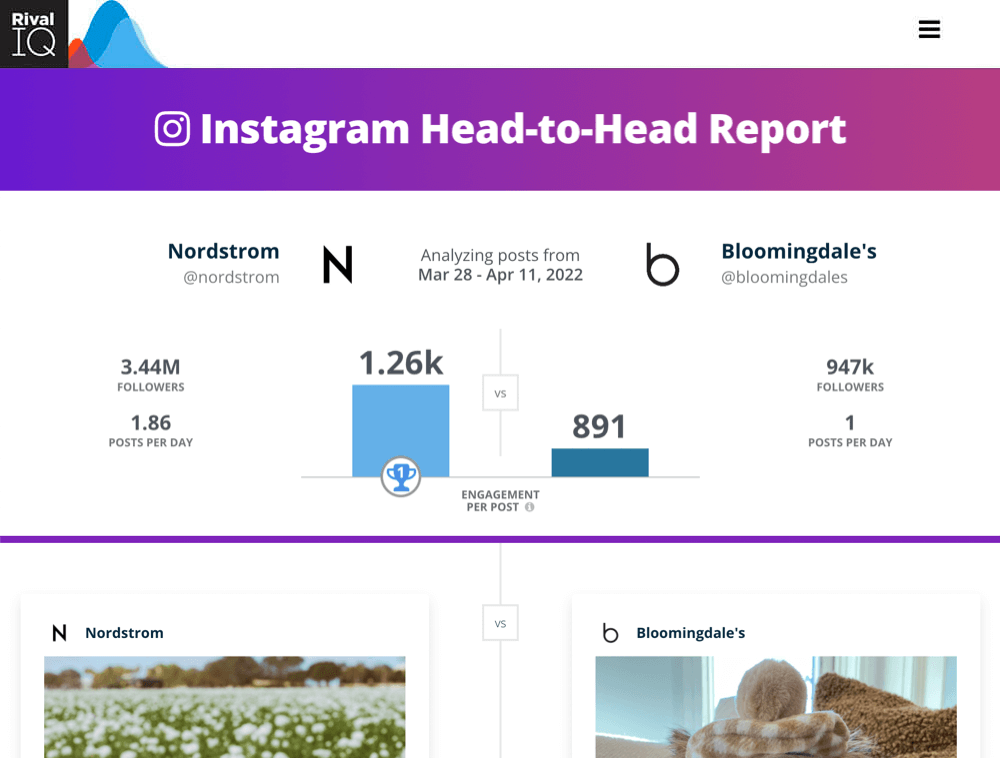
Rival IQ acknowledged a better way to measure engagement rates is by using the engagement rate per post metric. Engagement rate per post is the [best] metric because it controls for post volume and audience size and helps marketers understand how they’re doing in relation to their competitors.
Unfortunately, social network APIs continue to skinny the data that is publicly available, so Rival IQ and others cannot do this type of competitive reporting at scale. But you can with your own native metric reports.
4. Plan Seasonal Content and Align Hashtags Accordingly
Hashtags were all about the holidays on Instagram and Twitter this year, so that signals brands must keep up with content that aligns with the seasons. Work ahead by identifying these in your annual and quarterly editorial calendars and planning.
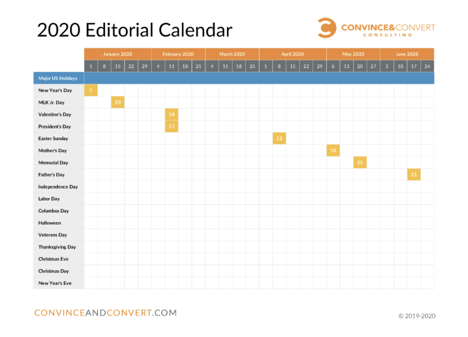
Planning in advance means your team is better positioned to capitalize on seasonal content by finally deploying all the “next year we should do this” ideas that are missed after the fact.
Hashtags that performed consistently well across all industries included: giveaways, alcohol-related, or those relating to holidays and current events. One smart note from the social media benchmark report is that hashtags are not equally used across social media channels.
Use research and hashtag tools to identify the right hashtags and how many to use for each social channel. Update these monthly or quarterly for best effect.
—
Get started with benchmarking and analyzing social content performance with the Head to Head Social Snapshot, where brands can see 1:1 performance against the Rival IQ benchmarks.
Go further by completing a social media audit that identifies the insights to set up strategic decisions for next year’s social media plans. I built a self-paced, free course that explains social auditing and insights, available to guide you through using social media metrics to audit and build social media strategy.
How will you approach social media differently in 2022? Tweet me @LaurenTTeague to let me know.
The post-2021 Social Media Benchmark Report: 4 Takeaways for Your Social Refresh appeared first on Content Marketing Consulting and Social Media Strategy.
Source: convinceandconvert.com

5 Ways To Grow Your Customer Relationships Through Social Selling
Social selling is a tool that almost anyone can add to their professional toolbox. While sales professionals have traditionally applied social selling, it can apply to anyone using relationships and relational marketing in their career. Social selling solves the problem of needing to fill a pipeline and connect with customers by building relationships.
For example, recruiters can use social selling practices to identify prospects, build relationships and grow trust with potential candidates before a job opportunity arises.
Social media doesn’t replace your existing selling or relational tools. Instead, it is a different tool that helps leverage the selling skills and the relationship-building skills that one has already fostered in their career.
5 Ways To Grow Your Customer Relationships Through Social Selling
To explain how social selling helps to grow customer relationships on a one-to-one basis, let’s look at these five ways to use it effectively:
1. Understand what Social Selling Is (and Isn’t)
Social selling is the art of using social media to find, understand, connect with, cultivate and nurture potential sales prospects.
There are four key steps in this process:
- Identify prospects online
- Enrich ideal contract profiles
- Showcase knowledge and expertise
- Build one-to-one relationships
While it seems obvious, it bears repeating:
Social Selling is not Social Media Marketing.
Though both happen on social media platforms, Marketing and Sales use different approaches to achieve very different outcomes.
Social media marketing supports driving attention and building affinity at a large scale, with multiple audiences in mind. Organic social media marketing supports the big picture and aims of an organization.
Contrast that with the messages delivered through social selling — messages dialed in for a specific audience through more personalized content. While the Marketing team is broadcasting from one to many, social selling is ideal for that one-to-one communication.
2. Grow Your Network
A key to understanding how best to use social selling is understanding who is really in your audience. When we pull back the curtain and reveal who’s really in our social media audiences, the results are always different than expected. Remember: Those who are paying attention to your channels are not necessarily who is the most active.
In social selling, we must dive into our respective audiences outside of the brand pages.
Think about your own LinkedIn connections and Twitter followers. They most likely include a mix of the following people:
- Prospects
- Co-workers and colleagues
- Industry peers and competition
- Adjacent peers and competition
- Peers from a group, event, or networking event
- Friends, family, and acquaintances
Who do we want in our audience? When social selling, prospects are in our direct line of sight. However, don’t rule out the importance of developing connections with adjacent peers and competitors or others in the peripherals of your network. This is especially true when seeking out who can connect you to a second-level connection.
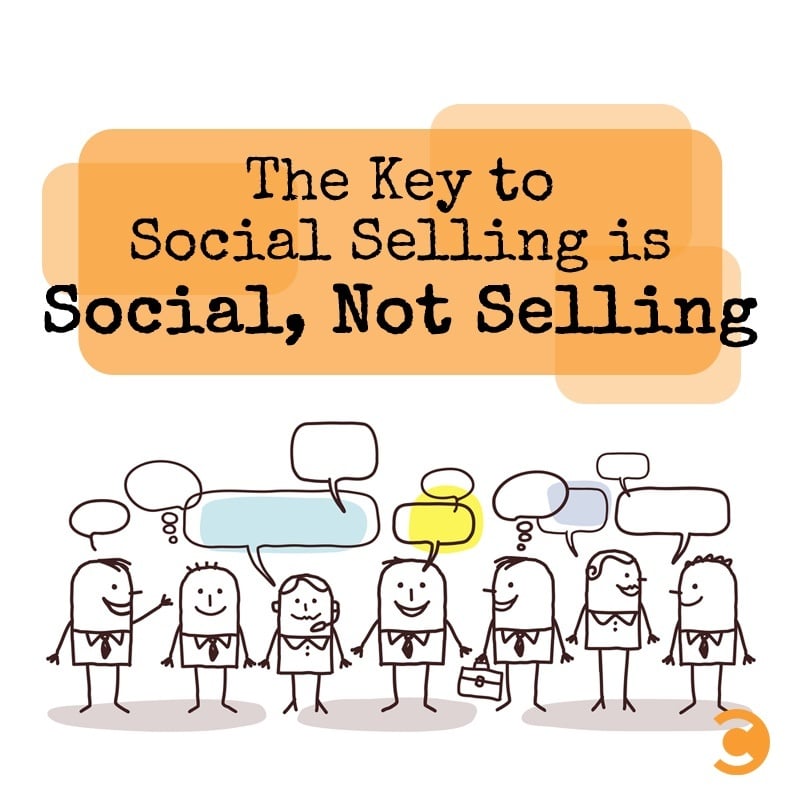
Build connections by adding value to their newsfeeds. At Convince & Convert, we are true believers that Youtility marketing pays off in dividends. When relationships are founded because we are helping, not selling, we become indispensable.
Transactions happening online take many forms — you may not get a direct sale, but an introduction or a recommendation from your network can lead to additional opportunities.
Focusing on helping people first, rather than only considering the next sale or deal, can build trust with our audience. Youtility is relevant in any form: Information, entertainment, and perspective. There are several ways to put Youtility into play.
When you’re relevant to gain someone’s attention, they permit you to earn their trust. Every salesperson knows that trust is the way to unlock that relationship and get closer to the desired outcome.
3. Be a Good Listener
We coined the term “Acceptable Eavesdropping” to describe the ideal way to listen to existing conversations happening online. Adapting social listening rules to how individuals can eavesdrop pays off in these ways:
- Follow prospects & peers and join the conversation they’re already having
- Comment and engage in content in a relatable way
- Join adjacent and industry groups of your target personas. Participate lightly and gain insights from the
- conversations, questions asked, and answers given.
- Follow relevant hashtags to find new prospects involved in similar conversations.
- Use Notifications and tools like Spoonbill.io to identify and react to profile changes.
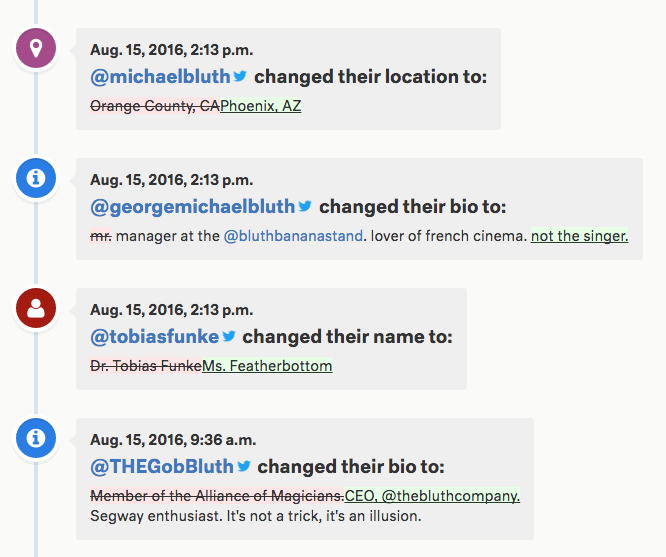
Credit: Spoonbill.io
Our actions online are generally public unless we expressly limit them. What is posted publicly is available for anybody to eavesdrop on if they know how to do it. From a social selling perspective, listening to existing conversations provides insights that help sellers fine-tune messaging and identify opportunities to contribute.
Comment on and engage with content and conversations, even if it’s not directly related to your sales effort. Applying a Youtility-first mindset, try to add value with any response or answer. Having an actual conversation builds trust and rapport.
Joining and participating in groups that attract your target personas or adjacent can lead to insights into how those individuals generally talk about their business challenges and needs.
One of the early steps I made this year while working on a startup idea was to join groups on Facebook and Reddit that help me identify and note the challenges of users that my idea will solve.
While I am not participating actively, being part of the group allows me to get familiar with this audience group’s challenges, complaints, and celebrations. Those insights are invaluable as I begin to build my product and demonstrate that I identify with the users’ needs from their point of view.
Wherever you choose to listen, do so to connect within your industry or specialty. Use that time to share information and expertise, ask for advice and build relationships. Select the social channels, groups, and hashtags that reflect the communities within your target audiences to get smarter about prospects and current customers.
4. Engage With Purpose
Listening should inform what content to create and share. All content should start from a place of understanding:
- 1) Who are you trying to reach?
- 2) What does that audience care about?
The Convince & Convert team says this all of the time, but it’s true: creating content your audience cares about is a surefire way to help them find you and stay with you.
But too often, employees are creating content that only they or their employer cares about. The effects just aren’t as appealing. We’ve all seen this as we’re scrolling through our newsfeeds, and we scroll right by what isn’t the most relevant or interesting content.
There needs to be a balanced approach between a company’s social marketing strategy and the employees taking ownership of their personal brand.
When directly engaging with your network, remember the golden rule of engagement– add value to your conversations. Do this by researching their industry and tailoring your content to their interests and needs. Be mindful of all information you share.
A good rule of thumb is to avoid using the word “I” in the first ten words of your post, caption, or comment. Engaging from a place of help means the conversation is not about you.

Stop defaulting to the “Like” (thumbs up) reaction. Using these other reactions will stand out among the different reactions, as others do not often use them.
If the post or article is noteworthy, consider sharing it and crediting the author. Send the author a direct message appreciating the post or tag them in your comments.
Use the Articles & Activities section to see what your contacts are commenting on. This will give you important insights into what they are interested in and allow you to open a conversation on a mutual piece of content you have engaged with. If your contact is not posting actively, this may help open a dialogue.
5. Measure the Effectiveness of Social Selling Efforts
Social media is a great way to generate leads, sure. But how can we measure the social selling steps of connecting with an audience, building credibility, and earning their trust? How do you know if your social selling plan is effective?
Here are a couple of ways to measure the effectiveness of social selling efforts.
Social Selling Index:
LinkedIn’s own Social Selling Index can be a barometer for individual progress. According to Linkedin, the SSI is a helpful measure of how a salesperson’s social selling skills and execution come together.
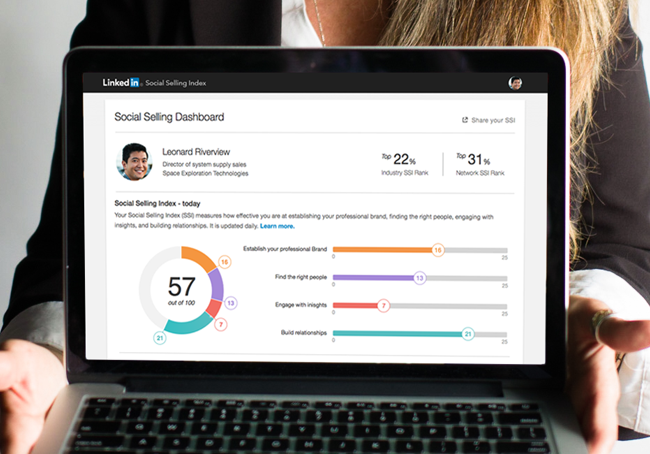
LinkedIn Social Selling Index
This self-report card allows for progress checks over time as a good base for identifying what steps taken are helping. It’s calculated by evaluating four distinct pillars:
- Establishing your professional brand
- Finding the right people
- Engaging with insights
- Building relationships
SSI scores update day to day, providing real-time feedback based on your activity and the health of your network over time. The score is based on a scale of zero to 100, with a maximum score for each pillar being 25.
Linkedin reports that social selling leaders create 45% more opportunities than those with a lower SSI as if we needed an incentive to boost scores. The more consistent you are using LinkedIn, the more significant the impact on your SSI score–but more importantly, the greater impact on your network overall.
Trackable Touchpoints
Making every touchpoint that we have with individuals trackable seems impossible. But in digital, we can get close with the right tools in place. Using data capturing and tracking technology makes it easier to qualify prospects and understand when they’re more ready and open for conversation.

Avoid duplicating Marketing’s role by trying to create campaigns on your own. Instead, it is more effective and more manageable to make individual touchpoints interactive.
Augment your emails and shared content to track when they are opened and viewed. Some of our favorite tools to do this include:
- Video tools that allow for viewability reporting, like Vidyard GoVideo
- Email enhancers like MixMax for automation and Sigstr for signatures
- Campaign URL builders and short URL providers
- SMS Messaging
Go Forth and Prosper
When applying social selling to building relationships with your social network, remember this: Doing it wrong is worse than not doing it at all. Take these ideas, and don’t hesitate to make subtle shifts in how you approach social media individually.

By focusing on the social more than the selling, success will follow.
Need an assist? The Convince & Convert Consulting team offers workshops on how teams can apply social selling to Sales, HR, and Professionals of all kinds.
The post 5 Ways To Grow Your Customer Relationships Through Social Selling appeared first on Content Marketing Consulting and Social Media Strategy.
Source: convinceandconvert.com

4 Reputation Management Realities That All Brands Now Face
What do Beyoncé, Kate Middleton, and Harrison Ford have in common? Other than having devoted fan bases, they’re celebrities who have a reputation for giving very few interviews. They control their messaging tightly.
While Beyoncé and Kate Middleton choose to go directly to their fan bases with highly choreographed messaging through their social media channels, Harrison Ford is one of only a very few celebrities who aren’t on social media at all.
However, whether or not they choose to connect with their fans online, none of these celebrities can stop the millions of rabid fans who run fan accounts, who post to Reddit and Instagram, and who analyze their every move through YouTube videos and blog posts.
Why does this matter for you and your business?
Just like celebrities, the rise of fan culture on the internet has fueled both a huge boom in brands’ abilities to control their own reputations, as well as the decentralization of where reputation management lies.


We are now able to build communities of like-minded customers and brand fans. With that comes the responsibility of monitoring a growing array of websites and spaces where brands rate products, review services, comment, and ask for help.
4 Key Considerations of Reputation Management
Ratings and Reviews Are No Longer a Choice
“The rating trusted most by consumers is 4 stars followed by 4.5 and 5 stars,” according to review software company ReviewTrackers.
Many years ago, I worked for a well-known arts & crafts brand. At that time, the company I worked for gave the ability to customers to rate and review patterns (the directions consumers would use to create their craft projects), but not the products themselves.
The thinking was that we didn’t want the companies’ own products to have negative reviews. And yet, study after study shows that a few negative reviews actually bolster trust in reviews overall. Furthermore, customers tend to trust relatively positive reviews most (see above quote from ReviewTrackers).
What brands must do is not only encourage reviews with open arms but encourage customers to look at positive reviews as social proof. Today, that same company has embraced product reviews both on their website and in their digital marketing efforts.
And this goes beyond B2C brands. Brands as wide-ranging as US Bank, the fifth-largest commercial bank in the US whose reviews are mostly on Google My Business, to DeSantis Breindel, a New York City-based branding consultancy whose reviews are on platforms like Clutch (both brands are clients of Convince & Convert) are not only monitoring and responding to reviews but also using reviews to feed their marketing efforts (see below).

It’s Not Just What They Say, It’s What You Do
“39 percent of social media complainers who expect a reply want it to come within sixty minutes, yet the average response time from businesses is five hours,” found research by Jay Baer and Edison Research.
In 2016, C&C founder Jay Baer wrote, “Haters are not your problem….Ignoring them is.” That reality is more true now than ever before.
Customers expect help with their issues, and when you don’t respond to negative reviews, your prospective customers will hold you accountable for that inaction.

To positively impact your reputation, treat reviews as an opportunity for customer service and excellent customer experience. Respond to your reviews; add context; thank brand fans and address fan haters.
Social Listening Is More Complex Than Ever
“Word of mouth is directly responsible for 19% of all purchases, and influences as much as 90%,” says the book Talk Triggers by Jay Baer and senior strategist Daniel Lemin.
Outside of owned review channels, brands must monitor reviews and conversations on channels from Facebook and Reddit to the bumper crop of industry-specific review sites such as Zocdoc and Healthgrades.

Using monitoring tools like Meltwater and Sprinklr helps brands to stay on top of what’s being said. Beyond sentiment and topics, brands must make sure that they are leveraging the built-in AI to analyze conversations for trends to keep on top of what their proactive messaging needs to be.
Not sure how to leverage these social listening tools to uncover this data? Consulting firms like Premium Blend can help to build strong queries and implement effective listening processes.
Again, it’s not just knowing what people are saying, but also using this data to shape what your brand should be talking about to be relevant to your customer base.
Showcase Your Customers’ Words and Stories
Reputation management is the reactive part of our work, but we also have the opportunity for reputation marketing. Leverage the stories that your customers are telling about you to market your products/services to prospective customers.
Whether you’re aggregating real customer social media posts like Korean beauty brand Hanacure does on their @hanacureeffect Instagram account or you’re using a tool like SocialProve to pop-up notifications to website visitors that indicates when others have purchased on your website, you’re engaging in reputation marketing.

What are some ways that your brand can leverage customer stories as social proof?
- Proactively turn user-generated content (UGC) into social media campaigns
- Leverage customer reviews and quotes on landing pages
- Showcase real customer feedback in advertising
- Address questions you’re getting from Quora, Reddit, and/or your own communities as content
- Create animated videos featuring customer reviews
- Integrate real questions into your chatbot scripts or FAQs
- Highlight your review scores using in your top-navigation and/or footer
3 Questions to Ask Yourself
- Your customers are already out there talking about your brand—are you encouraging them to do so in the places that help you to strengthen your reputation?
- Are you showcasing the level of customer experience that your prospects can expect from your team?
- Are you reassuring prospects that others like them trust you?
That’s your opportunity with reputation management. Don’t waste it.
The post 4 Reputation Management Realities That All Brands Now Face appeared first on Content Marketing Consulting and Social Media Strategy.
Source: convinceandconvert.com

What’s the Difference Between a Content Creator and an Influencer?
In today’s internet-focused age, words like “content creator” and “influencer” are thrown around on nearly every social media platform. Have you ever wondered: What do these terms really mean? Is it the same thing? How do the two roles differ from the perspective of a user or consumer?
In a nutshell, the content creator is a broad term describing someone who produces some form of content, including but not limited to blog posts, videos, photography, and reels.

Influencers can also create such content, but they’re better known for their connection to their audience (i.e., the “influence” they have on their followers).
Still, confused? Let’s dive deeper into the world of content creators and influencers to understand exactly what they do and what makes them different from each other.
What Do Content Creators Do?
Content creators create content for blogs and social media platforms. This can include YouTube videos, TikTok reels, and text-based posts on social media sites like Facebook, Twitter, Instagram, LinkedIn, etc.
The content they produce is typically original and may be shared for money, audience building, brand awareness, or just as a way to share their talents online.
For example, “Insta poets,” bloggers, and newsletter writers are typically seen as content creators.
Here is an example of content on Instagram shared by the account @poets.

Content creators aren’t limited to texts, though. They can specialize in video, audio, and visual content, among other forms.
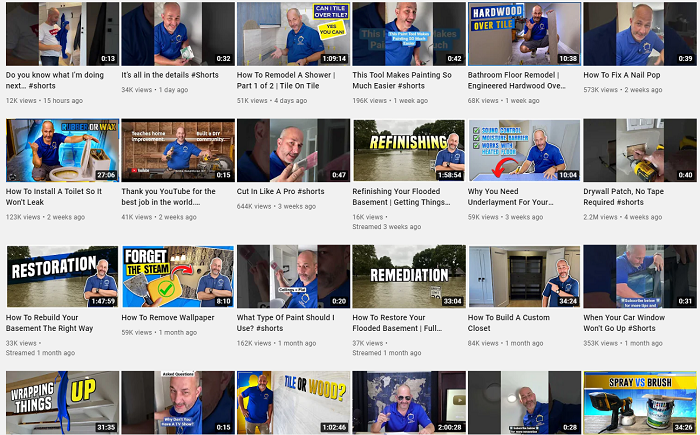
Here’s an example of a YouTube content creator Home RenoVision DIY.
What Do Influencers Do?
Influencers are popular individuals on social media and other content-sharing platforms who leverage their substantially large followings to promote certain brands and lifestyles.
This can be very beneficial for brands and small businesses looking to reach new users and build brand awareness.
When you see someone with thousands of followers flaunting a beauty or wellness product with a “sponsored” tag, they’re probably an influencer.
Influencers promote products and lifestyles through photos, videos, blogs, reels, and other forms of “viral” media.
Influencers often create content; that’s where the confusion comes from.
However, the difference is influencers are more focused on audience engagement, promotions, and portraying a certain image about themselves and their lives to sustain and grow their influence.
See this post by fashion influencer @sophia_hardy on Instagram, for example.

Content Creators Vs. Influencers: Skills
Content creators and influencers have some overlapping skills. These typically include proficiency with technology, writing and communication skills, photography, and audience management.
While some individuals may be more proficient at one skill than others, most digital creators and influencers need these skills in some capacity to thrive in their field.
Common skills:
- communicating ideas effectively
- basic tech proficiency
- managing client expectations
- admin tasks like invoicing, managing emails, follow-ups, etc.
Beyond the common overlapping skills, the two groups also need some specific skills to succeed. For instance, influencers need to have a strong understanding of how social media and audience engagement works.
Their entire process depends on leveraging these talents.
Influencer skills:
- photo editing
- video editing
- social media management
- audience management
- live streaming
- promotion
- knowledge of advertising
- niche expertise in a particular industry
Content creators can benefit from these skills too, but writing, recording, editing, and publishing content may be a bigger priority for them. Content creators also need to be good storytellers to create engaging content.
Nowadays, many content creators also excel at SEO and digital marketing to help themselves and their clients achieve key business goals.
Content marketing skills:
- above-average writing proficiency
- SEO
- digital marketing
- storytelling
- handling content management systems
- content research
- keyword research
- audience research
- broad knowledge of a particular industry
Content Creators Vs. Influencers: Strategy & Goals
The biggest difference between content creators and influencers lies in their goals and the strategies they use to achieve these objectives.
Content creators develop content marketing strategies. These include publishing schedules, topic research, keyword research, audience targeting, social media plans, and other digital marketing elements.
Content creators work with brands, agencies, business owners, and other clients to understand their current marketing needs and develop SMART plans to achieve their business goals.
Content creators earn money by developing content strategies and content items like blogs and videos for others, or by uploading media on their own accounts for ad revenue, affiliate sales, and paid subscriptions.
This way, they either get paid directly by a client seeking their services or through their own efforts by building an audience that wants to pay to consume their content.
Influencers work differently. They work with a primary goal to “influence” the audience. They work to build strong relationships with their followers. They constantly strive to increase engagement on their posts and ensure they have an optimal web presence.
Influencers also accept sponsorships from brands to promote products and lifestyle ideas. In exchange for money or free products, these users upload reviews, product photos, and videos, or sponsored posts on their social media accounts.
Many influencers make a huge share of their income through these sponsored posts, but not all influencers make enough money to make a living out of sponsorships. Some do it as a side hustle, while others do it for fame and status in society.
For instance, the following graphic by Influence.co shows the research findings highlighting the top ways popular influencers make money.
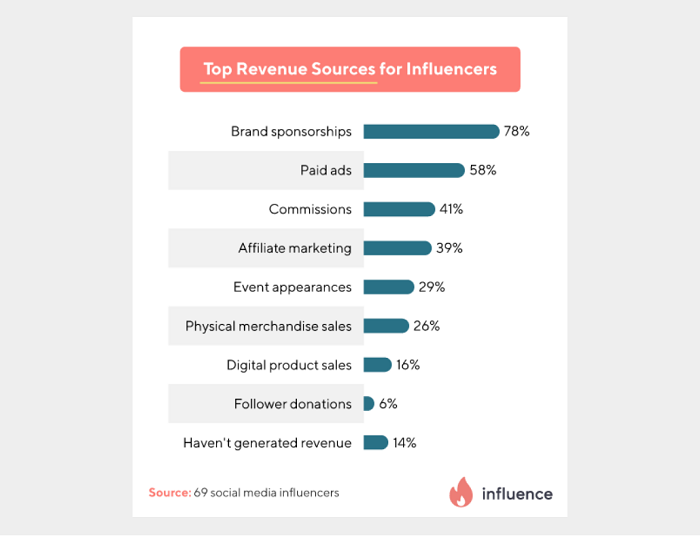
However, several influencers with millions of followers do reach a stage in their career where they’re regularly pulling in six figures from brand deals and sponsored posts.
Content Creators Vs. Influencers: Tools
Content creators and influencers use a variety of tools to meet their goals.
Content creators typically use the following tools:
- Blogging platforms like WordPress (free and paid features) to create and publish content.
- Google Trends (free) for keyword research and understanding current trends.
- SEMrush Topic Research Tool ($99.95 a month) for getting content ideas.
- AnswerthePublic (free) to get blog and research ideas around a specific topic.
- Grammarly (free and paid features) to catch typos and improve writing.
- Hemingway App (free) to detect reading level, reduce passive voice, and polish writing.
- Unsplash (free) to get free-of-cost, royalty-free images to use anywhere.
- Audacity (free) to create and edit audio files for podcasts and other audio formats.
This is far from being an exhaustive list. Different content creators use different tools based on their needs and end goals, but I hope this list gives you a great place to start your search.
Influencers typically use the following tools:
- Social media platforms (free and paid features) to post influential content and build an audience.
- Canva (free and paid features) to create engaging graphics in a variety of formats.
- Remove.bg (free and paid features) to remove background clutter from photographs.
- Sprout Social (starting at $99 a month) to schedule social media posts and track analytics.
- Influence.co (free and paid features) as a social media style directory to find influencers and work with sponsoring brands.
- TweetDeck (free) to organize tweets and feeds for easier access.
- Intellifluence (free and paid features) to collaborate directly with brands and agencies for sponsorships.
Again, different influencers will use a combination of these tools (or something completely different) based on how they work, but this list can be a good place to start looking.
Content Creators Vs. Influencers: Which Is Right for My Business?
Now that you know more about what content creators and influencers do, how they work, and which tools they use, it’s time to think about which of the two would be right for your business.

Whether you’re planning to work with content creators, influencers, or both, each option has its pros and cons. Let’s discuss some of those below.
Working With Content Creators
Let’s start by highlighting the pros and cons of working with content creators. Know that there will always be some individual differences based on how each person works, but many content creators share the following traits.
Pros:
- Content creators are well-versed with digital marketing and can add more value to your marketing campaigns.
- Content creators can offer more than one skill. They can write about your product but also offer photographs and videos for a more comprehensive final product.
- Content creators tend to be good storytellers. They can weave in narratives and strong research findings to strengthen your story and position your brand effectively.
Cons:
- Content creators may or may not have huge followings. Many content creators don’t have a massive influence on their audience, so you won’t necessarily get millions of impressions on your post.
- Content creators typically don’t take on sponsored posts, so your content may not be advertorial in nature.
- Some content creators have specific processes of how they work, and they might not be able to tailor their content to match your marketing needs.
Working With Influencers
Now let’s look at the pros and cons you can experience when working with influencers across different industries.
Pros:
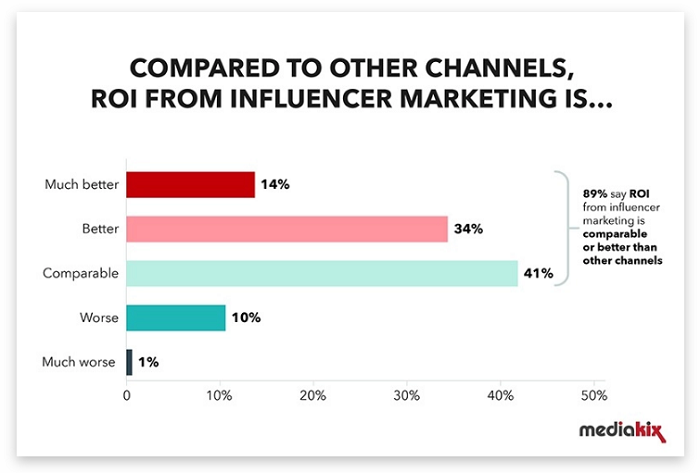
- Influencer marketing offers a great return on your investment. Studies show nearly 90 percent of marketers feel influencers provide comparable or better ROI than other marketing channels.
- Influencers have strong relationships with their audiences, so your posts can get a lot of engagement.
- Working with influencers can help you target specific audiences. For instance, beauty influencers have a lot of followers interested in beauty and wellness products so you can market to them directly.
Cons:
- Influencers may have huge followings but still be subpar content creators.
- Not every influencer can make the most engaging post so often there’s no guarantee of quality.
- Influencers may have fake followers. Today many influencers buy followers or have fake accounts to boost their apparent credibility making it very difficult to vet them before partnership.
- A lot of social media users dislike engaging with influencers, so you’re essentially cutting off a huge portion of your target audience by working only with influencers.
The bottom line here is that both influencers and content creators have something to offer, but you have to carefully consider your needs before choosing to work with any one of them.
Finally, remember that some content creators do double as influencers, offering you the best of both worlds.
Content Creators Vs. Influencers: Frequently Asked Questions
Here are some frequently asked questions about content creators and influencers.
Do content creators or influencers drive better ROI?
Statistically speaking, influencers tend to drive better ROI as they have a bigger audience, larger followings, and more consistent engagement on their posts.
What are the key differences between content creators and influencers?
Content creators are more focused on creating and publishing content, while influencers are more focused on building an audience, promoting brands, and maintaining the status quo.
They also operate differently. Content creators create original content for sharing knowledge or building a brand, while influencers post sponsored content for money and popularity.
How do I find the right influencers for my brand?
You can find the right influencer for your brand by using free and paid research tools like Intellifluence, Influence. co, and popular social media apps. You can also look at who your competitors are working with and where they find relevant influencers.
Are YouTubers content creators?
YouTubers are typically called content creators as they upload videos and popular content on a fairly consistent schedule. Viral YouTubers can become influencers once they have a large following and start accepting sponsored deals.
Conclusion: Content Creators Vs. Influencers
Working with content creators and influencers can benefit your marketing efforts. Content creators can help build an effective content marketing strategy, while influencers can help you reach more targeted users through sponsored posts.
Want to learn more about digital marketing and how to work with content creators and influencers? Read my guide on influencer marketing and content marketing strategy.
What is the most surprising difference between an influencer and a content creator you learned today?
Source: feedproxy.google.com

‘Tis the Season to Double Down on Social Customer Care (and Protect Your Community Managers)
Just when we thought we, as social media strategists and community managers, could rest up from the twists and turns of the last 18 months, the holiday season is upon us.
It feels like it could be a doozy.
- Global supply chain challenges are causing significant inventory gaps for some.
- A tight labor market causes other delays, shortages, or increased prices.
- Some families are gathering for the first holiday season in two years, and the expectations are HIGH.
Heightened customer expectations and consumer demands equate to a potential increase in the velocity of service inquiries. Sprout Social predicts a rise of 44% more messages on Instagram if last year’s trends continue and a 14% increase in Twitter messages.

Avoid Social Customer Care Burnout
With this challenge, of course, comes new opportunities to provide trust-building service to your potential and current customers.
Before we move into how to mobilize your company to provide extraordinary social customer care, this is a great time to remind everyone reading that social media community managers are grappling with burnout:
- The faucet never stops. You can set hours, scale teams, and establish processes, but this work never turns off.
- Daily jobs can consist of wading through endless hateful comments, especially on platforms like Twitter which is full of a polarized political scene.
- It’s harder and harder to break through and get a significant creative win, especially when expected to wear the hats of designer, video editor, copywriter, strategist, and customer service representative.
That takes us to the first recommendations for activating an excellent customer experience on social media this holiday season:
Train Your Social Care Team
If your social media manager is the only one serving as your organization’s social media customer service center, you need to rethink your approach.
As the demands ramp up, ensure you meet as a team and determine the resources you need to deliver the experience you want. Ideally, integrate your customer service team directly into your social listening inboxes.
Train anyone involved in responding to consumers on social media, so they understand the context of where they are playing, how it’s different from traditional customer service, and the brand’s social media voice and tone.

Establish Guidelines That Encourage Maximum Transparency (and Yes, Even Disappointment!)
During this season, you may not have good news for all. But all complaints or questions need a response.
Decide now how you can be the MOST transparent as possible in your response strategy, understanding that you don’t always (and can’t always) SOLVE the issue, but you can ALWAYS hear the issue.

Edison Research discovered that not answering a complaint results in a 50% decrease in advocacy. However, responding to a complaint results in a 25% increase in advocacy. NOTE: that did not say SOLVING a customer’s issue. Responding alone increases advocacy.
Consider the following:
- What will you not respond to?
- How will you respond to positive comments?
- When do you respond with a full response vs. a simple acknowledgment?
- When will you move conversations “off-stage” and into a more private channel like a DM?
Ensure Your Community Management Team Has The Right Software
If you don’t have a social listening tool in place, now may be the season to invest in a tool. Setting up your tools to make it easy to identify, respond to, and catalog customer inquiries will save huge amounts of time.
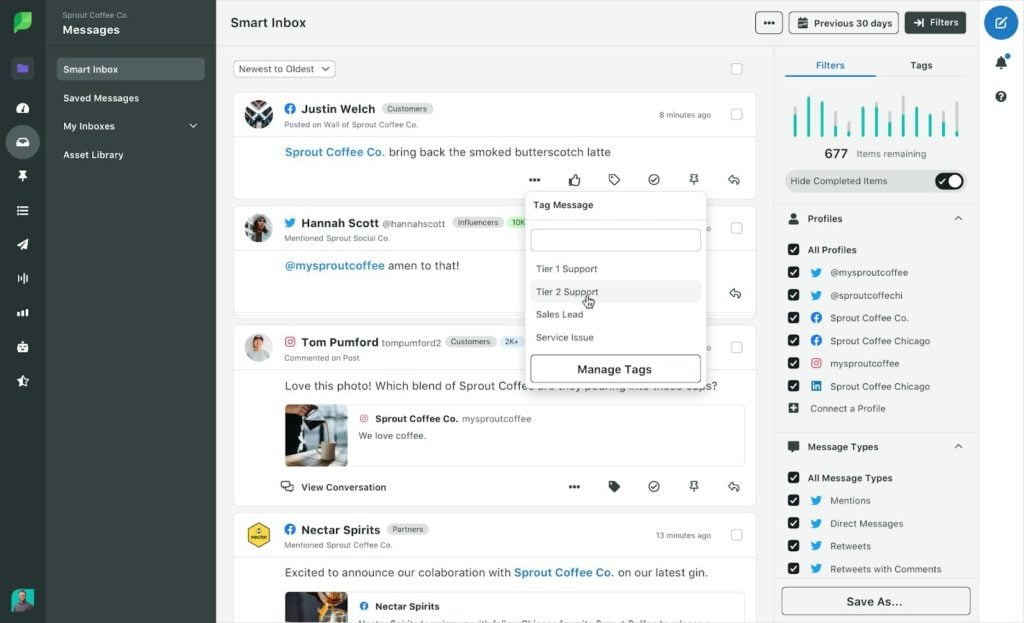
Today, many tools like Sprout Social or Hootsuite that you may already be using for posting have add-ons for listening. There are also stand-alone tools like Meltwater that can provide an extra layer of support.
Make Contacting Customer Service Easy and Accessible
In your social media bios, add other places where customers can receive service along with the hours and contact information.
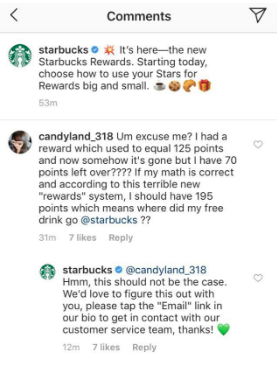
Use Integrated Social Tools To Respond To and Organize Responses
Each social channel has a set of tools that can help you provide information and organize your response.
Program automatic/quick replies for frequently asked questions. On Instagram, set up an FAQ Highlight that answers all frequently asked questions, so people don’t have to leave the app when looking for an answer.

If you aren’t using a social media monitoring system, utilize the message status capabilities within your social media inboxes, so you can filter based on messages that need a response.
May Your Social Care be Merry and Prepared
The best thing leaders can do is equip their teams with the necessary resources to scale social media services smoothly. In the best-case scenario, you won’t need them. But realistically, there will be a point in time where this preparation will ensure a better customer AND employee experience.
The post ‘Tis the Season to Double Down on Social Customer Care (and Protect Your Community Managers) appeared first on Content Marketing Consulting and Social Media Strategy.
Source: convinceandconvert.com

How to Use Social Listening for Lead Generation
Would you like your social media marketing strategy to bring in more leads?
Hardly any business would say “no” to that.
One of the best ways to generate leads from social media (apart from investing in social media advertising) is to use social media listening.
At this point, just about any business uses social media monitoring to help their customers and prevent a social media crisis.
These days anyone can message their favorite brand on Facebook and get help immediately. Anyone can tweet to a business on Twitter and hear back within a day.
Social media support has become a norm rather than a competitive advantage.
Yet, not many businesses realize that social media listening can also be used to acquire customers, not just help existing clients.
How to turn your social media strategy into a lead generation powerhouse?
Let’s see!
1. Treat Social Media Listening as a Project
The first step is to create a well-defined process.
More often than not, social media listening is mostly owned by your social media team (or a single social media manager).
They log in to a dashboard (or an individual platform like Facebook or Twitter), go through private messages, and post standard replies (like “Send your order number here to get help”).
Then they scroll through updates where the brand was tagged to see if there is anything else that needs a reply.
This is a bare minimum effort that a social media listening strategy usually entails.
Yet, this strategy fails to capture important opportunities, like winning a new customer or fixing a fundamental product or website error. To make more of your social listening strategy, make sure to:
1.1. Monitor more than your tagged mentions or DMs
If your brand is more or less known in the industry, consumers will be discussing it without ever tagging your social media profile. You want to know what they are saying, so:
- Monitor different variations of your brand name (one word, separate words, etc.). For example, in my case, that would be both “seosmarty” and “seo smarty”.
- Monitor the names of your CEO / founder or any other public representative. I would also want to keep an eye on the mentions of “ann smarty”
- Exclude tagged (linked) mentions because you will be notified of those by a social media platform and you are likely already monitoring them anyway. Creating a separate feed for your untagged brand mentions will help you catch those more effectively instead of losing them in the clutter.
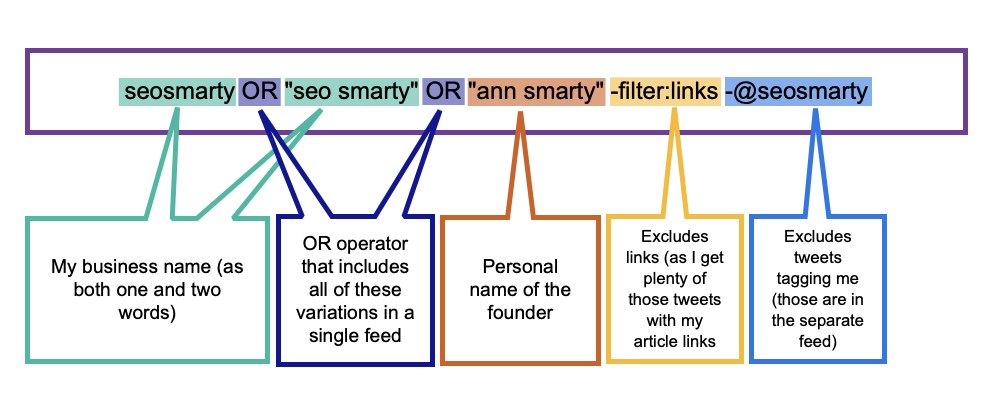
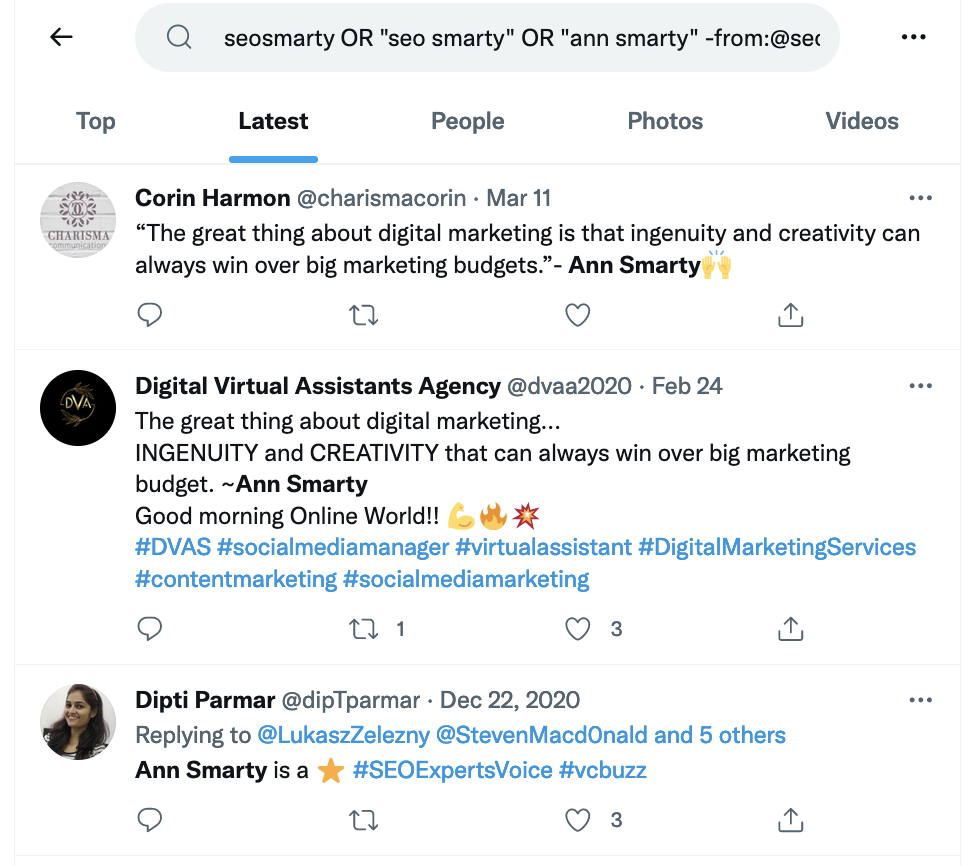
Most social media listening platforms allow you to create one unified feed monitoring keyword mentions. Here’s what it may look like using native Twitter search:
For local businesses, monitoring your location feed on Instagram is also a very good idea.
1.2. Include other team members into your monitoring routine
Social media messages are all different. Some people ask for immediate help, others simply share their feedback on a product or website usability.
This is why this process should involve more teams within your company.
This is where social media listening should be treated as a project where one central role (in this case, a social media manager), distributes messages around the company and even sets deadlines to make sure these messages are adequately acted upon.
Agorapulse is social management and monitoring platform that gets it: Every social media update you get through their monitoring solution can be assigned to a different team member with a comment.

Including various teams (design, product development, etc.) into your social media listening process helps everyone be on the same page and answer important questions:
- Are customers liking our product? How can we improve it?
- Is our website easy to navigate? How can we make it better?
- Are our customers satisfied with our customer support? How can we improve it?
- Are there unhappy customers and how can we win them back?
- And finally, what has prevented any person from becoming our customer and how can we still convert them?
This is the fundamental step in understanding your target audience and creating a better lead generation and conversion strategy.
2. Monitor Your Competitor’s (Unhappy) Customers
Your social media listening can not only help you understand your customers. It can also help you understand (and even win) your competitors’ customers.
This is why monitoring your competitor’s brand name is as important as monitoring your own.
Lots of customers will publicly share their dissatisfaction with various aspects of your competitors’ operations, so it is a good idea to create a separate feed for monitoring those complaints:
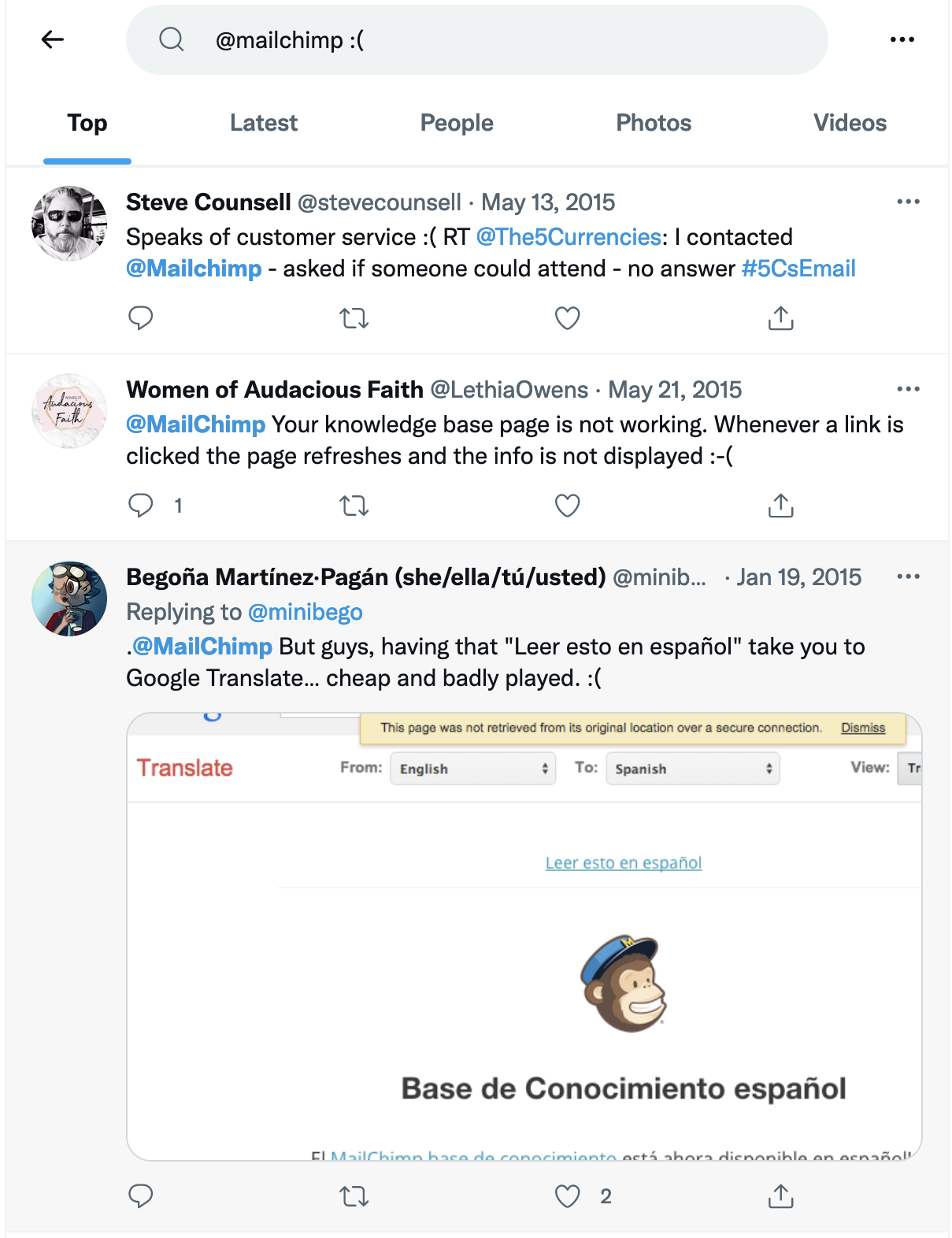
It is a great idea to treat these mentions as your own, i.e. assign these messages to your website and product developers, as well as involve your sales team for them to reach out to some of these people to try and get them to try your product (that doesn’t have these problems).
Additionally, use this trick when planning and developing your product to define your value proposition and identify your competitive advantage.
3. Seek Lead Generating Links
Finally, links can bring leads both directly (from people clicking on those links) and indirectly (by improving rankings of your site). And links can be acquired through social media listening.
Create a separate feed to monitor the following hashtags that journalists are using to find sources and opinions:
- #PRrequest
- #journorequest
- #asktwitter
Include your local and/or niche journalists into that monitoring feed to listen to what they have to say, what they are writing about and what they are asking.
In many cases, you will be able to suggest angles they may be interested in writing about based on what they are tweeting. Buzzsumo is a great way to find those journalists on Twitter:
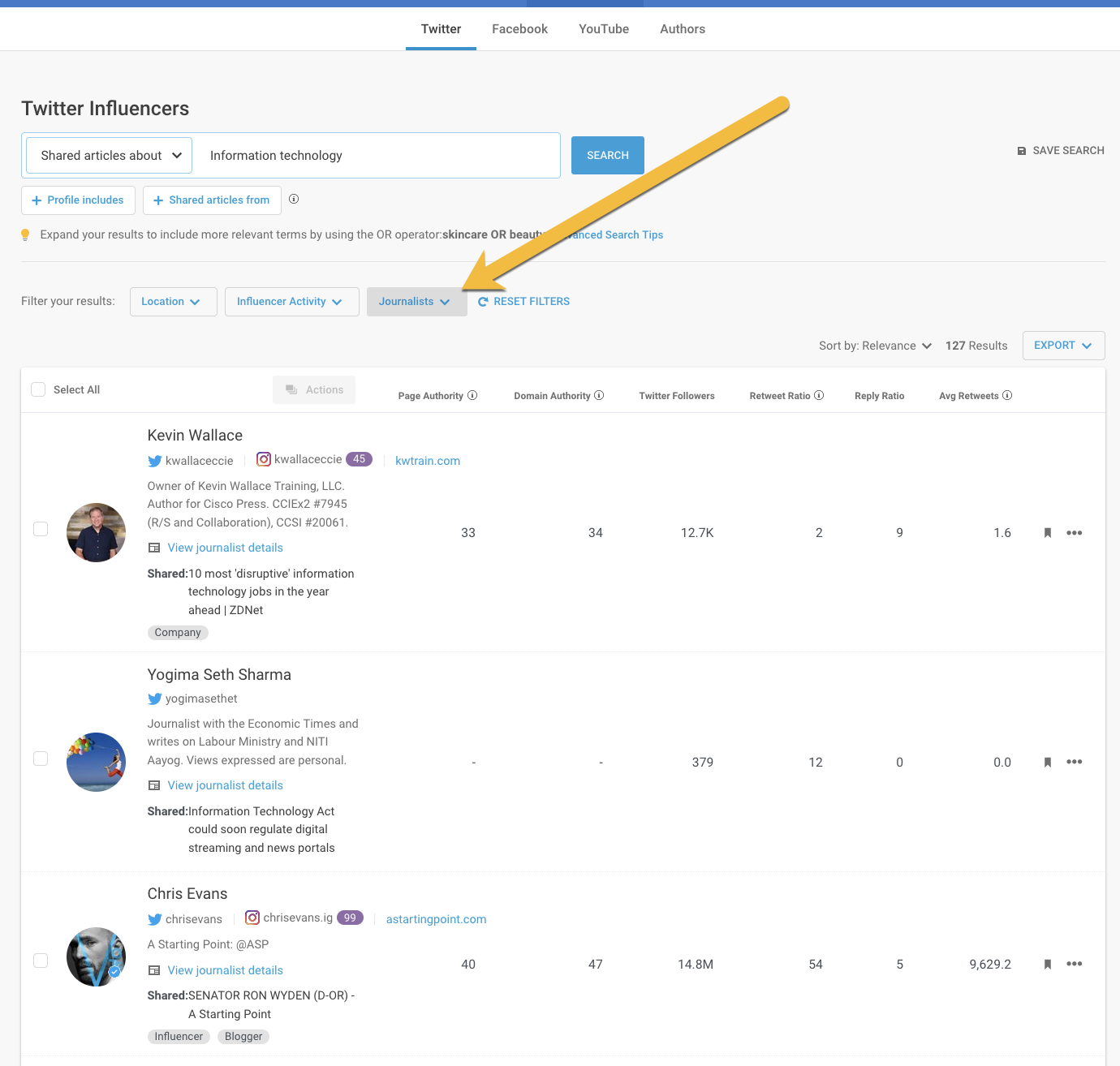
Once you set this feed up, your social media manager will go through that daily and assign selected tweets to your outreach team.
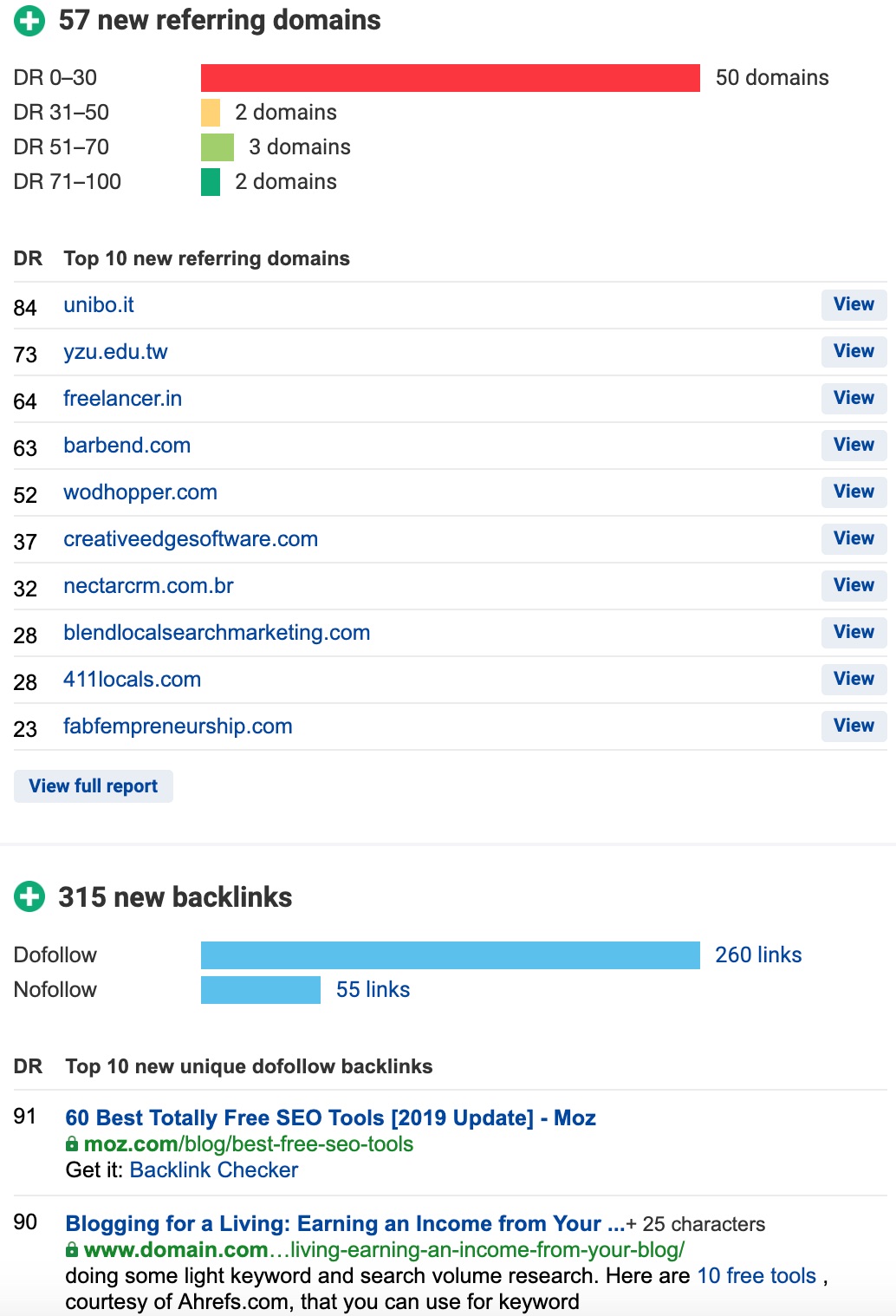
From there, to be able to evaluate these efforts, make sure to create well-organized link monitoring links. For example, Ahrefs alerts notify you via email when your domain gains (or loses) backlinks.
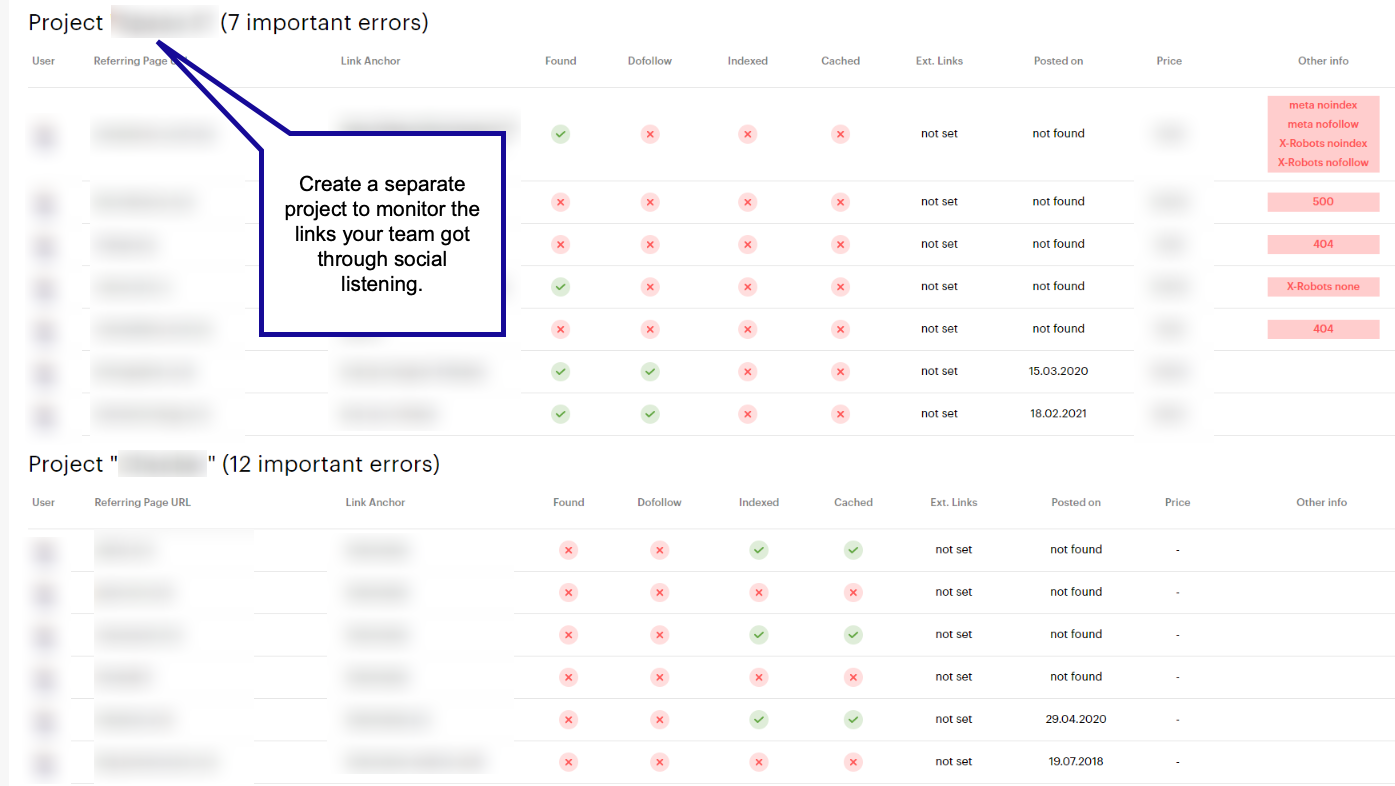
And Link Checker will help you organize those links for you to be able to clearly see which links were acquired through social media and assign important metrics to them (like nofollow / nofollow links, indexation status, redirects, etc.)
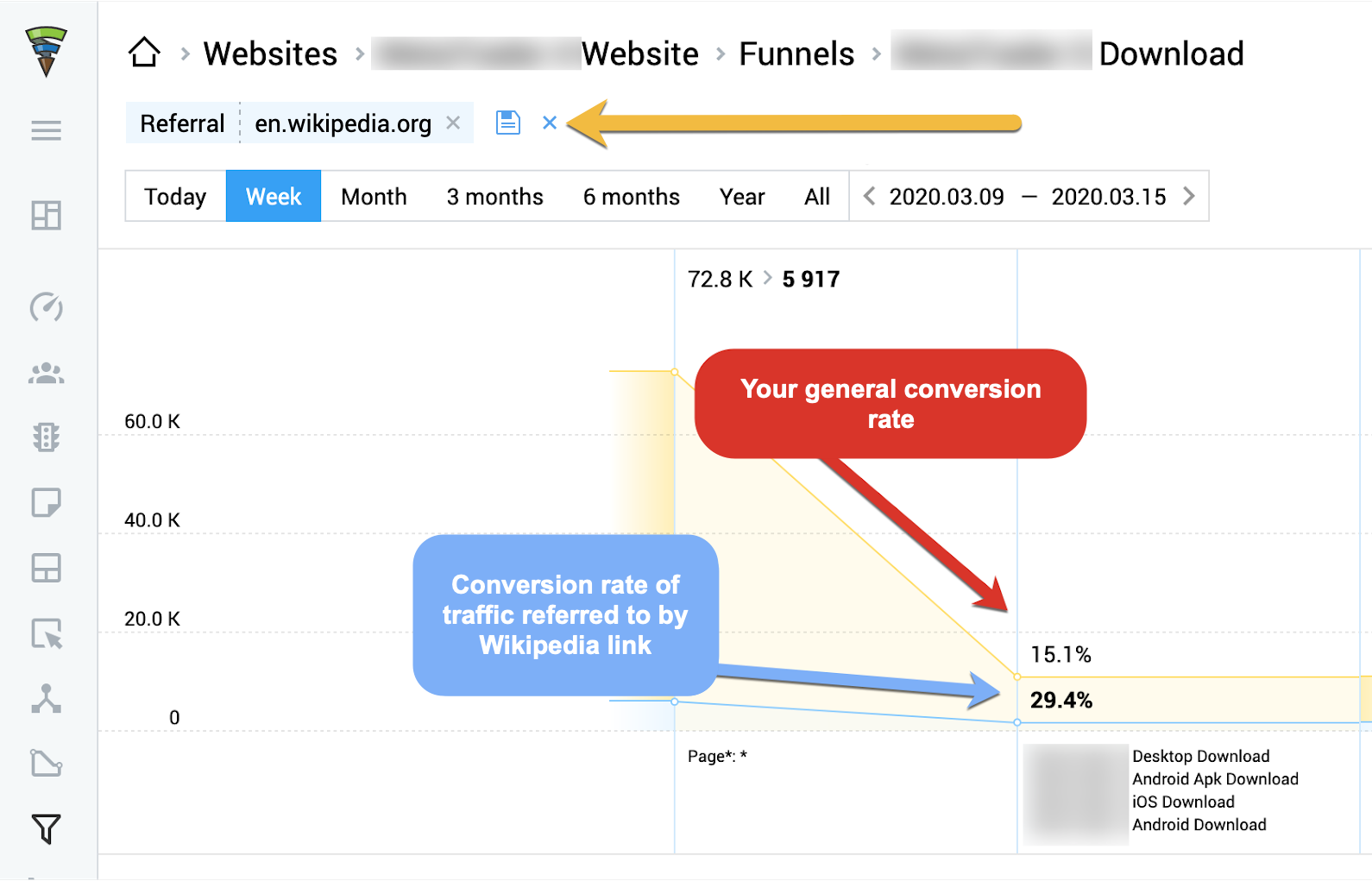
Additionally, Finteza will help you evaluate your traffic-driving links and analyze whether those clicks result in leads:
Conclusion
Social media listening can help you on many levels – from converting your potential customers to better understanding their needs. All of that can boost your lead generation efforts and help your conversion optimization strategy.
The post How to Use Social Listening for Lead Generation appeared first on Content Marketing Consulting and Social Media Strategy.
Source: convinceandconvert.com

The Complete Guide to Designing Visually Stunning Content (Even If You’re Not a Graphic Artist)
Let’s face it: a picture really is worth a thousand words, but an image you made yourself?
Priceless.
Compelling images create a connection between you and your audience and help you build on that relationship.
They encourage discussion and shares.
In short, images convert.
According to Venngage, 64 percent of marketers say images are “very important” or “essential” to their marketing strategy.

Disclosure: This content is reader-supported, which means if you click on some of our links we may earn a commission.
Yet, 40 percent of marketers use stock photos in their content.
While there’s nothing wrong with the occasional stock photo, businesses that want to stand out need to make the effort to create unique, stunning visual content.
The good news? You don’t have to drop thousands on a graphic design pro.
With the right tools and knowledge, you can create stunning visual content on your own.
In this guide, you’ll learn which tools are the best for creating the most in-demand graphics (like social media cover photos, infographics, and trendy header images) and basic graphic design principles to help your visual content stand out.
Graphic Design Tools to Create and Optimize Visual Content
You know you need to be able to create stylish, professional-looking results – but how do you do it?
Fortunately, there’s no shortage of tools offering easy-to-use graphic design platforms.
The best part is that there’s no graphic design experience needed to create stunning, share-worthy images.
You can simply drag and drop the elements you want to get surprisingly good results.
Even when you’re done, you can optimize the finished graphics to load fast and look great on any device; no designer necessary!
Here are a few of my personal favorites, along with the types of images you can create with them.
Tools to Design Your Own Graphics
Creating graphics doesn’t require a degree in visual arts.
Drag and drop editing tools make it easy to create infographics, blog photos, social media posts, and more.
Canva
This is a full-fledged graphic design program distilled into a simple, drag-and-drop platform.
It works right from your browser, so there’s no huge software download or complicated licensing scheme to wade through.
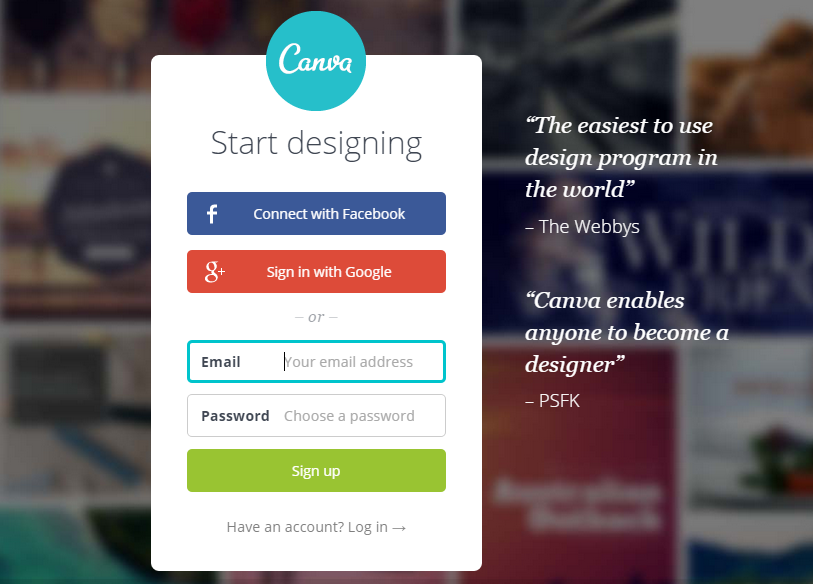
Canva lets you create a whole host of graphics and sizing and dimensions are already taken care of.
Create everything from flyers to business cards or social media images and infographics.
Use your own photos or browse Canva’s 1 million+ stock photo library where you can license images for as little as $1 each.
Simply choose a template as a starting point (or create your own if you’re feeling brave).
Then, customize your colors, icons, photos, and fonts to design your own perfectly built graphic masterpiece.
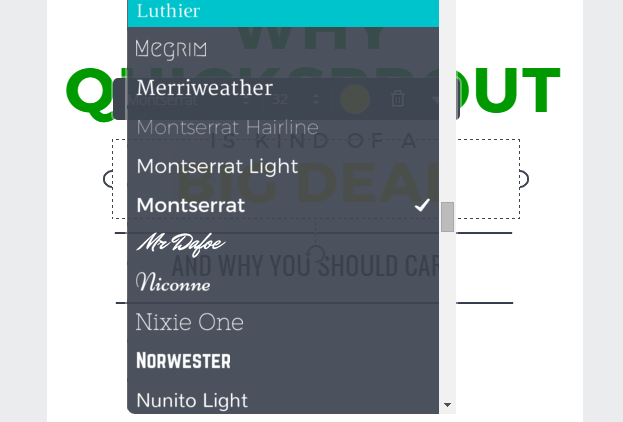
Beyond photos, Canva also has a fully stocked library of graphical elements and shapes that form the perfect backdrop for any image.
Simply search, drag and drop your way to an image you’ll be proud to say that you created.
A wide range of images and styles are available – ranging from social network graphics to collage-style images and everything in between.
The best part is most of Canva is free to use, apart from the photo licensing fees and added features.
So you can create as many graphics as you want without restrictions.
You can even log in using your Google or Facebook account – saving you from yet another password to remember.
PicMonkey
If Canva isn’t your jam, I suggest PicMonkey.
It’s a pretty similar platform, but slightly more in-depth.
If you want to erase backgrounds, add fonts, and even edit photos, it’s a great choice.
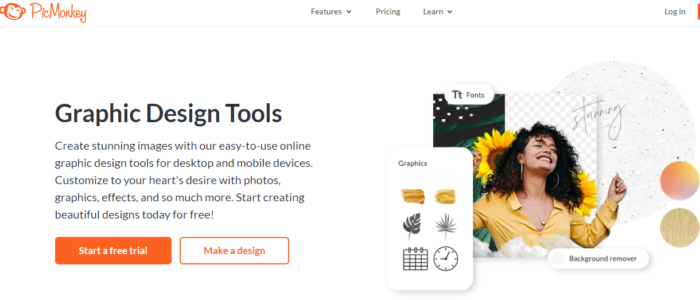 Top features include templates for different social media photos, photo editing, tons of graphic elements, and plenty of templates.
Like Canva, it is a drag-and-drop photo and graphic editor and pretty intuitive to use.
Pricing starts at $7.99 a month for their basic plan, which includes 1GB of cloud storage, video editing, tons of fonts, and premium effects, templates, and touch-up tools.
Tools to Optimize Your Graphics
Slow load times can clog up your site and eat up your bandwidth.
What’s more, every second your visitors spend waiting on your page to load is a lost conversion or a lost sale.
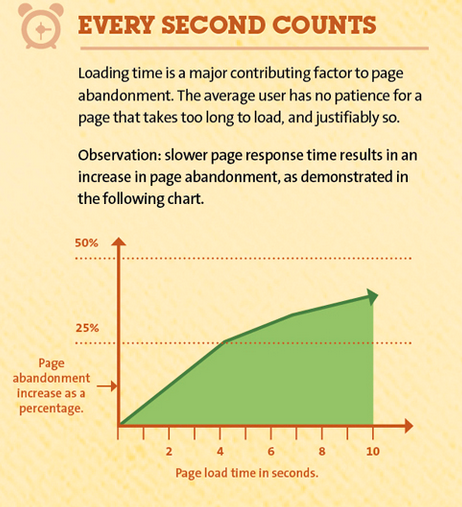
Fortunately, several resources can help you tame large images without the help of a graphic pro. You can even resize or rescale them in bulk.
Optimizilla
Drag and drop up to 20 images and quickly optimize them on the fly.
You can click/tap through the images and then use the slider bar to adjust the quality and compare the two files:
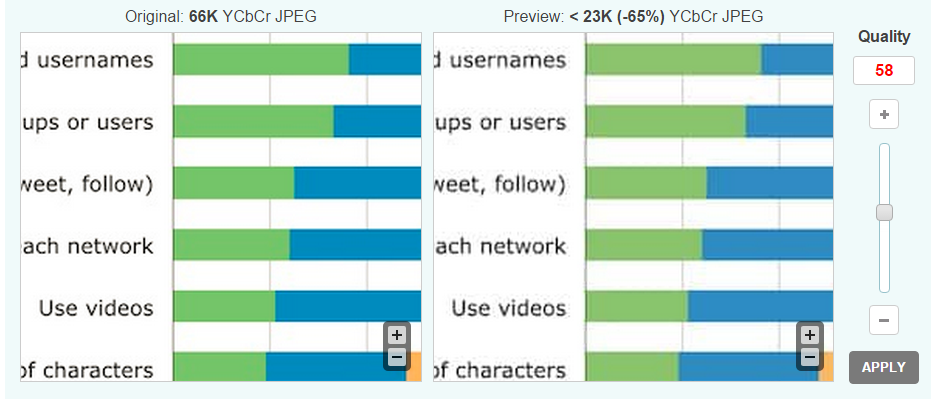
Optimizilla works with both JPG (photos) and PNG (logos and transparent images) formats since both of these file types tend to be larger in size.
All of the images you upload are automatically deleted after an hour and you can download the optimized versions selectively or all at one time.
Optimizilla is perfect if you have a limited number of images that need a size change and also tweak the quality of those images visually.
EWWW Image Optimizer
This WordPress plugin lets you optimize images fast.
The end result shows you how much space was saved, as well as the percentage of reduction.
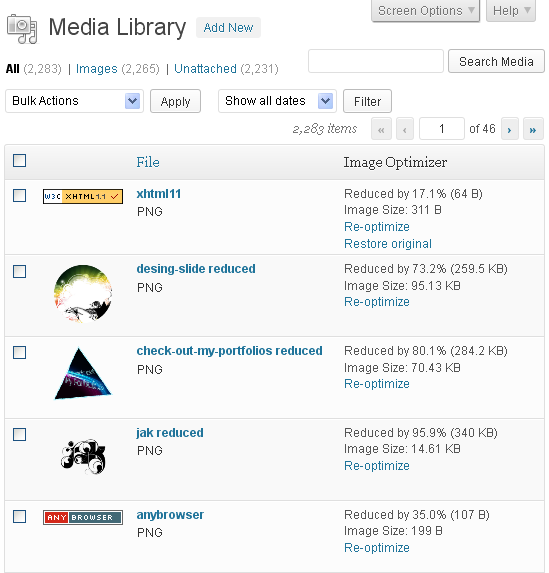
It works with other popular WordPress image plugins too, like NextGen photo gallery.
If you don’t like how a reduced file size image looks, you can either re-optimize it with different settings or restore the original.
The plugin leverages several unique optimization utilities in one complete package.
Because each individual image format has different ways of conserving file size, each one has its own unique utility to compress images without sacrificing quality.
Even as a graphic designer-in-training, you can still be inspired by unique websites and graphic designs.
Trying to save them directly from your browser can be a download nightmare, though.
You end up saving a lot of extra scripts, content, and other junk that clutters up your hard drive.
What if you could just have a screenshot of the page instead?
Page2Images
This site takes a screenshot of any page for you or converts multiple URLs into images.
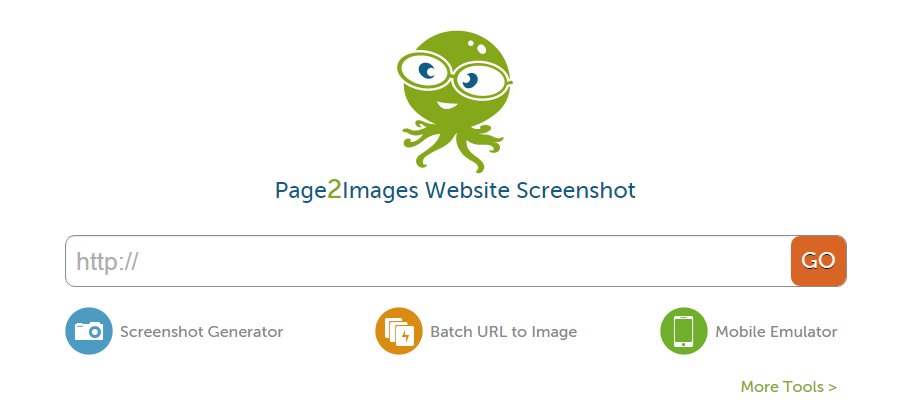
It’s great for saving images for inspiration and for creating more engaging how-to content.
Page2Images also lets you see what your site looks like on mobile devices via its mobile emulator:
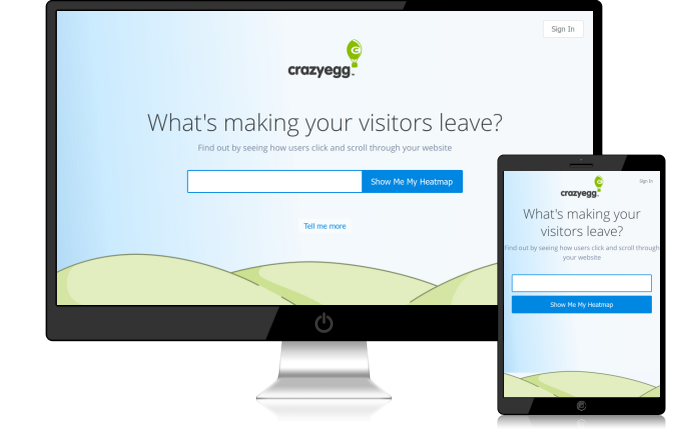
If you’ve ever wondered how to get that trendy “my site on a smartphone” look – this is how it’s done.
It’s also a quick and easy way to tell whether or not your page is optimized for mobile devices.
If you’d like something beyond the typical computer screen and mobile device as your choices, check out:
PlaceIt
PlaceIt lets you drag and drop your site to a variety of smartphones, monitors, tablets, and other devices.
Don’t have a screenshot? No problem.
You can choose an image and enter your URL to have PlaceIt grab an image of your site.
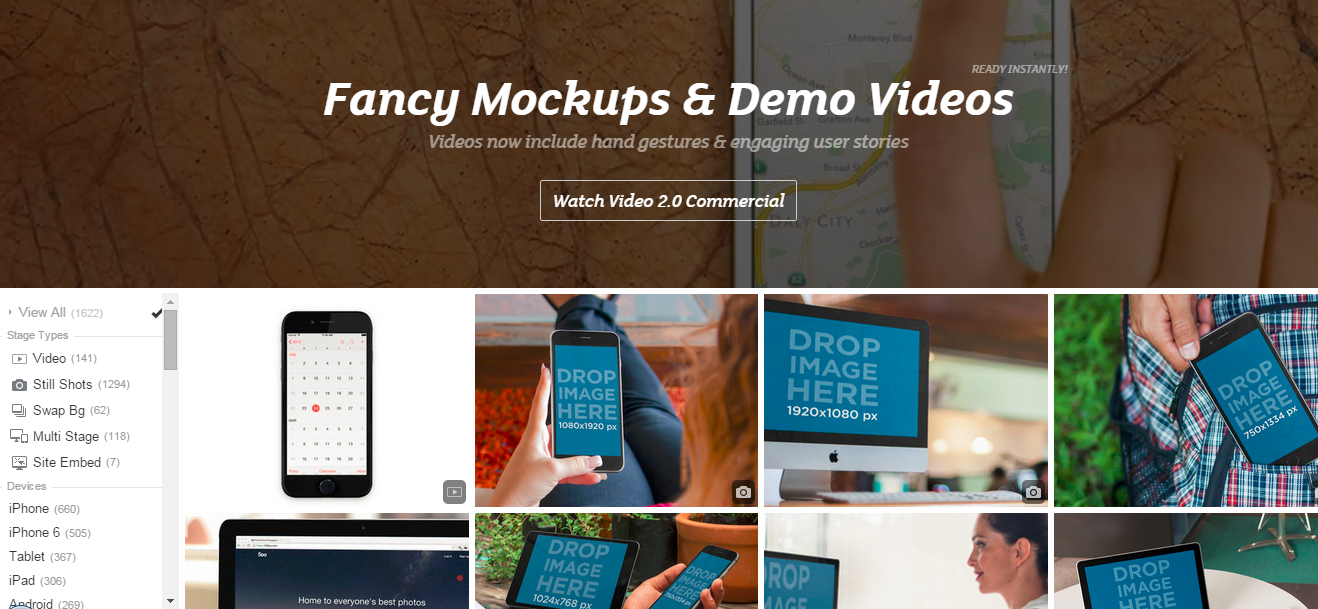
Want to show a group of people interacting with your app? Done.
Want to show off your new smartwatch program? Easy.
From billboards to bus stations, Placeit lets you put your site anywhere.
If you need a more human touch, PlaceIt also includes headshots of people of all ages and in a variety of situations. You can even narrow down your search to a specific gender, location, job, and much more.
Data Visualization Tools
Good data makes a larger impact when it’s visually relatable. When people see the numbers in a tangible, interactive way, your mission and goals go from being abstract terms to meaningful information.
These tools make it easier to use data visualization to create appealing charts, tables, and graphics.
Chartblocks
A tool that helps you create colorful, full-featured charts.
Data can be imported from spreadsheets, databases, or even live feeds and every aspect can be customized.
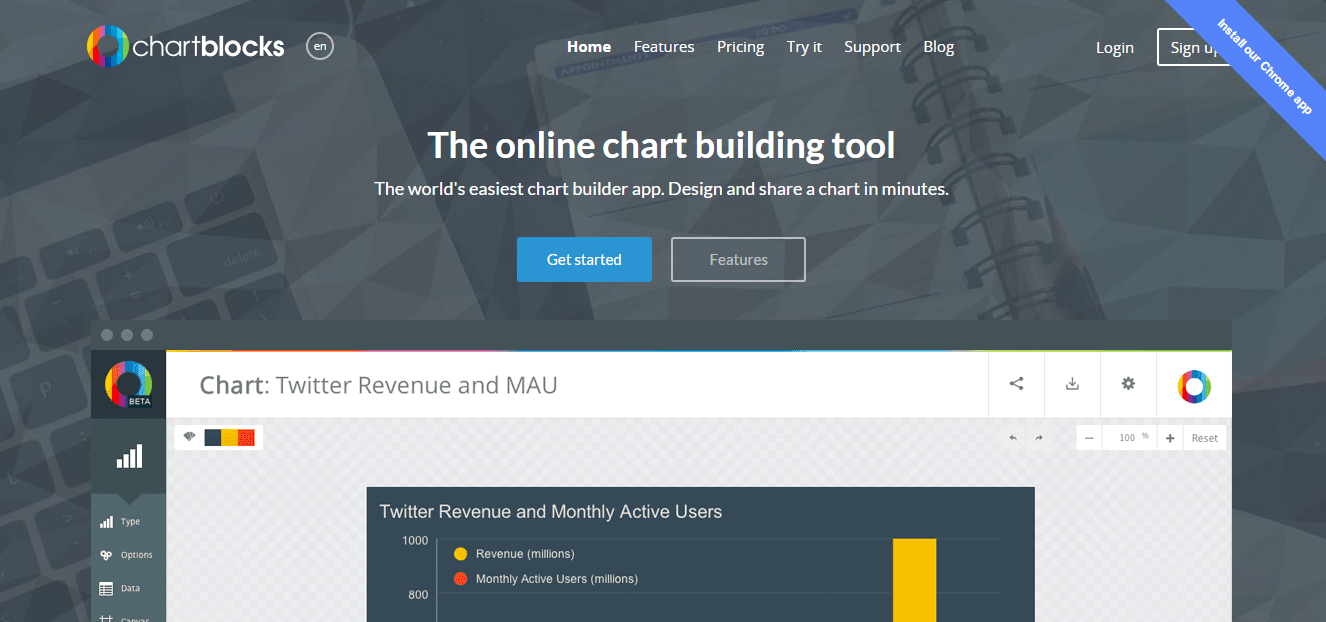
The charts are designed using HTML5 and Javascript, so they’re optimized for mobile devices and can be embedded directly into third-party sites, like websites and social networks like Twitter and Facebook.
What’s more, the finished graphic can be saved in a vector format, meaning it can be resized to any height and width without a loss of quality or resolution.
A free plan is available that lets you create up to 50 charts as transparent PNG files.
The free plan includes up to 50,000 monthly views and your charts are viewable publicly.
Paid plans give you more monthly views and the ability to make charts private.
On the lowest-priced plan and the free plan, charts are branded with the Chartblocks logo.
Timeline
Timeline is an easy way to create an interactive timeline of events on just about anything.
The timeline can pull media from sites including Twitter, Flickr, Google Maps, and Wikipedia as well as video sites like YouTube, Dailymotion, and Vimeo.
It can also pull sound files from Soundcloud, letting you create a rich media experience that’s interactive and informative.
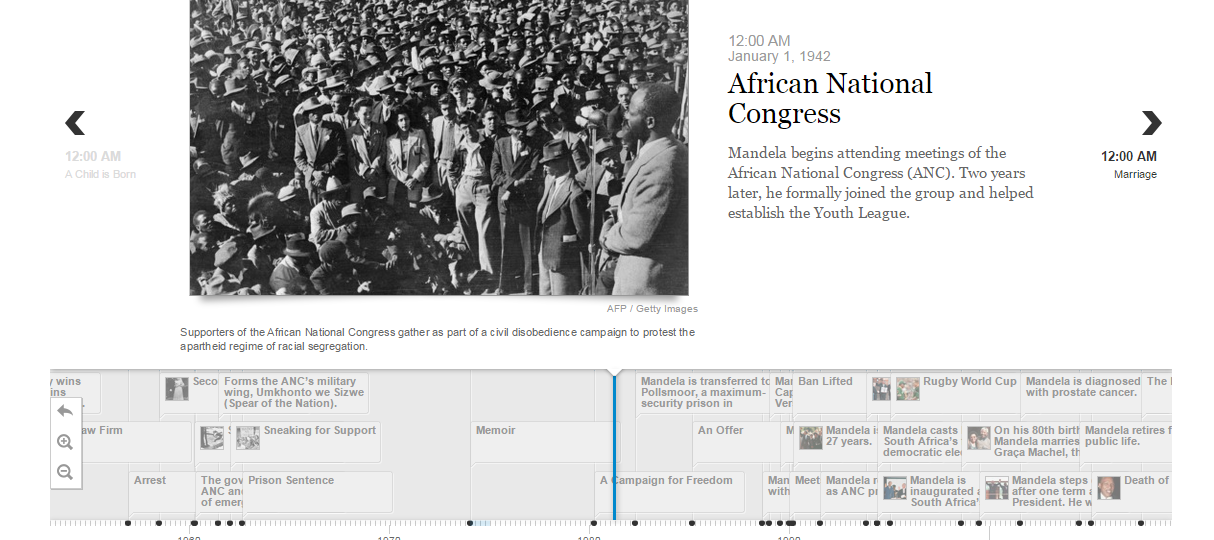
Using a Google Spreadsheet, you’d simply enter the data into the pre-made template, including major and minor events, dates, and associated media.
The Timeline then builds the finished product for you.
When it’s ready, you’ll get a finished URL that you can embed in your website, showing off a timeline with an associated media slideshow in a similar format to the example above.
Social Media Graphic Design Tools
Whether you want to create awesome images for Instagram or interesting social media profile photos for Facebook, there’s a social media tool for that.
Here are a few of my personal favorites:
Social Image Resizer
This web-based tool features a quick and easy way to take your existing images and resize them for use in just about any social media context.
You can turn images into icons (even favicons), as well as Facebook and Twitter images.
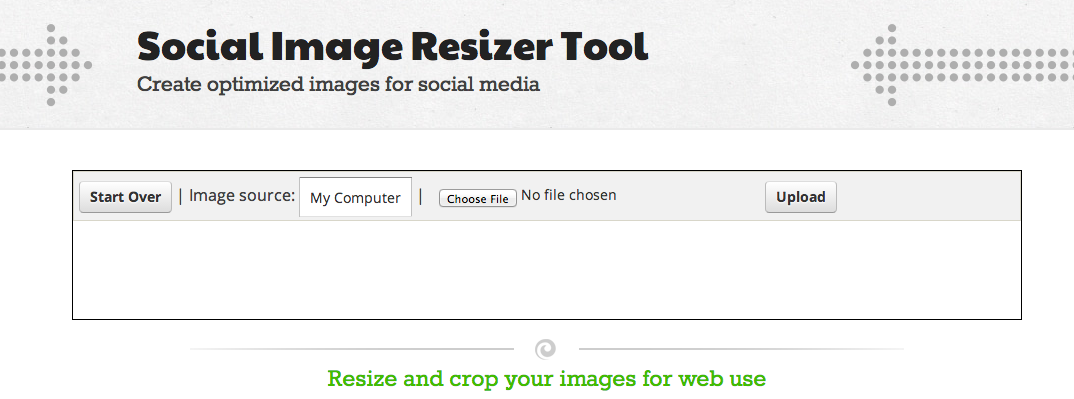
What if you need more social network-ready images beyond Twitter or Facebook?
Desygner
This tool helps you create images for a variety of social networks. In addition to Twitter and Facebook (both cover and profile photos), you can make images for use on Snapchat, YouTube, Tumblr, and Pinterest.
They offer a free plan with thousands of free images.
With these tools, you’ll never run out of unique professional looks for your social network pages.
Of course, now the question becomes – where do you find graphics?
There are plenty of stock photo sites online, but for those just getting started with graphics, there are also plenty of free (even for commercial use) images and photos you can use.
Where to Find Images for Visual Content
One of the biggest challenges to overcome when designing your own graphics is finding pre-made images that you can use as a starting point.
Fortunately, these sites will make finding images and icons for your projects (even commercial ones) as easy as searching and downloading.
Flat Icon
Flat Icon contains over five million icons and stickers to choose from.
These include all of the common computer-style icons (cursors, pointers, and the like) but also include icons of a variety of other things like people, objects, animals, and more.
Many of the icons are free to use with proper attribution to the author.
The Noun Project
An icon-illustrated repository of graphics depicting just about anything.
Anyone can volunteer and artists from around the world have created miniature works of art on anything you can imagine from summer camp to tattoos.
Just because you have all the tools at hand doesn’t necessarily mean you can create great graphics (although it certainly helps!).
That’s because none of them teach you how to actually design.
While the subject of how to design graphics from scratch is far more involved than this guide can cover, there are nevertheless a few basic principles to keep in mind.
Graphic Design Basics: Principles and Elements
There are six basic principles to graphic design. These apply whether you’re designing a logo for your website or a print brochure.
Graphics of all sizes and styles use one or more of these principles, so knowing them and how to apply them to your design will help you create the kinds of results you can’t wait to show off.
The Line
Lines are the building blocks of graphics.
They separate and create borders.
Thin, straight lines give the impression of a more corporate and professional look, while hand-drawn lines can show a more artistic, or even childlike flair.
These days, many websites trend toward segmenting content in large “blocked” areas, dividing each one with a line to keep the user scrolling.
Not only does this give you a visual separation, but it lets you transition from one thought to another without losing your visitor in a sea of content.
The Shape
Shapes can impart meaning.
Think about the octagonal STOP signs; you don’t need to see the word STOP to know what the sign is.
Or, the cross symbol that denotes first aid tells you that is a place to get medical help.
Shapes impact our world, our feelings, and how we interact with the world around us.
Sharp, angular shapes are seen as being more rigid and forceful, whereas gentle sloping or curved shapes have more of a feminine appeal to them.
Keep these points in mind when considering your target audience for your new design.
Texture
Textures create a wide range of design possibilities and still remain popular on web pages to this day.
From natural patterns like wood and leaves to background designs like paper or chalkboards, texture communicates a great deal about the page itself, even before you read a word.
If you’re looking to create a certain impression in the minds of your users, consider the available textures that lend themselves to that type of design.
Color
Color is one of the most important, but also one of the most overlooked, aspects of graphic design.
It’s important not just in logo and website design, but also in print.
Color and its various shades (see more on that under Color Values below) have very different meanings to visitors around the world.
Depending on language and colloquialisms, colors can impart feelings as well.
For example, many people associate “going green” with doing things that are good for the environment.
But when someone is “green” with envy, it can convey a sense of jealousy.
That’s why it’s important to properly balance color with other aspects of your page or design so that you create a positive association in the minds of your visitors.
Even if you’ve gone to great lengths to choose an appropriate color scheme, there’s still the shade, hue, and degree of lightness or darkness of the color that can change its perception.
Color Values
A color’s value is the intensity of its lightness or darkness.
For example, orange may be perceived as a color of warmth, friendliness, and confidence, but once lightened into more of a peach tone, can give off more of a feminine, comforting vibe.
Darkening a color can make it seem more foreboding or unapproachable.
Many corporate sites follow the “dark blue and grey” color scheme which, while it seems “safe,” can also be off-putting to consumers and make them feel as if the company is cold and uncaring.
It’s a lot to keep in mind, but having some basic knowledge of how colors affect your user and how you want your design to be visually perceived and understood can make a significant difference in how well it resonates with your chosen demographic.
Space
Space is the last of the graphic design principles, but it is certainly not the least.
You may have heard the term “white space” before – meaning the area of a page with no graphic elements or color.
Having enough white space on a page gives each individual element a sense of “breathing room.”
Having too much white space can make a page seem like the elements are floating all over the place with no real cohesion.
Like all of the other graphic design principles covered here, you need to carefully balance your use of space to avoid making your graphic look too cluttered or too empty.
How to Improve Your Graphic Design Skills
Once you have a firm understanding of the basics, you’ll want to branch out and try new things.
Even if your artistic ability ends at drawing a stickman (and a shaky one at that!), improving your graphic design skills is more about being observant and perceptive rather than having an amazing artistic ability.
Study Famous Graphic Designers
Having the tools and knowing the basic principles of graphic design will take you far, but one of the most crucial ingredients of a great graphic design is creativity.
Contrary to popular belief, creativity is not born, it is learned and made through practice.
What better way to practice and learn than by seeing what others have done?
For example, you may not have heard of a graphic designer named Paul Rand, but you’ve most certainly seen his work:
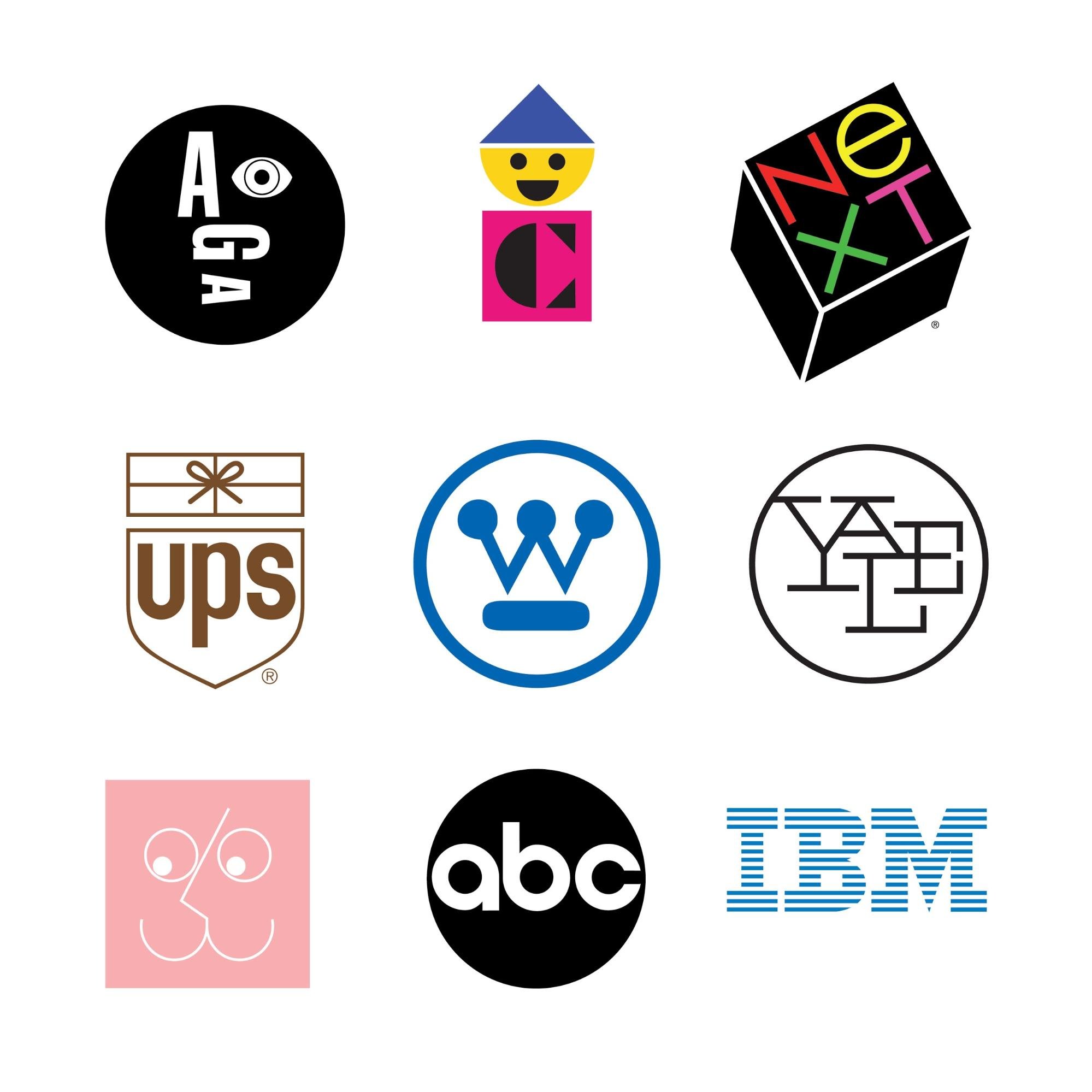
Largely self-taught, Rand’s best advice to aspiring graphic designers was that “you don’t have to be original. You just have to be good.”
Even if you weren’t familiar with the brand’s logo, Paul was determined that eventually, you would be.
One of his most famous corporate poster designs reflects that insistence:
Create a Swipe File
The best way to start is to look around.
Check out sites like Dribbble and Behance for design portfolios you like and then follow those designers so that you’ll get updates when they add new selections to their portfolios.
Create your own little “swipe file” of ideas, concepts, and images that you like.
Remember, even the most complicated designs can be broken down into their core pieces — shapes and lines.
When you learn the process behind the design, you can work on how to recreate it on your own.
If you like what you see, stretch your skills a little more and learn about filters and layers — core components of top-tier graphic design tools like Photoshop and Illustrator.
Obviously, I’m not advocating that you infringe on someone else’s copyright.
Everything in this guide is meant to walk you through the learning process to create your own graphics with no experience starting out.
Don’t be afraid to emulate those whose style you enjoy.
Over time you’ll come to refine it and create your own style.
Don’t Be Afraid to Ask for Feedback
It can be hard to ask for feedback on your work – especially when you’re just starting out.
You’re anxious.
Unsure of yourself.
Afraid of criticism.
We’ve all been there and experienced that.
Don’t be afraid to ask for feedback.
However, instead of saying “What do you think about this?” ask “How can I make this better?”
People won’t want to openly criticize your work, so asking what they think is bound to get you some praise – but praise isn’t what we’re going for – we’re going for improvement.
Some feedback is well-meaning, but when put into your design, it would make the end result look terrible.
That’s okay, too. As the designer, you’re free to dismiss any or all feedback.
However, take the time to reflect on criticism before dismissing it.
Is something lacking from the piece?
Does it communicate the brand and message well?
Is it something that others would want to share on their own social media pages?
Remember, everyone was a beginner once.
Some may have more artistic or creative talent than others, but it’s not something that can’t be developed over time.
Taking the time to learn the skills behind great graphic designs will help you appreciate and admire the work that goes into them even more.
Visually Stunning Content: Frequently Asked Questions
FAQ: 1
Can I learn graphic design myself?
Yes. There are a number of tools and guides (including this one) that can teach even non-designers the basics of graphic design.
Using a tool like Canva or PicMonkey, you can create visually appealing content for your blog, social media channels, and more.
FAQ: 2
What’s the fastest way to learn graphic design?
The fastest way to learn graphic design is through practice.
Use a tool like Canva or PicMonkey that offers templates.
Then create a swipe file of graphics you like and use those for inspiration.
FAQ: 3
What is the best graphic design tool for beginners?
PicMonkey and Cavna are easy to use for beginners.
They feature drag and drop functionality and templates you can customize to fit your needs.
FAQ: 4
What is white space in graphic design and why does it matter?
White space refers to the space between design elements.
It can be used to direct the eye to important details or make websites easier to use.
Guide to Visually Stunning Content for Non-Designers Conclusion
As you can see, getting started designing your own graphics doesn’t have to be overwhelming.
A basic sense of how colors, lines, space, and other principles play together on a canvas is only the beginning.
Today’s most in-demand graphic designers spend years perfecting their skills and building upon these core concepts.
For the rest of us, however, the web has made it easier than ever to craft beautiful, interactive designs that don’t take an artistic touch.

If you want to build upon what you’ve learned in this guide, there are plenty of fantastic resources, portfolios, and graphic design tips out there waiting for you.
Have you tried out any of these tools? Which one is your favorite?
Source: feedproxy.google.com

9 AI Tools For Media Creation
Artificial intelligence (AI) tools for media let you create content at scale in a previously impossible way and you don’t even need design experience to create something impressive.

Disclosure: This content is reader-supported, which means if you click on some of our links that we may earn a commission.
AI isn’t new.
The film and gaming industries both use it regularly, for instance.
But, these sectors have only scratched the surface of AI capabilities.
On a seemingly daily basis, new AI tools emerge to help people create articles, video scripts, logos, and more.
Naturally, these tools have investors excited.
However, they’ve plenty to offer to content creators, marketers, and digital agencies too.
Let’s look at how some of these AI tools for media can transform the way you work.
1. Podcastle
Podcastle, which has raised more than $1 million, is an extension for the Google Chrome browser. This free tool lets you create custom podcasts with just a few clicks.
With Podcastle, you can:
- quickly transcribe your podcasts
- create and edit content with the text editors
- turn text into podcasts
- revoice content
- record live interviews
- make autosave
- access unlimited content publishing and projects
Getting Started with Podcastle
Set up a Podcastle account by clicking on the green “create” link in the top right-hand corner.
Depending on what you want to do next, visit the tutorials page for step-by-step instructions.
Podcastle Cost
Podcastle’s free service gives you access to:
- 45 minutes of one-time audio recordings
- four hours of monthly audio recordings
- capacity for one host and two interviewees
- magic audio processing
And more.
There’s also a “storyteller” package for $11.99 a month. The storyteller has all the above features, plus:
- additional recordings and interviewing capacity10 hours of transcription every month
- high-quality downloads and revoicing
- unlimited magic audio processing
2. Let’s Enhance
Let’s Enhance takes any photo you upload and analyzes the photo quality, color, contrast, etc. Then, if the picture needs enhancement, it automatically color corrects and retouches the image with minimum input.
Other features include:
- batch processing
- custom sizing
- resolution increasing
- resizing and upscaling
This program isn’t just for personal use.
Let’s Enhance is also recommended for real estate and e-commerce, where you need clear, high-quality images.
Getting Started With Let’s Enhance
Upload an image to Let’s Enhance, and the algorithm enhances it as much as possible without compromising quality.
The algorithm provides a slider for tweaking parameters like contrast, hue, brightness, and saturation.
You can also apply additional filters.
Let’s Enhance Cost
Let’s Enhance has a subscription, business, and pay-as-you-go options.
Subscriptions for personal use run from $0 for a one-time, five-credit trial to $34 for 500 image credits per month.
Businesses can pay from $72 for 1,000 credits per month to $290 for 5,000 credits per month, plus get API access.
Pay as you go options range from $9 to $39 and let you use the program only when you need it.
3. QuillBot
QuillBot is one of the few quality paraphrasing tools on the market.
This comes in handy when you want to avoid being repetitive when writing long pieces.
It may also help you rework product descriptions.
The program has two main modes: one with synonyms and one without.
The first preserves the original sentence’s meaning while only changing certain words.
The second mode alters the word order so the sentence sounds more natural.
Other features include:
- grammar checker
- summarized
- citation generator
Getting Started With QuillBot
Upload or paste a document into QuillBot, then hit the “Paraphrase” button.
There’s nothing more to it! (However, be sure to proofread, just to be safe.)
QuillBot Cost
The free version gives users a 700 character paraphraser and a 5,000 character summarization limit. Free users also get:
- three synonym options
- three writing modes
- Chrome and doc extensions
Premium gives a 25,000 Summarizer and 10,000 Paraphraser character limit and processes 15 sentences simultaneously, as well as:
- four synonym options
- seven writing modes
- a wider range of tones
- sentence shortener and expander
Premium costs $14.95 for month-to-month use, $9.95 a month if paid semi-annually, or $6.67 per month for the annual option.
4. KinetiX
Investors believe in Europe-based KinetiX, which recently secured $608k in capital funding.

It turns your videos into 3D animations with quick editing options and filters.
Other features include:
- customization and collaboration
- prototyping
- 3D visualization
- access to characters and animations
- automated workflow
Getting Started With KinetiX
KinetiX uses a drag-and-drop interface available on the front page.
Just drop in any .fbx file or paste in a YouTube URL and click the “generate” button underneath.
You can upload a selection of video content, like your own recordings, MP4, and YouTube content.
The tool then creates an animated character in seconds.
KinetiX Cost
The KinetiX tech AI tool is free for personal use.
However, if you want to use it for commercial purposes, fees begin at 15€ per month.
5. Articoolo
Articoolo is an AI writing assistant that generates content in a fraction of the time it would take to write it yourself.
Additionally, it has a
- quote and image finder
- title generator
- article summarizer
- writer’s helper
Most marketers and business owners need content in a hurry at some point, or you may spend time looking for that perfect quote or image.
This AI app can do that quickly.
It’s also great for anyone that wants a starting point with title ideas or to rewrite large volumes of content for repurposing.
Getting Started With Articoolo
To start using the tool, enter your topic and then wait for Articoolo to get to work.
That’s all you need to do!
Articoolo Cost
Pay per use ranges from $19 for ten articles or $99 for 100 articles.
Subscribers pay $29 a month for 30 pieces and up to $99 a month for 250 articles.
6. Word.ai
Word.ai helps copywriters rework content with a natural-sounding voice.
It creates up to 1,000 rewrites of an article, giving users plenty of variety if they want to use the same piece of content in multiple ways.
It can also work as an editing tool.
Other features include:
- sentence restructuring
- split sentences
- quality enhancement
- clarity enhancement
Getting Started With Word.ai
- Click the green button in the top right-hand corner of the screen.
- The button will take you to the subscription deals.
- Click the “start my free trial” button for your preferred option.
- Then Word.ai asks you to sign up and create a password.
Word.ai Cost
New users get a free three-day trial. After that, you can pay $57 per month or an annual fee that breaks down to $27 per month (quite the deal in comparison!).
For heavy use, they offer an enterprise-level at various prices.
7. Synthesia
If you need to create video content in a hurry, Synthesia could be the tool.

Each video can be up to thirty minutes long, and you can upload any custom backgrounds and your own avatar.
Features include:
- 50 available languages
- PowerPoint capabilities
- synthetic or authentic voices
- background music
Aside from marketing videos or product demos, you could use it for:
- training
- personal videos
- video chatbots
Getting Started With Synthesia
Click “create account” in the top right-hand corner to create a free demo video and understand Synthesia better.
To start creating your content, enter your text into the browser.
Your video will be ready in minutes.
Synthesia Cost
Personal pricing is $30 a month for video credits.
Custom pricing is available too, but you must speak to the sales team.
8. Rephrase.ai
Rephrase.ai is a powerful video creation tool that enables people to quickly create and share quality videos in a matter of minutes.

You can add text, images, animations, and video clips within the easy-to-use interface.
It has wide use of applications, including educational and explainer videos, personalized customer touchpoints, digital marketing, and outreach.
To understand how the video creator works, they offer a handy tutorial.
Getting Started With Rephrase.ai
- Begin by signing up and selecting the category you’re interested in.
- Answer a series of questions about how and why you plan to use the program.
- Watch a short instructional video, then accept terms and conditions.
Rephrase.ai Cost
Plans begin at $25 for ten banner credits a month.
Each credit equals one minute of video. Rephrase.ai also has an enterprise option—contact them for details.
9.Designs.ai
Designs.ai incorporates several AI tools for media creation, including a logo and banner maker and a mock-up generator.

You create designs by dragging shapes on the canvas, which you then adjust with your mouse or keyboard input.
You also have the option of changing variables for fonts, colors, and backgrounds.
Features include:
- cloud storage
- massive image library
- speechmaker
- assistive tools
- unlimited usage and projects
- branding kit
Getting Started With Designs.ai
Click “Try for free” in the upper right-hand corner, choose which project you want to try out, and follow the prompts to get started.
Designs.ai Cost
Design.ai’s basic tier is $29 per month, and its pro-level is currently $69 per month.
If you pay annually, you save 34 percent.
For large-scale work, contact them about an enterprise contract.
Frequently Asked Questions About AI Tools for Media Creation
FAQ: 1
What Are the Different Types of AI Tools for Media Generation?
AI tools for media are in extensive use and serve a wide variety of purposes.
These include natural language generation, voice synthesis, sentiment classification, and text summarization.
FAQ: 2
How Do AI Tools for Media Help in Content Creation?
Tools that generate content are usually made for a specific purpose and consist of software-generated texts and visuals.
They may include chatbots and automatic translation tools, as well as writing assistants for blogs, social media, and PPC ads.
The list goes on and on.
These tools help save you time and resources, especially if you lack the expertise to create the content or visuals yourself.
FAQ: 3
How Much Do AI Tools for Media Cost?
There is a range of AI tools to create content that engages customers and improves conversions.
The costs vary depending on your needs and the type of tools you’re using.
FAQ: 4
What Are the Three Types of AI?
AI is a broad term used to describe a machine that can perform human intelligence processes.
The three types of AI are narrow-AI, general AI, and superintelligence.
AI Tools for Media Creation Conclusion
For a long time, artificial intelligence has helped us perform everyday tasks more quickly and efficiently.
Now, AI became more intelligent, creating media like articles and videos.
With these tools, a marketer can create quality content with ease, even if they don’t have expertise in making videos, creating podcasts, or graphic design.
Even for the experienced, AI tools for media have multiple advantages, saving people time and freeing up their resources for other tasks.
Tools like Rephrase.Ai, Word.AI, and KinetiX are changing how we create content and make it
Source: neilpatel.com