
Tag Archives for " email "

How to Win Customers’ Hearts and Pockets with These 7 Email Strategies [Free Webinar]
Are you frustrated with email marketing? Does it seem like everyone simply hits send on a single email and rakes in the big bucks?
Or maybe you have heard how for every $1 spent, email marketing generates $38 and that it has the broadest reach of all the platforms.
Yet you have a non-existent list that barely even opens your emails, let alone buys one of your offers.
On September 20 at 8 am PST, I’m hosting a free webinar that exposes my team’s strategies to create successful email campaigns that entice people to click “add to cart.”
Along with my co-hosts Vignesh Kumar, VP of Email Marketing at NP Accel (the SMB division of NP Digital), and Colin Cornwell, VP of Growth Marketing at NP Digital, we’ll break down how you can write better subject lines, create simple yet effective email workflows, and boost your conversion rates.
It’s free. Register here.
What Will You Learn?
My blog has racked up dozens of accolades for entrepreneurship and attracts millions of views every month.
I took what I’ve learned from its success and applied it to my marketing agency, NP Digital. Over the years, we’ve worked with companies worldwide and helped them hit their digital marketing goals.
The result?
My team and I have spent hours analyzing what works (and what doesn’t) and distilling our knowledge into unique email marketing strategies that work for everyone.
Whether you have yet to send out your first email blast, or you’ve been trying to perfect your strategy for years, this is the webinar for you.
Here are some of the things we will teach you:
- How to Write Emails That Convert: Learn how to craft an email that delivers value to your list, converts subscribers, and keeps them coming back for more.
- Tried and Tested Email Marketing Tactics: Discover the rinse-and-repeat email marketing strategies my team and I have used to grow NP Digital into one of the Top 100 Most Brilliant Companies.
- Creating a Winning Email Marketing Strategy: By the end of the webinar, you’ll have a clear idea of how to put our tactics into an email marketing strategy that works for your business.
And these are only some of the things you’ll learn during this free webinar.
Conclusion
Email may be one of the oldest forms of online communication, but it still packs a punch.
Not only is it one of the cheapest ways to engage with potential customers, but it has an unbeatable reach and drives conversions.
All you need to reap email marketing results is a firm understanding of which strategies work and which ones you need to ditch.
That’s exactly what my team and I will show you how to do.
Register for the webinar, and I’ll see you on September 20 at 8 am PST.
PS: If you want my team to implement these hacks and manage your email marketing for your business, go here.
Source: feedproxy.google.com

How Marketers Are Optimizing Their Email Marketing, According to Research
When most marketers consider how to optimize their email program, they think about how to write compelling copy and calls-to-action (CTAs). Yes, copy and CTAs are important. But there is more that marketers need to consider as they work to optimize their email program.

Email marketing has been evolving for decades and still remains one of the most actionable touchpoints along the customer journey today.
But how are marketers optimizing their email strategy to keep audiences engaged despite flooding inboxes?
To help answer this question, Ascend2 and various research partners fielded the Email Marketing Optimization Survey, and a total of 298 marketing professionals participated.
Here are a few noteworthy insights from the Asend2 research study:
What Is Email Optimization?
Email optimization is all the activities that can be measured that improve the email relationship with your audience and increase conversion rates and ROI.
Maybe the best way to look at email optimization is to look at the most difficult challenges that marketers encounter when trying to optimize their email campaigns.
The importance of keeping email subscribers engaged with relevant and valuable content cannot be understated, as it topped the list of challenges.
That same relevant and valuable content, when aligned with best practices in email data privacy, will help you overcome the second challenge on the list, reducing SPAM complaints.
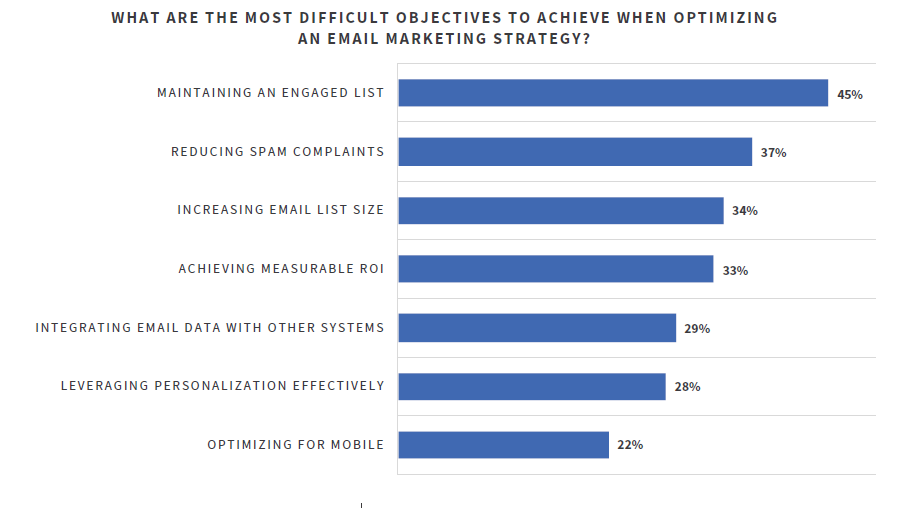
Maintaining an engaged email list is the #1 most difficult objective for email optimization, according to marketers.

Get the Fundamentals Right First
Email optimization starts before an email is sent.
Pre-deployment email testing is critical to delivering high-quality, engaging campaigns.
Design, deliverability, subject lines, subscriber verification, accessibility, sender reputation/SPAM score, HTML validation, and device/email client display are all important items to optimize before you hit send.
The best email copy and call-to-action (CTA) is guaranteed to produce a 0% conversion rate to the people that don’t receive it.
Also, if the design hinders a reader from reading the email, that will dramatically reduce your conversion rate.

Design is the most important attribute to test for email marketing optimization, according to marketers.
Take the time to set up a process and have the tools in place to review your emails before they are sent to get immediate positive results from your email optimization program.
Focus for Improvement
It is safe to say that if you want to improve any marketing campaign, it starts with the quality of your data.
For email, quality data allows marketers to deliver more personalization and targeted content to subscribers.
Quality data allows you to segment your list and, as a result, you can write more specific copy and targeted CTAs.
Also, your automation campaigns become more targeted, and even the types of content that you deliver are based on data and not random.
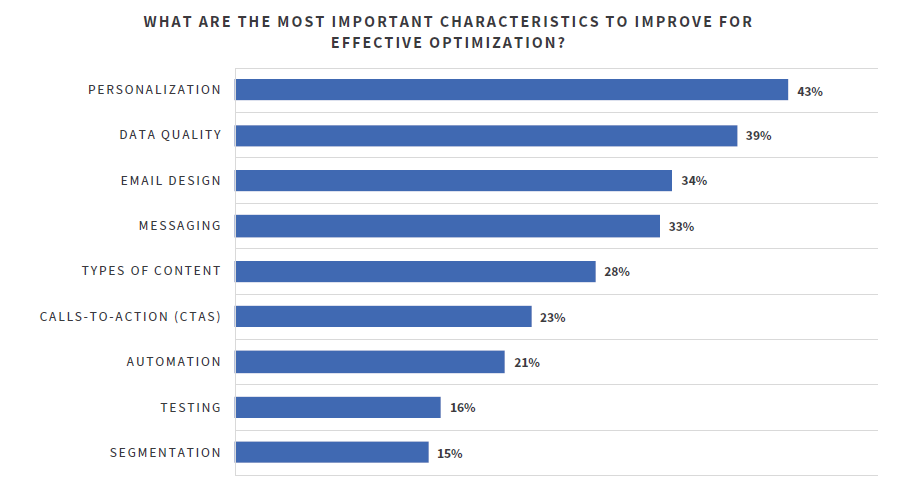
Personalization is the most important characteristic to improve for effective email optimization.
How to Handle Email Inactivity
So you’ve optimized your email campaigns, and some subscribers are still not engaging with you (how dare they!).
How long should a subscriber be inactive before removing them from an email marketing list?
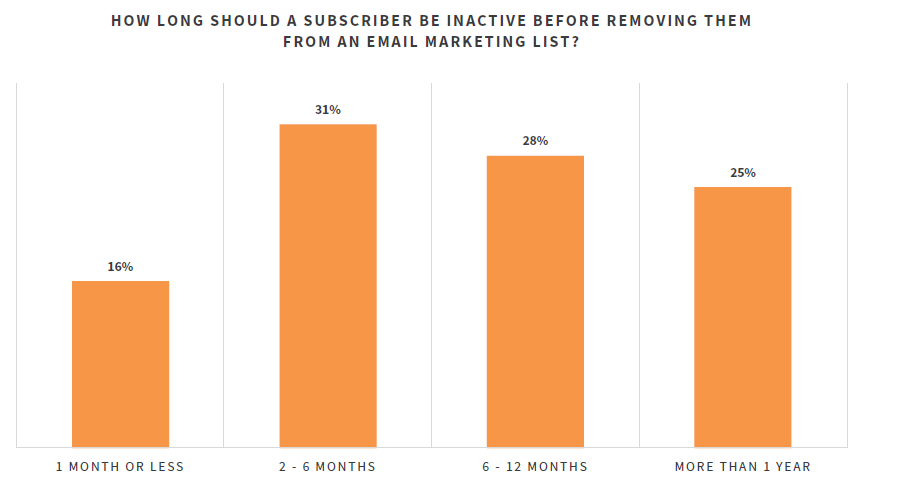
Subscribers who have been inactive for 2-6 months should be removed from email lists, according to 31% of marketers.
If you are doing all the best practices with data quality, pre-launch fundamentals, copy, CTAs, personalization, segmentation, and testing, and subscribers are not engaging with you, it’s important to set up a regular process to remove them from your list.
Remember, the goal is not your list size, so when subscribers tell you that they are not interested in you sending them emails by inactivity, believe them.

You can download the entire Email Marketing Optimization Survey Summary Report for more data, tips, and strategies to keep audiences engaged despite flooded inboxes.
The post How Marketers Are Optimizing Their Email Marketing, According to Research appeared first on Content Marketing Consulting and Social Media Strategy.
Source: convinceandconvert.com

4 Spectacular Site Traffic Sources That’ll Help You Move Beyond Google
Until a few years ago, every online business owner used to start their media marketing campaign solely by keeping the ‘big daddy’ in mind.
It was the chief source of exposure – the number one search engine traffic source that helped websites get visitors.
It was the most visited website on the internet, dwarfing every other site.
A whole new industry was created to optimize business websites as per this big daddy’s requirements.
Until one day when a new media marketing era started that made people socialize online.
These new social media platforms also became a breeding ground for publishers to attract eyeballs to their content and to try and attract direct traffic from those sources.
The ‘big daddy’ is Google.

If you’ve started a website to get online exposure, then you must have read a couple of articles on search engine optimization (SEO).
You might have achieved great search engine traffic results from Google.
However, you shouldn’t put all your eggs in one basket.

Diversifying your website traffic sources will ensure that your business does not tank in the wake of a single Google algorithmic update.
Algorithm Impacts
Consider Andrew, who lost 80 percent of his website traffic to Trollingmotors.net with the release of the Penguin update.
It was after this loss of direct traffic he realized the risk of relying solely on Google for customers.
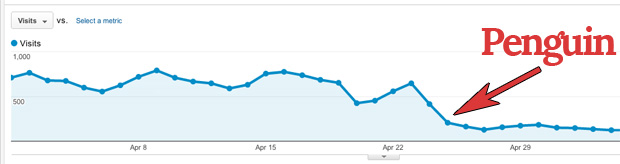
Don’t you dread being in a similar situation, losing all your web traffic because Google decides to change the game?
SEO Game

Building traffic from Google requires consistent effort for 3 months or more.
You need to target long-tail keywords, build authoritative backlinks and optimize your website pages for Google.
Not to mention the dominance of the click-throughs received by the top 3 spots in Google.
If you aren’t in the top 6, don’t expect more than 4 percent of clicks to your website.
And if you aren’t on the first page, you can almost abandon thinking about organic traffic, direct traffic and any other kind of web traffic from Google.
If you’re not on the first two pages,
you aren’t getting any visibility.
I don’t think I need to tell you the difficulty in ranking in the top 3 spots for keywords that have good search volume.
The hard-hitting reality is most businesses fail to rank for their targeted commercial keywords and don’t get intended results from SEO.
Are you willing to build a more sustainable and robust source of organic traffic for your website?
Then let’s roll with five alternative search engines besides Googles that drive traffic your way.

5 Alternatives that Drive Traffic Your Way
1. Capture Emails of Those Cold First-time Visitors
Email is the first and probably the best social channel for conversing with your audience.
It commands the daily attention of most people, drives engagement and accelerates business results.

The email has a high conversion rate and that outperforms search and social media by far.
But effective email return traffic rise does not happen overnight. It starts from your previous efforts and snowballs.
I’ve been able to increase my email traffic consistently since I’ve prepared my blog to capture new leads as part of my marketing campaign.
How to Increase Direct Traffic from Email Campaigns?
Would you like to know the 3 basic steps to increase direct traffic from your email campaigns?
Prepare a lead magnet like a free eBook or an email course that interests your visitors.
As an example, I offer free courses to learn SEO, CRO, and more.
You can also offer a swipe file like Digital Marketer.
It generated 28,507 subscribers in 45 days.
If you want to considerably boost your conversions and reduce your bounce rate, then you’ll need to put in extra effort and prepare a content upgrade for at least your most popular posts.
It can lift your conversions by a whopping 785 percent in one day.
So what are content upgrades?
They’re generally bonus resources.
If you don’t have the time to create more content, a simple checklist will do. The idea is to help the visitor take the first step after reading your article.
Setup lead capturing tools on your website
Marketing technology has come a long way.
You can do much more than simply adding an opt-in form in the right sidebar of your blog (that typically has less than a 1 percent conversion rate).
I would recommend that you experiment with slide-up, left sidebar sign-up forums, hello bars, and other tools.
A controversial, but extremely effective tool that deserves special mention is the popup or banner ad.
Popups can literally take your sign-ups through the roof.
But, if they’re so effective, then what’s the roadblock that may prevent you from using them?
They’re annoying and equate to a bad user experience which will contribute to a higher bounce rate.
You need to test triggering them at the appropriate time.
Your audience might like to spend 30 seconds on your website before they give you their email.
Your visitors should not feel intruded on or tricked into giving their email.
Don’t show the popups and banner ads repeatedly to a visitor after he has shown disinterest in giving you his email.
I would advise you to use an improved pop-up technology that decreases pop-up annoyance.
Properly onboard your new subscribers
The welcome email is your first point of contact with the subscriber.
Don’t waste the opportunity to add value and impress them early in your relationship with them.
So what can you deliver in your first email?
Ask the ‘number one’ problem that your subscriber is facing.
This encourages interaction and lays a strong foundation for your association with them.
(Optional but recommended) – Test your email subject lines
Only after they open your emails will you get the chance to engage with your audience.
Churning of readers is fairly common.
MailChimp found that average click-throughs last only 3.5 percent after the 100th email campaign for the users that last (as compared with 5 percent open rate for the first campaign).
Tweaking your subject lines can make all the difference in increasing your open rates and getting more engagement.
2. Write High-quality Guest Posts for Authority Blogs
Guest Posting has already been written off by Google.
I’ve seen bloggers derive tremendous referral traffic and build complete businesses from guest posting referral traffic.
It’s awesome to get organic traffic this way.
It’s such great exposure that I’ve guest posted regularly at likes of Entrepreneur, Search Engine Journal, HubSpot and Forbes.
Here are five tips to get good results and potential direct traffic from guest posting.
1. Understand the publication
Before sending a guest post pitch, get a feel for the type of content published in the publication.
Only then will you be able to think of post ideas that add value to their audience.
All bloggers are seeking valuable content to be shared on social media and to improve their own search engine traffic – you need to be able to add to this.
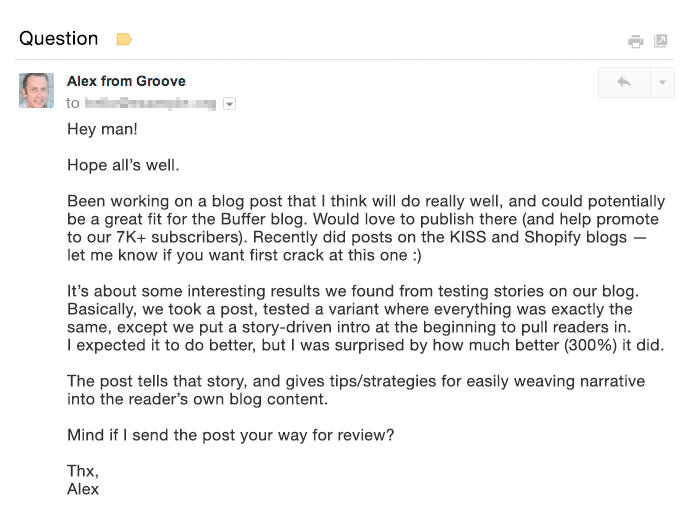
A great pitch puts the target blog’s audience first and proves why you’re the right fit for guest posting on their blog.
Want an example?
Then look at the email by Alex from GrooveHQ below.
2. Aim to get published on the biggest blogs where your target audience hangs around (not necessarily in your industry).
I received 0 conversions from some industry blogs (although they drive considerable organic traffic).
Yet I received a total of 16 conversions (lower visitor volume but high-converting direct traffic) from Entrepreneur Magazine and Inc.
3. If you’re short on time, rely on quality rather than quantity.
By putting in 18 hours to write an awesomely detailed guest post at HuffPo, Ramit Sethi was able to drive 100,000 visitors to his website. This would have had exceptional results not only for his search engine traffic but also for his social media traffic.
Compare that with a quickly written guest post that brought just a few hundred visitors for 1.5 hours of Ramit’s time.
4. Try to squeeze as many quality guest posts into your content production time as possible.
I’ve personally found that organic traffic is spread out from guest posts and adds up only over time.
5. Finally, spend extra time to create a content upgrade for your guest posts.
A content upgrade can have a tremendous impact on the number of emails you’ll collect.
Giles Thomas earned 408 subscribers from a single guest post by offering an upgrade.
3. Interview an Influencer or Get Interviewed by a High-traffic Website
Have you heard of the Four Hour Work Week author Tim Ferriss?
Right now, a staple content type that he serves his audience is his podcast.
He interviews world-class performers who share their wisdom on a plethora of subjects on Tim’s show and he is loved across social media.
Do Tim’s followers like the show?
Well, the show has surpassed 50,000,000 downloads.
And is the #1 business podcast on all of iTunes on most days.
Be it video or audio, interviews are inherently conversational, dynamic, and engaging.
The best part:t’s a win-win for both parties.
The interviewer gets exposure to the new audience while the interviewee gets to serve new engaging and authoritative content to his website visitors.
If you interview an industry influencer, you can request that they share the interview with their followers on social media.
Think of the organic traffic you will drive from hundreds of thousands of their social media followers.
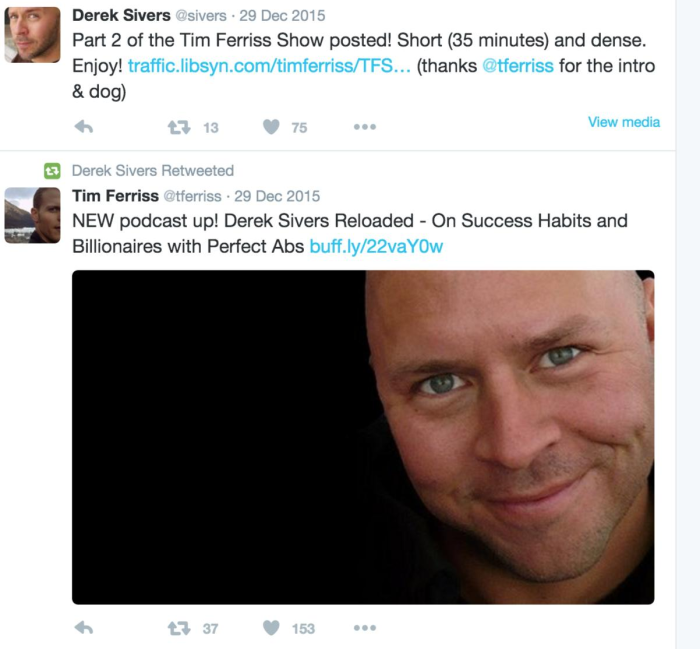
As an example look at the engagement received by a past interview of Derek Sivers on the Tim Ferriss Show. Derek tweeted the show’s link to his 283K followers.
It won’t hurt that you’ll also start a relationship with the influencer through such an interview.
Similarly getting interviewed by a high-authority website can bring you a huge amount of search engine traffic.
Getting interviewed by YourStory brought Harsh Agrawal 35,000+ views on his blog, Shoutmeloud, in a single day.
That was his highest search engine traffic source for the blog (having 600,000+ visitors/month).
Since interviews offer consolidated value, they serve as a lead generation source for your brand for a long period.
Just think of the number of bloggers you discovered through their interviews on YouTube and other high authority websites.
If you’ve got a really interesting story to share, you can also consider doing a Reddit AMA.
Mateen got 2000 pageviews from doing this AMA on earning $85,000 in profit by selling TeeSpring shirts/hoodies. He also increased his average daily visitors.
You can also answer questions from journalists at HARO by signing up as a source.
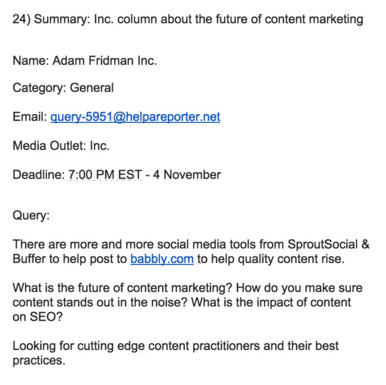
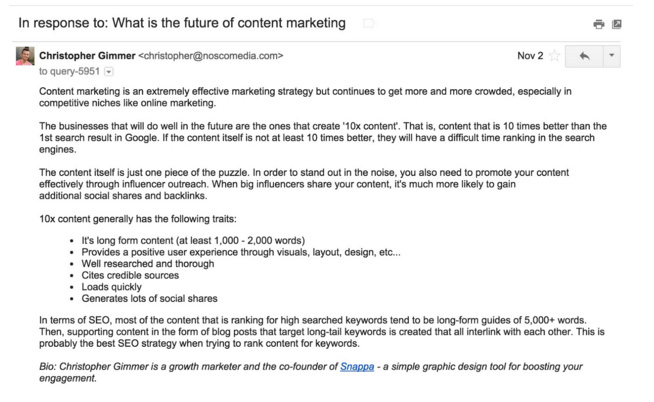
Christopher from Snappa saw this query on the future of content marketing from Inc Magazine on HARO.
He quickly sent a detailed reply.
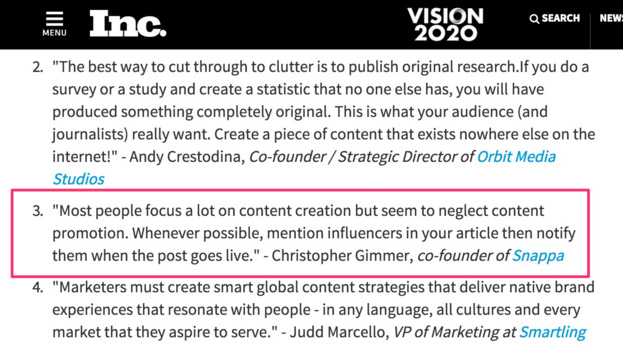
This earned him a mention in Inc a few weeks later.
HARO is a great strategy to get a brand mention on authority news websites like Entrepreneur and Inc.
Those backlinks will sweetly lift your reputation in the eyes of Google, driving your search engine traffic up, and boosting your marketing campaign.
4. Invest in Facebook Ads
I know a paid strategy might raise a few eyebrows when it comes to the idea of organic traffic.
Inbound marketers generally don’t like to pay for play in the form of banner ads or other pricey methods.
If you’re one of those, you might be frustrated with the declining organic Facebook reach.
If you’re having only a handful of fans on your Facebook page, then you will not get good results from your organic traffic reach.
So you’ll need to invest in Facebook Ads.
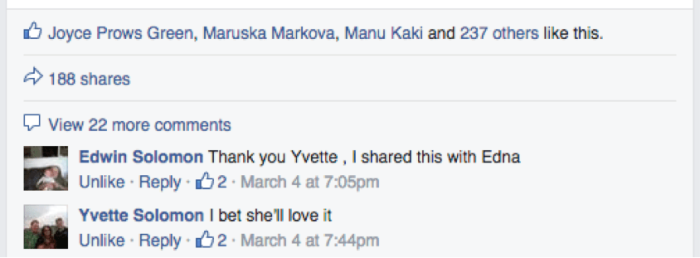
A US accounting firm (having 156 likes) didn’t get good engagement on their posts. Just a couple of likes.

After spending $20 on Facebook Ads they started getting great interaction. Look at the interaction on the post in two months.
Sparing some cash for running Facebook Ads can tremendously accelerate your email list growth (one of the best repeat traffic sources for your website).
Because there are very specific demographic targeting options available. You can also A/B test various images and text in your banner ads.
Let me share another case study to show you the kind of results you can achieve.
Matthew Woodward spent around $600 on Facebook Ads running two campaigns.
His cost per lead in running both campaigns was under 80 cents.
The ROI from running the campaign was over 2500 percent.
Aren’t the results incredible?
If you don’t want to splurge and spend $500, then even $5 a day can get you great results.
Mary earned 532 new subscribers in 43 days of running Facebook Ads.
The total amount she paid was just $227.05.
If you want to drive more traffic to your blog, then you can choose your most engaged Facebook posts and boost them to extend your reach.
You can even use Facebook Video Ads and add a CTA to drive traffic back to your website.
For native videos on Facebook, Mike Gingerich found anywhere between a 30 percent to 200 percent increase in engagement and reach compared with other types of posts.
Conclusion
Google’s algorithmic updates are unpredictable.
Relying solely on SEO to rope in traffic and customers can kill your business.
So experiment with traffic sources other than Google.
If you put in the necessary steps, you can also reap the benefits like others whose case studies I shared with you in this article.
Have you experimented with any of the above traffic sources and achieved good business growth?
How did you boost your direct traffic? I would love to hear your insights in the comments.
Source: neilpatel.com

The 5 Features You Should Be Using In Your Email Marketing App
Maybe you’re already using email marketing apps, but you aren’t getting the most from your sends. In this article, we’ll show five top features that you should use in your email marketing app to increase open and conversion rates.
After you sign up for an email marketing app, you might feel like you’re starting with a blank slate. Even if you have a lengthy email list, it’s hard to know how to reach and connect with your subscribers.
Maybe you’re already using email marketing apps, but you aren’t getting the most from your sends. In this article, we’ll show five top features that you should use in your email marketing app to increase open and conversion rates.
Why Send Email At All?
In a social-first world, it’s natural to ask: why send an email at all? It might feel like an antiquated platform, relegated to communication with family and far-flung friends.
In reality, savvy digital marketers know that email is a can’t-miss platform. It’s far more than a transactional channel to send purchase receipts and confirmations.
Here are just three of the reasons that you need email marketing as part of your toolbelt:
You own the list.
If you market on a platform like Facebook, you already know that you have to pay to market. Even if they follow and like your page, you’re on the hook to boost your posts.
Email marketing is an equal opportunity, and you’re able to market to your list freely.
Email gets seen.
According to Campaign Monitor, the overall open rate for email is 18%. It’s impressive to consider that nearly one-in-five recipients will see your marketing message – far better than blasting off social posts without promotion.
It feels friendly.
Never forget: email is a two-way communication tool. The reply button is only a click away and might be the start of a conversation that leads to a sale.
Must-Use Features in Email Marketing App
With the help of an email marketing app, you can take advantage of all of these benefits. Let’s look at five must-use features and apps that help you implement them.
Must-Use Feature 1: Segmentation
No matter what type of email list you’ve built, here’s one thing I know for sure: the audience is diverse. They have varying consumer preferences. They’re likely at different stages of the sales funnel.
Yet, so often, marketers treat the entire email list as if they’re flat people with the same preferences. This is a surefire way to reduce your open and conversion rates.
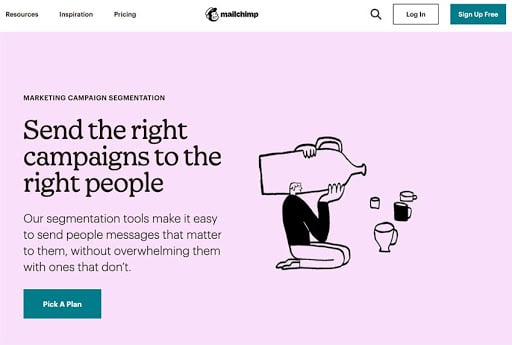
Mailchimp’s segmentation options make it easy to not only manage and tag your list with helpful data but to send targeted messages to cohorts.
The solution? Segmentation! Divide your list into useful groups, then target your emails based on what you know about the segments.
Segment your audience on factors like age, average speed, cart contents, and more.
You can even imagine sending fun emails based on the recipients’ location. (Think: “Our customers’ favorite floral arrangements in Tennessee!”)
You’ll need to spend time thinking about how to capture this information to effectively segment. Maybe you get it during sign-up or conduct a survey later to add the data after the fact. Once you’ve got these data points, segmentation is easy in most apps.
Must-Use Feature 2: Autoresponders
Don’t think of your email app as a “send-only” tool that requires you to log in, type a message, and press send. The magic of modern marketing is automating your communications, and that includes using autoresponders.
Here are five ideas for autoresponders, sparked by Neil Patel, that you can implement to automate your email workflow:
- Celebrations: who doesn’t love getting an email on their birthday? Taking a moment to send a discount or acknowledge a user’s big day can spark a sale.
- Reminders: with the right email software, you don’t have to “babysit” your promotions and remind customers. Set up an autoresponder to create urgency and remind your audience of a limited-time promotion.
- Follow-up: it’s a great idea to rekindle communication after a transaction. Maybe you use this to ask for a review or remind a member what your business does. Either way, it’s an automated way to keep the conversation going.
- Web triggers: you can send emails based on actions that users take. For example, if a user fills out a form, fire off an email that helps you move them to the next step in your sales funnel.
- Onboarding: we’ve all received simple sign-up confirmations, sure. A more powerful autoresponder to onboard your user is to send them suggestions on your top blog posts to check out, or other cornerstone content that they’re sure to check out.
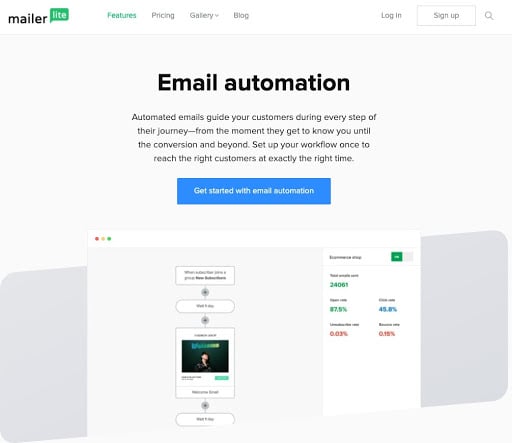
MailerLite is a powerful email automation tool that gives you a drag-and-drop tool to setup:
One of Andy Crestodina Orbit Media’s favorite email tricks is to use a “thank-you” autoresponder. It’s a simple way to show your gratitude with no extra work.
Using an autoresponder is the best of both worlds: it saves you time, and it increases engagement with your list. Set up a few targeted replies to help you connect with your list, even if you’re away from your keyboard.
Must-Use Feature 3: Analytics and Reporting
There’s a great saying in business: “if you can’t measure it, you can’t manage it.” It’s a data-driven worldview that posits that understanding your audience improves your marketing.
The best email marketing tools give you data. That might mean tracking open rate, click-through rate, or more. Start tracking those trends so that your future campaigns optimize for what techniques work.
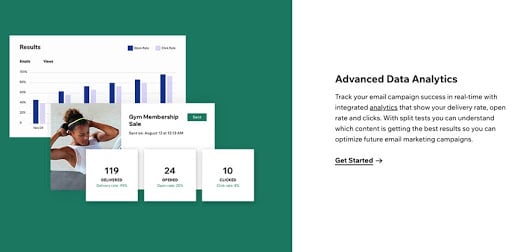
Use data analytics to help you continually improve your email efforts.
Wix’s email marketing services present all the key metrics you need to understand the success of your campaigns.
Open rates and click-through rates are two metrics you can track and monitor overtime in these apps so that your success increases over time. Track data, test what works, and keep iterating on your email strategy.
In addition, EmailAnalytics can provide you a comprehensive dashboard and tracking tools that allow you to monitor team productivity, engagement rates, best times to submit emails and overall insight into what works and what doesn’t.
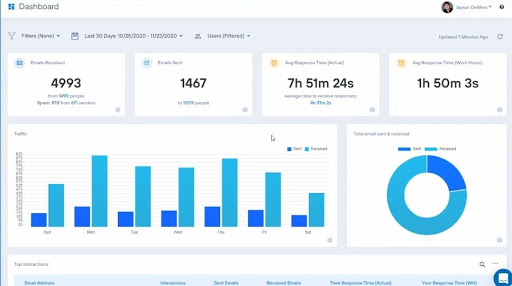
Continually optimize your campaigns with built-in analytics and reporting.
Don’t leave your email marketing efforts to guesswork and tribal knowledge. Instead, use the analytics and reporting built into your tool so that you can continually optimize your campaigns.
Must-Use Feature 4: Split Testing (A/B Testing)
Have you ever experienced email anxiety when emailing your audience?
Symptoms include staring entirely too long at the subject line, rewriting the content over and over, and ultimately never sending the message!
This occurs when you want to send the perfect email to your list. It’s totally natural, but here’s the problem: it’s based entirely on gut and intuition. Those two “metrics” rarely lead to results.
The solution is to split-test several versions of an email. Instead of erasing, re-writing, and deliberating, let the data speak for itself. When you split-test an email, you create several versions with limited changes between each version.
Your email app will send out a limited set of emails with each version of your campaign.
After testing the open and click-through rates, most email apps will automatically choose the optimized version and send it onto the rest of your list. That leads to higher open rates across your list.
When you split test an email campaign, you let the data speak for itself.
It removes the friction of sending and gives you confidence that you made the most of your mail. Make sure to use this feature so that your campaigns are optimized for your audience.
Must-Use Feature 5: Abandoned Cart
If you’re running an eCommerce shop, you don’t want to miss out on abandoned cart emails. It’s a form of an autoresponder message that helps you make more sales.
How many times have you put a product in your cart, only to close the tab and move onto another seller? This is a clear indicator that abandoned cart emails work as a way to bring a buyer back to your site to potentially complete a sale.
Abandoned cart emails tie into selling platforms like Shopify or Wix to help keep a sales lead in play. It’s a friendly reminder that can lead to a sale that you would otherwise miss. Use this feature to make the most of your email marketing.
Start Getting the Most From Email Marketing Today
The five techniques that you saw in this tutorial are tried-and-true options to improve your email marketing efforts. They help take your list and create more click-throughs and conversions. Try out these features to get the most from your email marketing platform.
The post The 5 Features You Should Be Using In Your Email Marketing App appeared first on Content Marketing Consulting and Social Media Strategy.
Source: convinceandconvert.com

Best Email Marketing Services
What if I told you there was a single marketing channel through which companies are finding a 3,800% ROI? That’s earning $38 for every dollar spent. This magic marketing channel is called email.
Disclosure: This content is reader-supported, which means if you click on some of our links that we may earn a commission.
Yes, just good old email. And that insane average return on investment is one of many email marketing statistics that have held true for years now.
The biggest surprise to me is how many companies aren’t taking advantage of email marketing.
I hear it’s too much work to design newsletters, manage a growing number of contacts, personalize messages, and keep the campaign moving forward.
There’s this perception that email is a time-sink, but it doesn’t align with the statistics.
If it were really too labor-intensive to run an efficient email marketing campaign, the average ROI wouldn’t even be 1/1000 of what it is, year after year.
The key is finding the right email marketing service. Don’t wait to start building better campaigns in less time.
The Top 5 Options For Email Marketing Services
- Constant Contact – Best for e-commerce
- Zoho Campaigns – Best for simple campaigns
- Sendinblue – Best ease-of-use Marketo
- Engage – Best for segmentation and personalization
- Pardot – Best for B2B marketing
How to Choose The Best Email Marketing Service For You
Email marketing services are packed with features to help you save time at every step of a campaign.
Every step.
My favorite products get you minutes back on every task. Professional templates, drag-and-drop email editors, list management tools—they make all the hard parts easy.
On top of that, many of the most time-consuming campaign processes can be automated with an email marketing service.
The minutes you save turn into hours quickly, especially if you’re churning campaigns on a large scale.
More effective campaigns. Less effort. That’s the goal.
Let’s walk through the core features available with email marketing services so that you understand which product is going to deliver you the best results for you.
Ease-of-use
Unless your marketing teams double as developers, it’s essential to find a tool that anyone on your team can use.
As you browse, pay attention to the templates and pre-set workflows offered by each email marketing service. Are you excited to use these or do you intend to create your own custom templates? Some email marketing services lose their reputed ease-of-use once you step outside their pre-defined pathways.
It’s a definite plus if your solution comes with visual design tools to build emails and workflows. A simple-to-learn editor can be used right away by the people who need it. They don’t need training, and aren’t stuck waiting on someone who’s comfortable with the editor.
The best email marketing services also provide support, documentation, and walkthroughs to educate users and ensure that their product is truly self-service.
If reviews indicate that customer support is sluggish, or that answers are hard to find, that’s a red flag.
Integration and Implementation
An important question to ask: How easily is your email marketing service going to mesh with your existing stack?
Solutions that integrate with products you use are going to speed deployment and encounter fewer issues moving forward. This is especially true of your existing CRM and any other customer data sources.
Some products, like Sendinblue, come with their own CRM as part of the package, which can be nice for companies that aren’t looking to purchase multiple products in service of their email campaign.
Email Deliverability
The emails you send need to reach your recipient’s inbox. End of story.
Without a high deliverability rate—I would be worried about anything below 95%—your email campaigns are dead in the water.
All good email marketing services ensure high deliverability in two ways.
On the backend, they authenticate emails with DKIM, SPF, and SenderID, while also working with internet service providers to make sure that customer IP addresses aren’t blocked.
Plus, quality platforms will provide ready-made email templates that are both visually appealing and compliant with privacy and anti-spam laws.
On the user side, email marketing services help you craft compelling subject lines and content that encourages customers to actually open your message. They also provide tools for managing subscribers so you can keep a clean list and avoid the spam folder.
Email Automation and Customer Journeys
One of the biggest defining (or limiting) features of an email marketing service is the level of sophistication your workflows can manage.
Entry-level tools can help you automate welcome series of emails for new subscribers, and other similarly straight-forward processes.
If you want to start adding conditional or logical triggers that branch the customer journey into more personalized paths, you are going to need a more substantial tool.
You are also going to need to know a lot about your audience. Products that have really good list segmentation features will pick up tons of information on your customers, which in turn makes your automation more accurately targeted.
Segmentation really drives your ability to automate personalized emails, for example. You can set workflow triggers that respond to customer engagement, shopping habits, and other tendencies to ensure that customers are only receiving messages they’re likely to care about.
Subscriber Management
Quality email marketing services come with a lot of tools to manage the subscribers on their list. They will help you:
- Import lists: Seamlessly integrate contact lists from CRMs and other databases.
- Keep a clean list: Identify and remove inactive subscribers and spam traps that reduce deliverability
- Generate leads: Create new contacts with pop-ups, landing pages, and other multi-channel tools that start an ongoing conversation.
- Segment your list: Automatically group subscribers based on many criteria, including everything from what time zone they live into how they signed up, and everything in between.
- Campaign Performance Tracking
- Email marketing strategies must be agile.
Every service reviewed in this article comes with the ability to track traditional KPIs like:
- Bounce rate
- Click-through rate
- Conversion rate
- Deliverability
- Forward/share rate
- List growth rate
- Open rates
- Unsubscribe rate
By keeping tabs on these metrics, companies can tweak their campaigns accordingly.
Many email marketing services offer A/B testing, which allows you to test different versions of emails or subject lines to see what performs better.
Look for that, because it’s super helpful for adjusting campaigns in the right direction over time.
More advanced email marketing services will help you tie traditional metrics to revenue, letting you see ROI per email sent and other business-critical metrics.
They’ll also let you see how content is performing with features like click heatmaps, which show where your customers are spending the most time.
You’ll probably have to spend more for those features, but they can provide crucial information that pays for itself.
Marketing automation software, like Pardot, provides multi-touch attribution models that let you visualize each touchpoint in the entire customer lifecycle. Marketing attribution drives business growth and informs your future campaigns by spotlighting the key elements of each customer relationship.
The Different Types of Email Marketing Services
Most products in this category want to provide email marketing services for companies of all sizes, so they offer a range of plans from a budget-friendly package to enterprise-grade service tiers.
Email Autoresponders
Exemplary products: Zoho Campaigns, Sendinblue (Free & Lite)
On the lightweight side of the spectrum, you’ll find services that augment your email marketing campaigns with easy-to-use tools for automation, email editing, and subscriber management.
You’ll see these products billed as email autoresponders or email automation.
They don’t change what you do so much as they help you do it better, faster, and at scale.
Because they are so simple, the best email autoresponders are incredibly intuitive, inexpensive, and can start delivering results almost immediately.
Email Marketing Platforms
Exemplary products: Constant Contact, Sendinblue (Premium & Enterprise)
Email marketing platforms are a one-stop-shop meant to help you build, track, manage, and optimize campaigns.
They are going to capture, store, and segment your customer data much better than a standalone email autoresponder. And with a richer picture of your audience, you can build much more complex email workflows.
You can get really granular when it comes to personalized customer journeys, for example. In Constant Contact, you can automate emails with shoppable product recommendations based on a person’s buying habits.
Doesn’t that sound great?
What’s really nice is that these products are very easy to use and deploy. Campaign performance tracking features are built right in and provide a ton of visibility and control instantly. Some will integrate with tools like Google Analytics to get actionable data.
You can see what’s working, what’s not, and make changes on the fly.
Marketing Automation Software
Exemplary products: Salesforce Pardot, Marketo Engage
Marketing automation software includes email marketing services as part of a broader suite that accounts for every channel of communication.
Organizations can expand their reach across email, SMS, social, SEO, websites, webinars, and paid media. Information from across all these channels is centralized in intuitive dashboards that drive real-time, evidence-based campaign decisions.
With marketing automation software, you can build out multi-branch email campaigns and customer journeys, tracking progress across every stage.
These products tend to be quite a bit more expensive, and understandably so. If you are looking to run simply to moderately complex email campaigns, you’re fine with an email marketing platform.
On the other hand, if you start to run into problems at scale or email workflows can’t handle your needs, it may be time to consolidate your processes with a marketing automation solution.
Examples of Email Marketing Services Software/Platforms
#1 – Constant Contact — Best for Ecommerce
Constant Contact offers some of the best email marketing services alongside top-notch solutions for ecommerce, event hosting, website building, and multi-channel marketing.
They average a 97% deliverability rate. This is only possible because the mature platform blends powerful behind-the-scenes functionality—like blocklists, proactive monitoring, and multiple forms of authentication—with an intuitive UI that helps teams craft effective messages that don’t bounce.
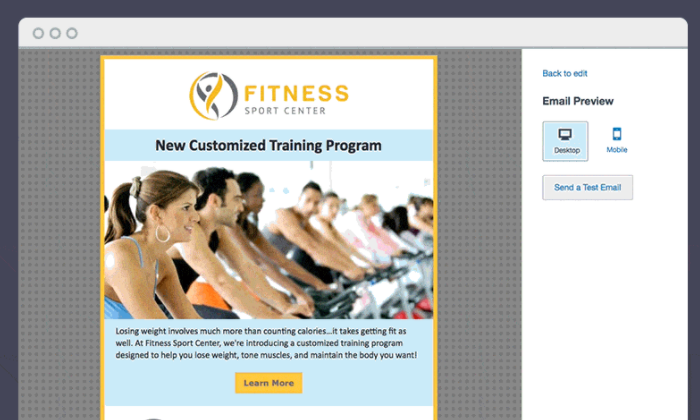
You can get Constant Contact up and running very quickly, and it will eliminate much of the legwork associated with email marketing.
Automate product recommendations, for example, by sending shoppable emails based on the items a customer has in their cart, the weather, or the tendencies of like-minded shoppers.
Trying to accomplish this task without an email marketing service would be extremely time-consuming. With Constant Contact, the process can be automated by just about anyone.
Some of the other reasons millions of people use constant contact include:
- Unlimited email sends
- Custom and branded templates
- Campaign performance tracking
- Subject line A/B testing
- Drag-and-drop email editorRich ecommerce capabilities
- Subscriber management, segmentationRSVP, survey, and poll
Constant Contact helps with lead generation, too, via landing pages, customizable pop-up forms, and free hosting for a mobile-responsive website. This includes a blog, where you can leverage your email content as posts for SEO.
There are three pricing tiers for Constant Contact email marketing services and the amount you pay is based on the number of contacts. The plans are:
- Email: Starting at $20/month
- Email Plus: Starting at $45/month
- Pro: Starting at $195/month
Constant Contact Email and Email Plus are two of the most popular email marketing services available today.
Constant Contact Pro uses AI-driven marketing automation to provide personalized product recommendations, smart subject lines, behavioral segmentation capabilities, and more advanced workflows.
I would consider a Pro subscription if you are thinking about marketing automation, but aren’t ready to pull the trigger on a heavyweight product like Pardot or Marketo.
#2 – Zoho Campaigns — Best for Simple Campaigns
Zoho Campaigns is a lightweight, cost-effective email marketing service that comes with all the must-have features.
In Zoho Campaigns, everything has been trimmed (but not watered down), so you can still accomplish 80-90% of what you can do with an email marketing service that costs three to four times as much.
The ease-of-use is on par with agile project management software like Trello. Not only can non-technical users navigate Zoho Campaigns, but they can also master their domain.
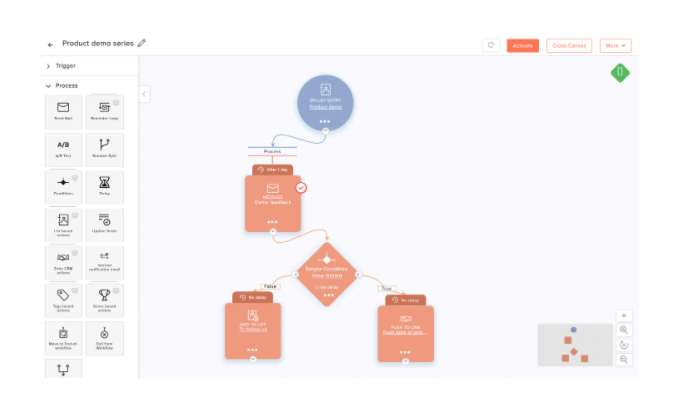
Intuitively control the following features:
- Drag-and-drop email editor and template builder
- Email autoresponders
- Email automation
- Merge tags
- Subscriber management
- A/B testing
- Team collaboration
- Real-time analytics
Keep in mind that Zoho Campaigns also has integrations with popular CRM, ecommerce, and contact management products.
Tying these data sources can help you better target and personalize your email campaigns, yet Zoho Campaigns will remain fairly easy to use.
Integrating Google Analytics, for example, can enrich the amount of customer data you pick up on each interaction, providing data visualizations to help you make sense of relationships over time.
Pricing is straightforward for Zoho Campaigns:
- Email-based Plan: starting at $2/month
- Subscriber-based Plan: starting at $4/month
- Pay-as-you-go Plan: starting at $6/month
The Subscriber-based Plan is my favorite because it includes email automation, which doesn’t come with the Email-based or Pay-as-you-go Plans. At $263/month for 100k contacts with the Subscriber-based Plan, the automation will pay for itself many times over.
You can also try the Zoho Campaigns free-forever version. It’s limited to 2,000 subscribers, but you get a lot of the marketing and content management features, as well as the chance to see if you like the interface.
#3 – Sendinblue — Best Ease-of-Use
Sendinblue is a unified CRM, chat, Facebook, SMS, and email marketing platform. It’s loaded with features that are super easy to learn.
In other words, lots of tools with very little training.
Unlike other options on this list, every Sendinblue subscription (including Free and Lite) comes with a sales CRM, marketing automation, real-time reporting, advanced segmentation features, and more.
How’s that for out-of-the-box function? But wait. There’s more.
With popups, landing pages, and chatbots, you can build out your contact list with minimal effort, turning website visitors and Facebook passersby into your next lead.
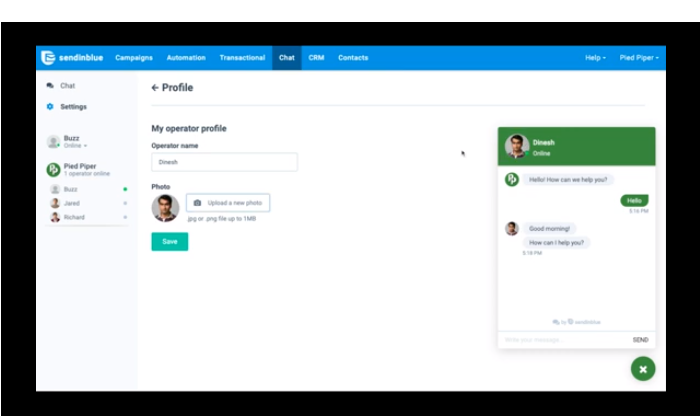
And once people are on your list, Sendinblue gives you a ton of great tools to nurture leads, build out customer journeys, and communicate effectively every step of the way. The key features include:
- Unlimited contacts with any plan
- Mobile-friendly visual email editor
- Retargeting ads
- Campaign performance trackingA/B TestingCustomizable signup formsTransactional emails
- Email API, SMTP relay, and other core API features
- Advanced email automation
Sendinblue offers a free forever version, and paid plans at several pricing tiers:
Lite: Starting at $25/monthPremium: Starting at $65/monthEnterprise: Contact sales
The amount you pay is based on your tier and the number of emails you send each month. You can store as many contacts as you want without affecting the price, which is not true with most other platforms.
Notably, Sendinblue’s pay-as-you-go plan includes the same great features as whatever tier you choose, except the phone support. This is also something you won’t find in other options, like Zoho Campaigns.
There is no prior knowledge or technical skill necessary to start using Sendinblue, and their free forever plan is one of the best available.
#4 – Marketo Engage — Best for Segmentation and Personalization
Marketo Engage, from Adobe, is a full-service marketing automation solution ready to support your strategy across any channel.
Centralize and analyze customer data in an intuitive environment that allows for email campaigns with fine-grained segmentation and dynamic personalization.
You can customize intricate workflows with behavioral triggers that wouldn’t be possible on other platforms because they can’t capture as much information as Marketo does.
Every feature is full-bodied. A/B/n testing, for example, lets you pilot multiple versions of the same site or email rather than just binary A/B testing, which is where many other products stop.
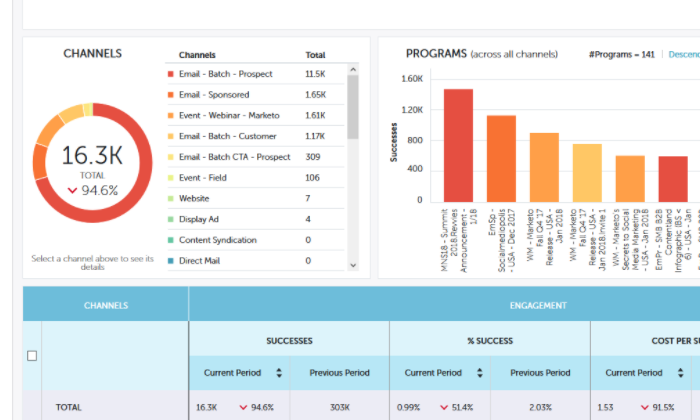
There’s also Adobe Sensei, which uses AI and machine learning to personalize content. Sensei analyzes the performance of all your assets, learns which content works best for whom, and updates emails accordingly.
Other great features that come with using Marketo for email marketing include:
- Drag-and-drop workflow builder
- Lead and account scoring
- Deep engagement and performance analytics
- Attribution and ROI dashboard
- Customer lifecycle management
- One-click campaign cloning
- Champion/Challenger testing
- A/B/n testing
You’ll have to contact Marketo to get a price. It’s going to have a higher total cost of ownership than a dedicated email marketing service, but if you want superior segmentation and personalization, this can get a lot more done.
#5 – Pardot — Best For B2B Marketing Automation
Pardot is the marketing automation platform from Salesforce that’s built specifically for B2B marketing.
Do you need to hear more, or are you already sold? It’s as good and as deep as you think it is.
Pardot has 2,000+ integrations, a rich feature set, and a surprisingly intuitive UI. To be honest, the platform is a few steps ahead of its competitors in the dedicated email marketing space.
It’s going to take some time and effort to build out the backend, but once everything is set up, Pardot gives you unrivaled visibility into your campaigns.
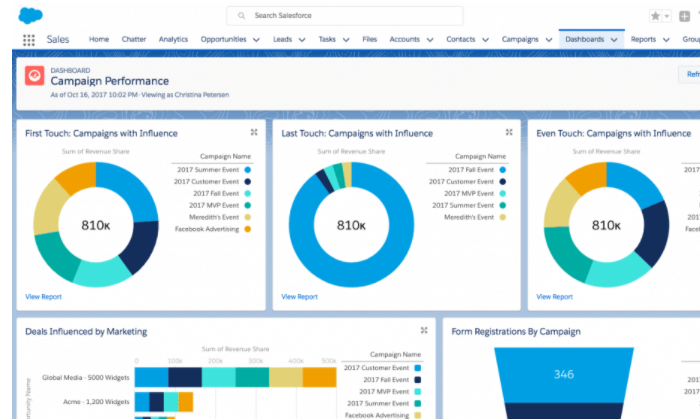
If you feel like the sophistication of workflows is lacking with your current setup or your analytics and data visualization tools aren’t giving you the insight into campaigns that you need, Pardot is the ticket.
Some of the advanced email marketing features include:
- B2B Marketing Analytics
- Engagement history dashboards
- Merge fields
- Visual lead nurturing designer
- Social profilingROI reporting
- Multi-touch attribution models
- Developer sandbox
Pardot is not a cheap option, but it is money well spent in service of a high-growth campaign.
There are four pricing tiers:
Growth: starting at $1,250/monthPlus: starting at $2,500/monthAdvanced: starting at $4,000/monthPremium: starting at $15,000/month
Other marketing automation solutions, like Marketo, are going to be in this neighborhood price-wise. There are certain email marketing platforms you can get for a fraction of the cost, but they’re not going to give you anywhere close to the oversight and customization Pardot affords.
Summary
If you are just starting out, I would try out one of the best email autoresponders to get a feel for which email marketing features are going to be most important to you.
Zoho Campaigns is another really great starting point. These tools are easy to use and many have free forever options.
For companies that need more visibility into their campaigns but don’t want to struggle with a new platform, Sendinblue will be great. It’s also not prohibitively expensive, even at the premium tier.
Constant Contact is another great option in the SMB price range, especially for ecommerce. It comes with some of the functionality you find with marketing automation software, but there’s no loss to its ease of use.
If you need the marketing automation and business intelligence functionality of Pardot or Marketo, budget it in. After a certain point, dedicated email marketing services aren’t going to handle the automated journeys you have in mind.
If Pardot and Marketo give you sticker shock, but you still want true marketing automation, check out Freshmarketer, or one of the other best marketing automation software solutions.
The post-Best Email Marketing Services appeared first on Neil Patel.
Source: feedproxy.google.com

What is an Email Funnel?
As a consumer—it would be nearly impossible to count the number of email funnels that have hit your inbox.
We can safely say, it’s been a lot.
Businesses love email funnels because they swiftly move new subscribers toward their first purchase.

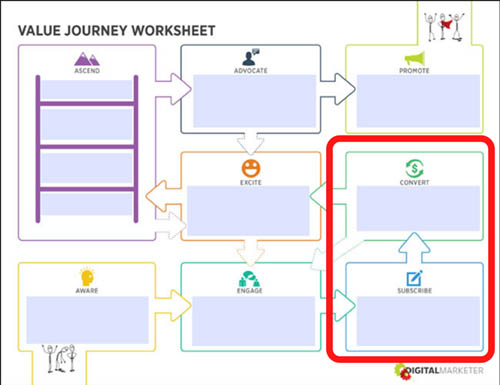
Let’s take a look at the Customer Value Journey to get an idea of where your prospects are when they become subscribers.
The Customer Value Journey is the journey a prospect takes from finding out a business exists (Stage 1: Awareness) to become such a raving fan of it they’re actively promoting the business like a salesperson only they pay you (Stage 8: Promote). 
When we talk about email funnels, we’re talking about the shift of a prospect choosing to become a subscriber (Stage 3: Subscribe) to buying your first offer (Stage 4: Convert).

Email funnels are a big deal in the marketing world because they work… really, really well.
People are still tuned into their inboxes, check out these statistics from OptinMonster:
- 99% of email users check their email every day
- 85% of the people you send an email to will receive your email
- More than 75% of teenagers still use email
Yep, you don’t need to figure out how to renegade on TikTok anytime soon; emails can reach every demographic you’re interested in.
How Email Funnels Work
Email funnels turn subscribers into customers by using specific strategies that sell products or services.
We’ll get into those strategies in a minute, but first, take a look at the return businesses are seeing on their email funnels:
- For every $1 spent, email has an average ROI of $38
- Segmented campaigns can reach a 760% increase in revenue
- Compared to Facebook or Twitter, email is 40 times more effective at acquiring new customers
The number of emails you use in your funnel is going to depend on what you’re selling, but generally, you’ll use a minimum of 4 and a maximum of 7.
If your subscriber hasn’t converted by your seventh email about this offer—then you don’t want to keep bombarding them with it.
When you’re putting together your email funnel, you’re going to be highly focused on the copy you use.
There are 4 emotional triggers to use in your email funnels:
- Gain: What does the subscriber gain by buying the product/service?
- Logic: Why does buying the product/service make total sense for them?
- Fear: What happens if they don’t buy the product/service?
- Scarcity: How long do they have to choose to buy this specific product/service?
Each email is going to follow a similar template:
- Introduction: Give a warm introduction to what you’re about to talk about (you wouldn’t walk up to somebody and start talking without at least saying a few introductory words first)
- Body: Use gain, logic, fear, and/or scarcity to show them why this offers matters to them NOW
- Close: Craft a clear call to action
- P.S. (Not always used): Add in extra gain, logic, fear, or scarcity
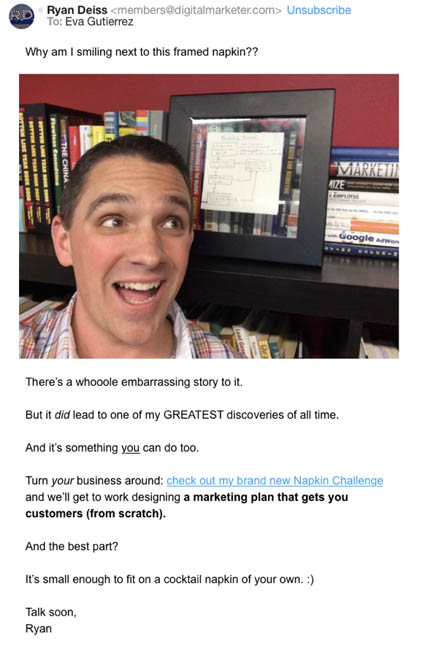
Here’s an example of an email funnel we ran for our Napkin Challenge.
The first email uses logic and curiosity to drive the subscriber to want to create a marketing plan that gets them, customers.
Subject Line: The napkin that cleaned up a $248k mess
Preview Text: A how-to guide for fixing a BIG problem

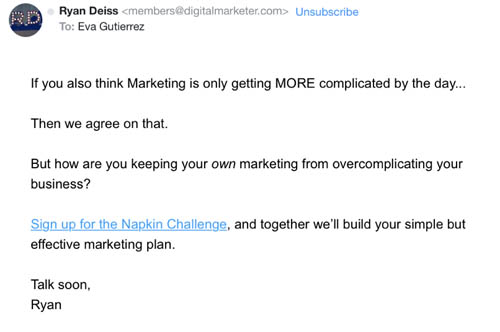
Touching on the fear business owners have over the complication of marketing these days, our second email was quick and to the point.
Subject Line: Why is this so complicated?
Preview Text: Maybe marketing isn’t the problem.

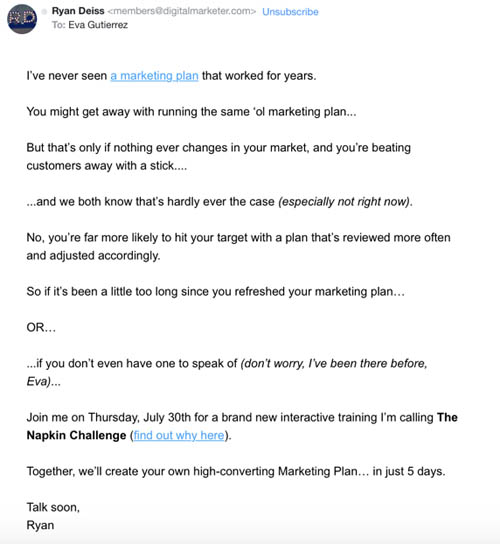
And then our third email used everything we know about the pain points of our avatars (thanks to the Customer Avatar Worksheet) to show them what they would gain from taking part in The Napkin Challenge.
Subject Line: time to hit the reset button
Preview Text: There’s no “do-over” button, just “do better”

If you want to look at more email funnels, take a look at your inbox.
Now that you’re familiar with what an email funnel is, you’ll realize that you’ve gotten a lot of these emails in the past.
Some may have worked well (you bought the product) and others not so well (either the funnel was off, or you weren’t their target avatar).
Email funnels are a BIG part of marketing strategies because they’re the platform that moves subscribers from Stage 3 of the Customer Value Journey to Stage 4, the stage where they become first-time customers of your business.
And that’s a big deal for every business. 
The post What is an Email Funnel? appeared first on DigitalMarketer.
Source: digitalmarketer.com

How Often Should You Email Your Newsletter List?
In the past, we’ve taken a look at why your blog needs an email newsletter and what you should include in your email newsletter.
But people have been asking for more detail on how often you should send emails to your newsletter subscribers. So we’re adding this post to round out our series on Newsletters.
Almost anything is possible here – from emailing once a year to emailing multiple times a day. For most bloggers, though, there’s a happy medium somewhere in between.
How Often Should YOU Email Your Audience?
Before we dig into the details, let’s look at some rough guidelines that will apply to most bloggers.
Chances are, your readers will want to hear from you somewhere between once a month and once a week. Less than once a month, and they may forget who you are or miss out on good offers.
More than once a week, and they may see your emails as just more “noise” in their inbox.
A couple of years ago, Marketing Sherpa found that most customers (close to 90%) want to receive emails “at least monthly”, and just over 60% of those want emails “at least weekly”.

So if you decide to email twice a month, you probably won’t go far wrong.
However, you may need to adjust this frequency depending on the type of email newsletter list you have.
Scenario #1: An ‘Updates’ Email List
Let’s say readers have signed up to hear about your new book when it’s released.
They might be interested in a monthly or quarterly newsletter about your progress, with links to interesting blog posts you’ve written, or other resources. But they’re unlikely to want emails every week or two.

In some situations (e.g. you’re a fiction author who brings out a book every year or two), an ‘update’ email just once a year might be appropriate.
Readers may not be interested in hearing regular details about your life and how the book’s coming along, but they might be very excited to get an email when it’s finished.
Scenario #2: An “E-course” Email List
If readers have joined your email list to take a short e-course by email, it might make sense to email them as often as daily (if each email is short) .
Anything less than weekly won’t be enough for them to make steady progress. Even if you’re only sending out the e-course material in weekly doses, you might want to send a second reminder email.
Readers are unlikely to want emails multiple times per day. But if you’re running an intense e-course (e.g. a week-long one that requires multiple hours of work per day) then it might make sense to email both morning and evening.
This is definitely a case, though, where you’ll want to …
Survey Your Audience to Find Out What They Want
If you’re not too sure what will suit your audience, ask them.
The easiest way to do this (and get a reasonable range of responses) is to run a survey.

You’ll probably want to ask questions that go beyond just the frequency of your emails.
For example, you may want to ask them what types of content they’d like to receive, or how long they want your emails to be.
You could ask something like this:
How often would you like to receive emails from me?
- Daily
- Twice a week
- Once a week
- Twice a month
- Monthly
- Quarterly (every three months)
- Other
Some Common Problems Related to Emailing Frequency
Sometimes, you might be having difficulties with your email newsletter without realizing those difficulties could be solved by changing the frequency.

On the other hand, you might also be worried about your email frequency because you think something is a problem when it really isn’t.
Here are some common worries and difficulties bloggers have, and my suggestions for solving them.
#1: “I Struggle to Come Up With Enough Content for My Newsletters”
If you find it tough to come up with ideas for your newsletters, you could:
- Send out blog posts rather than separate newsletters. Some bloggers send their entire blog post by email. Others craft a short summary or ‘teaser’ and then link to the post. You can send out your post using RSS to email.
- Write shorter newsletters. If you’re including two unique articles and a Q&A in every newsletter, you’re probably overwhelming your readers as well as yourself.
- Email less frequently. Obviously, if you go from emailing once a week to once a month, you’ll only need to come up with a quarter of the original amount of content.
- Re-run old newsletters. If you’ve been emailing for more than a year, you’ll have lots of people on your newsletter list who never saw your earliest newsletters. And even those who’ve stuck around from the beginning will probably have forgotten them. Pick a few good ones from your archives, edit them, and send them out again.
#2: “People Unsubscribe Whenever I Send an Email”
This causes a lot of bloggers to worry unnecessarily. You’ve probably noticed that when you send an email your unsubscribe rate goes up. This might put you off emailing at all, but it shouldn’t.
If you think about it, there’s a good reason why this happens. And it’s (normally) nothing to do with you emailing too often or emailing the wrong content.
It’s because some people are trying to reduce their incoming emails, and when an email comes in from you it acts as a signal to them to unsubscribe.
However, if you get comments or feedback saying “Too many emails” or similar, you might want to think about reducing the frequency.
And don’t worry if you get a lot of unsubscribes whenever you send a promotional email, either. If someone had no intention of ever buying anything from you, let them go.
#3: “I Get a Lot of Spam Complaints”
This is a situation where you’ll want to take action, as a high volume of spam complaints can affect the deliverability of your emails.
If you’re emailing more than a couple of times a week, it’s possible that the spam complaints are related to the frequency of your emails.
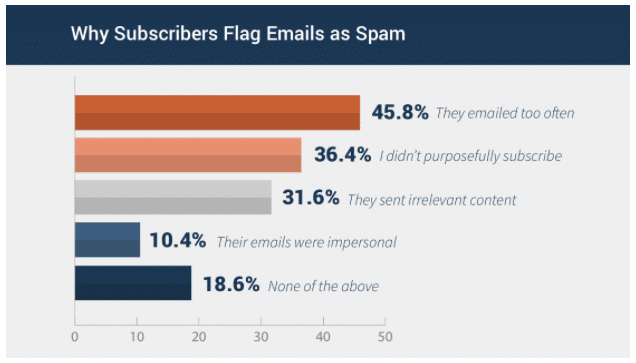
According to Campaign Monitor, one of the most popular reasons for marking emails as spam is because “they emailed too often”.
Another possibility here is you’re emailing at the right frequency, but not sending people what they asked for.
If your newsletter sign-up form promises “exclusive weekly tips” and you’re sending out two promotional emails every week and a few tips once a month, you need to change things so you’re delivering what people expect and, more importantly, what they consented to.
Changing the Frequency of Your Emails
Normally, it’s best to change your emailing frequency fairly gradually.
Don’t suddenly go from emailing once a quarter to once a week. It’s going to confuse and put off your subscribers. Instead, gradually change the frequency. You might go to monthly emails, then twice monthly, and then weekly.
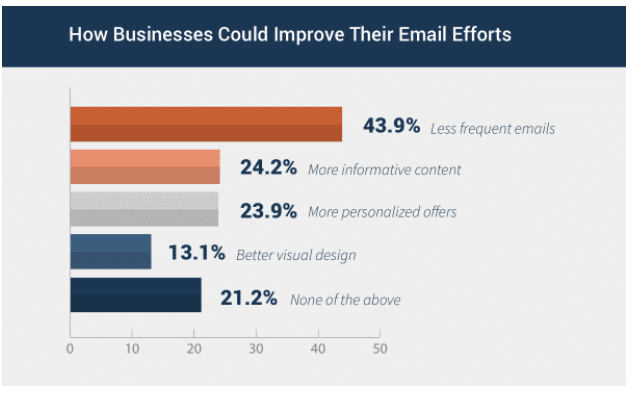
Similarly, if you normally email twice a week, your readers may start to worry if they don’t hear from you for a whole month – especially if you haven’t mentioned you’re going monthly.
The exception here is if you’re having problems because your emailing frequency is too high.
If you’re getting lots of spam complaints because emailing daily is too much for your audience, you can switch to weekly straight away.
Let Your Readers Choose How Often They Want to Hear From You
If you want, you can also let your readers decide how often they want to hear from you.
It can be a little fiddly, but most email providers let you add an option on your sign-up form (and/or where subscribers can update their details) that lets your subscribers choose how often they want to receive emails from you.
Here are instructions on how to do it in MailChimp.
Some readers might be delighted to receive every blog post the day you write it. Others may only want a weekly summary. By giving them the choice, you can keep everyone happy.

The appropriate frequency for your list depends very much on what you write about and who you’re writing for.
If you’re not sure what to go for, try emailing twice per month and ask readers to let you know if that’s about right for them.
You can easily adjust the frequency up to weekly or down to monthly, depending on the feedback. But be careful not to vary too wildly from what they consented to receive (i.e. going daily after telling them they were subscribing to a monthly newsletter).
I’d love to hear about your experiences with email frequency – whether with your own newsletter list or someone else’s.
Have you emailed too often (or not enough) in the past?
Or have you ever unsubscribed from someone else’s list because the emails were too frequent, or too far apart? Share your thoughts in the comments below.
The post How Often Should You Email Your Newsletter List? appeared first on ProBlogger.


Source: feeds.feedblitz.com

251: What You Should Know About Getting Started with Email
Have people been telling you for years that you need to create an email list for your blog? Is it time to finally bite the bullet?
Let’s talk about email – how to get started, email providers, types of messages, opt-ins, and sequences or auto-responders.
When it comes to choosing an email provider, start simple You don’t need all the bells and whistles.
Get subscribers used to hearing from you. Send a simple email message once a week or so to keep in touch with readers.
The more useful and actionable the message, the better. Readers will look forward to receiving them from you.
Once you have an email provider, you can start collecting the email addresses of new subscribers. Grow your email list fast by using an opt-in, exit popup, sign-up form, or incentive.
While opt-ins can be good, some subscribers will sign up just to get whatever freebie you’re offering rather than what comes later. To increase engagement, make opt-ins related to what comes next: ongoing emails, increased engagement, long-term opens, and reduced annoyance.
Email sequences and auto-responders to set up: exclusive content, best posts, affiliate promotions, product promotions, surveys, and asking questions.
Being able to segment your audience, and then deliver auto-responders based on their needs or situations, is very powerful.
Email serves as a win-win-win for you, your blog, and your subscribers.
Links and Resources for What You Should Know about Getting Started with Email:
Further Listening:
- 10 Things You Can Do Today that Will Pay Off On Your Blog Forever
- How to Increase Your Email List Subscribers By 100% Or More Today
- Create an Opt-In to Increase Your Email Subscriber Numbers
- How to Drive Traffic and Profit in Your Blogging with Autoresponders

Courses:
Join our Facebook group
Hi there and welcome to episode 251 of The ProBlogger Podcast. My name is Darren Rowse and I’m the blogger behind problogger.com, a blog, podcast, event, job boards, series of ebooks, and courses all designed to help you to grow a profitable blog.
You can learn more about what we do at ProBlogger at problogger.com.
In today’s episode, I want to talk about email. In particular, I want to answer three questions that I got from some of our Facebook groups on the topic of the email.
The questions are coming from Marco, Lisa, and Lia. Marco asks some questions about getting started, choosing an email provider, and what to send in those initial emails.
Lisa asked about tips for opt-ins to get more people to sign up. Lia asked about the sequence of emails that you might want to set up as an autoresponder afterward.
Click ► to expand…
Full Transcript
The questions do progress a little bit from the easier, beginner ones through to something a little bit more intermediate. You can find today’s show notes and there’s going to be plenty of extra reading for you. I’ve got some resources for you as well.
You can find those show notes at problogger.com/podcast/251 and I will recommend that you get a problogger.com/members and that’s where you can get some downloadable resources, one of which is relevant for today’s show.
There are six worksheets and guides that we’ve got there, they’re completely free.
You just have to give us your email address and we’ll send them and log in through to you so you can access those and the new ones that we will be adding in there as well.
Again, that’s problogger.com/members and that’s just a member’s area that we’ve got set up for you completely free. You will see our courses there as well, some of which are free and some of which are paid but that’s where you’ll be able to get the download, relevant to today’s show.
The Question from Marco & Lisa
Let’s get into the question from Marco. Thanks for your question, Marco.
Marco wrote, “After years of hearing I should be using email, I’ve decided to bite the bullet and start an email list but I have some starter questions. Firstly, which service should I use?
I know you get what you pay for but how much is too much for someone just starting out? Number two, what emails should I send? Any tips to help me get going?”
A few thoughts for you Marco, it is a big topic so I will be referring you to listen to a few other podcasts and to get that download that I mentioned before because a lot of ideas are covered in those.
Previously On:
I did some podcast—I think it was back in episode 66—I did a series on 10 Things You Can Do Today and then it’s going to pay off for the long term. I did three episodes in that series about emails.
Number 68, episode 68 is about getting subscribers. Number 69 is about keeping subscribers and number 70 is about autoresponders, which will be relevant for Lia’s question later as well. Listen to those podcasts.
I’ll link to them in the show notes.
Also, there’s that download, the download in our member’s area at problogger.com/members is a comparison of email providers. In that, we look at the most common email providers and the ones that we recommend, and which level they’re best suited to.
That’s going to answer some of your questions. I do recommend you to dig into those. The other advice I give you, Marco is to start simple and this really is advice that I want to give to Lisa and Lia as well.
You don’t have to complicate things with email. Email can get very complicated and there are levels of complexity that are worth adding on but when you’re starting out, don’t overcomplicate it.

Start Simple
You don’t have to have all the bells and whistles from day one. You will see people writing guides to use pop-ups, opt-ins, segmenting lists, and all these things and they’re all great.
They’re all things that you can learn but it’s so important if you’re in the situation that Marco is in—you haven’t yet started—sign up for a simple email provider. In our downloadable guide, we mention a few.
MailChimp is one that many of our readers used to get started. I think they have a free a plan to start out with, for a certain level. ConvertKit is another one, it’s probably a step up from MailChimp.
I think it’s great for beginners and again, I think MailChimp has an account for up to 2000 subscribers. It can be free to start but you are going to end up paying for all of these. ConvertKit does have a little bit more power to it.
The one that we use is Drip and whilst I’m in love with Drip. I highly recommend it for anyone who’s a bit more advance, who’s already got a list, and who wants to start segmenting and doing some of these more complicated things.
I think Drip might be a little bit of overkill for someone like Marco who’s just starting out unless you want to get really serious from day one. They’re the three of the ones that we can pay.
We also have used AWeber for years as well and I think from memory, they have a bit of free services as well. Right at our little downloadable guide at problogger.com/members, you will see the features of each of them and the plans as well.

Placement of Module
Keep it simple. Sign up for something. They all have forms that you can put into your sidebar, or on your blog, or in a blog post that begins to help you collect emails. That is the first thing you need to do.
You need to sign up and then you need to have a form somewhere on your site—the more prominent the better—and to start collecting the emails. That is the key and the third part is to start sending some emails. Even if you’ve only got one subscriber, start getting into the habit of sending regular emails.
There were things you can do to add complexity, to add a bit more strategy into what you do but start with the signing up, starting to collect emails, and starting to send an email every now and again to warm up your list.
That’s the bare essentials and then you can begin to experiment with using different types of emails, sending different types of emails, and collecting subscribers in new ways and there are some ways to grow your list a little bit faster.
If you want two starting points in terms of the next steps, once you are set up, I would encourage you to think about an opt-in and we’re going to talk more about that in answering Lisa’s question next.

Display of Sign Up Form
This is where you offer something in exchange for the email address. The other thing you might want to begin to experiment with is new ways of displaying your signup form.
Most people will put their signup form in their side bar. That’s the first place that most blogger will put it and that’s a good spot. People will sign up there but there are other ways of being a little bit more aggressive with that on putting, positioning the email form in places that people are more likely to respond to.
The most aggressive one is the popup. This is where you come to a site and they ask you immediately or maybe after 20 seconds to sign up. This will get you more, you may not feel comfortable with that though.
Perhaps, a better first step would be an exit popup and this is something a lot of bloggers are getting quite good success of light. This is where instead of interrupting people as they arrive on your site, you interrupt them when they go to leave your site.
That is still maybe a little bit aggressive for some of you but it might be a good first step. I think using that exit popup in conjunction with an opt-in, offering someone who’s leaving your site a gift—an opt-in can be a good strategy.

What should I send?
In terms of sending your emails, Marco ask, “What should I send?” Again, keep it simple. You can add to this. You will change this probably over time but the key is to send something on a regularly basis, that is useful and that is really where it needs to start.
It’s going to be something that is going to give the people receiving your email a quick win and that may be simply, “Here’s a link to the new post on my site this week.”
That’s typically what we do with The ProBlogger email that we send out ProBlogger Plus.
I send out a weekly email and it’s really a list of our new content. “Here’s our latest blog post, here’s our latest podcast, here’s my latest video, and here’s something to think about—I might include a quote or I might include some further reading or something else.”
That is all I send. I send it on a weekly basis so that my readers get used to hearing from me and I try and make it useful. All of the contents we produce has an outcome, has a win for our audience. That is something you could do.
The other option that I see some people doing is sending out just an extra piece of content in the email itself. You might want to try a few paragraphs, “Here’s something I’ve learned this week.”
And that email in and of itself becomes useful. Of course, there are other ways of sending emails as well and we’re going to talk about some of those in the moment with autoresponders but Marco, can I really encourage you, get started.
Just sign up for one of those. You can always change emails service providers later. You can take your email addresses and put them in a new one later.
You don’t want to be changing that too much but it’s totally fine to start it with one and then as you grow up, as your list gets bigger, as you learn how to use email better you can always change later on. Again, just head out to problogger.com/members to grab that download.

About Opt-ins
Lisa’s question.
Lisa asked about opt-ins and ways of collecting email addresses which flows on nicely from Marco’s questions.
She says, “Hi Darren, you recommend adding sign-up forms to a blog site, do you recommend it offering an incentive to sign up? I know people are inundated with emails how best to entrust them into their email box.”
Asking here about incentivizing the signup and essentially here what you’re asking people to do is to give their email address in exchange for something.
Opt-ins, I think can be really good. I was actually very light to doing opt-ins though because I was always a little bit worried with opt-ins that people are going to give you their email address just to get the thing and not for what comes next.
I guess, discontinuation of why they signed up and what they’re going to get in the long term. It was something that I was probably a little awkward about.
One of the things I would encourage you to think about when you’re creating your opt-in is to make that transition from the opt-in to the next emails as seamless as possible.
What can you create as an opt-in that you can then do some follow up on that makes the benefits of the opt-in flow even longer? This actually will mean that people want to get the next emails as well.
Don’t just think about the opt-in. Think about what you want to do with your lists in the long term and how an opt-in could be the first step in that sequence of emails that you might want to send.
This is where Lisa’s question flows in nicely, at the moment and that is about continuing that relationship.
You want to continue that relationship and you might send a weekly email like I’ve just mentioned to Marco but what other sequence of emails can you flow into that as well.
Think about the opt-in in terms of the beginning of a journey, part of the process, and also think about ways that you can then update that opt-in as well.
One of the best opt-ins that we’ve had at ProBlogger is one that you can see. If you go at problogger.com/ideas, you will get our landing page there for an opt-in we created with 180 blog post to ideas.
The idea of that is that we wanted to give people a quick win, help you to come up with ideas for your blog, and we wanted to deliver them over time.
We originally rolled that opt-in out as six emails over six months. That kept people subscribed and also showed them that we’ve got lots of content for you here and the emails that all flowed from the original opt-in as well.
That is one thing that you might want to be factoring in to your decision. Opt-ins do work but they don’t work brilliantly if the opt-in doesn’t reply to what comes next so make it that flow.
The other thing that I see people debate when it comes to opt-ins is how big to make them. Probably, 90% of people that I see teaching about opt-in say, “Deliver a quick win with your opt-in.”
Give Away Something
You want to give away something that people if they take action on it will get a quick win within 10 minutes of receiving it.
Our 180 blog post ideas that delivers that quick win, you sign up for our ideas and you get the first email within a minute or two and these 30 ideas for your blog. That’s a quick win.
That was relatively easy to create that opt-in and that’s great. That may be one topic of opt-in that you might want to do but I actually wonder whether that type of opt-in is going to work in the long run as much as it used to because so many people, offering these little free downloadable things.
“Here’s a list of tools that you could use, here’s a list of ideas, here’s a list of…” and it becomes these little ebooks or these little PDFs.
It’s so easy to create them and they do work to an extent but what impact do they actually have on your reader.
Is there an opportunity to go a little bit deeper and to create something that is more useful to them because, let’s face it, we’ve all got probably, a hard drive full of things that we downloaded on the internet that we never actually really go back to and use?
The thing that we’ve been trying on ProBlogger this year is to create an opt-in that is a lot bigger and a lot more useful, and that’s going to be life-changing in some way.

Start A Blog Course
The opt-in that we created at the start of this year was our Start A Blog Course. If you have enrolled in our Start A Blog Course, you know it’s a chunky opt-in, it is huge. There’s a lot of content.
It took us months of months, of months, of months to create and it goes against all of the advice that people say—deliver a quick win—but we have seen the people who signed up for that course have stayed with us as readers and as listeners.
They are grateful to us, and they’re engaged, and it has shown us the power of creating something for free in exchange for an email address.
All that we’re really getting out of that is an email address and maybe a little bit of affiliating come as well from some of the things we recommend.
About in exchange for that email address, we’re getting an engaged, thankful reader, a subscriber who is taking action on the emails who is sending as well. That’s the other thing that you might want to consider doing as well.
I would probably say, go for the quick opt-in first if you are just starting out at this.
Think about that but having the long run, what you could add that is a bit bigger, that’s a little bit more powerful, that’s going to change someone’s life and make them really grateful for receiving the thing that you create for them.
The other thing that we’ve been trying on ProBlogger is something I mentioned earlier on this podcast—that’s we’ve created a members area.
Again, problogger.com/members. We’ve actually created six opt-ins that are all housed in that one place and you could also access the Start A Blog Course there as well. What we are doing is creating a login area on ProBlogger where we keep our opt-ins because we have now multiple opt-ins.
We’ve got our 6 Months of Blog Post Ideas, we’ve got How to Create an Avatar for the reader of your blog, How to find readers for your blog?
We’ve got a worksheet on that, and a variety of other ones including that comparison of email service providers.
We’ve got now this collection of them and we decided that we’re going to create a space where they all sit together, where people can log in and grab them and any future ones that we’re adding as well.
In a sense, we created this little membership area as an opt-in as well, and whilst we haven’t really promoted this in great detail yet, it’s something that will roll up more and more and we’ll begin to promote more.
Particularly, using exit pop-ups. That’s something that we want to do. We want to—as people leave ProBlogger—actually offer them the free membership and these free downloads.
It is something that we’ll roll up more and more of but it’s something that I think, even in the limit of promotion that we’ve done of it can work quite well, that maybe something else that you might want to try as well.
Lia’s Question
Let’s finish out by looking at Lia’s question. Lia asked, “We set up a top 10 tips PDF giveaway.” She’s created an opt-in. “And we set up ConvertKit. Can you give us some examples of good email sequences that we can set up?”
Lia, I would highly recommend that you go on this into the episode that I mentioned earlier. It was episode 70 and that’s about 8 Ways to Use Autoresponders to Drive Traffic and Increase Your Blogging Income.
That does outline eight different types of sequences of emails that you can send out.
There’s a variety of things that mentioned there, let me just mention a few types of things that you might want to include in your sequence but really, I guess the big thing that I would encourage you to do is to think about where do you want to lead your readers to with the email sequence.
- Do you want to turn them from a subscriber into a customer?
- Do you want to turn them from subscriber into an attendee of one of your event?
- Do you just want to use that sequence to get more eyeballs on your site because maybe you’re monetizing with advertising?
- Are you wanting them to buy an affiliate product?
There’s a variety of things that you might be wanting to do with your reader and it’s really important to understand what the goal is of having a subscriber. A lot of it will come down to the model that you have on your site.
- If you’re selling something,
- if you’re selling a service,
- if you’re selling an event,
- if you’re just trying to build your profile,
if you’re trying to get people to buy books, whatever it might be.
Nail that first. I think that’s the most important thing and then you can just design a a sequence of emails that has the potential to take someone from being a first-time subscriber who doesn’t really know who you are—put yourself in their position.
What is going to stop them from becoming what you want them to become?
The other thing to consider of course is what benefit they are going to get from being a subscriber as well. It’s not just about how them—being a subscriber—is going to benefit you.
Are they going to become a customer of you, give you your money but what are they going to get out of that list as well?
Then designing content that has win-win undertakes your reader from a problem they have to a benefit that they receive but also taking them from cold subscriber to actually responding to the call to action that you’ve got as well.
Think carefully about those two things and then I reckon even as you think about those two things you begin to see opportunities as well.
A lot of people in their emails, autoresponders will do things like sending out extra exclusive content. A sequence of case studies, or a sequence of tutorials that you can’t get on the blog,
A sequence of emails that answer frequently asked questions that tackle pain points or that tackle the gains that subscribers want. Extra exclusive content is one thing that you can potentially do there.
The other thing that you might want to do is even think about putting together a little mini-course.
The email is actually from a course and that’s essentially how we used to run 31 Days to Build A Better Blog and that worked quite well. People are signing up for something that’s going to take them on a journey and in a sense that becomes the opt-in as well.

10 ‘Things’ Tips
Maybe that is after your top 10 tips PDF giveaway. Maybe you should follow that up with, “Here are another 10 things tips that are relevant to you but we’re going to deliver them as 10 emails over the next 10 days or over the next 10 weeks.”
You transition your readers from getting this free thing—the PDF—into an experience. We’re going to train you now. We’re going to take this further and may even be that you take those 10 tips from the PDF and go deeper into each of them in the next 10 emails.
The PDF might become the blueprint and then the emails become the unpacking of the blueprint. There’s a variety of ways that you can do it.
What I was talking about earlier really is to give them something that’s a quick win but also relate to the emails that follow after that.
Other people will use their email sequences to highlight the best content in their archives. We do this from time to time at Digital Photography School.
We have a little email sequence that once every month for two we send out an email automatically that just highlights his 10 portrait photography tips that you may have missed as a new subscriber to our site or his 10 landscape photography tips. Those emails are just about trying to get people over to our site.
Other people will include calls to action in their email sequences. Calls to action to buy affiliate products, or to buy your products, or that offer gift codes, or something along those lines.
Another really good thing to do early on in your sequence is to survey your audience or at least ask a question. Ask some questions to your audience to find out who they are.
I’ve mentioned on this podcast before, Caz and Craig make pages from their y Travel blog and their first email sequence asks their new subscriber what is your goal for travel?
They’ve got a travel blog. What’s your dream and then what’s holding you back from your dream? And they actually ask their subscribers to hit reply on the email and answer those two questions.
That opens up a conversation with their subscribers. It gives them insight into who is subscribing. What are their pain points? What are their dreams? And then they follow up with an email sequence of answering the problems.
They now have received hundreds, if not, thousands of emails back that most people have the same things holding them back from their dreams.
They’ve created an email sequence that removes those pain points or that gives tips on how to make the dreams come true. That might be another way that you can go about creating your autoresponder as well.
There’s a lot of different ways. Keep it simple though. This is the thing I was telling Marco, Lia, and Lisa is trying to keep what you do as simple as possible, particularly when you’re just starting out.
You don’t have to have all the bells and whistles when you first start out. The key is to start. Start collecting the emails, optimize the way that you collect those emails once you’re set up, and then start emailing. It’s so important.
People get stuck on each of those three points. Some people get stuck because they don’t sign up for an email provider, then they can’t do anything else.
Some people get stuck because they don’t actually call people to subscribe. They’ve got the email provider set up but they’re not actually doing anything to get these subscribers.
Some people get stuck because they never send any emails and they’re collecting new addresses every day and they never send an email out.
On most people, they’re getting stuck in one of those three points and if you’re at those points I encourage you to take action today.
Either sign up, get going with your email collection, optimize your collection of emails, and then start sending your emails. It’s just so important.
I hope some of that has helped answer up Marco, Lisa, and Lia’s questions, and others of you I know if someone’s asking those questions, other people will be as well. I hope they’ve helped.
I would love to hear any other questions you’ve got on the topic of email or anything else over in our Facebook group. Just search for ProBlogger Community on Facebook.
You’ll find our group or you can hit reply on any of the emails that I send you each week from ProBlogger Plus and that will come back to me or one of my team and I consider those questions for the future podcasts as well.
Lastly, hit over to problogger.com/members where you can grab those downloads and if you haven’t started a blog yet as well, check out The Start A Blog Course which will see the link as well once you’re signed in to the member’s area.
Thanks for listening. Talk to you next week on The ProBlogger Podcast.
Lastly, don’t forget you can grab today’s show notes at problogger.com/podcast/251 with our all the downloads mentioned today as well as all the further listening to other episodes about email.
How did you go with today’s episode?
Enjoy this podcast? Sign up for our ProBloggerPLUS newsletter to get notified of all new tutorials and podcasts.
Post 251: What You Should Know About Getting Started with Email appeared first on ProBlogger.

 Related Stories244: How to Find More Traffic for Your Blog Offline220: What You Should Include in Your Email Newsletters208: 5 Actionable Tips You Can Use to Get Better Results on Your Facebook Page
Source: feeds.feedblitz.com

SEO Isn’t the Only Way to Drive Traffic. Here Are 6 Alternative Strategies.
As marketers, we invest a lot of our time and energy into SEO.
Considering that Google receives over 66,000 searches every second, we’d be stupid not to.
But when it comes down to it, Google and other search engines are just one of the many ways you can drive traffic to your website.
In fact, depending on your target audience and competition, Google may not even be your best traffic source.
Take Upworthy, for example.
This site, which has a reputation for sharing feel-good viral videos, gets almost 43% of their traffic from social and less than 19% from search.
Groups of consumers all use the web differently.
Some like to get their content from friends or influencers on social.
A few depend on their trusted newsletters to tell them what content they need to read.
Others use an alternative search engine like YouTube or even Facebook.
6 Alternative Strategies to Drive Traffic
To prove that you don’t need Google to drive traffic to your website, here are six alternatives that can help boost your visits.
1. Create a YouTube channel
YouTube has 1.5 billion active users each month, making it the world’s second-largest social platform.
With 1.5 billion active users each month, YouTube is the world’s second-largest social platform.
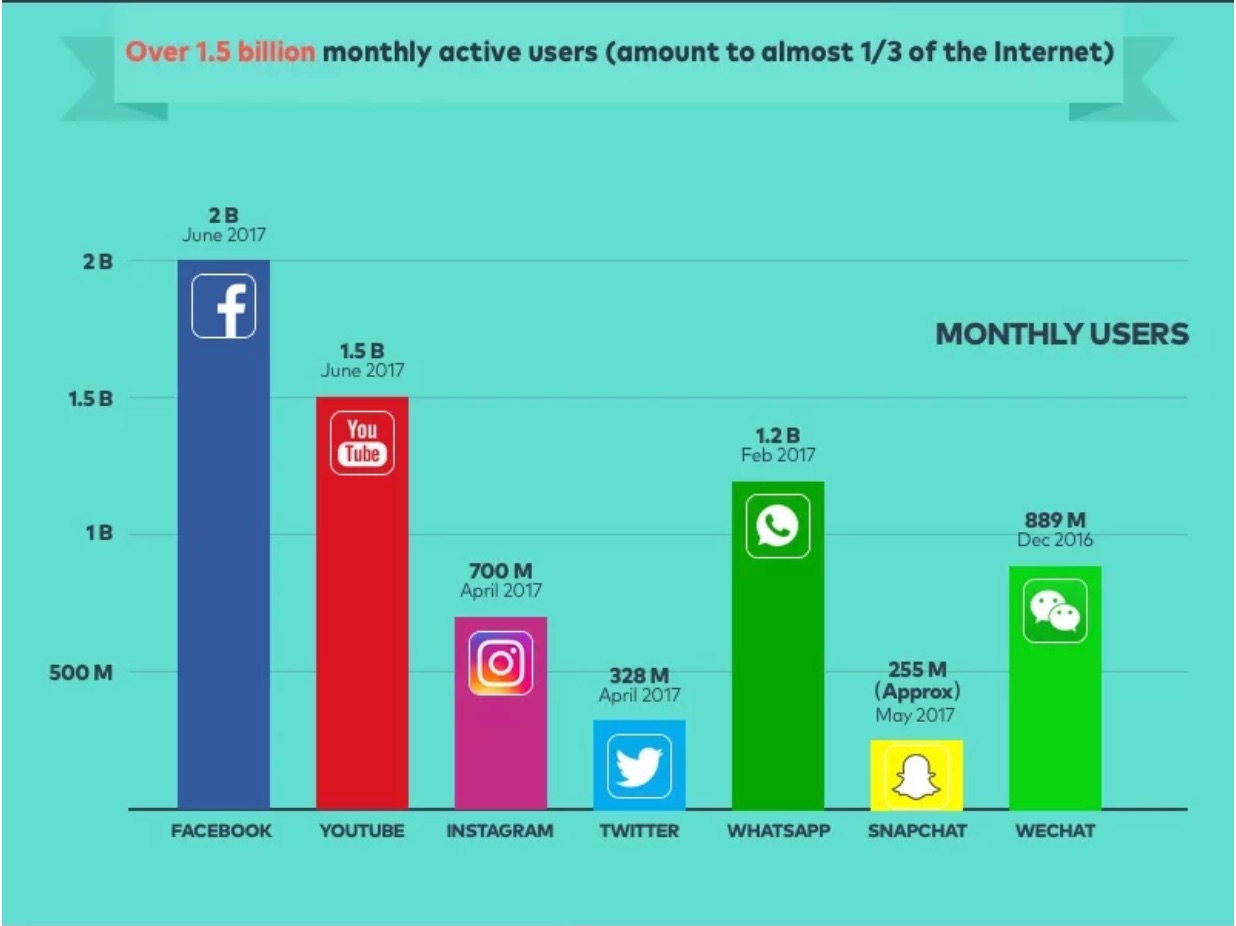
Over 30 million users log on to watch a total of 5 billion videos each and every day.
These numbers are massive.
However, these numbers still don’t rival Google, which processes about 3.5 billion searches per day.
So, how can you drive even a fraction of the traffic with YouTube that you could with Google?
Well, the beauty of YouTube is that it allows you to share videos.
While Google does display YouTube videos as part of its results lists (Google does, after all, own YouTube), the results aren’t quite the same.
In order to appeal and reach these video-lovers, you need to create YouTube content.
Because YouTube reaches more people from the ages of 18-49 than any cable network, this is particularly true if you’re marketing to younger generations.
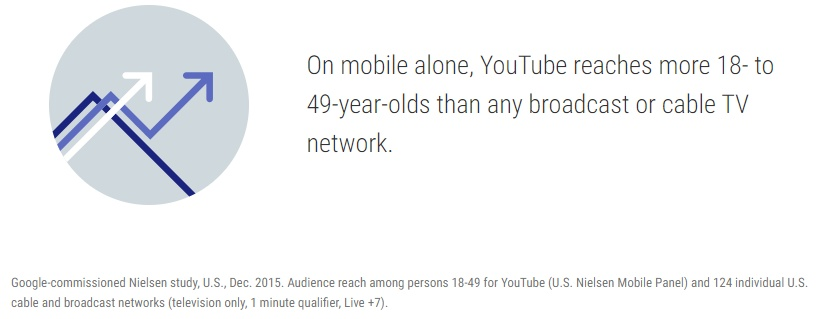
Gen Z’s love affair with YouTube runs especially deep.
In fact, 50% of Gen Z-ers told AdWeek they wouldn’t be able to live without the sharing site.
They also shared why.
For Gen Z-ers, YouTube is more than just a video-sharing site. Look at all of the things that they go to YouTube for:
If Gen Z’s love for videos continues as they grow older and start making new purchasing decisions, this may be a major game-changer for marketing in years to come.
Uploading videos to YouTube allows you to appear in front of customers who use the site like a traditional search engine.
Then, with appropriately-placed links, you can drive those users back to your website.
Let’s take a look at how GoPro’s YouTube channel does this.
As one of the most popular YouTube channels around, GoPro uses their high-quality videos to show what their product is capable of doing.
However, simply uploading videos doesn’t drive sales.
That’s why they also make it easy for customers to get from their YouTube channel to a product page.
Here, we have a video shot users shot with the GoPro HERO6:

Right within the first couple lines of the description, viewers have a link that will bring them straight to the product page for the GoPro HERO6.
Interested customers can check out what the new camera is capable of, then easily make their way over to the GoPro website to get additional details or make a purchase.
And this isn’t the only way GoPro pushes traffic to their website.
You can also find a link to their website and their social media profiles within their cover image.

This gives YouTube users who land on the company’s channel an opportunity to get to their website quickly.
You can also add links to your website within your actual video content.
YouTube even offers features that allow users to create interactive video ads.
These features display either over the video itself or at the end of a video, prompting viewers to make the next move.
You’ll see from this chart that both call-to-action overlays and auto end screens help drive traffic to your website.
Here’s an example of a call-to-action overlay from a HubSpot video.
YouTube features the link right within the middle of the video. HubSpot timed it perfectly so that it appears when the viewer has a thorough enough understanding of inbound marketing to start feeling enticed.
Now, let’s compare this to an auto end screen.
Here’s an example from The Tonight Show Starring Jimmy Fallon.
This presents the viewer with a number of different options when they’ve completed a video. It includes an offer to head to the NBC website to download the show’s app.
When using either of these interactive features, be sure to provide a clear and direct value to your watcher.
Also, keep in mind that you don’t want to plaster over your video with links to dozens of content pieces.
Instead, focus on just one or two that truly support the contents of your video.
2. Start conversations on social
If you do it correctly, social can rival Google as a traffic source.
According to Sprout Social, 48% of Millennials and 48% of Gen X-ers followed a brand on social media in Q1 of 2017.
This means you have less noise to cut through to get to your target audience.
Additionally, social provides you with an opportunity to engage and entertain – something you’ll struggle to do on a search engine.
When social users scroll through their timelines and news feeds, they’re looking for just about anything that will pique their interest.
If you’re capable of providing something high-quality and interesting, they’ll click through to your site to check out more.
However, it’s important to recognize how social is changing for brands.
In 2017, social accounted for 25.6% of all site visits.
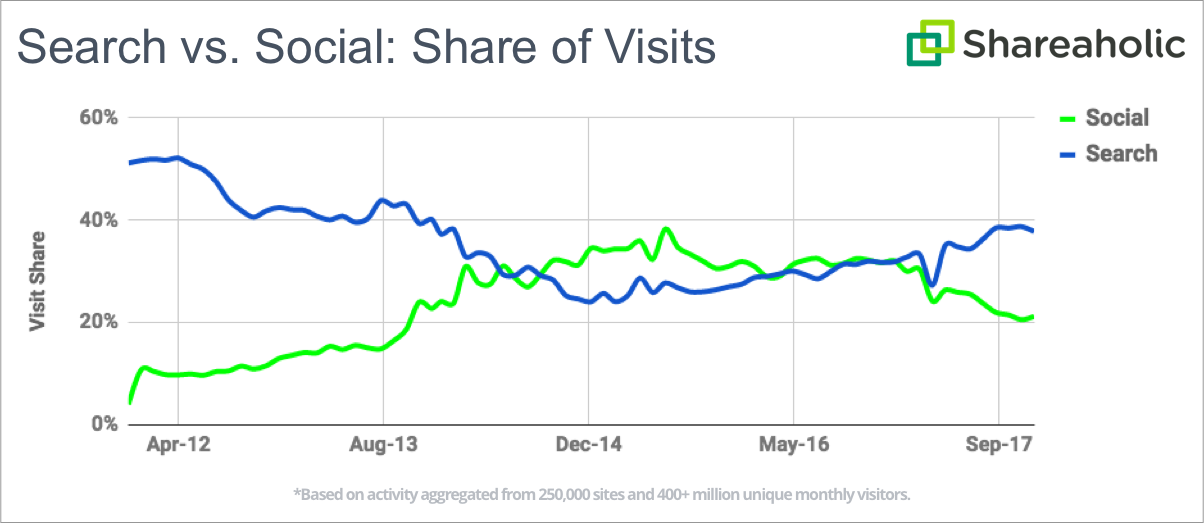
But this number is actually down from past years.
From the same study, we can see that from about the end of 2013 to the beginning of 2017, social was outperforming search for driving traffic.
Unfortunately, the changes to the Facebook algorithm led to serious declines in organic reach on the platform.
Compared to the first half of 2017, Facebook saw about a 9% drop in social media referrals in the second half of the year.
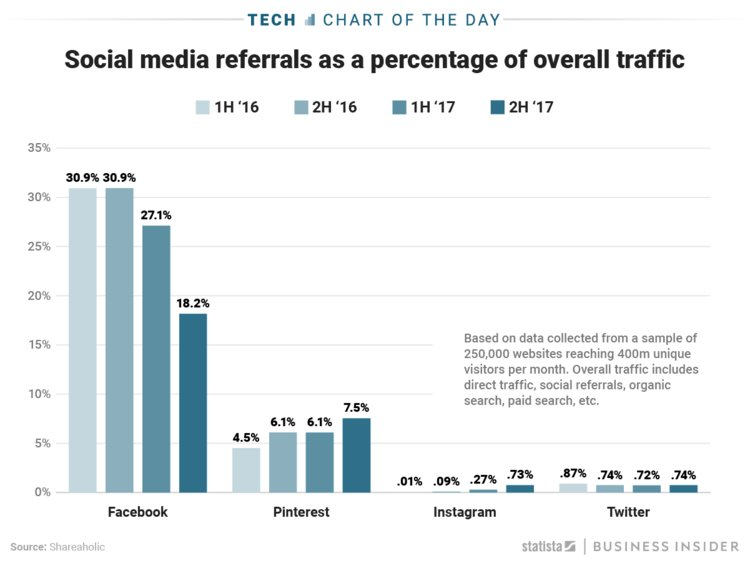
However, one social site’s loss is another’s gain.
While Facebook saw a large dip at the end of 2017, both Pinterest and Instagram saw some pretty significant jumps.
Regardless of the social networks, you choose to target, you want to provide meaningful and valuable information.
Remember that users log onto social to engage with their friends – not to have someone sell them something.
You want to find ways to engage your user while they’re still on the platform.
Buzzfeed Tasty does an excellent job at this.
Within their Facebook post, they include it all.
They created a video to grab attention.
They have friendly messages that establish the viewer as their friend.
And they include not one but two links that can either push the user to buy or to check out the recipe from the video.
And they do all of that without making it feel overwhelming!
This tactic has gained the Tasty Facebook page serious attention – almost 95 million followers!
To replicate this for your own audience, know your audience and create social content that blends seamlessly into their timelines.
Another way to get a conversation started is to use Twitter threads.
Twitter threads allow you to share insights, tips, and thoughts that connect by replying to yourself – and they have the power to bring you viral attention.
Check out what happened to travel blogger Hey Ciara.
On January 1st, she started this thread.
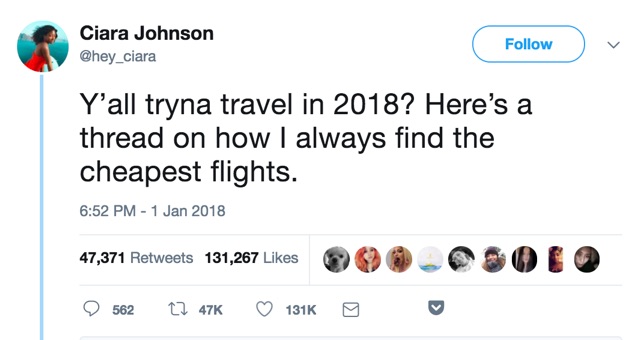
With this one thread alone, Ciara gained over 13,000 new Twitter followers, 6,000 new Instagram followers, and a 10x increase in her blog traffic.
Threads like these provide a distinct value to followers in a relatable way.
After sharing her secrets, Ciara drops a link to a blog post on her website containing more information.

Though the engagement with the link is significantly less than the first post, it was still able to drive traffic.
She already established authority with her followers in the thread. They trust her and know that she has information worth sharing. That gives them a reason to click on the link.
Creating a Twitter thread typically takes minimal effort. However, you want to be prepared to keep the momentum going.
Know the direction you’re going to take before you begin and be ready to share images, videos, or links that support your claims.
3. Partner with influencers
There are a lot of scams on the web, making shoppers wary about who they choose to purchase from.
If they’ve never heard of a business, they’re not going to pull out their credit cards after seeing just one ad.
Before they’re ready to shop, they need to trust you.
Unfortunately, it takes time to build trust organically.
However, you can speed up that process by working with influencers.
Almost nine out of ten individuals say that they trust online recommendations as much as personal recommendations.
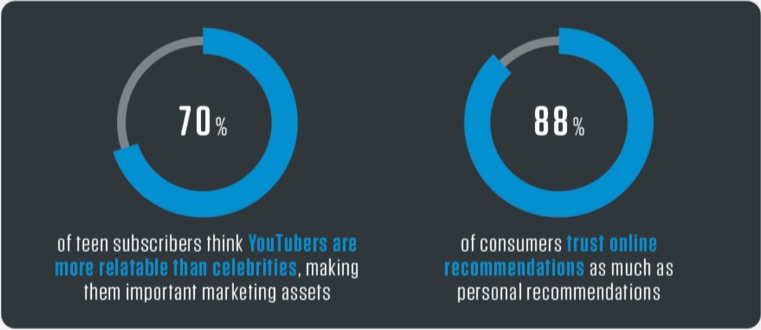
Influencer marketing gives your content a “stamp of approval” from someone your audience already values. This dramatically cuts down on the trust-building process.
There are two main ways that you can get in touch with influencers.
First, you can use the more traditional pathway of having influencers share sponsored posts.
Here’s an example of a sponsored post from Emma Blackery.
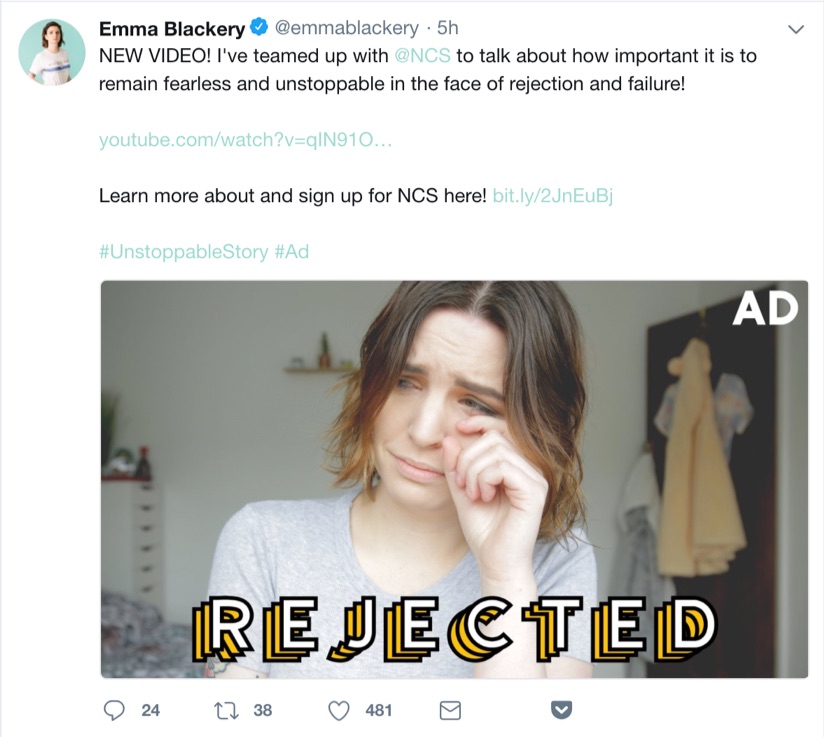
The National Citizen Service (NCS) sponsored the ad. In the UK, they offer kids from 15-17 years old a camp-like, professional development opportunity.
By sharing this post, Emma is bringing awareness to NCS while also vouching for its validity.
She also includes a link to the company’s homepage, encouraging her followers to check out the organization more.
Within just five hours, Emma’s post gained over 480 likes, 38 retweets, and 24 comments.
Compared to the handful of likes NCS’s own posts get, this kind of attention is huge.
Paying for advertisements can give you more control as a brand.
If you’re a small business or you have a limited marketing budget, it might not be right for you.
But even if you don’t have money to invest in influencer marketing, you can appeal to influencers for free by featuring them in your own content.
Posts like this one from Comm100 are a great way to connect with several influencers at once.
This not only gives you free promotion, but it can also help you create long-term relationships with influencers and experts you might want to partner with in the future.
If you choose to use this kind of content, have realistic expectations.
It isn’t likely that each influencer you mention will share the post, especially if they already have a large following.
However, reaching out to each expert to let them know that you’ve featured them might help you get a few new shares and a boost in web traffic.
One way of reaching out is to present a quote.
In this Twitter post from Jitesh Patil, he pulled a quote from Robbie Richards and then tagged him in the tweet.
This gained Robbie’s attention, so he retweeted it to his own audience.
This kind of outreach makes it easy for the influencer to share your content. With just one click of a button, they’ve done their job.
You can also reach out via direct message. This is one of Gary Vaynerchuk’s favorite ways to network.
According to Gary, “the key is to connect first, provide value, and THEN given the right opportunity presents itself, ASK.”
This kind of relationship can help you establish long-term relationships with influencers.
4. Take advantage of your email subscribers
The conversation about whether or not an email is dying has been happening for years.
Many markers are quick to support social or mobile apps over email marketing.
However, in Adobe’s 2017 Consumer Email Survey Report, they found that email was the preferred form of contact for 61% of survey participants.
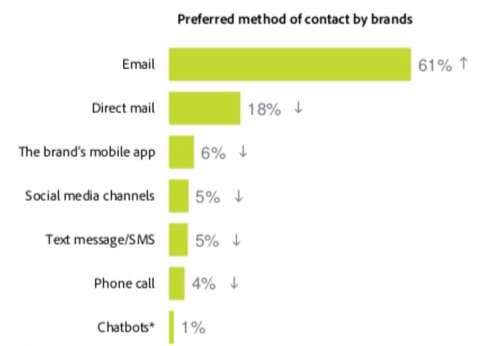
In fact, email was the only contact method that actually improved between 2016 and 2017.
But user preference isn’t the only thing that email marketing has over other contact methods.
The average click-through rate is also much higher.
For email, the average click-through rate is 3.42%.
While this might seem low, the average click-through rate for Facebook Ads is only 0.90%.
This means that you’re much more likely to get web traffic from your email subscribers than your social profiles.
And that starts with personalization.
Here’s an example of personalization from LinkedIn.
LinkedIn takes a user’s location, job title, and qualifications and provides unique job recommendations for them.
This goes far beyond simply changing the name at the top of a message. For best results, you need to personalize the email’s body, too.
According to research, personalizing email bodies has a dramatic effect on open rates and click-through rates.
Open rates are almost 7% higher with a personalized email body, and click-through rates jump by over 1.3%.
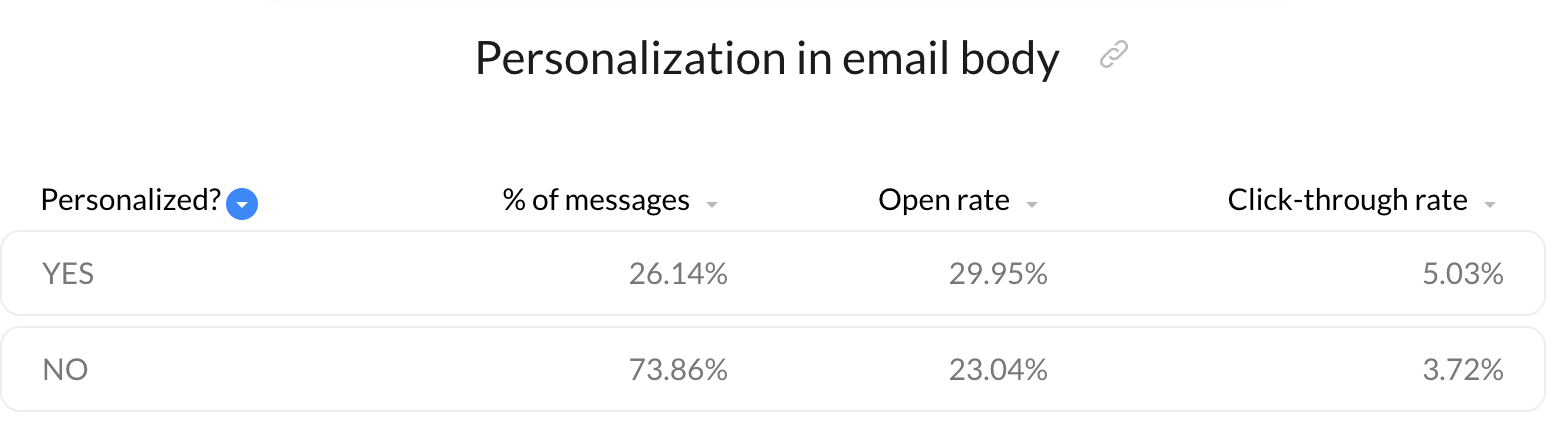
You can also personalize the sender name for even stronger click-through-rate results.
Take this example from HubSpot.
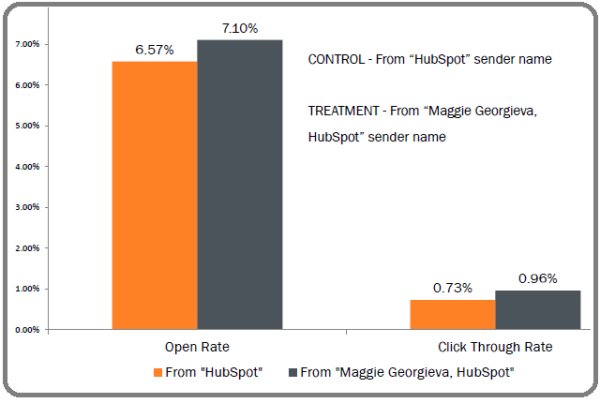
When they sent a message from “Maggie Georgieva, HubSpot,” there was a 0.50% higher open rate and 0.25% higher click-through rate than when they sent the email from just “HubSpot.”
For HubSpot, this meant that a personalized sender generated 292 more clicks.
To improve click-through rates even further, you also want to optimize your emails for mobile.
In the study from Adobe that we looked at above, we see that users are much more likely to check their personal email on a smartphone than a desktop or laptop.
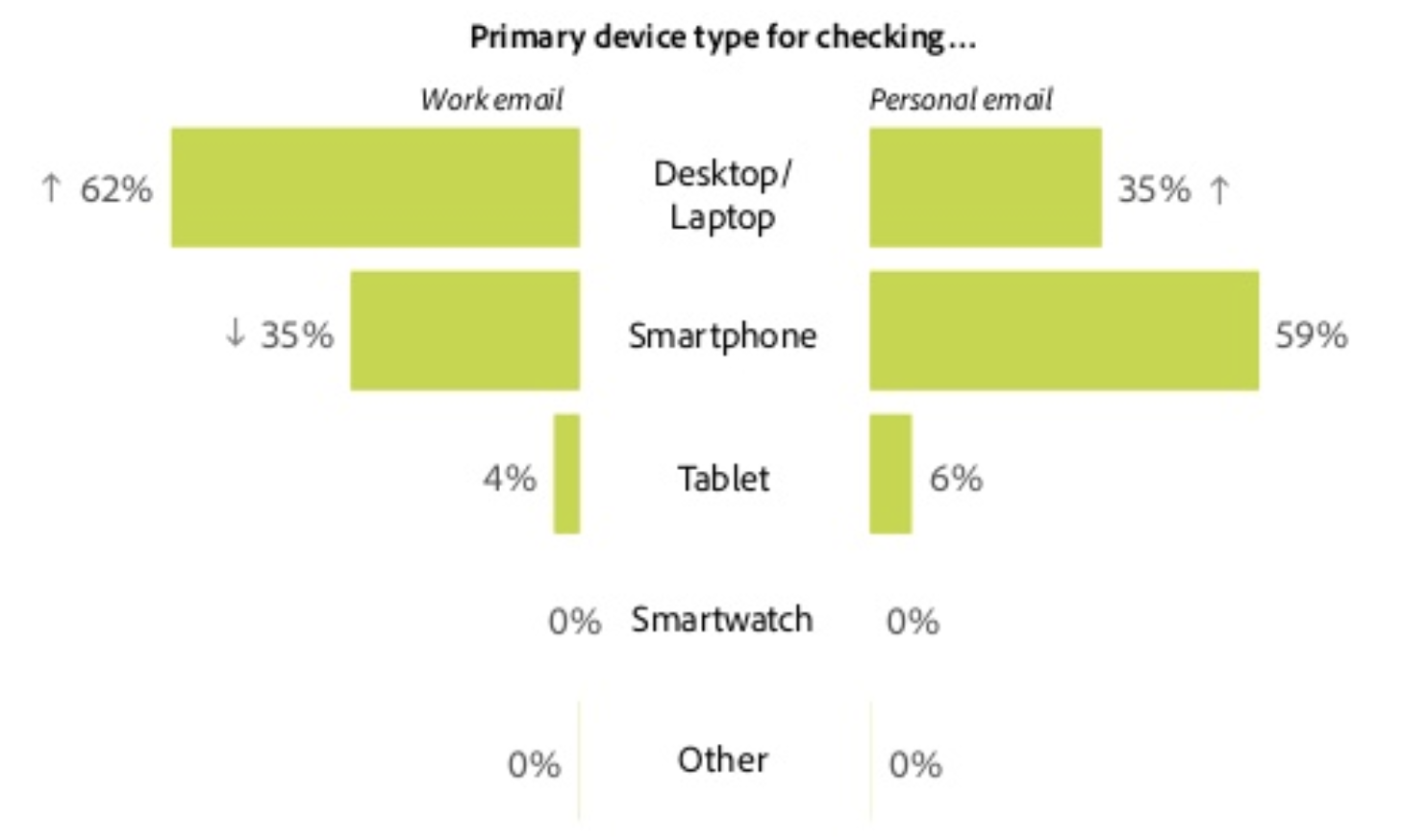
Make it easy for your email subscribers to get back to your website regardless of the screen they’re viewing your message on.
Use CTA buttons rather than in-text links and keep your messages short and to the point.
Provide enough information to pique your reader’s interest, but your end goal should always be to push subscribers back to your site.
5. Provide assistance on forums and question sites
People have a lot of questions.
And they don’t exclusively turn to Google to get their answers.
Users turn to forums and question sites.
Participating in conversations on sites like Reddit for Quora can help you attract individuals looking for answers beyond what Google can provide.
With over 330 million users, Reddit is the fourth most-visited website in the US.
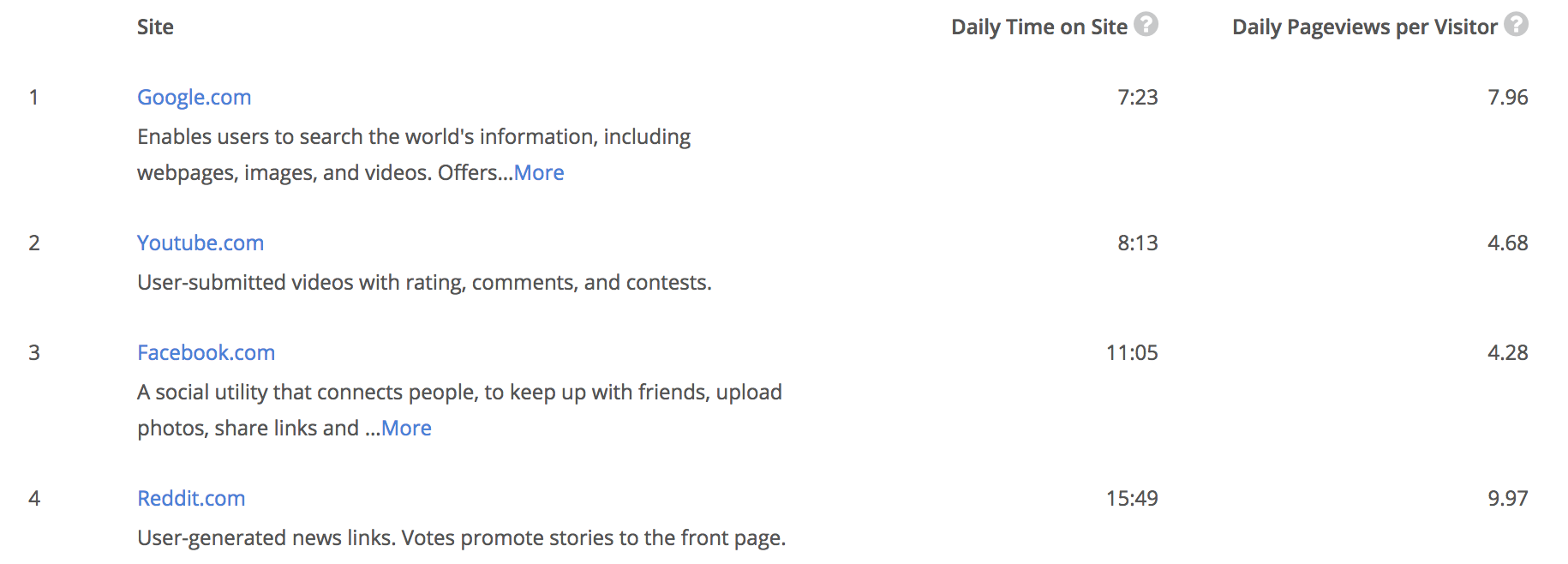
Although Google, YouTube, and Facebook outrank the site in terms of popularity, Reddit beats them all based on the average amount of time that users spend on the site.
Reddit can be a great place to promote your site. However, you need to be strategic with how you go about it.
Most subreddits have strict rules about what you can and can’t say in their comments.
Each subreddit has a moderator. If you post the wrong material, they’ll delete your post and potentially even ban your account.
Users turn to forums like Reddit for help – not to have someone sell to them.
But that doesn’t mean that you can’t use Reddit to drive traffic to your site.
One of the best ways to do it successfully is through an “ask me anything” session, or an AMA.
Here’s an example of a successful AMA from Student Loan Hero.
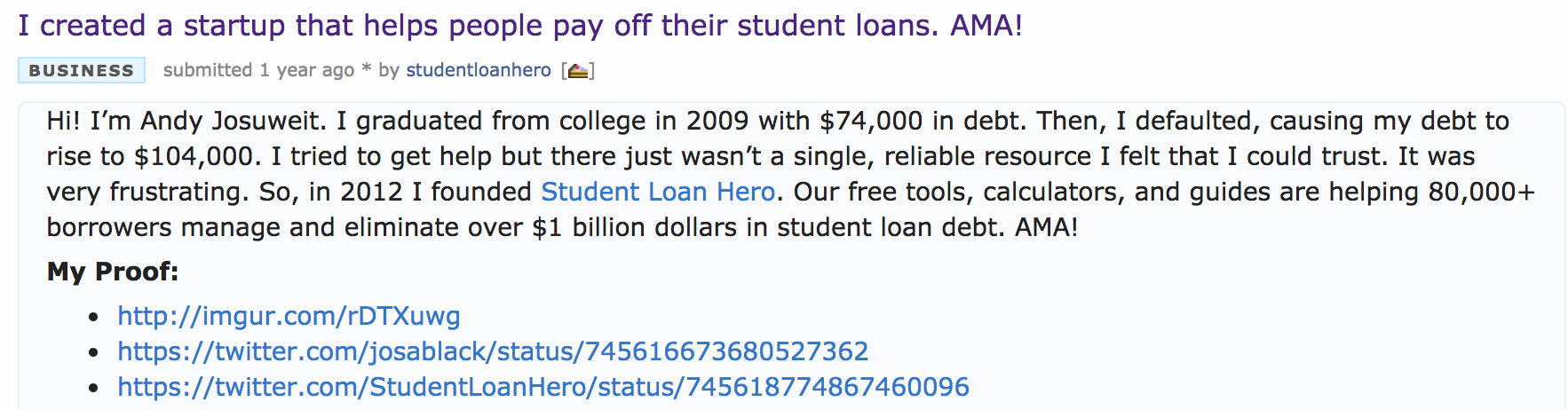
While the post is promoting the business, it’s more focused on providing Reddit users with valuable information about paying off debt.
By answering questions, Student Loan Hero is able to improve trust with Reddit users and get them interested in the brand.
They also find ways to link to their content and tools as they answer questions.
Here is an example.
Student Loan Hero isn’t using this platform as a way to spit out ads.
Instead, they’re framing their content to fit the unique needs of each individual asking questions.
If you’re trying to be spammy on Reddit, users will be quick to call you out.
However, you can still see a lot of success from the platform by making your value clear.
Jeff Callahan, the creator of one of the most successful Reddit posts, says that success on the platform begins with a “non-clickbaity” title.
He begins his post by sharing who he is and how he relates to the other users. Then, he communicates exactly what he has to say and why he’s credible enough to say it.

He then follows these same ideas throughout his post, always relating back to the user before providing tips or insights he can back up with personal experience.
If you use it wisely, Reddit can be a great place to bring visitors to your website.
You can also use Quora, which has 200 million unique monthly visitors, to answer questions from potential audience members.
Here’s an example of how I responded to a Quora question.
Like Reddit, Quora allows you to engage with individuals who are asking questions. Answering questions helps you prove your value to them before they head to your website.
This can encourage more traffic to your page.
Kevin Lee, the founder of Product Manager HQ, attributes his business’s start and growth to Quora.
According to his post about how Quora changed his life, Kevin explains that Quora brought thousands of new subscribers to his blog.
He says that people in public have even recognized him from his Quora answers.
If you’re in a niche industry, there are other forums you may want to take advantage of.
For example, marketers may want to become active on Inbound.org while lawyers should check out Avvo.
6. Take advantage of guest posting
Guest posting can be a powerful way to bring new traffic to your website.
About 57% of business bloggers use guest posting as part of their content strategy.
Some major brands even used guest blogging to get their platforms off the ground.
For example, Buffer used guest blogging to grow their site to 100,000 users in their first nine months.
When looking for guest posting opportunities, you want to find sites that are within your niche but aren’t direct competitors.
Hosting a post on another website puts your content in front of a new audience, driving new leads back to your page.
Check out this example of a guest post on Entrepreneur.
As you can see, Dan Dowling, the guest author in this example, has links to his Facebook page, Twitter account, and website homepage.
Guest posting on other websites isn’t the only way to use the strategy to drive traffic.
You can also feature guest posts on your own site.
This not only gives you a bit of a break in your content schedule, but it also encourages guest posters to share links to your page.
Here’s an example from ProBlogger.
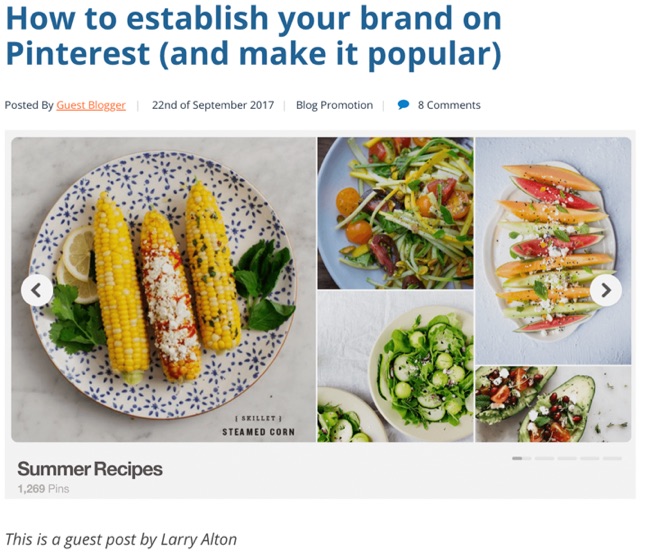
ProBlogger benefits from this post because the author, Larry Alton, will want to advertise that they’re featuring him on their site.
Each time Larry promotes the piece, ProBlogger gets a new wave of traffic.
But blogging isn’t your only option.
You can also appear on podcasts or webinars to share your opinion and expertise.
Here’s an example from SEMrush’s Search Marketing Scoop with David Bain.
In this episode, both Barry Schwartz, News Editor at Search Engine Land, and Richard Fergie, a consultant at E-Analytica, jump on the podcast to talk about paid and organic search.
These types of partnerships typically take more time, but they can provide serious returns in the end.
You want to think of what podcasts or webinars your audience may be engaging with that aren’t your direct competitors.
Conclusion
You don’t need Google to drive traffic to your website.
Sure, it helps.
But it shouldn’t be your only traffic source.
In fact, for the most success, you should have multiple pathways bringing new traffic to you.
Use these six traffic-generating sources as a starting point for diversifying how you bring in new visitors.
Pay close attention to your customers and target audience.
If they’re not responding to a particular pathway, don’t waste your time.
When you provide what they’re looking for in an avenue they’re already engaging with, traffic will flock to your page.
What are some of the best traffic sources for your website outside of SEO?
About the Author: Neil Patel is the cofounder of Neil Patel Digital.
Source: feedproxy.google.com